fuel AUDI TT COUPE 2016 User Guide
[x] Cancel search | Manufacturer: AUDI, Model Year: 2016, Model line: TT COUPE, Model: AUDI TT COUPE 2016Pages: 322, PDF Size: 52.86 MB
Page 59 of 322
Downloaded from www.Manualslib.com manuals search engine @ Tips
-Determine the depth before driving through
water.
-Do not stop the vehicle, drive in reverse or
switch the engine off when driving through
water.
- Keep in mind that oncoming vehicles may
create waves that raise the water level and
make it too deep for your vehicle to drive
through safely.
- Avoid driving
through salt water (corrosion).
Economical and environmentally-friendly
driving
The amount of fuel consumption, the envi ron
mental impact and the wear to the engine,
b rakes and tires depends mostly on yo ur driving
style. Wit h
an anticipatory and economic driv ing
style, fu
el consumption can be reduced by ap
proximately 10-lSo/o. The following tips will help
you conserve the environment and your money at
the same time.
Anticip atory driv ing
A veh icle uses the most fuel when a ccele rating.
When you drive with anticipation, you do not
need to brake as often and thus acce lerate less.
When possible, let your vehicle coast with a gea r
engaged -for example, when you notice that the
next traffic light is red.
Avoid full acceleration
You should rarely travel at the maximum vehicle
speed. High speeds cause a disproportionately
high increase in fuel consumption, emissions and
traffic noise. Slower driving saves fuel.
Reduce idling time
It pays off to stop the engine, for example when
at railroad crossings or traffic lights with longer
red lights. Stopping the engine for 30-40 sec
onds already saves more fuel than the amount of
extra fuel needed to restart the engine.
It takes a very long time in idle to warm the en
gine up to operating temperature. Wear and
emissions are especially high in the warm-up
Driving
phase. Therefore, you should begin driving im
mediately after starting the engine. Avoid high
RPMs while doing this.
Service regularly
By servic ing you r vehicle regularly, you can help
to reduce fuel consumption before you even start
to drive . The maintenance condition of your vehi
cle not only affects traffic safety and long-term
val ue b ut also impacts fuel co nsumptio n.
A poorly serviced engine can lead to fuel con
sumption that is 10% higher than normal.
Also check the oil level when refueling. The oil
con sumpti on
depends largely on the engine load
and speed. It is no rmal for the oil consumption
of a new engine to reach its lowest point only af
ter a certain amount of use. Therefore, the oil
consumption can only be properly judged after
approximately 3,000 mi (5,000 km) have been
driven.
Avoi d short trip s
The engine and exhaust cleaning system must
reach their optimal operating tempera tu re to ef
fectively reduce consumption and emissions.
A cold engine consumes a disproportionately
high
amount of f u el. The engine is at operating
temperature and consumption has normalized
only after approximately four kilometers.
Q) Note
Do not leave engine idling unattended after
starting. If warning lights should come on to
indicate improper operation, they would go
unheeded. Extended idling also produces
heat, which could result in overheating or
other damage to the vehicle or other proper
ty.
CD Note
-Have your vehicle maintained properly and
in accordance with the service recommenda
tions in your Warranty & M ain tenance book-
let. Lac k of proper mai ntenance as well as
improper use of th e vehi cle w il l impair the
function of the emission control system and
cou ld lead to damage. .,..
57
Page 66 of 322
Downloaded from www.Manualslib.com manuals search engine Automatic transmission
Automatic transmission
S tronic
Introduction
Your vehicle is equipped with an electronically
controlled DSG transmission called S tronic. Two
independent clutches transfer the power be
tween the engine and transmission. It allows the
vehicle to accelerate without a noticeable inter
ruption in traction.
The transmission upshifts or downshifts auto
matically. The driving style continuously influen
ces the selection of the driving program.
When a moderate driving style is used, the
transmission selects the most economical driving
mode. The transmission upshifts at a lower RPM
and downshifts at a higher RPM to improve fuel
efficiency.
The
transmi ssion switches to a sporty mode after
a kick-down or when the driver uses a sporty
driving style
characterized by quick accelerator
pedal movements, heavy acceleration, frequent
changes in speed and traveling at the maximum
speed.
If desired, the driver can also select the gears
manually (tiptronic mode).
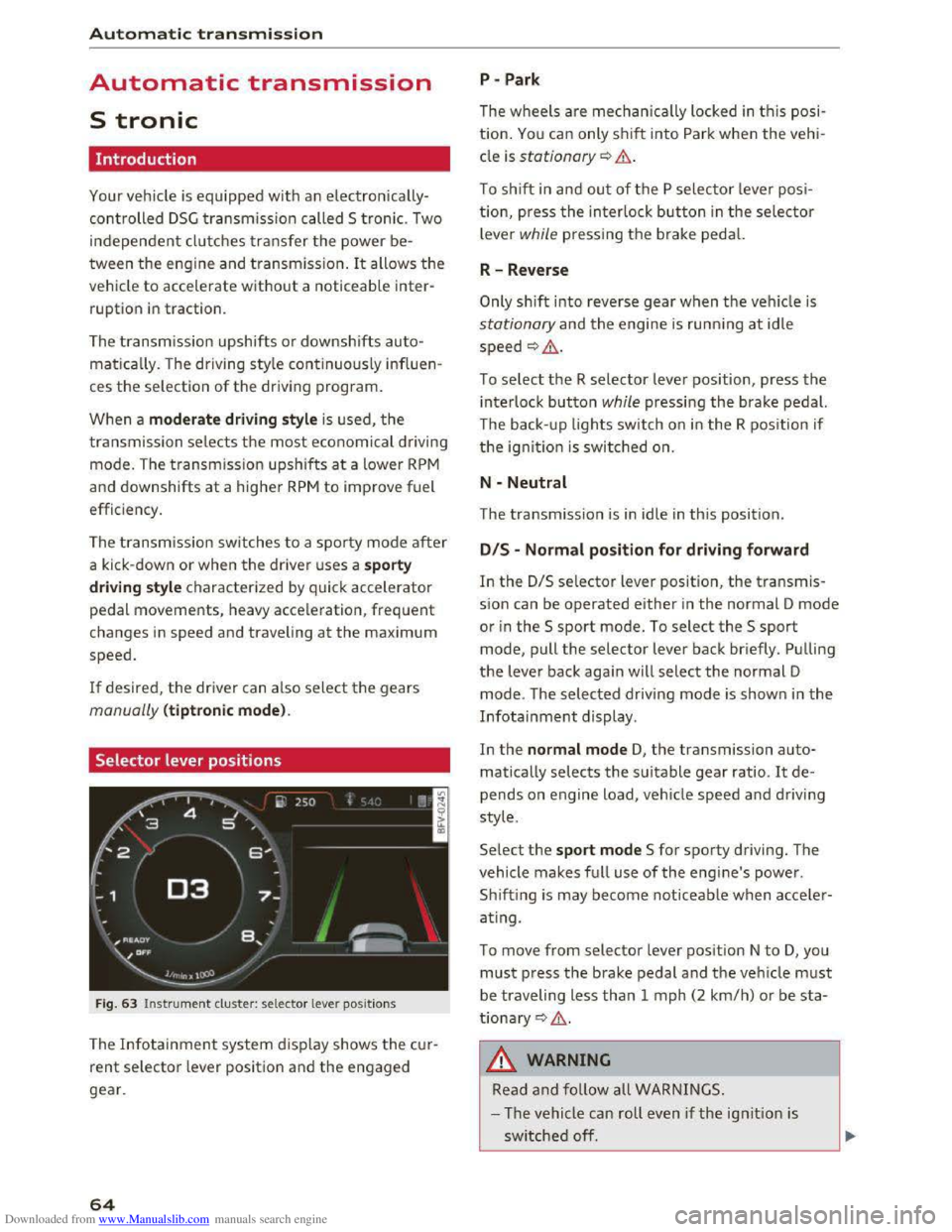
Selector lever positions
Fig. 63 Instrument cluster: selector lever positions
The Infotainment system d isplay shows the cur
rent selector lever position and the engaged
gear.
64
P -Park
The wheels are mechanica lly locked in this posi
tion. You can only shift into Park when the vehi
cle is stationary¢&.
To shift in and out of the P selector lever posi
tion, press the interlock button in the selector
lever while pressing the brake pedal.
R-Reverse
Only shift into reverse gear when the vehicle is
stationary and the engine is running at idle
speed ¢,6.
To select the R selector lever position, press the
interlock button while pressing the brake pedal.
The back- up
lights switch on in the R position if
the ignition is switched on.
N -Neutral
The transmission is in idle in this position.
DIS -Normal position for driving forward
In the D/S selector lever position, the transmis
sion can be operated either in the normal D mode
or in the S sport mode. To select the S sport
mode, pull the selector lever back briefly. Pulling
the lever back again will select the normal D
mode. The selected driving mode is shown in the
Infotainment display.
In
the normal mode D, the transmission auto
matically selects the suitable gear ratio. It de
pends on engine load, vehicle speed and driving
style.
Select the sport mode S for sporty driving. The
vehicle
makes full use of the engine's power.
Sh i
fting is may become noticeable when acce ler
ating.
To move from selector lever position N to D, you
must press the brake pedal and the vehicle must
be traveling less than 1 mph (2 km/h) or be sta
tionary ¢,6.
A WARNING
Read and follow all WARNINGS.
- The vehicle can roll
even if the ignition is
switched off.
Page 82 of 322
Downloaded from www.Manualslib.com manuals search engine Assist
& WARNING
Using Audi drive select incorrectly can lead to
collisions, other accidents and serious inju
ries.
Description
Applies to: vehicles with Audi drive select
The vehicle setup in each mode depends on the
vehicle's features. However, the engine and
steering are always affected.
Engine and automatic transmission
Depending on the mode, the engine and auto
matic transmission respond more quickly or i n a
more balanced
manner to accelerator pedal
movements.
Adaptive dampers (Audi magnetic ride)*
The adaptive dampers use sensors to record in
formation regarding steering movements, brak
ing and acceleration operations by the driver,
road
surface, driving speed, and load. With dri ve
select, you can adjust the adaptive dampers to
sporty (dynamic), comfortable (comfort) or ba l
anced (auto).
Steering
The power steering adapts. Indirect steering that
moves easily as in comfort mode is especially
suited to long drives on a highway. The dynamic
mode provides sporty, direct steering.
Cruise control system*
The acceleration performance is especially fuel
efficient in efficiency* mode.
Engine sound*
The engine sound is adapted to the applied mode
and can be subtle to sporty.
@ Tips
In some models, the maximum vehicle speed
can only be reached in the auto and dynamic
modes.
80
Selecting the driving mode
Applies to: vehicles with A ud i drive select
You can select between efficiency*, comfort, au
to, dynamic and individual.
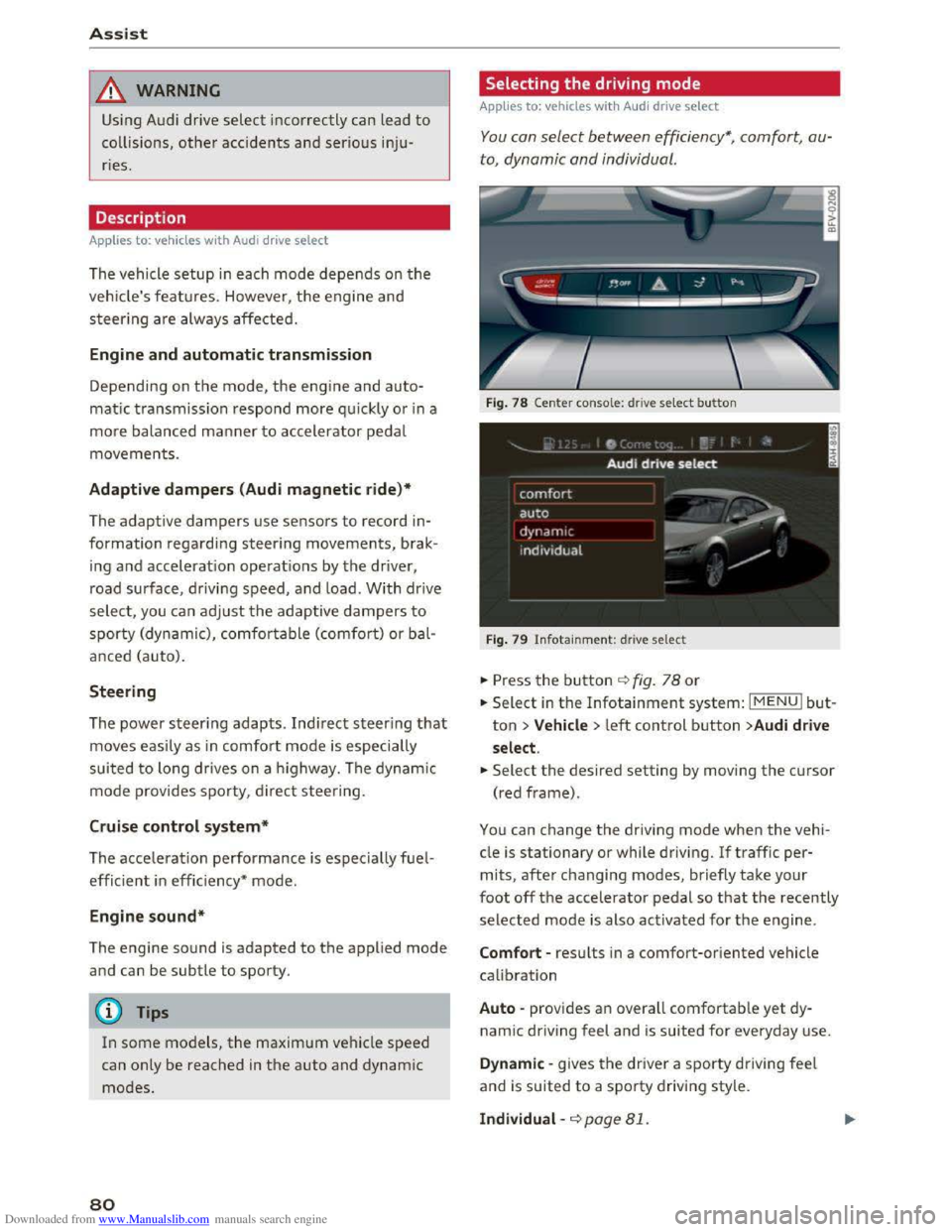
Fig. 78 Center conso le: drive select button
Fig. 79 Infotainment: drive select
.. Press the button ¢fig. 78 or
.. Select in the Infotainment system: IMENUI but
ton >Vehicle > left control button >Audi drive
select .
.. Select the desired setting by moving the cursor
(red frame).
You can change the driving mode when the vehi
cle is stationary or while driving. If traffic per
mits, after changing modes, briefly take your
foot off the accelerator pedal so that the recently
selected mode is also activated for the engine.
Comfort -results in a comfort-oriented vehicle
calibration
Auto -provides an overall comfortable yet dy
namic driving feel and is suited for everyday use.
Dynamic -gives the driver a sporty driving feel
and is suited to a sporty driving style.
Individual -¢page 81.
Page 105 of 322
Downloaded from www.Manualslib.com manuals search engine • Telephone
• Audi connect
• Navigation
• Directory
• Radio
•Media
· Sound
•
Help
• Help Speech dialog system
• Help Telephone
• Help Audi connect
• Help Navigation
• Help Map
• Help Radio
·Help Media
TEbEP:HONE
• Enter number
•Delete number I correc tion
• Directory
• Call (XY)
·business I private I land line I mobile
NAVIG:ATI0N
• N avigate to CXYl
·Business address I Private address
• Start I cancel route guidance
· Directory
• Last destinations
• N avigation favorites
· Drive
home
• Enter address
• Enter country I town I street I state
• Exclude routt I Exclude route for (XY) km Im
·Map
• Day map I Night map
Voice recognition system
• Favorites
• Call (XY)
• Enter number
• Redial
• Read new text message
• Navigate to (XY)
• Enter address/destination
• Onhne destinations
• Cancel route guidance
·Map
• Line (XY)
• Next page I previous page
• Cancel
•
No. l meant ()(Y)
• Correction
• Call
lost
• Redial
• Call mailbox
• Enter PIN I delete PIN
•
Telephone favorites
• Exclude next route section I Exclude
nex t
street
• Route list
• Calculate alternative routes
· Online destinations
• Special destination
• 20 driving position map/ 20 north position map/ 30 map I Destination map I Overview map
• Audi connect
• Travel information I Parking Information
•
Fuel prices
·Weather
RADIO
• Radio presets
• Last stations
•FM
• FM I AM I SIRIUS XM
• Station (XY) I Frequency (XY)
• T raffic announcement on I off
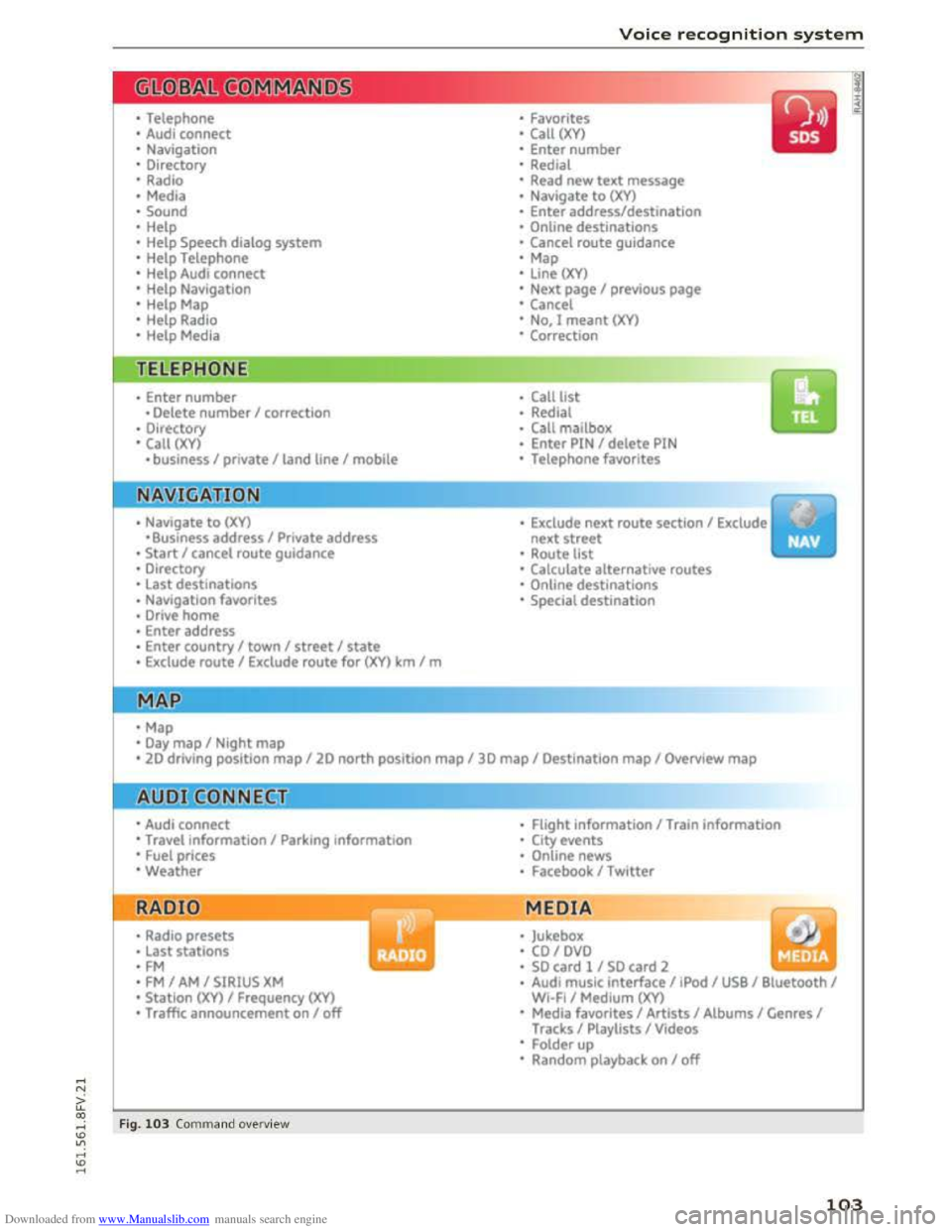
Fig. 103 Comm and ove rvie w
• Flight Information I Train information
• City events
• Online news
• Facebook I Twl tter
MEDIA
y • Jukebox
• CO I DVD
• SO card l / SD card 2
· Audi music interface I !Pod I USB I Bluetooth I
WI-Fi I Medium (XV)
• Media favorites I Artists I Albums I Genres I
Tracks I Playlists I Videos
• Folder up
· Random playback on I off
103
Page 112 of 322
Downloaded from www.Manualslib.com manuals search engine Telephone
Telephone
Introduction
Applies to: vehicles with telephone
To make calls through the MMI system, you must
connect your phone to the MMI with Bluetooth.
After connecting
your phone to the MM with
Bluetooth, you can use the telephone functions
conveniently
through the MMI.
Handsfree
After you have connected your cell phone to the
MMI via Bluetooth, you can use the handsfree
system and operate telephone functions through
your MMI. Phone calls are transmitted thro ug h
the antenna on your cell phone.
A WARNING
-Medical experts warn that cell phones can
interfere with the function of pacemakers.
Always maintain a minimum distance of 20
centimeters between the cell phone anten
na and the pacemaker.
-
Do not carry the cell phone in a pocket di
rectly over the pacemaker when the phone
is switched on.
- Switch
the cell phone off immediately if
you
suspect it may be interfering with the
pacemaker.
-Do not use the voice recognition system
¢page 104 in emergencies because your
voice may change in stressful situations. It
may take longer to dial the number or the
system may not be able to dial it at all. Dial
the emergency number manually.
- Switch
your cell phone off in areas where
there is a risk of an exp losion. These loca
tions are not always clearly marked. This
may include gas stations, fuel and chemical
storage facilities or transport vehicles, or lo
cations where fuel vapors (such as propane
or gasoline vapor in vehicles or buildings),
chemicals
or large quantities of dust parti
cles (such as flour, sawdust or metal) may
be present in the air. This also applies to all
other locations where you would normally
turn your vehicle engine off.
110
-
-The demands of traffic require your full at
tention. Read and follow the guidelines pro
vided in¢ page 95, Traffic safety informa
tion.
(D Tips
The Bluetooth connection range is limited to
inside the vehicle. It can also be affected by
local conditions
and interference with other
devices.
- Check
with your cell phone service provider
or the database for mobile devices at
www.audiusa.com/bluetooth to learn which
Bluetooth connections and functions are
supported on your cell phone.
Connecting a telephone
Connecting a cell phone using Bluetooth
Applies to: vehicles with telephone
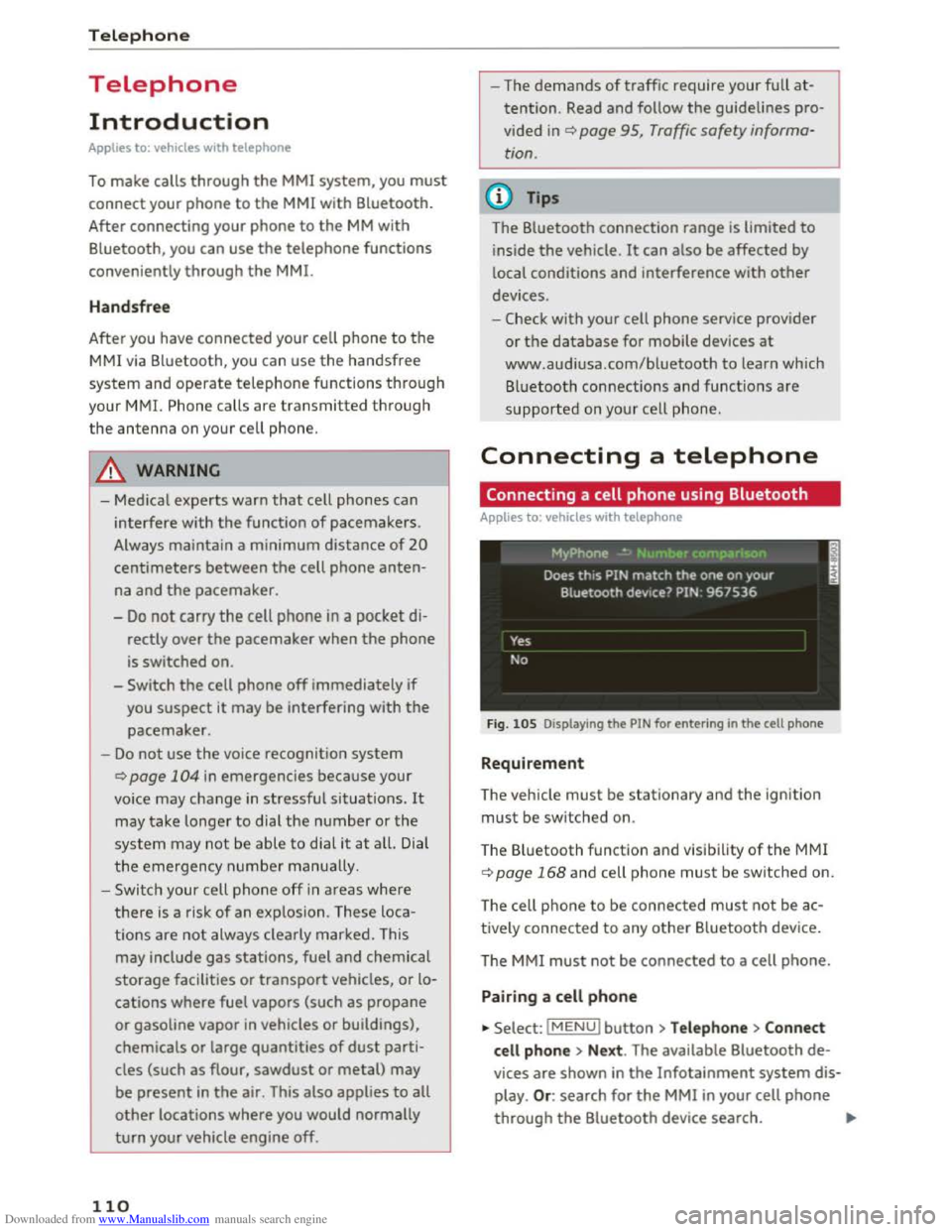
Fig. 105 Displaying the PIN for entering in the cell phone
Requirement
The vehicle must be stationary and the ignition
must be switched on.
The Bluetooth
function and visibility of the MMI
¢page 168 and cell phone must be switched on.
The cell ph
one to be connected must not be ac
tively connected to any other Bluetooth device.
T he
MMI must not be connected to a cell phone.
Pairing a cell phone
... Select: IMENUI button >Telephone> Connect
cell phone > Next . The available Bluetooth de
vices are shown in the Infotainment system dis
play. Or: search for the MMI in your cell phone
through the Bluetooth device search. ""'
Page 139 of 322
Downloaded from www.Manualslib.com manuals search engine ...... N
> u. CX> ...... u:>
"' ...... u:> ......
The selected destination is stored as the new
home
address.
Favorites
Applies to: vehicles with navigation system
... Press the INAV/MAPI repeatedly until the Enter
destination menu is displayed<:> page 131,
fig. 114.
-Storing an existing destination as a favorite:
search for
the desired destination using the in
put field. Or : select and confirm a destination
from the list. Select: right control button>
Store as favorite .
-
Renaming stored favorites: select: left control
button > Favorites > a favorite from the list>
right control button> Rename favorite.
- Moving
stored favorites: selec t: left contro l
button > Favorites > a favorite from the list >
right control button> Move favorite . Select
and confirm
the desired position.
- Deleting
stored favorites: select and confirm a
favorite> right control button> Delete this fa
vorite I Delete all favor ites.
Creating directory
contacts
Applies to: vehicles with navigation system
Two addresses (private/business) can be as
signed as destinations for each contact in the di
rectory.
... Press t h e I NAV/MAPI repeatedly until the Enter
destination menu is displayed r:!) page 131,
fig. 114.
Storing a destination as a contact in the
directory
Requirement: a cell phone must be connec ted to
the MMI.
- Select a destination> right control button>
Add destination to contact.
-
Select and confirm Add business destination or
Add private destination .
- Enter a
name. Or: select and confirm a directo
ry contact from the list .
-
Select and confirm Save business card.
Navigation
Additional settings
Navigation settings
Applies to: vehicles with navigation system
... Press the I NAV/MAPI repeatedly until the Enter
destination menu is displayed <:>page 131,
fig. 114.
... Select: right control button > Navigation set-
tings.
Depending on
the selected function, the follow
ing settings can be selected:
Show alternative routes
Up to three route suggestions and their proper
ties are displayed on the overview map when this
functi on is switched on. See also r:!) page 138
Gas station message
When this function is switched on, a message is
displayed if the fuel gauge goes below the re
serve marking. Confirming this message displays
a list
of gas stations in the area. When a gas sta
tion is selected, route guidance from the current
vehicle position is calculated .
Presentation mode
The presentation mode helps you to plan and fol
low a route without moving the vehicle. You can
Select starting point when you would like to cal
culate a route starting from a location other than
the veh icle position. Start presentation mode to
simulate route guidance .
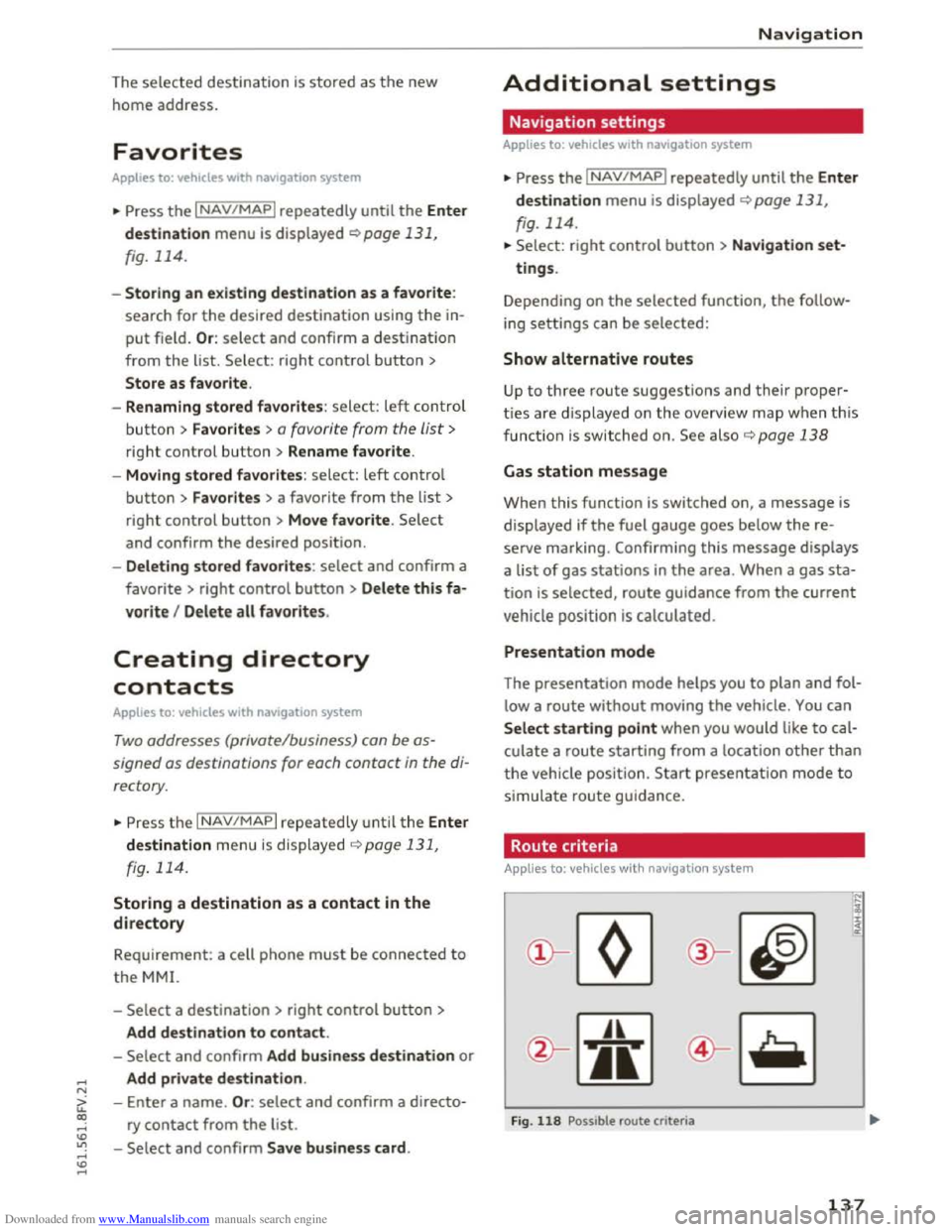
Route criteria
Applies to: vehicles with nav igat ion syste m
)(
Fig. 118 Possible route criteria
N
i :c <( cc
137
Page 168 of 322
Downloaded from www.Manualslib.com manuals search engine System settings
System settings
Setting the date and
time
You can set the clock time manually or using the
CPS.
.,. Select: IMENUI button> Settings > left control
button > MMI settings> Date & time .
Automatic setting
When this function is switched on~, the time
and date are automatically adjusted.
Time
The Time can be set manually. The Automatic
setting
must be switched off to do this.
Date
The Date can be set manually. The Automatic
setting
must be switched off to do this.
Time zone
When selecting the appropriate time zone, a
sampling of countries in this zone will be listed .
Automatic time zone*
When the automatic time zone function is
swi t
ched on, the time will automatically adjust to
the corresponding time zone.
Time format
If you select 24h, the clock will display, for ex
ample, 13:00. If you select AM/PM, the clock
will display, for
example, 1:00 PM.
Date format
I f you select 00.MM .YYYY, the date will display,
for example, 31.12.2015. If you select MM/DD/
YYYY , the date will display, for example,
12/31/2015. If you select YYYY·MM·DD , the
date display will display, for example,
2015-12-31.
MMI settings
.,. Select: IMENUI button> Settings > left control
button > MMI settings.
166
Language
The display language as well as the language for
Voice guidance* and the voice recognition sys
tem* can be changed.
The number of languages available depends on
the market .
Units of measurement
The following units can be selected:
-Speed (mph or km/h)
- Distance (miles or kilometers)
-Temperature (°F or 0()
- Fuel consumption (l/lOOkm, mpg (US), mpg
(UK) or km/l)
-Volume (liters, gallons)
Operating tips
When the function is switched on~. your MM!
shows you operating tips for input. The frequency
of how often it displays decreases with time. You
can switch off the operating tips at any time.
Voice recognition*
Command display : the display of possible com
mands during voice input can be switched on or
off.
Short dialog : prompts in a shorter format can be
switched on
or off.
Speech dialog system volume: you can adjust
the volume of the announcements by turning the
control knob.
Individual speech training (only when the vehi
cle is
stationary): you can adapt the voice recog
nition
system to your voice or pronunciation in
order to imp rove the system's ability to recognize
your speech. Individual training is comprised of
20 speech entries that consist of commands and
sequences of numbers. You can delete the pro
grammed voice training with the Reset individu
al speech training function .
Factory default settings
The following functions can be reset to the facto
ry default settings:
-Sound settings ~
Page 233 of 322
Downloaded from www.Manualslib.com manuals search engine Checking and Filling
Fuel
Gasoline grade
The correct gasoline grade is stated on the inside
of the fuel filler door.
The vehicle is equipped with a catalytic converter
and must only be driven with unleaded gasoline.
Audi recommends using TOP TIER Detergent Gas
oline. Additional information on TOP TIER Deter
gent Gasoline can be found on the official web
site (www.toptiergas.com).
The individual gasoline grades are differentiated
by octane ratings. This value is given with (R+M)/
2 equating to AKI or in RON.
The following headings match the corresponding
sticker in the fuel filler door.
UNLEADED FUEL ONLY MIN. (R+M)/2 87
Regular I MIN. RON 91 Regular
Use regular gasoline with minimum 87 AKI I
91 RON ~CD.
The maximum engine power is only reached if
p r
emium gasoline 91AKII95 RON is used.
UNLEADED FUEL ONLY PREMIUM MIN. (R
+M)/2 91 I SUPER MIN. RON 95
Using premium gasoline with minimum 91 AKI I
95 RON is recommended.
If premium gasoline is not available, you can also
use regular gasoline 87 AKI I 91 RON. However
this does reduce the engine power slightly.
CD Note
-Fill ing the tank just one time with leaded
fuel or other metallic additives will cause
permanent deterioration to the catalytic
converter function.
-When gasoline with an octane rating that is
too low is used, high speeds or heavy engine
load
can lead to engine damage.
Checking and Filling
{!) Tips
The vehicle can be filled with fuel that has a
higher octane rating than what is required by
the engine.
Blended gasoline
Use of gasoline containing alcohol or MTBE
(methyl tertiary butyl ether)
You may use unleaded gasoline blended with al
cohol or MTBE (commonly referred to as oxygen
ates) ifthe blended mixture meets the fo llowing
criteria:
Blend of gasoline methanol (wood alcohol or
methyl alcohol)
-Anti-knock index must be 87 AKI or higher.
- Blend must contain no more than 3% metha-
nol.
- Blend
must contain more than 2o/o co-solvents.
Blend of gasoline and ethanol (grain alcohol or
ethyl alcohol)
-Anti-knock index must be 87 AKI or higher.
- Blend must not contain more than 15% etha-
nol.
Blend of gasoline and MTBE
-Anti-knock index must be 87 AKI or higher.
- Blend must contain not more than 15% MTBE.
Seasonally adjusted gasoline
Many gasoline grades are blended to perform es
pecially well for winter or summer driving . Dur
ing
seasonal change-over, we suggest that you
fill
up at busy gas stations where the seasonal
adjustment is more likely to be made i n time.
CD Note
-Methanol fuels which do not meet these re
quirements may cause corrosion and dam
age to plastic and rubber components in the
fuel system.
-Do not use fuels that fail to meet the speci-
fied
crit eria in this chapter. ll>
231
Page 234 of 322
Downloaded from www.Manualslib.com manuals search engine Checking and Filling
-If you a re unable to determine whether or
not a particular fuel blend
meets the speci
fications, ask your service station or its fuel
supplier.
-
Do not use fuel for which the contents can
not be identified.
- Fuel system damage and performance prob
lems resulting from
the use of fuels differ
ent from those specified are not the respon
sibility of
Audi and are not covered under
the New Vehicle or the Emission Control
System Warranties.
- If you experience a loss of fuel economy or
driveability and performance problems due
to
the use of one of these fuel blends, we
recommend
that you switch to unblended
fuel.
Gasoline additives
A major concern among many auto manufactur
ers
is carbon deposit build-up caused by the type
of gasoline
you use .
Although gasoline grades differ from one manu
facturer
to another, they have certain things in
common. All gasoline grades contain substances
that can cause deposits to collect on vital engine
parts, such as fuel injectors and intake valves.
Al
though most gasoline brands include additives to
keep engine and fuel systems clean, they are not
equally effective .
Audi recommends using TOP TIER Detergent Gas
oline.
For more information on TOP TIER Deter
gent Gasoline, please go to the official website
(www.toptiergas .com).
After an extended period
of using inadequate
fuels, carbon deposit build-ups can rob your en
gine of peak performance.
CD Note
Damage or malfunction due to poor fuel qual
ity
is not covered by the Audi New Vehicle
Limited Warranty.
232
Refueling
Fuel filler neck
The fuel filler neck is located on the right rear
side panel behind
the fuel filler flap.
If the power locking system should fail, you can
still open
the flap manually -for detailed instruc
tions see
~page 235.
You can find the fuel tank capacity of your vehicle
in ~page 299.
The label on the inside of the fuel filler flap tells
you
the correct fuel for your vehicle. For more in
formation about fuel specifications, see
~page 231.
Your vehicle fuel tank has an on board refuelling
vapor recovery system. This feature helps to pre
vent fuel vapors from escaping from
the tank and
polluting
the environment while you refuel your
vehicle .
In order to fill the tank properly while
protecting
the environment, please follow this
refueling procedure carefully.
.&. WARNING
Under normal operating conditions, never car
ry additional fuel containers in your car. Gas
canisters and other containers used to trans
port fuel can be dangerous. Such containers,
full or empty, may leak and could cause a fire
in a collision. If you must transport fuel to
use for your lawn mower, snow blower, etc.,
be very careful and always observe local and
state laws regarding the use, transportation
and storage of such fuel containers.
Make cer
tain the container
meets industry standards
(ANSI/ASTM F8S2 -86).
{[) Note
Never drive your vehicle until the fuel tank is
completely empty. The irregular supply
of
fuel can cause misfiring. Gasoline could enter
the exhaust system and damage the catalytic
converter.
Page 235 of 322
Downloaded from www.Manualslib.com manuals search engine ..... N
G: CX)
.....
"' U"I
.....
"' .....
Fueling procedure
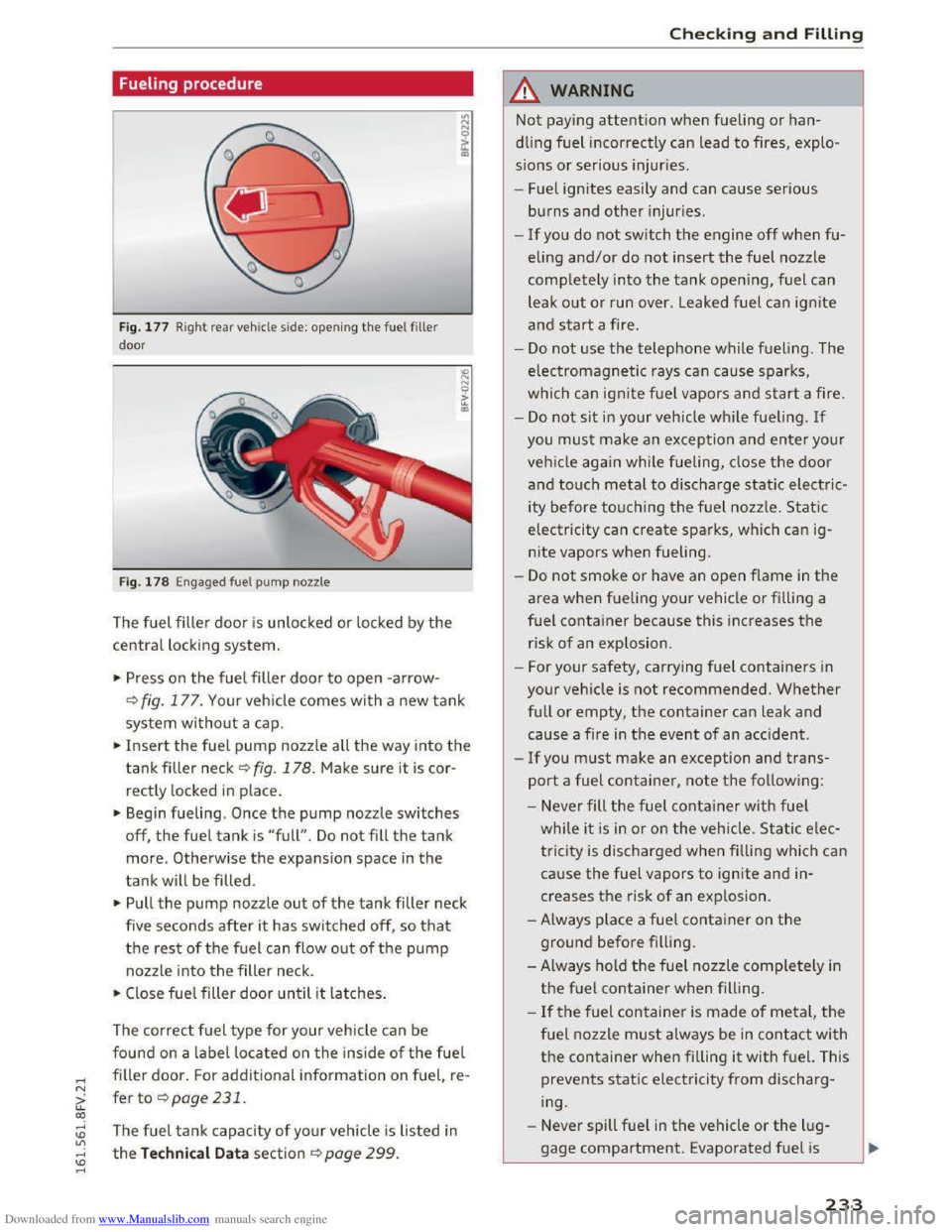
Fig. 177 Right re ar vehicle side: opening the fuel filler
door
Fig. 178 Engaged fuel pump nozzle
The fuel filler door is unlocked or locked by the
central locking system.
.. Press on the fuel filler door to open -arrow-
Q fig. 177. Your vehicle comes with a new tank
system without a cap.
.. Insert the fuel pump nozzle all the way into the
tankfiller neck ~fig. 178. Make sure it is cor
rectly locked
in place.
.. Begin fueling. Once the pump nozzle switches
off, the fuel tank is "full" . Do not fill the tank
more. Otherwise the expansion space in the
tank will be filled .
.. Pull the pump nozzle out of the tank filler neck
five
seconds after i t has switched off, so that
the rest of the fuel can flow out of the pump
nozzle into the filler neck.
.. Close fuel filler door until it latches.
The correct fuel type for your vehicle can be
found on a label located on the inside of the fuel
filler door. For additional information on fuel re-'
fer to ¢page231.
The fuel tank capacity of your vehicle is listed in
the Technical Data section Qpage 299.
Checking and Filling
.&. WARNING
Not paying attention when fueling or han
dling fuel incorrectly can lead to fires, explo
sions or serious injuries.
- Fuel igni
tes easily and can cause serious
burns and other injuries .
-
-If you do not switch the engine off when fu
eling and/or do not insert the fuel nozzle
completely into the tank opening, fuel can
leak
out or run over . Leaked fuel can ignite
and start a fire.
-
Do not use the telephone while fueling . The
electromagnetic rays can cause sparks,
which can ignite fuel vapors and start a fire.
-
Do not sit in your vehicle while fueling. If
you must make an exception and enter your
vehicl e again while fueling, close the door
and touch metal to discharge static electric
ity
before touching the fuel nozzle . Static
electricity can create sparks, which can ig
nite vapors when fueling.
-
Do not smoke or have an open f lame in the
area when fueling your vehicle or filling a
fuel container because this increases the
risk of an explosion .
- For
your safety, carrying fuel containers in
your vehicle is not recommended. Whether
full or empty, the container can leak and
cause a fire in the event of an accident .
-
If you must make an exception and trans
port a fuel container, note the following :
- Never fill
the fuel container with fuel
while it is in or on the vehicle . Static elec
tricity is discharged when filling which can
cause the fuel vapors to ignite and in
creases the risk of an exp losion .
-Always place a fuel container on the
ground before filling .
- Always hold
the fuel nozzle completely in
the fuel container when filling .
-
If the fuel container is made of metal, the
fuel nozzle must always be in contact with
the container when filling it with fuel. This
prevents static electricity from discharg
ing.
- Never
spill fuel in the vehicle or the lug
gage compartment. Evaporated fuel is
233