fuel AUDI TT COUPE 2016 Owner's Guide
[x] Cancel search | Manufacturer: AUDI, Model Year: 2016, Model line: TT COUPE, Model: AUDI TT COUPE 2016Pages: 322, PDF Size: 52.86 MB
Page 269 of 322
Downloaded from www.Manualslib.com manuals search engine ...... N
> u. CX> ...... u:>
"' ...... u:> ......
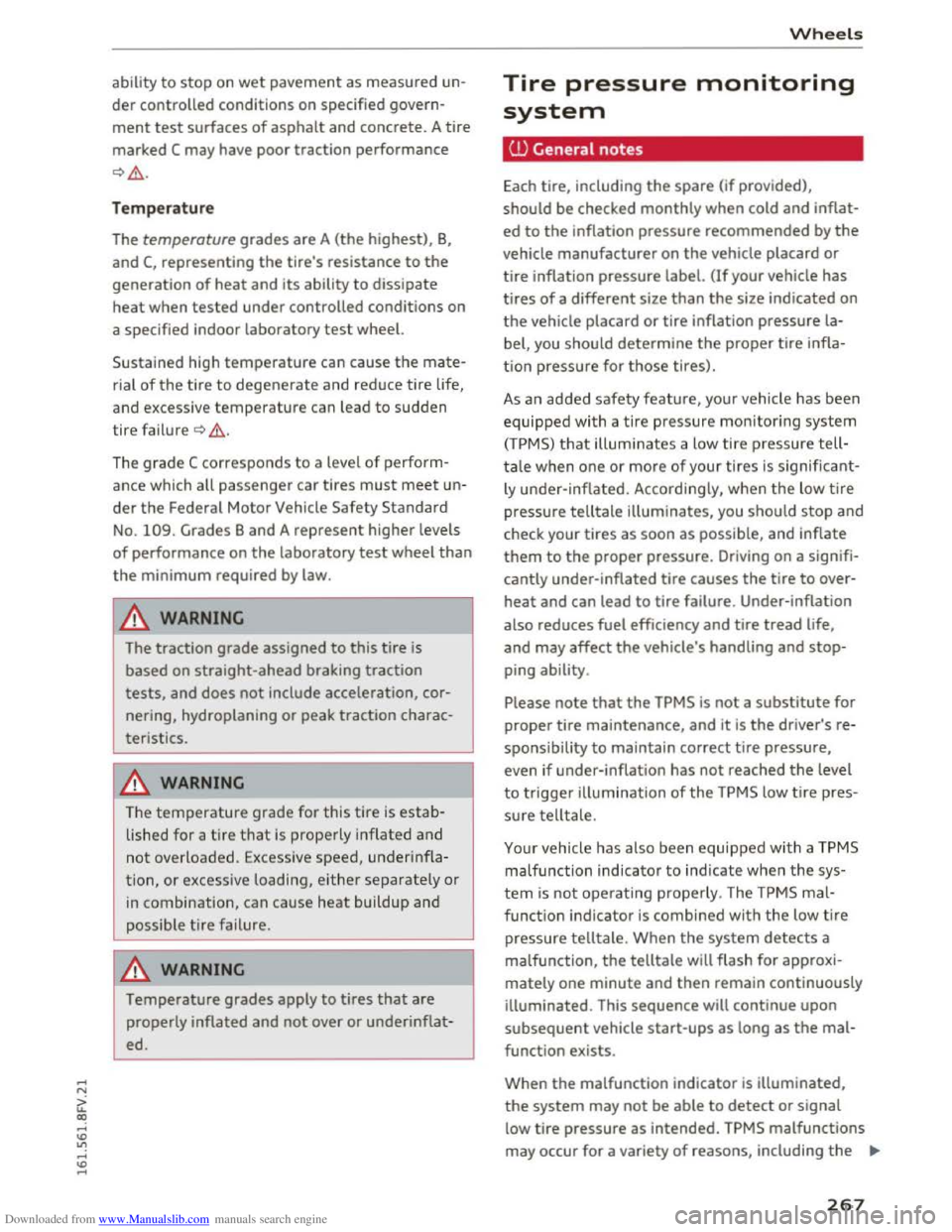
ability to stop on wet pavement as measured un
der controlled conditions on specified govern
ment test surfaces of asphalt and concrete. A tire
marked
C may have poor traction performance
c) .&..
Tempera ture
The temperature grades are A (the highest), B,
and C, representing the tire's resistance to the
generation of heat and its ability to dissipate
heat when tested under controlled conditions on
a specified indoor laboratory
test wheel.
Sustained high temperature can cause
the mate
r ial of
the tire to degenerate and reduce tire life,
and excess i
ve temperature can lead to sudden
tire failur e
c) .&..
The grade C corresponds to a leve l of perform
ance which all passenger car tires
must meet un
der
the Federal Motor Vehicle Safety Standard
No. 109. Grades Band A represent higher levels
of performance on
the laboratory test wheel than
the minimum required by law.
A WARNING
The traction grade assigned to this tire is
based on straight-ahead braking traction
tests, and does not include acceleration, cor
nering, hydroplaning or peak traction charac
teristics.
&_WARNING
-1
The temperature grade for this tire is estab-
lished for a t
ire that is properly inflated and
not overloaded. Excessive speed, underinfla
tion, or excessive loading, either separately or
in combination, can cause heat buildup and
possible t
ire failure.
&_WARNING
Temperature grades apply to tires that are
properly inflated and not over or under inflat
ed.
Wheel s
Tire pressure monitoring
system
CD General notes
Each tire, including the spare (if provided),
should be checked monthly when cold and inflat
ed to
the inflation pressure recommended by the
vehicle manufacturer on the vehicle placard or
tire inflation pressure label. (If your vehicle has
tires
of a different size than the size indicated on
the vehicle placard or tire inflation pressure la
bel, you shou ld determine
the proper tire infla
tion pressure for those tires).
As an added safety feature, your vehicle has been
equipped with a tire pressure monitoring system
(TPMS) that illuminates a low tire pressure tell
tale when one or more of your tires
is significant
ly under-inflated. Accordingly, when the low tire
pressure telltale illuminates, you should stop and
check your tires as soon as possible, and inflate
them
to the proper pressure. Driving on a signifi
cantly under-inflated tire causes
the tire to over
heat and can lead to tire failure . Under-inflation
also reduces fuel efficiency and tire tread life,
and may affect
the vehicle's handling and stop
ping ability .
Please note that the TPMS is not a substitute for
proper tire maintenance, and it
is the driver's re
spo nsibility
to maintain correct tire pressure,
even if under-inflation has
not reached the level
to trigger
illumination of the TPMS low tire pres
sure telltale.
Your vehicle has also been equipped with a TPMS
malfunction indicator to indicate when the sys
tem is not operating properly. The TPMS mal
function
indicator is combined with the low tire
pressure telltale. When the system detects a
malfunction,
the telltale will flash for approxi
mately one minute and then remain continuously
illuminated. This sequence
will continue upon
subsequent vehicle start-ups as long as the mal
function exists.
When
the malfunction indicator is illuminated,
the system may not be able to detect or signal
low tire pressure as intended.
TPMS malfunctions
may occur for a variety of reasons, including
the ""'
267
Page 274 of 322
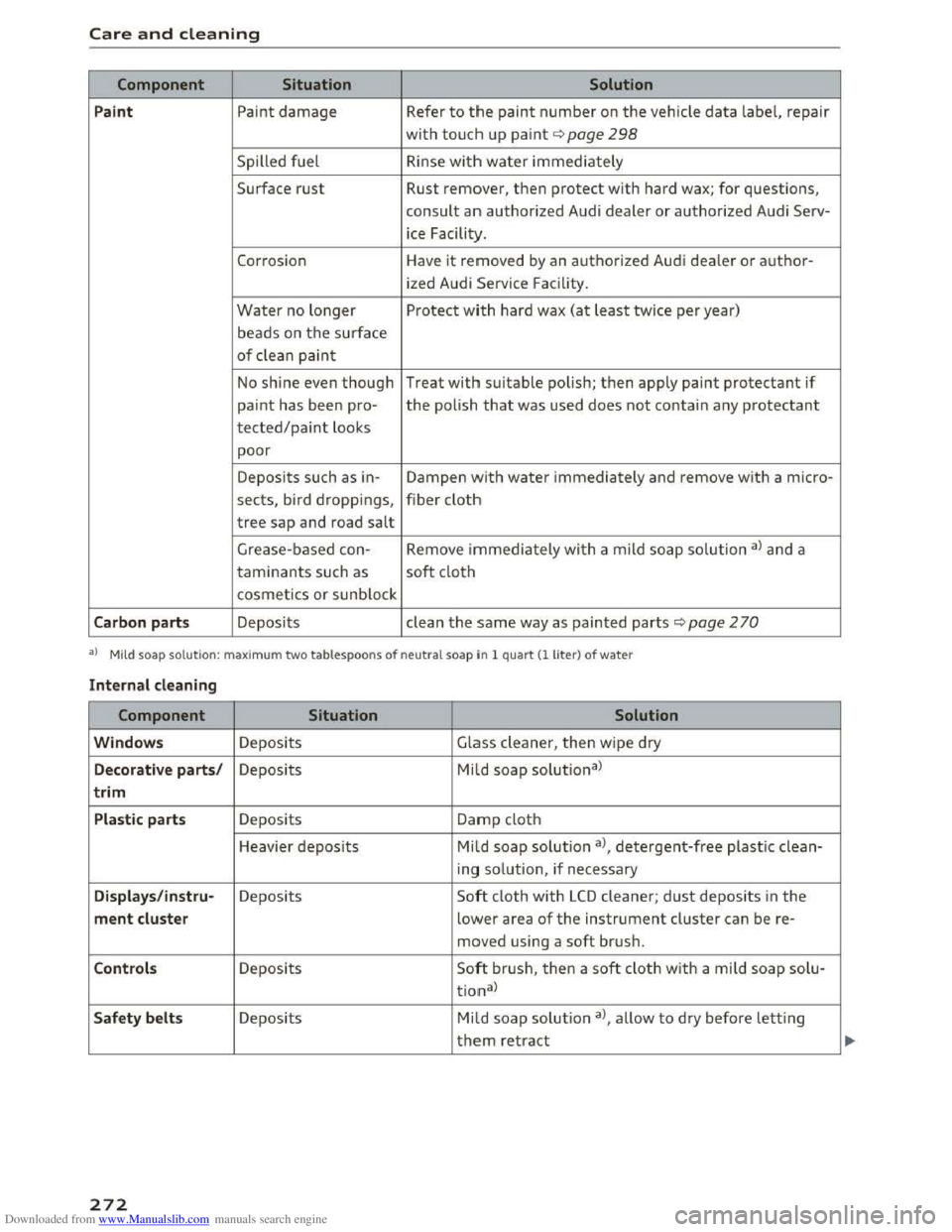
Downloaded from www.Manualslib.com manuals search engine Care and cleaning
Component Situation Solution
P a int
Paint damage Refer to the paint number on the vehicle data label, repair
with touch up paint¢ page 298
Spilled fuel R inse with water immediately
Surface rust Rust remover, then protect with hard wax; for questions,
consult an authorized Audi dealer or authorized Audi Serv-
ice Facility.
Corrosion Have it removed by an authorized Audi dealer or author-
ized Audi Service Facility.
Water no longer Protect with hard wax (at least twice per year)
beads on the surface
of clean paint
No shine even though Treat with suitable polish; then apply paint protectant if
paint has been pro-the polish that was used does not contain any protectant
tected/paint looks
poor
Deposits such as in-Dampen with water immediately and remove with a micro-
sects, bird droppings, fiber cloth
tree sap and road salt
Grease -based con- Remove immediately with a mild soap solution al and a
taminants such as soft cloth
cosmetics or sunblock
Carbo n part s Deposits clean the same way as painted parts ¢page 2 70
a) Mild soap solution: maxim um two tablespoons of neutral soap in 1 quart (1 liter) of water
Int ernal cleaning
Component Situation Solution
Windows Deposits Glass cleaner, then w ipe dry
Decorat iv e parts/ Deposits Mild soap solutional
trim
Plasti c parts Deposits Damp cloth
Heavier
deposits Mild soap solution al, detergent-free plasti c clean-
ing
solution, if necessary
Dis plays/instr u-Deposits Soft cloth with LCD cleaner; dust deposits in the
ment cluste r lower area of the instrument cluster can be re-
moved using a soft brush.
Contro ls Deposits Soft bru sh, then a soft cloth with a mi ld soap solu-
tional
Safety be lts Deposits Mild soap solution al, allow to dry before letting
them retract
272
Page 289 of 322
Downloaded from www.Manualslib.com manuals search engine ..... N
G: CX)
.....
"' U"I
.....
"' .....
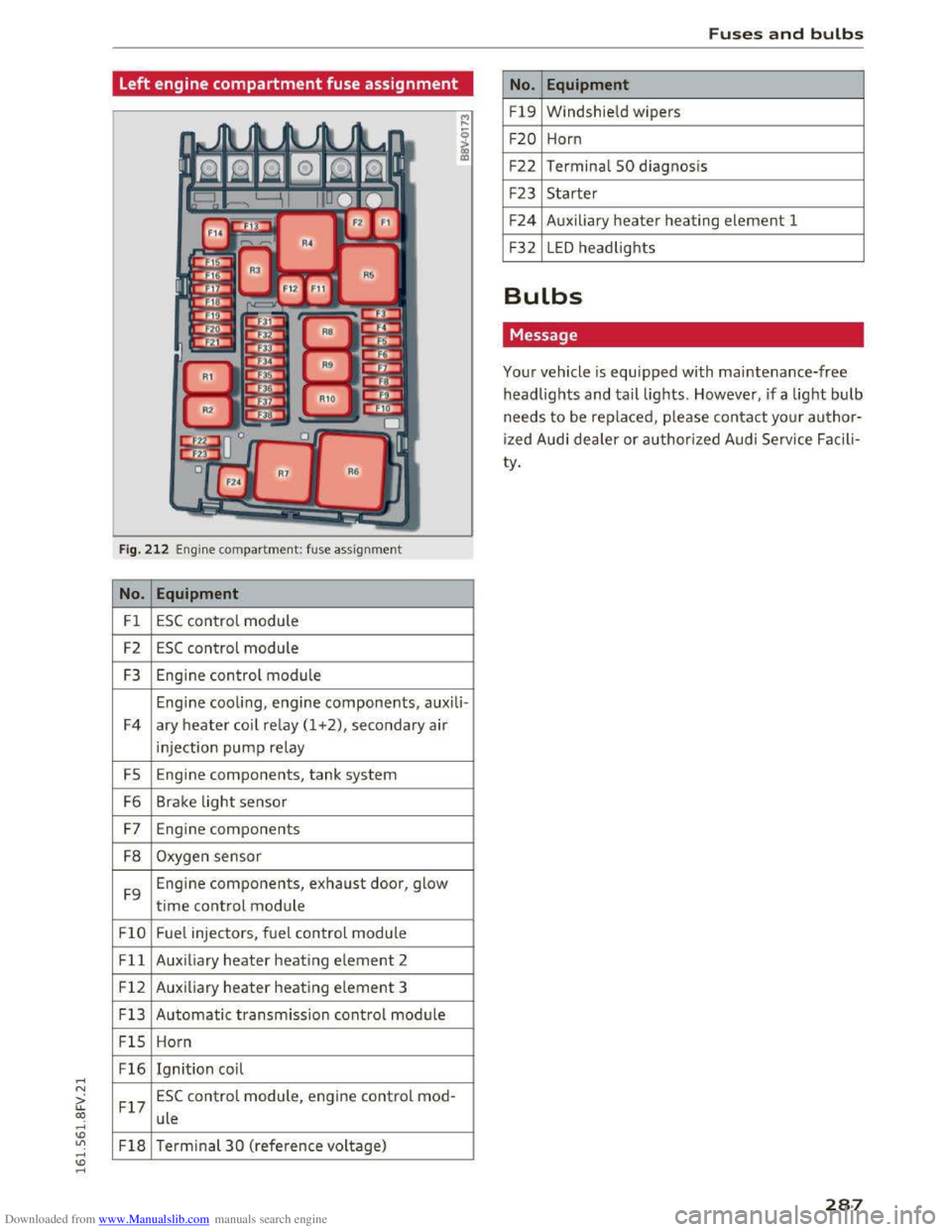
Left engine compartment fuse assignment
Fig. 212 Engine compartment: fuse assignment
No. Equipment
Fl ESC control module
F2 ESC control module
F3 Engine control module
Engine cooling, engine components, auxili-
F4 ary
heater coil relay (1 +2), secondary air
injection pump relay
FS Engine components, tank system
F6 Brake light sensor
F7 Engine components
F8 Oxygen sensor
F9 Engine
components, exhaust door, glow
time control module
FlO Fue
l injectors, fuel control module
Fll Auxiliary heater heating element 2
F 1 2 Auxiliary
heater heating e
lement 3
F13
Automatic transmission contr ol module
FlS Horn
F16 Ignition coil
F17
ESC control module, engine control mod-
ule
F18 Terminal 30 ( reference voltage)
Fuses and bulbs
No. Equipment
Fl9 Windshield wipers
F20 Horn
F22
Terminal 50 diagnosi s
F23 Starter
F24 Auxiliary heater heating element 1
F32 LED headlights
Bulbs
Message
Your vehicle is equipped with maintenance-free
headlights and tail lights. However, if a light bulb
needs to be replaced, please contact your author
ized Audi dealer or authorized Audi Service Facili
ty.
287
Page 296 of 322
Downloaded from www.Manualslib.com manuals search engine Consumer information
Consumer information
Warranty coverages
Your Audi is co vered by the following warran
ties:
- New Vehicle Limited Warranty
-Limited Warranty Against Corrosion Perfora-
tion
-Emissions Control System Warranty
-Emissions Performance Warranty
-California Emissions Control Warranty (USA
vehicles only)
-
California Emissions Performance Warranty
(USA vehicles only)
Detailed information regarding your warranties
can be found in your Warranty & Maintenance
booklet.
Operating your vehicle
outside the U.S.A. or
Canada
Government regulations in the United States and
Canada require that automobiles meet specific
emission regulations and safety standards.
Therefore, vehicles built for the U.S.A. and Cana
da differ from vehicles sold in other countries.
If you plan to take your vehicle outside the conti
nental limits of the United States or Canada,
there is the possi bility that:
- unleaded fuels for vehicles with catalytic con
verter may not be available;
- f
uel may have a considerably lower octane rat
ing. Improper fuel may cause engine damage;
-ser vice may be inadequate due to lack of proper
service facilities, tools or testing equipment;
-replacement parts may not be readily available.
-Navigation systems for vehicles built for the
U.S.A. and Canada will not necessarily work in
Europe , and may not work in other countries
outside North America.
294
Audi cannot be responsible for mechanical
damage that could result from inadequate
fuel, service or parts availability.
Audi Service Repair
Manuals and Literature
Audi Official Factory Service Manuals and Litera
ture are published as soon as possible after mod
el introduction. Service manuals and literature
are available to order from the Audi Technical Lit
erature Ordering Center at:
www.audi.techliterature.com
Maintenance
General
Your vehicle has been designed to help keep
maintenance requirements to a minimum. How
ever, a
certain amount of regular maintenance is
still necessary to assure your vehicle's safety,
economy and reliability. For detailed vehicle
maintenance consult your Warranty & Mainte
nance booklet.
Under difficult operating conditions, for exam
ple
at extremely low outside temperatures, in
very dusty regions, etc., some service work
should be performed between the intervals speci
fied. This
applies particularly to:
- oil
changes, and
- cleaning or replac ing the a ir filte r.
~ For the sake of the environment
By reg ularly maintaining your vehicle, you
help
make sure that emission standards are
maintained, thus minimizing adverse effects
on the environment.
Important considerations for you and your
vehicle
The increasing use of electronics, sophisticated
fuel injec tion and emission control systems, and
the generally increasing technical complexity of
today's automobiles, have steadily reduced the ~
Page 298 of 322
Downloaded from www.Manualslib.com manuals search engine Consumer information
@ For the sake of the environment
-Changing the engine settings will adversely
affect emission leve ls.
This is detrimental to
the environment and increases fuel con
sumption.
- A lways observe environmental regulations
when disposing
of old engine oil, used brake
fluid, dirty engine coolant, spent batteries
or worn out tires.
- Undeployed airbag modules and pretension
ers might be classified as
Perchlorate Mate
rial -special handl i
ng may apply, see
www.dtsc .ca. gov/hazard ouswaste/ perch l
o
rate. When th e vehicle or parts of th e re
strain t sys tem including
airb ag modu les
sa fety belts with prete ns ione rs a re scrap
ped, all applicab le laws and regulat ions
must be observed. Your authorized Audi
dealer is familia r with these requirements
and we recommend
that you have your deal
er perform this service for you.
Accessories and
technical changes
Additional accessories and parts
replacement
Always consult on authorized Audi dealer before
purchasing accessories.
Your vehicle incorporates the latest safety design
features ensuring a high standard
of active and
passive safety.
This safety could be comp romised by non -ap
proved changes
to the vehicle . For this reason, if
parts have to be replaced, please observe
the fol
lowing points when insta lling addit ional accesso
ries:
Approved
Audi accessories and genuine Audi
parts are available from author ized Audi dealers.
T hese dealers also have the necessary facilities,
too ls and trained specia
lists to install the parts
and accessories properly.
296
A WARNING
1-
Using the wrong spare parts or using non-ap-
proved accessories
can cause damage to the
vehicle and serio us personal in jury.
-
Use on ly accesso ries expressly approved by
Audi a nd gen uine Audi spare parts
- These parts and accessor ies have been spe
cially designed
to be used on your vehicle.
- Never install accessor i
es such as telephone
cradles
or beverage holders on airbag covers
or within the airbag deployment zones. Do
ing so will increase th e risk of injury if air
bags are triggered
in an accident!
- Before you check anythi ng in
the eng ine
compa
rtment, always read and heed all
WARNINGS Qpoge 236.
CD Note
-If items other than genu ine Audi spare
parts, add-on equipment and accessory
i t ems are used or if repair work
is not per
formed a
ccording to specified methods, this
c an resul t
in severe damage to yo ur vehi
cle's engine and body (such as cor ro sion)
and adve rsely
affect your vehicle's warranty.
- I f emergen cy repai rs mus t be per formed
elsew here, have
the vehicle examined by an
authorized Au
di dealer as soon as possib le .
- T he manufac ture r ca nnot be held liable for
damage
which occu rs d ue to fail ure to com
ply with
these stipulations.
Technical Modifications
Our guidelines must be complied with when tech
nical modifications ore mode .
Always consult an authorized Audi de aler before
sta rt ing work on any modifica tions.
This will help ensure tha t vehicle
function, per
fo rmance and safety are not impaired
Q .&..
Attempting to work on electronic components
and
the softwa re used with th em can cause mal
funct io ns. Because
of the way elect ronic compo
nen ts a re
int erconnected with each other, such
malfunc tions can also h
ave an adverse affect on
other systems tha t are not directl y involved. This .,..
Page 300 of 322
Downloaded from www.Manualslib.com manuals search engine Technical data
Technical data
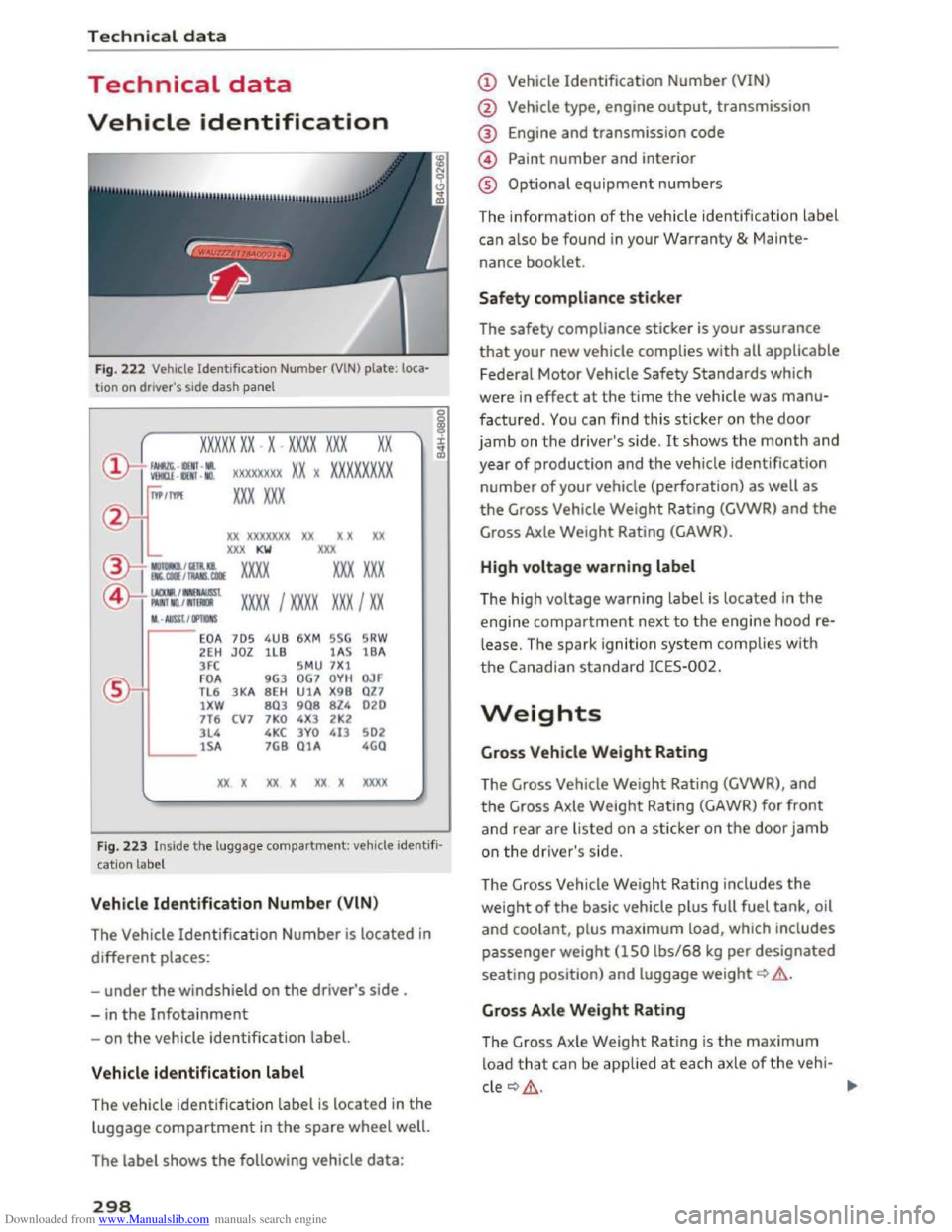
Vehicle identification
Fig. 222 Vehicle Identification Number (VlN) plate: loca·
tio n on driver 's side dash panel
xxxxx xx -x -xxxx xxx xx
©-+ : -: ::: xxxxxxxx x x )( xxxxxxxx
"'/IYl'I xxx xxx
)()( xxxxxxx xx x x xx
XXX KW XXX
®i :::~~ xxxx xxx xxx
@-t l:r":o'.:i:ra:st x xxx I xxxx xxx I xx
M. • AUSST, / Oi'llONS
EOA 705 4 UB 6XM SSG SRW
2EH JOZ lLB 1A S 1BA
3 FC S
M U 7X1
FOA 9G3 OG7 O YH OJF
TL 6 3 KA 8EH U1A X9 B OZ7
lXW 803 908 8Z4 020
7T6 CV 7 7KO 4X3 2 K2
3L4 4 KC 3YO 413 502
lSA 7GB O lA 4GO
xx x xx x xx x xx xx
Fig. 223 Inside the luggage compartment: veh icle ide ntifi
cation label
Veh icle Identification Number (VlN )
The Vehicle
Identification Number is located in
different places:
-
under the windshield on the driver' s side .
-
in the Infotainment
-on the vehicle identification label.
Vehicle identification label
The vehicle i
dentification label is located in the
luggage compartment in the spare wheel well.
The
label shows the following vehi cle data:
298
(!) Vehicle Identification Number (VIN)
@ Veh icle type, engine output, transmission
® Engine and transmission code
@ Paint number and interior
® Optional equipment numbers
The information of the vehicle identification label
can also be found in your Warranty & Mainte
nance book let.
Safety compliance sticker
The
safety compliance sticker is your assuranc e
that your new vehicle complies with all applicable
Federal Motor Vehicle Safety Standards which
were in effect at the time the vehicle was manu
factured. You can find this sticker on the door
jamb on the driver's side . It shows the month and
year of production and the vehicle identification
number of your vehicle (perforation) as well as
the Gross Vehicle Weight Rating (GVWR) and the
Gross Axle Weight Rating (GAWR) .
High voltage warning label
The high
voltage warning label is located in the
engine compartment next to the engine hood re
lease. The spark ignition system complies w it h
the Canadian standard ICES-002.
Weights
Gross Vehicle Weight Rating
The Gross Vehicle
Weight Rating (GVWR), and
the Gross Axle Weight Rating (GAWR) for front
and rear are listed on a sticker on the door jamb
on the driver's side.
The Gross Vehicle
Weight Rating includes the
weight of the basic vehicle plus full fuel tank, oil
and coolant, plus maximum load, which includes
passenger weight (150 lbs/68 kg pe r designated
seating posi tion) and luggage weight Q & .
Gross Axle Weight Rating
The Gross Axle
Weight Rating is the maximum
load that can be applied at each axle of the vehi-
cle
Q & . .,..
Page 301 of 322

Downloaded from www.Manualslib.com manuals search engine Vehicle capacity weight
The vehicle capacity weight (max. load) is listed
either on the driver's side B-pillar or inside the
fuel filler flap.
& WARNING
- The
actual Gross Axle Weight Rating at the
front and rear axles should not exceed the
permissible weights, and their combination
must not exceed the Gross Vehicle Weight
Rating .
- Exceeding
permissible weight ratings can
result in vehicle damage, accidents and per
sonal injury .
Dimensions
The dimensions can vary depending on the model
and equipment.
Length
Width
Width
across the mirrors
Height at curb weight
When driving on poor roads, by curbs and on
steep ramps, make sure that low-lying compo
nents such as the spoiler and exhaust system do
Capacities
Fuel tank
Windshield and headlight washer system*
Technical data
@ Note
- The vehicle capacity
weight figures apply
when the load is distributed evenly in the
vehicle (passengers and luggage). When
transporting a heavy load in the luggage
compartment, carry the load as near to the
rear axle as possible so that the vehicle's
handling is not impaired.
-Do not exceed the maximum permissible
axle loads or the maximum gross vehicle
weight. Always remember that the vehicle's
handling will be affected by the extra load.
Therefore, adjust your speed accordingly.
- Always
observe local regulations.
in (mm) 164.7 (4,184)
in (mm) 72.l (1832)
in (mm) 77.4 (1966)
in (mm) 53.3 (1353)
not come into contact with these or they could be
damaged. This applies especially when the vehi
cle is fully loaded.
gal (l) approx. 14.5 (55)
gal (l) approx. 2.4 (9.0)
299
Page 302 of 322
Downloaded from www.Manualslib.com manuals search engine Technical data
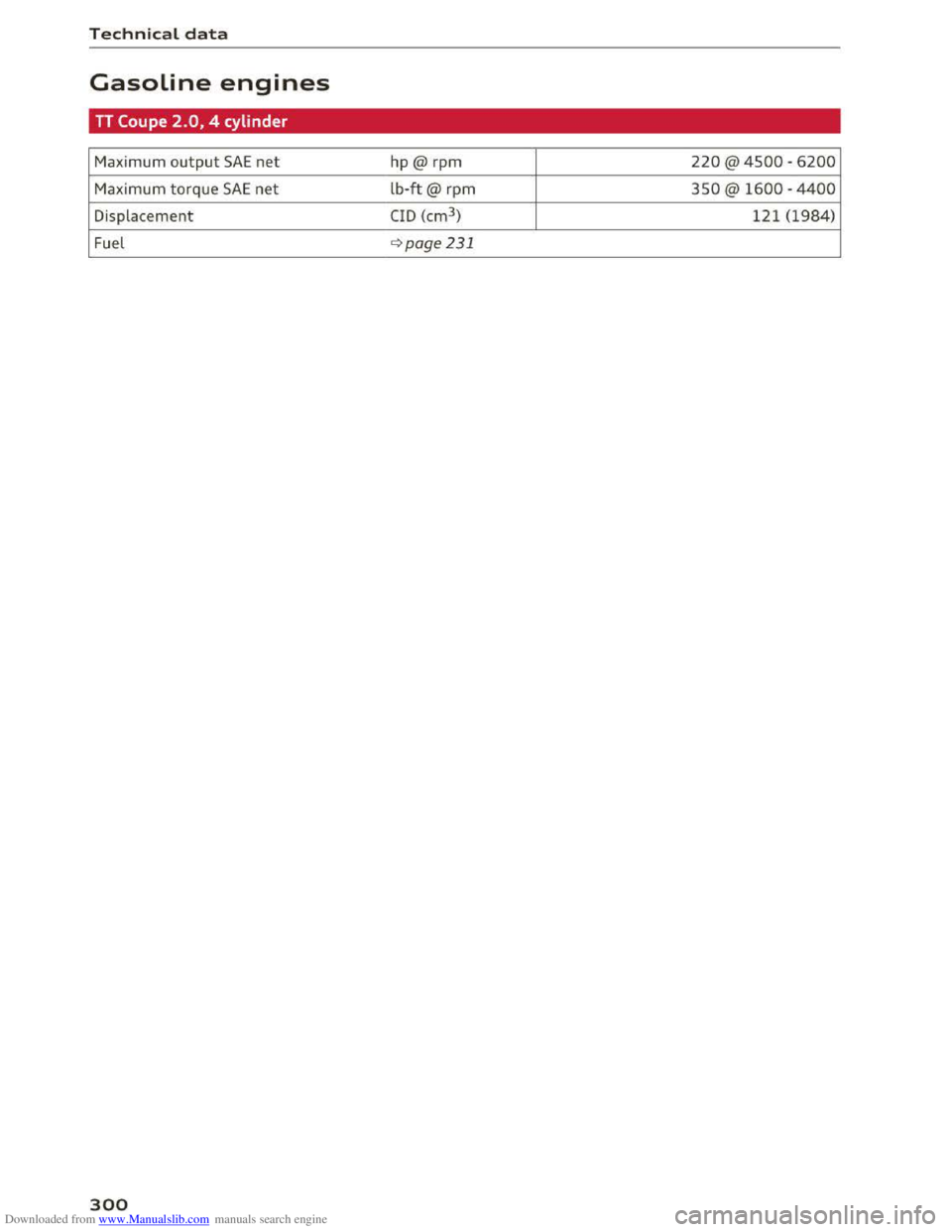
Gasoline engines
TT Coupe 2.0, 4 cylinder
Maximum output SAE net hp@ rpm 220 @ 4500 -6200
Maximum torque SAE net lb-ft@ rpm 350@ 1600 -4400
Displacement CID (cm3
) 121 (1984)
Fuel qpoge231
300
Page 305 of 322
Downloaded from www.Manualslib.com manuals search engine c
Cable (USB adapter/AUX connection cable) 1S5
California Proposition 65 Warning . . . . . . . 237
Battery specific . . . . . . . . . . . . . . . . . . . . . 246
Call
Accepting/rejecting . . . . . . . . . . . . . . . . . . 113
Holding/resuming . . . . . . . . . . . . . . . . . . . 113
Call list . . . . . . . . . . . . . . . . . . . . . . . . . . . . . 112
Call waiting (telephone) . . . . . . . . . . . . . . . . 119
Canceling route guidance . . . . . . . . . . . . . . . 136
Capacities
Fuel tank. . . . . . . . . . . . . . . . . . . . . . . . . . . 299
Washer fluid reservoir . . . . . . . . . . . . . . . . 299
Care . . . . . . . . . . . . . . . . . . . . . . . . . . . . . . . . 270
Cargo area
refer to Luggage compartment . . . . . . . . . 176
Catalytic converter . . . . . . . . . . . . . . . . . . . . 23S
CD ..... .. .. .. .. ............. .. . 150, 151
Cell phone
Audi phone box . . . . . . . . . . . . . . . . . . . . . 111
Connecting . . . . . . . . . . . . . . . . . . . . . . . . . 110
Playing music . . . . . . . . . . . . . . . . . . . . . . . 152
also refer to Telephone . . . . . . . . . . . . . . . 110
Cell phone compartment
refer to Audi phone box.......... .. .. . 111
Central locking . . . . . . . . . . . . . . . . . . . . . . . . 2S
Central locking switch . . . . . . . . . . . . . . . . . 29
Convenience key . . . . . . . . . . . . . . . . . . . . . . 28
Emergency locking . . . . . . . . . . . . . . . . . . . . 30
Luggage compartment lid . . . . . . . . . . . . . . 30
Power windows . . . . . . . . . . . . . . . . . . . . . . 32
Remote control key . . . . . . . . . . . . . . . . . . . 27
Setting . . . . . . . . . . . . . . . . . . . . . . . . . . . . . 29
Certification . . . . . . . . . . . . . . . . . . . . . . . . . 297
Changing engine oil . . . . . . . . . . . . . . . . . . . 241
Changing light bulbs . . . . . . . . . . . . . . . . . . 287
Changing the scale . . . . . . . . . . . . . . . . . . . . . 20
Characters
Map... .. .. .. .. ............. .. .. .. . 139
Navigation . . . . . . . . . . . . . . . . . . . . . . . . . 139
Charging the battery .............. 111, 155
Child restraint
Danger of using child restraints in the front
seat... .. .. .. .. ............. .. ..... 189
Index
Child restraints
Where can I get additional information
about child restraints and their use? . . . . 230
Child restraint system anchors . . . . . . . . . . 226
Child safety . . . . . . . . . . . . . . . . . . . . . . . . . . 212
Important safety instructions for us ing child
safety seats . . . . . . . . . . . . . . . . . . . . . . . . 215
Tether anchors . . . . . . . . . . . . . . . . . . . . . . 228
Tether straps . . . . . . . . . . . . . . . . . . . . . . . 228
Child safety seat
Unused safety belts on the rear seat 217
Child safety seats
Booster seats . . . . . . . . . . . . . . . . . . . . . . . 221
Convertible child seats . . . . . . . . . . . . . . . 219
How do I properly install a child safety seat
in my vehicle? .. .. ................... 215
Infant seats . . . . . . . . . . . . . . . . . . . . . . . . 218
Installing a child restraint using the LATCH
system ......... .. ................. 227
LATCH system . . . . . . . . . . . . . . . . . . . . . . 227
Lower anchorages . . . . . . . . . . . . . . . . . . . 227
Mounting and releasing the anchorage
hook ....... .. .. ................... 227
Safety instructions................... 215
Child seats . . . . . . . . . . . . . . . . . . . . . . . . . . 218
Securing . . . . . . . . . . . . . . . . . . . . . . . . . . . 223
Cigarette lighter . . . . . . . . . . . . . . . . . . . . . . . 47
City events (Audi connect) . . . . . . . . . . . . . . 123
Cleaning . . . . . . . . . . . . . . . . . . . . . . . . . . . . 270
Cleaning/removing ice from windows . . . . . 272
Cleaning Alcantara . . . . . . . . . . . . . . . . . . . . 273
Cleaning artificial leather . . . . . . . . . . . . . . . 273
Cleaning carbon parts . . . . . . . . . . . . . 272, 273
Cleaning controls . . . . . . . . . . . . . . . . . . . . . 272
Cleaning decorative parts and trim ... 271, 272
Cleaning displays . . . . . . . . . . . . . . . . . . . . . 272
Cleaning exhaust tail pipes . . . . . . . . . . . . . 271
Cleaning plastic parts . . . . . . . . . . . . . . . . . . 272
Cleaning rims . . . . . . . . . . . . . . . . . . . . . . . . 271
Cleaning seat covers . . . . . . . . . . . . . . . . . . . 273
Cleaning tail lights . . . . . . . . . . . . . . . . . . . . 271
Cleaning textiles . . . . . . . . . . . . . . . . . . . . . . 273
Cleaning the Audi virtual cockpit . . . . . . . . . 272
Cleaning the instrument cluster . . . . . . . . . 272
303
Page 306 of 322
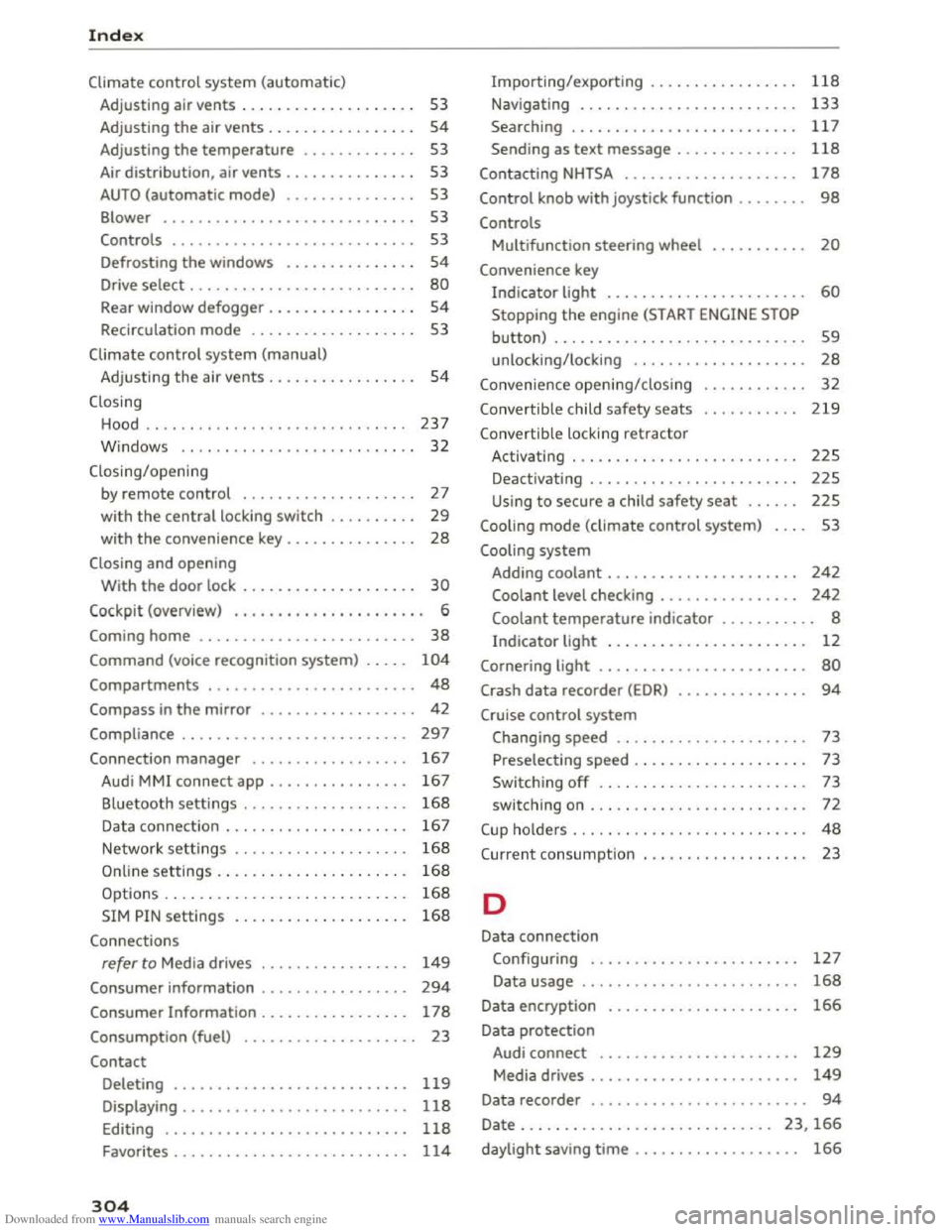
Downloaded from www.Manualslib.com manuals search engine Index
Climate control system (automatic)
Adjusting air vents . . . . . . . . . . . . . . . . . . . . 53
Adjusting
the air vents. . . . . . . . . . . . . . . . . 54
Adjusting the temperature . . . . . . . . . . . . . 53
Air
distribution, air vents . . . . . . . . . . . . . . . 53
AUTO (automatic mode) . . . . . . . . . . . . . . . 53
Blower . . . . . . . . . . . . . . . . . . . . . . . . . . . . . 53
Controls . . . . . . . . . . . . . . . . . . . . . . . . . . . . 53
Defrosting
the windows . . . . . . . . . . . . . . . 54
Drive select . . . . . . . . . . . . . . . . . . . . . . . . . . 80
Rear window defogger . . . . . . . . . . . . . . . . . 54
Recirculation mode . . . . . . . . . . . . . . . . . . . 53
Climate control system (manual)
Adjusting
the air vents . . . . . . . . . . . . . . . . . 54
Closing
Hood . . . . . . . . . . . . . . . . . . . . . . . . . . . . . . 237
W indows . . . . . . . . . . . . . . . . . . . . . . . . . . . 32
Closing/opening by remote
control . . . . . . . . . . . . . . . . . . . . 27
with the central locking switch . . . . . . . . . . 29
with the convenience key . . . . . . . . . . . . . . . 28
Closing and opening
With the door lock . . . . . . . . . . . . . . . . . . . . 30
Cockpit (overview) . . . . . . . . . . . . . . . . . . . . . . 6
Coming home . . . . . . . . . . . . . . . . . . . . . . . . . 38
Command (voice recognition system) . . . . . 104
Compartments . . . . . . . . . . . . . . . . . . . . . . . . 48
Compass in the mirror . . . . . . . . . . . . . . . . . . 42
Compliance . . . . . . . . . . . . . . . . . . . . . . . . . . 297
Connection manager . . . . . . . . . . . . . . . . . . 167
Audi MMI connect app . . . . . . . . . . . . . . . . 167
Bluetooth settings . . . . . . . . . . . . . . . . . . . 168
Data connection . . . . . . . . . . . . . . . . . . . . . 167
Network settings . . . . . . . . . . . . . . . . . . . . 168
Importing/exporting . . . . . . . . . . . . . . . . . 118
Navigating . . . . . . . . . . . . . . . . . . . . . . . . . 133
Searching . . . . . . . . . . . . . . . . . . . . . . . . . . 117
Sending as text message . . . . . . . . . . . . . . 118
Contacting NHTSA . . . . . . . . . . . . . . . . . . . . 178
Control knob with joystick function . . . . . . . . 98
Controls
Multifunction steering wheel . . . . . . . . . . . 20
Convenience key
Indicator light . . . . . . . . . . . . . . . . . . . . . . . 60
Stopping the engine (START ENGINE STOP
button) . . . . . . . . . . . . . . . . . . . . . . . . . . . . . 59
unlocking/locking . . . . . . . . . . . . . . . . . . . . 28
Convenience opening/closing
Convertible child safety seats
Convertib le locking retractor 32
219
Activating . . . . . . . . . . . . . . . . . . . . . . . . . . 225
Deactivating . . . . . . . . . . . . . . . . . . . . . . . . 225
Using to secure a child safety seat . . . . . . 225
Cooling mode (climate control system) . . . . 53
Cooling system
Adding coolant . . . . . . . . . . . . . . . . . . . . . .
242
Coolant level checking . . . . . . . . . . . . . . . . 242
Coolant temperature indicator . . . . . . . . . . . 8
Indicator light . . . . . . . . . . . . . . . . . . . . . . . 12
Cornering light . . . . . . . . . . . . . . . . . . . . . . . . 80
Crash data recorder (EDR) . . . . . . . . . . . . . . . 94
Cruise control system
Changing speed . . . . . . . . . . . . . . . . . . . . . . 73
Preselecting speed . . . . . . . . . . . . . . . . . . . . 73
Switching
off . . . . . . . . . . . . . . . . . . . . . . . . 73
switching on . . . . . . . . . . . . . . . . . . . . . . . . .
72
C up ho lders . . . . . . . . . . . . . . . . . . . . . . . . . . . 48
C urrent consumpt ion 23
Online settings . . . . . . . . . . . . . . . . . . . . . . 168
Options . . . . . . . . . . . . . . . . . . . . . . . . . . . .
168 D
SIM PIN settings . . . . . . . . . . . . . . . . . . . . 168
Connections
refer to Media drives . . . . . . . . . . . . . . . . . 149
Consumer information . . . . . . . . . . . . . . . . . 294
Consumer Information . . . . . . . . . . . . . . . . . 178
Consumption (fuel) . . . . . . . . . . . . . . . . . . . . 23
Contact
Deleting . . . . . . . . . . . . . . . . . . . . . . . . . . . 119
Displaying . . . . . . . . . . . . . . . . . . . . . . . . . . 118
Editing . . . . . . . . . . . . . . . . . . . . . . . . . . . . 118
Favorites . . . . . . . . . . . . . . . . . . . . . . . . . . . 114
304
Data connection
Configuring . . . . . . . . . . . . . . . . . . . . . . . .
127
Data usage . . . . . . . . . . . . . . . . . . . . . . . . . 168
Data encryption
Data protection 166
Audi connect . . . . . . . . . . . . . . . . . . . . . . . 129
Media drives . . . . . . . . . . . . . . . . . . . . . . . . 149
Data recorder . . . . . . . . . . . . . . . . . . . . . . . . . 94
Date . . . . . . . . . . . . . . . . . . . . . . . . . . . . . 23, 166
daylight saving time . . . . . . . . . . . . . . . . . . . 166