tow AUDI TT COUPE 2016 User Guide
[x] Cancel search | Manufacturer: AUDI, Model Year: 2016, Model line: TT COUPE, Model: AUDI TT COUPE 2016Pages: 322, PDF Size: 52.86 MB
Page 44 of 322

Downloaded from www.Manualslib.com manuals search engine Lights and Vision
Cleaning windshield wiper blades
Clean the wiper blades when you see wiper
streaks.
Clean the wiper blades with a soft towel
and glass cleaner.
"" Place the windshield wiper arms in the service
position
~page 42.
"" Fold the windshield wiper arms away from the
windshield.
& WARNING
Dirty windshield wiper blades can impair vi
sion, which increases
the risk of an accident.
Replacing windshield wiper blades
Fig. 39 Removing windshield wiper blades
Wiper service pos ition /blade repl acement
positi on
-
"' ~ 0 ci:
"' QJ
.,.. To bring the wipers into the service position,
turn the ignition off and move the windshield
wiper lever
into position@~ page 41, fig. 38.
.,.. To bring the wipers into the starting position,
turn the ignition on and move the windshield
wiper lever
into position@) for at least two sec
onds
q page 41, fig. 38.
Removing the wiper blade
.,.. Fold the windshield wiper arm away from the
windshield.
"" Press the locking knob@~ fig. 39 on the wiper
blade. Hold
the wiper blade firmly .
.,.. Remove the wiper blade in the direction of the
arrow.
42
Installing the wiper blade
.,.. Insert the new wiper blade into the mount on
the wiper arm @until you hear it latch into
place.
.,.. Place the wiper arm back on the windshield.
.,.. Turn the service position off.
& WARNING
For safety reasons, the windshield wiper
blades should be replaced once or twice each
year.
CD Note
- The windshie ld wiper blades must only be
folded away when in the service position!
Otherwise, you risk damaging the paint on
the hood or the windshield wiper motor.
-
You should not drive your vehicle or press
the windshield wiper lever when the wiper
arms are folded away
from the windshield.
The windshield wipers would move back in
to their original position and could damage
the hood and windshield.
(j) Tips
-You can also use the service position, for ex
ample,
if you want to protect the windshield
from icing by using a cover.
-
You cannot activate the service position
when
the hood is open.
Digital compass
Switching the compass on and off
Applies to: vehicles with digital compass
0 N
!
Fig. 40 Rearview mirror: digital compass is sw itched on
Page 50 of 322

Downloaded from www.Manualslib.com manuals search engine Seats and storage
Storage
Beverage holders
Fig . 48 Cup holder
Fig.
49 Center armrest folded up: cup holder*
Cup holder • under the center arm res t
.. Fold up the center armrest Q page 46.
.. Fold the plastic bracket toward the rear, if nec
essary Q fig. 49.
&_WARNING
-Spilled hot liquid can increase the risk of acci-
dents and injur ies.
-Never drive with containers that contain hot
liquid s uch as coffee or tea. The hot liquid
could spill
and cause burns during a colli
sion, sudden braking or other veh icle move
ment. Spilled hot liquid can also increase
the risk of accidents and injuries.
-
Only use soft containers in the cup holders.
Hard cups
and glasses can increase the risk
of injury during a collision.
- Never
use the cup holder or the adapter as
an ashtray -this is a fire hazard.
48
CD Note
Make sure your beverage container has a lid.
If not, your beverage could spill out and cause
damage to the vehicle electronic or stain the
seat covers.
Additional storage compartments
You will find a range of storage compartments
and holders at different locations in the vehicle.
-
Compartments in the doors
-Storage area in the glove compartment. The
glove
compartment can be locked using the
mechanical key¢ page 26.
-Storage compartment under the front center
armrest*
-Storage compartment on the rear side of the
front seat*. The compartment can hold a maxi
mum weight of 2.2 lbs (1 kg) .
-
Coat hooks
I"
&_WARNING
-No heavy or hard objects may be placed on
the storage compartment behind the rear
seat backrest. There is a risk of injuring the
vehicle passengers when braking suddenly .
-Always leave the lid on the glove compart
ment cover closed while driving to reduce
the risk of injury.
-
Only use the s t o rage compartments in the
door trim panels to store small objects, that
will not stick out of the compartment a nd
impair the range of the side airbags.
- Make
sure that the view to the rear is not
impaired by hanging garments.
-Hang only lightweight clothing and be sure
that there are no heavy or sharp-edged ob
jects in the pockets.
-
Do not use coat hangers to hang the cloth
ing
because this could impair the effective
ness of the side air bags*.
Objects
on the rear shelf that rub against the
rear window can damage the rear window
heating wires.
Page 51 of 322
Downloaded from www.Manualslib.com manuals search engine Roof rack
The roof rack must only be secured in the posi
tioning
bolt area.
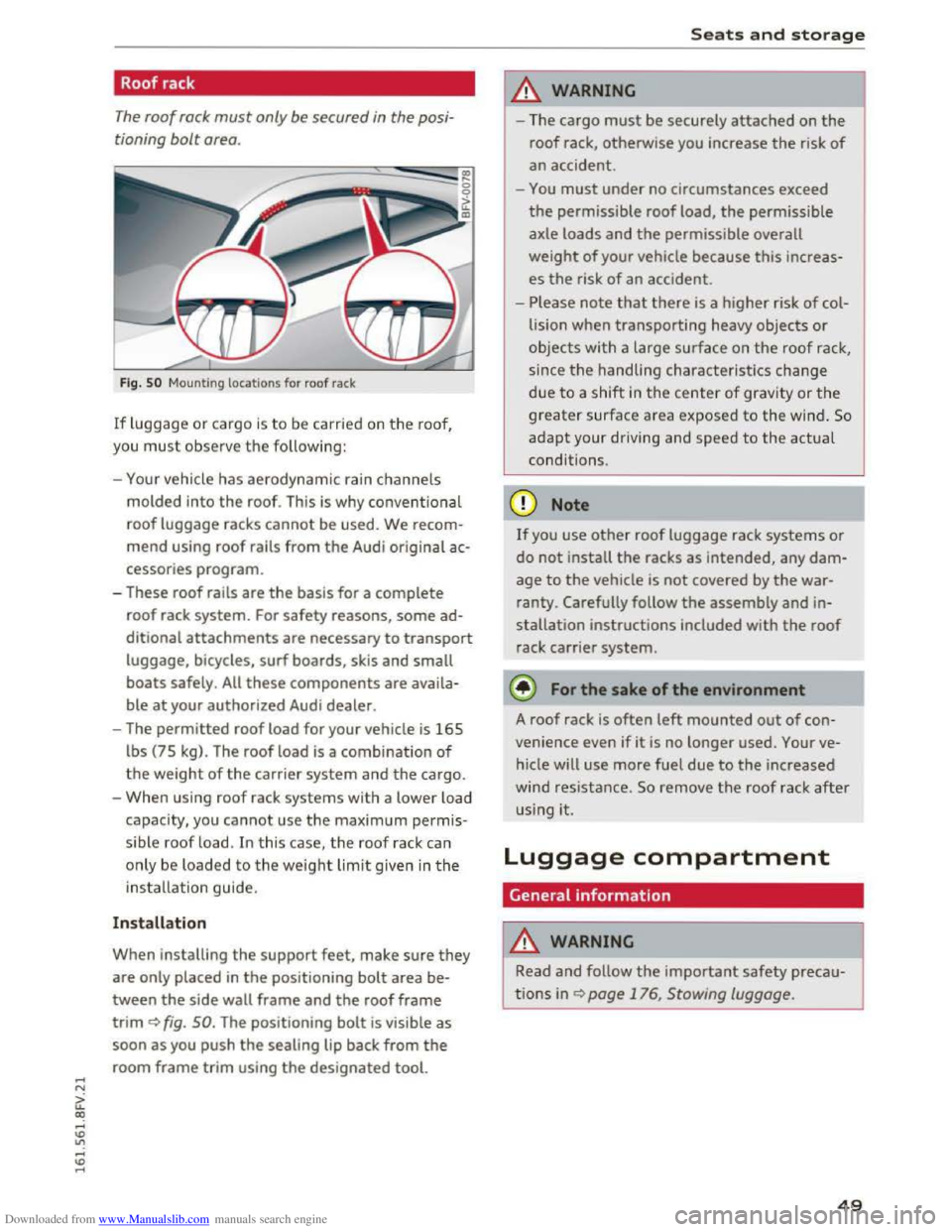
Fig. 5 0 Mounting locations for roof rack
If luggage or cargo is to be carried on the roo f,
you
must observe the following:
- Your vehicle
has aerodynamic rain channels
molded into the roof. This is why conventional
roof luggage racks cannot be used. We recom
mend using roof rails from the Audi original ac
cessories
program.
- These roof rails are the basis for a complete
roof rack system. For safety reasons, some ad
ditional attachments are necessary to transport
luggage, bicycles, surf boards, skis and small
boats safely. All these components are availa
ble at your authorized Audi dealer.
-The permitted roof load for your vehicle is 165
lbs (75 kg). The roof load is a combination of
the weight of the carrier system and the cargo.
-
When using roof rack systems with a lower load
capacity, you cannot use the maximum permis
s ible
roof load. In this case, the roof rack can
only be
loaded to the weight limit give n in the
installation guide.
Installation
When installing the support feet, make sure they
are only placed in the positioning bolt area be
tween the side wall frame and the roof frame
trim ~fig. 50. The positioning bolt is visible as
soon as you push the sealing lip back from the
room frame trim using the designated tool.
Seats and storage
A WARNING
iu=
-The cargo must be securely attached on the
roof rack, otherwise you increase the risk of
an accident.
-
You must under no circumstances exceed
the permissible roof load, the permissible
axle
loads and the permissible overall
weight of your vehicle because this increas
es the risk of an accident.
-
Please note that there is a higher risk of col
lision
when transporting heavy objects or
objects with a large surface on the roof rack,
since the handling characteristics
change
due to a shift in the center of gravity or the
g reater surface area exposed to the wind. So
adapt your driving and speed to the actual
conditions.
If you use other roof luggage rack systems or
do not install the racks as intended, any dam
age to the vehicle is not covered by the war
ranty. Carefully follow the assembly and in
stallation instructions included with the roof
rack carrier system.
¢!/) For the sake of the environment
A
roof rack is often left mounted out of con
venience even if
it is no longer used. Your ve
hicle will use
more fuel due to the increased
wind
resistance. So remove the roof rack after
us ing it.
Luggage compartment
General information
A WARNING
1---
Read and follow the important safety precau-
tions in ~page 176, Stowing luggage.
49
Page 65 of 322
Downloaded from www.Manualslib.com manuals search engine Pulling and holding the switch while driving at a
speed
of about 2 mph (3 km/h) or higher ini
tiates
the emergency braking function. The vehi
cle
is braked at all four wheels by activating the
hydraulic brake system . The brake performance is
similar to heavy braking. c> &.
In order not to activate the emergency braking by
mistake,
an audib le warning tone (buzzer)
sounds when
the switch is pulled. As soon as the
switch is released, or the accelerator pedal is de
pressed, emergency braking stops .
A WARNING
Emergency braking should only be used in an
emergency, when the normal brake pedal has
fai led or the brake pedal is obstructed. During
emergency braking, your vehicle
will brake
simi lar
to heavy braking. ESC and the associ
ated components
(ABS, ASR, EDL) cannot
overcome
the laws of physics. In corners and
when road or weather condi
tions are bad, a
full brake application can cause the vehicle to
skid or the rear end to break away, which in
creases the risk of an accident.
Trailer towing
General information
Your Audi TT Coupe is not designed to tow a trail
er.
Towing a trailer with your Aud i T T Coupe is not
r e commended and can cause damage to the car.
D amaged caused by
towing a trailer is not cov
e r
ed by you r A udi Warranty.
Driving
63
Page 70 of 322
Downloaded from www.Manualslib.com manuals search engine Automatic transmission
-The transmission can overheat and be dam
aged under certain driving and traffic condi
tions such as frequent starts, creeping for a
l
ong time, or stop-and-go traffic. When the
@]or. indicator light turns on, stop the
vehicle at the next opportunity and let the
transmission cool r::!;> page 70.
- Allowing the veh icle to roll when the engine
is stopped will damage the S troni c trans
mission because it is not lubricated
r::!;> page 290, Towing with a tow truck.
@ Tips
For
safety reasons, the parking brake is re
leased automatically only when the driver's
safety belt is engaged i n the buckle.
Hill descent control
The hill descent control system assists the driv
ing when driving down declines .
Hill descent control is activated when the selec
tor lever is in the Dor S position and you press
the brake pedal. The transmission automatically
selects a gear that is suitable for the incline. Hill
descent control tries to maintain the speed ach
ieved at the time of braking, within physical and
technical
limitations. If may still be necessary to
adj ust the speed with the brakes. Because hill de
scent control cannot shift down farther than 3rd
gear, it may be necessary to shift into tiptronic
mode in very steep areas. In this case, shift into
1st or 2nd gear in tiptronic mode to use the en
g ine 's braki ng force to relieve the brakes.
Hill
descent control switches off once the decline
levels
out or you press the accelerator pedal.
On vehicles with a cruise control system*
r::!;> page 72, hill descent control is also activated
when the speed is set.
A WARNING
Hill descent control cannot overcome physical
limitations,
so it may not be able to maintain
a
constant speed under all conditions. Always
be ready to apply the brakes.
68
Shifting manually (tiptronic mode)
The tiptronic allow the driver to shi~ the gears
manually.
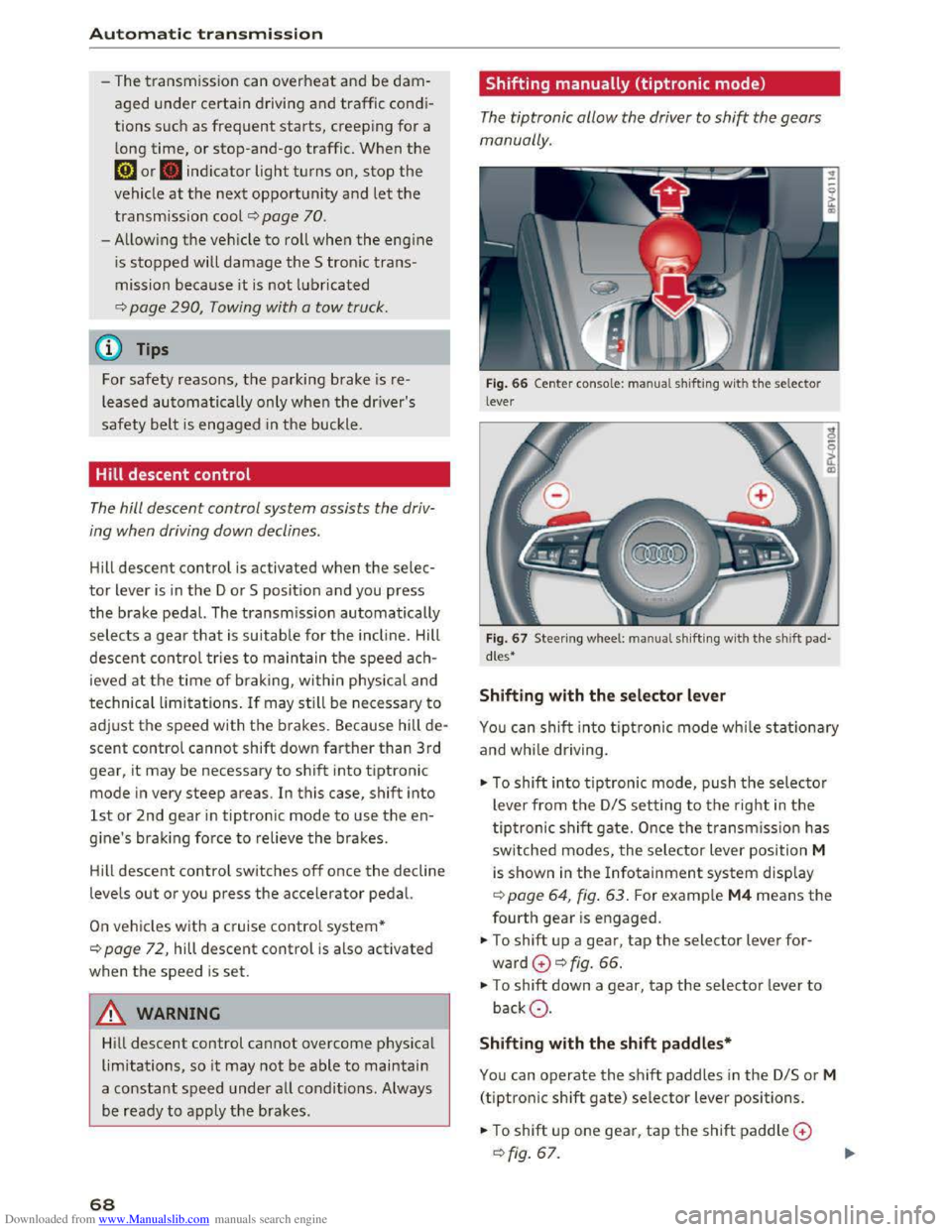
Fig. 66 Center conso le : ma nua l shifting with the selector
lever
Fig.
67 Steer ing whee l: ma nual shifting with the shift pad
dles•
Shifting with the selector lever
You can shift into tiptronic mode while stationary
and while dri ving.
""To shift into tiptronic mode, push the selector
lever from
the D/S setting to the right in the
tiptronic shift gate. Once the transmission has
switched modes, the selector lever position M
is shown in the Infotainment system display
r::!;>poge 64, fig. 63. For example M4 means the
fourth gear is engaged.
""To shift up a gear, tap the selector lever for
ward G ¢fig. 66.
""To shift down a gear, tap the selector lever to
backQ.
Shifting with the shift paddles*
You can operate the shift paddles in the D/S or M
(tiptronic shift gate) selector lever positions.
""To shift up one gear, tap the shift paddle G
r::!;> fig. 67.
Page 71 of 322
Downloaded from www.Manualslib.com manuals search engine ..... N
G'. CX)
.... ID IJ' .... ID ....
.,. To shift down one gear, tap the shift paddle Q.
If the shift paddles are tapped while in the D/S
selector lever position, automatic mode switches
off briefly. To switch from manually shifting back
to automatic shifting immediately, tap the shift
paddle 0 Q fig. 67 for 1 second.
To keep shifting using the shift paddles, move
the selector lever to the right out of the D/S posi
tion into
the tiptronic shift gate.
The transmission automatically shifts up or down
before critical
engine speed is reached.
The
transmission only allows manual shifting
when
the engine speed is within the permitted
rang e.
(D Tips
-If you shift to the next lowest gear, the
transmission will only shift if the engine will
not be over-rewed.
- With kick-down, the transmission shifts to a
lower
gear, depending on vehicle speed and
engine speed.
-tiptronic does not work if the transmission
is running in emergency mode.
Kick-down
Kick-down enables maximum acceleration.
When you press the accelerator pedal down be
yond
the resistance point, the automatic trans
mission downshifts into a lower gear, depending
on vehicle speed and engine RPM. It shifts up in
to the next higher gear once the max imum speci
fied
engine RPM is reached.
A WARNING
Please note that the wheels could spin on
s
lick or slippery roads when kick-down is ac
tive.
ll The ESC light turns on continuously and the message Sta·
bilization control (ESC): sport. Warning! Reduced stabil
ity appears temporarily to indicate in the Infotainment
system
that the syste m was deactivate d.
Automatic transmission
Launch Control-Program
The Launch Control Program enables maximum
acceleration.
Requirement: the engine must be at operating
temperature and the steering wheel must not be
turned.
... With the engine running, press the l.eoFFI but
ton briefly one time ll .
.,. Pull the selector lever back out of the D/S posi
tion briefly to select the S pos ition, or press it
toward the right into the tiptronic position or
select the Dynamic driving mode in drive se
lect* Q page 79.
.,. Press the brake pedal firmly with your left foot
and hold it all the way down for at least 1 sec
ond .
... At the same time, press the gas pedal all the
way down with your right foot until the engine
reaches and stays at a high RPM level.
.,. Remove your left foot from the brake.
A WARNING
-Always adapt your driving to the traffic flow.
-
Only use Launch Control when road and traf-
fic conditions allow it and other drivers will
not be endangered or impacted by your driv
ing and the vehicle's acceleration.
-
Please note that the drive wheels can spin
and the vehicle can break away when sport
mode is sw itched on, especially when the
road is slippery.
-
Once the vehicle has started moving, press
the l.t'l OFFI button briefly to turn the sport
mode off.
(D Tips
- The transmission temperature may increase
s ignificantly
after using the launch control
program. If that happens, the program may
not be available for a few minutes. It w ill be
available again after a cool-down period. "'
69
Page 73 of 322
Downloaded from www.Manualslib.com manuals search engine ..... N
G: CX)
.....
"' U"I
.....
"' .....
Selector lever emergency release
If the vehicle's power supply fails, the selector
lever can
be released in an emergency.
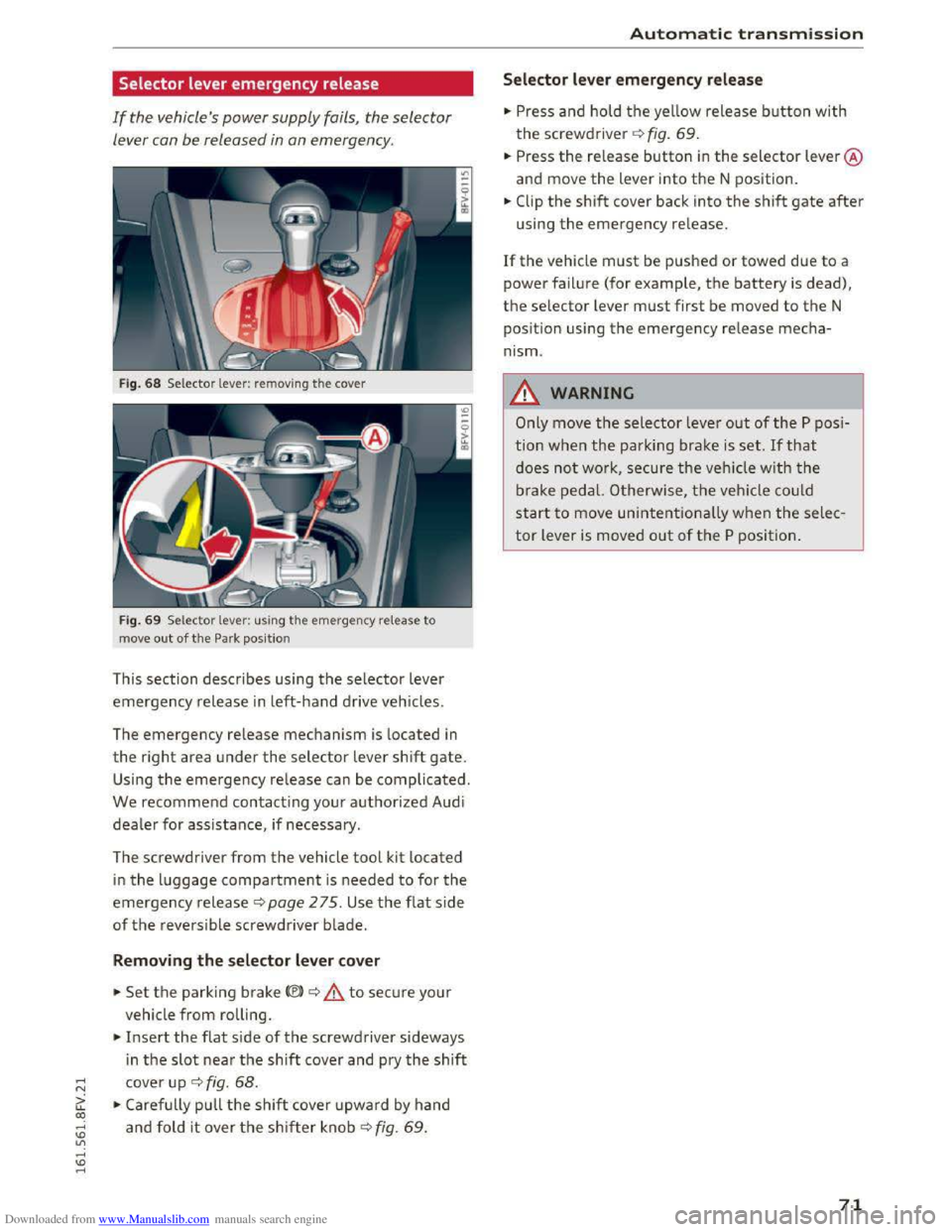
Fig. 68 Selector lever: removing the cover
Fig. 69 Selector lever: us ing the emergency release to
move
out of the Park position
This section describes using the selector lever
emergency release in left-hand drive vehicles.
The
emergency release mechanism is located in
the right area under the selector lever shift gate.
Using the emergency release can be complicated.
We recommend contacting your authorized Audi
dealer for assistance, if necessary.
The screwdriver
from the vehicle tool kit located
in the luggage compartment is needed to for the
emergency release c:> page 2 75. Use the flat side
of the reversible screwdriver blade.
Removing the selector lever cover
.. Set the parking brake<®> c:> A to secure your
vehicle
from rolling .
.. Insert the flat side of the screwdriver sideways
i n
the slot near the shift cover and pry the shift
cover up c:> fig. 68 .
.. Carefully pull the shift cover upward by hand
and fold it over the shifter knob c:> fig. 69 .
Automatic transmission
Selector lever emergency release
.. Press and hold the yellow release button with
the screwdriver c:> fig. 69.
.. Press the re lease button in the selector lever @
and move
the lever into the N position .
.. Clip the shift cover back into the shift gate after
using the emergency release.
If the vehicle must be pushed or towed due to a
power failure (for example, the battery is dead),
the selector lever must first be moved to the N
pos ition using
the emergency release mecha
nism.
_&WARNING
Only move the selector lever out of the P posi
tion
when the parking brake is set. If that
does not work, secure the veh icle w ith the
brake pedal. Otherwise,
the vehicle could
start to move unintentionally when the selec
tor lever is moved out of the P position.
71
Page 79 of 322
Downloaded from www.Manualslib.com manuals search engine ..... N
G: CX)
.....
"' U"I
.....
"' .....
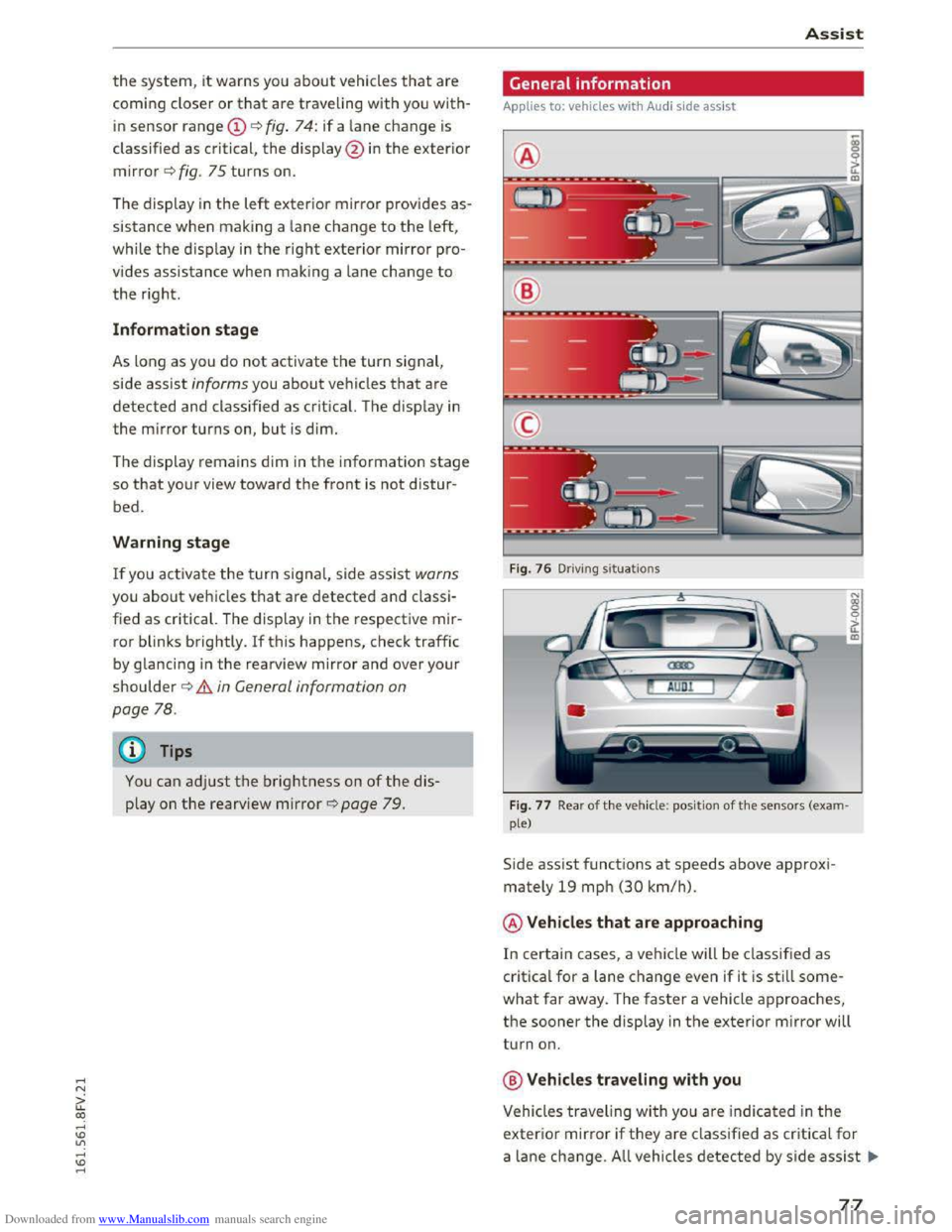
the system, it warns you about vehicles that are
coming closer or
that are traveling with you with
in sensor range(!) c::> fig. 74: if a lane change is
classified as critical, the display @ in the exterior
mirror c::>fig. 75 turns on.
General information
Applies to: veh icles wit h Aud i s ide assi st
®
Assist
The display in the left exterior mirror provides as
sistance when making a lane change to the left,
while the disp lay in the right exterior mirror pro
vides assistance when making a lane change
to
the right. @
Information stage
As long as you do not activate the turn signal,
side assist
informs you about vehicles that are
detected and class ified
as critical. The display in
the mirror turns on, but is dim.
The display remains
dim in the information stage
so that your view toward the front is not distur
bed.
Warning stage
If you activate the turn signal, side assist warns
you about vehicles
that are detected and classi
fied
as critical. The display in the respective mir
ror blinks brightly. If this happens, check traffic
by glancing in the rearview mirror and over your
shoulder
c::> .& in General information on
page 78.
@ Tips
You can adjust the brightness on of the dis
play on
the rearview mirror r::;, page 79.
Fig. 76 Driv ing s ituations
Fig.
77 Rear of t h e vehicl e: positio n of the sensors (exam
ple)
Side assist functions at speeds above approxi
mately 19 mph
(30 km/h).
@Vehicles that are approaching
In certain cases, a vehicle will be classified as
critical for a lane change even if it is still some
what far away. The faster a vehicle approaches,
the sooner the display in the exterior mirror will
turn on.
@Vehicles traveling with you
Vehicles traveling with you are indicated in the
exterior mirror if they are classified as critica l for
a lane change. All vehicles detected by side assist 111>-
77
Page 87 of 322
Downloaded from www.Manualslib.com manuals search engine ..... N
G: CX)
.....
"' U"I
.....
"' .....
use the system for safety reasons. Have it
checked by an authorized Audi dealer or au
thorized Audi Serv ice Facility.
-
Only use the rearview camera to assist you if
it shows a good, clear picture. For example,
the image may be affected by the sun shin
ing into
the lens, dirt on the lens or ifthere
is a defect.
-Use the rearview camera only ifthe luggage
compartment lid is completely closed. Make
sure any objects you may have mounted on
the luggage compartment lid do not block
the rearview camer a.
- T
he camera lens enlarges and distorts the
field of vi sion. The object appears both al
tered and inaccurate on the screen.
-In certain situations, people or objects in
the display appear close r or further away :
- For objects
that do not touch the ground,
such as the bumper of a parked vehicle, a
trailer hitch or the rear of a truck. Do not
use the help lines in this case.
-
If driven from a level surface onto an in
cline, or a downward slope.
-
If driven toward protrudi ng objects.
-If the vehicle is carrying too much load in
the rear.
CD Note
- Always re ad and follow the applicable warn
ings¢(!) in General information on
page82.
-The orange colo red orientation lines in the
Infotainment display show the vehicle path
depending on the steering wheel angle. The
front of the vehicle front swings out more
than the rear of the vehicle. Maintain plenty
of distance so that your outside mirror or a
corner of your vehicle does not collide with
any
obstacles.
Switching on/off
App lies to: vehi cles with rearv iew camera
Switching on
•Shift into reverse , or
Parking systems
•Press the P'#! button in the cen ter conso le
~page 83, fig . 81 . A short confirmation tone
sounds and the LE D in the button turns on.
Switching off
•Drive faster than 6 mph (10 km/h), o r
• Press the P'#! button, or
• switch the ign it ion off.
(!} Tips
- The visua l display in the left part of the dis
play
shoul d he lp you detect the critical vehi
cle areas.
-You can change the volume and display for
the signals ¢ page 86.
Cross parking
Applies to: veh icles wit h rearv iew camera
This view may be used when parking in a garage
or
in a parking space.
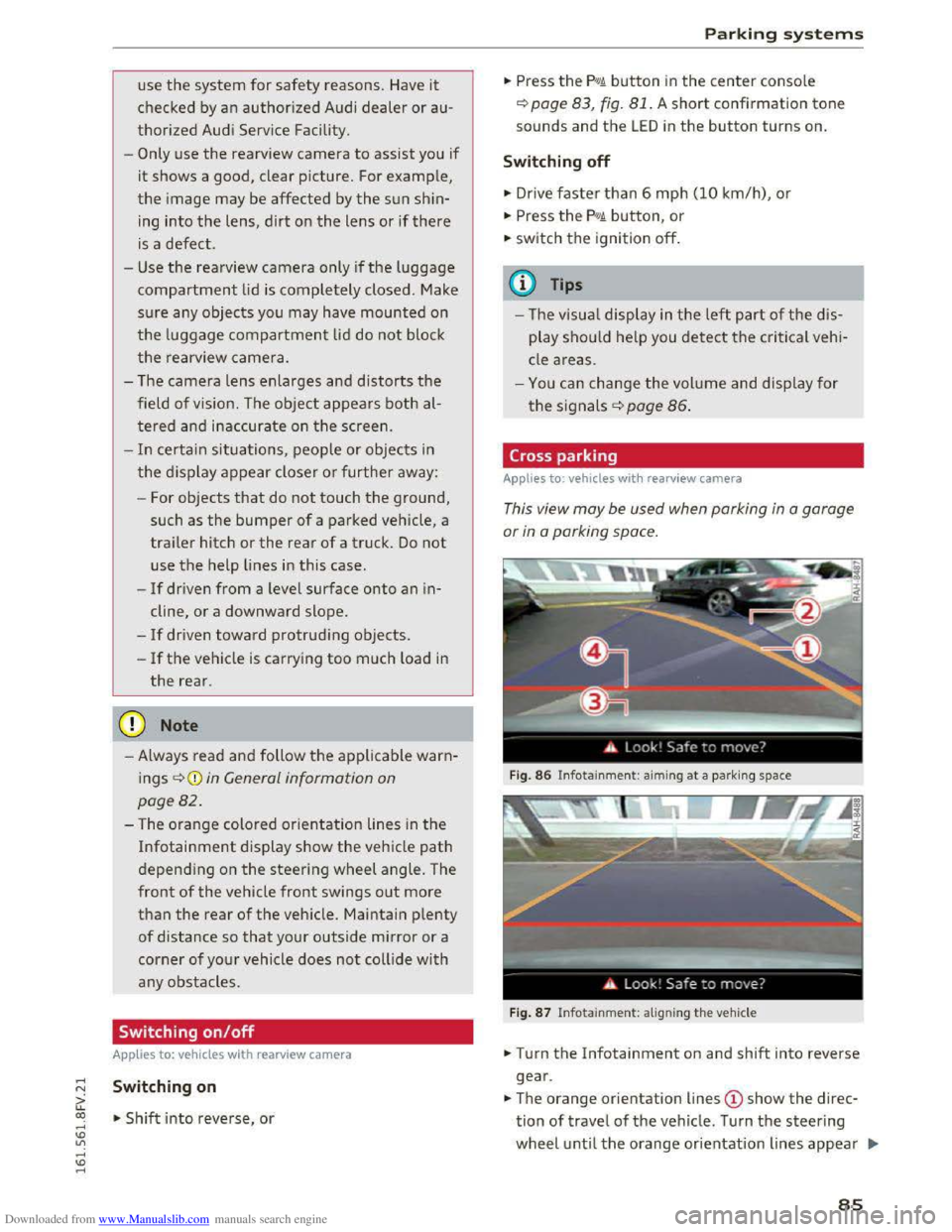
Fig. 86 Infotainme nt: aiming at a par king space
Fig. 87 Infotainme nt: al igning the vehicle
• Turn the Infotainment on and shift into reverse
gear .
•The orange orientation lines @show the direc
tion of travel of the vehicle. Turn the steering
wheel until the orange or ientation lines appear .,..
85
Page 92 of 322
Downloaded from www.Manualslib.com manuals search engine Intelligent Technology
-Only apply the brakes for the purpose of
cleaning the brake system when road and
traffic conditions permit. You must not en
danger other road users. This increases the
risk of an accident.
-
On steep slopes, reduce the speed and se
lect a lower gear or lower selector lever po
sition . Drive
as little as possible while press
ing the brake pedal and avoid putting your
left foot on the brake pedal while driving.
This could
cause the brakes to overheat and
impair the efficiency of the brakes.
-
Do not let the brakes "grind" by always
keeping
your foot on the brake pedal. This
can
cause the brakes to over heat, increase
wear and increase brak ing distance u nneces
sari ly.
-
Certa in weather and operating cond it io ns
such as driving through water, driving in
heavy rain or driving after washing your ve
hicle
can impair the effectiveness of the
brakes. In the winter, ice may build up on
the brake pads, rotors and drums. Check
these components by braking carefully. Ap
plying
the brakes carefully several times
dries the brakes and removes ice build-up.
- The efficiency
of the brakes can also be im
paired by driving
for long stretches on roads
covered with salt without using the brakes.
You can remove salt deposits from the
brake rotors and pads by carefully applying
the brakes several times.
-If the front spoiler is damaged or you install
another spoiler, make sure the front wheel
brakes are ventilated properly. Otherwise,
the brake system could overheat, wh ic h re
duces
thei r effectiveness.
- Failure
of a brake circuit impairs braking
performance, which increases braking dis
tance.
Avoid driving the vehicle and have it
towed it to the nearest authorized Audi
dealer or authorized Audi Service Facility.
- Never
let the vehicle roll while the engine is
stopped because this increases the risk of an
accident.
-
If the brake booster is not working, you will
have
to press much harder on the brake
90
pedal to compensate for the lack of the
booster.
@ Note
-Never let the brakes "rub" by pressing the
pedal lightly when braking is not really nec
essary. This
causes the brakes to overheat
and increases braking distance and causes
wear.
- Before driving a long
distance on a steep
slope, decrease your speed and select a low
er driving gear. This makes use of the en
gine braking effect and relieves the brakes.
If you need to brake additionally, brake in
interva ls and not continuously.
(D Tips
-Ifthe brake booster is not work ing, you
must press the brake pedal w ith much more
force than normal.
-
If you retrofit your vehicle with a front spoil
er wheel covers or similar items, make sure '
that the air flow to the front wheels is not
interrupted. Otherwise the brake system
can become too hot.
Electromechanical
steering
The electromechanical steering supports the
driver's steering movements.
Power steering adapts electronically based on
the vehicle speed.
Indicator lights and messages
• Steering: malfunction! Please stop vehicle
If this indicator light turns on and stays on and
this message appears, the power steering may
have failed.
Stop the vehicle in a safe location as soon as pos
sible.
Do not continue driving. See an authorized
Audi dealer or authorized Audi Service Facility for
assistance.
i:t-D Steering: malfunction! You may continue
driving