tow AUDI TT COUPE 2016 Owner's Manual
[x] Cancel search | Manufacturer: AUDI, Model Year: 2016, Model line: TT COUPE, Model: AUDI TT COUPE 2016Pages: 322, PDF Size: 52.86 MB
Page 97 of 322
Downloaded from www.Manualslib.com manuals search engine Multi Media Interface
Traffic safety
information
Audi recommends only performing certain Info
tainment system functions, such as entering a
destination, when the vehicle is stationary. Al
ways be prepared to stop operating the Infotain
ment system in the interest of your safety a nd
the safety o f other road users.
A WARNING
Only use the Infotainment sy ste m whe n traf
fic cond itions pe rmi t an d alw ay s i n a way that
allow s you to m aintain complete control over
your ve hicl e.
Introduction
The Multi Media Interface, or MMI for short,
combines various
systems for communication,
navigation " and entertainment in your Audi. You
can operate the MMI using the MMI control pan
el, the multifunction steering wheel or the voice
recognition
system".
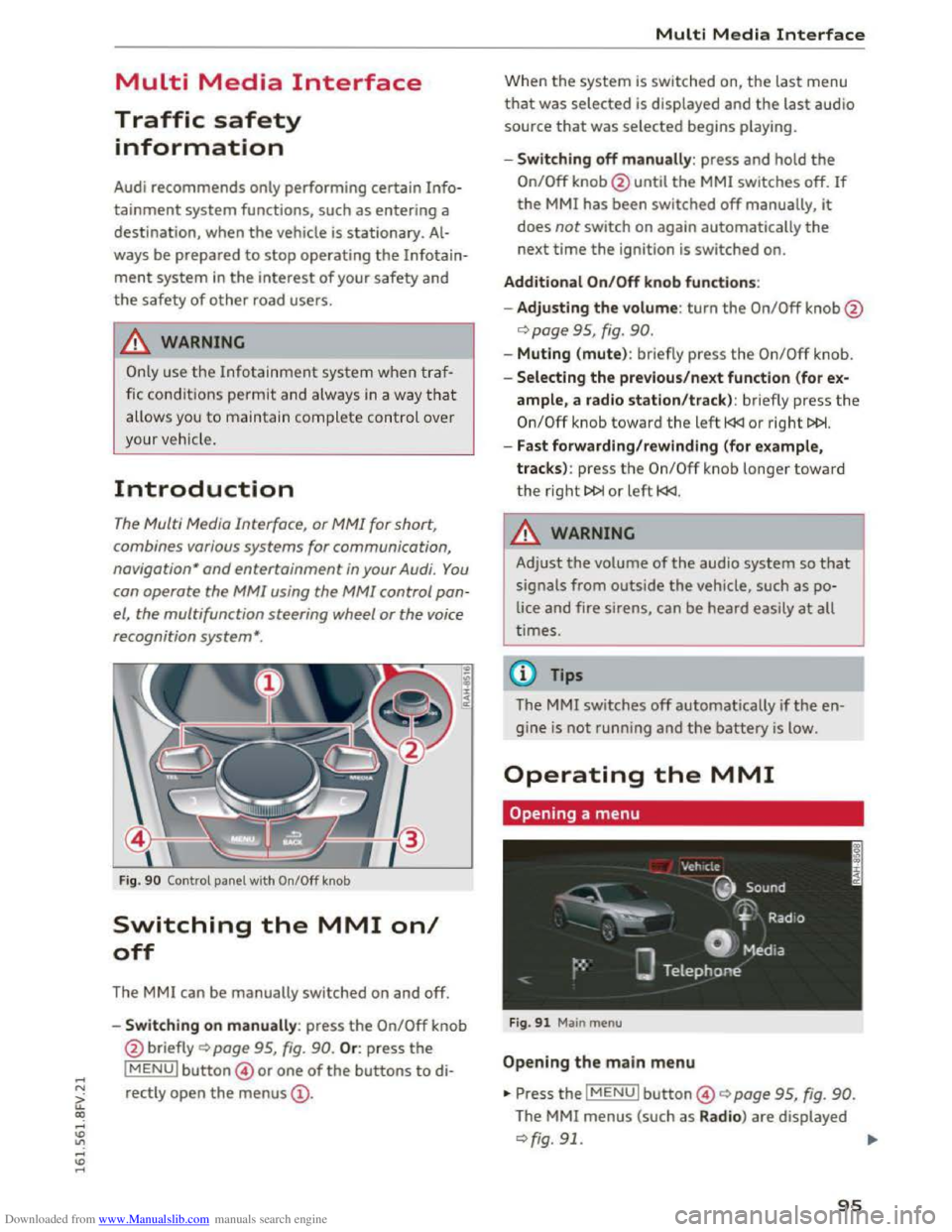
Fig. 90 Control panel with On/Off knob
Switching the MMI on/
off
The MMI can be manually switched on and off.
..
i
-Switching on manu ally: press the On/Off knob
@ briefly
Qpage 95, fig. 90. Or: press the
lMENUI button© or one of the buttons to di
rectly
open the menus@ .
Multi Media Interface
Wh en th e system is switched on, the last menu
that was selected is displayed and the last audio
source that was selected begins play ing.
-Swit ch ing off manually : press and hold the
On/Off knob@until the MMI switches off. If
the MMI has been switched off manually, it
does not switch on again automatically the
next time the ignition is switched on.
Additional On/Off knob functions:
- Adjusting the volum e:
turn the On/Off knob@
¢page 95, fig. 90.
-Muting (mute): br iefly press the On/Off knob.
-Selecting the previous/next function (for ex-
ample, a radio station/track ): br iefly press the
On/Off knob toward th e left l
-Fast forwarding/rewinding (for example,
tracks) :
press th e On/Off kno b longe r toward
the right t>l>I or left l
!-=-
Adjust the volume of th e a udio system so that
signals from outside the vehicle, such as po
lice
and fire sirens, can be heard easily at all
t imes.
Tips
The MMI switches off automatically if th e e n
gine
is not running and the battery is low.
Operating the MMI
Opening a menu
Fig . 91 Main menu
Open ing the main menu
•Press the IMENUI button© ~page 95, fig. 90.
The MMI menus (such as Radio ) are displayed
¢fig. 91. ....
95
Page 101 of 322
Downloaded from www.Manualslib.com manuals search engine ..... N
G: CX)
.....
"' U"I
.....
"' .....
Opening/closing a selection menu
Push the control knob toward t he left to open the
selection menu c::> page 96.
Press the IBACKI b utton@ c::> page 95, fig. 90 to
retur n to the fun ction one level up. Or : pus h the
con trol
kno b to the rig ht to close the sele ct io n
menu.
Opening/closing the options menu
Push the control knob to the right to open the
options menu r::;;;page 97.
Press
the IBACKI button@ r::;;; page 95, fig. 90 to
retu rn to the function one level up. Or : push the
control knob t o the left to close the options
menu.
Displaying the input field*
Push the control knob up to reach th e beginning
of a list in the central area/inpu t field.
Switching to speller input*
W hen th e inp ut fie ld is already open, switch di
rect ly
to the speller in the input fie ld by pushing
the control knob up again ¢page 99.
On the map
Requirement: a map must be disp laye d
r::;;;page 139, fig. 120.
Letter and number speller
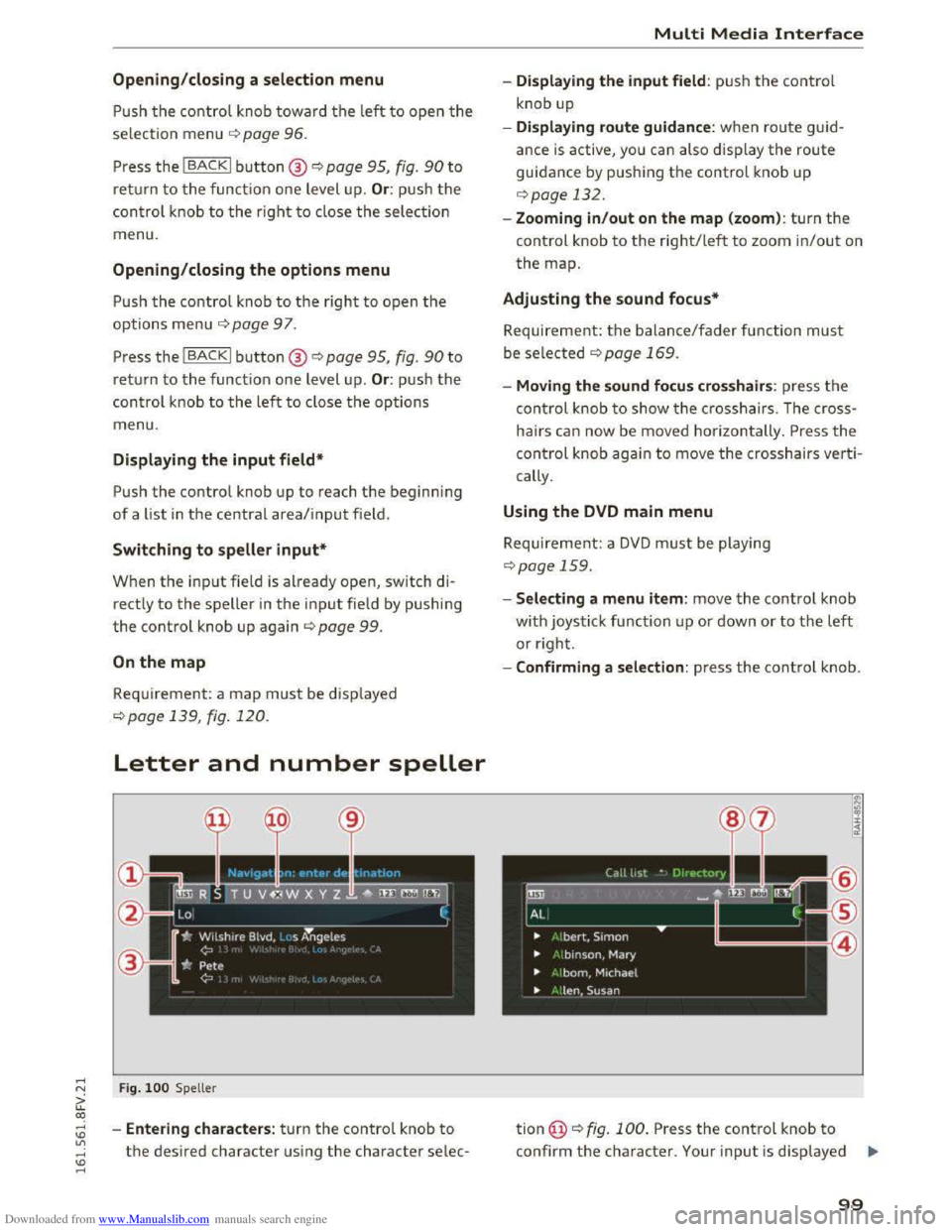
Fig. 1 0 0 Spell er
-Entering ch aracters: tu rn the control knob to
the desired character using the character selec -
Multi Media Interface
-Displaying the input field : push the contro l
knob up
- Displaying
route guidance: w hen route guid
ance is active , yo u can also displ ay the route
guidance by pushing the control knob up
c::> page 132.
-
Zooming in/out on the map (zoom): turn the
control knob to the right/lef t to zoom in/out on
the map.
Adjusting the sound focus*
Requireme nt: the balance/fader function must
be
selected c::> page 169.
- Moving the sound focus crosshairs: press th e
co
ntrol knob t o sh ow the crossh airs. The cro ss
h air s can now
be move d horizon tally . Press the
control knob again to move the crosshairs verti
cally .
Using the DVD main menu
Requireme nt: a DVD must be playing
c::>page 159.
-Selecting a menu item: move the control knob
w i
th joystick function up or down or to the left
or right.
- Confirming a
selection: press the contro l knob .
tion@r;:;;; fig. 100. Press the control knob to
confirm th e cha racter. Your input is disp layed ..,.
99
Page 105 of 322
Downloaded from www.Manualslib.com manuals search engine • Telephone
• Audi connect
• Navigation
• Directory
• Radio
•Media
· Sound
•
Help
• Help Speech dialog system
• Help Telephone
• Help Audi connect
• Help Navigation
• Help Map
• Help Radio
·Help Media
TEbEP:HONE
• Enter number
•Delete number I correc tion
• Directory
• Call (XY)
·business I private I land line I mobile
NAVIG:ATI0N
• N avigate to CXYl
·Business address I Private address
• Start I cancel route guidance
· Directory
• Last destinations
• N avigation favorites
· Drive
home
• Enter address
• Enter country I town I street I state
• Exclude routt I Exclude route for (XY) km Im
·Map
• Day map I Night map
Voice recognition system
• Favorites
• Call (XY)
• Enter number
• Redial
• Read new text message
• Navigate to (XY)
• Enter address/destination
• Onhne destinations
• Cancel route guidance
·Map
• Line (XY)
• Next page I previous page
• Cancel
•
No. l meant ()(Y)
• Correction
• Call
lost
• Redial
• Call mailbox
• Enter PIN I delete PIN
•
Telephone favorites
• Exclude next route section I Exclude
nex t
street
• Route list
• Calculate alternative routes
· Online destinations
• Special destination
• 20 driving position map/ 20 north position map/ 30 map I Destination map I Overview map
• Audi connect
• Travel information I Parking Information
•
Fuel prices
·Weather
RADIO
• Radio presets
• Last stations
•FM
• FM I AM I SIRIUS XM
• Station (XY) I Frequency (XY)
• T raffic announcement on I off
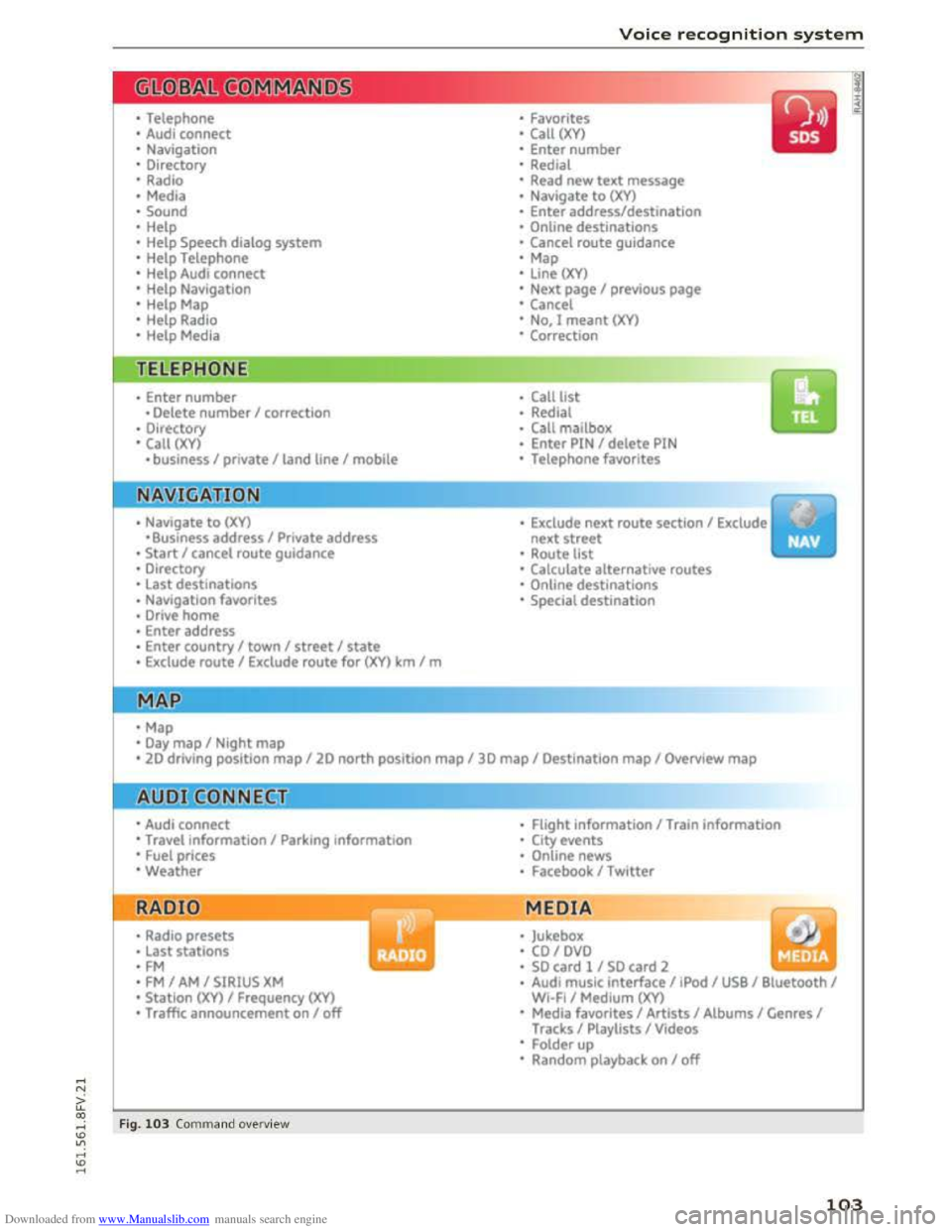
Fig. 103 Comm and ove rvie w
• Flight Information I Train information
• City events
• Online news
• Facebook I Twl tter
MEDIA
y • Jukebox
• CO I DVD
• SO card l / SD card 2
· Audi music interface I !Pod I USB I Bluetooth I
WI-Fi I Medium (XV)
• Media favorites I Artists I Albums I Genres I
Tracks I Playlists I Videos
• Folder up
· Random playback on I off
103
Page 152 of 322
Downloaded from www.Manualslib.com manuals search engine Media
Media drives
SD card reader
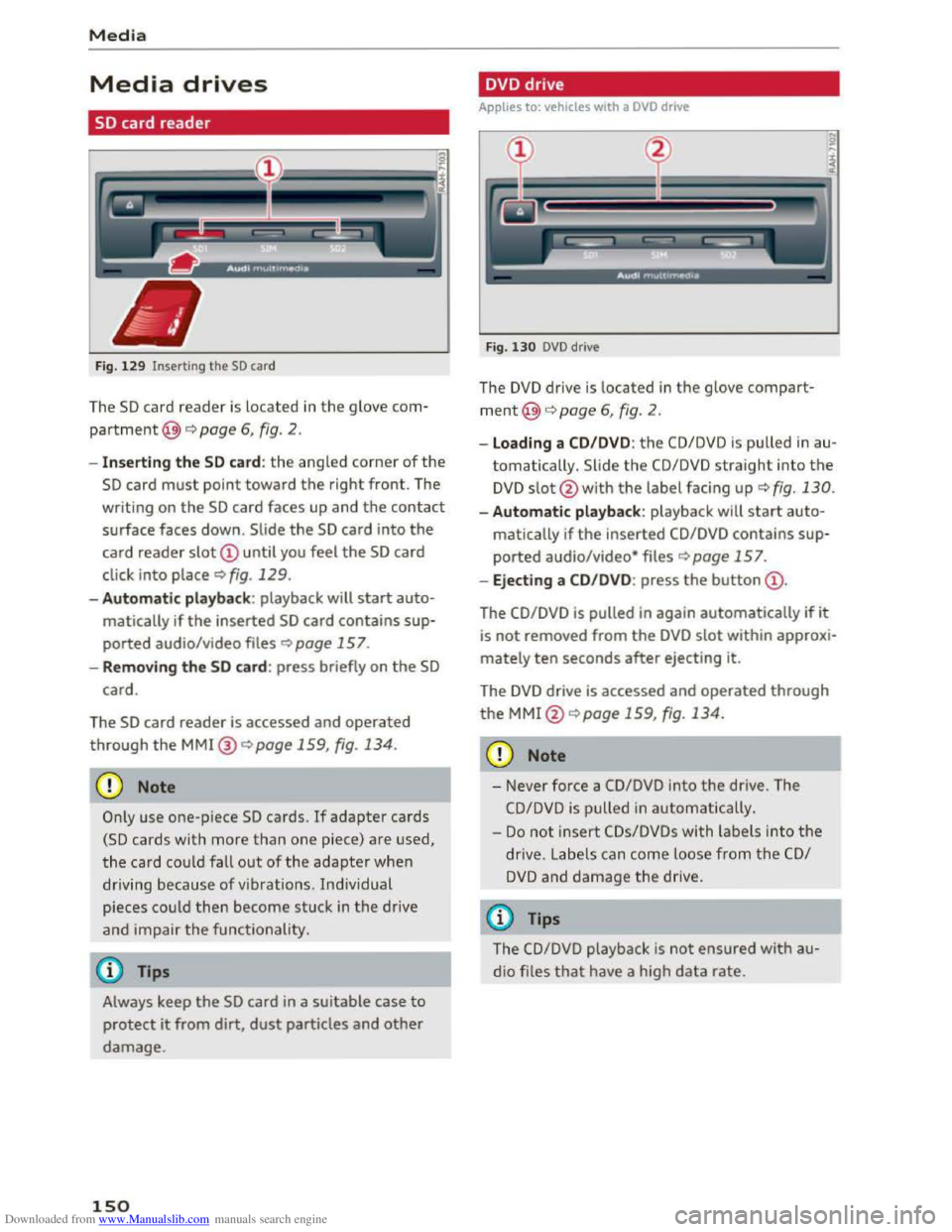
Fig. 12 9 Inserting the SD card
The SD card reader is located in the glove com
partment@) c:> page 6, fig. 2.
- Inserting the SD card : the angled corner of the
SD card must point toward the right front. The
writing on
the SD card faces up and the contact
surface faces down. Slide
the SD card into the
card reader
slot
click into place c:> fig. 129.
-Autom atic pla yba ck : playback will start auto
matically if
the inserted SD card contains sup
ported audio/video files
c:> page 15 7.
- Remo ving the SD card: press briefly on the SD
card.
The
SD card reader is accessed and operated
through
the MMI@ <::>page 159, fig. 134.
CD Note
Only use one-p iece SD cards. If adapter cards
(SD cards with more than one piece) are used,
the card
coul d fall out of the adapter when
driving because of vibrations . Ind iv idual
pieces
coul d then become stuck in the drive
and impair
the functionality.
Always keep the SD card in a suitable case to
protect it from dirt,
dust particles and other
damage.
150
DVD drive
Applies to: vehicles with a DVD drive
F
ig. 130 DVD drive
The DVD drive is located in the glove compart
ment@)<::> page 6, fig. 2.
-Loading a CD/DVD: the CD/DVD is pulled in au
tomatically. Slide the
CD/DVD straight into the
DVD slot@with the label facing up c:>fig. 130.
-Automatic playback: playback will start auto-
matically if the inserted
CD/DVD contains sup
ported audio/video* files
c:>page 157.
-Eject ing a CD/D V D : press the button
The CD/DVD is pulled in again automatically if it
is not removed from
the DVD slot within approxi
mately ten seconds after ejecting it.
The
DVD drive is accessed and operated through
the MMl@c:> page 159, fig. 134.
CD Note
-Never force a CD/DVD into the drive. The
CD/DVD is pulled in automatically.
-
Do not i nsert CDs/DVDs with labels into the
drive. Labe ls can come loose from the CD/
DVD and damage the drive.
(0 Tips
The CD/DVD playback is not ensured with au
dio files
that have a high data rate.
Page 175 of 322
Downloaded from www.Manualslib.com manuals search engine ...... N
G'. CX)
..... ID IJ' ..... ID .....
.&. WARNING
Drivers who are unbelted, out of position or
too close to the airbag can be seriously in
jured by an airbag as it unfolds. To help re
duce the risk of serious personal injury:
- Always
adjust the driver's seat and the
steering wheel so that there are at least
10 in (25 cm) between your breastbone and
the steering wheel.
-Always adjust the driver's seat and the
steering wheel so that there are at least 4 in
(10 cm) between the knees and the lower
part of the instrument panel.
- Always hold
the steering wheel on the out
side of the steering wheel rim with your
hands at the 9 o'clock and 3 o 'clock posi
tions to help reduce the risk of personal in
jury if the driver's airbag inflates.
- Never hold
the steering wheel at the
12 o'clock position or with your hands at
other positions inside the steering wheel
rim or on the steering wheel hub. Holding
the steering wheel the wrong way can cause
serious injuries to the hands, arms and head
if
the driver's airbag inflates
-
Pointing the steering wheel toward your
face
decreases the ability of the supplemen
tal driver's airbag to protect you in a colli
sion.
- Always
sit in an upright position and never
lean
against or place any part of your body
too close to the area where the airbags are
located.
- Before driving, always
adjust the front seats
properly and make sure that all passengers
are properly restrained.
- Never
adjust the seats while the vehicle is
moving. Your seat may move unexpectedly
and you could lose control of the vehicle .
- Never drive with
the backrest reclined or
tilted far back! The farther the backrests are
tilted back, the greater the risk of injury due
to incorrect positioning of the safety belt
and improper seating position .
- Children
must always ride in child seats
Q page 212. Special precautions apply
-
Safe driving
when installing a child seat on the front
passenger seat Q page 188.
Proper seating position for the front
passenger
The proper front passenger seating position is
important for safe, relaxed driving.
For your own safety and to reduce the risk of in
jury in the event of an accident, we recommend
that you adjust the seat for the front passenger
to the following position:
... Adjust the angle of the seatback so that it is in
an upright position and your back comes in full
contact with it whenever the vehicle is moving.
... Keep both feet flat on the floor in front of the
front passenger seat.
"' Fasten and wear safety belts correctly
Qpage 184.
For detailed information on how to adjust the
front passenger's seat, see Q page 44.
A WARNING
personal injury:
-
Passengers must always sit in an upright po
sition and never lean against or place any
part of their body too close to the area
where the airbags are located.
-
Passengers who are unbelted, out of posi
tion or too close to the airbag can be seri
ously injured by an airbag as it unfolds with
great force in the blink of an eye.
- Always
make sure that there are at least
10 in (25 cm) between the front passen
ger's breastbone and the instrument panel.
- Always
make sure that there are at least 4 in
(10 cm) between the front passenger's
knees and the lower part of the instrument
panel.
- Each
passenger must always sit on a seat of
their own and properly fasten and wear the
safety belt belonging to that seat. ..,.
173
Page 178 of 322
Downloaded from www.Manualslib.com manuals search engine Safe driving
mats will prevent them from sliding into posi
tions that could interfere with the pedals or im
pair
safe operation of your vehicle in other ways.
&. WARNING
--9
Pedals that cannot move freely can result in a
loss
of vehicle control and increase the risk of
serious personal injury.
- Always make
sure that floor mats are prop
erly
secured.
- Never place or install floor mats or other
floor coverings in the vehicle that cannot be
properly
secured in place to prevent them
from slipping and interfering with the ped
als or the ability to control the vehicle.
- Never place or insta ll floor
mats or other
floor coverings on top of already installed
floor
mats. Additional floor mats and other
coverings will reduce the size of the pedal
area and interfere with the pedals.
- Always properly
reinstall and secure floor
mats that have been taken out for cleaning.
-Always make sure that objects cannot fall
into
the driver footwell while the vehicle is
moving. Objects can become trapped under
the brake pedal and accelerator pedal caus
ing a loss of vehicle control.
Stowing Luggage
Loading the luggage compartment
All luggage and other objects must be properly
stowed and secured in the luggage compart
ment.
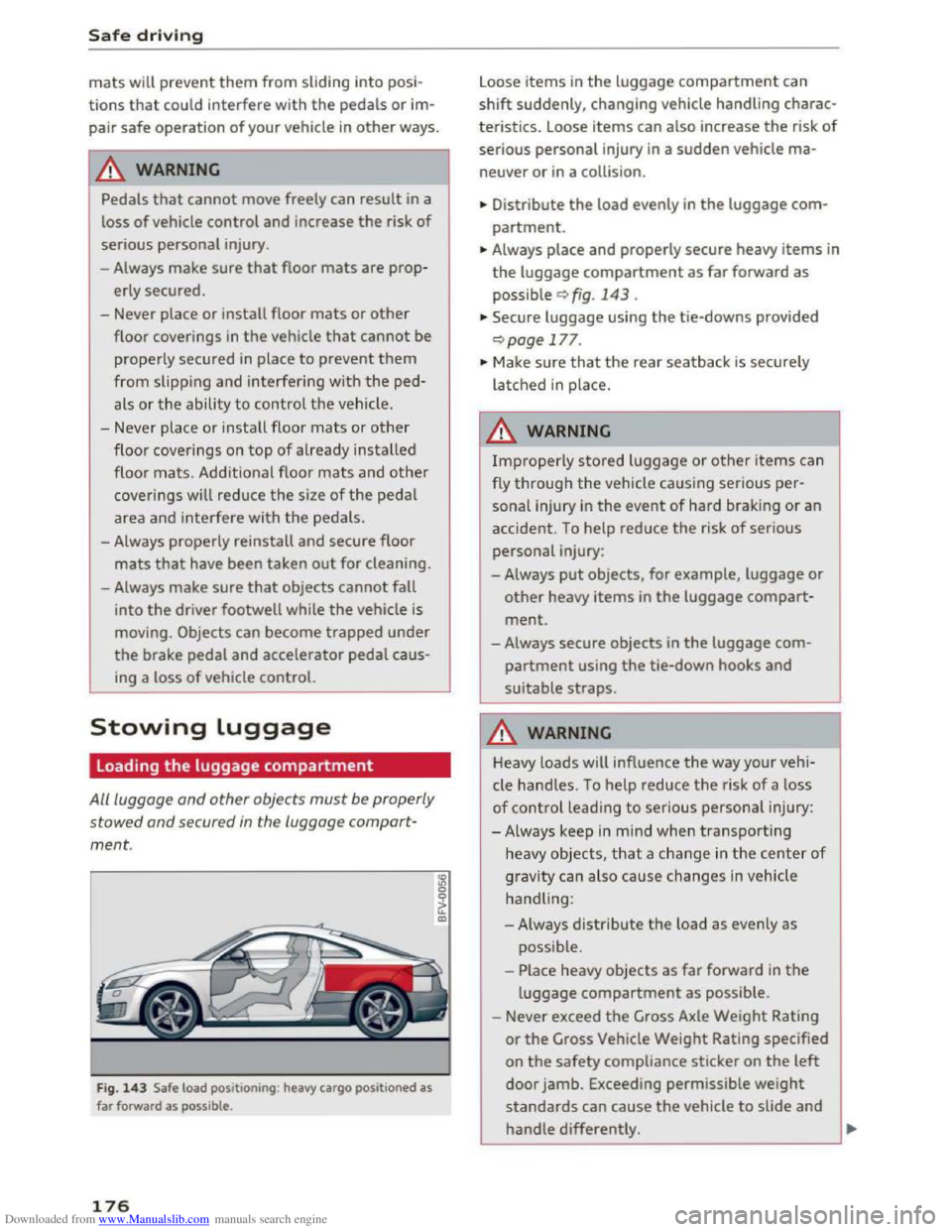
Fig. 143 Safe load posit ioning : heavy cargo positioned as
far forward as possible .
176
"' "' 0 0
it m
Loose items in the luggage compartment can
shift suddenly, changing vehicle handling charac
teristics. Loose
items can also increase the risk of
serious personal injury in a sudden vehicle ma
neuver or in a collision .
• Distribute
the load evenly in the luggage com
partment.
•Always place and properly secure heavy items in
the luggage compartment as far forward as
possible q fig. 143.
•Secure luggage using the tie-downs provided
qpage 177.
•Make sure that the rear seatback is securely
latched in place.
A WARNING
Improperly stored luggage or other items can
fly
through the vehicle causing serious per
sonal injury in the event of hard braking or an
accident. To help reduce the risk of serious
personal injury:
- Always
put objects, for example, luggage or
other heavy items in the luggage compart
ment.
-Always secure objects in the luggage com
partment using the tie-down hooks and
suitable straps.
A WARNING
Heavy loads will influence the way your vehi
cle
handles. To help reduce the risk of a loss
of control leading to serious personal injury:
-Always keep in m ind when transporting
heavy objects,
that a change in the center of
gravity can also cause changes in vehicle
handling:
- Always
distribute the load as evenly as
possible.
- Place heavy
objects as far forward in the
luggage compartment as possible.
- Never exceed
the Gross Axle Weight Rating
or the Gross Vehicle Weight Rating specified
on the safety compliance sticker on the left
door jamb. Exceeding permissible weight
standards can cause the vehicle to slide and
hand le differently. ..,.
Page 188 of 322
Downloaded from www.Manualslib.com manuals search engine Safety belts
Unfastening safety belts
Unbuckle the safety belt with the red release
button only after the vehicle has stopped.
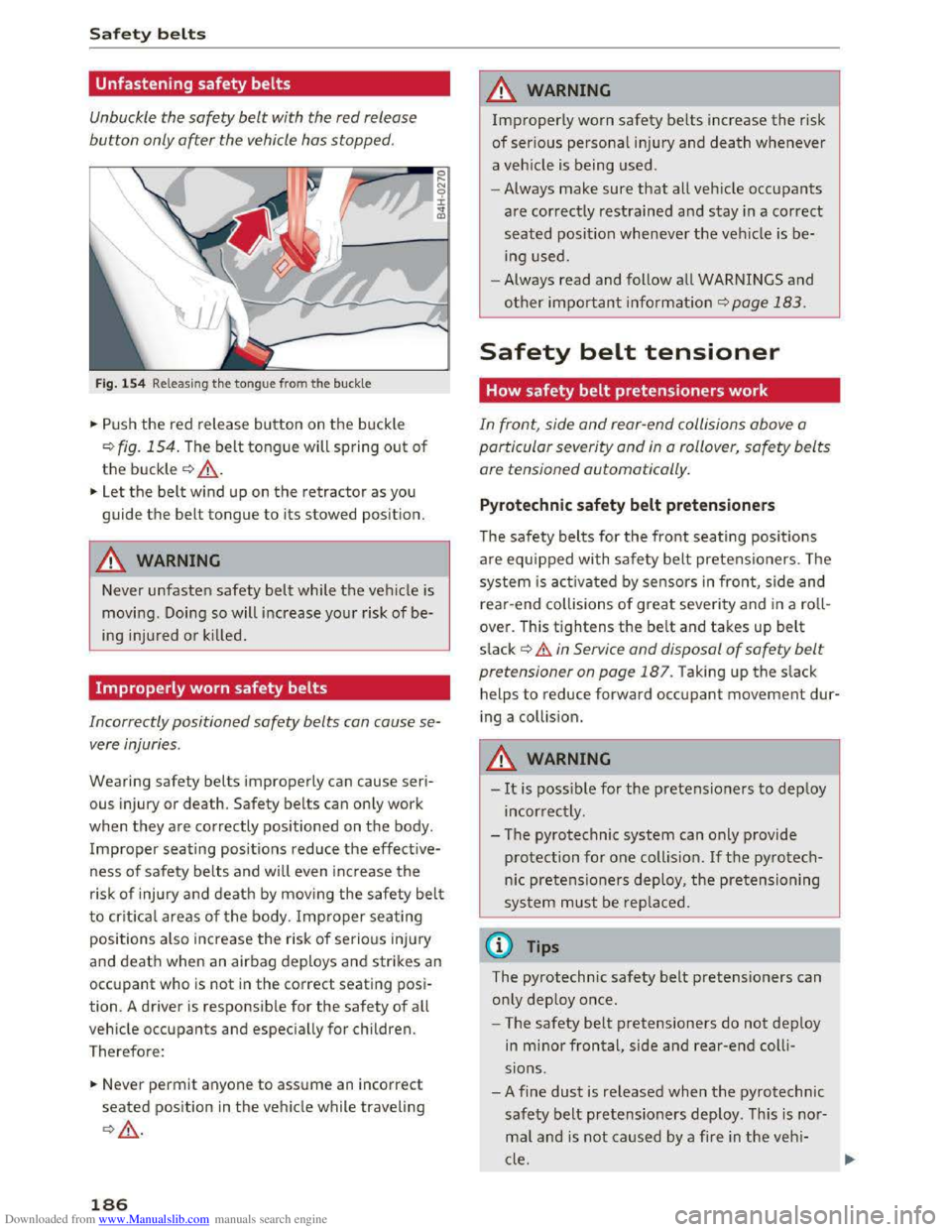
Fig. 154 Releasing the tongue from the buckle
.. Push the red release button on the buckle
Q fig. 154. The belt tongue will spring out of
the buckle Q ,&..
.. Let the belt wind up on the retractor as you
guide
the belt tongue to its stowed position.
A WARNING
Never unfasten safety belt while the vehicle is
moving . Doing so will increase your risk of be
ing injured
or kil led.
Improperly worn safety belts
a
~ 0 ± .. QJ
Incorrectly positioned safety belts can cause se
vere injuries .
Wearing safety belts improperly can cause seri
ous injury or death. Safety belts can only work
when they are correctly positioned on the body.
Improper seating positions reduce the effective
ness of safety belts and wil l even increase the
risk of injury and death by mov ing the safety belt
to crit ica l areas of the body. Improper seating
positions also increase the risk of serious injury
and death when an airbag deploys and strikes an
occupant who is not in the correct seating posi
tion. A driver
is responsible for the safety of all
vehicle
occupants and especially for children.
Therefore:
.. Never permit anyone to assume an incorrect
seated position in the vehicle while traveling
QA .
186
A WARNING
Improperly worn safety belts increase the risk
of serious personal injury and death whenever
a veh icle is being used.
- Always
make sure that all veh icle occupants
are corr ectly restrained and stay in a correct
seated position whenever the vehicle is be
ing
used.
- Always read and follow all WARNINGS and
other important information Q page 183.
Safety belt tensioner
How safety belt pretensioners work
In front, side and rear-end collisions above a
particular severity
and in a rollover, safety belts
are tensioned automatically .
Pyrotechnic safety belt pretensioners
The safety belts for the front seati ng pos it io ns
are equipped with safety belt pretensioners. The
system is acti va ted by sensors in front, side and
r
ear-end collisions of great seve rity and in a roll
over. This
tightens the belt and takes up belt
s lack ~ .& in Service and disposal of safety belt
pretensioner on page 187. Taking up the slack
helps
to reduce forward occupant movement dur
i ng a collis ion.
A WARNING
-It is possi ble for the pretensioners to deploy
incorrect ly .
- The pyrotechnic
system can only provide
protection for one collision. If th e py rotech
nic pretensioners deploy, the pretensioning
sys tem must be replaced.
(!) Tips
The pyrotechnic safety belt pretensioners can
o nl y
deploy once .
- The
safety belt pretensioners do not deploy
in minor frontal, side and rear-end colli
sions .
- A
fine dust is re leased when the pyrotechnic
safety belt pretensioners deploy . This is no r
mal and is not caused by a fire in the veh i
cle.
Page 198 of 322

Downloaded from www.Manualslib.com manuals search engine Airbag system
electronic control unit to regula te deployment
of the front Advanced Airbags.
- The
PASSENGER AIR BAG OFF light comes on
and stays on in the overhead console
¢page 200, fig. 158 and tells you when the
front Advanced Airbag on the passenger side
has
been turned off.
- A
sensor in the safety belt latch for the driver
and for
the front seat passenger that senses
whether that safety belt is latched or not and
transmits this information to the electronic
control unit.
A WARNING
Damage to the front passenger seat can pre
vent the front airbag from working properly.
-
Improper repai r or disassembly of the front
passenger and drive r seat will prevent the
Advanced Airbag System from functioning
properly.
-Repairs to the front passenger seat must be
performed by qualified and properly trained
workshop personnel.
-Never remove the front passenger or driver
seat from the vehicle.
- Never remove
the upholstery from the front
passenger seat.
-Never disassemble or remove parts from the
seat or disconnect wires from it.
- Never carry
sharp objects in your pockets or
put them on the seat. The capacitive pas
senger detection mat in the front p assenger
seat will not function properly if it is punc
tur ed.
- Never carry
things on your lap or carry ob
jects on the front passenger seat. Such ob
jects can influence the capacitance regis
tered by the capacitive passenger detection
system, so that incorrect information is pro
vided to the airbag control unit.
- Never
store items under the front passenger
seat. Parts of the Advanced Airbag System
under the passenger seat could be dam
aged, preventing them and the airbag sys
tem from working properly.
- Never place
seat covers or rep lacement up
holstery that have not been specifically ap
proved by Audi on the front seats.
196
-Seat covers can prevent the Advanced Air
bag System from recognizing child re
straints or occupants on the front passenger
seat and prevent the side airbag in the seat
backrest from deploying properly.
-If a seat heater has been retrofitted or oth
erwise added to the front passenger seat,
never install any child restraint system on
this seat.
-Never use cushions, pill ows , blankets, or
simila r items on the front passenger seat.
The additional laye rs p revent the capacit ive
p a
ssenger detecti on sys tem from accurately
measuring the capacitan ce of the child safe
ty seat and/or the person on the seat and
thus keep the Advanced Airbag System from
working properly.
- Never pl
ace or use any electrica l device
(such as a
laptop, CD player, electronic
games device, power inverter or seat heater
for child seats) on the front passenger seat
if the device is connected to the 12-volt
socket or the cigarette lighter socket. Such
dev i
ces can influence the capac itance regis
tered by the capacitive passenger detection
system, so that incorrect information is pro
vided to the airb ag control unit.
- I f you
must use a child restraint on th e fron t
p a
ssenger seat a nd the child restrain t man
ufacturer's instructions require the use of a
towel,
foam c u shion or something else to
properly position the child restraint, make
certain that the PASSENGER AIR BAG OFF
light comes on and stays on whenever the
child restraint is installed on the front pas
senger seat.
-
If the PASSENGER AIR BAG OFF light does
not come on and stay on, immediately in
stall child restraint in a rea r seating pos ition
and have
the airbag system inspected by
your Audi dea le r.
A WARNING
If the front passenger seat gets wet, dry it im-
mediately.
..,,.
Page 199 of 322
Downloaded from www.Manualslib.com manuals search engine ..... N
G: CX)
.....
"' U"I
.....
"' .....
-If liquid soaks into the front passenger seat,
this can keep the airbag system from work
ing properly
and may, for instance,
deactivate
the passenger frontal airbag . If
this happens, the PASSENGER AIR BAG OFF
light will come on and stay on together with
the airbag indicator light fl in the instru
ment cluster.
-
If liquid is pooled on the seat, but has not
soaked in, this may also keep the airbag sys
tem from working properly and cause the
passenger frontal airbag to be enabled
(turned on), even though there is a properly
installed child
restraint system on the seat.
Wet towels or other wet things on the seat
cushion can have the same effect. If the
front passenger frontal airbag is turned on,
the PASSENGER AIR BAG OFF light light
will go
out.
How the Advanced Airbag System
components work together
The front Advanced Airbag System and the side
airbags supplement the protection offered by the
front three-point safety belts with pretensioners
and load limiters to help reduce the risk of injury
in a wide range of accident and crash situations.
Be sure to read the important information about
safety and heed the WARNINGS in this chapter.
Deployment
of the Advanced Airbag System and
the activation of the safety belt pretensioners de
pend on the deceleration measured by the crash
sensors and registered by the electronic control
unit. Crash severity depends on speed and decel
eration as well as the mass and stiffness of the
vehicle or object involved in the crash.
On the passenger side, regardless of safety belt
use, the front passenger frontal airbag will be
turned off ifthe electrical capacitance measured
by the capacitive passenger detection system on
the front passenger seat is less than the amount
programmed in the electronic control unit. The
front passenger frontal airbag will also be turned
off if the capacitance measured by the system for
the front passenger seat equals that of an infant
of about one year of age in one of the child seats
that was used to certify the Advanced Airbag Sys-
Airbag system
tern under Federal Motor Vehicle Safety Standard
208. The PASSENGER AIR BAG OFF light comes
on and stays on to tell you when the front Ad
vanced Airbag System on
the passenger side has
been turned off c::;, page 200.
A WARNING
f-=
To reduce the risk of injury when an airbag in-
flates, always wear safety belts properly.
-
If you are unrestrained, leaning forward, sit
ting sideways
or out of position in any way,
your risk
of injury is much higher .
-
You will also receive serious injuries and
could even be killed if you are up against the
airbag or too close to it when it inflates -
even with an Advanced Airbag ¢page 188.
More important things to know about front
airbags
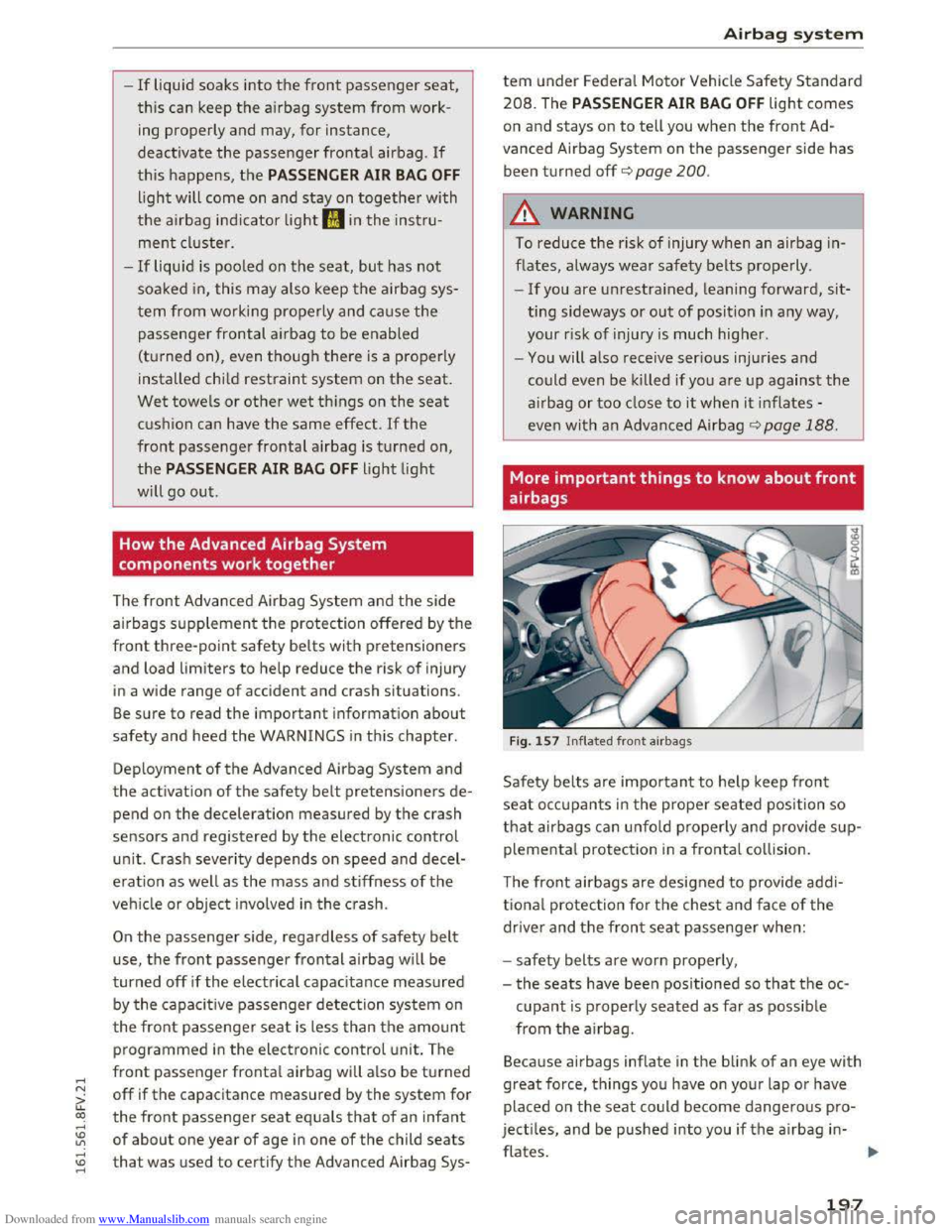
Fig. 157 Inflated front airbags
Safety belts are important to help keep front
seat occupants in the proper seated position so
that airbags can unfold properly and provide sup
plemental protection in a frontal collision.
The
front airbags are designed to provide addi
tional protection for the chest and face of the
driver and the front seat passenger when:
-
safety belts are worn properly,
-
the seats have been positioned so that the oc-
cupant is properly seated as far as possible
from the airbag .
Because
airbags inflate in the blink of an eye with
great force, things you have on your lap or have
placed on
the seat could become dangerous pro
jectiles, and
be pushed into you ifthe airbag in-
flates. .,..
197
Page 203 of 322
Downloaded from www.Manualslib.com manuals search engine .....
the combined capacitance of a typical l year
old
infant and one of the rearward-facing or
forward-facing child restraints listed in Federal
Motor Vehicle
Safety Standard 208 with which
the Advanced Airbag System in your vehicle was
certified.
If the front passenger seat is not occupied, the
front airbag will not deploy, and the PASSENGER
AIR BAG OFF light will stay on. Never install a
rearward -facing child
restraint on the front pas
senger seat, the safest place for a child in any
kind
of child restraint is at one of the seating po
sitions on
the rear seat ~page 189, Child re
straints on the front
seat -some important
things to know
and ~page 212, Child safety.
If the PASSENGER AIR BAG light comes
on ...
If the PASSENGER AIR BAG OFF light comes on
when one of the conditions listed above is met,
be sure to check the light regularly to make cer
tain that the PASSENGER AIR BAG OFF light
stays on continuously whenever the ignition is
on. If the PASSENGER AIR BAG OFF light does
n
ot appea r on and does not stay on all the time,
stop as soo n as it is safe to do so and
- reactivate
the system by turning the ignition
off for more than 4 seconds and then turning it
on again;
- remove and reinstall
the child restraint. Make
sure that the child restraint is properly instal
led and
that the safety belt for the front pas
senger seat has been correctly routed through
the child restrain t as described in th e child re
straint manufacturer's instructions;
- make
sure that the convertible locking retrac
tor on the safety belt for the front passenger
seat has been activated and that the safety belt
has been pulled tight.
-make sure that no electrical device (such as a
laptop,
CD player, electron ic games device,
power inverter
or seat heater for child seats) is
placed or used on the front passenger seat if
the device is connected to the 12-volt socket or
~ the cigarette lighter socket;
co -make sure that no seat heater has been retro-...
~ fitted or otherwise added to the front passen-
..... :::: ger seat;
Airbag system
-make sure that nothing can interfere with the
safety belt buckles and that they are not ob
structed;
-make sure that there are no wet objects (such
as a wet towel) and no water or other liquids on
the front passenger seat cushion.
If the PASSENGER AIR BAG light still does
not come on ...
If the PASSENGER AIR BAG OFF light still does
not come on and does not stay on continuously
(when
the ignition is switched on),
-
take the child restraint off the front passenger
seat and install it properly at one of the rear
seat positions. Have the airbag system inspect
ed
by your Audi dealer immediately.
-move the child to a rear seat position and make
sure that the child is properl y restrained in a
child
restraint that is appropriate for its size
and age.
The PASSENGER AIR BAG light should NOT
come on ...
The PASSENGER AIR BAG OFF light should NOT
come on when the ignition is on and an adult is
sitting in a prope r seating position on the front
passenger seat. If the PASSENGER AIR BAG OFF
light comes on and stays on or flashes for about
5 seconds while driving, under these circumstan
ces,
make sure that:
-the adult on the front passenger seat is proper
ly seated on the center of the seat cu sh ion wit h
his or
her back up against the backrest and the
backrest is not reclined,
-
the adult is not taking weight off the seat by
holding on to the passenger assist handle
above
the front passenger door or supporting
their weight on the armrest,
-the safety belt is being properly worn and that
there is not a lot of slack in the safety belt web
bing,
-
there are no aftermarket seat covers or cush
ions or
other things (such as blankets) on the
front passenger seat that might cause the ca
pacitive passenger detection system to miscal
culate electrical capacitance.
201