lock AUDI TT COUPE 2016 Owner's Guide
[x] Cancel search | Manufacturer: AUDI, Model Year: 2016, Model line: TT COUPE, Model: AUDI TT COUPE 2016Pages: 322, PDF Size: 52.86 MB
Page 94 of 322
Downloaded from www.Manualslib.com manuals search engine Intelligent Technology
Automatic mode (normal operation)
-Automatic extension: the rear spoiler will auto
matically extend when speeds exceed approxi
mately 75 mph (120 km/h)
-Automatic retraction: the rear spoiler will auto
matically retract when speeds decrease to un
der approximately 50 mph (80 km/h).
Manual mode
-Extending manually: briefly tap the~ fig. 89
button to fully extend the rear spoiler.
- Retracting manually:
when driving at speeds
below approximately 10 mph (20 km/h), press
and hold the button to retract the rear spoiler.
When at speeds between 10 mph (20 km/h)
and 75 mph (120 km/h), the rear spoiler will
completely retract when you tap the button.
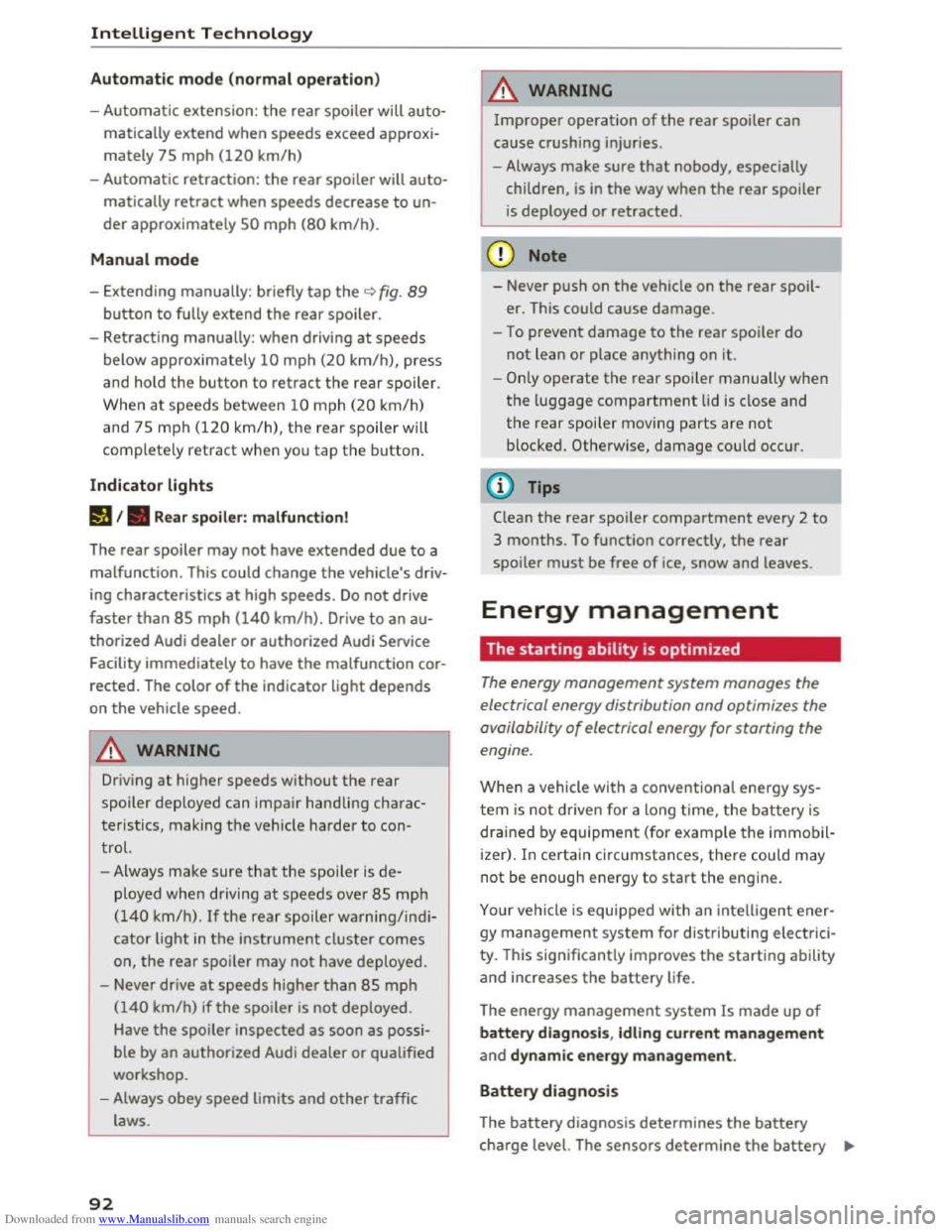
Indicator lights
Ii) I. Rear spoiler: malfunction!
The
rear spoiler may not have extended due to a
malfunction.
This could change the veh icle's driv
ing characteristics
at high speeds. Do not drive
faster than 85 mph (140 km/h). Drive to an au
thorized Audi dealer or authorized Audi Service
Facility
immediately to have the malfunction cor
rected. The color
of the indicator light depends
on the vehicle speed.
..&. WARNING
-
Driving at higher speeds without the rear
spoiler deployed can impair handling charac
teristics, making
the vehicle harder to con
trol.
- Always
make sure that the spoiler is de
ployed when driving at
speeds ove r 85 mph
(140 km/h). If the rear spoiler warning/indi
cator light in the instrument cluster comes
on, the rear spoiler may not have deployed.
- Never drive
at speeds higher than 85 mph
(140 km/h) ifthe spoiler is not deployed.
Have
the spoiler inspected as soon as possi
ble by an
authorized Audi dealer or qualified
workshop.
- Always obey
speed limits and other traffic
laws.
92
..&. WARNING
Improper operation of the rear spoiler can
cause crushing injuries.
-Always make sure that nobody, especially
children, is
in the way when the rear spoiler
is deployed or retracted.
«J:) Note
-Never push on the vehicle on the rear spoil
er. This could
cause damage.
- To
prevent damage to the rear spoiler do
not lean or place anything on it.
-
-Only operate the rear spoiler manually when
the luggage compartment lid is close and
the rear spoiler moving parts are not
blocked. Otherwise, damage could occur.
(D Tips
Clean the rear spoiler compartment every 2 to
3 months. To function correctly, the rear
spoiler must be free of ice, snow and leaves.
Energy management
The starting ability is optimized
The energy management system manages the
electrical energy distribution
and optimizes the
availability
of electrical energy for starting the
engine.
When a vehicle with a conventiona l energy sys
tem is not driven for a long time, the battery is
drained by equipment (for example the immobil
izer). In
certain circumstances, there could may
not be enough energy to start the engine.
Your vehicle
is equipped with an intelligent ener
gy
management system for distributing electrici
ty. T his sign ificant
ly improves the starting ability
and increases the battery life.
The
energy management system Is made up of
battery diagnosis, Idling current management
and dynamic energy management.
Battery diagnosis
The battery diagnosis determines the battery
charge level. The sensors determine the battery Ill>
Page 110 of 322
Downloaded from www.Manualslib.com manuals search engine Voice recognition system
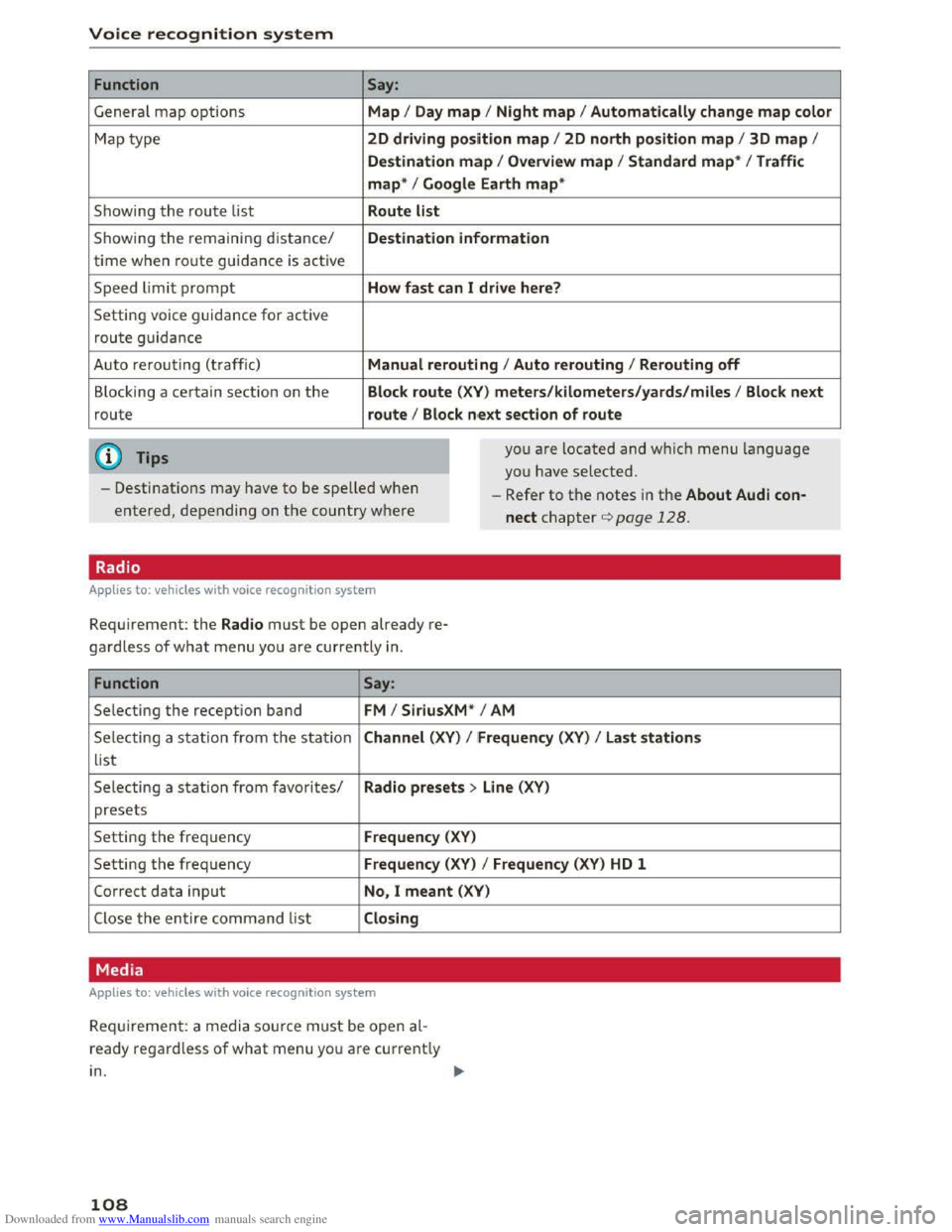
Function
General map options
Map type
Showing
the route list
Showing the remaining distance/
time when route guidance is active
Speed
limit prompt
Setting voice guidance for active
route guidance
Auto rerouting
(traffic)
B locking a certain section on
the
route
@ Tips
Say:
Map I Day map I Night map I Automatically change map color
2D driving position map I 2D north position map I 3D map I
Destination map I Overvi ew map I Stand ard map* I Traffic
map* I Google Earth map*
Route li
st
Destin ation information
How fast
can I drive here?
Manual rerouting
I Auto rerouting I Rerouting off
Block route (XV) mete rs / kilomete rs /yards/miles I Block next
route I Block nex t sect ion of route
you are located and which menu language
you have
selected.
- Destinations may have
to be spelled when
entered, depending on
the country where -
Refe r
to the notes in the About Audi con
nect chapter¢ page 128.
Radio
Applies to: vehicles with vo ice recogn ition system
Requirement: the Radio must be open already re
gardless of what menu you are currently in.
Function Say:
Selecting the reception band FM I SiriusXM * I AM
Selecting a station from t h e s ta tion Channel (XV) I !Frequenc y (XV) I Last station s
list
Selecting a station from favorites/ Radio presets > Line (XV)
presets
Setting
the frequency Frequenc y (XV)
Setting the frequency Frequency (XV) I Frequency (XV) HD 1
Correct data input No, I meant (XV)
Close the entire command list Closing
Media
Applies to: vehicles with vo ice recogn it ion syste m
Requ ir emen t: a media source must be open al
ready regard l
ess of what menu you are current ly
in.
108
Page 140 of 322
Downloaded from www.Manualslib.com manuals search engine Navigation
... Press the I NAV/MAPI repeatedly until the Enter
destination
menu is displayed c::> page 131,
fig. 114.
... Select: right control button > Route criteria.
(!)HOV lanesn: with the Avoid function, HOV
lanes are excluded when calculating routes.
When Allow is selected, the MMI will route you
through HOV lanes and show them on the map.
@Highways / @ Toll roads /@ Ferries : if the navi
gation system should not include highways, toll
roads or ferries -if possible -when calculating
routes, you can select the Avoid function.
Voice guidance
Applies to: vehicles with navigation system
... Press the I NAV/MAPI repeatedly until the Enter
destination
menu is displayed c::> page 131,
fig. 114.
... Select: right control button > Voice guidance .
Voice guidance:
voice guidance can be complete
or shortened. With the Traffic function, voice
gu
idance prompts are only given when there are
traffic incidents on your route. When Off is se
lec ted, no voice guidance is given .
Voice guidance during phone call: voice guid
ance during a phone call can be switched on or
off.
Entertainment fader: c::> page 170.
Voice guidance volume: c::> page 170.
Blocking a route
App lies to: vehicles with navigation system
Requirement: a destination must be entered and
the route guidance must be started.
... Press the I NAV/MAPI repeatedly until the Enter
destination
menu is displayed c::> page 131,
fig. 114.
... Select: right control button > Block route .
When route guidance is active, the calculated
route will avoid the area you have specified (max-
l) Hig h oc cupancy vehicle
138
imum: 20 km), if possible. The navigation system
calculates an alternative route.
The
route to be avoided that you have entered
applies only to the c urrent route and must be re
set, if necessary.
The
areas you have selected to avoid will appear
with red and white shading on the map.
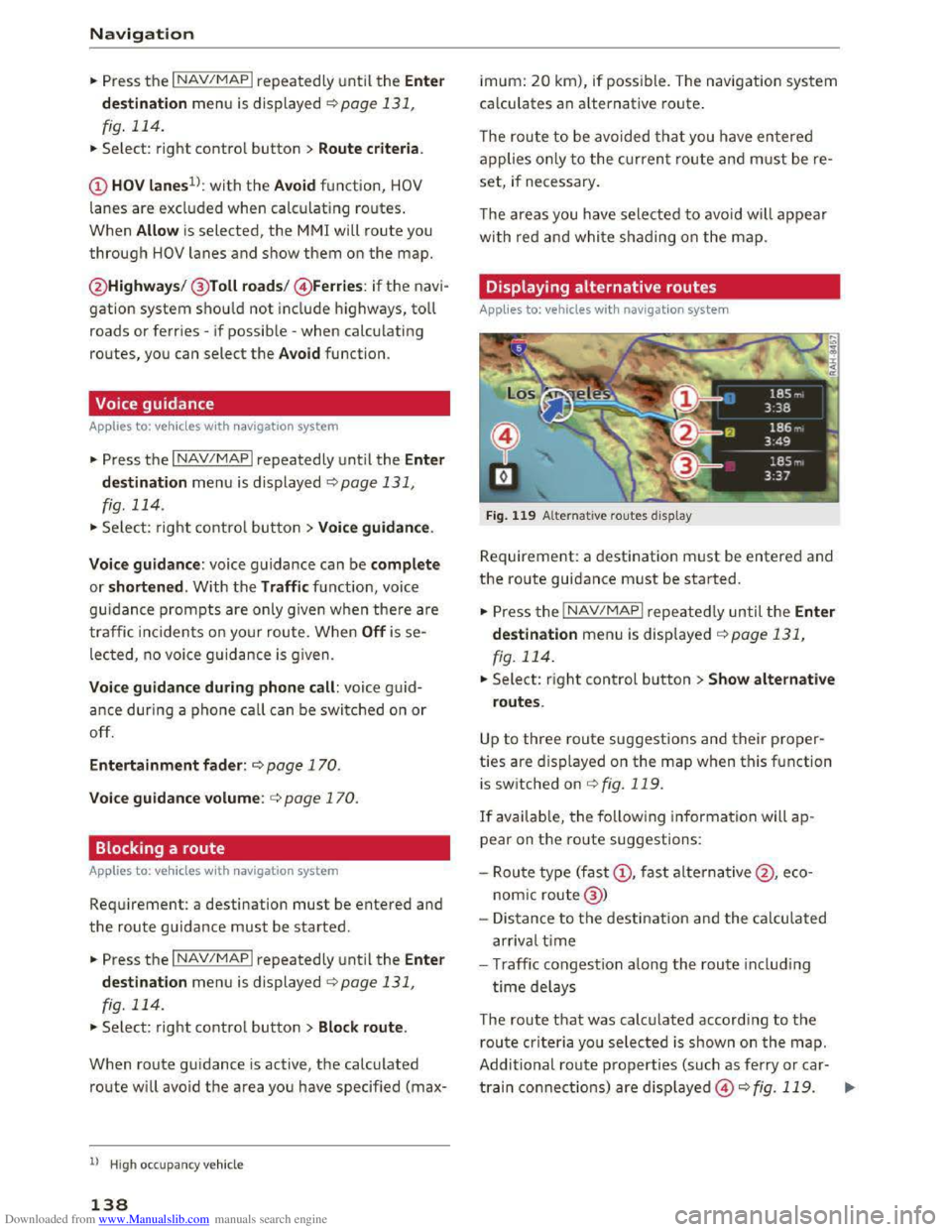
Displaying alternative routes
Applies to: vehicles with navigation system
Fig. 119 Alternative routes display
Requirement: a destination must be entered and
the route guidance must be started.
... Press the I NAV /MAP I repeated Ly until the Enter
destination
menu is displayed r::!>page 131,
fig. 114 .
... Select: right control button >Show alternative
routes.
Up to three route suggestions and their proper
ties are displayed on the map when this function
is
switched on c::>fig. 119.
If available, the following information will ap
pear on the ro ute suggestions:
-
Route type (fast(!), fast alternative@ , eco
nomic route@ )
- Distance
to the destination and the calculated
arrival time
- Traffic congestion a long the route includ ing
time delays
The route that was calculated according to the
route criteria you selected is shown on the map.
Additional
route properties (such as ferry or car-
train connections) are d isplayed@r::!> fig. 119. .,..
Page 143 of 322
Downloaded from www.Manualslib.com manuals search engine ...... N
> u. CX> ...... u:>
"' ...... u:> ......
Depending on the function selec ted, the follow
i ng
options can also be selected under th e Map
menu:
Cancel route guidance: ¢ page 136.
Map settings: ¢page 141 .
Route criteria :¢ page 137.
Voice guidance:¢ page 138.
Navigation settings: ¢page 137.
Online traffic data*: ¢page 142.
Block route:¢ page 138.
Show alternative routes:¢ page 1 3 8 .
Parking along the route: parki ng option s near
the veh icle are disp layed.
POis along the route: points of interest nea r the
vehicle are displayed .
Save current position: you can save your current
vehicle position as a favor ite q page 13 7 or save
it
as a contact in the directory ¢ page 13 7.
Audi
connect for this location* : allows you to
search for City events or Weather at the entered
location.
Country information: you can display the appli
cable urban
and rural speed limits for any coun
try/state. This information will be automatically
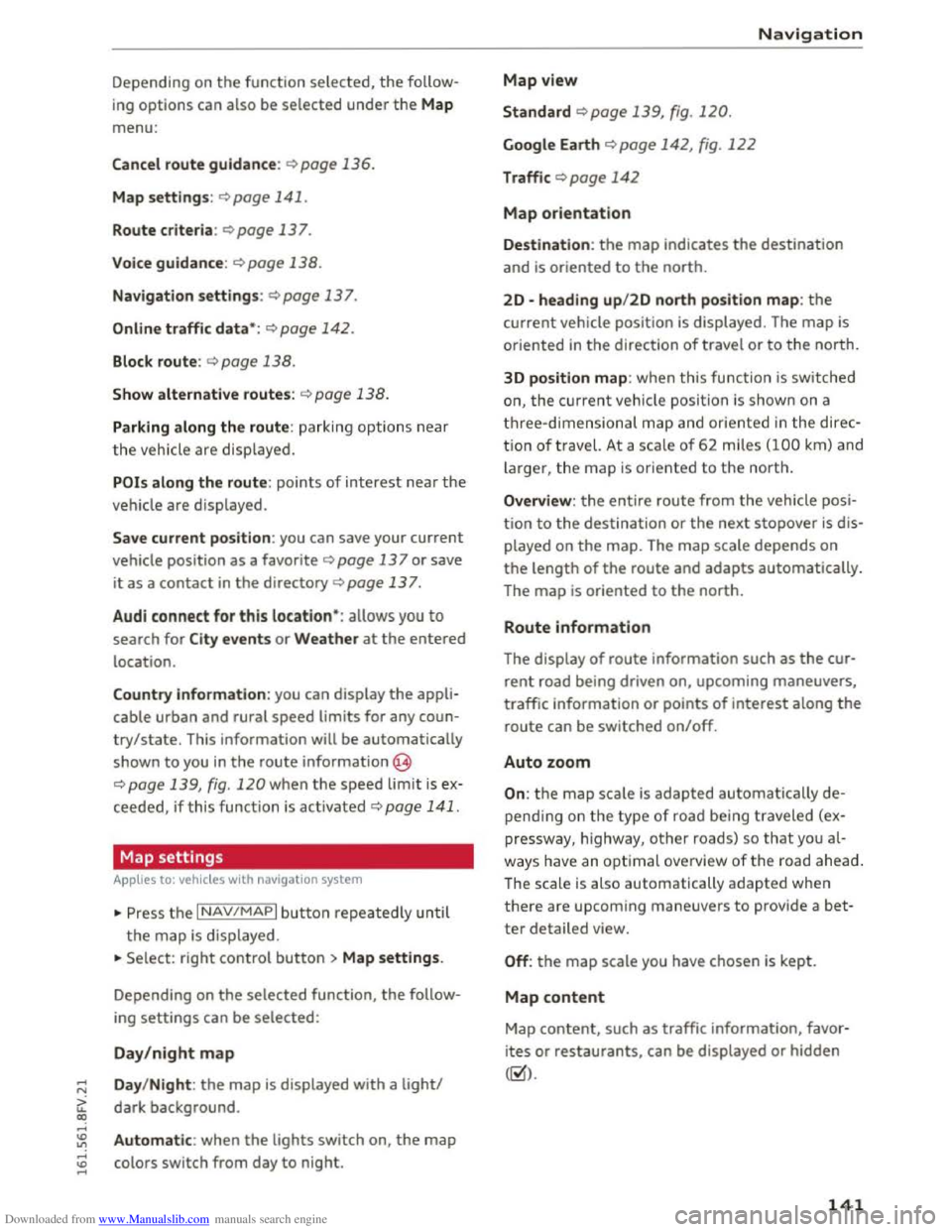
shown
to you in the route information @
q page 139, fig. 120 when the speed limit is e x
ceed ed, if this function is activated ¢page 141.
Map settings
A pp lies to: vehi cles with navigation system
... Press the I NAV/MAPI button repeatedly un til
the map is displayed .
... Select: right control button> Map settings.
Depending on
the selected function, the follow
ing
settings can be selected :
Day/night map
Day/Night : the map is displayed with a light/
dark background .
Automatic: when the lights switch on, the map
colors switch from day to night.
Map view
Standard ¢page 139, fig . 120.
Google Earth ¢ page 142, fig. 122
Traffic ¢ page 142
Map orientation
Navigation
Destination: the map ind icates the destina tion
and is or iented to the north.
2D -heading up/2D north position map: the
curre nt vehicle position is displayed. The map is
oriented in the direction of travel or to the north.
3D
position map: when this functio n is sw itch ed
on, the cur rent vehicle position is show n on a
three-dim ensiona l map and oriente d in the d ir e c
tion of travel. At a sca le of 62 m iles (100 km ) and
larger, t he map is or iented to the north.
Overview : the entire route from the vehicle posi
ti on to the destination or the nex t stopover is dis
played on
the map. The map scale depends on
the length of the route and adapts automatically.
The
map i s oriented to the north.
Route information
The display of route information such as the cur
rent road being driven on, upcoming maneuvers,
traffic information
or points of interest along the
r
oute can be switched on/off.
Auto zoom
On: the map scale is adapted automatically de
p endi ng o n th e type of road being traveled (ex
pr essway,
highway, other roads) so th a t you al
way s have an opti
mal o ve rview of the roa d ah ead.
The scale is also automatically adapted w he n
t h
ere are upcom ing maneu vers to provi de a bet
ter detailed view.
Off: the map scale you have chosen is kept.
Map content
Map content, such as traffic information, favor
i t es
or restaurants, can be displayed or hidden
(g).
141
Page 157 of 322
Downloaded from www.Manualslib.com manuals search engine ..... N
G: CX)
.....
"' U"I
.....
"' .....
and does not take any responsi bility for the
contents of the online media services .
- Also
note the ins truc tion s in the chapter
c:> page 128, About Audi connect .
-Depending on the mobile device bei ng used ,
i
nter ruptio ns in the media p lay back can oc
cur.
To avoid interruptions when usin g a
mobile device, do not lock the screen on
your mobile device and keep the Audi MMI
connect app in the foreground.
-Contact your a uth o rized Audi dealer or au
thorized Audi Service Facility for additional
information about online media.
Multimedia connections
USB adapter for Audi music interface or
USB charging port
Depending on the vehicle equipment, you con
connect
your mobile devices (such as a smort
phone or MP3 player) to the Audi music interface
or a USB charging port using a special USB
adapter.
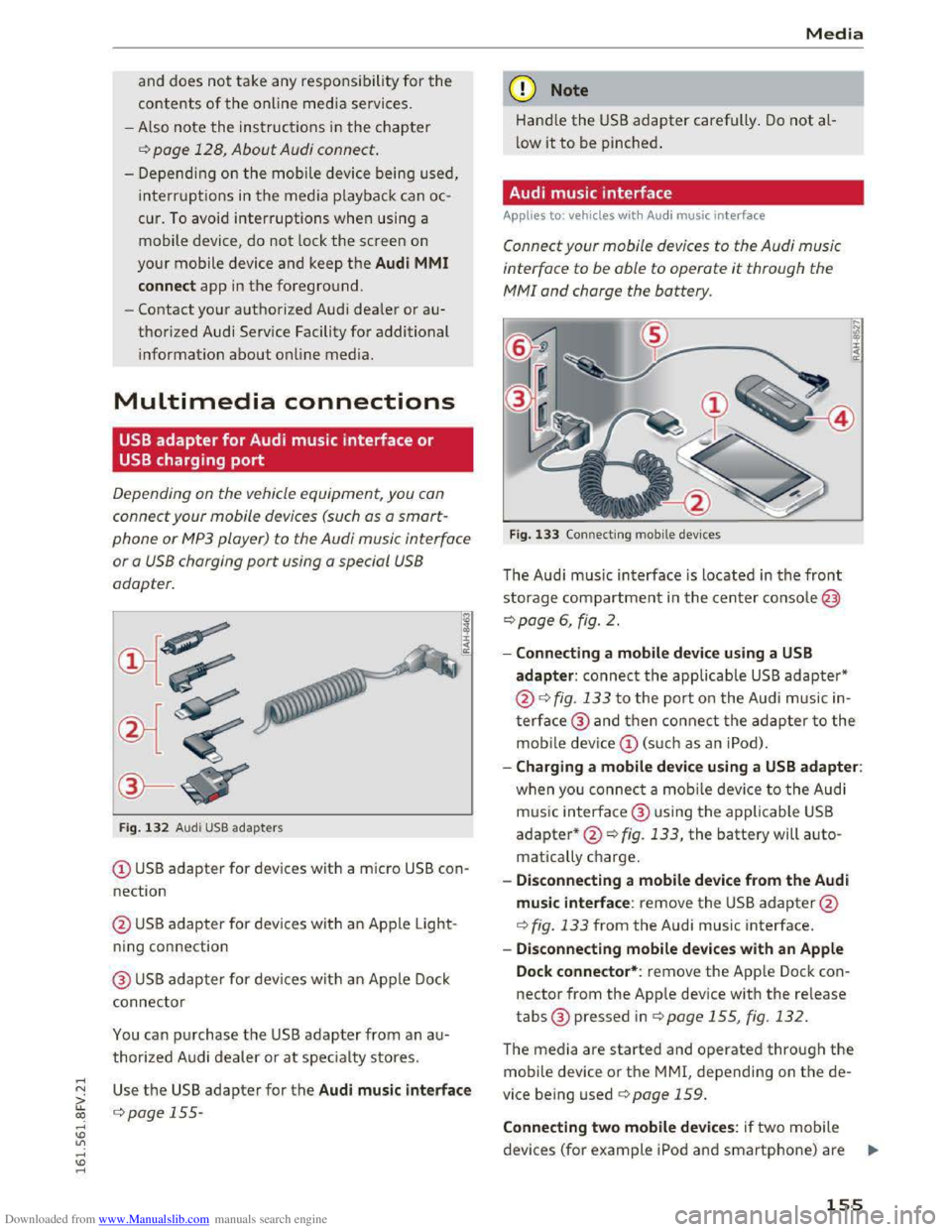
Fig. 1 3 2 Audi USB ada pters
(!) USB adapter for devices with a micro USB con
nection
@ US B adapter for devi ces with an Ap ple Light
ning con nection
@ USB adapter for devi ces wit h an Apple Dock
connector
You can p urchase the USB adapter from an a u
thorized A udi dealer or at specialty stores.
Use th e USB adapter for the Audi music interface
c:> page 155-
Media
Q) Note
Hand le the USB adapter carefully . Do not al
low it to be pinched.
Audi music interface
Applies to: vehicles with Aud i music interface
Connect your mobile devices to the Audi music
interface
to be able to operate it through the
MM! and charge the battery.
Fig. 133 Connecti ng mobile dev ices
The Aud i m us ic interface is loc ated in the front
storage compartment in the c enter c o nsole@
c:>page 6, fig. 2.
-Connecting a mobile device using a USB
adapter: connect the applicable USB adapter*
@c:> fig. 133 t o the port on the Audi music in
t
erface@ and then c o nne ct the ada p ter to the
mobile dev ice(!) (s uc h a s an iPod).
-Charging a mobile device using a USB adapter:
w h
en yo u co nnect a mobile device to the Audi
m us ic
interfac e @ using the applicable USB
adapter*@c:> fig. 133, the battery will auto
matically ch
arge.
-
Disconnecting a mobile device from the Audi
music interface: remove the USB adapter@
c:> fig. 133 from the Audi music interface.
-Disconnecting mobile devices with an Apple
Dock connector*: remove the App le Dock con
nector from the App le device with the release
tabs® pressed inc:> page 155, fig. 132.
The media are started and operated through the
mobile device or th e MMI, depending on t he de
vice being used c:>page 159.
Connecting two mobile devices: if two m obile
devices (for
example iPo d and smartphone) are ..,..
155
Page 166 of 322
Downloaded from www.Manualslib.com manuals search engine Media
-The security levels for the Parental control
are based on the US standards from the Mo
tion Picture Association of America (MPAA).
Note that the age levels for video DVDs in
European countries may differ. -
Password entry
for Parental control will be
locked for approximately one minute if you
enter the incorrect password three times in
a row. The password can only be reset by an
authorized
Audi dealer.
Troubleshooting
Problem Solution
Audi music interface* /Bluetooth
Refer to the information on the Audi music interface*
audio player*:
mobile device is c::.> page 155/Blue·tooth audio player* c::.> page 152. You can learn
not supported. about supported mobile devices in the Audi database for mobile
devices
at www.audisua.com/bluetooth.
Audi music interface* : the vol-Adjust the volume of the mobile device to approximately 70% of
ume is too high/too low when the maximum output c> page 162, Input level.
starting playback through the
AUX input.
Audi music interface* : the porta-For many cell phones or mobile devices, playback is not possible
ble device
is not recognized as a when the battery level is too low (less than So/o of its capacity).
source. The mobile device will only be recognized as a source
in the MM!
after connecting if the battery charge is sufficient.
Audi music interface* : malfunc- The Bluetooth audio player function is switched on. Switch this
tions during audio playback
function off
c> page 168 when you are not using the Bluetooth
through an iPod/iPhone/iPad. audio player.
AUX input: there is static when When connecting and disconnecting, the External audio player
connecting and disconnecting the source is already selected. Before connecting or disconnecting the
AUX connection cable. mobile device, either mute the device (see q page 169) or switch
to a different audio source (for example
c> page 145, Accessing
the radio).
Bluetooth audio player*/Wi-Fi Only one interface should be actively used at a time to ensure
audio player*: audio playback in-problem-free playback.
terference .
Wi-Fi audio player*: audio play- Audio playback interference can occur on some cell phones if the
back interference . Internet connectilon in the vehicle was not established through
the SIM card reader* on the MMI control panel and the mobile da-
ta option on the cell phone is switched on. Deactivate the mobile
data
option on your cell phone.
Jukebox*: tracks on the imported When
importing playlists , all of the files themselves must be im-
playlist are grayed out. ported.
Jukebox*: imported tracks cannot If you cannot find imported tracks in the media center, they may
be played or found . not be supported .
Only copy supported files q page 15 7 to the
Jukebox .
164
Page 168 of 322
Downloaded from www.Manualslib.com manuals search engine System settings
System settings
Setting the date and
time
You can set the clock time manually or using the
CPS.
.,. Select: IMENUI button> Settings > left control
button > MMI settings> Date & time .
Automatic setting
When this function is switched on~, the time
and date are automatically adjusted.
Time
The Time can be set manually. The Automatic
setting
must be switched off to do this.
Date
The Date can be set manually. The Automatic
setting
must be switched off to do this.
Time zone
When selecting the appropriate time zone, a
sampling of countries in this zone will be listed .
Automatic time zone*
When the automatic time zone function is
swi t
ched on, the time will automatically adjust to
the corresponding time zone.
Time format
If you select 24h, the clock will display, for ex
ample, 13:00. If you select AM/PM, the clock
will display, for
example, 1:00 PM.
Date format
I f you select 00.MM .YYYY, the date will display,
for example, 31.12.2015. If you select MM/DD/
YYYY , the date will display, for example,
12/31/2015. If you select YYYY·MM·DD , the
date display will display, for example,
2015-12-31.
MMI settings
.,. Select: IMENUI button> Settings > left control
button > MMI settings.
166
Language
The display language as well as the language for
Voice guidance* and the voice recognition sys
tem* can be changed.
The number of languages available depends on
the market .
Units of measurement
The following units can be selected:
-Speed (mph or km/h)
- Distance (miles or kilometers)
-Temperature (°F or 0()
- Fuel consumption (l/lOOkm, mpg (US), mpg
(UK) or km/l)
-Volume (liters, gallons)
Operating tips
When the function is switched on~. your MM!
shows you operating tips for input. The frequency
of how often it displays decreases with time. You
can switch off the operating tips at any time.
Voice recognition*
Command display : the display of possible com
mands during voice input can be switched on or
off.
Short dialog : prompts in a shorter format can be
switched on
or off.
Speech dialog system volume: you can adjust
the volume of the announcements by turning the
control knob.
Individual speech training (only when the vehi
cle is
stationary): you can adapt the voice recog
nition
system to your voice or pronunciation in
order to imp rove the system's ability to recognize
your speech. Individual training is comprised of
20 speech entries that consist of commands and
sequences of numbers. You can delete the pro
grammed voice training with the Reset individu
al speech training function .
Factory default settings
The following functions can be reset to the facto
ry default settings:
-Sound settings ~
Page 175 of 322
Downloaded from www.Manualslib.com manuals search engine ...... N
G'. CX)
..... ID IJ' ..... ID .....
.&. WARNING
Drivers who are unbelted, out of position or
too close to the airbag can be seriously in
jured by an airbag as it unfolds. To help re
duce the risk of serious personal injury:
- Always
adjust the driver's seat and the
steering wheel so that there are at least
10 in (25 cm) between your breastbone and
the steering wheel.
-Always adjust the driver's seat and the
steering wheel so that there are at least 4 in
(10 cm) between the knees and the lower
part of the instrument panel.
- Always hold
the steering wheel on the out
side of the steering wheel rim with your
hands at the 9 o'clock and 3 o 'clock posi
tions to help reduce the risk of personal in
jury if the driver's airbag inflates.
- Never hold
the steering wheel at the
12 o'clock position or with your hands at
other positions inside the steering wheel
rim or on the steering wheel hub. Holding
the steering wheel the wrong way can cause
serious injuries to the hands, arms and head
if
the driver's airbag inflates
-
Pointing the steering wheel toward your
face
decreases the ability of the supplemen
tal driver's airbag to protect you in a colli
sion.
- Always
sit in an upright position and never
lean
against or place any part of your body
too close to the area where the airbags are
located.
- Before driving, always
adjust the front seats
properly and make sure that all passengers
are properly restrained.
- Never
adjust the seats while the vehicle is
moving. Your seat may move unexpectedly
and you could lose control of the vehicle .
- Never drive with
the backrest reclined or
tilted far back! The farther the backrests are
tilted back, the greater the risk of injury due
to incorrect positioning of the safety belt
and improper seating position .
- Children
must always ride in child seats
Q page 212. Special precautions apply
-
Safe driving
when installing a child seat on the front
passenger seat Q page 188.
Proper seating position for the front
passenger
The proper front passenger seating position is
important for safe, relaxed driving.
For your own safety and to reduce the risk of in
jury in the event of an accident, we recommend
that you adjust the seat for the front passenger
to the following position:
... Adjust the angle of the seatback so that it is in
an upright position and your back comes in full
contact with it whenever the vehicle is moving.
... Keep both feet flat on the floor in front of the
front passenger seat.
"' Fasten and wear safety belts correctly
Qpage 184.
For detailed information on how to adjust the
front passenger's seat, see Q page 44.
A WARNING
personal injury:
-
Passengers must always sit in an upright po
sition and never lean against or place any
part of their body too close to the area
where the airbags are located.
-
Passengers who are unbelted, out of posi
tion or too close to the airbag can be seri
ously injured by an airbag as it unfolds with
great force in the blink of an eye.
- Always
make sure that there are at least
10 in (25 cm) between the front passen
ger's breastbone and the instrument panel.
- Always
make sure that there are at least 4 in
(10 cm) between the front passenger's
knees and the lower part of the instrument
panel.
- Each
passenger must always sit on a seat of
their own and properly fasten and wear the
safety belt belonging to that seat. ..,.
173
Page 179 of 322
Downloaded from www.Manualslib.com manuals search engine -Please observe information on safe driving
r:;. page 171.
A WARNING
r-=-
To help prevent poisonous exhaust gas from
being drawn into the vehicle, always keep the
rear lid closed while driving.
- Never
transport objects larger than those
fitting completely into the luggage area be
cause the rear lid cannot be fully closed.
-
If you absolutely must drive with the rear lid
open, observe the following notes to reduce
the risk of poisoning:
-
Close all windows,
-
Open all air outlets in the instrument pan-
el,
-Switch off the air recirculation,
-
Set the fresh air fan to the highest speed.
A WARNING
Always make sure that the doors, all windows
and the rear lid are securely closed and locked
to reduce the risk of injury when the vehicle is
not being used.
- After closing
the rear lid, always make sure
that it is properly closed and locked.
- Never leave your vehicle
unattended espe
cially with the rear lid left open. A child
could crawl into
the vehicle through the lug
gage compartment and close the rear lid be
coming trapped and unable to get out. Be
ing trapped in a vehicle can lead to serious
personal injury.
- Nev er
let children play in or around the vehi
cle.
- Never
let passengers ride in the luggage
compartment. Vehicle occupants must al
ways be properly restrained in one of the ve
hicle's seating positions.
(D Tips
-Air circulation helps to reduce window fog
ging. Stale air escapes to the outside
through vents in the trim panel, on the left
side of the luggage compartment. Be sure
to keep these slots free and open.
Safe driving
-The tire pressure must correspond to the
load. The tire pressure is shown on the tire
pressure label. The tire pressure label is lo
cated on the driver's side B-pillar. The tire
pressure label lists the recommended cold
tire inflation
pressures for the vehicle at its
maximum capacity
weight and the tires that
were on your vehicle at the time it was man
ufactured. For recommended tire pressures
for normal load conditions, please see chap
ter r:;. page 261.
Tie-down s
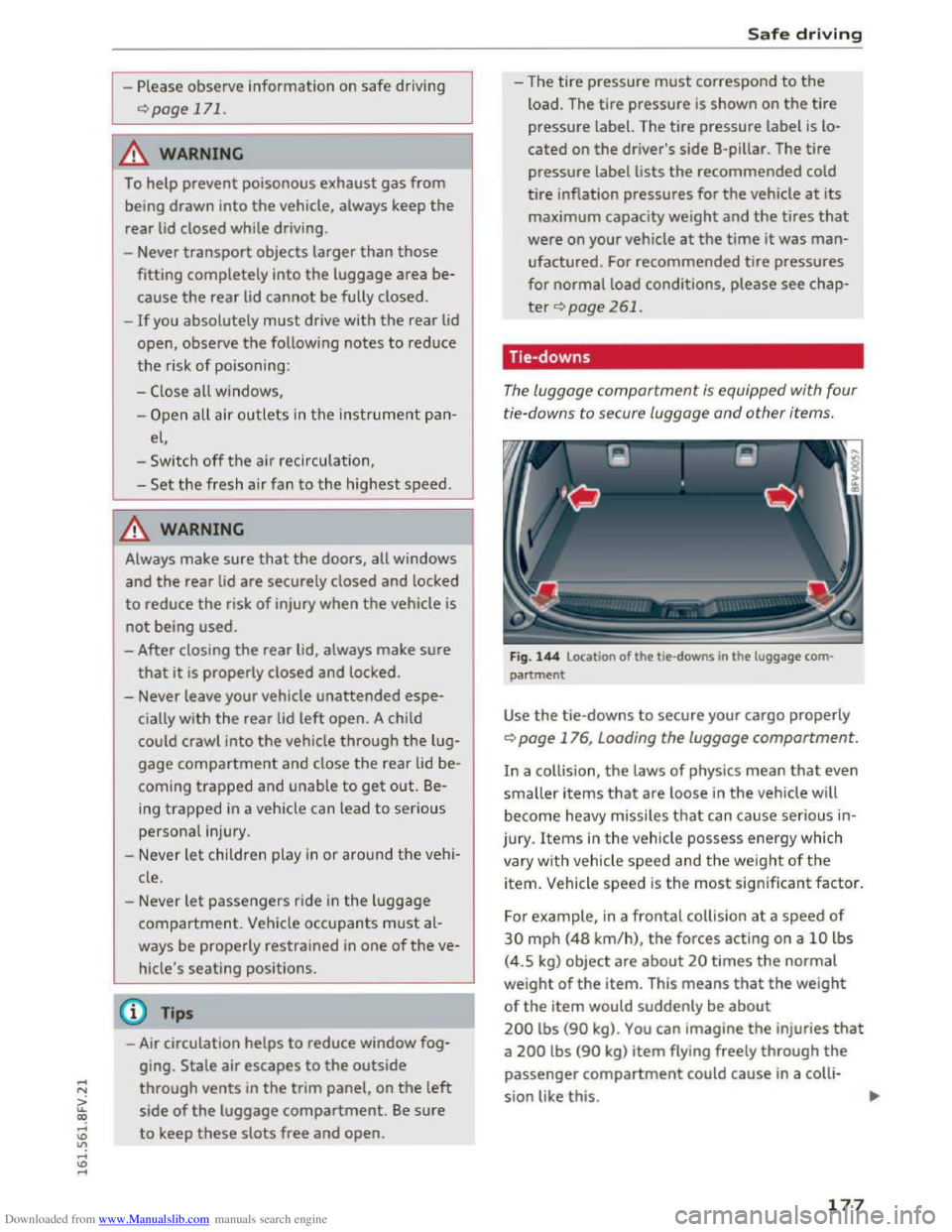
The luggage compartment is equipped with four
ti e-downs to secure luggage
and other items.
Fig. 144 Location of the tie-downs in the luggage com
partment
Use the tie-downs to secure your cargo properly
r:;. page 176, Loading the luggage compartment.
In a collision, the laws of physics mean that even
smaller items that are loose in the vehicle will
become heavy missiles that can cause serious in
jury . Items in the vehicle possess energy which
vary with vehicle
speed and the weight of the
item. Vehicle speed is the most significant factor.
For example, in a frontal collision at a speed of
30 mph (48 km/h), the forces acting on a 10 lbs
(4.5 kg) object
are about 20 times the normal
weight of the item. This means that the weight
of the item would suddenly be about
200 lbs (90 kg). You can imagine the injuries that
a 200 lbs (90 kg) item flying freely through the
passenger compartment could cause in a colli
sion like this.
177
Page 186 of 322
Downloaded from www.Manualslib.com manuals search engine Safety belts
-Always keep the belts clean. Dirty belts may
not work properly and can impair the func
tion
of the i nertia reel ¢table Internal
cleaning on page 272.
Safety belts
Fastening safety belts
Seat first -everybody buckle up!
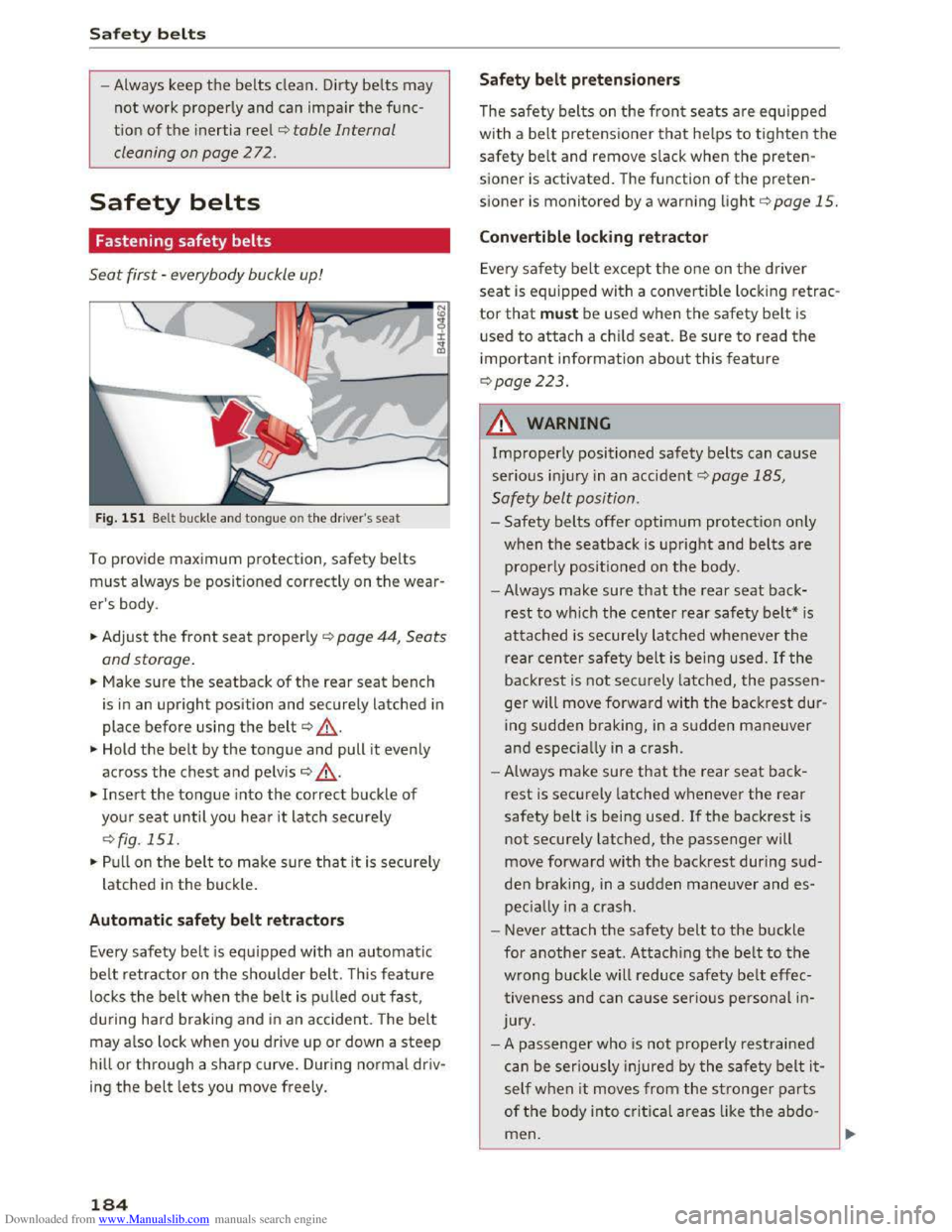
Fig. 151 Belt buckle and tongue on t he driver's seat
To provide maximum protection, safety belts
must always be positioned correctly on the wear
er's body.
... Adjust the front seat properly c::> page 44, Seats
and storage.
... Make sure the seatback of the rear seat bench
is
in an upright position and securely latched in
place before using the belt¢ ,&. .
... Hold the belt by the tongue and pull it evenly
across
the chest and pelv is c::> .&_.
... Insert the tongue into the correct buckle of
your seat until you hear i t latch securely
c::>fig. 151.
... Pull on the bel t to make sure that it is securely
latched in the buck le .
Automatic safety belt retractors
Every safety belt is equipped with an automatic
belt retractor on the shoulder belt. T his feature
locks the belt when the belt is pul led out fast,
during hard braking and in an accident. The belt
may also lock when you drive up or down a steep
hill or through a sharp curve. During normal driv
ing
the belt lets you move freely.
184
Safety belt pretensioners
The safety belts on the front seats are equipped
with a belt pretensioner that helps to tighten the
safety belt and remove slack when the preten
sioner is activated. The function of the preten
sioner is monitored by a warning light c::> page 15.
Convertible locking retractor
Every safety belt except the one on the driver
seat is equipped with a convertib le locking retrac
tor that must be used when the safety belt is
used to attach a child seat. Be sure to read the
important information about this feature
c::>page223 .
.&. WARNING
Improperly positioned safety belts can cause
serious injur y in an accident .:::>page 185,
Safety belt position.
-Safety belts offer optimum protection only
when the seatback is upright and belts are
properly positioned on the body .
- Always
make sure that the rear seat back
rest to which the center rear safety belt* is
attached is securely latched whenever the
rear center safety belt is being used. If the
backrest is not securely latched, the passen
ger will move forward with the backrest dur
ing
sudden braking, in a sudden maneuver
and especiall y in a crash .
- Always
make sure that the rear seat back
rest is securely latched whenever the rear
safety belt is being used. If the backrest is
not securely latched, the passenger will
move
forward with the backrest during sud
den braking, in a sudden maneuver and es
peciall y in a crash.
- Never
attach the safety belt to the buckle
for
another seat. Attaching the belt to the
wrong buckle will reduce safety belt effec
tiveness and can cause serio us personal in
jury.
- A
passenger who is not properly restra ined
can
be seriously injured by the safety belt it
self when it moves from the stronger parts
of the body into critical areas like the abdo
men.