ESP AUDI TT COUPE 2017 User Guide
[x] Cancel search | Manufacturer: AUDI, Model Year: 2017, Model line: TT COUPE, Model: AUDI TT COUPE 2017Pages: 322, PDF Size: 79.73 MB
Page 42 of 322
Lights and Vision
Dimming the mirrors
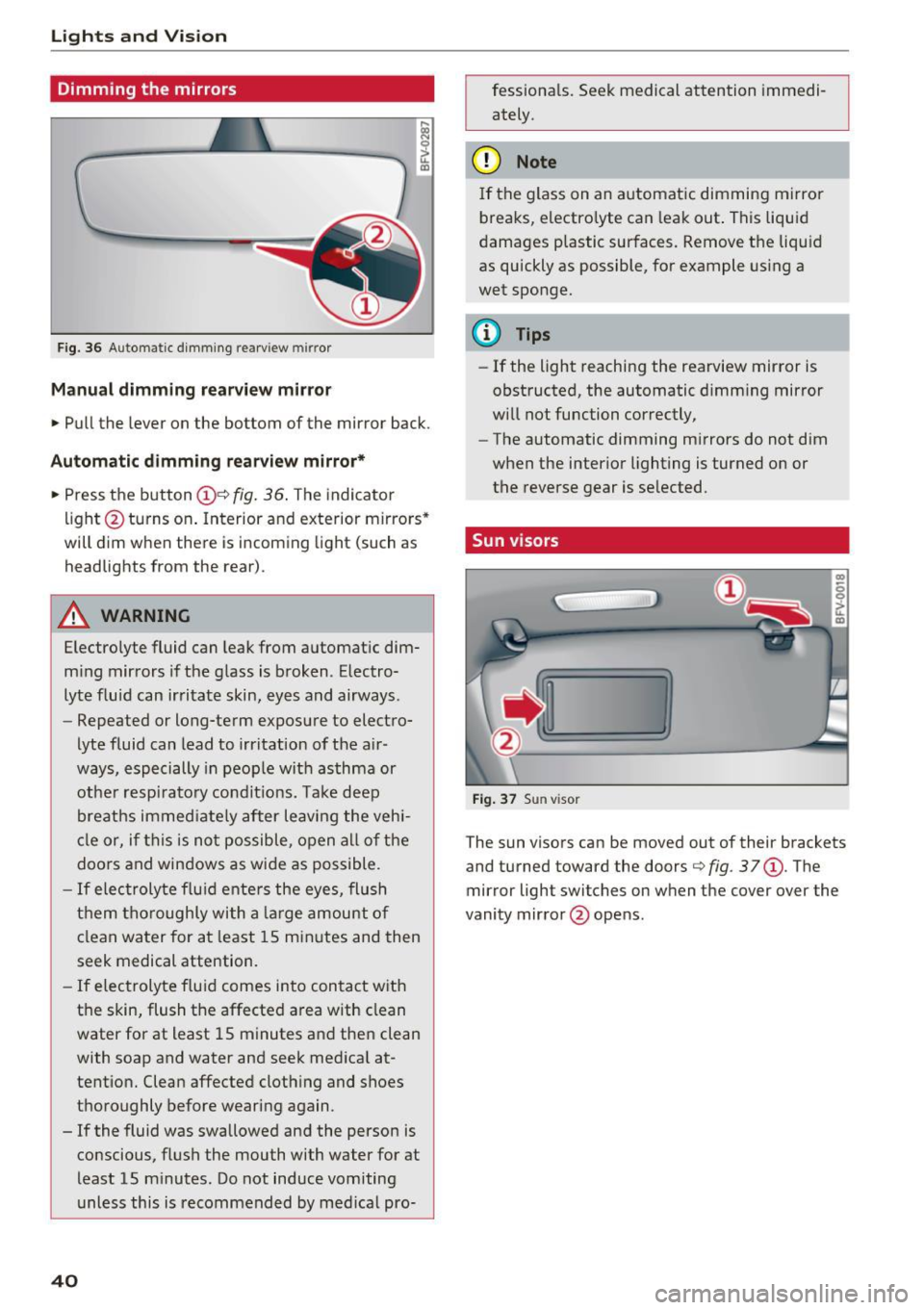
Fig. 36 Automatic d imm ing rearview mirror
Manual dimming rea rview mirror
.. Pull the lever on the bottom of the mirror back.
Automatic dimm ing rearview mirror*
.. Press t he button @Qfig.
36 . The indicator
li ght @turns o n. Interior and exterior mirro rs *
will dim w hen the re is i ncom ing light (such as
headlights from the rear) .
A WARNING
Electro lyte fluid can leak from automat ic dim
m ing mir rors i f the g lass is broken . Electro
lyte f luid can irritate skin, eyes and airways.
- Repeated or long-te rm exposure to elect ro-
lyte fluid can lead to irritation of the air
ways, especially in peop le wit h asthma or
ot he r resp irato ry co ndi tions. Tak e deep
breath s immed iate ly after leaving the veh i
cl e or, if this is no t possible, o pen a ll of th e
doors and win dows as wide as possible .
-If elec troly te f lu id ente rs the eyes, flush
t h em thor oughly wi th a la rge amoun t of
cl ean wa ter for a t least 15 mi nutes an d then
seek medical attention.
- If e lec trolyte f lu id comes into con tact w ith
t h e skin , flush the affected a rea wit h clean
water for at least 15 minutes a nd the n clean
with soap and water and seek medica l at
tentio n. Clean affected cloth ing and shoes
t h oroughly bef ore wearing again.
- If the fluid was swallowe d an d the person is
conscious, fl ush the mouth with water for at
least 15 m inutes. Do not induce vomiting
unless this is recommended by me dica l pro-
40
fessiona ls . Seek medical attention immedi
ately .
(D Note
I f the glass on an a utomat ic dimming mirro r
breaks, electro lyte can lea k out . This liquid
damages p lastic sur faces. Remove t he liquid
as quickly as possible, fo r example using a
wet sponge.
@ Tips
- If the light reaching the rearview mirror is
obstructed, the automatic d imm ing mirror
w ill not function correctly,
- The automatic dimming m irrors do not dim
when the interio r lighting is turned o n or
the reverse gear is se lected .
Sun v isors
Fi g. 37 Sun visor
m
-0 0 ::1-u.. co
T he sun visors can be moved out of their brackets
and tu rned toward the doors
Q fig . 37 @. The
mirror light switches on when the cover over the
vanity mir ror @ ope ns.
Page 43 of 322

CD
CD
.... N
" N ...... 0
0
Ill co
Windshield wipers
Switching the windshield wipers on
Fig. 38 Windshie ld wiper lever
Move the windshield wiper lever to the corre
sponding position:
@ -windshield w ipers off
@ -interval mode. To increase/decrease the wip
er intervals, move the switch ® to the left/right.
In vehicles with a rain sensor*, the wipers turn on in the rain once the vehicle speed exceeds ap
proximately 2 mph (4 km/h). The higher the sen
sitivity of the rain sensor* is set (switch ® to the
right), the earlier the windsh ield wipers react to
mo isture on the windsh ield. You can deact ivate
the rain sensor mode* in the Infotainment sys
tem, which switches the intermi ttent mode on.
Select in the Infotainment system:
I MENU! but
ton>
Vehicle > left control button >Driver as sis
tance > Rain sensor
> Off.
@ -slow wiping
@ -fast wip ing
© -sing le w ipe If you hold the lever in th is posi
tion longer, the wipers switch from slow wiping
to fast w iping.
® -clean the windshield To eliminate water
droplets, the windshield wipers perform one af
terwipe after several seconds while driving in
temperatures above 39 °F (4 °C). You can switch
this function off by moving the lever to position
@ within 10 seconds of the afterwipe . The after
wipe function is reactivated the next t ime you
switch the ignition on.
C leaning the headlights* . The headlight washer
system* only functions when the lights are
Lights and V ision
switched on. The headlights are automatically
cleaned the first time and every fifth time the
l ever is moved to position
® ·
A WARNING
--
- The rain sensor* is only intended to assist
the driver. The driver may still be responsi
ble for manually sw itch ing the w ipers on
based on visibility cond itions.
- The windsh ield may not be treated w ith wa
ter-repelling w indshield coating agents. Un
favorable condit ions, such as wetness, dark
ness, and when the sun is low, can cause in
creased glare, wh ich increases the risk of an
accident. Wiper blade chatter is also possi
b le.
- Properly functioning windshield wiper
b lad es are required for a cl ear v iew and safe
driving
<:::> page 42, Replacing windshield
wiper blades .
(D Note
-If there is frost, make sure the windshield
w iper blades are not frozen to the wind
shield. Switching on the windshield w ipers
when the blades are frozen to the wind
shield can damage the wiper blades.
- Prior to using a car wash, the w indshield
wiper system must be switched off (lever in
position 0). This prevents the wipers from
switching on unintentionally and caus ing
damage to the windsh ield wiper system.
(D Tips
- The windshie ld wipers switch off when the
ignition is switched off. You can activate the
w indshield wipers after the ignition is
switched back on by moving the w indshield
w iper lever to any position.
- Wor n or dirty windshield w iper blades result
in streaking. This can affect the rain sensor*
function . Check your w indshield w iper
blades regularly .
- The washer f luid nozzles in the windsh ield
washer system are heated * at low tempera-
tures when the ign ition is o n. .,.
41
Page 53 of 322
co
co
.... N
" N .... 0
0
Vl c:o
Warm and cold Climate control system
Description
The climate control system warms, cools and re
moves humidity from the air in the vehicle interi
or. It functions most effectively when the w in
dows are closed. If there is a build-up of heat in
side the vehicle, ventilation can help to speed up
the cooling process.
Pollutant filter
The pollutant filter removes pollutants such as
dust and pollen from the air.
Key recognition
Certain settings are automatically stored and as
signed to the remote contro l key being used .
A WARNING
Poor visibility can lead to accidents.
- For safer driving, keep all windows free of
ice, snow and fog.
- Become familiar as quickly as possible with
the correct use and function of the climate
control system, especially with the defrost
ing and defogging function.
- When the temperature is below freezing,
only use the windshield washer system after
the windsh ield has been warmed by the cli
mate control system. The washer fluid could
freeze on the windshield and impair visibili
ty .
(D Note
-If you suspect that the climate control sys
tem is damaged, switch the system off to
Warm and cold
prevent further damage and have it checked
by an authorized Audi dea ler or authorized
Audi Service Facility.
- Repairs to the Audi climate control system
require special technical know ledge and
special tools. See an authorized Audi dealer
or authorized Audi Service Facility.
(® For the sake of the environment
Reducing the amount of fuel used also re
duces the amount of pollutants that enter the
air.
(D Tips
- To prevent interference with the heating
and cooling output and to prevent the win
dows from fogging over, the air intake in
front of the windshield must be free of ice,
snow or leaves.
- Condensation from the cooling system can
drip and form a puddle of water under the
vehicle. This is normal and does not mean
there is a leak .
- The energy management system may switch
the seat heating* or rear window defroster
off temporarily . These systems are availab le
aga in as soon as the energy supp ly has been
restored.
- The flows through the vents under the rear
w indow . Make s ure the openings are not
covered when plac ing clothing on the lug
gage compartment cover .
51
Page 57 of 322
co
co
.... N
" N .... 0
0
Vl c:o
Driving
General information
Breaking in
A new vehicle must be broken in, and the break
in distance should be 1,000 mi les ( 1,500 km). Do
not drive at speeds that w ill exceed
2/3 of the
maximum permitted engine speed
(RPM) for the
first 600 miles (1,000 km) , and avoid full accel
eration during this period . You may gradually
start increasing the
RPM and the speed between
600 miles (1,000 km) and 1,000 miles (1,500
km).
During the first hours of use, the engine has a
higher internal friction than later on when all
moving parts have settled into place with each
other.
How the vehicle is driven during the first 1,000
miles (1,500 km) also affects the engine quality.
Drive at moderate engine speeds after the initial
break-in per iod, part icularly when running a cold
engine . This will reduce engine wear and improve
the mileage .
Do not drive at too low of an engine speed (rpm).
Shift down if the engine stops running "smooth
ly" . Extremely high eng ine speeds are automati
cally reduced .
Avoid damaging the vehicle
When you are driving on poor roads, or over
curbs, steep ramps, etc., make certain that low
lying parts such as spoilers and exhaust system
parts do not bottom out and get damaged.
This is especially true for vehicles with low-slung
chassis (sports chassis)* and fully loaded
vehicles.
Driving through water on roads
Note the following to reduce the risk of vehicle
damage when driving through water, for examp le
on flooded roads :
- The wate r must not be any higher than the bot
tom of the vehicle body .
Driving
- Do not drive faster than walking speed.
A WARNING
After driv ing through water or mud, the effec
tiveness of the brakes may be reduced due to moisture on the brake rotors and brake pads.
A few careful brake applications should dry
off the brakes .
(D Note
Vehicle components such as the engine,
transmission, suspension or electrical system
can be severely damaged by driving through
water.
(D Tips
- Determine the depth before driving through
water.
- Do not stop the vehicle, drive in reverse or
switch the engine off when driving through
water.
- Keep in mind that oncoming vehicles may create waves that raise the water level and
make it too deep for your vehicle to drive
through safely.
- Avoid dr iving through salt water, because
this can cause corrosion.
Economical and environmentally-friendly
driving
T he amount of fuel consumpt ion, the environ
menta l impact and the wear to the engine,
brakes and tires depends mostly on your driving
style. With an anticipatory and economic driving
style, fuel consumption can be reduced by ap
proximately 10-15%. The following tips will help
you conserve the environment and your money at
the same time .
Anticipatory driving
A vehicle uses the most fuel when accelerating.
When you drive with anticipation, you do not
need to brake as often and so you accelerate less.
When possible, let your vehicle coast with a
gear
engaged -
for example, when you notice that the
next traff ic light is red . .,,.
55
Page 58 of 322

Driving
Avoid full acc ele ra tion
You sho uld rare ly travel at the maximum vehicle
speed . High speeds cause a disp roportionately
high increase in fuel consumption, emissions and
traffic noise . Slower driving saves fuel.
Reduce idling time
It pays off to stop the engi ne, for examp le when
at rai lro ad crossings or tr affic lights with longer
red lights . Stopping the engine for 30 -40 sec
onds already saves more fuel than the amount of
extra fuel needed to resta rt the engine.
It t akes a very long time in idle to wa rm the en
g ine up to operating tempe ra ture . Wear and
emissions are especially high in the warm-up
p hase . Therefore, yo u should begin driving im
mediately after starting the engine. Avoid high
RPMs while do ing th is.
Have ma intenanc e performed r egularly
By having maintenance performed regular ly on
your vehicle, yo u can help to reduce f uel con
sumpt ion before you even start to dr ive. The
maintenance condition of your vehicle not only
affects traffic safety and long-term value but a l
so impacts
fuel consumpt ion .
A poorly maintained engine can lead to fuel con
sumpt ion that is 10% higher than normal.
A lso check the
oil le vel when refueling . The o il
consumption
depends large ly on the engine load
and speed. It is normal for the oil consumpt ion
of a new eng ine to reach its lowest point only af
ter a certain amount of use. Therefore, the oil
consumption can o nly be properly judged after
approx imately 3,000 m i (S,000 km) have been
d riven.
Avoid short trips
The engine and exhaust cleaning system must
reach the ir opt imal
operating temperature to ef
fectively red uce consumption and em iss ions.
A co ld engine uses a disproportionately h igh
amount of fuel. The engine reaches operating
temperature and consumpt io n normalizes only
afte r approximately
four kilometers.
56
(D Note
Do not leave engine idling unattended after
starting. If warning lights sho uld come on to
i ndicate imprope r operation, they would go
unheeded. Extended idling also produces
h eat, which could result in overheating or
other damage to the vehicle o r other proper
ty.
(D Note
- Have your ve hicle ma intained properly and
in accordance with the service recommenda
t ions i n your Warranty
& M aintenance book
let. La ck of prope r mai nte na nce as we ll as
imp roper use o f the ve hicle will impa ir the
func tion of the emission cont ro l sys tem and
cou ld lead to damage.
- Do not alte r or remove any compone nt of
the Emission Contro l System unless ap
proved by the man ufacturer.
- Do not alte r or remove any dev ice, such as
heat shields, switches, ig nition w ires,
valves, which are designed to protect your
vehicle's Emission Contro l System and other
important veh icle components.
(D Tips
The cons umption estimates as publishe d by
ENVIRONMENTAL PROTECTION AGENCY
(EPA) and Transport Canada may not corre
spond to your actual consumption on the r oad, which wi ll vary depending upon vehicle
l oad and speed, road a nd wea ther conditions,
tr ip length, etc.
Page 63 of 322

co
co
.... N
" N .... 0
0
Vl c:o
-Always take the vehicle key with you when
leaving your vehicle, even for a short period
of time. This applies particularly when chil
dren remain in the vehicle. Otherwise chil
dren could start the engine, release the
parking brake or operate electrical equip
ment such as power windows, which in
creases the risk of an accident.
- No one should remain in the vehicle when it
is locked - especially children. Locked doors
make it more difficult for emergency work
ers to get into the vehicle, which puts lives
at risk.
(D Tips
When stopping at a traffic signal or stopping
in city traffic, you can set the parking brake
manually. The vehicle does not have to be
held with the brake pedal. The parking brake
eliminates the tendency to creep when a se
lector lever position is engaged. As soon as
you press the accelerator pedal, the parking brake releases automatically and your vehicle
starts to move ~page 61.
(D Tips
- Occasional noises when the parking brake is
set and released are normal and are not a
cause for concern.
- The parking brake goes through a self-test
cycle at regular intervals when the vehicle is
stopped. Any noises associated with this are
normal.
- If there is a power failure, the parking brake
will not set if it is released, and it will not
release if it is set
q Li::,.. See an authorized
Audi dealer or authorized Audi Service Fa
cility for assistance.
Starting from a stop
Various convenience and safety functions may be
available when the vehicle begins driving, de
pending on vehicle equipment.
Starting on hills with the parking brake set
Requirement: the driver's door must be closed.
Driving
.. To start driving comfortably when on a hill, set
the parking brake and begin driving as usual.
The braking force of the parking brake does not
release automatically until the wheels build up
enough driving force.
Starting on hills with hill hold assist
Hill hold assist makes it easier to start on hills.
Requirement: the driver's door must be closed
and the engine must be running.
.. To activate hill hold assist, press and hold the
brake pedal for several seconds. The vehicle
must be in an uphill direction of travel.
After releasing the brake pedal, the braking pow er is maintained for a brief moment
q & to pre
vent the vehicle from rolling back when starting .
During this time, you can easily begin to move
your vehicle.
& WARNING ~
App lies to: veh icles with hill hold assist
- If you do not begin driving immediately or
the engine stalls after releasing the brake
pedal, your vehicle may begin to roll back
ward. Press the brake pedal or set the park
ing brake immediately.
- The intelligent technology of hill hold assist
cannot overcome the limitations imposed by
natural physical laws. The increased comfort
offered by hill hold assist should not cause
you to take safety risks.
- Hill hold assist cannot hold the vehicle in
place on all hills (for example, if the ground
is slippery or icy).
- To reduce the risk of an accident, always
make sure the vehicle is situated safely
while stationary.
Automatic transmission
Introduction
Your vehicle is equipped with an electronically
controlled DSG transmission called S tronic. Two
independent clutches transfer the power be-
tween the engine and transmission. It allows the .,..
61
Page 69 of 322

co
co
.... N
" N .... 0
0
Vl c:o
~ To shift down one gear, tap the shift paddle 0-
If the sh ift paddles are tapped while in the D/S
selecto r lever posit io n, automatic mode switches
off briefly . To switch from manually shifting back
to a utomatic shifting immediately, tap the shift
paddle G)¢fig . 67for 1 second .
To keep shifting using the shift paddles, move
the sele ctor lever to the right out of the D/S posi
tion into the t ipt ronic shift gate.
The transm ission automatically shifts up o r down
befo re critical engine speed is reached.
The transm ission only a llows manual sh ift ing
when the engine speed is within the permitted
range.
(D Tips
- If you sh ift to the next lowest gear, the
transm ission w ill only shift if the engine w ill
not be over-revved.
- With kick-down, the transmission shifts to a
l ower gear, depending on vehicle speed and
engine speed.
- tiptronic does not wo rk if the t ransmiss ion
i s r unning in emergency mode.
Kick-down
Kick-down enables maximum acceleration.
When you press the accelerator pedal down be
yond the resistance point , the automatic trans
m iss ion downshifts into a lower gear and the en
g ine utilizes its fu ll power , depend ing on veh icle
speed and engine R PM.
It shifts up into t he next
h igher gea r once the maximum spec ified engine
RP M is reached.
A WARNING
Please note that the wheels could spin on
slick or slippery roads when kick-down is ac
tive.
-
l ) T he ESC lig ht turn s on continuous ly and the mess age S ta·
b ili za tion co ntro l (E SC): sport. Warn ing! Red uced st abi l·
ity appe ars te mporar ily in th e I nfotainment syste m to in
di cate tha t the syste m wa s deact ivate d.
D riv ing
Launch Control-Program
The Launch Control Program enables maximum
acceleration .
Requirement: the engine must be at operating
temperature and the steering wheel must not be
turned .
~ With the engine running, press the l1' 0FF I but
ton briefly one t ime
l ).
~ Pull the selector lever back out of the D/S posi
tion briefly to select the S position, or press it
toward the r ight into the tiptron ic position or
select the
Dynamic dr iving mode in dr ive se
lect* ¢
page 79.
~ Press the brake pedal fi rm ly w ith your left foo t
and hold it all the way down for at least 1 sec
ond.
~ At the same time, p ress the gas peda l all the
way down with your right foot until the eng ine
reaches and stays at a high RPM level.
~ Remove your left foot from the brake.
A WARNING
- Always adapt your driving to the t raff ic flow.
- Only use Launch Control when road and traf-
f ic conditions allow it and other drivers will
not be endange red or impacted by your dr iv
ing and the vehicle's acceleration.
- Please note that the d rive wheels can spin
and the vehicle can b reak away when spo rt
mode is switched on, especially when the
road is slippery.
- Once the vehicle has started mov ing, press
the
! .P-O FF I button briefly to turn the spo rt
mode off.
(D Tips
- The transmission temperature may increase
significant ly after using the launch control
prog ram. If that happens, the prog ram may
no t be ava ilable for a few minutes.
It will be
avai lab le again afte r a cool -down period. ..,.
67
Page 72 of 322
Ass is t
Assist
Electronic speed Limiter
Your vehicle may be factory equipped with tires
that are rated for a maximum speed of 130 mph (210 km/h). This is less than the maximum speed
of your vehicle. To reduce the risk of sudden tire
failure and loss of control if the vehicle is operat
ed at excessive speeds, your vehicle also has an
electronic speed limiter. The electronic speed
lim iter prevents your vehicle from going faster
than the t ire speed rating. For mo re information
~page 262.
If the engine control unit receives faulty vehicle
road speed signals, the Malfunction Indicator
L amp (MIL)
¢..ffi will illumina te. If this occurs,
con tact the nearest au thorized A ud i dealer for
assistance.
_& WARNING
Always observe the posted speed limits and
adjust you r speed to suit prevailing road, traf
fic and weather conditions. Never drive your
vehicle faster than the maximum speed rating
of the tires installed.
Speed warning system
Applies to: vehicles with speed warning system
The speed warning system helps you to stay be
low a specified maximum speed that can be set,
changed or deleted in the Infotainment system . -
The speed warning
system warns you if you are
exceeding the maximum speed that you have set.
A warni ng tone will sound as soon as you r speed
exceeds the sto red value s lightly. The
(OJ (USA
models)
I [OJ (Canada models) indicator light
and a message appear i n the ins trumen t cluster
d isp lay a t the same time. Th@
Hll (USA models)/
[O](Canada models) in dicator light and the mes
sage turn off when the vehicle speed drops be low
the stored maximum speed.
Se tting a threshold is rec om mended if you would
like to be reminded when yo u reach a certa in
maximum speed . Situations where you may want
to do so include driving in a country w it h a ge ne r-
70
al speed limit or if there is a spec ified maximum
speed for winter tires.
Setting the warning threshold
.,. Select in the Infotainment system: IMENU ! but
t on
> Vehicle > left con trol b utton > Driver as
sistance > Speed warning > Manu al.
a) Tips
Regar dless of the speed warning sys tem, you
sh ould alw ays mon itor your spee d using the
speedometer and tnake s ure yo u are fo llow ing
the lega l speed limit.
Cruise control system
Switching on
Applies to: vehicles with cruise control system
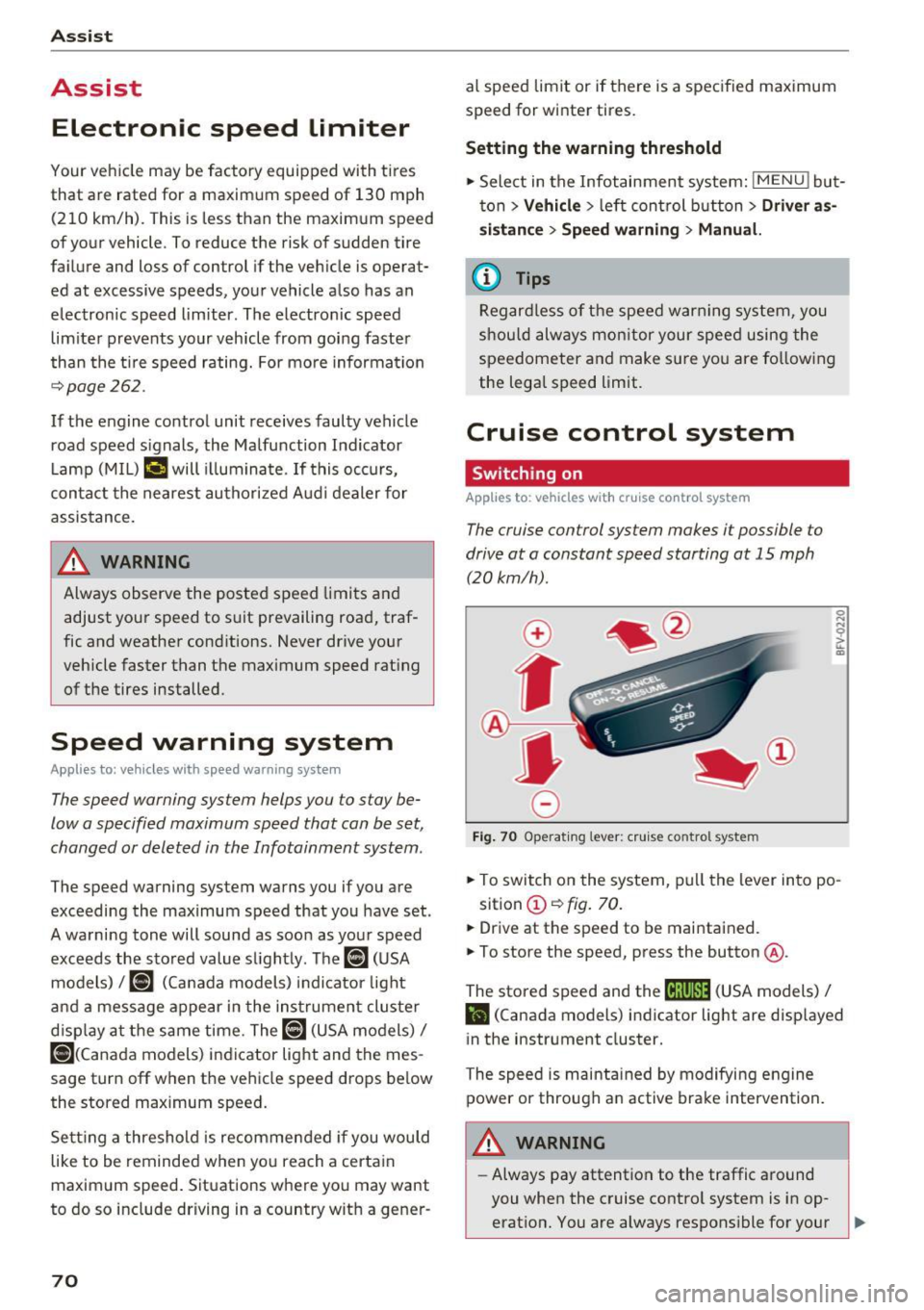
The cruise control system makes it possible to
drive at a constant speed starting at 15 mph
(20kmlh).
0
f
~
0
F ig. 70 Operat ing lever: crui se control system
.,. To switch on the system, pu ll the lever into po -
sition @~
fig. 70.
.,. Drive at the speed to be maintained.
.,. To store the speed, press the button @.
The stored speed and the
M;\1)~1j (USA models) /
l'I (Canada models) indicator light are displayed
in the instrument cluster.
The speed is maintained by modifying engine
power or through an active brake intervention.
_& WARNING
-Always pay attention to the traffic around
you when the cruise contro l system is in op
erat ion. You are always respons ible for your ,...
Page 74 of 322
Ass is t
& WARNING
You should only resume the stored speed if it
is not too high for existing traffic conditions.
Otherwise you can increase the r isk of an acci
dent .
Audi active Lane assist
Description
Appl ie s to: ve hicles w ith Audi ac tive lane assis t
Active lane assist detects lane marker lines with
in the limits of the system using a camera in the
windshield. If you are approaching a detected
lane marker line and it appears likely that you
will leave the lane, the system will warn you with
correct ive steering. You can override th is steer ing
at any time . If you pass over a line, the steer ing
wheel will v ibrate l ightly. In order for this warn
ing vibration to occur, it must first be sw itched
on in the Infotainment system. Active lane assist
is ready for operation when the lane marker line
is detected on at least one side of the vehicle.
The system is designed for driving on express
ways and highways and so it only activates at
speeds above approximately 40 mph (65 km/h) (depending on the market).
Applies to vehicles w ith side assist* : if you act i
vate a turn signal when active lane assist is ready
and it classifies a lane change as critical because
of vehicles traveling alongside you or approach
ing you, there w ill be noticeable corrective steer
ing shortly before you leave the lane. This will at
tempt to keep your vehicle in the lane.
Applies to vehicles without side assist* : the sys
tem does not warn when it is ready if you activate
the turn signal before crossing the lane marker line . In this case, it assumes that you are chang
ing lanes intentionally .
& WARNING
-The system wa rns the driver that the veh icle
is leav ing the lane using co rrective s teer ing.
1 ) The co rrect ive stee ring fun ctio n is not ava ilabl e in all mar
ket s.
72
The driver is always responsible for keeping
the vehicle within the lane.
- The system can assist the driver in keeping
the vehicle in the lane, but it does not drive
by itself. A lways keep your hands on the
steer ing wheel.
- Corrective steering may not occur in certain situations, such as during heavy braking.
- There may be cases where the camera does
not recognize all lane marker lines. Correc
tive steering can only take place on the s ide
of the vehicle where lane marker lines are
detected .
- Other road structures or objects could poss i
bly be identified un intent ionally as lane
marker lines . As a result, corrective steering
may be unexpected o r may not occ ur.
- The camera view can be restricted, for ex
ample by vehicles driving ahead or by ra in,
snow, heavy spray light shin ing into the
camera or by dirt o n the window. This can
result in active lane assist not detecting the
lane marker lines or detecting them incor
rectly.
- In certain s ituations where visibility is low,
the vehicle may switch internally from "ear
ly" to "late" steering cor rection
ll.
- Unde r certain cond itions such as r uts in the
road, an inclined roadway or crosswinds, the
corrective steer ing alone may not be enough
to keep the vehicle in the m iddle of the lane.
- For safety reasons, active lane assist must
not be used when there are poor road and/
or weather conditions such as slippery
roads, fog, gravel, heavy rain, snow and the potential for hydroplaning . Using active lane
assist under these cond it ions may increase
the risk of a crash.
Page 76 of 322
Assist
-The camera field of view¢ page 73, fig. 72 is
dirty or covered in ice. C lean this area on the
windshield.
- The camera field of view is fogged over. Wait
until the fog has cleared before switching the
active lane assist on again.
- The system has been unable to detect the lanes
for an extended period of time due to road con
ditions. Switch active lane assist back on when
the lines are more visible.
Audi active lane assist: currently unavailable.
See owner's manual
There is a temporary active lane assist malfunc
tion. Try switching the active lane assist on aga in
later.
Audi active lane assist: malfunction! See own
er's manual
Drive to an authorized Aud i dea ler or authorized
Audi Service Facility immediately to have the
malfunct ion corrected.
Audi active lane assist: Please take over steer
ing!
This message appears if you are not steering by
yourself. If th is is the case, active lane assist does
not switch off, but it is "not ready" to provide a
warn ing. The system can he lp you keep the veh i
cle in the lane. However, you are responsible for
driving the vehicle and must steer it yourself.
Adjusting the steering time and v ibration
warning
A ppl ie s to: ve hicles w ith Audi active lane assis t
You can adjust individual active lane assist set
tings in the Infotainment system.
Select in the Infotai nment system: I MENU I but
ton>
Vehicle > left control button >Driver assis
tance > Audi active lane assist
l) The correct ive stee ring fu nctio n is not availab le in all mar
kets.
74
Steering time1>
Early: in this setting, the corrective steering hap
pens continuously to help keep the vehicle in the
center of the lane.
Late : in this setting, the system provides correc
tive steering just before a vehicle wheel touches a
detected lane marker line .
Vibration warning
You can switch the addit ional vibration warn ing
i n the steering wheel on or off.
'
@ Tips
In certain markets : your sett ings are stored
automat ica lly and assigned to the remote
control key in use.
Lap timer
Introduction
App lies to: vehicles wi th lap tim er
Lap timer
You can measure and analyze lap times with the
lap timer in the display. The time is measured in
minutes, seconds and 1/10 seconds. With lap
times longer than 60 minutes, the hour is also
shown and the display of 1/10 seconds is re
moved.
The time measurement on an indiv idual lap ends
after 99 hours 59 minutes and 59 seconds. A
new lap starts automatically after that.
The measurement ends after a maximum of 30 laps. You can then eva luate the lap times or start
a new time measurement .
You can contro l the lap timer using the controls
on the multifunction steering wheel
¢ page 75.
A WARNING
Your focus should always be on driv ing your
vehicle safely. As the driver, you have com
p lete respons ibility for safety in traffic. Only
-