change wheel AUDI TT COUPE 2017 User Guide
[x] Cancel search | Manufacturer: AUDI, Model Year: 2017, Model line: TT COUPE, Model: AUDI TT COUPE 2017Pages: 322, PDF Size: 79.73 MB
Page 88 of 322
Parking systems
Switching off
.. Drive faster than 6 mph (10 km/h), or
.. Press the
P"1A button, or
.. Switch the ignition
off.
(D) Tips
- The visual display in the left part of the dis
play should help you detect the critical vehi
cle areas .
- You can change the volume of the sig nals
and the display
¢page 86.
Perpendicular parking
Appl ies to: ve hicles with rea rview ca mera
This view may be used when parking in a garage
or in a parking space.
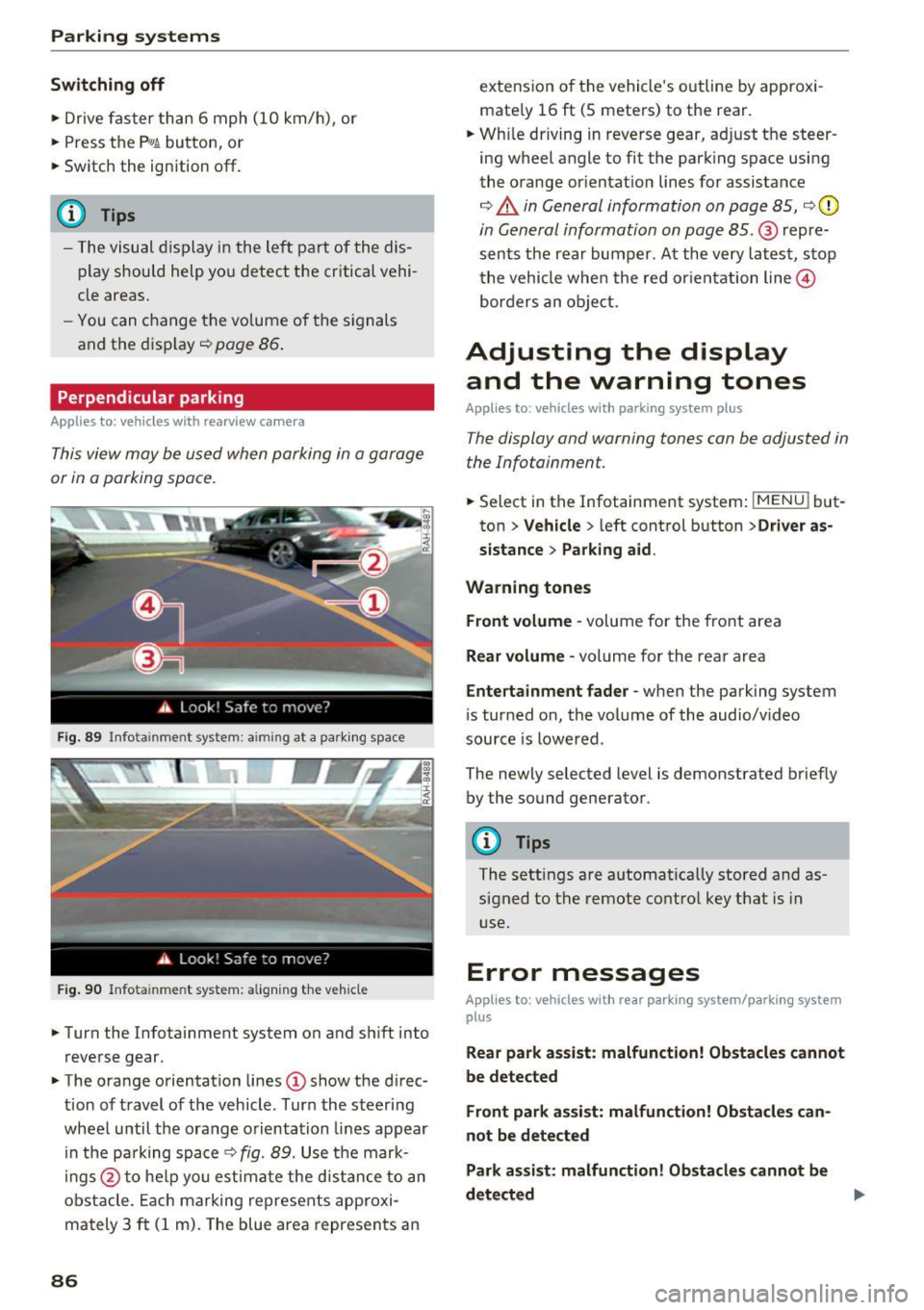
Fig. 89 Info ta inment syste m: aim ing at a pa rking space
Fig. 90 Infota inme nt sys tem: aligning the vehicle
.. Turn the Infotainment system on and shift into
reverse gear.
.. The orange orientation lines
(I) show the direc
tion of travel of the vehicle . Turn the steering
wheel until the orange orientation lines appear
in the pa rking space
c:!;> fig. 89. Use the mark
ings @to help you estimate the d istance to an
obstacle. Each marking represents approxi
mately 3
ft (1 m). The blue area represents an
86
extension of the vehicle 's outline by approxi
mate ly 16
ft (5 meters) to the rear .
.. Wh ile driving in reverse gear, adjust the steer
ing wheel angle to fit the parking space using
the orange orientation lines for assistance
¢ &. in General information on page 85, ¢(D
in General information on page 85. @ repre
sents the rear bumper. At the very latest, stop
the vehicle when the red or ientation line@
borders an object.
Adjusting the display
and the warning tones
Applies to: vehicles with parkin g sys tem plus
The display and warning tones can be adjusted in
the Infotainment.
.. Select in the Infotainment system : IMENUj but
ton
> Vehicle > left control button >Driver as
sistance> Parking aid .
Warning tones Front volume -
volume for the front area
Rear volume -volume for the rear area
Entertainment fader -when the parking system
is turned on, the volume of the audio/video
source is lowered .
The newly selected level is demonstrated briefly by the sound generator.
{!) Tips
The settings are automat ically stored and as
signed to the remote control key that is in
use.
Error messages
App lies to : vehicles wit h rear parking system/parking system
plus
Rear park assist: malfunction! Obstacles cannot
be detected
Front park assist: malfunction! Obstacles can
not be detected
Park assist: malfunction! Obstacles cannot be
detected ..,._
Page 94 of 322
Intelligent Technology
snow and ice. Always read and follow safety pre
cautions
¢ & .
Winter tires
By using all wheel drive, your vehicle has good
forward motion with standard tires in winter con
ditions. However, in winter we recommend using
winter or all season tires on
all four wheels, be
cause this will improve the
broking effect.
Snow chains
If there are snow chain laws, snow chains must
also be used on vehicles with all wheel drive
¢ page 2 70, Snow chains.
Replacing tires
For vehicles with all wheel drive, only whee ls with
the same rolling circumference should be used .
Avoid using tires with different tread depths
¢ page 262, New tires or wheels.
Offroad vehicle?
Your Aud i is not an offroad vehicle - there is not
enough ground clearance. For this reason, avoid
difficult terrain.
_&. WARNING
-Also, in vehicles with all wheel drive, adapt
your driv ing style to the current road and
t ra ffic conditions. Do not let the increased
safety provided tempt you into taking risks,
because this increases the r isk of an acci
dent.
- The braking ability of your vehicle is limited
to the traction of the wheels. In this way, it
is not different from a two wheel drive vehi
cle. Do not be tempted to accelerate to a
high speed when the road is slippery, be
cause this increases the risk of an accident.
- Note that on wet streets, the front wheels
can "hydroplane" if driving at speeds that
are too high. Unlike front whee l drive
vehicles, the eng ine does not rev highe r sud
denly when the vehicle begins hydroplaning.
For this reason, pay attention to the road
conditions regardless o f your speed.
92
Rear spoiler
Appl ies to: vehicles with retractable rear spoile r
The extendoble rear spoiler increases driving sta
bility.
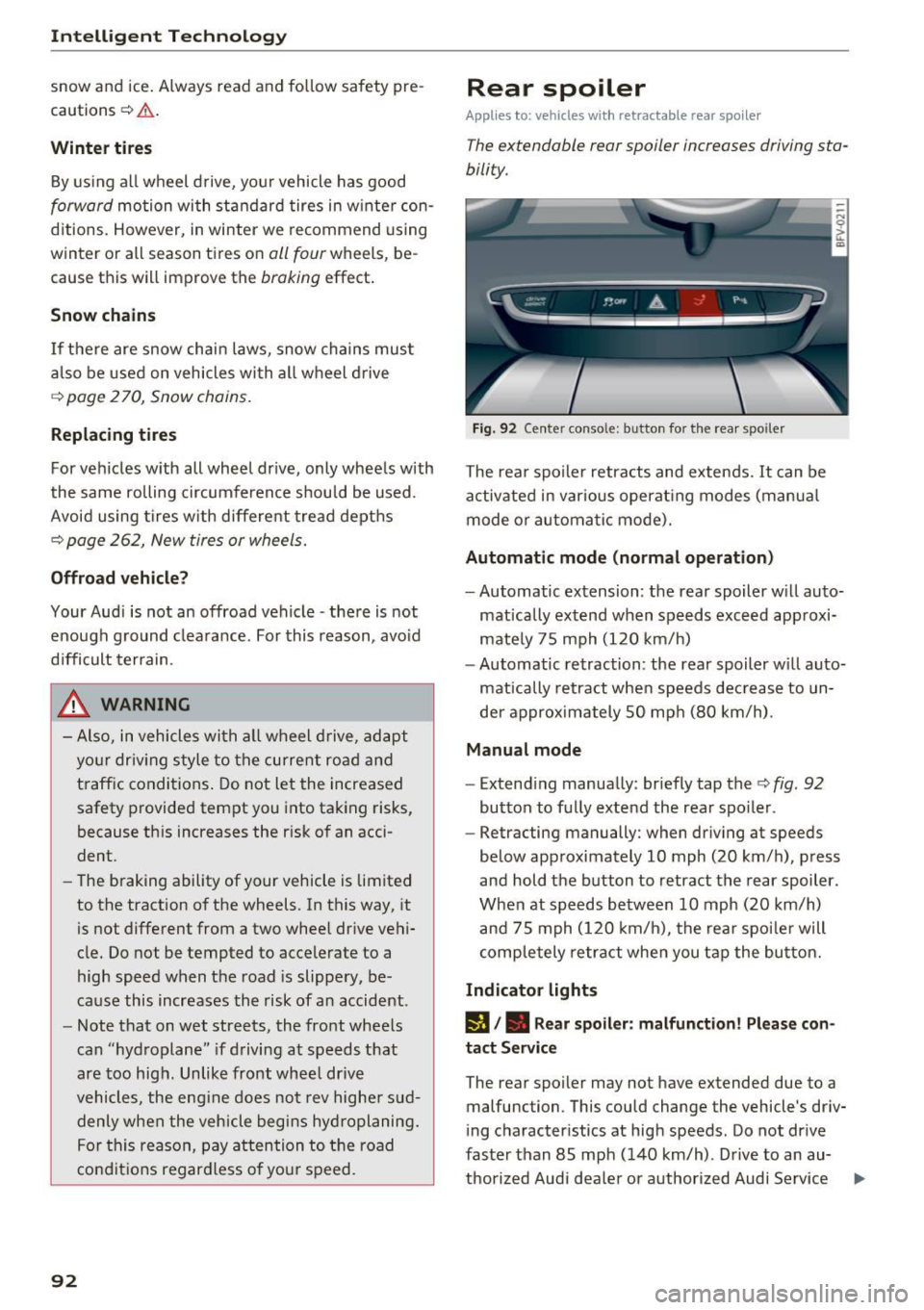
Fig. 92 Center conso le: button for the rear spoiler
The rear spoiler retracts and extends. It can be
activated in various operat ing modes (manua l
mode or automatic mode).
Automatic mode (normal operation)
- Automatic extension: the rear spoiler w ill auto-
mat ically extend when speeds exceed approxi
mately 75 mph
(120 km/h)
- Automatic retraction: the rear spoiler w ill auto
matically retract when speeds decrease to un
der approximately 50 mph (80 km/h).
Manual mode
-Extend ing manually : briefly tap the¢ fig. 92
button to fully extend the rear spoiler .
- Retracting manually: when driving at speeds
below approximately
10 mph (20 km/h), press
and hold the b utton to retract the rear spoiler .
When at speeds be tween
10 mph (20 km/h)
and 75 mph
(120 km/h), the rea r spoi ler will
completely retract when you tap the button.
Indicator lights
IJ,. Rear spoiler: malfunction! Please con
tact Service
The rear spoiler may not have extended due to a
malfunction. This could change the vehicle's driv
ing characteristics at high speeds. Do not drive
faster than 85 mph
(140 km/h) . Drive to an au-
thorized Audi dea ler or authorized Audi Service ..,.
Page 110 of 322

Voice recognition system
Voice recognition system Operating
Applies to: vehicles with vo ice recognition system
You con operate many Infotainment functions
conveniently by speaking.
Req uirement: the ignition and the MM I must be
sw itched on, there m ust be no p hone call in p rog
ress and the park ing system must not be active .
... Switching on : briefly press the~ but ton @
¢page 21, fig. 10 on the mu ltifunction stee r
ing whee l an d say the desired command after
the
Beep .
... Switching off :
press and hold the l2!J button.
Or: say the command C ancel.
.., Pause :
say the command Pause . To resume,
press the
l2!I button .
... Corre cting : press the ~ button one t ime
@ ¢
page 20, fig. 8. Or: say the command Cor
r ec tion .
Input assistance
The system gu ides you through the input with
visual and audio feedback .
-Visual input assistance : after switching on
vo ice recognit ion, a display with a se lection of
poss ible commands appea rs. The command
display can be sw itched on/off under
I M ENU !>
Setting s> left control bu tton > MMI setting s>
Speech dialog sy stem .
-Audio input as sistance :
to have the poss ible
comma nds read, press the
10, I button on the
mul tifunction steering wheel briefly and say
Help .
For the syst em to understand you:
Speak clearly and dist inctly at a normal volume .
Speak louder when d riving faster .
Emphasize the words in the commands evenly
and do not leave long pauses .
Do not speak a command when the voice recogni
tion system is making an announcement .
Close the doors, the windows and the sunroof* to reduce bac kground noise. Make sure t hat passen-
108
gers are not speaking when you are giv ing a voice
command .
Only use the system from the dr ive r's seat be
c au se the hands free microphone is direc ted to
ward that seat .
Additional settings
See¢ page 179, Voice recognition system .
&_ WARNING
-Dire ct yo ur full attention to dr iv ing. As the
d river, you have complete responsibili ty fo r
safety in traff ic. Only use the functions in
such a way that you a lways maintain com
p lete contro l over your vehicle in all traffic
situations .
- Do not use the voice recognition system i n
emergencies beca use your voice may change
in stressful s ituations. It may take longer to
dia l the number or the system may not be
ab le to dia l it at all. Dial the emergency
number manually.
(D Tips
- The d ia log pauses when there is an incom
ing phone call and will continue if you ig
nore the call. The dia log ends if you answer
the ca ll.
- There are no navigation prompts* when a di
alog is act ive .
- You can select an item in the list using ei
ther the vo ice recognit ion system or the
cont rol knob .
Command overview
information
Applies to: vehicles with voice recognition system
The following overv iews des cribe the commands
t h at can be used to operate t he M MI using the
vo ice recognit ion system.
Alternative commands are separated using a"/",
fo r example say:
Telephone / (or) Navigation /
(or) Radio.
Sequences of commands used to perform an ac
tion are ident ified w ith a
"> ", fo r example say:
Enter addre ss > (then) Enter country /state . II>
Page 210 of 322

Airbag syste m
-Always install rear -facing child seats on the
rear seat.
- If you must install a rearward facing chi ld
seat on the front passenger seat because of
exceptional c ircumstances and the
PA SSEN
G ER AIR BAG OFF ~;
light does not come
on and stay on, immediately install the rear
facing child seat in a rear seating position and have the airbag system inspected by
you r Audi dealer.
_& WARNING
Objects between you and the a irbag w ill in
crease the risk of in jury in a crash by interfer
ing with the way the airbag unfo lds or by be
ing pushed into yo u as the airbag inflates.
-
- Never hold th ings in your hands or on your
lap when the vehicle is in use.
- Never transport items on or in the area of
the front passenger seat . Objects could
move into the area of the front airbags du r
ing brak ing or other sudden maneuver and
become dangerous projectiles that can
cause serious personal injury if the a irbags
inflate.
- Never place or attach accessor ies or other
objects (such as cup holders, te lephone
brackets, large, heavy or bulky objects) on
the doors, over or near the area marked "AIRBAG" on the steering wheel, instru
ment pane l, seat backrests or between
those areas and yourself. These objects could cause injury in a crash, espe cially
when the airbags inflate.
- Never recline the front passenge r's seat to
t ransport objects . Items can also move into
the area of the side airbag or the front air bag during braking or in a sudden maneu
ver. Objects near the airbags can become projectiles and cause injury, particularly
when the seat is reclined .
- Never place or transport objects on the
front passenger seat. Objects on the front passenge r seat could cause the capac itive
sensor in t he seat to signal to airbag system
that the seat is occupied by a person when it in fact is not, or that the person on the seat
208
is heavier than he or she actually is. The
change in electric capacitance because of
such objects can cause the passenger front
airbag to be t urned on when it should be
off, or can cause the airbag to work in a way
that is different from the way it would have
wo rked without objects on the seat.
- Always make sure that there is noth ing o n
the front passenge r seat that will cause the
capacitive passenge r de tection system in
the sea t to signal to the Airbag System tha t
the seat is occup ied by a person when it is
not , or to signal that it is occupied by some
one who is heavier than the person act ually
sitt ing on the seat. The presence of an ob
ject could cause the passenger front airbag
to be turned on when it should be off , or
could cause the airbag to work in a way that is diffe rent from the way it would have
wo rked without the object on the seat.
- Never til t the front passenger seat backrest
forward when the vehicle is mov ing . An in
flating airbag wi ll force t he bac krest back
ward and can injure rear seat occup ants .
_& WARNING
The fine dus t created when airbags deploy can
cause breathing prob lems for people with a
h istory of asthma or other breathing condi
tions.
- To reduce the r isk of breathing problems,
those with asthma o r other respiratory con
ditions sho uld get fresh ai r right away by
getting out of the vehicle or opening win
dows or doors.
- If you are in a co llision in which airbags de
ploy, wash your hands and face with m ild
soap and water before eating.
- Be carefu l not to get the dust into your eyes,
or into any cuts or scratches .
-If the residue shou ld get into your eyes,
flush them w ith water .
Page 214 of 322
Airbag syste m
Make sure that the PASSENGER AIR BAG
OFF
11;; li ght comes on and stays on all t he
t ime whenever the ignition is switched on.
A WARNING
-
- If the PA SSEN GER AIR BAG OFF 11;; light
does not go out when an adult is si tting on
the front passe nger seat a fter ta king the
steps described above, make sure the adult is p roperly seated and restrained at one of
the rear seating positions.
- Have the airbag system inspected by your
Audi dealer befo re t ransporting anyone on
the front passenger seat.
@ Tips
If the capacitive passenger detection system
determines that the front passenger seat is
empty, the frontal airbag on the passenge r
side w ill be tu rned off, and the
PASSENGER
AIR BAG OFF
11;; light will stay on.
Repair , care and disposal of the airbags
Parts of the a irbag system are installed at many
different places on your Audi. Installing, remov ing, servic ing or repa iring a part in an area of the
ve hicle can damage a part of an airbag system
and prevent that system from working properly
i n a collision .
There are some important things you have to
know to make sure that the effectiveness of the
system w ill not be impaired and that discarded
components do not cause injury or pollute the
env ironment.
A WARNING
Improper care, serv icing and repai r proce
dures can increase the r is k of personal injury
and death by preventing an airbag from de
ploying when needed or dep loying an airbag
unexpectedly:
-
- Never cover, obstruct, or change the stee r
ing wheel horn pad or airbag cover or the in
strument pane l or modify them in any way.
212
- Never attach any objects s uch as c up ho lders
or telephone mountings to the surfaces cov
ering the a irbag un its.
- For cleaning the horn pad or instrument
panel, use only a soft, dry cloth or one mois
tened w ith plain water. Solvents or cleaners
could damage the airbag cover or change
the st iffness or strength of the material so
that the airbag canno t deploy and p rotect
properly.
- Never repair, adjust , or change any parts of
the airbag system.
- All work on the steering wheel, inst rument
panel, front seats or e lectr ica l system ( in
cluding the installation of a udio eq uipment,
cellular telephones and C B radios, etc.)
m ust be perfo rmed by a qualified techn ician
who has the training and specia l equipment
necessary.
- For any work on the airbag system, we strong ly recommend that you see your au
thorized A udi dealer or qualified workshop.
- Never modify the front b umper or parts of
the vehicle body.
- Always make sure that the side a irbag can
inflate w ithout interference:
- Never install seat covers or replacement
upholstery over the front seatbacks that
have not been specifically approved by
A udi.
- Never use additional seat c ushions that
cover the areas where the side airbags in
flate.
- Damage to the orig inal seat cove rs or to
the seam in the area of the s ide airbag
module mus t alway s be repaired immedi
ate ly by an autho riz ed Au di dealer.
- The a irbag system can deploy on ly once. Af
ter an airbag h as been deployed, i t m ust be
repla ced with new replacement parts de
signed and approved espec ia lly for your
Audi model version . Replacement of com
plete airbag systems or airbag components
must be perfo rmed by qua lified workshops
only. Make su re that any airbag service ac
tion is entered in your A udi Warranty
&
Ma intenance boo klet under AIRBAG RE-
PLAC EM EN T RECORD.
~
Page 225 of 322
co
co
.... N
" N .... 0
0
Vl c:o
rear seating position and have the airbag
system inspected by your authorized Audi
dealer.
- Always buckle the child seat firmly in
place even if a child is not sitting in it. A
loose child seat can fly around during a
sudden stop or in a collision.
- Always read and heed all WARNINGS
whenever using a child restraint in a vehi
cle
c!;> page 189, Safety belts, c!;> page 197,
Airbag system
and c!;> page 221, Impor
tant information.
{D) Tips
Always replace child restraints that were in
stalled in a vehicle dur ing a crash. Damage to
a child restraint that is not visible could cause
it to fail in another collision situation.
Advanced front airbag system and children
Your vehicle is equipped with a front "Advanced
Ai rbag System" in compliance with United States
F edera l Motor Vehicle Safety Standard ( FMVSS)
208 as applicable at the time your vehicle was manufactured.
The Advanced Airbag system in your vehi cle has
been certified to meet the "low-risk" require
ments for 3- and 6-year old children on the pas
senger side and small adults on the driver side.
The low risk deployment criteria are intended to
reduce the risk of injury through interaction with
the airbag that can occur, for example, by being
too close to the steering wheel and instrument
panel when the airbag inflates. In addition, the
system has been certified to comply with the
"s uppress io n " req uiremen ts of the Safety Stand
ard, to turn of f the front airbag for infants up to
12 months who are restrained on the front pas
senger seat in chi ld restraints that are listed in
the Standard.
E ven though your vehicle is equipped with an Ad
vanced Ai rbag system, all children, especially
those 12 years and younger, should always r ide
in the back seat properly restrained for their age
and size. The airbag on the passenger side makes
the front seat a potentially dangerous place for a
Child safety
child to ride. The front seat is not the safest place
for a chi ld in a forward-facing chi ld safety seat . It
can be a very dangerous place for an infant or a
larger ch ild in a rearward-facing seat.
T he vehicle's Advanced A irbag System has a ca
pacitive passenger detection system in the front
passenger seat cushion that can detect the pres
ence of a baby or a ch ild in a child restraint sys
tem on this seat.
The capacitive passenger detection system regis
ters the changes that result in an electrical field
when a child, a child restraint, and a baby b lanket
are on the front passenger seat. The change in
the measured capacitance due to the presence of
a child, a ch ild restraint, and a baby blanket on
the front passenger seat is related to the child
restraint system resting on the seat . Th e meas
ur ed capacitance of a child restraint system var
ies depending on the type of system and specific
make and mode l.
T he elect rical capacitance of the various types,
makes, and models of child restra in ts specified
by the U.S .National Highway Traff ic Safety Ad
ministration (NHTSA) in the relevant safety
standard are stored in the Advanced Airbag Sys
tem control unit together with the capacitances
typ ica l of infants and a 1-year old child. When a
child restraint is used on the front passenger
seat w ith a typical 1 year -old infant, the Ad
vanced Airbag System compares the capacitance measured by the capacitive passenge r detection
system with the data stored in the electronic con
trol unit.
Child restraints and Advanced front airbag
system
Regardless of the ch ild restraint that you use,
make sure that it has been certified to meet Unit
ed States Federal Motor Vehicle Safety Standards
and has been certified by its manufacturer for
use with an a irbag. Always be sure that the child
r estra int is properly installed at one of the rear
seating positions.
If in except ional circumstances
you must use it on the front passenger seat, care
f ully read all of the information on child safety
and Advanced Airbags and heed all of the .,.
223
Page 262 of 322
Wheels
Rim
means a metal support for a tire
or a tire and tube assembly upon
which the t ire beads are seated .
Rim diameter
means nominal diameter of the
bead seat . If you change your
wh eel size, you will have to p ur
chase new tires to match the new
rim d iameter .
Rim size designation
means rim diameter and w idth.
Rim width
means nomina l distance between
r im flanges .
Sidewall
means that portion of a t ire be
twee n the tread and bead .
Speed rating (letter code)
means the speed at which a t ire is
designed to be driven for extend
ed periods of ti me. The ratings
range from 93 mph (150 km/h)
to 186 mph (298 km/h)
¢ table
on page 256 .
You may not find
this information on all tires be
cause it is not required by law.
The speed rating letter code,
wh ere applicable, is molded on
the tire sidewall and ind icates the
260
maximum permissible road
speeds
¢ A in Winter tires on
page 270 .
Tire pressure monitoring
system *
means a system that detects
when one or mo re of a vehicle's
tires a re underinflated and illumi
nates a low tire pressure war ning
telltale .
Tread
means that portion of a tire that
comes into contact wi th the road.
Tread separation
means pulling away of the tread
from the tire carcass .
Treadwear indicators (TWI)
means the project ions wi thin the
pr inc ipal grooves designed to g ive
a visua l indication of the degrees
of wear of the tread . See
¢ page 264, Treadwear indicator
for mo re information on meas ur
ing tire wear.
Uniform Tire Quality Grading
i s a tire informa tion system devel
oped by the Unite d States Nation
a l Highway Traffic Safety Admin
istration (NHTSA) that is designed
to help buyers make re lative
..
Page 268 of 322
Wheels
the risk of an accident. Read and follow the important safe
ty precautions in ¢ page 267,
Tires and vehicle load limits.
-The tire must flex more if the tire pressure is too low or if
the vehicle speed or load are
too high. This heats the tire up
too much. This increases the risk of an accident because it
can cause the tire to burst and
result in loss of vehicle con
trol.
- Incorrect tire pressure in
creases tire wear and has a
negative effect on driving and
Tire pressure table
Please note that the information
contained in the following table
was correct at the time of print ing, and the information is sub
ject to change. If there are differ
ences between this information
and the tire pressures specified
on the label on the driver's side B
p illar, always follow the spec ifica
tion on the B-pillar label
¢ page 265, fig. 198.
266
braking behavior, which in
creases the risk of an accident.
(D Note
Replace lost valve caps to re
duce the risk of damage to the
tire valves.
@ For the sake of the environment
Tire pressure that is too low in
creases fuel consumption.
(D Tips
Audi recommends using the
tire pressure specified for a normal load
¢ table on
page 267
or for a full load
when the vehicle is partially
loaded.
Make sure that the tire designa
tion on your tire matches the des
ignation on the tire pressure label
and the tire pressure table.
The following table lists recom
mended tire pressures in cold
tires according to the load and
the size of the tires installed.
Page 275 of 322

co
co
.... N
" N .... 0
0
Vl c:o
Your vehicle has also been equipped with a TPMS
malfunction indicator to indicate when the sys
tem is not operating properly. The TPMS mal
function indicator is combined with the low tire pressure telltale. When the system detects a
malfunction, the telltale will flash for approxi
mately one minute and then remain continuously
illuminated . This sequence will continue upon
subsequent vehicle start-ups as long as the mal
function exists .
When the malfunction indicator is illuminated,
the system may not be able to detect or signal low tire pressure as intended. TPMS malfunctions
may occur for a variety of reasons, including the
installation of replacement or alternate tires or
wheels on the vehicle that prevent the TPMS
from functioning properly . Always check the
TPMS malfunction telltale after replacing one or
more tires or wheels on your vehicle to ensure
that the replacement or alternate tires and
wheels allow the TPMS to continue to function properly.
If the Tire Pressure Monitoring System
indicator appears
The tire pressure indicator in the instrument
cluster informs you if the tire pressure is too low
or if there is a system malfunction .
Using the ABS sensors, the tire pressure monitor
ing system compares the tire tread circumfer
ence and vibration characteristics of the individu
al tires. If the pressure changes in one or more
tires, this is indicated in the Infotainment system
display w ith an indicator light
RE and a message.
If only one tire is affected, the location of that
tire will be indicated.
The tire pressures must be stored in the Infotain
ment system again each time the pressures
change (switching between partial and full load
pressure) or after changing or replacing a tire on
your vehicle
c::;, page 274 . The tire pressure moni
toring system only monitors the tire pressure you have stored. Refer to the tire pressure label for
the recommended tire pressure for your vehicle
¢ page 265, fig. 199.
Wheels
Tire tread circumference and vibration character
istics can change and cause a tire pressure warn
ing if :
- the tire pressure in one or more tires is too low.
- the tire has structural damage.
- the tire was replaced or the tire pressure was
changed and it was not stored
c::;, page 274.
- the spare tire* is installed .
Indicator lights
RE-Loss of pressure in at least one tire c::;, &,.
Check the tires and replace or repair if necessary.
Check/correct the pressures of all four tires and
store the pressure again in the Infotainment sys
tem
¢ page 274.
mm (Tire Pressure Monitoring System) Tire
pressure: malfunction! See owner's manual -If
mm appears after switching on the ignition or
while driving and then the indicator light
RE in
the instrument cluster also starts to blink for
about one minute and then stays on permanent
ly, there is a system malfunction. Try to store the
correct tire pressures
c::;, page 2 74 . If the indica
tor light does turn off or turns on again after a short period of time, drive to an authorized Audi
dealer or authorized Audi Service Facility immedi
ately to have the malfunction corrected.
A WARNING
..-
- If the tire pressure indicator appears in the
display, reduce your speed immediately and
avoid any hard steering or braking maneu
vers. Stop as soon as possible and check the
tires and their pressure.
- The driver is responsible for maintaining the
correct tire pressures . You must check the
tire pressures regularly .
- Under certain conditions (such as a sporty
driving style, winter conditions or unpaved
roads), the pressure monitor indicator may
be delayed.
- Do not use run-flat tires on your vehicle . Us
ing them when not permitted can lead to
vehicle damage or accidents.
273
Page 276 of 322
Wheels
(D Tips
- The tire pressure monitoring system can al
so stop work ing when there is an ESC mal
funct ion.
- Using snow chains may result in a system
malfunction.
- The tires with the identification "AO"
¢ page 262 have been matched with your
A udi tire pressure monitoring system. We
r ecommend t hat you use these t ires.
Storing tire pressures
If the tire pressure changes or a tire is replaced, it must be confirmed in the Infotainment system .
... Make s ure before storing that the tire p ressures
of all fo ur t ires meet the specified val ues and
are adapted to the load
¢page 263 .
.,. Switc h on the ignition .
.,. Se lect in the In fota inment system: the
I MENU I
button > Vehicle > left contro l bu tton > Service
& checks > Tire pressure monitoring .
@ Tips
Do not store the tire press ures if snow chains
are i nsta lied.
274