change time AUDI TT COUPE 2017 Owner's Manual
[x] Cancel search | Manufacturer: AUDI, Model Year: 2017, Model line: TT COUPE, Model: AUDI TT COUPE 2017Pages: 322, PDF Size: 79.73 MB
Page 174 of 322
Audi smartph one inte rfac e
Audi smartphone
interface
Setup
App lies to: ve hicles w ith Audi smartpho ne in te rface
You can connect your smartphone to th e MMI us
ing the Audi smartphone int erfac e. Certain con
te nt on your smartph on e is ada pted to the Info
t ainment syste m display while driving and can
be operated through the MMI control panel.
Requirement :
The vehicle must be stationary and the ignition
must be switched on.
iPhone generation 5 or higher with Lightning
connector and iOS 7.1.2 operating system or
h igher.
Or :
Sma rtphone with Android Auto app and Android
5.0 Lo llipop operating system or higher.
"' Connect your smar tphone to the Audi music in -
te rface
<:? page 161 using a USB adapter
¢page 161, fig. 137 .
.. Se lect and confirm Activ ate Apple CarPla y or
Activate And roid Auto now .
.. Fo llow the system instruct ions.
"' Pay attention to any additional system prompts
o n your smartphone if applicable.
If you chose not to use Apple CarPlay or Andro id
Auto when connect ing your smartphone for the
first time, you can start the Audi smartp hone in
terface later on using the
Connection manager .
.. Se lect: I M ENU I button> Audi smartphone in-
terfa ce > Change to conne ction manager .
.. Connect your sma rtphone to the A udi music in
terface
<:?page 161 using a USB adapte r
¢page 161, fig. 137 .
.. Se lect and confirm Audi smartphone : in the
Connection manager ¢ page 175. You can se
lect you r smartphone in the list of devices that
are already paired
¢ page 176.
"'Follow the system instruct ions .
1> In p repa ratio n at the t ime of p rint ing.
172
(D Tips
- The f unctions t hat can be used depend on
t h e follow ing factors, among others :
- the brand of your smartpho ne
- the vers io n of the ope rating system in
your smartphone
- the software version of the app used
- the USB adapter cab le and correct connec-
tion
- your cell phone se rvice provide r
- the customized settings on your smart -
phone
- One o f the factors above o r a combina tion
of any of them could cause your smartphone
to be incompatib le wit h the Audi smart
phone interface. Compatibility cannot be
guaranteed for all types of smartphones.
For more informat ion and assistance, refer
to the use r guide and the manufactu rer of
you r smartphone.
- If the connected smartphone has voice con
t rol, you can ope ra t e you r smartpho ne usi ng
the ext erna l voice recognition system*
¢page 113.
- The menu language shown in the MMI is
based on t he sett ing s in you r smartp ho ne.
- Th e time d is pl ayed in the M MI is based on
t h e settings in yo ur smartp hone.
- Severa l MMI funct ions a re not availab le
when Apple Car Play o r Andro id Auto is ac
t ive.
- You cannot connec t any mobi le devices via
Bl uetoo th when an App le Car Play connec
ti on is a ct ive .
- Whe n the Apple CarPlay connec tion is ac
t ive,
Tag this song for iTunes*1
) is not avai l
able
¢page 15 1 .
Operating
App lies to: vehicles with A udi smartp hone interface
Opening a menu
Apple CarPlay : you can go back to the Apple Ca r
Play main menu regardless of the se lec ted me nu
i tem by p ressing and holdi ng the
!BACKI b utt on. ..,.
Page 176 of 322
System settings
System settings
Setting the date and
time
You con set the clock time manually or using the
CPS .
"'Select: I MENU I button> Settings> left control
button >
MMI settings > Date & time .
"'Or: select: I MENU I button> Vehicle> left con-
trol button >
Vehicle settings > Date & time .
Automatic setting
When this function is switched on~. the time
and date are automatically set.
Time
Requirement: the Automatic setting must be
switched off .
Press the control knob. You can set the
Time
manually by turning and pressing the control
knob.
Date
Requirement: the Automatic setting must be
sw itched off.
Press the control knob . You can set the
Date
manually by turning and press ing the control
knob.
Time zone
When selecting the appropriate time zone, a
sampling of countries in this zone will be listed .
Automatic time zone*
When this function is switched on~, the time
will automatically adjust to the corresponding
time zone.
Time format
If you select 24h , the clock will display, for ex
ample,
13:00 . If you se lect AM/PM , the clock
w ill disp lay, for examp le,
1:00 PM.
Date format
If you select DD.MM .YYYY, the date display will
show, for examp le,
31.08.2017 . If you select
MM/DD/YYYY , the date display will show, for ex -
174
ample, 08/31/2017. If you select YYYY-MM
DD ,
the date display will show, for example,
2017-08-31.
MMI settings
"'Select: !MENUI button> Settings > left control
button >
MMI settings .
Language
You can change the display language as well as
the language for the voice guidance* and voice
recognition system*.
The number of languages available depends on
the market .
Measurement units
The following units can be selected:
-Speed (mph or km/h)
-Distance (miles or kilometers)
-Temperature (°For 0
()
-Fuel consumption (l/l00km, mpg (US), mpg
(UK) or km/l)
- Volume (liters, ga llons)
Tool tips
When this function is switched on~. your MMI
shows you tips for input . The frequency of how
often it displays decreases with time. You can
switch off the operating tips at any time.
Speech dialog system
Applies to : vehicles wit h voice re cog nitio n syste m
Command display: when this function is switch
ed on~. the MMI will show you the possible
commands for voice input in the respective
menu. You can sw itch the funct ion off at any
time .
Short dialog: when this function is switched on
~. a shorter form of the prompts is used. You
can switch the function off at any time .
Speech dialog system volume: you can adjust
the volume of the prompts by turning the control
knob.
ll-
Page 179 of 322

co
co
.... N
" N .... 0
0
Vl c:o
Online settings*
- Data connection settings :
see Q pag e 131 ,
C on fig uri ng the d ata connection
- Data usage counter : the am oun t o f data pack
e ts th at ar e sent and r eceived throug h the M MI
is d is pl ayed. You can rese t the dat a usage infor
mation to zero using the
Reset data counter
opt ion.
- Network statu s: the mobile netwo rk provider
for data se rvice as well as t he netwo rk status
are displayed .
Wi-Fi settings*
See 9 p age 130, W i-F i ho tspo t.
SIM PIN settings*
- Automatic PIN entry:
when t his fu nction is
swi tched on@', the S IM PIN is automa tically
saved in t he MMI after it is e nte red for the firs t
t im e. The S IM PIN fo r f our di fferen t SIM car ds
c a n b e save d in t he MM I. W ith the func tion
swit ched o ff, the cu rrently store d SI M P IN i s
deleted from the MMI. When t he a utomat ic
PI N entry is switc hed on, there a re no SI M PIN
prompts.
- Disable PIN query : when switched on, the re are
no SIM PI N quer ies. The a utomat ic PIN entry is
not used in t his case.
- Change PIN : you can change t he PI N on your
SIM card . First enter the c urrent SI M PIN. The
SIM PIN may only contai n dig its 0-9. The new
SIM PIN must be ente red twice for secur ity and
then it w ill be saved to the SI M card.
Apple CarPlay sound settings/ Android Auto
sound settings
Applies to: vehicles with Audi smartphone interface
See Q page 178.
About Apple CarPlay/ About Android Auto
Applies to: vehicles with Audi smartphone interface
Here you will f in d l egal info rmat ion regar ding
the use of Ap ple Ca rPlay or Android Auto a nd in
formation about dev ice-specif ic data exchange.
System settings
Delete CarPlay device/Delete Android Auto
device
Applies to: vehicles with Aud i smartphone interface
Requirement: yo ur cell phone m ust not be con
nected to t he Aud i m usic inter face with a USB
adapter .
T o remove you r cell p hone from the list of a ll ce ll
p hones t hat are a lready paired, se lect and con
firm
Delete CarPlay device or Delete Android Au
to device .
{!) Tips
Some SIM ca rds do not a llow the SI M PIN
q ueries to be sw itche d off.
System update
.,. Select : !ME NUI button> Settings > left control
button >
System maintenance .
- System update :
slide the sto rage device w ith
the update data into t he a pprop riate drive
Q page 156. Se lect and confi rm the dr ive>
Start update . The length of the process de
pe nds on the s ize of the update .
-Reset driver installation : the selected media
driver package is reset to t he settings at the
time of delivery .
-Version information : information on the MMI
software version and the navigation database*
so ftware ve rsi on is d isplayed. The
Software in
formation
fu nction also prov ides info rmat io n
on t he softwa re co nta ined in th e MMI an d the
licensing ag ree ment.
177
Page 225 of 322
co
co
.... N
" N .... 0
0
Vl c:o
rear seating position and have the airbag
system inspected by your authorized Audi
dealer.
- Always buckle the child seat firmly in
place even if a child is not sitting in it. A
loose child seat can fly around during a
sudden stop or in a collision.
- Always read and heed all WARNINGS
whenever using a child restraint in a vehi
cle
c!;> page 189, Safety belts, c!;> page 197,
Airbag system
and c!;> page 221, Impor
tant information.
{D) Tips
Always replace child restraints that were in
stalled in a vehicle dur ing a crash. Damage to
a child restraint that is not visible could cause
it to fail in another collision situation.
Advanced front airbag system and children
Your vehicle is equipped with a front "Advanced
Ai rbag System" in compliance with United States
F edera l Motor Vehicle Safety Standard ( FMVSS)
208 as applicable at the time your vehicle was manufactured.
The Advanced Airbag system in your vehi cle has
been certified to meet the "low-risk" require
ments for 3- and 6-year old children on the pas
senger side and small adults on the driver side.
The low risk deployment criteria are intended to
reduce the risk of injury through interaction with
the airbag that can occur, for example, by being
too close to the steering wheel and instrument
panel when the airbag inflates. In addition, the
system has been certified to comply with the
"s uppress io n " req uiremen ts of the Safety Stand
ard, to turn of f the front airbag for infants up to
12 months who are restrained on the front pas
senger seat in chi ld restraints that are listed in
the Standard.
E ven though your vehicle is equipped with an Ad
vanced Ai rbag system, all children, especially
those 12 years and younger, should always r ide
in the back seat properly restrained for their age
and size. The airbag on the passenger side makes
the front seat a potentially dangerous place for a
Child safety
child to ride. The front seat is not the safest place
for a chi ld in a forward-facing chi ld safety seat . It
can be a very dangerous place for an infant or a
larger ch ild in a rearward-facing seat.
T he vehicle's Advanced A irbag System has a ca
pacitive passenger detection system in the front
passenger seat cushion that can detect the pres
ence of a baby or a ch ild in a child restraint sys
tem on this seat.
The capacitive passenger detection system regis
ters the changes that result in an electrical field
when a child, a child restraint, and a baby b lanket
are on the front passenger seat. The change in
the measured capacitance due to the presence of
a child, a ch ild restraint, and a baby blanket on
the front passenger seat is related to the child
restraint system resting on the seat . Th e meas
ur ed capacitance of a child restraint system var
ies depending on the type of system and specific
make and mode l.
T he elect rical capacitance of the various types,
makes, and models of child restra in ts specified
by the U.S .National Highway Traff ic Safety Ad
ministration (NHTSA) in the relevant safety
standard are stored in the Advanced Airbag Sys
tem control unit together with the capacitances
typ ica l of infants and a 1-year old child. When a
child restraint is used on the front passenger
seat w ith a typical 1 year -old infant, the Ad
vanced Airbag System compares the capacitance measured by the capacitive passenge r detection
system with the data stored in the electronic con
trol unit.
Child restraints and Advanced front airbag
system
Regardless of the ch ild restraint that you use,
make sure that it has been certified to meet Unit
ed States Federal Motor Vehicle Safety Standards
and has been certified by its manufacturer for
use with an a irbag. Always be sure that the child
r estra int is properly installed at one of the rear
seating positions.
If in except ional circumstances
you must use it on the front passenger seat, care
f ully read all of the information on child safety
and Advanced Airbags and heed all of the .,.
223
Page 242 of 322
Check ing and F illing
Checking and Filling
Fuel
Gasoline grade
The correct gasoline grade is stated on the inside
of the fuel filler door .
The vehicle is equipped with a catalytic converter
and must only be driven w ith
unleaded gasoline .
Audi recommends using TOP TIER Detergent Gas
oline. Additional information on TOP TIER Deter
gent Gasoline can be found on the offic ial web
site (www .toptiergas.com) .
The individua l gasoline grades are differentiated
by
octane ratings . This value is given with (R +M)/
2 equating to AKI or in RON.
The fo llow ing headings match the correspond ing
sticker in the fue l filler door.
UNLEADED FUEL ONLY MIN. (R+M) /2 87
Regula r/ MIN. RON
91 Regular
Use regu la r gaso line with minim um 87 AKI/
91
RON ~ 0 .
The max imum eng ine powe r is only reached if
p rem ium gaso line 91 A KI/ 95 RON is used.
UNLEADED FUEL ONLY PREMIUM MIN . (R
+M)/2
91 / SUPER MIN. RON 95
Using premium gasoline with m inim um 91 AKI/
95 RON is recommende d.
If premium gasoline is not available, you can also
use reg ula r gaso line 87 A KI/ 91 RON . Howeve r
this does reduce t he e ngine powe r slight ly.
(D Note
- Fill ing the tank just one time with leaded
fuel or other meta llic additives will cause
permanent de te riorat io n to the catalyt ic
conve rter func tion.
- Whe n gasol ine with an oc tane r ati ng that is
too low is used, high speeds o r heavy engi ne
l o ad can lead to engi ne d amage.
240
(D Tips
The vehicle may be filled with fuel that has a
h igher octane rating than what is requi red by
the eng ine.
Blended gasoline
Use of gasoline containing alcohol or MTBE (methyl tertiary butyl ether)
You may use unleaded gasoline blended with al
cohol o r MT BE (commonly referred to as oxygen
ates) if the blended m ix tu re meets t he fo llow ing
c rit er ia:
Blend of gasoline m ethano l (wood alcohol or
methyl alcohol)
- Anti-knock index must be 87 AKI or h igher.
- Blend must contain no more than 3% metha-
nol.
- Blend must contain more tha n 2% co-solvents.
Blend of gasoline and ethanol (grain alcohol or
ethyl alcohol)
- Anti-k noc k index mus t be 87 AK I or higher.
- Blend must not conta in mo re than 15% etha-
nol.
Blend of gasoline and MTBE
- Anti -knock index must be 87 AKI or higher.
- Blend mus t contain no t mo re than 15% MT BE.
Seasonally adjusted gasoline
Many gasoline grades are blended to perform es
pecially well for w inter or s umme r dr iv ing . Dur
i ng seasonal change-ove r, we s ugges t that yo u
fill up a t busy gas stat ions w here the seasona l
adjus tment is mo re li kely to be made in t ime .
(D Note
-Metha nol fuels which do not meet these re
quirements may cause cor rosion and dam
age to plas tic and rubber com ponen ts i n t he
fue l system.
- Do not use f ue ls that fa il to meet the speci
fie d cr iteri a in th is chap ter.
Page 248 of 322
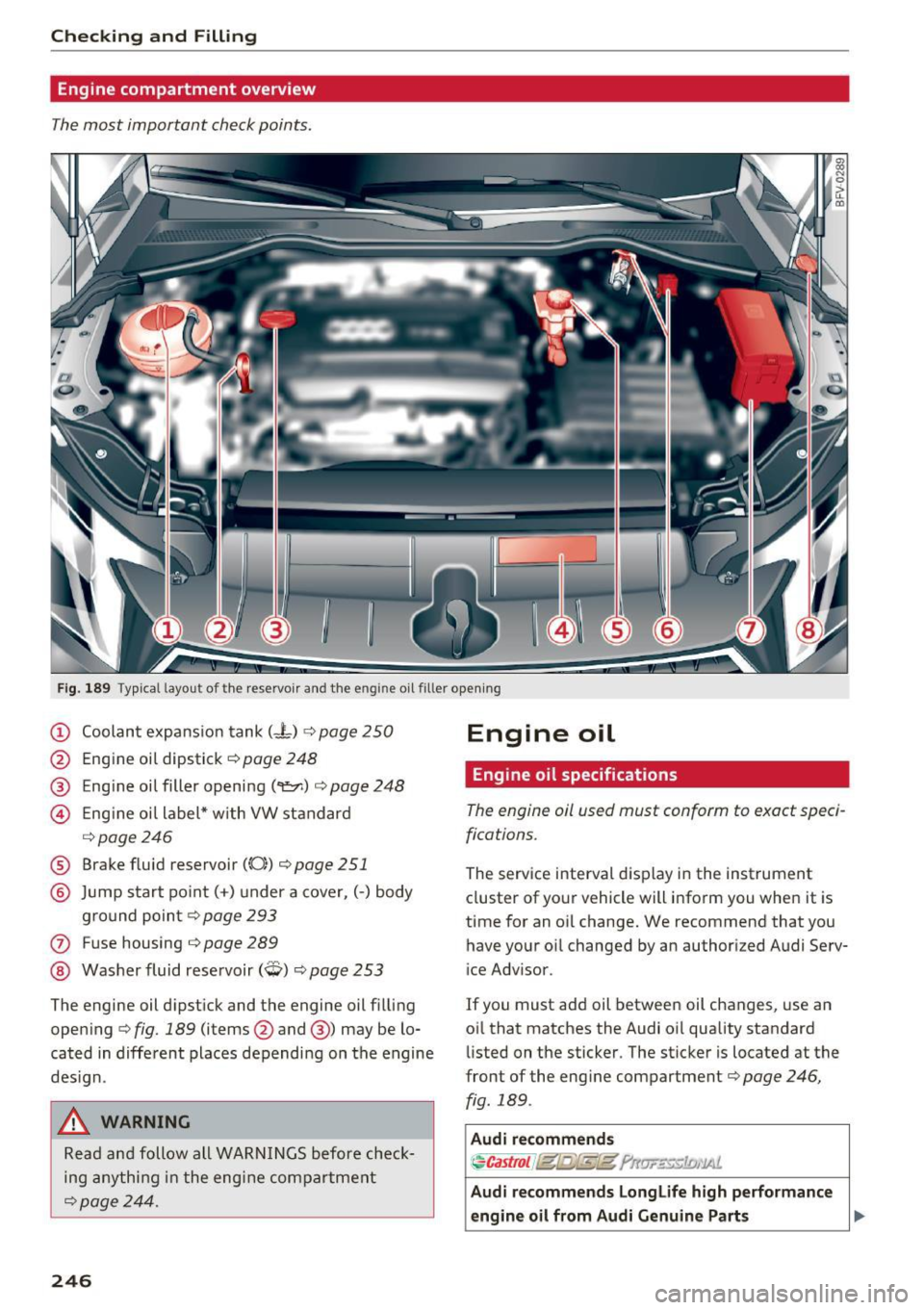
Checking and Filling
Engine compartment overview
The most important check points.
Fig. 189 Typ ical l ayout of the reservoir and the engine o il filler opening
(D Coolant expansion tank (- t) ¢ page 250
@ Engine oil dipstick¢ page 248
® Engine oil filler opening (
¢ page246
® Brake fluid reservoir ((0)) ¢ page 251
@ Jump start point( +) un der a cover, (-) body
ground point ¢page 293
0 Fuse housing ¢ page 289
@ Washer fluid reservoir (W) ¢ page 253
The engine oil dipstick and the engine oil filling
opening ¢ fig. 189 (items@and @) may be lo
cated in different places depending on the engine
design.
A WARNING
Read and follow all WARNINGS before check
ing anything in the engine compartment
¢page 244.
246
Engine oil
Engine oil specifications
The engine ail used must conform to exact speci
fications.
The serv ice interval d isplay in the instrument
cluster of your vehicle will inform you when it is
time for an oil change. We recommend that you
have your oil changed by an authorized Audi Serv
ice Adv isor.
If you must add oil between oil changes, use an
oil that matches the Audi oi l quality standard
listed on the sticker. The sticker is located at the
front of the eng ine compartment¢ page 246,
fig. 189 .
Audi recommends
~Castrol J@t@fkl!t ?llw..::~c:1£;,'lAl.
Audi recommends Longlife high performance
engine oil from Audi Genuine Parts .,..
Page 249 of 322
Using the proper engine oil is important for the
functionality and s ervice life of the engine. Your
engine was factory-filled with a high -quality oil
which can usually be used throughout the entire
year .
Note
Your Limited New Vehicle Warranty does not
cover damage or malfunctions due to failure
to follow recommended maintenance and use
requirements as set forth in the Audi Owner's Manual and Warranty & Maintenance booklet .
- Use only a high quality engine oil that ex-
pressly complies with the Aud i oil quality
standard specified for your vehicle's engine.
Using any o ther oil can cause serious engine
damage.
- Do not mix any lubricants o r other additives
into the engine oil. Doing so can cause en
gine damage.
@ Tips
If you need to add oil and there is none availa
ble that meets the Audi o il quality standard
your eng ine requ ires, you may add a total of
no more than 0 .5 qt (0,5 l) of a h igh-quali ty
"synthet ic"oil that meets the following speci
fications.
- ACEA A3 or API SM with a v iscosity grade o f
SAE OW-30, SAE SW -30 or SAE SW-40.
- Fo r more information abou t engine o il t ha t
has been approved for your vehicle, please
contact either your authorized Audi dea ler
or Audi Custome r Relat ions at
1 (800) 822-2834 or visit our web site at
www.audiusa.com or www.audican ada.ca .
Engine oil consumption
T he engine in your vehicle depends on an ade
qua te amoun t of oil to lubricate and cool all of
i t s moving par ts.
In order to provide effective lub rication and coo l
ing of in te rnal engine components, a ll internal
~ combustion engines consume a cer tain amount
;:::: of oil. Oil consumption varies from engine to en-
" ~ gine and may change sign ificantly over the life of 0
~ the eng ine . Typically, eng ines with a spec ified c:o
Ch eck ing and Filling
break-in period (see ¢ page 55) consume more
oi l during th e break-in period than they consume
after oil consumption has stabilized.
Under normal cond itions, the rate of oil con
sumption depends on the q uality and viscos ity o f
the oil , the RPM (revolutions per minut e) at
which the engine is operated, the amb ient tem
perature and road condit ions. Further factors are
the amount of oil dilution from w ater condensa
tion or fuel resid ue and the oxidation level of the
o il. As any engine is subject to wear as mileage
builds up, the oi l consumption may increase ove r
t ime unt il repla cement of worn components may
become necessary.
With al l these variables coming into play, no
standard rate of o il consumption can be estab
l ished or spec ified . T he re is no alte rnative to reg
u la r and fre quent chec king of the o il level , see
Note .
If the yellow engine oil level warning symbo l II
in the instrument cluster lights up , you sho uld
check the o il level as soon as possible
¢
page 248 . Top off the o il at your earliest con
venience ¢
page 248.
A WARNING
Before you check anything in the engine com
partment, always read and heed all WARN
INGS¢
page 244 .
(D Note
Driving with an insufficient oil level is likely to
cause severe damage to the engine.
(D Tips
- The oil pressure warning display. is not
an indicator of the oil le vel. Do not rely on
it . Instead, check the oil level in your en·
gine at regular intervals , preferabl y each
time you refuel, and always befo re going
on a long trip.
- If you have the impression your engine con
sumes excessive amounts of oil, we recom
mend that you consult an author ized Audi
dea ler to have the cause of your concern
prope rly diagnosed . Keep in mind that the .,,.
247
Page 251 of 322
co
co
... N
" N ... 0
0
Vl c:o
@ For the sa ke of the env ironment
- Engine oi l should never enter the sewer sys
tem or come into contact with the ground
under any circumstances.
- Pay attention to legal requirements when
disposing of empty oil containers.
The engine oil consumption may be up to 0.5 quart/600 m iles (0.5 liter/1,000 km), de
pending on driving style and operating condi
tions. Consumption may be higher during the
first 3,000 miles (5,000 km). Because of this,
the engine oil level must be checked regular ly.
It would be best to check each time you re
fue l your vehicle and before long dr ives.
Changing the engine oil
We recommend that have your oil changed by an
authorized Audi dealer or a qualified service sta
tion.
Before you check anyth ing in the eng ine compart
ment,
alw ays r ea d and heed all WARNINGS Q .&.
in Working in the engine compartment on
page 244.
The engine oil must be changed according to the
intervals specified in your Warranty
& Mainte
n ance booklet. This is very important because the
l ubri cat ing propert ies of o il diminish gradually
d ur ing normal vehicle use.
Under some c ircumstances the eng ine o il should
be changed more frequently . Change oil more of
ten if you d rive mostly short distances, ope rate
the vehicle in dusty areas or under predominant ly
stop-and -go traffic conditions, or have your vehi
cle where temperatures remain below freezing
for extended periods.
Detergent additives in the oil will make fresh oil
l ook da rk after the engine has been running for a
short time. This is normal and is not a reason to
change the oil more often than recommended.
Because of the problem of p roper disposal, along
with the special tools and necessa ry expertise re
qu ired, we strong ly recommend that you have
Ch eck ing and Filling
your oi l changed by an authorized Audi dealer or
a qualified service station .
If yo u choo se to ch ange yo ur oil your self, please
note the follow ing important info rmation:
A WARNING
=
To reduce the risk of persona l injury if you
must change the engine oil in your vehicle
yourself:
- Wear eye protect ion .
-
-To redu ce the r is k of burns from hot eng ine
oil, let the engine cool down to the touch.
- W hen remov ing the oil d rain plug w ith your
fingers, stay as far away as possib le. Always
keep your forearm parallel to the ground to
he lp prevent hot oil from running down your
arm.
- Drain the oil into a container designed for
this purpose, one la rge enough to hold at
least the tota l amount of oil in yo ur engine.
- Engine oil is poisonous. Keep it well out of
the reach of children.
- Continuous contact with used engine oil is
harmful to your skin. Always protect your
skin by washing oil off thoroughly with soap
and water.
(D Note
Never mix oil additives with your engine oil.
These additives can damage your engine and
adverse ly affect yo ur Audi Limited New Vehi
cle Warranty.
@ For the sake of the environment
- Before chang ing yo ur oi l, first make sure
you know where you can properly d ispose of
the used oil.
- Always dispose of used engine o il properly.
Do not dump it on garden soil, wooded
areas, into open streams or down sewage
drains.
- Recycle used engine o il by tak ing it to a used
eng ine oil collection fac ility in your area, or
contact a service station .
249
Page 256 of 322
Checking and Filling
-Do not use a glass cleaner that contains
paint solvents, because this could damage
the pa int .
Service interval display
The service interval display detects when your ve
hicle is due for service.
The service interva l display works in two stages:
- Inspection or oil change reminder: after a cer-
tain distance driven, a message appears in the
Infotainment system display each time the ig
nition is switched on or off . The remaining dis
tance or time is displayed briefly.
- Inspection or oil change due: if your vehicle
has reached an inspection or oi l change interval
or both intervals at the same time, the mes
sage
Inspection due! or Oil change due! or Oil
change and inspection due!
appears briefly af
ter switching the ignition on/off .
Checking service intervals
You can check the remaining distance or time un
til the next oil change or next inspection. Select
in the Infotainment system: the !MENU ! button>
Vehicle > left control button > Service & checks >
Service intervals.
{[) Note
-Following the service intervals is critical to
maintain ing the service life and value of
your vehicle, especially the engine. Even if
the mileage on the vehicle is low, do not ex
ceed the time for the next service.
- Calculating the time to the next oi l change
i s interrupted when the vehicl e battery is
disconnected
~ page 2 79.
254
Page 268 of 322
Wheels
the risk of an accident. Read and follow the important safe
ty precautions in ¢ page 267,
Tires and vehicle load limits.
-The tire must flex more if the tire pressure is too low or if
the vehicle speed or load are
too high. This heats the tire up
too much. This increases the risk of an accident because it
can cause the tire to burst and
result in loss of vehicle con
trol.
- Incorrect tire pressure in
creases tire wear and has a
negative effect on driving and
Tire pressure table
Please note that the information
contained in the following table
was correct at the time of print ing, and the information is sub
ject to change. If there are differ
ences between this information
and the tire pressures specified
on the label on the driver's side B
p illar, always follow the spec ifica
tion on the B-pillar label
¢ page 265, fig. 198.
266
braking behavior, which in
creases the risk of an accident.
(D Note
Replace lost valve caps to re
duce the risk of damage to the
tire valves.
@ For the sake of the environment
Tire pressure that is too low in
creases fuel consumption.
(D Tips
Audi recommends using the
tire pressure specified for a normal load
¢ table on
page 267
or for a full load
when the vehicle is partially
loaded.
Make sure that the tire designa
tion on your tire matches the des
ignation on the tire pressure label
and the tire pressure table.
The following table lists recom
mended tire pressures in cold
tires according to the load and
the size of the tires installed.