change time AUDI TT COUPE 2017 User Guide
[x] Cancel search | Manufacturer: AUDI, Model Year: 2017, Model line: TT COUPE, Model: AUDI TT COUPE 2017Pages: 322, PDF Size: 79.73 MB
Page 81 of 322

co
co
.... N
" N .... 0
0
Vl c:o
The display brightness adjusts automatically to
the brightness of the surroundings, both in the information and in the warning stage. In very
dark or very bright surroundings, the automatic
adjustment will set the display to the minimum
or maximum level. In such cases, you may notice no change when adjusting the brightness, or the
change may only be noticeable once the sur roundings change.
Adjust the brightness to a level where the display in the information stage will not disrupt your
view ahead .
If you change the brightness, the dis
play in the exter ior mirror will briefly show the
brightness level in the information stage. The
brightness of the warning stage is linked to the
brightness in the information stage and is adjust
ed along with the information stage.
(D Tips
- Side assist is not active while you are ma k
ing the adjustment.
- Your settings are automatically stored and
assigned to the remote control key being
used.
Messages
Applies to: veh icles with Audi side assist
If the side assist switches off automatically, a
message appears in the Infotainment system dis
play.
@j Audi side assist : cur rently unavailable.
Sensor vision restricted due to surroundings.
See owner's manual
The radar sensors' vision is affected. Do not cover
the area in front of the sensors with bike wheels,
stickers, dirt or other objects . Clean the area in
front of the sensors, if necessary~
page 77,
fig. 80.
@j Audi side assist: currently unavailable.
See owner's manual
Side assist cannot be switched on at this time be
cause there is a malfunction (for example, the
battery charge level may be too low).
Assist
@j Audi side assist: malfunction! Please
contact Service
The system cannot guarantee that it will detect
vehicles correct ly and it has switched off. The
sensors have been moved or are faulty . Have the
system checked by an authorized Audi dealer or authorized Audi Service Facility soon .
Audi drive select (drive
settings)
Introduction
Applies to : vehicles with Audi drive se lect
Drive select makes it possible to experience dif
ferent types of vehicle sett ings in one veh icle .
The driver can select from three modes,
Comfort,
Auto
and Dynamic , using the ~t.~, button in the
center console or by using the Infotainment sys
tem. This allows you to switch between a sporty
and a comfortable driving mode, for example. In
the
Individual mode, the settings can be adjust
ed to your persona l preferences . This makes it
possible to combine settings such as a sporty en
gine setting with light steering.
A WARNING
=
Using Audi drive select incorrectly can lead to
collis ions, other accidents and serious inju
ries .
Description
Applies to: vehicles with Audi drive se lect
The vehicle setup in each mode depends on the
vehicle's features. However, the engine and
steering are always affected .
Engine and automatic transmission
Depending on the mode, the engine and auto
matic transmission respond more quickly or in a
more ba lanced manner to accelerator pedal
movements.
Adaptive dampers (Audi magnetic ride)*
The adaptive dampers use sensors to record in
formation regarding steering movements, brak
ing and acceleration ope rations by the driver,
road surface, driving speed, and load. With d rive .,..
79
Page 96 of 322
Intelligent Technology
greater than the amount being generated in or
der to maintain an optimal vehicle battery charge
level.
(D Tips
- Energy management cannot overcome the laws of physics. Note that the charge level
and length of the vehicle battery life are
limited.
- When the starting ability is jeopardized, the
(•j indicator light turns on¢ page 13.
What you should know
Maintaining the starting ability is the highest
priority.
A lot of stress is placed on the vehicle battery
when driving short distances, during city driving,
and at cold times of the year. A lot of energy is
used but little is generated. It is also critical
when the engine is not running but electrical
equipment is switched on. In this case, energy is used but none is generated .
In situations like this, energy management will
actively regulate the distribution of energy.
Long periods without use
If you do not drive your vehicle for several days or
weeks, electrical equipment is gradually scaled
back or switched off. This reduces energy use and
ensures the vehicle will be able to start after long
periods of time. Some convenience functions
such as opening with the remote control key may not be available . These convenience functions
will be available again once you switch the igni tion on and start the engine.
With the engine switched off
The vehicle battery will drain if you use Infotain ment functions such as listening to the radio
while the engine is switched off .
If the vehicle's ability to start may be impaired by
the energy use, a message will appear in the In
fotainment system display. The message indi cates that the system will switch off automatically soon .
If you would like to continue using the
functions, you must start the engine.
94
With the engine running
Although e lectrical energy is generated while
driving , the vehicle battery can drain . This can
happen if little energy is generated but much is
used, and the charge level of the vehicle battery
is not optimal.
To restore the balance of energy , components
that require large amounts of energy are tempo
rarily scaled back or switched off. Heating sys
tems in particular require a great deal of energy.
If you notice, for example, that the seat heating*
or rear window defroster is not working, then it has been temporarily reduced or switched off .
These systems are available again as soon as the energy supply has been restored.
In addition, you may notice that the idle speed
has slightly increased . That is normal and no
cause for concern . By increasing the idling speed ,
the additional required energy will be generated
and the vehicle battery will be charged.
Information about data
recorded by vehicle
control modules
Your vehicle is not equipped with a crash data re
corder . This device is installed by some vehicle
manufacturers to record data about crashes so
that it can be analyzed later. Crash data record
ers are also called "Event Data Recorders (EDR)".
In some legal jurisdictions, it is not permitted to
access or download data recorded by pre-instal
led crash data recorders in order to evaluate a
crash without clear consent of the vehicle owner.
Your vehicle is not equipped with a crash data re
corder. However it does contain a variety of elec
tronic control modules for various vehicle sys
tems such as engine function, exhaust treatment
or airbags and safety belts.
These electronic control modules record vehicle
data during normal driving for diagnosis and re
pair purposes. The recording capability of the
electronic control modules is limited to data only
- no sound is recorded. If the control module de
tects a system malfunction or other change in
status, a very limited amount of data is recorded .,,.
Page 97 of 322

co
co
.... N
" N .... 0
0
Vl c:o
for an extremely small period of time. Data that
is recorded in such a case may include vehicle
speed, driving direction, the load on the brakes
and head restraints and performance in the event
of an acc ident or other change in status. The
stored data can only be read or downloaded with
special devices .
Intelligent Technology
95
Page 117 of 322
co
co
.... N
" N .... 0
0
Vl c:o
~ Enter the PIN for connecting on your cell
phone.
O r: when the PIN is displayed on your
ce ll phone, confirm the PIN on your ce ll phone
and in the MMI. The time allowed for entering
the PIN is limited to approximately 30 seconds.
~ Pay attention to any additional system prompts
displayed on your cell phone, for example if the
system should connect automatically in the fu
ture. Depend ing on the ce ll phone, you may
have to confirm downloading the directory sep
arately.
After conn ecting succes sfully
After connecting successfully, a sho rt message
w ith informat ion about the connected profi les
will appear. You can also change profiles later.
Select:
IMENU ! button> Setting s> left control
button >
MMI setting s > Conn ecti on ma nag er
c>page 176.
In addition, the cell phone contacts are automat
ically loaded in the MMI directory. This p rocess
can take several minutes, depending on the num
ber of contacts.
@ Tips
- Making phone calls through the MMI is only
possib le using the
Hand sfree Bl uetooth pro
file.
- You can apply additional settings to con
nected cell phones using the connection
manager
c> page 175.
- You can also search for the MMI in you r ce ll
phone using the Bluetooth device search .
- You only have to pair your dev ice one time.
Bluetooth devices that are already paired
automatically connect to the MMI when the Bluetooth function is switched on, they are
within range and the ignit ion is switched on.
The last connected cell phone is given first
prior ity .
- Authorizing the MMI connection in your cell
phone will make automat ic connection pos
s ible .
- Pay attention to any system prompts dis
played on your cell phone, for example if
the system should connect automat ica lly in
the future. Depending on the cell phone,
T e le ph on e
you may also need to download the directo
ry and confirm access to your text messages
separately .
- When leaving the vehicle, the Bluetooth
connection to the cell phone will automati
cally disconnect. Depending on your cell
phone, phone calls in progress may be auto
matically redirected from the MMI to your
cell phone and you can continue the call on
your phone.
- You can obtain more information from your
cell phone service provider or from yo ur cell
phone user gu ide. For informat ion on us ing
the te lephone, v is it
www .audiu sa .co m/
blu eto oth
or contact your authorized A udi
dea ler or authorized Audi Service Facility .
Operating two telephones through the
MMI
You can connect two cell phones to the MMI, for
example your business cell phone as the main
phone and your private cell phone as the addi
tional phone. You con be reached in your vehicle
through both cell phones.
The first connected ce ll phone is displayed as the
main phone in the MMI. The second cell phone is
connected as the additional phone.
The directory from the connected main phone
will a lways be displayed. If you would like to use
the d irectory from the additional phone, you
must switch the main and addit ional phone
c> page 116.
Connecting a ce ll phone as the m ain phone
Connect your cell phone to the MMI via Blue
tooth. The first connected cell phone is disp layed
as the
Main phone in the MMI.
See
c> page 114, Connecting a cell phone using
Bluetooth .
Connecting a ce ll phone as the additional
phone
Requirement: a ce ll phone must be connected to
the MMI as the main phone.
Se lect:
I MENU I button> Tel ephon e> right con-
t rol button >
Connect additional telephone . ..,.
115
Page 130 of 322
Audi connect
~ Confirm your entry with OK .
Then yo u can open yo ur persona l sett ings from
your my Audi a ccount in you r vehicle.
@ Tips
You c an receive you r myAud i PIN if you have
se t up a myA udi account. For addi tional i nfor
mat ion, see
my .audiusa .com .
Audi connect services
Basic functions
Applies to: veh icles with Audi connect
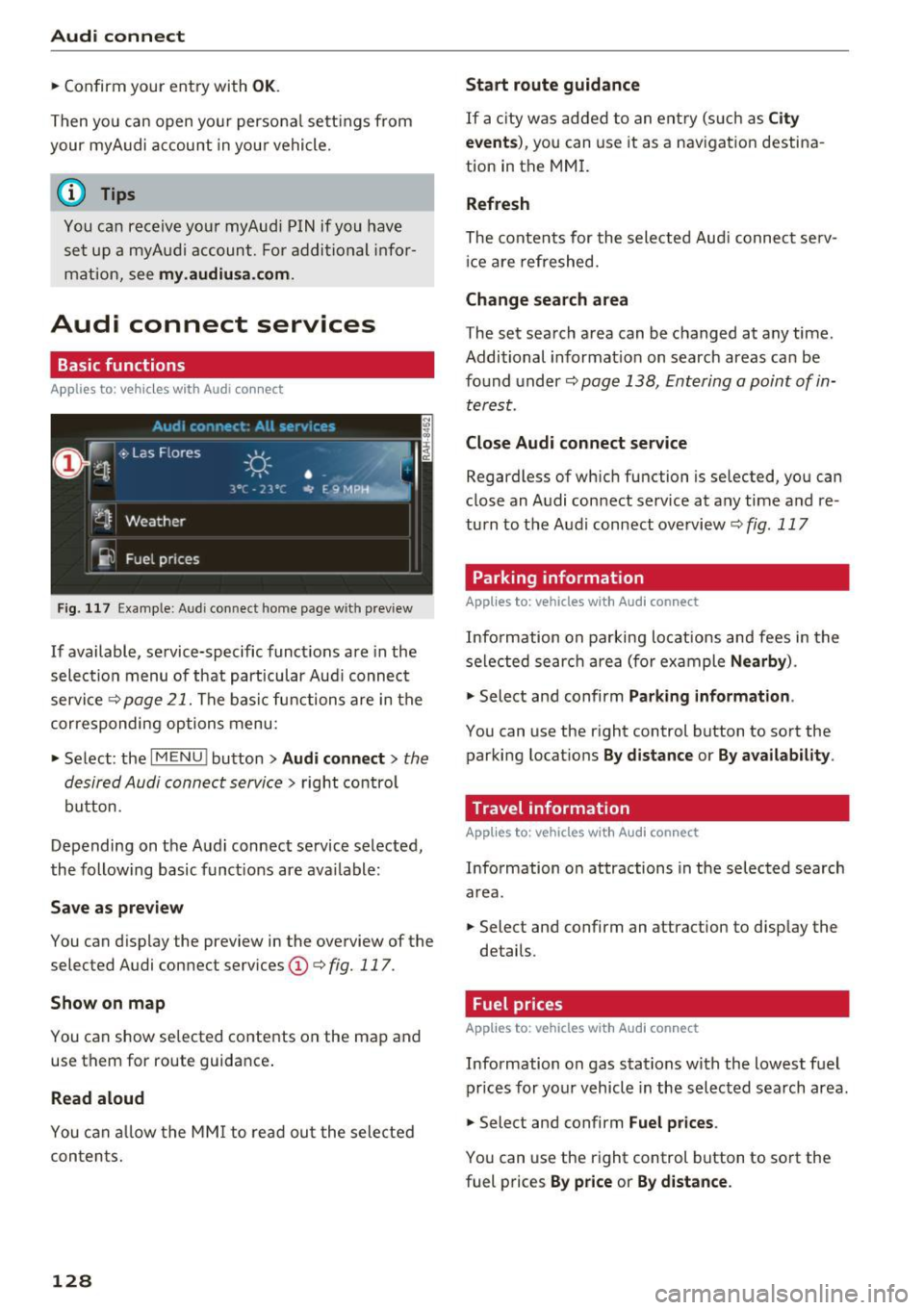
Fig . 11 7 Example: A udi co nnect home page w ith preview
If available, se rvice-specific funct ions are in the
selec tion menu of that particular Aud i connec t
service¢
page 21. The bas ic functions are in the
corresponding options menu:
~ Se lect : the IMENU ! button> Audi connect > the
desir ed Audi connect servic e>
right contro l
button.
Depending on the Aud i connect service se lected,
the following basic funct ions are available:
Save a s preview
You can d isplay the preview in the overview of the
selected Audi con nect serv ices
(D ¢ fig. 117.
Show on map
You can show selected contents on the map and
use them for route guidance .
Read aloud
You can allow the MM I to read ou t the sele cted
con ten ts.
128 Start route guidance
If a
city was ad d ed to an e ntry (s uch as City
events ),
you c an use it as a nav igat io n destina
tion in the MM I.
Refresh
The contents for the selec te d Aud i connec t serv
ic e ar e refreshed.
Change search area
The set search area can be changed at any time .
Additional informat ion on search areas can be
fo und under ¢
page 138, Ent ering a point of in
terest.
Close Audi connect service
Regardless of wh ich fu nction is se lected, you can
close an A udi con nect service at any time a nd re
turn to t he Audi connect ove rview ¢
fig. 117
Parking information
Applies to: vehicles with Audi connect
Info rmation on pa rking locat ions and fees in the
selected searc h area (for ex ample
Nearby ).
~ Select and confirm Parking information .
You can use the right control button to so rt the
parking locat ions
By distance or By availability .
Travel information
Applies to: vehicles with Audi connect
Information on attractions in the selected search
area .
~ Select and confirm an attraction to disp lay the
details .
Fuel prices
Applies to: vehicles with Audi connect
Information on gas stations with the lowest f uel
prices for your vehicl e in the selected search area .
~ Select and confirm Fuel prices.
You can use the right control button to so rt the
fuel prices
By price or By distance .
Page 131 of 322
co
co
.... N
" N .... 0
0
Vl c:o
Weather
Applies to: vehicles with Audi connect
Information on current weather conditions as
well as weather forecasts for the selected search area (for example,
Nearby ).
~ Select and confirm Weather.
Flight information
Applies to: vehicles with Audi connect
Information on flights and current arrival/depar
ture times in the selected search area .
~ Select and confirm Flight information .
You can select the desi red information using the
right control button.
City events
Applies to: vehicles with Audi connect
Information on events in various categories in
the desired search area .
~ Select and confirm City events > left cont rol
button
> category.
Online news
Applies to: vehicles with Audi connect
You can check the current headlines of your fa
vorite publications in the MMI.
Requirement: your myAudi account must be sub
scr ibed to newsfeeds and your vehicle must be
connected to myAudi
¢ page 127.
~ Select : Online news > desired newsfeed > a
headline.
© Tips
If you have not subscribed to any personal
newsfeeds in your myAudi account, pre -con
figured newsfeeds will be displayed.
Audi connect
Twitter
Applies to: vehicles with Audi connect
You can access the most important functions in
your Twitter account through your MMI.
Requirement:
You must have connected your myAudi account
with Twitter. Additional information on this can
be found in the
Audi connect (myAudi) operating
manua l under
my .audiusa.com .
You must have connected your vehicle wit h
myAudi
¢ page 127.
~ Select Twitter > left control button > desired
function
(for examp le, Trends ).
The following categories can be se lected in the
Twitter menu:
- My tweets: News Feed and the Tweets you have
posted are listed.
- Home : the Tweets for everyone you follow are
displayed.
- Trends : topics on Twitter that are currently
popular within a country .
Different functions are ava ilable depending on
the Twitter category you have selected:
-New tweet: you can post a new tweet using
pre-made templates or using customized tem plates in your myAudi account.
-Refresh: the se lected Twitter function is re
freshed.
- Favorite : set a Tweet as favorite to show you
liked it .
-Retweet : you can quote a Tweet to share i t with
others.
(D Tips
- You can find additional information on con
necting your myAud i account with Twitter in
the
Audi connect (myAudi) operating man
ual at
my.audiusa.com.
- Other settings s uch as account, language,
Tweet security and location settings
cannot
be changed in the MMI. These changes must
be made on the Tw itter website.
129
Page 137 of 322
CD
CD
.... N
" N ...... 0
0
Ill co
Navigation
Opening navigation
Applies to: vehicles with navigation system
Navigation
The navigation system directs you to your destination, around traffic incidents and on alternative
routes, if desired.
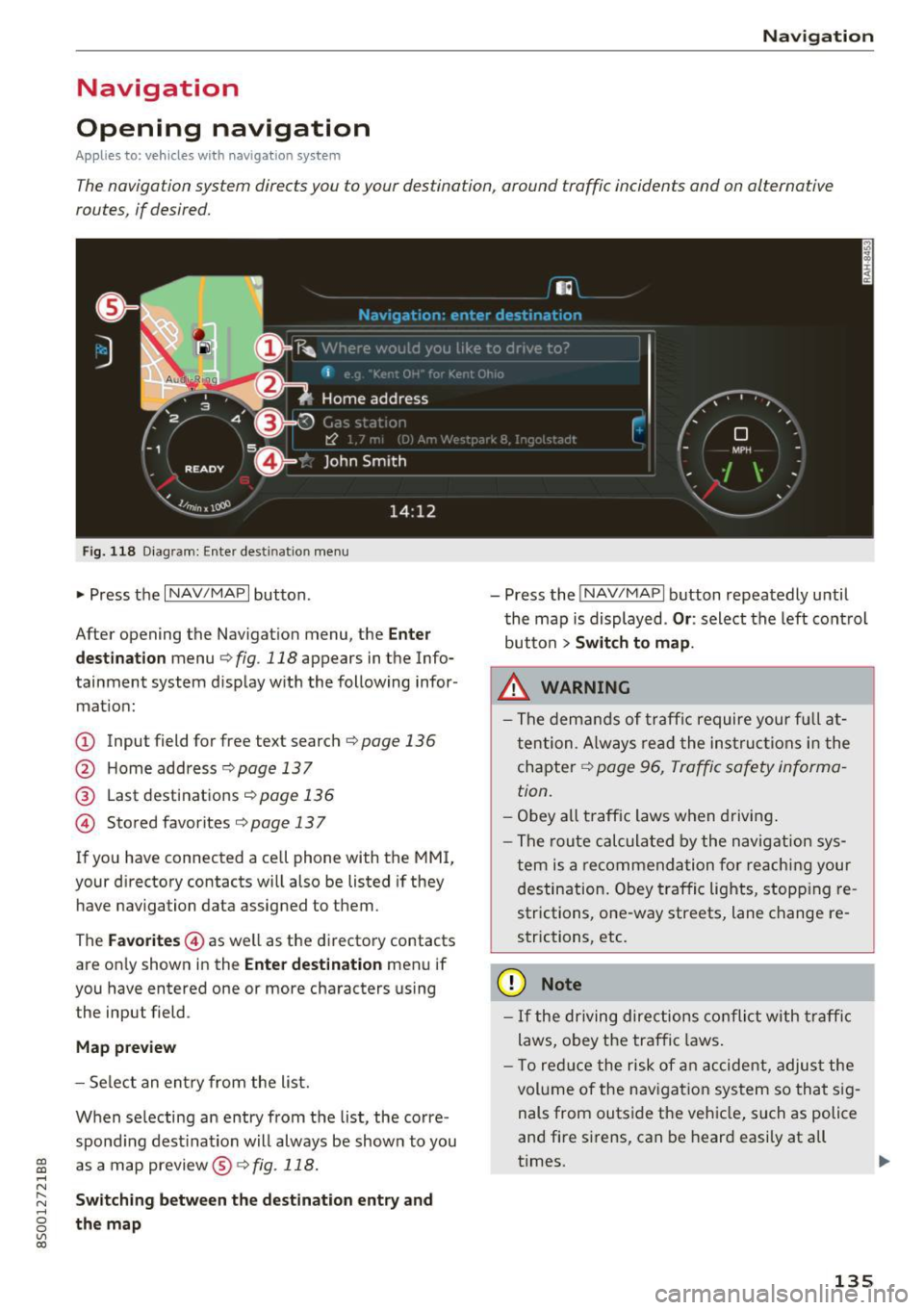
Fig . 118 Diag ram: Enter destination menu
• Press the I NAV/MAPI button.
After opening the Navigation menu, the
Enter
destination
menu c;, fig. 118 appears in the Info
tainment system display with the following infor mat ion:
(!) Input field for free text search c;, page 136
@ Home address <=;>page 137
® Last destinations c;, page 136
@ Stored favorites c;, page 13 7
If you have connected a cell phone with the MMI,
your directory contacts will also be listed if they
have navigation data assigned to them .
The
Favorites @) as well as the directory contacts
are on ly shown in the
Enter destination menu if
you have entered one or more characters using
the input field.
Map preview
- Select an entry from the list.
When se lecting an entry from the list, the corre
spond ing destination will always be show n to you
as a map preview@~
fig. 118.
Switching between the destination entry and
the map
- Press the INAV/MAPI button repeatedly until
the map is displayed .
Or: select the left control
button
> Switch to map .
_&. WARNING
- The demands of traffic require your fu ll at
tention . Always read the instructions in the
chapter
c;, page 96, Traffic safety informa
tion.
- Obey
all traffic laws when driving.
- The route calculated by the navigation sys-
tem is a recommendation for reaching your
destination. Obey traffic lights, stopp ing re
strictions, one-way streets, lane change re
strictions, etc.
(D Note
- If the driving directions conflict with traffic
laws, obey the traffic laws.
- T o reduce the risk of an accident, adjust the
volume of the navigation system so that sig
nals from outside the vehicle, such as police
and fire sirens, can be heard easily at all
times.
-
135
Page 138 of 322

Navig ation
(D Tips
- Information on importing map updates us
i ng an
SO card in your MMI can be found in
the
Aud i con nect (m yAud i) ope rating man
u al
under m y. audiu sa .com .
- Snow and obstructions on the GPS antenna
or interference caused by trees and large buildings can impair satellite reception and
affect the system's ability to determine the
vehicle position . Several deact ivated or mal
funct ion ing sate llites ca n also inte rrupt GPS
r eception and affect the system's ab ility to
determ ine the veh icle posi tion.
- Because st reet names sometimes change,
the n ames stored in the MMI may in rare
cases differ from the ac tual s treet name .
Entering a destination
Free text search for destinations
Applies to: ve hicles w ith navigation system
Using the MMI touch control pad, you can enter
the data fo r a navigation dest inat ion in any orde r
all at once (fo r example , monument Wash ing
ton). Likew ise, you can sea rch fo r po in ts of inter
est, contacts, previous desti nations or favor ites
to naviga te to the des ired add ress.
"' Press the
I NAV/MAPI button repeated ly un til
the
Enter de stination menu is displayed
¢ page 135, fig . 118.
"' Keep turning the contro l knob to t he left until
the input fie ld appears.
- Write one or more search terms in the input
field
(J) ¢page 135, fig. 118 . A list of all re
su lts fo und will appear in the Infotainment sys
tem display.
- Se lect and confirm a destination from the re -
s ul ts list.
- Se lect and confirm
Start route guidance .
The route is displayed as an ove rview in the map
and the route guidance is al ready active .
Narrowing the se arch area
-Se lect : right contro l button > Countr y/state se
lect ion.
136
All co untries/states are selected at the factory
for the free text search. Using the
Countr y/state
sele ct ion ,
you can deselect the irre levant coun
tries/states to increase the search speed and nar
row the results list.
(D Tips
- The MMI input suggestions depend on the
last nav igated destinat ions.
- Up to SO entries can be stored in the last
destinations list .
- Additional information on free text sea rches
can be found under ¢
page 104.
- For additional information about entering
information on the MMI touch, see
q page98.
Load last destination
App lies to : vehicles with navigat ion syste m
Your last destinations are automotically stored
and can be loaded directly as a destination .
Requirement: a destinat io n was a lready navigat
ed to.
"' Press the
I NAV /MAPI button repeatedly u nti l
t he
Enter de stination me nu is displayed
¢page 135, fig . 118 .
You r last dest inations will be listed directly in the
Enter d estination me nu and a re marked wi th the
symbol @qpage 135, fig. 118.
-Select and confirm one of your last destina-
tions.
- Select and confirm
Sta rt route guidance .
Delete la st destination s
-Select and confirm one of the last destinations
from the list.
- Select: right control button
> Delete.
-Select and confirm Delete th is last destination
or Delete all last de stin ations.
The selected destinat ion or all last dest inat ions
i s/are deleted and no longer d isp layed in the
en
ter dest ination
q page 135, fig. 118 menu.
Page 168 of 322
Media
-Move fa vorite : select the des ired entry from
the favorites list. Select the right control but
ton
> Mo ve fav orite. Select and confirm the
desired presets locat ion.
- Delet ing a fa vorite : select the desired entry
from the favorites list. Select the right contro l
button
> Delete fa vo rit e > Del ete this f avorite
or Delete all favorit es.
Additional settings
Options menu
Context -specific functions and settings are ava il
ab le depending on the se lected source.
.,. Press the right contro l bu tton.
Sound settings
See ¢ page 178 .
Input level
Req uirement: a mobi le device must be connected
to the AUX connection cable or to a USB adapter
¢ page 161, Multimedia connections.
The vo lume of the mobile device is adapted to
the MMI. Audi recommends adjusting the vo lume
on the mobile device to 70% of the max imum
volume output.
Bluetooth settings
See ¢ page 176.
Wi-Fi settings
See ¢ page 130, Wi-Fi hotspot .
Connection manager
See ¢page 175.
Additional track information
With the funct ion sw itched on~ and a p laylist
open, vario us information about the current track
(such as artist, album and album cover *) as well
as the p lay ing t ime and the rema ining playing
time are displayed.
l ) The fun ctio n auto matic ally sw itche s off when th e source
is cha nge d.
2> This fun ction is not a vai la bl e fo r all cell phon es.
166
Jukebox m emory capacity *
Information on the J ukebox memo ry capac ity and
the number of stored tracks in the Jukebox is dis
played .
Change playing position
Turn the cont rol knob to the left or r ight. O r:
move you r finge r on the MM I touch contro l pad
from the left to the r igh t.
Shuffle1>
With the function switched on~, all files in the
playlist are p layed and shown in random order .
Repeat track1l
When the funct ion is switched on~, the current
track repeats.
Back to 'Playback '
The options menu is closed. The track currently
playing appears in the playlist
¢ page 165,
fig. 144 .
Play similar music *
The track curre ntly playing is q uick ly ana ly zed
(such as artists, genres, mood , beat) and a sma rt
playlist with simi lar tracks is shown .
Play more ...
A smart playl ist is s hown based on the t rack cur
r ently playing . Yo u can sele ct between a p lay list
with more tracks
by thi s arti st , from thi s album
or of thi s genre.
Set as ringtone*
2l
Requirement: a cell phone must be connected to
t h e MMI. The track c urrently playing must be in
the
Juk ebo x* ¢ page 157 .
The selected track w ill be used as the ri ngtone
for incoming calls.
Gr acenote online databa se *
Requirement: the MMI must be connected to the
Internet. .,.
Page 172 of 322
Media
on the system language and canno t always
be g uarantee d.
Troubleshooting
Problem Solution
Audi music inte rface* /Bluetooth au-
Read the instructions in the chapter c:;, page 161 , Multimedia
dio playe r*: mobile dev ice is not sup -connections/ c:;, page 158, Blue tooth audio player. You can
ported. learn about supported mobile dev ices in the Audi database for
mob ile dev ices at
www.audiusa .com /bluetooth .
Audi music interface* /AUX input:
the Ad
just the volume of the mobile device to approximate ly 70%
vo lume is too high/too low when of t he maximum out put
c;, page 166, Input level.
sta rting playback thro ugh the AUX in -
put.
Audi music interface *: th e port able For many ce ll p ho nes o r mobile device s, pl ayback i s not pos si-
device is not recogni zed as a so urc e. b
le w hen the b attery level is too low (less th a n 5% o f its ca -
pacity). The mobi le device w ill on ly be reco gni zed as a media
source in the MMI after connecting if the batte ry c harge leve l
is s ufficient.
Audi music interface *: malfu nctions T he Bluetoot:h audio player fu nct io n is swit ched o n. Sw itch
dur ing a udio p layback t hroug h an t his funct io n off
c:;, page 1 76 whe n you are no t usi ng the
iPod/ iPhone.
Bluetooth audio player .
AUX input :
there is stat ic when con- When connecting and disconnecting , the E xternal aud io play-
nec ting and disconnect ing the AUX er source is al ready selected . Befo re con necting or d isconnect -
co nnect io n cabl e. ing the mobile device, ei ther mute the device (see
c:;, page 178) o r swi tch to a different aud io so urce (fo r exam-
p le
¢ page 15 0, Opening the radio).
Bluetooth audio player " /Wi-Fi audio On ly one interface should be active ly used at a time to ensure
player *: audio playback interference. problem -free playback.
Wi-Fi audio player* : audio playbac k Aud
io playb ack inte rference can occur on some ce ll phones if
in terference . t
he Inte rnet connection in t he ve hicl e was no t establis hed
through the SI M card reade r* on the MMI cont rol panel and
the
mobile data option on the cell phone is sw itched on. De-
activate the
mobile data option on your cell phone.
Jukebox *: tracks on the i mpo rted When importing p laylist s, al l of the files themselves mus t be
playlist are g raye d ou t.
import ed.
Jukebox *: imported tracks ca nnot be If you cannot find imported tracks in the media center, they
played o r found . may not be suppor ted . Only copy supported fi les
c:;, page 168
t o the Jukebox .
Wi-Fi audio player* : multiple devices Close the Audi MMI connect app on t he connected devices
are connected to the W i-F i h otspot . A (for examp le , sma rtphones) that are not being used as the
med ia p layer (s uch as a smartphone) W i-Fi audio player*. Likewise, close the UPnP server apps or
appea rs as the med ia source and can- the med ia pe rmissio ns on t he i nteg rated UPnP/DLNA se rver.
no t be changed . Connect the desired device as a W i- F i aud io play-
er* c:;,
page 159 .
170
...