steering wheel AUDI TT COUPE 2017 Owners Manual
[x] Cancel search | Manufacturer: AUDI, Model Year: 2017, Model line: TT COUPE, Model: AUDI TT COUPE 2017Pages: 322, PDF Size: 79.73 MB
Page 4 of 322
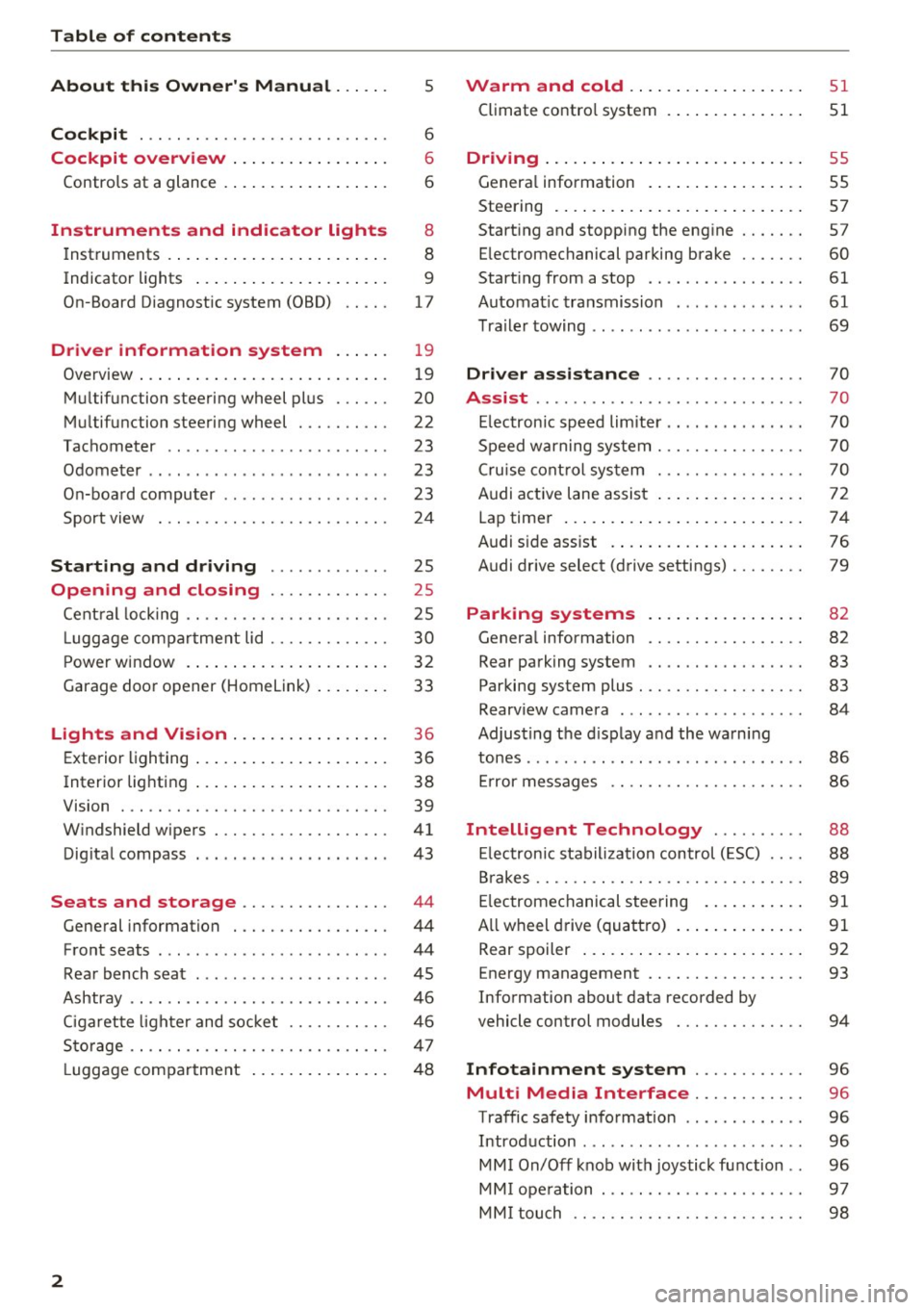
Table of content s
About this Owne r's Manual . .. .. .
5
Cockpi t . . . . . . . . . . . . . . . . . . . . . . . . . . . 6
Cockpit overview . . . . . . . . . . . . . . . . . 6
Controls at a glance . . . . . . . . . . . . . . . . . . 6
Instruments and indicator lights 8
Instruments . . . . . . . . . . . . . . . . . . . . . . . . 8
Indicator lights . . . . . . . . . . . . . . . . . . . . . 9
On-Board Diagnostic system (OBD) . . . . .
17
Drive r information system . . . . . . 19
Overview . . . . . . . . . . . . . . . . . . . . . . . . . . . 19
M ultifunction steering wheel plus . . . . . . 20
Mu ltifunction steering wheel . . . . . . . . . . 22
Tachometer . . . . . . . . . . . . . . . . . . . . . . . . 23
Odometer . . . . . . . . . . . . . . . . . . . . . . . . . . 23
On-board computer . . . . . . . . . . . . . . . . . . 23
Sport view . . . . . . . . . . . . . . . . . . . . . . . . . 24
Start ing and driving . . . . . . . . . . . . . 25
Opening and closing . . . . . . . . . . . . . 25
Cent ral locking ... ............ .... .. .
L uggage compartment lid ............ .
P ower window .. ... .. ..... ... .. .. .. .
Garage doo r opener (Home link) ... .. .. . 25
30
32
33
Lights and Vision . . . . . . . . . . . . . . . . . 36
Exterior lighting . . . . . . . . . . . . . . . . . . . . . 36
Interior lighting . . . . . . . . . . . . . . . . . . . . . 38
V1s1on . . . . . . . . . . . . . . . . . . . . . . . . . . . . . 39
W indshield wipers . . . . . . . . . . . . . . . . . . .
41
Dig ital compass . . . . . . . . . . . . . . . . . . . . . 43
Seats and storage . . . . . . . . . . . . . . . . 44
General information . . . . . . . . . . . . . . . . . 44
Front seats . . . . . . . . . . . . . . . . . . . . . . . . . 44
Rea r bench seat . . . . . . . . . . . . . . . . . . . . . 45
Ashtray . . . . . . . . . . . . . . . . . . . . . . . . . . . . 46
Ciga rette lighter and socket . . . . . . . . . . . 46
S to rage . . . . . . . . . . . . . . . . . . . . . . . . . . . . 47
L uggage compa rtment . . . . . . . . . . . . . . . 48
2
Warm and cold .. .. ... . .. .... ... .. 51
Climate contro l system . . . . . . . . . . . . . . . 51
Dr1v1ng ... .. .. .. .. .. .. .. .. .... ... . .
Genera l information .. ... . .. .... ... . .
Steering . ... .. .. .. .. ... .. ..... ... . .
Start ing and stopping the engine
Electromechanical parking brake ...... .
Start ing from a stop .. ... ....... ... . .
Automat ic transmission ....... ..... . .
Tra ile r towing ...................... .
Driver assistance .............. .. .
Assist ............................ .
Electronic speed lim iter ..... ....... .. .
Speed warning sy stem . .. ........... . .
Cruise cont rol sys tem
Audi active lane assist ... . ... .... ... . .
Lap timer ... .. .. .. ... .. .. ..... ... . .
Audi s ide assist . ... .. ... . .. .... ... . .
Audi drive select (drive settings) ....... .
Parking systems
General information .. ............. . .
Rear parking system .. .. ........... . .
Parking system plus . .. ............. . .
55
55
57
57
60
61
61
69
70
70
70
70
70
72
74
76
79
82
82
83
83
Rearv iew camera . . . . . . . . . . . . . . . . . . . . 84
Adjust ing the d isplay and the wa rning
tones ...... ... .. .. .. ... ....... ... .. 86
Er ror messages . . . . . . . . . . . . . . . . . . . . . 86
Intelligent Technology . . . . . . . . . . 88
El ectronic stabiliza tion control ( ESC) . . . . 88
B rakes . . . . . . . . . . . . . . . . . . . . . . . . . . . . . 89
E lectromechanical steering . . . . . . . . . . .
91
A ll wheel d rive (quattro) . . . . . . . . . . . . . . 91
Rear spoiler . . . . . . . . . . . . . . . . . . . . . . . . 92
Energy management . . . . . . . . . . . . . . . . . 93
Information about data recorded by
vehicle control modules . . . . . . . . . . . . . . 94
Infotainment system . . . . . . . . . . . . 96
Multi Media Interface . . . . . . . . . . . . 96
Traffic safety information . . . . . . . . . . . . . 96
Introd uction . . . . . . . . . . . . . . . . . . . . . . . . 96
MM I On/Off knob with joystick function . . 96
MM I ope ration . . . . . . . . . . . . . . . . . . . . . . 9 7
MM I touch . . . . . . . . . . . . . . . . . . . . . . . . . 98
Page 9 of 322
co
co
.... N
" N .... 0
0
Vl c:o
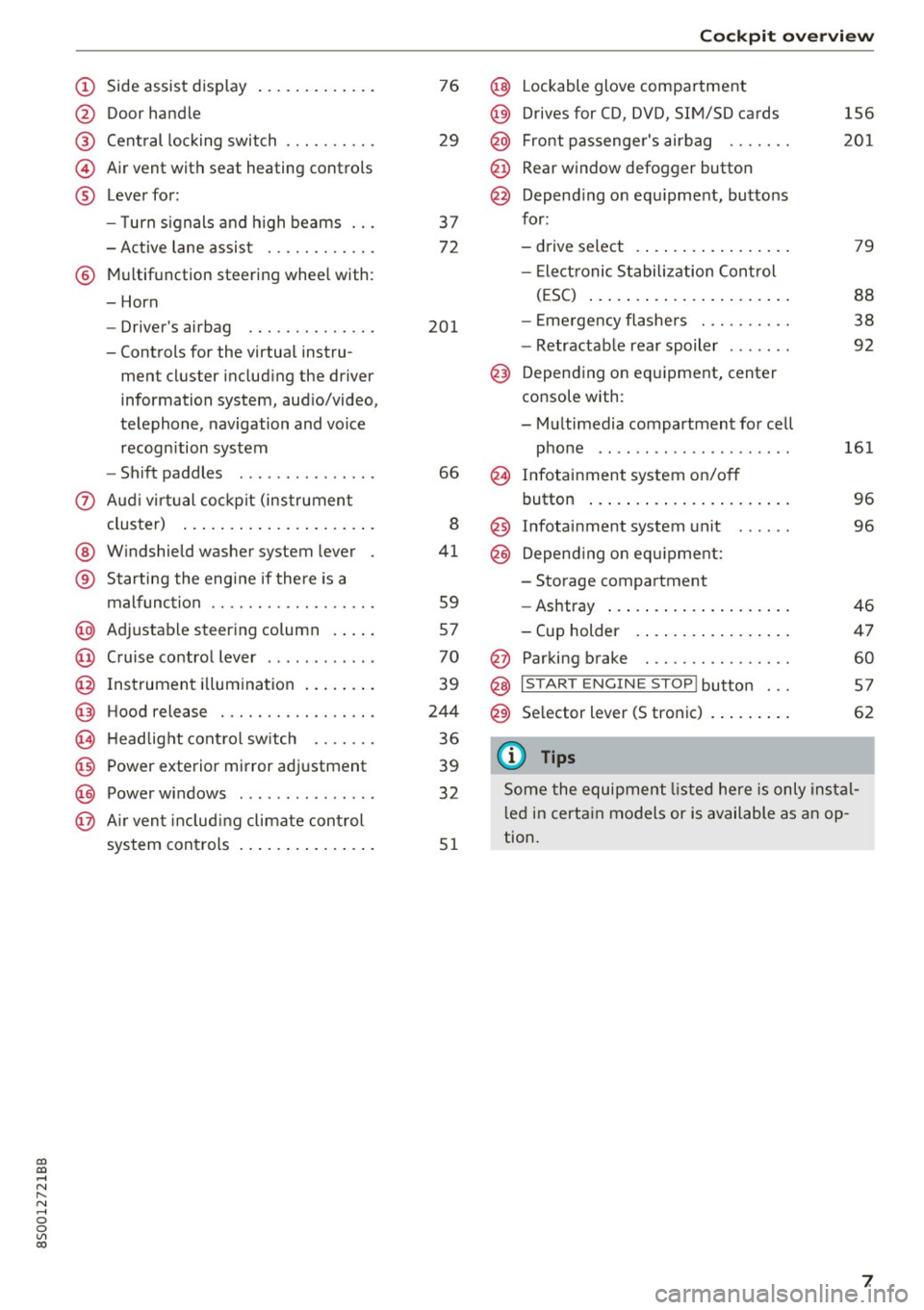
(!) Side assist display ..... ... .. .. .
@ Door handle
®
©
®
Cent ral locking switch
Air vent with seat heating controls
Lever for:
- T urn s ignals and h igh beams .. .
- Active lane assis t ......... .. .
® Multifunction steering wheel with :
- Horn
- Driver's ai rbag .. ......... .. .
- Controls for the virtual instru-
ment cluster includ ing the driver
information system, aud io/video,
telephone, navigation and voice
recogn ition system
- Shift paddles . .... ..... ... . .
0 Aud i v ir tu al co ckpit (instrument
cluster) ... .... .. .... ... .. .. .
@ W indshield washer system lever
® S tarting the engi ne if the re is a
mal func tion .. ........... .. .. .
@ Adjustab le st eering column . ... .
@ Cruise co ntrol lever .. ..... ... . .
@ Ins trument i llum ination ... .. .. .
@ Hood release . .... ......... .. .
0 H eadlight cont rol sw itch .... .. .
@ Power exterior mirror adjustment
@ Power windows . .... ..... ... . .
@ A ir ven t incl uding climate con trol
system controls ... .... ... .. .. .
76
29
3 7
72
201
66
8
41
59
57
70
39
244
36
39
32
5 1
Coc kpit o ve rv iew
@ Lockable glove compartment
@) Drives for CD, DVD, SIM/SD cards
@ Front passenge r's airbag ...... .
@ Rear window defogg er button
@ Depend ing o n equ ipment, buttons
for :
- drive select .. ... .. .. ..... .. .
- Elect ronic S tabilization Control
( E SC) ... .. .. .. .... . ..... .. .
- E me rgency flashe rs ...... ... .
- Retractab le rear spoiler ...... .
@) Depending on eq uipment, center
console with :
- Multimedia compartment for cell phone ...... .. ............ .
@ Infotainment system on/off
button ... .. .. ... .. .. ..... .. .
@ Infotai nment system unit
@) Depend ing o n eq uipment:
- Storage compartment
- Ashtray ... .. ... .. .. ..... .. .
- Cup holder .. ... .. .. ..... .. .
@ Parking brake . .. ............ .
@ I START E NGINE STOP I button ...
@) Selector lever (S tronic)
(D Tips
156
2 01
79
88
38
92
161 96
96
46
4 7
60
5 7
62
Some the equipment listed he re is only ins tal
l e d in certa in models or is available as an op
tion.
7
Page 11 of 322
co
co
.... N
" N .... 0
0
Vl c:o
(D Note
Never drive until the tank is completely emp
ty. The irregular supply of fuel that results
from that can cause engine misfires . Uncom
busted fuel will then enter the exhaust sys
tem. This can cause overheating and damage
to the catalytic converter .
Indicator lights
Description
The indicator lights in the instrument cluster
blink or turn on. They indicate functions or mal
functions.
With some indicator lights, messages may appear and warning signals may sound. The indica
tor lights and messages in the display can be cov
ered by other displays. To show them again, se lect the tab for the indicator lights and messages
using the multifunction steering wheel
c;, page 19. If there are several malfunct ions,
you can display them one at a time using the
thumbwheel.
Some ind icator lights in the display can display in
several colors .
Overview
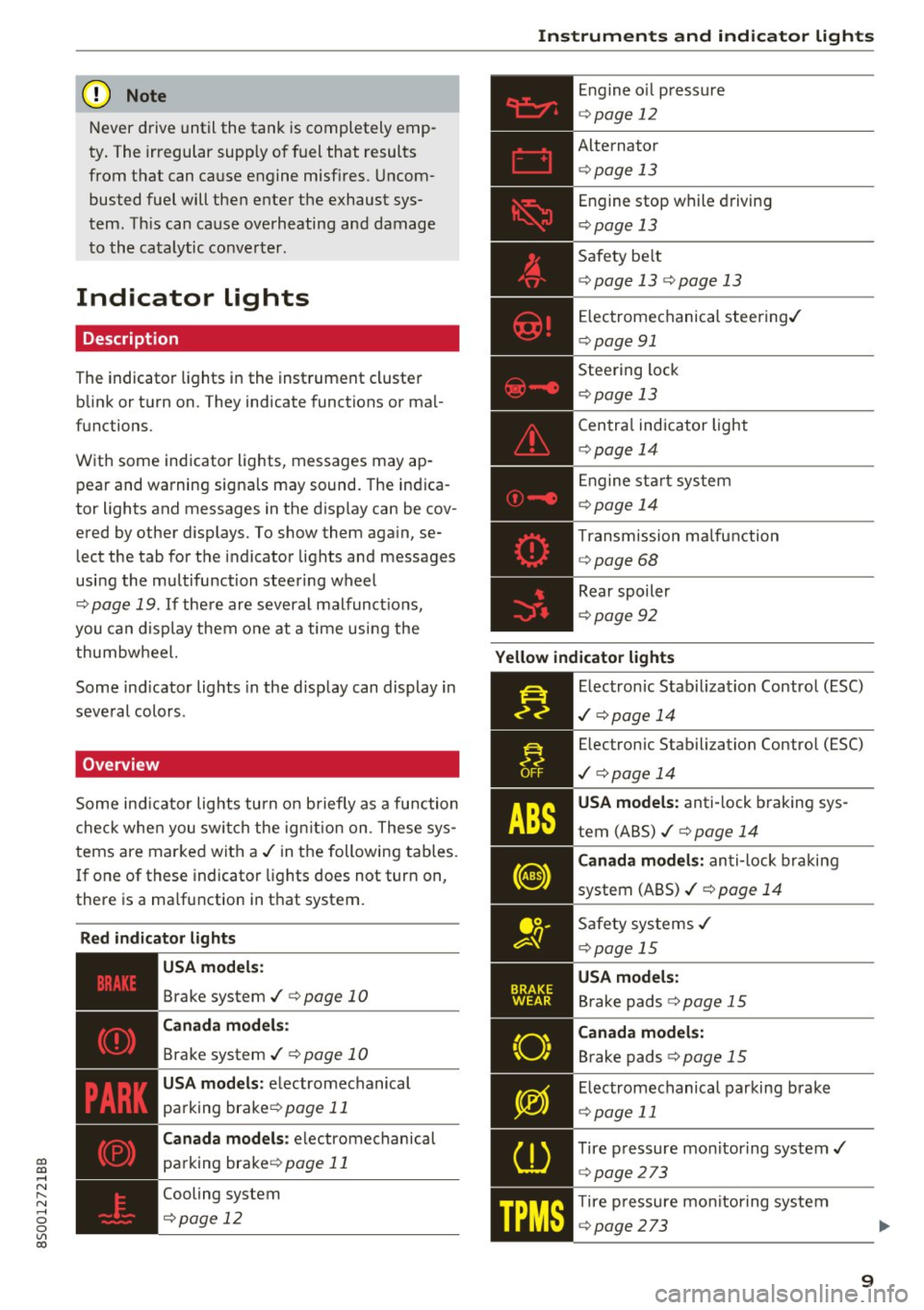
Some indicator lights turn on briefly as a function
check whe n you switch the ign ition on . These sys
tems are marked with a
,I in the following tables.
If one of these indicator lights does not turn on,
there is a ma lfunction in that system.
Red indicator lights
---------------
US A models :
Brake system ./ c;, page 10
Canada models:
Brake system ./ c;, page 10
USA models : electromechanical
parking brake¢
page 11
Canada models: electromechanical
parking brake¢
page 11
Cooling system
<=>page 12
Instruments and indicator lights
Engine oil pressure
c;,page 12
Alternator
¢ page 13
Engine stop while driving
¢page 13
Safety be lt
c;, page 13 c;, page 13
Electromechanical steering./
c;,page 91
Steering lock
¢page 13
Central indicator light
c;,page 14
Engine start system
c;,page 14
Transmission malfunction
c;, page 68
Rear spoiler
c;,page 92
Yellow indicator lights
Electronic Stabilization Contro l (ESC)
,I c;, page 14
Electronic Stabilization Control (ESC)
./ c;, page 14
USA models: anti-lock braking sys
tem (ABS)./
c;, page 14
Canada models: anti-lock braking
system (ABS) ./
c;, page 14
Safety systems ,I
c;,page 15
USA models:
Brake pads c;, page 15
Canada models:
Brake pads c;, page 15
Electromechanical parking brake
c;,page 11
Tire pressure monitoring system../
<=>page 273
Tire pressure monitoring system
<=>page 273
9
Page 22 of 322

Drive r inf orm ati on sy stem
- If your vehicle is stationary or if you are driv
ing at very low speeds, the temperature dis
played may be s light ly higher than the ac
tual temperature outside due to the heat
radiating from the engine.
- At temperatures below 41 °F (+S
0
(), a
snowflake symbol appears in front of the
temperature display¢,&.
Multifunction steering
wheel plus
Operating
A pp les to: ve hicles w ith multifunctio n steering wheel p lus
The Multifunction steering wheel plus* hos 14
buttons. You con use them to operate the driver
information system and the MMI functions ,
change the volume and switch the voice recogni
tion system* on and off.
Fig . 7 Infotainment system display
Fig . 8 Mult ifunc tion steering whee l, left side
Req uirement: the ignition must be switched on.
The driver information system contains mult iple
tabs
(D that display various informat ion @.
The follow ing tabs are available, depending on
veh icle equipment :
20
First tab Vehicle
Second Warnings
tab
a)
Third tab Radio c::> page 150
Media c::>page 155
Fourth tab Telephone*¢ page 114
Fifth tab Navigation
* c::> page 135
Map* c::> page 143
Sixth tab b) Sound¢ page 17 4
Audi connect*¢ page 126
Settings c::> page 174
a) This tab is only visible if at le ast one indicat or light or
message is shown or
if t h e correspond ing system is
switched on.
b) The contents of the tab de pend on the menu that was
used last.
@ Button ~
-Swit ch ing tab s: p ress the l<1 1>I bu tto n to the
left/right (for example, radio).
@ !VIEWI button
S witching th e view : press the !VIEWI button to
switch from the classic v iew
c::> page 19, fig. 5 to
the e nhanced view
c::>page 19, fig. 6.
@button ~
Returning to funct ions at higher levels
@ 121 and 19 contr ol butt ons
Opening/closing the selection menu or options
menu
c::> page 21.
(J) Left thumbwheel
-Sele cting a function in a m enu /list : turn the
left thumbwheel to the des ired function in a
menu or list (such as se lecting a station, Lap
times*) .
-Co nfirming a selection : press the left thumb
wheel (for example, confirm the station).
-Zoomin g in /out on th e map : when a map is
disp layed, turn the le ft thumbwheel up/down
to zoom in/o ut on the map.
Page 23 of 322
CD
CD
.... N
" N ...... 0
0
Ill co
Control buttons
Applies to: vehicles with multifunction steering wheel plus
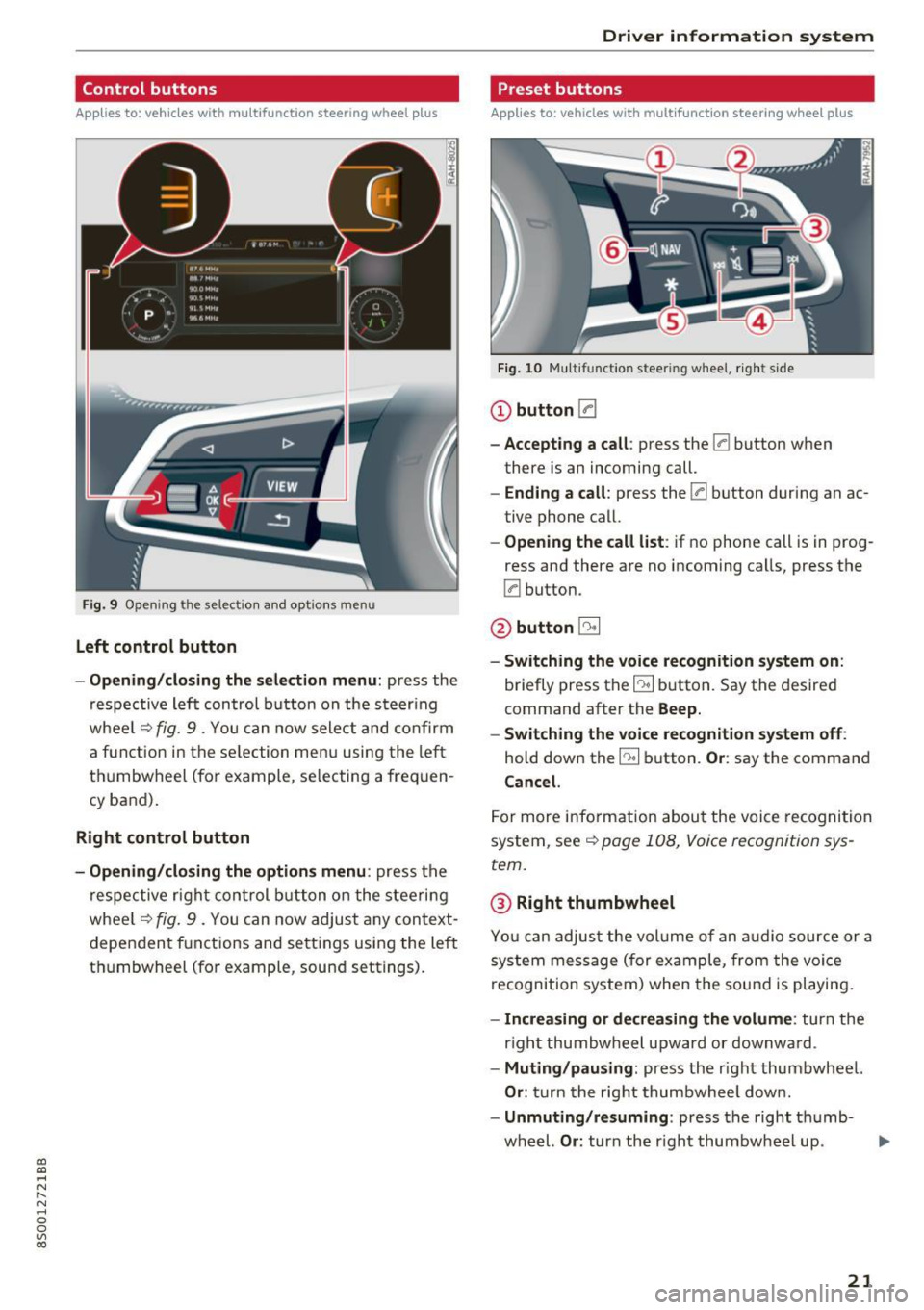
Fig . 9 Open ing th e selec tio n and opt ions menu
Left control button
- Opening /closing the select ion menu : press the
respective lef t control button on the s teer ing
whee l
c::> fig. 9 . You can now sele ct and confirm
a f unction in the se lection men u using the le ft
t hu mbwheel (for example, se lec ting a frequen
cy band) .
Right control button
-Opening /closing the options menu : press the
r espective r ight con trol b utton o n the stee rin g
whee l
c::> fig. 9 . You can now adjus t any context
dependent f unctions and setti ngs using the left
t hu mbwheel (fo r example , sound sett ings).
Driver in forma tion system
Preset buttons
Applies to: vehicles with multifunctio n steering wheel plus
Fig . 10 M ulti fun ctio n stee ring whee l, ri ght s ide
CD button [a
-Accepting a call : press the [a button when
there is an incoming call.
- Ending a call : press the [a button during an ac
tive phone call.
- Opening the call list : if no phone call is in prog
ress and there are no incoming ca lls, press the
[a button.
@ button 5l
-Switching the voice re cognition system on :
briefly press the~ button. Say the desired
command a fter the
Beep.
- Switching the voice recognition system off :
hold down the~ button. Or : say the command
Cancel.
For more info rm ation abou t the voice recognition
system, see
c::> page 108, Voice recognition sys
tem.
@ Right thumbwheel
You can adjus t the vol ume of an a udio source or a
system message (for ex ample, from the voice
recognition system) when the sou nd is pl ayin g.
-Increasing or decrea sing the volume: turn the
r ight thumbw heel upward or downw ard.
- Muting /pausing : press the r ight thumbwheel.
Or : turn the rig ht thumbwhee l dow n.
- Unmuting /resuming : press the right t humb-
wheel.
Or : turn th e right thumbw heel up. .,,.
21
Page 24 of 322
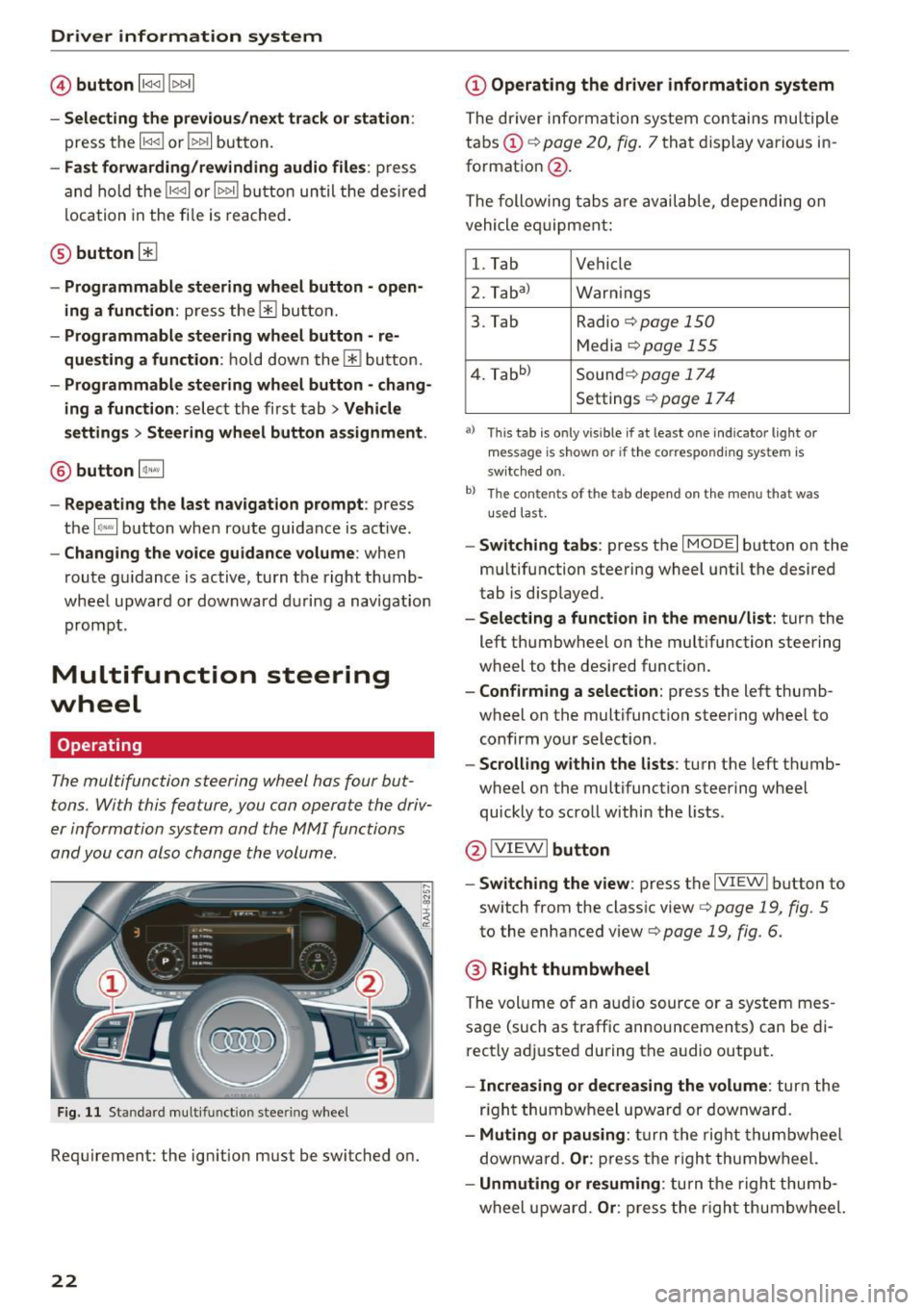
Driver information system
© button l1<1<1 I l1>1>1 I
-Selecting the previous/next tr ack or station :
press the ll
- Fast forwarding /re winding audio file s: press
and ho ld the
! 1q<] I or l1>1> 1I bu tton un til t he desired
location in the fi le is reached .
@button @
- Programmable steering wheel button - open
ing a function :
press the@ bu tton.
- Programmable steering wheel button - re
questing a function :
ho ld dow n the Ill button.
- Programmable steering wheel button - chang
ing a function:
selec t the fi rst tab> Vehicle
settings
> Steering wheel button a ssignment .
@ button 1~·" 1
- Repeating the last navigat ion prompt : press
the
I Q•,.., I button when route guidance is active.
- Changing the voice guidance volume : when
route gu idance is active, turn th e right thumb
whee l upward or dow nward d uring a navigat ion
prom pt.
Multifunction steering
wheel
Operating
The multifunction steering wheel has four but
tons. With this feature, you can operate the driv
er information system and the MMI functions
and you can also change the volume.
Fig . 11 Standard multifunction stee ring wheel
Requirement: the ignition must be switched on.
22
(D Operating the driver information system
The driver information system contains multiple
tabs (!)¢
page 20, fig . 7 that disp lay various i n
format ion
@ .
The following tabs a re av ail ab le, depe nding on
vehicle e quipment:
l. Tab Vehicle
2. Taba )
Warnings
3. Tab Radio
c::> page 150
Media c::>page 155
4. Tabb )
Sound¢ page 174
Settings ¢page 17 4
a) Thi s tab is only v is ib le if at least one indicator lig ht or
message is shown or if t he co rrespond ing sys te m is
sw itched o n.
b ) Th e co ntents of th e tab depend on the menu t hat was
u se d l ast.
-Switch ing tabs : press th e I MODE I button on the
m ultifunction steering wheel unt il the desired
tab is disp layed .
-Selecting a function in the menu/list : turn the
left thumbwheel on the multifunction steering
wheel to the desired function .
-Confirming a selection : press the left thumb
wheel on the multifunction steering wheel to
confirm your selection.
-Scrolling with in the lists : turn the left thumb
wheel on the multifunction steering whee l
quickly to scro ll within the lists .
@!VI EWI button
- Switching the view :
press the IVIEWI button to
switch from the class ic view
c::> page 19, fig. 5
to th e enhanced view c::> page 19, fig. 6.
® Right thumbwheel
The volume o f an a udio source o r a system mes
sage (such as traffic announcements) can be di
r ectly adjusted during the a udio output.
- Increasing or decreasing the volume : turn the
r ig ht thumbwheel u pward or downwa rd.
- Muting or pausing : turn the rig ht thumbwhee l
downwa rd.
Or : press th e righ t thumbwheel.
- Unmuting or resuming : turn the righ t thumb
wheel u pw ard.
Or : press the r igh t thumbwheel.
Page 59 of 322
CD
CD
.... N
" N ...... 0
0
Ill co
Steering
Adjusting the steering wheel position
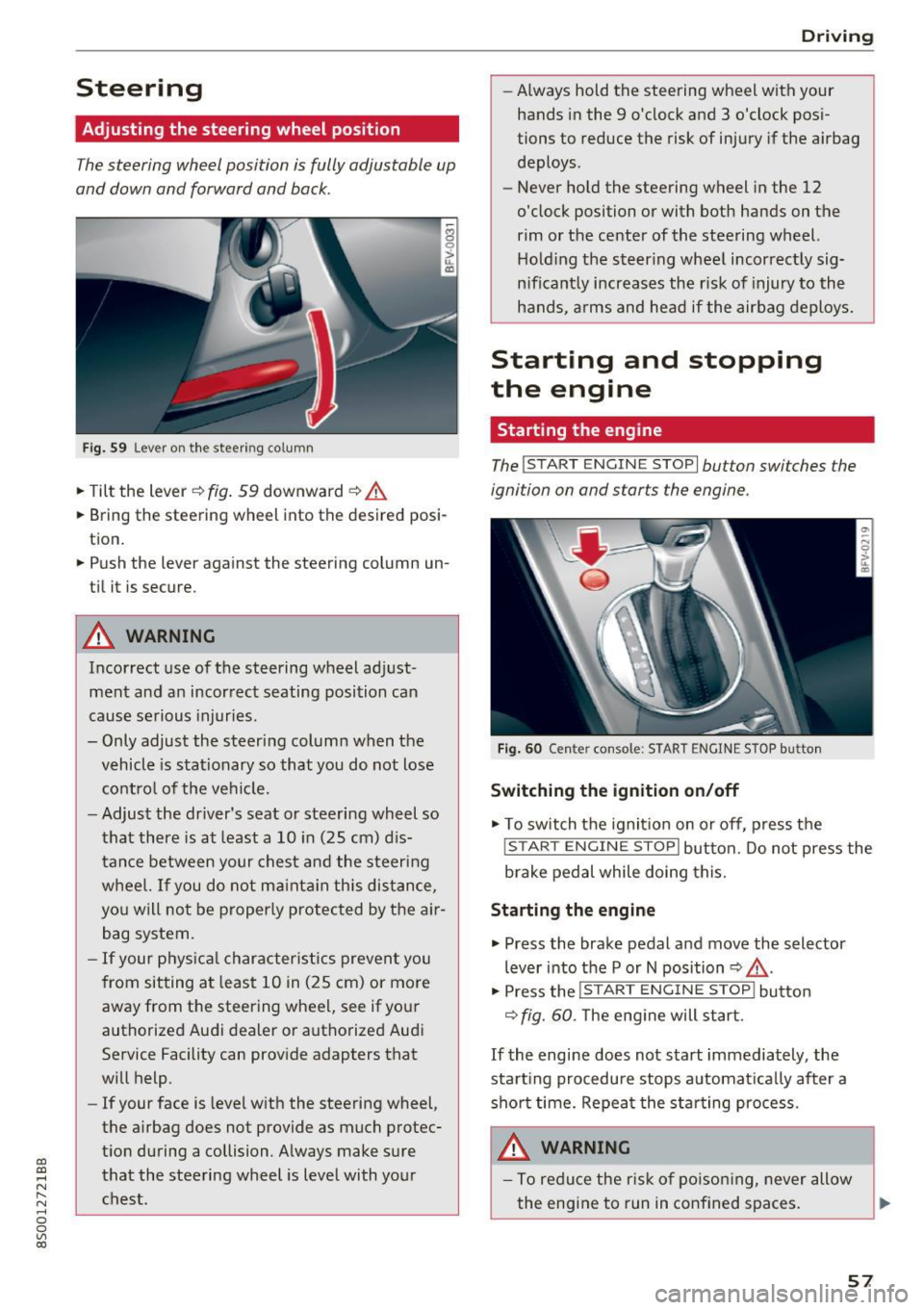
The steering wheel position is fully adjustable up
and down and forward and back.
Fi g. 59 Lever on th e steering column
... Tilt the lever c:::> fig . 59 downward c:::> A
... Bring the steering wheel into the desired posi
tion .
... Push the lever against the steering column un
t il it is secure.
A WARNING
Incorrect use of the steering wheel ad just
ment and an incor rect seating posi tion ca n
cause se rious injuries.
- Only adjust the steeri ng column when the
vehicle is stat ionary so that you do not lose
cont ro l of the ve hicl e.
- Adjus t the dr iver's seat or steering wheel so
that there is at least a 10 in (25 cm) d is
t an ce betwee n your chest a nd t he s teering
w heel. If y ou d o not m aint ain this dis tan ce,
yo u will n ot be proper ly protected by the a ir
bag system.
- If your phys ic al characteris tics p reven t you
from sit ting a t least 1 0 in ( 25 cm) or mo re
away from the steering whee l, see if yo ur
authorized Audi dea ler or autho rized Audi
Service Facility can prov ide adapters that
will help.
- If your face is leve l with the steering wheel,
the a irbag does not provide as much protec
t io n during a collision. Always make s ure
tha t the steering wheel is leve l with yo ur
chest.
D rivi ng
-Always hold the steering wheel with your
hands i n the 9 o'clock and 3 o'clock pos i
tions to reduce the risk of injury if the airbag
deploys.
- Never hold the steering wheel in the 12
o'clock position or with both hands on the
rim or the center of the stee ring wheel.
H old ing the steer ing whee l incorrect ly sig
n ificant ly increases the r isk of injury to the
hands, a rms and head if the air bag deploys.
Starting and stopping
the engine
Starting the engine
The ! S TART ENGINE STOPI button switches the
ignition on and starts the engine .
Fig . 60 Center console: START ENGINE STOP b utto n
Switching the ignition on /off
... To switch t he ignit io n on or off, press t he
!START ENGI NE STOPI but ton. Do not press the
brake pedal while doing this.
Starting the engine
... Press the brake pedal a nd move the selector
lever into the P or N position
c:::> ,&. .
... Press the !START ENGINE STOP I butto n
<=:> fig. 60. The eng ine will start.
If the engine does not start immediately, the
sta rt ing procedure stops a utoma tica lly after a
sho rt time. Repea t the s ta rt ing process .
A WARNING
- To redu ce the r is k of p oisoni ng, never allow
the eng ine to run in confined spaces.
57
Page 62 of 322
Driving
Electromechanical
parking brake
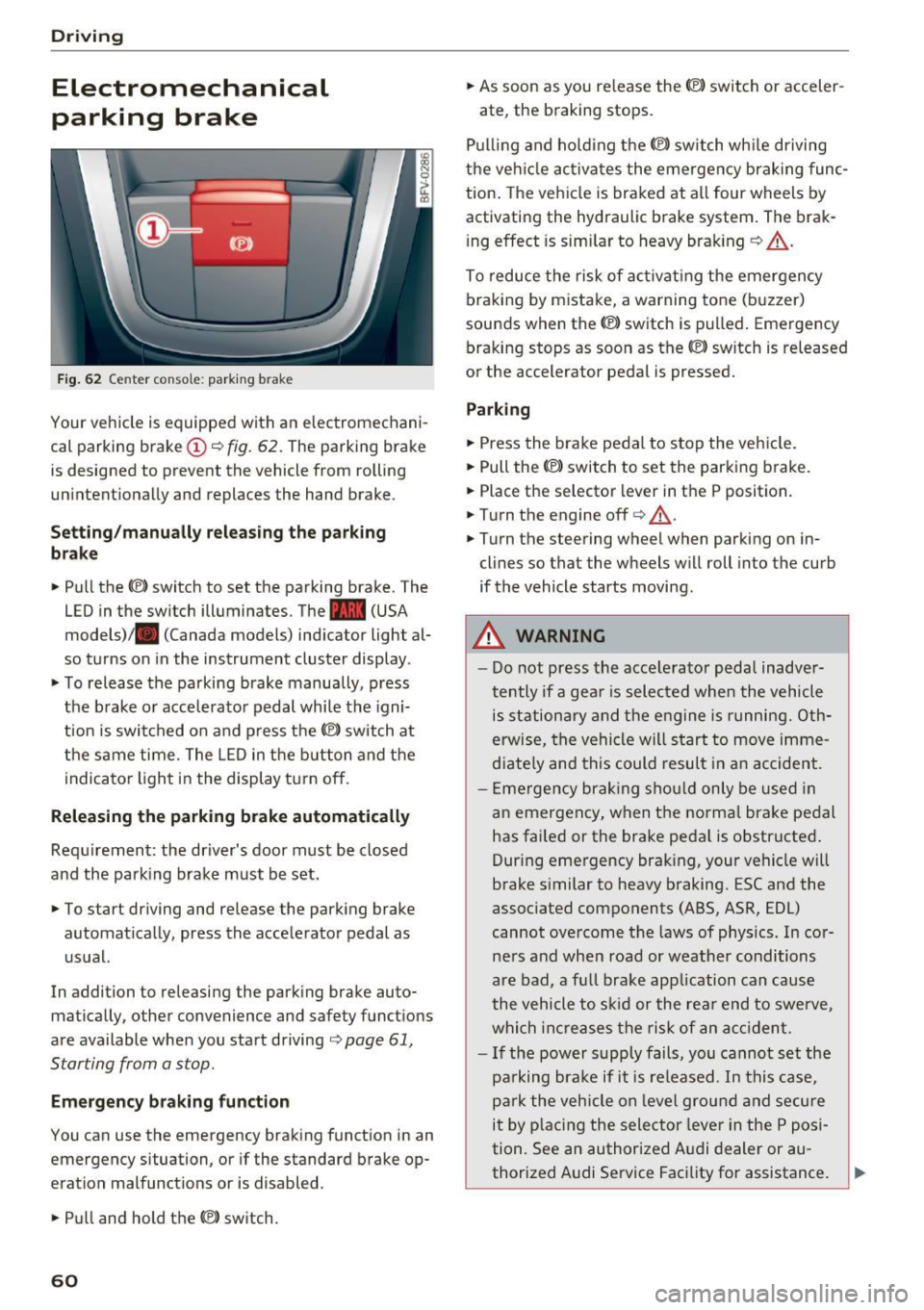
Fig . 62 Center conso le: par king brake
Your vehicle is equipped with an electromechani
cal parking brake(!)
o fig. 62. The parking brake
is designed to prevent the vehicle from rolling
unintentionally and replaces the hand brake.
Setting /manuall y re le asing the parking
bra ke
.. Pull the(®) switch to set the parking brake. The
LED in the switch illuminates. The -(USA
models)/ . (Canada models) indicator light al
so turns on in the instrument cluster display .
.. To release the parking brake manua lly, press
the brake o r acce lerato r pedal while the igni
tion is swi tched on a nd p ress the
«el) switch at
the same time. The L ED in the b utton and the
indicator light in the display t urn off.
Releasing the parking brake automatically
Req uirement: the driver's door must be closed
and the park ing brake must be set.
.. To start driving and release the park ing brake
automat ically, press the accelerator pedal as
u su al.
In addition to releasing the park ing brake auto
mat ica lly, other convenience and safety functions
are available when you start driving
o page 61,
Starting from a stop .
Emergency braking function
You can use the emergency brak ing function in an
emergency situation, or if the standard brake op
eration mal functions or is disabled .
.. Pull and hold th e®> switch.
60
.. As soon as you re lease the (®) switch or acceler-
ate, the braking stops.
P ulli ng and ho ld ing the®) switch wh ile driving
the ve hicle ac tiva tes the emerge ncy braking func
tion . The vehi cle is braked at a ll four wheels by
activating the hydraulic brake system . The brak
i ng effect is sim ilar to heavy brak ing
o ,A .
To reduce the risk of act ivat ing the emergency
braking by mistake, a warning tone (buzzer)
sou nds when the© switch is pulled . Emergency
bra king stops as soon as the®) switch is released
or the accelerator pedal is pressed.
Parking
.. Press the bra ke pedal to stop the veh icle.
.. Pull the®> switch to set the parking brake.
.. Place the selector lever in t he P position .
.. Turn the engine off
cc> ,A.
.. Turn the steering wheel when parking on in
cl ines so that the wheels w ill roll into the curb
if the vehicle starts moving.
.&. WARNING
- Do not press the acce lera to r pedal inadve r
tently if a gea r is selec ted whe n the vehicle
is st ation ary and the e ngine is runni ng. Oth
erwise, the vehi cle will s tart to move imme
diate ly and this could result i n an accident.
- E mergency brak ing sho uld only be used i n
an emergency, when the norma l bra ke pe dal
has failed or the brake peda l is o bstr ucted .
During emergency brak ing, your vehicle will
brake s imilar to heavy braking. ESC and the
associated components (ABS, ASR, EDL)
cannot ove rcome the laws of physics. In co r
ners and when road or weather conditions
are bad, a fu ll brake application can cause
the vehicle to s kid or the rea r end to swe rve,
whi ch in crease s the risk of an ac cident.
- I f the power supply fails, you cannot set the
pa rking bra ke if it is released. In this ca se,
p ar k the vehicle on leve l grou nd and secure
it by plac ing the sele ctor lever in the P pos i
tion. See an authorized A udi dealer or au -
thorized A udi Service Facil ity for assistance.
~
Page 69 of 322

co
co
.... N
" N .... 0
0
Vl c:o
~ To shift down one gear, tap the shift paddle 0-
If the sh ift paddles are tapped while in the D/S
selecto r lever posit io n, automatic mode switches
off briefly . To switch from manually shifting back
to a utomatic shifting immediately, tap the shift
paddle G)¢fig . 67for 1 second .
To keep shifting using the shift paddles, move
the sele ctor lever to the right out of the D/S posi
tion into the t ipt ronic shift gate.
The transm ission automatically shifts up o r down
befo re critical engine speed is reached.
The transm ission only a llows manual sh ift ing
when the engine speed is within the permitted
range.
(D Tips
- If you sh ift to the next lowest gear, the
transm ission w ill only shift if the engine w ill
not be over-revved.
- With kick-down, the transmission shifts to a
l ower gear, depending on vehicle speed and
engine speed.
- tiptronic does not wo rk if the t ransmiss ion
i s r unning in emergency mode.
Kick-down
Kick-down enables maximum acceleration.
When you press the accelerator pedal down be
yond the resistance point , the automatic trans
m iss ion downshifts into a lower gear and the en
g ine utilizes its fu ll power , depend ing on veh icle
speed and engine R PM.
It shifts up into t he next
h igher gea r once the maximum spec ified engine
RP M is reached.
A WARNING
Please note that the wheels could spin on
slick or slippery roads when kick-down is ac
tive.
-
l ) T he ESC lig ht turn s on continuous ly and the mess age S ta·
b ili za tion co ntro l (E SC): sport. Warn ing! Red uced st abi l·
ity appe ars te mporar ily in th e I nfotainment syste m to in
di cate tha t the syste m wa s deact ivate d.
D riv ing
Launch Control-Program
The Launch Control Program enables maximum
acceleration .
Requirement: the engine must be at operating
temperature and the steering wheel must not be
turned .
~ With the engine running, press the l1' 0FF I but
ton briefly one t ime
l ).
~ Pull the selector lever back out of the D/S posi
tion briefly to select the S position, or press it
toward the r ight into the tiptron ic position or
select the
Dynamic dr iving mode in dr ive se
lect* ¢
page 79.
~ Press the brake pedal fi rm ly w ith your left foo t
and hold it all the way down for at least 1 sec
ond.
~ At the same time, p ress the gas peda l all the
way down with your right foot until the eng ine
reaches and stays at a high RPM level.
~ Remove your left foot from the brake.
A WARNING
- Always adapt your driving to the t raff ic flow.
- Only use Launch Control when road and traf-
f ic conditions allow it and other drivers will
not be endange red or impacted by your dr iv
ing and the vehicle's acceleration.
- Please note that the d rive wheels can spin
and the vehicle can b reak away when spo rt
mode is switched on, especially when the
road is slippery.
- Once the vehicle has started mov ing, press
the
! .P-O FF I button briefly to turn the spo rt
mode off.
(D Tips
- The transmission temperature may increase
significant ly after using the launch control
prog ram. If that happens, the prog ram may
no t be ava ilable for a few minutes.
It will be
avai lab le again afte r a cool -down period. ..,.
67
Page 74 of 322
Ass is t
& WARNING
You should only resume the stored speed if it
is not too high for existing traffic conditions.
Otherwise you can increase the r isk of an acci
dent .
Audi active Lane assist
Description
Appl ie s to: ve hicles w ith Audi ac tive lane assis t
Active lane assist detects lane marker lines with
in the limits of the system using a camera in the
windshield. If you are approaching a detected
lane marker line and it appears likely that you
will leave the lane, the system will warn you with
correct ive steering. You can override th is steer ing
at any time . If you pass over a line, the steer ing
wheel will v ibrate l ightly. In order for this warn
ing vibration to occur, it must first be sw itched
on in the Infotainment system. Active lane assist
is ready for operation when the lane marker line
is detected on at least one side of the vehicle.
The system is designed for driving on express
ways and highways and so it only activates at
speeds above approximately 40 mph (65 km/h) (depending on the market).
Applies to vehicles w ith side assist* : if you act i
vate a turn signal when active lane assist is ready
and it classifies a lane change as critical because
of vehicles traveling alongside you or approach
ing you, there w ill be noticeable corrective steer
ing shortly before you leave the lane. This will at
tempt to keep your vehicle in the lane.
Applies to vehicles without side assist* : the sys
tem does not warn when it is ready if you activate
the turn signal before crossing the lane marker line . In this case, it assumes that you are chang
ing lanes intentionally .
& WARNING
-The system wa rns the driver that the veh icle
is leav ing the lane using co rrective s teer ing.
1 ) The co rrect ive stee ring fun ctio n is not ava ilabl e in all mar
ket s.
72
The driver is always responsible for keeping
the vehicle within the lane.
- The system can assist the driver in keeping
the vehicle in the lane, but it does not drive
by itself. A lways keep your hands on the
steer ing wheel.
- Corrective steering may not occur in certain situations, such as during heavy braking.
- There may be cases where the camera does
not recognize all lane marker lines. Correc
tive steering can only take place on the s ide
of the vehicle where lane marker lines are
detected .
- Other road structures or objects could poss i
bly be identified un intent ionally as lane
marker lines . As a result, corrective steering
may be unexpected o r may not occ ur.
- The camera view can be restricted, for ex
ample by vehicles driving ahead or by ra in,
snow, heavy spray light shin ing into the
camera or by dirt o n the window. This can
result in active lane assist not detecting the
lane marker lines or detecting them incor
rectly.
- In certain s ituations where visibility is low,
the vehicle may switch internally from "ear
ly" to "late" steering cor rection
ll.
- Unde r certain cond itions such as r uts in the
road, an inclined roadway or crosswinds, the
corrective steer ing alone may not be enough
to keep the vehicle in the m iddle of the lane.
- For safety reasons, active lane assist must
not be used when there are poor road and/
or weather conditions such as slippery
roads, fog, gravel, heavy rain, snow and the potential for hydroplaning . Using active lane
assist under these cond it ions may increase
the risk of a crash.