ECU AUDI TT COUPE 2019 Owner's Manual
[x] Cancel search | Manufacturer: AUDI, Model Year: 2019, Model line: TT COUPE, Model: AUDI TT COUPE 2019Pages: 312, PDF Size: 83.95 MB
Page 67 of 312
8S1012721BA
Driving
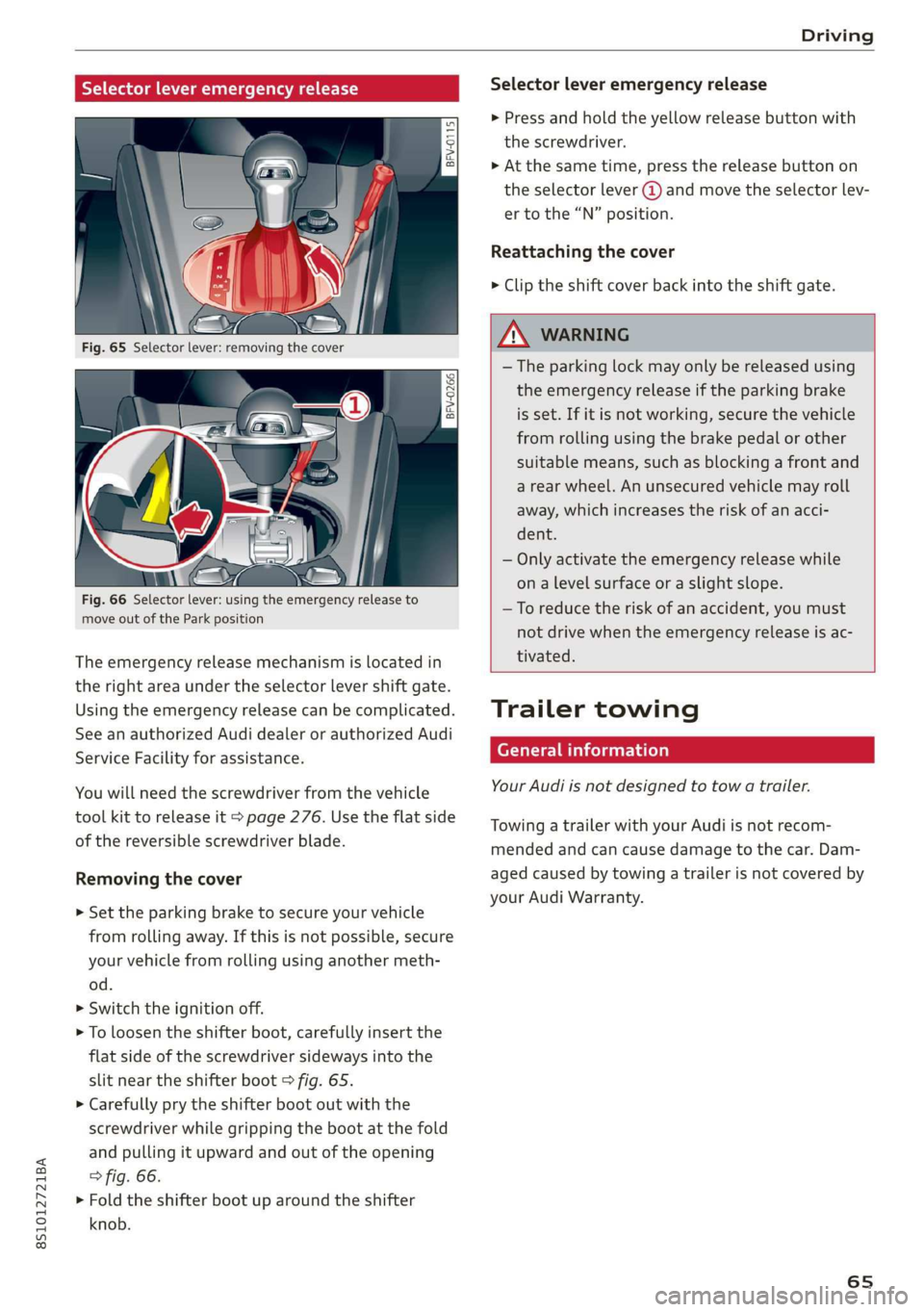
Selectorleveremergencyrelease
BFV-0266
Fig.66Selectorlever:usingtheemergencyreleaseto
moveoutoftheParkposition
Theemergencyreleasemechanismislocatedin
therightareaundertheselectorlevershiftgate.
Usingtheemergencyreleasecanbecomplicated.
SeeanauthorizedAudidealerorauthorizedAudi
ServiceFacilityforassistance.
Youwillneedthescrewdriverfromthevehicle
toolkittoreleaseit>page276.Usetheflatside
ofthereversiblescrewdriverblade.
Removingthecover
>Set theparkingbraketosecureyourvehicle
fromrollingaway.Ifthisisnotpossible,secure
yourvehiclefromrollingusinganothermeth-
od.
>Switchtheignitionoff.
>Toloosentheshifterboot,carefully insertthe
flatsideofthescrewdriversidewaysintothe
slitneartheshifterboot>fig.65.
>Carefullyprytheshifterbootoutwiththe
screwdriverwhilegrippingthebootatthefold
andpullingitupwardandoutoftheopening
>fig.66.
>Foldtheshifterboot uparoundtheshifter
knob.
Selectorleveremergencyrelease
>Pressandholdtheyellowreleasebuttonwith
thescrewdriver.
>Atthesametime,pressthereleasebuttonon
theselectorlever@andmovetheselectorlev-
ertothe“N”position.
Reattachingthecover
> Cliptheshiftcoverbackintotheshiftgate.
ZA\WARNING
—Theparkinglockmayonlybereleasedusing
the emergencyreleaseiftheparkingbrake
isset.Ifit isnotworking,securethevehicle
fromrollingusingthebrakepedalorother
suitablemeans,suchasblockingafrontand
arearwheel.Anunsecuredvehiclemayroll
away,whichincreasestheriskofanacci-
dent.
—Onlyactivatethe emergencyreleasewhile
onalevelsurfaceoraslightslope.
—Toreducetheriskofanaccident,youmust
notdrivewhentheemergencyreleaseisac-
tivated.
Trailertowing
Generalinformation
YourAudiisnotdesignedtotowatrailer.
TowingatrailerwithyourAudiisnotrecom-
mendedandcancausedamagetothecar.Dam-
agedcausedbytowingatrailerisnotcoveredby
yourAudi Warranty.
65
Page 68 of 312
Assistsystems
Assistsystems
Speedwarningsystem
Appliesto:vehicleswithspeedwarningsystem
Thespeedwarningsystemhelpsyoutostaybe-
low aspecifiedmaximumspeedthatcanbeset,
changedordeletedintheInfotainmentsystem.
Thespeedwarningsystemwarnsyouifyouare
exceeding themaximumspeedthatyouhaveset.
Awarningtonewillsoundassoonasyourspeed
exceedsthestoredvalueslightly.Theoe)in-
dicatorlightandamessagewillappearinthein-
strumentclusterdisplayatthesametime.The
oweindicatorlightandthemessageturnoffif
thespeedfallsbackbelowthestoredmaximum
speed.
Settingathresholdisrecommendedifyouwould
liketoberemindedwhenyoureachacertain
maximumspeed.Situationswhereyoumaywant
todosoincludedrivinginacountrywithagener-
alspeedlimitorifthereisaspecifiedmaximum
speedforwintertires.
Settingthewarningthreshold
> SelectintheInfotainmentsystem:MENUbut-
ton>Vehicle> leftcontrolbutton>Driveras-
sistance>Speedwarning>Manual.
G)Tips
Regardlessofthespeedwarningsystem,you
shouldalwaysmonitoryourspeedusingthe
speedometerandmakesureyouarefollowing
thelegalspeedlimit.
Cruisecontrolsystem
Appliesto:vehicleswithcruisecontrolsystem
Thecruisecontrolsystemassiststhedriverin
maintainingaconstantspeedaboveapproxi-
mately15mph(20km/h).Thesystemmaintains
thedesiredspeedbybrakingandaccelerating.
66
ZAWARNING
—Alwayspayattentiontothetrafficaround
yourvehiclewhenthecruisecontrolsystem
isinoperation.Asthedriver,youarealways
responsibleforcontrollingyourvehicle
speedandthedistancebetweenyourvehicle
andothervehicles.
—Forsafetyreasons,cruisecontrolshould not
beusedinthecity,instop-and-gotraffic,on
windingroads,andwhenroadconditionsare
poor(suchasice,fog,gravel,heavyrain,
andconditionsthatcouldlead tohydroplan-
ing),becausethisincreasestheriskofanac-
cident.
—Switchthecruisecontrolofftemporarily
whendrivinginturninglanes,highwayexits,
orinconstructionzones.
—Toreducetheriskofanaccident,youshould
onlyresumethestoredspeedifitissuitable
forthecurrenttrafficconditions.
()Note
Beforedrivingdownhillalong distanceona
steephill,decreaseyourspeedandselecta
lowergear.Thismakesuseoftheenginebrak-
ingeffectandreducestheloadplacedonthe
brakes.
G)Tips
Thebrakelightsturnonwhenthebrakesare
appliedautomatically.
Switchingthesystemon
Appliesto:vehicleswithcruisecontrolsystem
@g
©
&©
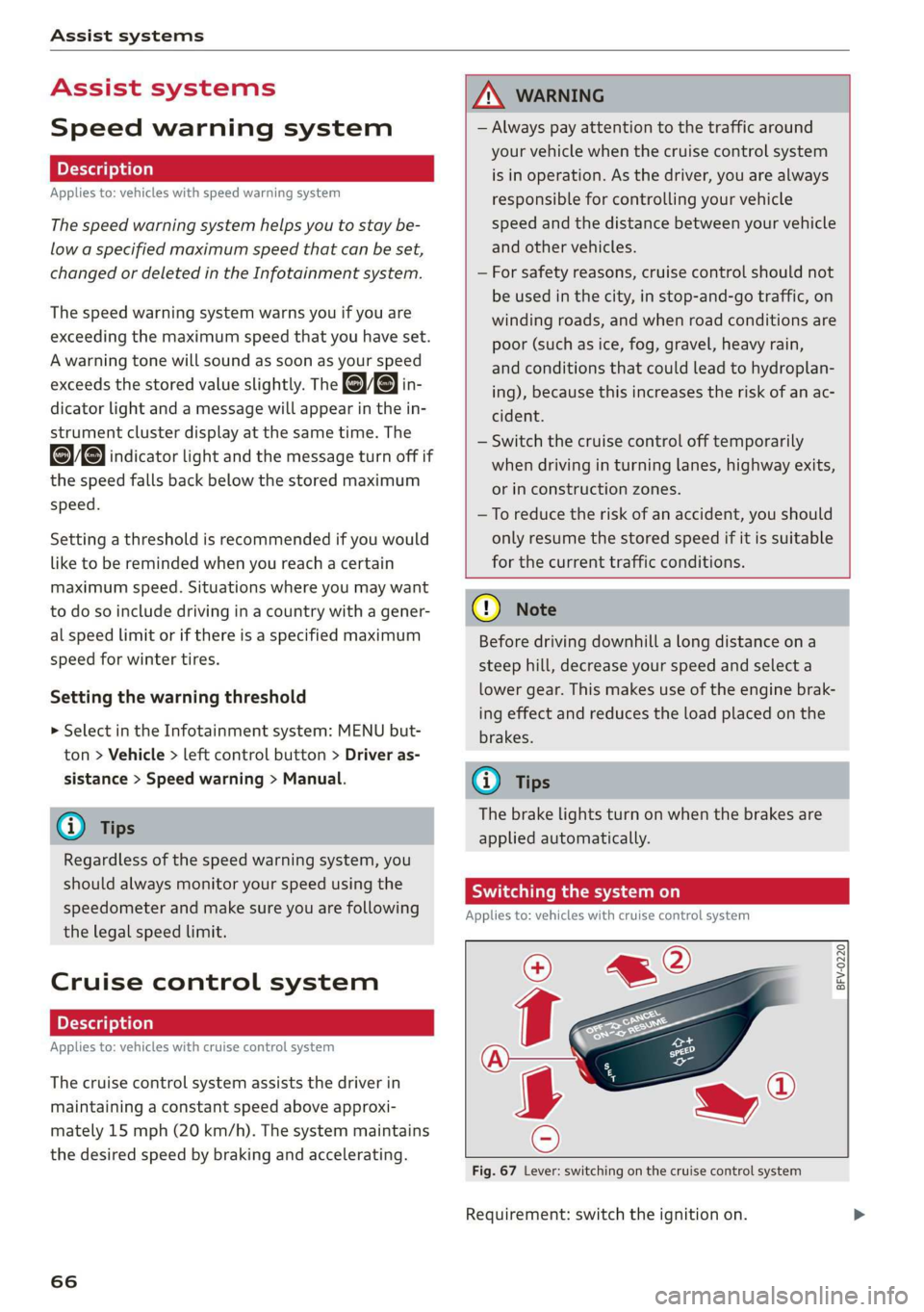
Fig.67Lever:switchingonthecruisecontrolsystem
Requirement:switchtheignitionon.
Page 69 of 312
![AUDI TT COUPE 2019 Owners Manual 8S1012721BA
Assistsystems
>Toswitchthesystemon,pullthelevertoward
youtoposition@).
TheGgor{§]indicatorlightandthecorre-
spondingmessagewillappearintheinstrument
cluster.
Z\WARNING
Ifthebrakesarem](/img/6/57659/w960_57659-68.png "AUDI TT COUPE 2019 Owners Manual 8S1012721BA
Assistsystems
>Toswitchthesystemon,pullthelevertoward
youtoposition@).
TheGgor{§]indicatorlightandthecorre-
spondingmessagewillappearintheinstrument
cluster.
Z\WARNING
Ifthebrakesarem")
8S1012721BA
Assistsystems
>Toswitchthesystemon,pullthelevertoward
youtoposition@).
TheGgor{§]indicatorlightandthecorre-
spondingmessagewillappearintheinstrument
cluster.
Z\WARNING
Ifthebrakesaremalfunctioning(forexample,
overheating)whilethecruisecontrolsystem
isswitchedon,itmayshutoffautomatically.
Preselectingoractivatingacruisecontrol
ey-t-fe)
Appliesto:vehicleswithcruisecontrolsystem
Whenthevehicleisstationary,youcanpreselect
thecruisecontrolspeedoractivatethespeed
whiledriving.
Requirement:thesystemmustbe switchedon.
>Topreselectacruisecontrolspeedwhentheve-
hicleisstationary,tapthelevertoward@)/G)
=>page66,fig.67.
>Toactivatethecruisecontrolspeed,pullthe
levertowardposition@whiledriving,or
>Tosetthecurrentdrivingspeedasthecruise
controlspeed,pressthebutton(@)onthelever.
Theactive cruisecontrolspeedisindicatedwith
theGgorBSindicatorlightintheinstrument
cluster.
Changingthecruisecontrolspeed
Appliesto:vehicleswithcruisecontrolsystem
>Toincrease ordecreasethecruisecontrolspeed
insmallincrements,tap theleveruptothe
firstleveltoward@/@)>page66,fig.67.
>Toincrease ordecreasethecruisecontrolspeed
inlargerincrements,taptheleveruptothe
secondleveltoward@)/G).
>Toincrease ordecreasethecruisecontrolspeed
continuously,tapandholdtheleveratthefirst
orsecondleveltoward(#)/).
Overridingordeactivatingthecruise
controlspeed
Appliesto:vehicleswithcruisecontrolsystem
Youcanoverride ordeactivatethecruisecontrol
system.Whenyoudeactivatethesystem,your
cruisecontrolspeedwillbestoredandyoucan
resumethatspeed.
Requirement:thesystemmustbeswitchedon
andactivated.
Overriding
>Totemporarilyoverridethecruisecontrol
speed,presstheacceleratorpedal.
>Onceyoureleasetheacceleratorpedal,thesys-
temwilladjustbacktothestoredcruisecontrol
speed.
Ifyouoverridethecruisecontrolsystemfora
longperiodoftime,thecruisecontrolsystem
willbedeactivated.Thesystemindicatorlight
willturnoffandthecruisecontrolspeedwillbe
stored.
Deactivating
>Todeactivatethecruisecontrolspeed,press
thelevertoward@)(notlockedintoplace)
=>page66,fig.67.
>Pressthebrakepedal.
Z\WARNING
Restingyourfootontheacceleratorpedal
couldoverridethecruise control.Thiswillpre-
ventbrakinginterventionsby the system.
Siemeel
Appliesto:vehicleswithcruisecontrolsystem
Whenyouswitchthesystemoffcompletely,the
cruisecontrolspeedwillbedeleted.
Requirement:thesystemmustbeswitchedon.
>Toswitchthesystemoff,pressthelevertoward
@(lockedintoplace)>page66,fig.67,or
>Switchtheignitionoff.
67
Page 71 of 312
8S1012721BA
Assistsystems
Sietemyo)ai
Appliesto:vehicleswithAudiactivelaneassist
B8V-0692
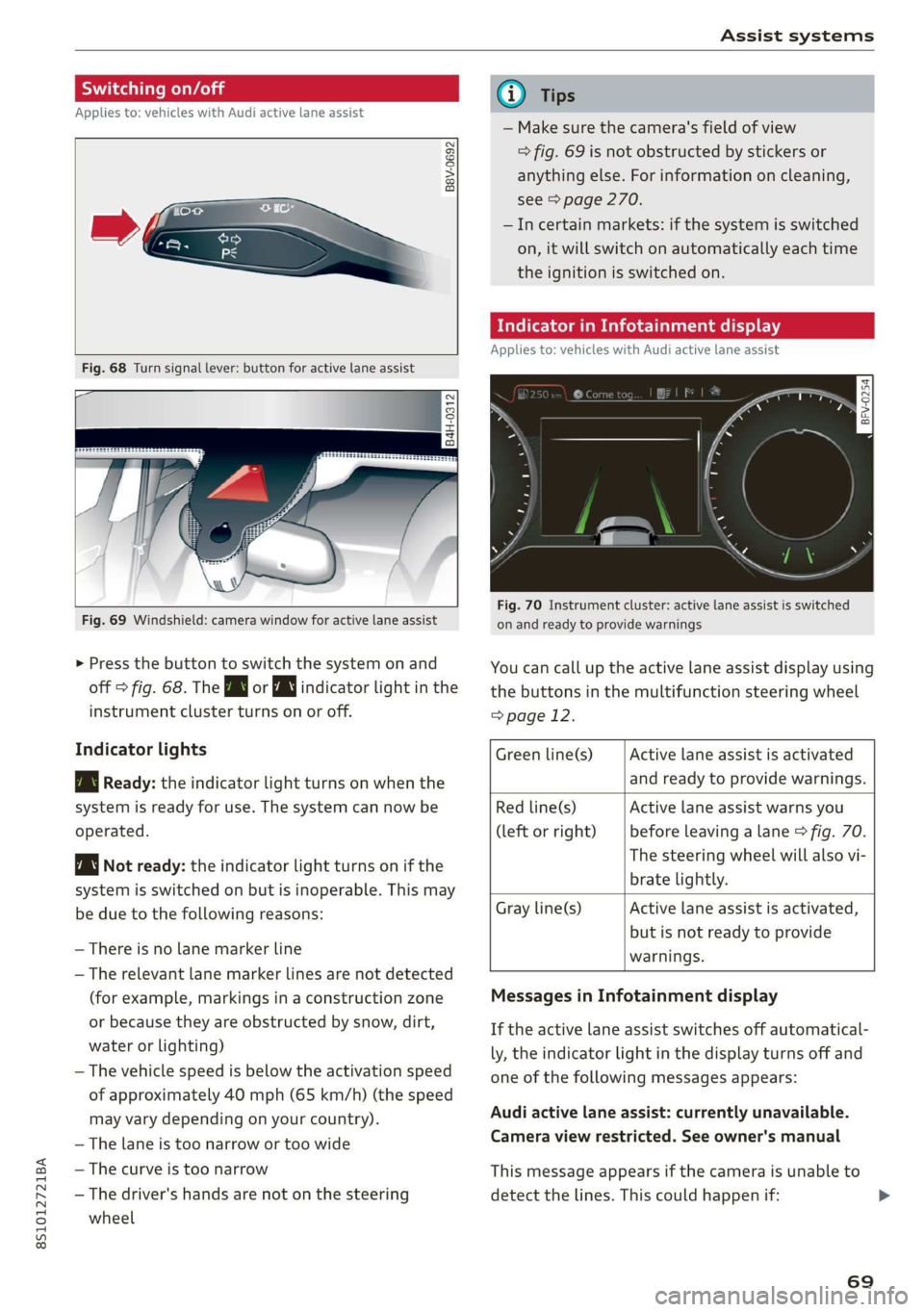
Fig.68Turnsignallever:buttonforactivelaneassist
B4H-0312
Fig.69Windshield:camerawindowforactivelaneassist
>Pressthebuttontoswitchthesystemonand
off>fig.68.TheBworindicatorlightinthe
instrumentclusterturnsonoroff.
Indicatorlights
BgReady:theindicatorlightturnsonwhenthe
systemisreadyforuse.Thesystemcannowbe
operated.
Notready:theindicatorlightturnsonifthe
systemisswitchedonbutisinoperable.Thismay
beduetothefollowingreasons:
—Thereisnolane markerline
—Therelevant lane markerlinesarenotdetected
(forexample,markingsinaconstructionzone
orbecausetheyareobstructedbysnow,dirt,
waterorlighting)
—Thevehiclespeedisbelowtheactivationspeed
ofapproximately40mph(65km/h)(thespeed
mayvarydependingonyourcountry).
—Thelaneistoonarrowortoowide
—Thecurveistoonarrow
—Thedriver'shandsarenotonthesteering
wheel
@Tips
— Makesurethecamera'sfieldofview
>fig.69isnotobstructedbystickersor
anythingelse.Forinformationoncleaning,
see>page270.
—Incertainmarkets:ifthesystemisswitched
on,itwillswitchonautomaticallyeachtime
theignitionisswitchedon.
Meeeclei
Appliesto:vehicleswithAudiactivelaneassist
=z
Ss
Beg
Fig.70Instrument cluster:activelaneassistisswitched
onandreadytoprovidewarnings
Youcancalluptheactivelaneassistdisplayusing
thebuttonsinthemultifunctionsteeringwheel
=>page12.
Activelaneassistisactivated
andreadytoprovidewarnings.
Greenline(s)
Redline(s)
(leftorright)
Activelaneassistwarnsyou
beforeleavingalane>fig.70.
Thesteeringwheelwillalsovi-
bratelightly.
Activelaneassistisactivated,
butisnotreadytoprovide
warnings.
Grayline(s)
MessagesinInfotainmentdisplay
Iftheactivelaneassistswitchesoffautomatical-
ly,theindicatorlightinthedisplayturnsoffand
oneofthefollowingmessagesappears:
Audiactivelaneassist:currentlyunavailable.
Cameraviewrestricted.Seeowner'smanual
Thismessageappearsifthecameraisunableto
detectthelines.Thiscouldhappenif:
69
Page 73 of 312
8S1012721BA
Assistsystems
Themeasurementendsafteramaximumof30
laps.Youcanthenevaluatethelaptimesorstart
anewtimemeasurement.
Youcancontrolthelaptimerusingthecontrols
onthemultifunctionsteeringwheel>page71.
ZA\WARNING
Yourfocusshouldalways beondrivingyour
vehiclesafely.Asthedriver,youhavecom-
pleteresponsibilityforsafetyintraffic.Only
use thefunctionssuchasthelaptimerinsuch
awaythatyoualwaysmaintaincompletecon-
troloveryourvehicleinalltrafficsituations.
@Tips
Youcanretrieveinformationfromthetrip
computerwhilethelaptimerstopwatchis
running.
Openingthelaptimerandmeasuringtime
Appliesto:vehicleswithlaptimer
IRAH-8493|
Bestlap
Lap3
NewLap
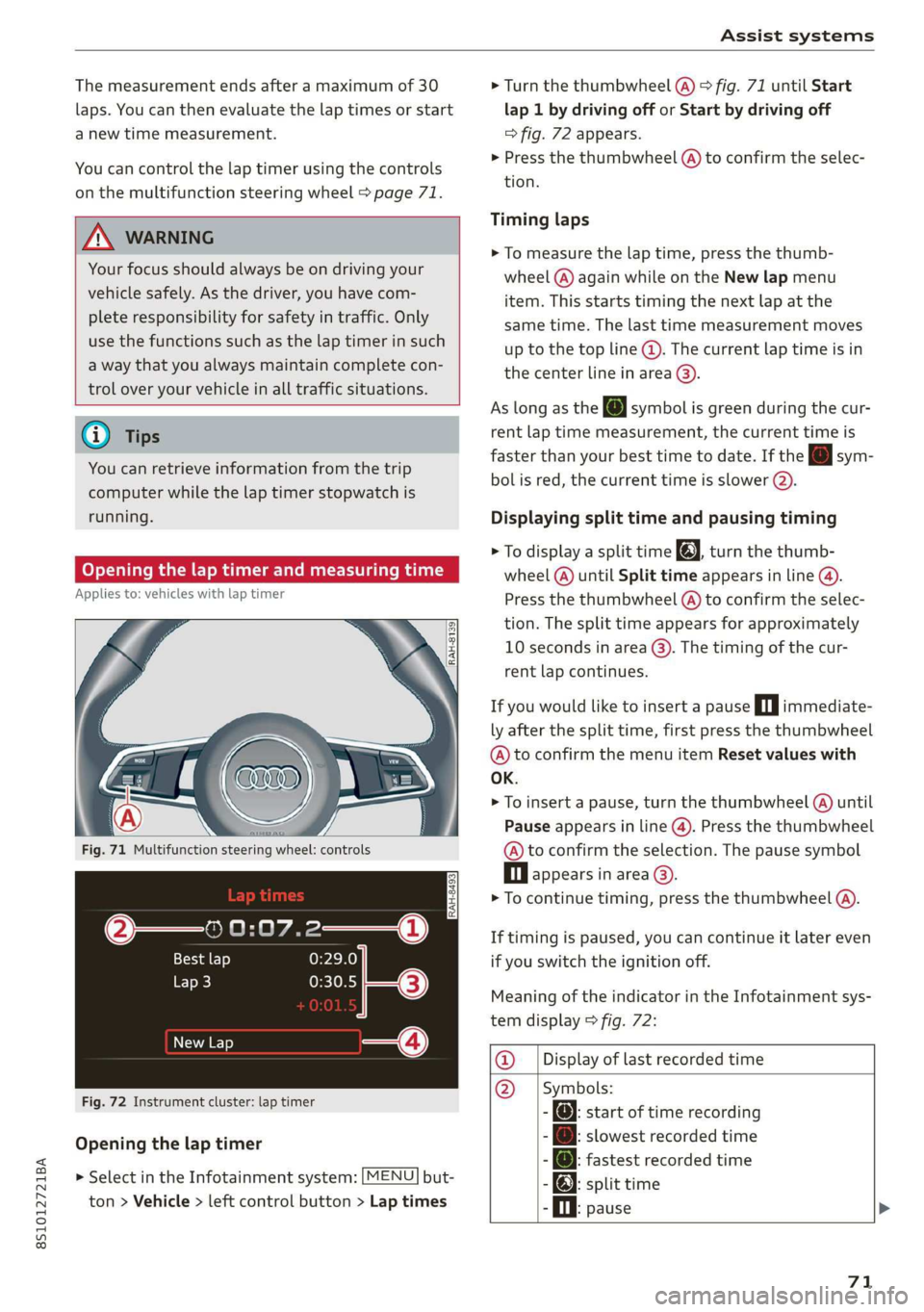
Fig.72Instrument cluster:laptimer
Openingthelaptimer
> SelectintheInfotainmentsystem:[MENU]but-
ton>Vehicle> leftcontrolbutton>Laptimes
>Turn thethumbwheel(@)>fig.71untilStart
lap 1bydrivingofforStartbydrivingoff
=>fig.72appears.
>Pressthethumbwheel(A)toconfirmtheselec-
tion.
Timinglaps
>Tomeasurethelaptime,pressthethumb-
wheel(@)againwhileontheNewlapmenu
item. Thisstartstimingthenextlapatthe
sametime.Thelasttimemeasurementmoves
[email protected]
thecenterlineinarea@).
AslongastheJsymbolisgreenduring thecur-
rentlaptimemeasurement,thecurrenttimeis
fasterthanyourbesttimetodate.Ifthe[Jsym-
bolisred,thecurrenttimeisslower().
Displayingsplittimeandpausingtiming
>[email protected]
wheel(@)untilSplittimeappearsinline@).
Pressthethumbwheel(@)toconfirmtheselec-
tion.Thesplittimeappearsforapproximately
10secondsinarea@).Thetimingofthecur-
rentlapcontinues.
Ifyouwouldliketoinsertapausein|immediate-
lyafterthesplittime,firstpressthethumbwheel
@)toconfirm themenuitemResetvalueswith
OK.
>Toinsertapause, turnthethumbwheel(@)until
Pauseappearsinline(@).Pressthethumbwheel
@toconfirmtheselection.Thepausesymbol
Dlappearsinarea©.
>Tocontinuetiming,pressthethumbwheel(A).
Iftimingispaused,youcancontinueitlatereven
ifyouswitchtheignitionoff.
MeaningoftheindicatorintheInfotainmentsys-
temdisplay>fig.72:
@_|Displayoflastrecordedtime
@_|Symbols:
-:startoftimerecording
[email protected]
-@:fastestrecordedtime
-):splittime
.Oi.pause>
71
Page 74 of 312
Assistsystems
@_|Currenttimemeasurement
@=|Menu:
-Startlap1bydrivingoff(start)
-Startbydrivingoff(start)
-Newlap(startanotherlap)
-Splittime(timeforasectionwithinthe
course)
-Pause(pausethetiming)
-Cancellap
-Resetlaptimes(deletesallvalues)
Evaluatingrecordedtimesorresetting
Appliesto:vehicleswithlaptimer
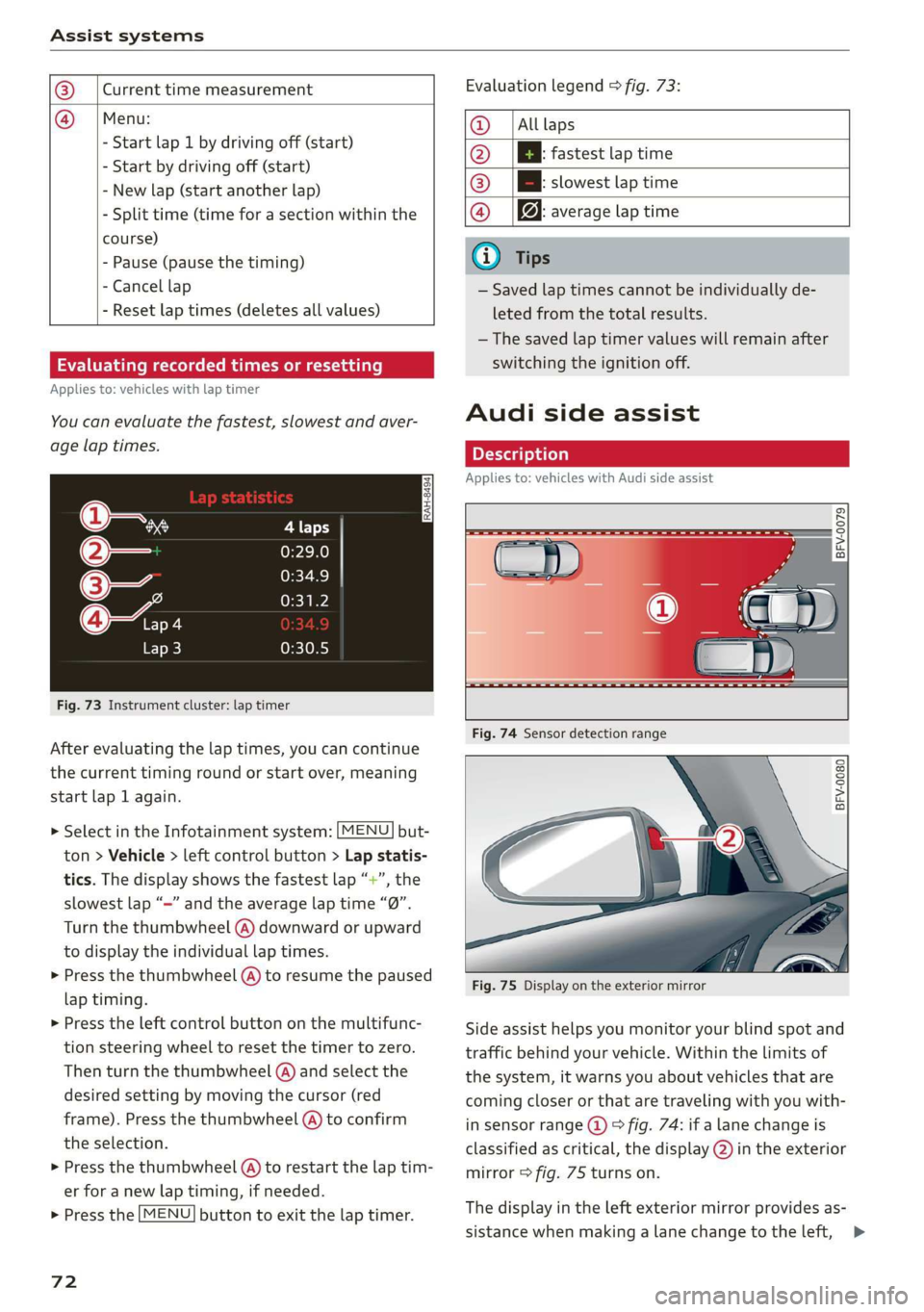
Youcanevaluatethefastest,slowestandaver-
agelaptimes.
is
3
z
ss
Fig.73Instrumentcluster:laptimer
Afterevaluatingthelaptimes,youcancontinue
thecurrenttimingroundorstartover,meaning
startlap1again.
> SelectintheInfotainmentsystem:[MENU]but-
ton>Vehicle> leftcontrolbutton>Lapstatis-
tics.Thedisplayshowsthefastestlap“+”,the
slowestlap“—”andtheaveragelaptime“0”.
Turnthethumbwheel(A)downwardorupward
to displaytheindividuallaptimes.
>Pressthethumbwheel(A)toresumethepaused
laptiming.
>»Presstheleftcontrolbuttononthemultifunc-
tionsteeringwheeltoresetthetimertozero.
Thenturnthethumbwheel(@)andselectthe
desiredsettingbymovingthecursor(red
frame).Pressthethumbwheel@)toconfirm
the
selection.
>Pressthethumbwheel(@)torestartthelaptim-
erforanewlaptiming,ifneeded.
>Pressthe[MENU]buttontoexitthelaptimer.
72
Evaluationlegend9fig.73:
@|Alllaps
@|Bfastestlaptime
@|Bslowestlaptime
@|f@averagelaptime
G)Tips
—Savedlaptimescannotbeindividuallyde-
letedfromthetotalresults.
—Thesavedlaptimervalueswillremainafter
switchingtheignitionoff.
Audisideassist
Appliesto:vehicleswithAudisideassist
BFV-0079
BFV-0080
Fig.75Displayontheexteriormirror
Sideassisthelpsyoumonitoryourblindspotand
trafficbehindyourvehicle.Withinthelimitsof
thesystem,itwarnsyouaboutvehiclesthatare
coming
closerorthataretravelingwithyouwith-
insensorrange@)>fig.74:ifalanechangeis
classifiedascritical,thedisplay@)intheexterior
mirror>fig.75turnson.
Thedisplayintheleftexteriormirrorprovidesas-
sistancewhenmakingalanechangetotheleft,>
Page 78 of 312
Assistsystems
adjustthesuspensioncontroltosporty(dynam-
ic),comfortable(comfort)orbalanced(auto).
Steering
Thepowersteeringadapts.Indirectsteeringthat
moveseasilyasincomfortmodeisespecially
suited tolongdrivesonahighway.Thedynamic
modeprovidessporty,directsteering.
Enginesound*
Theenginesoundadaptstothecurrentmode
andcan besubtletosporty.
Insomemodels,themaximumvehiclespeed
canonlybe reachedintheautoanddynamic
modes.
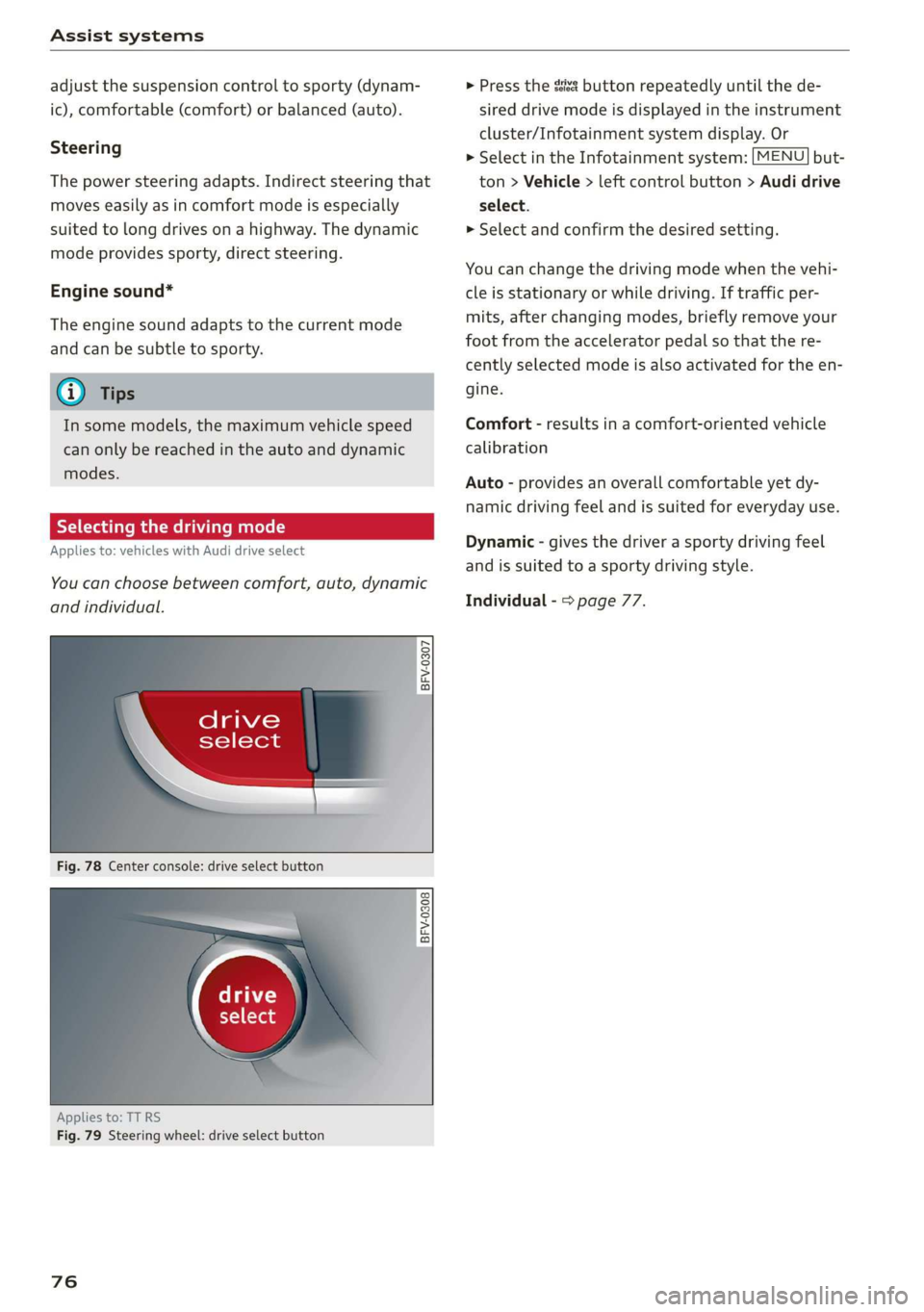
Selectingthedrivingmode
Appliesto:vehicleswith Audidriveselect
You can choosebetweencomfort,auto,dynamic
andindividual.
BFV-0307
,drive
\select
Fig.78Centerconsole:driveselectbutton
BFV-0308
Appliesto:TT RS
Fig.79Steeringwheel:driveselectbutton
76
>Pressthesssbuttonrepeatedlyuntilthede-
sireddrivemodeisdisplayedintheinstrument
cluster/Infotainmentsystemdisplay.Or
>SelectintheInfotainmentsystem:[MENU]but-
ton>Vehicle>leftcontrolbutton>Audidrive
select.
»Selectandconfirmthedesiredsetting.
Youcanchangethedrivingmodewhenthevehi-
cleisstationaryorwhiledriving.Iftrafficper-
mits,afterchangingmodes,brieflyremoveyour
footfromtheacceleratorpedalsothatthere-
centlyselectedmodeisalsoactivatedfortheen-
gine.
Comfort-resultsinacomfort-orientedvehicle
calibration
Auto-providesanoverallcomfortableyetdy-
namicdrivingfeelandissuitedforeverydayuse.
Dynamic-givesthedriverasportydrivingfeel
andissuited toasportydrivingstyle.
Individual->page77.
Page 80 of 312
Parkingaid
Parkingaid
Introduction
Appliesto:vehicleswithrearparkingsystem/parkingsystem
plus
Dependingonthevehicleequipment,various
parkingaidswillhelpyouwhenparkingandma-
neuvering.
Therearparkingsystemisanaudible parkingaid
thatwarnsyouofobstaclesbehindthevehicle
=>page79.
Theparkingsystemplusassistsyouwhilepark-
ingbyaudiblyandvisuallywarningyouofobjects
detectedinfrontofandbehindthevehicle
=>page79.
Therearviewcamerashowstheareabehindthe
vehicleintheInfotainmentsystemdisplay.The
linesintherearviewcameraimagehelpyouto
parkormaneuver>page80.
ZAWARNING
—Alwayslookfortrafficandcheckthearea
aroundyourvehiclebylookingatitdirectly
aswell.Theparkingsystemcannotreplace
thedriver'sattention.Thedriverisalways
responsiblewhenenteringorexitingapark-
ingspaceandduringsimilarmaneuvers.
—Pleasenotethatsomesurfaces,suchas
clothing,arenotdetectedbythesystem.
—Sensorsandcamerashaveblindspotsin
whichpeopleandobjectscannotbedetect-
ed.Beespeciallycautiousofsmallchildren
andanimals.
— Thesensorscanbedisplacedbyimpactsor
damagetotheradiatorgrille,bumper,
wheelhousingandtheunderbody.Thepark-
ingsystemmaybeimpairedasaresult.
HaveanauthorizedAudidealerorauthor-
izedAudiServiceFacilitychecktheirfunc-
tion.
—Makesurethesensorsarenotobstructedby
stickers,depositsorothermaterials.Ifthey
are,thesensorfunctioncouldbeimpaired.
Foradditionalinformationoncleaning,see
=page270.
78
@)Note
—Someobjectsarenotdetectedordisplayed
bythesystemundercertaincircumstances:
—objectssuchasbarrierchains,trailerdraw
bars,verticalpolesorfences
—objectsabovethesensorssuchaswallex-
tensions
—objectswithcertainsurfacesorstructures
suchaschainlinkfencesorpowdersnow
—Ifyoucontinuedrivingclosertoalowob-
ject,itmaydisappearfromthe sensor
range.NotethatyouwillnoLongerbe
warnedaboutthisobstacle.
—Maintainenoughdistancefromthecurbto
reducetheriskofdamagetotherims.
G)Tips
— The systemmayprovideawarningeven
thoughtherearenoobstaclesinthecover-
ageareainsomesituations,suchas:
—certainroadsurfacesor whenthereistall
grass
—externalultrasonicsourcessuchasfrom
cleaningvehicles
—inheavyrain,snow,orthickvehicleex-
haust
—Werecommendthatyoupracticeparkingin
atraffic-freelocationorparkinglotto be-
come
familiarwiththesystem.Practice
parkingingoodlightand weathercondi-
tions.
—Youcanchangethevolumeofthesignals.
—Whatappearsinthedisplayisslightlyde-
layed.
— Thesensorsmustbekeptcleanandfreeof
snowandicefortheparkingaidtooperate.
Page 86 of 312
IntelligentTechnology
IntelligentTechnology
Electronicstabilization
control (ESC)
ElectronicStabilizationControl(ESC)supports
driversafety.Itreducestheriskofslippingand
improvesdrivingstability.ESCdetectscriticalsit-
uationssuchasthevehicleoversteeringandun-
dersteeringorthewheelsarespinning.The
brakesareappliedortheenginetorqueisre-
ducedinordertostabilizethevehicle.Whenthe
ESCengages,theBindicatorlightblinksinthe
instrumentcluster.
ThefollowingsystemsareintegratedintheESC:
Anti-lockbrakingsystem(ABS)
ABSpreventsthewheelsfromlockingwhenbrak-
ing.Thevehiclecanstillbesteeredevenduring
hardbraking.Applysteadypressuretothebrake
pedal.Donotpumpthepedal.Apulsinginthe
brakepedalindicatesthatthesystemisacting to
stabilizethevehicle.
Brakeassistsystem
Thebrakeassistsystemcandecreasebrakingdis-
tance.Itincreasesbrakingpowerwhenthe driver
pressesthebrakepedalquicklyinemergencysit-
uations.Youmustpressandholdthebrakepedal
untilthedangeroussituationisover.
Anti-SlipRegulation(ASR)
ASRreducesdrivepowerwhenthedrivewheels
beginspinningandadaptsthepowertotheroad
conditions.Thismakesiteasiertostart,acceler-
ateanddriveuphills.
ElectronicDifferentialLock(EDL)
TheEDLappliesthe brakestowheelsthatare
slippingandtransfersthedrivepowertotheoth-
erwheels.Thisfunctionisnotavailableathigher
speeds.
Inextremecases,EDLautomaticallyswitchesoff
tokeepthebrakeonthebrakedwheelfromover-
heating.Thevehicleisstillfunctioningcorrectly.
84
EDLwillswitchonagainautomaticallywhencon-
ditionshavereturnedtonormal.
Powersteering
The ESCcanalsosupportvehiclestability
throughsteering.
Selectivewheeltorquecontrol
Selectivewheeltorquecontrolisusedwhendriv-
ingoncurves.Brakingistargetedtowardthe
wheelsontheinsideofthecurveasneeded.This
allowsmoreprecisedrivingincurves.
Automaticpost-collisionbrakingsystem
Theautomaticpost-collisionbrakingsystemcan
helptoreducetheriskofslidingandofaddition-
alcollisionsafteranaccident.Iftheairbagcon-
trolmoduledetectsacollisionaboveacertainve-
hiclespeed, thevehicleisbraked by theESC.
Thevehicledoesnotbrakeautomaticallyifoneof
thefollowingoccurs:
—Thedriverpressestheacceleratorpedal
—Thebrakingforcegeneratedbythepressed
brakepedalisgreaterthanthebrakingforce
thatwouldbeinitiatedbythesystem
—TheESC,thebrakesystem,orthevehicleelec-
tricalsystemisnotfunctioning
ZAWARNING
—TheESCanditsintegratedsystemscannot
overcomethelimitsimposedbynatural
physicallaws.Thisisespeciallyimportanton
slipperyorwetroads.Ifthesystemsbegin
acting tostabilizeyourvehicle,youshould
immediatelyalteryourspeedtomatchthe
roadandtrafficconditions.Donotletthein-
creasedsafetyprovidedtemptyouintotak-
ingrisks.Thiscouldincreaseyourriskofa
collision.
—Pleasenotetheriskofacollisionincreases
whendrivingfast,especiallythroughcurves
andonslipperyorwetroads,andwhendriv-
ingtooclosetoobjectsahead.The ESC and
itsintegratedsystemscannotalwayspre-
ventcollisions-thereisstillariskofacci-
dents!
Page 89 of 312
8S1012721BA
IntelligentTechnology
@)Note
—Neverletthebrakes“rub”bypressingthe
pedallightlywhenbrakingisnotactually
necessary.Thiscancause thebrakestoover-
heatandincreasesbrakingdistanceand
causeswear.
—Beforedrivingonlongstretcheswithsteep
hills,reduce thevehiclespeedandshifttoa
lowergeartouse theenginebrakingeffect.
Thisreducestheloadonthebrakes.Ifyou
needtobrakeadditionally,brakeinintervals
andnotcontinuously.
G)Tips
—Ifyouretrofityourvehiclewithafrontspoil-
er,wheelcoversorsimilaritems,makesure
thattheairflowtothebrakesisnotob-
structed.Otherwisethebrakesystemcan
overheat.
—Alsorefertotheinformationaboutbrake
fluid>page243.
Steering
Electromechanicalsteeringsupportsthedriver's
steeringmovementsbyelectronicallyadapting
thepowersteeringdependingonthevehicle
speed.ThesettingsdependontheselectedAudi
driveselect*mode.
aSteering:malfunction!Pleasestopvehicle
Thepowersteeringmayhavefailed.Adaptyour
drivingstyleimmediatelytocompensateforthe
factthatitmaybemoredifficulttoturnthe
steeringwheel,andstopyourvehicleinasafelo-
cationassoonaspossible.Donotcontinuedriv-
ing.SeeanauthorizedAudidealerorauthorized
AudiServiceFacilityforassistance.
&Steering:malfunction!Youcancontinue
driving
Thereisamalfunction.Steeringmaybemoredif-
ficultormoresensitive.Adaptyourdrivingstyle.
Havethesteeringsystemcheckedimmediately
byanauthorizedAudidealerorauthorizedAudi
ServiceFacility.Pleasenotethatthered indicator
lightmayturnonafterrestartingtheengine.Do
notcontinuedrivingifitdoes.
@)Tips
Ifthe1orlindicatorlightonlystayson
forashorttime,youmaycontinuedriving.
ALLwheeldrive(quattro)
Appliesto:vehicleswithallwheeldrive
Inallwheeldrive,allfourwheelsarepowered.
Generalinformation
Inallwheeldrive,thedrivingpowerisdividedbe-
tweenallfourwheels.Thishappensautomatical-
lydependingonyourdrivingbehavioraswellas
thecurrentroadconditions.Alsosee>page84,
Electronicstabilizationcontrol(ESC).
Theallwheeldriveconceptisdesignedforhigh
enginepower.Yourvehicleisexceptionallypow-
erfulandhasexcellentdrivingcharacteristics
bothundernormaldrivingconditionsandon
snowandice.Alwaysreadandfollowsafetypre-
cautions>A\.
Wintertires
Byusingallwheeldrive,yourvehiclehasgood
forwardmotionwithstandardtiresinwintercon-
ditions.However,inwinterwerecommendusing
winterorallseasontiresonallfourwheels,be-
causethiswillimprovethebrakingeffect.
Snowchains
Iftherearesnowchainlaws,snowchainsmust
alsobe usedonvehicleswithallwheeldrive
=>page263,Snowchains.
Replacingtires
Forvehicleswithallwheeldrive,onlywheelswith
thesamerollingcircumference should beused.
Avoidusingtireswithdifferenttreaddepths
=>page255,Newtiresorwheels.
87