ECU AUDI TT COUPE 2019 Service Manual
[x] Cancel search | Manufacturer: AUDI, Model Year: 2019, Model line: TT COUPE, Model: AUDI TT COUPE 2019Pages: 312, PDF Size: 83.95 MB
Page 150 of 312
Radio
Requirement:thefavoriteslistmustbedis-
played.
—Listeningtopresets:selectandconfirm apre-
setfromthelist.
—Moveapreset:selectapresetfromthelist>
rightcontrolbutton>Movepreset.Or:press
andholdthecontrolknobforseveralseconds.
Selectandconfirmthelocationoftheselected
preset.
—Deletingpresets:selecta presetfromthelist>
rightcontrolbutton>Deletepreset>Delete
thispresetorDeleteallpresets.
Additionalsettings
Radiosettings
>Select:[RADIO]button>rightcontrolbutton>
Radiosettings.
Thefollowingsettingscan beselected,depend-
ingonthebandthatisselected:
Stationnames(FM)
Variable:scrollingtexttransmittedby theFM
stationsisshownintheInfotainmentsystemdis-
play.
Fixed:scrollingtexttransmittedby theFMsta-
tionsisnotshownintheInfotainmentsystem
display.Onlythecurrentsectionofthescrolling
textisdisplayed.
FM/AMHDRadio*
YoucanswitchHDRadioreceptiononoroff.
Channelsorting(SiriusXM*)
YoucansetthechannelsortingforSiriusXMsta-
tionlists*by:
—Channelnumber:thechannelsaresortedinas-
cendingorderaccordingtotheirchannelnum-
ber.
—Channelname:thechannelsarelistedinalpha-
beticalorder.
—Firstcategory,thenchannelnumber:thechan-
nelsaresortedbytheircategoryandthenby
theirchannelnumbers.
148
—Firstcategory,thenchannelname:thesta-
tionsaresorted bytheircategoryandthenby
theirchannelnames.
Categoryfilter(SiriusXM*)
Thestationsshowninthestationlistcanbefil-
teredbyyourpersonalpreferencesandbypro-
gramtype.Theprogramcategoriesthatyoucan
selectdependonwhatisofferedbyyourprovid-
er.SelecttheAllcategoriesoptiontodeactivate
allfilteroptionsanddisplayallavailablestations
inthesatellitestationlist.
Show"NowPlaying"screen
Whenthefunctionisswitchedon¥andthesta-
tionsorpresetslistisopen, thedisplaywill
switchtotheShow"NowPlaying"screenview
afterapproximatelyfiveseconds>page147.De-
pendingonavailability,informationabouttheset
station(such asstationname,artistandstation
logo)maybedisplayedinthisview.
Preferredpictureview
Youcansetyourpreferredscreenviewforthe
Show "NowPlaying"screen>page147.
—Stationlogo:thestationlogoisdisplayed,de-
pendingonavailability.
—Coverart:thealbumcoverorgenrecoverisdis-
played,dependingonavailability.
Gracenoteonlinedatabase*
Requirement:theMMImustbeconnectedtothe
Internet.TheCoverartoptionmustbeselected
=page148,Preferredpictureview.
Whenthefunctionisswitchedon(¥,thealbum
coverorgenrecoverforthesongthatisplayingis
loadedfromtheGracenoteonlinedatabase,de-
pendingonavailability.
Subscriptionstatus(SiriusXM)*
Thisoptionisavailablewhenyoursubscriptionis
abouttoexpireorhasalreadyexpired.Theexpi-
rationdateforyourlicenseisdisplayed.
CalltoSiriusXM”*:thecontactinformationfor
yoursatelliteradioproviderisdisplayed.Tocall
yoursatelliteradioproviderusingtheMMI,press
CalltoSiriusXM”*.
Page 152 of 312
Media
Media
Introduction
Therearevariousmediadrivesandconnections
availableintheMMI.Youcanplay,forexample,
audio/videofilesfromtheJukebox*orconnect
yourmobiledevicetotheAudimusicinterface*
andoperateitthroughtheMMI.
Notes
Mediaandformatrestrictions:theMMI(includ-
ingtheSDcardreaderandtheUSBstoragede-
viceconnection*)wastestedwithavarietyof
productsandmediaavailableinthemarket.
However,theremaybecaseswhereindividualde-
vicesormediaandaudio/video*filesmaynot be
recognized,mayplayonlywithrestrictionsor
maynotplayatall.
DigitalRightsManagement:pleasenotethat
theaudio/videofilesaresubjecttocopyrightpro-
tection.
Themediadrivesdonotplayfilesthatarepro-
tectedbyDRMandthatareidentifiedwiththe
symbolfii.
Datasecurity:neverstoreimportantdataonSD
cards,theJukebox*,CDs/DVDsormobiledevices.
AudiAGisnotresponsiblefordamagedorlost
filesandmedia.
Loadingtimes:themorefiles/folders/playlists
thatareonastoragemedium,thelongeritwill
taketo loadtheaudio/video*files.Audirecom-
mendsusingstoragemediathatonlycontainau-
dio/videofiles*.To decrease thetimeittakesto
loadaudio/videofiles*,createsubfolders(forex-
ample,fortheartistoralbum).Theloadingtime
willalsoincreasewhenimportingfiles.
Additionalinformation:whenplaying,audio
filesareautomaticallydisplayedwithanyaddi-
tionalinformationthatisstored(suchasthear-
tist,trackandalbumcover).Ifthisinformationis
notavailableonthestoragemedium,theMMI
willchecktheGracenotemetadatadatabase.
150
However,insomecases,theadditionalinforma-
tionmaynotbedisplayed.
Restrictedfunctionality:resettheMediaset-
tingstothefactorydefaultsettingsiffunctional-
ityisrestricted>page170.
Iffunctionalityisrestricted,resettheJukebox*to
thefactorydefaultsettings>page170.
Forinformationaboutthepropertiesofsupport-
edmediaandfileformats,see>page164.
@)Note
Alwaysfollowtheinformationfoundin>@in
Generalinformationonpage123.
CD/DVDoperation
CD/DVDandformatrestrictions:thefunctionali-
tyofindividualstoragemediamaybelimiteddue
tothevarietyofblankCDs/DVDsavailable and
thevariouscapacities.AudioCDsorvideoDVDs
withcopyprotection,CDs/DVDsthatdonotcon-
formtothestandard,andmultisessionCDsmay
havelimitedplaybackormaynotplayatall.Audi
recommendsfinalizingtherecordingprocess
whencreatingmultisession CDs.Multisession
DVDsarenotsupported.
UsingCDs/DVDs,theCDdrive ortheDVDdrive:
toensurecorrect,high-qualityplaybackandto
preventdamagetothedriveordiscreadinger-
rors,alwaysstoreCDs/DVDsinaprotective
sleeveand donotexposethemtodirectsunlight.
Donotuse:
—Damaged,dirtyorscratchedCDs/DVDs
—
SingleCDs/DVDswith3in(8cm)diameter
—CD/DVDsthatarenotround
—CDs/DVDswithlabels
—Protectiverings
—CleaningCDs
Thermalprotectionswitch:CD/DVDplayback
maybetemporarilyunavailableifoutsidetem-
peraturesareextremelyhotorcold.Athermal
protectionswitchisinstalledtoprotectthe
CD/DVDandthelaser.
Laserdevices:laserdevicesare dividedintosafe-
tyclasses1to4inaccordancewithDINIEC76>
Page 163 of 312
8S1012721BA
Media
Playlist
naa)
ThebigB
Sola
a:
Again
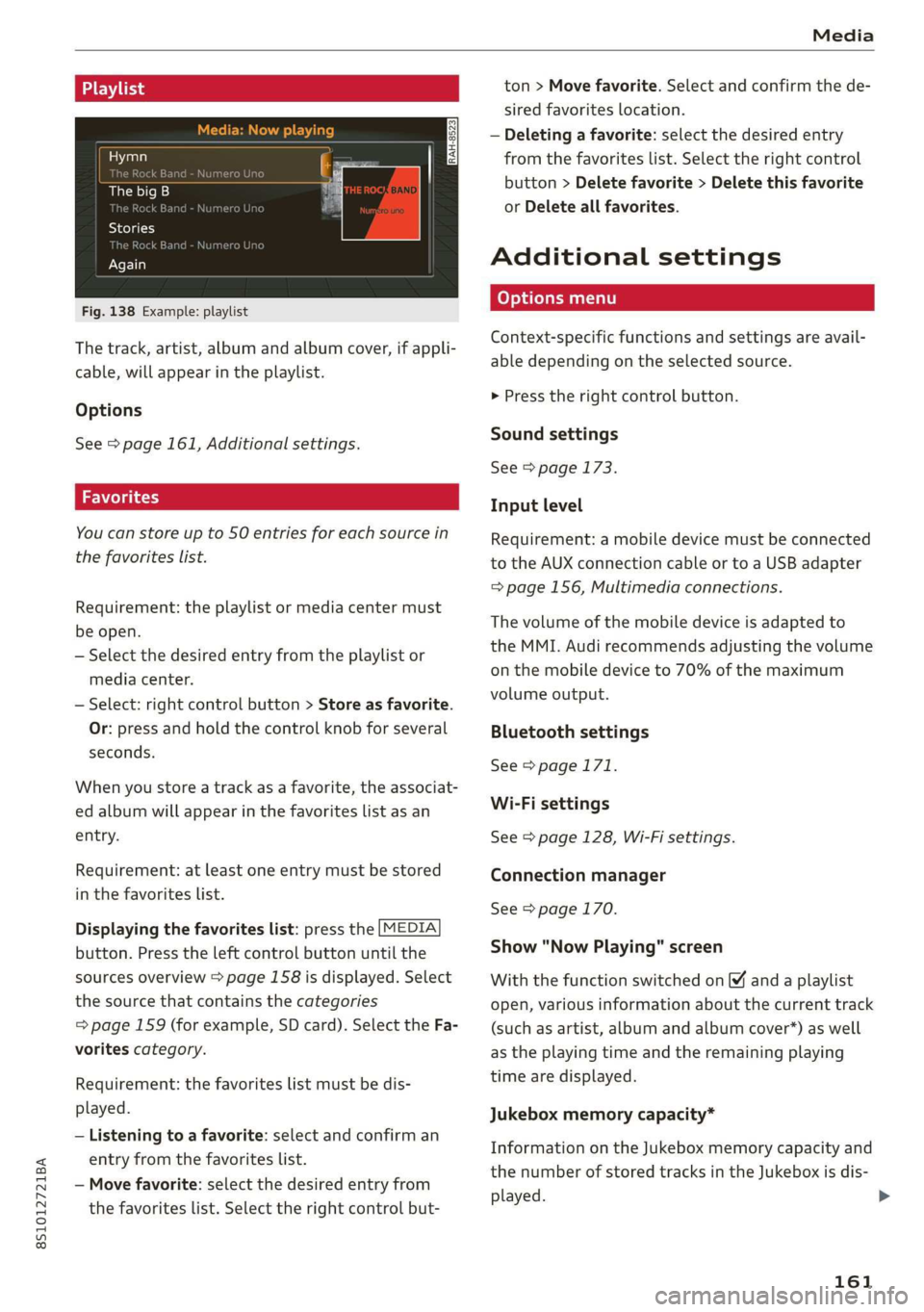
Fig.138Example:playlist
Thetrack,artist,albumandalbumcover,ifappli-
cable,willappearintheplaylist.
Options
See>page161,Additionalsettings.
Youcanstoreupto50entriesforeachsourcein
thefavoriteslist.
Requirement:theplaylistormediacentermust
beopen.
—Selectthedesiredentryfromtheplaylistor
mediacenter.
—Select:rightcontrolbutton>Storeasfavorite.
Or:pressandholdthecontrolknobforseveral
seconds.
Whenyoustoreatrackasa favorite,theassociat-
edalbumwillappearinthefavoriteslistasan
entry.
Requirement:atleastoneentrymustbestored
inthefavoriteslist.
Displayingthefavoriteslist:pressthe[MEDIA
button.Presstheleftcontrolbuttonuntilthe
sourcesoverview>page158isdisplayed.Select
thesourcethat containsthecategories
=>page159(forexample,SDcard).SelecttheFa-
voritescategory.
Requirement:thefavoriteslistmustbedis-
played.
—Listeningtoafavorite:selectandconfirm an
entryfromthefavoriteslist.
—Movefavorite:selectthedesiredentryfrom
thefavoriteslist.Selecttherightcontrolbut-
ton>Movefavorite.Selectandconfirmthede-
siredfavoriteslocation.
—Deletingafavorite:selectthedesiredentry
fromthefavoriteslist.Selecttherightcontrol
button>Deletefavorite>Deletethisfavorite
orDeleteallfavorites.
Additionalsettings
Context-specificfunctionsandsettingsareavail-
abledependingontheselectedsource.
>Presstherightcontrolbutton.
Soundsettings
See>page173.
Inputlevel
Requirement:amobiledevicemustbeconnected
totheAUXconnectioncableor toaUSBadapter
=>page156,Multimediaconnections.
Thevolumeofthemobiledeviceisadaptedto
theMMI.Audirecommendsadjustingthevolume
onthemobiledeviceto70%ofthemaximum
volumeoutput.
Bluetoothsettings
See>page171.
Wi-Fisettings
See>page128,Wi-Fisettings.
Connectionmanager
See>page170.
Show"NowPlaying"screen
Withthefunctionswitchedon¥andaplaylist
open,variousinformationaboutthecurrenttrack
(suchasartist,albumandalbumcover*)aswell
astheplayingtimeandtheremainingplaying
timearedisplayed.
Jukeboxmemorycapacity*
InformationontheJukeboxmemorycapacityand
thenumberofstoredtracksintheJukeboxisdis-
played.
161
>
Page 164 of 312
Media
Rewind/Fastforward
Turnthecontrolknobtotheleftorright.Or:
moveyourfingerontheMMItouchcontrolpad
fromthelefttotheright.
Shuffle!)
Withthefunctionswitchedon,allfilesinthe
playlistareplayedandshowninrandomorder.
Repeattrack!)
Whenthefunctionisswitchedon ¥,thecurrent
trackrepeats.
Backto'Playback'
Theoptionsmenuisclosed.Thetrackcurrently
playing
appearsintheplaylist>page161,
fig.138.
Playsimilarmusic*
Thetrackcurrentlyplayingisquicklyanalyzedfor
featuressuchasartist,genres,mood,andbeat,
andasmartplaylistwithsimilartrackswillbe
shown.
Playmore...
Asmartplaylistisshownbasedonthetrackcur-
rentlyplaying.Youcanselectbetweenaplaylist
withmoretracksbythisartist,fromthisalbum
orofthisgenre.
Setasringtone*2)
Requirement:amobiledevicemustbeconnected
totheMMI.Thetrackcurrentlyplayingmustbe
intheJukebox*>page152.
Theselectedtrackwillbeusedastheringtone
forincomingcalls.
Gracenoteonlinedatabase*
Requirement:theMMImustbeconnectedtothe
Internet.
Dependingonavailability,variousinformation
willloadaboutthetrackcurrentlyplayingwhen
thisfunctionisswitchedon.
)Thefunctionautomaticallyswitchesoffwhenthesourceis
changed.
2)Thisfunctionisnotavailableforallcellphones.
162
Copytojukebox
See>page152,AddingfilestotheJukebox.
Favorites
See>page161.
Additionaloptions
Requirement:thevehiclemustbestationaryand
avideofile*oraDVD*mustbeplaying.
Parentalcontrol*
PlaybackofvideoDVDscanberestrictedusing
parentalcontrol.
Enterthepasswordforparentalcontrol.Pass-
wordsetatthefactory:1234.Youhavethefol-
lowingoptions:
—Protectionlevel:selectandconfirmtheprotec-
tionlevel(forexample,Level5).Eightdifferent
protectionlevelscanbesetforparentalcon-
trol.Ifyousettheparentalcontrollevelat Lev-
el 5,allDVDsfromlevels1-5canbeplayed.
VideoDVDswithahigherlevelwillnotplay.Se-
lectUnrestrictedtoremovealloftherestric-
tions.
—Changepassword:editthecurrentpassword.
Switchtofullscreen
Thevideoimageisdisplayed.Turnthecontrol
knobtodisplaytheplaylist.Or:pressthe[BACK
button.
Replayvideo
WhenthisfunctionisswitchedonM,thecurrent
videowillreplay.
ShowDVD menu
Selectingamenuitem:selectandconfirma
menuitem.Or:moveyourfingerontheMMI
touchcontrolpad*andpressthecontrolknob.>
Page 169 of 312
8S1012721BA
Audismartphoneinterface
Audismartphone
interface
Setup
Appliesto:vehicleswithAudismartphoneinterface
YoucanconnectyoursmartphonetotheMMIus-
ingtheAudismartphoneinterface.Certaincon-
tenton yoursmartphoneisadaptedtotheInfo-
tainmentsystemdisplaywhiledrivingandcan
beoperatedthroughtheMMIcontrolpanel.
Requirement:
Thevehiclemustbestationaryandtheignition
mustbe switchedon.
iPhonegeneration5orhigher withLightning
connectorandiOS7.1.2operatingsystemor
higher.Or:
AsmartphonewiththeAndroidAutoapp andAn-
droid5.0Lollipopoperatingsystemorhigheris
required.
>Connectyour smartphonetotheAudimusicin-
terface>page157usingtheapplicableUSB
adapter>page156,fig. 131.
> SelectandconfirmActivateAppleCarPlayor
ActivateAndroidAutonow.
>Follow thesysteminstructions.
>Payattentiontoanyadditionalsystemprompts
onyoursmartphone,ifapplicable.
IfyouchosenottouseAppleCarPlayorAndroid
Autowhenconnectingyoursmartphoneforthe
firsttime,youcanstarttheAudismartphonein-
terfacelateronusingtheConnectionmanager.
>Select:[MENU]button>Audismartphonein-
terface>Changetoconnectionmanager.
>Connectyour smartphonetotheAudimusicin-
terface>page157usingtheapplicableUSB
adapter>page156,fig. 131.
>SelectandconfirmAudismartphoneinterface
intheConnectionmanager>page170.You
canselectyoursmartphoneinthelistofdevi-
cesthatarealreadypaired>page171.
>Follow thesysteminstructions.
)Inpreparationatthetimeofprinting.
ZAWARNING
Drivingrequiresyourcompleteandundivided
attention.Asthedriver,youhavecompletere-
sponsibilityforsafetyintraffic.Neveroperate
mobiledeviceswhiledriving,becausethisin-
creasestheriskofanaccident.
@)Note
Alwaysfollowtheinformationfoundin>@in
Generalinformationonpage123.
@)Tips
—Thefunctionsthatcan beuseddependon
thefollowingfactors,amongothers:
—Thebrandofyoursmartphone
~Theversionoftheoperatingsystemin
yoursmartphone
—Thesoftwareversionoftheappused
—TheUSBadaptercableandcorrectconnec-
tion
—Yourcellphoneserviceprovider
—Thecustomizedsettingson yoursmart-
phone
—Oneofthefactorsaboveoracombination
ofanyofthemcouldcauseyoursmart-
phonetobe incompatiblewiththeAudi
smartphoneinterface.Compatibilitycannot
beguaranteedforalltypesofsmartphones.
Formoreinformationandassistance,refer
totheuserguideandthemanufacturerof
yoursmartphone.
—Iftheconnectedsmartphonehasvoicecon-
trol,youcan operateyoursmartphoneusing
theexternalvoicerecognitionsystem*
=>page107.
— ThemenulanguageshownintheMMIis
basedonthesettingsinyoursmartphone.
—ThetimedisplayedintheMMIisbasedon
thesettingsinyoursmartphone.
—SomeMMIfunctionsarenotavailablewhen
AppleCarPlayorAndroidAutoisactive.
—Youcannotconnectanymobiledevicesvia
BluetoothwhenanAppleCarPlayconnec-
tionisactive.
167
Page 174 of 312
Systemsettings
SelectInvisiblefortheMMItonotbevisibleto
otherdevices.However,itisstillpossibletoes-
tablishaBluetoothconnectionwithpairedde-
viceswhenthevisibilityisswitchedoff.Select
Offtoturnvisibilityoff.ThenaBluetoothcon-
nectionisnotpossible.
—Bluetoothaudioplayer:whenthisfunctionis
switchedon[M,theBluetoothaudioplayeris
availableasasourceintheMediamenu.
—DeleteBluetoothdevice:theselectedcell
phone/mobiledeviceisdisconnectedfromthe
MMI.
—ShowBluetoothprofiles:youcanConnector
DisconnecttheHandsfreeprofileandtheDi-
rectory/contacts*separately.
—Bluetoothname:theMMIBluetoothname(for
example,,AUDIMMI2017“)isdisplayedand
canbechanged.
WhenthefunctionisswitchedonM,thesymbol
®&page99,fig.104appearsintheInfotain-
mentsystemdisplay.
Onlinesettings*
—Dataconnectionsettings:see>page127,Cell
phonenetwork
—Datausagecounter:theamountofdatapack-
etsthataresentandreceivedthroughtheMMI
isdisplayed.Youcanresetthedatausageinfor-
mationtozerousingtheResetdatacounter
option.
—Networkstatus:themobilenetworkprovider
fordataserviceaswellasthenetworkstatus
aredisplayed.
Wi-Fisettings*
See>page128,Wi-Fisettings.
SIMPINsettings*
—AutomaticPINentry:whenthisfunctionis
switchedon ©,theSIMPINisautomatically
savedintheMMIafteritisenteredforthefirst
time.TheSIMPINforfourdifferentSIMcards
can be savedintheMMI.Withthefunction
switchedoff,thecurrentlystoredSIMPINis
deletedfromtheMMI.Whentheautomatic
PINentryisswitchedon,therearenoSIMPIN
prompts.
172
—DisablePINquery:whenswitchedon,thereare
noSIMPINqueries.TheautomaticPINentryis
notusedinthiscase.
—ChangePIN:youcanchangethePINonyour
SIMcard.FirstenterthecurrentSIMPIN.The
SIMPINmayonlycontaindigits0-9.Thenew
SIMPINmustbeenteredtwiceforsecurityand
thenitwillbesavedtotheSIMcard.
AppleCarPlaysoundsettings/AndroidAuto
soundsettings
Appliesto:vehicleswithAudismartphoneinterface
See>page173.
AboutAppleCarPlay/AboutAndroidAuto
Appliesto:vehicleswith Audismartphoneinterface
Hereyouwillfindlegalinformationregardingthe
useofAppleCarPlayorAndroidAutoandinfor-
mationaboutdevice-specificdataexchange.
DeleteCarPlaydevice/DeleteAndroidAuto
device
Appliesto:vehicleswithAudismartphoneinterface
Requirement:yourcellphonemustnotbecon-
nectedtotheAudimusicinterfacewithaUSB
adapter.
Select:Audismartphone>adevicefromthelist
>rightcontrolbutton.
Toremoveyourcellphonefromthelist,select
andconfirmDeleteCarPlaydeviceorDeleteAn-
droidAutodevice.
G)Tips
SomeSIMcardsdonotallowtheSIMPIN
queriestobeswitchedoff.
Systemupdate
>Select:[MENU]button>Settings>leftcontrol
button>Systemmaintenance.
—Systemupdate:insertthestoragedevicewith
theupdatedataintotheappropriatedrive
=>page151.Selectandconfirmthedrive>
Startupdate.Thelength oftheprocessde-
pendsonthesizeoftheupdate.
Page 177 of 312
8S1012721BA
Safedriving
Safedriving
Basics
Safedrivinghabits
Pleaseremember-safetyfirst!
Theindividualsafetyfeaturesofyourvehiclecan
worktogetherasasystemtohelpprotectyou
and
yourpassengersinawiderangeofaccidents.
Thesefeaturescannotworkasasystemifthey
arenot alwayscorrectlyadjustedandcorrectly
used.
Thischaptercontainsimportantinformation,
tips,instructionsandwarningsthatyouneedto
readandobserveforyourownsafety,thesafety
of
yourpassengersandothers.Wehavesummar-
izedherewhatyouneedtoknowaboutsafety
belts,airbags,childrestraintsaswellaschild
safety.Yoursafetyisforusprioritynumber1.Al-
waysobservetheinformationandwarningsin
thissection-foryourownsafetyaswellasthat
ofyourpassengers.
Theinformationinthissectionappliestoall
modelversionsofyourvehicle.Someofthefea-
turesdescribedinthissectionsmaybe standard
equipmentonsomemodels,ormaybeoptional
equipmentonothers.Ifyouarenotsure,ask
yourauthorizedAudidealer.
ZAWARNING
—Alwaysmakesurethatyoufollowthein-
structionsandheedtheWARNINGSinthis
Manual.Itisinyourinterestandinthein-
terestofyourpassengers.
—AlwayskeepthecompleteOwner'sLitera-
tureinyourAudiwhenyoulendorsellyour
vehicleso thatthisimportantinformation
willalways beavailabletothedriverand
passengers.
—AlwayskeeptheOwner'sliteraturehandyso
that
youcanfinditeasilyifyouhaveques-
tions.
Importantthingstodobeforedriving
Safetyiseverybody'sjob!Vehicleandoccupant
safetyalwaysdependsontheinformedandcare-
fuldriver.
Foryoursafetyandthesafety ofyourpassen-
gers,beforedrivingalways:
>Makesurethatalllightsandsignalsareoperat-
ingcorrectly.
>Makesurethatthetirepressureiscorrect.
>Makesurethatallwindowsarecleanandafford
goodvisibility totheoutside.
>Secureallluggageandotheritemscarefully
=>page44,>page43.
>Makesurethatnothingcaninterferewiththe
pedals.
>Adjustfrontseatandmirrorscorrectlyforyour
height.
>Makesuretouse therightchildrestraintcor-
rectlytoprotectchildren>page212,Child
safety.
>Sitproperlyinyourseatandmakesurethat
yourpassengersdothesame©page40,Front
seats.
>Fastenyoursafetybeltandwearitproperly.Al-
soinstructyourpassengerstofastentheirsafe-
tybeltsproperly>page180.
Whatimpairsdrivingsafety?
Safedrivingisdirectlyrelatedtotheconditionof
thevehicle,thedriveraswellasthedriver’sabili-
ty toconcentrateontheroadwithoutbeingdis-
tracted.
Thedriverisresponsibleforthesafetyoftheve-
hicleandallofitsoccupants.Ifyourabilityto
driveisimpaired,safetyrisksforeverybodyinthe
vehicleincreaseand youalsobecomeahazardto
everyoneelseontheroad>/\.Therefore:
>Donotletyourselfbedistractedbypassengers
orbyusinga cellulartelephone.
>NEVERdrivewhenyourdrivingabilityisim-
paired(bymedications,alcohol,drugs,etc.).
>Observealltrafficlaws,rulesoftheroadand
speedlimitsandplaincommonsense.
>ALWAYSadjustyourspeedtoroad,trafficand
weatherconditions.
175
>
Page 179 of 312
8S1012721BA
Safedriving
—Neveradjusttheseatswhilethevehicleis
moving.Yourseatmaymoveunexpectedly
and youcouldlosecontrolofthevehicle.
—Neverdrivewiththebackrestreclinedortilt-
edfarback!Thefartherthebackrestsare
tiltedback,thegreatertheriskofinjurydue
toincorrectpositioningofthesafetybelt
andimproperseatingposition.
—Childrenmustalwaysrideinchildseats
=page212.Specialprecautionsapplywhen
installinga childseatonthefrontpassenger
seat>page188.
Properseatingpositionforthefront
passenger
Theproperfrontpassengerseatingpositionis
importantforsafe,relaxeddriving.
Foryourownsafetyandtoreducetheriskofin-
juryinthe eventofanaccident,werecommend
thatyouadjusttheseatforthefrontpassenger
tothefollowingposition:
>Adjust theangleoftheseatbacksothatitisin
anuprightpositionandyour backcomesinfull
contactwithitwheneverthevehicleismoving.
>Keepbothfeetflatonthefloorinfrontofthe
frontpassengerseat.
>Fastenandwearsafetybeltscorrectly
=>page184.
Fordetailedinformationonhowtoadjustthe
frontpassenger'sseat,see>page40.
ZAWARNING
Frontseatpassengerswhoareunbelted,out
ofpositionortooclosetotheairbagcan be
seriouslyinjuredorkilledbytheairbagasit
unfolds.Tohelpreducetheriskof seriousper-
sonalinjury:
—Passengersmustalwayssitinanuprightpo-
sitionandneverleanagainstor placeany
partoftheirbodytooclose tothearea
wheretheairbagsarelocated.
—Passengerswhoareunbelted,outofposi-
tion ortooclosetotheairbagcanbeseri-
ouslyinjuredby anairbagasitunfoldswith
greatforceintheblinkofaneye.
—Alwaysmakesurethatthereareatleast
10in(25cm)betweenthefrontpassenger‘s
breastboneandtheinstrumentpanel.
—Alwaysmakesurethatthereareatleast4in
(10cm)betweenthefrontpassenger‘s
kneesandthelowerpartoftheinstrument
panel.
—Eachpassengermustalwayssitonaseat of
theirownandproperlyfastenandwearthe
safetybeltbelongingtothatseat.
—Beforedriving,alwaysadjustthefrontpas-
sengerseatproperly.
—Alwayskeepyourfeetonthefloorinfrontof
theseat.Neverrestthemontheseat,in-
strumentpanel,outofthewindow,etc.The
airbagsystemandsafetybeltwillnot be
abletoprotectyouproperlyandcanevenin-
creasetheriskofinjuryinacrash.
—Neverdrivewiththebackrestreclinedortilt-
edfarback!Thefartherthebackrestsare
tiltedback,thegreatertheriskofinjurydue
toincorrectpositioningofthesafetybelt
andimproperseatingposition.
—Childrenmustalwaysrideinchildseats
=page212.Specialprecautionsapplywhen
installingachildseatonthefrontpassenger
seat>page188.
Properseatingpositionsforpassengersin
rearseats
Rearseatpassengersmustsituprightwithboth
feetonthefloorconsistentwiththeirphysical
sizeandbeproperlyrestrainedwhenevertheve-
hicleisinuse.
Toreducetheriskofinjurycausedbyanincorrect
seatingpositionintheeventofasuddenbraking
maneuveroranaccident,yourpassengersonthe
rearbenchseatmustalwaysobservethefollow-
ing:
>Makesurethattheseatbackissecurelylatched
intheuprightposition>page46.
>Keepbothfeetflatinthefootwellinfront of
therearseat.
>»Fastenandwearsafetybeltsproperly
=>page184.
177
Page 180 of 312
Safedriving
>Makesurethatchildrenarealwaysproperlyre-
strainedinachildrestraintthatisappropriate
fortheirsizeandage>page212.
ZAWARNING
Passengerswhoareimproperly seatedonthe
rearseatcanbeseriouslyinjuredinacrash.
—Eachpassengermustalwayssitonaseat of
theirownandproperlyfastenandwearthe
safetybeltbelongingtothatseat.
—Safetybeltsonlyoffermaximumprotection
whentheseatbackissecurelylatchedinthe
uprightpositionandthesafetybeltsare
properlypositionedonthebody.Bynotsit-
tingupright,arearseatpassengerincreases
theriskofpersonalinjuryfromimproperly
positionedsafetybelts!
Examplesofimproperseatingpositions
Theoccupantrestraintsystemcanonlyreduce
theriskofinjuryifvehicleoccupantsareproperly
seated.
Improperseatingpositionscancauseseriousin-
juryordeath.Safetybeltscanonlyworkwhen
theyareproperlypositionedonthebody.Im-
properseatingpositionsreducetheeffectiveness
of safety
beltsandwillevenincreasetheriskof
injuryanddeathbymovingthesafetybelttocrit-
icalareasofthebody.Improperseatingpositions
alsoincreasetheriskofseriousinjuryanddeath
whenanairbagdeploysandstrikesanoccupant
whoisnotintheproperseatingposition.Adriver
isresponsibleforthesafetyofallvehicleoccu-
pantsandespeciallyfor children.Therefore:
>Neverallowanyonetoassumeanincorrect
seatingpositionwhenthevehicleisbeingused
oA.
Thefollowingbulletinslistonlysomesamplepo-
sitionsthatwillincreasetheriskofseriousinjury
anddeath.Ourhopeisthattheseexampleswill
makeyoumoreawareofseatingpositionsthat
aredangerous.
Therefore,wheneverthevehicleismoving:
—neverstandupinthevehicle
178
—neverstandontheseats
—neverkneelontheseats
—neverridewiththeseatbackreclined
—neverliedownontheseats
—neverleanupagainsttheinstrumentpanel
—neversitontheedgeoftheseat
—neversitsideways
—neverleanout thewindow
—neverputyourfeetout thewindow
—neverputyourfeetontheinstrumentpanel
—neverrestyourfeetontheseatcushionorback
oftheseat
—neverrideinthefootwell
—neverrideinthecargoarea
ZA\WARNING
Improperseatingpositionsincreasetherisk
ofseriouspersonalinjuryanddeathwhenever
avehicleisbeingused.
—Alwaysmakesurethatallvehicleoccupants
stayinaproperseatingpositionandare
properlyrestrainedwheneverthevehicleis
beingused.
Driverandpassenger
sidefootwell
MalSelechletlina(ad(olary
ZAWARNING
Alwaysmakesurethatthekneeairbagcanin-
flatewithoutinterference.Objectsbetween
yourselfandtheairbagcanincreasetherisk
ofinjuryinanaccident byinterferingwiththe
waytheairbagdeploysorbybeingpushedin-
toyouastheairbagdeploys.
—Nopersons(children)oranimalsshouldride
inthefootwellinfrontofthepassenger
seat.Iftheairbagdeploys,thiscanresultin
serious orfatalinjuries.
—Noobjectsofanykindshouldbecarriedin
thefootwellareainfrontofthedriver'sor
passenger'sseat.Bulkyobjects(shopping
bags,forexample)canhamperorprevent
properdeploymentoftheairbag.Smallob-
jectscanbethrownthroughthevehicleif
Page 181 of 312
8S1012721BA
Safedriving
theairbagdeploysandinjureyouoryour
passengers.
Pedalarea
The pedalsmustalwaysbefreetomoveand
mustneverbeinterferedwithby afloormator
anyotherobject.
Makesurethatallpedalsmovefreelywithoutin-
terferenceandthatnothingpreventsthemfrom
returningtotheiroriginalpositions.
Only usefloormatsthatleavethepedalareafree
andcan besecuredwithfloormatfasteners.
If abrakecircuitfails,increasedbrakepedaltrav-
elisrequiredto bringthevehicletoafullstop.
ZAWARNING
Pedalsthatcannotmovefreelycancauseloss
ofvehiclecontrolandincreasetheriskofseri-
ousinjury.
—Neverplaceanyobjectsinthedriver'sfoot-
well.Anobjectcouldgetintothepedalarea
andinterferewithpedalfunction.Incaseof
suddenbrakingoranaccident,youwould
notbeabletobrakeoraccelerate!
—Alwaysmakesurethatnothingcanfallor
moveintothedriver'sfootwell.
1aColeyMelaMelehTeedel
Alwaysusefloormatsthatcanbesecurelyat-
tachedtothefloormatfastenersanddonotin-
terferewiththefreemovementofthepedals.
>Makesurethatthefloormatsareproperlyse-
curedand cannotmoveandinterferewiththe
pedals>A\.
Useonlyfloormatsthatleavethepedalareaun-
obstructedandthatarefirmlysecuredsothat
theycannotslipoutofposition.Youcanobtain
suitablefloormatsfromyourauthorizedAudi
Dealer.
FloormatfastenersareinstalledinyourAudi.Floor
matsusedinyourvehiclemustbeattached
tothesefasteners.Properlysecuringthefloor
matswillpreventthemfromslidingintoposi-
tionsthatcouldinterferewiththe pedalsorim-
pairsafeoperationofyourvehicleinotherways.
Z\WARNING
Pedalsthatcannotmovefreelycanresultina
lossofvehiclecontrolandincreasetheriskof
seriouspersonalinjury.
—Alwaysmakesurethatfloormatsareprop-
erlysecured.
—Neverplaceorinstallfloormatsorother
floorcoveringsinthevehiclethatcannot be
properlysecuredinplacetopreventthem
fromslippingandinterferingwiththeped-
alsortheabilitytocontrolthevehicle.
—Neverplaceorinstallfloormatsorother
floorcoveringsontopofalreadyinstalled
floormats.Additionalfloormatsandother
coveringswillreducethesizeofthe pedal
areaandinterferewiththepedals.
—Alwaysproperlyreinstallandsecurefloor
matsthathavebeentakenoutforcleaning.
—Alwaysmakesurethatobjectscannotfallin-
tothedriverfootwellwhilethevehicleis
moving.Objectscanbecometrappedunder
thebrakepedalandacceleratorpedalcaus-
ing a lossofvehiclecontrol.
179