ignition AUDI TT COUPE 2019 Owner's Guide
[x] Cancel search | Manufacturer: AUDI, Model Year: 2019, Model line: TT COUPE, Model: AUDI TT COUPE 2019Pages: 312, PDF Size: 83.95 MB
Page 68 of 312
Assistsystems
Assistsystems
Speedwarningsystem
Appliesto:vehicleswithspeedwarningsystem
Thespeedwarningsystemhelpsyoutostaybe-
low aspecifiedmaximumspeedthatcanbeset,
changedordeletedintheInfotainmentsystem.
Thespeedwarningsystemwarnsyouifyouare
exceeding themaximumspeedthatyouhaveset.
Awarningtonewillsoundassoonasyourspeed
exceedsthestoredvalueslightly.Theoe)in-
dicatorlightandamessagewillappearinthein-
strumentclusterdisplayatthesametime.The
oweindicatorlightandthemessageturnoffif
thespeedfallsbackbelowthestoredmaximum
speed.
Settingathresholdisrecommendedifyouwould
liketoberemindedwhenyoureachacertain
maximumspeed.Situationswhereyoumaywant
todosoincludedrivinginacountrywithagener-
alspeedlimitorifthereisaspecifiedmaximum
speedforwintertires.
Settingthewarningthreshold
> SelectintheInfotainmentsystem:MENUbut-
ton>Vehicle> leftcontrolbutton>Driveras-
sistance>Speedwarning>Manual.
G)Tips
Regardlessofthespeedwarningsystem,you
shouldalwaysmonitoryourspeedusingthe
speedometerandmakesureyouarefollowing
thelegalspeedlimit.
Cruisecontrolsystem
Appliesto:vehicleswithcruisecontrolsystem
Thecruisecontrolsystemassiststhedriverin
maintainingaconstantspeedaboveapproxi-
mately15mph(20km/h).Thesystemmaintains
thedesiredspeedbybrakingandaccelerating.
66
ZAWARNING
—Alwayspayattentiontothetrafficaround
yourvehiclewhenthecruisecontrolsystem
isinoperation.Asthedriver,youarealways
responsibleforcontrollingyourvehicle
speedandthedistancebetweenyourvehicle
andothervehicles.
—Forsafetyreasons,cruisecontrolshould not
beusedinthecity,instop-and-gotraffic,on
windingroads,andwhenroadconditionsare
poor(suchasice,fog,gravel,heavyrain,
andconditionsthatcouldlead tohydroplan-
ing),becausethisincreasestheriskofanac-
cident.
—Switchthecruisecontrolofftemporarily
whendrivinginturninglanes,highwayexits,
orinconstructionzones.
—Toreducetheriskofanaccident,youshould
onlyresumethestoredspeedifitissuitable
forthecurrenttrafficconditions.
()Note
Beforedrivingdownhillalong distanceona
steephill,decreaseyourspeedandselecta
lowergear.Thismakesuseoftheenginebrak-
ingeffectandreducestheloadplacedonthe
brakes.
G)Tips
Thebrakelightsturnonwhenthebrakesare
appliedautomatically.
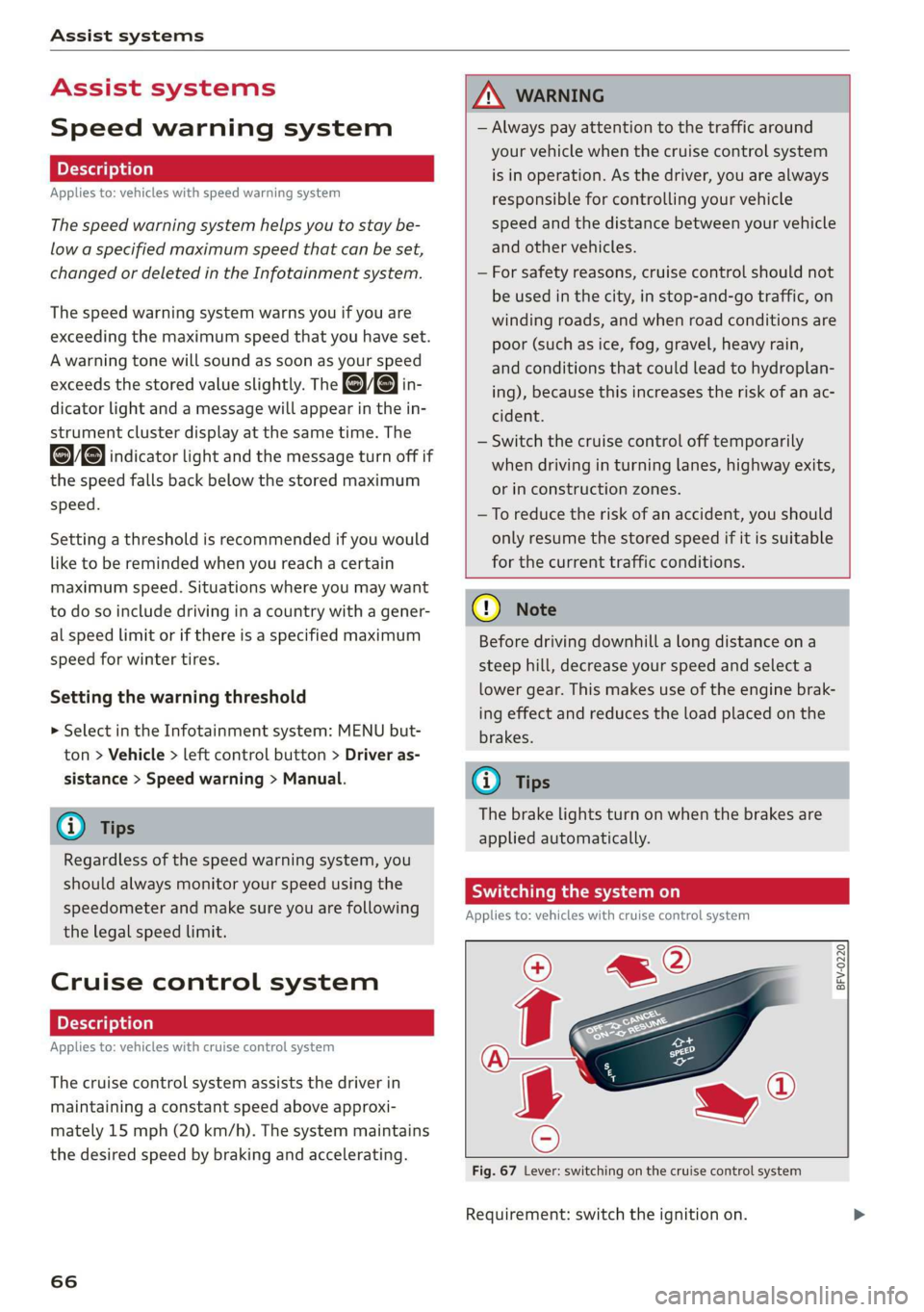
Switchingthesystemon
Appliesto:vehicleswithcruisecontrolsystem
@g
©
&©
Fig.67Lever:switchingonthecruisecontrolsystem
Requirement:switchtheignitionon.
Page 69 of 312
![AUDI TT COUPE 2019 Owners Guide 8S1012721BA
Assistsystems
>Toswitchthesystemon,pullthelevertoward
youtoposition@).
TheGgor{§]indicatorlightandthecorre-
spondingmessagewillappearintheinstrument
cluster.
Z\WARNING
Ifthebrakesarem](/img/6/57659/w960_57659-68.png "AUDI TT COUPE 2019 Owners Guide 8S1012721BA
Assistsystems
>Toswitchthesystemon,pullthelevertoward
youtoposition@).
TheGgor{§]indicatorlightandthecorre-
spondingmessagewillappearintheinstrument
cluster.
Z\WARNING
Ifthebrakesarem")
8S1012721BA
Assistsystems
>Toswitchthesystemon,pullthelevertoward
youtoposition@).
TheGgor{§]indicatorlightandthecorre-
spondingmessagewillappearintheinstrument
cluster.
Z\WARNING
Ifthebrakesaremalfunctioning(forexample,
overheating)whilethecruisecontrolsystem
isswitchedon,itmayshutoffautomatically.
Preselectingoractivatingacruisecontrol
ey-t-fe)
Appliesto:vehicleswithcruisecontrolsystem
Whenthevehicleisstationary,youcanpreselect
thecruisecontrolspeedoractivatethespeed
whiledriving.
Requirement:thesystemmustbe switchedon.
>Topreselectacruisecontrolspeedwhentheve-
hicleisstationary,tapthelevertoward@)/G)
=>page66,fig.67.
>Toactivatethecruisecontrolspeed,pullthe
levertowardposition@whiledriving,or
>Tosetthecurrentdrivingspeedasthecruise
controlspeed,pressthebutton(@)onthelever.
Theactive cruisecontrolspeedisindicatedwith
theGgorBSindicatorlightintheinstrument
cluster.
Changingthecruisecontrolspeed
Appliesto:vehicleswithcruisecontrolsystem
>Toincrease ordecreasethecruisecontrolspeed
insmallincrements,tap theleveruptothe
firstleveltoward@/@)>page66,fig.67.
>Toincrease ordecreasethecruisecontrolspeed
inlargerincrements,taptheleveruptothe
secondleveltoward@)/G).
>Toincrease ordecreasethecruisecontrolspeed
continuously,tapandholdtheleveratthefirst
orsecondleveltoward(#)/).
Overridingordeactivatingthecruise
controlspeed
Appliesto:vehicleswithcruisecontrolsystem
Youcanoverride ordeactivatethecruisecontrol
system.Whenyoudeactivatethesystem,your
cruisecontrolspeedwillbestoredandyoucan
resumethatspeed.
Requirement:thesystemmustbeswitchedon
andactivated.
Overriding
>Totemporarilyoverridethecruisecontrol
speed,presstheacceleratorpedal.
>Onceyoureleasetheacceleratorpedal,thesys-
temwilladjustbacktothestoredcruisecontrol
speed.
Ifyouoverridethecruisecontrolsystemfora
longperiodoftime,thecruisecontrolsystem
willbedeactivated.Thesystemindicatorlight
willturnoffandthecruisecontrolspeedwillbe
stored.
Deactivating
>Todeactivatethecruisecontrolspeed,press
thelevertoward@)(notlockedintoplace)
=>page66,fig.67.
>Pressthebrakepedal.
Z\WARNING
Restingyourfootontheacceleratorpedal
couldoverridethecruise control.Thiswillpre-
ventbrakinginterventionsby the system.
Siemeel
Appliesto:vehicleswithcruisecontrolsystem
Whenyouswitchthesystemoffcompletely,the
cruisecontrolspeedwillbedeleted.
Requirement:thesystemmustbeswitchedon.
>Toswitchthesystemoff,pressthelevertoward
@(lockedintoplace)>page66,fig.67,or
>Switchtheignitionoff.
67
Page 71 of 312
8S1012721BA
Assistsystems
Sietemyo)ai
Appliesto:vehicleswithAudiactivelaneassist
B8V-0692
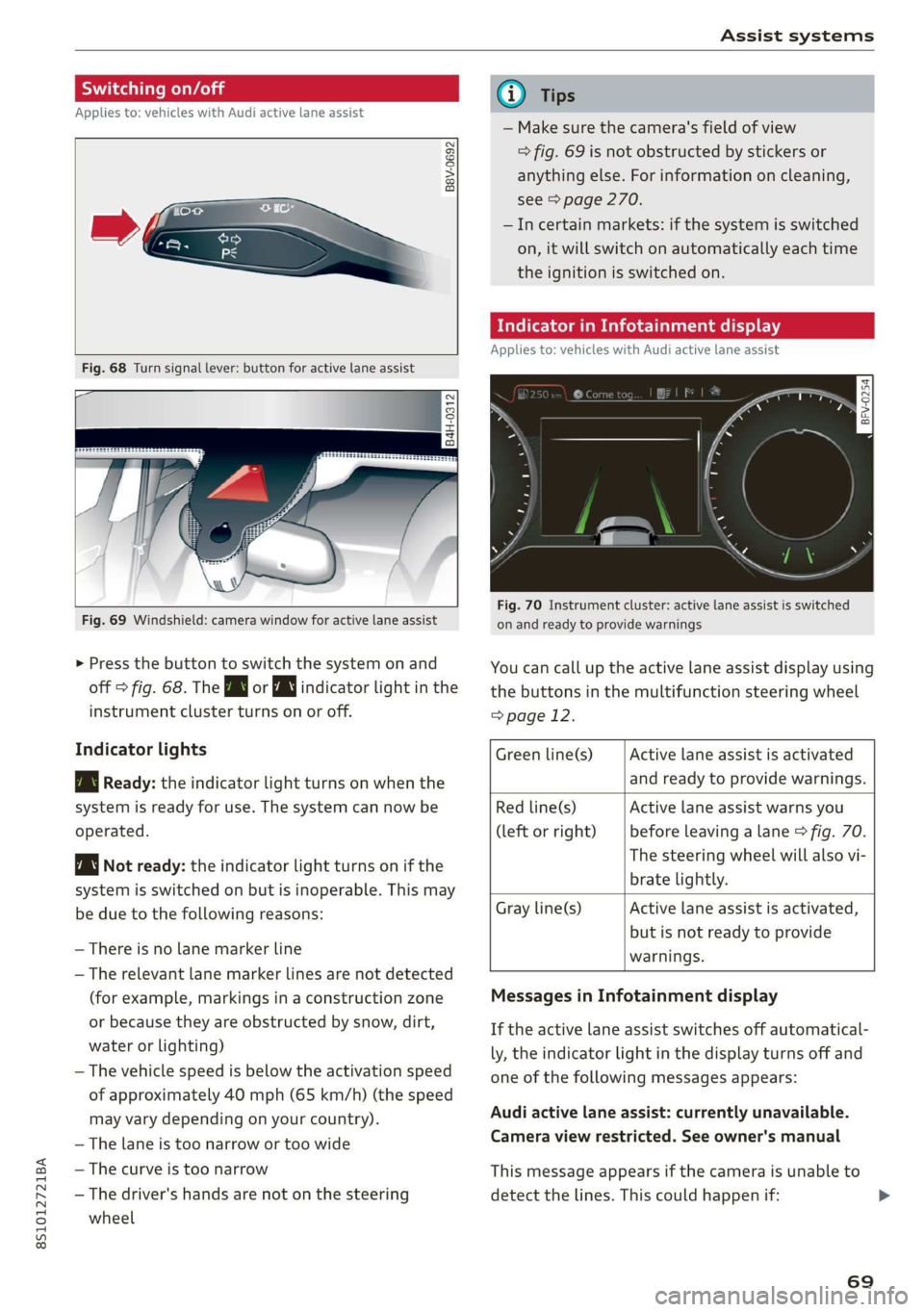
Fig.68Turnsignallever:buttonforactivelaneassist
B4H-0312
Fig.69Windshield:camerawindowforactivelaneassist
>Pressthebuttontoswitchthesystemonand
off>fig.68.TheBworindicatorlightinthe
instrumentclusterturnsonoroff.
Indicatorlights
BgReady:theindicatorlightturnsonwhenthe
systemisreadyforuse.Thesystemcannowbe
operated.
Notready:theindicatorlightturnsonifthe
systemisswitchedonbutisinoperable.Thismay
beduetothefollowingreasons:
—Thereisnolane markerline
—Therelevant lane markerlinesarenotdetected
(forexample,markingsinaconstructionzone
orbecausetheyareobstructedbysnow,dirt,
waterorlighting)
—Thevehiclespeedisbelowtheactivationspeed
ofapproximately40mph(65km/h)(thespeed
mayvarydependingonyourcountry).
—Thelaneistoonarrowortoowide
—Thecurveistoonarrow
—Thedriver'shandsarenotonthesteering
wheel
@Tips
— Makesurethecamera'sfieldofview
>fig.69isnotobstructedbystickersor
anythingelse.Forinformationoncleaning,
see>page270.
—Incertainmarkets:ifthesystemisswitched
on,itwillswitchonautomaticallyeachtime
theignitionisswitchedon.
Meeeclei
Appliesto:vehicleswithAudiactivelaneassist
=z
Ss
Beg
Fig.70Instrument cluster:activelaneassistisswitched
onandreadytoprovidewarnings
Youcancalluptheactivelaneassistdisplayusing
thebuttonsinthemultifunctionsteeringwheel
=>page12.
Activelaneassistisactivated
andreadytoprovidewarnings.
Greenline(s)
Redline(s)
(leftorright)
Activelaneassistwarnsyou
beforeleavingalane>fig.70.
Thesteeringwheelwillalsovi-
bratelightly.
Activelaneassistisactivated,
butisnotreadytoprovide
warnings.
Grayline(s)
MessagesinInfotainmentdisplay
Iftheactivelaneassistswitchesoffautomatical-
ly,theindicatorlightinthedisplayturnsoffand
oneofthefollowingmessagesappears:
Audiactivelaneassist:currentlyunavailable.
Cameraviewrestricted.Seeowner'smanual
Thismessageappearsifthecameraisunableto
detectthelines.Thiscouldhappenif:
69
Page 73 of 312
8S1012721BA
Assistsystems
Themeasurementendsafteramaximumof30
laps.Youcanthenevaluatethelaptimesorstart
anewtimemeasurement.
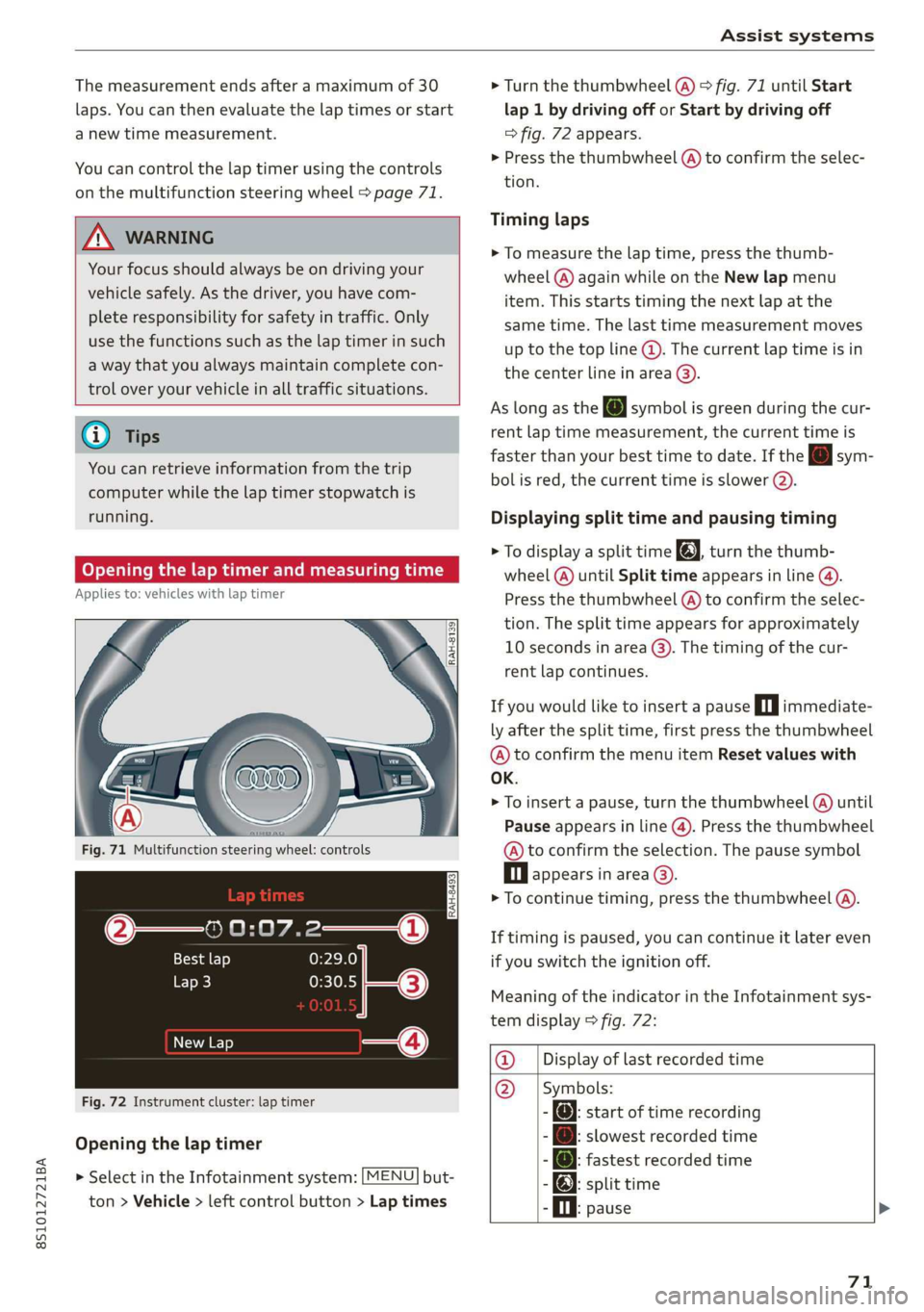
Youcancontrolthelaptimerusingthecontrols
onthemultifunctionsteeringwheel>page71.
ZA\WARNING
Yourfocusshouldalways beondrivingyour
vehiclesafely.Asthedriver,youhavecom-
pleteresponsibilityforsafetyintraffic.Only
use thefunctionssuchasthelaptimerinsuch
awaythatyoualwaysmaintaincompletecon-
troloveryourvehicleinalltrafficsituations.
@Tips
Youcanretrieveinformationfromthetrip
computerwhilethelaptimerstopwatchis
running.
Openingthelaptimerandmeasuringtime
Appliesto:vehicleswithlaptimer
IRAH-8493|
Bestlap
Lap3
NewLap
Fig.72Instrument cluster:laptimer
Openingthelaptimer
> SelectintheInfotainmentsystem:[MENU]but-
ton>Vehicle> leftcontrolbutton>Laptimes
>Turn thethumbwheel(@)>fig.71untilStart
lap 1bydrivingofforStartbydrivingoff
=>fig.72appears.
>Pressthethumbwheel(A)toconfirmtheselec-
tion.
Timinglaps
>Tomeasurethelaptime,pressthethumb-
wheel(@)againwhileontheNewlapmenu
item. Thisstartstimingthenextlapatthe
sametime.Thelasttimemeasurementmoves
[email protected]
thecenterlineinarea@).
AslongastheJsymbolisgreenduring thecur-
rentlaptimemeasurement,thecurrenttimeis
fasterthanyourbesttimetodate.Ifthe[Jsym-
bolisred,thecurrenttimeisslower().
Displayingsplittimeandpausingtiming
>[email protected]
wheel(@)untilSplittimeappearsinline@).
Pressthethumbwheel(@)toconfirmtheselec-
tion.Thesplittimeappearsforapproximately
10secondsinarea@).Thetimingofthecur-
rentlapcontinues.
Ifyouwouldliketoinsertapausein|immediate-
lyafterthesplittime,firstpressthethumbwheel
@)toconfirm themenuitemResetvalueswith
OK.
>Toinsertapause, turnthethumbwheel(@)until
Pauseappearsinline(@).Pressthethumbwheel
@toconfirmtheselection.Thepausesymbol
Dlappearsinarea©.
>Tocontinuetiming,pressthethumbwheel(A).
Iftimingispaused,youcancontinueitlatereven
ifyouswitchtheignitionoff.
MeaningoftheindicatorintheInfotainmentsys-
temdisplay>fig.72:
@_|Displayoflastrecordedtime
@_|Symbols:
-:startoftimerecording
[email protected]
-@:fastestrecordedtime
-):splittime
.Oi.pause>
71
Page 74 of 312
Assistsystems
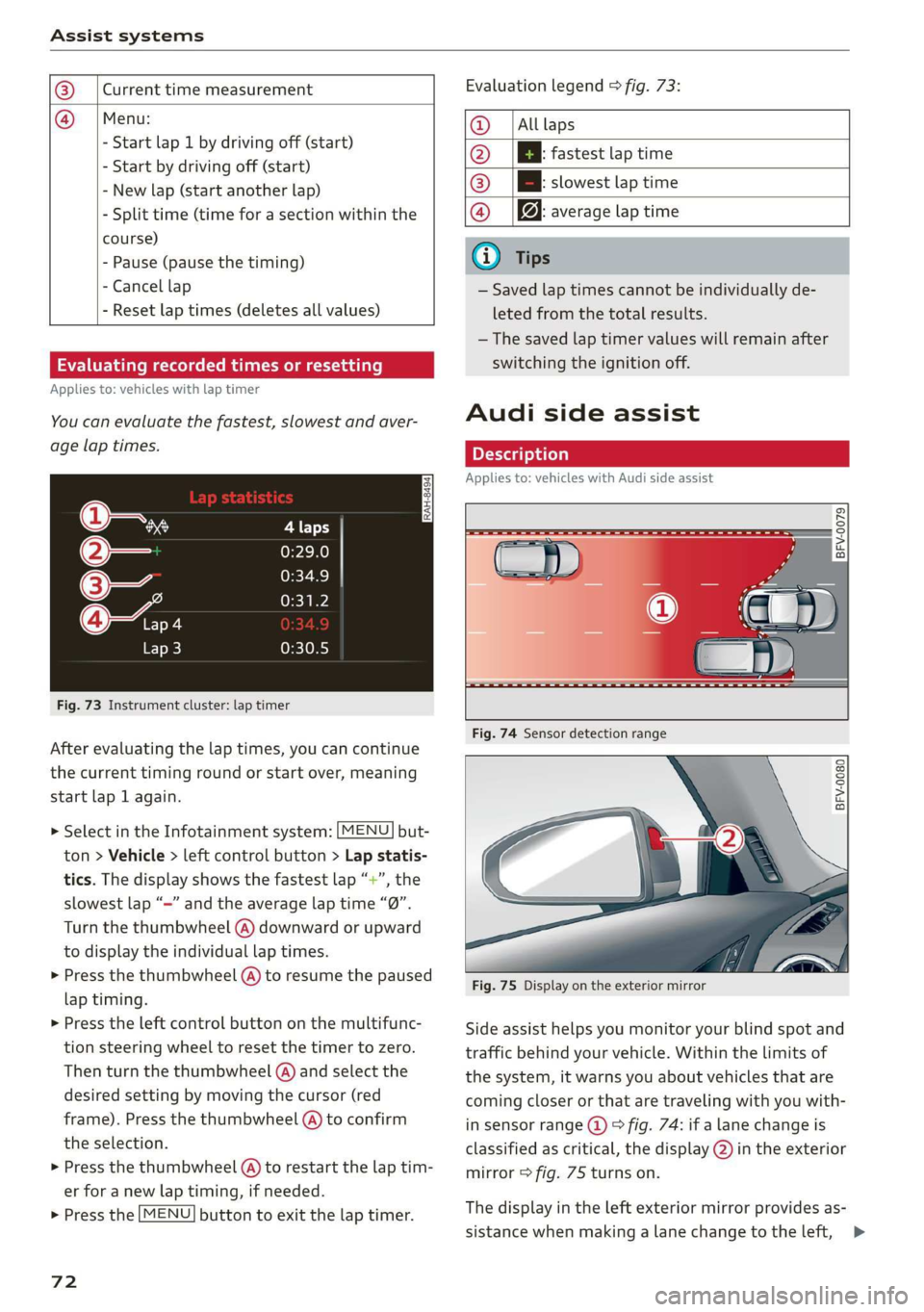
@_|Currenttimemeasurement
@=|Menu:
-Startlap1bydrivingoff(start)
-Startbydrivingoff(start)
-Newlap(startanotherlap)
-Splittime(timeforasectionwithinthe
course)
-Pause(pausethetiming)
-Cancellap
-Resetlaptimes(deletesallvalues)
Evaluatingrecordedtimesorresetting
Appliesto:vehicleswithlaptimer
Youcanevaluatethefastest,slowestandaver-
agelaptimes.
is
3
z
ss
Fig.73Instrumentcluster:laptimer
Afterevaluatingthelaptimes,youcancontinue
thecurrenttimingroundorstartover,meaning
startlap1again.
> SelectintheInfotainmentsystem:[MENU]but-
ton>Vehicle> leftcontrolbutton>Lapstatis-
tics.Thedisplayshowsthefastestlap“+”,the
slowestlap“—”andtheaveragelaptime“0”.
Turnthethumbwheel(A)downwardorupward
to displaytheindividuallaptimes.
>Pressthethumbwheel(A)toresumethepaused
laptiming.
>»Presstheleftcontrolbuttononthemultifunc-
tionsteeringwheeltoresetthetimertozero.
Thenturnthethumbwheel(@)andselectthe
desiredsettingbymovingthecursor(red
frame).Pressthethumbwheel@)toconfirm
the
selection.
>Pressthethumbwheel(@)torestartthelaptim-
erforanewlaptiming,ifneeded.
>Pressthe[MENU]buttontoexitthelaptimer.
72
Evaluationlegend9fig.73:
@|Alllaps
@|Bfastestlaptime
@|Bslowestlaptime
@|f@averagelaptime
G)Tips
—Savedlaptimescannotbeindividuallyde-
letedfromthetotalresults.
—Thesavedlaptimervalueswillremainafter
switchingtheignitionoff.
Audisideassist
Appliesto:vehicleswithAudisideassist
BFV-0079
BFV-0080
Fig.75Displayontheexteriormirror
Sideassisthelpsyoumonitoryourblindspotand
trafficbehindyourvehicle.Withinthelimitsof
thesystem,itwarnsyouaboutvehiclesthatare
coming
closerorthataretravelingwithyouwith-
insensorrange@)>fig.74:ifalanechangeis
classifiedascritical,thedisplay@)intheexterior
mirror>fig.75turnson.
Thedisplayintheleftexteriormirrorprovidesas-
sistancewhenmakingalanechangetotheleft,>
Page 82 of 312
Parkingaid
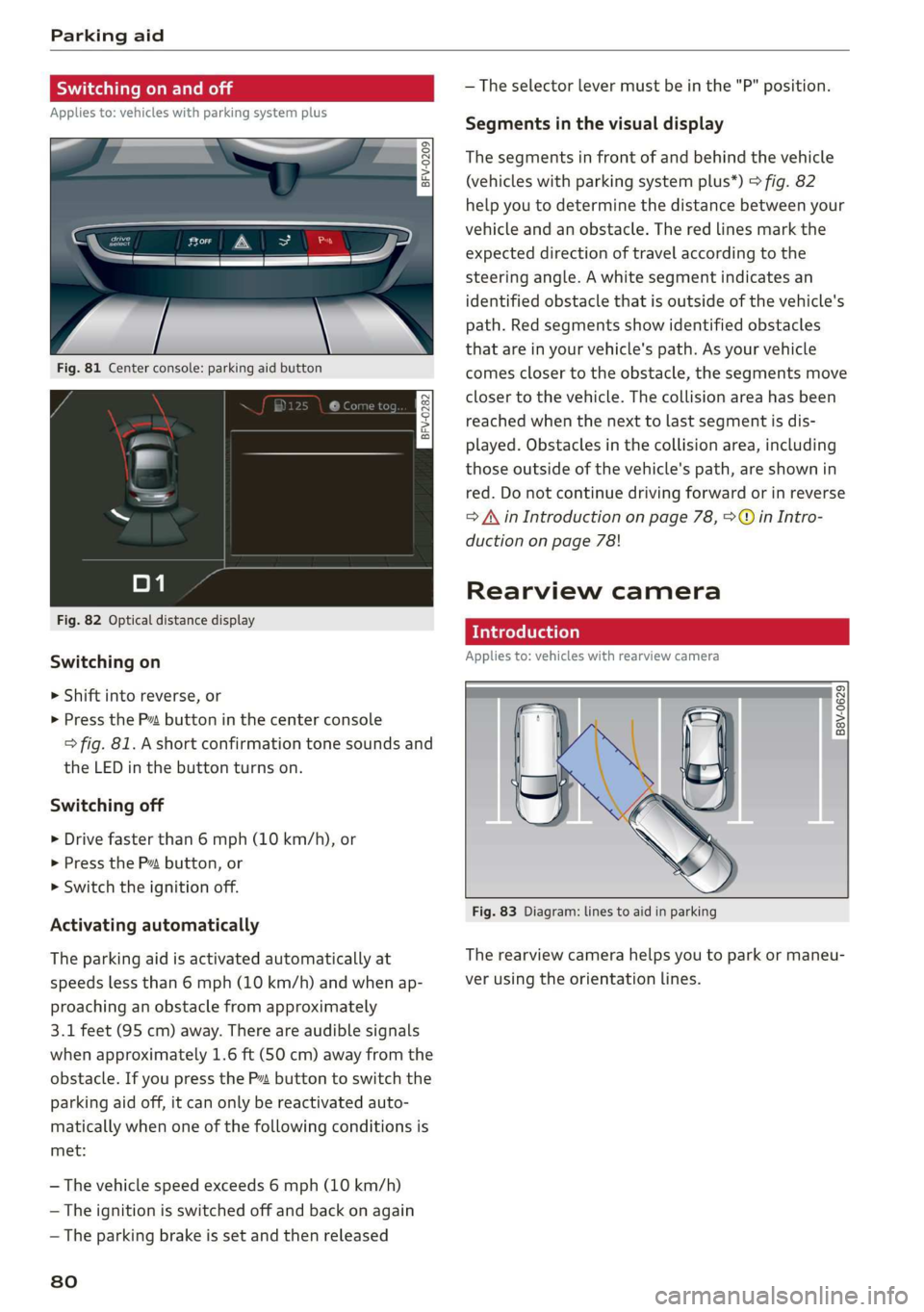
Switchingonandoff
Appliesto:vehicleswith parkingsystemplus
a 3q | >
zoO
Fig.81Centerconsole:parkingaidbutton
Fig.82Opticaldistancedisplay
Switchingon
>Shiftintoreverse,or
>PressthePvbuttoninthe centerconsole
>fig.81.Ashortconfirmationtonesoundsand
theLEDinthebuttonturnson.
Switchingoff
>Drivefasterthan6mph(10km/h),or
>PressthePbutton,or
>Switchtheignitionoff.
Activatingautomatically
The
parkingaidisactivatedautomaticallyat
speedslessthan6mph(10km/h) andwhenap-
proachinganobstaclefromapproximately
3.1feet(95cm)away.Thereareaudiblesignals
whenapproximately1.6ft(50cm)awayfromthe
obstacle.IfyoupresstheP”buttontoswitchthe
parkingaidoff,itcanonly bereactivatedauto-
maticallywhenoneofthefollowingconditionsis
met:
—Thevehiclespeedexceeds6mph(10km/h)
—Theignitionisswitchedoffandbackonagain
—Theparkingbrakeissetandthenreleased
80
—Theselectorlevermustbeinthe"P"position.
Segmentsinthevisualdisplay
Thesegmentsinfront ofandbehindthevehicle
(vehicleswithparkingsystemplus*)>fig.82
helpyoutodeterminethedistancebetweenyour
vehicleandanobstacle.Theredlinesmarkthe
expecteddirectionoftravelaccordingtothe
steering angle.Awhitesegmentindicatesan
identifiedobstacle thatisoutsideofthevehicle's
path.Redsegmentsshowidentifiedobstacles
thatareinyourvehicle'spath.Asyourvehicle
comesclosertotheobstacle,thesegmentsmove
closertothevehicle.Thecollisionareahasbeen
reachedwhenthenexttolastsegmentisdis-
played.Obstaclesinthecollisionarea,including
thoseoutsideofthevehicle'spath,areshownin
red.Donotcontinuedrivingforwardorinreverse
=AinIntroductiononpage78,>@inIntro-
ductiononpage78!
Rearviewcamera
Introduction
Appliesto:vehicleswithrearviewcamera
B8V-0629
Fig.83Diagram:linestoaidinparking
Therearviewcamerahelpsyoutoparkormaneu-
verusingtheorientationlines.
Page 83 of 312
8S1012721BA
Parkingaid
Ceeace1od}
Appliesto:vehicleswithrearviewcamera
BFV-0086
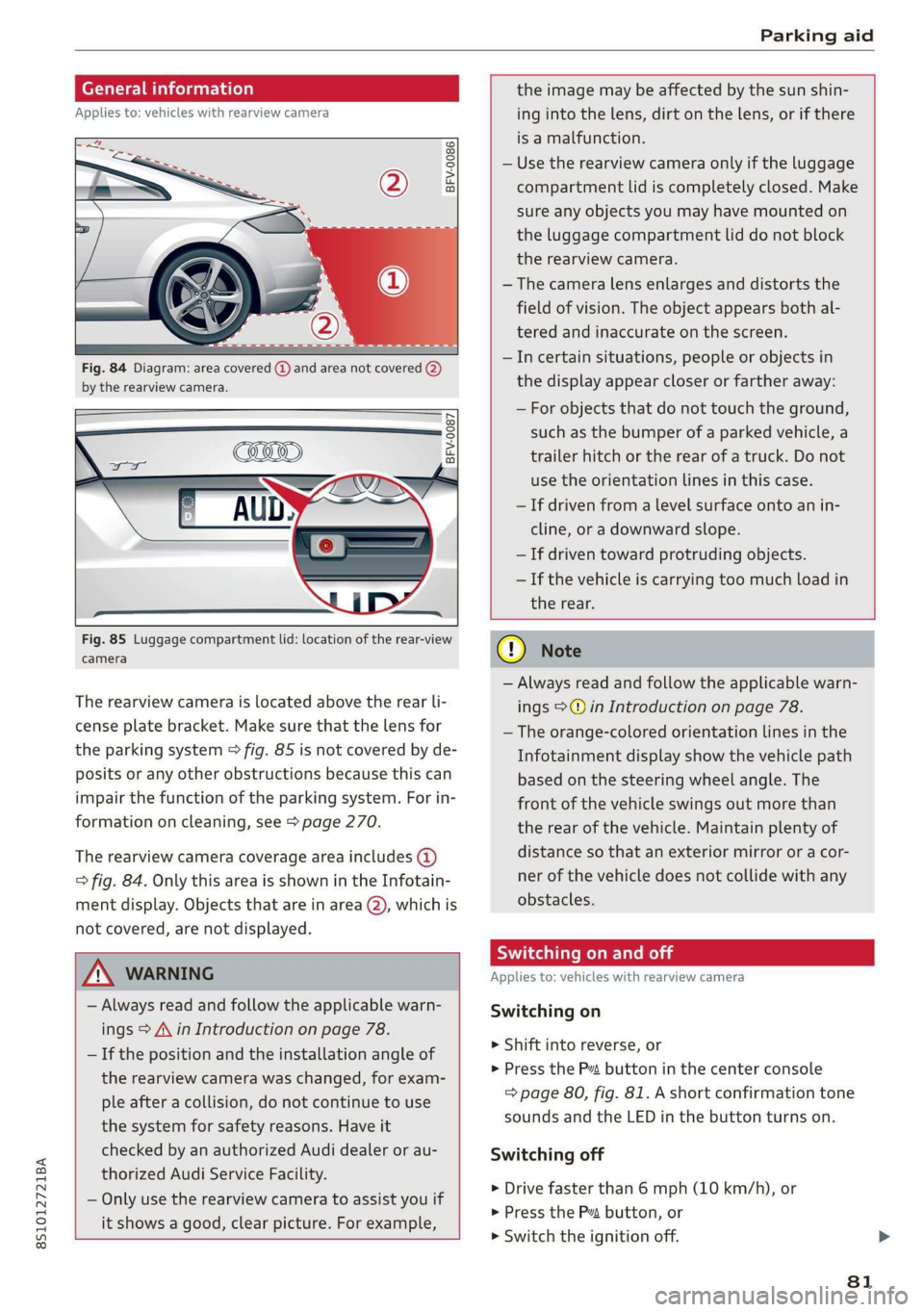
Fig.84Diagram:areacovered@)andareanotcovered(2)
bythe rearviewcamera.
BFV-0087
Fig.85Luggagecompartmentlid:locationoftherear-view
camera
Therearviewcameraislocatedabovetherearli-
censeplatebracket.Makesurethatthelensfor
theparkingsystem>fig.85isnotcoveredbyde-
positsoranyotherobstructionsbecausethiscan
impairthefunctionoftheparkingsystem.Forin-
formationoncleaning,see>page270.
Therearviewcameracoverageareaincludes(4)
=>fig.84.OnlythisareaisshownintheInfotain-
mentdisplay.Objectsthatareinarea(2),whichis
notcovered,arenotdisplayed.
Z\WARNING
—Alwaysreadandfollowtheapplicablewarn-
ings>A\inIntroductiononpage78.
—Ifthepositionandtheinstallationangleof
therearviewcamerawaschanged,forexam-
pleafteracollision,donotcontinuetouse
thesystemforsafetyreasons.Haveit
checkedbyanauthorizedAudidealerorau-
thorizedAudiServiceFacility.
—Onlyuse therearviewcameratoassistyouif
itshowsagood,clearpicture.Forexample,
theimagemaybeaffectedbythesunshin-
ingintothelens,dirtonthelens,orifthere
isamalfunction.
—Usetherearviewcameraonlyiftheluggage
compartmentlidiscompletelyclosed.Make
sureanyobjectsyoumayhavemountedon
theluggagecompartmentliddonotblock
therearviewcamera.
— Thecameralensenlargesanddistortsthe
fieldofvision.Theobjectappearsbothal-
teredandinaccurateonthescreen.
—Incertainsituations,peopleor objectsin
thedisplayappearcloserorfartheraway:
—Forobjectsthatdonottouchtheground,
suchasthebumperofaparkedvehicle,a
trailerhitchortherearofatruck.Donot
usetheorientationlinesinthiscase.
—Ifdrivenfromalevelsurfaceontoanin-
cline,oradownwardslope.
—Ifdriventowardprotrudingobjects.
—Ifthevehicleiscarryingtoomuchloadin
therear.
CG)Note
—Alwaysreadandfollowtheapplicablewarn-
ings>@inIntroductiononpage78.
—Theorange-coloredorientationlinesinthe
Infotainmentdisplayshowthevehiclepath
basedonthesteeringwheelangle.The
front ofthevehicleswingsoutmorethan
therearofthevehicle.Maintainplentyof
distanceso thatanexteriormirrororacor-
nerofthevehicledoesnotcollidewithany
obstacles.
SicLeRoi
Appliesto:vehicleswithrearviewcamera
Switchingon
>Shiftintoreverse,or
>PresstheP”buttoninthecenterconsole
=>page80,fig.81.Ashortconfirmationtone
soundsandtheLEDinthebuttonturnson.
Switchingoff
>Drivefasterthan6mph(10km/h),or
>PressthePvbutton,or
>»Switchtheignitionoff.
81
Page 84 of 312
Parkingaid
@®Tips
—Thevisualdisplayintheleftpartofthedis-
playshouldhelpyoudetectthecriticalvehi-
cleareas.
—Youcanchangethevolumeofthesignals
andthedisplay>page82.
Perpendicularparking
Appliesto:vehicleswithrearviewcamera
Thisviewmaybe usedwhenparkinginagarage
orinaparkingspace.
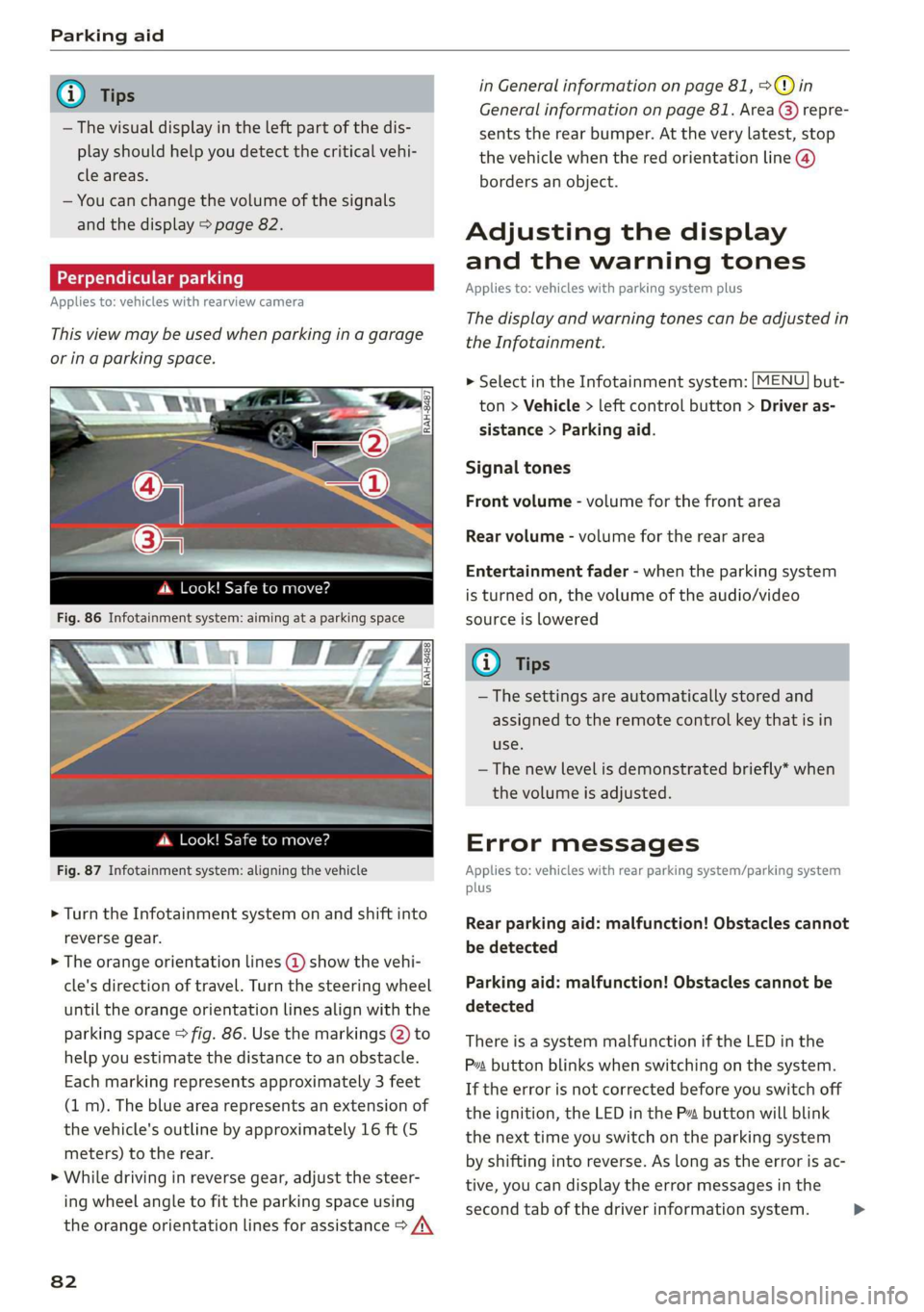
4d.Look!Safetomove?
Fig.87Infotainmentsystem:aligningthevehicle
>Turn theInfotainmentsystemonandshiftinto
reversegear.
>Theorangeorientationlines@showthevehi-
cle'sdirectionoftravel.Turn thesteeringwheel
untiltheorangeorientationlinesalignwiththe
parkingspace>fig.86.Usethemarkings@)to
helpyouestimatethedistancetoanobstacle.
Eachmarkingrepresentsapproximately3 feet
(1m).Thebluearearepresentsanextensionof
thevehicle'soutlinebyapproximately16ft(5
meters)totherear.
>Whiledrivinginreversegear,adjustthesteer-
ingwheelangletofittheparkingspaceusing
theorangeorientationlinesforassistance>/\
82
inGeneralinformationonpage81,>@)in
Generalinformationonpage81.Area@)repre-
sentstherearbumper.Attheverylatest,stop
thevehiclewhentheredorientationline@)
bordersanobject.
Adjustingthedisplay
andthewarningtones
Appliesto:vehicleswithparkingsystemplus
Thedisplayandwarningtonescanbeadjustedin
theInfotainment.
MENU >SelectintheInfotainmentsystem:but-
ton>Vehicle> leftcontrolbutton>Driveras-
sistance>Parkingaid.
Signaltones
Frontvolume-volumeforthefrontarea
Rearvolume-volumeforthereararea
Entertainmentfader-whentheparkingsystem
isturnedon,thevolumeoftheaudio/video
sourceislowered
G)Tips
—Thesettings areautomaticallystoredand
assignedtotheremotecontrolkeythatisin
use.
— Thenewlevelisdemonstratedbriefly*when
thevolumeisadjusted.
Errormessages
Appliesto:vehicleswithrearparkingsystem/parkingsystem
plus
Rearparkingaid:malfunction!Obstaclescannot
bedetected
Parkingaid:malfunction!Obstaclescannotbe
detected
ThereisasystemmalfunctioniftheLEDinthe
Psbuttonblinkswhenswitchingonthe system.
Iftheerrorisnotcorrectedbeforeyouswitchoff
theignition,theLEDinthePbuttonwillblink
thenexttimeyouswitchontheparkingsystem
byshifting intoreverse.Aslongastheerrorisac-
tive,youcandisplaytheerrormessagesinthe
secondtabofthedriverinformationsystem.>
Page 87 of 312
8S1012721BA
IntelligentTechnology
—Acceleratecarefullywhendrivingoncondition.Differenttiresizescanleadtoa
smooth,slipperysurfacessuchasiceandreductioninenginepower.
snow.Thedrivewheelscanspinevenwhen—Youmayhearnoiseswhenthesystemsde-
thesecontrolsystemsareinstalledandthisscribedareworking.
canaffectdrivingstabilityandincreasethe
riskofacollision.
G)Tips
— TheABSandASRonlyfunctioncorrectly
whenallfourwheelshaveasimilarwear
ScaleLiemelal
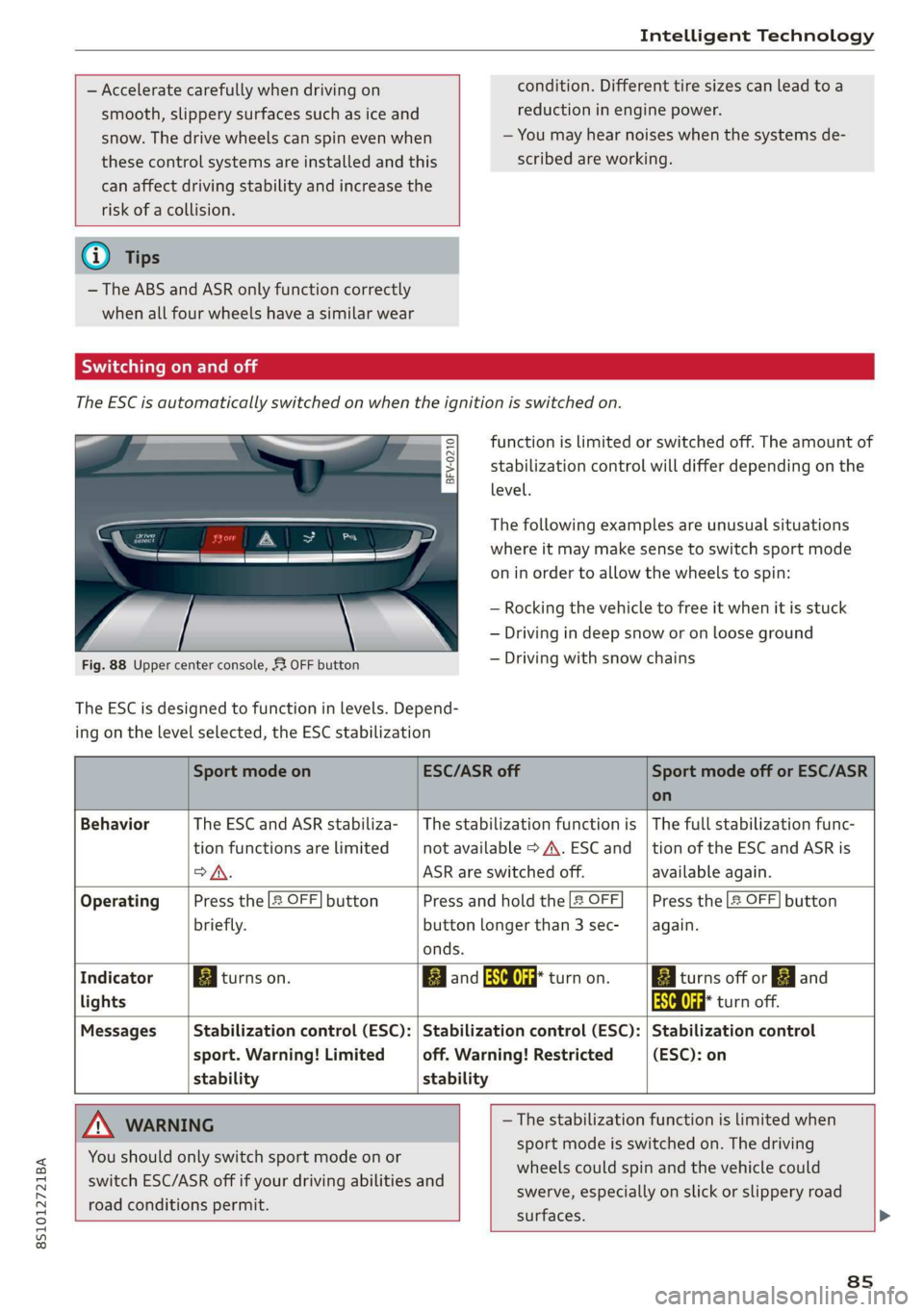
TheESCisautomaticallyswitchedonwhentheignitionisswitchedon.
functionislimitedorswitchedoff.Theamountof
stabilizationcontrolwilldifferdependingonthe
level.
eS
sgS$
= o
Thefollowingexamplesareunusualsituations
whereitmaymakesensetoswitchsportmode
oninordertoallowthewheelstospin:
—Rocking thevehicletofreeitwhenitisstuck
—Drivingindeepsnoworonlooseground
—Drivingwithsnowchains
Fig.88Uppercenterconsole,53OFFbutton
The ESCisdesignedtofunctioninlevels.Depend-
ingonthelevelselected,theESCstabilization
SportmodeonESC/ASRoffSportmodeofforESC/ASR
on
BehaviorThe ESC andASRstabiliza-|Thestabilizationfunctionis|Thefullstabilizationfunc-
tionfunctionsarelimitednotavailable>A\.ESCand_|tionoftheESC andASRis
>A.ASRareswitchedoff.availableagain.
OperatingPressthe2OFF]buttonPressandholdthe|&OFFPressthe2OFF]button
briefly.buttonlongerthan3sec-again.
onds.
IndicatorBiturnson.BBandaaturnon.BiturnsofforFJand
lightsaaturnoff.
MessagesStabilizationcontrol(ESC):|Stabilizationcontrol(ESC):|Stabilizationcontrol
sport.Warning!Limitedoff.Warning!Restricted(ESC):on
stabilitystability
AWARNING—Thestabilizationfunctionislimitedwhen
sportmodeisswitchedon.Thedriving
wheelscouldspinandthevehiclecould
swerve,especiallyonslickorslipperyroad
surfaces.
Youshouldonly switchsportmodeonor
switchESC/ASRoffifyourdrivingabilitiesand
roadconditionspermit.
8s
Page 92 of 312
MultiMediaInterface
MultiMediaInterface
Trafficsafety
information
AudirecommendsperformingcertainInfotain-
mentsystemfunctions,suchasenteringa desti-
nation,onlywhenthevehicleisstationary.Al-
waysbe preparedtostopoperating theInfotain-
mentsystemintheinterestofyoursafetyand
thesafety ofotherroadusers.
Z\WARNING
Onlyuse theInfotainmentsystemwhenroad,
traffic,weather,andvisibilityconditionsper-
mitandalwaysinawaythatallowsyouto
maintaincompletecontroloveryourvehicle.
@Tips
Certainfunctionsarenotavailablewhiledriv-
ing.
Introduction
TheMultiMediaInterface,orMMIforshort,
combinesvarioussystemsforcommunication,
navigation*andentertainmentinyourAudi.You
canoperatetheMMIusingtheMMIcontrolpan-
el,themultifunctionsteeringwheelorthevoice
recognitionsystem*.
@-TaNDr:
Se2
[RAH-8837|
:
Fig.90MMIcontrolpanel
MMIcontrolpanel overview
@Controlknobwithjoystickfunction.91
@MMItouchcontrolpad*.........92
@®Leftcontrolbutton.............91
@Rightcontrolbutton............91
©)Buttonsforopeningmenusdirectly.91
90
©)[MENU]buttonwc...cosevestan91
AZ):[BACK]buttOoss+ «saysseemusae91
MMIOn/Offknobwith
joystickfunction
Operating
[RAH-8739
Fig.91MMIOn/Offknobwithjoystickfunction
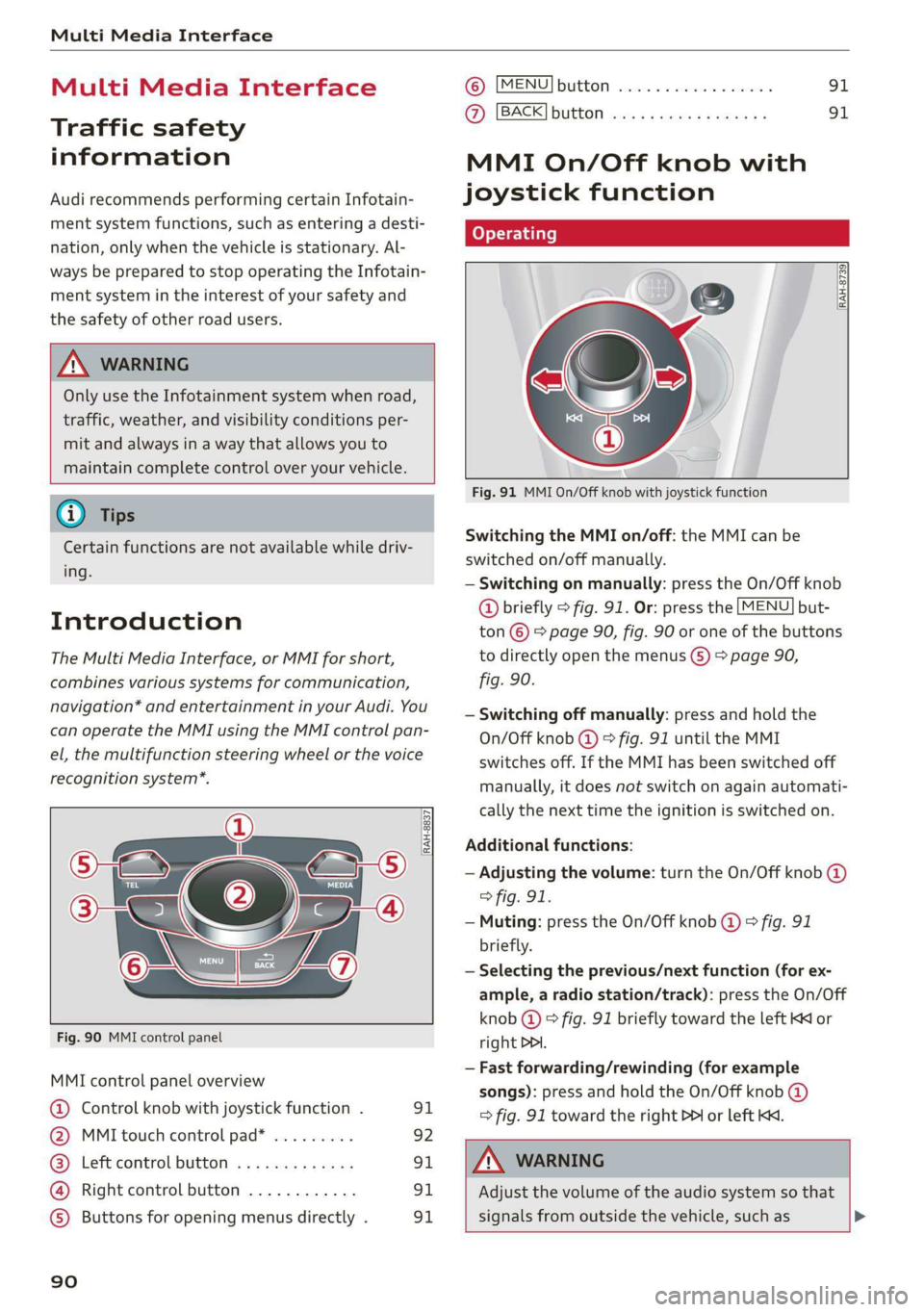
SwitchingtheMMIon/off:theMMIcanbe
switched
on/offmanually.
—Switchingonmanually:presstheOn/Offknob
@briefly>fig.91.Or:pressthe[MENU]but-
ton©>page90,fig.90oroneofthebuttons
todirectlyopenthemenus()>page90,
fig.90.
—Switchingoffmanually:pressandholdthe
On/Offknob@©fig.91untiltheMMI
switchesoff.IftheMMIhasbeenswitchedoff
manually,itdoesnotswitchonagainautomati-
callythenexttimetheignitionisswitchedon.
Additionalfunctions:
—Adjustingthevolume:turntheOn/Offknob@)
>fig.91.
—Muting:presstheOn/Offknob@©fig.91
briefly.
—Selectingtheprevious/nextfunction(forex-
ample,aradiostation/track):presstheOn/Off
knob@)°fig.91brieflytowardtheleftKKor
rightDDI.
—Fastforwarding/rewinding(forexample
songs):pressandholdtheOn/Offknob@)
=>fig.91towardtherightPPIorleftKd.
Z\WARNING
Adjustthevolumeoftheaudiosystemso that
signalsfromoutsidethevehicle,suchas>