tow AUDI TT COUPE 2020 Owner's Guide
[x] Cancel search | Manufacturer: AUDI, Model Year: 2020, Model line: TT COUPE, Model: AUDI TT COUPE 2020Pages: 280, PDF Size: 98.79 MB
Page 173 of 280
8S1012721BB
Media
(CO) 6/VDE 0837. The various types of audio
equipment installed conform to safety class 1.
The laser uses so little power or is shielded so
there is no danger when it is used correctly.
Media drives
SD card reader
3
5 = z
ES
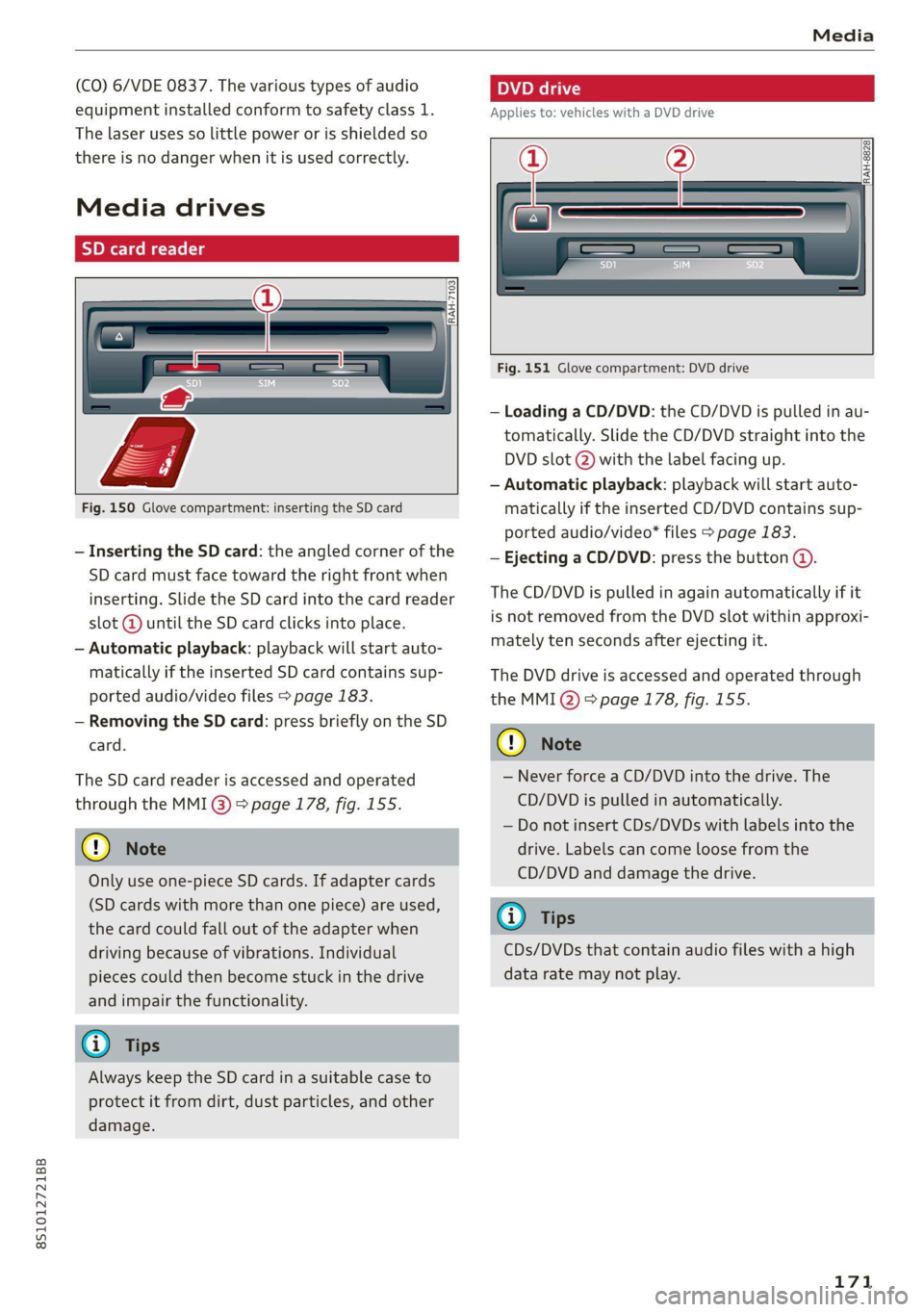
Fig. 150 Glove compartment: inserting the SD card
— Inserting the SD card: the angled corner of the
SD card must face toward the right front when
inserting. Slide the SD card into the card reader
slot @ until the SD card clicks into place.
— Automatic playback: playback will start auto-
matically if the inserted SD card contains sup-
ported audio/video files > page 183.
— Removing the SD card: press briefly on the SD
card.
The SD card reader is accessed and operated
through the MMI @) > page 178, fig. 155.
@) Note
Only use one-piece SD cards. If adapter cards
(SD cards with more than one piece) are used,
the card could fall out of the adapter when
driving because of vibrations. Individual
pieces could then become stuck in the drive
and impair the functionality.
@) Tips
Always keep the SD card in a suitable case to
protect it from dirt, dust particles, and other
damage.
Applies to: vehicles with a DVD drive
_————
RAH-8828}
Fig. 151 Glove compartment: DVD drive
— Loading a CD/DVD: the CD/DVD is pulled in au-
tomatically. Slide the CD/DVD straight into the
DVD slot @) with the label facing up.
— Automatic playback: playback will start auto-
matically if the inserted CD/DVD contains sup-
ported audio/video* files > page 183.
— Ejecting a CD/DVD: press the button @.
The CD/DVD is pulled in again automatically if it
is not removed from the DVD slot within approxi-
mately ten seconds after ejecting it.
The DVD drive is accessed and operated through
the MMI Q) 8 page 178, fig. 155.
() Note
— Never force a CD/DVD into the drive. The
CD/DVD is pulled in automatically.
— Do not insert CDs/DVDs with labels into the
drive. Labels can come loose from the
CD/DVD and damage the drive.
@ Tips
CDs/DVDs that contain audio files with a high
data rate may not play.
171
Page 209 of 280

8S1012721BB
Checking and Filling
Coolant Freeze protec-
additive tion
Warm min. 40% min. -13 °F
regions max. 45% (-25 °C)
Cold min. 50% max. -40 °F
regions max. 55% (-40 °C)
@) Note
— Before the start of winter, have an author-
ized Audi dealer or authorized Audi Service
Facility check if the coolant additive in your
vehicle matches the percentage appropriate
for the climate. This is especially important
when driving in colder climates.
— If the appropriate coolant additive is not
available in an emergency, do not add any
other additive. You could damage the en-
gine. If this happens, only use water and re-
store the correct mixture ratio with the
specified coolant additive as soon as possi-
ble.
— Only refill with new coolant.
— Radiator sealant must not be mixed with
the coolant.
— Due to the risk of engine damage, the cool-
ing system should only be refilled by an au-
thorized Audi dealer or authorized Audi
Service Facility. An authorized Audi dealer or
authorized Audi Service Facility can also pro-
vide you with important information about
the recommended coolant additive.
Checking coolant
RAZ-0539
MIN
Fig. 173 Engine compartment - coolant expansion tank
(diagram): @) cover; @) markings
Observe the safety precautions > page 200, Gen-
eral information.
Checking the coolant level
> Park the vehicle on a level surface.
>» Switch the ignition off.
> Open the hood > page 201.
> Check the coolant level in the coolant expan-
sion tank > page 202, fig. 170 using the outer
markings @) > fig. 173. The coolant level must
be between the markings @) when the engine is
cold. When the engine is warm it can be slight-
ly above the upper marking.
Adding coolant
Requirement: there must be a residual amount of
coolant in the expansion tank >@.
If you must add coolant, use a mixture of water
and coolant additive. Mixing the coolant additive
with distilled water is recommended.
> Allow the engine to cool.
> Place a large, thick towel on the coolant expan-
sion tank cap.
>» Remove the cover () > fig. 173 carefully to the
left > A\.
» Add the correct mixture ratio of coolant
> page 206 up to the upper marking @)
> fig. 173.
> Make sure that the fluid level remains stable.
Add more coolant if necessary.
> Close the cap securely.
Coolant loss usually indicates that there is a leak.
Immediately drive your vehicle to an authorized
Audi dealer or authorized Audi Service Facility
and have the cooling system inspected. If the
cooling system is not leaking, coolant loss can re-
sult from the coolant boiling due overheating
and then being forced out of the cooling system.
Z\ WARNING
— The engine compartment in any vehicle can
be a dangerous area. Stop the engine and al-
low it to cool before working in the engine
compartment. Always follow the informa-
tion found in > page 200, General informa-
tion.
— Never open the hood if you can see or hear
steam or coolant escaping from the engine
compartment. This increases the risk of >
207
Page 229 of 280
8S1012721BB
Wheels
increase the risk of the loss of
vehicle control.
—The brakes on a vehicle that
has been overloaded may not
be able to stop the vehicle
within a safe distance.
—Tires on a vehicle that has
been overloaded can fail sud-
denly, including a blowout and
sudden deflation, causing loss
of control and a crash.
—Always make sure that the to-
tal load being transported
does not make the vehicle
heavier than the vehicle’s
Gross Vehicle Weight Rating.
Determining correct load
limit
Use the example below to calcu-
late the total weight of the pas-
sengers and luggage or other
things that you plan to transport
so that you can make sure that
your vehicle will not be overload-
ed.
Steps for Determining Correct
Load Limit
1. Locate the statement “THE
COMBINED WEIGHT OF OCCU-
PANTS AND CARGO SHOULD
NEVER EXCEED XXX KG OR XXX
LBS” on your vehicle’s placard
(tire inflation pressure label)
> page 223, fig. 180.
. Determine the combined
weight of the driver and pas-
sengers that will be riding in
your vehicle.
. Subtract the combined weight
of the driver and passengers
from “XXX” kilograms or “XXX”
pounds shown on the sticker
> page 223, fig. 180.
. The resulting figure equals the
available amount of cargo and
luggage load capacity. For ex-
ample, if the “XXX” amount
equals 1400 lbs. and there will
be five 150 lbs. passengers in
your vehicle, the amount of
available cargo and luggage
load capacity is 650 lbs.
(1400-750 (5 x 150) = 650
lbs.)
. Determine the combined
weight of luggage and cargo
being loaded on the vehicle.
That weight may not safely ex-
ceed the available cargo and
luggage load capacity calculat-
ed in Step 4.
. If your vehicle will be towing a
trailer, load from your trailer
will be transferred to your
227
>
Page 251 of 280

8S1012721BB
Emergency assistance
4. Attach the other end of the negative cable
(black) to the jump start connection @) on
the vehicle.
Starting the engine
> Start the engine in the vehicle giving the charge
and let it run at idle.
> Now start the engine in your vehicle, which has
the
drained battery.
> If the engine does not start: Stop the starting
procedure after 10 seconds and then repeat it
after approximately 30 seconds.
> Turn on the rear window defogger in your vehi-
cle in order to reduce any voltage peaks that
may occur when disconnecting the jump start
cables. The headlights must be switched off.
> With the engines running, remove the cables in
reverse order of the way they were installed.
> Close the red cover on the positive terminal.
Z\ WARNING
— Never connect the jump start cable directly
to your vehicle battery. Only use the connec-
tions in the engine compartment.
— Do not touch the non-insulated parts of the
terminal clamps. The cable must also not
come into contact with vehicle components
that conduct electricity when it is connected
to the positive vehicle battery terminal. This
can cause a short circuit.
— The locking bolts on the battery cells must
be tightened securely.
— Keep ignition sources (open flames, burning
cigarettes, etc.) away from the vehicle bat-
teries to reduce the risk of an explosion.
— Route the jump start cables so they cannot
get caught in the moving parts in the other
vehicle's engine compartment.
@) Note
Please note that the connecting process previ-
ously described for the jump start cables is in-
tended for when your vehicle is being jump
started.
@) Tips
Make sure that the connected jump start ca-
bles have sufficient contact with metal.
Towing
General information
You should only perform the steps that follow if
you have the necessary tools and technical ex-
pertise.
Towing requires a certain amount of practice.
Audi recommends contacting a towing company
to have the vehicle transported.
You should only have your vehicle towed by an-
other vehicle when disabled in exceptional cir-
cumstances. Inexperienced drivers should not
tow.
Notes on towing
When the engine is stopped, the transmission
will not be sufficiently lubricated if traveling at
high speeds and long distances:
— The maximum permitted towing speed is 30
mph (50 km/h).
— The maximum permitted towing distance is 30
miles (50 km).
Additional information on towing with a tow
truck
The vehicle may only be towed with the front axle
raised. Do not wrap any chains or cables around
the brake lines.
If the vehicle should be towed with the axle
raised, then the ignition must be switched off to
reduce the risk of damage to the drivetrain.
Tow bar and towing cable
The vehicle can be towed with a tow bar or tow-
ing cable. Both drivers should be familiar with
the special considerations when towing, especial-
ly when using a towing cable.
Always make sure the traction force does not ex-
ceed the permitted level and there are no shock
loading conditions. There is always the risk of the >
249
Page 252 of 280

Emergency assistance
coupling becoming overloaded when driving off-
road.
For the most safety and security, drive with a tow
bar. You should use a towing cable only if a tow
bar is not available. Use a towing cable made of
synthetic elastic cable similar elastic material.
ZX WARNING
— Towing highly increases the risk of an acci-
dent, for example from colliding with the
towing vehicle.
— To reduce the risk of an accident, do not al-
low anyone to remain inside the vehicle
when it is being transported by a tow truck
or a special transporter.
@) Note
— If normal towing is not possible, for exam-
ple if the transmission is faulty or if the
towing distance is greater than 30 miles
(50 km), then transport the vehicle on a
special carrier.
— If the vehicle is towed by a tow truck at the
axle that is not permitted, this can cause se-
vere damage to the transmission.
— The vehicle must not be tow started for
technical reasons.
@) Tips
— If there is a power failure, the selector lever
will not move out of the "P" position. The
parking lock must be released using the
emergency release before towing the vehi-
cle > page 86.
— Follow the local legal regulations for tow-
ing.
Read and follow the important information under
=> page 249.
Preparations
> Only secure the towing cable or tow bar at the
designated towing loops > page 250,
=>page 251.
250
>» Make sure the towing cable is not twisted. Oth-
erwise it could disconnect from the towing loop
while towing.
> Switch the emergency flashers on in both
vehicles > page 38. However, do not do this if it
prohibited by law.
Towing vehicle (front)
> Only start to drive when the towing cable is
taut.
> Be especially careful when accelerating.
» Avoid sudden braking or driving maneuvers.
Vehicle being towed (rear)
> Make sure the ignition is switched on so that
the steering wheel is not locked and so that you
can use the turn signals, the horn, and the
windshield wipers if needed > /A\.
> Switching it off before the vehicle has stopped
may impair the function of the brake booster
and power steering. You would then need to
use more force to steer and brake the vehicle.
> Release the parking brake > page 77.
> Select the “N” selector lever position.
> Make sure the towing cable is always taut.
ZA WARNING
Never tow a vehicle using a tow bar or towing
cable if the vehicle does not have electrical
power.
Front towing loop
BFV-0309
Fig. 196 Front bumper: installing the towing loop
The threaded opening for the towing loop is lo-
cated on the right side of the front bumper.
> Remove the towing loop from the vehicle tool
kit > page 241.
Page 253 of 280
8S1012721BB
Emergency assistance
> Press the cap inward with brief, strong pressure
=> fig. 196. The cap will loosen from the bump-
er.
>» Tighten the towing loop in the threaded open-
ing until it stops and then tighten it with a
wheel wrench.
>» After using, place the towing loop back in the
vehicle tool kit.
If the towing loop is not tightened until it
stops when installing, the threads may be
pulled out when towing the vehicle and result
in an accident.
Depending on the model, the shape of the
cover can vary.
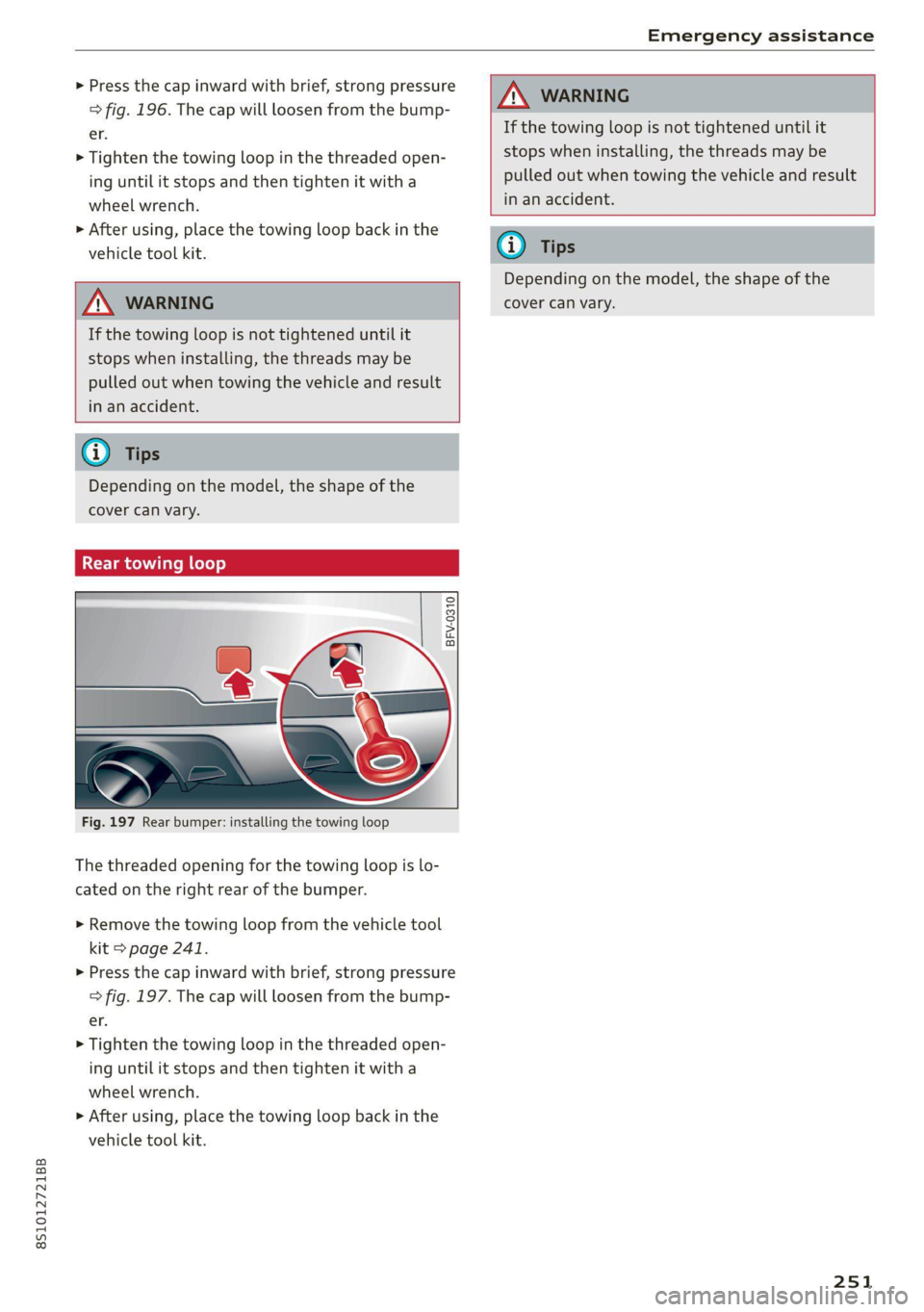
Rear towing loop
S
©
gS 3 z o
Fig. 197 Rear bumper: installing the towing loop
The threaded opening for the towing loop is lo-
cated on the right rear of the bumper.
> Remove the towing loop from the vehicle tool
kit > page 241.
> Press the cap inward with brief, strong pressure
=> fig. 197. The cap will loosen from the bump-
er.
> Tighten the towing loop in the threaded open-
ing until it stops and then tighten it with a
wheel wrench.
> After using, place the towing loop back in the
vehicle tool kit.
If the towing loop is not tightened until it
stops when installing, the threads may be
pulled out when towing the vehicle and result
in an accident.
Depending on the model, the shape of the
cover can vary.
251
Page 276 of 280

Index
Treadwear indicators................0. 222
Unidirectional...............-00- 215, 246
Uniform tire quality grading............ 229
Tires and wheels
Glossary of tire and loading terminology .. 216
Tires and vehicle load limits............ 226
Tone (sound)
refer to Adjusting the sound............ 193
oo) 241
Top tether anchor (securing the child safety
S@at) 0. eee ee 62
Touch
refer to MMI touch sss <= ees ss ees ss oe 113
TOWinGise < s awe = ease € 8 Saat s 1 Bam & yaa 249
Towing loop............. eee e seas 250, 251
Towing protection monitoring............. 24
TPMS
TNGICatOrlUGHE « seae < s eee s oem = Hae a 234
Tire pressure monitoring system.... 231, 232
Trafficinformation « sas»: = » esas s 2 swe & oo 162
Tratfl@ reports « ses ¢ ¢ eeews ¢ ¢ mews ¢ © nee ee 159
Transmission malfunction (indicator light)... 85
Treble (Sound)... 1... 0. cece cece e eee es 193
Turn signals ........... 5... e cece eee eee 37
U
Uniform tire quality grading............. 229
Unlocking and locking
By remote control..............-.00005 21
Using the lock cylinder................. 23
With the central locking switch.......... 22
With the convenience key..............- 21
Updating stations (radio)................ 165
USB charging port..........0 es ee eee eee 63
USB stick
refer to Audi music interface........... 176
V
Vanity Mirror... ke ee eee 41
Vehicle
Care/cleaning..........-..0 0c eee eee 235
DIMeCNSIONS sce s 2 een o 2 eeow v wees & Be 262
Identification data...............0085 262
Out of service... 2... eee eee eee eee 240
Raising « ¢ cess + 2 mean + 2 ames 5 2 gees ¥ eee 245
274
Vehicle battery
Charge level... .... 0... eee eee eee 110
Vehicle care... eee eee eee 235
Vehicle identification number............ 262
Vehicle jacks. 2 2 cscs ss emene vo soncne ¥ os 241, 247
Lifting points...............0 eee eee 245
Vehicle toolkit... 0.0.0... eee eee eee 241
Version information.................04. 192
VIEW Dutt Misese a 2 cme 2 crcnene a 2 aceon a 2 arenes x 12
Voice quidance:s « « sve <2 meas es een se eee 157
also refer to Multifunction
steering wheel..............--.00-- 12,14
Voicemail... . 6... eee ee eee ee eee 138
Voice recognition system............ 14, 123
Gomitniands: « = eax « «mace se sees cosas: 124
External scion 5% acon & & eam wo come ¥ & maces
Settings............. 0.0.0... . eee eee
NOIUIMG sceas x = suse ¥ a pewe se eee Y Hate
Volume...
Multifunction steering wheel............ 14
Voice recognition system........... 14, 123
WwW
Warning lights
refer to Indicator lights.................. 7
Washing matte finish paint.............. 235
Wave band
refer to Frequency band............... 165
Weights... 0... cece cece ee eee eee 263
Wheel bolts........... 0.00.00. e eee 228
anti-theft........................00. 244
Removing the cover............ esse 244
Tightening specification............... 247
Whieelst. « srcsise 6 a aveveus a 2 neveana © a cownems a 6 ainane 213
Changing............. see eee eee eee 246
Cleaning ws < & ewe + eaews 2 bean ss Hews es 236
Glossary of tire and loading terminology.. 216
Replacing .......... 6.00 cece cece eee 243
Tire pressure monitoring system.... 231, 232
Tires and vehicle load limits............ 226
Wheeliwrench ss ss cess sa ees oe were ae es 241
Wi-Fi
Audi musicistreamis «6 vse ao sess a a wcenivn 174
Audio player.............0 eee eee eee 174
HOtSPOUSEttINOS:s y s caves x 2 cues 2k ROR 147
Onlinetmediats oa scsi wo swans 3 w avers 6 ween 175