tow AUDI TT COUPE 2020 Owners Manual
[x] Cancel search | Manufacturer: AUDI, Model Year: 2020, Model line: TT COUPE, Model: AUDI TT COUPE 2020Pages: 280, PDF Size: 98.79 MB
Page 4 of 280
Table of contents
About this Owner's Manual......
SUMIMALY: ; « ss6% : osen ss sean cs poe s
QC CCeS Skis: si esis a 6 ores os ewe
Cockpit overview.............-000005
Indicator lights overview...........0.
Display and operation............
Instrument cluster...............
Instrument cluster overview...........
Coolant temperature indicator.........
Tachometer.......... 0.0 eee eee eee
Odometer as = s eee = seen ge zee a tows e
Outside temperature display...........
Fuellevel.......... 0. cece eee eee eee
Multifunction steering wheel..........
Vehicle functions « se-0 2. ese ve eee ees
MessageS ... 0... eee eee eee
Starting and driving.............
Opening and closing.............
Central locking 2.2% ieee seven a eevee
Luggage compartment lid.............
Power windows.............0.00 0005
Garage door opener...............0..
POWER EOPE: « «cece 0 csv « o semiens 6 0 eens
Automatic power top.................
Wind deflector ecax « x came + 5 yom 2 4 ews
Power top emergency operation........
Lights and Vision.................
Exterior lighting ssivses + « ssa 3s inane 9 & sou
Interior lighting. ................000.
VISION s « s saas ss sees Fo Hees Eo ee ee
Windshield wipers..............00005
Digital compass................0000.
Sitting correctly and safely......
Correct passenger seating position......
Front seats .......... 00sec eee eee
R@ar S@atS sces s = sees ¢ ¢ cee oo ete gg oes
Steerimg' wheelies «+ eau a x conse 0 sessvas
Safety belts. ....... 0... eee eee eee
Airbag SYStEMise. x + ones + © amie 2s eee
Child safety seats... 00.2... cece eens
NOD
OO
10 18
18
18
24
26
28
31 31 33 33
36 36 39
40
41
43
45 45
45
48
48
49
Ey
Stowing and using............... 63
Power SourceS...... 00... c eee eee 63
StOraGe « coun s 2 ween s 2 MEWS 4 a REE 5p eS 63
Luggage compartment............... 64
Roof rack... 6.66. e ee eee eee eee eee 67
Warrriiandicoleiis « 6 sis os wiwia sos 69
Climate control system............... 69
Fluids in the A/C system. ............. 72
PD EIING: escssay « & wnsunets © 8 sommes 5 ¢ see Oo 74
Generalinformation................. 74
Starting and stopping the engine....... 75
Electromechanical parking brake....... 77
Starting to drive..... 02... eee eee 78
Sporty Criving'ss < « exes xe een xe pews x ee 79
Automatic transmission.............. 79
Driver assistance................. 87
Assist systems................00. 87
Speed warning system...............- 87
Cruise control system.............0-5 87
Audi active lane assist................ 89
LAPRIMIOG enesnin « © csansiza « oxensms 9 © ecesere oe tee 91
Audi side assist 93
Audi drive select (drive settings)........ 96
Parking aid....................... 99
IMEROGUCtION ax = x eae x 2 ney 5s goes & & Hees 99
Rear parking system ........0...-00 0% 100
Parking system plus.............-.04. 100
RearvieW Camera cw + x cya so nema « gas 101
Adjusting the display and the warning
TONES 2. eee 103
ErtOr MeSSAGCSix. « = sown « = sem ee eee s 103
Intelligent Technology........... 105
Electronic Stabilization Control (ESC).... 105
Brakes’: so isemwe o eames av omceme 2 2 mess 6 ase 107
Steering... ..... cece eee ee eee ee 108
All wheel drive (quattro).............. 109
Rearspoiler's « css i essa s ¢ oes se sores 109
Energy management................. 110
Infotainment system............ 111
Multi Media Interface............ Lid
Traffic safety information............. VT
INEROGUCHON sc 2 « ween + eam s 2 wane ooo Bow Lit
Page 18 of 280
![AUDI TT COUPE 2020 Owners Manual Instrument cluster
Accessing the sport displays in the central
area
> Open the first Vehicle tab (trip computer) using
the [<>] button on the multifunction steering
wheel.
> Select on the mul](/img/6/57658/w960_57658-17.png "AUDI TT COUPE 2020 Owners Manual Instrument cluster
Accessing the sport displays in the central
area
> Open the first Vehicle tab (trip computer) using
the [<>] button on the multifunction steering
wheel.
> Select on the mul")
Instrument cluster
Accessing the sport displays in the central
area
> Open the first Vehicle tab (trip computer) using
the [<>] button on the multifunction steering
wheel.
> Select on the multifunction steering wheel: left
control button > Sport displays.
> Turn the left thumbwheel on the multifunction
steering wheel until the desired sport display
appears in the instrument cluster.
Accessing the sport displays in the additional
display
> Select on the multifunction steering wheel:
right control button > Additional display.
> Select the desired additional display.
G meter*
The G meter displays the longitudinal and lateral
acceleration. The maximum values that are
reached are stored and displayed when the vehi-
cle is stationary.
> To reset the stored values, select on the multi-
function steering wheel: right control button >
Reset values.
Engine data*
The engine data displays the current power and
torque.
Tire pressure monitoring system*
The tire pressure monitoring system displays the
current tire pressures and temperature. Also see
=> page 232, Tire pressure monitoring system.
Messages
@)Electromechanical parking brake
If the Zi Hh © indicator light turns on, the
parking brake has been set.
Zin / © Parking brake: warning! Vehicle
parked too steep
If the indicator light blinks and the message ap-
pears, there is not enough braking power to se-
cure the vehicle. The brakes have overheated. The
vehicle could roll away, even on a small incline.
16
gw Parking brake: malfunction! Please contact
Service
There is a malfunction in the parking brake. Drive
to an authorized Audi dealer or authorized Audi
Service Facility immediately to have the malfunc-
tion corrected. Do not park the vehicle on hills,
because it could roll.
[email protected] / {@) Parking brake: warning! Vehicle
parked too steep
The braking force may not be enough to secure
the vehicle from rolling away. Park the vehicle in
a place with less of an incline.
WN / {@) Parking brake: applied
The parking brake is set. Press and hold the brake
pedal
to release the parking brake.
@~- Steering lock
|e —e| Steering: malfunction! Please stop vehicle
There is a malfunction in the electronic steering
lock. You cannot turn the ignition on.
Do not tow your vehicle because it cannot be
steered. See an authorized Audi dealer or author-
ized Audi Service Facility for assistance.
|e—e| Steering lock: malfunction! Please contact
Service
There is a malfunction in the electronic steering
lock.
Drive immediately to an authorized Audi dealer
or authorized Audi Service Facility to have the
malfunction repaired.
Z\ WARNING
Do not tow your vehicle when there is a mal-
function in the electronic steering lock - this
increases the risk of an accident.
oem ae eee Ll)
BS Engine start system: malfunction! Please
contact Service
Do not switch the ignition off because you may
not be able to switch it on again.
Page 26 of 280
Opening and closing
Locking the front passenger's door with the
mechanical key
The mechanical lock is located on the edge of the
front passenger's door. It is only visible when the
door is open.
>» Remove the mechanical key > page 20.
> Remove the cap from the opening > fig. 19.
> Insert the key into the slot inside and turn it all
the way to the right (right door) or to the left
(left door*).
Once the front passenger's door is closed, it is no
longer possible to open it from the outside. The
door can be opened from the inside by pulling
the door handle.
Pa aee CL)
Applies to: vehicles with anti-theft alarm system
If the anti-theft alarm system detects a vehicle
break-in, audio and visual warning signals are
triggered. The anti-theft alarm system is switch-
ed on or off when locking or unlocking your vehi-
cle. If the alarm is triggered, it will shut off auto-
matically after a certain amount of time.
Switching the alarm off manually
> To switch the alarm off, press the @ button on
the remote control key or switch the ignition
on.
Depending on the vehicle equipment, the anti-
theft alarm system may have the following fea-
tures:
Break-in security feature
The alarm will sound if there is a break-in at the
doors, hood, and/or luggage compartment lid.
Interior/towing protection monitor
The alarm will be triggered if there are move-
ments detected in the vehicle interior or if there
is a change in the vehicle angle.
If you leave persons/animals in the vehicle or
have the vehicle transported, switch off the inte-
rior/towing protection monitoring alarm to pre-
vent the alarm from being triggered:
24
> Press the f button on the remote control key a
second time within 2 seconds. Or
> Applies to: vehicles with convenience key:
Touch the sensor on the door handle a second
time within two seconds. Or
> Turn the mechanical key in the door lock to the
close position a second time within 2 seconds.
> If you lock the vehicle, then the interior/towing
protection monitor will stay off until the next
time the vehicle is unlocked.
(i) Tips
The interior/towing protection monitoring on-
ly functions correctly when the windows and
the power top* are closed.
Luggage compartment
lid
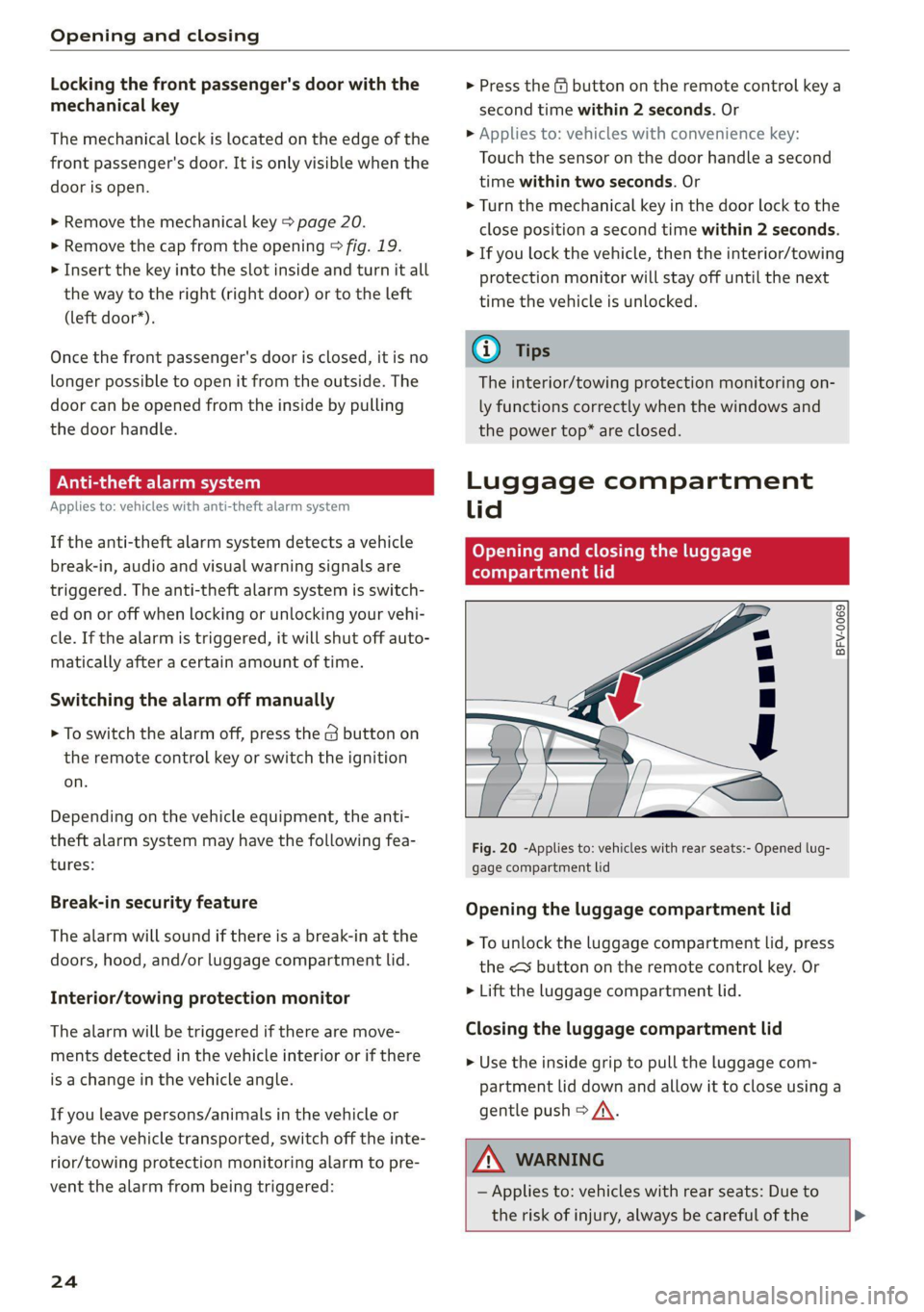
Opening and closing the luggage
ea Tatu Ue)
BFV-0069
Fig. 20 -Applies to: vehicles with rear seats:- Opened lug-
gage compartment lid
Opening the luggage compartment lid
> To unlock the luggage compartment lid, press
the <3 button on the remote control key. Or
> Lift the luggage compartment lid.
Closing the luggage compartment lid
> Use the inside grip to pull the luggage com-
partment lid down and allow it to close using a
gentle push > A\.
Z\ WARNING
— Applies to: vehicles with rear seats: Due to
the risk of injury, always be careful of the >
Page 33 of 280
8S1012721BB
Power top
Power top
Automatic power top
General information
Applies to: vehicles with power top
The power top opens and closes automatically.
When open, the power top is stored completely
in the power top compartment. The power top
can be opened or closed at speeds up to 30 mph
(50 km/h). The power top will not open when the
temperature is below 5 °F (-15 °C).
Under normal conditions, the power top is wind-
and waterproof. In rare cases, small droplets of
water may form under extreme weather condi-
tions such as torrential or prolonged rain. That is
normal and no cause for concern.
Follow the care instructions to keep the power
top free of leaks and to maintain its appearance
=> page 235, Care and cleaning. Also observe the
following:
— Open and stow the power top only when it is
clean and dry. Stowing the power top when it is
damp can create imprints in it, and if it is left
that way for long periods of time, mildew and
other damage can form. To prevent scratching
or damaging the power top, do not use any
sharp-edged objects to remove ice and snow.
The rear window may be cleared with a stand-
ard ice scraper.
— Do not leave the power top open for several
weeks or the creases in it may become discol-
ored.
— Do not open the power top when the tempera-
ture is below 32 °F (0 °C). The fabric in the
power top loses elasticity in sub-zero tempera-
tures.
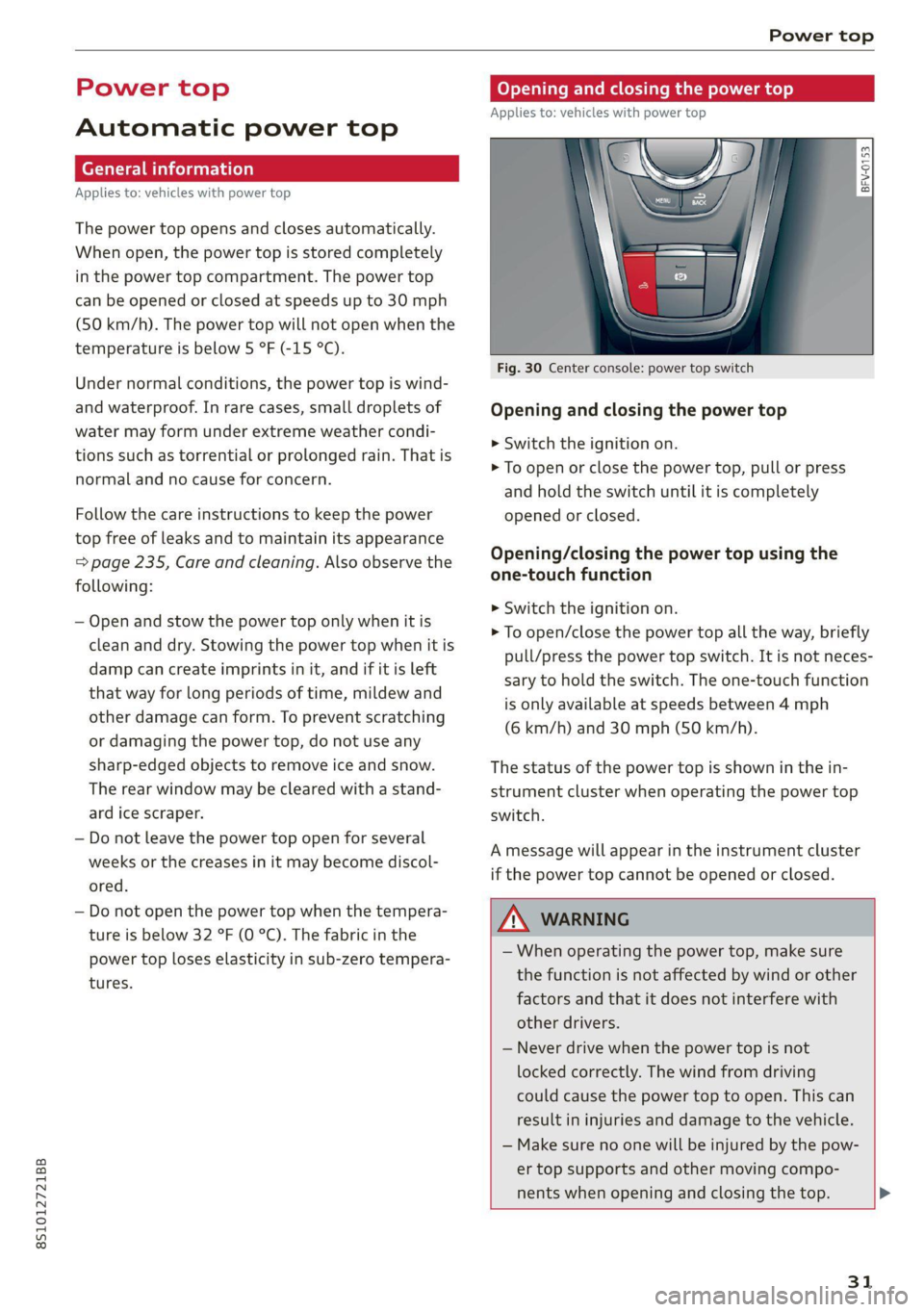
Opening and closing power top
Applies to: vehicles with power top
toad a
> im o
Fig. 30 Center console: power top switch
Opening and closing the power top
> Switch the ignition on.
> To open or close the power top, pull or press
and hold the switch until it is completely
opened or closed.
Opening/closing the power top using the
one-touch function
>» Switch the ignition on.
> To open/close the power top all the way, briefly
pull/press the power top switch. It is not neces-
sary to hold the switch. The one-touch function
is only available at speeds between 4 mph
(6 km/h) and 30 mph (50 km/h).
The status of the power top is shown in the in-
strument cluster when operating the power top
switch.
A message will appear in the instrument cluster
if the power top cannot be opened or closed.
ZX WARNING
— When operating the power top, make sure
the function is not affected by wind or other
factors and that it does not interfere with
other drivers.
— Never drive when the power top is not
locked correctly. The wind from driving
could cause the power top to open. This can
result in injuries and damage to the vehicle.
— Make sure no one will be injured by the pow-
er top supports and other moving compo-
nents when opening and closing the top. >
31
Page 38 of 280

Lights and Vision
Lights and Vision
Exterior lighting
Sitar MeL Lats eal
B8V-0430
Fig. 40 Instrument panel: light switch
Light switch ©:
Turn the switch to the corresponding position.
When the lights are switched on, the 2»: symbol
turns on.
0 - lights are off (in some markets, the daytime
running lights* are switched on when the ignition
is switched on.)
— USA models: The daytime running lights switch
on automatically when the ignition is switched
on and the light switch is in the O or AUTO posi-
tion (only in daylight). The Daytime running
lights can be switched on and off in the MMI
> page 37> A.
— Canada models: The daytime running lights
switch on automatically when the ignition is
switched on and the light switch is in the O,
300 or AUTO position (only in daylight) > A\.
AUTO* - automatic headlights switch on and off
depending on brightness, for example in twilight,
during rain or in tunnels.
300: - Parking lights
ZO - Low beam headlights
220 - All-weather lights*
Q# - Rear fog light(s)*
All-weather lights*
In vehicles with all-weather lights, the front
lights are adjusted automatically so that you are
36
less likely to see glare from your own headlights,
for example when driving on a wet road.
Automatic dynamic headlight range control
system*
Your vehicle is equipped with a headlight range
control system so that there is less glare for on-
coming traffic if the vehicle load changes. The
headlight range also adjusts automatically when
braking and accelerating.
Light functions
The following light functions may be available
depending on vehicle equipment and only func-
tion when the light switch is in the AUTO posi-
tion.
Static cornering light* (vehicles with LED head-
lights) - the cornering light switches on automat-
ically when the steering wheel is turned at a cer-
tain angle at speeds up to approximately 44 mph
(70 km/h) and when the turn signal is activated
at speeds up to approximately 25 mph
(40 km/h). The area to the side of the vehicle is
illuminated better when turning.
Highway light function* (vehicles with LED head-
lights) - This function adapts the lighting for
highway driving based on vehicle speed.
Speed dependent light distribution* (vehicles
with
LED headlights) - The speed dependent light
distribution adapts the light in towns and on
highways or expressways. Intersections can also
be illuminated on vehicles with a navigation sys-
tem*.
ZA\ WARNING
— Automatic headlights* are only intended to
assist the driver. They do not relieve the
driver of responsibility to check the head-
lights and to turn them on manually based
on the current light and visibility conditions.
For example, fog cannot be detected by the
light sensors. So always switch on the low
beams under these weather conditions and
when driving in the dark ZO.
—To reduce glare for traffic behind your vehi-
cle, the rear fog lights* should only be
turned on in accordance with the legal >
Page 40 of 280

Lights and Vision
Daytime running lights
USA models: the daytime running lights can be
switched on or off using the MMI. Select On or
Off.
Canada models: this function cannot be switched
off. They activate automatically each time the ig-
nition is switched on. This menu item is shown
with a “gray background”.
Entry/exit lighting
The entry lighting function illuminates the area
outside the vehicle when you unlock the vehicle
when it is dark. To switch on the function, select
Entry/exit lighting.
The exit lighting function illuminates the area
outside the vehicle when you turn the ignition off
and open the driver's door when it is dark. To
switch on the function, select Entry/exit light-
ing.
The entry/exit lighting only works when it is dark
and the light switch is in the AUTO position.
Emergency flashers
wm 3 a 2
> in oO
Fig. 42 Center console: emergency flasher button
The emergency flashers makes other drivers
aware of your vehicle in dangerous situations.
> Press the A button to switch the emergency
flashers on or off.
When the emergency flashers are turned on, the
a and B indicator lights will flash at the same
time.
You can indicate a lane change or a turn when the
emergency flashers are switched on by using the
38
turn signal lever. The emergency flashers stop
temporarily.
The emergency flashers also work when the igni-
tion is turned off.
@® Tips
You should switch the emergency flashers on
if:
— you are the last car in a traffic jam so that
all other vehicles approaching from behind
can see your vehicle
— your vehicle has broken down or you are
having an emergency
— your vehicle is being towed or if you are tow-
ing another vehicle
If the ka indicator light turns on, a bulb has
failed. The message indicates the location of the
bulb. Replace the bulb immediately.
Vehicle lights: malfunction! Please contact
Service
There is a malfunction in the headlights or the
light switch. Drive immediately to an authorized
Audi dealer or authorized Audi Service Facility to
have the malfunction repaired.
By Audi adaptive light: malfunction! See own-
er's manual
Adaptive light* is not working. The headlights
still function.
Drive immediately to an authorized Audi dealer
or authorized Audi Service Facility to have the
malfunction repaired.
a Automatic headlights: malfunction! See
owner's manual
The light/rain sensor is malfunctioning.
The low beams remain switched on at all times
for safety reasons when the light switch is in the
AUTO position. However, you can continue to
turn the lights on and off using the light switch.
Drive immediately to an authorized Audi dealer
or authorized Audi Service Facility to have the
malfunction repaired.
Page 42 of 280
Lights and Vision
> Turn the knob toward "-" or "+" to reduce or in-
crease the brightness.
> Press the knob again to return it to its original
position.
Vision
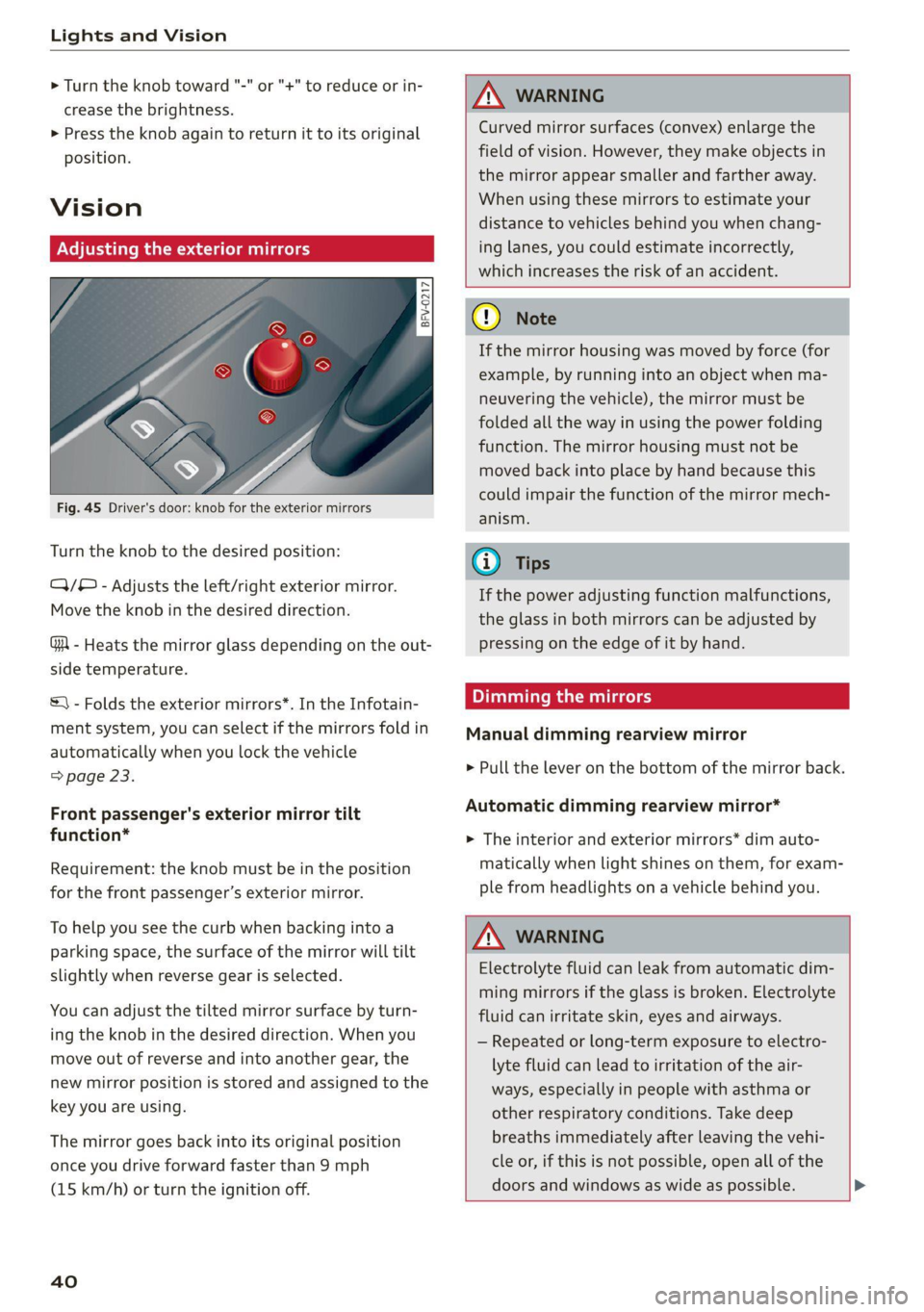
rata ieee)
- 5
g z
Fig. 45 Driver's door: knob for the exterior mirrors
Turn the knob to the desired position:
Q)/® - Adjusts the left/right exterior mirror.
Move the knob in the desired direction.
GA - Heats the mirror glass depending on the out-
side temperature.
A WARNING
Curved mirror surfaces (convex) enlarge the
field of vision. However, they make objects in
the mirror appear smaller and farther away.
When using these mirrors to estimate your
distance to vehicles behind you when chang-
ing lanes, you could estimate incorrectly,
which increases the risk of an accident.
C) Note
If the mirror housing was moved by force (for
example, by running into an object when ma-
neuvering the vehicle), the mirror must be
folded all the way in using the power folding
function. The mirror housing must not be
moved back into place by hand because this
could impair the function of the mirror mech-
anism.
@ Tips
If the power adjusting function malfunctions,
the glass in both mirrors can be adjusted by
pressing on the edge of it by hand.
Dimming the mirrors
Manual dimming rearview mirror
&) - Folds the exterior mirrors*. In the Infotain-
ment system, you can select if the mirrors fold in
automatically when you lock the vehicle
> page 23. > Pull the lever on the bottom of the mirror back.
a : og
Front passenger's exterior mirror tilt Automatic dimming rearview mirror
function* > The interior and exterior mirrors* dim auto-
Requirement: the knob must be in the position
for the front passenger’s exterior mirror.
To help you see the curb when backing into a
parking space, the surface of the mirror will tilt
slightly when reverse gear is selected.
You can adjust the tilted mirror surface by turn-
ing the knob in the desired direction. When you
move out of reverse and into another gear, the
new mirror position is stored and assigned to the
key
you are using.
The mirror goes back into its original position
once you drive forward faster than 9 mph
(15 km/h) or turn the ignition off.
40
matically when light shines on them, for exam-
ple from headlights on a vehicle behind you.
ZA WARNING
Electrolyte fluid can leak from automatic dim-
ming mirrors if the glass is broken. Electrolyte
fluid can irritate skin, eyes and airways.
— Repeated or long-term exposure to electro-
lyte fluid can lead to irritation of the air-
ways, especially in people with asthma or
other respiratory conditions. Take deep
breaths immediately after leaving the vehi-
cle or, if this is not possible, open all of the
doors and windows as wide as possible. >
Page 43 of 280

8S1012721BB
Lights and Vision
— If electrolyte fluid comes into contact with
the eyes, flush them thoroughly with plenty
of clean water for at least 15 minutes and
then seek medical attention.
— If electrolyte fluid comes into contact with
the skin, flush the affected area with clean
water for at least 15 minutes, and then
clean with soap and water and seek medical
attention. Clean affected clothing and shoes
thoroughly before wearing again.
— If the fluid was swallowed and the person is
conscious, flush the mouth with water for at
least 15 minutes. Do not induce vomiting
unless this is recommended by medical pro-
fessionals. Seek medical attention immedi-
ately.
Q Note
If the glass on an automatic dimming mirror
breaks, electrolyte can leak out. This liquid
damages plastic surfaces. Clean this liquid as
quickly as possible, for example with a wet
sponge.
@ Tips
— If the light reaching the rearview mirror is
obstructed, the automatic dimming mirror
will not function correctly,
— The automatic dimming mirrors do not dim
when the interior lighting is turned on or
the reverse gear is selected.
Sun visors
eo
S
Z| > a
G3
Fig. 46 Front headliner: sun visor
Applies to: vehicles with pivoting sun visors: The
sun visors can be pulled out of their brackets and
turned toward the doors (@).
The vanity mirrors on the sun visors have covers.
Slide the cover in the direction of the arrow @).
Applies to: vehicles with mirror lighting: The mir-
ror lighting switches on when the cover opens.
Windshield wipers
Switching the windshield wipers on
BFV-0019
Fig. 47 Lever: windshield wipers.
Move the windshield wiper lever S7 to the corre-
sponding position:
@- Windshield wipers off
@- Interval mode. To increase/decrease the wip-
er intervals, move the switch @) to the left/right.
In vehicles with a rain sensor*, the wipers turn on
in the rain once the vehicle speed exceeds ap-
proximately 2 mph (4 km/h). The higher the sen-
sitivity of the rain sensor* is set (switch @) to the
right), the earlier the windshield wipers react to
moisture on the windshield. You can deactivate
the rain sensor mode* in the Infotainment sys-
tem, which switches the intermittent mode on.
Select in the Infotainment system: [MENU] but-
ton > Vehicle > left control button > Driver assis-
tance > Rain sensor > Off.
@- Slow wiping
@®- Fast wiping
@®- Single wipe. If you hold the lever in this posi-
tion longer, the wipers switch from slow wiping
to fast wiping.
©- Clean the windshield @. To eliminate water
droplets, the windshield wipers perform one af-
terwipe after several seconds while driving in
temperatures above 39 °F (4 °C). You can switch
this function off by moving the lever to position >
41
Page 44 of 280

Lights and Vision
© within 10 seconds of the afterwipe. The after-
wipe function is reactivated the next time you
switch the ignition on.
Clean the headlights*. The headlight washer sys-
tem* only functions when the lights are switched
on. The headlights are automatically cleaned the
first time and every fifth time the lever is moved
to position G).
ZA\ WARNING
— The rain sensor* is only intended to assist
the driver. The driver may still be responsi-
ble for manually switching the wipers on
based on visibility conditions.
— The windshield must not be treated with
water-repelling windshield coating agents.
Under unfavorable conditions, such as wet-
ness, darkness, and when the sun is low,
these coatings can cause increased glare,
which increases the risk of an accident. They
can also cause wiper blade chatter.
— Properly functioning windshield wiper
blades
are required for a clear view and safe
driving > page 42, Replacing windshield
wiper blades.
function. Check your windshield wiper
blades regularly.
—The washer fluid nozzles in the windshield
washer system are heated* at low tempera-
tures when the ignition is on.
— When stopping temporarily, such as at a
traffic light, the speed of the windshield
wipers automatically reduces by one level.
Cleaning windshield wiper blades
Clean the wiper blades when you see wiper
streaks. Clean the wiper blades with a soft towel
and glass cleaner.
> Place the windshield wiper arms in the service
position > page 42.
> Fold the windshield wiper arms away from the
windshield.
ZA WARNING
Dirty windshield wiper blades can impair vi-
sion, which increases the risk of an accident.
Replacing windshield wiper blades
@) Note
— If there is frost, make sure the windshield
wiper blades are not frozen to the wind-
shield. Switching on the windshield wipers
when the blades are frozen to the wind-
shield can damage the wiper blades.
— The windshield wiper system must be
switched off (lever in position 0) before us-
ing a car wash. This prevents the wipers
from switching on unintentionally and caus-
ing damage to the windshield wiper system.
@) Tips
— The windshield wipers switch off when the
ignition is switched off. You can activate the
windshield wipers after the ignition is
switched on again by moving the windshield
wiper lever to any position.
— Worn or dirty windshield wiper blades result
in streaking. This can affect the rain sensor*
42
i
> 2
B8R-0379
Fig. 48 Windshield wipers: removing windshield wiper
blades
Windshield wiper service position/blade
replacement position
> To bring the windshield wipers into the service
position, turn the ignition off and move the
windshield wiper lever into position @)
=> page 41, fig. 47.
> To bring the wipers into the starting position,
turn the ignition on and move the windshield
wiper lever into position @) for at least two sec-
onds & page 41, fig. 47.
Page 59 of 280

8S1012721BB
Sitting correctly and safely
Always make sure the indicator light corresponds
to the occupancy of the front passenger's seat.
— Adults or individuals with a similar stature sit-
ting in the front passenger seat: The front pas-
senger's airbag must be activated.
PASSENGER AIR BAG ON @ must remain
on.
— Individuals with a smaller stature (for exam-
ple, adolescents or smaller adults) sitting in
the front passenger seat: The front passeng-
er's airbag must be activated.
PASSENGER AIR BAG ON ® must remain
on.
— Child in a child safety seat secured on the
front passenger seat: The front passenger's air-
bag must be deactivated.
PASSENGER AIR BAG OFF &; must remain
on.
— Front passenger seat is not occupied: The front
passenger's airbag must be deactivated.
PASSENGER AIR BAG OFF 3%; must remain
on.
ZA WARNING
— An adult or a person with a small stature
(such as a young person or small adult) seat-
ed on the front passenger's seat will not be
protected by the passenger's airbag in the
event of a collision if the passenger's airbag
is deactivated. This increases the risk of in-
jury and death. Always make sure that
PASSENGER AIR BAG ON @ remains on
while driving. If
PASSENGER AIR BAG ON @ does not
turn on, make sure the front passenger is
sitting correctly in the seat > page 45 and
that there are no objects covering the front
passenger's seat (such as blankets or pil-
lows). If PASSENGER AIR BAG ON @
still does not turn on, the front passenger's
seat must not be used. Drive to an author-
ized Audi dealer or authorized Audi Service
Facility and have the airbag system inspect-
ed.
—Achild ina child safety seat on the front
passenger's seat - especially in a rear-facing
child safety seat - can receive a severe im-
which increases the risk of serious or fatal
injury. Applies to Coupe: Always secure child
safety seats on the rear seats. If special cir-
cumstances require the use of a child safety
seat on the front passenger's seat, always
make sure that
PASSENGER AIR BAG OFF %; remains
on while driving. If
PASSENGER AIR BAG OFF #¥; does not
turn on, remove the child safety seat and in-
stall it again according to the child safety
seat manufacturer instructions. If
PASSENGER AIR BAG OFF &%; still does
not turn on, the front passenger's seat must
not be used. Drive to an authorized Audi
dealer or authorized Audi Service Facility
and have the airbag system inspected.
Fluids, electronic devices, or mechanical
damage on the front passenger's seat may
cause the front passenger seat occupant de-
tection to malfunction. The system may
then incorrectly detect if the front passeng-
er's seat is occupied. As a result, it could de-
ploy the front passenger’s airbag incorrectly
or fail to deploy it, which increases the risk
of serious or fatal injury. Make sure that no
wet objects (such as a wet hand towel) and
no fluids come into contact with the front
passenger's seat cushion. If the front pas-
senger's seat becomes wet, dry it immedi-
ately. Make sure no electronic devices (such
as a laptop or a retrofitted seat heater) are
on the front passenger's seat. Do not trans-
port any objects on or under the front pas-
senger's seat.
Seat covers or protective covers may prevent
the advanced airbag system from correctly
detecting child safety seats or passengers in
the front passenger's seat. You must not use
seat covers or protective covers on the front
passenger's seat that are not specifically ap-
proved for use on Audi seats with an ad-
vanced airbag system.
pact if the front passenger's airbag deploys,
57