fuel AUDI TT ROADSTER 2008 User Guide
[x] Cancel search | Manufacturer: AUDI, Model Year: 2008, Model line: TT ROADSTER, Model: AUDI TT ROADSTER 2008Pages: 316, PDF Size: 70.1 MB
Page 37 of 316
Fuel supply too low [J
When the J symbol illuminates, this means there is about 1.8
gal lons
(7 l iters) o f fue l left in the fuel ta nk. T ime to re fuel!
=>
page 275.
I f the symbo l lights up, even when there is ample fuel in the tank,
and the text
TANK SYSTEM MA LFUN CTION! CON TACT WORKSHOP
appears in the display, there is a fau lt in the system. Contact a qual
ified workshop to have the fau lt rectified. •
Checking the engine oil level _,;.
When the -= symbol illuminates, check the engine oil leve l as soon
as possib le =>
page 224. Top off the oil at your ear liest opportun ity
=>
page 225. •
Engine oil sensor defective
-
If the _ symbol illuminates, contact your authorized Audi dealer
and have the oil sensor inspected . Unti l you have this done, check
the oi l leve l each time you re fue l jus t to be on the sa fe s ide
=>
page 224 . •
Worn brake pads .)
If the symbo l illuminates, contact your authorized Audi dea ler to
have the front bra ke pads inspected (on that occasion have the rear
brakes inspected as wel l to be safe). •
Controls and equip
ment
Driver inform ation system
Speed warning 1
~ (USA models) / ~ (Canada
models)
I f the ~ symbo l illuminates, this means you are d riving faste r than
the set vehicle speed . Slow down!=>
page 37. •
Speed warning 2
-.... (USA models) /
l.,... (Canada models)
If the C) symbol il luminates, this means you have driven faster than
the sec ond set vehic le s peed. Slow d own! =>
page 37. •
Applies to veh icles : wi th dynami c he ad light r ange ad just ment
Headlight range control defective
If the il luminates, the dynamic head light range control is no
longer working pr ope rly. Have the syste m checked and repa ired at
your authorized Audi dea ler .•
Windshield washer fluid level too low .-_j
If the ~ symbol illuminates, add windshie ld washer fluid to the
washer sys tem =>
page 236 . •
Battery voltage low ~
If the C sy mb ol illu min ates, co ntact your au thori ze d Audi dealer
and have the following components inspected:
• drive belt
• generator
• b att e ry charge
I • •
Page 41 of 316
To del ete maximum sp eed
-Turn off the ignition.
- Briefly press the button in the instrument cluste r
=>
page 38, fig . 24. The odometer and the digital clock are
now illuminated.
- Press the button for at leas t 2 seconds. T he curren tly
stored maximum speed appears in the display.
Press the rese t button in the w ipe r lever ®=>
page 38,
fig. 25 until the crossed out speed warni ng symbol fo r
warning threshold 2 appears in the d isplay.
A few seconds after the adjustment is comp leted, the illumination
for the odometer and the digital clock wi ll go out .
[ i J Tip s
This warning threshold can a lso be controlled through the trip
computer ~
page 28, "Navigating the menu". •
Contro ls and eq uip
ment
Dri ver in form ati on syst em
Trip computer
Introduction
The trip computer gives you inf ormation on current and
average fuel mileage, average speed, fuel range and
driving time .
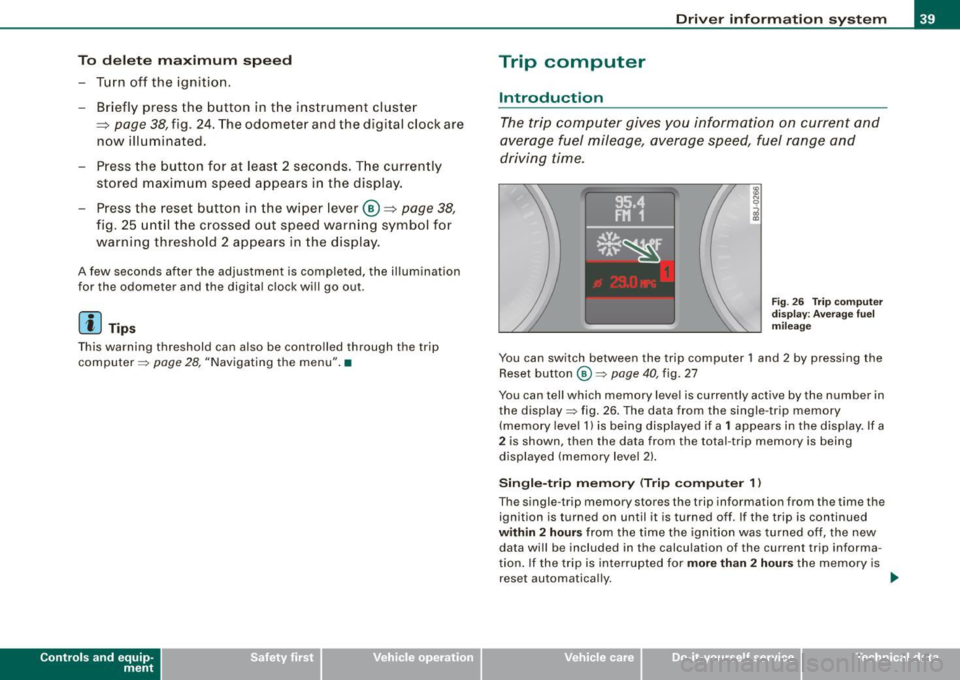
Fig . 2 6 Trip c omput er
di sp lay: Ave ra g e f uel
mi lea ge
You can switch between the trip computer 1 and 2 by pressing the
Reset button
@ ~ page 40 , fig. 27
You can tell which memory level is currently active by the number in
the display ~ fig . 26 . The data from the single -trip memory
(memory level 1) is being disp layed if a
1 appears in the display. If a
2 is shown, then the data from the total -trip memory is being
displayed (memory leve l 2) .
Sin gle -trip mem ory (Trip compute r 1)
The single -t r ip memory stores the trip information from the time the
ignition is turned on until it is turned off. If the trip is continued
within 2 hour s from the time the ignition was turned off, the new
data wi ll be included in the calcu lation of the current trip informa
tion. If the trip is interrup ted for
more than 2 hour s the memory is
reset automatica lly. _,.
Vehicle care I I irechnical data
Page 42 of 316
Driver inf ormation sy ste m
To ta l-tr ip mem ory ( Trip compu te r 2)
Unlike the single -trip memory, the total -tr ip memory is not reset
automatically . This permits you to evaluate your driving data for the
entire period between manua l resets.
Fu el r an ge
The estimated cruising range in miles (km) appears in the display.
This tells you how far your vehicle will be able to travel on the
current tank of fuel and with the same driving sty le . The display
changes in increments of 6 miles (10 km).
The cruising range is calculated based on the fuel consumption for
t he last 18 miles (30 km). If you drive conservatively, the cruising
range will increase .
Average fuel m ile ag e
The average fuel economy in MPG (1/100 km) since you last cleared
the memory appears in this display. You can use this display to
adjust your driving technique to achieve a desired mileage.
C ur rent fuel mil eage
The instantaneous fuel consumption in mi les per gallon (1/100 km)
is shown in th is d isplay. You can use this display to adjust your
driving technique to achieve a desired mileage.
Fue l consumption is recalcu la ted at intervals of 33 yards (30
meters). When the vehicle is stationary, the most recent fuel
consumption is d isplayed .
Average speed
The average speed in mph (km/h) s ince the last time the display was
reset appears in the display .
Elap se d time
The length of time that you have been driving since you last reset
the memory appears in this display.
Di stance
The elapsed distance since the last time the memory was cleared
appears in the display. The maximum distance that can be recorded
is 9,999 .9 miles (9,999 .9 kilometers).
[ i ] Tips
• Fuel consumptions (average and current), range and speed are
displayed in metric units on Canadian models.
• All stored values will be lost if the vehicle battery is
disconnected .•
Operation
The trip computer is controlled by two switches on the
windshield wiper lever.
S ele cting th e fun ctions
Fig. 27 Wiper ar m:
W iper l ever: co ntrols
fo r th e tr ip com pute r
P u sh in the upper (lower) pro trusion o n the function
se lector switch @to scroll up (dow n) through the trip
computer functions~ fig. 27. The functions for the trip
comp uter are displayed in succession on the respect ive
memory leve ls. Keep the switc h pus hed until the desired
display appears . .-,,
Page 43 of 316
Switchin g bet w ee n m enu l ev els
- Tap the Rest button ® briefly to reach the various menu
levels one after the other ("Computer 1 ", "Computer 2",
"Navigation system"* and "Start menu") .
Rese ttin g th e fun ction to z ero
- Select the desired function.
- Push the reset button ® for at least two seco nds .
The trip computer only operates when the ignition is on. When you
turn on the ignition, the function that was in use when you last
turned the ignition off will be displayed .
In addition to the trip computer information (memory level 1 or 2)
and navigation information can be displayed. To switch the display
between the different systems, tap the Reset button
@ briefly .
You can reset the following va lues to zero using the reset button:
• driving time
• average mileage
• average speed
In addition,
a ll the values in the single -trip or the total-trip memory
can be de leted simu ltaneously .
[ i ] Tips
• If you hold down the reset button for longer than 2 seconds, the
current value (for example, average fuel consumption) will be reset
to zero .
• Malfunction displays in Auto -Check Control are shown even with
the display switched off.
• All stored values will be lost if the vehicle battery is
disconnected. •
Controls and equip
ment
Dri ver infor mat io n sy ste m
Tire pressure monitoring system
General notes
As an added safety feature, your vehicle has been equipped with a
tire pressure monitoring system (TPMS) that illuminates a low tire
pressure telltale when one or more of your tires is significant ly
under -inflated. The TPMS only provides a low tire pressure warning
and does not reinflate your tires.
Accordingly, when the low tire pressure tellta le illuminates, you
should stop and check your tires as soon as possib le, and inflate
them to the proper pressure. Driving on a significantly under
inflated t ire causes the tire to overheat and can lead to tire failure .
Under -inflation a lso reduces fuel efficiency and tire tread l ife, and
may affect the vehicle's handling and stopping ability.
(D Note
• Please note that the TPMS is not a substitute for proper tire
maintenance, and it is the driver's respons ib ility to maintain correct
tire pressure, even if under -inflation has not reached the level to
trigger illumination of the TPMS low tire pressure telltale .
• Each tire, including the spare, should be checked monthly when
cold and inflated to the inflat ion pressure recommended by the
vehic le manufacturer on the vehicle p lacard or tire inflation pres
s u re label. (If your vehicle has tires of a different size than the size
indicated on the vehicle placard or tire inflation pressure labe l, you
should determine the proper tire inflation pressure for those
tires.) •
TPMS malfunction indicator
Your vehic le has a lso been equipped with a TPMS malfunction indi
cator to indicate when the system is not operating proper ly . The
TPMS malfunction indicator is combined with the low tire pressure _.,
I • •
Page 44 of 316
Driver inf orm atio n syst em
telltale. When the system detects a malfunction, the telltale will
flash for approximately one minute and then remain continuously
illuminated. This sequence will continue upon subsequent vehicle
starts up as long as the malfunction exists .
When the ma lfunction indicator is illuminated, the system may not
be able to detect or signal low tire pressure as intended.
TPMS malfunctions may occur for a variety of reasons, including the installation of replacement or alternate tires or wheels on the
vehicle that prevent the TPMS from functioning properly. A lways
check the TPMS malfunction tellta le after replacing one or more
tires or whee ls on your vehicle to ensure that the replacement or
a lternate tires and wheels al low the TPMS to continue to function
proper ly .•
Introduction
The tire pressure monitoring system monitors air pressure
in all four road wheels while the vehicle is moving.
As soon as the t ire pressure monitoring system senses a s ignificant
loss of air pressure in one or several tires, text messages and yel low
symbo ls appear in the instrument cluster display to a lert the driver.
The warning light in the instrument c luster comes on when the
tire is significantly underinflated
=> page 17.
The warning light
malfunction . also
illuminates in the case of a system
Be aware that tire pressure is also dependent on the temperature of
the tire . For every 18 °F (10 °C) increase in tire temperature, tire pres
sure increases by about 1 .5 psi (0. 1 bar) . The tire warms up while the
vehic le is moving and tire pressure rises. So you should adjust tire
pressure on ly when they are
cold , when the temperature of the tires
is roughly the same as the ambient air temperature.
In order to keep the tire pressure monitoring system properly ca li
brated, tire pressure on all four tires should be checked at regular intervals, adjusted if necessary and saved in the proper setting
(recommended
pressure)=>
page 44.
The tire pressure is shown on the label located on the driver 's side
B -pillar (visible when the door is open) .
& WARNING
• When the tire pre ssure monitor ing system warn ing light i s lit ,
one or more of your t ir es is s ignificantl y unde r-inflated . You should
s top and check your tire s as s oon as po ssible , and inflate them to
the p rope r pre ss ure as indi cated on th e vehicl e's tire pr essure
label
=> pag e 242. Driv ing on a s ignific antl y un der-inflated t ire
c a use s the tire to overhe at and can le ad to tire fa ilure. Unde r-inf la
ti on also i s lik el y to impair the vehicle' s handling and stopping
ability .
• Do not adju st t ir e pressur e wh en t ire t emp erature is exce ssiv e.
Thi s could le ad to seriou s tire dam age and even cau se the tire t o
bur st, w ith the addition al dan ger of an accident.
W For the sake of the environment
Driving with under -inflated tires reduces fuel efficiency and tire
tread life.
[ i ] Tips
• Each tire should be checked month ly when the temperature of
the tires is abou t the same as ambient air temperature and s et to the
recommended inflation pressure as specified on the tire pressure
label =>
page 242.
• The factory supplied spare whee l is equipped with a se nsor for
the tire pressure monitoring sys tem. As long as the spare wheel is
n ot mounted, the tire pressure of this tire wil l not be monitored.
• T he tire pressure monitoring system he lps the driver to keep an
eye on tire pressures . But the driver still has the responsibility f or
maintaining the correct tire pressure . .,_
Page 53 of 316
& WARNING
• When you lock your vehicle from outside, nobody -especially
children · should remain inside the vehicle. Remember, when you
lock the vehicle from the outside the windows cannot be opened
from the inside.
• When you leave the vehicle, always remove the ignition key and
take it with you. This will prevent passengers (children, for example) from accidentally being locked in the vehicle should they
accidentally press the power locking switch.
• Do not leave children inside the vehicle unsupervised. In an
emergency it would be impossible to open the doors from the
outside without the key.
[ i J Tips
• In the event of a crash with airbag deployment all locked doors
will be automatically unlocked to give access to the vehicle occu
pants from the outside .
• If the power locking system should malfunction, you can lock
each door individually using the vehicle key.
• If the power locking system should fail, you can still open the
fuel tank flap in an emergency=>
page 218.
• You are well advised not to keep valuables inside an unattended
vehicle, visible or not . Even a properly locked vehicle cannot provide
the security of a safe! •
Contro ls and eq uip
ment
Opening and closing
Unlocking and locking the vehicle with the
remote control
How the remote control works.
Fig. 35 Remote
control : function
buttons
Whether only the driver's door or the entire vehicle is
unlocked when the opening button@ is pressed once,
depends on the settings in the Driver information system
Central locking menu => page 27.
To unlock the vehicle m
-Press button @.
- Press button ©
two times within two seconds to unlock
all doors and the rear lid .
To lock the vehicle 63
-Press button @ => & in "General description" on
page 50.
-Watch that all turn signal lights flash once.
To unlock rear lid only e::5
-Press button @for approximately one second.
Vehicle care I I irechnical data
Page 105 of 316
___________________________________________________ W_ a_ r_m _ a_ n_d_ c_ o_ ld _ __.11111
- To adjust the direction o f the airflow from the o utlet,
move the tab in the cen ter of the o utlet in the desired
direction . The direction of the air delivered from the
vents can be adjusted hor izontally and vertically .
G) Air flows to the windshield and the driver and front passenger
side windows
@ Air flows to the driver/fron t passeng er or to the driver and front
passenger side windows
© Air flows to the driver/front passenger
© Air flows to the footwe ll
Using the rotary knob, you can adjust air distribution=>
page 101 so
that air flows from specific vents=>
page 102, fig. 97.
Heated or unheated fresh air, or cooled air flows from the vents.
[ i ] Tip s
If climate control is running in cooling mode, air should flow mainly
from vents @ and
G). To achieve adequate coo ling, you should
never c lose the outlets completely .•
Using the climate controls economically
Economical use of the climate controls helps to save fuel.
When climate co ntrol is w orking in c ooling mode, engine
performa nce is reduced and fuel consum ption is affected .
To keep the t ime the air cond itioning is on as s hort as
poss ible, you s hould do the following :
- If yo u would like to save fue l, sw itch the air con ditioning
off .
- If you open t he windows while driving, switch the air
conditio ning off .
Contro ls and eq uip
ment
- If the ve hicle is extremely hot due to the heat of the sun,
br ie fl y open doors and windows .
c£> For the sake of the environment
When you save fuel, you reduce emissions from the vehicle .•
Rear window defogger [ffiJ
The rear window defogger clears the rear window of
condensation.
F ig . 9 8 Switc h for rear
w ind ow defo gg er
- Press the [ml button to turn t he rear window defogger on
and off.
The rear window defogger works only when the engine is running .
The indicator light in the button illuminates when the rear window
defogger is turned on .
The rear window defogger is switched off automatica lly after 10 to
20 m inutes, depending on the outside temperature .
At very low outside temperatures, the rear window defogger can be switched on continuously by pushing the
Qii) button for more than 2
seconds. This remains stored until the ignition is switched off . A ..,
Vehicle care I I Technical data
Page 111 of 316
_________________________________________________ O .=.:.n.:....: t~h :.::e ::....:.. r.::o :.::a :.:d::...__lfflll
- Wit h a manual transm issi on, engage 1st gea r, or with a n
a utomatic transmission place the se lector lever in P
=> & .
- Remove the ignition key from the ignit io n lock.
Wha t el se you should do wh en parking yo ur v ehi cle on
a n incli ne or d ecline
Turn the steering whee l so that if the vehicle shou ld start to rol l, it
wi ll roll into the curb.
I f you are park ing on a
decline (the front of you r ve hicle facing
downhill) , turn the front wheels to the right so that they poin t
toward the curb .
If you are park ing on an in cline (the font of your vehicle facing
uphill!, turn the front whe els to the left so that they point
away from
the curb .
& WARNING
This is how you can reduce the ri sk of injury when le avi ng your
vehicle .
• Never p ark the vehi cle w here it can come
in cont act w ith dry
gra ss, s pilled fuel or any other flammable mater ial s.
• Never allow anyone -espe cially small ch ildren -to remain
in the
vehicle when it is locked . Locked doors make it more difficult for
re scu ers to ac ce ss the pa ssenger compartment in the e vent of an
emergency . Danger to life!
• Never lea ve childr en un super vis ed in the vehicle . Children
c ould release the parking brake or move the gearsh ift l ever out of
gear . The vehicle could start to r oll away a nd cau se an a ccident .
• No matter what the season i s, the temperature
in a parked
v ehi cle can reach dangerou s level s. •
Controls and equip
ment
Acoustic parking system
A pplies to veh ic les : wit h 4 -ch anne l a cou stic park ass is t
Rear acoustic park assist
Acoustic park assist gives a warning a bout o bstacles
behind the vehicle.
Description
The rear acoustic park assist (4 -channel acoustic park assist) deter
mines the d istance of the vehic le from an obstac le using u ltrasonic
sensors. The sensors are in the rear bumper. The volume and the
pitch of the chimes can be adjusted through the menu display
=> page 27.
The range at which the sensors start to m easure is about :
To the side
Center rear
Acti v atio n
2 feet (0 .60 m)
5 feet (1.60 ml
The pa rking assist is activated when rever se ge ar is engaged . A brief
tone confirms that the system is activated .
Backing up
Distance warning when backing up starts when an obstacle is
detec ted in the range of the park ass ist system . As the distance
decreases, the time interval between the aud ible tones becomes
shorter .
When the distance is less than 1 foot (0.30 m) , the tone becomes
continuous . At this point you should stop backing up.
Please note that low objects a lready signalled by a warning can
disappear from the sys tem's detection range and wil l not continue
t o be signa lled . ..,
I • •
Page 194 of 316
___ D_ r _i_v _i_n ""'g "'- a_ n_ d _ e_ n_v_ i_ r _o _n_ m_ e_ n_t ___________________________________________ _
Driving and environment
The first 1,000 miles ( 1 ,500 km) and
afterwards
New engine
The engine needs to be run-in during the first 1,000 miles
(1,500 km).
For the first 600 miles (1,000 kilometres):
Do not use full throttle.
- Do not drive faster than 3/4 of the top speed marked on
the speedometer.
- Avoid high engine speeds .
From 600 to 1,000 miles (1,000 to 1,500
kilometres):
- Speeds can gradually be increased to the max imum
permissible road or engine speed.
During and after break-in period
- Do not rev the engine up to high speeds when it is cold.
This applies whether the transmission is in N (Neutral) or
1n gear.
After the break-in period
- Do not exceed maximum engine speed under any
circumstances.
- Upshift into the next higher gear before reaching the red
area at the end of the tachometer scale=> page 12.
During the first few hours of driving, the engine's internal friction is
higher than later when all the moving parts have been broken in.
How well this break-in process is done depends to a considerable
extent on the way the vehicle is driven during the first 1,000 miles
(1,500 kilometres).
0 Note
Extremely high engine speeds are automatically reduced. However,
these RPM-limits were programmed for an engine well run-in, not a
new engine.
~ For the sake of the environment
Do not drive with unnecessarily high engine speeds - upshifting
early saves fuel, reduces noise and protects the environment .•
New tires
If your vehicle is running on new tires, drive particularly
careful for the first 350 miles (500 kilometres) after fitting.
& WARNING
New tires tend to be slippery and must also be "broken-in". Be
sure to remember this during the first 350 miles (500 kilometres).
Brake gently. Avoid following closely behind other vehicles or
other situations that might require sudden, hard braking.
:I
Page 195 of 316
New brake pads
Remember that new brake pads do not have a full braking
effec t during the first 250 miles (400 kilometres) after they
are installed.
New brake pads have to be "burnished in" before they have optima l
grab=> &.
During the break -in period, you should avoid putting severe loads
on the brakes. Severe loads include, for example, sudden hard
braking, in particular at very high speeds or, for example, on moun
tain passes.
& WARNING
U ntil the y develop the m axim um "b ite " fo r be st stoppi ng p owe r,
th e s urfaces on new br ake p ads re quir e some " brea king -in " during
th e ini tia l 100 to 150 miles 1 150 to 200 k ilom etres) of nor ma l c ity
driving . You can comp ensa te fo r thi s by press ing the brak e ped al
more fi rml y. T his appl ie s w henev e r ne w pad s a re in sta lled . •
Catalytic converter
It is very important that your emission control system
(catalytic converter) is fu nctioning properly to ensure that
y o ur vehicle is running in an environmentally s ound
manner.
- Always use lead-free gasoline~ page 214, "Fuel supply".
- Never run the tank down a ll the way to empty.
- Never put too much motor o il in your engine~
page 225,
"Adding engine oi l 'l=:;r\11
•
- Neve r try to push -or tow -s tart your ve hicle.
Controls and equip
ment Safety first Vehicle operation
Dri
ving and environm ent
The catalytic converter is an efficient "clean-up" device built into the
exhaust system of the vehicle . The cataly tic converter burns many
of the pollutants in the exhaust gas before they are re leased into the
atmosphere.
The exclusive use of un leaded fuel is critica lly important for the l ife
of the catalytic converter and proper functioning of the engine.
& WARNING
• Do not park or oper ate th e ve hi cle in are a s whe re the hot
exha ust sys te m may c ome in conta ct wi th dr y grass, bru sh , fu el
s pill or other mat eri al which can cau se a fi re.
• Do not app ly a dditi onal u nder co at ing or ru stpr oofing on or
near the exhau st m anifold , exh au st pipe s, cata ly tic convert er or
he at shi elds. During dri ving, the s ubstance use d f or und ercoa ting
c ould ov erheat an d ca u se a fire.
0 Note
• Be aware that just one tank fi lling with
le ad ed fuel wi ll a lready
seriously degrade the performance of the catalytic converter.
• Do not exceed the correct engine oil level =>
page 225.
• Do not drive until the fuel tank becomes completely empty. The
engine could misfire . Unburned fuel could a lso get into the exhaust
system and this could cause the catalytic converter to overheat .
• Do not turn off the igni tion wh ile the vehicle is moving.
• Do not continue to operate your vehicle under these conditions,
as otherwise fue l can reach the cata lytic converter. This could resu lt
in overheating of the converter, requiring its replacement .
• To assure efficient operation of the Emiss ion Control System:
- Have your vehicle maintained properly and in accordance with
the service recommendations in your Maintenance & Warranty
booklet.
Vehicle care Do-it-yourself service Technical data