remote control AUDI TT ROADSTER 2008 User Guide
[x] Cancel search | Manufacturer: AUDI, Model Year: 2008, Model line: TT ROADSTER, Model: AUDI TT ROADSTER 2008Pages: 316, PDF Size: 70.1 MB
Page 65 of 316
-Press and hold the switch down throughout the closing
procedure.
The folding top is completely open or closed when the indicator
light <:-in the instrument cluster goes out. The door windows are
automatically lowered about 20 mm while the top is opening .
& WARNING
Never drive the vehicle with the top not properly latched! Other
wise there is a risk that the top will be opened by the wind. This
can result in injuries and damage to the vehicle.
[ i] Tips
• Opening and closing the automatic convertible top is possible
below posted speed limits in city driving . At speeds above 4 mph (6
km/h), you can use the "convenience opening" function. The folding
top is completely opened by briefly pulling on the switch.
• The indicator light for the folding top goes out as soon as it is
correctly latched .
• In order not to discharge the battery unnecessarily, the top
should not be lowered or raised several times in succession with the
engine not running.
• I f the indicator light for the folding top flashes when the switch
is actuated, there is a malfunction. •
Controls and equip
ment
Folding top
Ap plies to vehic les: with power fo lding top
Convenience opening and closing of power
top
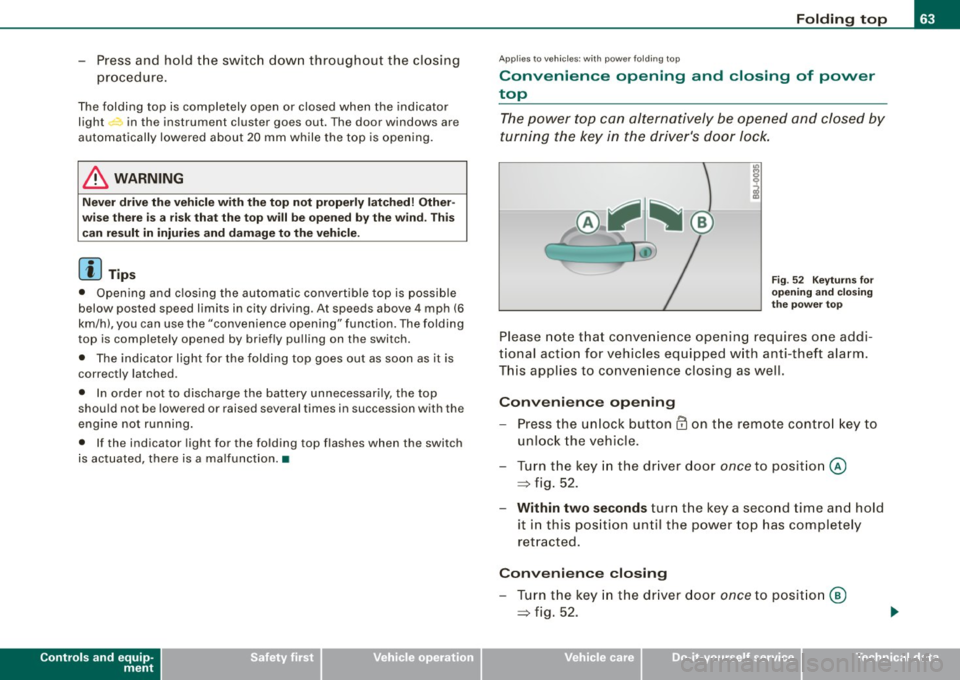
The power top can alternatively be opened and closed by
turning the key in the driver's door Jock.
Fig. 52 Keyturns for
opening and closing
the power top
Please note that convenience opening requires one addi
tional action for vehicles equipped with anti-theft alarm.
This applies to convenience closing as well.
Convenience opening
-Press the unlock button CD on the remote control key to
unlock the vehicle.
- Turn the key in the driver door
once to position @
=> fig. 52.
- Within two seconds turn the key a second time and hold
it in this position until the power top has completely
retracted.
Convenience closing
- Turn the key in the driver door once to position @
=> fig. 52.
I • •
Page 66 of 316
Folding top
-Within two seconds turn the key a second time and hold
it in this position until the power top has completely
closed.
Opening or closing motion stops immediately as soon as you
release the key . For safety reasons, i t is not possible to activate the
convenience feature with the remote control.
& WARNING
When opening and closing the power top make sure to keep your
self and others clear of all moving parts. Risk of injury! •
Applies to vehi cles: w ith wind deflecto r
Wind Deflector
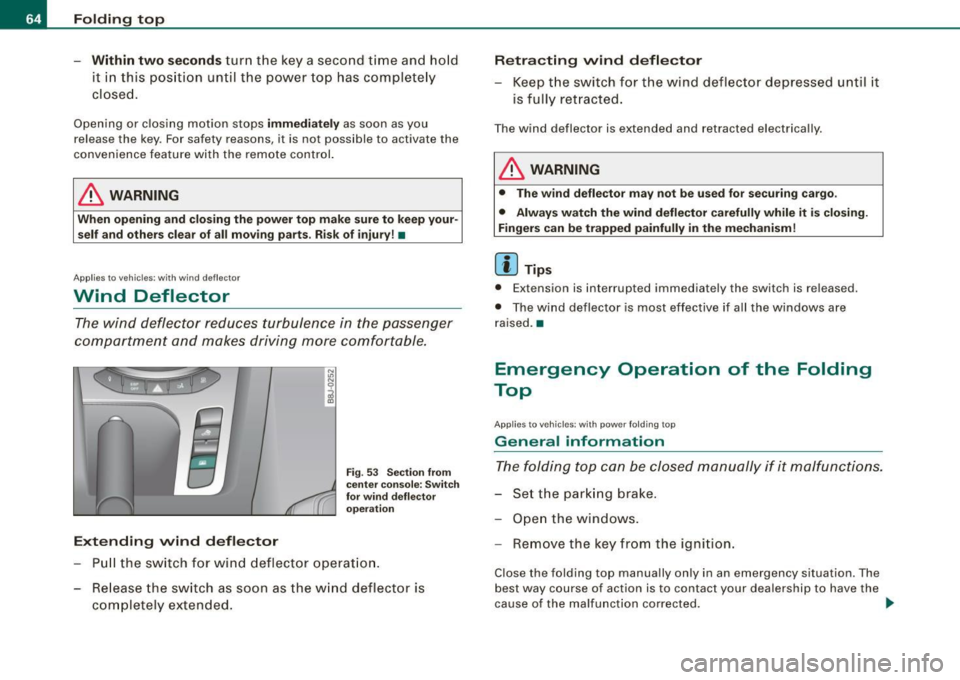
The wind deflector reduces turbulence in the passenger
compartment and makes driving more comfortable.
Extending wind deflector
N
"'
I
Fig . 53 Section from
center console: Switch
for wind deflector
operation
Pull the switch for wind deflector operation.
- Release the switch as soon as the wind deflector is
completely extended.
Retracting wind deflector
- Keep the switch for the wind deflector depressed until it
is fully retracted.
The wind deflector is extended and retracted electrically .
& WARNING
• The wind deflector may not be used for securing cargo.
• Always watch the wind deflector carefully while it is closing.
Fingers can be trapped painfully in the mechanism!
[ i ] Tips
• Extension is interrupted immediat ely the sw itch is releas ed.
• The wind deflector is most effective if all the windows are
raised. •
Emergency Operation of the Folding
Top
A pp lies to vehicles: wit h p owe r fo ld ing t op
General information
The folding top can be closed manually if it malfunctions.
- Set the parking brake.
- Open the windows.
- Remove the key from the ignition.
Close the folding top manually only in an emergency situation . The
best way course of act ion is to contact your dealership to have the
cause of the malfunction corrected. .,
Page 76 of 316
Clear vision
Coming home situation
In
darkness, the activated system will turn on the headlights, side
marker lights , rear side marker lights , tail lights, and rear license
plate light as soon as the driver's door is opened from inside.
As long as one of the doors or the rear lid remains open, the set of
external lights will keep burning for about four minutes maximum.
To provide light for departure, the set of vehicle lights will keep
burning for about another 30 seconds after all doors and the rear lid
have been closed.
The factory-set time of 30 seconds until the lights are switched off can be adjusted if you prefer a longer or shorter duration. Have the
adjustment done by your authorized Audi dealer or a qualified work
shop. The system can be adjusted to keep the lights burning for a
maximum of 60 seconds.
Leaving home situation
As soon as the vehicle is unlocked by pressing the
ti button on your
remot e control, the set of external l ights is switched on .
The external lights are switched off as soon as the driver's door is
opened from outside . Even if you had the system readjusted to keep
the lights burning for an extended time for coming home, the
external lights will be turned off if you do not open the driver's door
within 60 seconds after unlocking. See chapter "Opening and
Closing" in your Owner's Manual. If the lights are switched off
before you reach the driver's door, press the
a button once more to
turn them on again.
[ i] Tips
• Do not attach any stickers to the windshield in front of the two
light sensors, as this would interfere with both the automatic oper
ation of the headlights and the automatic dimming of the inside
mirror(s). • If
the vehicle is remotely unlocked and locked three times in
succession, leaving home will not turn on the lights a fourth time to
safeguard the battery and lights.
• If you wish to use the coming home/leaving home function regu
larly, you can leave it activated at all times without risking perma
nent strain on the electrical system. As the system is controlled by
light sensors, it will only be energized in darkness .
• Frequent use of the coming home/leaving home function for
approaching and departing a vehicle parked in the dark will strain
the battery. This applies particularly if only short distances are
driven between stops . Occasionally drive longer distances to make
sure the battery is recharged sufficiently.
• If the fog lights have been switched on by the coming
home/leaving home function, they will always be switched off when
you switch on the ignition. •
Instrument panel illumination
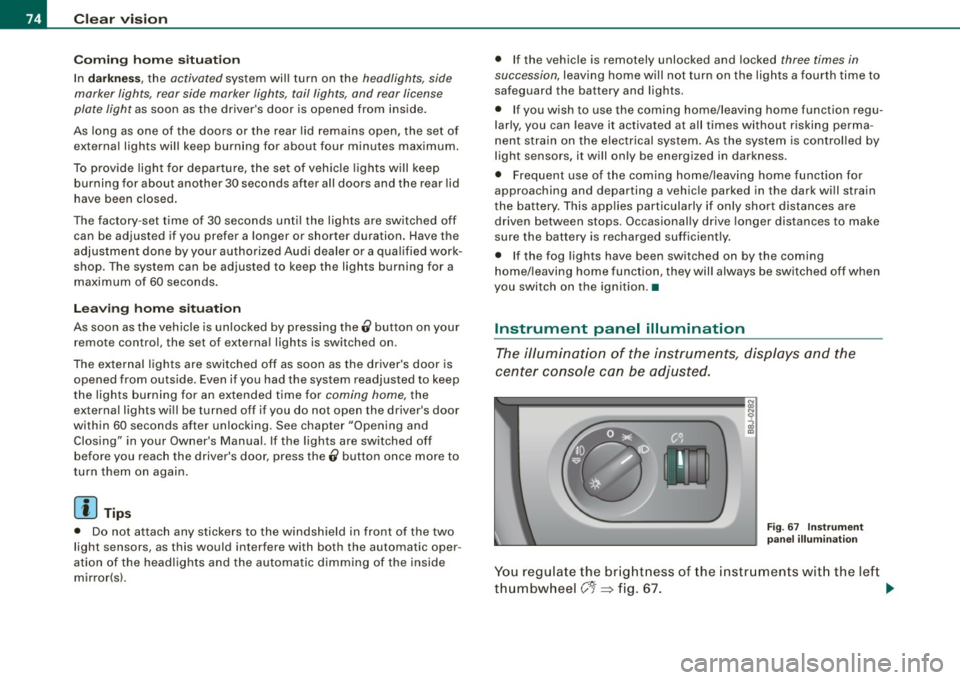
The illumination of the instruments, displays and the
center console can be adjusted.
Fig. 67 Instrument
panel illumination
You regulate the brightness of the instruments with the left
thumbwheel
C J=> fig. 67. ~
Page 87 of 316
Digital compass
Applies to vehicles: with di gital co mpass
Activating or deactivating the compass
The direction is displayed on the interior rear view mirror.
Fig . 78 Inside rear
view mirror : digital
compass activated
To activate or deactivate, hold the @~fig. 78 button
down until the red display appears or disappears.
The digital compass only works with the ignition turned on. The
directions are displayed as initials :
N (North), NE (Northeast), E
(East), SE (Southeast), S (South), SW (Southwest), W (West), NW
(Northwest).
[ i) Tips
To avoid inaccura te directions , do not allow any remote controls,
electrical systems, or metal parts close to the mirror. •
Contro ls and eq uip
ment
Clear vision
Ap plies to vehi cles: wit h dig ital compass
Setting the magnetic deflection zone
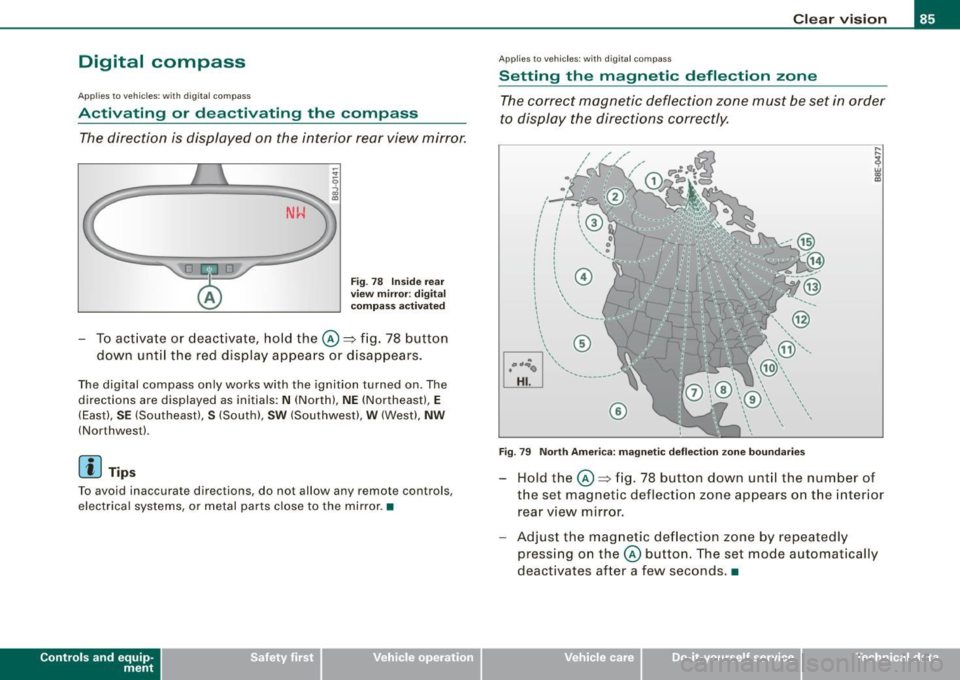
The correct magnetic deflection zone must be set in order
to display the directions correctly.
.
• ,_,;a;..~>, I I
I I
I I
I ' I I
I I
' I I I
I @ I
l '
l
I ' I ,, l ----
'
'
'
®
\, ,, ...... _______ ,.,.
©
@
Fig. 79 North America: magnetic deflection zone boundaries
Hold the@~ fig. 78 button down until the number of
the set magnetic deflection zone appears on the interior
rear view mirror.
Adjust the magnetic deflection zone by repeatedly
pressing on the@ button. The set mode automatically
deactivates after a few seconds . •
Vehicle care I I Technical data
Page 123 of 316
HomeLink® -_______________ ___.
Homelink®
Universal remote control
Applies to veh icles: wit h Home link® unive rsa l rem ote cont rol
General information
The Homelink® feature can learn up to three radio
frequency codes for most current transmitters used for
operating garage doors, estate gates, home or outdoor
lighting systems, and other devices.
You must first program the Homelink® transmitter before you can
use the system~
page 121, "Programming the Homelink® trans
mitter" .
In order to program the Homelink® transmitte r for devices utili zing
rolling cod e, a second person on a ladder who can safely reach the
garage door opener motor is recommended. It is also necessary to
locate the "learn" button on your garage door opener motor . Refer
to the operating instructions for the opener, as the location and
color of this button may vary by manufacturer .
You can still use the original remote control for the device at any
time .
& WARNING
• Never use the Homelink"" transmitter with any garage door
opener that does have not the safety stop and reverse feature as
required by federal safety standards. This includes any garage
door opener model manufactured before April 1, 1982.
• A garage door opener which cannot detect an object, signaling
the door to stop and reverse does not meet current federal safety standards. Using a garage door opener without these features
increases risk of serious injury or death .
Con tro ls and eq uip
ment
& WARNING (continued)
• For safety reasons never release the parking brake or start the
engine while anyone is standing in front of the vehicle.
• A garage door or an estate gate may sometimes be set in
motion when the Homelink® remote control is being
programmed .
If the device is repeatedly activated, this can over
strain motor and damage its electrical components -an over
heated motor is a fire hazard!
• To avoid possible injuries or property damage, please always
make absolutely certain that no persons or objects are located in
the range of motion of any equipment being operated. •
Applies to vehi cles : wit h Home link ® un iv ers al re mote co ntrol
Programming the Homelink ® transmitter
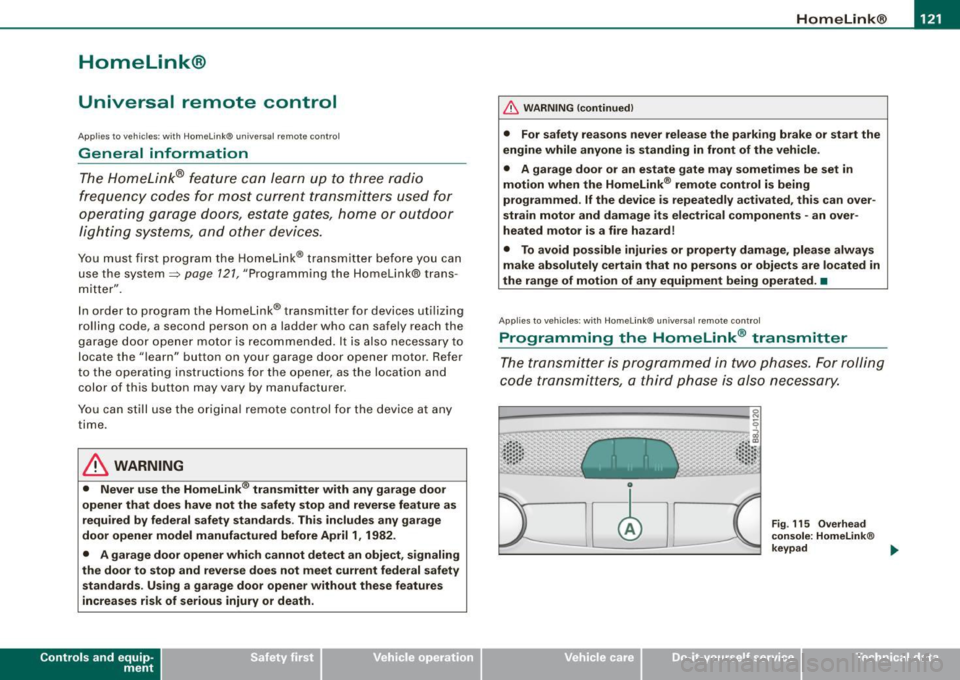
The transmitter is programmed in two phases. For rolling
code transmitters, a third phase is also necessary.
0
Vehicle care I I
Fig. 115 Overhead
console: Homelink®
keypad ...
irechnical data
Page 124 of 316
-L_!H~o~m~ e~L:!!in~ k~®~------------------------------------------------
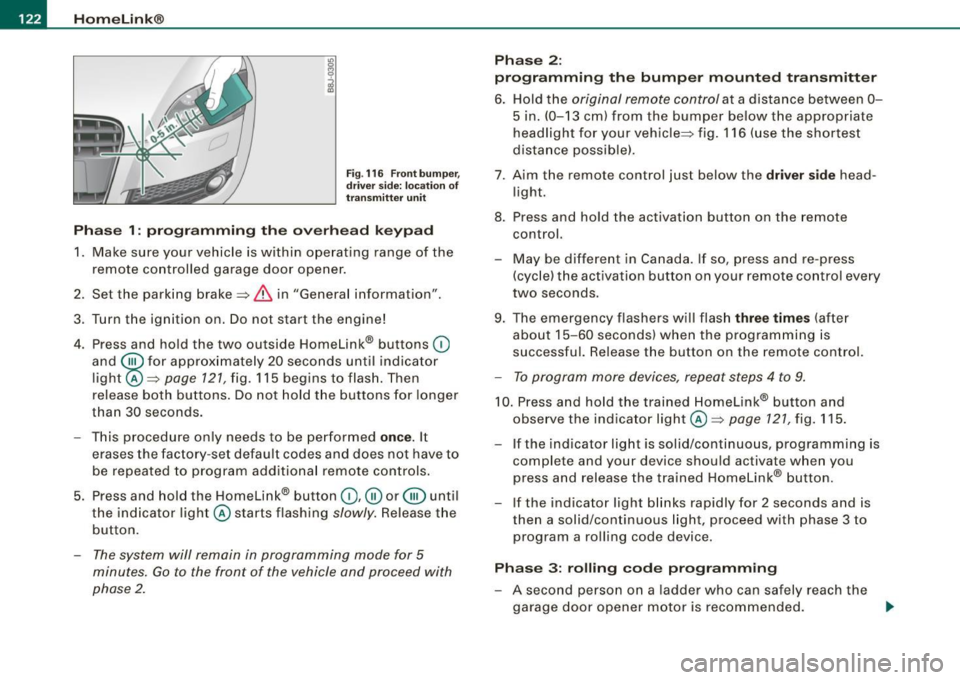
Fig . 116 Front bumper ,
driver side: location of
transmitter unit
Phase 1: programming the overhead keypad
1. Make sure your vehicle is within operating range of the
remote controlled garage door opener.
2. Set the parking brake::::,
& in "Genera l information".
3. Turn the ignition on. Do not start the engine!
4. Press and hold the two outside Homelink® buttons
(D
and @f or approxim~tely 20 sec_onds until indicator
light@::::,
page 121, fig. 115 begins to flash. Then
release both buttons. Do not hold the buttons for longer
than
30 seconds.
- This procedure only needs to be performed
once. It
erases the factory-set default codes and does not have to
be repeated to program additional remote controls.
5. Press and hold the Homelink® button
(D , ® or @ until
the indicator light@starts flashing
slowly. Release the
button.
- The system will remain in programming mode for 5
minutes.
Go to the front of the vehicle and proceed with
phase 2.
Phase 2:
programming the bumper mounted transmitter
6. Hold the original remote control at a distance between 0-
5 in. (0-13 cm) from the bumper below the appropriate
headlight for your vehicle::::, fig.
116 (use the shortest
distance possible).
7 . Aim the remote control just below the driver side head
light.
8. Press and hold the activation button on the remote control.
- May be different in Canada. If so, press and re-press
(cycle) the activation button on your remote control every
two seconds.
9. The emergency flashers will flash three times (after
about
15-60 seconds) when the programming is
successful. Release the button on the remote control.
- To program more devices, repeat steps 4 to 9.
10. Press and hold the trained Homelink® button and
observe the indicator light @::::,
page 121, fig. 115.
If the indicator light is solid/continuous, programming is
complete and your device should activate when you
press and release the trained Homelink® button.
- If the indicator light blinks rapidly for 2 seconds and is
then a solid/continuous light, proceed with phase 3 to
program a rolling code device.
Phase 3: rolling code programming
- A second person on a ladder who can safely reach the
garage door opener motor is recommended.
~
Page 125 of 316
Home Link® -_______________ ___.
11. Locate the "learn" button on the garage door opener
motor (refer to the operating instructions for the opener,
as the locat ion of this button may vary by manufacturer) .
12 . Press and release the learn button on the garage door
opener motor .
- Note : once the button is pressed, there are 30 se cond s in
wh ich to initiate the next step.
13. On the Homelink ® keypad inside the vehicle, firmly
press and hold the Homelink ® button prev iously
programmed in phases 1 and 2 for two seconds and
release . Repeat th is seque nce twi ce.
- Some vehicles may require the press/hold/re lease
sequence up to three times to complete the training
p rocess.
HomeLink ® should now activate your rolling code
equipped device.
If the 5 minut e tim e lim it is exceeded, the e mer gency flasher s will
flash o ne tim e to indicate that the process has been terminated. In
th is case , re p eat st eps 4 through 9.
If the emergency flashers do not flash
three times (after about 15-
60 se conds) , programming was not successful. In thi s case , repeat
steps 4 through 9.
Remo te con trol uni ts for garage door openers in Canada are set to
stop transm itting radio frequency signals aft er two seconds . Th is
time may not be sufficient for the Homelink® system to learn the
rad io frequency signal. P erform a ll oth er steps as described
above. •
Contro ls and eq uip
ment
A pp lies to veh ic les: wi th Homelin k® un iversa l rem ote contr ol
Operating the Homelink ® transmitter
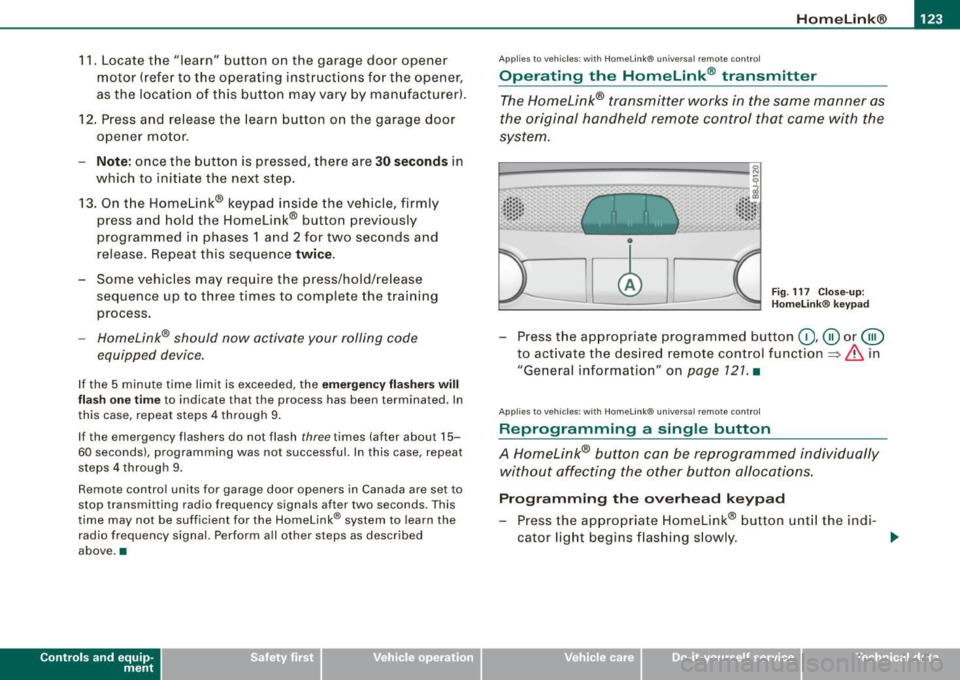
The Homelink® transmitter works in the same manner as
the original handheld remote control that came with the
system.
~ ---- -------- ..... --- --Jlil 9
al ..... .. Cl) .: :: : :: •• •• • .• 1 , .. .• .. .. .. .. ~
Fig . 117 C lose- up:
H ome link® key pad
- Press the appropr iate programmed button G) ,@ or @
to act ivate the des ired remote control function
~ & in
"General information " on
page 121 . •
A pplies to vehi cle s: w it h Homeli nk® univ ersa l re mote c ontro l
Reprogramming a single button
A Homelink® but ton can be reprogrammed individually
without affecting the other button allocations.
Progr amming th e ov erh ea d k eyp ad
- Press the appropriate Homelink® button unt il the ind i-
cator light begins flashing s lowly. _,.
Vehicle care I I irechnical data
Page 126 of 316
• .___H_ o_ m _ e _L_i _ n _k _® ____________________________________________________ _
Pr og ra mming th e bump er m ount ed tr ansmitt er
1. Hold the original remote control at a distance between 0-
5 in. (0 -13 cm ) from the bumper below the appropriate
headlight for your vehicle (use the shortest distance
poss ible).
2. Aim the remote control just below the
dr iver s ide head
l ight.
3. Press and hold the activation button on the remote control.
4. The emergency flashers will flash
three tim es (after
about
15-60 seconds) when the programming is
successful. Now release the button on the remote
co ntrol.
- If the dev ice utilizes a rol ling code, please f ollow phase 3
of ~
page 121, "Programming the Home Link® trans
m itter" for rolling code programming .
This pr oce dure w ill ca use the existing pr ogra mm ing on th e
H om eli nk® button to be eras ed ! •
A pplies to vehicl es: w ith H om eli nk® univ er sal re mot e con tro l
Erasing the programming of the HomeLink ®
transmitter
When you erase the programming, the programming on
all three of the transmitter channels with be lost!
- Perform steps 1 to 4 as described on~ page 122 , "Phase
1 : programming the overhead keypad".
When comp let ed, the Hom elink ® system will be in the program
ming mode and is then ready to learn the codes for remote
controlled devices.
[ i ] T ip s
• Programmed buttons cannot be erased ind ividua lly.
• For security reasons you are adv ised to erase the programming
of the Homelink ® system befo re you sell your vehic le. •
Applies to vehicle s: with Home link® univ er sa l re m ote con tro l
Information and accessories
If you wou ld like more information on Homelink ®, where to
pu rchase the Homelink ® compatib le products , or would li ke to
purchase the Homelink ® Home Lighting Package, please call tol l
free: 1 -800 -355 -3515.
[ i ] T ip s
• The Homelink ® universal transmitter complies with part 15 of
the FCC rules and RSS -2 10 of IC part 15. Operation is subject to th e
following conditions :
- this device may not cause harmful interference, and
- this device must accept any interference that may be received
including in terference that may cause undesired operation .
• Changes or modifications not express ly approved by the party
respons ible for compliance could void th e user 's authority to
operate the device (DOC : ISTC 1763 102 264 Pr ince MODEL/FCC ID :
CB2 V94800l. •
Page 306 of 316
__ _!:_A~l'.!:p~ h~ a~ b~e~ t~ic ~a..'.... l ~in~d~e ~x~ --------------------------------------------
Proper disposal of drained brake fluid ...
230
Proper disposal of drained engine
coolant . ............ .... ...... . 228
Proper disposa l of drained engine oil
225,226
Recycling used engine oil ..... .... 225
Un leaded fuel .... ............... 214
What should I do with an old battery?
231
EPC
See Electronic power control . . . . . . . . 17
ESP
See Electronic Stability Program .... 184
Event Da ta Recorder (EDR) . . . . . . . . . . . 184
Expansion tank 228
F
Fan 100
Radiator . . . . . . . . . . . . . . . . . . . . . . . . 229
Flat tire Changing ....................... 267
Floor mats . . . . . . . . . . . . . . . . . . . . . . . . . 134
Fog lights, front ..................... 73
Folding master key with remote contro l . 47
Fo lding top .. ..... .. .... .... ........ 60
Automatic folding top . . . . . . . . . . . . . 62
Care and cleaning ...... ........ .. 203
Emergency operation . . . . . . . . . . . . . . 64
General . .... ... .. .... .... ...... .. 60
manual folding top ........... ..... 61
Warning/indictor lights .. ........ .. 18
Wind deflector . . . . . . . . . . . . . . . . . . . . 64 Foot pedals
. . . . . . . . . . . . . . . . . . . . . . . . 134
For the sake of the env ironment
Gasoline fumes and the environment 2 16
Letting your engine warm up . ..... 107
Reducing engine noise by early
upshifting .................. .... 12
Refueling ... .. .... .... .... ...... 216
Saving fuel by early upshifting ...... 12
Front airbags Description ..... ..... ...... ...... 150
How they work . . . . . . . . . . . . . . . . . . . 155
Front seats . . . . . . . . . . . . . . . . . . . . . . . . . . 87
Adjusting ......... .... .... ...... 131
Adjusting the manual seats .. .... ... 89
Child restraints in the front seat .... 147
Fronta l col lisions and the laws of physics ...
138
Fuel Additives .. ....... .... .......... 214
Blended gasoline ................. 214
Consumption .. ............. ...... 39
Fi ller neck . .... ........ ... ....... 215
Fuel gauge . . . . . . . . . . . . . . . . . . . . . . . 14
Gasoline ........... ... .... .... .. 214
Gasoline additives .... .... ... .. ... 215
Octane rating ... .. .... .... .... ... 214
Recommendation . . . . . . . . . . . . . . . . 214
Refuelling ..... ........ .... ... ... 216
Reserve .. .... ....... ...... .... ... 14
Tank capacity . .... ... .... ..... ... 291
Unlocking the fuel filler flap by hand 218
Fuel fi ller cap ......... .... .... ... .... 24
Fuel supply too low ........ ....... ... 35 Fuse
arrangement .... ... .. .. . .... .. . 274
G
Garage door opener ... .......... .... 121
Gas discharge lamps ...... ... .... ... 277
Gauges Engine coolant temperature ........ 13
Fuel gauge .... .... ....... .... .... 14
Tachometer ........... ...... .... . 12
Gearshift lever
6 -speed manual transmission ... ... 113
Generator Warning/indicator lights ............ 19
G lossary of tire and loading terminology ...
239
G love compartment ...... .... .... .... 96
Gross Vehicle Weight Rating (GVWR) ... 289
H
Head restraints ........ ... ........ .. 132
Adjusting .. ........... .... .... .. 132
Headlight Defective . . . . . . . . . . . . . . . . . . . . . . . . . 36
Headlight range control
defective .......... .... ....... .... 35
Headlights .... ....... .... ... .... .... 69
adaptive light ...... ........ .... ... 72
Front fog lights ... .... .... .... .... 73
Switching off ... .... ...... .... .... 69
Switching on ...... .... ....... .... 69
Washer system . . . . . . . . . . . . . . . . . . . 79
Page 307 of 316
______________________________________________ A_ l_,_ p _h_ a_ b_e _t_ic _ a _ l _in _ d_e _ x __ _
Heated
front seats (climate control) .... .... 104
rear window ...... ....... ..... ... 103
Heated outside mirrors ... .. .... .... .. 83
Heated seats .................. .... . 104
Seats ...... ...... .... ........ ... 104
Heated washer jets
Wiper and washer system . ......... 78
Heating .. .... ... .... .... ......... ... 98
High beam ...... ................. 69, 76
Warning/indicator lights ... ... .... .. 18
High voltage warning label ........... 288
Homelink® ... .. .... .... ........... 121
Homelink® universal remote control ... 121
Hood Opening .. ............... ... .... 219
Release lever .................... 219
Horn ......... ... .. .... .... ...... ... 11
How many airbags does my vehicle have? . .
153
How often should I check my tire pressures?
245
How safety belt tensioners work .... ... 144
Hydroplaning ........ .... .... .... ... 249
I
Igni tion key 106
Ignition lock ...... ...... .... ...... .. 106
Ignition lock positions ............... 106
Immobili zer ... ............. ..... ... . 14
Important things to do before driving .. 128
Controls and equip
ment Safety first
Improperly
worn safety belts ... .. ... .. 144 K
Indicator light
Airbag system ........ .... .... ... 157 Key .....
........ ........ ...... ... .. . 47
Audi magnetic ride ................ 17 Battery replacement ......
.... .... . 49
PASSENGER AIR BAG OFF ... ....... 157 Conven
ience opening and closing of pow-
Indicator lights .. ...... .... .... ...... 16
Infant seats ........ ...... ... .... ... 173
How do I properly insta ll an infant seat in
my vehicle? ....... ...... ....... 173
Safety instructions ......... ....... 173
Inside rearview mirror ......... ...... . 82
Installing child safety seats
Safety belts ...................... 177
Instrument cluster and controls . ...... . 12
Instrument panel
Illumination ......... ............. 74
Ins truments and controls
Genera l il lustration ................ 11
Interior lights ....... ..... ....... .... . 77 er top
... .... .... ... ............ 63
Convenience opening and closing of windows ............ .... ........ 58
Emergency key .. ...... ............ 47
Key replacement ......... .... ..... 47
Master key . ...... .... ...... .... .. 47
Valet key ... .. .... .... .... .... .... 47
Key less entry remote contro l .......... . 48
Kick-down Automatic transmission ........... 117
Knee airbags ........ ... .... ........ 161
Description . ...... .... ....... .... 161
How they work ................... 163
Important safety instructions ... .... 163
Luggage compartment .. ....... .... 77
L
J Launch Control Program ............. 117
Jump start location ........... ... .... 279
Jump starting ...................... 279
Jumper cables ... ..... ...... .... .... 279
Jump-starting . ........ .... ... .. .... 278 Leather ...
... .... ....... .... ...... . 209
Cleaning ...... .... ..... .. .... ... 210
Leaving -home-function ................ 73
Lifting jack ......................... 269
Lift ing vehicle .... .................. 283
Light sensor defective ........... ...... 36
Light sensor package Automatic headlight control .. ....... 70
Vehicle operation Vehicle care Do-it-yourself service Technical data