ignition AUDI TT ROADSTER 2011 User Guide
[x] Cancel search | Manufacturer: AUDI, Model Year: 2011, Model line: TT ROADSTER, Model: AUDI TT ROADSTER 2011Pages: 260, PDF Size: 64.11 MB
Page 23 of 260
the calculation of the current tr ip in fo rma
tion . If the trip is i nterrupted for
more than 2
hours
the memory is reset automatica lly .
Total -trip m emory (Trip computer 2)
Unlike the sing le- trip memory , the tota l- t rip
memory is not reset automatically. This per
mits you to evaluate your dr iv ing data for the
entire period between manual resets.
Efficiency program*
The eff ic iency p rogram can help you to use
l ess fuel
r=> page 23.
Operation
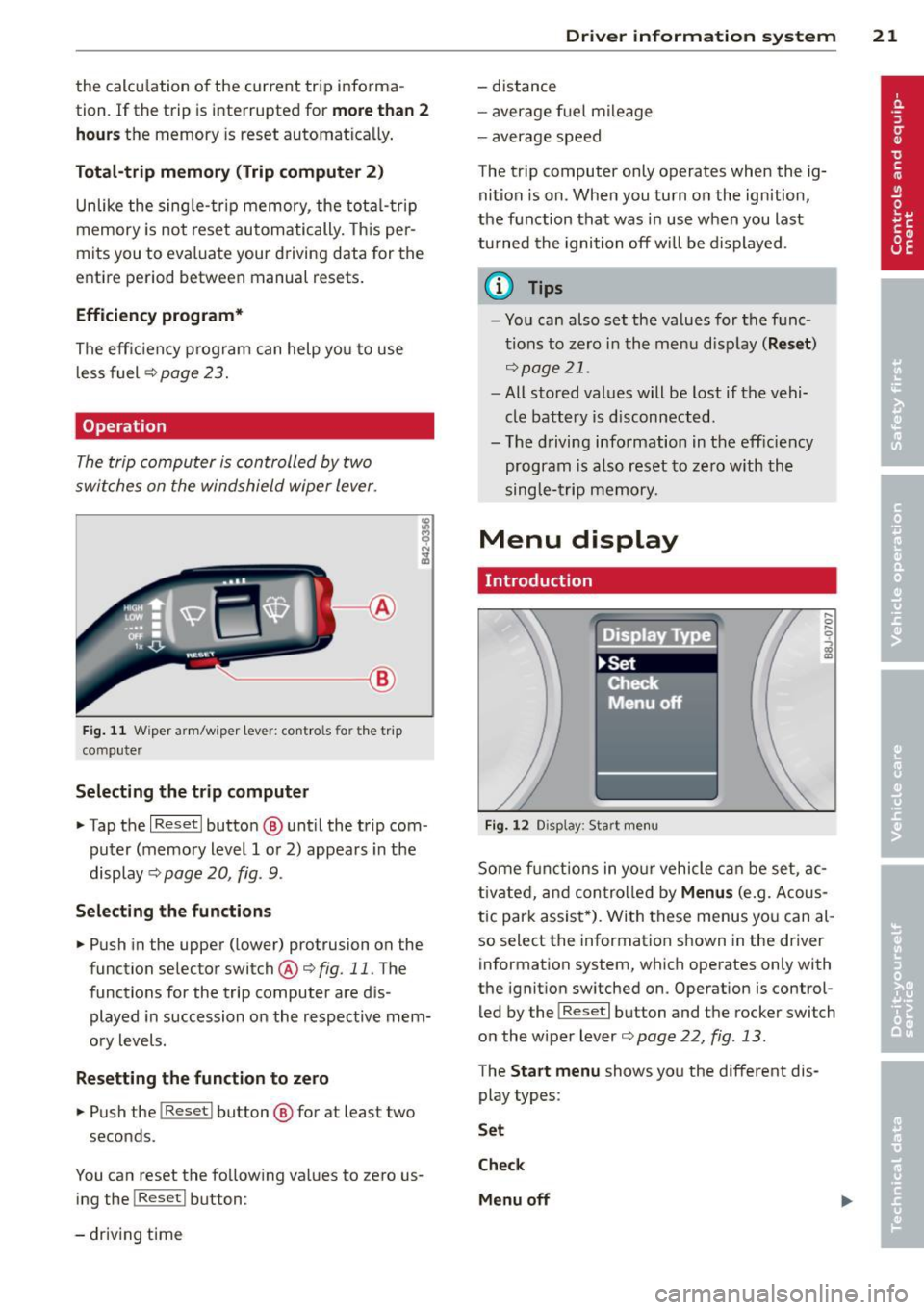
The trip computer is controlled by two
switches on the windshield wiper lever .
~--®
Fig . 11 W ip er arm /wip er lev er: con tro ls for t he t rip
co mpu te r
Selecting the tr ip computer
" Tap the I Reset I butto n@ unt il the trip com
puter (memory level 1 or 2) appears in the
display <=>
page 20, fig. 9.
Selecting the functions
" Push in the upper (lower) protrusion on the
function selector switch@<=>
fig. 11. The
function s for the trip computer are d is
played in succession on the respective mem
o ry levels.
Resetting the function to zero
" Pu sh the I Reset I button ® for at leas t two
s econds .
You can reset the fo llow ing values to zero us
ing the !Reset l button :
- driv ing time
Dr iver in formation system 21
- distance
- average f uel mi leage
- average speed
The trip computer only operates when the ig nit ion is on. Whe n you turn on the ign ition,
the function that was in use when you last
turned the ignition off will be displayed .
(D Tips
- You can also set the va lues for the f unc
t ions to zero in the menu disp lay
( Re set )
<=>page 21 .
-All stored values will be lost if the vehi
cle battery is d isconnected.
- The d riving information in the eff iciency
program is also reset to zero w ith the
single- trip memory.
Menu display
Introduction
Fi g. 1 2 Dis play: Star t me nu
Some f unctions in yo ur vehicle can be set , a c
tivated, and con tro lled by
Menus (e.g. Acous
tic par k assis t*). With these menus yo u can al
so select the information shown in the driver
information system, which operates only w ith
the ignit ion sw itched on . Operation is control
led by the
I Re set I b utton and the rocker switch
on the wiper lever
<=> page 22 , fig . 13.
The Start menu shows yo u the different dis
play types :
Set
Check
Menu off
Page 26 of 260
24 Driver information system
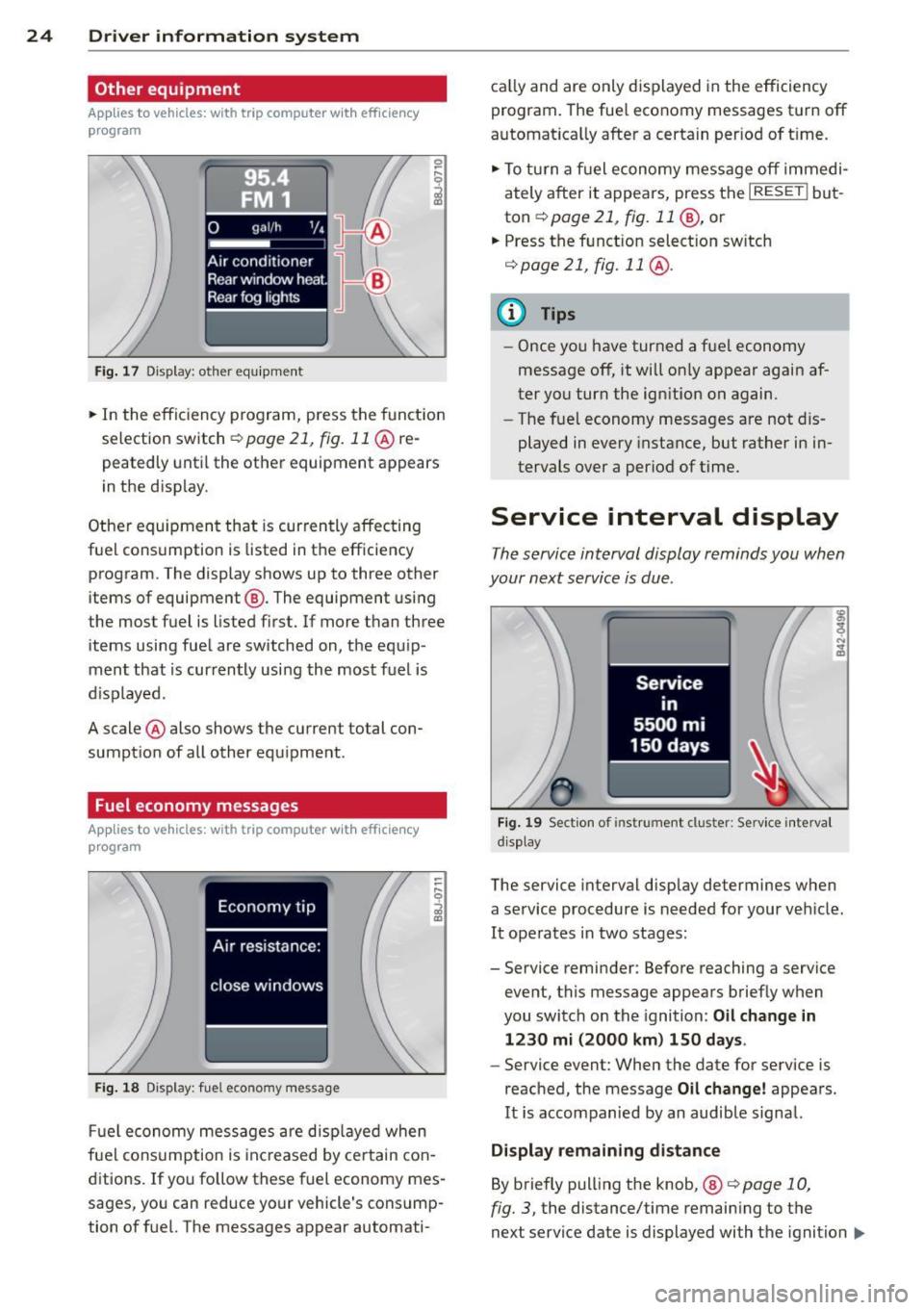
Other equipment
Applies to vehicles: with trip computer w ith eff iciency
program
Fig. 17 Dis pl ay : o th er equ ipm ent
• In the effic iency program, press the funct ion
selection switch
r::;, page 21, fig. 11 @ re
peatedly until the other equipment appears
in the disp lay.
Other equipment that is currently affecting
fuel consumption is listed in the efficiency program . The display shows up to three other
items of equipment ®· The equipment using
the most fuel is listed first. If more than three
items using fuel are switched on, the equip
ment that is currently using the most fuel is
d isplayed .
A scale @also shows the current total con
sumption of all other equipment .
Fuel economy messages
Applies to vehicles: with trip computer with efficiency
program
Fig. 18 Dis play: fuel eco nomy message
Fuel economy messages are displayed when
fuel consumption is inc reased by certain con
ditions. If you follow these fuel economy mes
sages, you can reduce your vehicle's consump
tion of fuel. The messages appear automati- cal
ly and are only d isplayed in the efficiency
program. The fuel economy messages turn off
automat ica lly after a certain per iod of t ime.
• To turn a fuel economy message off immedi
ately after it appears, press the
I RESET ! but
ton
r::;, page 21 , fig. 11 @, or
.. Press the funct ion select ion sw itch
r::;, page 21, fig. 11 @ .
@ Tips
- Once you have turned a fuel economy
message off, it will on ly appear again af
ter you turn the ignition on again.
- The fue l economy messages are not dis
played in every instance, but rather in in
tervals over a period of time.
Service interval display
The service interval display reminds you when
your next service is due .
Fig. 19 Section of instrument clus ter: Se rv ice interva l
d isplay
The service interval display determines when
a service procedure is needed for your veh icle .
It operates in two stages:
- Service reminder: Before reaching a service
event, this message appears briefly when
you switch on the ignition: Oil change in
1230 mi (2000 km) 150 days.
- Service event: When the date for service is
reached, the message Oil change! appears.
It is accompanied by an audible signal.
Display remaining distance
By briefly pulling the knob, ®
<=>page 10,
fig. 3, the distance/time remaining to the
next service date is displayed with the ignition
IIJ,-
Page 27 of 260
on. The distance/time remaining is updated
every 300 mi les (500 km).
I f the d istance/ time remaining is called up on
new vehicles or after service has been per
formed, the due date is always shown in the
disp lay with
Oil change in----- m i (km)- -
d ay s
within the first 300 miles (500 km).
To reset the display
The dealersh ip perfo rming the service resets
the disp lay whe n the service has been com
p leted . The display is resets as follows :
- Switch the ignition on.
- Pull the knob @
Q page 10, fig. 3, this mes-
sage appears:
Oil chang e!
- Pull the knob u ntil t he d isplay O il change in
--- --mi (km )··· day s
appears in the display.
If the reset button is not p ulled within
5
seconds, the display reset mode closes .
(D Tips
-If a malfunction is p resen t (red symbol),
the distance remaining cannot be ca lled
u p.
- Do not reset the display between service
intervals . Do ing so will res ult in an in co r
r ect displ ay.
- If the batte ry is d iscon nected, the Serv
i ce Interval Disp lay val ues are ret ained .
-If service was not performed at the co r
re ct time or the service interval display
w as not reset a fter service w as per
fo rmed, the add itiona l mi leage driven or
the elapsed days wi ll be shown as nega
tive numbers.
Lap timer
Introduction
App lies to vehicles: with lap timer
You ca n record and evaluate lap times with
the lap timer in the display
¢page 25,
fig . 21 . The time is measu red in minutes, sec
onds and 1/10 seconds. The hou rs a re also
shown when the lap time exceeds 60 minutes .
The maximum individual measurement is 99
hours.
Dr iver in formation system 25
A WARNING
Please devote your full attention to driv
i ng. As the driver, you have complete re
spons ib ility for safety in traffic. Only use
the functions in such a way that you a lways
maintai n comple te control over you r ve hi
cle in a ll traffic situations.
(D Tips
When the lap time r stopwatch is running ,
you can ca ll up the tr ip comp ute r informa
tion with the
I RESET I but to n.
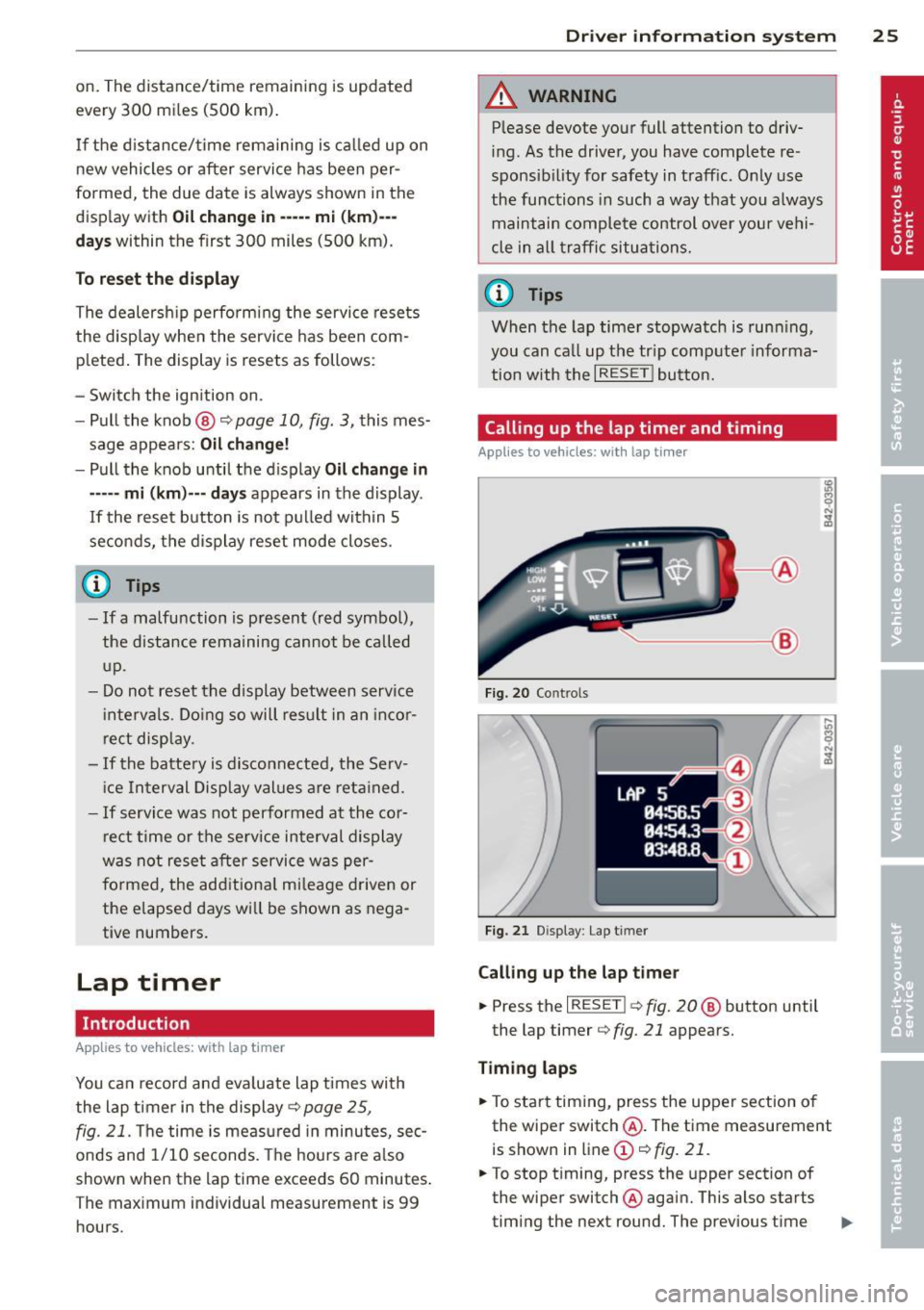
Calling up the lap timer and timing
Applies to vehicles: wi th lap timer
---- @
Fig. 20 Co ntrols
F ig. 21 Display : Lap t imer
Calling up the lap t imer
... Press the I RESET !¢ fig . 20 @ button until
the lap timer ¢
fig. 21 appears.
Timing laps
.,. To start timing, press the upper section o f
the wiper switch @. The time measurement
is shown in line
(D ¢ fig. 21.
.,. To stop timing, press the upper section of
the wiper switch @again. This also starts
timing the next round. The previous time ..,_
Page 28 of 260
26 Driver information system
moves one line up, first to line @ and then
to line @. Line @) shows the current lap
number , for example LAP 5.
Displaying intermediate time and pausing
timing
• To display an intermediate time, press the
lower section of the wiper switch @. T he in
termediate time appears in line
(D and is
marked with".
• To pause tim ing, pres s the lower section of
the wiper switch @again .
• To continue t iming, press the upper section
of the wiper switch @.
If timing is paused, you can co ntinue it later
even if you switch the ign it ion off .
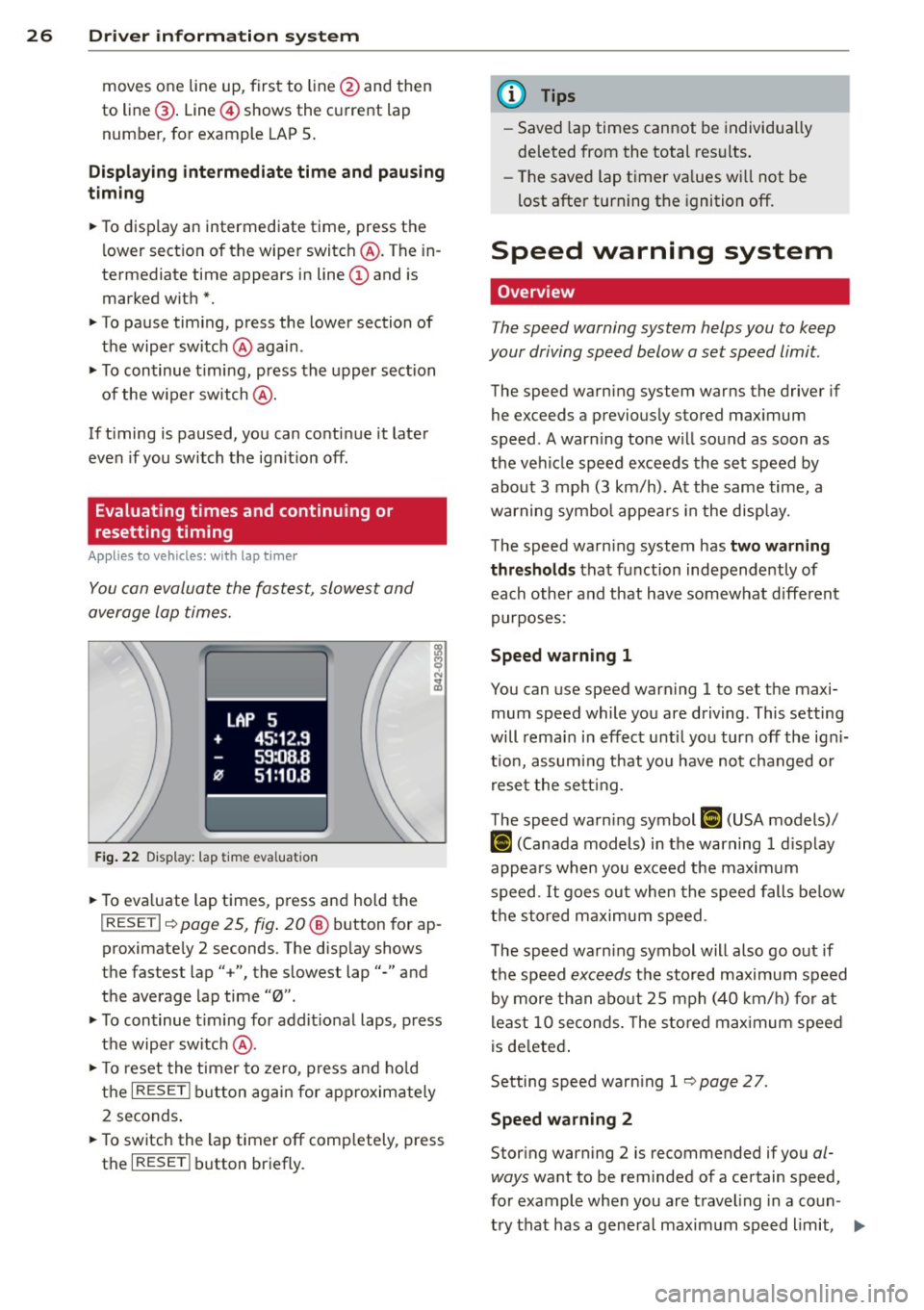
Evaluating times and continuing or
resetting timing
Applies to vehicles: with lap timer
You can evaluate the fastest, slowest and
average lap times.
LAP 5
+ 45:12.9
59:08.B
0 51:10.B
Fig. 22 Dis play : lap time eva lua tion
• To eva luate lap times, press and hold the
I RESE T I~ page 25, fig . 20 @ button for ap
proximate ly 2 seconds. The disp lay shows
the fastest lap" +", the slowest lap"-" and
the average lap time "0".
• To continue t iming for add itional laps, press
the wiper switch @.
• To reset the timer to zero , press and hold
the
I RESE T! button again for approximately
2 seconds .
• To switch the lap timer off comp letely, press
the
I RESE T! button briefly.
(D Tips
-Saved lap times cannot be individually
de leted from the total results.
- The saved lap t imer va lues wi ll not be
lost after turning the ignition off.
Speed warning system
Overview
The speed warning system helps you to keep
your driving speed below a set speed limit.
The speed warning system warns the driver if
he exceeds a previously stored maximum
speed . A warning tone will sound as soon as
the vehicle speed exceeds the set speed by
about 3 mph (3 km/h). At the same time, a
warning symbol appears in the display.
The speed warning system has
two warning
thresholds that function independently of
each other and that have somewhat different
purposes:
Speed warning 1
You can use speed warning 1 to set the maxi
mum speed while you are driving . This setting
will remain in effect until you turn off the ign i
t io n, assuming that you have not changed o r
reset the setting.
The speed warn ing symbol
[i (USA models)/
IDl (Canada models) in the warning 1 display
appears when you exceed the maximum
speed.
It goes out when the speed falls below
the stored maximum speed .
The speed warn ing symbol will also go out if
the speed
exceeds the stored maximum speed
by more than about 25 mph (40 km/h) for at
least 10 seconds. The stored maximum speed
is deleted.
Setting speed warning 1
~page 27 .
Speed warning 2
Storing warning 2 is recommended if you al
ways
want to be rem inded of a certain speed,
for example when you are travel ing in a coun
try that has a general maximum speed limit, .,..
Page 37 of 260
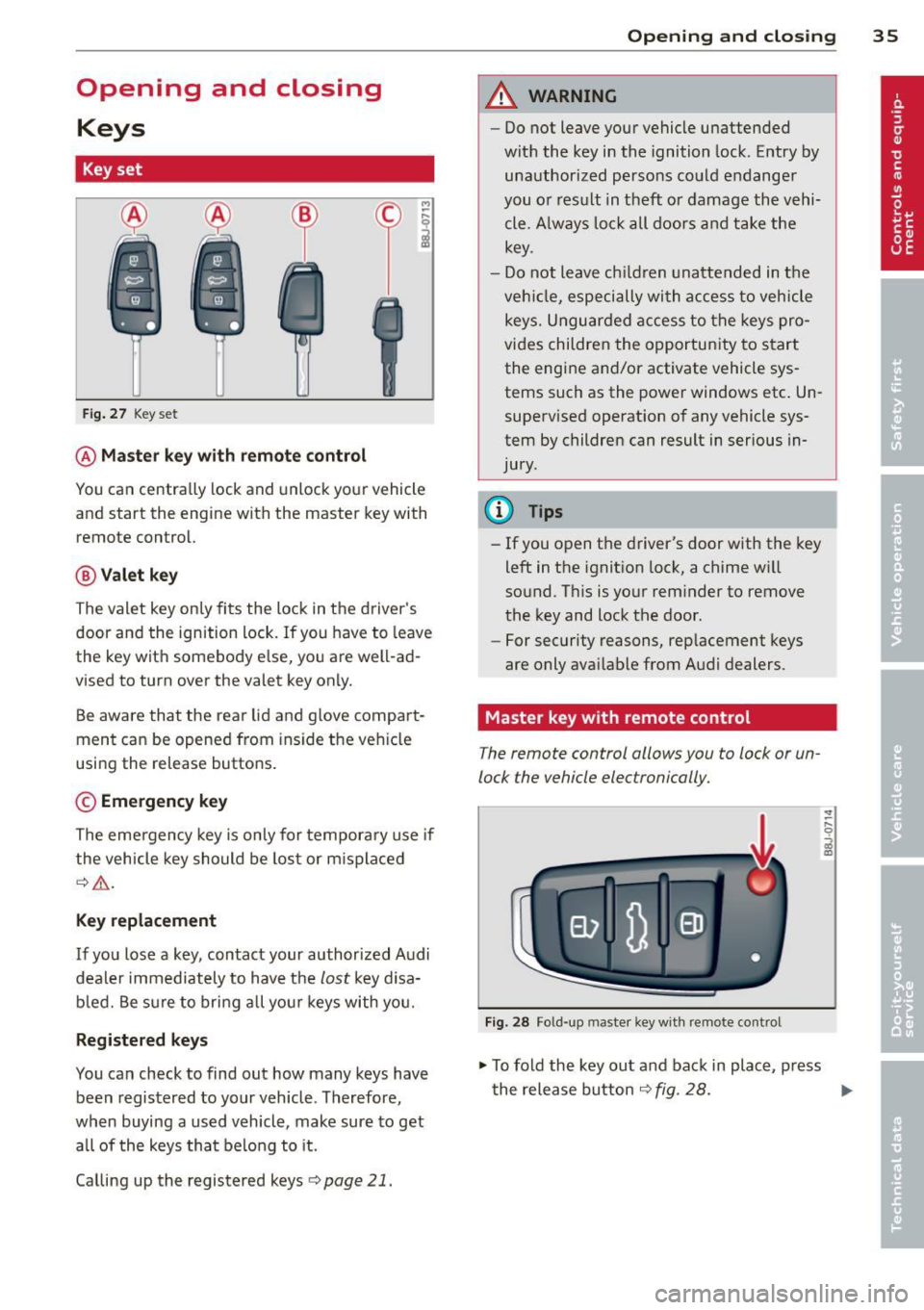
Opening and closing Keys
Key set
Fig. 27 Key set
@Master key with remote control
M
-~
il
You can centrally lock and unlock your vehicle
and start the engine with the master key with
remote control.
@ Valet key
The valet key only fits the lock in the d river's
door and the ignition lock. If you have to leave
the key with somebody e lse, yo u are well -ad
vised to turn over the valet key only.
Be aware that the rear lid and g love compa rt
ment can be opened from ins ide the vehicle
using the release buttons .
© Emergency key
The emergency key is only for temporary use if
the vehicle key should be lost or m isplaced
¢ .&,.
Key replacement
If you lose a key, contact your authorized Audi
dealer immediately to have the
lost key d isa
bled. Be sure to bring all your keys with you.
Registered keys
You can check to find out how many keys have
been registered to your veh icle . Therefore,
when buying a used vehicle, make sure to get all of the keys that belong to it.
Calling up the registered keys¢
page 21.
Opening and closing 35
A WARNING
-Do not leave your vehicle unattended
with the key in the ignition lock. Entry by
unauthorized persons could endanger
you o r result in theft or damage the vehi
cle. A lways lock all doors and take the
key.
- Do not leave ch ildren unattended in the
veh icle, especially with a ccess to vehicle
keys. Unguarded access to the keys pro
vides children the opportunity to start
the engine and/or activate vehicle sys
tems such as the power windows etc . Un
supervised operation of any vehicle sys
tem by children can result in serious in
jury.
(0 Tips
- If you open the driver's door with the key
left in the ignit ion lock, a chime w ill
sound. Th is is your reminder to remove
the key and lock the door .
- For security reasons, rep lacement keys
are only avai lable from Audi dealers.
Master key with remote control
The remote control allows you to lock or un
lock the vehicle electronically.
Fig. 28 Fo ld-up mas ter key with remote contro l
.,. To fold the key out and back in place, press
the release button ¢
fig. 28. ..,.
Page 38 of 260
36 Opening and clo sing
The transmitter and battery are located in the
head of the remote control. The receiver is lo
cated inside the vehicle. The maximum effec
tive range depends on several things . Remem
ber, if the battery is weak, the effective range
decreases .
If you need to replace the remote contro l, or if
you need to have it repaired, you must see
your authorized Audi dealer. Only then can
you use the key again .
@ Tips
-If the ignition is sw itched on, the remote
control system is deact ivated .
- The remote control system can be affect
ed by other systems operating in the
same frequency range close to the vehi
cle, such as mob ile telephones, televi
s ion broadcasting stat ions, etc.
- For Decla rat ion of Compliance to United
States FCC and Industry Canada regula
tions
~ page 244.
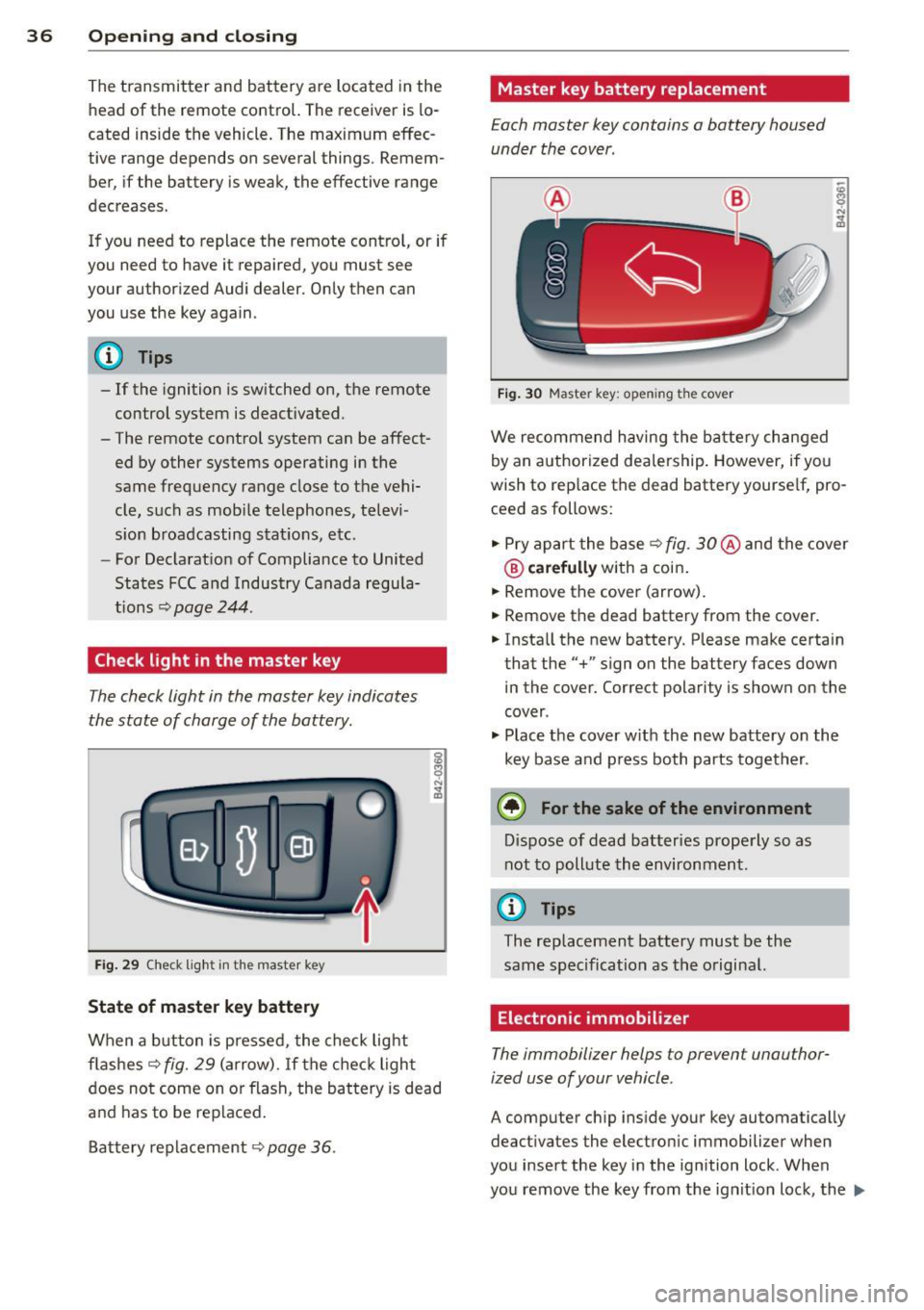
Check light in the master key
The check light in the master key indicates
the state of charge of the battery .
Fig. 29 Che ck lig ht in the maste r key
State of master key battery
When a button is pressed, the check lig ht
flashes
c::> fig. 29 ( a rrow) . If the check light
does not come on or flash, the battery is dead
a nd has to be replaced.
B attery replacement
c::> page 36.
Master key battery replacement
Each master key contains a battery housed
under the cover .
Fig . 30 Master key: open ing the cover
We recommend having the ba tte ry ch anged
by an authorized dealership . However, if you
wish to rep lace the dead battery yourse lf, pro
ceed as follows:
" Pry apart the base
c::> fig. 30 @ and the cove r
® carefully with a coin .
" Remove the cover (arrow) .
" Remove the dead battery from the cover.
" Insta ll the new battery. Please make certain
that the" +" sign on the battery faces down
in the cover. Correct polarity is shown on the
cover .
" Plac e th e cover w it h the new battery o n the
key base and p ress both parts together.
@ For the sake of the environment
D ispose of dead batteries properly so as
not to poll ute the environment.
(0 Tips
The replacement battery must be the
sam e spec ificat ion as the o riginal.
Electronic immobilizer
The immobilizer helps to prevent unauthor
ized use of your vehicle .
A computer chip inside your key automatically
deactivates the electro nic immobilizer when
you insert the key in the ignition lock . When
you remove the key from the ignit ion lock, the
Ill>
Page 39 of 260
electronic immob ilizer is a utomat ically acti
vated once again.
A WARNING -
Always take the key with you when you
leave the ve hicle. The key can disarm the
elect ronic engine immobilizer and pe rm it
an unauthor ized person to start the engine
an d ena ble ope rat io n of t he vehicle sys
t ems s uch as powe r wi nd ow or pow er to p
leadi ng to se rious pe rsonal injury.
@ Tips
- The vehicle ca nnot be s tarted if an unau
thoriz ed key is used . The ve hicle may not
star t if another radio device such as a key
fo r anot her vehicle o r a transpo nder is
l oc ated on the key ring.
- Fo r D ecl arat io n of Compliance to United
Sta tes FCC a nd Indus try C anada regul a
tions¢
page 244.
Power locking system
General description
The power locking system locks or unlocks all
doors simultaneously.
The power locking system i n your ve hicle in
corporates the fo llow ing functions :
- C entral lo ck ing func tion
- Remote contro l feature ~
page 35.
- Ant i-Theft Alarm System ¢ page 42.
All the doors and the rear lid are locked by the
centra l locking system when you lock the vehi
cle .
The unlocking and lock ing mode * can be
changed in the driver i nformation system
¢page 21.
Unlocking the vehicle
You can un lock the vehicle from outsi de either
by using the remote control
or by inserting
and turning the key in the driver's door lock.
When you
unlock your ve hicle:
Opening and clo sin g 37
- The ant i-theft a larm system is deactivated
briefly.
- The vehi cle i nterior ligh ts illum inate for ap
proximately 3 0 seconds.
- All turn s ignal lights w ill fla sh twice when
the ca r is u nlocked .
- Aft er u nlocking the vehicle, you have 30 sec
onds to open a door or the rear lid . After 3 0
seconds, the vehicle a utomat ica lly locks and
the anti-theft a la rm system activates aga in .
T he re ar lid can be locked or unlocked e ither
by using the remote cont ro l
or by inse rting
and tu rning the key in the drive r's door lock.
U nlocking the vehicle with the remote cont ro l
,;::::::5 will on ly unlock the rear lid, to open it, the
li d handle needs to be pressed.
Locking the vehicle
You can lock the veh icle from outs ide either by
u sing the remote control
or by inse rting and
turning the key in the drive rs's door lock.
When you
lock the veh icle:
- All doors an d the rear lid are loc ked .
- All turn s ignal lig hts will flash o nce w hen
t he ca r is lo ck ed .
- The ant i-theft a la rm sys tem is ac tiva ted.
The ho rn of the anti- theft alarm sys tem w ill
so und and the an ti-the ft ala rm system read
iness light, located in the center of the in
st rument panel be low the w indshield on the
r ight side of the a ir vent , will start to blin k.
- The vehicle interior lights turn off .
Automatic locking*
The au toma tic lo cking fea ture locks a ll the ve
hicle doors and the re ar lid w hen you drive
faste r than
9 mph (15 km/ h).
You can unlock t he veh icle from the inside by:
- removing the key from the ignition switc h
(t he vehicle w ill automatically un lock itself)
or
- pressing the unlock part of the power lock
sw itch
€1) or
pull ing the door handle (to open the door).
Page 40 of 260
38 Opening and clo sing
If you wish, you can have an authoriz ed Audi
deal er conv ert your power doo r lock syst em to
automatic lo cking .
.&_ WARNING
-When you lock your vehicle from outside,
nobody- especially children -should re
ma in ins ide the veh icle . Remember,
when you lock the vehicle from the out
side the windows cannot be opened from
the inside .
- When you leave the vehicle , always re
move the ignition key and ta ke it with
yo u. T his wi ll prevent pa ssengers ( chil
dre n, for examp le) from accidenta lly be
ing locked in the veh icle should they acci
dentally press the power locking switch.
- Do no t leave children ins ide the veh icle
unsupervised . In a n emergency it would
be impossib le to open the doors from
the outside w ithout the key .
(D Tips
-In the even t of a c rash with airbag de
ployment all locked doors will be auto
matically unlocked to give access to t he
vehicle occupants from the outside .
- If the power lock ing system should ma l
funct ion, you can lock each door indiv id
u a lly using the vehicle key .
- If the power locking system should fail,
you can still open the fue l tank f lap in an
emergency
c::;, page 177.
- You are we ll advised not to keep valua
bles inside an unattended vehicle, visib le
o r not. Even a properly locked vehicle
ca nnot provide the security of a safe!
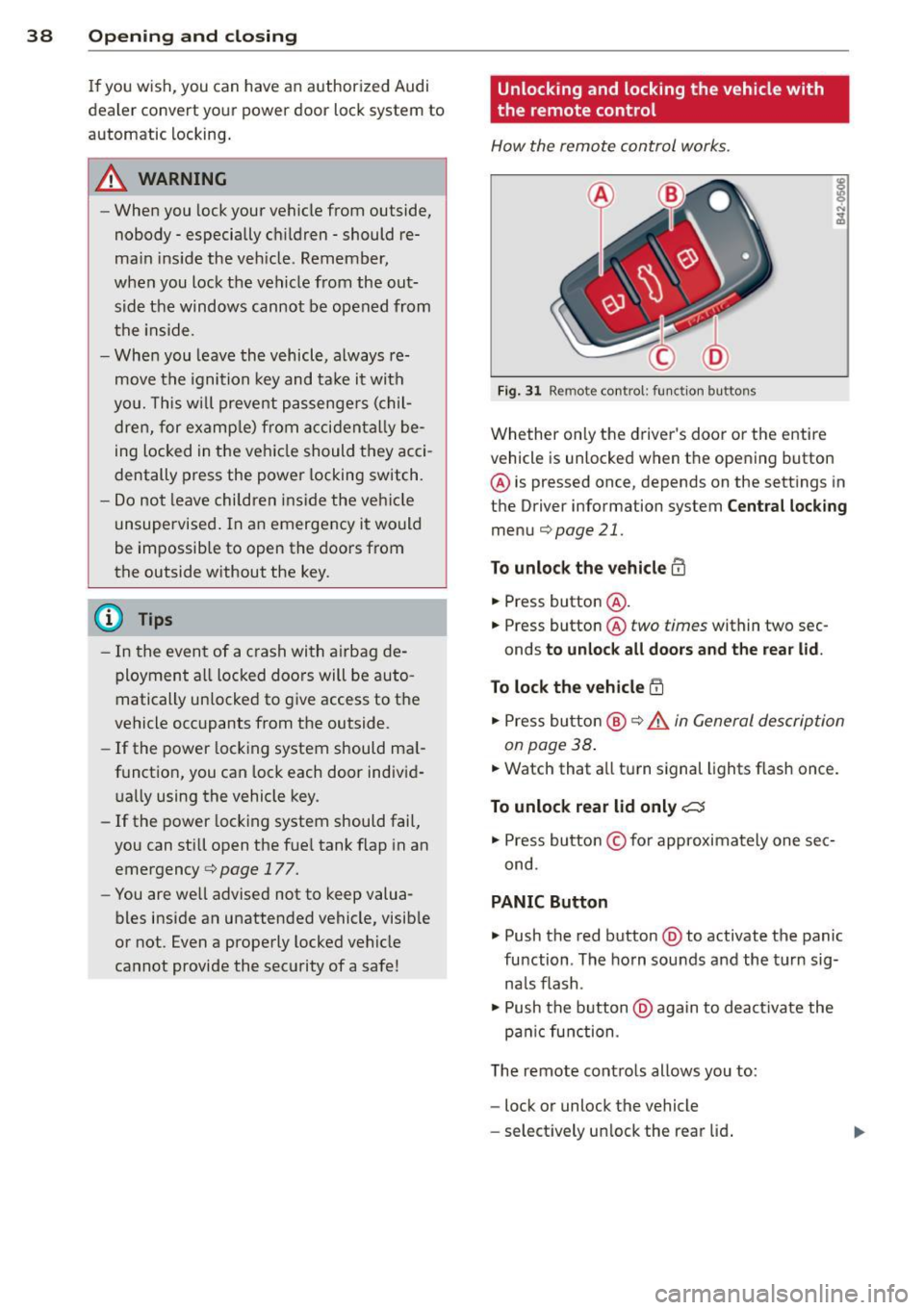
Unlocking and locking the vehicle with
the remote control
How the remote control works .
Fig . 31 Remo te control : fun ction bu ttons
Whether on ly the driver's door o r the entire
vehicl e is unlocked when t he opening button
@ is pressed once, depends on the sett ings in
t h e Driver information system
Cent ral lock ing
menu c::;,page 21.
To unlock the vehicle m
• Press button @.
• Press button @
two times within two sec
onds
to unloc k all doors and the rea r lid .
To lock th e vehicle !'.D
• Press bu tton @ c::;, .&. in General de scription
on page 38 .
• Watch that a ll turn signal lights f lash once.
To unlock rear lid only C:5
• Press button © for approximately one sec
ond .
PANIC Button
• Push the red button @to activate the panic
function . The ho rn sou nds and the t urn sig
na ls flash .
• Push the b utton @again to deact ivate the
pa nic function .
T he remote cont ro ls allows you to:
- lock or unlock the vehicle
- se lect ively un lock the rear lid .
Page 41 of 260
The turn signals will flash briefly whenever
you lock or unlock the vehicle. Also, the interi
or light will come on or go
off whenever you
open or clo se the driver 's door .
The transmitter and battery are located in the head of the remote control. The r eceiver is lo
cated inside the vehicle. The maximum effec
tive range depends on several things. Remem
ber, if the ba ttery is weak, the effec tive range
decreases .
T he remote-control key contains a fold-o ut
key that you can use to manu ally lock or un
lock the vehicle and to start the engine .
If you need to replace the remote contro l, or if
you need to have it repaired, you must see
your author iz ed Audi dealer. Only then can
you use the key again.
A WARNING
Read and follow all WARNINGS¢.&. in
General description on page 38 .
{!) Tips
-The remote control key is automatica lly
deactivated when the ignition is switch
ed on .
-
-The operation of the remote control key
can be temporarily disrupted by interfer
ence from transmitters in the v icin ity of
the veh icle work ing in the same frequen
cy range (e.g. a ce ll phone, radio equip
ment) .
- In order to make sure the locking func
tion is working, you shou ld always keep
your eye on the vehicle to make sure it is
proper ly locked.
- Do n ot use t he remo te control if you are
i nside the car, otherwise yo u may unin
tentiona lly lock the ve hicle, and then you
would set
off the anti-theft ala rm when
you try to start the engine or open a
door. In case this happens anyhow, push
the un lock button
m .
- Use the panic funct ion only if you are in
an emergency situation .
Openin g an d clos ing 39
Resetting the remote control
T he remote control must be reset if the vehi
cle does not unlock .
.,. Press the unlock 0 button on the remote
control.
.,. Unlock or lock the ve hicle once at the door
lock using the stem of the remote control
key.
The synchronization process must not take longer than 30 seco nds .
Operating locks with the key
To lock and unlock the vehicle from the ou t
side, turn the key in the lock of the driver's
door .
® ifijiilil @
c_c~ ~~......- 1_J2)
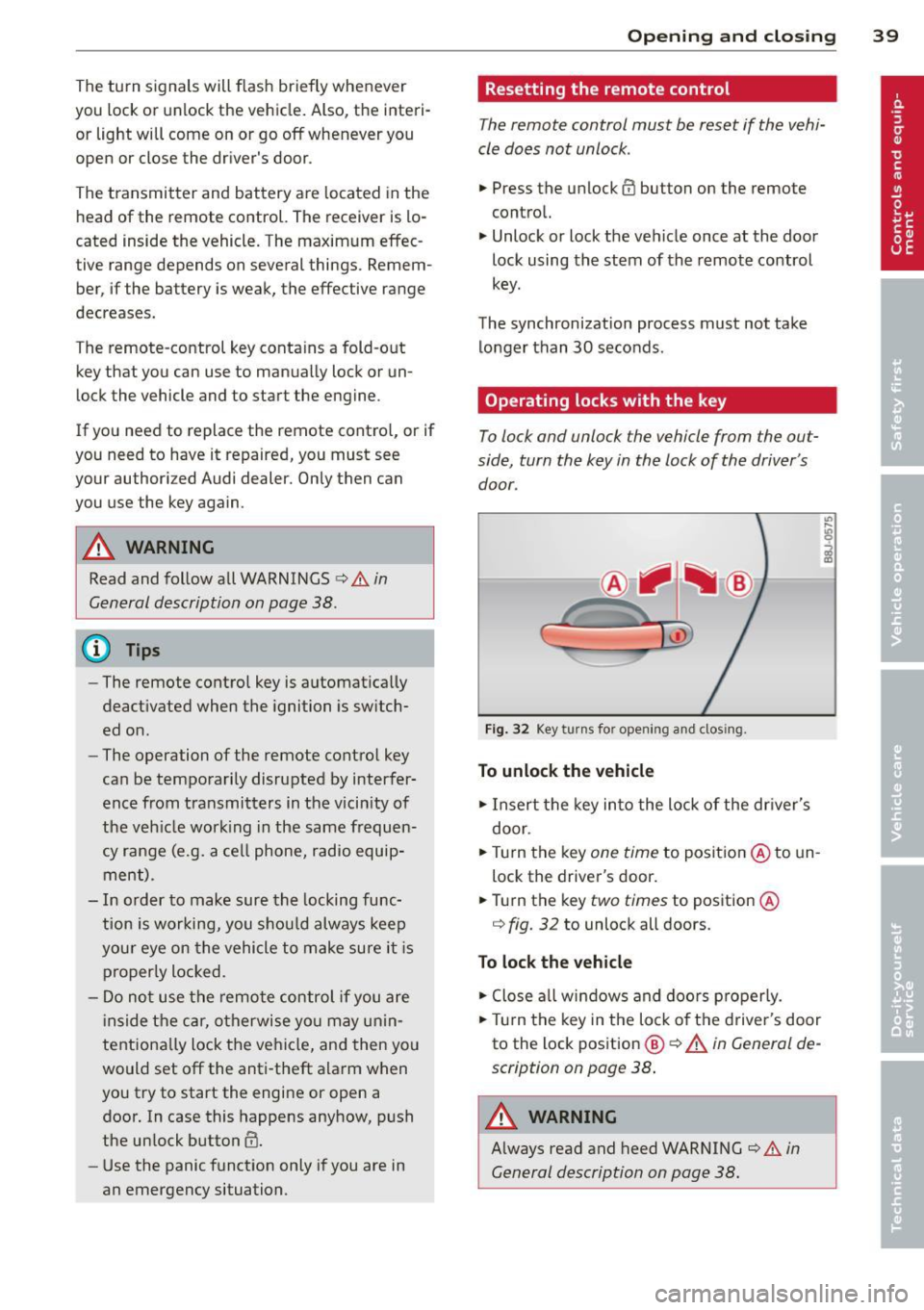
Fig . 32 Key turn s fo r open ing an d clos ing.
To unlock the vehicle
.,. Insert the key into the lock of the dr iver's
door .
.,. Tu rn the key
one time to position @to un
lock the driver's door .
.,. Turn the key
two times to position @
¢
fig. 32 to unlock all doo rs .
To lock the vehicle
.,. Close a ll w indows and doo rs p roperly.
.,. Tu rn the key i n the lock of t he driver's door
to the lock pos ition
@ ¢ A in General de
scription on page 38 .
A WARNING
~ -
Always read and heed WARNING¢.&. in
General description on page 38.
Page 45 of 260
- engine compartment
-lu ggage compar tment
- doors
- ignition
When the system is activated, the alarm will
be triggered if one of the doors, the engine
h ood or the rear lid are opened, or if the ign i
tion is turned on.
The anti-theft alarm system wi ll also go off
when the battery is disconnected.
You can a lso trigger the alarm by pressing the
PANIC button on your remote-control key.
This will alert other peop le in case of emer
gency. Press the
PANIC button again to turn
off the alarm .
How is the anti-theft alarm switched off
when triggered?
The alarm system is switched off when you
unlock the vehicle using the remote-control
key or when the ignition is sw itched on . The
a larm w ill also switch itse lf off when it comes
to the end of its cycle.
Emergency flasher
The emergency flasher will blink briefly when
the doors, engine hood and rear lid are prop
erly closed .
If the emergency flashers do not blink, check
the doors, engine hood and rear lid to make
sure they are properly closed. If you close a
door, the hood or the rear lid with the ant i
theft alarm switched on, the emergency flash
e rs will bli nk only after you have closed the
door or lid .
@ Tips
-For the anti-theft alarm system to func
tion properly, make sure all vehicle doors
and windows are closed before leaving
the vehicle .
- When you open the vehicle from the
driver's door using the key, the centra l
l ocking switch will work only after you
have switched on the ignition.
Opening and closing 43
Power windows
Controls
The driver can operate all windows .
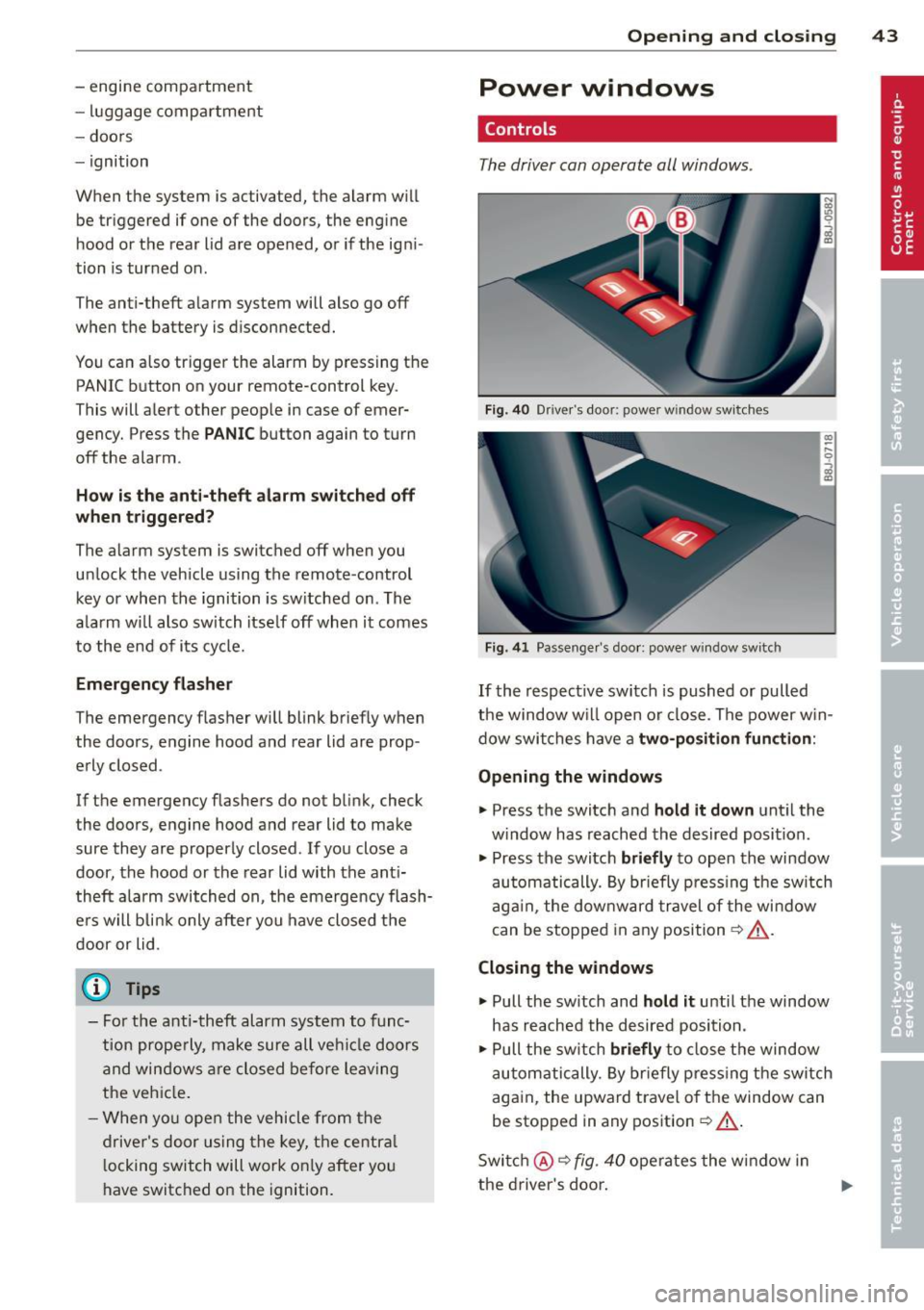
Fig. 40 Driver's door: power w indow switches
Fig. 41 Passenger's door: power window switch
If the respective switch is pushed or pulled
the window w ill open or close. The power win
dow switches have a
two-position function :
Opening the windows
.,. Press the switch and hold it down unt il the
w indow has reached the desired position.
.. Press the switch
briefly to open the window
automatically. By briefly pressing the switch
again , the downward travel of the window
can be stopped in any position¢ _&..
Closing the windows
.,. Pull the sw itch and hold it until the window
has reached the desired position.
.,. Pull the switch
briefly to close the window
automatically. By briefly pressing the switch
again, the upward travel of the window can
be stopped in any position
~ _&. .
Switch @¢
fig. 40 operates the window in
the driver's door.