lock AUDI TT ROADSTER 2011 User Guide
[x] Cancel search | Manufacturer: AUDI, Model Year: 2011, Model line: TT ROADSTER, Model: AUDI TT ROADSTER 2011Pages: 260, PDF Size: 64.11 MB
Page 29 of 260
or if you do not want to exceed a specified
speed for w inter t ires.
The speed warning 2 symbol,
1mj (USA mod
e ls)/
laJ (Canada models) appears in the dis
p lay when you exceed the stored speed lim it.
Unlike war ning 1, it will not go out until the
ve hicle speed drops be low the stored speed
limit.
Sett ing speed warning 2
c:> page 2 7 .
(0 Tips
Even t ho ugh yo ur vehicle is equipped with
a speed warning sys tem, yo u shou ld st ill
watch the speedomete r to make sure you
are not driving faster than the speed limit.
Speed warning 1: setting a speed limit
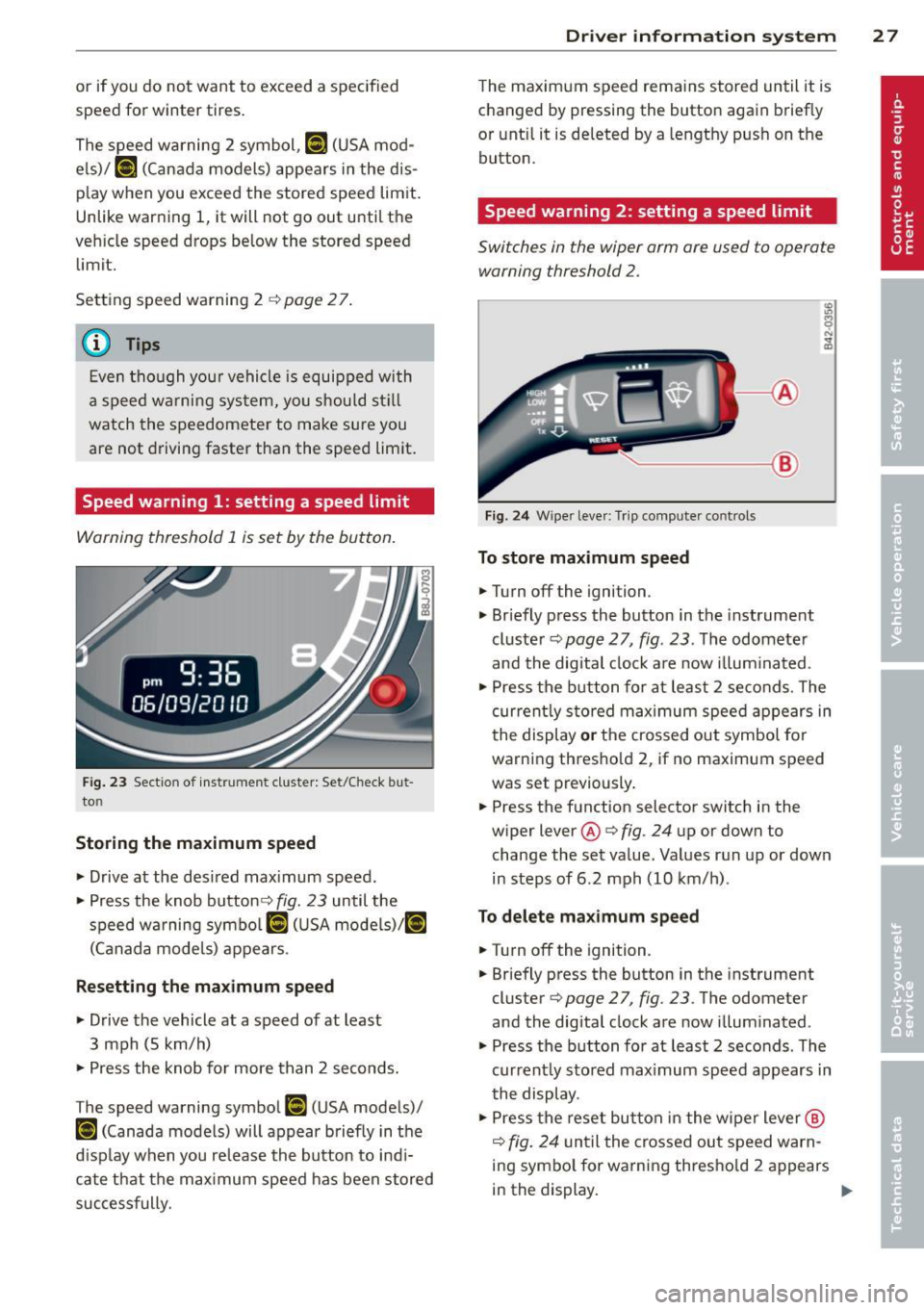
Warning threshold 1 is s et by the button.
F ig. 23 Sec tio n of ins trume nt clus ter: Set/Check but
to n
Storing the maximum speed
• Drive a t the desi red max imum speed.
• Press the knob button¢
fig. 23 until the
speed wa rning symbo l
[I (U SA mode ls)l [°i
(Canad a mode ls) appears .
Resetting the maximum speed
• Drive the vehicle at a speed of at least
3 mph (5 km/h)
• Press the knob fo r more than 2 seconds.
T he speed warning symbo l
[I (U SA mode ls)/
t•) (Canada models) will appear b riefly in t he
d isp lay when you re lease the button to indi
cate that the max imum speed has been stored
successfully.
Dr iver in formation system 2 7
The maximum speed rema ins stored until it is
c hanged by pressing the button again b rief ly
or unti l it is deleted by a lengthy push on the
button .
Speed warning 2: setting a speed limit
Switches in the wiper arm are used to operate warning threshold 2 .
-----@
Fig. 2 4 Wipe r leve r: T rip comp uter co ntrols
To store maximum speed
• Turnoff the igni tion .
• Briefly press the button in the instrument
cluste r
c:> page 2 7 , fig . 23 . The odomete r
and the digital clock a re now illum inated .
• Press the b utton for at least 2 se co nds. The
curren tly s to red max imum spee d appears in
the display
or t h e crossed o ut symbol for
warni ng thresho ld 2, if no maximum speed
was set previously .
• Press the f unction selector switch in the
wiper lever @
c:> fig. 24 up or down to
change the set va lue. Values run up or down
in steps of 6 .2 mph (10 km/h) .
To delete ma ximum speed
• Turnoff the ignit ion.
• Briefly press the button in the instrument
cluster
c:> page 2 7 , fig . 23 . The odometer
and the digital clock are now illum inated .
• Press the b utton fo r at least 2 seconds . The
current ly sto red max imum speed appears in
t he display .
• Press the reset button in the wipe r lever @
c:> fig. 24 unt il the crosse d ou t speed warn
ing sym bo l for warning thresho ld 2 a ppears
in the display.
~
Page 30 of 260
28 Driv e r in formation sy stem
A few seconds after the adjustment is com
p leted, the illumination for the odometer and
the dig ital clock will go o ut.
@ Tips
This warning threshold can also be con
trolled through the trip computer
~page 22, Navigating the menu.
On-Board Diagnostic
system (OBD)
On-Board Diagnostics
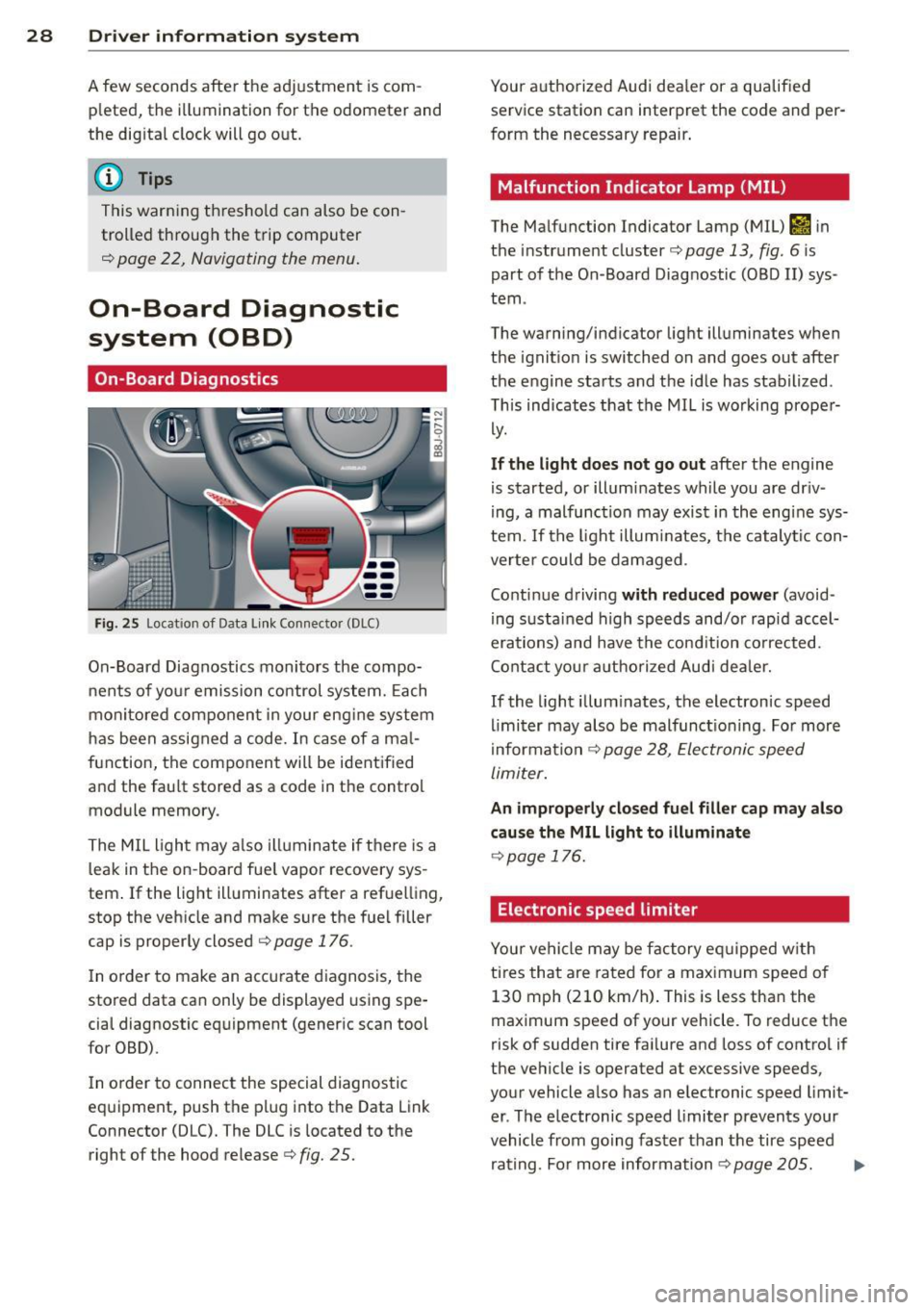
Fig. 25 Locat ion of Data Link Connecto r (DLC)
On-Board Diagnostics monitors the compo
nents of you r emission control system. Each
monitored compo nen t in your eng ine system
has been assigned a code . In case of a ma l
function, the component will be identified
and the fau lt stored as a code in the control
module memory.
The MIL light may a lso illuminate if there is a
leak in the on-board fue l vapor recovery sys
tem .
If the light illuminates after a refuelling,
stop the vehicle and make sure the fuel filler
cap is properly closed ¢
page 176.
In o rder to make an accurate diagnosis, the
stored data can only be displayed using spe
cia l diagnostic equipment (generic scan tool
for OBD).
I n o rder to connect the special diagnostic
equipment, push the plug into the Data Link
Connector (DLC). The DLC is located to the
right of the hood release¢
fig. 25.
Your authorized Audi dea ler or a qualified
service station can interpret the code and per
form the necessary repair .
Malfunction Indicator lamp (MIL)
The Malfunction Indicator Lamp (MIL) &'I in
the instrument cluster¢
page 13, fig. 6 is
part of the On-Board Diagnostic COBO II) sys
tem .
The warning/indicator light illuminates when
the ignit io n is switched on and goes out after
the e ngine starts and the idle has stabilized.
Th is indicates that the MIL is working prope r
ly.
If th e light d oes not go out after the engine
is started, or illum inates wh ile you are dr iv
ing, a malfunc tion may exist in the engine sys
tem.
If the light illum inates, the catalytic con
verte r could be damaged .
Continue driving
with reduced p ower (avoid
ing sustained high speeds and/or rapid accel
erations) and have the cond ition corrected.
Contact you r authorized Audi dea le r.
If the light illum inates, the electronic speed
limi ter may also be malfunct ioning . For more
i nformation ¢
page 28, Electronic speed
limiter.
An improperly clo sed fu el filler cap ma y also
cau se the MIL light to illuminate
¢ page 176.
Electronic speed limiter
Your vehicle may be factory eq uipped w ith
tires that are rated for a maximum speed of 130 mph (210 km/h) . This is less than the
maximum speed of your vehicle. To reduce the
risk of sudden tire fai lure and loss of control if
the vehicle is operated at excessive speeds,
your vehicle a lso has an electronic speed limit
er . The electronic speed limiter prevents your
vehicle from going faster than the tire speed
rating. Fo r more information
¢page 205. ...,
Page 33 of 260
than 3 seconds and faster than 3 mph (5 km/
h).
A WARNING
-Always observe the warnings in
9 page 172, Engine compartment, be
fore opening the engine hood and check ing the brake flu id .
- Driv ing with low brake fluid is a safety
hazard! Stop the car and get professional
assistance.
- If the brake system warn ing/ indicator
light illuminates together with the ABS
warning/ind icator light, t hen the ABS
system is malfunct ion ing . The rear
wheels co uld qu ickly lock up when yo u
apply the brakes. This could lead to loss
o f control and your vehi cle could slide!
Drive carefu lly to the nearest a uthorized
Audi dealer and have the ma lfunction
corrected.
_ L Engine cooling system
A malfunction in the engine cooling system
must be repaired as soon as possible .
When the . symbol in the d isp lay flashes,
then either the eng ine coolan t
temperature is
too high, or the coo lant
level is too low. In ad
dition to the symbol, the fo llowing message
also appears in the display:
Swit ch off engine and check coolant level
"'Pull off the road and stop the vehicle.
"'T urn off t he engine.
"' Check coolant leve l
9page 185.
"'Add coolant if ne cessary¢ page 186.
"' Contin ue driving only after the eng ine cool -
ant warn ing/indicato r light goes o ut.
"' Contact your authorized Audi dea ler for as-
s istance if necessary.
If the engine coolant level is correct, then the radiator fan may be the cause of the malf unc
tion .
If the generator wa rning/ind icator light
should also illuminate ¢
page 16, then the
fan belt may be damaged.
Dr iver in formati on sys tem 3 1
A WARNING
-If your vehicle should break down for
mechanical or other reasons, park at a
safe distance from moving traffic, tu rn
off the eng in e and tu rn on the haza rd
warn ing ligh ts ¢
page 56, Emergen cy
flasher ~-
-
-Never ope n the hood if you see o r hear
s team or coola nt es caping from the en
gi ne compartmen t -you ris k being sc ald
ed . Wait unt il yo u can no longer see o r
hea r steam o r coolant escap ing.
- T he engine compa rtment o f any vehicle
is a dangerous area. Be fore you perform
a ny work i n the engine compartment,
turn off the eng ine and allow it to cool.
Follow t he warn ing stickers
9 page 172,
Engine compartment .
(D Note
Do not continue driv ing if the . sym bol
ill uminates. There is a malfunction in the
engine cooling system -you could damage
your engine.
~ Engine oil pr essure
The red engine oil pressure warning symbol
requires immediate service or repair.
If the . symbo l appears in the disp lay and
flashes, the o il pressure is too low . In add ition
to the symbol, the following message a lso ap
pears in the display:
Switch off engine and check oil le vel
"' Pull off the road an d stop the ve hicle.
"' Shu t the eng ine down.
"' Check the engine oil level¢
page 183 .
"'Contact your authorized Audi dealer for as-
sistance if necessary.
Engine oil level too low
I f the engine oil leve l is too low , top off oil to
the p roper level
¢ page 183. .,.
Page 37 of 260
Opening and closing Keys
Key set
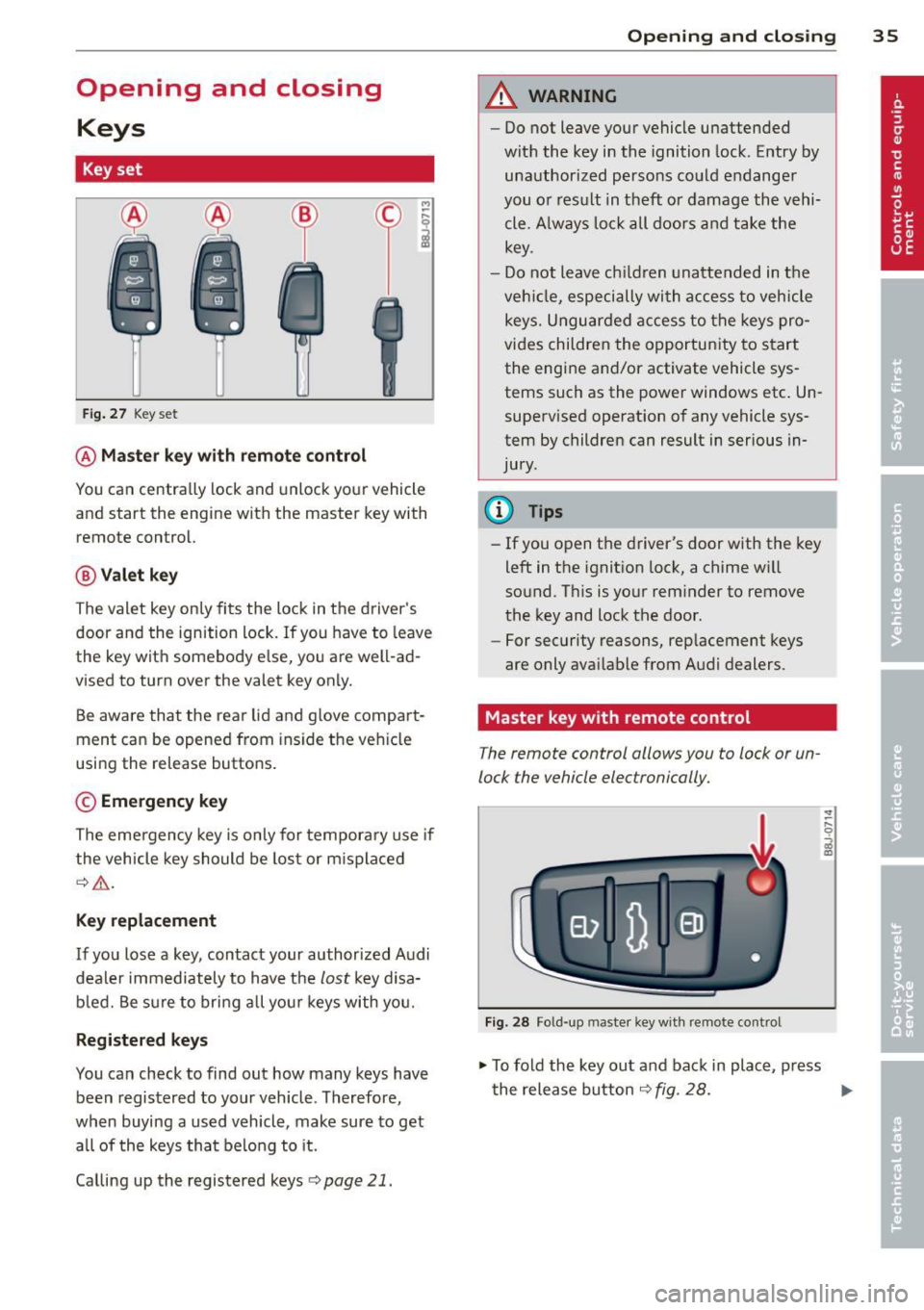
Fig. 27 Key set
@Master key with remote control
M
-~
il
You can centrally lock and unlock your vehicle
and start the engine with the master key with
remote control.
@ Valet key
The valet key only fits the lock in the d river's
door and the ignition lock. If you have to leave
the key with somebody e lse, yo u are well -ad
vised to turn over the valet key only.
Be aware that the rear lid and g love compa rt
ment can be opened from ins ide the vehicle
using the release buttons .
© Emergency key
The emergency key is only for temporary use if
the vehicle key should be lost or m isplaced
¢ .&,.
Key replacement
If you lose a key, contact your authorized Audi
dealer immediately to have the
lost key d isa
bled. Be sure to bring all your keys with you.
Registered keys
You can check to find out how many keys have
been registered to your veh icle . Therefore,
when buying a used vehicle, make sure to get all of the keys that belong to it.
Calling up the registered keys¢
page 21.
Opening and closing 35
A WARNING
-Do not leave your vehicle unattended
with the key in the ignition lock. Entry by
unauthorized persons could endanger
you o r result in theft or damage the vehi
cle. A lways lock all doors and take the
key.
- Do not leave ch ildren unattended in the
veh icle, especially with a ccess to vehicle
keys. Unguarded access to the keys pro
vides children the opportunity to start
the engine and/or activate vehicle sys
tems such as the power windows etc . Un
supervised operation of any vehicle sys
tem by children can result in serious in
jury.
(0 Tips
- If you open the driver's door with the key
left in the ignit ion lock, a chime w ill
sound. Th is is your reminder to remove
the key and lock the door .
- For security reasons, rep lacement keys
are only avai lable from Audi dealers.
Master key with remote control
The remote control allows you to lock or un
lock the vehicle electronically.
Fig. 28 Fo ld-up mas ter key with remote contro l
.,. To fold the key out and back in place, press
the release button ¢
fig. 28. ..,.
Page 38 of 260
36 Opening and clo sing
The transmitter and battery are located in the
head of the remote control. The receiver is lo
cated inside the vehicle. The maximum effec
tive range depends on several things . Remem
ber, if the battery is weak, the effective range
decreases .
If you need to replace the remote contro l, or if
you need to have it repaired, you must see
your authorized Audi dealer. Only then can
you use the key again .
@ Tips
-If the ignition is sw itched on, the remote
control system is deact ivated .
- The remote control system can be affect
ed by other systems operating in the
same frequency range close to the vehi
cle, such as mob ile telephones, televi
s ion broadcasting stat ions, etc.
- For Decla rat ion of Compliance to United
States FCC and Industry Canada regula
tions
~ page 244.
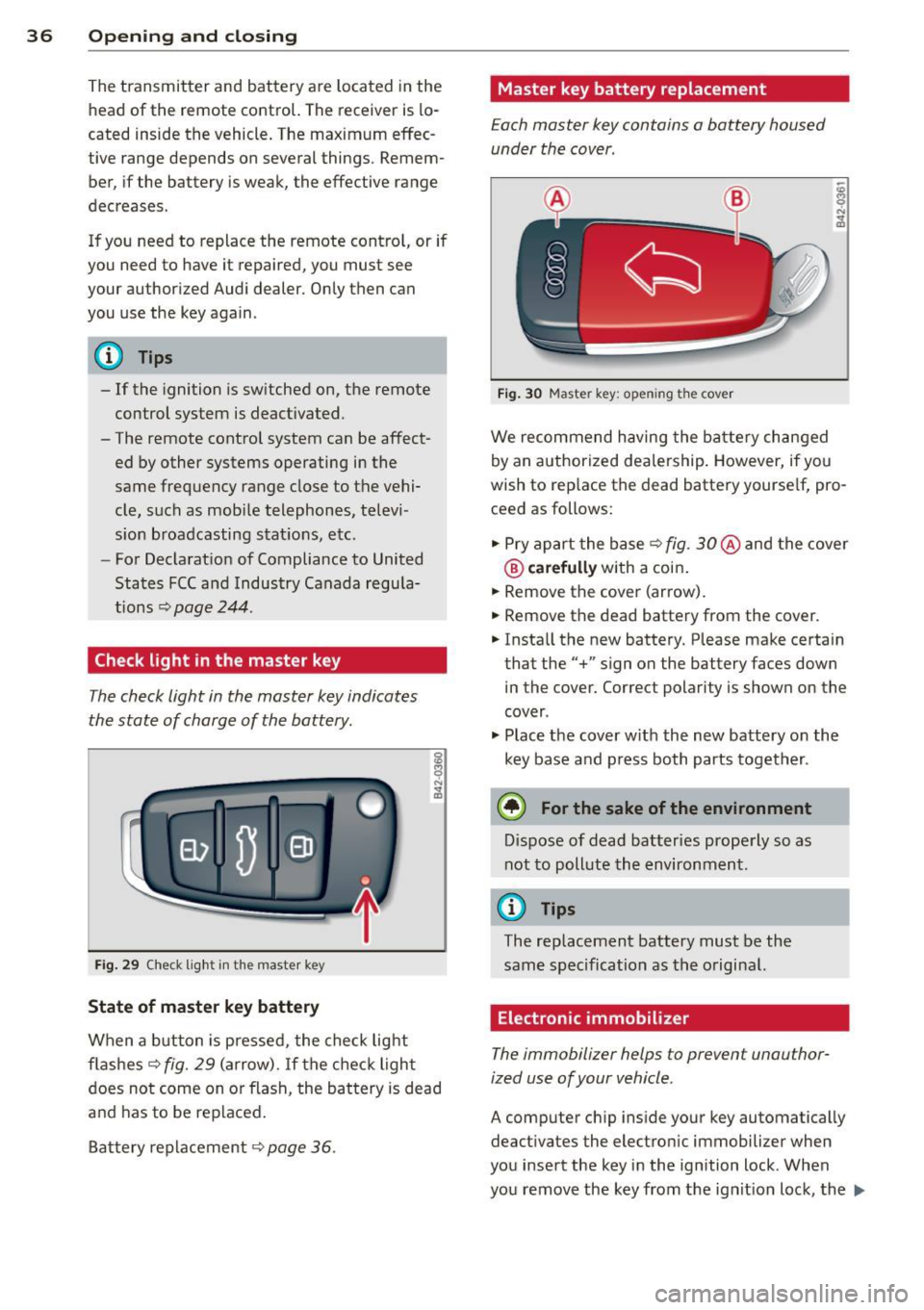
Check light in the master key
The check light in the master key indicates
the state of charge of the battery .
Fig. 29 Che ck lig ht in the maste r key
State of master key battery
When a button is pressed, the check lig ht
flashes
c::> fig. 29 ( a rrow) . If the check light
does not come on or flash, the battery is dead
a nd has to be replaced.
B attery replacement
c::> page 36.
Master key battery replacement
Each master key contains a battery housed
under the cover .
Fig . 30 Master key: open ing the cover
We recommend having the ba tte ry ch anged
by an authorized dealership . However, if you
wish to rep lace the dead battery yourse lf, pro
ceed as follows:
" Pry apart the base
c::> fig. 30 @ and the cove r
® carefully with a coin .
" Remove the cover (arrow) .
" Remove the dead battery from the cover.
" Insta ll the new battery. Please make certain
that the" +" sign on the battery faces down
in the cover. Correct polarity is shown on the
cover .
" Plac e th e cover w it h the new battery o n the
key base and p ress both parts together.
@ For the sake of the environment
D ispose of dead batteries properly so as
not to poll ute the environment.
(0 Tips
The replacement battery must be the
sam e spec ificat ion as the o riginal.
Electronic immobilizer
The immobilizer helps to prevent unauthor
ized use of your vehicle .
A computer chip inside your key automatically
deactivates the electro nic immobilizer when
you insert the key in the ignition lock . When
you remove the key from the ignit ion lock, the
Ill>
Page 39 of 260
electronic immob ilizer is a utomat ically acti
vated once again.
A WARNING -
Always take the key with you when you
leave the ve hicle. The key can disarm the
elect ronic engine immobilizer and pe rm it
an unauthor ized person to start the engine
an d ena ble ope rat io n of t he vehicle sys
t ems s uch as powe r wi nd ow or pow er to p
leadi ng to se rious pe rsonal injury.
@ Tips
- The vehicle ca nnot be s tarted if an unau
thoriz ed key is used . The ve hicle may not
star t if another radio device such as a key
fo r anot her vehicle o r a transpo nder is
l oc ated on the key ring.
- Fo r D ecl arat io n of Compliance to United
Sta tes FCC a nd Indus try C anada regul a
tions¢
page 244.
Power locking system
General description
The power locking system locks or unlocks all
doors simultaneously.
The power locking system i n your ve hicle in
corporates the fo llow ing functions :
- C entral lo ck ing func tion
- Remote contro l feature ~
page 35.
- Ant i-Theft Alarm System ¢ page 42.
All the doors and the rear lid are locked by the
centra l locking system when you lock the vehi
cle .
The unlocking and lock ing mode * can be
changed in the driver i nformation system
¢page 21.
Unlocking the vehicle
You can un lock the vehicle from outsi de either
by using the remote control
or by inserting
and turning the key in the driver's door lock.
When you
unlock your ve hicle:
Opening and clo sin g 37
- The ant i-theft a larm system is deactivated
briefly.
- The vehi cle i nterior ligh ts illum inate for ap
proximately 3 0 seconds.
- All turn s ignal lights w ill fla sh twice when
the ca r is u nlocked .
- Aft er u nlocking the vehicle, you have 30 sec
onds to open a door or the rear lid . After 3 0
seconds, the vehicle a utomat ica lly locks and
the anti-theft a la rm system activates aga in .
T he re ar lid can be locked or unlocked e ither
by using the remote cont ro l
or by inse rting
and tu rning the key in the drive r's door lock.
U nlocking the vehicle with the remote cont ro l
,;::::::5 will on ly unlock the rear lid, to open it, the
li d handle needs to be pressed.
Locking the vehicle
You can lock the veh icle from outs ide either by
u sing the remote control
or by inse rting and
turning the key in the drive rs's door lock.
When you
lock the veh icle:
- All doors an d the rear lid are loc ked .
- All turn s ignal lig hts will flash o nce w hen
t he ca r is lo ck ed .
- The ant i-theft a la rm sys tem is ac tiva ted.
The ho rn of the anti- theft alarm sys tem w ill
so und and the an ti-the ft ala rm system read
iness light, located in the center of the in
st rument panel be low the w indshield on the
r ight side of the a ir vent , will start to blin k.
- The vehicle interior lights turn off .
Automatic locking*
The au toma tic lo cking fea ture locks a ll the ve
hicle doors and the re ar lid w hen you drive
faste r than
9 mph (15 km/ h).
You can unlock t he veh icle from the inside by:
- removing the key from the ignition switc h
(t he vehicle w ill automatically un lock itself)
or
- pressing the unlock part of the power lock
sw itch
€1) or
pull ing the door handle (to open the door).
Page 40 of 260
38 Opening and clo sing
If you wish, you can have an authoriz ed Audi
deal er conv ert your power doo r lock syst em to
automatic lo cking .
.&_ WARNING
-When you lock your vehicle from outside,
nobody- especially children -should re
ma in ins ide the veh icle . Remember,
when you lock the vehicle from the out
side the windows cannot be opened from
the inside .
- When you leave the vehicle , always re
move the ignition key and ta ke it with
yo u. T his wi ll prevent pa ssengers ( chil
dre n, for examp le) from accidenta lly be
ing locked in the veh icle should they acci
dentally press the power locking switch.
- Do no t leave children ins ide the veh icle
unsupervised . In a n emergency it would
be impossib le to open the doors from
the outside w ithout the key .
(D Tips
-In the even t of a c rash with airbag de
ployment all locked doors will be auto
matically unlocked to give access to t he
vehicle occupants from the outside .
- If the power lock ing system should ma l
funct ion, you can lock each door indiv id
u a lly using the vehicle key .
- If the power locking system should fail,
you can still open the fue l tank f lap in an
emergency
c::;, page 177.
- You are we ll advised not to keep valua
bles inside an unattended vehicle, visib le
o r not. Even a properly locked vehicle
ca nnot provide the security of a safe!
Unlocking and locking the vehicle with
the remote control
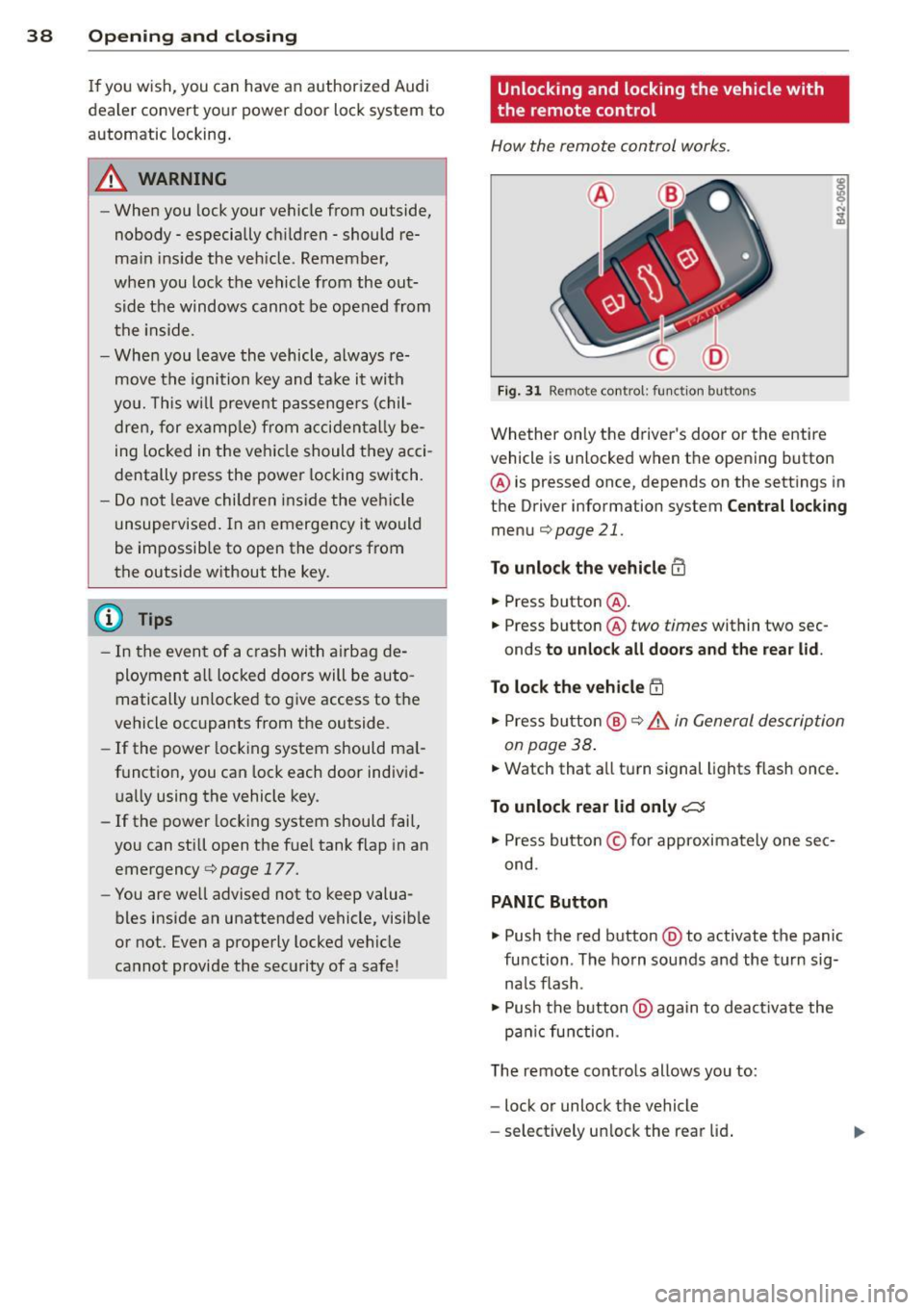
How the remote control works .
Fig . 31 Remo te control : fun ction bu ttons
Whether on ly the driver's door o r the entire
vehicl e is unlocked when t he opening button
@ is pressed once, depends on the sett ings in
t h e Driver information system
Cent ral lock ing
menu c::;,page 21.
To unlock the vehicle m
• Press button @.
• Press button @
two times within two sec
onds
to unloc k all doors and the rea r lid .
To lock th e vehicle !'.D
• Press bu tton @ c::;, .&. in General de scription
on page 38 .
• Watch that a ll turn signal lights f lash once.
To unlock rear lid only C:5
• Press button © for approximately one sec
ond .
PANIC Button
• Push the red button @to activate the panic
function . The ho rn sou nds and the t urn sig
na ls flash .
• Push the b utton @again to deact ivate the
pa nic function .
T he remote cont ro ls allows you to:
- lock or unlock the vehicle
- se lect ively un lock the rear lid .
Page 41 of 260
The turn signals will flash briefly whenever
you lock or unlock the vehicle. Also, the interi
or light will come on or go
off whenever you
open or clo se the driver 's door .
The transmitter and battery are located in the head of the remote control. The r eceiver is lo
cated inside the vehicle. The maximum effec
tive range depends on several things. Remem
ber, if the ba ttery is weak, the effec tive range
decreases .
T he remote-control key contains a fold-o ut
key that you can use to manu ally lock or un
lock the vehicle and to start the engine .
If you need to replace the remote contro l, or if
you need to have it repaired, you must see
your author iz ed Audi dealer. Only then can
you use the key again.
A WARNING
Read and follow all WARNINGS¢.&. in
General description on page 38 .
{!) Tips
-The remote control key is automatica lly
deactivated when the ignition is switch
ed on .
-
-The operation of the remote control key
can be temporarily disrupted by interfer
ence from transmitters in the v icin ity of
the veh icle work ing in the same frequen
cy range (e.g. a ce ll phone, radio equip
ment) .
- In order to make sure the locking func
tion is working, you shou ld always keep
your eye on the vehicle to make sure it is
proper ly locked.
- Do n ot use t he remo te control if you are
i nside the car, otherwise yo u may unin
tentiona lly lock the ve hicle, and then you
would set
off the anti-theft ala rm when
you try to start the engine or open a
door. In case this happens anyhow, push
the un lock button
m .
- Use the panic funct ion only if you are in
an emergency situation .
Openin g an d clos ing 39
Resetting the remote control
T he remote control must be reset if the vehi
cle does not unlock .
.,. Press the unlock 0 button on the remote
control.
.,. Unlock or lock the ve hicle once at the door
lock using the stem of the remote control
key.
The synchronization process must not take longer than 30 seco nds .
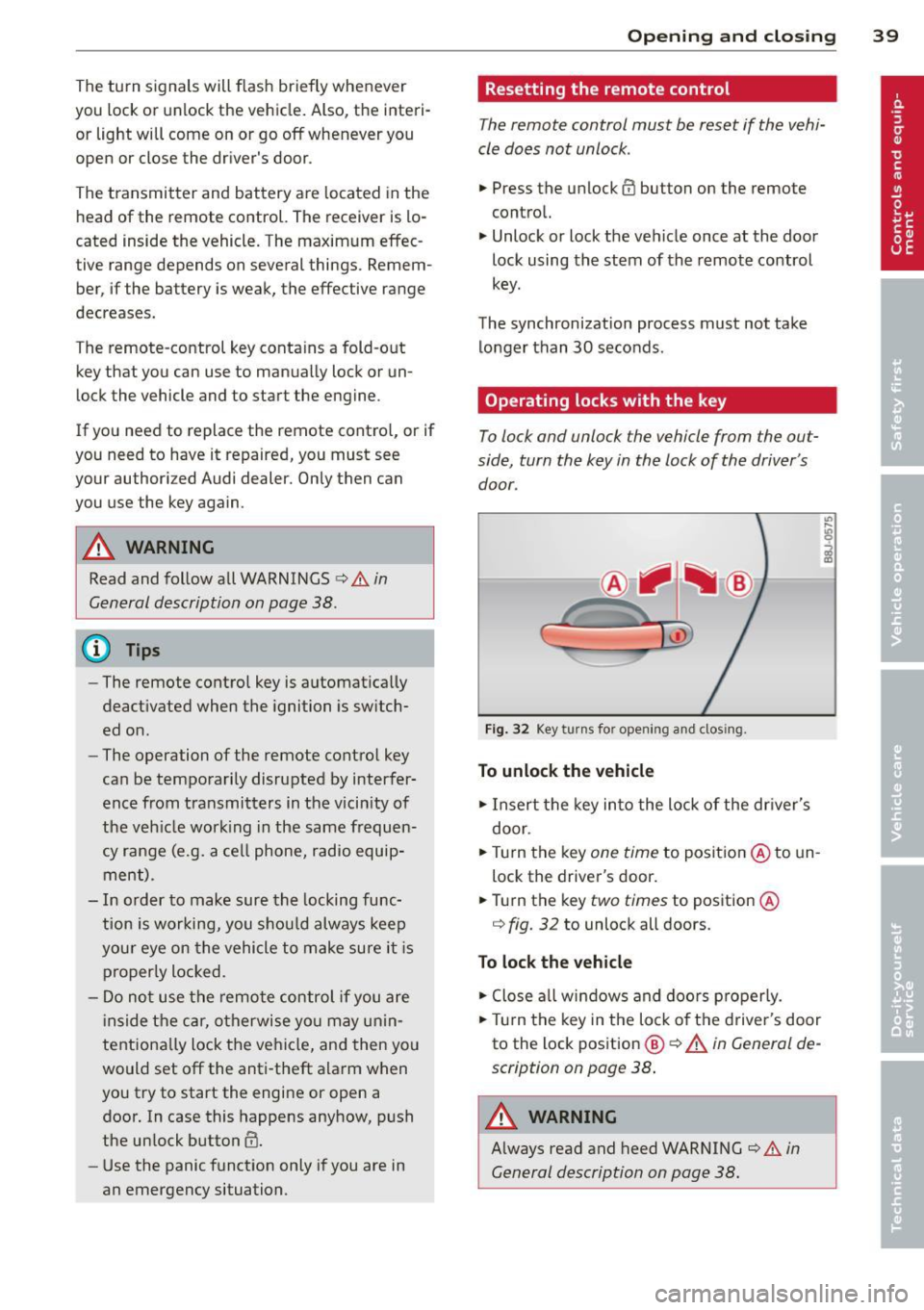
Operating locks with the key
To lock and unlock the vehicle from the ou t
side, turn the key in the lock of the driver's
door .
® ifijiilil @
c_c~ ~~......- 1_J2)
Fig . 32 Key turn s fo r open ing an d clos ing.
To unlock the vehicle
.,. Insert the key into the lock of the dr iver's
door .
.,. Tu rn the key
one time to position @to un
lock the driver's door .
.,. Turn the key
two times to position @
¢
fig. 32 to unlock all doo rs .
To lock the vehicle
.,. Close a ll w indows and doo rs p roperly.
.,. Tu rn the key i n the lock of t he driver's door
to the lock pos ition
@ ¢ A in General de
scription on page 38 .
A WARNING
~ -
Always read and heed WARNING¢.&. in
General description on page 38.
Page 42 of 260
40 Opening and closing
locking and unlocking the vehicle from
inside
The vehicle can be locked or unlocked from
the inside using the power locking switch.
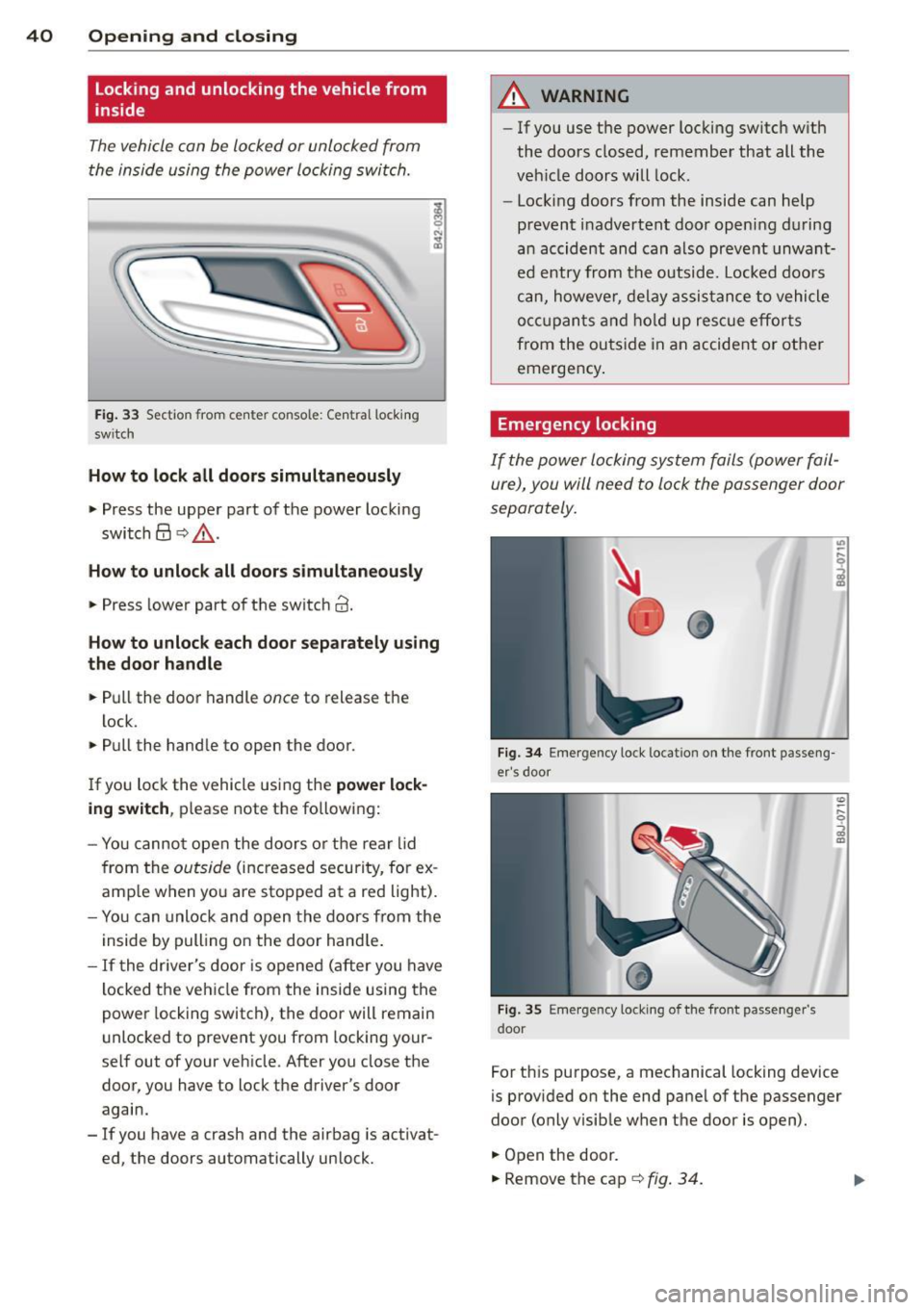
Fig. 33 Section from center console: Cent ral locking
sw itch
How to lock all doors simultaneously
,.. Press the upper part of the power locking
switch@ c::>.&, .
How to unlock all doors simultaneou sly
,.. Press lower part of the switch @.
How to unlock each door separately using
the door handle
,.. Pull the door handle once to release the
lock.
,.. Pull the handle to open the door.
If you lock the vehicle using the
power lock
ing switch,
please note the fo llowing:
- You cannot open the doors or the rear lid
from the
outside (increased security, for ex
amp le when you are stopped at a red light).
- You can unlock and open the doors from the
inside by pulling on the door handle .
- If the driver 's door is opened (after you have
l ocked the vehicle from the inside using the
power locking switch), the door will remain
unlocked to prevent you from locking your
self out of your vehicle. After you close the door, you have to lock the driver 's door
again.
- If you have a crash and the airbag is activat
ed, the doors automatically unlock.
A WARNING
-- If you use the power locking switch with
the doors closed, remember that all the
veh icle doors will lock.
- Locking doors from the inside can help
prevent inadvertent door opening during
an accident and can also prevent unwant
ed entry from the outside. Locked doors
can, howeve r, delay assistance to vehicle
occ upa nts and hold up rescue efforts
from the outside in an accident or other
emergency .
Emergency locking
If the power locking system fails (power fail
ure), you will need to lock the passenger door
separately.
Fig. 34 Eme rge ncy lock locat ion on the front passeng
er's door
Fig. 35 E merge ncy locki ng of the front passenger 's
doo r
For this purpose, a mechanical locking device
is provided on the end pane l of the passenger
door (only visible when the door is open).
,.. Open the door.
,.. Remove the cap
c::> fig. 34.
Page 43 of 260
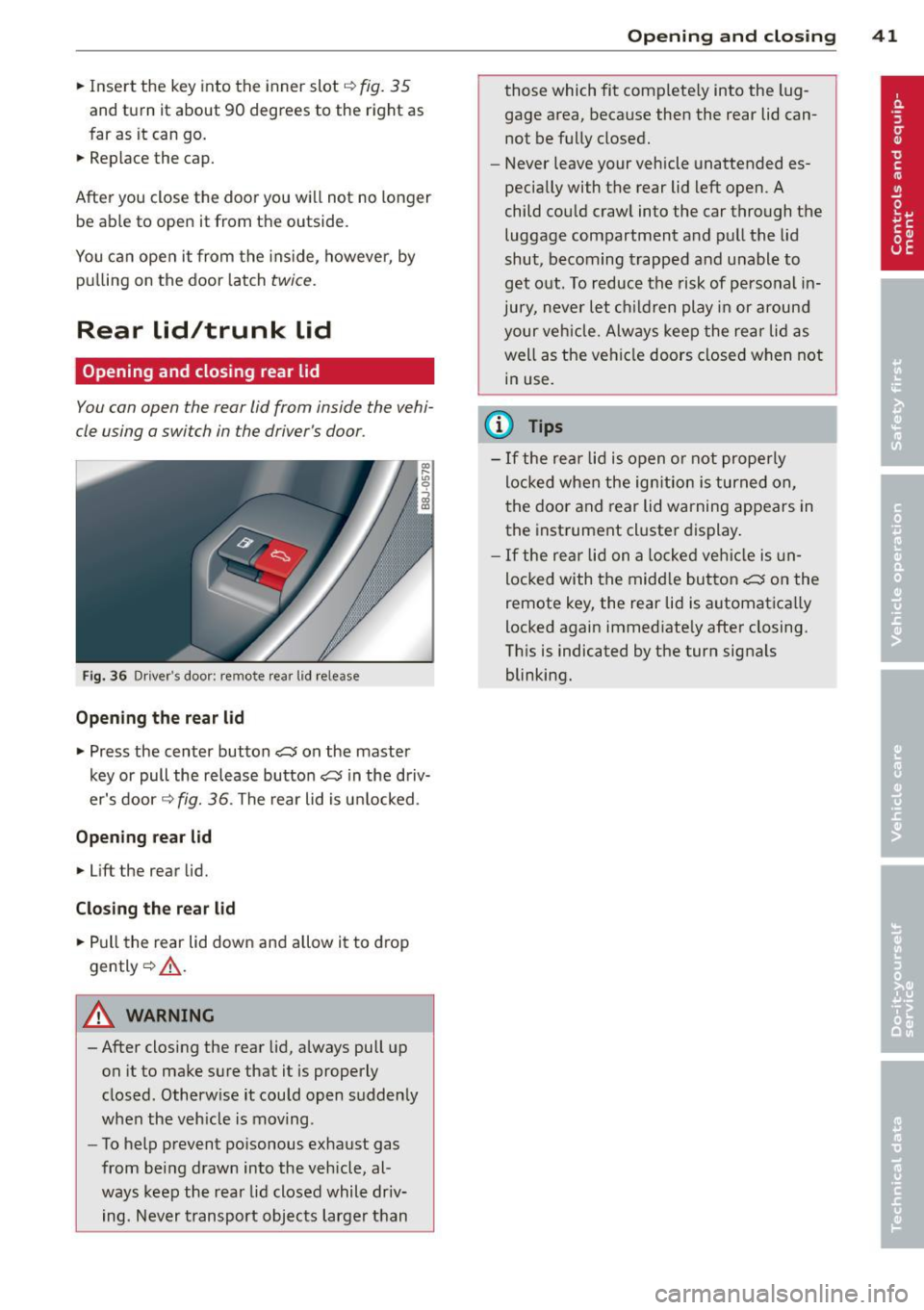
.. Inse rt the key into the inner slot ~ fig. 35
and turn it about 90 degrees to the right as
far as it can go.
.. Replace the cap.
After you close the door you will not no longer be ab le to open it from the outside.
You can open it from the ins ide, however, by
pu lling on the door latch
twice .
Rear lid/trunk lid
Opening and closing rear lid
You con open the rear lid from inside the vehi
cle using o switch in the driver's door .
Fig. 36 Driver 's door : remote rear lid re lease
Opening th e re ar lid
.. Press the center button cs on the master
key or pull the release butto n
cs in the driv
er's door ¢
fig. 36. The rear lid is u nlocked.
Opening rear lid
.. Lift the rear lid.
Cl os ing th e re ar lid
.. Pull the rear lid down and a llow it to drop
gently ¢,&. .
A WARNING
-After closing the rear lid, always pull up
on it to make sure that it is properly
closed . Otherw ise it could open sudden ly
when the veh icle is mov ing .
- To help prevent po isonous exhaust gas
from being drawn into the vehicle, al
ways keep the rear lid closed while dr iv
ing. Never transport objects larger than
Op enin g an d clos ing 41
those which fit completely into the lug
gage area, because then the rear lid cannot be fully closed .
- Never leave your vehicle unattended es
pecially with the rear lid left open. A
child could crawl into the car through the
luggage compartment and pull the lid
shut, becoming trapped and unable to
get out. To reduce the risk of personal in
jury, never let children play in or around
your veh icle. Always keep the rear lid as
well as the vehicle doors closed when not
in use.
(l} Tips
- If the rear lid is open o r not properly
locked when the ig nition is turned on,
t he door and rear lid warning appears in
the instrument cl uster display .
- If the rear lid on a locked veh icle is un
locked with the midd le button
cs on the
remote key, the rear lid is automatica lly
locked again immediate ly after closing.
Th is is indicated by the turn signals
blinking.