warning lights AUDI TT ROADSTER 2011 User Guide
[x] Cancel search | Manufacturer: AUDI, Model Year: 2011, Model line: TT ROADSTER, Model: AUDI TT ROADSTER 2011Pages: 260, PDF Size: 64.11 MB
Page 34 of 260

32 Driver information system
Engine oil level OK
If th e . symbol st arts flashin g ag ain eve n
though the engine oil leve l checks O K on the
dip stick,
do not start driving again and do
not let the engine run at idle .
Instead, con
tact your author ized Audi dealer for assis
tance.
@ Tips
- The engine oil pressure symbol. is
not an indicator for a low engine oil lev
el. Do not rely on it. Instead , check the
oil level in your engine at regular inter
vals, preferably each time you refuel,
and always before going on a long trip.
- The yellow oil level warning indication
II requires oil refill or workshop serv
ice without delay. Do not wait until the
red oil pressure warning symbol.
starts to flash before you respond to
the low oil level warning
II . By then,
your engine may already have suffered
serious damage.
fl) Fuel supply too low
When the (i1 symbo l ill uminates, this means
there are about 2.6 gallons (10 liters) of fue l
left i n the fuel tank . Time to ref uel!
r::;, page 17 5 .
If the symbol lights up, even when t he re is
ample fuel in the tank, and the text
Tank sys
tem malfunction! Please contact workshop
a ppears in the d isplay, there is a fault in the
sys tem. Contact a qualified wor ksh op to have
the fau lt rectified.
'l=:11 , Checking the engine oil level
II! Please add max . 1 qt of engine oil!
If th e II sy mbo l comes o n, add 1 quart( ! li
ter) of o il at t he nex t oppor tunity
<::;,page 183.
1) - : USA mod els onl y
~ Checking the engine oil level
W hen the Ill symbol illum ina tes, check t he
engi ne oil leve l as soon as po ssibl e
r::;, page 183 . Top off t he oil at your ear liest
oppo rtunity
<::;, page 183 .
~.,., Engine oil sensor defective
If the II symbol illum inates, contact yo ur
autho rized Aud i dea le r and have the oil senso r
i nspected .
{0) Worn brake pads
&J Brake pads!
If the warning light i lluminates, immed iate ly
contact your a uthori zed Audi d ealer or quali
fied works hop to have all b rake pads i nspect
ed. On USA mode ls t he war ning ligh t
&J
comes on together w ith the warning light
1111 . Bot h set s of bra ke pads o n an ax le
mu st al ways be re place d at th e same time.
A WARNING
Driving w ith bad bra kes ca n ca use a colli
sion and ser io us perso nal in jury.
- If th e warni ng light
&J an d th e warn ing
lig ht
11111> with t he mess age Brake
pads!
comes o n in the ins trum en t cluste r
d isp lay, immediate ly co ntact you r au
th orized A udi dealer or qualif ied work
shop to have all b rake pads checked or
re placed if nec essary.
0 /8 Speed warning 1
If the [i (USA models)l [i) (Canada mode ls)
symbol illum ina tes, this m ea ns you a re d riv
i ng fas ter than t he set vehicle speed . S low
down!
r::;, page 26.
-
Page 39 of 260
electronic immob ilizer is a utomat ically acti
vated once again.
A WARNING -
Always take the key with you when you
leave the ve hicle. The key can disarm the
elect ronic engine immobilizer and pe rm it
an unauthor ized person to start the engine
an d ena ble ope rat io n of t he vehicle sys
t ems s uch as powe r wi nd ow or pow er to p
leadi ng to se rious pe rsonal injury.
@ Tips
- The vehicle ca nnot be s tarted if an unau
thoriz ed key is used . The ve hicle may not
star t if another radio device such as a key
fo r anot her vehicle o r a transpo nder is
l oc ated on the key ring.
- Fo r D ecl arat io n of Compliance to United
Sta tes FCC a nd Indus try C anada regul a
tions¢
page 244.
Power locking system
General description
The power locking system locks or unlocks all
doors simultaneously.
The power locking system i n your ve hicle in
corporates the fo llow ing functions :
- C entral lo ck ing func tion
- Remote contro l feature ~
page 35.
- Ant i-Theft Alarm System ¢ page 42.
All the doors and the rear lid are locked by the
centra l locking system when you lock the vehi
cle .
The unlocking and lock ing mode * can be
changed in the driver i nformation system
¢page 21.
Unlocking the vehicle
You can un lock the vehicle from outsi de either
by using the remote control
or by inserting
and turning the key in the driver's door lock.
When you
unlock your ve hicle:
Opening and clo sin g 37
- The ant i-theft a larm system is deactivated
briefly.
- The vehi cle i nterior ligh ts illum inate for ap
proximately 3 0 seconds.
- All turn s ignal lights w ill fla sh twice when
the ca r is u nlocked .
- Aft er u nlocking the vehicle, you have 30 sec
onds to open a door or the rear lid . After 3 0
seconds, the vehicle a utomat ica lly locks and
the anti-theft a la rm system activates aga in .
T he re ar lid can be locked or unlocked e ither
by using the remote cont ro l
or by inse rting
and tu rning the key in the drive r's door lock.
U nlocking the vehicle with the remote cont ro l
,;::::::5 will on ly unlock the rear lid, to open it, the
li d handle needs to be pressed.
Locking the vehicle
You can lock the veh icle from outs ide either by
u sing the remote control
or by inse rting and
turning the key in the drive rs's door lock.
When you
lock the veh icle:
- All doors an d the rear lid are loc ked .
- All turn s ignal lig hts will flash o nce w hen
t he ca r is lo ck ed .
- The ant i-theft a la rm sys tem is ac tiva ted.
The ho rn of the anti- theft alarm sys tem w ill
so und and the an ti-the ft ala rm system read
iness light, located in the center of the in
st rument panel be low the w indshield on the
r ight side of the a ir vent , will start to blin k.
- The vehicle interior lights turn off .
Automatic locking*
The au toma tic lo cking fea ture locks a ll the ve
hicle doors and the re ar lid w hen you drive
faste r than
9 mph (15 km/ h).
You can unlock t he veh icle from the inside by:
- removing the key from the ignition switc h
(t he vehicle w ill automatically un lock itself)
or
- pressing the unlock part of the power lock
sw itch
€1) or
pull ing the door handle (to open the door).
Page 40 of 260
38 Opening and clo sing
If you wish, you can have an authoriz ed Audi
deal er conv ert your power doo r lock syst em to
automatic lo cking .
.&_ WARNING
-When you lock your vehicle from outside,
nobody- especially children -should re
ma in ins ide the veh icle . Remember,
when you lock the vehicle from the out
side the windows cannot be opened from
the inside .
- When you leave the vehicle , always re
move the ignition key and ta ke it with
yo u. T his wi ll prevent pa ssengers ( chil
dre n, for examp le) from accidenta lly be
ing locked in the veh icle should they acci
dentally press the power locking switch.
- Do no t leave children ins ide the veh icle
unsupervised . In a n emergency it would
be impossib le to open the doors from
the outside w ithout the key .
(D Tips
-In the even t of a c rash with airbag de
ployment all locked doors will be auto
matically unlocked to give access to t he
vehicle occupants from the outside .
- If the power lock ing system should ma l
funct ion, you can lock each door indiv id
u a lly using the vehicle key .
- If the power locking system should fail,
you can still open the fue l tank f lap in an
emergency
c::;, page 177.
- You are we ll advised not to keep valua
bles inside an unattended vehicle, visib le
o r not. Even a properly locked vehicle
ca nnot provide the security of a safe!
Unlocking and locking the vehicle with
the remote control
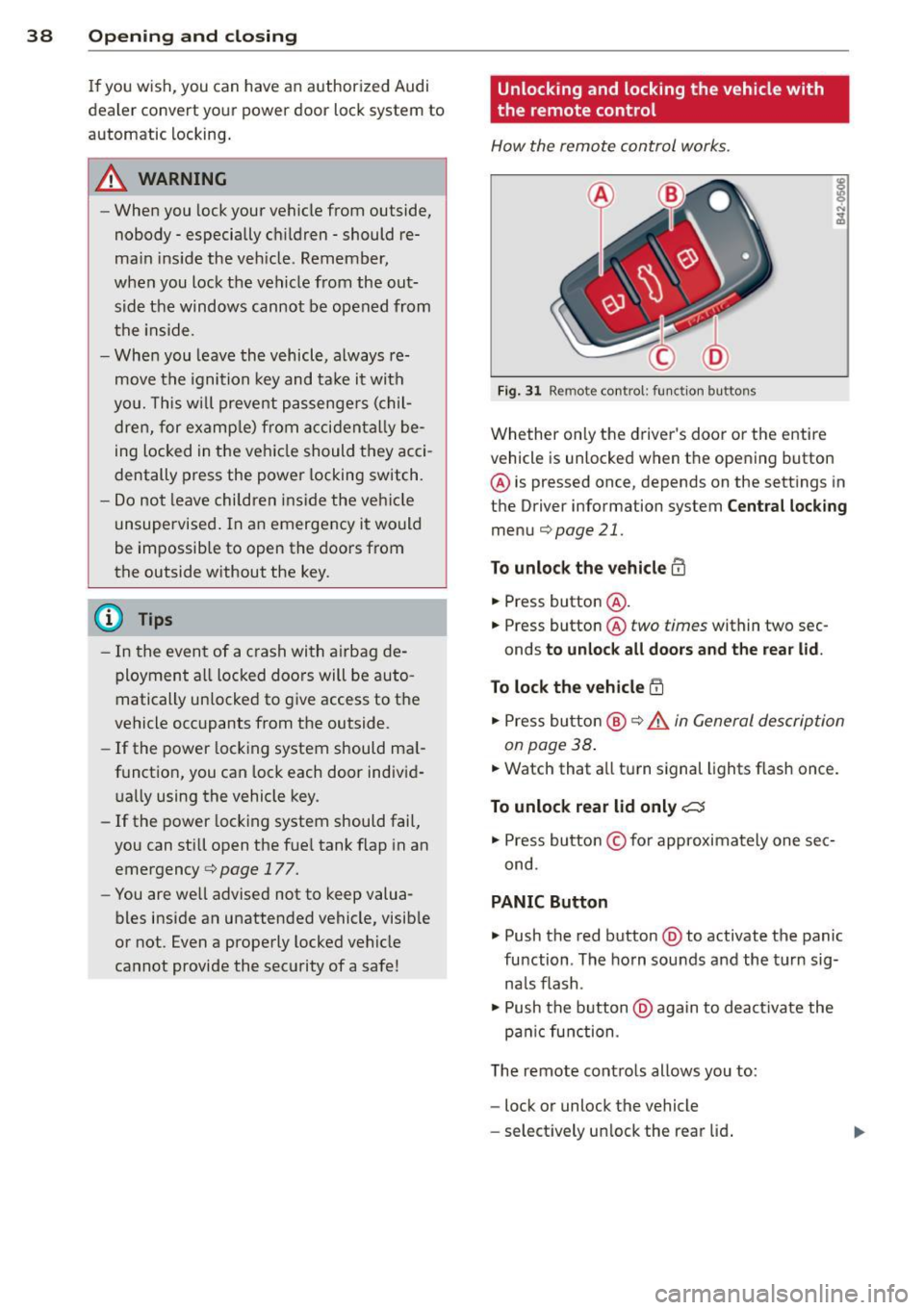
How the remote control works .
Fig . 31 Remo te control : fun ction bu ttons
Whether on ly the driver's door o r the entire
vehicl e is unlocked when t he opening button
@ is pressed once, depends on the sett ings in
t h e Driver information system
Cent ral lock ing
menu c::;,page 21.
To unlock the vehicle m
• Press button @.
• Press button @
two times within two sec
onds
to unloc k all doors and the rea r lid .
To lock th e vehicle !'.D
• Press bu tton @ c::;, .&. in General de scription
on page 38 .
• Watch that a ll turn signal lights f lash once.
To unlock rear lid only C:5
• Press button © for approximately one sec
ond .
PANIC Button
• Push the red button @to activate the panic
function . The ho rn sou nds and the t urn sig
na ls flash .
• Push the b utton @again to deact ivate the
pa nic function .
T he remote cont ro ls allows you to:
- lock or unlock the vehicle
- se lect ively un lock the rear lid .
Page 56 of 260

54 Clear vision
light sensor checke d as soon as possi ble at a
d ea le rship.
Com ing home /le aving home function *
The function is switched on when the switch is
i n the AU TO* position and the function is
shown as active in the driver info rmation sys
tem .
The
co ming h om e function illuminates the
a rea around the veh icle when the ig nition is
switc hed off and the driver 's door is opened.
The length of time the lights remain on can be set in the menu display
( Illumin ation > Exte
r io r light s> co ming hom e).
The leaving home function i lluminates the
area around the vehicle when unlock ing it.
A WARNING
- Never use daytime running lights to see
where you are going. They are not bright
enough and w ill not let you see far
enough ahead for safety, especially at
dusk or when it is dark. Always switch on
the low beams at dusk or when it is dark.
- Automatic headlights are only intended
to assist the dr ive r. They do not relieve
the driver of his responsibility to check
the headlights and to tu rn them on man
ually according to the current light and
visibili ty cond itions. Fo r example, fog
and rain cannot be detected by the light
sensors . So a lways switch on the head
lights under these weather cond itions
and when driving in the dark
io.
- Crashes can happen when yo u cannot see
the road ahead and when you cannot be seen by other motorists .
- Always turn on the headlights so that
you can see ahead and so tha t others
can see yo ur ca r from the bac k.
- With the switch in
AUTO front fog lights
ca nnot be t urned on in addition .
- The light sensor for headlight control is
l ocated in the rear view m irror mount .
Do no t apply a ny stickers to the w ind- shield in this area to prevent malfunc
tions or fa ilures.
- Some exter io r li ght ing funct ions can be
adjusted in the driver informat ion sys
tem
~ page 21.
- If you remove the ignition from the igni
tion lock while the headlights are still
on, a buzzer wi ll sound as long as the
dr iver's door is open to rem ind you to
turn off the lights.
- Always observe the specif ic loca l regu la
tions for your area as to when to use your
lights.
- With automatic headlights, the high
beam funct ion is also available, but wit h
one restrict ion: If you have not switched
the high beams back to low beams dur
ing automatic headlight operation (fo r
example, after d rivi ng through a tunnel) ,
only the low beams come on the nex t
t ime au tomatic headlights are swi tched
on. To use the high beams, you first have
to pull the high beam lever back and
then push the lever forward again.
- In cool or damp weather, the inside of
the headlig hts, turn signals and tail
lights can fog over due to the tempera
t u re difference between the inside and
outside. They w ill clear shortly after
switching them on. This does not affect
the se rv ice life of the lig hting .
Adaptive light
Applies to veh icles: w ith Adapt ive Light
When driving around bends, the relevant area
of the road is better illuminated.
F ig . 59 Adapt ive li ght w hen dr iv in g
Page 60 of 260

58 Clear vis ion
Mirrors
Manual glare dimming
Standard sett ing
.,. Move the small lever (located on the bottom
edge of the mirror) to the front .
Anti-glare setting
.,. Move the small lever (located on the bottom
edge of the mirror) to the rear.
Automatically dimming inside mirror
App lies to vehicles: with automat ically dimming inside
rearview mirror
The automatic dimming function con be
turned on and off if required.
Fig. 66 Inside rea rvi ew mir ror, d ig ita l compass ac tivat
ed: a uto dimmin g on/off b utt o n an d indicator ligh t
Disabling auto dimming
.,. Press button @briefly, -the gree n indicator
l ight @ goes out .
Activating /reactivating auto dimming
.,. Press button @briefly, -the green indicator
light @goes on.
Automatic dimming function
The a utomatic dimming function is activated
every time the ignition is turned on. The green indicator light is lit to indicate auto dimming
is active .
When dimming is activated, the inside mirror
will darken
automa tically in response to the
amount of light str ik ing the m irror (such as
headlights from rearwa rd approaching veh i
cles) . Even in dimming mode, the mirror su r
face turns bright when: -
the interior lig ht is switched on
- reve rse ge ar is engaged.
Sensors for automatic headlights*
With the he lp of the se nsors i n the mir ror,
whe n the light switch is in the
AUTO posit ion,
t h e low beams a re sw itc hed on an d off auto
matically de pending on the ambient light co n
di tions
q page 53 .
.&_ WARNING
Broken g lass o f aut oma tic dimm ing mir ror
ca n cause electrolyte f luid lea kage . Elec
trolyte f luid can irritate skin, eyes , and res
pirato ry system.
- Repeated or prolonged ex posu re to e lec
trolyte can cause irritation to the respira
tory system , especially among people
wit h asthma or other resp iratory condi
tions . Get fresh air immediately by leav
i n g the veh icle o r, if that is no t possib le,
op en w indows and doo rs all the way.
- If electroly te gets into the eyes, flus h
them thorough ly with large amounts of
clean water fo r at least 15 minu tes;
m edical attenti on is recom mend ed.
- I f electrolyte contac ts skin, fl ush affect
e d area w ith clean wate r fo r at lea st 15
minu tes and t hen wa sh affected area
wit h soap an d wate r; medical atte ntion
is recommended . Thoro ughly wash af
fected clothi ng and shoes before re use .
-If swallowed and person is conscious,
rinse mout h with water for at least 15
m inutes . Do not induce vomiting unless
instr ucted to do so by medica l professio
na l. Get medical attention immediately.
(D Note
Liq uid electrolyte leaked from a broke n
mir ro r glass w ill damage any plastic s urfa
ces it comes in contact with. Clean up sp il
l ed e lectrolyte immed iate ly w ith clear wa
ter and a sponge .
(!} Tips
-If you switch off the automatic dim
ming funct ion on the inside mirror ,
Page 61 of 260

automatic dimming of the o uts ide m ir
r or s will likewise be di sabled .
-Check to make sure there are no objects
preventing light from reaching the inside
mirror.
- Do not attach any sticke rs to the wind
shield in front of the two light sensors,
as this would interfere with both the au
tomatic operation of the headlights and
the automatic dimming of the inside mir ror(s).
Outside mirrors
The outside mirrors ore electrically adjusted.
Fig. 67 Forward section of drive r's armrest: power mir
ror contro ls
Adju sting th e outside mirror s
• Turn the adjusting knob to posit ion ©
Q fig. 67 to adjust the o utside mirror on the
driver's side .
• Turn the adjusting knob to position ® to ad
just the outside mirror on the passenger
side.
• Press the knob in the appropriate direction
to move the mirror surface so that you have
a good view to the rear.
Heated mirro rs
• Turn the knob to posit ion @.
Depending on the outside temperature, the
mirror surfaces are heated until the ignition is
switched off -even if the knob is no longer in
position @. You are well-advised to fold the
outs ide mirrors in when maneuvering in tight
spaces or when leaving the car parked close to
other veh icles.
Clear vi sion 59
(D Note
- Curved ( i.e. convex) mirror s urfaces in
crease yo ur field of view. Remember that
vehicles or other objects will appear
smaller and farther away than when
seen in a flat m irror . If you use this mir
ror to estimate distances of following ve
hicles when chang ing lanes, you could
es timate incorrectly and cause an ac ci
dent.
- If the mirror housing is moved uninten
tionally (for examp le, w hile pa rking your
vehicle), then yo u must first fold the m ir
ror elect rically . Do not rea djust the mir
ror housing man ually . You cou ld damage
the motor which controls the mirror .
(D Tips
If there sho uld be a ma lf u nction in the
e lectrica l system, yo u can sti ll adjust the
outside m irrors by pressing the edge of
the m irror.
Automatic dimming for outside mirrors
Applies to vehicles: wit h automatic dimm ing for outside
mirro rs
The outs ide mirrors are dimmed together with
the automatic dimming of the inside mirror .
When the ignition is sw itched on, the mirrors
darken automatically depending on the light
striking them (e .g. headlights from the rear) .
When the interior lighting is switched on and
when reverse gear is engaged, the mirrors are
switched back to the ir original br ightness (not
dimmed) .
A WARNING
Broken glass of automat ic dimming mirror
can cause electrolyte flu id leakage. El ec
trolyte f lu id can ir rit a te skin, eyes, a nd res
p ira to ry system.
- Repeated or prolonged exposu re to e lec
trolyte can cause irritation to the respira
tory sys tem, espe cially among people
wit h asthma or other resp irato ry co ndi -
tions . Get fresh air immediately by
~
Page 63 of 260

come back a while later and drive off, the rain
sensor will reactivate itself after the vehicle
speed has exceeded 4 mph (6 km/h).
The rain sensor* is only activated with the
wiper lever set to position(!). When it starts
to rain, the rain sensor will automatically acti
vate the intermittent wiping mode.
To reduce the sensitivity of the sensor, move
switch @ down. To increase the sensitivity,
move the switch up. The higher you adjust the
sensitivity, the faster the sensor will react
when it senses moisture on the windshield. The pauses between wiper turns depend not
only on the sensitivity setting, but on the ve
hicle speed as well.
During brief stops, e.g . at a red light, wiper
motion will automatically be reduced to the
next lower speed . Wipers already turning at
low speed. change to intermittent wiping.
When the ignition is turned on, the washer
jets are heated .
A WARNING
-Wiper blades are crucial for safe driving!
Only when they are in good condition are
they able to clear the windows properly
to provide uncompromising visibility.
Worn or damaged wiper blades are a
safety hazard ¢
page 63, Replacing
windshield wiper blades!
- The light/rain sensor* is only designed to
assist and support the driver.
It remains
entirely the driver's responsibility to
monitor outside weather conditions and
to manually activate the wipers as soon
as rain or drizzle reduces visibility
through the windshield.
- The windshield must not be treated with
water-repellent materials. They can in
crease glare under poor visibility condi
tions such as wetness, darkness, or when
the sun is low on the horizon. In addi
tion, they can cause the windshield wip
ers to chatter.
Clear vision 61
@ Note
In freezing or near freezing conditions:
- Always check that the wiper blades are
not frozen to the glass before you turn
the wipers on. Loosen a wiper blade
which is frozen in place before operating
the wipers to prevent damage to the
wiper blade or the wiper motor.
- Do not use the wipers to clear a frosted
window. Using the wipers as a conven ient ice scraper will destroy the wiper
blades .
- Before you take your vehicle to an auto
matic car wash, make sure you have the
windshield wiper system switched off (lever in position
0), otherwise the wind
shield wiper system could get damaged
in the car wash if it should suddenly
come on.
@ Tips
-The windshield wipers are switched off
when the ignition is turned off. Activate
the windshield wipers after the ignition
is switched back on by moving the wind
shield wiper lever to any position.
- Worn or dirty windshield wiper blades
cause smearing, which can affect the op
eration of the light/rain sensor*. Check
the condition of your windshield wiper
blades regularly.
-The rain sensor is part of the interval
wiping system. Turning off the ignition
will also deactivate the rain sensor. To re
activate the sensor, switch off the inter
val wiping function, then switch it back
on again.
-Applies to vehicles with light/rain sen
sor: When the wipers are switched on
manually and in rain conditions, the au
tomatic headlights* turn on¢
page 53,
Switching the headlights on and off
or
off during the day when the wipers are
no longer operating. The automatic
headlights* function is available in this
case only when the light switch is in the
"AUTO" position¢
page 53, fig. 57.
Page 83 of 260
You should always lock the steering whenever
you leave your vehicle . This makes a vehicle
theft even more difficu lt ¢ & .
Ignition ke y safe ty lock
After switching off the ignition, the ig nit ion
key can only be removed from the ign ition
l ock when the selector lever is in the "P"
(Park) position . After you have removed the
key, the selector lever is locked and cannot be
moved.
Ignition on @
If it is difficult to turn the key after you have
inse rted it into the ignition lock, turn the
steering whee l back and forth. This will take
the load
off the steering lock mechan ism and
you will be able to turn the key freely and start the engine.
Starting the engin e@
In this position the engine starts . While the
engine is starting, the power supply to the headlights and other e lectr ica l consumers is
tempo rarily interrupted to conserve battery
power . After the engine has started, release
the key and it will return to posit io n @ .
Before the starter can be operated again the
key must be turned back to position@. The
non-r epeat lock prevents you from damag ing
the sta rter when the engine is runn ing .
A WARNING
-Never remove the key from the ign ition
lock whi le the vehicle is moving. The
steering wheel will lock causing loss of
control.
- If you have to leave your ve hicle -even
f or just a m in ute -always remove the ig
ni tion key and take it with you. This is es
pecially important if yo u a re going to
leave chi ldren behind in the vehicle. The
children cou ld start the engine or use
other vehicle controls. Unsupervised use
of vehicle controls (for example, power
windows) can cause serious personal in
jur ies .
-
On th e ro ad 81
(D Tips
If the vehicle battery has been disconnect
ed and then reconnected, then yo u must
l eave the key in posit ion @ for about 5
seconds before you can start the engine.
Starting and stopping
the engine
' Starting the engine
The engine can only be started with an origi
nal Audi key .
.,. Se t the par king brake.
.,. Move the selector lever in P or
N q ,& .
.,. Tu rn the ignition key to position ®
~ page 80, fig. 90 -do not depress the gas
peda l when starting the engine!
.,. Let go of the key as soon as the engine
starts.
A cold engine may at first be loud after it has
been started. This is due to the hydraulic
valves bu ild ing up the oil pressure. Th is nor
mal and no need for concern .
If the engine does not start immediately, stop
trying after 10 seconds and then try to restart
the engine about 30 seconds later.
A WARNING
-Never start or let the eng ine run in a con-
fined o r enclosed area . Exhaust fumes
from the engine contain carbon monoxide,
a colorless and odo rless gas. Ca rbon mon
oxide can be f atal if inhaled.
- Never leave the engine id ling unattend
ed. An una ttended veh icle with a runn ing
engine poses a danger o f personal injury
or theft .
(D Note
-Avo id high engine speeds, fast accelera
tion or heavy engine loads while the en
gine is still cold. This could damage the
engine.
- The engine cannot be started by pushing
or towing the vehicle . .,..
Page 89 of 260
Transmission S tronic transmission
Introduction
Your vehicle is equipped with a S tronic trans miss ion, also called a double-clutch system/
transmission.
Power is transferred between the engine and
the transm ission by means of two i ndepend
ent clutches. They replace the to rque convert
e r of conventional automat ic transm iss ions
and a llow the vehicle to acce lerate without a
noticeable break in the power flow .
W it h the aid
of tiptroni c, the gears can op
tionally be sh ifted
manually¢ page 90.
Selector lever positions
All the selector lever positions are explained
in this section.
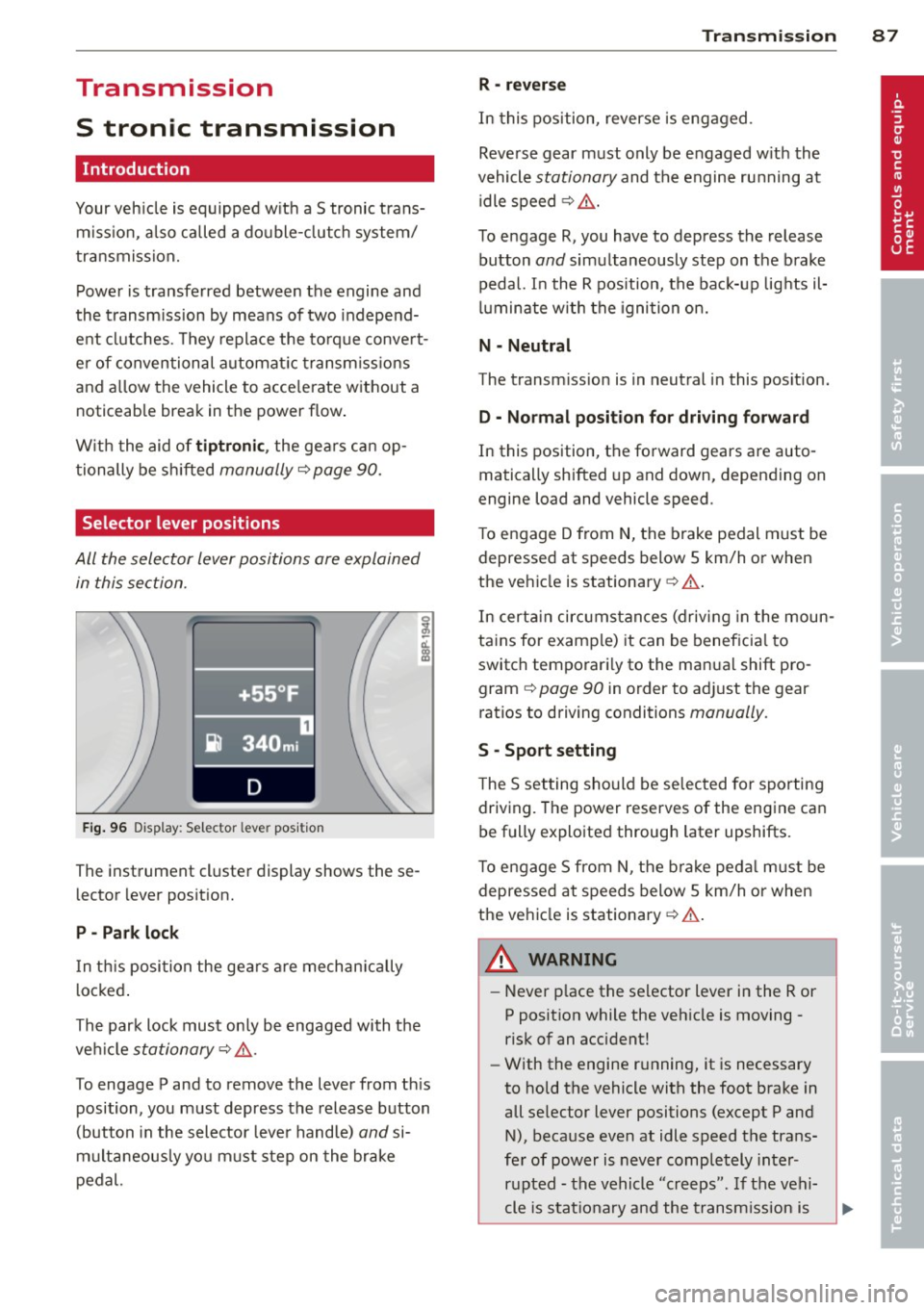
F ig . 96 Display: Selector lever position
The instrument cluster display shows these
l ector lever position.
P -Park lock
In th is posi tion the gea rs are mechan ically
l ocked .
The park lock must on ly be engaged with the
ve hicl e
stationary¢ /1..
To engage P and to remove the lever from th is
position, you must depress the release button
(button in the selector lever handle)
and si
multaneously yo u must step on the brake
pedal.
Tran sm iss ion 87
R -re ver se
In this position, reverse is eng aged.
Reverse gear must only be engaged w ith the
vehicle
stationary and the engine ru nning at
idle speed ¢
/1..
To engage R, you have to depress the release
button
and simultaneously step on the brake
pedal. I n the R pos ition, the bac k-up lights il
luminate w ith the ignition on.
N -Neutral
The transm iss ion is in neutral in this pos ition.
D -Normal po sition fo r dri ving forward
In this position, the forward gears are auto
matically shifted up and down, depending on
engine load and vehicle speed.
T o engage D from
N, the brake pedal must be
depressed at speeds below S km/h or when
the vehicle is stationary¢&. .
In certa in circ umstances (driving in the moun
tains for examp le) it can be beneficia l to
switch temporari ly to the man ual shift pro
gram ¢
page 90 in order to adjust the gear
ratios to driving conditions
manually .
S -Sport s etting
T he S set ting should be se lected for sporting
driving. The power reserves of the engine ca n
be fully explo ited through later upshifts.
T o e ngage S from N, the b ra ke peda l must be
depressed at speeds below 5 km/h or when
the ve hicle is stationary ¢&. .
A WARNING
-Never p lace the selector lever i n the R or
P posit ion while the veh icle is moving -
risk of an accident!
- With the engine r unning, it is necessary
to hold the vehicle with the foot brake in
all se lector lever positions (except P and
N), because even at idle speed the trans
fe r of power is never completely inter
r u pted -the vehicle "creeps". If t he vehi
cle is stat ionary and the t ransm ission is
Page 100 of 260
98 Driving Safel y
Driving Safely
General notes
Safe driving habits
Please remember -safety first!
This chapter contains important information,
tips, instructions and warnings that you need
to read and observe for your own safety, the
safety of your passengers and others . We have
summarized here what you need to know
about safety belts, a irbags, ch ild restra ints as
well as child safety. Your safety is for us
priori
ty number 1.
Always observe the info rmat ion
and warn ings in th is sect ion -fo r yo ur own
safety as well as for that of your passengers.
The information in this se ction app lies to all
model ve rsions of your veh icle . Some of the
feat ures desc ribed in this sec tions may be
standa rd equipment on some models, or may
be optional equipment on others . If you are
not sure, ask your authorized Aud i dealer.
A WARNING
- Make certain that you follow the instruc
t ions and heed the WARNINGS in this
Manual. It is in your interest and in the
interest of your passengers .
- Always keep the complete Owner's Liter
ature in your Audi when you lend or sell
yo ur vehicle so that this important info r
mation will a lways be ava ilable to the
dr iver and passenge rs.
- Always keep the Owner's literature handy
so that you can find i t eas ily if yo u have
ques tions.
Safety equipment
The safety features are part of the occupant
restraint system and work together to help
reduce the risk of injury in a wide variety of
accident situations.
Your safety and the safety of your passenge rs
should not be left to chance. Advances in
technology have made a varie ty o f fea tures
avai la bl e to he lp re duce the risk of injury in an accident
. The following is a lis ting o f just a
few of the safety features in your Audi:
- sophis tic ated s afety be lts fo r drive r and a ll
passenger sea ting pos it ions,
- safety belt pre-tensione rs,
- fro nt airbags,
- knee airbags for the front seats,
- side airbags in the front seats,
- LATCH anchorages for child restraints,
- ad justab le steering column .
T hese ind iv idual safety features can wor k to
ge ther as a sys tem to he lp p rotec t you and
you r passengers in a wide range of accidents.
These features cannot wo rk as a system if
they are not always p roper ly adjusted and
properly used!
Safet y is everybody's re sponsibilit y!
Important things to do before driving
Safety is everybody's job! Vehicle and occu
pant safety always depends on the informed and careful driver.
For yo ur safe ty and the safety of you r passen
gers,
befor e driving alwa ys:
"' Make s ure that all lights and signa ls are op
erati ng correctly .
"' Ma ke su re t hat the t ire p ressu re is co rrec t.
"' Mak e su re that all windows are clean and a f
ford good vis ibility to the outs ide.
"' Sec ure all luggage and other items caref ully
I:!) page 7 3.
"'Make sure that nothing can interfere with
the pedals.
"' Adjust front seat, head restraint and mirrors
correctly for your height .
"' Inst ruct passe ngers to adjust the head re
st raints accord ing to the ir height .
"' Ma ke sur e to use the r igh t chi ld restraint
correc tly to protect c hild ren
¢ page 136,
Child Safety .
"'Sit properly in your seat and make sure that
your passengers do the same
I:!) page 66,
General recommendations. .,_