light AUDI TT ROADSTER 2011 Owner's Guide
[x] Cancel search | Manufacturer: AUDI, Model Year: 2011, Model line: TT ROADSTER, Model: AUDI TT ROADSTER 2011Pages: 260, PDF Size: 64.11 MB
Page 55 of 260

Clear vision Lights
Switching the headlights on and off
Fig . 57 Instrument pane l: light switch
F ig. 58 Instrument pane l: light switch w ith daytime
running lights (DRL)
The light switch must not be overturned past
the stops in
either dire ct ion.
Switching on automatic headlight
control*
.,. Turn the light switch to AUTO* ¢ fig. 57 .
Switching on the side ma rker lights
.,. Turn the light switch to ,oo:.
Switching on the headlights and high
beam
.,. Turn the light switch to gD .
.,. Push the high beam lever forward towards
the instrument panel¢
page 55.
Switching off the lights
.,. Turn the light switch to 0.
The headlights only work when the ignition is
switched on. While starting the engine or
when switching
off the ignition, the head-
Clear vision 53
lights will go off and only the side marker
lights will be on.
Daytime running lights (DRL) (USA
models)
The daytime r unning lights can be turned on
or
off using this function. If the function is ac
tive, the daytime running lights are turned on
automatica lly when the ignition is switched
on.
The daytime running lights are activated
only
when the light switch is at the AUTO* or DRL *
position.
Daytime running lights (Canada models
only)
The daytime running lights are activated only
when the light switch ¢ fig. 57 is either at the
0 or the ,oo: position.
The daytime r unning lights function cannot be
turned
off .
Automatic headlight control*
In the switch position AUTO the automatic
headlight control
is turned on. The low
beams are turned on automatically through a
light sensor as soon as ambient brightness
(e .g. when driving into a tunnel) falls below a
value preset at the factory. When ambient
brightness increases aga in, the low beams are
turned
off again automatica lly c:> & .
In the AUTO position the low beams are
switc hed
off automatically when the ignition
is tur ned
off.
Light Sensor Malfunction*
In the event of a light sensor malfunction, the
driver is notified in the instrument cluster dis
play:
ral Automatic headlights/automatic wipers
defective
For safety reasons the low beams are turned
on permanen tly with the switch in
AUTO* .
However, you can continue to turn the lights
on and
off using the light switch. Have the ..,.
Page 56 of 260

54 Clear vision
light sensor checke d as soon as possi ble at a
d ea le rship.
Com ing home /le aving home function *
The function is switched on when the switch is
i n the AU TO* position and the function is
shown as active in the driver info rmation sys
tem .
The
co ming h om e function illuminates the
a rea around the veh icle when the ig nition is
switc hed off and the driver 's door is opened.
The length of time the lights remain on can be set in the menu display
( Illumin ation > Exte
r io r light s> co ming hom e).
The leaving home function i lluminates the
area around the vehicle when unlock ing it.
A WARNING
- Never use daytime running lights to see
where you are going. They are not bright
enough and w ill not let you see far
enough ahead for safety, especially at
dusk or when it is dark. Always switch on
the low beams at dusk or when it is dark.
- Automatic headlights are only intended
to assist the dr ive r. They do not relieve
the driver of his responsibility to check
the headlights and to tu rn them on man
ually according to the current light and
visibili ty cond itions. Fo r example, fog
and rain cannot be detected by the light
sensors . So a lways switch on the head
lights under these weather cond itions
and when driving in the dark
io.
- Crashes can happen when yo u cannot see
the road ahead and when you cannot be seen by other motorists .
- Always turn on the headlights so that
you can see ahead and so tha t others
can see yo ur ca r from the bac k.
- With the switch in
AUTO front fog lights
ca nnot be t urned on in addition .
- The light sensor for headlight control is
l ocated in the rear view m irror mount .
Do no t apply a ny stickers to the w ind- shield in this area to prevent malfunc
tions or fa ilures.
- Some exter io r li ght ing funct ions can be
adjusted in the driver informat ion sys
tem
~ page 21.
- If you remove the ignition from the igni
tion lock while the headlights are still
on, a buzzer wi ll sound as long as the
dr iver's door is open to rem ind you to
turn off the lights.
- Always observe the specif ic loca l regu la
tions for your area as to when to use your
lights.
- With automatic headlights, the high
beam funct ion is also available, but wit h
one restrict ion: If you have not switched
the high beams back to low beams dur
ing automatic headlight operation (fo r
example, after d rivi ng through a tunnel) ,
only the low beams come on the nex t
t ime au tomatic headlights are swi tched
on. To use the high beams, you first have
to pull the high beam lever back and
then push the lever forward again.
- In cool or damp weather, the inside of
the headlig hts, turn signals and tail
lights can fog over due to the tempera
t u re difference between the inside and
outside. They w ill clear shortly after
switching them on. This does not affect
the se rv ice life of the lig hting .
Adaptive light
Applies to veh icles: w ith Adapt ive Light
When driving around bends, the relevant area
of the road is better illuminated.
F ig . 59 Adapt ive li ght w hen dr iv in g
Page 57 of 260
The benefit o f adaptive light is that the curve
and the edg e of th e road are better i lluminat
ed
c::> fig . 59. T he adaptive light is controlled
automatically , depend ing on veh icle speed
and steering wheel ang le.
When driving a round bends, the head lights
are contro lled according to steer ing wheel an
g le. So that there is no black area ahead of the
ve hicle, the two main beams pivo t at different
angles.
(D Tips
T he system works above a speed of about
6 mph (10 km/h) .
Front fog lights
Use the light switch to turn on the front fog
lights.
0 0
"' -ci. a) a,
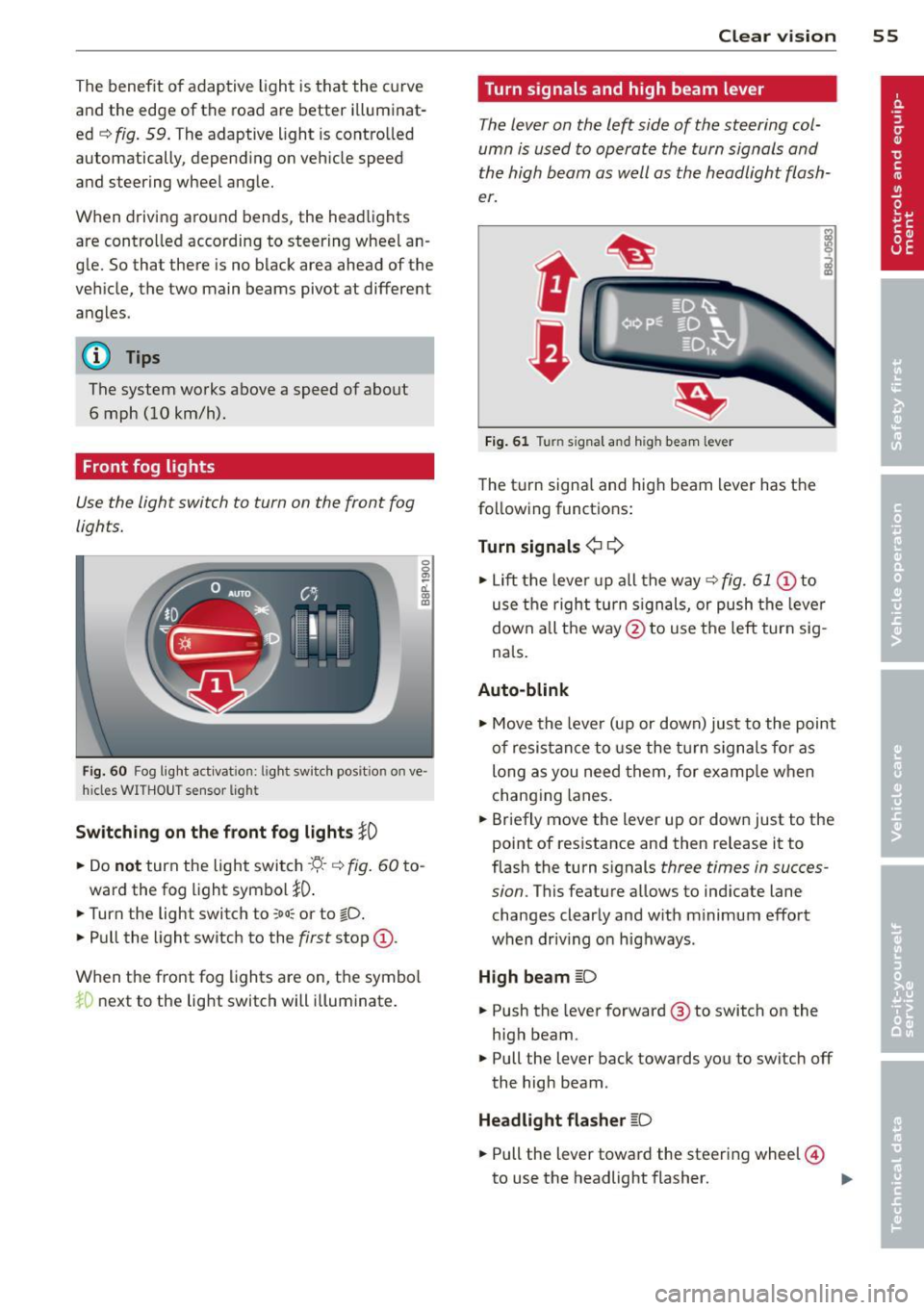
F ig . 6 0 Fog l ig ht activat ion : ligh t switc h pos it io n on ve ·
hides WIT HO UT s ensor lig ht
Switching on the f ront fog lights }0
• Do not turn the light swi tch -'ti--c::> fig . 60 to -
ward the fog light symbol
}D .
• Turn the light switch to ~oo; or to tD .
• Pull the light switch to the first stop @.
When t he front fog lights are on, the symbo l
iD next to the lig ht switch will illuminate .
Clear vision 55
Turn signals and high beam lever
The lever on the left side of the steering col
umn is used to operate the turn signals and
the high beam as well as the h eadlight flash
er.
t
'
Fi g. 61 Tu rn signal and high beam lever
The turn signa l and high beam lever has t he
following functions:
Turn signals ¢
9
• Lift the leve r up a ll the way c::> fig. 61 @ to
use t he right turn s ignals, or push the leve r
down all the way@to use t he left tur n sig
na ls .
Auto -blink
• Move the leve r (up or down) just to the point
of resistan ce to use the turn signa ls fo r as
long as you need them, for e xamp le w hen
chang ing lanes.
• Briefly move the lever up or down just to the
point of resistance and then release it to
flash the turn s ignals
three times in succes
sion .
This featu re allows to ind icate lane
changes clearly and w ith m inimum effort
when driv ing o n highways .
High beam
~D
• Push the lever forward @ to switch on the
high beam .
.. Pull the lever back towards you to switch off
the high beam .
Headlight flasher
~D
• Pull the lever toward the steering wheel@
to use the headlight flasher. ..,.
Page 58 of 260
56 Clear vis ion
Notes on the se feature s
- The turn signals only work with the ignition
swit ched on . The indicator lights
(I or IN in
the instr ument cl uster ¢
page 13 also b link .
- After you have turned a corner, the turn sig-
nal switches off a utomat ica lly.
- T he
high beam works only when the head
lights are on. The indicator light . in the
instrument cluster illuminates when the
high beams a re on.
- The
headlight flasher wo rks on ly as long as
yo u hold the lever -even if there are no
lights switched on. The indicator light . in
the instrument cl uster illum inates when you
use the headlight f lasher.
(D Note
Do not use the high beam or headlight
flasher if you know that these cou ld be
blind ing oncoming traffic.
Emergency flasher
The emergency flasher makes other motorists
aware that you or your vehicle are in an emer
gency situation.
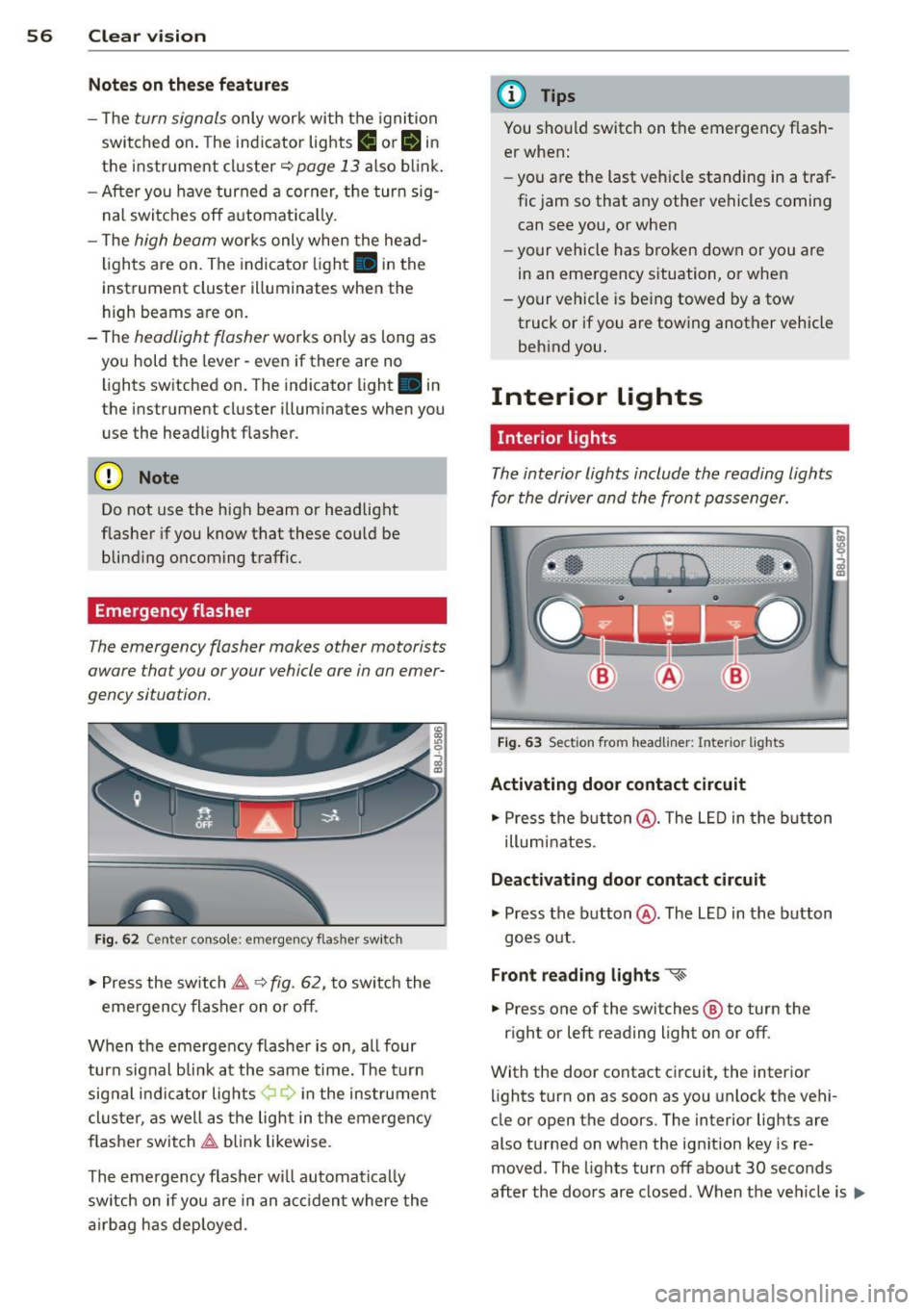
F ig . 6 2 Cente r console: emerge ncy flas her sw itch
,. Press the switch ~ ~ fig. 62, to switch the
eme rgency flasher on or off .
When the emergency f lashe r is on, a ll four
turn sig nal bli nk at the same time. The t urn
sig nal i ndi ca tor lights ¢ Q in the ins trument
cluster, as well as the lig ht in t he emergen cy
f lasher switch ~ blink likewise .
The emergency flasher w ill automat ica lly
switch on if you are in an a cciden t where the
a irbag has deployed.
(D Tips
You should switch on t he emergency f lash
er when:
- you are the last veh icle standing in a traf
fic jam so that any other vehicles coming can see you, or when
- your vehicle has broken down or you are
in an emergency s ituation, or when
- your vehicle is being towed by a tow
truck or if you are tow ing another vehicle
beh ind you.
Interior lights
' Interior lights
The interior lights include the reading lights
for the driver and the front pass enger.
F ig . 63 Sect ion from headliner: Interio r lights
Activating door contact circuit
,. Press the b utton @. The L ED in the b utton
illum inates.
Deactivating door contact circuit
,. Press the button @. The LED in the button
goes o ut.
Front reading lights "<~
.. Press one of the switches ® to turn the
r ight or left reading light on or off.
With the door contact circuit, the interior lights turn on as soon as you unlock the vehi-
cle or open the doors. The interior lig hts are
also t urned on when the ign ition key is re
moved . The lights turn off about 30 seconds
after the doo rs ar e closed. When the ve hicle is
lilJJ,
Page 59 of 260

locked or when the ignition is turned on, the
interior lights are turned off.
When a door is open, the interior l igh ts are
turned off afte r abo ut 10 m inu tes to p reven t
battery draining.
The brightness of the lights is controlled au
t om atically by a dimmer when they are
sw itched on and off.
Instrument panel illumination
The illumination of the instruments, displays
and the cen ter console can be adjusted .
Fig . 64 Instr ument pane l illu min at io n
i a:. .. a,
You regulate the brightness of the instru
ments with the left thumbwheel
Co/¢ fig. 64 .
Ign ition ON, light switch at @.
Wit h t he igni tion swi tched ON, the glow o f in
strument needles
can be adjusted to a ppear
b righter or dimmer.
Ignition ON , light switch at ~oQ: or ~D .
With the l igh ts sw itched on, the brightness of
i nstr ument cluster (i.e. needles, gauges and
d isp lays) and center console i llumination can
be ad justed .
(D Note
The instrument cluster and cente r console
illumination (ga uges and needles) comes
on when you switch on the ignition and the
vehicle headlights are off. Be aware of t he
following difference between mode ls built
to US or Ca nadian specifications:
- USA models: illumination of the instru
ment cluster (gauge s and needles),
dash and cente r console around the
Clear vi sion 5 7
gearshift lever is controlled by a light
sensor located in the in strument panel.
The in strument panel illumination will
automatically become dimmer as the
daylight fades away and eventuall y will
go out completely when outside light is
very low . This i s to remind you, the driv
er, to switch on the headlights before it
get s too dark.
- Canada models: in strument pan el illu
min ation w ill stay bright r egardless of
the intensit y of ambient light . Alwa ys
be aware of changes in out side light
conditions while you are dri ving. Re·
s pond in time to fading daylight by
turning the light switch to position
~D
(or "AUTO" if your car is equipped with
this feature)
to turn on you r headlights.
luggage compartment light
The light is located on the right side of the
luggage compartment.
These lights come on automatically when t he
rear lid is opened . The lights turn off automat
ical ly if the lid is left open for more then 10
minutes .
Vision
Sun visors
Using the sun visors make s driving safer .
Fig. 65 Sun visor
- ~ ---------.ttr -···---=-=---------~=--·-·----- -·-==:. - · =-~-----
The vanity mirrors in the sun visors are equip
ped with lids. Push lid in direct ion of arrow to
open.
Page 60 of 260

58 Clear vis ion
Mirrors
Manual glare dimming
Standard sett ing
.,. Move the small lever (located on the bottom
edge of the mirror) to the front .
Anti-glare setting
.,. Move the small lever (located on the bottom
edge of the mirror) to the rear.
Automatically dimming inside mirror
App lies to vehicles: with automat ically dimming inside
rearview mirror
The automatic dimming function con be
turned on and off if required.
Fig. 66 Inside rea rvi ew mir ror, d ig ita l compass ac tivat
ed: a uto dimmin g on/off b utt o n an d indicator ligh t
Disabling auto dimming
.,. Press button @briefly, -the gree n indicator
l ight @ goes out .
Activating /reactivating auto dimming
.,. Press button @briefly, -the green indicator
light @goes on.
Automatic dimming function
The a utomatic dimming function is activated
every time the ignition is turned on. The green indicator light is lit to indicate auto dimming
is active .
When dimming is activated, the inside mirror
will darken
automa tically in response to the
amount of light str ik ing the m irror (such as
headlights from rearwa rd approaching veh i
cles) . Even in dimming mode, the mirror su r
face turns bright when: -
the interior lig ht is switched on
- reve rse ge ar is engaged.
Sensors for automatic headlights*
With the he lp of the se nsors i n the mir ror,
whe n the light switch is in the
AUTO posit ion,
t h e low beams a re sw itc hed on an d off auto
matically de pending on the ambient light co n
di tions
q page 53 .
.&_ WARNING
Broken g lass o f aut oma tic dimm ing mir ror
ca n cause electrolyte f luid lea kage . Elec
trolyte f luid can irritate skin, eyes , and res
pirato ry system.
- Repeated or prolonged ex posu re to e lec
trolyte can cause irritation to the respira
tory system , especially among people
wit h asthma or other resp iratory condi
tions . Get fresh air immediately by leav
i n g the veh icle o r, if that is no t possib le,
op en w indows and doo rs all the way.
- If electroly te gets into the eyes, flus h
them thorough ly with large amounts of
clean water fo r at least 15 minu tes;
m edical attenti on is recom mend ed.
- I f electrolyte contac ts skin, fl ush affect
e d area w ith clean wate r fo r at lea st 15
minu tes and t hen wa sh affected area
wit h soap an d wate r; medical atte ntion
is recommended . Thoro ughly wash af
fected clothi ng and shoes before re use .
-If swallowed and person is conscious,
rinse mout h with water for at least 15
m inutes . Do not induce vomiting unless
instr ucted to do so by medica l professio
na l. Get medical attention immediately.
(D Note
Liq uid electrolyte leaked from a broke n
mir ro r glass w ill damage any plastic s urfa
ces it comes in contact with. Clean up sp il
l ed e lectrolyte immed iate ly w ith clear wa
ter and a sponge .
(!} Tips
-If you switch off the automatic dim
ming funct ion on the inside mirror ,
Page 61 of 260

automatic dimming of the o uts ide m ir
r or s will likewise be di sabled .
-Check to make sure there are no objects
preventing light from reaching the inside
mirror.
- Do not attach any sticke rs to the wind
shield in front of the two light sensors,
as this would interfere with both the au
tomatic operation of the headlights and
the automatic dimming of the inside mir ror(s).
Outside mirrors
The outside mirrors ore electrically adjusted.
Fig. 67 Forward section of drive r's armrest: power mir
ror contro ls
Adju sting th e outside mirror s
• Turn the adjusting knob to posit ion ©
Q fig. 67 to adjust the o utside mirror on the
driver's side .
• Turn the adjusting knob to position ® to ad
just the outside mirror on the passenger
side.
• Press the knob in the appropriate direction
to move the mirror surface so that you have
a good view to the rear.
Heated mirro rs
• Turn the knob to posit ion @.
Depending on the outside temperature, the
mirror surfaces are heated until the ignition is
switched off -even if the knob is no longer in
position @. You are well-advised to fold the
outs ide mirrors in when maneuvering in tight
spaces or when leaving the car parked close to
other veh icles.
Clear vi sion 59
(D Note
- Curved ( i.e. convex) mirror s urfaces in
crease yo ur field of view. Remember that
vehicles or other objects will appear
smaller and farther away than when
seen in a flat m irror . If you use this mir
ror to estimate distances of following ve
hicles when chang ing lanes, you could
es timate incorrectly and cause an ac ci
dent.
- If the mirror housing is moved uninten
tionally (for examp le, w hile pa rking your
vehicle), then yo u must first fold the m ir
ror elect rically . Do not rea djust the mir
ror housing man ually . You cou ld damage
the motor which controls the mirror .
(D Tips
If there sho uld be a ma lf u nction in the
e lectrica l system, yo u can sti ll adjust the
outside m irrors by pressing the edge of
the m irror.
Automatic dimming for outside mirrors
Applies to vehicles: wit h automatic dimm ing for outside
mirro rs
The outs ide mirrors are dimmed together with
the automatic dimming of the inside mirror .
When the ignition is sw itched on, the mirrors
darken automatically depending on the light
striking them (e .g. headlights from the rear) .
When the interior lighting is switched on and
when reverse gear is engaged, the mirrors are
switched back to the ir original br ightness (not
dimmed) .
A WARNING
Broken glass of automat ic dimming mirror
can cause electrolyte flu id leakage. El ec
trolyte f lu id can ir rit a te skin, eyes, a nd res
p ira to ry system.
- Repeated or prolonged exposu re to e lec
trolyte can cause irritation to the respira
tory sys tem, espe cially among people
wit h asthma or other resp irato ry co ndi -
tions . Get fresh air immediately by
~
Page 62 of 260
60 Clear vis ion
leaving the vehicle or, if that is not possi
ble, open windows and doors all the way.
- If electrolyte gets into the eyes, flush
them thoro ughly with large amounts of
clean water for at least 15 m inutes;
med ica l attent ion is recommended.
- If electrolyte contacts sk in, f lush affect
ed area with clean water for at least 15
minutes and then was h affected area
with soap and water; medical attention is recommended. Thoroughly wash af
fected clothing and shoes before reuse.
- If swallowed and person is conscious,
rinse mo uth w ith water for at least 15
m in utes . Do not i ndu ce vom iting u nless
ins truc ted to do so by medica l professio
nal. Get medical attention immedia tely.
(D Note
Electrolyte leak ing from a broken m irror
glass attacks the veh icle paint and plast ic
surfa ces. Clean up spilled electroly te im
mediately wi th clear water and a sponge.
@ Tips
- If automatic dimming for the in sid e
mirror i s switched off, the outside m ir
rors are al so not dimmed automaticall y.
- Automa tic dimming for the m irror only
opera tes p roperly i f the sunshade * for
the rear window is retracted, o r the light
striking the ins ide mir ro r is not hindered
by other objects .
Wiper and washer
system
Windshield wiper
The windshield wiper lever controls both the
windshield wipers and the washer system.
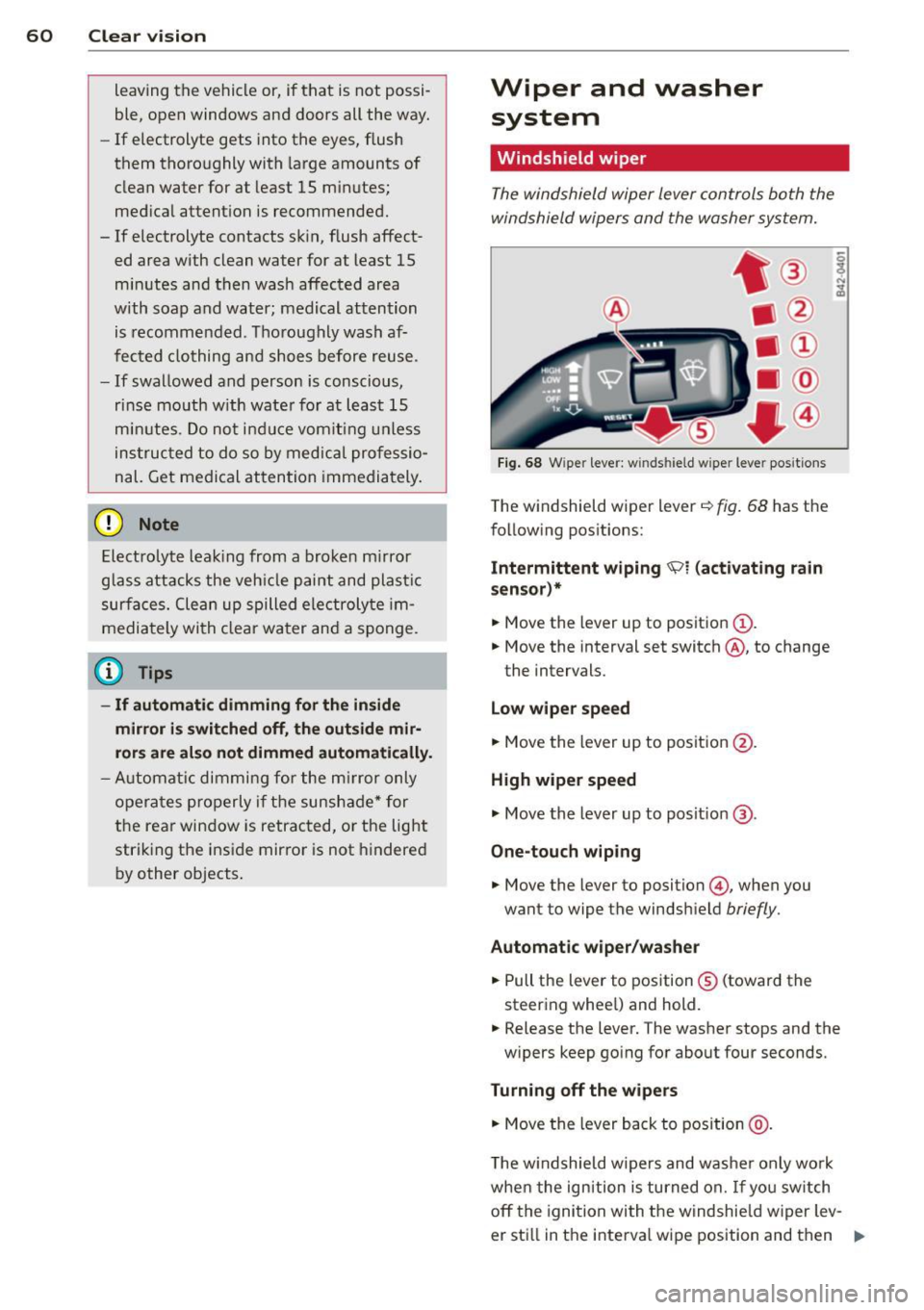
F ig . 68 W ipe r leve r: w inds hield w ipe r leve r posit ions
T he windshield wiper lever~ fig. 68 has the
following pos itions:
Intermittent w iping \91 (activating r ain
sens or)*
.,. Move the lever up to position (!) .
.,. Move the interval set switch @, to change
the intervals.
Low wiper spe ed
.,. Move the lever up to posit ion @.
High w iper speed
.,. Move the lever up to posit ion ®·
One-touch wiping
.,. Move the lever to position @ , when you
want to wipe the windshield
briefly.
Automatic wiper /wa sher
.,. Pull the lever to position ® (toward the
steering whee l) and hold .
.,. Release the lever. The washer stops and the
w ipers keep go ing for about four seconds.
Turning off the wipers
.,. Move the lever back to position @ .
The w indshield wipers and washer only wo rk
whe n the ign ition is turned on.
If you sw itch
off the ignition with the windshie ld w iper lev-
er sti ll in the interva l wipe position and then
Ill>
Page 63 of 260

come back a while later and drive off, the rain
sensor will reactivate itself after the vehicle
speed has exceeded 4 mph (6 km/h).
The rain sensor* is only activated with the
wiper lever set to position(!). When it starts
to rain, the rain sensor will automatically acti
vate the intermittent wiping mode.
To reduce the sensitivity of the sensor, move
switch @ down. To increase the sensitivity,
move the switch up. The higher you adjust the
sensitivity, the faster the sensor will react
when it senses moisture on the windshield. The pauses between wiper turns depend not
only on the sensitivity setting, but on the ve
hicle speed as well.
During brief stops, e.g . at a red light, wiper
motion will automatically be reduced to the
next lower speed . Wipers already turning at
low speed. change to intermittent wiping.
When the ignition is turned on, the washer
jets are heated .
A WARNING
-Wiper blades are crucial for safe driving!
Only when they are in good condition are
they able to clear the windows properly
to provide uncompromising visibility.
Worn or damaged wiper blades are a
safety hazard ¢
page 63, Replacing
windshield wiper blades!
- The light/rain sensor* is only designed to
assist and support the driver.
It remains
entirely the driver's responsibility to
monitor outside weather conditions and
to manually activate the wipers as soon
as rain or drizzle reduces visibility
through the windshield.
- The windshield must not be treated with
water-repellent materials. They can in
crease glare under poor visibility condi
tions such as wetness, darkness, or when
the sun is low on the horizon. In addi
tion, they can cause the windshield wip
ers to chatter.
Clear vision 61
@ Note
In freezing or near freezing conditions:
- Always check that the wiper blades are
not frozen to the glass before you turn
the wipers on. Loosen a wiper blade
which is frozen in place before operating
the wipers to prevent damage to the
wiper blade or the wiper motor.
- Do not use the wipers to clear a frosted
window. Using the wipers as a conven ient ice scraper will destroy the wiper
blades .
- Before you take your vehicle to an auto
matic car wash, make sure you have the
windshield wiper system switched off (lever in position
0), otherwise the wind
shield wiper system could get damaged
in the car wash if it should suddenly
come on.
@ Tips
-The windshield wipers are switched off
when the ignition is turned off. Activate
the windshield wipers after the ignition
is switched back on by moving the wind
shield wiper lever to any position.
- Worn or dirty windshield wiper blades
cause smearing, which can affect the op
eration of the light/rain sensor*. Check
the condition of your windshield wiper
blades regularly.
-The rain sensor is part of the interval
wiping system. Turning off the ignition
will also deactivate the rain sensor. To re
activate the sensor, switch off the inter
val wiping function, then switch it back
on again.
-Applies to vehicles with light/rain sen
sor: When the wipers are switched on
manually and in rain conditions, the au
tomatic headlights* turn on¢
page 53,
Switching the headlights on and off
or
off during the day when the wipers are
no longer operating. The automatic
headlights* function is available in this
case only when the light switch is in the
"AUTO" position¢
page 53, fig. 57.
Page 64 of 260
62 Clear vis ion
- Make sure the washer fl uid reservoir in
the engine compartment is topped
off
before going on a long trip . Look up
c:> page 192 for checking and fi lling the
washer container.
- The w ipers only operate w ith the hood
completely closed.
Headlight washer system
App lies to vehicles: with hea dlig ht washer system
The headlight washer system cleans the
headlights.
.. Operate the winds hield wiper/washer sys
tem
c:> page 60, fig. 68 ® with the head
li ghts turned on by holding the lever for lon
ger than one second.
The washer jets extend forward o ut of the
front bumper driven by water pressure to
spray the front headlights with water.
You shou ld inspect the headlights regularly
(for example when refue ling) and clean
off
any solid dirt or insects from the lenses .
To ensure the system works properly in winter,
keep the washer jets free of snow and remove
any ice using a de-icing spray.
Service position
It is only possible to change wiper blades if
you move the wiper arms to the service posi
tion
I n o rder to use the windsh ie ld w ipers, the
front lid must be comp letely closed
Moving wiper blades to the service
position
.. When there is a ris k of frost, ma ke s ure that
the wiper b lades are not frozen to the wind
shield .
.. Switch the ignition on .
.. Move the wiper lever to pos ition
0
c:> page 60, fig. 68 .
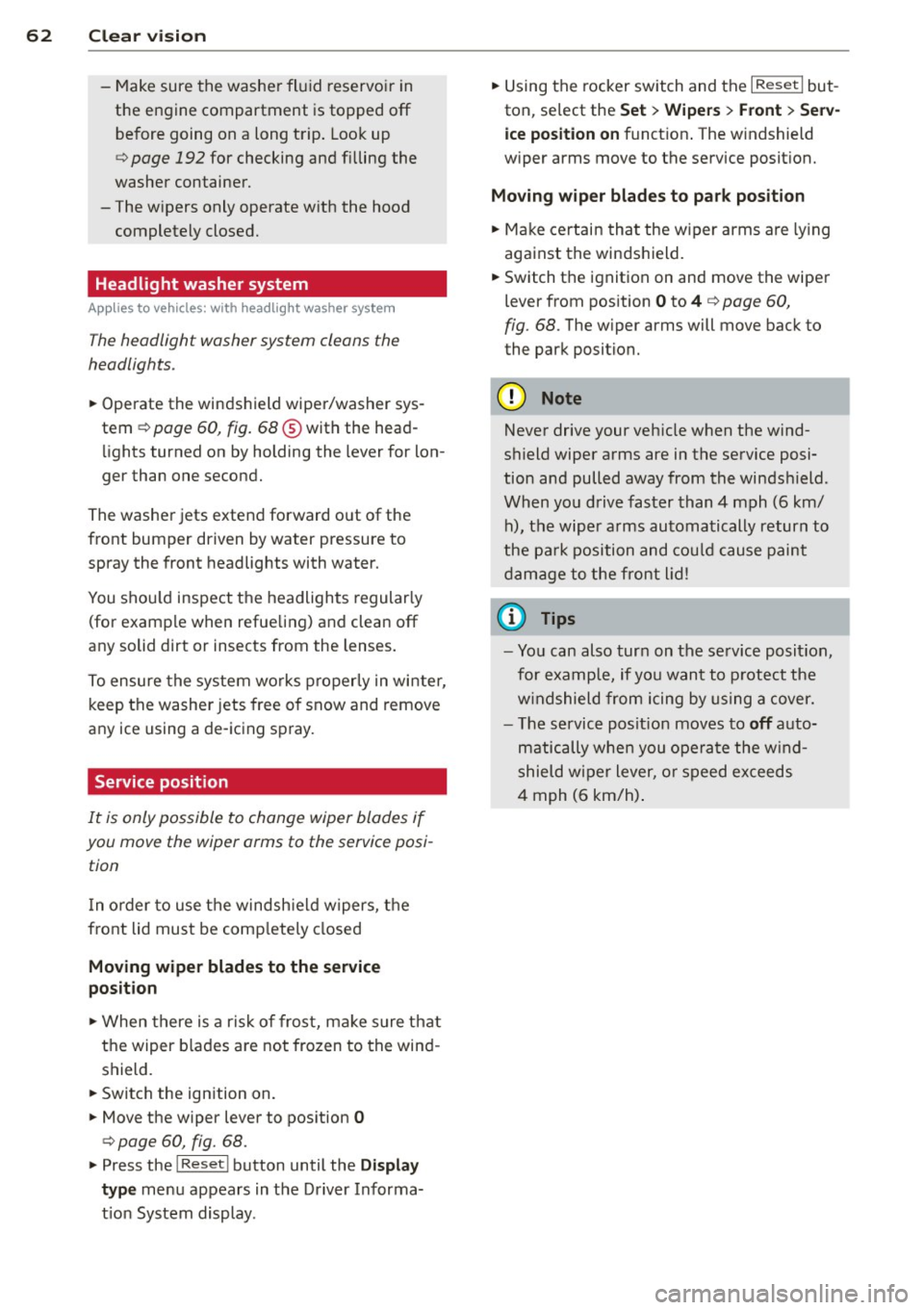
.. Press the I Reset I button until the Display
type menu appears in the Driver Informa
t ion System display . ..
Using the rocker switch and the
I R ese t I but
ton, se lect the Set > Wipe rs > Front > Se rv
ice po sition on function . The w indshield
w iper arms move to the service posit ion.
Mo ving wip er blades to pa rk position
.. Make certain that the w iper arms are ly ing
against the windshield .
.. Switch the ignition on and move the wipe r
lever from pos ition O
to 4 c:> page 60,
fig. 68.
The w iper arms will move back to
the park position.
@ Note
Never drive your veh icle when the wind
sh ield wiper arms are in the service posi
tion and pulled away from the winds hield.
When you d rive faster than 4 mph (6 km/
h), the wiper a rms automatically return to
the pa rk position and cou ld cause paint
d amage to the front l id!
@ Tips
= Yo u can also tur n on the se rvice posit ion,
for example, if yo u want to p rotect the
w indshield from icing by us ing a cover.
- The service posit ion moves to
off a uto
matically whe n you ope ra te the w ind
shield wiper lever, o r speed exceeds
4 mph (6 km/h) .