ESP AUDI TT ROADSTER 2014 User Guide
[x] Cancel search | Manufacturer: AUDI, Model Year: 2014, Model line: TT ROADSTER, Model: AUDI TT ROADSTER 2014Pages: 244, PDF Size: 60.87 MB
Page 42 of 244
40 Opening and closing
-Remember -you can still open or close
the power windows for about ten mi
nutes after the ignition is switched off.
Only when either of the front doors are
opened are the power windows sw itched
off.
- Be careful when closing the windows.
Check to see that no one is in the way, or
serious injury could result!
- Always remove the ignition key whenever
you leave your vehicle .
- If you lock your vehicle from the outside,
no one, especially children, should re
ma in in the vehicle.
- Do not stick anything on the w indows or
the windsh ield that may interfere with
the driver's field of vision.
(D Tips
-When the doors are opened, the w in
dows are automat ically lowered 10 mm .
- The windows can still be opened and
closed for about ten m inutes after the
ignition has been turned off. The power
windows are not shut off until one of the
fron t doors is opened.
Convenience close/open feature
You can close or open the windows from out
side when you lock or unlock your car with the
key.
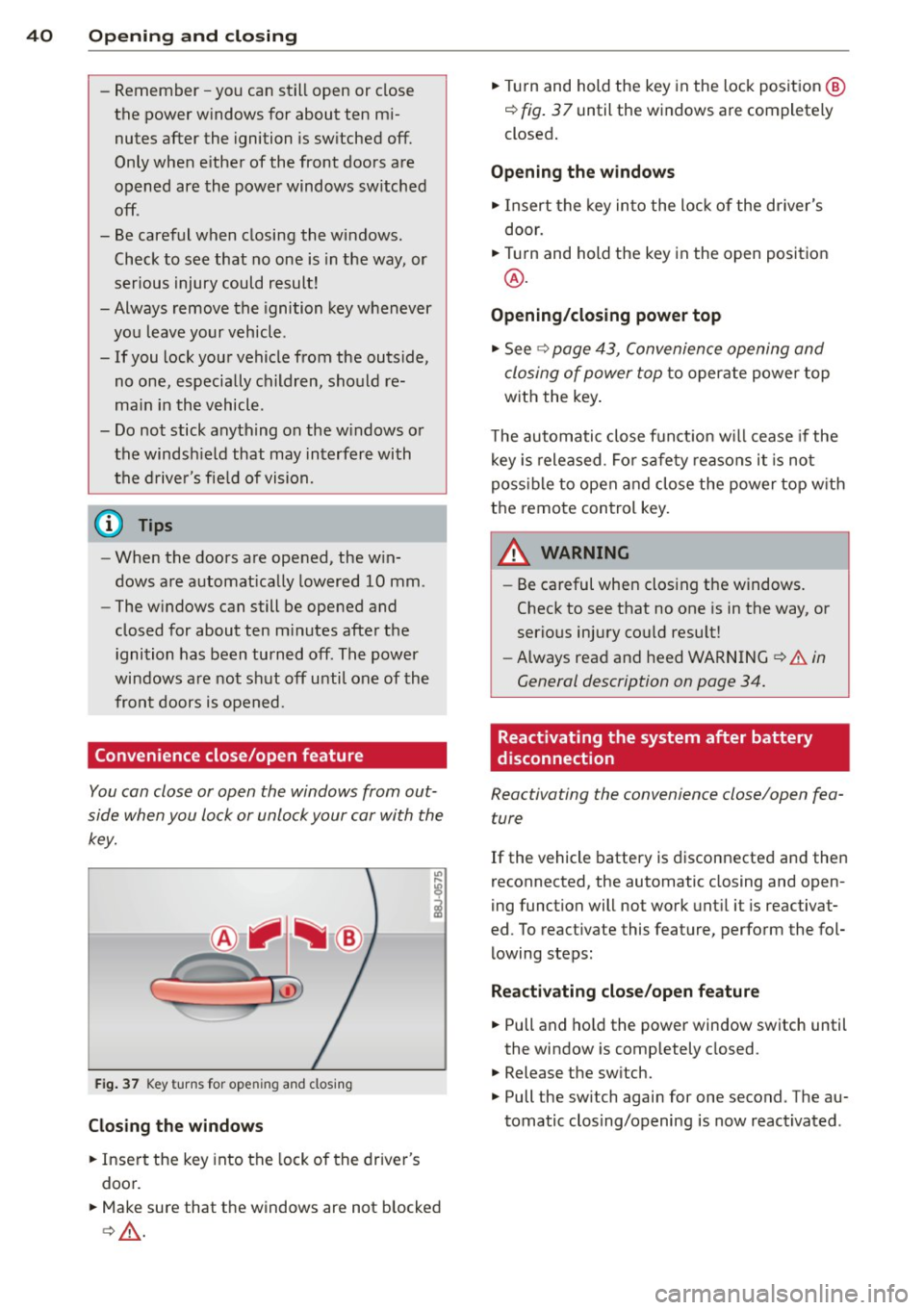
F ig. 37 Key turns for open ing and closing
Closing the windows
• Insert the key into the lock of the driver's
door.
• Make sure that the windows are not blocked
c>& .
• Tu rn and hold the key in the lock position @
¢ fig. 37 until the windows are completely
closed.
Opening the windows
• Insert the key into the lock of the driver's
door.
• Turn and hold the key in the open position
@.
Opening/closing power top
• See c> page 43, Convenience opening and
closing of power top
to operate power top
with the key.
T he automatic close funct io n w ill cease if the
key is released. Fo r sa fety reasons it is not
poss ible to open and close the power top w ith
the remote control key.
A WARNING
-
- Be careful when clos ing the windows.
Check to see that no one is in the way, or
serious injury cou ld resu lt!
- Always read and heed WARNING
~.&. in
General description on page
34.
Reactivating the system after battery
disconnection
Reactivating the convenience close/open fea
ture
If the vehicle battery is disconnected and then
reconnected, the automatic closing and open
ing function will not work until it is reactivat
ed. To reactivate this feature, perform the fol
lowing steps:
Reactivating close/open feature
• Pull and hold the power window switch until
the window is completely closed.
• Release the sw itch.
• Pull the sw itch again for one second . The au
tomatic clos ing/opening is now reactivated .
Page 43 of 244
Convertible top
Convertible top
General information
The comprehensively engin eered design of the
f abric convertib le top a llows it to be operated
qu ickly and simply. When open, the convert i
b le top is stowed completely in a tonneau pro
vided spec ifically for this purpose.
I n normal operating conditions, the converti
b le top is wind -and waterp roof. Under certa in
circumstances, a small quantity o f droplets
might form, but on ly in extremely inclement
weather, e.g . torrentia l or contin uous heavy
rain. This is normal and not a cause for con
cern.
F ollow the care instructions
Q page 155 to
maintain the convertible top's attractive ap
pearance and to keep it wind- and waterproof.
Please follow these instructions as well:
- Stow and open the convertib le top only
when it is clean. When the top is folded
away, sharp-edged contaminants can build
up as silt and cause wear spots o n the rear
window, which may damage the convertible
top over time. Of course, ice and snow should also be removed before open ing the
convertible top.
- Under no c ircumstances should you use
sharp-edged or abrasive objects to remove
ice and snow . Use a commerc ial ice scraper
to remove ice from o f the rear window.
- T he convert ible top should be opened only if
it is complete ly d ry. If the convertib le top is
opened and then stored wet, unattractive
indentations may develop . In addition, over
time, mold and mildew stains can develop.
- Do no t leave the convertible top open for
several weeks at a time; instead, open and
close it from time to time so that the fabric
does not disco lor where it folds, and to pre
vent creases from forming. This is espec ially
important if it happens to be stowed wh ile
still damp on occasion.
- Because the fabric becomes less flexible
when temperatures drops below zero, we
Convertible top 41
recommend not operating the convertible
top below O°C.
A WARNING -
- When operat ing the convertible top,
make sure that any external factors (e.g.
the wind) do not impair its funct ion or
e ndanger other drivers.
- Never drive wh ile the convertib le top is
not properly secured. Otherwise , it may
be pulled open by the wind. This can
cause injur ies and damage to the vehicle
- danger of an accident!
- When opening and closing the converti-
ble top make sure to keep yourself and
o thers clear of a ll movi ng pa rts. Risk of
in jur y!
d) Note
-Always make su re that there is enough
clearance above the veh icle so that the
c onvertib le top is not damaged when
opening and clos ing.
- Do not place any objects in the tonneau
t o avoid damage when open ing the con
ver tible top.
(D Tips
- Th e convert ible top should be operated
only wi th the ign ition sw itched on.
- When pa rking the ca r with the convert i
ble top open, bear in mind t hat the vehi
cle's in terior is not p rotec ted fro m dam
age due to unexpec ted weather condi
tions, o r unauthorized access . It is there
fore advisab le to close the convertib le
top before leaving the veh icle. If objects
are left inside the vehicle, they should be
locked in the luggage compartment.
Page 51 of 244
light sensor checked as soon as possible at a
dealership.
Adaptive light *
The benefit of adaptive l ight is that the curve
and the edge of the road are better i llum inat
ed . The adaptive light is contro lled automati
cally, depending on vehicle speed and steering
wheel angle.
When driving a round bends, the head lights
are contro lled according to steering wheel an
g le . So that there is no black area ahead of the
ve hic le, the two main beams pivot at different
angles. The system works above a speed of
about 6 mph (10 km/h).
Com ing home /le avi ng home function *
The function is swit ched on when the switch is
in the AUTO* position and the function is
shown as active in the driver information sys
tem.
The
coming hom e function illuminates the
area around the vehicle when the ign ition is
switched off and the driver's door is ope ned.
The length of time the lights remain on can be
set in the menu display
( Illumination > Exte
rior lights > coming home ).
The leavi ng home function i lluminates the
area around the vehicle when unlocking it.
A WARNING
- Never use dayt ime running l ights to see
where you are going. They are not bright
enough and w ill not let you see far
enough ahead for safety, especially at
dusk or when it is dar k. Always switch on
the low beams at dusk or when i t is dar k.
- Automatic headlights a re only intended
to assist the dr iver. They do not re lieve
t he driver of his responsibi lity to check
t he headlights and to turn them on man
ually according to the current light and
visibility conditions. For example, fog
and rain cannot be detected by the light
sensors. So a lways switch on the head
lights under these weather cond itions
and when driving in the dark
jO .
Clear vis ion 49
- Crashes can happen when you cannot see
the road ahead and when you cannot be
seen by other motorists.
- Always turn on the headlights so that
youcanseeahe adandsothatothe ~
can see your car from the back .
- Please observe legal regulat ions w hen
using the ligh ting systems des cribed.
(D Tips
- T he light sensor for head light control is
located in the rear view mirror mount.
Do not apply any stickers to t he wind
shield in th is area to preven t malfunc
tions or fa ilures.
- Some exter io r l ighting funct ions can be
adjusted in t he driver i nformat ion sys
t em
~page 24.
- I f you remove the igni tion from t he igni
t ion lock while the headligh ts are s till
on, a buzzer wi ll sound as long as the
driver's door is o pen to remind yo u to
t u rn off the lights.
- Always observe the specific local regula
tions for your area as to when to use your
lights.
- With automatic headlights, the high
beam f unction is also available, but w ith
one restrict ion: If you have not sw itched
the high beams back to low beams dur
ing automatic headlight operation (for
example, after d riving throug h a tunnel),
only the low beams come on the next
t ime au tomati c headlights a re swi tched
on. To use the high beams , you firs t have
t o pull the hig h beam lever back and
then push the lever fo rward again .
- In coo l or damp weather, the inside of
the headlights, turn signals an d tail
lights can fog over due to the tempera
t u re difference between the inside and
outside. They w ill clear shortly after
switching them on. This does not affect
the se rv ice life of the lighting.
Page 54 of 244
52 Clear vis ion
Instrument panel illumination
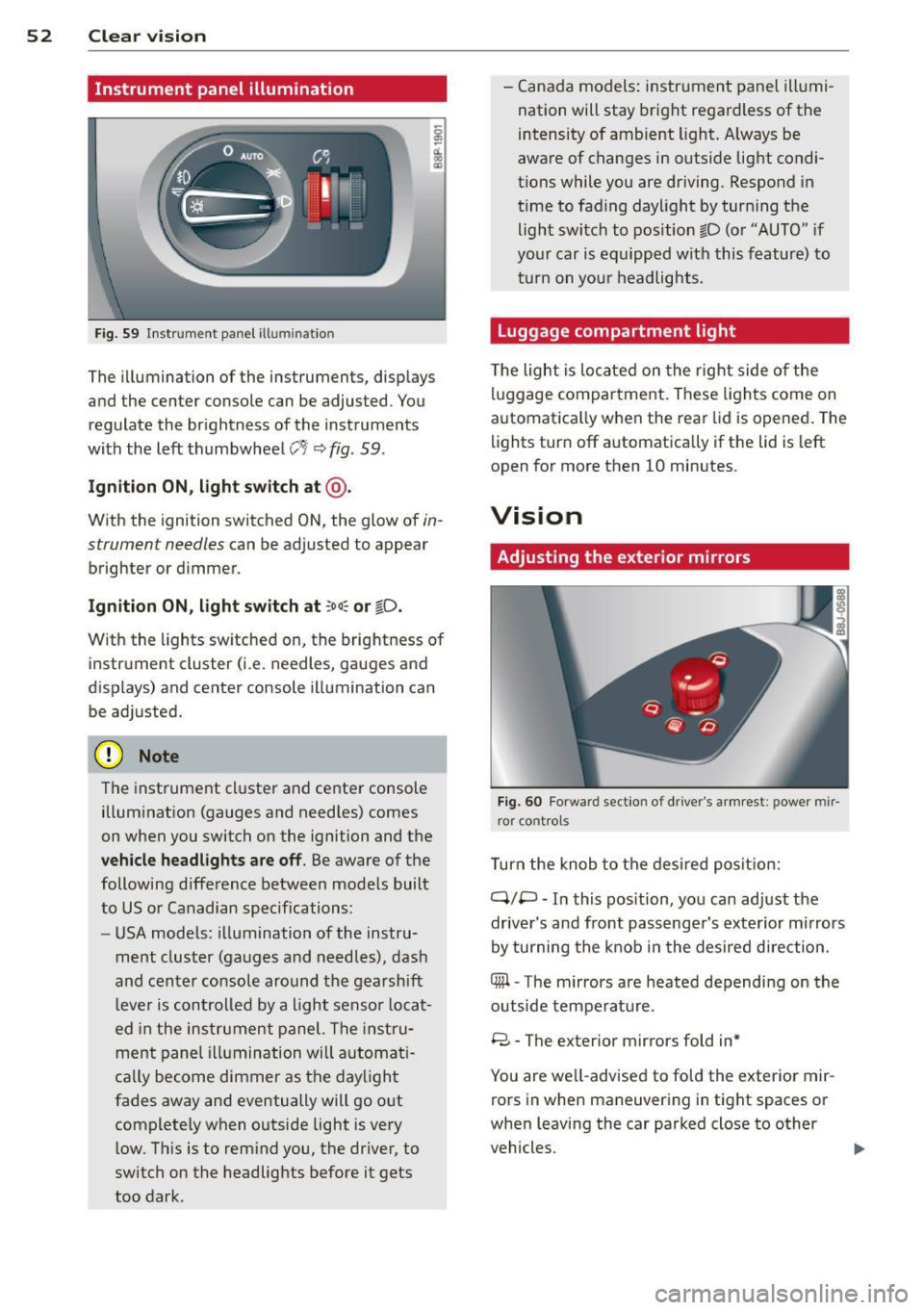
F ig. 59 In strum ent panel ill uminatio n
The illumina tion of the instruments, displays
and the center conso le can be adjusted . You
regulate the br ightness of the inst ruments
with the left thumbwhee l
CJ:J ~ fig. 59 .
Ignition ON, light switch at @.
With the ignition switched ON, the glow of in
strument needles can be adjusted to appear
brighte r or d immer.
Ignition ON, light switch at ;oo~ or io .
With the l ights sw itched on, the brightness of
instrument cluster (i.e. needles, gauges and
displays) and center console illuminat ion can
be adjusted.
@ Note
The instrument cl uster and cente r console
illumination (gauges and needles) comes
on when you switch on the ignition and the
veh icle headlights are off. Be aware of the
following difference between mode ls built
to US or Canadian specifications:
- USA mode ls : illumination of the instru
ment cluster (gauges and needles), dash
and cente r consol e around the gearsh ift
l ever is controlled by a light senso r locat
ed in the instrument panel. The instru
ment pane l ill umination will a utomat i
ca lly become dimmer as the daylight
fades away and eventually will go o ut
complete ly when outside light is very
l ow . Th is is to rem ind you, the driver, to
switch on the headlights before it gets
too dark . -
Canada models: instr ument panel illumi
nation will stay bright regardless of the
intensity of ambient light . A lways be
aware of changes in outside light condi
tions while you are driving. Respond in
time to fading daylight by tur ning the
light switch to position fD (o r "AUTO" if
your car is equipped with this feature) to
t ur n on you r headlights.
Luggage compartment light
The light is located on the right side of the
lu ggage compartme nt. These lights come on
automat ica lly when the rea r lid is opened . The
lights turn off automatica lly if the lid is left
open for more then 10 minutes.
Vision
Adjusting the exterior mirrors
F ig. 60 Fo rwa rd sect io n of drive r's armr est: power mir
ror cont rol s
Turn the knob to the desired posit ion:
Q/ P -In this pos ition, you can adjust the
drive r's and front passenger's exte rior m irrors
by turning the knob in the desired d irection.
4iil -The mirrors are heated depending on the
outside temperature .
8 -The exterior mirror s fold in*
You are we ll-advised to fold the exterior mir
rors in when maneuvering in tight spaces or
when leaving the car parked close to other
vehicles. ..,,.
Page 55 of 244
_& WARNING
- Curved (i. e. convex) mirror surfaces in
crease your field of view. Remember that
vehicles or other objects will appear
smaller and farther away than when seen
in a flat mirror.
If you use this mirror to
estimate distances of following vehicles
when changing lanes, you could estimate
incorrectly and cause an accident.
CD Note
- If the mirror housing is moved uninten
tionally (for example, while parking your
vehicle), then you must first fold the mir ror electrically. Do not readjust the mir
ror housing manually. You could damage
the motor which controls the mirror .
- If you wash the vehicle in an automatic
car wash, you must fold the exterior mir
rors in to reduce the risk of damage to
the mirrors . Never fold power folding ex
terior mirrors* by hand. Only fold them in and out using the power controls .
@ Tips
If there should be a malfunction in the
electrical system, you can still adjust the
exterior mirrors by pressing the edge of
the mirror .
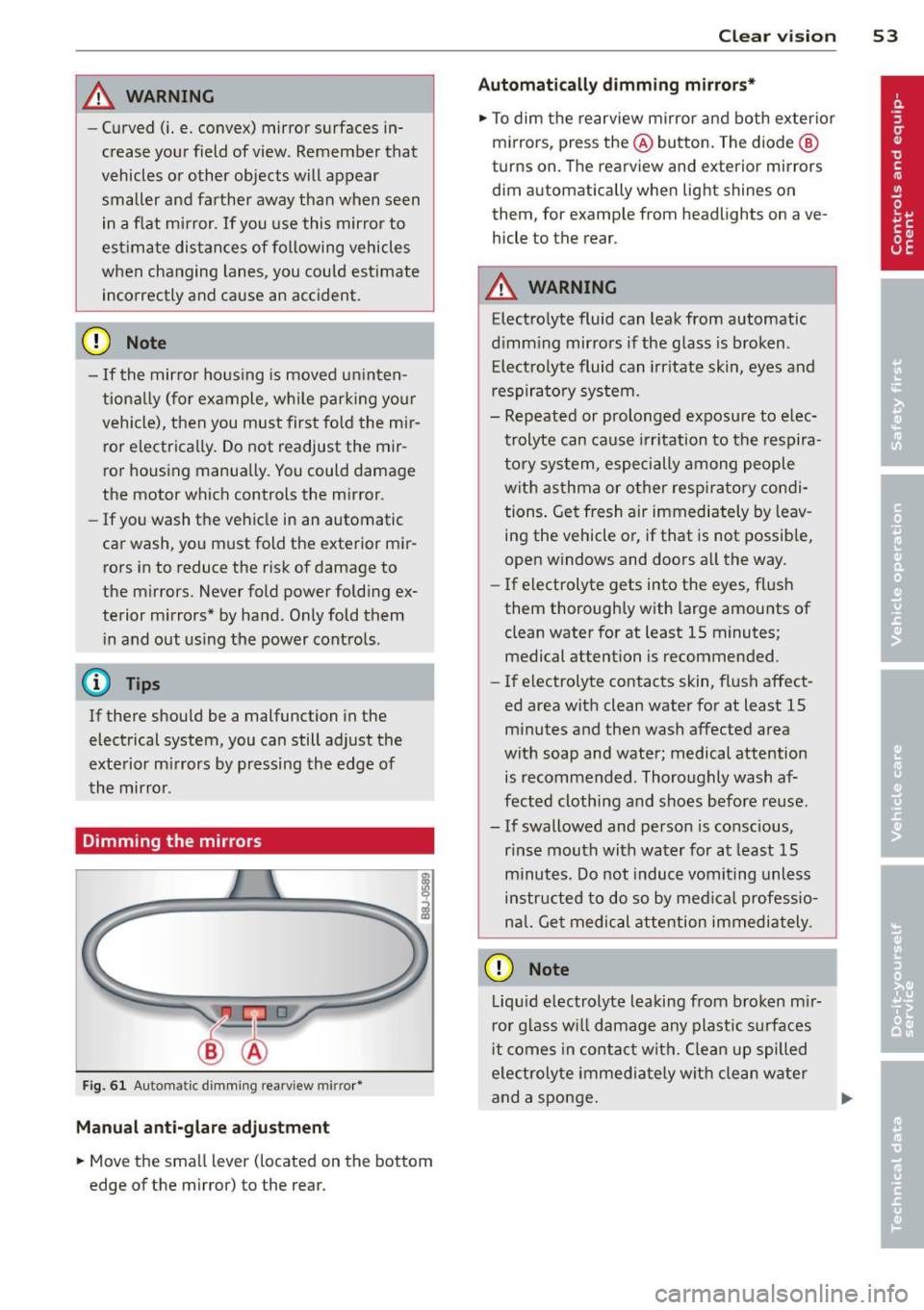
Dimming the mirrors
Fig. 61 Automa tic dimming re arview mirror•
Manual anti-glare adjustment
• Move the small l ever (located on the bottom
edge of the mirror) to the rear.
Clear vision 53
Automatically dimming mirrors*
• To dim the rearview mirror and both exterior
mirrors, press the @button. The diode @
turns on . The rearview and exterior mirrors
dim automatically when light shines on
them, fo r ex ample from headlights on ave
hicle to the rear .
_& WARNING
Electrolyte fluid can leak from automatic
dimming mirrors if the glass is broken .
Electrolyte fluid can irritate skin, eyes and
respiratory system.
- Repeated or prolonged exposure to elec
trolyte can cause irritation to the respira
tory system, especially among people
with asthma or other respiratory condi
tions. Get fresh air immediately by leav
ing the vehicle or, if that is not possible,
open windows and doors all the way.
- If electrolyte gets into the eyes, flush
them thoroughly with large amounts of
clean water for at least 15 minutes·
. '
medical attention is recommended.
- If electrolyte contacts skin, flush affect
ed area with clean water for at least 15 minutes and then wash affected area
with soap and water; medical attention is recommended. Thoroughly wash af
fected clothing and shoes before reuse .
- If swallowed and person is conscious, rinse mouth with water for at least 15
minutes. Do not induce vomiting unless
instructed to do so by medical professio
nal. Get medical attention immediately .
CD Note
Liquid electrolyte leaking from broken mir
ror glass will damage any plastic surfaces
it comes in contact with. Clean up spilled
electrolyte immediately with clean water
and a sponge. .,..
Page 57 of 244
During brief stops, e.g. at a red light, wiper
motion will automatically be reduced to the
next lower speed. Wipers already turning at
low speed change to intermittent wiping.
When the ignition is turned on, the washer
jets are heated.
A WARNING
- Wiper blades are crucial for safe driving!
Only when they are in good condition are
they able to clear the windows properly
to provide uncompromising visibility .
Worn or damaged wiper blades are a safety hazard ¢
page 5 7, Replacing
windshield wiper blades!
- The light/rain sensor* is only designed to
assist and support the driver.
It remains
entirely the driver's responsibility to
monitor outside weather conditions and
to manually activate the wipers as soon as rain or drizzle reduces visibility
through the windshield.
- The windshield must not be treated with
water-repellent materials. They can in
crease glare under poor visibility condi
tions such as wetness, darkness, or when
the sun is low on the horizon. In addi
tion, they can cause the windshield wip
ers to chatter .
(I) Note
In freezing or near freezing conditions:
- Always check that the wiper blades are
not frozen to the glass before you turn
the wipers on . Loosen a wiper blade
which is frozen in place before operating
the wipers to prevent damage to the
wiper blade or the wiper motor.
- Do not use the wipers to clear a frosted window . Using the wipers as a conven
ient ice scraper will destroy the wiper
blades.
- Before you take your vehicle to an auto
matic car wash, make sure you have the
windshield wiper system switched off (lever in position 0), otherwise the wind
shield wiper system could get damaged
Clear vision 5 5
in the car wash if it should suddenly
come on.
(0 Tips
- The windshield wipers are switched off
when the ignition is turned off. Activate
the windshield wipers after the ignition
is switched back on by moving the wind
shield wiper lever to any position.
- Worn or dirty windshield wiper blades
cause smearing, which can affect the op
eration of the light/rain sensor* . Check
the condition of your windshield wiper
blades regularly.
- The rain sensor is part of the interval
wiping system . Turning off the ignition
will also deactivate the rain sensor. To re activate the sensor, switch off the inter
val wiping function, then switch it back
on again.
-Applies to vehicles with light/rain sen
sor : When the wipers are switched on
manually and in rain conditions, the au
tomatic headlights* turn on¢
page 48,
Switching the headlights on and off
or
off during the day when the wipers are
no longer operating. The automatic
headlights* function is available in this
case only when the light switch is in the
"AUTO" position¢
page 48, fig. 53.
-Make sure the washer fluid reservoir in
the engine compartment is topped off
before going on a long trip. Look up
¢
page 180 for checking and filling the
washer container .
- The wipers only operate with the hood
completely closed .
Headlight washer system
Applies to vehicles: with headlight washer system
The headlight washer system cleans the
headlights.
"'Operate the windshield wiper/washer sys
tem
o page 54, fig. 63 ® with the head
lights turned on by holding the lever for lon-
ger than one second . ..,.
Page 62 of 244
60 Seats and stor age
Seats and storage
General recommen
dations
Why is your seat adjustment so
important?
The safety belts and the airbag system can
only provide maximum protection if the front
seats are correctly adjusted.
There are various ways of adjusting the front
seats to provide safe and comfortable support
for the driver and the front passenger. Adjust
you r seat prope rly so that :
- you can easily and quickly reach all the
switches and controls in the instrument
panel
-your body is properly supported thus reduc
ing physical stress and fatigue
- the safety be lts and airbag system can offer
maximum protection
¢ page 109.
In the following sections, you will see exactly
how you can best adjust your seats .
There are special regulations and instructions
for installing a child safety seat on the front
passenger's seat. Always heed the informa
tion regarding child safety provided in
¢ page 130, Child Safety.
A WARNING
Incorrect seating position of the driver and
all other passengers can result in serious
personal injury.
- Always keep your feet on the floor when
the vehicle is in motion -never put your
feet on top of the instrument panel, out
of the window or on top of the seat cush
ion! This applies especially to the passen
gers .
If your seating position is incorrect
you increase the risk of injury in the case
of sudden braking or an acc ident.
If the
airbag inflates and the seating position
is incorrect this could result in personal
injury or even death.
- It is important for both the driver and
front passenger to keep a distance of at least 10
inches (25 cm) between them
selves and the steering wheel and/or in
strument panel. If you're sitting any
closer than this, the airbag system can not protect you properly . In addition to
this, the front seats and head restraints
must be adjusted to your body height so
that they can give you maximum protec
tion.
- Always try to keep as much distance as
possible between yourself and the steer
ing wheel or instrument panel.
- Do not adjust the driver's or front pas
senger's seat whi le the vehicle is moving.
Your seat may move unexpectedly, caus
ing sudden loss of vehicle control and
personal injury. If you adjust your seat
while the vehicle is moving, you are out of position.
Driver's seat
The correct seat position is important for safe
and relaxed driving.
We recommend that you adjust the driver's
seat in the following manner :
.,. Adjust the seat in fore and aft direction so
that you can easily push the peda ls to the
floor whi le keeping your knee slightly bent
i::> A in Why is your seat adjustment so im
portant? on page 60 .
.,. Adjust the seatback so that when you sit
with your back against the seatback , you can
still grasp the top of the steering wheel.
.,. Position the head restraint according to the
occupant 's height
<=:> page 63 . For maxi
mum protection, the top of the head re
straint shou ld be at least at eye level, pref
erably higher and ideally level with the top
of the head
¢ page 95, fig. 102.
A WARNING "--
Never place any objects in the driver's foot-
well. An object could get into the pedal
area and interfere with pedal function. In
case of sudden braking or an accident, you
would not be able to brake or accelerate!
Page 64 of 244
62 Seats and storage
seating position and improperly posi
tioned safety be lts!
Power seats
Adjustment switches
App lies to vehicles: wit h power seats
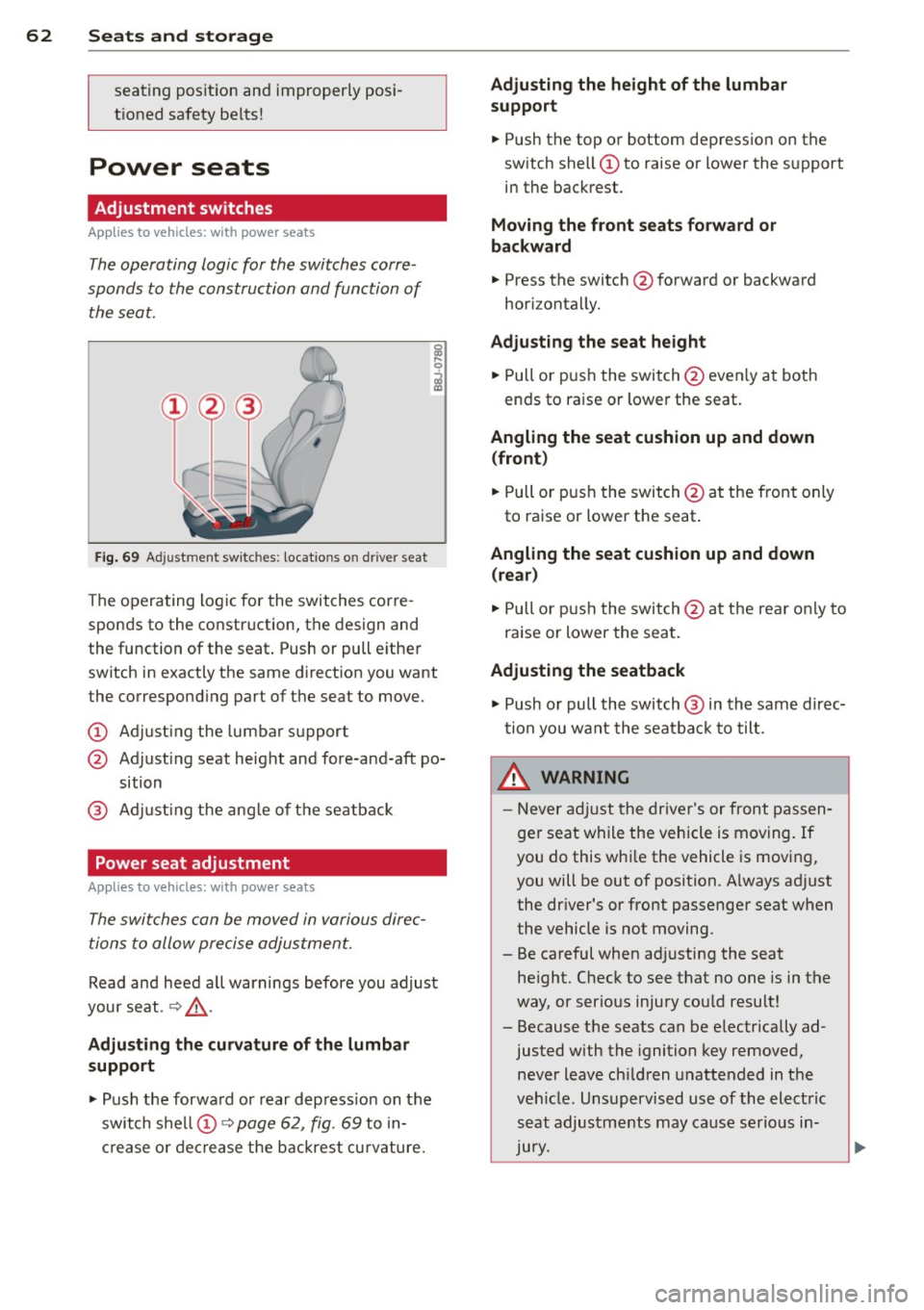
The operating logic for the switches corre
sponds to the construction and function of
the seat.
Fig. 69 Adjustment switches: locations on driver seat
The operating logic for the switches corre
sponds to the construction, the design and
the function of the seat. Push or pull either
switch in exactly the same direction you want
the corresponding part of the seat to move.
CD Adjusting the lumbar support
@ Adjusting seat height and fore-and-aft po
sition
@ Adjusting the angle of the seatback
Power seat adjustment
Applies to vehicles: with power seats
The switches can be moved in various direc
tions to allow precise adjustment.
Read and heed all warnings before you adjust
your seat. ¢&_ .
Adjusting the curvature of the lumbar
support
.,. Push the forward or rear depress ion on the
switch shell CD¢
page 62, fig. 69 to in
crease or decrease the backrest curvature.
Adjusting the height of the lumbar
support
.,. Push the top or bottom depression on the
switch shell CD to raise or lower the support
in the backrest.
Moving the front seats forward or
backward
.,. Press the switch @forward or backward
horizontally.
Adjusting the seat height
.,. Pull or push the switch @even ly at both
ends to raise or lower the seat.
Angling the seat cushion up and down (front )
.,. Pull or push the switch @at the front only
to raise or lower the seat.
Angling the seat cushion up and down (rear)
.,. Pull or push the switch@at the rear only to
raise or lower the seat .
Adjusting the seatback
.,. Push or pull the switch @ in the same direc
tion you want the seatback to tilt.
,&. WARNING
-Never adjust the driver's or front passen
ger seat while the vehicle is moving.
If
you do this while the vehicle is moving,
you will be out of position. A lways ad just
the dr iver's or front passenger seat when
the vehicle is not moving.
- Be careful when adj usting the seat
height. Check to see that no one is in the
way, or serious injury could result!
- Because the seats can be e lectrically ad
justed with the ignition key removed,
never leave ch ildren unattended in the
vehicle. Unsupervised use of the electric
seat adjustments may cause serious in
Jury.
Page 78 of 244
76 On the road
On ly afte r th e ve hic le has come to com
plete stop, shou ld you f irm ly set t he park
ing b rake and either move the selector lev
er i nto "P".
Parking
P a rkin g
"' Stop the vehicle using the brake pedal.
"' Set the parki ng brake firmly .
"' Swi tc h off the engine.
"' Mov e the selector lever into the P pos ition
~ A -
.. When on incl ines or decli nes, turn the steer
ing wheel so that the vehicle will roll into
the curb if it begins to move .
A WARNING
This is how you can reduce the risk of in
jury when leaving your veh icle.
- Never park the vehicle where it can come
in contact with dry grass, spilled fuel or
any other flammable mater ials.
- Never allow anyone -especia lly small
children -to remain in the vehicle when
it is locked. Locked doors make it more
difficult for rescuers to access the pas
senger compartment in the event of an
eme rgency. Danger to life!
- Never leave children unsupervised in the
vehicle . Children could re lease the park
ing brake o r move the gea rshift lever out
of gear. The vehicle could start to roll
away and ca use an accident.
- N o matter wha t the season is, the tem
perature in a par ked vehicle can rea ch
dangero us levels .
Starting on hills
Applies to vehicles: wit h hill h old ass ist
H ill hold assist ma kes it easie r to sta rt on
h ill s.
The system is act ivated when the brake pedal
i s depressed
for a few s econds .
After releasing the brake pedal, the brake
power is held for a brief moment to prevent
the vehicle from rolling back when start ing . At
th is time, you can easi ly beg in to move your
vehicle.
A WARNING
-- If you did not begin moving immed iate ly
after releasing the brake pedal, under
c e rtain ci rcumstances, the vehicle would
begin to ro ll backwa rd. Depr ess the
b rake ped al immedi ately o r engage the
hand brake .
- Should t he e ngine sta ll, dep ress the
b ra ke ped al immediate ly or eng age the
hand b rake .
- I n or der to prevent the vehicle from roll
ing back unintentionally when s tarti ng in
s top -and-go traffic, keep the brake pedal
depressed for a few seconds before driv
ing off.
(J} Tips
You can find o ut if yo ur vehicle is eq uipped
with "Hill hold ass ist" at an autho rized
A udi dealersh ip.
Speed warning system
Overview
The speed warning system helps you to keep
your driving speed below a set speed limit.
The speed warn ing system warns the driver if
he exceeds a previous ly stored max imum
speed . A warning tone will sound as soon as
the ve hicle speed exceeds the set speed by
about 3 mph (3 km/h). At the same time, a
warning symbo l appea rs in the display.
The speed warn ing system has
two warning
thr esho lds
that f unction independently of
each other and that have somewhat different
purposes:
Speed warning 1
You can use speed warning 1 to set the maxi mum speed while you are driving . This setting
will remain in effect unti l yo u tur n off the ..,.
Page 80 of 244
78 On the road
Speed warning 2: setting a speed limit
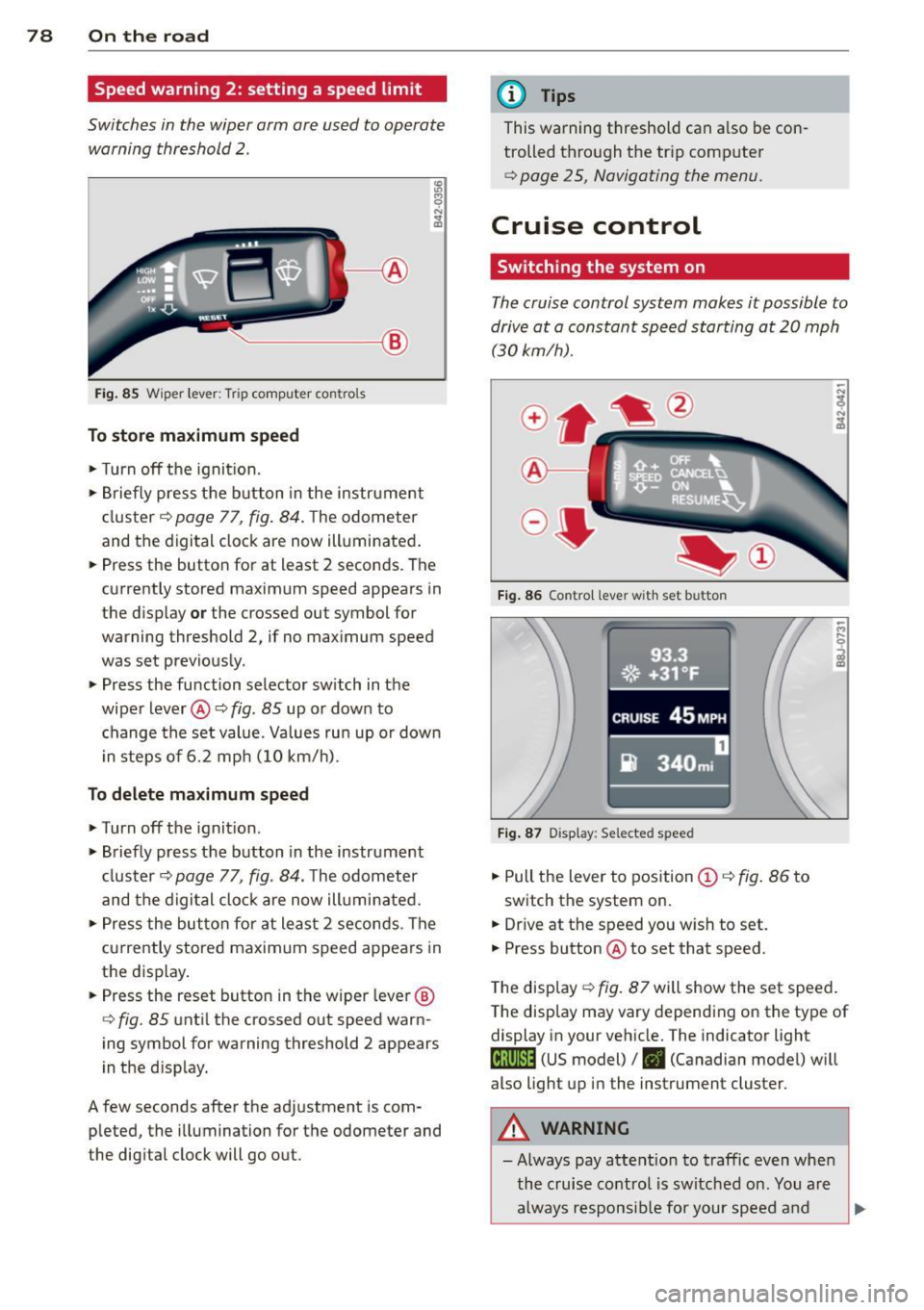
Switches in the wiper arm are used to operate
warning threshold
2 .
'----I ®
Fig. 85 Wiper lever: Tr ip computer con trols
To store maximum speed
>Turnoff the ignition.
> Briefly press the button in the instrument
cl uster ¢
page 77, fig. 84. The odometer
and the digital clock are now illuminated .
> Press the button for at least 2 seconds . The
currently stored maximum speed appears in
the display
or the crossed out symbol for
warning threshold 2, if no max imum speed
was set previously.
> Press the function selector sw itch in the
wipe r lever @¢
fig. 85 up or down to
change the set value. Values run up or dow n
i n steps of 6.2 mph (10 km/h).
To delete maximum speed
>Turnoff the ignit ion.
> Briefly press the button in the instrument
cluster <:::>
page 77, fig . 84 . The odometer
and the digital clock are now illumi nated.
> Press the button fo r at least 2 seconds . The
cu rrently stored maxim um speed appears in
the display.
> Press the reset button in the wiper lever ®
<:::>
fig . 85 until the crossed out speed warn
ing symbol for warning threshold 2 appears
i n the display.
A few seconds after the adjustment is com
pleted, the illumination for the odometer and
the dig ital clock will go out.
(D Tips
This warning threshold can a lso be con
trolled thro ugh the tr ip computer
¢ page 25, Navigating the menu.
Cruise control
Switching the system on
The cruise control system makes it possible to
drive at a constant speed starting at 20 mph (30 km/h) .
®-
Fig. 86 Contro l leve r with set b utton
Fig. 87 Display : Se lecte d speed
> Pull the lever to position (D <:::> fig. 86 to
switch the system on.
> Dr ive at the speed you w ish to set.
> Press button @ to set that speed.
.., ....
i
The display <:::> fig. 87 will show the set speed .
The display may vary depending on the type of
display in your vehicle. The indicator light
M;ll)~14 (US model)/ . (Canadian model) will
also light up in the instrument cluster .
A WARNING
- Always pay attention to traffic even when
the cruise control is switched on. You are
always responsib le for your speed and