remote control AUDI TT ROADSTER 2014 User Guide
[x] Cancel search | Manufacturer: AUDI, Model Year: 2014, Model line: TT ROADSTER, Model: AUDI TT ROADSTER 2014Pages: 244, PDF Size: 60.87 MB
Page 60 of 244
58 Clear vis ion
- To help prevent damage to the wiper
arms or other components, do not at
tempt to move the wipers by hand .
@ Tips
-Commercial hot waxes applied by auto
matic car washes affect the cleanability
of the glass surface.
- The front wiper blades are different
l engths; the blade on the driver's side is
l onger.
Digital compass
Activating or deactivating the compass
Appl ies to vehicles: with digital compass
The direction is displayed on the interior rear
view mirror.
Fig. 66 Ins ide rear vi ew mirror: digita l compass acti·
vate d
,. To activate or deactivate, hold the@
i=> fig. 66 button down until the red display
appears or d isappears.
The digital compass only works with the igni
tion turned on. The direct ions are displayed as
in itials:
N (North), NE (Northeast), E (East),
SE (Southeast), S (South), SW (Southwest),
W (West), NW (Northwest).
(j) Tips
To avo id inaccurate directions, do not al
low any remote controls, electrical sys
tems, or metal parts close to the mirror.
Setting the magnetic deflection zone
Applies to vehicles: with digital compass
The correct magnetic deflection zone must be
set in order to display the directions correctly.
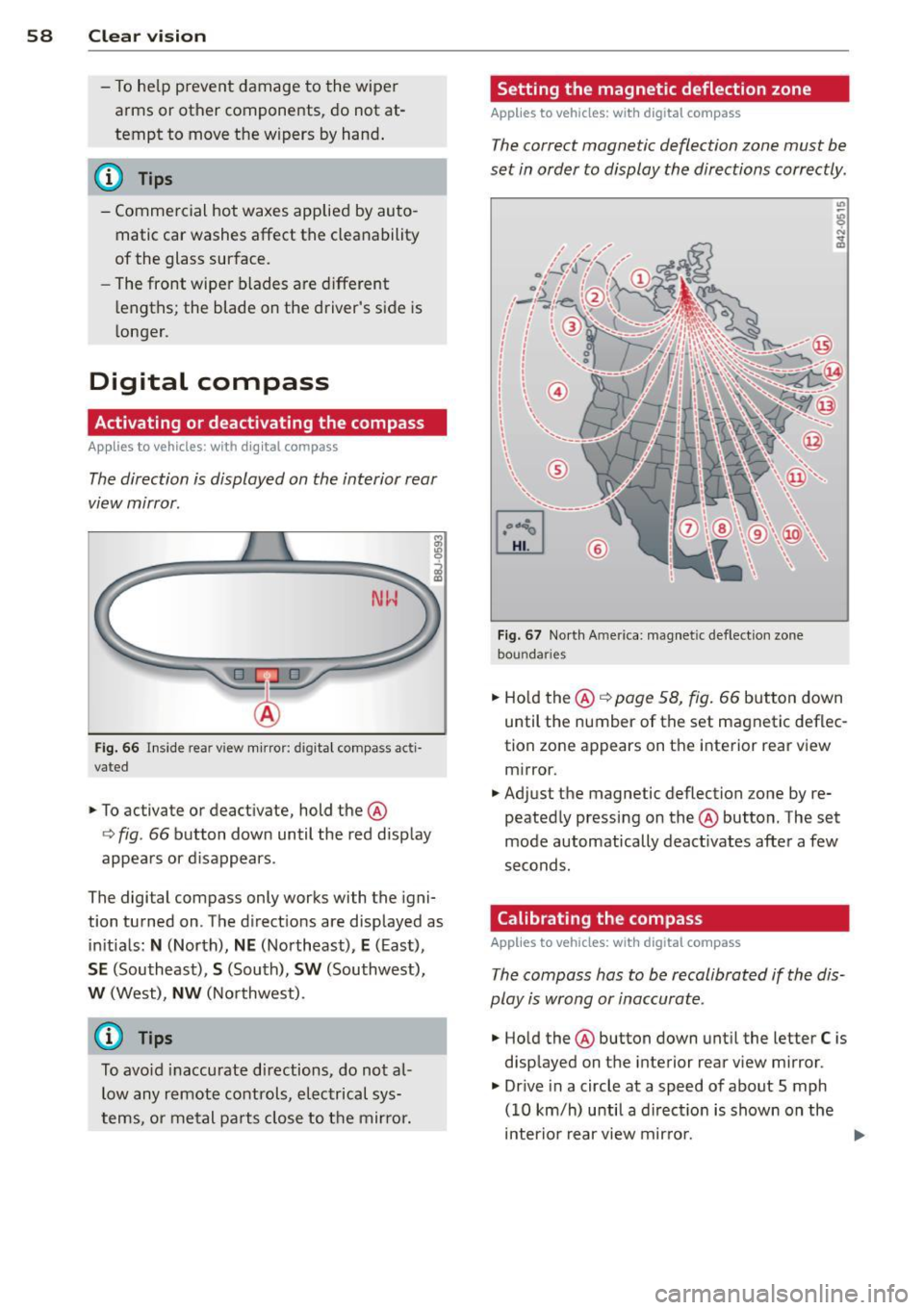
Fig. 67 North America: mag netic defle ction zone
boundar ies
,. Ho ld the @¢ page 58, fig. 66 button down
until the number of the set magnetic deflec
tion zone appears on the interior rear view mirror.
,. Adjust the magnetic deflection zone by re
peatedly pressing on the @button. The set
mode automatically deact ivates after a few
seconds.
Calibrating the compass
Applies to vehicles: with digital compass
The compass has to be recalibrated if the dis
play is wrong or inaccurate.
,. Hold the @button down until the letter
C is
displayed on the interior rear view mirror.
,. Dr ive in a circle at a speed of about S mph
(10 km/h) until a direct ion is shown on the
interior rear view mirror. ..,.
Page 91 of 244
Homelink
Universal remote
control
General information
The HomeLink universal remote control can
be programmed with hand-held transmitters
from existing equipment.
You must first program the Homelink trans
mitter before you can use the system
~ page 89, Programming the HomeLink
transmitter.
In order to program the Homelink transmit
ter for devices utilizing rolling code, a second
person on a ladder who can safely reach the
garage door opener motor is recommended.
It is also necessary to locate the "learn" but
ton on your garage door opener motor . Refer
to the operating instructions for the opener, as the location and color of this button may
vary by manufacturer .
You can still use the origina l remote control
for the device at any time.
A WARNING
-
- Never use the Homelink transmitter
with any garage door opener that does
have not the safety stop and reverse fea
ture as requ ired by federal safety stand
ards. This includes any garage door open
er model manufactured before April 1,
1982.
- A garage door opener which cannot de
tect an object, signaling the door to stop
and reverse does not meet current feder
al safety standards. Using a garage door
opener without these features increases
risk of serious injury or death.
- For safety reasons never release the
parking brake or start the engine while
anyone is standing in front of the vehicle.
- A garage door or an estate gate may
sometimes be set in motion when the Homelink remote control is being pro
grammed. If the device is repeatedly ac-
Homelink 89
tivated, this can overstrain motor and
damage its electrical components -an
overheated motor is a fire hazard!
- To avoid possible injuries or property
damage, please always make absolutely
certain that no persons or objects are lo
cated in the range of motion of any
equipment being operated.
(!) Tips
- If you would like more information on
Homelink, where to purchase the Home
Link compat ible products, or would like
to purchase the Homelink Home Light
ing Package, please call toll-free:
1-800-355-3515.
- For Declaration of Compliance to United
States FCC and Industry Canada regu la
tions
~page 229.
Programming the Homelink transmitter
The transmitter is programmed in two phas
es. For rolling code transmitters, a third
phase is also necessary.
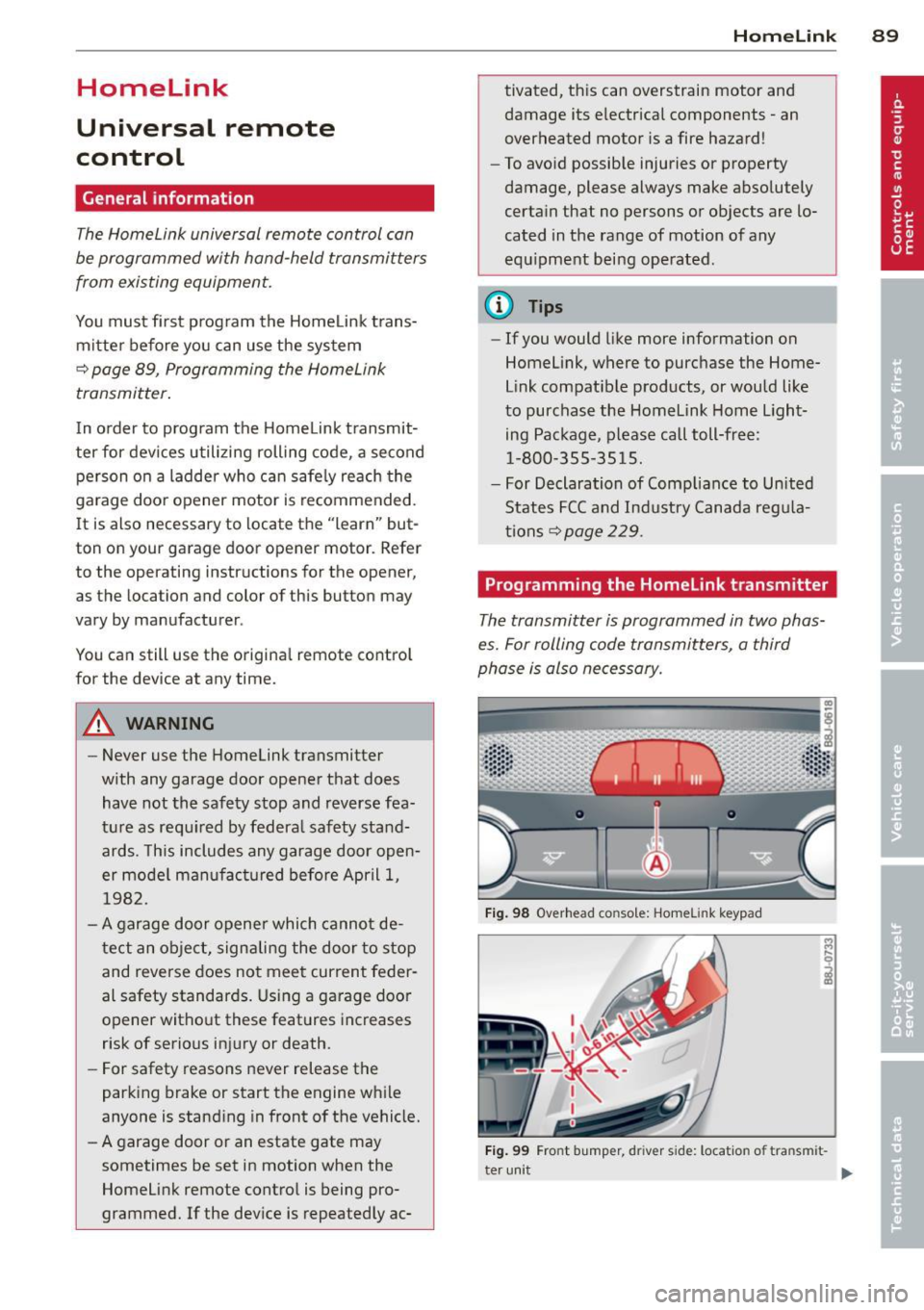
Fig. 98 Overhead co nsole: Homelink keypad
Fig. 99 Fro nt bumper, d river side: locatio n of tra nsm it-
ter unit
IJ-
Page 92 of 244
90 Homelink
Phase 1:
programming the overhead keypad
1. Make sure yo ur vehicle is wit hin o peratin g
range of the remote contro lled garage
door opener .
2. Set the parking brake¢.&. in General in
formation on page 89 .
3. Tur n the ignition on . Do not sta rt the e n
g ine!
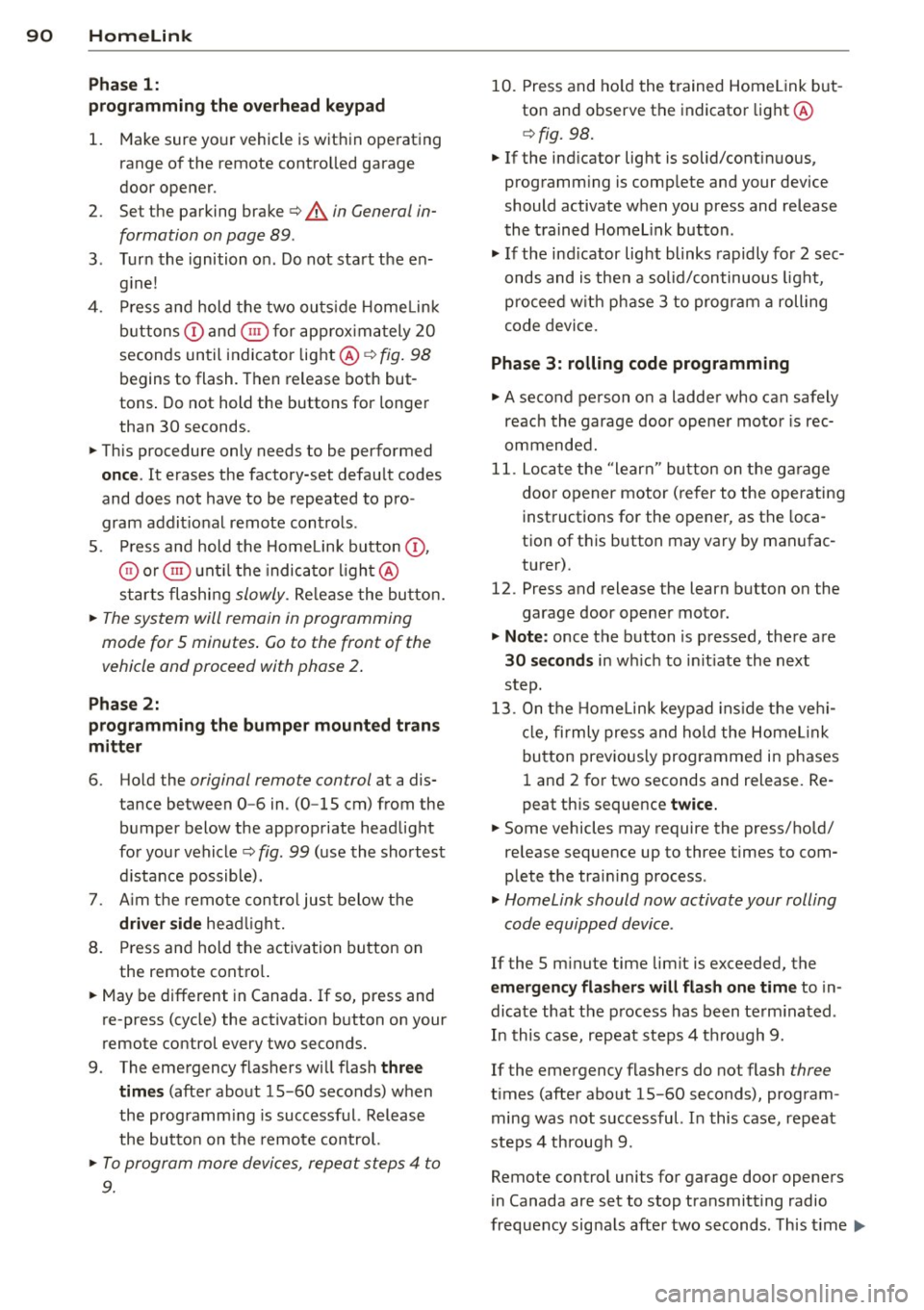
4 . Pr ess and hold the two ou ts ide Home Link
b uttons
(D and @for app rox imately 2 0
seconds un til indicator light @¢fig . 98
begins to flash. Then release both but
tons . Do not hold the buttons for longe r
than
30 seconds.
.,. This procedure only needs to be performed
once . It erases the factory-set defau lt codes
and does not have to be repeated to pro
gram addit ional remote cont rols .
S . Press and hold the Hom elink button
(D ,
® or @ unt il the indica to r li gh t@
starts flashi ng
slowly. Re lease the bu tton.
.,. The system will remain in programming
mode for 5 minutes .
Co to the front of the
vehicle and proceed with phase 2 .
Phase 2:
programming the bumper mounted tran s
mitter
6 . Hold the original remote control at a dis
tance between
0 -6 in . (0 -15 cm) from the
b umper below the appropriate head light
fo r you r vehicle
q fig. 99 (u se the sho rtest
d istance possible).
7 . Aim t he remo te con trol jus t below the
driver side hea dligh t.
8 . Pr ess and hold the activation button on
the remote cont ro l.
.,. May be different in Canada. If so, press and
re-press (cycle) the activat ion b utton on your
remote control every two seconds.
9 . The eme rgency flashers will flash
three
time s
(after abo ut 15 -60 seconds) when
the programm ing is successf ul. Release
the butto n on the remote control.
.,. To program more devi ces, repea t steps 4 to
9.
10. Press and ho ld the trained Homelink but
ton and observe the indicator light @
¢fig. 98.
.,. If the ind icator lig ht is solid/contin uous,
prog ramm ing is comp lete and your device
should activate when you press and release
t he tra ined Homel ink b utton .
.,. If the ind icator light blinks rapidly fo r
2 se c
onds and is then a so lid/continuous ligh t,
procee d w ith p hase
3 to progr am a roll ing
code device.
Phase 3: rolling code programming
.,. A seco nd person o n a ladde r who can safely
reach th e garage door opene r moto r is rec
ommended .
11. Loc ate t he "lear n" bu tton on t he g arage
doo r opener motor ( re fer to the operating
inst ructions for the opener, as the loca
tion of t his button may vary by man ufac
turer).
12. Press and release the learn b utton on the
garage door opene r motor .
.,. Note : once the b utton is p ressed, the re a re
30 seconds in w hich to in it iate the next
step.
13. On t he Home link keypad ins ide t he ve hi
cl e, fi rmly press and hol d the Home link
bu tton prev ious ly progr ammed in phases
1 an d 2 for two seconds and release. Re
peat th is sequence
twice.
.,. Some vehicles may require the press/hold/
release sequence up to three times to com
plete the trai ning process .
.,. Homelink should now activate your rolling
code equipped d evice .
If the 5 minute time limit is exceeded , the
emergency flashers will flash one time to in
dicate that the p rocess has been te rm ina ted .
In this case, repeat steps 4 through 9.
If the emergency flashers do not flash
three
t imes (afte r about 15 -60 seconds) , program
ming was not successful. I n this case, repeat
steps 4 through 9 .
Remote contro l units for garage do or openers
in Canada are set to stop transmitting radio
fr eq uency sig nals afte r two seconds. Th is t ime ..,.
Page 93 of 244
may not be sufficient for the Homelink sys
tem to learn the radio frequency signal. Per
form all other steps as descr ibed above.
Operating the Homelink transmitter
The HomeLink transmitter works in the same
manner as the original hand held remote con
trol that came with the system.
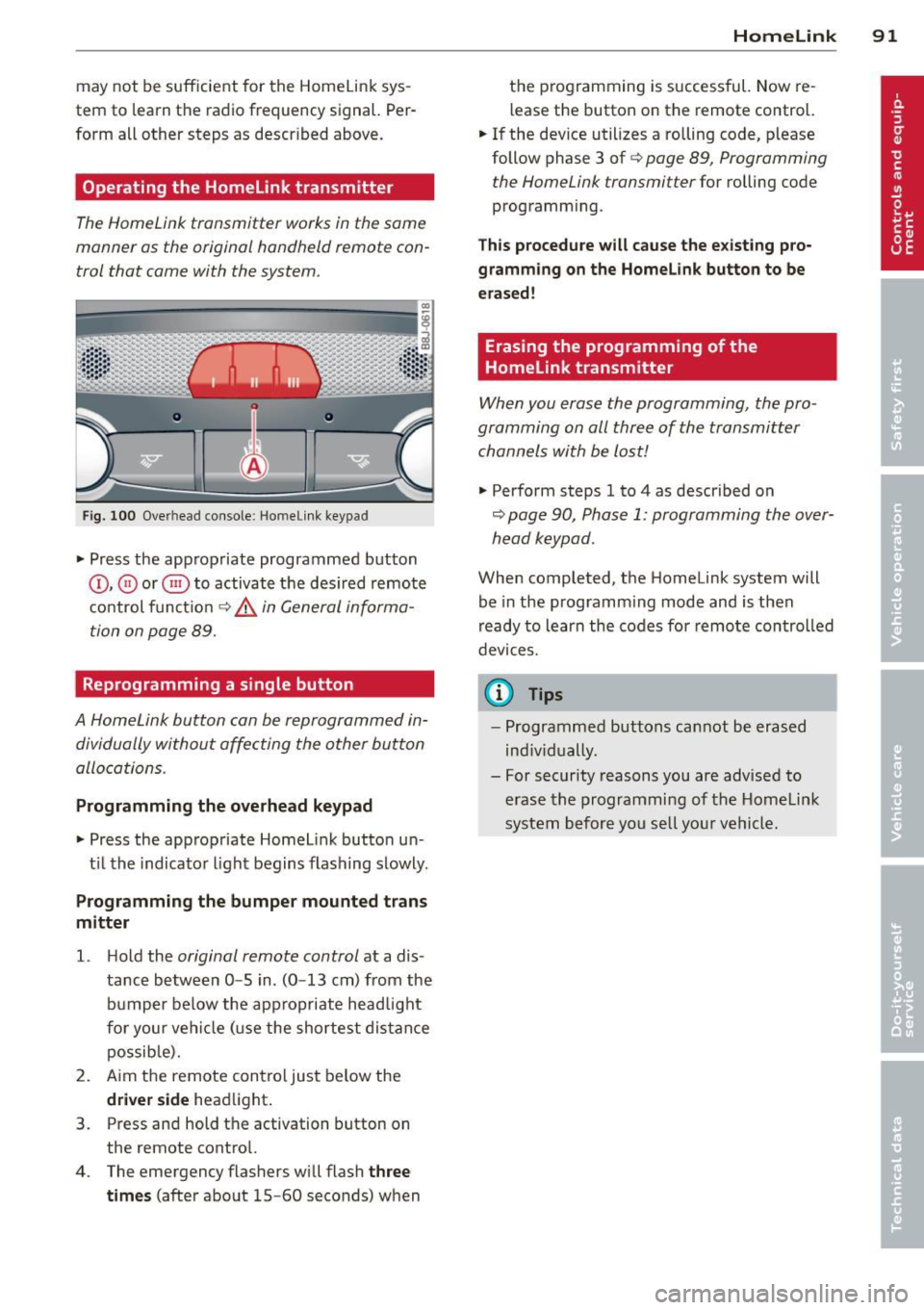
Fi g. 100 Overhead co nsole: Homeli nk keypad
• Press the app ropriate programmed button
© , @ or@ to activat e th e des ired remote
c o ntrol func tion
¢ &. in General informa
tion on page 89.
Reprogramming a single button
A HomeLink button can be reprogrammed in
dividually without affecting the other button
allocations.
Programming the overhead keypad
• Press the app ropriate Homel ink button u n-
t il t he indicato r light begins flashing slowly .
Programming the bumper mounted tran s
mitter
1. H old the original remote control at a dis
tance between
0 -5 in . (0 -13 cm) from the
bumper below the appropriate headlight
fo r you r vehi cle (u se the sh ortest dis tan ce
possib le).
2. A im the remote con tro l just below the
driver side head light.
3. Press and hold the activation button on the remote contro l.
4 . The emergency flashers wi ll flash
three
times
(after about 15 -60 seconds) w hen
Homelink 91
the p rogramming is successful. Now re
l ease the button on the remote control.
• If the dev ice utilizes a rolling code, p lease
follow phase 3 of ¢
page 89, Programming
the Home Link transmitter
for rolling code
programm ing .
Th is p rocedu re will cause the e xisting pro
gramming on the Homelink button to be
erased!
Erasing the programming of the
Homelink transmitter
When you erase the programming, the pro
gramming on all three of the transmitter channels with be lost!
• Perform steps 1 to 4 as described on
~ page 90, Phase 1: programming the over
head k eypad .
When completed, the Homelink system will
be in the prog ramm ing mode and is then
r eady to learn the codes fo r remote controlled
devices.
(D Tips
- Programmed buttons can not be erased
ind iv idually.
- For security reasons you are advised to erase the programming of the Homelink
system before yo u se ll you r vehicle.
Page 150 of 244
148 Intelligent technology
Battery diagnosi s
Battery diagnosis continuously determines
the state of the battery. Sensors determine
battery voltage, battery current and battery
temperature. This determines the current
state of charge and the power of the battery.
Idling current management
I dling current management reduces energy
consumption while the vehicle is standing.
With the ignition switched off, it controls the
energy supply to the various electrical compo
nents. Data from battery diagnosis is consid
ered.
Depending on the battery's state of charge,
individual consumers are gradually turned off
to prevent excessive discharge of the battery
and thus maintain starting capability.
Dynamic energy management
While the vehicle is being driven, dynamic en
ergy management distributes the energy gen
erated according to the needs of the individu
al components. It regulates consumption, so
that more electrical energy is not being used
than is being generated and ensures an opti
mal state of charge for the battery .
(D Tips
-But even energy management cannot
negate the limits of physics. Consider
that the power and life of a battery are
limited .
- If starting ability is threatened, you are informed by a warning
~page 149,
Driver notification in the instrument
cluster display.
What you should know
The highest priority is given to maintaining
starting capability .
The battery is severely taxed in short -distance
driving, in city traffic and during the cold time
of year. Abundant electrical energy is re
quired, but only a little is generated.
It is also
critical if the engine is not running and electri- cal components are turned on.
In this in
stance energy is being consumed but none is
being generated.
It is in precisely these situations that you will
notice energy management actively regulat
ing the distribution of energy.
Vehicle stands for an extended period
If you do not drive your vehicle over a period
of several days or weeks , electrical compo
nents are gradually cut back or switched off .
This reduces energy consumption and main
tains starting capability over a longer period.
Take into consideration that when you unlock
your vehicle, some convenience functions ,
such as the remote key or power seat adjust
ment, may not be available. The convenience
functions will be available again when you
turn on the ignition and start the engine.
With the engine turned off
If you listen to the radio, for example, with
the engine turned off, the battery is being dis
charged.
If starting capability is jeopardized due to en
ergy consumption, a message appears in the
driver information display.
You have to start the engine to charge the
battery.
With the engine running
Although electrical energy is generated when
the vehicle is being driven, the battery can be
come discharged. This happens mostly when
little energy is being generated and a great
deal consumed and the battery's state of
charge is not optimal.
To bring the energy balance back into equili
brium, consumers which require especially
large amounts of energy are temporarily cut
back or switched off . Heating systems in par
ticular require a great deal of energy. If you
notice, for example, that the heated seats* or
the heated rear window are not heating, they
have been temporarily cut back or switched .,.
Page 231 of 244
Technical Modifications
Our guidelines must be complied with when technical modifications are made .
Always consult an authorized Aud i dealer be
fore starting work on any modifications.
This will he lp ensure that vehicle function,
performance and safety are not impaired
¢ .&. .
Attempting to work on electronic components
and the software used with them can cause
malfunctions. Beca use of the way electronic
components are interconnected with each
other, such malfunctions can also have an ad
verse affect on other systems that are not di
rectly involved . Th is means that you r isk both
a substantial reduction in the operational
safety of you r vehicle and an inc reased wea r of
vehi cle parts¢ _&..
Author ized Audi dealers w ill perform th is
wo rk in a professiona l and competent ma nner
or, in spec ial cases, refer you to a p rofessional
company that specializes in such mod ifi ca
tions .
_& WARNING t=
Improper repairs and modifications can
change the way vehicle systems wo rk and
cause damage to the veh icle and ser ious
personal injury.
(D Note
If emergency repairs must be performed
elsewhere, have the veh icle examined by
an authorized A udi dealersh ip as soon as
possible.
Declaration of Compliance, Telecommu
nication or Electronic Systems
-
Radio Frequency Devices and Radiocommuni
cation Equipment User Manual Notice.
The manufacturer is not responsible for any
radio or TV interference caused by unauthor
i zed modifications to th is equ ipment.
Con sumer In formation 229
D evices
T he following devices each comply wi th FCC
Pa rt 15 .1 9, FCC Part 15.2 1 and RSS -Gen Iss ue
1:
- Cell phone pac kage
- Electron ic immobilizer
- Homelink un iversal remote co ntrol
- Remote control key
FCC Part 15.19
This device complies with part 15 of the FCC
Ru les. Operation is subject to the fo llow ing
two conditions:
(1) This devi ce may not cause harm ful inte r
ference, and
( 2 ) this device must accept any inte rfe rence
received, including inter ference that may
ca use undes ired operation .
FCC Part 15.21
CAUTION:
Changes or mod ificat ions not expressly ap
proved by the party responsible for compli
ance could vo id the user's authority to operate
the eq uipment.
RSS-Gen Issue 1
Operation is sub ject to the fo llow ing two con
dit ions:
(1) this device may not ca use interference,
and
(2) this device must accep t any inte rference,
incl uding interference tha t may cause unde
s ired operation of the device .
•
•
Page 234 of 244
232 Index
Temperature ............ ... .. .... .. 69
Ventilation .... ........... ... .... .. 68
C lock . . . . . . . . . . . . . . . . . . . . . . . . . . . . . . 11
Clutch overheating . . . . . . . . . . . . . . . . . . . 87
Cold ti re inflation pressure ..... ... ... . 185
Com ing home .............. .... ..... 49
Compass mirror ............ ... .... .. 58
Compl iance .. ............. .. .. .. .. . 229
Consumer Information . . . . . . . . . . . 99, 226
Contacting NHTSA .......... ... .... .. 99
Controls Cleaning . .... ........... .. .. .... . 157
Controls and displays .................. 8
Convenience close/open feature Pow er top . . . . . . . . . . . . . . . . . . . . . . . . . 43
Windows . ................. ..... .. 40
Conve rtible child safety seats .. .. .... . 135
Convertible locking retractor Activating .................... ... . 140
Deactivating .................. .... 140
Using to secure a ch ild safety seat 138, 140
Convertible top .. .......... .. .. .... .. 41
Automatic convertible top ............ 43
Eme rgency operation . . . . . . . . . . . . . . . . 44
General information ........... ..... 41
manual convertible top ........ .. .. .. 42
Warn ing/ indictor lights .............. 17
W ind deflecto r ..................... 44
Cooling system . . . . . . . . . . . . . . . . . . . . . 172
Expansion tank ... ..... ..... .. .. .. . 173
Cornering light ............ .. .. .. .. .. 49
C ruise control . . . . . . . . . . . . . . . . . . . . . . . 78
Changing speed . . . . . . . . . . . . . . . . . . . . 79
Pr esetting your speed . . . . . . . . . . . . . . . 79
Switching
off .............. .. .... .. 79
Sw itching on ....................... 78
Warning/indicator lights ... .. .. .. .. . . 21
Cup holder . . . . . . . . . . . . . . . . . . . . . . . . . . 64
Current fuel mileage 23
D
Damping
refer to Audi magnetic ride . .. .. .. .. . . 80
Data recorder . . . . . . . . . . . . . . . . . . . . . . 142
Date display . . . . . . . . . . . . . . . . . . . . . . . . 11
Daytime running lights ................ 48 D
ecla ration of compliance
Cell phone package ................ 229
E lectronic immob ilizer .............. 229
Homelink universal remote control ... 229
Remote control key ............ .... 229
D ecorative decals
Cleaning . ..... .. ............. .... 157
D eco rative parts/tr im
Cleaning .. .... .. ............. .... 157
def What does this mean when it appears in
the tr ip odometer display? ........... 12
Defective light bulb warning ........... 20
Defrosting the windows .......... .. .. . 71
Determining correct load limit ........ 190
Digital clock . . . . . . . . . . . . . . . . . . . . . . . . 11
Dig ital compass . . . . . . . . . . . . . . . . . . . . . 58
Dimensions . .... .. ............. .... 224
Dimming the rearview mirror .......... 53
Dipst ick
Reading the dipst ick properly ........ 170
Displays Cleaning .. .... .. ............. .... 157
D istance ......... .. .............. .. 23
Driver information system
Boost ........ .. .. ................ 26
Engine oil temperature .............. 26
Menu button . . . . . . . . . . . . . . . . . . . . . . 25
Menu display . . . . . . . . . . . . . . . . . . . . . . 24
Open door or front lid warning ........ 22
Outside temperature display . . . . . . . . . . 22
Red symbo ls ... ... ................ . 13
Service interval display . . . . . . . . . . . . . . 28
Setting ........................... 26
Sound system display . . . . . . . . . . . . . . . 22
Tr ip computer .. .................. .. 23
yellow symbols . . . . . . . . . . . . . . . . . . . . . 13
Driver seat
refer to Seating position . . . . . . . . . . . . . 93
Driving Run-flat tires .... ............. .... 203
Driving safely . .. .. ... .......... .... . 92
Driving through water ............... 151
Duplicat e key ..... ............. ..... 32
Dust filter . . . . . . . . . . . . . . . . . . . . . . . . . . 69
Page 236 of 244
234 Index
F
Fan ... . ... ... .. .. ..... ... .. .. .... .. 69
Radiator ... .. . .. ..... ... .. .. .... . 174
Fasten ing
B ooste r seats ............ .... .. .. .
137
Conve rtible c hild safety se ats . .. .. .. . 135
Infant sea ts
F lat t i re 13 5
Changing .. ... ......... ... .. .. ... 209
Floor mats . . . . . . . . . . . . . . . . . . . . . . . . . . 97
Fog lights . . . . . . . . . . . . . . . . . . . . . . . . . . 5 0
Fo ld ing master key w ith remote contro l .. 32
Foot pedals . . . . . . . . . . . . . . . . . . . . . . . . . 97
For the sake of the environmen t
G asoline fumes and the environmen t ..
163
Le tting you r engine warm up ... .. .. . . 74
Refue ling . . . . . . . . . . . . . . . . . . . . . . . . 163
Saving fue l by early upshifting . ..... . . 10
Fr ont airbags
D escr ipt ion . . . . . . . . . . . . . . . . . . . . . . .
113
H owtheywork ...... .......... .... 118
Fronta l collisions and the laws of physics 102
F ront seats . . . . . . . . . . . . . . . . . . . . . . . . . 60
Ad justing ....................... ..
94
Ad just ing the manual seats . .... .... .. 61
C hi ld restra ints in the front seat ... .. . 110
Fu el
Additives ... ... . ...... ... .. .. .... .
161
Blended gasoline ........... .. .... . 161
Current fuel mileage . . . . . . . . . . . . . . . . 23
Fill er neck .. .. .. ...... .... ... .. .. . 162
Fue l gauge . ... ......... ... .. .. ... . 12
Fuel supp ly too low . . . . . . . . . . . . . . . . . 20
Gasoline ... ... .......... .. .. .. .. . 16 1
Gasoline additives ........ .... .... . 162
Octane rating . ........... .. .. .. .. . 16 1
Recommendation .... ... .. .. .. .... . 161
Refue lling . .. .. .. ..... ... .. .. .... . 163
Reserve . ... ... . ...... ... .. .. .... .. 1 2
Tank capacity .............. .. .... . 224
Unlock ing the fue l filler flap by hand .. 164
Fu el economy messages (efficiency pro-
gram) ... .... ... . ...... ... .. .. .... ..
27
Fuse ar rangement ....... .. .. .. .. .. . 2 14
G
Garage doo r opener ( Homelink) .... . .. . 89
Gas discha rge lamps ..... .. ... ..... ..
2 16
Ga uges
Engine coolant temperature . . . . . . . . . .
11
Fuel gauge . . . . . . . . . . . . . . . . . . . . . . . . 12
Tachometer . . . . . . . . . . . . . . . . . . . . . . . 10
General illustration
Instruments and controls .. ... .. .. .. .. 8
Generator (warning/ indicator l igh ts) . .. .
16
G lossary of tire and loading terminology 182
G love compartment . . . . . . . . . . . . . . . . . . 66
G ross Vehicle We ight Rating (GVWR) ... 223
H
Head lights ..... .. .......... ... ... .. 48
adaptive light . . . . . . . . . . . . . . . . . . . . . . 49
Cleaning . . . . . . . . . . . . . . . . . . . . . . . . . 156
defective . . . . . . . . . . . . . . . . . . . . . . 20, 2 1
Fron t fog lights . . . . . . . . . . . . . . . . . . . . 50
Switching off .... ... .. ..... ... .. .. . 4 8
Switching on ..... .. ... ..... ... .. .. . 48
Washe r system . . . . . . . . . . . . . . . . . . . . . SS
Xenon headlights .............. .. .. . 48
He ad restr aints .. .. ............. .. ... 95
Adjusting ..... .. .. .... .... ... .. .. . 95
Heated
exter io r mir ro rs . . . . . . . . . . . . . . . . . . . .
52
fron t seats (cl ima te control) ..... .. .. . 72
rear window ...................... . 71
Heated seats . . . . . . . . . . . . . . . . . . . . . . . . 72
Heate d washer jets
Wiper and washer system .. ... .. .. .. .
54
H eating .. .. ...... ............. ..... 68
Hig h beam . . . . . . . . . . . . . . . . . . . . . . 48, 50
High voltage warning label .. ... .. .. .. 223
Hill Descent Assist . ... .. ......... ... . 85
Hill ho ld assist
Starting on hills ............... .....
76
Homel in k unive rsal remote control . ... . 89
Hood Open ing .. .. .. .. .................
165
Re le a se lever . . . . . . . . . . . . . . . . . . . . . 165
Hor n .... .. .. .. .. ............... .. .. 8
How many ai rba gs does my vehicle have?
115
Page 237 of 244
How often should I check my tire pres-
sures? .... .. .. ... ... .... ... .. .. ...
188
H ow safety belt pretensioners wo rk . .. . 107
Hydroplaning .. ........... .. .. .. ... 192
I
Ignition key . . . . . . . . . . . . . . . . . . . . . . . . . 73
I gnition key safety lock . . . . . . . . . . . . . . . 7 4
Ignition lock . . . . . . . . . . . . . . . . . . . . . . . . 73
I gnition lock pos itions ... ... .. .. .. .. .. 73
Immobilizer . . . . . . . . . . . . . . . . . . . . . . . . 12
Important things to do before driving . . . 92
I mp roperly wor n safety be lts . .. .. .. .. . 106
Indicator light Airbag system . . . . . . . . . . . . . . . 119, 120
Aud i magnetic ride .................. 21
C lut ch ove rheati ng ........ .. .. .. .. ..
87
PASSENG ER AIR BAG O FF .. .. .. .. .. . 120
Indicator lights Red symbols in the center d isplay .. .. .. 13
Yellow symbols in the center d isp lay . .. 13
also refer to War ning/ indica to r li ghts .. 12
Infant seats . ............. .... .. ...
135
Instal ling ch ild safety sea ts
Safety belts . . . . . . . . . . . . . . . . . . . . . . 138
I nst rumen t cluster and contro ls .. .. .. .. 10
Instrument panel illum ination . .. .. .. .. 52
I nstrumen ts and con tro ls
Gene ral i llustration .... ... .. .. .. .. ...
8
Inter ior lights . . . . . . . . . . . . . . . . . . . . . . . 51
Luggage compartmen t .............. 52
]
Ju mp-starting 217
J umper cables .. ........... .. .. .. ... 218
K
Key ... .... .. .. .. ... . .... ... .. .. .... 32
Battery replacement ... ... .. .. .. .. .. 33
Check light . .. ........... .. .. .. .. .. 32
Conve nience opening and closing of pow-
e r top ... .. .... .......... ..... .... 43
Conven ience opening and clos ing of w in -
dows .. .. ... .................. .. .. 4 0
E me rgency key ........... .. .. .. .. .. 3 2
Inde x 235
Key rep lacement . . . . . . . . . . . . . . . . . . . 32
Master key . . . . . . . . . . . . . . . . . . . . . . . . 32
Valet key . . . . . . . . . . . . . . . . . . . . . . . . . . 32
Keyless ent ry remote cont ro l . . . . . . . . . . . 33
K ick-down . . . . . . . . . . . . . . . . . . . . . . . . . .
86
Knee a irbags . ....... . .. .. ..... ... .. 124
Description . ... .. .. . ... ...... ... .. 124
How they work . .. .... ............. 125
Important safety instructions ........ 126
L
Lap timer ... .. .. .... . ... ...... ... .. . 29
Lau nch Control Prog ram ..............
86
Leathe r cleaning/protect ion .......... 158
Leaving home ... .. .. . ... ...... ... .. . 49
Lift ing jack ........ ................ 210
Lifting vehicle . .. .. .... ............. 222
L igh t/ rain senso r defec tive ............ 21
Lights ........ ... .. ................
48
Coming/Leav ing home .. .. ... ..... .. . 49
E mergency flashe r .. .......... ... ...
51
Exte rior lig hti ng .. .. . .............. . 49
F ron t fog lights . . . . . . . . . . . . . . . . . . . .
50
Head lights . ..... .. . .. .. ..... ... .. . 4 8
Hig h beam . . . . . . . . . . . . . . . . . . . . 48 , SO
Instrument pane l illumination ... .. .. . 52
S ide marker lights ............. .... .
48
Turn signals ... .. ................. . 50
Xenon headlights ........... ...... .. 48
Loading the luggage compartment ... .. . 97
Lock ing
Power lo ckin g sw it ch ........... .. .. .
36
Rea r lid /trun k lid ................ .. . 37
Remote maste r key ... ...... ... .. .. .
35
U sing the key . ..... . .. .. ..... ... .. . 36
Luggage compartm ent
Li gh t ..... .. .. .. .. .. ........... .. . 52
L oad ing . .. .. .. .. .. ............... . 97
S ki bag ... .. .... .. . .. ... .... ... .. .
63
M
Maintenan ce .. .. .. .. .. ........... .. 226
Malfunction Indicator Lamp (MIL) 19, 30
Manua l convertib le top
closing ... .. .... ... .. .. ..... ... .. . 42
•
•
Page 238 of 244
236 Index
Master key ........ ........ .. .. .... .. 33
Battery replacement ................ 33
Matte finish pa int cleaning .. .. .. .... .
155
Menu button . . . . . . . . . . . . . . . . . . . . . . . . 25
Menu display . . . . . . . . . . . . . . . . . . . . . . . . 24
Mirrors
Activating the digital compass .... .. ..
58
Adjusting the exterior mirrors . .. .... .. 52
d' .
1m ming .... ............ .. .. .. .. .. 53
Monitoring the Advanced Airbag System 119
N
Natural leather
Cleaning ..... ........... .... .... .
158
New tires and wheels
NHTSA 192
Contact ing .. ............ .. .. .. .. .. 99
Number of seats ........... .. .. .. .. . 101
0
Occupant seating positions .. .. .. .. .. .. 93
Octane rating .. ........... .. .. .... .
161
Odometer . .. ... .. ..... ... .... .. .. .. 12
Oil
refer to Engine oil ............ .... . 167
On-Board Diagnostic System (OBD)
Data Link Connector (DLC) .. .. .. .. .. . .
30
Electronic speed limiter . . . . . . . . . . . . . . 31
Malfunction Indicator Lamp (MIL) ..... 30
Open door or front lid warning . . . . . . . . . 22
Opening convertible top
manually ................ .. .. .... ..
42
Operate your vehicle economica lly and
minimize pollution ........... .. .... .
152
Opt ional equipment
Marked with an asterisk . . . . . . . . . . . . . . . 6
Other equipment (efficiency program) ...
27
Outlets ..... ................ ..... .. 65
Outside mirrors
refer to Exterior mirrors . . . . . . . . . . . . . 52
Outside temperature display . .. .. .... .. 22
Owner 's manual
How the Owner's Manual is organized ... 6
p
Paint damage ..... ............. .... 157
Paint No ... ... .. .. .. ..... ...... .. .. 223
Park assist .. .. .. .. ............. .. .. . 80
Cleaning sensors lenses ......... .. .. 156
Parking . . . . . . . . . . . . . . . . . . . . . . . . 76, 84
Pa rking brake . .. .. .......... ...... .. 75
Parking brake warning ............ ... . 15
Parking on a decline (downhill) .. .. .. .. . 76
Parking on an incline (uphill) ........ .. . 76
Parts replacement ................. . 228
Pass-through . . . . . . . . . . . . . . . . . . . . . . . . 63
PASS ENGER AIR BAG OFF light . . . . . . . . 120
Passive safety system .. .......... .. .. . 92
Pedals . ........ .. .. ........ ...... .. 97
Physical princip les of a frontal collision
102
Plastic parts
Cleaning .. .. .. .. .. ... ........ .. ..
157
Polishing ... .. ... ... .... .... ... .. .. 157
Pollen filter . . . . . . . . . . . . . . . . . . . . . . . . . 69
Pollutant filter .. .. ................ .. 69
Power locking switch . ........... .. .. .
36
Power locking system ............ .... . 34
Convenience close/open feature . . . . . . . 40
Locking and unlocking the vehicle from
1ns1de ... ... .. .. .. .............. ..
36
Opening and closing the windows . .... . 40
Rear lid/trunk lid .............. .. .. . 37
Remote control . . . . . . . . . . . . . . . . . . . . 33
Unlocking and locking vehicle .. ... ... .
35
Power out lets . . . . . . . . . . . . . . . . . . . . . . . 65
Power seats
Adjustment . . . . . . . . . . . . . . . . . . . . . . .
62
Power steer ing
refer to Electro-mechanical power as-
s ist . . . . . . . . . . . . . . .. .. .. .. .. .
17, 146
Power top
Cleaning .. .... .. ............. ....
157
Convenience close/open feature ...... . 43
Convenience opening/clos ing ..... ... . 43
Power window switches .......... .... . 39
Reactivating the system ........ .... .
40
Pregnant women
Special considerations when wearing a
safety belt .... .. .. .............. .
106