check engine AUDI TT ROADSTER 2015 User Guide
[x] Cancel search | Manufacturer: AUDI, Model Year: 2015, Model line: TT ROADSTER, Model: AUDI TT ROADSTER 2015Pages: 244, PDF Size: 60.74 MB
Page 22 of 244
20 Instruments and warning/indicator lights
If the Ill symbol comes on, add 1 quart (1 li
ter) of oil at the next opportunity
c:::> page 169.
'.!2" .... Engine oil sensor defective
If the. symbol illuminates, contact your au
thorized Audi dealer and have the oil sensor inspected.
Bil Fuel supply too low
When the D symbol illuminates, this means
there are about 1.9 gallons (7 liters) of fuel
left in the fuel tank. Time to refuel!
c:::> page 161.
If the symbol lights up, even when there is
ample fuel in the tank, and the text
Tank sys
tem malfunction! Please contact workshop
appears in the display, there is a fault in the
system. Contact a qualified workshop to have
the fault rectified.
co Windshield washer fluid level too
low
If the B symbol illuminates, add windshield
washer fluid to the washer system
c:::> page 179.
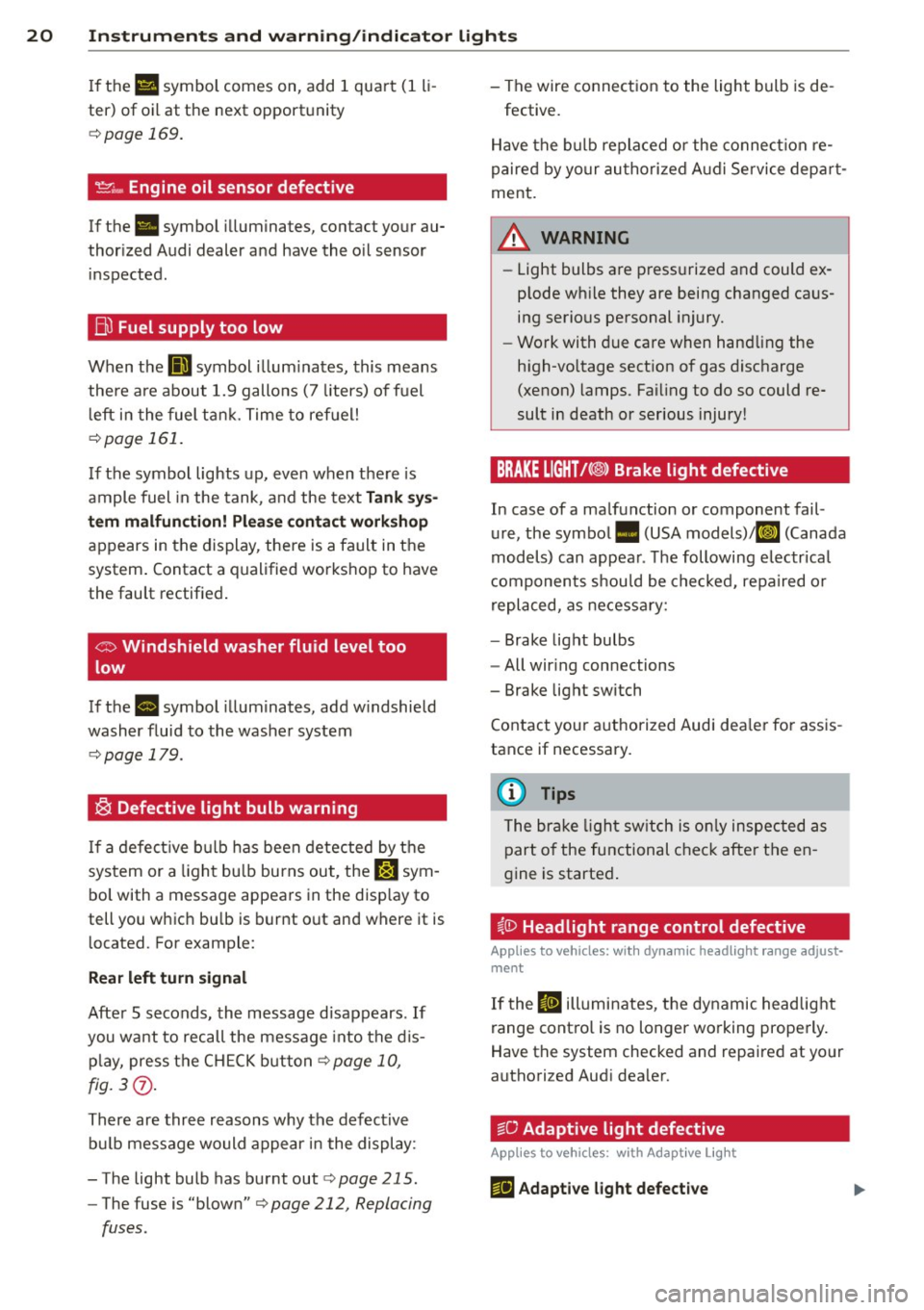
® Defective light bulb warning
If a defective bulb has been detected by the
system or a light bulb burns out, the
&:J sym
bol with a message appears in the display to
tell you which bulb is burnt out and where it is
located. For example:
Rear left turn signal
After 5 seconds, the message disappears . If
you want to recall the message into the dis
play, press the CH ECK button
c:::> page 10,
fig. 3(i) .
There are three reasons why the defective
bulb message would appear in the display:
- The light bulb has burnt out
r:> page 215.
-The fuse is "blown" r:> page 212, Replacing
fuses .
-The wire connection to the light bulb is de-
fective.
Have the bulb replaced or the connection re
paired by your authorized Audi Service depart
ment.
A WARNING
- Light bulbs are pressurized and could ex
plode while they are being changed caus
ing serious personal injury.
- Work with due care when handling the
high-voltage section of gas discharge
(xenon) lamps. Failing to do so could re
sult in death or serious injury!
BRAKE LIGHT!<®> Brake light defective
In case of a malfunction or component fail
ure, the symbol. (USA models)/Kf' ~» (Canada
models) can appear. The following electrical
components should be checked, repaired or
replaced, as necessary:
- Brake light bulbs
- All wiring connections
- Brake light switch
Contact your authorized Audi dealer for assis
tance if necessary.
(D Tips
The brake light switch is only inspected as
part of the functional check after the en
gine is started.
~CD Headlight range control defective
Applies to vehicles: wit h dynamic headlight range adjust·
ment
If the II illuminates, the dynamic headlight
range control is no longer working properly.
Have the system checked and repaired at your
authorized Audi dealer.
~O Adaptive light defective
Applies to vehicles: with Adapt ive Lig ht
m;J Adaptive light defective
Page 24 of 244
22 Driver in formation sy ste m
Driver information
system
Introduction
The Driver information display inside the in
strument cluster provides you, the driver ,
with important information.
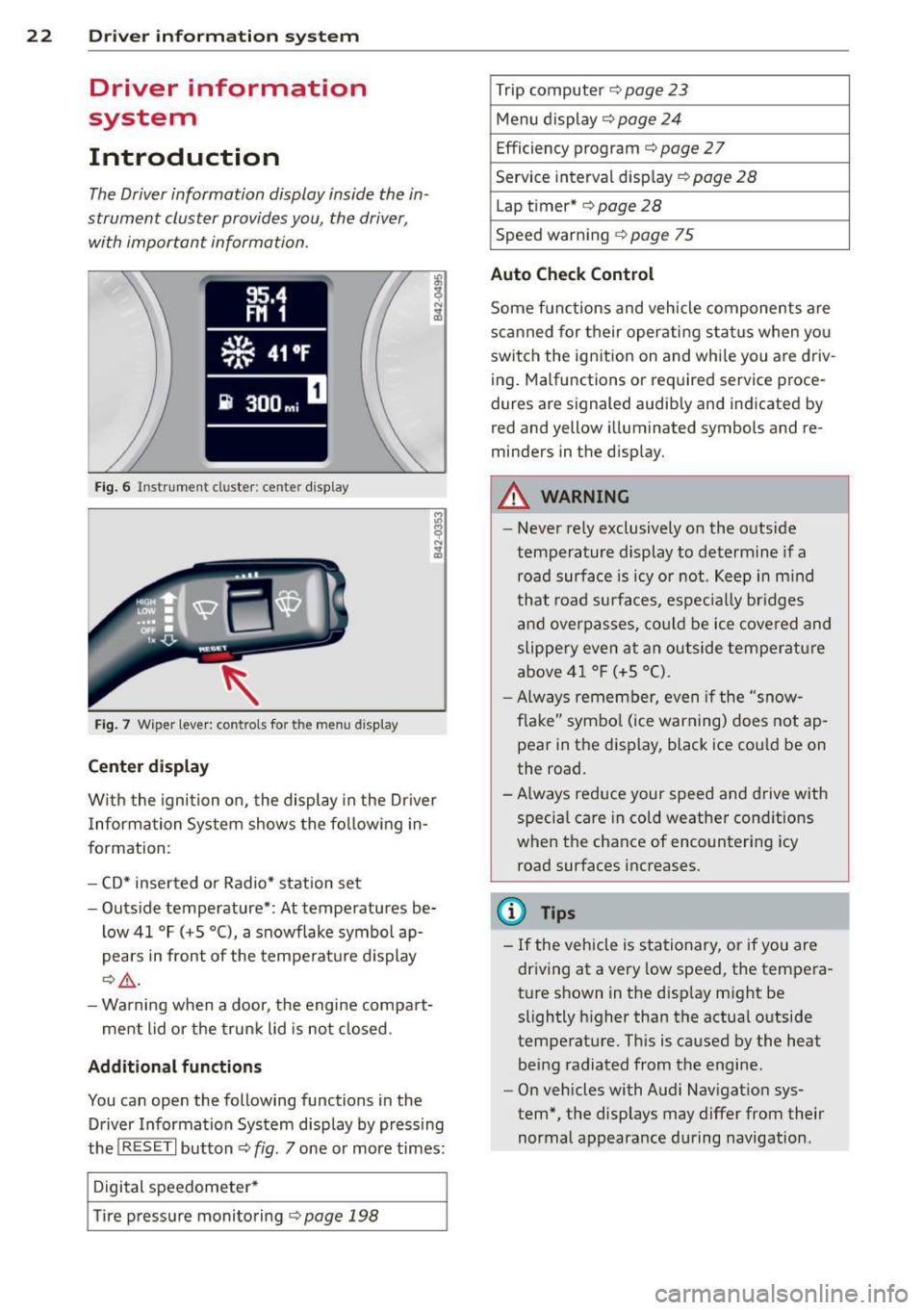
Fig . 6 In strum en t cl ust er: center display
Fig. 7 Wiper le ver: con trols fo r the menu disp lay
Cent er d ispla y
With the igni tion on, the display in the Dr iver
I nformation System shows the fol low ing in
formation :
- CD* inserted or Radio* station set
- Outs ide temperature* : At temperatures be-
low 41 °F ( +S °C), a snowflake symbol ap
pears in front of the temperatu re d isplay
c::> .&_ .
- Warning when a door, the engine compa rt-
ment lid or the trunk lid is not closed .
Additional functions
You can open the following functions in the
Driver Information Sys tem disp lay by p ressing
the
! R ESE T I button c::> fig. 7 one or more times:
Digital speedometer *
T ire pressure monitoring
c::> page 198
Trip computer c::> page 23
Menu d isplay c::> page 24
Efficiency program c::> page 27
Service interval disp lay
c::> page 28
Lap timer* c::> page 28
Speed warn ing <=:> page 75
Auto Check Control
Some f unct ions and vehicle components are
scanned for their operati ng sta tus when yo u
switch the ign ition on and whi le you a re driv
ing. Malfunctions or req uired service proce
dures ar e signaled audib ly and indicated by
red and yellow i lluminated symbols and re
m inders in the display.
A WARNING -
- Never rely exclusively on the outside
temperature display to determine if a
road surface is icy or not . K eep in m ind
that road surfaces, espec ially br idges
and overp asses, co uld be ice covered and
slippe ry even at an outside tempe ra tu re
above 4 1 °F (+5 °C).
- Always remembe r, even if the "snow
f lake" symbo l (ice warning) does not ap
pear in the disp lay, black ice could be on
the road .
- A lways reduce your speed and d rive with
specia l care in cold weather cond itions
when the chance of encountering icy
road surfaces increases.
(D Tips
- If the vehicle is stationary, or if you are
dr iving at a very low speed, the tempera
t u re s hown in the d isp lay m ight be
slightly h igher than the actual o utside
temperature. Th is is caused by the heat
being radiated from the engine .
- On vehicles with Audi Nav igat ion sys
tem *, the displays may differ from their
normal appearance during navigation .
Page 27 of 244
Set Clock ¢ page 2 5
Computer¢ page 25
Acoustic par k assist* ¢ page 79
Speed warning ¢ page 77
Language ¢
page 2 5
Units (distance, fue l consump-
tion, temperature) ¢
page 25
Tire press ure moni toring
c> page 198
Lap timer* c>page 28
Lighting* ¢ page 48
Wiper (service pos it io n)
¢page 56
Window c> page 40
Doors (unlo ck ing and locking
mode, for example Auto- lock)
¢ page 34, c> page 34
Check
Service c> page 28
Chassis numbe r c> page 2 22
Engine oil temperature*
¢
page 26, c> page 26
Registe red keys ¢ page 32
Menu off
All of the messages shown in
vehicles withou t menu display ap-
pe ar o n the display screen.
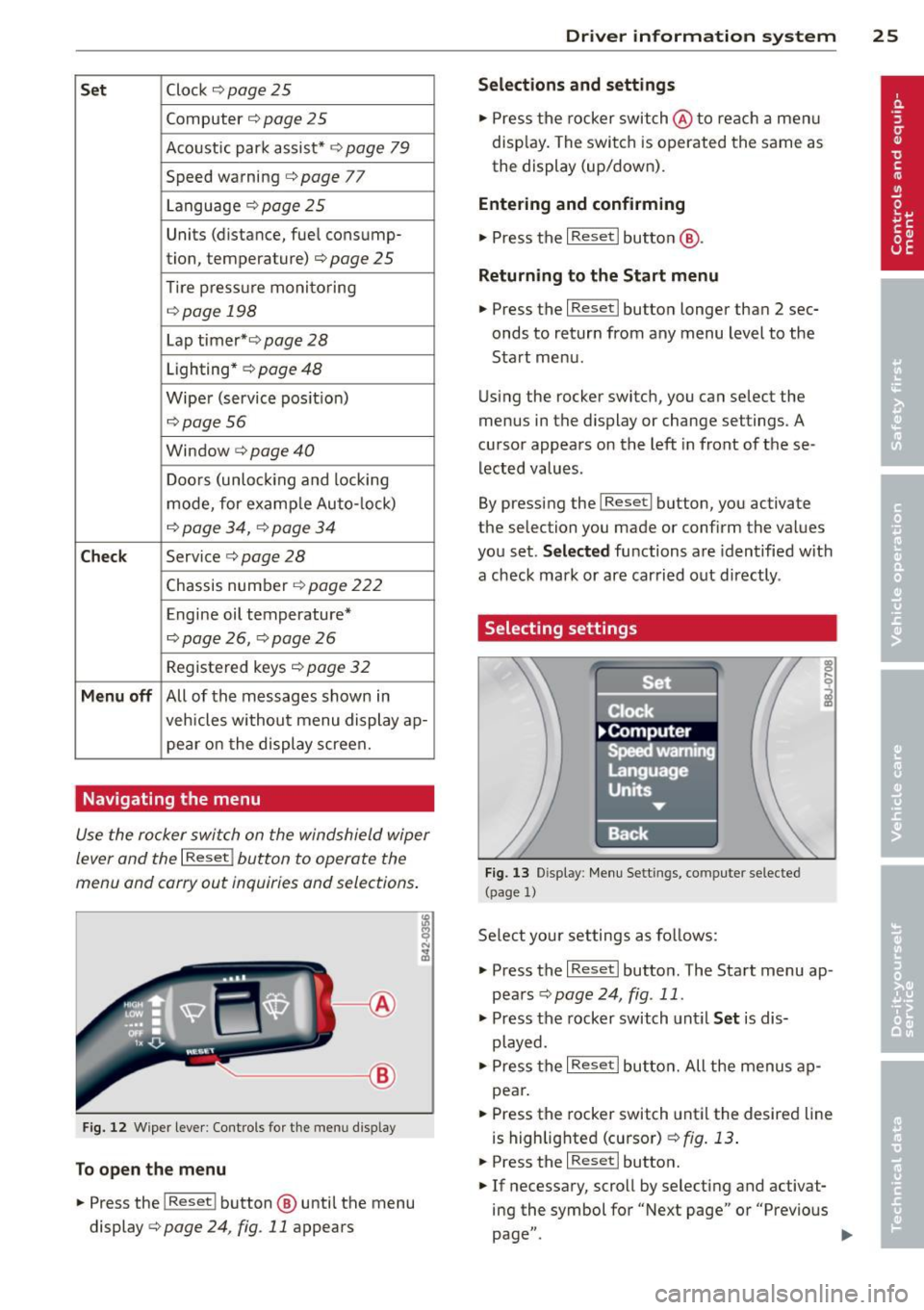
Navigating the menu
Use the rocker switch on the windshield wiper
lever and the
I Reset ! button to operate the
menu and carry out inquiries and selections.
~-- @
Fig. 1 2 Wiper leve r: Controls for the men u disp lay
To open the menu
.. Press the I Reset ! button @ until the menu
display
i=> page 24 , fig . 11 appears
Dr iver in formation system 25
Selections and settings
.. Press the rocker switch @to reac h a men u
disp lay. The swi tch is operated the same as
the display (up/down).
Entering and confirming
.,. Press the I Reset I butto n @ .
Returning to the Start menu
.. Press the I Reset I button longer tha n 2 sec
onds to return from any menu level to the
Sta rt menu .
U sing the rocker switc h, you can select the
menus in the display or change settings. A
cursor appea rs on the left in front of these
lected values .
By pressing the
I Reset! button, you activate
the selection you made or confirm the values
you set.
Selected fu nctions are identified wit h
a check mark or ar e car ried out directly .
Selecting settings
Fig. 13 D isplay: Menu Sett ings, co mpute r selected
(page
l)
Se lect you r settings a s foll ows:
.,. Press the
I Reset I butto n. The Sta rt menu ap
pears ¢
page 24 , fig . 11 .
.. Press the rocker switch unt il Set is dis
played .
.. Press the
I Reset I butto n. All the menu s a p
pe a r .
.. Press the rocker switch until the desire d line
is highlig hted (curso r)
¢ fig . 13 .
.. Press the I Reset I button.
.. If necessary, scro ll by selecting and activat
ing the symbol for "Next page" o r "Previous
page" .
~
Page 30 of 244
28 Driver information system
-The fuel economy messages are not dis
played in every instance, but rather in in
terva ls over a period of ti me.
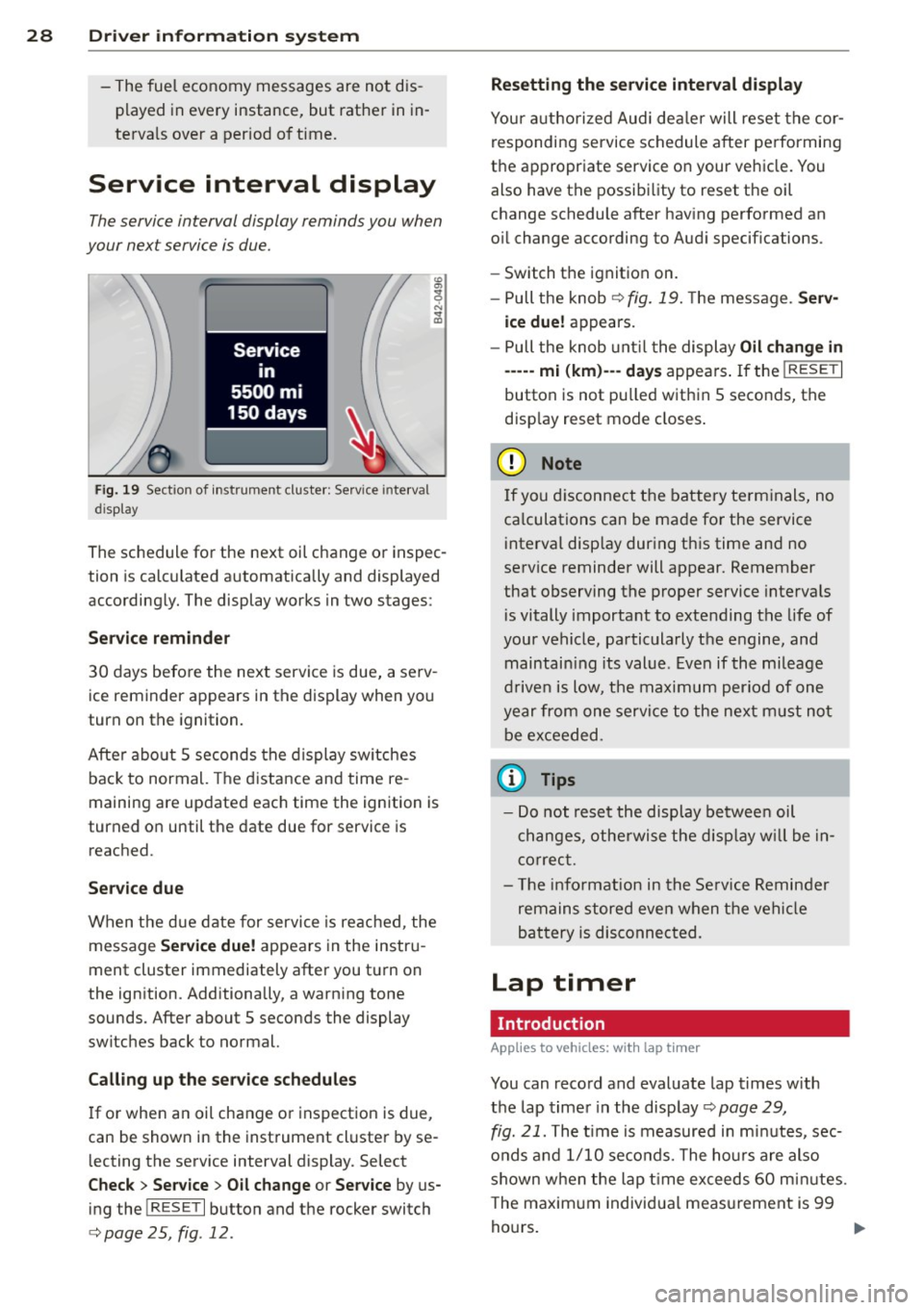
Service interval display
The service interval display reminds you when
your nex t service is due.
Fig. 19 Sect ion of instrument cluster: Serv ice in terva l
d isp lay
The schedule for the next oil change or inspec
tion is calculated automatically and displayed
accordingly. The display works in two stages :
Service reminder
30 days before the next service is due, a serv
ice reminder appears in the display when you
turn on the ignition.
After about
5 seconds the display switches
back to normal. The distance and time re
maining are updated each time the ignition is
turned on until the date due for service is
reached.
Service due
When the due date for service is reached , the
message
Service due! appears in the instru
ment cluster immediately after you turn on
the ignition. Additionally, a warning tone
sounds . After about
5 seconds the display
switches back to normal.
Calling up the service schedules
If or when an oil change or inspection is due,
can be shown in the instrument cluster by se
lecting the serv ice interval display. Select
Check > Service > Oil change or Service by us
ing the
! R ES ET I button and the rocker switch
c> page 25 , fig . 12.
Resetting the service interval display
Your authorized Audi dealer will reset the cor
responding service schedule after performing
the appropriate service on your veh icle. You
also have the possibility to reset the oil
change schedule after having performed an
o il change according to Audi specifications.
- Switch the ignition on.
- Pull the knob
c> fig. 19. The message. Serv-
ice due!
appears.
- Pull the knob until the display
Oil change in
-----mi (km)---day s appears . If the I RESET I
button is not pulled within 5 seconds, the
disp lay reset mode closes.
(D Note
If you disconnect the battery terminals, no
ca lculations can be made for the service
interval display during this time and no
service reminder will appear. Remember
that observing the proper service intervals
i s vitally important to extending the life of
your vehicle, particularly the engine, and
maintain ing its value . Even if the mileage
driven is low, the maximum period of one
year from one service to the next must not
be exceeded.
'
(D Tips
-Do not reset the display between oil
changes, otherwise the display w ill be in
correct.
- Th e information in the Service Reminder
remains stored even when the vehicle
battery is disconnected.
Lap timer
I ntrod ucti on
App lies to vehicles: wit h lap timer
You can record and evaluate lap times with
the lap timer in the display c>page
29,
fig. 21. The time is measured in minutes, sec
onds and
1/10 seconds. The hours are also
shown when the lap t ime exceeds
60 min utes .
T he maximum individual measurement is 99
hours. ..,.
Page 34 of 244
32 Opening and clo sing
Opening and closing
Keys
Key set
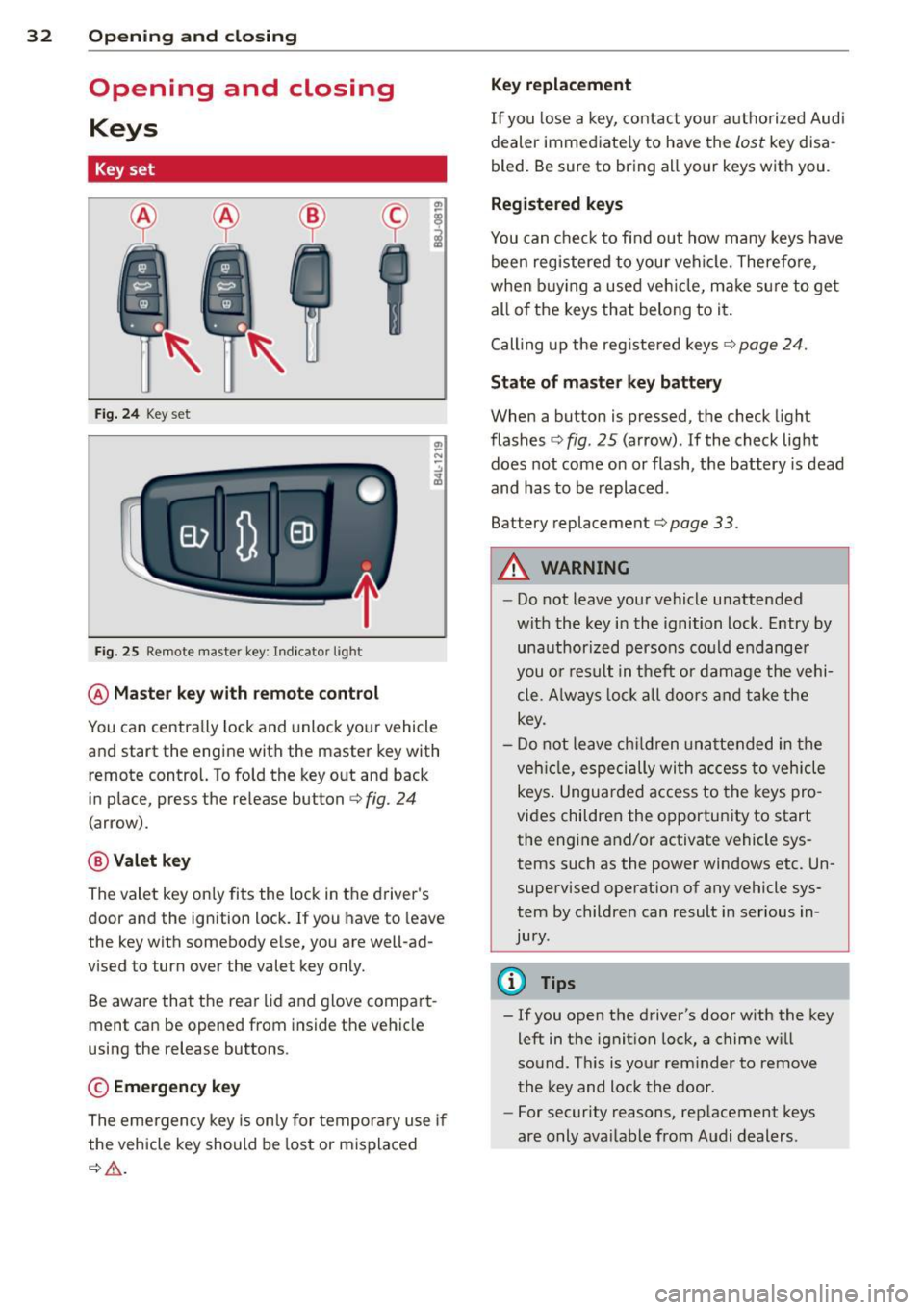
Fig . 2 4 Key set
Fig . 25 Remote master key : Indicator light
@ Ma ster key w ith remote control
You can centrally lock and unlock your vehicle
and start the engine with the master key with
remote control. To fold the key out and back
in place, press the re lease button
c:> fig. 24
(arrow).
@ Valet ke y
The valet key on ly fits the lock in the driver's
door and the ignition lock. If you have to leave
the key with somebody e lse, you are well-ad
vised to turn over the valet key only.
Be aware that the rear lid and glove compart
ment can be opened from inside the vehicle
using the release buttons .
© Emergency k ey
The eme rgency key is only for temporary use if
the vehicle key should be lost or misplaced
c:> & .
Ke y replac ement
If you lose a key, contact you r a uthorized Audi
dealer immed iate ly to have the
Lost key disa
bled. Be sure to bring all your keys with you .
Registered ke ys
You can check to find out how many keys have
been reg istered to your vehicle. Therefore,
when buy ing a used veh icle, make sure to get
all of the keys that belong to it.
Call ing up the reg istered keys
c:> page 24.
St ate of mas ter key b atter y
When a button is pressed, the check light
flashes
c:> fig . 25 (arrow) . If the check light
does not come on or flash, the battery is dead
and has to be replaced .
Battery replacement
c:> page 33.
_& WARNING ........... -
- Do not leave your vehicle unattended
wit h the key in the ignition lock. Entry by
unauthorized persons could endange r
you o r result in theft or damage the vehi
cle. A lways loc k all doors a nd take the
key.
- D o not leave ch ildren unattended in the
veh icle, especially wi th access to vehicle
keys . Unguarded access to the keys pro
vides children the opportunity to start
the engine and/or activate vehicle sys
tems such as the power windows etc. Un supervised operation of any vehicle sys
tem by children can result in ser ious in
jury.
{!) Tips
- If you open the driver's door with the key
left in the ignit ion lock, a chime will
sound . Th is is your rem inder to remove
the key and lock the door.
- For security reasons, rep lacement keys
are only ava ilable from Audi dealers .
Page 41 of 244
When will the anti theft ala rm system be
triggered?
When the vehicle is locked , the alarm system
monitors and protects the following parts of
the vehicle:
- engine compartment
- luggage compartment
- doo rs
- ignition
When the system is activated, the alarm will
be triggered if one of the doors, the engine
hood or the rear lid are opened, or if the ign i
tion is turned on.
The anti-theft alarm system will also go off
when the battery is disconnected.
You can a lso trigger the alarm by pressing the
PANIC button on your remote-control key.
This will alert other people in case of emer
gency. Press the
PANIC button again to turn
off the alarm .
How is the anti-theft alarm switched off
when triggered?
The alarm system is switched off when you
unlock the vehicle using the remote-control key or when the ignition is sw itched on . The
a larm will also switch itse lf off when it comes
to the end of its cycle.
Emergency flasher
The emergency flasher will blink briefly when
the doors, engine hood and rear lid are prop
erly closed.
If the emergency flashers do not blink, check
the doors, engine hood and rear lid to make
sure they are properly closed. If you close a
door, the hood or the rear lid with the ant i
theft alarm switched on, the emergency flash
ers will blink only after you have closed the
door or lid.
(1) Tips
For the anti-theft alarm system to func
tion properly, make sure all vehicle doors
and windows are closed before leaving the
vehicle.
Opening and closing 39
Power windows
Controls
The driver can operate all windows .
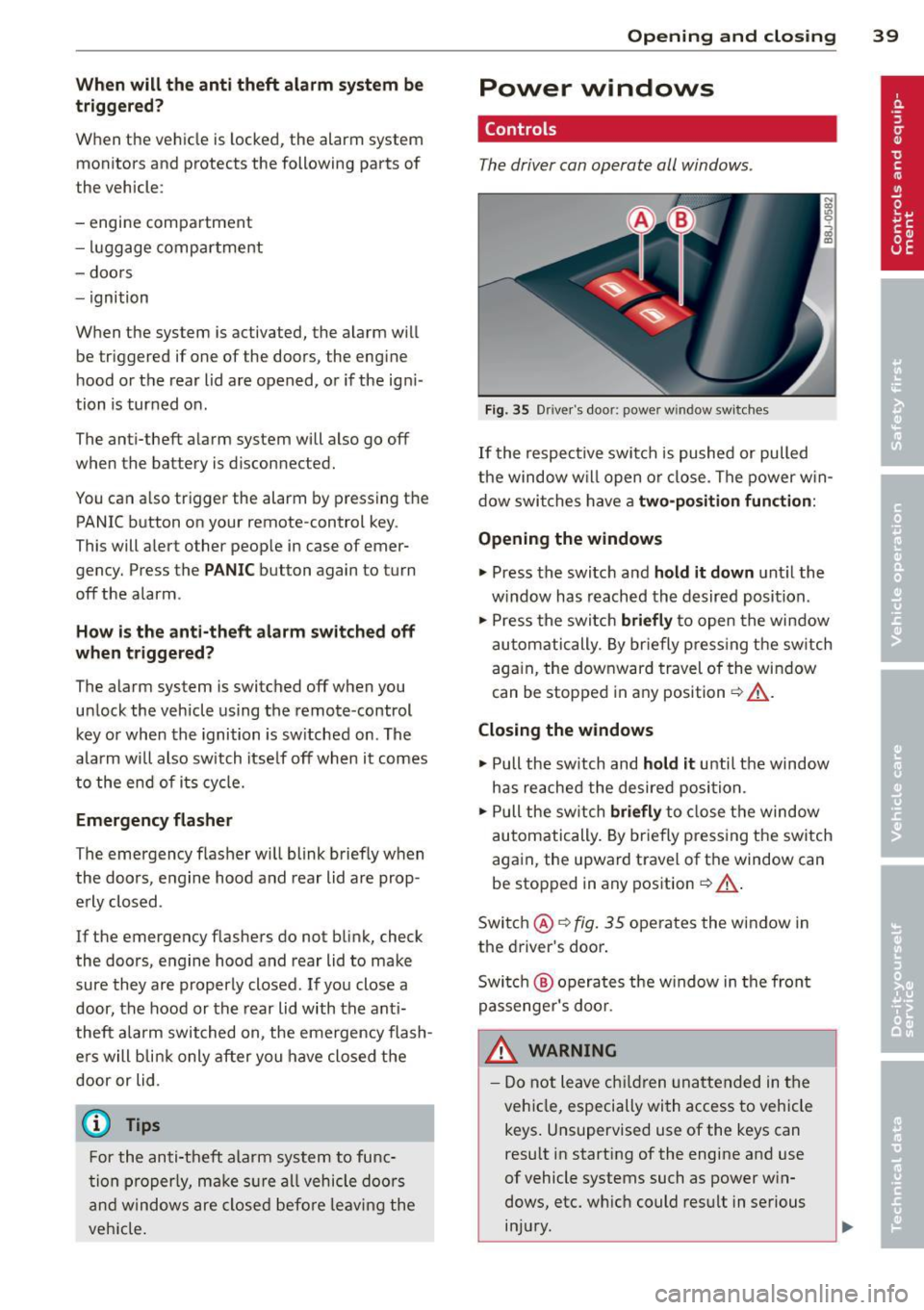
Fig. 35 Driver's door: power w indow switches
If the respective switch is pushed or pulled
the window w il l open or clos e. The power win
dow switches have a two-position function :
Opening the windows
.,. Press the switch and hold it down until the
w indow has reached the desired position .
.,. Press the switch
briefly to open the window
automatically. By briefly pressing the switch
again, the downward travel of the window
can be stopped in any position<=-> .&_.
Closing the windows
.,. Pull the sw itch and hold it unti l the window
has reached the desired position .
.,. Pull the switch
briefly to close the window
automatically. By briefly press ing the switch
aga in, the upward travel of the window can
be stopped in any position
~ .&_ .
Switch @<=->fig .
35 operates the window in
the driver's door.
Switch @ operates the window in the front
passenger 's door.
&_ WARNING
- Do not leave children unattended in the
vehicle, especially with access to vehicle
keys . Unsupervised use of the keys can
result in start ing of the engine and use
of vehicle systems such as power win
dows, etc. wh ich could result in serious
injury.
Page 57 of 244

During brief stops, e.g. at a red light, wiper
motion will automatically be reduced to the
next lower speed. Wipers already turning at
low speed change to intermittent wiping.
When the ignition is turned on, the washer
jets are heated.
A WARNING
- Wiper blades are crucial for safe driving!
Only when they are in good condition are
they able to clear the windows properly
to provide uncompromising visibility .
Worn or damaged wiper blades are a safety hazard ¢
page 5 7, Replacing
windshield wiper blades!
- The light/rain sensor* is only designed to
assist and support the driver.
It remains
entirely the driver's responsibility to
monitor outside weather conditions and
to manually activate the wipers as soon as rain or drizzle reduces visibility
through the windshield.
- The windshield must not be treated with
water-repellent materials. They can in
crease glare under poor visibility condi
tions such as wetness, darkness, or when
the sun is low on the horizon. In addi
tion, they can cause the windshield wip
ers to chatter .
(I) Note
In freezing or near freezing conditions:
- Always check that the wiper blades are
not frozen to the glass before you turn
the wipers on . Loosen a wiper blade
which is frozen in place before operating
the wipers to prevent damage to the
wiper blade or the wiper motor.
- Do not use the wipers to clear a frosted window . Using the wipers as a conven
ient ice scraper will destroy the wiper
blades.
- Before you take your vehicle to an auto
matic car wash, make sure you have the
windshield wiper system switched off (lever in position 0), otherwise the wind
shield wiper system could get damaged
Clear vision 5 5
in the car wash if it should suddenly
come on.
(0 Tips
- The windshield wipers are switched off
when the ignition is turned off. Activate
the windshield wipers after the ignition
is switched back on by moving the wind
shield wiper lever to any position.
- Worn or dirty windshield wiper blades
cause smearing, which can affect the op
eration of the light/rain sensor* . Check
the condition of your windshield wiper
blades regularly.
- The rain sensor is part of the interval
wiping system . Turning off the ignition
will also deactivate the rain sensor. To re activate the sensor, switch off the inter
val wiping function, then switch it back
on again.
-Applies to vehicles with light/rain sen
sor : When the wipers are switched on
manually and in rain conditions, the au
tomatic headlights* turn on¢
page 48,
Switching the headlights on and off
or
off during the day when the wipers are
no longer operating. The automatic
headlights* function is available in this
case only when the light switch is in the
"AUTO" position¢
page 48, fig. 52.
-Make sure the washer fluid reservoir in
the engine compartment is topped off
before going on a long trip. Look up
¢
page 179 for checking and filling the
washer container .
- The wipers only operate with the hood
completely closed .
Headlight washer system
Applies to vehicles: with headlight washer system
The headlight washer system cleans the
headlights.
"'Operate the windshield wiper/washer sys
tem
o page 54, fig. 62 ® with the head
lights turned on by holding the lever for lon-
ger than one second . ..,.
Page 74 of 244
7 2 On the road
On the road
Steering
Adjusting the steering wheel column
The steering wheel position can be continu
ously adjusted in height and distance .
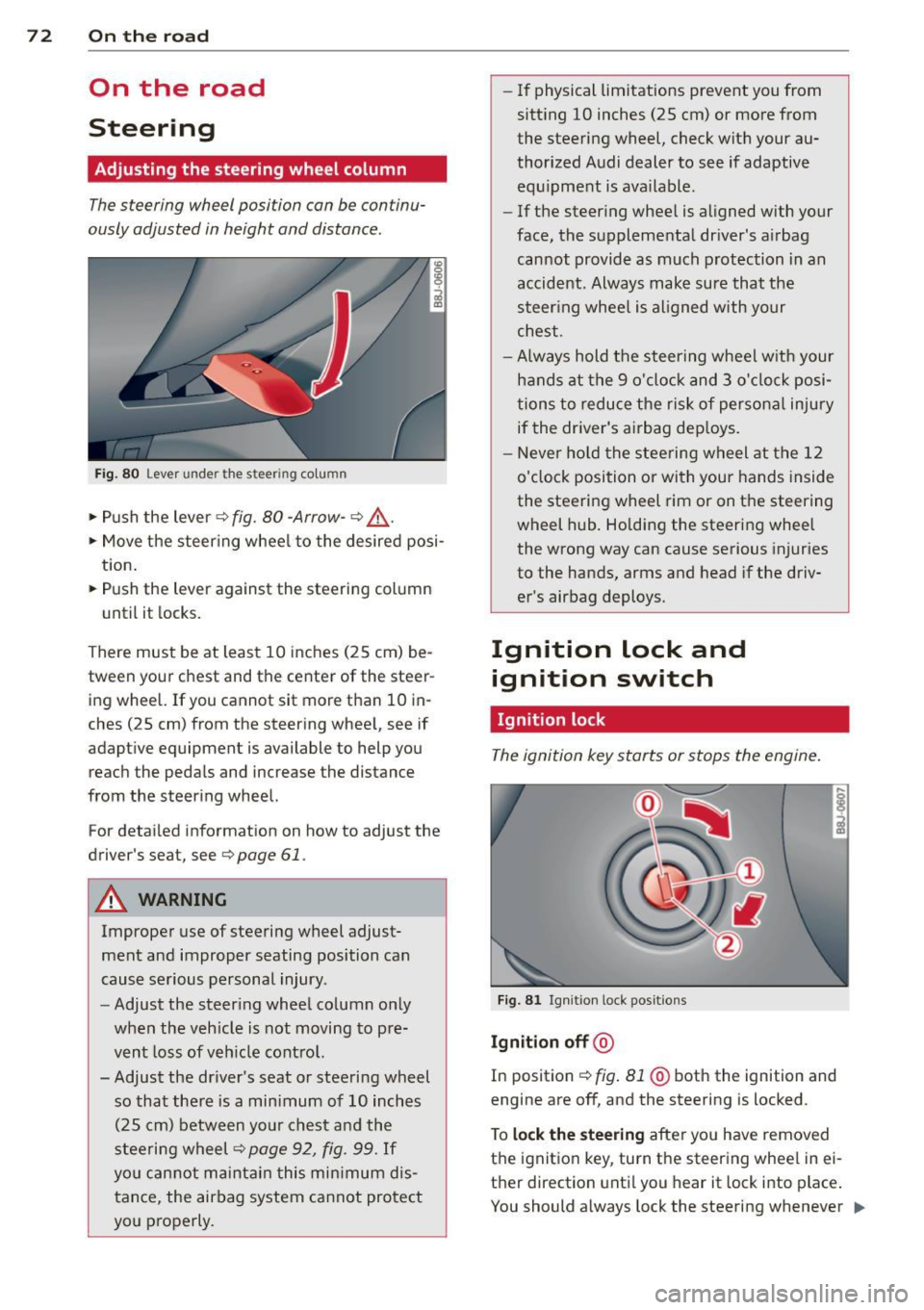
Fig. 80 Lever under the steer ing colu mn
~ Push the lever Q fig. 80 -Arrow- ¢&_ .
~ Move the steer ing whee l to the desired posi
tion.
~ Push the lever against the steering column
until it locks.
There must be at least 10 inches (25 cm) be
tween your chest and the center of the steer ing wheel. If you cannot sit more than 10 in
ches (25 cm) from the steering wheel, see if
adaptive equipment is available to help you
reach the pedals and increase the distance
from the steering wheel.
For detai led informat ion on how to adjust the
driver's seat, see
Q page 61.
A WARNING
Improper use of steering wheel adjust
ment and improper seating position can
cause serious personal injury .
- Adjust the steering wheel column only
when the veh icle is not moving to pre
vent loss of veh icle control.
-
- Adjust the driver's seat or steering wheel
so that there is a min imum of 10 inches
(25 cm) between your chest and the
steering wheel¢
page 92, fig . 99. If
you can not maintain this min imum dis
tance, the airbag system cannot protect
you properly.
- If physical limitations prevent you from
sitt ing 10 inches (25 cm) or more from
the steering wheel, check with your au
thorized Audi dealer to see if adaptive equ ipment is ava ilable .
- If the steer ing wheel is aligned with your
face, the supplemental dr iver's airbag
cannot provide as much protection in an
accident. Always make sure that the
steer ing whee l is aligned with your
chest.
- Always hold the steering wheel w ith your
hands at the 9 o'clock and 3 o' clock posi
tions to reduce the risk of persona l injury
if the driver's airbag dep loys .
- Never ho ld the steering wheel at the 12
o'clock position or with your hands inside
the steering wheel rim or on the steering
wheel hub . Holding the steering wheel
the wrong way can cause serious injuries
to the hands, arms and head if the driv
er's airbag deploys.
Ignition lock and ignition switch
Ignition lock
The ignition key starts or stops the engine.
F ig . 81 Ign it ion lock pos it ions
Igniti on off @
In position Q fig. 81 @ both the ignition and
engine are off, and the steering is locked .
T o
lo ck th e steering after yo u have removed
the ignition key, turn the steering whee l in ei
ther direction unti l you hear it lock into place .
You should a lways lock the steering whenever
II>
Page 146 of 244
144 Intelligent technology
-Never push the ve hicle or app ly force to
the rea r spo ile r - i t co uld be damaged .
- To prevent damage to the rear spoiler do
not lean o r place a nyth ing o n it.
- Only ope rate the rear spoi ler manually
when the rear lid is closed and t he rear
spo ile r moving parts are not blocked.
Otherwise, damage could occur.
C lean the spoi le r compartment every 2 to
3 months . The spoiler compartment must
always be free of ice, snow, leaves or other
debris.
Braking
General information
What affects braking efficiency?
Operating conditions and d riving habit s
The brakes on today's automob iles are st ill
subject to wea r, depend ing largely on operat
i ng cond itions and dr iv ing habits
c:> & . On
ve hicles that a re e ithe r dr iven mostly in stop
and-go city traffic o r a re driven ha rd , the
b rake pads should be checked by yo ur auth or
iz ed A udi dealer more often th an specifie d in
the
Warranty & Maintenance booklet . Fail ure
to have your b ra ke pads inspected can res ult
in red uced b rake performance.
O n steep slopes, yo u sh ou ld use t he b ra ki ng
effect of the engine . This way, yo u preven t un
necessa ry wear on the brake system . If you
must use yo ur brakes, do not ho ld the bra kes
down continuously . P u mp the brakes at inter
va ls.
N oises may occur w hen braking depending on
the speed, bra king force and outside condi
tions s uch as temperature and h umidity.
Moisture or road salt
Unde r cert a in co ndi tions, for examp le, w hen
d riving through wate r or ve ry heavy rain , or
even after washing yo ur vehicle , the braking effect can be
reduced due to mois ture (or in
freez ing cond itions ice) on the brake pads. A
f ew cautio us brake applications s hou ld dry off
the brake pads or remove any ice coatings.
T he effec tiveness of the brakes can be red uce d
whe n the vehicle is d riven on a sa lt -covered
road and the b rakes are not used . Likewise,
yo u clean off acc umulated salt coat ing from
brake d iscs and pads with a few cautio us ap
plicat ions o f th e b rake
c:> & .
Corrosion
The re may be a tendency for dirt to build up
on the brake pads and corros ion to form on
t h e d iscs if the car is not driven regu larly or
o n ly for short trips w ith litt le use of the
brakes .
If the brakes are not used frequently, or if cor
ros ion has formed on the discs, it is adv isable
to clean off t he pads a nd d iscs by braking
firmly a few times from a moderately h igh
s p eed
c:> & .
Faults in the brake system
If you shou ld notice a sudden increase i n
brake pedal trave l, then one of the two brake
c ircuits may have fa iled
c:> & .
Low brake fluid level
Malfunctions ca n occ ur in the bra ke system if
t h e b rake fluid level is too low. The brake flu id
level is monitored electronica lly.
Brake booster
T he br ake boos ter inc reases the pressure tha t
yo u genera te with the b ra ke peda l. It works
o nl y when t he engine is runnin g
.c:> .&
Brake lining wear status
Br ake lining wear may be che cked by visual in
spe ct io n of th e condition o f the br ake pa ds
t h ro ugh the open ing s in the wheel. If neces
sa ry, the w heel may be removed fo r thi s i n
spect ion
c:> page 208, What should I be
aware of when changing a tire?.
Page 147 of 244
A WARNING
-You should perform brak ing maneuvers
for the purpose of cleaning the brake
system only if road cond it ions permit .
Other road users must not be put at r isk -
yo u may cause an acc ident!
- Before descending a steep grade, reduce
speed and shift transm iss ion into a lowe r
gear or lowe r driving range. Do not ride
the brakes or hold the pedal down too
long or too often . This cou ld cause the
brakes to get hot and diminish braking
efficiency.
- Do not "ride the b rakes" by resting your
foot on the pedal when yo u do not intend
to brake . Th is may cause the brakes to
overheat, premature wear and increased
stopp ing distance.
- Under certain climat ic and operating
condit ions such as passing throug h wa
ter, driving in heavy rai n or after wash ing
the vehicle, the effect iveness of the
brakes can be reduced. In winter, ice can
accumulate on the brake pads, lini ngs,
discs and d rums. Carefully apply brakes
f or a test . B rakes wi ll dry and ice coat
ings wi ll be cleaned
off after a few ca re
ful brake applications.
- Driv ing for an ex tended pe riod of time on
salt -covered roa ds without using your
brakes can also affect braking efficiency.
Clean
off accumulated salt coating from
brake discs and pads with a few cautious
brake applicat ions.
- If you damage the front spoiler, or if you install a different spoiler, be sure the air
flow to the front brakes is not obstruct
ed . Otherwise the brake system could
overheat reducing the eff ectiveness of
the ent ire brake system.
- Failure of one bra ke c ircuit will impair
the brak ing capability resulting in an in
cr eased stopp ing distan ce. Avoid dr iv ing
the ve hicle and have it towed to the near
est Aud i dea le r or q ualified workshop .
- Never le t the vehicle ro ll to a stop w ith
the engine shu t off.
Int ellig ent technolog y 145
-If the brake booster is not working, the
brake peda l must be pressed considera
bly harder to make up for the lack of
booster assistance.
Electro-mechanical
power assist
The ele ctro-mechanical power assist helps
the driver when steering .
The degree of power assist is electronically
matched to veh icle speed.
The powe r steering system assists the driver
so that he can steer the vehicle with reduced
physical effort.
Power steer ing will not work if the engine is
off . As a result, the steering wheel will be hard
to turn .
A WARNING
If the system develops a problem, you
must seek qualified professiona l assis
tance.
(D Note
-
If there is an electronic malfunction, ser
votronic
will still function like a conven
tiona l powe r steering system, providing a
constant steering support force tha t is no
l onger proportionate to the vehicle speed.
This is most noticeable when t urning the
steering wheel at low speeds (for example
when parking), - more effort w ill be re
quired than usual.
- Be aware of the different than usual
steering response and adjust your steer
ing force accordingly.
- Have the problem checked and set right
by an authori zed Aud i dea ler as soon as
possible.
- If a steering malfunction occurs, th is is
signa led w ith the
ls4 or .• indicator
lights and a warn ing tone, see. •
•