battery AUDI TT ROADSTER 2016 User Guide
[x] Cancel search | Manufacturer: AUDI, Model Year: 2016, Model line: TT ROADSTER, Model: AUDI TT ROADSTER 2016Pages: 306, PDF Size: 31.82 MB
Page 63 of 306
Downloaded from www.Manualslib.com manuals search engine 0
N
,.....
N
......
0
,.....
Vl
CX) For
a comfortable climate inside the vehicle:
- In the summer, adjust the temperature to just
a few degrees below the outside temperature
- Do not turn the blower up too high
- Do not point the air outlets directly at the occu-
pants
� Adjusting the blower speed
The rotary control (D can be used to adjust the
blower speed in small steps. You should leave
the blower on at a low setting to prevent the win
dows from misting up and to ensure that the ve
hicle interior is constantly ventilated. To demist
the windows, we recommend that you increase
the blower speed and set control @ to�-
! A IC !
Switching air cooling* on/off
The air cooling system only works when the blow
er is switched on. When the air cooling is switch
ed off, the air is neither cooled nor dehumidified.
The windows may mist up as a result. The air
cooling is switched off automatically at low out
side temperatures.
I • I • I Adjusting
the temperature
The rotary control @ can be used to adjust the
temperature in small steps.
Adjusting the air distribution
The rotary control @ can be used to adjust the
air distribution.
At the � setting, the windscreen and side win
dows are defrosted or demisted. The air recircu
lation is switched off, but can be switched on
again manually by pressing the� button.
The round air outlets in the dashboard can be ad
justed ¢page 63.
To prevent the front side windows from misting
up in wet weather, it's a good idea to open the
side air outlets and point them to the side. Heating
and cooling
� Switching air recirculation on/off
In air recirculation mode, the air from the interi
or of the vehicle is filtered and recirculated. This
setting prevents fumes etc. from entering the in
terior. We recommend switching on the air recir
culation mode when driving through a tunnel or
in traff ic queues ¢,&.
The air recirculation mode is switched off when
the control is in the defrost position �-
! lliil
RE
AR
!
Switching rear window heating on/
off
If the rear window heating is activated with the
ignition switched on, the battery management
determines whether or not the battery charge
level is sufficient for the rear window heating to
be switched on. Otherwise the rear window heat
ing operates when the engine is running, and
switches off automatically after about
10 -20 minutes, depending on the outside tem
perature.
To switch on the rear window heating perma
nently, press and hold the !lliil REAR! button for at
least two seconds. This setting will be stored for
approximately 15 minutes after the ignition is
switched off.
A WARNING
For reasons of safety you should not leave the
air recirculation switched on for too long. This
mode prevents fresh air from entering the ve
hicle, so the windows can mist over if the air
cooling is switched off. Bad visibility can
cause an accident.
61
Page 65 of 306
Downloaded from www.Manualslib.com manuals search engine 0
N
,.....
N
......
0
,.....
Vl
CX) To
prevent the front side windows from misting
up in wet weather, it's a good idea to open the
side air outlets and point them to the side.
� Switching air recirculation on/off
The air recirculation mode can be switched on
manually or automatically*.
- To switch the manual air recirculation mode
on/off, press the[;] button.
- The automatic* air recirculation function must
be activated on the infotainment system. Se
lect the following on the infotainment system:
IM ENU
I
button > Car > left control button > Ve
hicle settings > A/C > Auto recirculation. The
air quality sensor, which is designed for the de
tection of diesel and petrol exhaust fumes, au
tomatically switches the air recirculation mode
on or off depending on the level of pollution in
the outside air.
In air recirculation mode, the air from the interi
or of the vehicle is filtered and recirculated. This
setting prevents fumes etc. from entering the in
terior. We recommend switching on the air recir
culation mode when driving through a tunnel or
in traffic queues ¢ A.
The air recirculation mode is switched off when
the [;] or I
AUTO I
or I l!ii'
M
AX
I button is pressed.
I@ MAX!
Switching the defroster on/off
The windscreen and side windows are defrosted
or demisted as quickly as possible. Most of the
air comes out of the outlets below the wind
screen. The air recirculation mode is deactivated.
The temperature is regulated automatically.
The defroster is switched off when the !AUTO!
button is pressed.
l[jjj) REAR!
Switching the rear window heating
on/off
If the rear window heating is activated with the
ignition switched on, the battery management
determines whether or not the battery charge
level is sufficient for the rear window heating to
be switched on. Otherwise the rear window heat
ing operates when the engine is running, and
switches off automatically after about Heating
and cooling
10 -20 minutes, depending on the outside tem
perature.
To switch on the rear window heating perma
nently, press and hold the l[jjj) REA
R!
button for at
least two seconds. This setting will be stored for
approximately 15 minutes after the ignition is
switched off.
A WARNING
For reasons of safety you should not leave the
air recirculation switched on for too long. This
mode prevents fresh air from entering the ve
hicle, so the windows can mist over if the air
cooling is switched off. Bad visibility can
cause an accident.
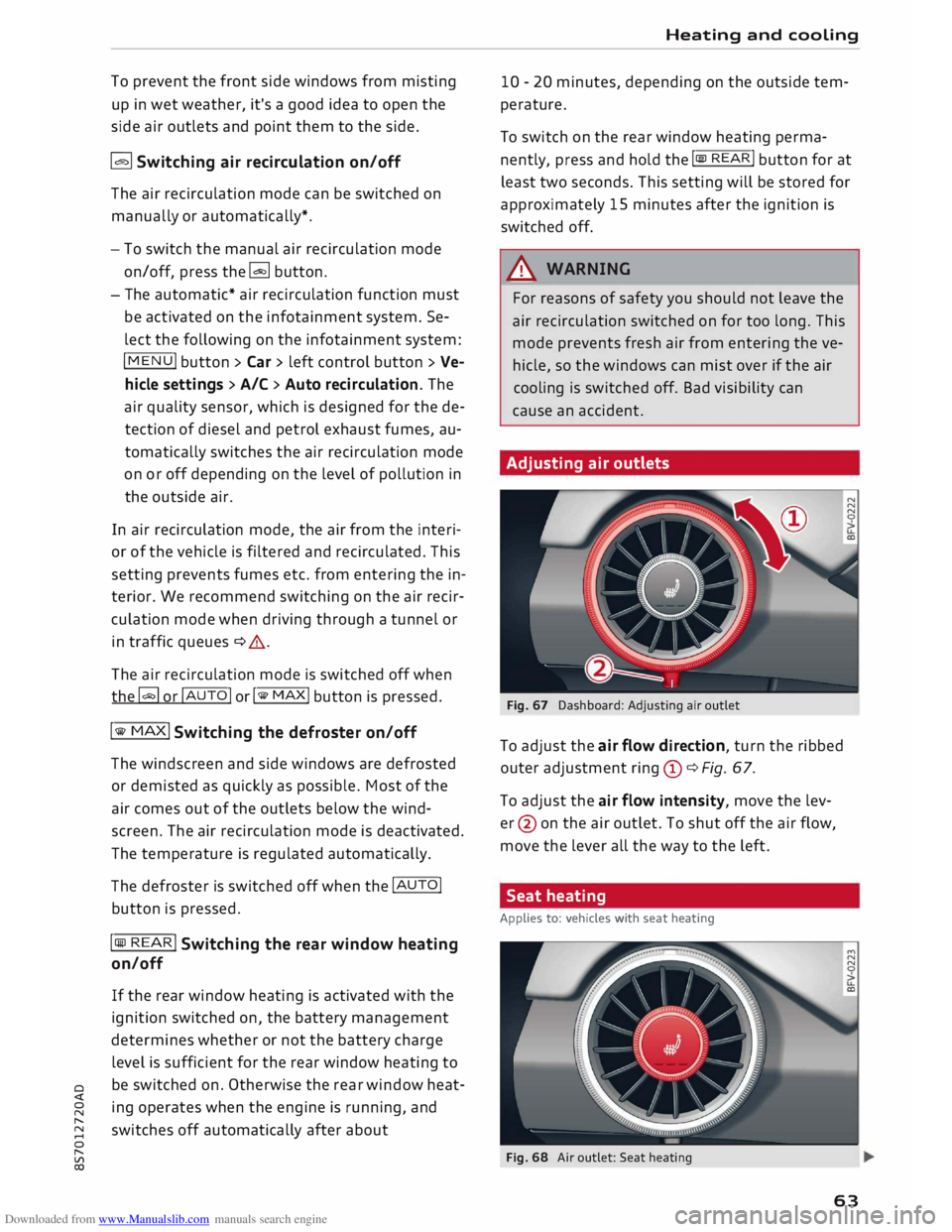
Adjusting air outlets
Fig. 67 Dashboard: Adjusting air outlet
To adjust the air flow direction, turn the ribbed
outer adjustment ring(!)¢ Fig. 67.
To adjust the air flow intensity, move the lev
er @ on the air outlet. To shut off the air flow,
move the lever all the way to the left.
Seat heating
Applies to: vehicles with seat heating
Fig. 68 Air outlet: Seat heating
63
Page 67 of 306
Downloaded from www.Manualslib.com manuals search engine 0
N
,.....
N
......
0
,.....
Vl
CX) This
could cause burns to bare skin in the
immediate vicinity of the air outlets.
{!)) Note
- The blower output is always lower when the
soft top is closed than when it is open.
- The power management system
¢page 118 may reduce the temperature in
certain situations if the battery voltage is
too low.
Supplementary heater
Applies to: vehicles with diesel engine
On cold days, the interior of the vehicle warms up
more quickly with the supplementary electric
heater. The supplementary heater is switched on
automatically as required, depending on the set
ting on the vehicle heating system.
The supplementary heater function can be
switched on or off as required. Select the follow
ing on the infotainment system: !MENU! button>
Car > left control button > Vehicle settings > A/C
> Auto supplementary heater. Heating
and cooling
65
Page 72 of 306
Downloaded from www.Manualslib.com manuals search engine Driving
CD CAUTION
If the engine has been working hard for a long
time, there is a risk of heat building up in the
engine compartment after the engine has
been switched off; this could cause engine
damage. For this reason, you should leave the
engine idling for about 2 minutes before
switching it off.
{(D Note
After the engine is stopped, the radiator fan
may remain on or turn itself back on for up to
10 minutes, even if the ignition is switched
off. This may occur for the following reasons:
- Residual heat has raised the coolant tem-
perature.
- Direct sunlight has additionally heated up
the engine compartment while the engine is
warm.
-Applies to vehicles with diesel particulate
filter: The emission control system is hot
because of the regeneration process, even
though the engine has not yet reached oper
ating temperature.
Driver messages
Switch off ignition before leaving car. Battery is
being discharged
This message appears and the buzzer sounds if
you open the driver's door while the ignition is
switched on. Switch off the ignition to prevent
the battery from being discharged.
Pressing start/stop button again will switch off
engine.
This message appears if you press the
!START ENGINE STOP!
button while the vehicle is
moving.
Engine start system: fault. Please contact work
shop
A fault has occurred when starting the engine au
tomatically (automatic start function). Drive to a
qualified workshop soon and have the fault recti
fied. Press and hold
the !START
ENGINE STOP!
button to start the engine.
70 II
Remote control key: hold back of key
against marked area. See owner's manual
This message appears if there is no convenience
key inside the vehicle or if the system cannot de
tect or identify the key. This can happen, for ex
ample, if the radio signal from the key is obstruc
ted by a metal briefcase or similar, or if the key
battery is weak. Electronic equipment, such as
mobile phones, can also interfere with the radio
signal from the key.
The engine can still be started or stopped if this
happens (please refer to �page 71, Starting
the engine after a malfunction).
Ill Remote control key: key not recognised. Is
key still in vehicle?
If the indicator lamp Ill lights up and the mes
sage appears, the convenience key was removed
from the vehicle while the engine was running. If
the convenience key is not in the vehicle you will
not be able to switch on the ignition or restart
the engine after it has been switched off. You will
also not be able to lock the vehicle from the out
side.
Please press brake pedal
This message appears on vehicles with an auto
matic gearbox if you try to start the engine with
out first pressing the brake pedal.
Please press clutch pedal
This message appears on vehicles with a manual
gearbox if you try to start the engine without
first pressing the clutch pedal. The engine will
only start if you press the clutch pedal.
Please engage N or P
This message will appear if you try to start or
switch off the engine when the selector lever is
not in Nor P. The engine can then not be started
or switched off.
Shift to P, otherwise vehicle can roll away.
Doors do not lock if lever is not in P
For safety reasons, this message will appear and
a warning buzzer will sound if the selector lever
of the automatic gearbox is not in position P
when you switch off the ignition with the
�
Page 73 of 306
Downloaded from www.Manualslib.com manuals search engine !START
E
NGIN E
STOP!
button. Put the selector
lever in position P; otherwise the vehicle can roll
away. If the lever is not in position P you will not
be able to lock the vehicle using the locking sen
sor on the door handle or the convenience key.
Starting the engine after a malfunction
If the remote control key battery is exhausted or
if radio interference or a system malfunction oc
curs, extra steps may be necessary in order to
start the engine.
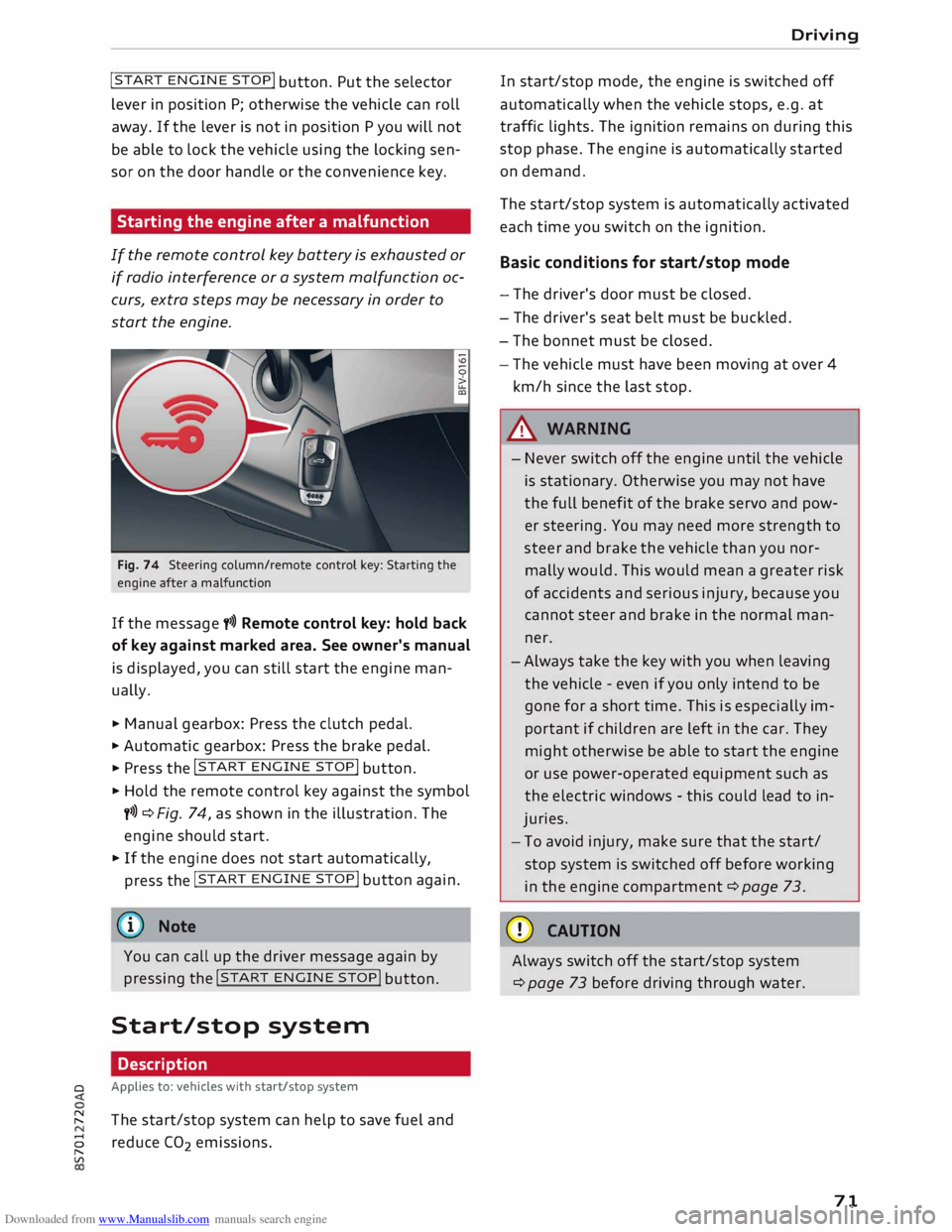
Fig. 74 Steering column/remote control key: Starting the
engine after a malfunction
If the message t>>) Remote control key: hold back
of key against marked area. See owner's manual
is displayed, you can still start the engine man
ually.
� Manual gearbox: Press the clutch pedal.
� Automatic gearbox: Press the brake pedal.
� Press the !START
ENGINE STOP!
button.
� Hold the remote control key against the symbol
y>>) ¢Fig. 74, as shown in the illustration. The
engine should start.
� If the engine does not start automatically,
press the !START
E
NGINE STOP!
button again.
@ Note
You can call up the driver message again by
pressing the !START
ENGINE STOP!
button.
Start/stop system Description
0 Applies
to: vehicles with start/stop system
� The start/stop system can help to save fuel and
8 reduce CO
2 emissions.
"
Vl Driving
In start/stop mode, the engine is switched off
automatically when the vehicle stops, e.g. at
traffic lights. The ignition remains on during this
stop phase. The engine is automatically started
on demand.
The start/stop system is automatically activated
each time you switch on the ignition.
Basic conditions for start/stop mode
- The driver's door must be closed.
- The driver's seat belt must be buckled.
- The bonnet must be closed.
- The vehicle must have been moving at over 4
km/h since the last stop.
A WARNING
- Never switch off the engine until the vehicle
is stationary. Otherwise you may not have
the full benefit of the brake servo and pow
er steering. You may need more strength to
steer and brake the vehicle than you nor
mally would. This would mean a greater risk
of accidents and serious injury, because you
cannot steer and brake in the normal man
ner.
- Always take the key with you when leaving
the vehicle -even if you only intend to be
gone for a short time. This is especially im
portant if children are left in the car. They
might otherwise be able to start the engine
or use power-operated equipment such as
the electric windows -this could lead to in
juries.
- To avoid injury, make sure that the start/
stop system is switched off before working
in the engine compartment ¢page 73.
CD CAUTION
Always switch off the start/stop system
¢page 73 before driving through water.
71
Page 74 of 306
Downloaded from www.Manualslib.com manuals search engine Driving
Switching off/ starting the engine
Applies to: vehicles with start/stop system
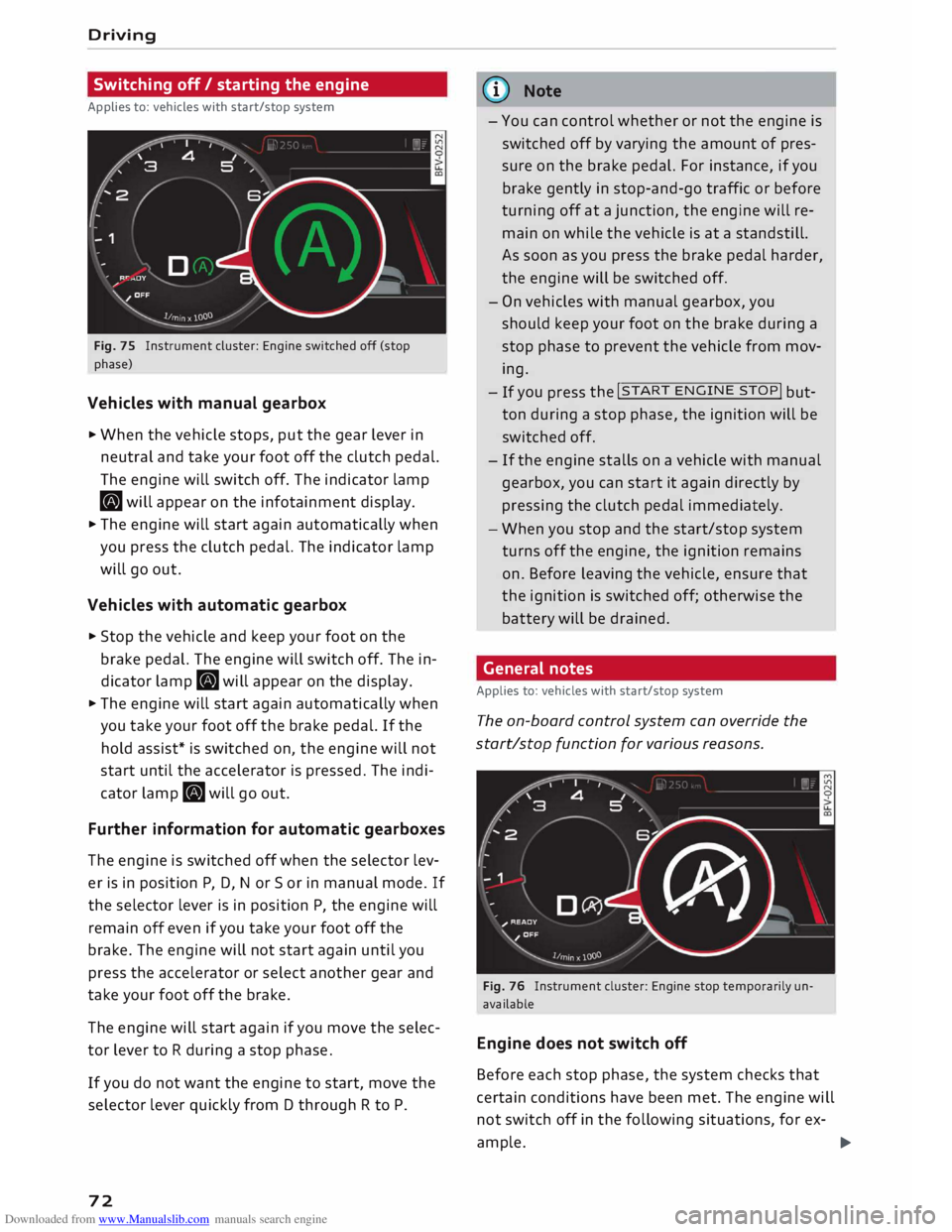
Fig. 75 Instrument cluster: Engine switched off (stop
phase)
Vehicles with manual gearbox
... When the vehicle stops, put the gear lever in
neutral and take your foot off the clutch pedal.
The engine will switch off. The indicator lamp
• will appear on the infotainment display.
... The engine will start again automatically when
you press the clutch pedal. The indicator lamp
will go out.
Vehicles with automatic gearbox
... Stop the vehicle and keep your foot on the
brake pedal. The engine will switch off. The in
dicator lamp. will appear on the display.
... The engine will start again automatically when
you take your foot off the brake pedal. If the
hold assist* is switched on, the engine will not
start until the accelerator is pressed. The indi
cator lamp. will go out.
Further information for automatic gearboxes
The engine is switched off when the selector lev
er is in position P, D, N or So r in manual mode. If
the selector lever is in position P, the engine will
remain off even if you take your foot off the
brake. The engine will not start again until you
press the accelerator or select another gear and
take your foot off the brake.
The engine will start again if you move the selec
tor lever to R during a stop phase.
If you do not want the engine to start, move the
selector lever quickly from D through R to P.
72 ijJ)
Note
- You can control whether or not the engine is
switched off by varying the amount of pres
sure on the brake pedal. For instance, if you
brake gently in stop-and-go traffic or before
turning off at a junction, the engine will re
main on while the vehicle is at a standstill.
As soon as you press the brake pedal harder,
the engine will be switched off.
- On vehicles with manual gearbox, you
should keep your foot on the brake during a
stop phase to prevent the vehicle from mov
ing.- If you
press the !START
ENGINE
STOP!
but
ton during a stop phase, the ignition will be
switched off.
- If the engine stalls on a vehicle with manual
gearbox, you can start it again directly by
pressing the clutch pedal immediately .
- When you stop and the start/stop system
turns off the engine, the ignition remains
on. Before leaving the vehicle, ensure that
the ignition is switched off; otherwise the
battery will be drained .
General notes
Applies to: vehicles with start/stop system
The on-board control system can override the
start/stop function for various reasons.
Fig. 76 Instrument cluster: Engine stop temporarily un
available
Engine does not switch off
Before each stop phase, the system checks that
certain conditions have been met. The engine will
not switch off in the following situations, for ex-
ample. ..,.
Page 75 of 306
Downloaded from www.Manualslib.com manuals search engine 0
N
,.....
N
......
0
,.....
Vl
CX) -
The engine has not yet reached the minimum
temperature required for start/stop mode.
- The interior temperature selected on the air
conditioner has not yet been reached.
- The exterior temperature is very high/Low.
- The windscreen is being defrosted @.
- The parking aid* or park assist* is switched on.
- The vehicle battery charge is too Low.
- The steering wheel is close to full Lock or the
vehicle is being steered.
- Reverse gear has just been selected.
- The vehicle is on a steep gradient.
� will appear in the infotainment display to in
dicate this status.
Engine cuts in again automatically
The stop phase is interrupted in the following sit
uations, for example. The engine cuts in auto
matically without intervention from the driver.
- The vehicle starts to roll (e.g. on a hill).
- The interior temperature deviates from the air
conditioner setting.
- The windscreen is being defrosted @.
- The brake pedal is pressed several times in suc-
cession.
- The vehicle battery charge drops to an insuffi-
cient level.
- The power consumption is high.
Ignition is switched off automatically
To prevent the vehicle battery from being dis
charged, the ignition will be switched off auto
matically if certain conditions are met. For in
stance:
- The vehicle has already been driven.
- The start/stop system has switched off the en-
gine.
- The driver's door is opened.
- The driver's seat belt is unbuckled.
- The brake pedal is not pressed.
- The vehicle is stationary.
If the dipped beam headlights are on when this
happens, the side lights will be turned on instead
and the message Side Lights will be automatical
ly switched off in 30 minutes. See owner's man
ual will appear on the infotainment display. After Driving
approx. 30 minutes, or when you Lock the vehicle,
the side lights will be switched off.
If the start/stop system has not stopped the en
gine or if you have switched off the start/stop
system manually, the engine will continue run
ning and the ignition will not be switched off au
tomatically¢,&..
A WARNING
Never run the engine in confined spaces. The
exhaust gases are toxic -risk of poisoning!
(© Note
If you select D, No r S (on vehicles with auto
matic gearbox) after selecting reverse gear,
the car must have been moving at over
10 km/h before the system can switch off the
engine again.
Switching the start/stop system off and on
manually
Applies to: vehicles with start/stop system
You can switch the system off manually if you
don't want to use it.
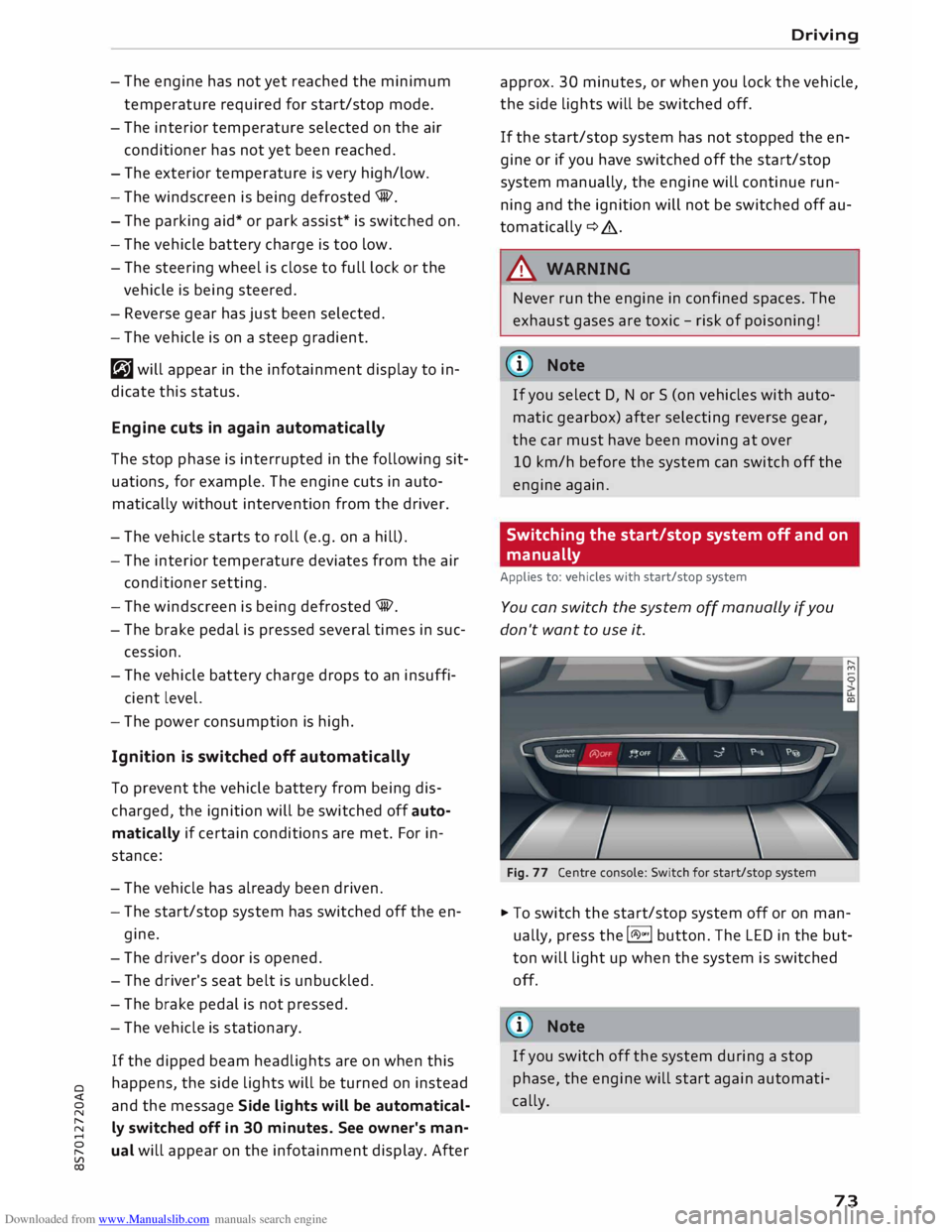
Fig. 77 Centre console: Switch for start/stop system
� To switch the start/stop system off or on man
ually, press the l(A)"'I button. The LED in the but
ton will light up when the system is switched
off.
@ Note
If you switch off the system during a stop
phase, the engine will start again automati
cally.
73
Page 86 of 306
Downloaded from www.Manualslib.com manuals search engine Driving
Releasing the selector lever manually (LHD
vehicles)
Applies to: vehicles with automatic gearbox
The selector Lever can be released manually if
the electrical power supply should fail.
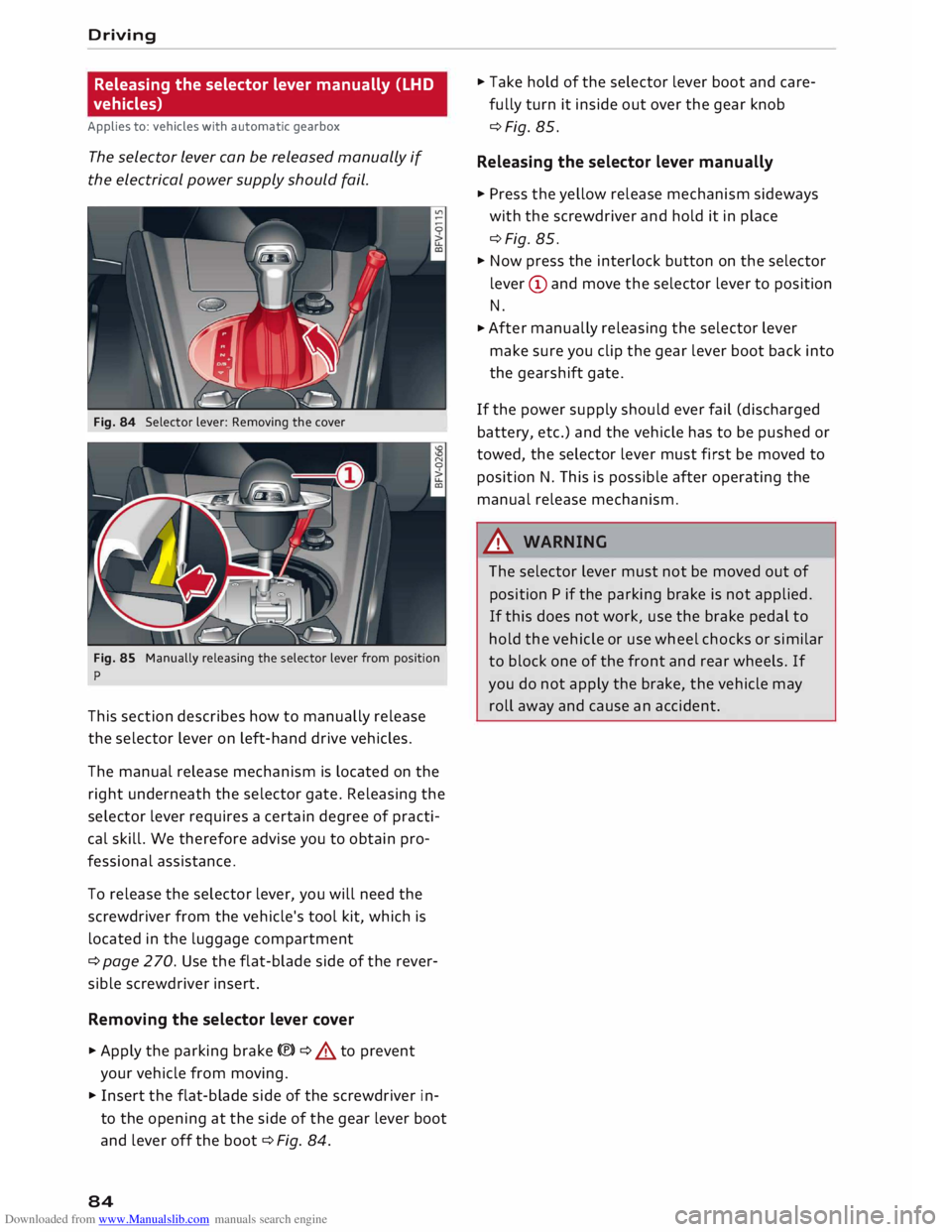
Fig. 84 Selector lever: Removing the cover
Fig. 85 Manually releasing the selector lever from position
p
This section describes how to manually release
the selector lever on left-hand drive vehicles.
The manual release mechanism is located on the
right underneath the selector gate. Releasing the
selector lever requires a certain degree of practi
cal skill. We therefore advise you to obtain pro
fessional assistance.
To release the selector lever, you will need the
screwdriver from the vehicle's tool kit, which is
located in the luggage compartment
¢ page 270. Use the flat-blade side of the rever
sible screwdriver insert.
Removing the selector lever cover
� Apply the parking brake(®)¢ & to prevent
your vehicle from moving.
� Insert the flat-blade side of the screwdriver in
to the opening at the side of the gear lever boot
and lever off the boot ¢Fig. 84.
84 �
Take hold of the selector lever boot and care
fully turn it inside out over the gear knob
¢Fig. 85.
Releasing the selector lever manually
� Press the yellow release mechanism sideways
with the screwdriver and hold it in place
¢Fig. 85.
� Now press the interlock button on the selector
lever (D and move the selector lever to position
N.
� After
manually releasing the selector lever
make sure you clip the gear lever boot back into
the gearshift gate.
If the power supply should ever fail (discharged
battery, etc.) and the vehicle has to be pushed or
towed, the selector lever must first be moved to
position N. This is possible after operating the
manual release mechanism .
.&_ WARNING
The selector lever must not be moved out of
position P if the parking brake is not applied.
If this does not work, use the brake pedal to
hold the vehicle or use wheel chocks or similar
to block one of the front and rear wheels. If
you do not apply the brake, the vehicle may
roll away and cause an accident.
Page 87 of 306
Downloaded from www.Manualslib.com manuals search engine Releasing
the selector lever manually (RHD
vehicles)
Applies to: vehicles with automatic gearbox
The selector Lever can be released manually if
the electrical power supply should fail.
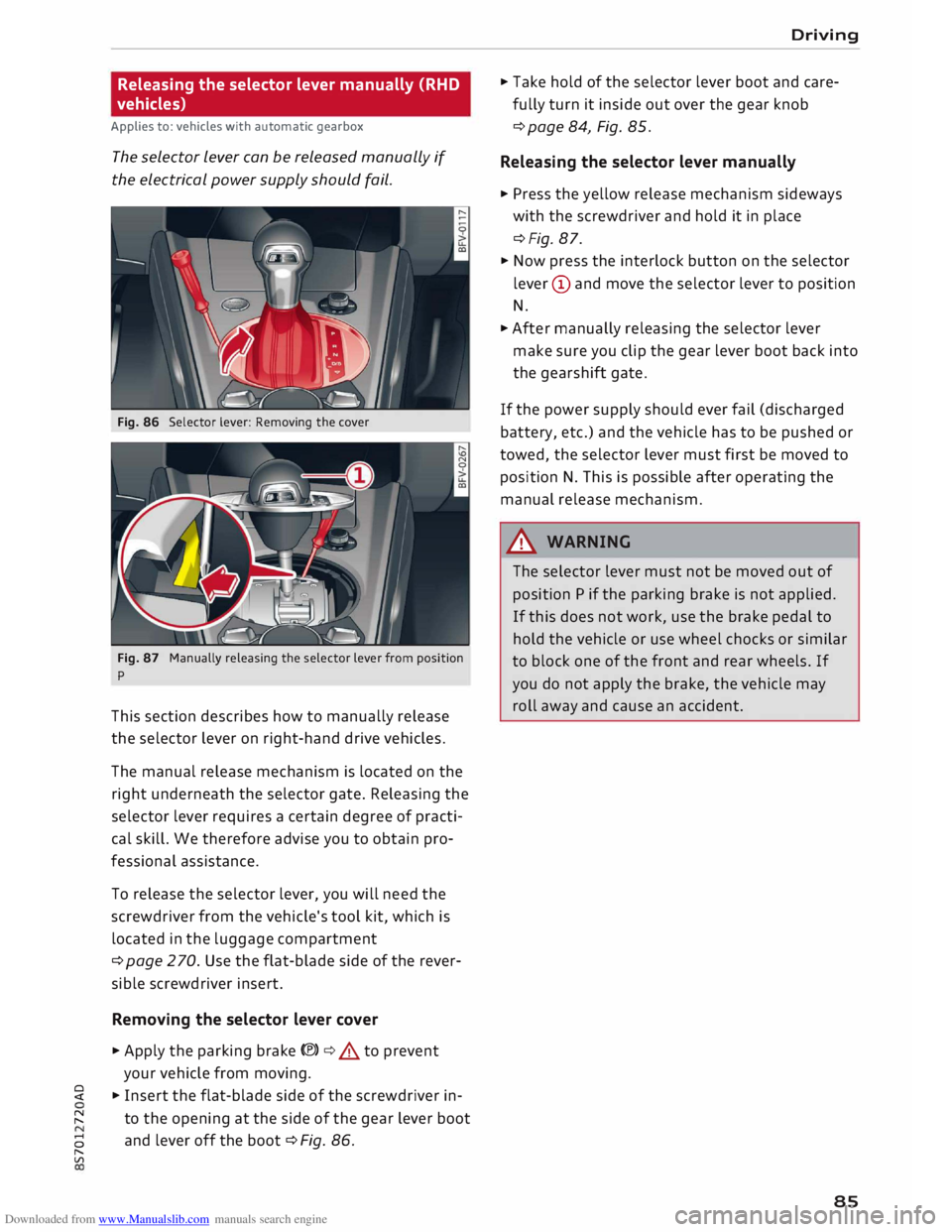
Fig. 86 Selector lever: Removing the cover
Fig. 87 Manually releasing the selector lever from position
p
This section describes how to manually release
the selector lever on right-hand drive vehicles.
The manual release mechanism is located on the
right underneath the selector gate. Releasing the
selector lever requires a certain degree of practi
cal skill. We therefore advise you to obtain pro
fessional assistance.
To release the selector lever, you will need the
screwdriver from the vehicle's tool kit, which is
located in the luggage compartment
¢ page 2 70. Use the flat-blade side of the rever
sible screwdriver insert.
Removing the selector lever cover
� Apply the parking brake(®)¢.&. to prevent
your vehicle from moving.
� � Insert the flat-blade side of the screwdriver in-
� to
the opening at the side of the gear lever boot
8 and
lever off the boot ¢ Fig. 86.
"
Vl Driving
� Take hold of the selector lever boot and care
fully turn it inside out over the gear knob
¢ page 84, Fig. 85.
Releasing the selector lever manually
� Press the yellow release mechanism sideways
with the screwdriver and hold it in place
¢Fig. 87.
� Now press the interlock button on the selector
lever (D and move the selector lever to position
N.
� After manually releasing the selector lever
make sure you clip the gear lever boot back into
the gearshift gate.
If the power supply should ever fail (discharged
battery, etc.) and the vehicle has to be pushed or
towed, the selector lever must first be moved to
position N. This is possible after operating the
manual release mechanism.
&_ WARNING
The selector lever must not be moved out of
position P if the parking brake is not applied.
If this does not work, use the brake pedal to
hold the vehicle or use wheel chocks or similar
to block one of the front and rear wheels. If
you do not apply the brake, the vehicle may
roll away and cause an accident.
85
Page 102 of 306
Downloaded from www.Manualslib.com manuals search engine Driver
assist systems
racks, stickers, deposits or any other substances.
If necessary, clean the area in front of the sen
sors ¢ page 98, Fig. 103.
@j Audi side
assist: currently unavailable.
See owner's manual
The side assist is temporarily inoperative and
cannot be switched on (for instance if the battery
is not sufficiently charged).
@j Audi
side assist: fault. Please contact
workshop
The system cannot detect vehicles reliably and
will be deactivated. The sensors are out of align
ment or defective. Have the system checked by a
qualified workshop soon.
Audi drive select (vehicle
set-up functions)
Introduction
Applies to: vehicles with Audi drive select
Drive select allows you to use different set-ups
on your vehicle. The four modes efficiency*, com
fort, auto and dynamic allow the driver, for ex
ample, to change from a sporty mode to a more
comfortable one via the �.:i.l\:'I button in the centre
console or via the infotainment system. In addi
tion, the individual mode allows you to adapt the
vehicle set-up to suit your personal driving style.
For example, you might choose to combine a
more dynamic engine set-up with a lighter steer
ing response.
Description
Applies to: vehicles with Audi drive select
The possible vehicle set-up in each mode de
pends on which equipment is installed on your
vehicle.
Engine and automatic gearbox*
The response of the engine and automatic gear
box* to accelerator pedal movements will be
more spontaneous or balanced, depending on
which mode you select. In efficiency* mode the
automatic gearbox* selects the next gear at low
er engine speeds and the coasting mode is activa-
100 ted
¢ page 82. This helps to reduce fuel con
sumption.
Suspension control (Audi magnetic ride)*
The suspension control uses sensors to collect in
formation on steering movements, braking and
acceleration input by the driver, road surface
quality, road speed and vehicle loading. With
drive select you can choose between dynamic and
comfort-oriented suspension set-ups (dynamic
and comfort modes), or opt for a more balanced
set-up (auto mode).
Steering
The degree of power assistance can be varied.
The light, indirect steering response in comfort
mode is particularly suitable on long motorway
trips, for instance. The steering has a tighter,
more direct feel in dynamic mode.
Air conditioner*
The air conditioner runs in a particularly econom
ical mode when the efficiency* setting is selec
ted. When this function is selected, eco* is shown
in the display of the automatic air conditioner.
Cruise control system*
The acceleration response is particularly econom
ical in efficiency* mode.
Engine sound*
The sound of the engine is matched to the selec
ted mode and ranges from subdued to dynamic.
(QJ} Note
- On some models the vehicle's maximum
speed can only be obtained in the auto and
dynamic modes.
- On vehicles with manual gearbox, an E ap
pears in the gear-change indicator when ef
ficiency* mode is activated.
-Applies to vehicles with manual gearbox: If
you press the accelerator right down past
the point of resistance in efficiency* mode,
the engine power is automatically control
led to give your vehicle maximum accelera-
tion. ..,.