bonnet AUDI TT ROADSTER 2016 User Guide
[x] Cancel search | Manufacturer: AUDI, Model Year: 2016, Model line: TT ROADSTER, Model: AUDI TT ROADSTER 2016Pages: 306, PDF Size: 31.82 MB
Page 231 of 306
Downloaded from www.Manualslib.com manuals search engine 0
N
,.....
N
......
0
,.....
Vl
CX) -
Never change or replace the bumper or bon
net as a part of tuning measures. This can
impair the effectiveness of the pedestrian
protection system and invalidate the oper
ating permit for your vehicle.
- False activation of the pedestrian protection
system is possible.
Servicing the pedestrian protection system
Applies to: vehicles with pedestrian protection system
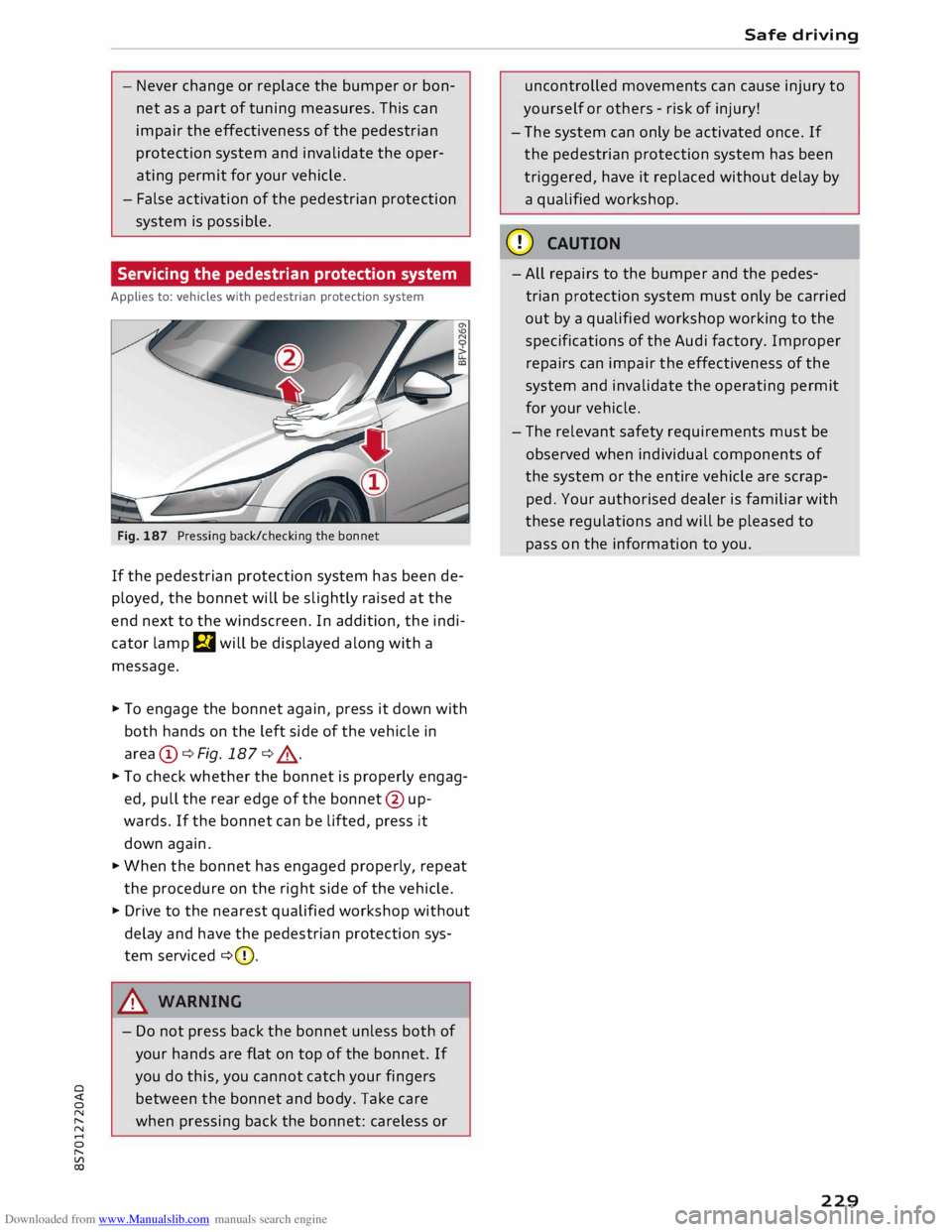
Fig. 187 Pressing back/checking the bonnet
If the pedestrian protection system has been de
ployed, the bonnet will be slightly raised at the
end next to the windscreen. In addition, the indi
cator lamp m will be displayed along with a
message .
.,. To engage the bonnet again, press it down with
both hands on the left side of the vehicle in
area (i)¢Fig.187 ¢.&,. .
.,. To check whether the bonnet is properly engag
ed, pull the rear edge of the bonnet @ up
wards. If the bonnet can be lifted, press it
down again .
.,. When the bonnet has engaged properly, repeat
the procedure on the right side of the vehicle .
.,. Drive to the nearest qualified workshop without
delay and have the pedestrian protection sys
tem serviced ¢(D.
8_ WARNING
- Do not press back the bonnet unless both of
your hands are flat on top of the bonnet. If
you do this, you cannot catch your fingers
between the bonnet and body. Take care
when pressing back the bonnet: careless or Safe
driving
uncontrolled movements can cause injury to
yourself or others -risk of injury!
- The system can only be activated once. If
the pedestrian protection system has been
triggered, have it replaced without delay by
a qualified workshop.
CD CAUTION
- All repairs to the bumper and the pedes
trian protection system must only be carried
out by a qualified workshop working to the
specifications of the Audi factory. Improper
repairs can impair the effectiveness of the
system and invalidate the operating permit
for your vehicle.
- The relevant safety requirements must be
observed when individual components of
the system or the entire vehicle are scrap
ped. Your authorised dealer is familiar with
these regulations and will be pleased to
pass on the information to you.
229
Page 247 of 306
Downloaded from www.Manualslib.com manuals search engine 0
N
,.....
N
......
0
,.....
Vl
CX) -
Never spill fluids on a hot engine. These flu
ids can cause a fire (e.g. radiator anti
freeze).
- Take care not to cause short circuits in the
electrical system, especially when working
on the battery.
- When working in the engine compartment
be aware that the radiator fan may start
running suddenly, even if the ignition is
switched off -risk of injury!
- Do not unscrew the cap on the expansion
tank when the engine is hot. The cooling
system is under pressure.
- Protect face, hands and arms by covering
the cap with a large, thick rag to protect
against escaping coolant and steam.
- Never remove the engine cover panel -risk
of burns!
- If any tests have to be performed with the
engine running, there is an extra safety risk
from the rotating parts, such as the drive
belts, alternator and radiator fan, etc., and
from the high-voltage ignition system.
- Vehicles with automatic gearbox: Never
open the throttle inadvertently (for instance
by hand from the engine compartment) if a
gear is engaged while the vehicle is station
ary with the engine running. The vehicle will
otherwise start moving immediately and
could cause an accident.
- Observe the following additional warnings if
work on the fuel system or the electrical
system is necessary:
- Do not smoke.
- Never work near naked flames.
- Always keep an approved fire extinguisher
immediately available.
- Any work on the batteries and electrical sys
tem in your vehicle entails a risk of injury
and chemical burns in addition to danger of
accident or fire. For this reason, you must
have the work carried out by a qualified
workshop.
CD CAUTION
When topping up fluids make sure the correct
fluid is put into the correct filler opening. This Checking
and topping up fluids
can otherwise cause serious malfunctions or
engine damage.
@ For the sake of the environment
Inspect the ground underneath your vehicle
regularly so that any leaks are detected at an
early stage. If you find spots of oil or other
fluids, have your vehicle inspected in the
workshop.
i Note
On right-hand drive vehicles* some of the
containers/ reservoirs mentioned below are
located on the other side of the engine com
partment.
Opening/closing bonnet
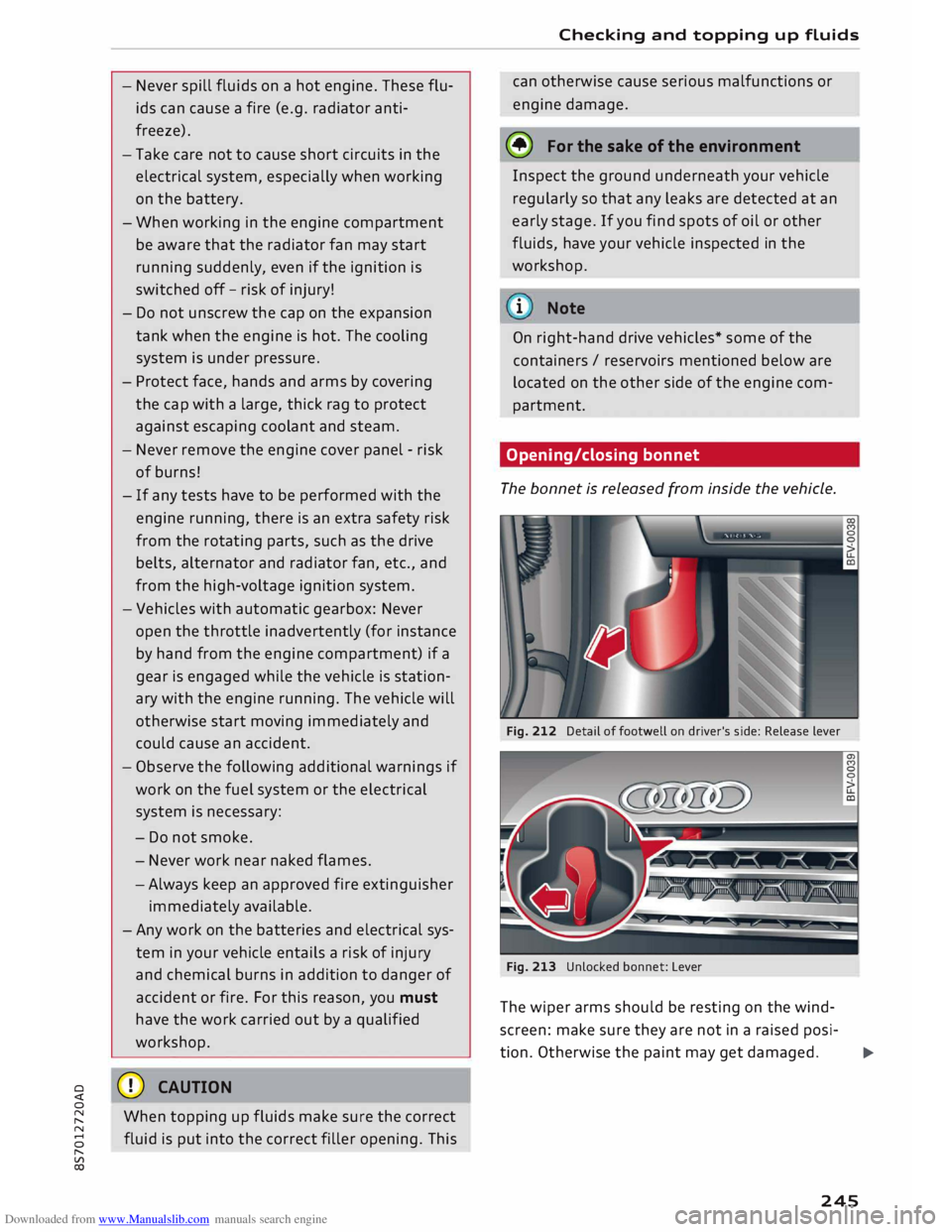
The bonnet is released from inside the vehicle.
Fig. 212 Detail of footwell on driver's side: Release lever
Fig. 213 Unlocked bonnet: Lever
The wiper arms should be resting on the wind
screen: make sure they are not in a raised posi-
tion. Otherwise the paint may get damaged.
..,..
245
Page 248 of 306
Downloaded from www.Manualslib.com manuals search engine Checking
and topping up fluids
Opening the bonnet
� With the driver's door open, pull the Lever un
der the dashboard in the direction indicated
(arrow) ¢Fig. 212.
� Lift the bonnet slightly¢,&.
� Press the release Lever ¢Fig. 213 in the direc
tion indicated (arrow). This will release the ar
rester hooks.
� Open the bonnet.
Closing the bonnet
� To close the bonnet, pull it down to overcome
the spring pressure.
� Then Let it drop into the catches; do not press
down ¢,&.
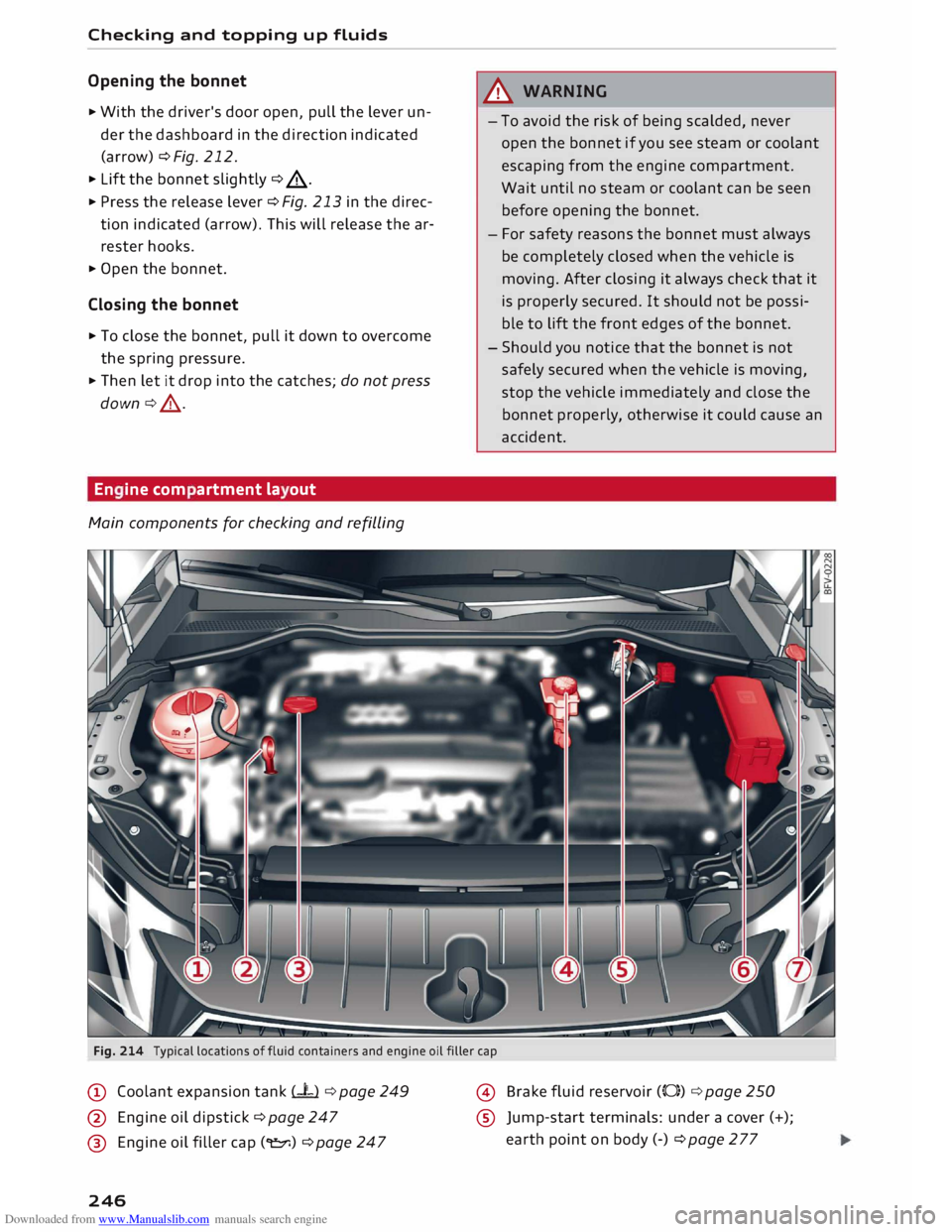
En ine com artment la out
Main components for checking and refilling A
WARNING
- To avoid the risk of being scalded, never
open the bonnet if you see steam or coolant
escaping from the engine compartment.
Wait until no steam or coolant can be seen
before opening the bonnet.
- For safety reasons the bonnet must always
be completely closed when the vehicle is
moving. After closing it always check that it
is properly secured. It should not be possi
ble to Lift the front edges of the bonnet.
- Should you notice that the bonnet is not
safely secured when the vehicle is moving,
stop the vehicle immediately and close the
bonnet properly, otherwise it could cause an
accident.
Fig. 214 Typical locations offluid containers and engine oil filler cap
@ Coolant expansion tank (-L) ¢ page 249
@ Engine oil dipstick ¢ page 247
@ Engine oil filler cap(�) ¢ page 247
246 @
Brake fluid reservoir (0)) ¢ page 250
® Jump-start terminals: under a cover (+);
earth point on body (-) ¢page277
Page 250 of 306
Downloaded from www.Manualslib.com manuals search engine Checking
and topping up fluids
- Switch off the warm engine. Wait for a few mi
nutes for the oil to drain back into the sump.
- Open the bonnet ¢page 245.
- Pull out the oil dipstick ¢page 246, Fig. 214,
wipe it with a clean cloth and insert it again,
pushing it in as far as it will go.
- Then pull the dipstick out again and check the
oil level ¢table on page 248.
- If the oil level is too low, add more engine oil.
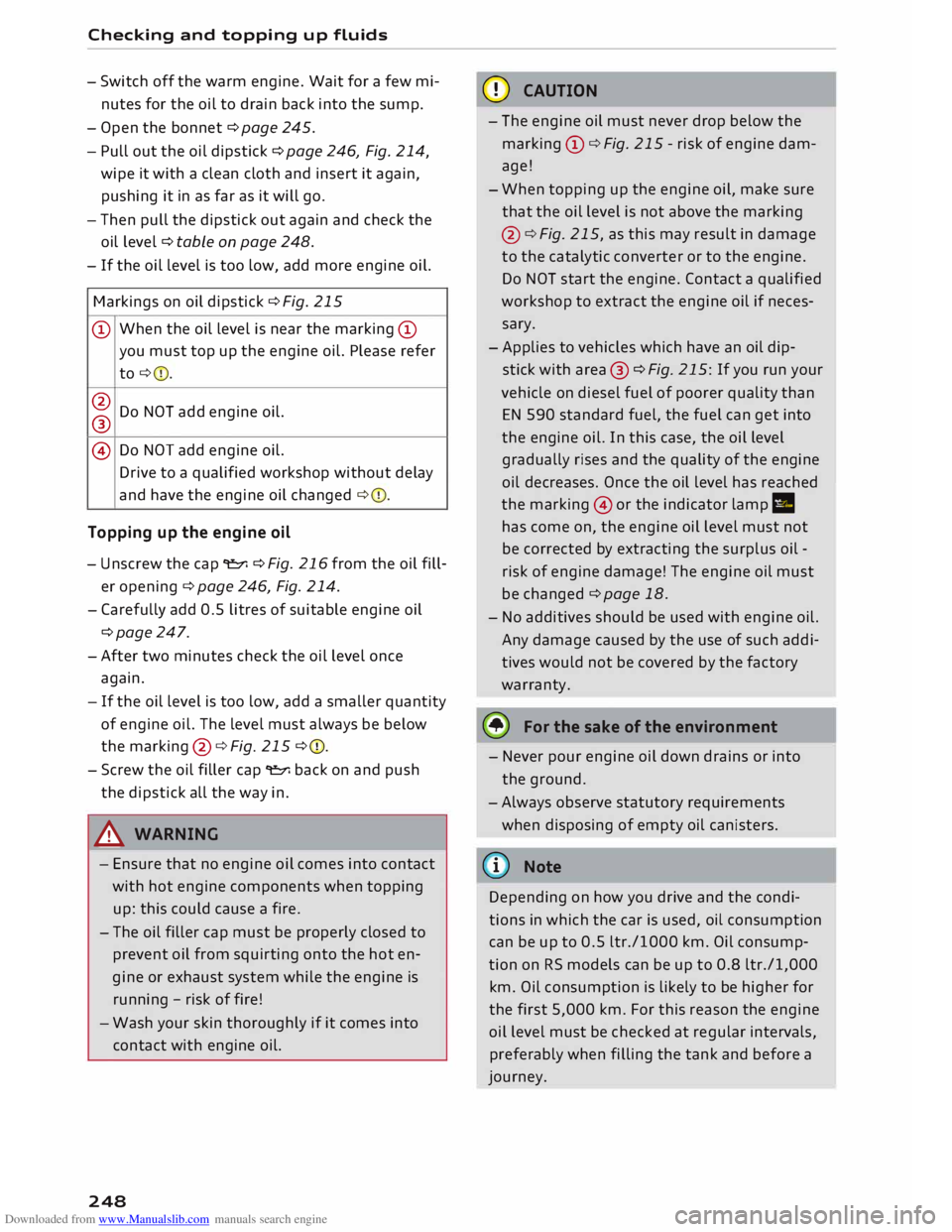
Markings on oil dipstick ¢ Fig. 215
@ When
the oil Level is near the marking @
you must top up the engine oil. Please refer
to ¢ 0.
@ Do NOT add engine oil.
®
@ Do
NOT add engine oil.
Drive to a qualified workshop without delay
and have the engine oil changed ¢0.
Topping up the engine oil
- Unscrew the cap "E::71 ¢Fig. 216from the oil fill
er opening ¢ page 246, Fig. 214.
- Carefully add 0.5 litres of suitable engine oil
¢page 247.
-After two minutes check the oil level once
again.
- If the oil level is too low, add a smaller quantity
of engine oil. The level must always be below
the marking @¢Fig. 215 ¢0.
- Screw the oil filler cap "E::71 back on and push
the dipstick all the way in.
A WARNING
- Ensure that no engine oil comes into contact
with hot engine components when topping
up: this could cause a fire.
- The oil filler cap must be properly closed to
prevent oil from squirting onto the hot en
gine or exhaust system while the engine is
running -risk of fire!
- Wash your skin thoroughly if it comes into
contact with engine oil.
248 CD
CAUTION
- The engine oil must never drop below the
marking (!)¢ Fig. 215 -risk of engine dam
age!
- When topping up the engine oil, make sure
that the oil level is not above the marking
@ ¢Fig. 215, as this may result in damage
to the catalytic converter or to the engine.
Do NOT start the engine. Contact a qualified
workshop to extract the engine oil if neces
sary.
- Applies to vehicles which have an oil dip
stick with area® ¢Fig. 215: If you run your
vehicle on diesel fuel of poorer quality than
EN 590 standard fuel, the fuel can get into
the engine oil. In this case, the oil Level
gradually rises and the quality of the engine
oil decreases. Once the oil level has reached
the marking @or the indicator lamp II
has come on, the engine oil level must not
be corrected by extracting the surplus oil -
risk of engine damage! The engine oil must
be changed ¢ page 18.
- No additives should be used with engine oil.
Any damage caused by the use of such addi
tives would not be covered by the factory
warranty.
® For the sake of the environment
- Never pour engine oil down drains or into
the ground.
-Always observe statutory requirements
when disposing of empty oil canisters.
@ Note
Depending on how you drive and the condi
tions in which the car is used, oil consumption
can be up to 0.5 Ltr./1000 km. Oil consump
tion on RS models can be up to 0.8 ltr./1,000
km. Oil consumption is likely to be higher for
the first 5,000 km. For this reason the engine
oil level must be checked at regular intervals,
preferably when filling the tank and before a
journey.
Page 253 of 306
Downloaded from www.Manualslib.com manuals search engine 0
N
,.....
N
......
0
,.....
Vl
CX) Explanation
of warnings on vehicle battery:
® Wear safety
glasses!
A Battery
acid is extremely corrosive. Wear
protective gloves and safety glasses.
@ Keep
open flames, sparks, uncovered
Lights and Lit cigarettes away from the
battery!
� A
highly explosive mixture of gases may
be given off when the battery is under
charge!
® Keep children
away from batteries and
battery acid.
.&_ WARNING
Any work on the batteries and electrical sys
tem in your vehicle entails a risk of injury and
chemical burns in addition to danger of acci
dent or fire. For this reason, you must have
the work carried out by a qualified workshop.
CD CAUTION
If the car is left standing for Long periods,
protect the battery from frost. The battery
will be damaged irreparably if it is allowed to
freeze <=> page 2 51.
@ For the sake of the environment
'8 Batteries contain toxic substances including
sulphuric acid and Lead. Please contact a
qualified workshop if you have any questions.
Vehicle battery
The term "vehicle battery" refers to the 12 Volt
battery in your vehicle.
If the vehicle is not used for long periods
If you do not drive your vehicle for a period of
several days or weeks, the power management
will gradually shut off the on-board systems one
by one, or reduce the amount of current they are
using. This Limits the amount of power consumed
and helps to ensure reliable starting even after a
Long period <=> page 118. Certain convenience fea
tures, such as interior Lighting or electric seat ad
justment, may not be available. These functions Checking
and topping up fluids
will be restored when you switch on the ignition
and start the engine.
Even though some systems are deactivated auto
matically, certain electrical equipment continues
to draw current even when the ignition is off. If
the vehicle is Left standing for Long periods, this
can result in total battery discharge. If the vehi
cle battery is allowed to discharge completely, an
internal chemical reaction damages the battery
irreparably. To avoid this, the vehicle battery
should be recharged at Least once a month
<=> page 251. Please contact a qualified workshop
if you have any questions.
Winter conditions
Cold weather is very hard on the vehicle battery.
The starting capacity may be reduced as a result.
For this reason, you should have the vehicle bat
tery checked by a qualified workshop before the
start of winter.
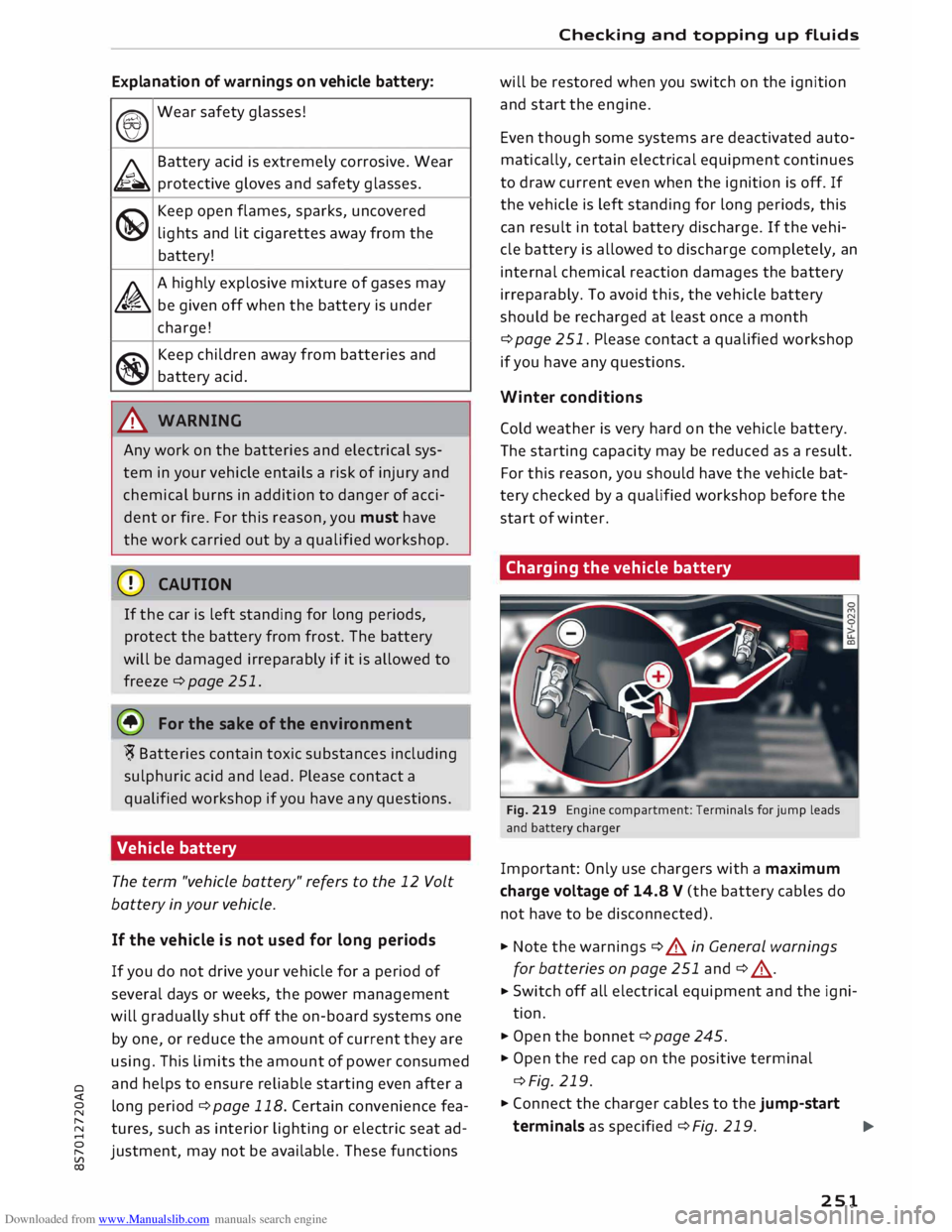
Charging the vehicle battery
Fig. 219 Engine compartment: Terminals for jump leads
and battery charger
Important: Only use chargers with a maximum
charge voltage of 14.8 V (the battery cables do
not have to be disconnected).
� Note the warnings c:> A in General warnings
for batteries on page 251 and<=> A_ .
� Switch
off all electrical equipment and the igni
tion.
� Open the bonnet<=> page 245.
� Open the red cap on the positive terminal
<=>Fig. 219.
� Connect the charger cables to the jump-start
terminals as specified <=> Fig. 219.
�
251
Page 254 of 306
Downloaded from www.Manualslib.com manuals search engine Checking
and topping up fluids
... Now connect the battery charger to the mains
and switch on.
... After charging the battery: switch off the bat-
tery charger and disconnect the mains cable .
... Detach the charger cables from the terminals.
... Refit
the red cap onto the positive terminal.
... Close the bonnet ¢page 245.
A WARNING
- A highly explosive mixture of gases may be
given off when the battery is under charge.
Only charge the vehicle battery in a well
ventilated area.
- When it is discharged the vehicle battery
can freeze at temperatures around 0°
(. You
must not use a vehicle battery which has
frozen, even after it has thawed, because
the ice may have cracked the battery casing
and allowed the battery acid to escape -risk
of explosion and chemical burns! Please
contact a qualified workshop if you have any
questions.
- Do not connect or disconnect the charging
cables during the charging process -risk of
explosion!
1 Note
- Use only the terminals in the engine com
partment to charge the vehicle battery.
- Before you charge the vehicle battery, al
ways read and follow the manufacturer's in
structions for using the battery charger.
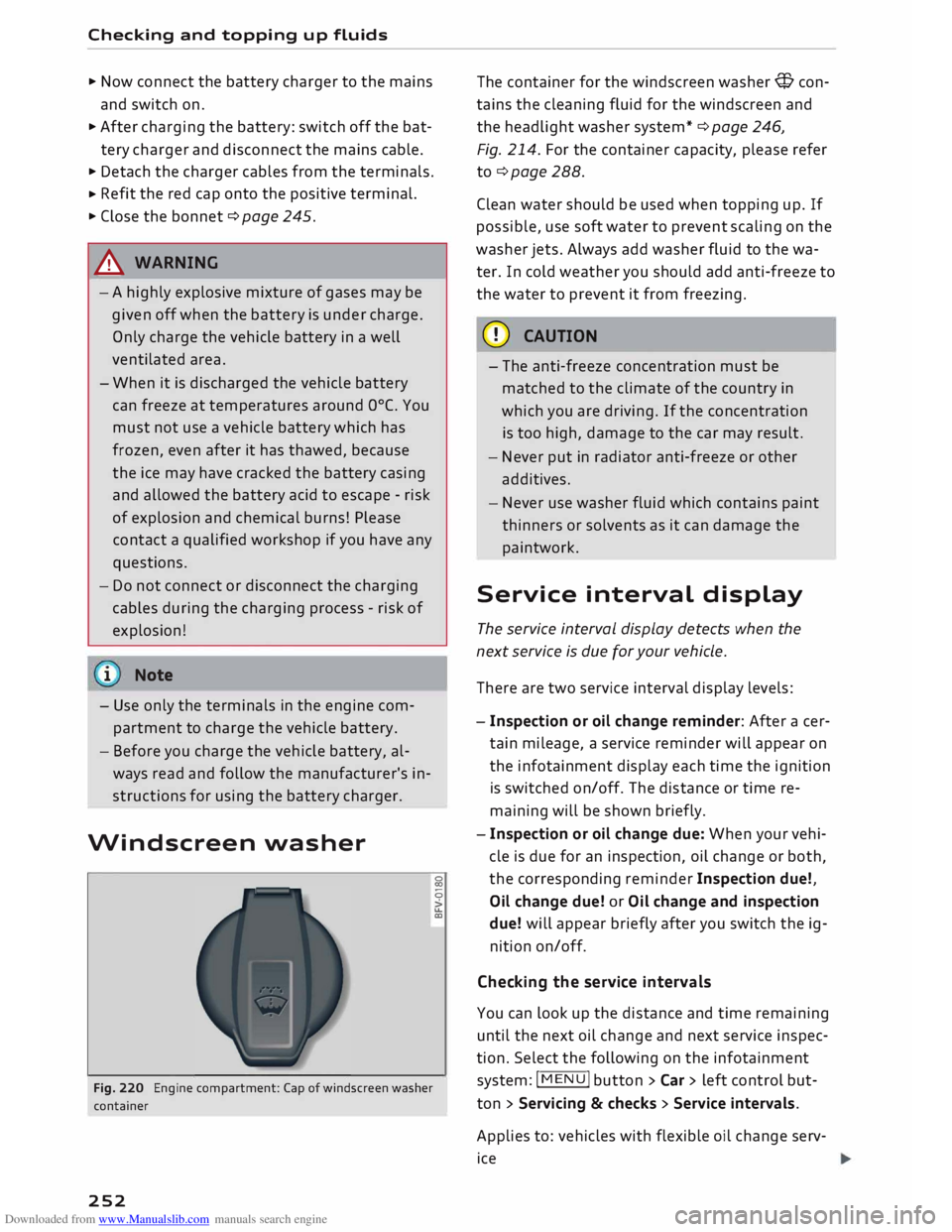
Windscreen washer
Fig. 220 Engine compartment: Cap of windscreen washer
container
252 �
0
>
u..
co The
container for the windscreen washer@ con
tains the cleaning fluid for the windscreen and
the headlight washer system* ¢ page 246,
Fig. 214. For the container capacity, please refer
to¢ page 288 .
Clean water should be used when topping up. If
possible, use soft water to prevent scaling on the
washer jets. Always add washer fluid to the wa
ter. In cold weather you should add anti-freeze to
the water to prevent it from freezing.
CD CAUTION
- The anti-freeze concentration must be
matched to the climate of the country in
which you are driving. If the concentration
is too high, damage to the car may result.
- Never put in radiator anti-freeze or other
additives.
- Never use washer fluid which contains paint
thinners or solvents as it can damage the
paintwork.
Service interval display
The service interval display detects when the
next service is due for your vehicle .
There are two service interval display levels:
- Inspection or oil change reminder: After a cer
tain mileage, a service reminder will appear on
the infotainment display each time the ignition
is switched on/off. The distance or time re
maining will be shown briefly.
- Inspection or oil change due: When your vehi
cle is due for an inspection, oil change or both,
the corresponding reminder Inspection due!,
Oil change due! or Oil change and inspection
due! will appear briefly after you switch the ig
nition on/off.
Checking the service intervals
You can look up the distance and time remaining
until the next oil change and next service inspec
tion. Select the following on the infotainment
system: IM EN u I button > Car > left control but
ton > Servicing & checks > Service intervals.
Applies to: vehicles with flexible oil change serv
ice
Page 265 of 306
Downloaded from www.Manualslib.com manuals search engine 0
N
,.....
N
......
0
,.....
Vl
CX) Care
of vehicle and
cleaning
General notes
Regular and careful care helps to maintain the
value of the vehicle. This may also be one of the
requirements for upholding any warranty claims
in the event of corrosion or paint defects.
Qualified workshops carry stocks of suitable car
care materials. Please follow the instructions for
use on the packaging.
A WARNING
- Cleaning products and other materials used
for car care can damage health if misused.
- Car care products can contain toxic substan
ces and must always be kept in a safe place
out of reach of children.
@ For the sake of the environment
- Please choose care products that are not
harmful to the environment.
- Surplus cleaning materials should not be
disposed of together with ordinary house
hold waste.
Washing the vehicle
The longer residues are allowed to remain on the
vehicle, the more damage they can do to the
paintwork. High temperatures (for instance in di
rect sunlight) further intensify the damage.
Before washing, soak heavy dirt with plenty of
water.
Stubborn dirt, such as bird droppings or resinous
tree sap, is best removed with plenty of water
and a micro-fibre cloth.
After the period when salt is put on the roads,
have the underside of the vehicle washed thor
oughly.
High-pressure cleaners
When cleaning the vehicle with a high-pressure
cleaner, always follow the operating instructions
for the equipment. This applies particularly to Care
of vehicle and cleaning
the operating pressure and the spraying dis
tance. Do not point the spray jet directly at the
seals on the windows, doors, bonnet or boot lid,
or at the tyres, rubber hoses, insulating material,
sensors* or camera lenses*. Maintain a distance
of at least 40 cm.
Do not use a high-pressure cleaner to remove
snow and ice.
Never use high-pressure cleaners with a round
jet nozzle or "dirt blasters".
The water must not be hotter than 60 °C.
Automatic car washes
Spray the vehicle with water before washing.
Ensure that the windows are closed and that the
windscreen wipers are switched off. Follow the
car wash operator's rules and recommendations,
especially if any accessories are attached to your
vehicle.
If possible use a brush less car wash.
Washing by hand
Clean the car with a soft sponge or brush, start
ing on the roof and working down. Use solvent
free cleaning agents.
Washing matt-painted vehicles by hand
To avoid damaging the paintwork when washing
the car, first remove any dust, sand and grit. In
sects, grease stains and fingerprints are best re
moved using a special cleaning agent for matt
painted surfaces.
Apply the product with a micro-fibre cloth. Do
not apply too much pressure to avoid damaging
the paintwork.
Rinse the car thoroughly with water. Then clean
the car with a neutral shampoo and a soft micro
fibre cloth.
Rinse the car with Lots of water again and then
let it dry in the air. Remove any water stains with
a chamois.
263
Page 294 of 306
Downloaded from www.Manualslib.com manuals search engine Index
Car care
Washing/cleaning . . . . . . . . . . . . . . . . . . . 263
Car keys . . . . . . . . . . . . . . . . . . . . . . . . . . . . . . 27
Car phone . . . . . . . . . . . . . . . . . . . . . . . 141, 156
Catalytic converter . . . . . . . . . . . . . . . . . . . .
244
CD drive . . . . . . . . . . . . . . . . . . . . . . . . . . . . .
193
Central locking system . . . . . . . . . . . . . . . . . .
27
Boot lid . . . . . . . . . . . . . . . . . . . . . . . . . . . . . 33
Central locking switch . . . . . . . . . . . . . . . . .
31
Electric windows . . . . . . . . . . . . . . . . . . . . .
35
Locking doors manually . . . . . . . . . . . . . . . . 32
Remote control key . . . . . . . . . . . . . . . . . . .
29
Settings .. .. .. .. .. .. .. .. .. .. . . .. .. ..
31
Centre armrest . . . . . . . . . . . . . . . . . . . . . . . .
55
Centre console lighting, adjusting brightness
.48
Cetane number (diesel) . . . . . . . . . . . . . . . .
241
Changing bulbs . . . . . . . . . . . . . . . . . . . . . . .
284
Charging battery (mobile devices) . . . . 198, 199
Chassis number . . . . . . . . . . . . . . . . . . . . . .
287
Child lock . . . . . . . . . . . . . . . . . . . . . . . . . . .
204
Child seats . . . . . . . . . . . . . . . . . . . . . . . . . .
223
Categories . . . . . . . . . . . . . . . . . . . . . . . . .
224
ISOFIX . . . . . . . . . . . . . . . . . . . . . . . . . . . .
225
Side airbags . . . . . . . . . . . . . . . . . . . . . . . .
224
Cigarette lighter . . . . . . . . . . . . . . . . . . . . . . . 56
Cleaning . . . . . . . . . . . . . . . . . . . . . . . . . . . .
263
Cleaning/de-icing windows . . . . . . . . . . . . . 265
Cleaning/treating natural leather . . . . . . . . 266
Cleaning Alcantara . . . . . . . . . . . . . . . . . . . .
266
Cleaning Audi virtual cockpit . . . . . . . . . . . .
265
Cleaning carbon parts . . . . . . . . . . . . . 265, 266
Cleaning controls and displays . . . . . . . . . . 265
Cleaning displays . . . . . . . . . . . . . . . . . . . . . 265
Cleaning fabrics . . . . . . . . . . . . . . . . . . . . . .
266
Cleaning instrument cluster . . . . . . . . . . . .
265
Cleaning leatherette . . . . . . . . . . . . . . . . . . .
266
Cleaning plastic parts . . . . . . . . . . . . . . . . . .
265
Cleaning seat upholstery . . . . . . . . . . . . . . . 266
Cleaning windbreak
Closing 265
Bonnet . . . . . . . . . . . . . . . . . . . . . . . . . . . .
245
Windows ........................... 34
Coasting mode . . . . . . . . . . . . . . . . . . . . . . . .
82
Coat hooks . . . . . . . . . . . . . . . . . . . . . . . . . . .
5 7
Cold engine . . . . . . . . . . . . . . . . . . . . . . . . . . . 66
292 Colour
code . . . . . . . . . . . . . . . . . . . . . . . . . .
287
Coming home . . . . . . . . . . . . . . . . . . . . . . . . . 47
Command see Command (speech dialogue system) . 132
Command (speech dialogue system) . . . . . . 133
Compact temporary spare wheel . . . . . . . . . 276
Compartments . . . . . . . . . . . . . . . . . . . . . . . .
57
Compass in mirror . . . . . . . . . . . . . . . . . . . . .
52
Conference calls . . . . . . . . . . . . . . . . . . . . . . 148
Connection manager 213
Connections see Media . . . . . . . . . . . . . . . . . . . . . .
191, 200
Connection settings . . . . . . . . . . . . . . . . . . .
213
Consumption (fuel)
. . . . . . . . . . . . . . . . 25, 287
Contacts Displaying details.. . . . . . . . . . . . . . . . . . . 154
From another directory . . . . . . . . . . . . . . . 214
Importing/exporting . . . . . . . . . . . . . . . . .
154
Memory capacity . . . . . . . . . . . . . . . . . . . .
156
Searching for . . . . . . . . . . . . . . . . . . . . . . .
154
Storing as a destination...............
175
Control buttons . . . . . . . . . . . . . . . . . . . . . .
123
Controls Multi-function steering wheel..... ...... 21
Controls and displays (overview) . . . . . . . . . . . 8
Control units . . . . . . . . . . . . . . . . . . . . . . . . . 119
Convenience key
Indicator lamp . . . . . . . . . . . . . . . . . . . . . . .
70
Switching off engine (START ENGINE STOP
button) . . . . . . . . . . . . . . . . . . . . . . . . . . . . . 69
Convenience open/close . . . . . . . . . . . . . . . . . 35
Cooling mode (air conditioner) . . . . . . . . 61, 62
Cooling system
Anti-freeze . . . . . . . . . . . . . . . . . . . . . . . . . 249
Checking coolant level . . . . . . . . . . . . . . . . 249
Coolant temperature gauge . . . . . . . . . . . . 10
Topping up coolant . . . . . . . . . . . . . . . . . . 249
Warning lamp . . . . . . . . . . . . . . . . . . . . . . . 14
Cornering light . . . . . . . . . . . . . . . . . . . . . . . 100
Crank (for closing soft top manually) . . . . . . 42
Crosshairs . . . . . . . . . . . . . . . . . . . . . . . . . . . 171
Cruise control system
Adjusting stored speed . . . . . . . . . . . . . . . .
87
Pre-selecting a speed . . . . . . . . . . . . . . . . . .
87
Switching off . . . . . . . . . . . . . . . . . . . . . . . .
87
Switching on . . . . . . . . . . . . . . . . . . . . . . . . . 86
Page 296 of 306
Downloaded from www.Manualslib.com manuals search engine Index
Start/stop system . . . . . . . . . . . . . . . . . . . . 71
Starting . . . . . . . . . . . . . . . . . . . . . . . . . 68, 70
Switching off . . . . . . . . . . . . . . . . . . . . . . . . 69
Engine compartment
Layout ............................. 246
Opening/closing bonnet . . . . . . . . . . . . . .
245
Safety notes . . . . . . . . . . . . . . . . . . . . . . . .
244
Engine data
see Sport displays . . . . . . . . . . . . . . . . . . . . 96
Engine management (indicator lamp) . . . . . .
17
Engine oil . . . . . . . . . . . . . . . . . . . . . . . . . . .
247
Changing . . . . . . . . . . . . . . . . . . . . . . . . . .
247
Checking oil level . . . . . . . . . . . . . . . . . . . .
247
Consumption . . . . . . . . . . . . . . . . . . . . . . .
247
Dipstick . . . . . . . . . . . . . . . . . . . . . . . . . . . .
247
Indicator lamp . . . . . . . . . . . . . . . . . . . . . . . 18
Oil change service . . . . . . . . . . . . . . . . . . .
247
Service intervals . . . . . . . . . . . . . . . . . . . . .
247
Temperature gauge . . . . . . . . . . . . . . . . . . . 26
Topping up . . . . . . . . . . . . . . . . . . . . . . . . . 247
Warning lamp . . . . . . . . . . . . . . . . . . . . . . .
14
Engine speed governing (indicator lamp) 17
Engine start/stop mode
see Start/stop system . . . . . . . . . . . . . . . . . 73
Entering information
Using MMI touch . . . . . . . . . . . . . . . . . . . . 124
Using the speller . . . . . . . . . . . . . . . . . . . . 128
Entry Using MMI touch 124
Environmental tips
Filling the tank . . . . . . . . . . . . . . . . . . . . . . 242
Leaks.............................. 245
Minimising pollution . . . . . . . . . . . . . . . . . . 67
ESC see Electronic stabilisation control (ES() . 113
ESP see Electronic stabilisation control (ES() . 113
Ethanol (fuel) . . . . . . . . . . . . . . . . . . . . . . . .
241
Event data recorder . . . . . . . . . . . . . . . . . . . 119
Event memory. . . . . . . . . . . . . . . . . . . . . . . .
119
Exterior lights . . . . . . . . . . . . . . . . . . . . . . . . . 44
Exterior mirrors
Adjusting . . . . . . . . . . . . . . . . . . . . . . . . . . .
48
Anti-dazzle setting . . . . . . . . . . . . . . . . . . .
49
Heating . . . . . . . . . . . . . . . . . . . . . . . . . . . . .
48
External speech dialogue system . . . . . . . . 139
294 F
Factory settings (MMI) . . . . . . . . . . . . . . . . .
213
Fader(sound) ........................ 217
FAME (fuel) . . . . . . . . . . . . . . . . . . . . . . . . . . 241
Fastening rings . . . . . . . . . . . . . . . . . . . . . . . 228
Fast forward/rewind (audio/video file) . . . . 200
Fast route
177
Favourites Media ............................. 203
Navigation . . . . . . . . . . . . . . . . . . . . . . . . . 171
Telephone . . . . . . . . . . . . . . . . . . . . . . . . . .
149
File formats (media drives) . . . . . . . . . . . . .
206
Filling the tank . . . . . . . . . . . . . . . . . . . . . . . 242
Fuel gauge . . . . . . . . . . . . . . . . . . . . . . . . . . 10
Opening fuel tank flap . . . . . . . . . . . . . . . . 242
Releasing tank flap manually . . . . . . . . . . 244
Tank capacity . . . . . . . . . . . . . . . . . . . . . . .
288
Using spare fuel canister . . . . . . . . . . . . . . 243
Finding entries
see Search function . . . . . . . . . . . . . . . . . .
129
Fire extinguisher . . . . . . . . . . . . . . . . . . . . . .
269
First-aid kit . . . . . . . . . . . . . . . . . . . . . . . . . .
269
Fixed oil change service . . . . . . . . . . . . . . . . 247
Flexible oil change service . . . . . . . . . . . . . . 247
Floor mats . . . . . . . . . . . . . . . . . . . . . . . . . . . 227
Fog lights . . . . . . . . . . . . . . . . . . . . . . . . . . . . 44
Footwell light . . . . . . . . . . . . . . . . . . . . . . . . .
48
Four-wheel drive . . . . . . . . . . . . . . . . . . . . . . 116
Frequency band
see Waveband 185
Front seats
see Seats . . . . . . . . . . . . . . . . . . . . . . . . . . .
54
Front window
see Windscreen . . . . . . . . . . . . . . . . . . . . . . SO
Fuel . . . . . . . . . . . . . . . . . . . . . . . . . . . . . . . .
241
Consumption . . . . . . . . . . . . . . . . . . . . 25, 287
Ethanol . . . . . . . . . . . . . . . . . . . . . . . . . . . . 241
Fuel gauge . . . . . . . . . . . . . . . . . . . . . . . . . . 10
Saving fuel ...................... 67, 100
Tank capacity . . . . . . . . . . . . . . . . . . . . . . . 288
Warning light . . . . . . . . . . . . . . . . . . . . . . . . 18
Fuel economy
Coasting mode . . . . . . . . . . . . . . . . . . . . . . .
82
Fuel range . . . . . . . . . . . . . . . . . . . . . . . . . . . . 25
Page 299 of 306
Downloaded from www.Manualslib.com manuals search engine 0
N
,.....
N
....
0
,.....
Vl
CX) Memory
card
SD card readers . . . . . . . . . . . . . . . . . . . . . 192
Types/formats supported . . . . . . . . . . . . .
206
Memory list
see Favourites . . . . . . . . . . . . . . . . . . . . . .
188
MENU button . . . . . . . . . . . . . . . . . . . . . . . .
121
Menus/symbols . . . . . . . . . . . . . . . . . . . . . .
130
Messages . . . . . . . . . . . . . . . . . . . . . . . . . . .
150
see also E-mail ...................... 151
Mileage recorder. . . . . . . . . . . . . . . . . . . . . . . 24
Mirrors Adjusting exterior mirrors . . . . . . . . . . . . . .
48
Anti-dazzle setting . . . . . . . . . . . . . . . . . . .
49
Make-up mirrors . . . . . . . . . . . . . . . . . . . . .
49
MMI see Multi Media Interface
MMI search 121
see Search function . . . . . . . . . . . . . . . . . . 129
MMI touch . . . . . . . . . . . . . . . . . . . . . . . . . . . 124
Mobile phone . . . . . . . . . . . . . . . . . . . . . . . . 286
Connecting . . . . . . . . . . . . . . . . . . . . . . . . . 160
Playing music . . . . . . . . . . . . . . . . . . . . . . . 194
see also Telephone . . . . . . . . . . . . . . . . . . 141
Mobile phone tray
see Audi phone box . . . . . . . . . . . . . . . . . . 146
MODE ............................... 23
Modifications . . . . . . . . . . . . . . . . . . . . . . . .
285
Mounting pin (for changing wheels) . . . . . .
270
Moving off.. . . . . . . . . . . . . . . . . . . . . . . . . . . 75
MP3 see Jukebox . . . . . . . . . . . . . . . . . . . . . . . . 193
Multi-function steering wheel . . . . . . . . . 21, 23
Buttons............................. 23
Controls . . . . . . . . . . . . . . . . . . . . . . . . . . . .
21
Operation . . . . . . . . . . . . . . . . . . . . . . . . . . .
23
Multicollision brake assist system . . . . . . . . 113
Multi Media Interface.................. 121
Music see Media . . . . . . . . . . . . . . . . . . . . . .
191, 200
Music collection
see Jukebox . . . . . . . . . . . . . . . . . . . . . . . .
193
Mute . . . . . . . . . . . . . . . . . . . . . . . . . . . . 23, 217
myAudi Configuring Audi connect services . . . . . . 162
Importing contacts . . . . . . . . . . . . . . . . . . 154 Index
Logging on in the vehicle . . . . . . . . . . . . . . 162
PIN . . . . . . . . . . . . . . . . . . . . . . . . . . . . . . . 162
N
Natural commands (speech dialogue
system) . . . . . . . . . . . . . . . . . . . . . . . . . . . . . 139
NAV/MAP button . . . . . . . . . . . . . . . . . . . . . 169
Navigation . . . . . . . . . . . . . . . . . . . . . . . . . . . 169
Operating unit (MMI) . . . . . . . . . . . . . . . . .
169
see also Map . . . . . . . . . . . . . . . . . . . . . . . 178
Neck heating . . . . . . . . . . . . . . . . . . . . . . . . . . 64
Network connection (Wi-Fi) . . . . . . . . . . . . .
165
Network selection (telephone mode) . . . . . 155
Numbers/characters, entering (using the
speller) . . . . . . . . . . . . . . . . . . . . . . . . . . . . .
128
0
Octane rating (petrol)
Oil 241
see Engine oil . . . . . . . . . . . . . . . . . . . . . . .
247
Oil change intervals . . . . . . . . . . . . . . . . . . . 252
Oil change service . . . . . . . . . . . . . . . . . . . . .
247
On-board computer . . . . . . . . . . . . . . . . . . . . 25
On-board Handbook . . . . . . . . . . . . . . . . . . .
216
ON/OFF button (MMI) . . . . . . . . . . . . . . . . .
121
Online destinations
see Point of interest search . . . . . . . . . . . . 173
Online media . . . . . . . . . . . . . . . . . . . . . . . . . 196
Online services
see Audi connect 159
Opening Bonnet . . . . . . . . . . . . . . . . . . . . . . . . . . . . 245
Fuel tank flap . . . . . . . . . . . . . . . . . . . . . . . 242
Windows ........................... 34
Operation Multi-function steering wheel . . . . . . . . . . . 23
Multi Media Interface . . . . . . . . . . . . . . . . 122
Speech dialogue system . . . . . . . . . . . . . .
133
Options menu . . . . . . . . . . . . . . . . . . . . 126, 127
Outside temperature display . . . . . . . . . . . . . 20
Overview (controls and displays) . . . . . . . . . . . 8
p
Paddle levers (automatic gearbox) . . . . . . . . 81
Paint damage . . . . . . . . . . . . . . . . . . . . . . . . 265
297