display AUDI TT ROADSTER 2016 User Guide
[x] Cancel search | Manufacturer: AUDI, Model Year: 2016, Model line: TT ROADSTER, Model: AUDI TT ROADSTER 2016Pages: 306, PDF Size: 31.82 MB
Page 24 of 306
Downloaded from www.Manualslib.com manuals search engine Driver
information system
5th tab Navigation*
¢ page 169
Map* ¢page 178
6th tabb)
Sound ¢page 212
Audi connect* ¢page 159
Settings ¢page 212
al This tab is only visible if one or more warning/indicator
lamps or driver messages are displayed or if the relevant
system is switched on.
b l
The tab contents depend on which menu you used last.
@� button
- To switch between tabs: Press the left/right
side of the !<1 t>I button (e.g. to call up radio
functions).
@!VIEW! button
To change views: Press the !VIEW! button to
switch from the classic view ¢ page 20, Fig. 4 to
the extended view¢ page 20, Fig. 5.
®� button
To return to the previous function level.
@ Control buttons [ll and [g
To call up/close the selection menu or options
menu ¢ page 22.
0 Left thumbwheel
- To select a fun ction in a menu/list: Scroll the
left thumbwheel to the desired function in a
menu or list (e.g. to select a radio station or lap
times*).
- To con firm your selection: Press the left
thumbwheel (e.g. to tune to the radio station).
- To zoom in/out of the map: When a map is
shown on the display, scroll the left thumb
wheel up/down to make the map scale larger or
smaller.
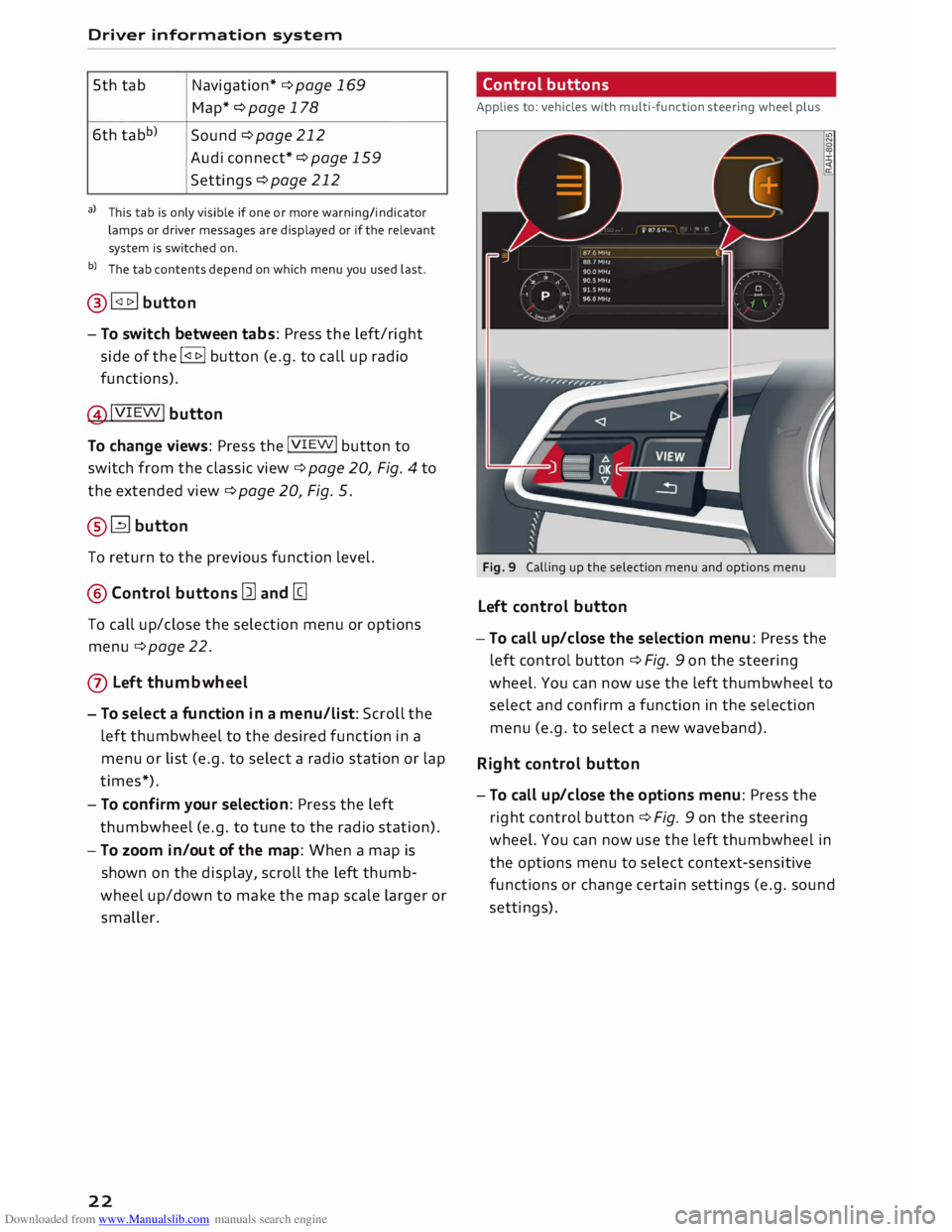
22 Control
buttons
Applies to: vehicles with multi-function steering wheel plus
Fig. 9 Calling up the selection menu and options menu
Left control button
-To call up/close the selection menu: Press the
left control button ¢ Fig. 9 on the steering
wheel. You can now use the left thumbwheel to
select and confirm a function in the selection
menu (e.g. to select a new waveband).
Right control button
- To call up/close the options menu: Press the
right control button ¢ Fig. 9 on the steering
wheel. You can now use the left thumbwheel in
the options menu to select context-sensitive
functions or change certain settings (e.g. sound
settings).
Page 25 of 306
Downloaded from www.Manualslib.com manuals search engine 0
N
,.....
N
....
0
,.....
Vl
CX) Direct
selection buttons
Applies to: vehicles with multi-function steering wheel plus
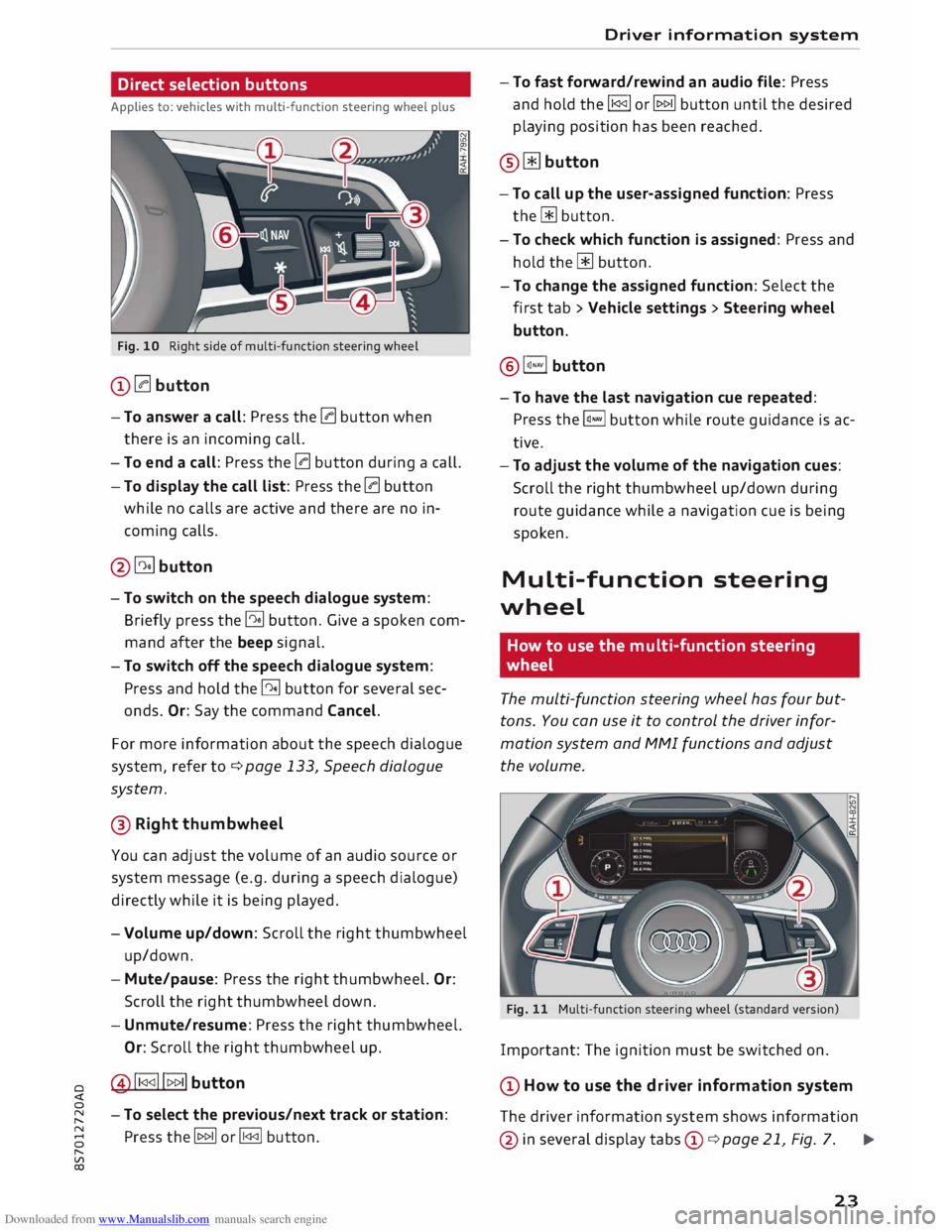
Fig. 10 Right side of multi-function steering wheel
(D 0 button
- To answer a call: Press the 0 button when
there is an incoming call.
- To end a call: Press the 0 button during a call.
- To display the call list: Press the 0 button
while no calls are active and there are no in
coming calls.
@�button
- To switch on the speech dialogue system:
Briefly press the� button. Give a spoken com
mand after the beep signal.
- To switch off the speech dialogue system:
Press and hold the� button for several sec
onds. Or: Say the command Cancel.
For more information about the speech dialogue
system, refer to ¢ page 133, Speech dialogue
system.
® Right thumbwheel
You can adj
ust the volume of an audio source or
system message (e.g. during a speech dialogue)
directly while it is being played.
- Volume up/down: Scroll the right thumbwheel
up/down.
- Mute/pause: Press the right thumbwheel. Or:
Scroll the right thumbwheel down.
- Unmute/resume: Press the right thumbwheel.
Or: Scroll the right thumbwheel up.
@!1 <1<1!!t>t> 1I button
- To select the previous/next track or station:
Press the� or� button. Driver information
system
- To fast forward/rewind an audio file: Press
and hold the !1<1<1!
or� button until the desired
playing position has been reached.
® � button
- To call up the user-assigned function: Press
the� button.
- To check which function is assigned: Press and
hold the� button.
- To change the assigned function: Select the
first tab > Vehicle settings > Steering wheel
button.
@ l�.,vl button
-To have the last navigation cue repeated:
Press the�
button while route guidance is ac
tive.
- To adjust the volume of the navigation cues:
Scroll the right thumbwheel up/down during
route guidance while a navigation cue is being
spoken.
Multi-function steering
wheel
How to use the multi-function steering
wheel
The multi-function steering wheel has four but
tons. You can use it to control the driver infor
mation system and MMI functions and adjust
the volume.
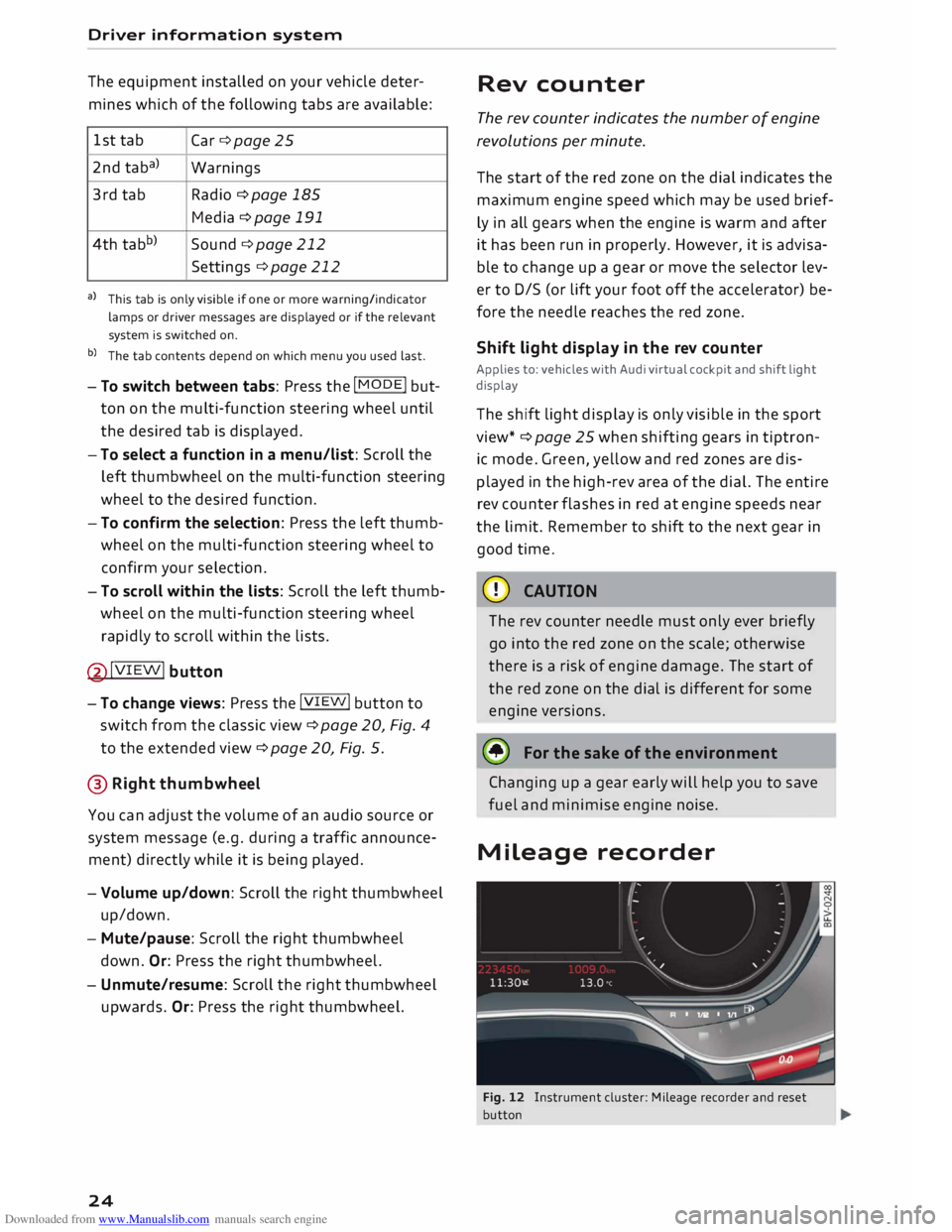
Fig. 11 Multi-function steering wheel (standard version)
Important: The ignition must be switched on.
(D How to use the driver information system
The driver information system shows information
@ in several display tabs©
¢ page 21, Fig. 7. .,..
23
Page 26 of 306
Downloaded from www.Manualslib.com manuals search engine Driver
information system
The equipment installed on your vehicle deter
mines which of the following tabs are available:
1st tab
Car ¢page 25
2nd taba)
Warnings
3rd tab Radio
¢ page 185
Media ¢ page 191
4th tabb)
Sound ¢page 212
Settings ¢page 212
a) This tab is only visible if one or more warning/indicator
lamps or driver messages are displayed or if the relevant
system is switched on.
b) The tab contents depend on which menu you used last.
- To switch between tabs: Press the
I MOD
E
! but
ton on the multi-function steering wheel until
the desired tab is displayed.
- To select a function in a menu/list: Scroll the
left thumbwheel on the multi-function steering
wheel to the desired function.
- To confirm the selection: Press the left thumb
wheel on the multi-function steering wheel to
confirm your selection.
- To scroll within the lists: Scroll the left thumb
wheel on the multi-function steering wheel
rapidly to scroll within the lists.
@!VIEW! button
- To change views: Press the !VIE
W! button to
switch from the classic view¢ page 20, Fig. 4
to the extended view¢ page 20, Fig. 5.
@ Right thumbwheel
You can adjust the volume of an audio source or
system message (e.g. during a traffic announce
ment) directly while it is being played.
- Volume up/down: Scroll the right thumbwheel
up/down.
- Mute/pause: Scroll the right thumbwheel
down. Or: Press the right thumbwheel.
- Unmute/resume: Scroll the right thumbwheel
upwards. Or: Press the right thumbwheel.
24 Rev
counter
The rev counter indicates the number of engine
revolutions per minute.
The start of the red zone on the dial indicates the
maximum engine speed which may be used brief
ly in all gears when the engine is warm and after
it has been run in properly. However, it is advisa
ble to change up a gear or move the selector lev
er to D/S (or lift your foot off the accelerator) be
fore the needle reaches the red zone.
Shift light display in the rev counter
Applies to: vehicles with Audi virtual cockpit and shift light
display
The shift light display is only visible in the sport
view* ¢ page 25 when shifting gears in tiptron
ic mode. Green, yellow and red zones are dis
played in the high-rev area of the dial. The entire
rev counter flashes in red at engine speeds near
the limit. Remember to shift to the next gear in
good time.
CD CAUTION
The rev counter needle must only ever briefly
go into the red zone on the scale; otherwise
there is a risk of engine damage. The start of
the red zone on the dial is different for some
engine versions.
@ For the sake of the environment
Changing up a gear early will help you to save
fuel and minimise engine noise.
Mileage recorder
Fig. 12 Instrument cluster: Mileage recorder and reset
button
Page 27 of 306
Downloaded from www.Manualslib.com manuals search engine 0
N
,.....
N
....
0
,.....
Vl
CX) Trip
recorder/odometer
The trip recorder shows the distance that has
been travelled since it was last reset. It is used to
measure individual journeys.
The trip recorder can be reset to zero by pressing
the reset button lo.al ¢Fig. 12.
The odometer records the vehicle's total mileage.
Fault display
If there is a fault in the instruments, the letters
DEF appear in the trip recorder display. Have the
fault rectified as soon as possible.
On-board computer
You can call up the following information se
quentially on the on-board computer ¢ page 20,
Fig. 4@ :
-Time & date ¢page 212
-Average consumption
- Fuel range
- Single journey memory summary
- Total journey memory summary
The single journey memory processes the infor
mation on a journey from the time the ignition is
Sport view Driver
information system
switched on until it is switched off. If the journey
is resumed within two hours after the ignition is
switched off, the new figures are automatically
included in the calculation.
Unlike the single journey memory, the total jour
ney memory is not erased automatically. In this
way, you can determine the period for which you
wish the on-board computer to supply driving in
formation.
Fuel consumption
The current fuel consumption can be shown in a
bar display. The average fuel consumption from
the single journey memory can also be displayed.
If the bar turns green, your vehicle is saving fuel
using one of the following functions:
- Recuperation: Electrical energy can be stored in
the vehicle battery (recuperation) if the vehicle
is travelling downhill or coasting in gear (over
run). In this case, the bar will move towards the
t:::3 symbol.
- Coasting mode* ¢ page 82.
@ Note
The date, time and display format can be
changed via the infotainment system.
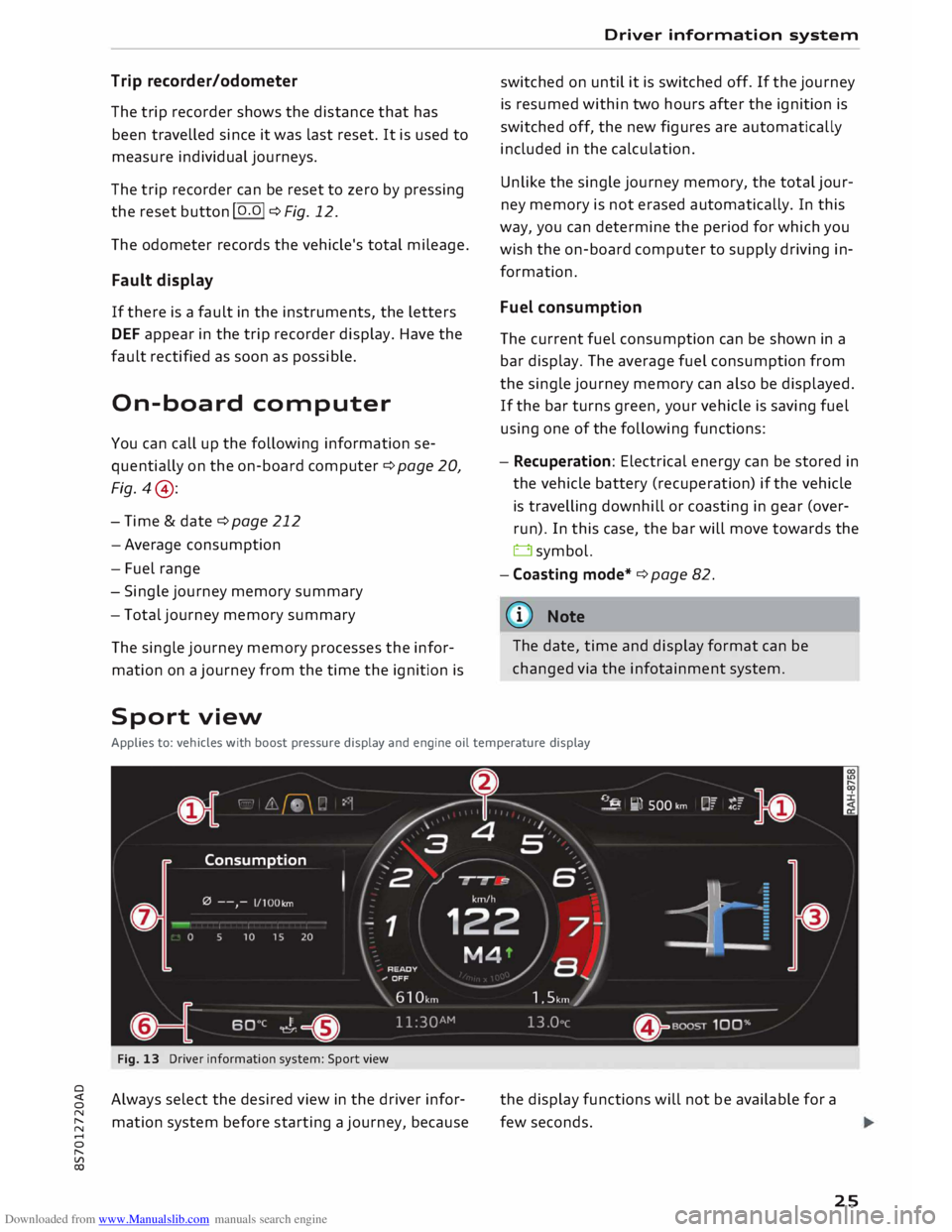
Applies to: vehicles with boost pressure display and engine oil temperature display
Fig. 13 Driver information system: Sport view
Always select the desired view in the driver infor
mation system before starting a journey, because the
display functions will not be available for a
few seconds.
25
Page 28 of 306
Downloaded from www.Manualslib.com manuals search engine Driver
information system
... Select the following on the infotainment sys
tem: I MEN
U I
button > Car > left control button
> Layout .
... Move the cursor (red frame) to select the de-
sired setting.
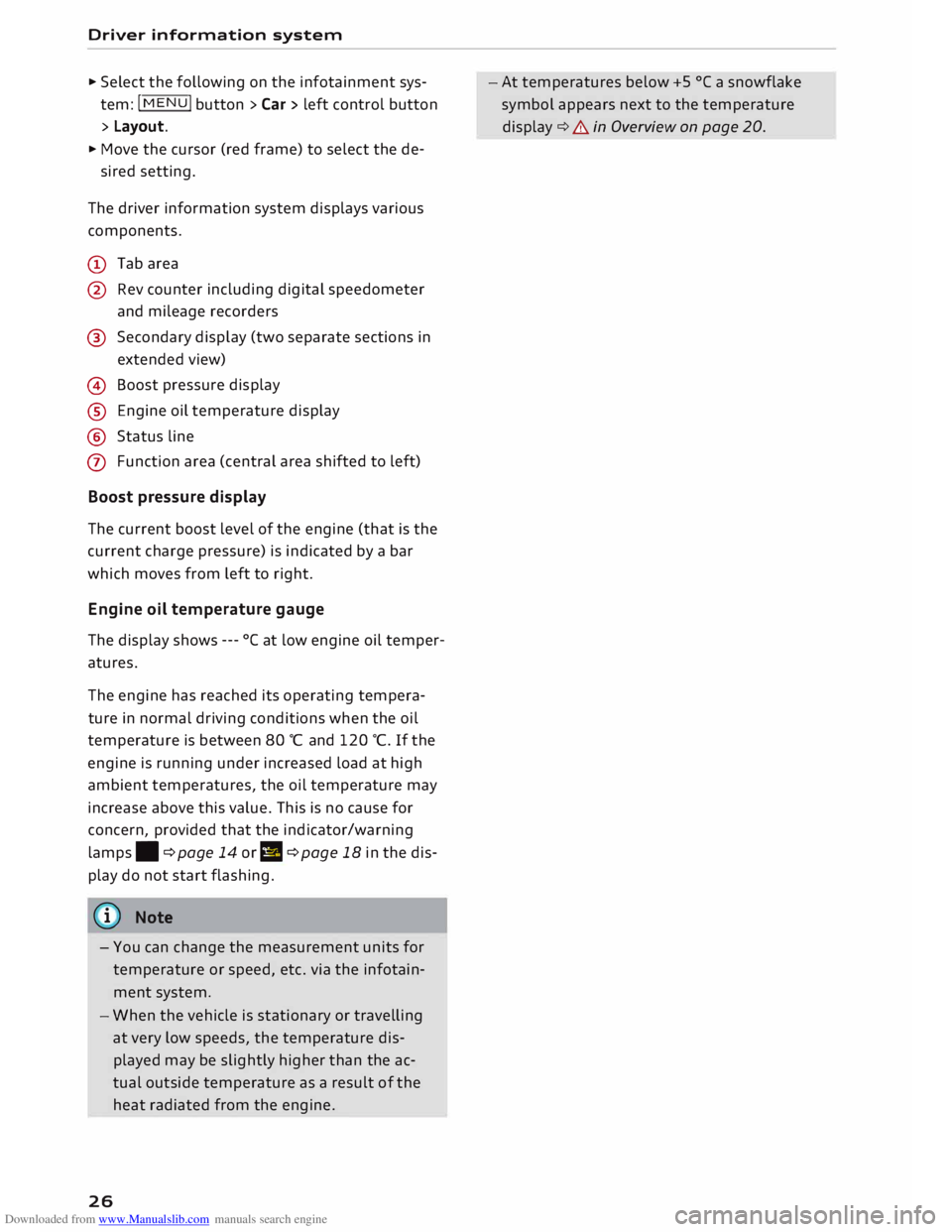
The driver information system displays various
components.
(D Tab area
@ Rev counter including digital speedometer
and mileage recorders
@ Secondary display (two separate sections in
extended view)
@ Boost pressure display
® Engine oil temperature display
@ Status line
(J) Function area (central area shifted to left)
Boost pressure display
The current boost level of the engine (that is the
current charge pressure) is indicated by a bar
which moves from left to right.
Engine oil temperature gauge
The display shows ---°Cat low engine oil temper
atures.
The engine has reached its operating tempera
ture in normal driving conditions when the oil
temperature is between 80 °C and 120 °C. If the
engine is running under increased load at high
ambient temperatures, the oil temperature may
increase above this value. This is no cause for
concern, provided that the indicator/warning
lamps. ¢page 14 orl! ¢page 18 in the dis
play do not start flashing.
{(!)) Note
- You can change the measurement units for
temperature or speed, etc. via the infotain
ment system.
- When the vehicle is stationary or travelling
at very low speeds, the temperature dis
played may be slightly higher than the ac
tual outside temperature as a result of the
heat radiated from the engine.
26 -At
temperatures below +5 °( a snowflake
symbol appears next to the temperature
display ¢&. in Overview on page 20.
Page 35 of 306
Downloaded from www.Manualslib.com manuals search engine 0
N
,.....
N alarm
is triggered immediately when you open a
door.
To deactivate the alarm, switch on the ignition or
press the[@] button on the remote control key.
Int erior monitor and tow-away prot ection
When the vehicle is locked, the alarm will be trig
gered if movements are detected in the interior
(e.g. by animals) or if the vehicle's inclination is
changed (e.g. during transport). You can prevent
the alarm from being triggered accidentally by
switching off the interior monitor and/or tow
away protection. To do so, proceed as follows:
� Press the� button¢ Fig. 23. The LED in the
button will light up.
� If you now lock the vehicle, the interior monitor
and tow-away protection will remain deactiva
ted until the vehicle is unlocked again.
Safelo ck1
)
The doors can no longer be opened from the in
side. This makes it more difficult to break into
the vehicle ¢ A . The message Be aware of door
sa felock. See owner's manual appears on the in
fotainment display when you switch off the igni
tion as a reminder that the safelock mechanism*
will be activated. You can switch off the safelock
mechanism* by using one of the following op
tions:
� Press the� button on the remote control key a
second time within 2 seconds. Or:
� Touch
the sensor on the door handle a second
time within 2 seconds (applies to vehicles with
convenience key). Or:
� Turn the emergency key in the door lock to the
lock position a second time within 2 seconds.
The alarm is triggered if you switch off the safe
lock mechanism* and a door handle is then oper
ated. To deactivate the alarm, switch on the igni
tion or press the� button on the remote control
key.
8 1}This function is not available on all export versions/equip
,.....
� ment
versions. Doors
and windows
A WARNING
Do not leave anyone (especially children) in
the car if it is locked from the outside and the
safelock mechanism* is activated: the doors
and windows cannot then be opened from the
inside. Locked doors could delay assistance in
an emergency, potentially putting lives at
risk.
CD CAUTION
If you switch off the safe lock mechanism*,
the interior monitor and tow-away protection
are automatically disabled, and vice versa.
This means that your vehicle is no longer
completely protected against theft.
The interior monitor and tow-away protection
will only function as intended if the windows
are closed.
Boot lid
Opening and closing the boot lid
Opening boot lid
� To open the boot lid, press the� button on
the remote control key for at least one second.
Or:
� Pull the boot lid up.
Closing boot lid
� Pull down the boot lid and let it drop into the
latch ¢ A .
A WARNING
- After closing the boot lid, always check that
the catch has engaged properly. The boot lid
could otherwise open suddenly when the ve
hicle is moving -this could result in an acci-
dent. ..,.
33
Page 42 of 306
Downloaded from www.Manualslib.com manuals search engine Soft
top (folding roof)
� Note
- To avoid draining the vehicle battery, do not
operate the soft top repeatedly with the en
gine switched off.
-A message will be displayed in the instru
ment cluster if a soft top malfunction oc
curs ¢ page 40.
- The soft top can also be operated manually
in the event of a malfunction ¢page 41,
Manual operation of the soft top. The cause
of the fault should be traced and rectified
by a qualified workshop as soon as possible.
- If you park the car with the soft top open,
remember that this leaves the interior ex
posed to intruders and to potential damage
in sudden adverse weather. Lock any be
longings you leave behind in the luggage
compartment. Close the soft top before you
leave the vehicle unattended.
- The windows in the doors are automatically
lowered slightly while the soft top is open
ing/closing.
Convenience open/close function for soft
top
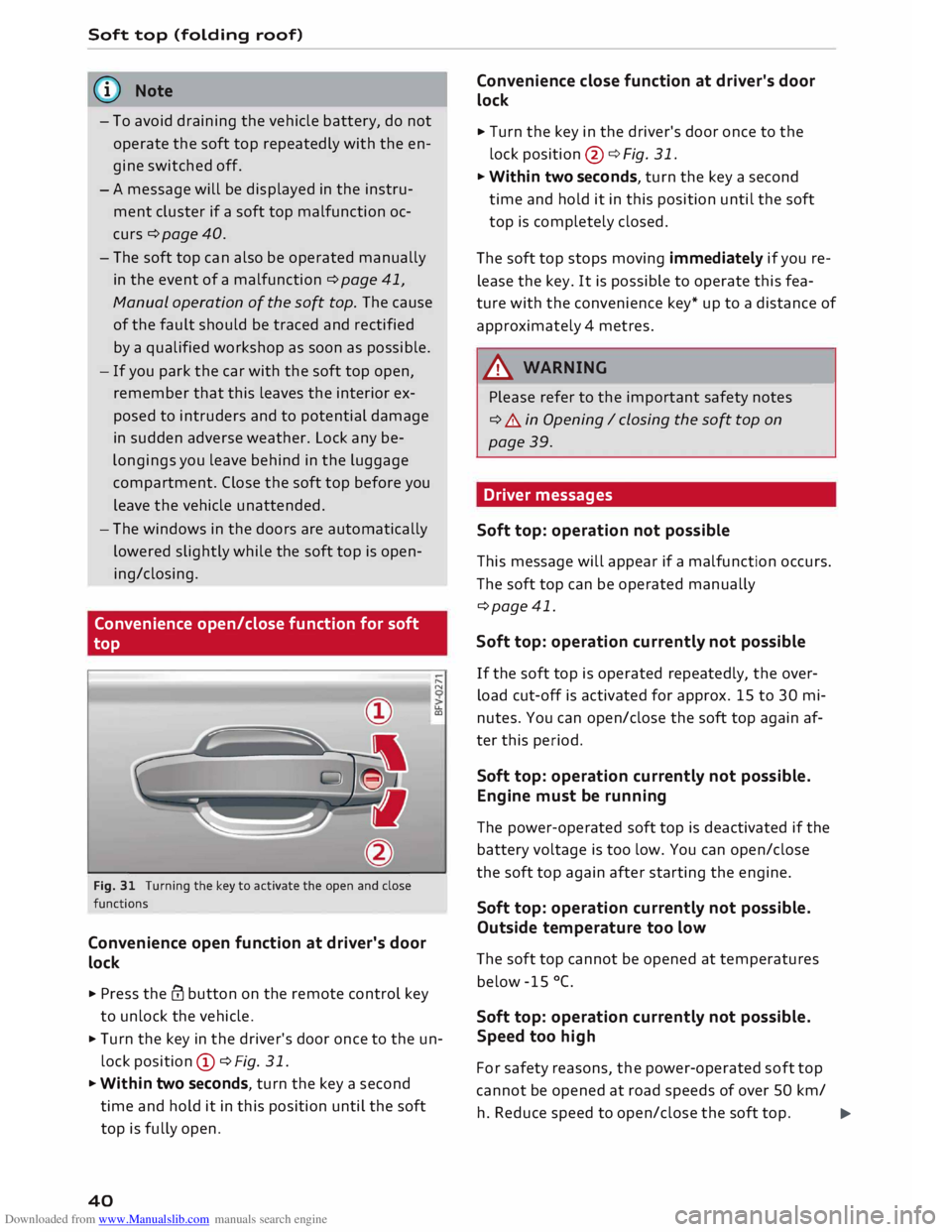
Fig. 31 Turning the key to activate the open and close
functions
Convenience open function at driver's door
lock
.. Press the@ button on the remote control key
to unlock the vehicle. .....
N
u..
a:,
.. Turn the key in the driver's door once to the un
lock position CD ¢Fig. 31.
.. Within two seconds, turn the key a second
time and hold it in this position until the soft
top is fully open.
40 Convenience
close function at driver's door
lock
.. Turn the key in the driver's door once to the
lock position @¢ Fig. 31.
.. Within two seconds, turn the key a second
time and hold it in this position until the soft
top is completely closed.
The soft top stops moving immediately if you re
lease the key. It is possible to operate this fea
ture with the convenience key* up to a distance of
approximately 4 metres.
A WARNING
Please refer to the important safety notes
¢ A in Opening I closing the soft top on
page 39.
Driver messages
Soft top: operation not possible -
This message will appear if a malfunction occurs.
The soft top can be operated manually
¢page 41.
Soft top: operation currently not possible
If the soft top is operated repeatedly, the over
load cut-off is activated for approx. 15 to 30 mi
nutes. You can open/close the soft top again af
ter this period.
Soft top: operation currently not possible.
Engine must be running
The power-operated soft top is deactivated if the
battery voltage is too low. You can open/close
the soft top again after starting the engine.
Soft top: operation currently not possible.
Outside temperature too low
The soft top cannot be opened at temperatures
below -15 °C.
Soft top: operation currently not possible.
Speed too high
For safety reasons, the power-operated soft top
cannot be opened at road speeds of over 50 km/
h. Reduce speed to open/close the soft top.
�
Page 48 of 306
Downloaded from www.Manualslib.com manuals search engine Lights
and vision
Main beam assist
Applies to: vehicles with main beam assist
The main beam assist automatically switches
the main beam headlights on or off depending
on the surrounding light conditions.
A sensor (Located in the mounting for the interior
mirror) detects light sources from other road
users. The main beams are activated or deactiva
ted automatically depending on the position of
vehicles on either side of the road, on the road
speed, and on other traffic and ambient condi
tions.
On vehicles with matrix LED headlights, individu
al segments of the main beam are activated or
deactivated. The relevant sector in front of the
vehicle is masked, while the surrounding areas
remain lit. The ambient surroundings are thus il
luminated optimally without dazzling other road
users.
Activating the main beam assist
Important: The light switch must be set to AUTO,
the dipped beam headlights must be on and the
main beam assist must be activated on the info
tainment system¢ page 47.
... Press the lever forwards ®¢ page 45, Fig. 41
to activate the main beam assist. The indicator
lamp� will light up in the infotainment dis
play and the main beams will be switched on/
off automatically. An indicator lamp. lights
up when the main beams are switched on.
Switching the main beams on/off manually
If the main beams are not switched on or if the
headlights are not dipped as expected, you can
control the dip function manually:
.., To switch on the main beams manually, push
the lever to position @. The indicator lamp.
will light up .
... To dip the headlights manually, pull the lever
towards you@. The main beam assist will be
deactivated.
Flashing the headlights
... Pull the lever towards you© to flash the head
lights when the main beam assist is activated
46 and
the main beams are dipped. The main
beam assist will remain activated.
Driver messages on the infotainment display
Main beam assist: fault. See owner's manual
Drive to a qualified workshop soon and have the
fault rectified. You can still switch the main
beam headlights on and off manually.
Main beam assist: currently unavailable. Cam
era view restricted due to surroundings. See
owner's manual
The camera vision is impaired, e.g. by stickers or
dirt.
The sensor is located between the interior mirror
and the windscreen. Do not affix any stickers on
this section of the windscreen.
A WARNING
The main beam assist is only intended to as
sist the driver. The driver must always ensure
that the headlights are used when required,
and may have to switch them on or off man
ually, e.g. when the light conditions or visibili
ty are poor. In the following situations man
ual intervention may be necessary:
- Hazardous weather conditions such as fog,
heavy rain and snow or water splashes
- Roads on which oncoming traffic is partially
concealed (e.g. on motorways)
- Indiscernible road users (e.g. cyclists with
insufficient lighting or vehicles with dirty
rear lights)
- Tight corners, steep hill crests or valleys
- Poorly lit towns
- Highly reflective objects, such as road signs
- Windscreen misted up, dirty, frosted or cov-
ered by stickers in front of the sensor
(CD) Note
The main beam assist is deactivated whenever
you intervene by switching the main beams
on or off manually @.
Page 54 of 306
Downloaded from www.Manualslib.com manuals search engine Lights
and vision
Digital compass
Activating and deactivating the compass
Applies to: vehicles with digital compass
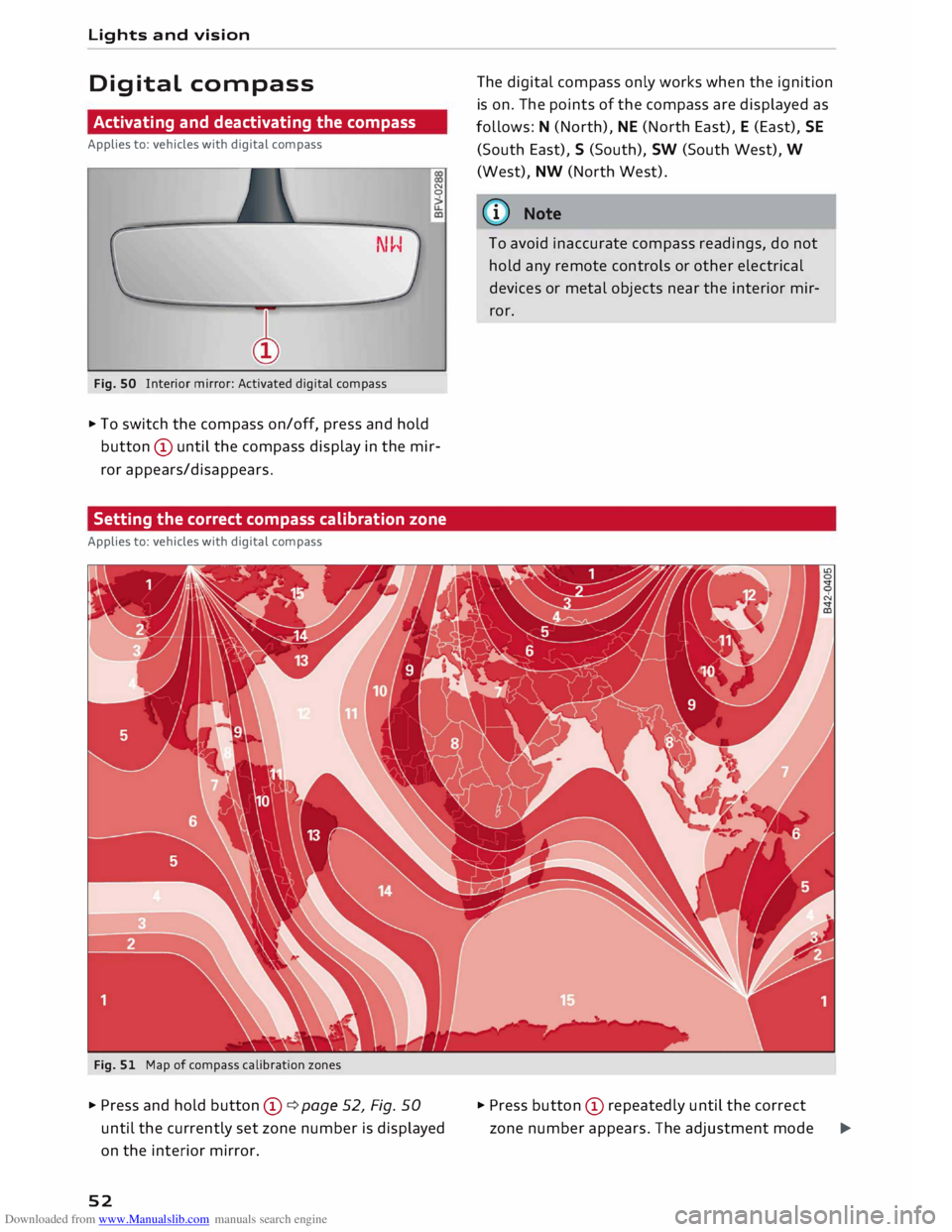
Fig. SO Interior mirror: Activated digital compass N
0
.,. To switch the compass on/off, press and hold
button © until the compass display in the mir
ror appears/disappears.
Setting the correct compass calibration zone
Applies to: vehicles with digital compass
Fig. 51 Map of compass calibration zones
.,. Press and hold button ©¢ page 52, Fig. 50
until the currently set zone number is displayed
on the interior mirror.
52 The
digital compass only works when the ignition
is on. The points of the compass are displayed as
follows: N (North), NE (North East), E (East), SE
(South East), S (South), SW (South West), W
(West), NW (North West).
ij)) Note
To avoid inaccurate compass readings, do not
hold any remote controls or other electrical
devices or metal objects near the interior mir
ror.
.,. Press button © repeatedly until the correct
zone number appears. The adjustment mode
�
Page 55 of 306
Downloaded from www.Manualslib.com manuals search engine 0
N
,.....
N
......
0
,.....
Vl
CX) will
be ended automatically after a few sec
onds.
Calibrating compass
Applies to: vehicles with digital compass
The compass must be re-calibrated if the display
is incorrect or inaccurate .
... Press and hold button (D until the letter Cap
pears on the interior mirror .
... Drive in a circle at a speed of about 10 km/h un
til a point of the compass is displayed on the in
terior mirror.
& WARNING
- Calibrate your compass at a location where
there is no traffic so that you do not endan
ger yourself or other road users (accident
risk).
- Always pay attention to the road and the
area surrounding the vehicle when you are
reading the compass while the vehicle is
moving. Lights
and vision
53