brake light AUDI TT ROADSTER 2016 Owner's Manual
[x] Cancel search | Manufacturer: AUDI, Model Year: 2016, Model line: TT ROADSTER, Model: AUDI TT ROADSTER 2016Pages: 306, PDF Size: 31.82 MB
Page 80 of 306
Downloaded from www.Manualslib.com manuals search engine Driving
while the engine is running, you must apply
the parking brake and engage the parking
lock P.
- To avoid accidents, apply the parking brake
and put the selector lever in position P be
fore opening the bonnet and working on the
vehicle with the engine running. Please ob
serve the important safety warnings
¢ page 244, Working on components in
the engine comportment.
Ct) Note
- Drive select: You can select the sport pro
gram for gear changes by activating the dy
namic mode. The infotainment display will
show S instead of D.
- If the lever is moved accidentally to N when
driving, take your foot off the accelerator
and let the engine speed drop to idling be
fore selecting Dor S again.
- It is not possible to move the selector lever
out of position P if the electrical power sup
ply fails. In this case, the selector lever can
be released manually. Left-hand drive
vehicles ¢page 84, right-hand drive
vehicles ¢page 85.
Selector lever lock
Applies to: vehicles with automatic gearbox
The selector Lever Lock prevents gears from being
engaged inadvertently, so that the vehicle is not
set in motion unintentionally.
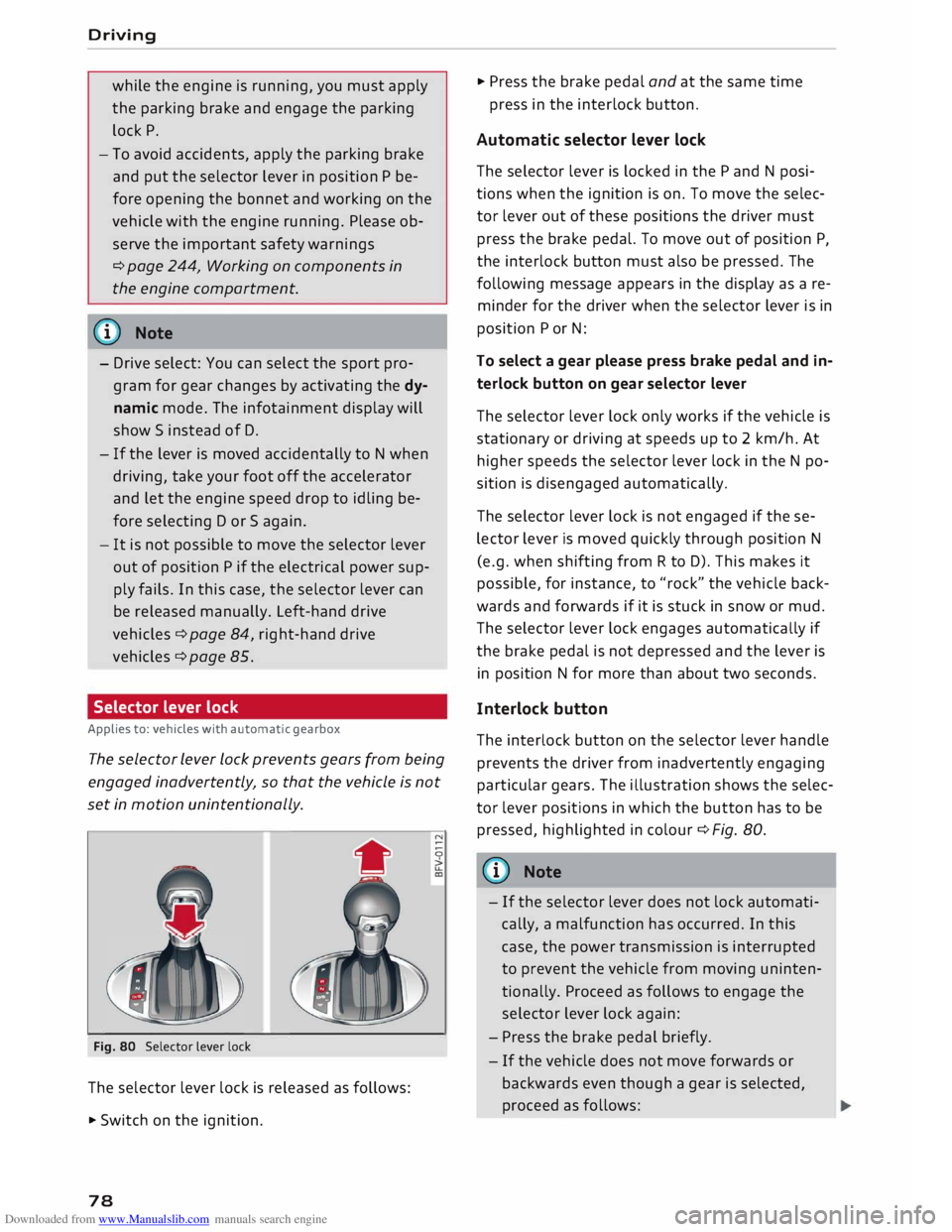
Fig. 80 Selector lever lock
The selector lever lock is released as follows:
• Switch on the ignition.
78 •
Press the brake pedal and at the same time
press in the interlock button.
Automatic selector lever lock
The selector lever is locked in the P and N posi
tions when the ignition is on. To move the selec
tor lever out of these positions the driver must
press the brake pedal. To move out of position P,
the interlock button must also be pressed. The
following message appears in the display as a re
minder for the driver when the selector lever is in
position P or N:
To select a gear please press brake pedal and in
terlock button on gear selector lever
The selector lever lock only works if the vehicle is
stationary or driving at speeds up to 2 km/h. At
higher speeds the selector lever lock in the N po
sition is disengaged automatically.
The selector lever lock is not engaged if the se
lector lever is moved quickly through position N
(e.g. when shifting from R to D). This makes it
possible, for instance, to "rock" the vehicle back
wards and forwards if it is stuck in snow or mud.
The selector lever lock engages automatically if
the brake pedal is not depressed and the lever is
in position N for more than about two seconds.
Interlock button
The interlock button on the selector lever handle
prevents the driver from inadvertently engaging
particular gears. The illustration shows the selec
tor lever positions in which the button has to be
pressed, highlighted in colour¢ Fig. 80.
{(D) Note
- If the selector lever does not lock automati
cally, a malfunction has occurred. In this
case, the power transmission is interrupted
to prevent the vehicle from moving uninten
tionally. Proceed as follows to engage the
selector lever lock again:
- Press the brake pedal briefly.
- If the vehicle does not move forwards or
backwards even though a gear is selected,
proceed as follows:
Page 81 of 306
Downloaded from www.Manualslib.com manuals search engine 0
N
,.....
N
......
0
,.....
Vl
CX) -
If the vehicle does not move in the desired
direction, the system may have failed to en
gage the gear correctly. In this case, press
the brake pedal and select the gear again.
- If the vehicle still does not move in the de
sired direction, a system malfunction has
occurred. Seek professional assistance and
have the system checked.
General notes on driving an automatic
Applies to: vehicles with automatic gearbox
The gearbox changes the forward gears up and
down automatically.
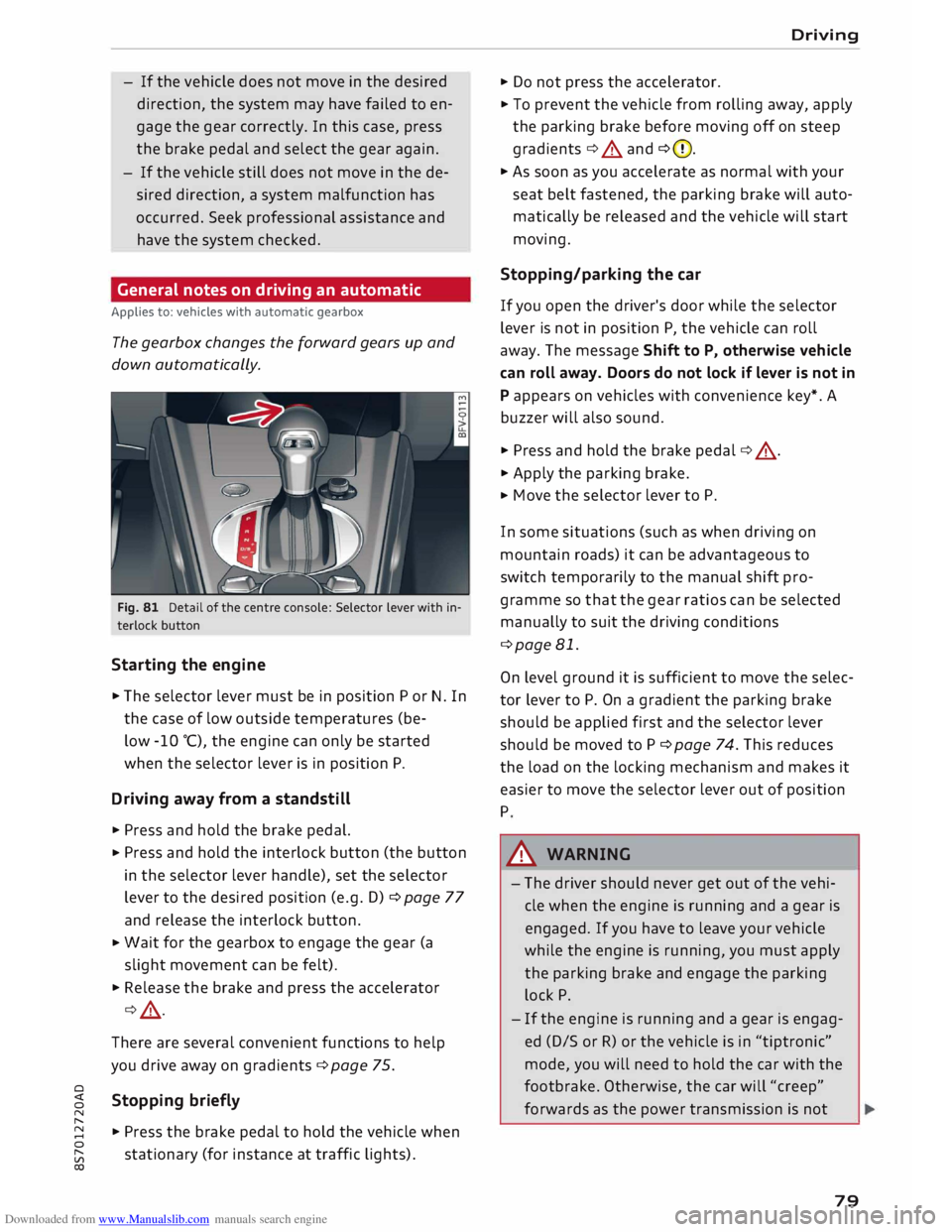
Fig. 81 Detail of the centre console: Selector lever with in
terlock button
Starting the engine
.,. The selector lever must be in position P or N. In
the case of low outside temperatures (be-
low -10 °(), the engine can only be started
when the selector lever is in position P.
Driving away from a standstill
.,. Press and hold the brake pedal.
.,. Press
and hold the interlock button (the button
in the selector lever handle), set the selector
lever to the desired position (e.g. D) ¢ page 77
and release the interlock button.
.,. Wait
for the gearbox to engage the gear (a
slight movement can be felt).
.,. Release the brake and press the accelerator
¢ .&, .
There are several convenient functions to help
you drive away on gradients ¢page 75.
Stopping briefly
.,. Press the brake pedal to hold the vehicle when
stationary (for instance at traffic lights). Driving
.,. Do not press the accelerator .
.,. To prevent the vehicle from rolling away, apply
the parking brake before moving off on steep
gradients ¢.&. and ¢(D.
.,. As soon as you accelerate as normal with your
seat belt fastened, the parking brake will auto
matically be released and the vehicle will start
moving.
Stopping/parking the car
If you open the driver's door while the selector
lever is not in position P, the vehicle can roll
away. The message Shift to P, otherwise vehicle
can roll away. Doors do not lock if lever is not in
P appears on vehicles with convenience key*. A
buzzer will also sound .
.,. Press and hold the brake pedal¢ .&, .
.,. Apply the parking brake .
.,. Move
the selector lever to P.
In some situations (such as when driving on
mountain roads) it can be advantageous to
switch temporarily to the manual shift pro
gramme so that the gear ratios can be selected
manually to suit the driving conditions
¢page 81.
On level ground it is sufficient to move the selec
tor lever to P. On a gradient the parking brake
should be applied first and the selector lever
should be moved to P ¢ page 74. This reduces
the load on the locking mechanism and makes it
easier to move the selector lever out of position
P
A WARNING
- The driver should never get out of the vehi
cle when the engine is running and a gear is
engaged. If you have to leave your vehicle
while the engine is running, you must apply
the parking brake and engage the parking
lock P.
- If the engine is running and a gear is engag
ed (D/S or R) or the vehicle is in "tiptronic"
mode, you will need to hold the car with the
footbrake. Otherwise, the car will "creep"
forwards as the power transmission is not
79
Page 82 of 306
Downloaded from www.Manualslib.com manuals search engine Driving
fully interrupted even when the engine is
idling.
- The accelerator pedal must on no account
be pressed inadvertently when the vehicle is
stationary. The vehicle could otherwise start
moving immediately (in some cases even if
the parking brake is engaged) and possibly
cause an accident.
- Do not press the accelerator while selecting
a gear with the vehicle stationary and the
engine running, as this could cause an acci
dent.
- Never move the selector lever to R or P
when driving at normal speeds, as this could
cause an accident.
- Before you drive down a steep gradient, re
duce the speed and use "tiptronic" to select
a low gear.
- Never allow the brake to drag when driving
downhill and do not use the brake pedal too
often or for long periods. Constant braking
will cause the brakes to overheat and will
considerably reduce the effectiveness of the
brakes. It will increase the braking distance
and could cause the brake system to fail.
- To avoid rolling back on gradients always
hold the vehicle with the footbrake or park
ing brake if you have to stop.
- Never attempt to hold the vehicle with the
clutch when stopping on a gradient. The
clutch is disengaged automatically if it is
overloaded and becomes too hot -accident
risk! If the clutch is overloaded, the indica
tor lamp 51 will light up and a message will
appear ¢page 83.
CD CAUTION
- When you have stopped on a gradient, do
not try to stop the vehicle rolling back by ac
celerating when a gear is engaged. This
could cause the automatic gearbox to over
heat and become damaged. Apply the park
ing brake or press the brake pedal in order
to prevent the vehicle from rolling back.
- If you allow the car to roll with the selector
lever in position N with the engine switched
off, the automatic gearbox will be damaged
as it will not be lubricated.
80 -
In certain driving and traffic conditions, for
instance in stop-and-go traffic, if you have
to pull away frequently or if the vehicle
creeps forwards over a long distance, the
gearbox can overheat and become dam
aged. If the indicator lamp 51 or the warn
ing lamp . lights up, stop the vehicle at
the first opportunity and let the gearbox
cool down ¢page 83.
- If you allow the car to roll with the engine
switched off, the S tronic gearbox will be
damaged as it will not be lubricated
¢ page 2 78, Tow-starting I towing away.
ijJ) Note
For safety reasons the parking brake will only
release automatically if the driver's seat belt
is engaged in its buckle.
Downhill speed control
Applies to: vehicles with automatic gearbox
The downhill speed control function helps the
driver when driving down steep gradients.
Downhill speed control is activated on a downhill
gradient when the selector lever is in D/S and the
driver presses the brake pedal. The gearbox auto
matically selects a suitable gear for the gradient.
The downhill speed control function attempts to
maintain the speed at which the vehicle was trav
elling when the foot brake was applied (subject
to the laws of physics and technical limitations of
the power train). It may be necessary to adjust
the speed again using the foot brake. The down
hill speed control can change down to 3rd gear
but no further, so it may be necessary to change
to tiptronic mode on very steep gradients. In this
case, change down manually to 2nd or 1st gear in
tiptronic mode to use the engine braking effect
and reduce the load on the brakes.
Downhill speed control is deactivated as soon as
the road levels out again or you press the acceler
ator pedal.
On vehicles with cruise control system*
¢ page 86, downhill speed control is activated
when you set a cruising speed.
�
Page 84 of 306
Downloaded from www.Manualslib.com manuals search engine Driving
the next higher gear is delayed until the engine
reaches maximum rpm.
A WARNING
Please note that if the road surface is slippery
or wet, the kick-down feature could cause the
driving wheels to spin, which could result in
skidding.
Coast ing mode
Applies to: vehicles with automatic gearbox
In coasting mode, you can use the vehicle's kinet
ic energy to drive without using the accelerator
on certain stretches of road. This saves fuel by al
lowing you to take your foot off the accelerator
earlier and let the vehicle coast (for instance
when approaching a speed restriction in a built
up area).
Switching on coa sting mode
Important: Selector lever must be in D, gradient
must be less than 12 %.
� Select efficiency mode in drive select*
¢page 100 (you only have to do this once).
� Take your foot off the accelerator.
If you have selected the "on-board computer"
display, the message Coasting mode will then
appear. The gearbox automatically disengages
the clutch at speeds above 20 km/h and lets the
vehicle coast without the engine braking effect.
The engine ticks over at idling speed while the ve
hicle is coasting.
Stopping coasting mode
� Press the brake pedal or accelerator.
To use the engine braking effect and overrun fuel
cut-off again, all you need to do is tap the brake
pedal briefly.
You can improve your fuel economy and help to
reduce emissions by using a combination of the
coa sting mode (i.e. coasting with low fuel con-
l l
The ESC lamp lights up permanently and the message
Stabilisation control (ESC): sport. Warning! Restricted
stability appears temporarily in the infotainment display
to indicate the deactivation status.
82 sumption
on a longer stretch of road) and the
overrun fuel cut-off (i.e. using the engine brak
ing effect with no fuel consumption on a shorter
stretch of road).
A WARNING
- If you are approaching an obstruction when
coasting mode is switched on, please re
member that the vehicle will not slow down
as quickly as usual when you take your foot
off the accelerator -risk of accident!
- The vehicle can pick up speed if you are driv
ing down a slope in coasting mode -risk of
accident!
- If other people are using your car, you
should draw their attention to the coasting
mode.
ijJ) Note
- Coasting mode is only available in efficien
cy* mode (drive select*).
- The message Coasting mode only appears
when the current fuel consumption display
is selected. The gear is no longer displayed
when you are in coasting mode (e.g. E in
stead of E6).
- The coasting mode is deactivated tempora
rily on gradients of 15 % or greater.
Launch control programme
Applies to: vehicles with automatic gearbox
The launch control programme enables maxi
mum acceleration.
Important: The engine must be warm and the
steering wheel must be pointing straight ahead.
� Deactivate the start/stop system*¢ page 73.
The LED in the l(A)""
I button will light up.
� Deactivate the hold assist* ¢ page 76. The LED
in the button will go out.
� Press the IJ,OFF! button
once briefly while the
engine is running 1
). �
Page 89 of 306
Downloaded from www.Manualslib.com manuals search engine -
Make sure you do not unintentionally rest
your foot on the accelerator -this will over
ride the cruise control system which, as a re
sult, will not brake the vehicle.
- The automatic braking function may be de
activated if a system fault occurs in the
brake system (e.g. if the brakes overheat)
while the cruise control system is activated.
All the other cruise control functions remain
activated as long as the indicator lamp.
is
lit.
@ Note
- Vehicles with manual gearbox: The set
speed cannot be reached if the currently se
lected gear is too high or too low or if the
engine would overrev or fail to run smoothly
at the target speed. Make sure to change up
or down a gear in good time.
- The brake lights come on when the system
brakes the vehicle.
Adjusting the speed
Applies to: vehicles with cruise control system
... To increase or reduce the cruising speed in
steps of 1 km/h, briefly push the lever one lev
el upwards or downwards towards
GY0
¢ page 86, Fig. 88 .
.., To increase or reduce the cruising speed in
steps of 10 km/h, briefly push the lever two
levels upwards or downwards towards
GY 0
¢ page 86, Fig. 88 .
.., To increase or reduce the speed gradually, hold
the Lever towards
GYO until
you reach the de
sired cruising speed.
Overriding the set speed
Applies to: vehicles with cruise control system
You can use the accelerator pedal to increase
speed in the normal way, for example to overtake
another vehicle. Once you release the accelera
tor, the system will revert to the speed you stor
ed initially.
� However,
if the vehicle exceeds the programmed
� speed
significantly for a long time, the cruise
::2 control
system will be deactivated temporarily.
Vl
CX) Driver
assist systems
The indicator lamp.
in the instrument cluster
will go out, but the programmed speed will re
main stored.
Pre-selecting a speed
Applies to: vehicles with cruise control system
You can pre-select a desired speed while the ve
hicle is stationary.
.., Switch on the ignition .
... Pull the Lever to position
(!)¢
page 86, Fig. 88.
... Press the Lever up towards 0 or down towards
0 in order to increase or reduce the cruising
speed setting.
This function allows you to enter the desired
cruise control setting speed ahead of time, for
example before joining a motorway. Once you are
on the motorway, you can activate the cruise con
trol system by pulling the Lever to position
(!).
Switching off
Applies to: vehicles with cruise control system
Switching off temporarily
... Press the brake pedal, or
.., Push the lever towards
@ (click
stop not en
gaged) ¢ page 86, Fig. 88.
Switching off completely
.., Push the Lever to position
@ (click
stop engag-
ed), or
.., Switch off the ignition.
The speed setting will remain stored after the
system is temporarily deactivated. To resume the
programmed cruising speed, release the clutch
or brake pedal and pull the lever to position
(!).
The stored speed will be deleted once the igni
tion is switched off.
.&, WARNING
Do not resume the programmed cruising
speed if this is too high for the traffic condi
tions -this can cause accidents.
87
Page 90 of 306

Downloaded from www.Manualslib.com manuals search engine Driver
assist systems
Speed Limiter
Description
Applies to: vehicles with speed Limiter
®
Fig. 89 Speed limiter: illustration
At speeds above approximately 30 km/h, the
speed limiter helps prevent the driver from ex
ceeding a set cut-off speed. The indicator lamp
Ill lights up as soon as you switch on the speed
limiter.
Speed limiter displays
@ -The speed limiter is in passive mode, but a
cut-off speed has not yet been set.
@- The speed limiter is in passive mode, and a
set cut-off speed has been stored.
@ -The speed limiter is activated. The indicator
lamp Ill flashes briefly when the speed limiter is
applied.
A WARNING
Always switch the speed limiter off after use
to prevent it from being activated uninten
tionally.
- Even when using the speed limiter, the driv
er maintains full responsibility for control
ling the vehicle's speed.
- Always direct your full attention to the road,
even when you are using the speed limiter.
It is always the driver who is responsible for
determining the speed and for keeping a
safe distance to the other vehicles on the
road.
- For safety reasons, the speed limiter must
not be used in adverse weather or difficult
driving conditions (such as ice, fog, loose
88 grit
or gravel, heavy rain, etc.) -risk of acci
dent!
- Only accelerate quickly or use the kick-down
feature when the visibility and weather con
ditions are suitable, and when the road and
traffic conditions allow you do do so safely.
CD CAUTION
Before driving down a long, steep gradient, it
is advisable to reduce speed and select a low
er gear. In this way you will make use of the
engine braking effect and relieve the load on
the brakes.
Switching on
Applies to: vehicles with speed limiter
0
f
� 0
Fig. 90 Control lever for cruise control system "'
N
u.
a,
.. Pull
the lever to position @¢ Fig. 90 to switch
on the system .
.. Press button @ to select the speed limiter. The
message Ill Speed limiter: selected will ap
pear on the instrument cluster.
.. Press button @to store the cut-off speed while
the car is moving.
The instrument cluster will indicate the stored
cut-off speed, and the indicator lamp Ill will
light up.
While the speed limiter is switched on, you can
switch to the cruise control system* ¢ page 86.
Press button
@.
The last cut-off speed set for the speed limiter
remains stored and can be applied again when
you switch back into speed limiter mode.
Page 91 of 306
Downloaded from www.Manualslib.com manuals search engine 0
N
,.....
N
....
0
,.....
Vl
CX) Changing
the cut-off speed
Applies to: vehicles with speed limiter
.,. To increase or reduce the cut-off speed in steps
of 1 km/h, briefly push the lever one level up
wards or downwards towards
G
Y 0
¢
page 88,
Fig. 90.
.,. To increase or reduce the cut-off speed in steps
of 10 km/h, briefly push the lever two levels
upwards or downwards towards
GJl
0 .
.,. To
increase or reduce the cut-off speed continu
ously, push the lever one or two levels upwards
or downwards towards G)/0 and hold the Lev
er until the desired speed is reached.
Overriding the cut-off speed
Applies to: vehicles with speed limiter
To override the speed limiter temporarily, press
the accelerator fully past the point of resistance
(kick-down feature).
Speed limiting is suspended temporarily. The in
dicator lamp Ill flashes while the system is deac
tivated; the cut-off speed setting will remain
stored. The system is reactivated automatically
as soon as your speed drops below the original
stored setting.
Switching off
Applies to: vehicles with speed limiter
Switching off temporarily
.,. Push
the lever towards @ (click stop not en
gaged) ¢ page 88, Fig. 90. The instrument
cluster will indicate the stored cut-off speed,
and the indicator Lamp mm will Light up.
Switching off completely
.,. Push the Lever to position @ (click stop engag-
ed), or
.,. Switch off the ignition.
The cut-off speed setting will remain stored after
the system is temporarily deactivated. To resume
the programmed cut-off speed, pull the lever to
position (!). The vehicle speed is limited to the
stored cut-off setting as soon as your current
driving speed drops below the stored cut-off
speed. Driver
assist systems
The stored cut-off speed will be deleted once the
ignition is switched off.
Automatic deactivation
mm Speed limiter: currently unavailable. See
owner's manual
The speed limiter has been automatically deacti
vated because the system has detected a fault
which could impair its function. Try switching on
the speed limiter again later .
& WARNING
The speed limiter may be deactivated if a
fault occurs in the brake system (e.g. if the
brakes overheat) while the speed limiter is ac
tivated.
{CD) Note
If a system fault requires the speed limiter to
switch off automatically, for safety reasons it
does not switch off completely until the driver
releases the accelerator pedal once or deacti
vates the system manually.
89
Page 107 of 306
Downloaded from www.Manualslib.com manuals search engine 0
N
,.....
N
....
0
,.....
Vl
CX) (D}
Note
Zone ®
* is detected and analysed as the vehi
cle is moving past. When you switch on the ig
nition or after the vehicle has been stationary
for a while or a door is opened, the ambient
surroundings may have changed. Zone®
* is
displayed in black on the infotainment system
for this reason.
Switching on/off
Applies to: vehicles with parking system plus
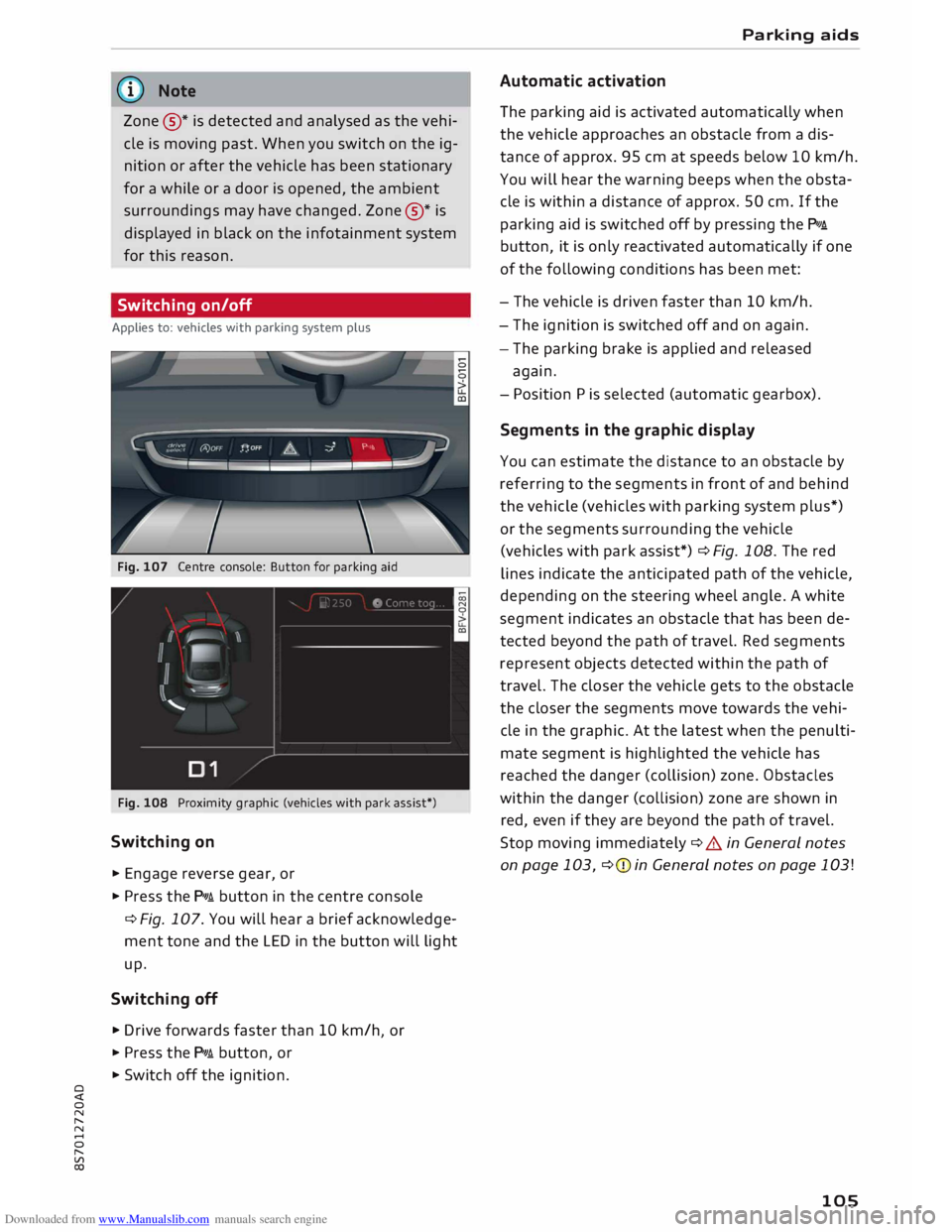
Fig. 107 Centre console: Button for parking aid
Fig. 108 Proximity graphic (vehicles with park assist*)
Switching on
... Engage reverse gear, or
... Press the p,,,i button in the centre console
¢ Fig. 107. You will hear a brief acknowledge
ment tone and the LED in the button will light
up.
Switching off
.,. Drive forwards faster than 10 km/h or
I
... Press the p,,,i button, or
... Switch off the ignition. Parking
aids
Automatic activation
The parking aid is activated automatically when
the vehicle approaches an obstacle from a dis
tance of approx. 95 cm at speeds below 10 km/h.
You will hear the warning beeps when the obsta
cle is within a distance of approx. 50 cm. If the
parking aid is switched off by pressing the P,#A.
button, it is only reactivated automatically if one
of the following conditions has been met:
- The vehicle is driven faster than 10 km/h.
- The ignition is switched off and on again.
- The parking brake is applied and released
again.
- Position Pis selected (automatic gearbox).
Segments in the graphic display
You can estimate the distance to an obstacle by
referring to the segments in front of and behind
the vehicle (vehicles with parking system plus*)
or the segments surrounding the vehicle
(vehicles with park assist*) ¢Fig. 108. The red
lines indicate the anticipated path of the vehicle,
depending on the steering wheel angle. A white
segment indicates an obstacle that has been de
tected beyond the path of travel. Red segments
represent objects detected within the path of
travel. The closer the vehicle gets to the obstacle
the closer the segments move towards the vehi
cle in the graphic. At the latest when the penulti
mate segment is highlighted the vehicle has
reached the danger (collision) zone. Obstacles
within the danger (collision) zone are shown in
red, even if they are beyond the path of travel.
Stop moving immediately ¢ A in General notes
on page 103, ¢(Din General notes on page 103!
105
Page 117 of 306
Downloaded from www.Manualslib.com manuals search engine 0
N
,.....
N
......
0
,.....
Vl
CX) A
WARNING
You should switch on the sport mode or
switch off the ESC/traction control system
(ASR) only if your driving ability and the traf
fic conditions allow you to do so safely -dan
ger of skidding!
- The stabilising function is restricted when
sport mode is switched on. The driven
wheels may start to spin, causing the vehi
cle to lose grip, in particular on slippery or
wet roads.
- When the ESC/traction control system
(ASR) is switched off, the vehicle will not be
stabilised.
@ Note
- The ESC/traction control system (ASR) can
not be switched off and the sport mode can
not be switched on when the cruise control
system* is on.
- In the event of a malfunction in the rear
spoiler system or the Audi magnetic ride, it
may not be possible to switch off the ESC/
ASR or switch on the sport mode.
Brakes
New brake pads
New brake pads do not give full braking effect for
the first 400 km, they must first be "bedded in".
However, you can compensate for the slightly re
duced braking effect by applying more pressure
on the brake pedal. Avoid placing a heavy load on
the brakes during the running-in period.
Wear
The rate of wear on the brake pads depends a
great deal on how you drive and the conditions in
which the vehicle is operated. Negative factors
are, for instance, city traffic, frequent short trips
or hard driving with abrupt starts and stops.
Noises
Brake noise may develop in certain situations, de
pending on the speed, braking force and ambient
conditions (such as temperature and relative hu
midity). Intelligent
technology
Effect of moisture and salt
In certain conditions, such as in heavy rain, early
morning dew, or after washing the car or driving
through water, the full braking effect can be de
layed by moisture (or in winter by ice) on the
discs and brake pads. The brakes should be
"dried" by pressing the pedal to restore full brak
ing effect.
When you are driving at higher speeds with the
windscreen wipers on, the brake pads are very
briefly brought into contact with the brake discs.
This automatic process which goes unnoticed by
the driver is carried out at regular intervals and is
intended to improve braking response in wet con
ditions.
The effectiveness of the brakes can also be tem
porarily reduced if the car is driven for some dis
tance without using the brakes when there is a
lot of salt on the road in winter. The layer of salt
that accumulates on the discs and pads can be
removed with a few cautious brake applications.
Corrosion
There may be a tendency for dirt to build up on
the brake pads and corrosion to form on the discs
if the car is used infrequently, or if you only drive
low mileages without using the brakes very
much.
If the brakes are not used frequently, or if corro
sion has formed on the discs, it is advisable to
clean off the pads and discs by braking firmly a
few times from a moderately high speed ¢ A.
Faults in the brake system
If the brake pedal travel should ever increase
suddenly, this may mean that one of the two
brake circuits has failed. Drive immediately to the
nearest qualified workshop and have the fault
rectified. On the way to the dealer, be prepared
to use more pressure on the brake pedal and al
low for longer stopping distances.
Low brake fluid level
Malfunctions can occur in the brake system if the
brake fluid level is too low. The brake fluid level
is monitored electronically.
llll-
115
Page 118 of 306
Downloaded from www.Manualslib.com manuals search engine Intelligent
technology
Brake servo
The brake servo amplifies the pressure you apply
to the brake pedal.
A WARNING
- When applying the brakes to clean off de
posits on the pads and discs, select a clear,
dry road. Be sure not to inconvenience or en
danger other road users; do not risk an acci
dent.
- Never let the car coast with the engine
switched off (this can cause accidents).
CD CAUTION
- Never let the brakes "drag" by leaving your
foot on the pedal
when
you do not really in
tend to brake. This overheats the brakes, re
sulting in longer stopping distances and
greater wear.
- Before driving down a long, steep gradient,
it is advisable to reduce speed and select a
lower gear. In this way you will make use of
the engine braking effect and relieve the
load on the brakes. If you still have to use
the brakes, it is better to brake firmly at in
tervals than to apply the brakes continuous
ly.
� Note
-If the brake servo is out of action, you must
apply considerably more pressure to the
brake pedal than you normally would.
- If you wish to equip the car with accessories
such as a front spoiler or wheel covers, it is
important that the flow of air to the front
wheels is not obstructed, otherwise the
brakes can overheat.
Electro-mechanical
power steering
Electro-mechanical power steering assists the
driver when steering.
The degree of power assistance is adapted elec
tronically, depending on the speed.
116 Warning/indicator
lamps and driver
messages
• Steering: fault. Please stop vehicle
If the warning lamp Lights up permanently and
the message appears, there may be a power
steering failure.
Stop the vehicle in a safe place as soon as possi
ble. Do NOT drive on. Obtain professional assis
tance.
� Steering: fault. You can continue driving
If the indicator lamp lights up, the steering re
sponse may be heavier or Lighter than usual. In
addition, it is possible that the steering wheel
will be off centre when driving in a straight Line.
Drive slowly to a qualified workshop and have the
fault rectified.
('!)) Note
You can drive on if the warning/indicator
lamp . or� Lights up only briefly.
Four-wheel drive
(quattro)
Applies to: vehicles with four-wheel drive
On quattro models the engine power is distrib
uted to all four wheels.
General notes
On four-wheel drive vehicles, the engine power is
distributed to all four wheels. The distribution of
power is controlled automatically according to
your driving style and the road conditions. Also
refer to¢ page 113, Electronic stabilisation con
trol (ESC).
The four-wheel drive is specially designed to
complement the superior engine power of your
Audi. This combination gives the car exceptional
handling and performance capabilities -both on
normal roads and in more difficult conditions,
such as snow and ice. Even so (or perhaps espe
cially for this reason), it is important to observe
certain safety points¢&.
�