fuel AUDI TT ROADSTER 2016 Owner's Manual
[x] Cancel search | Manufacturer: AUDI, Model Year: 2016, Model line: TT ROADSTER, Model: AUDI TT ROADSTER 2016Pages: 306, PDF Size: 31.82 MB
Page 143 of 306
Downloaded from www.Manualslib.com manuals search engine 0
N
,.....
N
......
0
,.....
Vl
CX) Telephone
Introduction
Applies to: vehicles with telephone
You have different options for making calls in
your vehicle via the MMI; this depends on your
vehicle's equipment and the features of your mo
bile phone.
Handsfree operation
After connecting your mobile phone to the MMI
system via Bluetooth, you can operate the hands
free system and the telephone functions conven
iently via the MMI. Your phone calls will be made
via the antenna of your mobile phone.
With the Audi phone box*, you can use the vehi
cle's external aerial to make calls. The use of the
external aerial reduces radiation in the vehicle
and also ensures better reception quality
¢page 146.
Car phone d
)
As part of Audi connect*, the Audi phone box* in
cludes a car telephone function which can be
used via a separate mini SIM card in the SIM card
reader* or an rSAP 2
>-enabled mobile phone. With
the car telephone function, you can use the vehi
cle's external aerial to make calls. The use of the
external aerial reduces radiation in the vehicle
and also ensures better reception quality
¢page 146.
Once a connection has been established success
fully, you can also change the profiles at a later
time. Refer to¢ page 213, Connection manag
er.
A WARNING
- According to health organisations, mobile
phones may interfere with the function of
pacemakers. A minimum distance of 20 cm
should be kept between the mobile phone
aerial and the pacemaker.
l) Not available in all markets. On vehicles with Audi con
nect* and Audi phone box*
2 > Remote SIM Access Profile Telephone
- Do not carry a mobile phone in your breast
pocket directly over the pacemaker when
the phone is switched on.
- If you suspect interference, switch the
mobile phone off immediately.
- The speech dialogue system*¢ page 133
must not be used in cases of emergency,
since the voice changes in stressful situa
tions. This could result in a failed or delayed
telephone connection. Always dial emergen
cy numbers manually!
- Switch off your mobile phones in all areas
where there may be a risk of explosion. Re
member that these areas may not always be
adequately marked. Such places are filling
stations, fuel and chemical storage facilities
or transport vehicles and other places where
fumes, chemicals (e.g. from leaking pro
pane or fuel vapours in vehicles or build
ings) or large quantities of dust particles
(e.g. from flour, wood or metal) could accu
mulate in the air. This warning also applies
to all other places where you would normal
ly switch off your engine.
- Today's driving conditions require the full
attention of drivers. Please always note the
information in the chapter ¢page 121,
Notes on traffic safety.
CD CAUTION
Please always observe the information ¢(Din
Wi-Fi hotspot on page 166.
- For information regarding which Bluetooth
connections and functions your mobile
phone supports, contact your mobile net
work
service
provider or consult the mobile
device database at www.audi.com/blue
tooth.
- The maximum range of the Bluetooth con
nection is limited to the interior of the vehi
cle. The connection can be susceptible to in-
terference from other electronic devices.
..,.
141
Page 165 of 306
Downloaded from www.Manualslib.com manuals search engine Show
on map
You can have selected content displayed on the
map and use it for route guidance.
Read 1
)
You can have the MMI read out some types of
content.
Start route guidance
If an entry contains a location (e.g. in City
events), this can be used as a navigation destina
tion in the MMI.
Refresh
The content of the Audi connect service selected
is updated.
Change search area
The search area selected can be changed at any
time. For more information on search areas,
please refer to ¢ page 172, Entering a special
destination.
Cl osing an Audi connect service
You can close an Audi connect service at any time
and go back to the overview, regardless of which
function you have chosen ¢ Fig. 152.
Parking information
Applies to: vehicles with Audi connect
Information on places to park and parking fees in
the search area selected (e.g. In immediate vi
cinity).
� Select and confirm Parking information.
You can use the right control button to sort the
car parks by distance or by availability.
Travel information
Applies to: vehicles with Audi connect
Information on landmarks in the search area se
lected.
� Select an confirm a landmark to have details
� displayed.
0
N
,.....
N
......
0
,.....
� 1}
Not available in all languages. Audi
connect
Fuel prices
Applies to: vehicles with Audi connect
Information on filling stations with the cheapest
fuel prices for your vehicle in the search area se
lected.
� Select and confirm Fuel prices.
You can use the right control button to sort the
fuel prices by price or by distance.
Weather
Applies to: vehicles with Audi connect
Information on the current weather and weather
forecasts for the search area selected (e.g. In im
mediate vicinity).
� Select and confirm Weather.
Flight information
Applies to: vehicles with Audi connect
Information on flights and current arrival/depar
ture times in the search area selected.
� Select and confirm Flight information.
You can use the right control button to select the
information you require.
City events
Applies to: vehicles with Audi connect
Information on events of different categories in
the search area selected.
� Select and confirm City events > left control
button > a category.
Online news
Applies to: vehicles with Audi connect
With this service, you can call up the latest head
lines from your preferred news providers in the
MMI.
Important: You must have subscribed to news
feeds via your myAudi account and your vehicle
must be connected to myAudi ¢page 162.
..,_
163
Page 178 of 306
Downloaded from www.Manualslib.com manuals search engine Navigation
Other settings
Navigation settings
Applies to: vehicles with navigation system
"" Press the
I NAV
/M
AP
I button
repeatedly until
the Enter destination menu is displayed
¢ page 169, Fig. 153.
""Select: right control button > Navigation set-
tings.
Depending on the function selected, you can use
the following settings:
Always display alternative routes
When this function is switched on�. up to three
suggested routes and their characteristics are
displayed on the overview map. Refer to
¢ page 177, Displaying alternative routes.
Fuel warning
When the fuel gauge is in the reserve zone, a
message will appear when this function is on �
A list of nearby filling stations will be displayed
after you confirm this message. When you select
one of the filling stations, the route to its loca
tion will be calculated based on the current posi
tion of your car.
Arrival notification*
The arrival notification is switched off when the
vehicle leaves the factory.
When this function is switched on�. the MMI
will inform you when you are approaching selec
ted special destinations (e.g. imported myAudi
special destinations). You can also have a sound
played using the Play notification tone function.
Delete myAudi special destinations*
Destinations that you import from your myAudi
account to your MMI are automatically saved.
You can delete them individually or all at once.
Presentation mode
You can use the presentation mode to plan and
"drive" a journey effectively without the need to
move the vehicle. You can choose your start loca-
l l
This function is not available in the Mexican market.
176 tion
manually (Select start location) if, for exam
ple, you would like to calculate a route starting
from a different position than the current posi
tion of the vehicle. Start the presentation mode
to simulate route guidance.
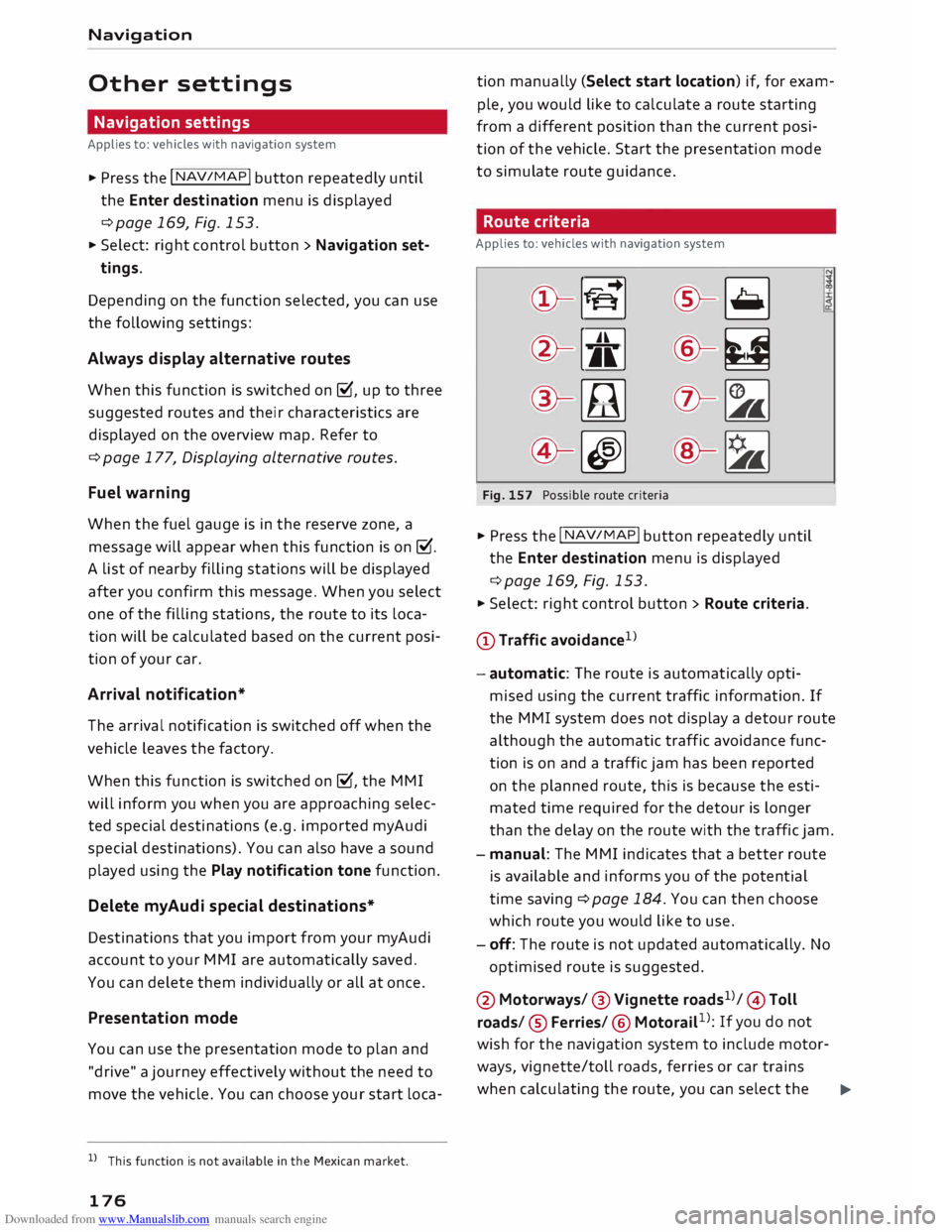
Route criteria
Applies to: vehicles with navigation system
©- [tS
[
®-�
®- [J,[ @-�
®-[l;lj (?)-�
©-� ®-�
Fig. 157 Possible route criteria
"" Press the I NAV/
MAP
! button repeatedly until
the Enter destination menu is displayed
¢page 169, Fig. 153.
"" Select: right control button > Route criteria.
(D Traffic avoidance 1
> .!!;
- automatic: The route is automatically opti
mised using the current traffic information. If
the MMI system does not display a detour route
although the automatic traffic avoidance func
tion is on and a traffic jam has been reported
on the planned route, this is because the esti
mated time required for the detour is longer
than the delay on the route with the traffic jam.
- manual: The MMI indicates that a better route
is available and informs you of the potential
time saving ¢ page 184. You can then choose
which route you would like to use.
- off: The route is not updated automatically. No
optimised route is suggested.
@ Motorways/ @ Vignette roads1
>/ © Toll
roads/ ® Ferries/ ® Motorail 1
>: If you do not
wish for the navigation system to include motor
ways, vignette/toll roads, ferries or car trains
when calculating the route, you can select the
..,.
Page 243 of 306
Downloaded from www.Manualslib.com manuals search engine 0
N
,.....
N
......
0
,.....
Vl
CX) Checking
and topping up
fluids
Fuel Petrol grade
Applies to: vehicles with petrol engine
The correct grade of petrol is Listed inside the
fuel tank flap.
The vehicle is equipped with a catalytic converter
and must only be run on unleaded petrol. Petrol
must be sulphur-free and must comply with the
EN 228 standard. You can fuel your vehicle with
fuels containing a maximum of 10% ethanol
(ElO). The petrol grades have different octane
ratings (RON).
The following headings relate to the sticker on
the inside of your vehicle's tank flap:
Unleaded fuel only RON/ROZ 95 Super,
Premium or min. RON/ROZ 91 Normal
The use of premium petrol (95 RON) is recom
mended. If that type of fuel is not available, reg
ular petrol (RON 91) can be used with a slight
loss of power.
Unleaded fuel only, min. RON/ROZ 95
Super, Premium
Premium petrol (at least 95 RON) must be used.
If premium petrol is not available, the engine can
be run on regular petrol with 91 RON as an emer
gency measure. In this case only use moderate
engine speeds and a light throttle. Fill up with
premium or Super Plus petrol as soon as possi
ble.
Unleaded fuel only RON/ROZ 98 Super Plus
or min. RON/ROZ 95 Super, Premium
The use of Super Plus petrol (98 RON) is recom
mended. If that type of fuel is not available, pre
mium petrol (RON 95) can be used with a slight
loss of power.
If premium petrol is not available, the engine can
be run on regular petrol with 91 RON as an emer
gency measure. In this case only use moderate
engine speeds and a light throttle. Fill up with Checking
and topping up fluids
premium or Super Plus petrol as soon as possi
ble.
CD CAUTION
- Do NOT fuel your vehicle with high-ethanol
fuel blends (e.g. ESQ or E85). This will dam
age the fuel system.
- Just one tank of leaded fuel or fuel with
metallic additives will permanently impair
the efficiency of the catalytic converter.
- You should use only petrol additives which
have been approved by Audi. Additives with
so-called octane boosters or antiknock addi
tives can contain metallic additives that
cause significant damage to the engine and
the catalytic converter. Do not use such ad
ditives.
- Metal-based fuels, which can be identified
from the marking on the fuel dispenser,
must not be used. LRP fuel (lead replace
ment petrol) also contains high concentra
tions of metallic additive. Risk of engine
damage!
- High engine speed and full throttle can
damage the engine when using petrol with
an octane rating lower than the correct
grade for the engine.
((D Note
- You can use higher octane fuel than your en
gine requires.
- In countries where sulphur-free fuel is not
available, you may use low-sulphur fuel in
stead.
Diesel fuel
Applies to: vehicles
with
diesel engine
Please note the information on the inside of the
fuel tank flap.
The use of sulphur-free diesel complying with
the EN 590 standard is recommended.
Diesel can thicken at very low temperatures,
which can result in problems starting the engine
or prevent the engine from running smoothly.
For this reason, filling stations in some countries
offer winter-grade diesel fuel during the cold 1)11,,
241
Page 244 of 306
Downloaded from www.Manualslib.com manuals search engine Checking
and topping up fluids
months so that you can continue to operate your
vehicle reliably. Ask at your filling station wheth
er the diesel fuel available there is suitable for
the current conditions and for the temperatures
which could potentially occur.
CD CAUTION
- Never use FAME fuels (biodiesel), petrol,
heating oil, thinners or any other fuels or
additives, as these could cause serious dam
age to the fuel system and the engine.
- Never start the engine if you fill up with the
wrong type of fuel, as this could damage
the fuel system and the engine. Obtain pro
fessional assistance.
Filling the tank
Procedure for filling the tank
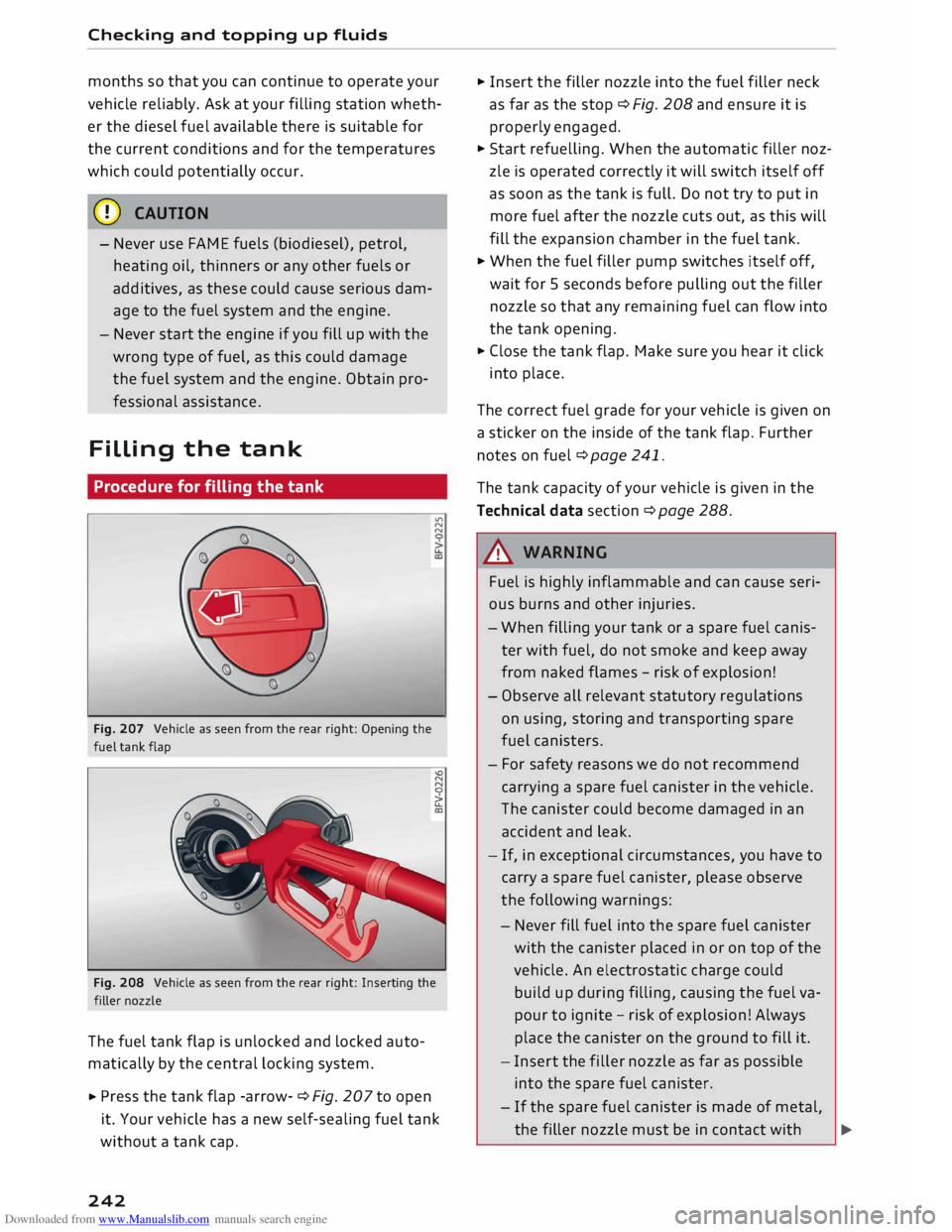
Fig. 207 Vehicle as seen from the rear right: Opening the
fuel tank flap .,..
N
N
u..
a,
Fig. 208 Vehicle as seen from the rear right: Inserting the
filler nozzle
The fuel tank flap is unlocked and Locked auto
matically by the central Locking system.
... Press
the tank flap -arrow- ¢ Fig. 207 to open
it. Your vehicle has a new self-sealing fuel tank
without a tank cap.
242 ...
Insert the filler nozzle into the fuel filler neck
as far as the stop ¢ Fig. 208 and ensure it is
properly engaged .
... Start refuelling. When the automatic filler noz
zle is operated correctly it will switch itself off
as soon as the tank is full. Do not try to put in
more fuel after the nozzle cuts out, as this will
fill the expansion chamber in the fuel tank.
.., When the fuel filler pump switches itself off,
wait for 5 seconds before pulling out the filler
nozzle so that any remaining fuel can flow into
the tank opening.
... Close the tank flap. Make sure you hear it click
into place.
The correct fuel grade for your vehicle is given on
a sticker on the inside of the tank flap. Further
notes on fuel ¢ page 241.
The tank capacity of your vehicle is given in the
Technical data section ¢ page 288 .
A WARNING
Fuel is highly inflammable and can cause seri
ous burns and other injuries.
- When filling your tank or a spare fuel canis
ter with fuel, do not smoke and keep away
from naked flames -risk of explosion!
- Observe all relevant statutory regulations
on using, storing and transporting spare
fuel canisters.
- For safety reasons we do not recommend
carrying a spare fuel canister in the vehicle.
The canister could become damaged in an
accident and Leak.
- If, in exceptional circumstances, you have to
carry a spare fuel canister, please observe
the following warnings:
- Never fill fuel into the spare fuel canister
with the canister placed in or on top of the
vehicle. An electrostatic charge could
build up during filling, causing the fuel va
pour to ignite -risk of explosion! Always
place the canister on the ground to fill it.
- Insert the filler nozzle as far as possible
into the spare fuel canister .
- If the spare fuel canister is made of metal,
the filler nozzle must be in contact with �
Page 245 of 306
Downloaded from www.Manualslib.com manuals search engine 0
N
,.....
N
......
0
,.....
Vl
CX) the
canister during filling. This helps
prevent an electrostatic charge building
up.
- Make sure you never spill fuel in the vehi
cle or in the luggage compartment. Fuel
vapour is explosive -danger to life!
CD CAUTION
- If any fuel is spilt onto the vehicle, it should
be removed immediately as it could other
wise damage the paintwork.
- Never run the tank completely dry. If there
is an irregular fuel supply, misfiring can oc
cur. As a result unburnt fuel can enter the
exhaust system and cause damage to the
catalytic converter(s).
- When filling the fuel tank after having run it
completely dry on a vehicle with a diesel en
gine the ignition must be switched on for at
least 30 seconds without starting the en
gine. When you then start the engine it may
take longer than normal (up to one minute)
for the engine to start firing. This is because
air needs to be bled from the fuel system
while starting.
@) For the sake of the environment
Do not try to put in more fuel after the auto
matic filler nozzle has switched off; this may
cause the fuel to overflow if it becomes warm.
@ Note
Should the fuel tank flap become frozen stuck
during inclement weather, press the middle
of the flap with the palm of the hand and try
again.
(ill) Note
- To prevent the tank from being filled with
the incorrect type of fuel, only suitable filler
nozzles can be inserted in the fuel filler on
your vehicle.
- If the filler nozzle is old, damaged or too
small, it may not be able to open the pro
tection mechanism on the fuel tank. In this
case, try turning the filler nozzle before in
serting it in the fuel filler neck, use a differ- Checking
and topping up fluids
ent filling pump or seek professional assis
tance.
- The protection mechanism will not open if
you try to add fuel from a spare fuel canis
ter. If you need to fill the tank from a spare
fuel canister, you must use the special fun
nel stowed in the luggage compartment
¢page 243, Fig. 209.
Filling the tank using a spare fuel canister
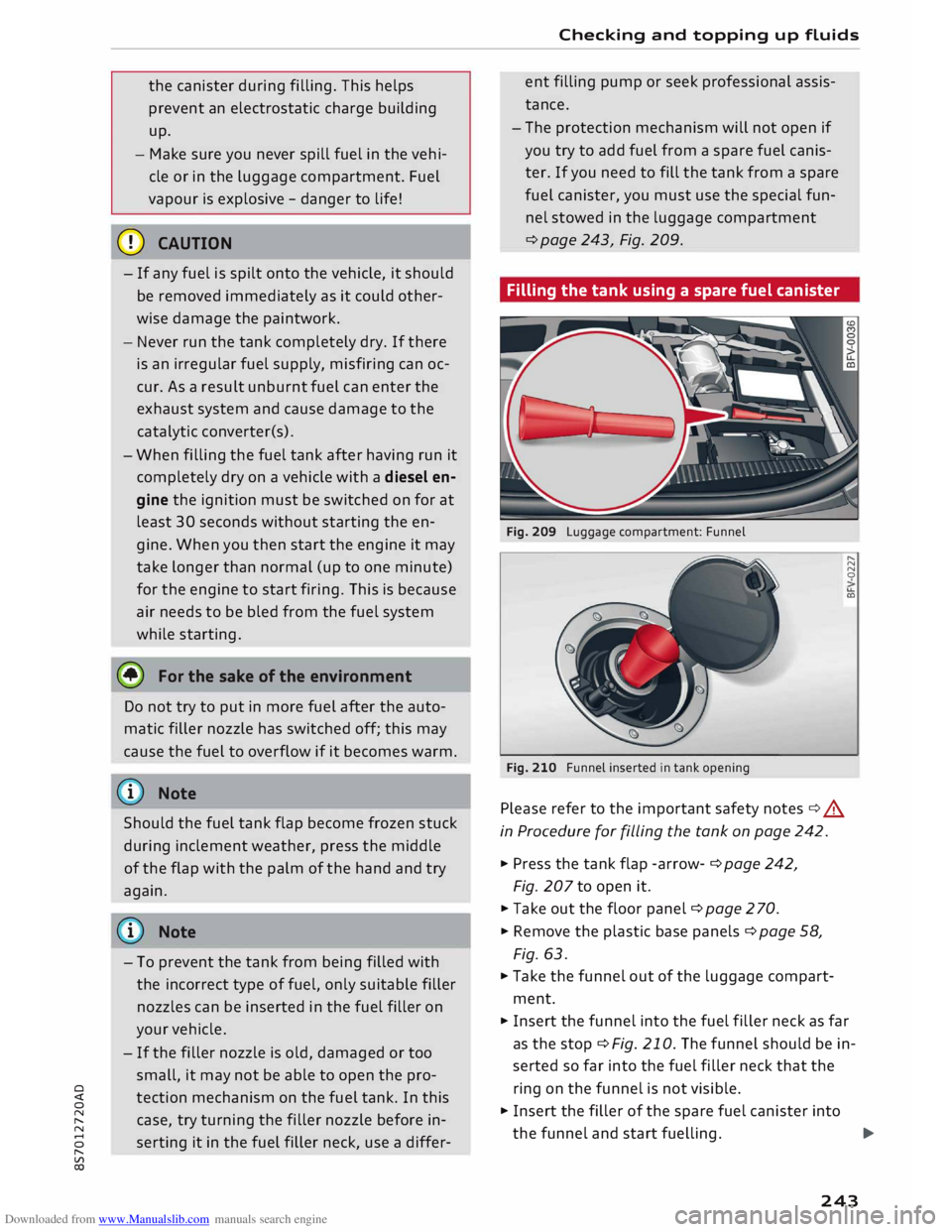
Fig. 209 Luggage compartment: Funnel
Fig. 210 Funnel inserted in tank opening
Please refer to the important safety notes¢.&.
in Procedure for filling the tank on page 242.
""' Press the tank flap -arrow- ¢ page 242,
Fig. 207 to open it.
.., Take out the floor panel¢ page 2 70.
""' Remove the plastic base panels ¢ page 58,
Fig. 63.
.., Take the funnel out of the luggage compart
ment. .....
N
N
0
I.L
a,
""' Insert the funnel into the fuel filler neck as far
as the stop ¢Fig. 210. The funnel should be in
serted so far into the fuel filler neck that the
ring on the funnel is not visible.
.., Insert the filler of the spare fuel canister into
the funnel and start fuelling.
...,.
243
Page 246 of 306
Downloaded from www.Manualslib.com manuals search engine Checking
and topping up fluids
... After fuelling, remove the funnel and close the
fuel tank flap so that it locks in place.
CD CAUTION
Remove any fuel spills from the paintwork im
mediately.
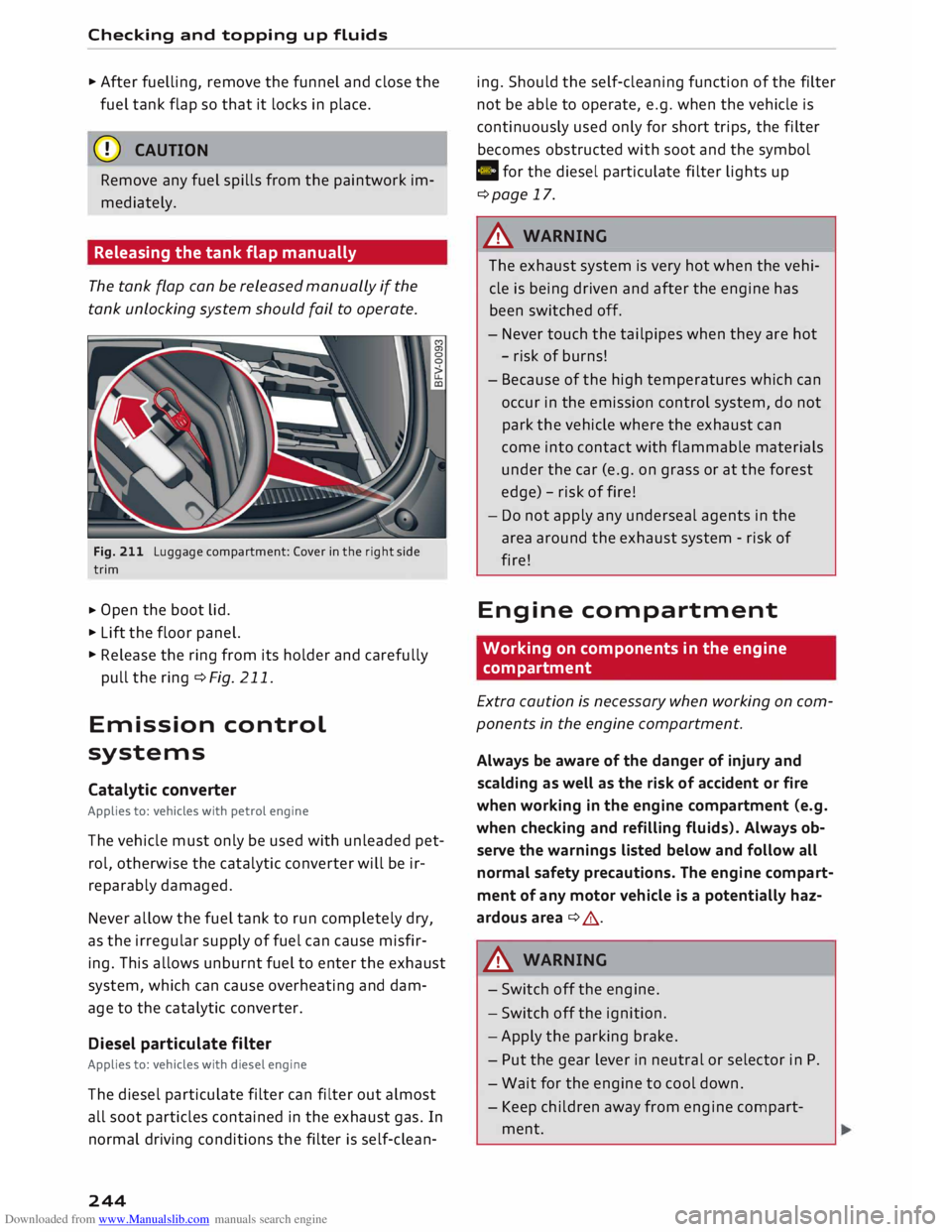
Releasing the tank flap manually
The tank flap can be released manually if the
tank unlocking system should fail to operate.
Fig. 211 Luggage compartment: Cover in the right side
trim
... Open
the boot lid .
... Lift the floor panel.
... Release the ring from its holder and carefully
pull the ring ¢Fig. 211.
Emission control
systems
Catalytic converter
Applies to: vehicles with petrol engine
The vehicle must only be used with unleaded pet
rol, otherwise the catalytic converter will be ir
reparably damaged.
Never allow the fuel tank to run completely dry,
as the irregular supply of fuel can cause misfir
ing. This allows unburnt fuel to enter the exhaust
system, which can cause overheating and dam
age to the catalytic converter.
Diesel particulate filter
Applies to: vehicles with diesel engine
The diesel particulate filter can filter out almost
all soot particles contained in the exhaust gas. In
normal driving conditions the filter is self-clean-
244 ing.
Should the self-cleaning function of the filter
not be able to operate, e.g. when the vehicle is
continuously used only for short trips, the filter
becomes obstructed with soot and the symbol
C for the diesel particulate filter lights up
¢page 17.
A WARNING
The exhaust system is very hot when the vehi
cle is being driven and after the engine has
been switched off.
- Never touch the tailpipes when they are hot
- risk of burns!
- Because of the high temperatures which can
occur in the emission control system, do not
park the vehicle where the exhaust can
come into contact with flammable materials
under the car (e.g. on grass or at the forest
edge) -risk of fire!
- Do not apply any underseal agents in the
area around the exhaust system -risk of
fire!
Engine compartment
Working on components in the engine
compartment
Extra caution is necessary when working on com
ponents in the engine compartment.
Always be aware of the danger of injury and
scalding as well as the risk of accident or fire
when working in the engine compartment (e.g.
when checking and refilling fluids). Always ob
serve the warnings listed below and follow all
normal safety precautions. The engine compart
ment of any motor vehicle is a potentially haz
ardous area ¢ A .
A WARNING
- Switch off the engine.
- Switch off the ignition.
- Apply the parking brake.
- Put the gear lever in neutral or selector in P.
- Wait for the engine to cool down.
- Keep children away from engine compart-
ment.
Page 247 of 306
Downloaded from www.Manualslib.com manuals search engine 0
N
,.....
N
......
0
,.....
Vl
CX) -
Never spill fluids on a hot engine. These flu
ids can cause a fire (e.g. radiator anti
freeze).
- Take care not to cause short circuits in the
electrical system, especially when working
on the battery.
- When working in the engine compartment
be aware that the radiator fan may start
running suddenly, even if the ignition is
switched off -risk of injury!
- Do not unscrew the cap on the expansion
tank when the engine is hot. The cooling
system is under pressure.
- Protect face, hands and arms by covering
the cap with a large, thick rag to protect
against escaping coolant and steam.
- Never remove the engine cover panel -risk
of burns!
- If any tests have to be performed with the
engine running, there is an extra safety risk
from the rotating parts, such as the drive
belts, alternator and radiator fan, etc., and
from the high-voltage ignition system.
- Vehicles with automatic gearbox: Never
open the throttle inadvertently (for instance
by hand from the engine compartment) if a
gear is engaged while the vehicle is station
ary with the engine running. The vehicle will
otherwise start moving immediately and
could cause an accident.
- Observe the following additional warnings if
work on the fuel system or the electrical
system is necessary:
- Do not smoke.
- Never work near naked flames.
- Always keep an approved fire extinguisher
immediately available.
- Any work on the batteries and electrical sys
tem in your vehicle entails a risk of injury
and chemical burns in addition to danger of
accident or fire. For this reason, you must
have the work carried out by a qualified
workshop.
CD CAUTION
When topping up fluids make sure the correct
fluid is put into the correct filler opening. This Checking
and topping up fluids
can otherwise cause serious malfunctions or
engine damage.
@ For the sake of the environment
Inspect the ground underneath your vehicle
regularly so that any leaks are detected at an
early stage. If you find spots of oil or other
fluids, have your vehicle inspected in the
workshop.
i Note
On right-hand drive vehicles* some of the
containers/ reservoirs mentioned below are
located on the other side of the engine com
partment.
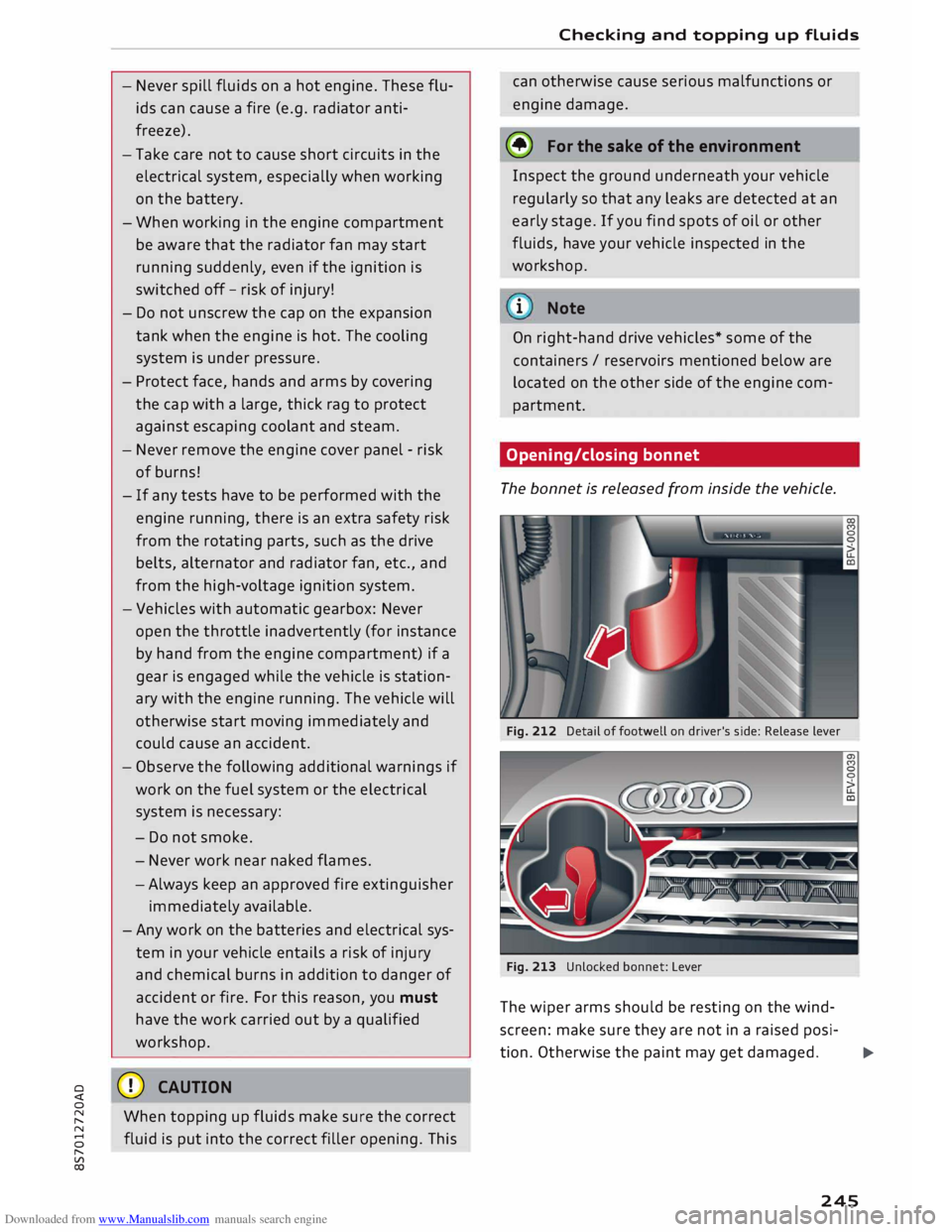
Opening/closing bonnet
The bonnet is released from inside the vehicle.
Fig. 212 Detail of footwell on driver's side: Release lever
Fig. 213 Unlocked bonnet: Lever
The wiper arms should be resting on the wind
screen: make sure they are not in a raised posi-
tion. Otherwise the paint may get damaged.
..,..
245
Page 249 of 306
Downloaded from www.Manualslib.com manuals search engine 0
N
,.....
N
......
0
,.....
Vl
CX) ®
Fuse box¢ page 282
0 Windscreen washer container {�)
c:::>page 252
The positions of the engine oil dipstick and en
gine oil filler cap¢ Fig. 214 (items @and @)
may be different on some engine versions.
Engine oil
Choosing the correct engine oil grade
The service interval display in the instrument
cluster of your vehicle will inform you when it is
time for an oil change. We recommend having
the oil changed by a qualified workshop.
If you have to top up the oil between oil changes,
use the grades of oil specified in the table in ac
cordance with VW standards.
- the vehicle is being serviced based on the flexi
ble or fixed oil change service (see last service
record).
- the vehicle has a petrol or diesel engine (see
sticker on inside of fuel tank flap).
Oil Change Service
Flexible Fixed
Petrol engines vw
504 00 vw 502 00
Diesel engines
vw 507 00 With
diesel
particulate fil-
ter:
vw 507 00
Without diesel
particulate fil-
ter:
vw sos 00
Audi recommends
�Castrol )g[Ij)@[g ?m»E«!JJ1)JJ.lf..
Audi recommends Longlife high-performance
engine oil from Audi Genuine Parts
(© Note
If the oil grades specified in the table are not
available, you can use one of the following
grades as a substitute. To prevent damage to
the engine, this should not be done more Checking
and topping up fluids
than once between oil changes and no more
than 0.5 litres should be used.
- Petrol engines: ACEA A3 or API SN (API SM)
standard
- Diesel engines: ACEA C3 or API CJ-4 stand
ard
((!)) Note
The flexible oil change service is not available
for all models in all countries.
Checking and topping up the engine oil
level
The oil dipstick differs depending on the type of
engine.
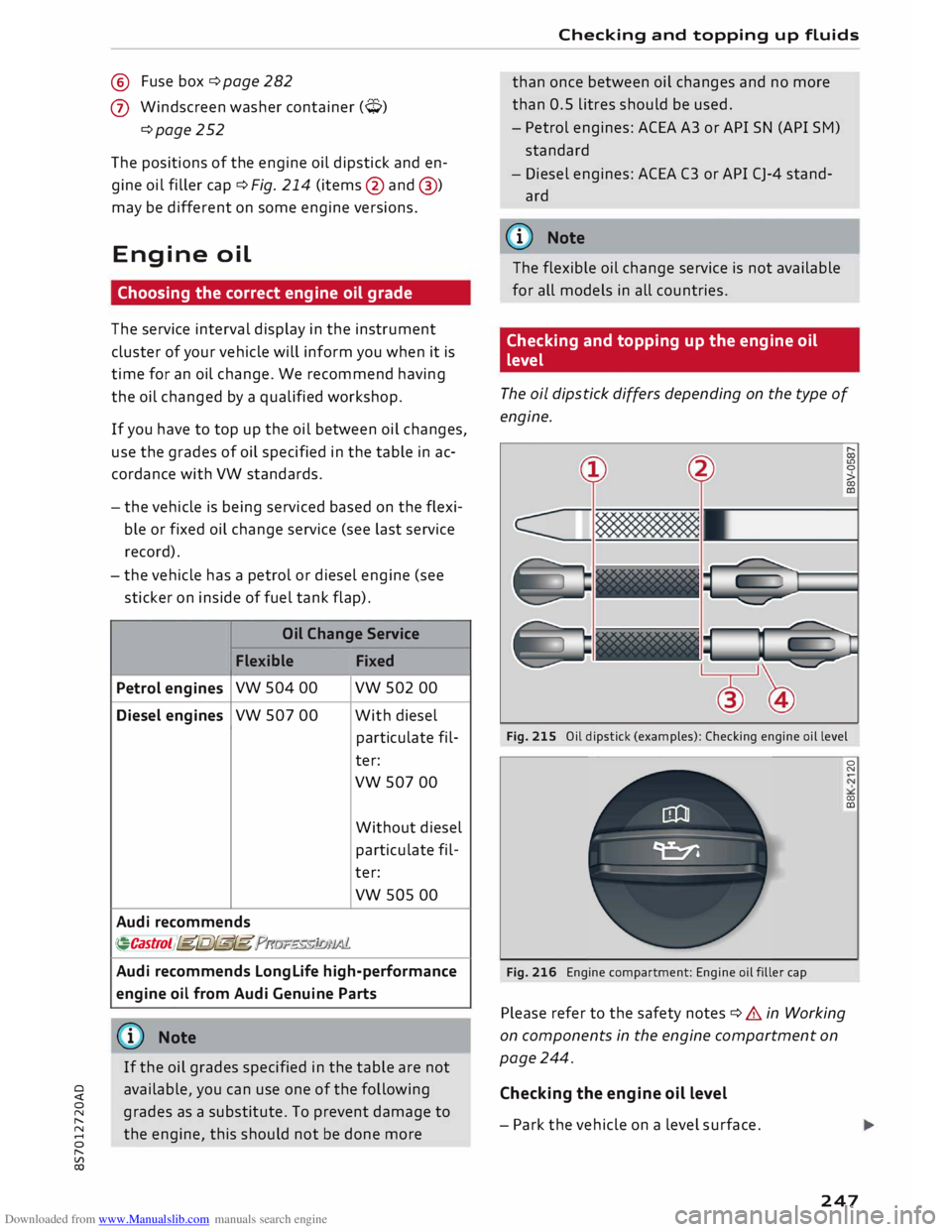
Fig. 215 Oil dipstick (examples): Checking engine oil level
Fig. 216 Engine compartment: Engine oil filler cap
Please refer to the safety notes ¢ .& in Working
on components in the engine compartment on
page 244.
Checking the engine oil level
- Park the vehicle on a level surface. 0
N
00
a:,
247
Page 250 of 306
Downloaded from www.Manualslib.com manuals search engine Checking
and topping up fluids
- Switch off the warm engine. Wait for a few mi
nutes for the oil to drain back into the sump.
- Open the bonnet ¢page 245.
- Pull out the oil dipstick ¢page 246, Fig. 214,
wipe it with a clean cloth and insert it again,
pushing it in as far as it will go.
- Then pull the dipstick out again and check the
oil level ¢table on page 248.
- If the oil level is too low, add more engine oil.
Markings on oil dipstick ¢ Fig. 215
@ When
the oil Level is near the marking @
you must top up the engine oil. Please refer
to ¢ 0.
@ Do NOT add engine oil.
®
@ Do
NOT add engine oil.
Drive to a qualified workshop without delay
and have the engine oil changed ¢0.
Topping up the engine oil
- Unscrew the cap "E::71 ¢Fig. 216from the oil fill
er opening ¢ page 246, Fig. 214.
- Carefully add 0.5 litres of suitable engine oil
¢page 247.
-After two minutes check the oil level once
again.
- If the oil level is too low, add a smaller quantity
of engine oil. The level must always be below
the marking @¢Fig. 215 ¢0.
- Screw the oil filler cap "E::71 back on and push
the dipstick all the way in.
A WARNING
- Ensure that no engine oil comes into contact
with hot engine components when topping
up: this could cause a fire.
- The oil filler cap must be properly closed to
prevent oil from squirting onto the hot en
gine or exhaust system while the engine is
running -risk of fire!
- Wash your skin thoroughly if it comes into
contact with engine oil.
248 CD
CAUTION
- The engine oil must never drop below the
marking (!)¢ Fig. 215 -risk of engine dam
age!
- When topping up the engine oil, make sure
that the oil level is not above the marking
@ ¢Fig. 215, as this may result in damage
to the catalytic converter or to the engine.
Do NOT start the engine. Contact a qualified
workshop to extract the engine oil if neces
sary.
- Applies to vehicles which have an oil dip
stick with area® ¢Fig. 215: If you run your
vehicle on diesel fuel of poorer quality than
EN 590 standard fuel, the fuel can get into
the engine oil. In this case, the oil Level
gradually rises and the quality of the engine
oil decreases. Once the oil level has reached
the marking @or the indicator lamp II
has come on, the engine oil level must not
be corrected by extracting the surplus oil -
risk of engine damage! The engine oil must
be changed ¢ page 18.
- No additives should be used with engine oil.
Any damage caused by the use of such addi
tives would not be covered by the factory
warranty.
® For the sake of the environment
- Never pour engine oil down drains or into
the ground.
-Always observe statutory requirements
when disposing of empty oil canisters.
@ Note
Depending on how you drive and the condi
tions in which the car is used, oil consumption
can be up to 0.5 Ltr./1000 km. Oil consump
tion on RS models can be up to 0.8 ltr./1,000
km. Oil consumption is likely to be higher for
the first 5,000 km. For this reason the engine
oil level must be checked at regular intervals,
preferably when filling the tank and before a
journey.