fuel consumption AUDI TT ROADSTER 2016 Owners Manual
[x] Cancel search | Manufacturer: AUDI, Model Year: 2016, Model line: TT ROADSTER, Model: AUDI TT ROADSTER 2016Pages: 306, PDF Size: 31.82 MB
Page 27 of 306
Downloaded from www.Manualslib.com manuals search engine 0
N
,.....
N
....
0
,.....
Vl
CX) Trip
recorder/odometer
The trip recorder shows the distance that has
been travelled since it was last reset. It is used to
measure individual journeys.
The trip recorder can be reset to zero by pressing
the reset button lo.al ¢Fig. 12.
The odometer records the vehicle's total mileage.
Fault display
If there is a fault in the instruments, the letters
DEF appear in the trip recorder display. Have the
fault rectified as soon as possible.
On-board computer
You can call up the following information se
quentially on the on-board computer ¢ page 20,
Fig. 4@ :
-Time & date ¢page 212
-Average consumption
- Fuel range
- Single journey memory summary
- Total journey memory summary
The single journey memory processes the infor
mation on a journey from the time the ignition is
Sport view Driver
information system
switched on until it is switched off. If the journey
is resumed within two hours after the ignition is
switched off, the new figures are automatically
included in the calculation.
Unlike the single journey memory, the total jour
ney memory is not erased automatically. In this
way, you can determine the period for which you
wish the on-board computer to supply driving in
formation.
Fuel consumption
The current fuel consumption can be shown in a
bar display. The average fuel consumption from
the single journey memory can also be displayed.
If the bar turns green, your vehicle is saving fuel
using one of the following functions:
- Recuperation: Electrical energy can be stored in
the vehicle battery (recuperation) if the vehicle
is travelling downhill or coasting in gear (over
run). In this case, the bar will move towards the
t:::3 symbol.
- Coasting mode* ¢ page 82.
@ Note
The date, time and display format can be
changed via the infotainment system.
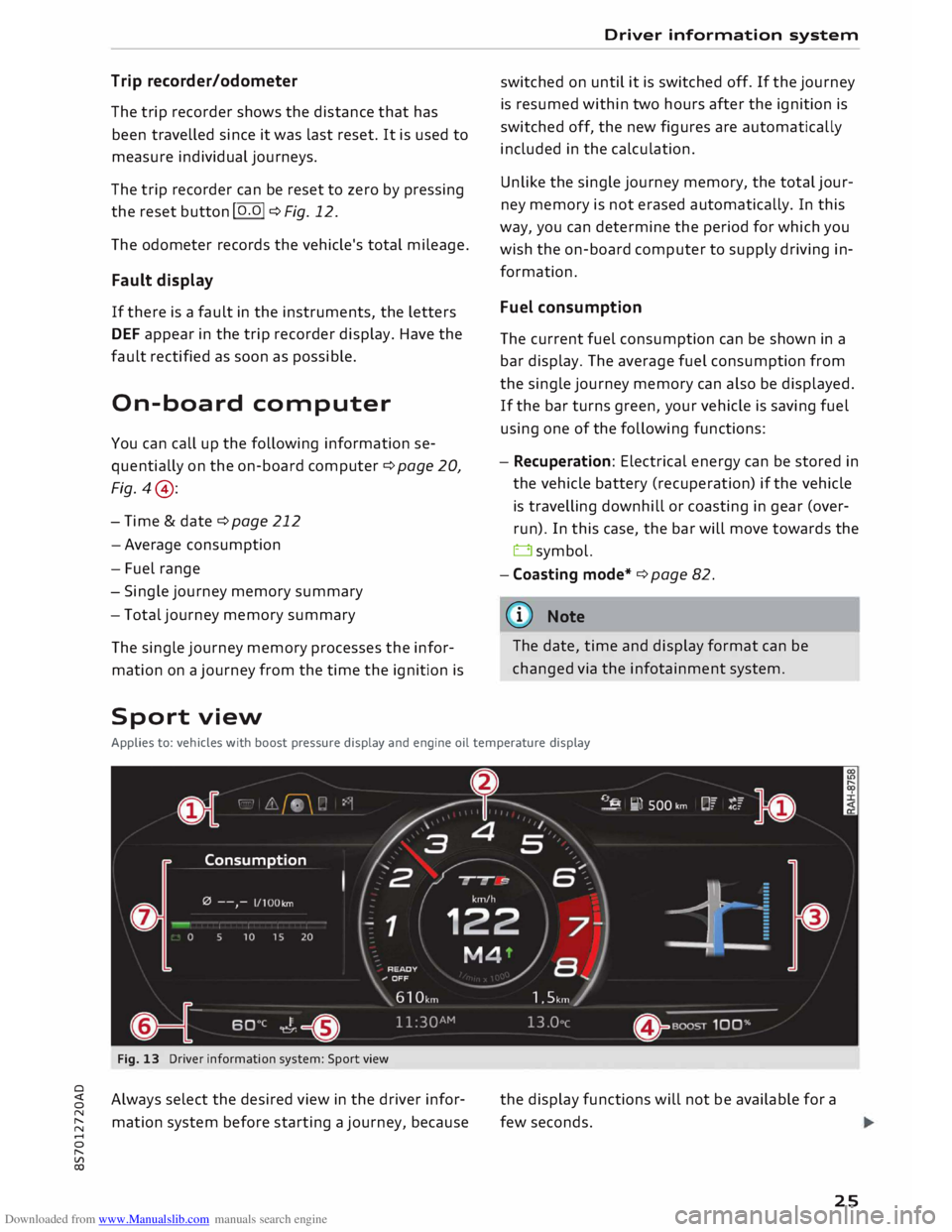
Applies to: vehicles with boost pressure display and engine oil temperature display
Fig. 13 Driver information system: Sport view
Always select the desired view in the driver infor
mation system before starting a journey, because the
display functions will not be available for a
few seconds.
25
Page 69 of 306
Downloaded from www.Manualslib.com manuals search engine 0
N
,.....
N
......
0
,.....
Vl
CX) -
Do NOT stop the vehicle, drive in reverse or
switch off the engine before you are out of
the water.
- Bear in mind that waves created by oncom
ing traffic could exceed the permissible
wading depth of your vehicle.
- Avoid driving through salt water (corrosion).
How to improve economy and minimise
pollution
Fuel economy, environmental impact and wear
on the engine, brakes and tyres depend largely
on the way you drive the vehicle. By adopting an
economical driving style and anticipating the
traffic situation ahead, you can reduce fuel con
sumption by 10-15%. The following section gives
you some tips on lessening the impact on the en
vironment and reducing your operating costs at
the same time.
Anticipate well in advance
A car uses most fuel when accelerating. If you an
ticipate hazards and speed changes well in ad
vance, you will need to brake less and thus accel
erate less. Wherever possible, let the car slow
down gradually with a gear engaged, for in
stance when you can see that the next traffic
lights are red.
Change gear early to save fuel
An effective way of saving fuel is to change up
quickly through the gears. Running the engine at
high rpm in the lower gears uses an unnecessary
amount of fuel. Press the accelerator slowly and
avoid using the "kick-down" feature.
Avoid driving at high speed
Avoid travelling at top speed. Fuel consumption,
exhaust emissions and noise levels all increase
very rapidly at higher speeds. Driving at moder
ate speeds will help to save fuel.
Do not let the engine idle for longer than
necessary
Engine idling periods are automatically reduced
on vehicles with start/stop system*. On vehicles
without start/stop system*, it is worthwhile
switching off the engine at level crossings, for in- Driving
stance, or at traffic lights with a long red phase.
The fuel saved after only 30 -40 seconds is
greater than the amount of fuel needed to re
start the engine.
The engine takes a very long time to warm up
when it is running at idling speed. Mechanical
wear and pollutant emissions are also especially
high during this initial warm-up phase. It is
therefore best to drive off immediately after
starting the engine. Avoid running the engine at
high speed.
Regular servicing
Regular servicing can establish a basis for good
fuel economy before you start driving. A well
serviced engine gives you the benefit of im
proved fuel efficiency as well as maximum relia
bility and an enhanced resale value.
A poorly maintained engine can consume up to
ten percent more fuel than necessary.
Check the oil level when filling the tank. Oil con
sumption depends to a great extent on the en
gine load and engine speed. It is quite normal
that the oil consumption of a new engine only
reaches its lowest level after a certain mileage.
This means that the oil consumption can only be
properly assessed after about 5,000 km.
Avoid short trips
The engine and emission control system need to
reach their proper working temperature in order
to minimise fuel consumption and emissions.
A cold engine uses disproportionately more fuel.
The engine only reaches its working temperature
after about four kilometres, when fuel consump
tion will return to a normal level.
Check tyre pressures
Always make sure the tyres are inflated to the
correct tyre pressures to save fuel. If the tyre
pressures are just 0.5 bar too low, this can in
crease the fuel consumption by as much as 5 %.
Due to the greater rolling resistance, under-infla
tion also increases tyre wear and impairs han
dling.
67
Page 70 of 306
Downloaded from www.Manualslib.com manuals search engine Driving
The tyre pressures should always be checked
when the tyres are cold.
Do not use winter tyres all through the year; they
will increase fuel consumption by up to 10 %.
Avoid carrying unnecessary loads
Every kilo of extra weight will increase the fuel
consumption, so it is worth checking the luggage
compartment occasionally to make sure that no
unnecessary loads are being transported.
Save electrical energy
The engine drives the alternator to generate elec
tricity. This means that fuel consumption rises
when more power is required for electrical equip
ment. Switch off electrical equipment when it is
not needed. Electrical equipment which uses a
lot of electricity includes the blower (at a high
setting), the rear window heating and the seat
heating*.
Steering Adjusting the steering wheel position
The height and reach of the steering wheel can
be adjusted as required to suit the driver.
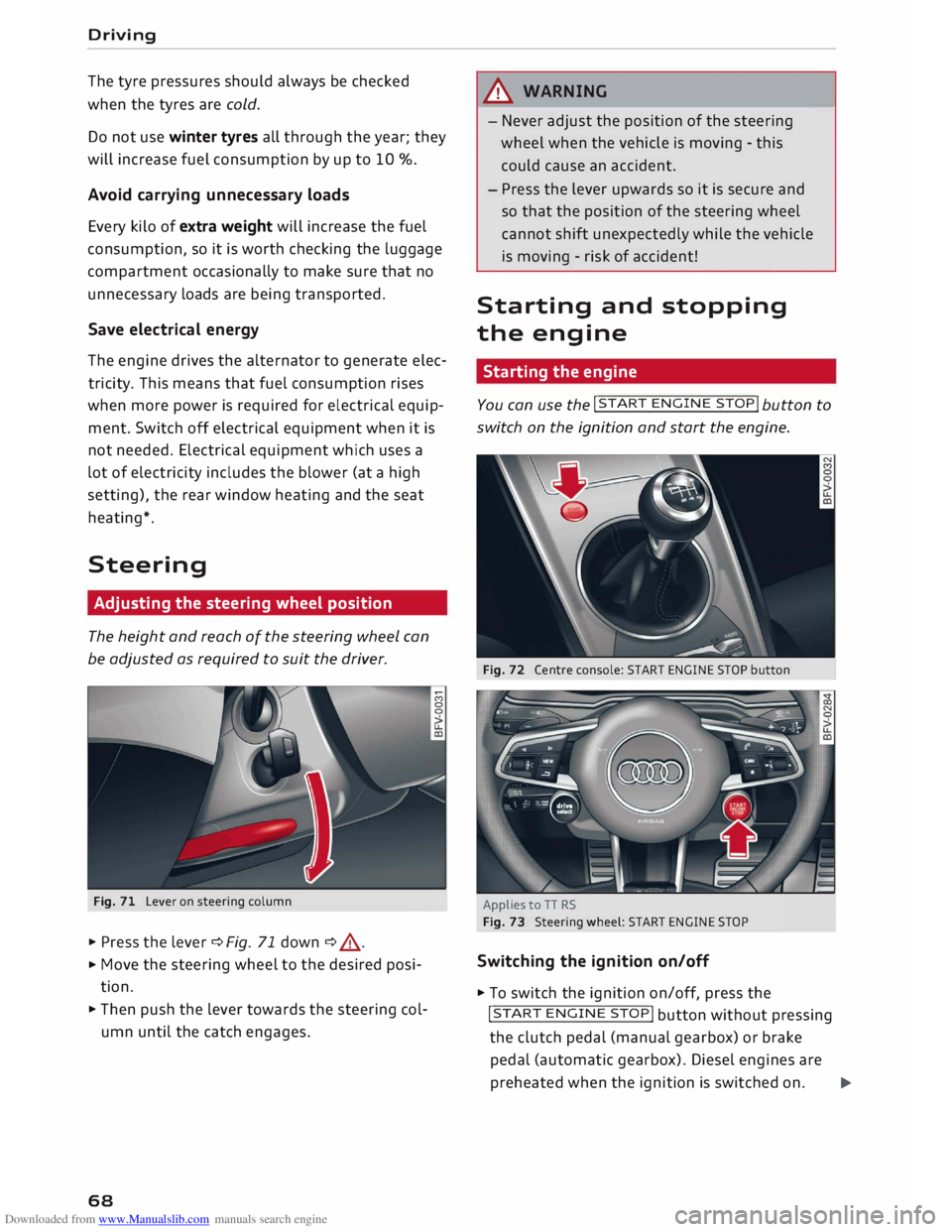
Fig. 71 Lever on steering column
� Press the lever¢ Fig. 71 down ¢ .&, .
� Move
the steering wheel to the desired posi
tion.
� Then push the lever towards the steering col
umn until the catch engages.
68 A
WARNING
- Never adjust the position of the steering
wheel when the vehicle is moving - this
could cause an accident.
- Press the lever upwards so it is secure and
so that the position of the steering wheel
cannot shift unexpectedly while the vehicle
is moving -risk of accident!
Starting and stopping
the engine
Starting the engine -
You can use the !START
ENGINE STOP!
button to
switch on the ignition and start the engine.
Fig. 72 Centre console: START ENGINE STOP button
Applies to TT RS
Fig. 73 Steering wheel: START ENGINE STOP
Switching the ignition on/off
� To switch the ignition on/off, press the
!START ENGINE STOP!
button without pressing
the clutch pedal (manual gearbox) or brake
pedal (automatic gearbox). Diesel engines are
preheated when the ignition is switched on.�
Page 84 of 306
Downloaded from www.Manualslib.com manuals search engine Driving
the next higher gear is delayed until the engine
reaches maximum rpm.
A WARNING
Please note that if the road surface is slippery
or wet, the kick-down feature could cause the
driving wheels to spin, which could result in
skidding.
Coast ing mode
Applies to: vehicles with automatic gearbox
In coasting mode, you can use the vehicle's kinet
ic energy to drive without using the accelerator
on certain stretches of road. This saves fuel by al
lowing you to take your foot off the accelerator
earlier and let the vehicle coast (for instance
when approaching a speed restriction in a built
up area).
Switching on coa sting mode
Important: Selector lever must be in D, gradient
must be less than 12 %.
� Select efficiency mode in drive select*
¢page 100 (you only have to do this once).
� Take your foot off the accelerator.
If you have selected the "on-board computer"
display, the message Coasting mode will then
appear. The gearbox automatically disengages
the clutch at speeds above 20 km/h and lets the
vehicle coast without the engine braking effect.
The engine ticks over at idling speed while the ve
hicle is coasting.
Stopping coasting mode
� Press the brake pedal or accelerator.
To use the engine braking effect and overrun fuel
cut-off again, all you need to do is tap the brake
pedal briefly.
You can improve your fuel economy and help to
reduce emissions by using a combination of the
coa sting mode (i.e. coasting with low fuel con-
l l
The ESC lamp lights up permanently and the message
Stabilisation control (ESC): sport. Warning! Restricted
stability appears temporarily in the infotainment display
to indicate the deactivation status.
82 sumption
on a longer stretch of road) and the
overrun fuel cut-off (i.e. using the engine brak
ing effect with no fuel consumption on a shorter
stretch of road).
A WARNING
- If you are approaching an obstruction when
coasting mode is switched on, please re
member that the vehicle will not slow down
as quickly as usual when you take your foot
off the accelerator -risk of accident!
- The vehicle can pick up speed if you are driv
ing down a slope in coasting mode -risk of
accident!
- If other people are using your car, you
should draw their attention to the coasting
mode.
ijJ) Note
- Coasting mode is only available in efficien
cy* mode (drive select*).
- The message Coasting mode only appears
when the current fuel consumption display
is selected. The gear is no longer displayed
when you are in coasting mode (e.g. E in
stead of E6).
- The coasting mode is deactivated tempora
rily on gradients of 15 % or greater.
Launch control programme
Applies to: vehicles with automatic gearbox
The launch control programme enables maxi
mum acceleration.
Important: The engine must be warm and the
steering wheel must be pointing straight ahead.
� Deactivate the start/stop system*¢ page 73.
The LED in the l(A)""
I button will light up.
� Deactivate the hold assist* ¢ page 76. The LED
in the button will go out.
� Press the IJ,OFF! button
once briefly while the
engine is running 1
). �
Page 250 of 306
Downloaded from www.Manualslib.com manuals search engine Checking
and topping up fluids
- Switch off the warm engine. Wait for a few mi
nutes for the oil to drain back into the sump.
- Open the bonnet ¢page 245.
- Pull out the oil dipstick ¢page 246, Fig. 214,
wipe it with a clean cloth and insert it again,
pushing it in as far as it will go.
- Then pull the dipstick out again and check the
oil level ¢table on page 248.
- If the oil level is too low, add more engine oil.
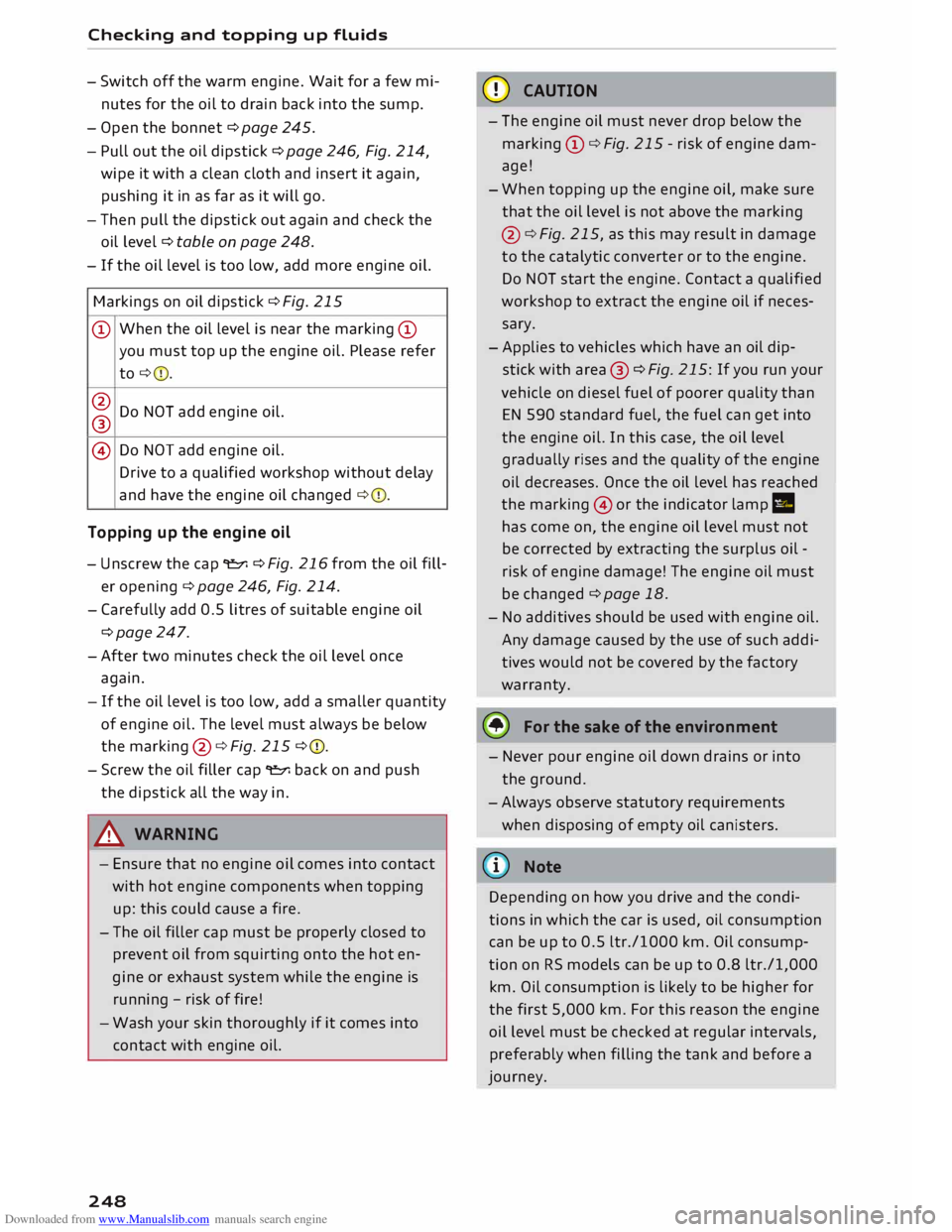
Markings on oil dipstick ¢ Fig. 215
@ When
the oil Level is near the marking @
you must top up the engine oil. Please refer
to ¢ 0.
@ Do NOT add engine oil.
®
@ Do
NOT add engine oil.
Drive to a qualified workshop without delay
and have the engine oil changed ¢0.
Topping up the engine oil
- Unscrew the cap "E::71 ¢Fig. 216from the oil fill
er opening ¢ page 246, Fig. 214.
- Carefully add 0.5 litres of suitable engine oil
¢page 247.
-After two minutes check the oil level once
again.
- If the oil level is too low, add a smaller quantity
of engine oil. The level must always be below
the marking @¢Fig. 215 ¢0.
- Screw the oil filler cap "E::71 back on and push
the dipstick all the way in.
A WARNING
- Ensure that no engine oil comes into contact
with hot engine components when topping
up: this could cause a fire.
- The oil filler cap must be properly closed to
prevent oil from squirting onto the hot en
gine or exhaust system while the engine is
running -risk of fire!
- Wash your skin thoroughly if it comes into
contact with engine oil.
248 CD
CAUTION
- The engine oil must never drop below the
marking (!)¢ Fig. 215 -risk of engine dam
age!
- When topping up the engine oil, make sure
that the oil level is not above the marking
@ ¢Fig. 215, as this may result in damage
to the catalytic converter or to the engine.
Do NOT start the engine. Contact a qualified
workshop to extract the engine oil if neces
sary.
- Applies to vehicles which have an oil dip
stick with area® ¢Fig. 215: If you run your
vehicle on diesel fuel of poorer quality than
EN 590 standard fuel, the fuel can get into
the engine oil. In this case, the oil Level
gradually rises and the quality of the engine
oil decreases. Once the oil level has reached
the marking @or the indicator lamp II
has come on, the engine oil level must not
be corrected by extracting the surplus oil -
risk of engine damage! The engine oil must
be changed ¢ page 18.
- No additives should be used with engine oil.
Any damage caused by the use of such addi
tives would not be covered by the factory
warranty.
® For the sake of the environment
- Never pour engine oil down drains or into
the ground.
-Always observe statutory requirements
when disposing of empty oil canisters.
@ Note
Depending on how you drive and the condi
tions in which the car is used, oil consumption
can be up to 0.5 Ltr./1000 km. Oil consump
tion on RS models can be up to 0.8 ltr./1,000
km. Oil consumption is likely to be higher for
the first 5,000 km. For this reason the engine
oil level must be checked at regular intervals,
preferably when filling the tank and before a
journey.
Page 259 of 306
Downloaded from www.Manualslib.com manuals search engine 0
N
,.....
N
......
0
,.....
Vl
CX) @
For the sake of the environment
Under-inflated tyres will increase the fuel
consumption. -------------
We recommend always using either the tyre
pressure setting (D for partial loads or the
setting @for full loads.
Wheel bolts and rims
Wheel bolts
The wheel bolts should be clean and turn easily.
A special adapter is required to turn the anti
theft wheel bolts* cc> page 2 73.
Rims Rims with a bolted rim flange* or bolted trim
parts* consist of several components. A special
technique is applied to bolt these components
together. Never attempt to repair or dismantle
them c:::>A.
A WARNING
If the wheel bolts have not been tightened or
serviced correctly, they can come loose, and
you could lose control of the vehicle -risk of
accident! For the correct tightening torque,
refer to cc> page 2 75, A�er changing a wheel.
- Make sure that the wheel bolts and threads
in the wheel hubs are always clean and free
from grease.
- Only use wheel bolts that are designed to
match the rims on your car.
- Always have damaged rims repaired by a
qualified workshop. Never attempt to repair
or dismantle rims yourself -risk of accident!
Winter tyres
In winter road conditions winter tyres will consid
erably improve the car's handling. Due to their
type of construction (width, rubber compound,
tread pattern), summer tyres give less grip on ice
and snow.
� Winter tyres must be fitted on all four wheels . Wheels
� Only use winter tyres of the correct type ap
proved for your vehicle.
� Please note that the maximum permissible
speed for winter tyres may be lower than for
summer tyres cc>.&_ . Your specialist retailer can
advise you of the maximum speed for your
tyres.
� After fitting the wheels you must always check
the tyre pressures cc> page 256.
Winter tyres lose their effectiveness when the
tread is worn down to a depth of 4 mm. The per
formance of winter tyres is also severely impaired
by ageing, even if the tread is still much deeper
than 4 mm.
A WARNING
- Never exceed the maximum approved speed
for your tyres. This causes the tyres to over
heat and can even result in a blow-out -risk
of accident!
- Always adapt your driving style to the pre
vailing road and traffic conditions. Drive
carefully and reduce your speed on icy or
slippery roads. Even winter tyres lose their
grip on black ice.
@ For the sake of the environment
Summer tyres should be fitted again as
soon
as possible; they give better handling on
roads which are free of snow and ice. They are
quieter, do not wear so quickly and reduce
fuel consumption.
(© Note
All-weather tyres can also be used instead of
winter tyres. Please note that winter tyres
with the£ symbol are required by law during
the winter season in some countries.
Snow chains
Snow chains will improve braking ability as well
as traction in winter conditions.
� Snow chains can be used on the front wheels
only. This also applies to vehicles with four-
wheel drive*.
..,.
257
Page 289 of 306
Downloaded from www.Manualslib.com manuals search engine Technical
data
Vehicle identification
data
XXXXX XX -X -XXXX XXX
(1\_J_ FAHRZG. -llENT -NR.
� VEHnE-IOENT -NO. xx
P /TYPE XXXXXXXX
XX X
XXXXXXXX
XXX XXX
I XX
XXXXXXX XX X.X XX
XXX KW
XXX
®i �i��:-:::s��
OE
xxxx
XXX XXX
©+ �N
:t,) N
�:� r.
xxxx I xxxx XXX I xx
M. -AUSSl/ !M'TIONS
EOA 7D5
4UB 6XM 5SG 5RW
2EH JOZ lLB
lAS 1BA
3FC 5MU 7X1
FOA 9G3 OG7
OYH
OJF
TL6 3KA 8EH UlA X9B QZ7 lXW
803 908 8Z4 D2D
7T6 CV7
7KO
4X3 2K2
3L4 4KC 3YO
4I3 5D2
15A 7GB 01A
4GO
® XX.
X XX.
X XX. X xxxx
® @ © @
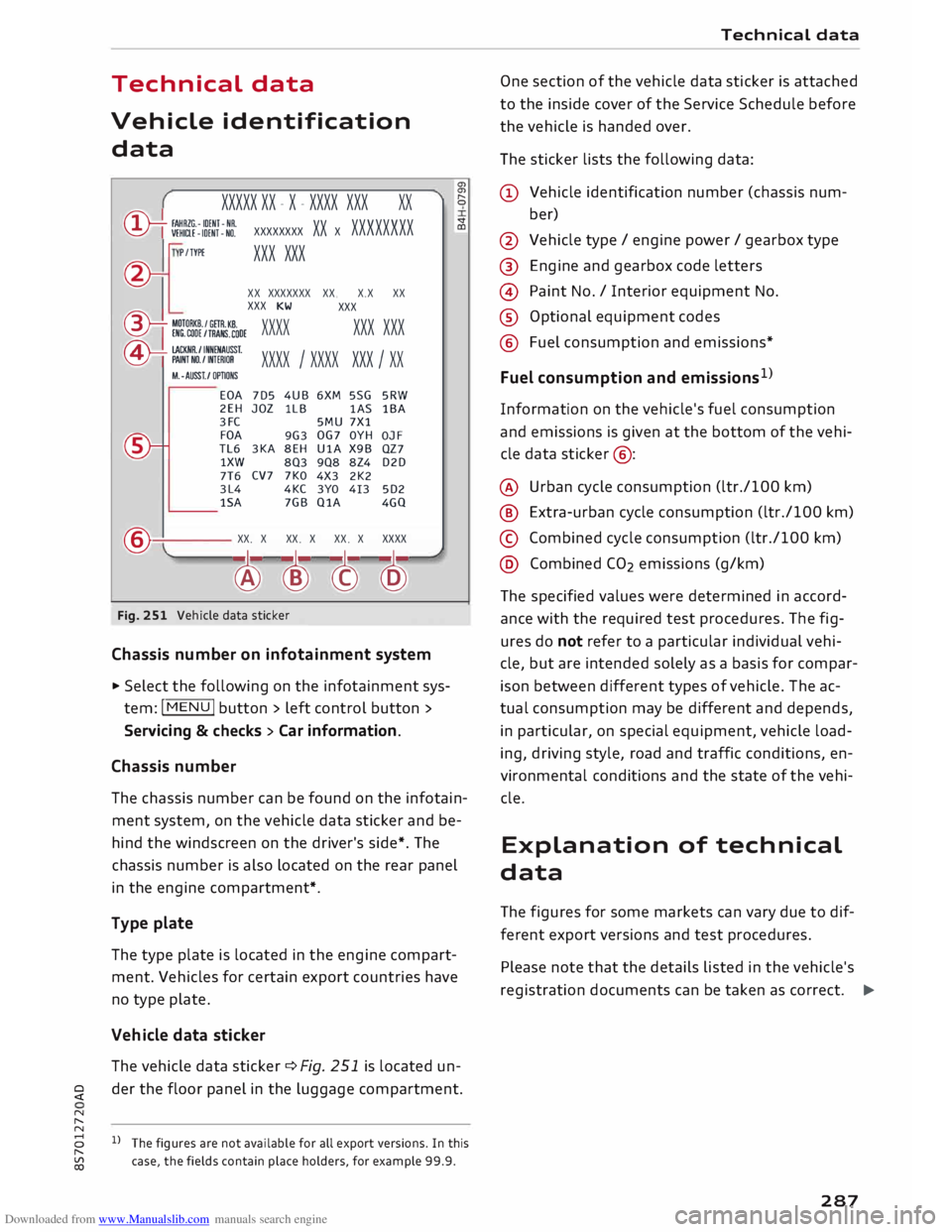
Fig. 251 Vehicle data sticker
Chassis number on infotainment system
... Select the following on the infotainment sys
tem: I MENU I button > left control button >
Servicing & checks > Car information.
Chassis number a,
a,
"
0
V
CD
The chassis number can be found on the infotain
ment system, on the vehicle data sticker and be
hind the windscreen on the driver's side*. The
chassis number is also located on the rear panel
in the engine compartment*.
Type plate
The type plate is located in the engine compart
ment. Vehicles for certain export countries have
no type plate.
Vehicle data sticker
The vehicle data sticker¢ Fig. 251 is located un-
� der
the floor panel in the luggage compartment.
N
,.....
N
8 l}The figures are not available for all export versions. In this
,.....
� case,
the fields contain place holders, for example 99.9. Technical
data
One section of the vehicle data sticker is attached
to the inside cover of the Service Schedule before
the vehicle is handed over.
The sticker lists the following data:
(!) Vehicle identification number (chassis num-
ber)
@ Vehicle type/ engine power/ gearbox type
@ Engine and gearbox code letters
@ Paint No./ Interior equipment No.
® Optional equipment codes
@ Fuel consumption and emissions*
Fuel consumption and emissions 1
>
Information on the vehicle's fuel consumption
and emissions is given at the bottom of the vehi
cle data sticker @:
@ Urban cycle consumption (ltr./100 km)
@ Extra-urban cycle consumption (ltr./100 km)
© Combined cycle consumption (ltr./100 km)
@ Combined CO2 emissions (g/km)
The specified values were determined in accord
ance with the required test procedures. The fig
ures do not refer to a particular individual vehi
cle, but are intended solely as a basis for compar
ison between different types of vehicle. The ac
tual consumption may be different and depends,
in particular, on special equipment, vehicle load
ing, driving style, road and traffic conditions, en
vironmental conditions and the state of the vehi
cle.
Explanation of technical
data
The figures for some markets can vary due to dif
ferent export versions and test procedures.
Please note that the details listed in the vehicle's
registration documents can be taken as correct. .,.
287
Page 293 of 306
Downloaded from www.Manualslib.com manuals search engine Audi
phone box . . . . . . . . . . . . . . . . . . . . . . . 146
Audi side assist
see Side assist . . . . . . . . . . . . . . . . . . . . . . . 97
Audi smartphone interface ......... 210, 215
Audi virtual cockpit (instrument cluster) 10
AUTO Automatic air conditioner . . . . . . . . . . . . . . 62
Automatic headlights . . . . . . . . . . . . . . . . . 44
Auto Lock (central locking system) . . . . . . . .
27
Automatic air conditioner
see Air conditioner (automatic) . . . . . . . . . . 62
Automatic gearbox . . . . . . . . . . . . . . . . . . . . .
76
Back-up programme . . . . . . . . . . . . . . . . . . 83
Downhill speed control
. . . . . . . . . . . . . . . .
80
Driving tips . . . . . . . . . . . . . . . . . . . . . . . . . .
79
Kick-down . . . . . . . . . . . . . . . . . . . . . . . . . . . 81
Launch control programme . . . . . . . . . . . . . 82
Malfunction . . . . . . . . . . . . . . . . . . . . . . . . . 78
Manual gear selection . . . . . . . . . . . . . . . . . 81
Manual release of selector lever . . . . . . 84, 85
Selector lever lock . . . . . . . . . . . . . . . . . . . . 78
Selector lever positions . . . . . . . . . . . . . . . .
77
Steering wheel with paddle levers . . . . . . . 81
tiptronic . . . . . . . . . . . . . . . . . . . . . . . . . . . .
81
Automatic zoom (navigation) . . . . . . . . . . .
180
AUX input . . . . . . . . . . . . . . . . . . . . . . . 198, 199
Average fuel consumption . . . . . . . . . . . . . . .
25
Average speed . . . . . . . . . . . . . . . . . . . . . . . .
25
Axle loads . . . . . . . . . . . . . . . . . . . . . . . . . . . 288
B
BACK button . . . . . . . . . . . . . . . . . . . . . . . . .
121
Background lighting . . . . . . . . . . . . . . . . . . . . 48
Balance (sound) ...................... 217
Bandages see First-aid kit . . . . . . . . . . . . . . . . . . . . . 269
Bass (sound) . . . . . . . . . . . . . . . . . . . . . . . . .
217
Battery . . . . . . . . . . . . . . . . . . . . . . . . . . . . .
250
Charge . . . . . . . . . . . . . . . . . . . . . . . . . . . . 118
Charging . . . . . . . . . . . . . . . . . . . . . . . . 15, 251
Indicator lamp . . . . . . . . . . . . . . . . . . . . . . . 15
Power management .. . . . . . . . . . . . . . . . . 118
Winter conditions . . . . . . . . . . . . . . . . . . . 251
0
� Battery,
charging (mobile devices) . . . . . . . 146
� Belts
::2 see
Seat belts . . . . . . . . . . . . . . . . . . . . . . . 230
Vl
CX) Index
Better route (navigation) . . . . . . . . . . . . . . . 184
Biodiesel . . . . . . . . . . . . . . . . . . . . . . . . . . . . 241
Bioethanol (fuel) . . . . . . . . . . . . . . . . . . . . .
241
Blower (air conditioner) . . . . . . . . . . . . . . 61, 62
Bluetooth Audio player . . . . . . . . . . . . . . . . . . . . . . . . 194
Connecting a mobile phone . . . . . . . . . . . . 142
Remote SIM Access Profile . . . . . . . . . . . . 160
Settings . . . . . . . . . . . . . . . . . . . . . . . . . . . 215
Boost pressure display . . . . . . . . . . . . . . . . . . 26
Boot see Luggage compartment . . . . . . . . . . . . 227
Boot lid
Manual release . . . . . . . . . . . . . . . . . . . . . . . 34
Opening/closing . . . . . . . . . . . . . . . . . . . . . . 33
Brake fluid Checking brake fluid level . . . . . . . . . . . . . 250
Brakes . . . . . . . . . . . . . . . . . . . . . . . . . . . . . . 115
Brake assist system . . . . . . . . . . . . . . . . . . 113
Brake fluid . . . . . . . . . . . . . . . . . . . . . . . . . 250
Brake pads worn . . . . . . . . . . . . . . . . . . . . . 16
Brake pedal . . . . . . . . . . . . . . . . . . . . . . . .
226
Brake servo . . . . . . . . . . . . . . . . . . . . . . . . .
115
Electro-mechanical parking brake. . . . . . . . 74
Emergency braking aid . . . . . . . . . . . . . . . 113
Emergency braking function . . . . . . . . . . . . 74
New brake pads . . . . . . . . . . . . . . . . . . . . . 115
Warning lamp . . . . . . . . . . . . . . . . . . . . . . . 13
Browser see Media centre . . . . . . . . . . . . . . . . . . . .
201
Bucket seat . . . . . . . . . . . . . . . . . . . . . . . . . . . 55
Bulbs, changing . . . . . . . . . . . . . . . . . . . . . . 284
Buttons Multi-function steering wheel. . . . . . . . 21, 23
Operating unit (MMI)................. 121
C
Cables (USB adapter/AUX adapter) . . . . . . . 197
Calling up media . . . . . . . . . . . . . . . . . . . . . .
200
Call list . . . . . . . . . . . . . . . . . . . . . . . . . . . . . 147
Call options . . . . . . . . . . . . . . . . . . . . . . . . . .
155
Camera-based traffic sign recognition . . . . . 90
Capacities Fuel tank. . . . . . . . . . . . . . . . . . . . . . . . . . .
288
Washer fluid reservoir . . . . . . . . . . . . . . . . 288
Caps for wheel bolts, removing . . . . . . . . . .
272
291
Page 294 of 306
Downloaded from www.Manualslib.com manuals search engine Index
Car care
Washing/cleaning . . . . . . . . . . . . . . . . . . . 263
Car keys . . . . . . . . . . . . . . . . . . . . . . . . . . . . . . 27
Car phone . . . . . . . . . . . . . . . . . . . . . . . 141, 156
Catalytic converter . . . . . . . . . . . . . . . . . . . .
244
CD drive . . . . . . . . . . . . . . . . . . . . . . . . . . . . .
193
Central locking system . . . . . . . . . . . . . . . . . .
27
Boot lid . . . . . . . . . . . . . . . . . . . . . . . . . . . . . 33
Central locking switch . . . . . . . . . . . . . . . . .
31
Electric windows . . . . . . . . . . . . . . . . . . . . .
35
Locking doors manually . . . . . . . . . . . . . . . . 32
Remote control key . . . . . . . . . . . . . . . . . . .
29
Settings .. .. .. .. .. .. .. .. .. .. . . .. .. ..
31
Centre armrest . . . . . . . . . . . . . . . . . . . . . . . .
55
Centre console lighting, adjusting brightness
.48
Cetane number (diesel) . . . . . . . . . . . . . . . .
241
Changing bulbs . . . . . . . . . . . . . . . . . . . . . . .
284
Charging battery (mobile devices) . . . . 198, 199
Chassis number . . . . . . . . . . . . . . . . . . . . . .
287
Child lock . . . . . . . . . . . . . . . . . . . . . . . . . . .
204
Child seats . . . . . . . . . . . . . . . . . . . . . . . . . .
223
Categories . . . . . . . . . . . . . . . . . . . . . . . . .
224
ISOFIX . . . . . . . . . . . . . . . . . . . . . . . . . . . .
225
Side airbags . . . . . . . . . . . . . . . . . . . . . . . .
224
Cigarette lighter . . . . . . . . . . . . . . . . . . . . . . . 56
Cleaning . . . . . . . . . . . . . . . . . . . . . . . . . . . .
263
Cleaning/de-icing windows . . . . . . . . . . . . . 265
Cleaning/treating natural leather . . . . . . . . 266
Cleaning Alcantara . . . . . . . . . . . . . . . . . . . .
266
Cleaning Audi virtual cockpit . . . . . . . . . . . .
265
Cleaning carbon parts . . . . . . . . . . . . . 265, 266
Cleaning controls and displays . . . . . . . . . . 265
Cleaning displays . . . . . . . . . . . . . . . . . . . . . 265
Cleaning fabrics . . . . . . . . . . . . . . . . . . . . . .
266
Cleaning instrument cluster . . . . . . . . . . . .
265
Cleaning leatherette . . . . . . . . . . . . . . . . . . .
266
Cleaning plastic parts . . . . . . . . . . . . . . . . . .
265
Cleaning seat upholstery . . . . . . . . . . . . . . . 266
Cleaning windbreak
Closing 265
Bonnet . . . . . . . . . . . . . . . . . . . . . . . . . . . .
245
Windows ........................... 34
Coasting mode . . . . . . . . . . . . . . . . . . . . . . . .
82
Coat hooks . . . . . . . . . . . . . . . . . . . . . . . . . . .
5 7
Cold engine . . . . . . . . . . . . . . . . . . . . . . . . . . . 66
292 Colour
code . . . . . . . . . . . . . . . . . . . . . . . . . .
287
Coming home . . . . . . . . . . . . . . . . . . . . . . . . . 47
Command see Command (speech dialogue system) . 132
Command (speech dialogue system) . . . . . . 133
Compact temporary spare wheel . . . . . . . . . 276
Compartments . . . . . . . . . . . . . . . . . . . . . . . .
57
Compass in mirror . . . . . . . . . . . . . . . . . . . . .
52
Conference calls . . . . . . . . . . . . . . . . . . . . . . 148
Connection manager 213
Connections see Media . . . . . . . . . . . . . . . . . . . . . .
191, 200
Connection settings . . . . . . . . . . . . . . . . . . .
213
Consumption (fuel)
. . . . . . . . . . . . . . . . 25, 287
Contacts Displaying details.. . . . . . . . . . . . . . . . . . . 154
From another directory . . . . . . . . . . . . . . . 214
Importing/exporting . . . . . . . . . . . . . . . . .
154
Memory capacity . . . . . . . . . . . . . . . . . . . .
156
Searching for . . . . . . . . . . . . . . . . . . . . . . .
154
Storing as a destination...............
175
Control buttons . . . . . . . . . . . . . . . . . . . . . .
123
Controls Multi-function steering wheel..... ...... 21
Controls and displays (overview) . . . . . . . . . . . 8
Control units . . . . . . . . . . . . . . . . . . . . . . . . . 119
Convenience key
Indicator lamp . . . . . . . . . . . . . . . . . . . . . . .
70
Switching off engine (START ENGINE STOP
button) . . . . . . . . . . . . . . . . . . . . . . . . . . . . . 69
Convenience open/close . . . . . . . . . . . . . . . . . 35
Cooling mode (air conditioner) . . . . . . . . 61, 62
Cooling system
Anti-freeze . . . . . . . . . . . . . . . . . . . . . . . . . 249
Checking coolant level . . . . . . . . . . . . . . . . 249
Coolant temperature gauge . . . . . . . . . . . . 10
Topping up coolant . . . . . . . . . . . . . . . . . . 249
Warning lamp . . . . . . . . . . . . . . . . . . . . . . . 14
Cornering light . . . . . . . . . . . . . . . . . . . . . . . 100
Crank (for closing soft top manually) . . . . . . 42
Crosshairs . . . . . . . . . . . . . . . . . . . . . . . . . . . 171
Cruise control system
Adjusting stored speed . . . . . . . . . . . . . . . .
87
Pre-selecting a speed . . . . . . . . . . . . . . . . . .
87
Switching off . . . . . . . . . . . . . . . . . . . . . . . .
87
Switching on . . . . . . . . . . . . . . . . . . . . . . . . . 86
Page 296 of 306
Downloaded from www.Manualslib.com manuals search engine Index
Start/stop system . . . . . . . . . . . . . . . . . . . . 71
Starting . . . . . . . . . . . . . . . . . . . . . . . . . 68, 70
Switching off . . . . . . . . . . . . . . . . . . . . . . . . 69
Engine compartment
Layout ............................. 246
Opening/closing bonnet . . . . . . . . . . . . . .
245
Safety notes . . . . . . . . . . . . . . . . . . . . . . . .
244
Engine data
see Sport displays . . . . . . . . . . . . . . . . . . . . 96
Engine management (indicator lamp) . . . . . .
17
Engine oil . . . . . . . . . . . . . . . . . . . . . . . . . . .
247
Changing . . . . . . . . . . . . . . . . . . . . . . . . . .
247
Checking oil level . . . . . . . . . . . . . . . . . . . .
247
Consumption . . . . . . . . . . . . . . . . . . . . . . .
247
Dipstick . . . . . . . . . . . . . . . . . . . . . . . . . . . .
247
Indicator lamp . . . . . . . . . . . . . . . . . . . . . . . 18
Oil change service . . . . . . . . . . . . . . . . . . .
247
Service intervals . . . . . . . . . . . . . . . . . . . . .
247
Temperature gauge . . . . . . . . . . . . . . . . . . . 26
Topping up . . . . . . . . . . . . . . . . . . . . . . . . . 247
Warning lamp . . . . . . . . . . . . . . . . . . . . . . .
14
Engine speed governing (indicator lamp) 17
Engine start/stop mode
see Start/stop system . . . . . . . . . . . . . . . . . 73
Entering information
Using MMI touch . . . . . . . . . . . . . . . . . . . . 124
Using the speller . . . . . . . . . . . . . . . . . . . . 128
Entry Using MMI touch 124
Environmental tips
Filling the tank . . . . . . . . . . . . . . . . . . . . . . 242
Leaks.............................. 245
Minimising pollution . . . . . . . . . . . . . . . . . . 67
ESC see Electronic stabilisation control (ES() . 113
ESP see Electronic stabilisation control (ES() . 113
Ethanol (fuel) . . . . . . . . . . . . . . . . . . . . . . . .
241
Event data recorder . . . . . . . . . . . . . . . . . . . 119
Event memory. . . . . . . . . . . . . . . . . . . . . . . .
119
Exterior lights . . . . . . . . . . . . . . . . . . . . . . . . . 44
Exterior mirrors
Adjusting . . . . . . . . . . . . . . . . . . . . . . . . . . .
48
Anti-dazzle setting . . . . . . . . . . . . . . . . . . .
49
Heating . . . . . . . . . . . . . . . . . . . . . . . . . . . . .
48
External speech dialogue system . . . . . . . . 139
294 F
Factory settings (MMI) . . . . . . . . . . . . . . . . .
213
Fader(sound) ........................ 217
FAME (fuel) . . . . . . . . . . . . . . . . . . . . . . . . . . 241
Fastening rings . . . . . . . . . . . . . . . . . . . . . . . 228
Fast forward/rewind (audio/video file) . . . . 200
Fast route
177
Favourites Media ............................. 203
Navigation . . . . . . . . . . . . . . . . . . . . . . . . . 171
Telephone . . . . . . . . . . . . . . . . . . . . . . . . . .
149
File formats (media drives) . . . . . . . . . . . . .
206
Filling the tank . . . . . . . . . . . . . . . . . . . . . . . 242
Fuel gauge . . . . . . . . . . . . . . . . . . . . . . . . . . 10
Opening fuel tank flap . . . . . . . . . . . . . . . . 242
Releasing tank flap manually . . . . . . . . . . 244
Tank capacity . . . . . . . . . . . . . . . . . . . . . . .
288
Using spare fuel canister . . . . . . . . . . . . . . 243
Finding entries
see Search function . . . . . . . . . . . . . . . . . .
129
Fire extinguisher . . . . . . . . . . . . . . . . . . . . . .
269
First-aid kit . . . . . . . . . . . . . . . . . . . . . . . . . .
269
Fixed oil change service . . . . . . . . . . . . . . . . 247
Flexible oil change service . . . . . . . . . . . . . . 247
Floor mats . . . . . . . . . . . . . . . . . . . . . . . . . . . 227
Fog lights . . . . . . . . . . . . . . . . . . . . . . . . . . . . 44
Footwell light . . . . . . . . . . . . . . . . . . . . . . . . .
48
Four-wheel drive . . . . . . . . . . . . . . . . . . . . . . 116
Frequency band
see Waveband 185
Front seats
see Seats . . . . . . . . . . . . . . . . . . . . . . . . . . .
54
Front window
see Windscreen . . . . . . . . . . . . . . . . . . . . . . SO
Fuel . . . . . . . . . . . . . . . . . . . . . . . . . . . . . . . .
241
Consumption . . . . . . . . . . . . . . . . . . . . 25, 287
Ethanol . . . . . . . . . . . . . . . . . . . . . . . . . . . . 241
Fuel gauge . . . . . . . . . . . . . . . . . . . . . . . . . . 10
Saving fuel ...................... 67, 100
Tank capacity . . . . . . . . . . . . . . . . . . . . . . . 288
Warning light . . . . . . . . . . . . . . . . . . . . . . . . 18
Fuel economy
Coasting mode . . . . . . . . . . . . . . . . . . . . . . .
82
Fuel range . . . . . . . . . . . . . . . . . . . . . . . . . . . . 25