stop start AUDI TT ROADSTER 2016 Owner's Manual
[x] Cancel search | Manufacturer: AUDI, Model Year: 2016, Model line: TT ROADSTER, Model: AUDI TT ROADSTER 2016Pages: 306, PDF Size: 31.82 MB
Page 82 of 306
Downloaded from www.Manualslib.com manuals search engine Driving
fully interrupted even when the engine is
idling.
- The accelerator pedal must on no account
be pressed inadvertently when the vehicle is
stationary. The vehicle could otherwise start
moving immediately (in some cases even if
the parking brake is engaged) and possibly
cause an accident.
- Do not press the accelerator while selecting
a gear with the vehicle stationary and the
engine running, as this could cause an acci
dent.
- Never move the selector lever to R or P
when driving at normal speeds, as this could
cause an accident.
- Before you drive down a steep gradient, re
duce the speed and use "tiptronic" to select
a low gear.
- Never allow the brake to drag when driving
downhill and do not use the brake pedal too
often or for long periods. Constant braking
will cause the brakes to overheat and will
considerably reduce the effectiveness of the
brakes. It will increase the braking distance
and could cause the brake system to fail.
- To avoid rolling back on gradients always
hold the vehicle with the footbrake or park
ing brake if you have to stop.
- Never attempt to hold the vehicle with the
clutch when stopping on a gradient. The
clutch is disengaged automatically if it is
overloaded and becomes too hot -accident
risk! If the clutch is overloaded, the indica
tor lamp 51 will light up and a message will
appear ¢page 83.
CD CAUTION
- When you have stopped on a gradient, do
not try to stop the vehicle rolling back by ac
celerating when a gear is engaged. This
could cause the automatic gearbox to over
heat and become damaged. Apply the park
ing brake or press the brake pedal in order
to prevent the vehicle from rolling back.
- If you allow the car to roll with the selector
lever in position N with the engine switched
off, the automatic gearbox will be damaged
as it will not be lubricated.
80 -
In certain driving and traffic conditions, for
instance in stop-and-go traffic, if you have
to pull away frequently or if the vehicle
creeps forwards over a long distance, the
gearbox can overheat and become dam
aged. If the indicator lamp 51 or the warn
ing lamp . lights up, stop the vehicle at
the first opportunity and let the gearbox
cool down ¢page 83.
- If you allow the car to roll with the engine
switched off, the S tronic gearbox will be
damaged as it will not be lubricated
¢ page 2 78, Tow-starting I towing away.
ijJ) Note
For safety reasons the parking brake will only
release automatically if the driver's seat belt
is engaged in its buckle.
Downhill speed control
Applies to: vehicles with automatic gearbox
The downhill speed control function helps the
driver when driving down steep gradients.
Downhill speed control is activated on a downhill
gradient when the selector lever is in D/S and the
driver presses the brake pedal. The gearbox auto
matically selects a suitable gear for the gradient.
The downhill speed control function attempts to
maintain the speed at which the vehicle was trav
elling when the foot brake was applied (subject
to the laws of physics and technical limitations of
the power train). It may be necessary to adjust
the speed again using the foot brake. The down
hill speed control can change down to 3rd gear
but no further, so it may be necessary to change
to tiptronic mode on very steep gradients. In this
case, change down manually to 2nd or 1st gear in
tiptronic mode to use the engine braking effect
and reduce the load on the brakes.
Downhill speed control is deactivated as soon as
the road levels out again or you press the acceler
ator pedal.
On vehicles with cruise control system*
¢ page 86, downhill speed control is activated
when you set a cruising speed.
�
Page 84 of 306
Downloaded from www.Manualslib.com manuals search engine Driving
the next higher gear is delayed until the engine
reaches maximum rpm.
A WARNING
Please note that if the road surface is slippery
or wet, the kick-down feature could cause the
driving wheels to spin, which could result in
skidding.
Coast ing mode
Applies to: vehicles with automatic gearbox
In coasting mode, you can use the vehicle's kinet
ic energy to drive without using the accelerator
on certain stretches of road. This saves fuel by al
lowing you to take your foot off the accelerator
earlier and let the vehicle coast (for instance
when approaching a speed restriction in a built
up area).
Switching on coa sting mode
Important: Selector lever must be in D, gradient
must be less than 12 %.
� Select efficiency mode in drive select*
¢page 100 (you only have to do this once).
� Take your foot off the accelerator.
If you have selected the "on-board computer"
display, the message Coasting mode will then
appear. The gearbox automatically disengages
the clutch at speeds above 20 km/h and lets the
vehicle coast without the engine braking effect.
The engine ticks over at idling speed while the ve
hicle is coasting.
Stopping coasting mode
� Press the brake pedal or accelerator.
To use the engine braking effect and overrun fuel
cut-off again, all you need to do is tap the brake
pedal briefly.
You can improve your fuel economy and help to
reduce emissions by using a combination of the
coa sting mode (i.e. coasting with low fuel con-
l l
The ESC lamp lights up permanently and the message
Stabilisation control (ESC): sport. Warning! Restricted
stability appears temporarily in the infotainment display
to indicate the deactivation status.
82 sumption
on a longer stretch of road) and the
overrun fuel cut-off (i.e. using the engine brak
ing effect with no fuel consumption on a shorter
stretch of road).
A WARNING
- If you are approaching an obstruction when
coasting mode is switched on, please re
member that the vehicle will not slow down
as quickly as usual when you take your foot
off the accelerator -risk of accident!
- The vehicle can pick up speed if you are driv
ing down a slope in coasting mode -risk of
accident!
- If other people are using your car, you
should draw their attention to the coasting
mode.
ijJ) Note
- Coasting mode is only available in efficien
cy* mode (drive select*).
- The message Coasting mode only appears
when the current fuel consumption display
is selected. The gear is no longer displayed
when you are in coasting mode (e.g. E in
stead of E6).
- The coasting mode is deactivated tempora
rily on gradients of 15 % or greater.
Launch control programme
Applies to: vehicles with automatic gearbox
The launch control programme enables maxi
mum acceleration.
Important: The engine must be warm and the
steering wheel must be pointing straight ahead.
� Deactivate the start/stop system*¢ page 73.
The LED in the l(A)""
I button will light up.
� Deactivate the hold assist* ¢ page 76. The LED
in the button will go out.
� Press the IJ,OFF! button
once briefly while the
engine is running 1
). �
Page 85 of 306
Downloaded from www.Manualslib.com manuals search engine 0
N
,.....
N
......
0
,.....
Vl
CX) ...
Briefly pull the selector lever back from posi
tion D/S to select position S, or move the selec
tor lever to the right into the tiptronic gate, or
select dynamic mode in drive select*
�page 100.
... Press the brake pedal firmly with your left foot
and hold it down for at least one second.
... At the same time, press the accelerator all the
way down with your right foot until the engine
revs are high and steady.
... Take your left foot off the brake.
A WARNING
-Always adapt your driving style to the traffic
conditions.
- Only use the launch control programme
when road and traffic conditions permit,
and make sure your manner of driving and
accelerating the vehicle does not inconven
ience or endanger other road users.
- Please note that the driven wheels may
start to spin when the sport mode is switch
ed on, causing the vehicle to lose grip, in
particular on slippery or wet roads -danger
of skidding!
- When acceleration has been completed, you
should deactivate the sport mode again by
briefly pressing
the I� OFF! button.
(D) Note
- The gearbox may be hot after you have used
the launch control programme. In this case,
the programme may not be available for
several minutes. The programme will be
available again after a cool-down period.
-Accelerating with the launch control pro
gramme places a heavy load on all parts of
the vehicle. This can result in increased wear
and tear.
Gearbox malfunction
Applies to: vehicles with automatic gearbox
• Gearbox malfunction! Please stop the vehi
cle and select P Driving
There is a malfunction in the gearbox. Park the
vehicle safely and do not drive on. Obtain profes
sional assistance.
• Gearbox overheating: please stop vehicle
The gearbox is overheating and could be dam
aged. Stop the vehicle and let the gearbox cool
down with the engine idling and the selector lev
er in position P. If the indicator lamp and the
message disappear, drive to a qualified workshop
soon and have the fault rectified. Do not drive on
if the warning lamp stays on and the message
does not disappear. You should obtain professio
nal assistance.
ID Gearbox malfunction: you can continue driv
ing. See owner's manual
Drive to a qualified workshop soon and have the
fault rectified.
ID Gearbox malfunction: no reverse gear. You
can continue driving
A gearbox malfunction has occurred. The gearbox
will switch to the back-up programme. The pro
gramme will only move into certain gears or may
not be able to shift gears at all. The engine may
stall. You can no longer engage reverse gear.
Drive to a qualified workshop without delay and
have the fault rectified.
ID Gearbox malfunction: you can continue driv
ing in D until engine off
Park your vehicle well away from moving traffic.
Obtain professional assistance.
ID Gearbox overheating: please adapt driving
style
You can continue driving at moderate speed. You
can resume normal driving if the indicator lamp
goes out.
ID Gearbox: please press brake pedal and select
gear again
If a gearbox malfunction has occurred due to
overheating, this message will appear once the
gearbox has cooled down again.
83
Page 96 of 306
Downloaded from www.Manualslib.com manuals search engine Driver
assist systems
This message is displayed when the camera is no
longer functional after the system has continu
ously failed to detect the lane markings. This can
have the following causes:
- The outside of the camera window¢ page 93,
Fig. 95 is dirty or frosted. Remove dirt or ice
from this area of the windscreen.
- The inside of the camera window is misted up.
In this case, wait for the camera window to de
mist before switching on the active lane assist
system again.
- Due to the road conditions, the system has not
been able to detect the lane markings for a
long period. Do not switch the active lane assist
system on again before the lane markings are
discernible.
Audi active lane assist: currently unavailable.
See owner's manual
A temporary fault is preventing the active lane
assist system from being switched on. Try switch
ing on the active lane assist system again later.
Audi active lane assist: fault. See owner's man
ual
Drive to a qualified workshop soon and have the
fault rectified.
Audi active lane assist: please take over steering
This message will appear if you do not steer the
vehicle yourself. In this case, the active lane as
sist will switch to "not ready for warning" but will
not be deactivated completely. The system can
assist you to keep the vehicle in the lane. Howev
er it is your own responsibility to steer and con
trol the vehicle.
A WARNING
Please note that the messages only appear
with a delay or are not displayed at all on
vehicles with additional equipment (such as
steering wheel knobs) fitted on the steering
wheel. Always keep your hands on the steer
ing wheel.
l l
The steering input function is not available on all export
versions.
94 Setting
the steering input time and
vibration warning
Applies to: vehicles with Audi active lane assist
You can change the active Lane assist settings on
the infotainment system to suit your individual
preferences.
Select the following
on the infotainment system:
!MENU! button> Car > left control button> Driv
er assist > Audi active lane assist.
Steering input1
)
early: If this setting is selected, a continuous
steering input assists the driver to keep the vehi
cle in the middle of the lane.
late: If this setting is selected, the steering is not
corrected until just before a wheel touches a de
tected lane marking.
Vibration warning
You can switch the additional steering wheel vi
bration warning on/off.
(Q'j) Note
Your personal settings are stored automati
cally and assigned to the remote control key
which is being used (only applies to some
countries).
Lap timer
Introduction
Applies to: vehicles with lap timer
Lap timer
You can use the lap timer in the display to record
and evaluate lap times. The times are recorded in
minutes, seconds and tenths of a second. The
hour will appear in the display and the tenths of a
second will disappear if the session lasts for over
60 minutes.
Individual lap times stop automatically after
99 hours 59 minutes and 59 seconds. A new lap
will then start automatically.
�
Page 97 of 306
Downloaded from www.Manualslib.com manuals search engine 0
N
,.....
N
......
0
,.....
Vl
CX) The
lap timer stops after a maximum of 30 laps.
You can then evaluate the lap times or start a
new session.
The lap timer is operated using the controls on
the multi-function steering wheel¢ page 95.
A WARNING
Please direct your full attention at all times to
the road! As the driver, you have full responsi
bility for the safety of the vehicle and other
road users. For this reason, you should only
use the lap timer functions in a manner that
allows you to maintain control of the vehicle
in all situations -accident risk!
ijj} Note
You can call up information from the on
board computer while the stopwatch of the
lap timer is running.
Calling up the lap timer and recording lap
times
Applies to: vehicles with lap timer
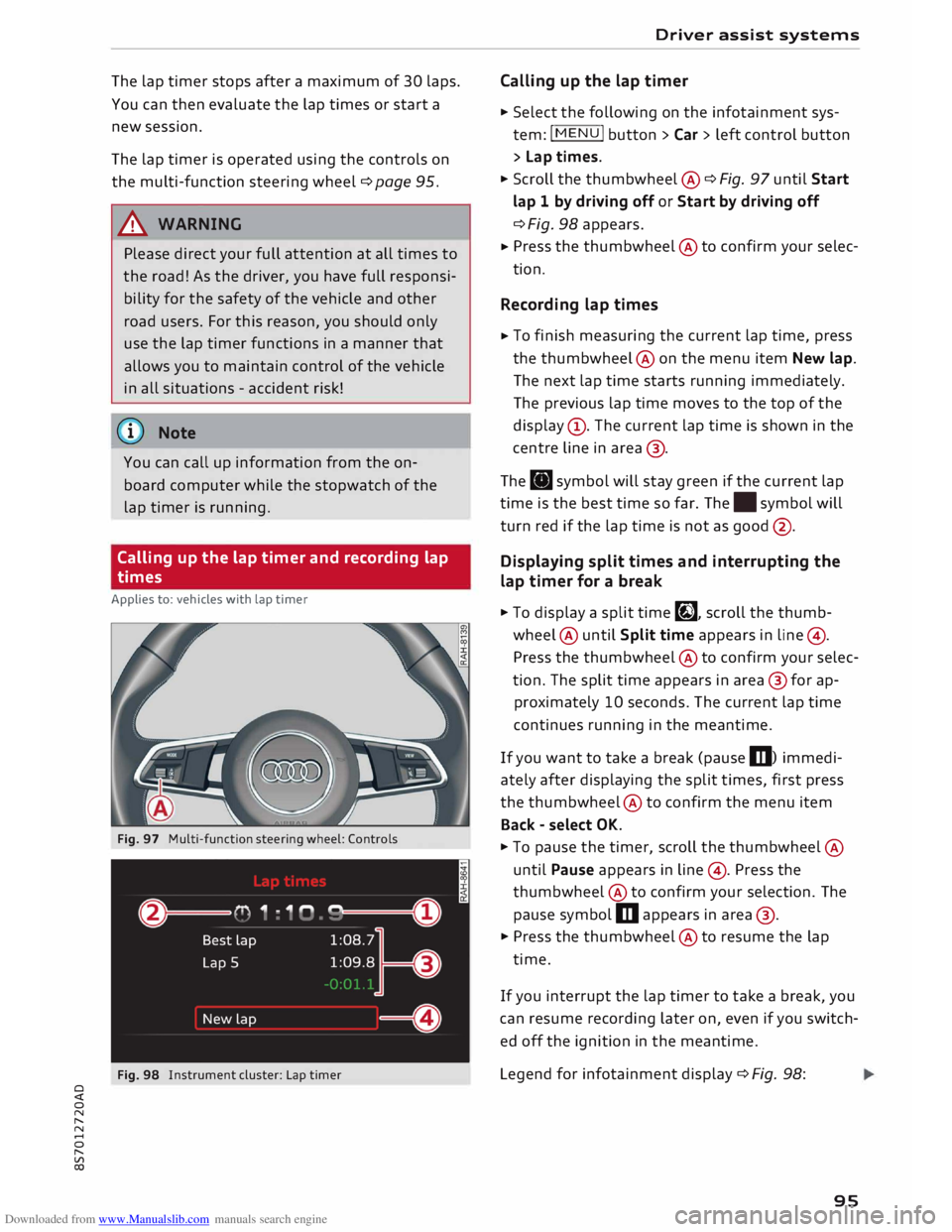
Fig. 97 Multi-function steering wheel: Controls
Fig. 98 Instrument cluster: Lap timer Driver
assist systems
Calling up the lap timer
� Select the following on the infotainment sys
tem: I MENU I button >Car> left control button
> Lap times.
� Scroll the thumbwheel @ ¢ Fig. 97 until Start
lap 1 by driving off or Start by driving off
¢ Fig. 98 appears.
� Press
the thumbwheel @to confirm your selec
tion.
Recording lap times
� To
finish measuring the current lap time, press
the thumbwheel@ on the menu item New lap.
The next lap time starts running immediately.
The previous lap time moves to the top of the
display (!). The current lap time is shown in the
centre line in area @.
The . symbol will stay green if the current lap
time is the best time so far. The. symbol will
turn red if the lap time is not as good @.
Displaying split times and interrupting the
lap timer for a break
� To display a split time�, scroll the thumb
wheel @ until Split time appears in line@) .
Press the thumbwheel @to confirm your selec
tion. The split time appears in area @for ap
proximately 10 seconds. The current lap time
continues running in the meantime.
If you want to take a break (pause m) immedi
ately after displaying the split times, first press
the thumbwheel @to confirm the menu item
Back -select OK.
� To pause the timer, scroll the thumbwheel @
until Pause appears in line @). Press the
thumbwheel @to confirm your selection. The
pause symbol m appears in area @.
� Press the thumbwheel @to resume the lap
time.
If you interrupt the lap timer to take a break, you
can resume recording later on, even if you switch
ed off the ignition in the meantime.
Legend for infotainment display¢ Fig. 98:
95
Page 106 of 306
Downloaded from www.Manualslib.com manuals search engine Parking
aids
Rear parking aid
Description
Applies to: vehicles with rear parking aid
The rear parking aid is an acoustic parking sys
tem.
Description
Sensors are located in the rear bumper. When
the sensors detect an obstacle, you are alerted by
acoustic signals (beeps).
Please ensure that the sensors are kept free of
stickers, deposits and any other substances
which could impair the function of the system.
Notes on cleaning ¢page 263.
The measuring range of the sensors starts at
about:
I Side
Centre 1.60 m
The acoustic signals sound with increasing fre
quency as you approach the obstacle. A warning
tone will sound continuously when the vehicle is
less than approx. 0.30 m away from the obstacle.
Stop reversing immediately¢ A in General notes
on page 103, ¢ 0 in General notes on page 103 !
The volume of the warning beeps will be gradual
ly reduced after about four seconds if the vehicle
remains at a constant distance from a detected
obstacle (it will not be reduced if the obstacle is
closer than 0.30 m).
Activating
The rear parking aid is activated automatically
when reverse gear is engaged. You will hear a
brief acknowledgement tone.
104 Parking
system plus
Description
Applies to: vehicles with parking system plus/park assist
The parking system plus provides acoustic and
visual assistance when parking.
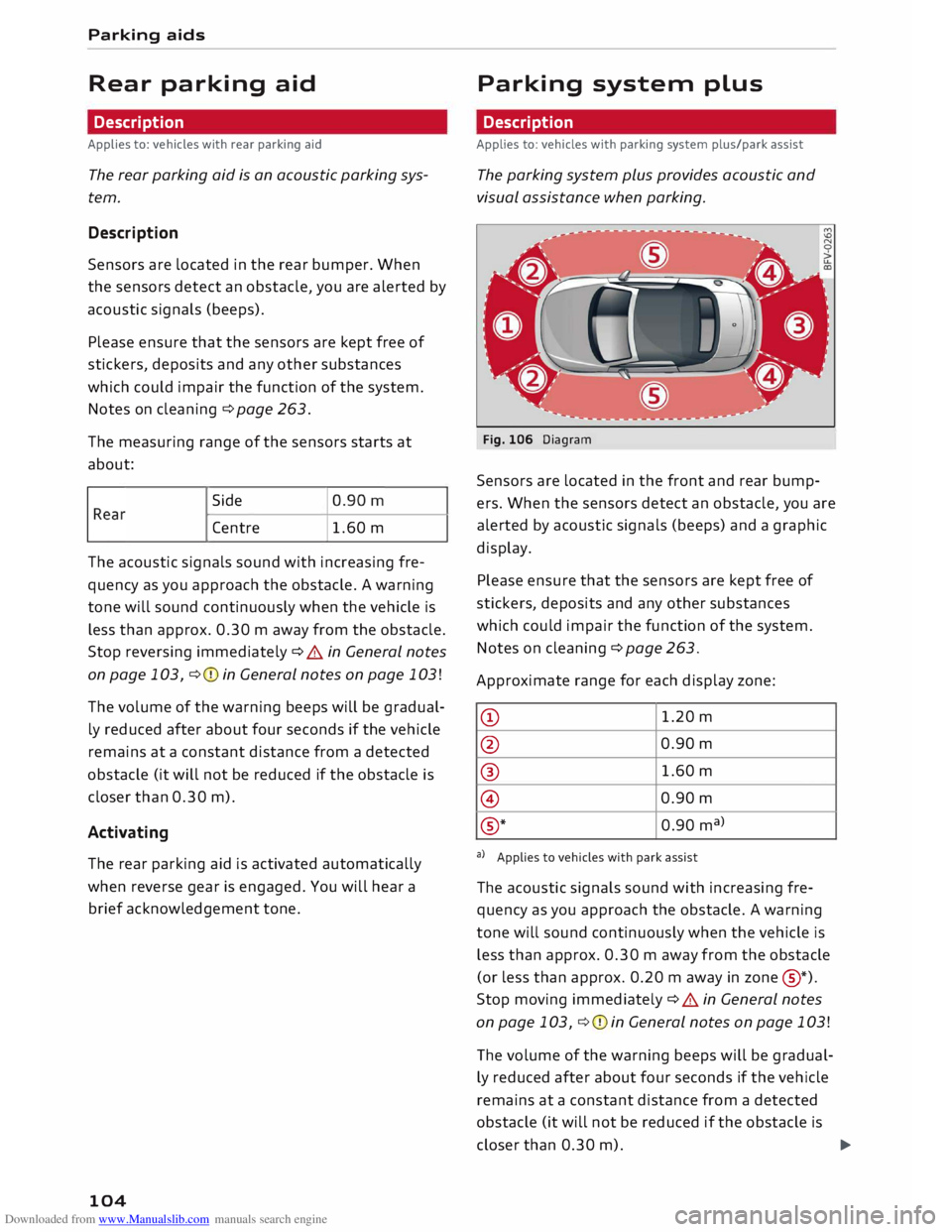
Fig. 106 Diagram
Sensors are located in the front and rear bump
ers. When the sensors detect an obstacle, you are
alerted by acoustic signals (beeps) and a graphic
display.
Please ensure that the sensors are kept free of
stickers, deposits and any other substances
which could impair the function of the system.
Notes on cleaning ¢ page 263.
Approximate range for each display zone:
CD 1.20
m
@ 0.90
m
® 1.60
m
@ 0.90
m
® *
0.90
ma
>
a) Applies to vehicles with park assist
The acoustic signals sound with increasing fre
quency as you approach the obstacle. A warning
tone will sound continuously when the vehicle is
less than approx. 0.30 m away from the obstacle
(or less than approx. 0.20 m away in zone @
*)
.
Stop moving immediately ¢ A in General notes
on page 103, ¢ 0 in General notes on page 103 !
The volume of the warning beeps will be gradual
ly reduced after about four seconds if the vehicle
remains at a constant distance from a detected
obstacle (it will not be reduced if the obstacle is
closer than 0.30 m).
...,
Page 112 of 306
Downloaded from www.Manualslib.com manuals search engine Parking
aids
- The best parking results will be achieved if
you position the vehicle as parallel as possi
ble to the line of parked cars or the kerb be
fore you start the actual parking manoeu
vre.
-If there are suitable parking spaces on both
sides of the road (for instance on a one-way
street), you can change the direction of the
turn signals to park on the other side, even
if you have already activated the park assist.
Parking parallel to the roadside
Applies to: vehicles with park assist
The driver is responsible for parking the vehicle.
t' 3 '\.
I
\
- IR
�
- 1 '"*-w )
' -,-,.
-
\
}
__
D�
; READY
'\. * OFF
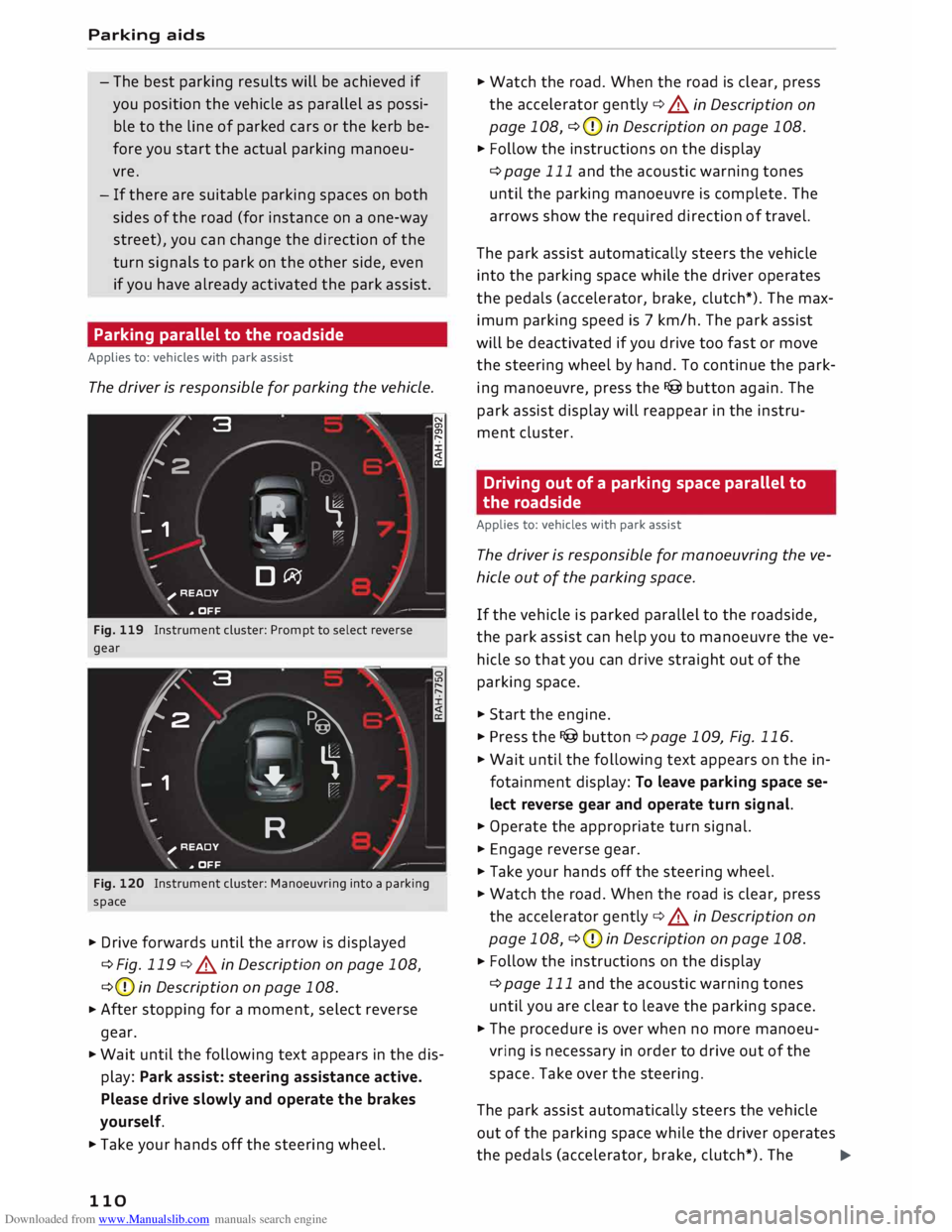
Fig. 119 Instrument cluster: Prompt to select reverse
gear
'2' 3
2
,
I
- - 1 '\.
� \
�
'-.
'--""'."" ' I
R )_
;
READY
_,,..,
'\. * OFF
Fig. 120 Instrument cluster: Manoeuvring into a parking
space
� Drive forwards until the arrow is displayed
¢Fig. 119 ¢.&.
in Description on page 108,
¢ (D
in Description on page 108.
� After
stopping for a moment, select reverse
gear.
� Wait until the following text appears in the dis
play: Park assist: steering assistance active.
Please drive slowly and operate the brakes
yourself.
� Take your hands off the steering wheel.
110 �
Watch the road. When the road is clear, press
the accelerator gently ¢.&.
in Description on
page 108, ¢(D
in Description on page 108.
� Follow the instructions on the display
¢page 111 and the acoustic warning tones
until the parking manoeuvre is complete. The
arrows show the required direction of travel.
The park assist automatically steers the vehicle
into the parking space while the driver operates
the pedals (accelerator, brake, clutch*). The max
imum parking speed is 7 km/h. The park assist
will be deactivated if you drive too fast or move
the steering wheel by hand. To continue the park
ing manoeuvre, press the I@ button again. The
park assist display will reappear in the instru
ment cluster.
Driving out of a parking space parallel to
the roadside
Applies to: vehicles with park assist
The driver is responsible for manoeuvring the ve
hicle out of the parking space.
If the vehicle is parked parallel to the roadside,
the park assist can help you to manoeuvre the ve
hicle so that you can drive straight out of the
parking space.
� Start the engine.
� Press the I@ button ¢ page 109, Fig. 116.
� Wait until the following text appears on the in
fotainment display: To leave parking space se
lect reverse gear and operate turn signal.
� Operate the appropriate turn signal.
� Engage reverse gear.
� Take your hands off the steering wheel.
� Watch the road. When the road is clear, press
the accelerator gently ¢.&.
in Description on
page 108, ¢(D
in Description on page 108.
� Follow
the instructions on the display
¢page 111 and the acoustic warning tones
until you are clear to leave the parking space.
� The procedure is over when no more manoeu
vring is necessary in order to drive out of the
space. Take over the steering.
The park assist automatically steers the vehicle
out of the parking space while the driver operates
the pedals (accelerator, brake, clutch*). The
�
Page 113 of 306
Downloaded from www.Manualslib.com manuals search engine maximum
manoeuvring speed is 5 km/h. The
park assist will be deactivated if you drive too
fast or move the steering wheel by hand. To con
tinue the parking manoeuvre, switch the engine
off/on. Then press the I@ button again. Alterna
tively, drive out of the parking space without us
ing the park assist.
Driver messages
Applies to: vehicles with park assist
Iii! Park assist: steering assistance active.
Please drive slowly and operate the brakes your
self
The park assist is ready. You can now park the ve
hicle. Watch the road ¢ & in Description on
page 108.
Ill Park assist: ended. Please take over steer
ing.
The park assist has finished the parking manoeu
vre.
Ill Park assist: cancelled. Continue steering ve
hicle!
The park assist has interrupted the parking ma
noeuvre to avoid a collision between the vehicle
and an obstacle.
Ill Park assist: cancelled. Steering input detec
ted. Continue steering vehicle!
The steering assistant has been deactivated be
cause the driver has intervened in the steering.
To continue the parking manoeuvre, press the
I@ button again.
[9] Reduce your speed! For the best results when
passing the line of parked cars where you want to
park, do not drive faster than 30 km/h (if parking
parallel to the roadside) or 20 km/h (if parking
perpendicular to the roadside) ¢ page 109.
Ill Park assist: cancelled. Speed too high. Con
tinue steering vehicle!
You were driving too fast into the parking space.
Do not exceed 7 km/h when driving into the park-
� ing space.
� Ill
Park assist: currently unavailable. Stabilisa
o
[;:j tion
control (ESC) off Parking aids
Switch the ES( on to use the park assist.
Iii! To leave parking space select reverse gear
and operate turn signal
The park assist is ready. You can leave the park
ing space. Watch the road ¢ & in Description on
page 108.
Ill Park assist: cancelled. Stabilisation control
(ESC) input. Continue steering vehicle!
Take over the steering. Finish parking without
the park assist or drive out of the parking space.
The park assist has interrupted the parking ma
noeuvre, because the ESC has been switched off.
Take over the steering or switch on the ESC
¢page 114 and start the parking manoeuvre
again ¢page 109.
Ill Park assist: ended. Please take over steering
and continue driving.
The park assist has finished manoeuvring the ve
hicle out of the parking space. Please take over
the steering.
Ill Park assist: cancelled. Space too small
The assist function is unable to automatically
steer the vehicle out of the parking space be
cause the space is too small. Manoeuvre the vehi
cle out of the parking space without using the
park assist.
Ill Park assist: time limit exceeded
Ill Park assist: cancelled. Time limit exceeded.
Continue steering vehicle!
The parking manoeuvre was not completed with
in about six minutes after the park assist was ac
tivated. To continue the parking manoeuvre,
press the I@ button again.
Ill Park assist: currently unavailable
Ill Park assist: currently unavailable. Continue
steering vehicle!
The park assist cannot be used to park the vehi
cle. Try repeating the parking manoeuvre or
switching the ignition off and on again.
Ill Park assist: not stopped long enough
Ill-
111
Page 117 of 306
Downloaded from www.Manualslib.com manuals search engine 0
N
,.....
N
......
0
,.....
Vl
CX) A
WARNING
You should switch on the sport mode or
switch off the ESC/traction control system
(ASR) only if your driving ability and the traf
fic conditions allow you to do so safely -dan
ger of skidding!
- The stabilising function is restricted when
sport mode is switched on. The driven
wheels may start to spin, causing the vehi
cle to lose grip, in particular on slippery or
wet roads.
- When the ESC/traction control system
(ASR) is switched off, the vehicle will not be
stabilised.
@ Note
- The ESC/traction control system (ASR) can
not be switched off and the sport mode can
not be switched on when the cruise control
system* is on.
- In the event of a malfunction in the rear
spoiler system or the Audi magnetic ride, it
may not be possible to switch off the ESC/
ASR or switch on the sport mode.
Brakes
New brake pads
New brake pads do not give full braking effect for
the first 400 km, they must first be "bedded in".
However, you can compensate for the slightly re
duced braking effect by applying more pressure
on the brake pedal. Avoid placing a heavy load on
the brakes during the running-in period.
Wear
The rate of wear on the brake pads depends a
great deal on how you drive and the conditions in
which the vehicle is operated. Negative factors
are, for instance, city traffic, frequent short trips
or hard driving with abrupt starts and stops.
Noises
Brake noise may develop in certain situations, de
pending on the speed, braking force and ambient
conditions (such as temperature and relative hu
midity). Intelligent
technology
Effect of moisture and salt
In certain conditions, such as in heavy rain, early
morning dew, or after washing the car or driving
through water, the full braking effect can be de
layed by moisture (or in winter by ice) on the
discs and brake pads. The brakes should be
"dried" by pressing the pedal to restore full brak
ing effect.
When you are driving at higher speeds with the
windscreen wipers on, the brake pads are very
briefly brought into contact with the brake discs.
This automatic process which goes unnoticed by
the driver is carried out at regular intervals and is
intended to improve braking response in wet con
ditions.
The effectiveness of the brakes can also be tem
porarily reduced if the car is driven for some dis
tance without using the brakes when there is a
lot of salt on the road in winter. The layer of salt
that accumulates on the discs and pads can be
removed with a few cautious brake applications.
Corrosion
There may be a tendency for dirt to build up on
the brake pads and corrosion to form on the discs
if the car is used infrequently, or if you only drive
low mileages without using the brakes very
much.
If the brakes are not used frequently, or if corro
sion has formed on the discs, it is advisable to
clean off the pads and discs by braking firmly a
few times from a moderately high speed ¢ A.
Faults in the brake system
If the brake pedal travel should ever increase
suddenly, this may mean that one of the two
brake circuits has failed. Drive immediately to the
nearest qualified workshop and have the fault
rectified. On the way to the dealer, be prepared
to use more pressure on the brake pedal and al
low for longer stopping distances.
Low brake fluid level
Malfunctions can occur in the brake system if the
brake fluid level is too low. The brake fluid level
is monitored electronically.
llll-
115
Page 130 of 306
Downloaded from www.Manualslib.com manuals search engine Multi
Media Interface
Speller for Letters/numbers
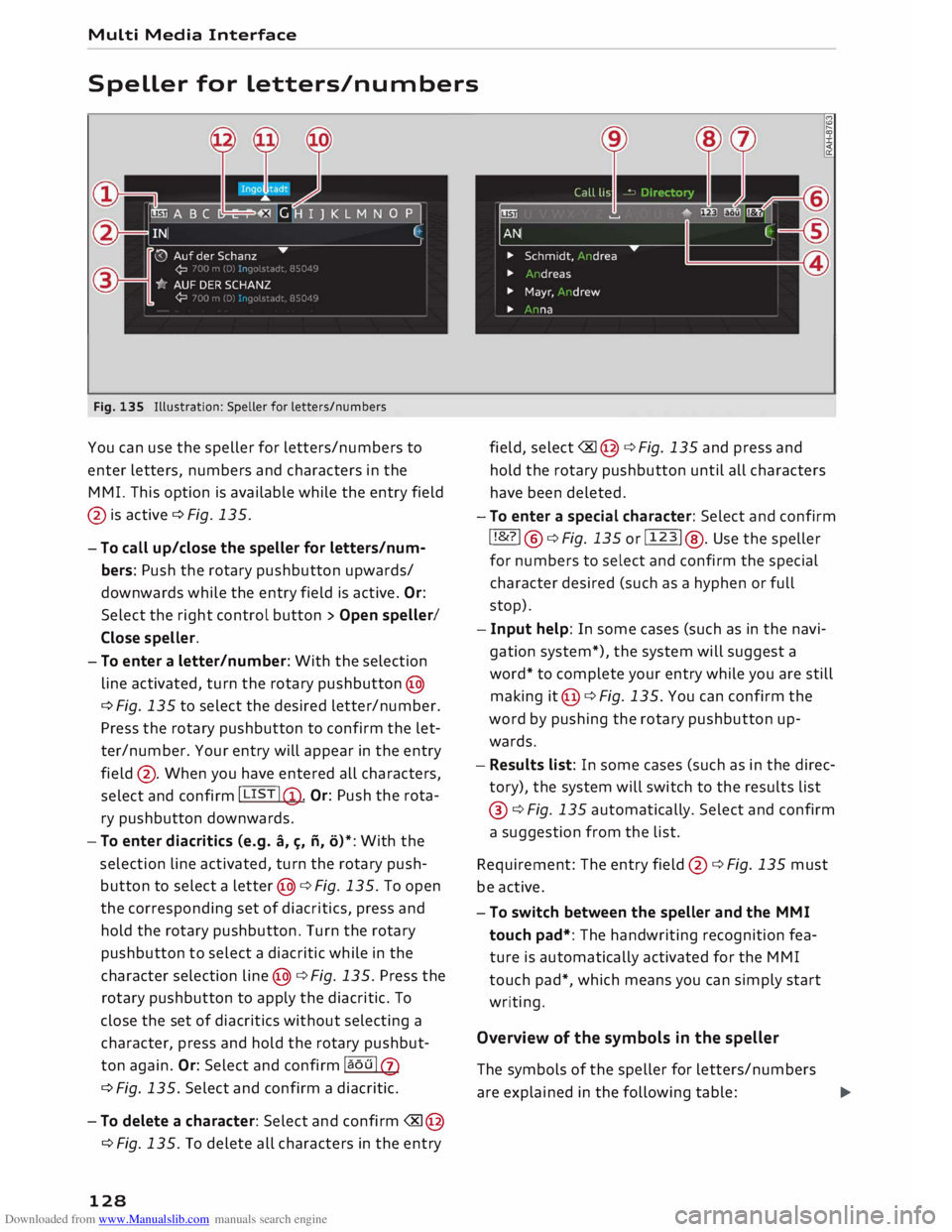
Fig. 135 Illustration: Speller for letters/numbers
You can use the speller for letters/numbers to
enter letters, numbers and characters in the
MMI. This option is available while the entry field
@ is active ¢ Fig. 135.
- To call up/close the speller for letters/num
bers: Push the rotary pushbutton upwards/
downwards while the entry field is active. Or:
Select the right control button > Open speller/
Close speller.
- To enter a letter/number: With the selection
line activated, turn the rotary pushbutton @
¢ Fig. 135 to select the desired letter/number.
Press the rotary pushbutton to confirm the let
ter/number. Your entry will appear in the entry
field @. When you have entered all characters,
select and confirm I LIST !@ .
Or: Push the rota
ry pushbutton downwards.
- To enter diacritics (e.g. a,�. ii, o)*: With the
selection line activated, turn the rotary push
button to select a letter @¢ Fig. 135. To open
the corresponding set of diacritics, press and
hold the rotary pushbutton. Turn the rotary
pushbutton to select a diacritic while in the
character selection line@¢ Fig. 135. Press the
rotary pushbutton to apply the diacritic. To
close the set of diacritics without selecting a
character, press and hold the rotary pushbut
ton again. Or: Select and confirm la ou lQ)
¢ Fig. 135. Select and confirm a diacritic.
-To delete a character: Select and confirm �@
¢Fig. 135. To delete all characters in the entry
128 field,
select� @¢ Fig. 135 and press and
hold the rotary pushbutton until all characters
have been deleted.
- To enter a special character: Select and confirm
! !&?! @¢Fig. 135 or!123! @. Use the speller
for numbers to select and confirm the special
character desired (such as a hyphen or full
stop).
- Input help: In some cases (such as in the navi
gation system*), the system will suggest a
word* to complete your entry while you are still
making it@ ¢ Fig. 135. You can confirm the
word by pushing the rotary pushbutton up
wards.
- Results list: In some cases (such as in the direc
tory), the system will switch to the results list
@ ¢Fig. 135 automatically. Select and confirm
a suggestion from the list.
Requirement: The entry field@¢ Fig. 135 must
be active.
- To switch between the speller and the MMI
touch pad*: The handwriting recognition fea
ture is automatically activated for the MMI
touch pad*, which means you can simply start
writing.
Overview of the symbols in the speller
The symbols of the speller for letters/numbers
are explained in the following table:
�