alarm AUDI TT ROADSTER 2016 Owners Manual
[x] Cancel search | Manufacturer: AUDI, Model Year: 2016, Model line: TT ROADSTER, Model: AUDI TT ROADSTER 2016Pages: 306, PDF Size: 31.82 MB
Page 31 of 306
Downloaded from www.Manualslib.com manuals search engine LED
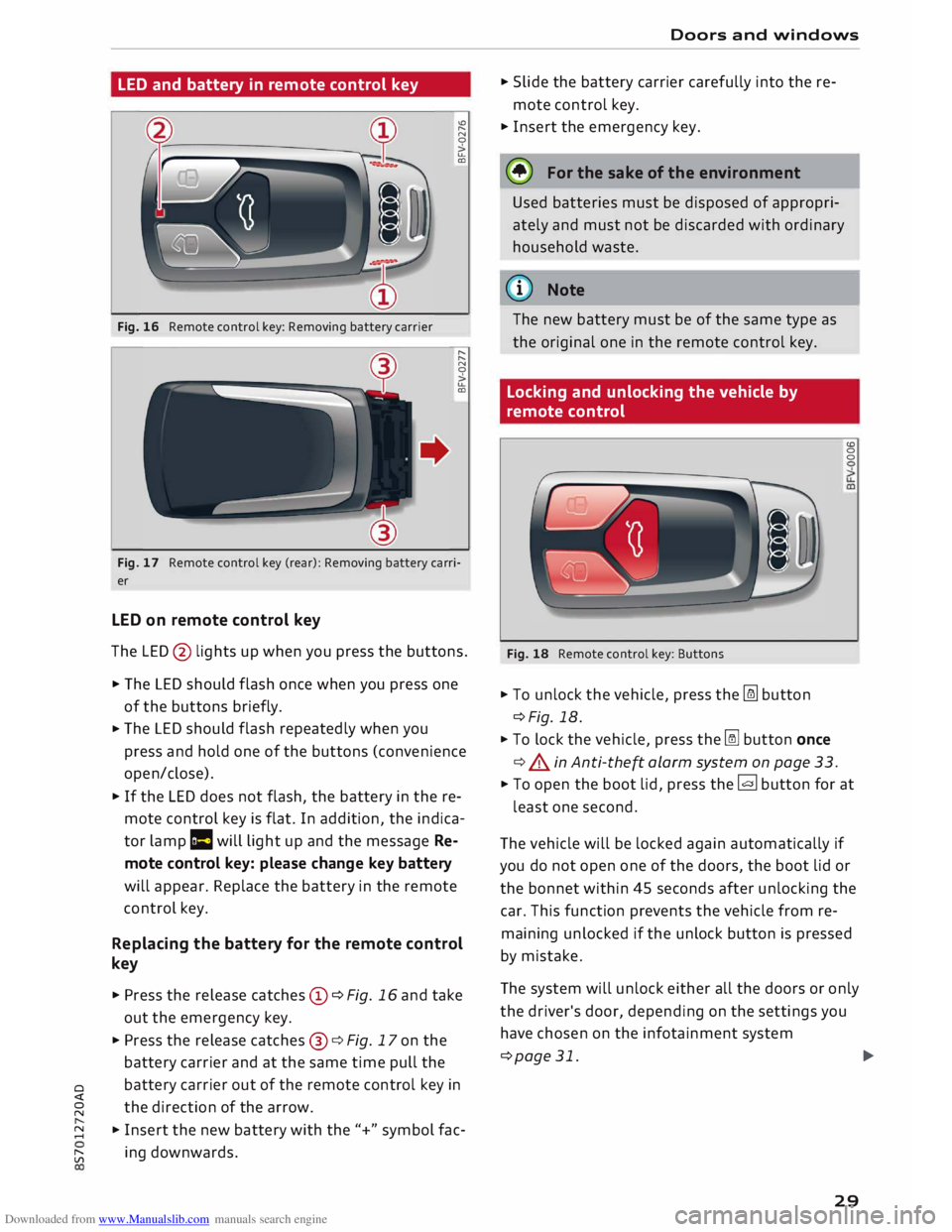
and battery in remote control key
Fig. 16 Remote control key: Removing battery carrier "'
"
N
0
>
u..
CD
"
"
N
0
>
u..
CD
Fig. 17 Remote control key (rear): Removing battery carri
er
LED on remote control key
The LED @ lights up when you press the buttons.
� The LED should flash once when you press one
of the buttons briefly.
� The
LED should flash repeatedly when you
press and hold one of the buttons (convenience
open/close).
� If
the LED does not flash, the battery in the re
mote control key is flat. In addition, the indica
tor lamp la will light up and the message Re
mote control key: please change key battery
will appear. Replace the battery in the remote
control key.
Replacing the battery for the remote control
key
� Press the release catches© ¢Fig. 16 and take
out the emergency key.
� Press the release catches@¢ Fig. 17 on the
battery carrier and at the same time pull the
o battery
carrier out of the remote control key in
direction of the arrow.
� �
Insert the new battery with the"+" symbol fac-
[;:j ing
downwards. Doors
and windows
� Slide the battery carrier carefully into the re
mote control key.
� Insert the emergency key.
@ For the sake of the environment
Used batteries must be disposed of appropri
ately and must not be discarded with ordinary
household waste.
@ Note
The new battery must be of the same type as
the original one in the remote control key.
Locking and unlocking the vehicle by
remote control
Fig. 18 Remote control key: Buttons
� To unlock the vehicle, press the [m button
¢Fig. 18.
� To lock the vehicle, press the� button once
¢ .&. in Anti-the� alarm system on page 33. (0
0
0
� To open the boot lid, press the� button for at
least one second.
The vehicle will be locked again automatically if
you do not open one of the doors, the boot lid or
the bonnet within 45 seconds after unlocking the
car. This function prevents the vehicle from re
maining unlocked if the unlock button is pressed
by mistake.
The system will unlock either all the doors or only
the driver's door, depending on the settings you
have chosen on the infotainment system
¢page 31.
.,..
29
Page 32 of 306
Downloaded from www.Manualslib.com manuals search engine Doors
and windows
_& WARNING
On vehicles with an anti-theft alarm system*,
do not leave anyone (especially children) in
the car if it is locked from the outside and the
safelock mechanism* is activated: the doors
and windows cannot then be opened from the
inside ¢ page 32. Locked doors could delay
assistance in an emergency, potentially put
ting lives at risk.
Note
- Do not use the remote control key when the
vehicle is out of sight.
- On vehicles with the convenience key* the
selector lever must be in P, otherwise it will
not be possible to lock the vehicle.
Locking and unlocking the vehicle with the
convenience key
Applies to: vehicles with convenience key
The doors and the boot lid can be locked and un
locked without handling the remote control key.
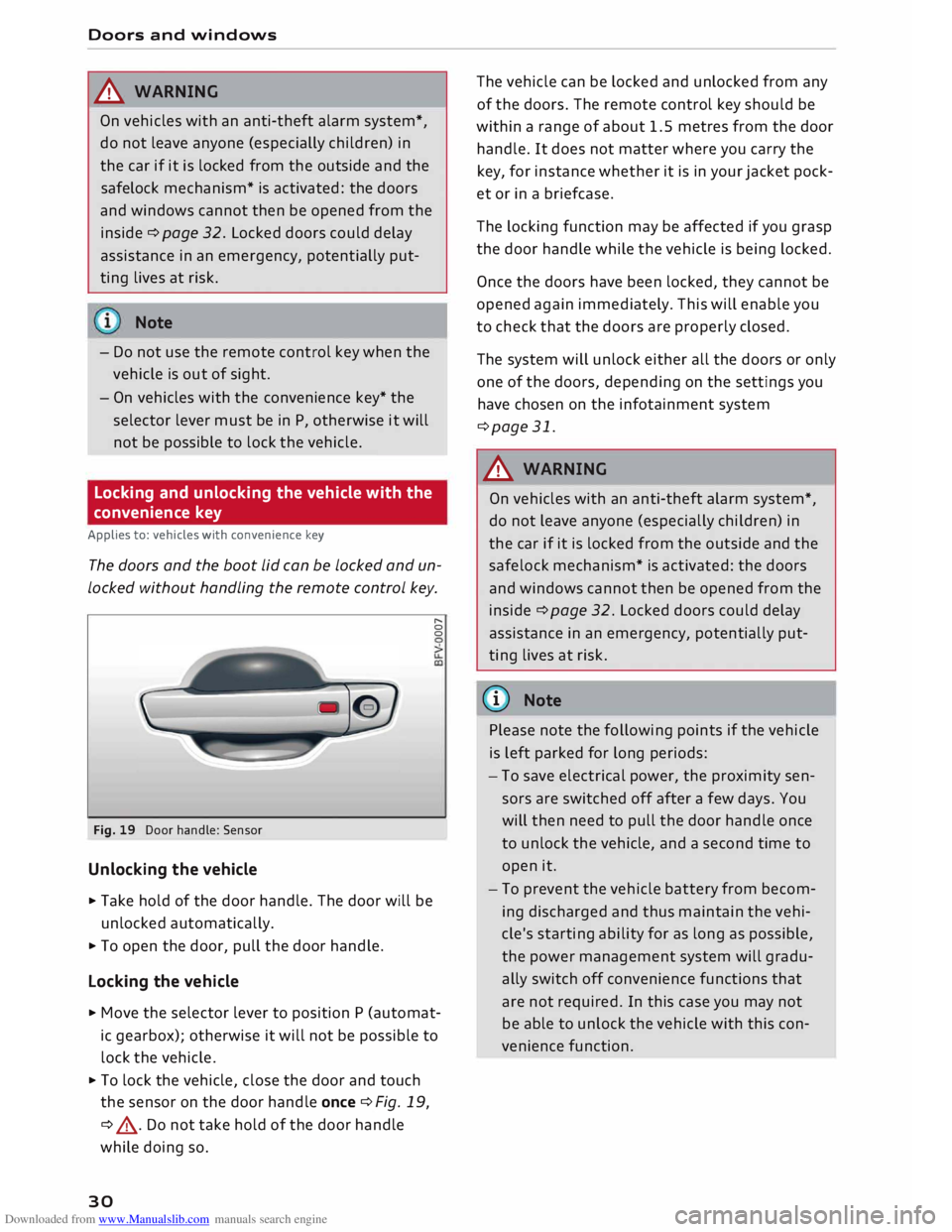
Fig. 19 Door handle: Sensor
Unlocking the vehicle
... Take hold of the door handle. The door will be
unlocked automatically.
... To open the door, pull the door handle.
Locking the vehicle r,.
0
0
... Move the selector lever to position P (automat
ic gearbox); otherwise it will not be possible to
lock the vehicle .
... To lock the vehicle, close the door and touch
the sensor on the door handle once ¢Fig. 19,
¢ .&, . Do not take hold of the door handle
while doing so.
30 The
vehicle can be locked and unlocked from any
of the doors. The remote control key should be
within a range of about 1.5 metres from the door
handle. It does not matter where you carry the
key, for instance whether it is in your jacket pock
et or in a briefcase.
The locking function may be affected if you grasp
the door handle while the vehicle is being locked.
Once the doors have been locked, they cannot be
opened again immediately. This will enable you
to check that the doors are properly closed.
The system will unlock either all the doors or only
one of the doors, depending on the settings you
have chosen on the infotainment system
¢page 31.
_& WARNING
On vehicles with an anti-theft alarm system*,
do not leave anyone (especially children) in
the car if it is locked from the outside and the
safelock mechanism* is activated: the doors
and windows cannot then be opened from the
inside ¢ page 32. Locked doors could delay
assistance in an emergency, potentially put
ting lives at risk.
{Q)) Note
Please note the following points if the vehicle
is left parked for long periods:
- To save electrical power, the proximity sen
sors are switched off after a few days. You
will then need to pull the door handle once
to unlock the vehicle, and a second time to
open it.
- To prevent the vehicle battery from becom
ing discharged and thus maintain the vehi
cle's starting ability for as long as possible,
the power management system will gradu
ally switch off convenience functions that
are not required. In this case you may not
be able to unlock the vehicle with this con
venience function.
Page 34 of 306
Downloaded from www.Manualslib.com manuals search engine Doors
and windows
Locking and unlocking the doors manually
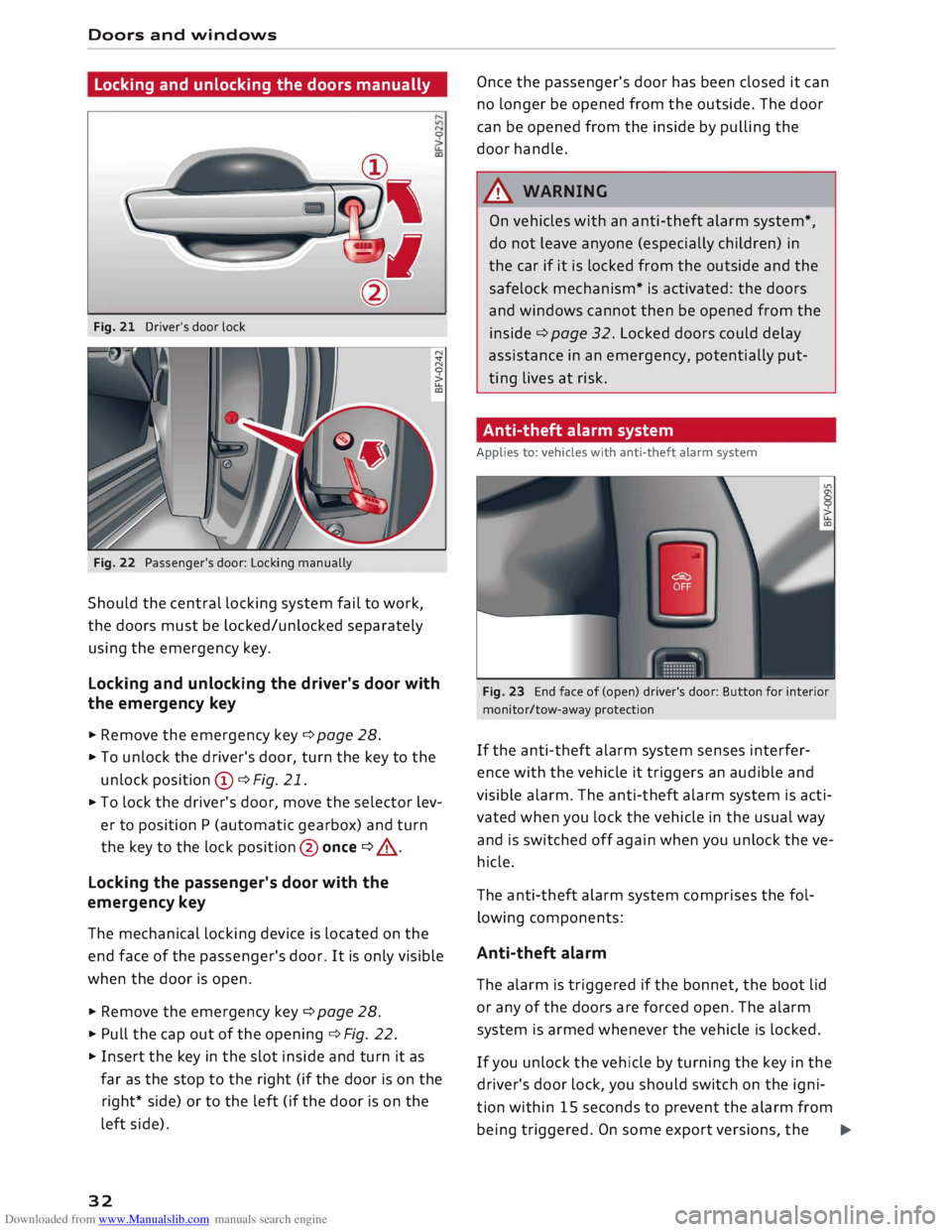
Fig. 21 Driver's door lock
Fig. 22 Passenger's door: Locking manually
Should the central locking system fail to work,
the doors must be locked/unlocked separately
using the emergency key.
Locking and unlocking the driver's door with
the emergency key
... Remove the emergency key c::> page 28.
.., To unlock the driver's door, turn the key to the
unlock position © c::>Fig. 21.
.., To lock the driver's door, move the selector lev
er to position P (automatic gearbox) and turn
the key to the lock position @ once c::> .,&. .
Locking the passenger's door with the
emergency key
The mechanical locking device is located on the
end face of the passenger's door. It is only visible
when the door is open.
... Remove the emergency key c::>page 28.
... Pull the cap out of the opening c::>Fig. 22 .
... Insert the key in the slot inside and turn it as
far as the stop to the right (if the door is on the
right* side) or to the left (if the door is on the
left side).
32 Once
the passenger's door has been closed it can
no longer be opened from the outside. The door
can be opened from the inside by pulling the
door handle.
A WARNING
On vehicles with an anti-theft alarm system*,
do not leave anyone (especially children) in
the car if it is locked from the outside and the
safelock mechanism* is activated: the doors
and windows cannot then be opened from the
inside c::> page 32. Locked doors could delay
assistance in an emergency, potentially put
ting lives at risk.
Anti-theft alarm system
Applies to: vehicles with anti-theft alarm system
Fig. 23 End face of (open) driver's door: Button for interior
monitor/tow-away protection
If the anti-theft alarm system senses interfer
ence with the vehicle it triggers an audible and
visible alarm. The anti-theft alarm system is acti
vated when you lock the vehicle in the usual way
and is switched off again when you unlock the ve
hicle.
The anti-theft alarm system comprises the fol
lowing components:
Anti-theft alarm
The alarm is triggered if the bonnet, the boot lid
or any of the doors are forced open. The alarm
system is armed whenever the vehicle is locked .
If you unlock the vehicle by turning the key in the
driver's door lock, you should switch on the igni
tion within 15 seconds to prevent the alarm from
being triggered. On some export versions, the ..,.
Page 35 of 306
Downloaded from www.Manualslib.com manuals search engine 0
N
,.....
N alarm
is triggered immediately when you open a
door.
To deactivate the alarm, switch on the ignition or
press the[@] button on the remote control key.
Int erior monitor and tow-away prot ection
When the vehicle is locked, the alarm will be trig
gered if movements are detected in the interior
(e.g. by animals) or if the vehicle's inclination is
changed (e.g. during transport). You can prevent
the alarm from being triggered accidentally by
switching off the interior monitor and/or tow
away protection. To do so, proceed as follows:
� Press the� button¢ Fig. 23. The LED in the
button will light up.
� If you now lock the vehicle, the interior monitor
and tow-away protection will remain deactiva
ted until the vehicle is unlocked again.
Safelo ck1
)
The doors can no longer be opened from the in
side. This makes it more difficult to break into
the vehicle ¢ A . The message Be aware of door
sa felock. See owner's manual appears on the in
fotainment display when you switch off the igni
tion as a reminder that the safelock mechanism*
will be activated. You can switch off the safelock
mechanism* by using one of the following op
tions:
� Press the� button on the remote control key a
second time within 2 seconds. Or:
� Touch
the sensor on the door handle a second
time within 2 seconds (applies to vehicles with
convenience key). Or:
� Turn the emergency key in the door lock to the
lock position a second time within 2 seconds.
The alarm is triggered if you switch off the safe
lock mechanism* and a door handle is then oper
ated. To deactivate the alarm, switch on the igni
tion or press the� button on the remote control
key.
8 1}This function is not available on all export versions/equip
,.....
� ment
versions. Doors
and windows
A WARNING
Do not leave anyone (especially children) in
the car if it is locked from the outside and the
safelock mechanism* is activated: the doors
and windows cannot then be opened from the
inside. Locked doors could delay assistance in
an emergency, potentially putting lives at
risk.
CD CAUTION
If you switch off the safe lock mechanism*,
the interior monitor and tow-away protection
are automatically disabled, and vice versa.
This means that your vehicle is no longer
completely protected against theft.
The interior monitor and tow-away protection
will only function as intended if the windows
are closed.
Boot lid
Opening and closing the boot lid
Opening boot lid
� To open the boot lid, press the� button on
the remote control key for at least one second.
Or:
� Pull the boot lid up.
Closing boot lid
� Pull down the boot lid and let it drop into the
latch ¢ A .
A WARNING
- After closing the boot lid, always check that
the catch has engaged properly. The boot lid
could otherwise open suddenly when the ve
hicle is moving -this could result in an acci-
dent. ..,.
33
Page 285 of 306
Downloaded from www.Manualslib.com manuals search engine 0
N
,.....
N
......
0
,.....
Vl
CX) &,
WARNING
Never attempt to repair a fuse or replace a
blown fuse by fitting a fuse with a higher am
pere rating. This could damage the electrical
system -risk of fire!
CD CAUTION
If a newly replaced fuse blows again after a
short time, the electrical system must be
checked by a qualified workshop as soon as
possible.
@ Note
- Unassigned fuse locations are not shown in
the tables below.
- Some of the items of equipment listed in
the tables below are only fitted on certain
models or are optional extras.
Fuses in vehicle interior
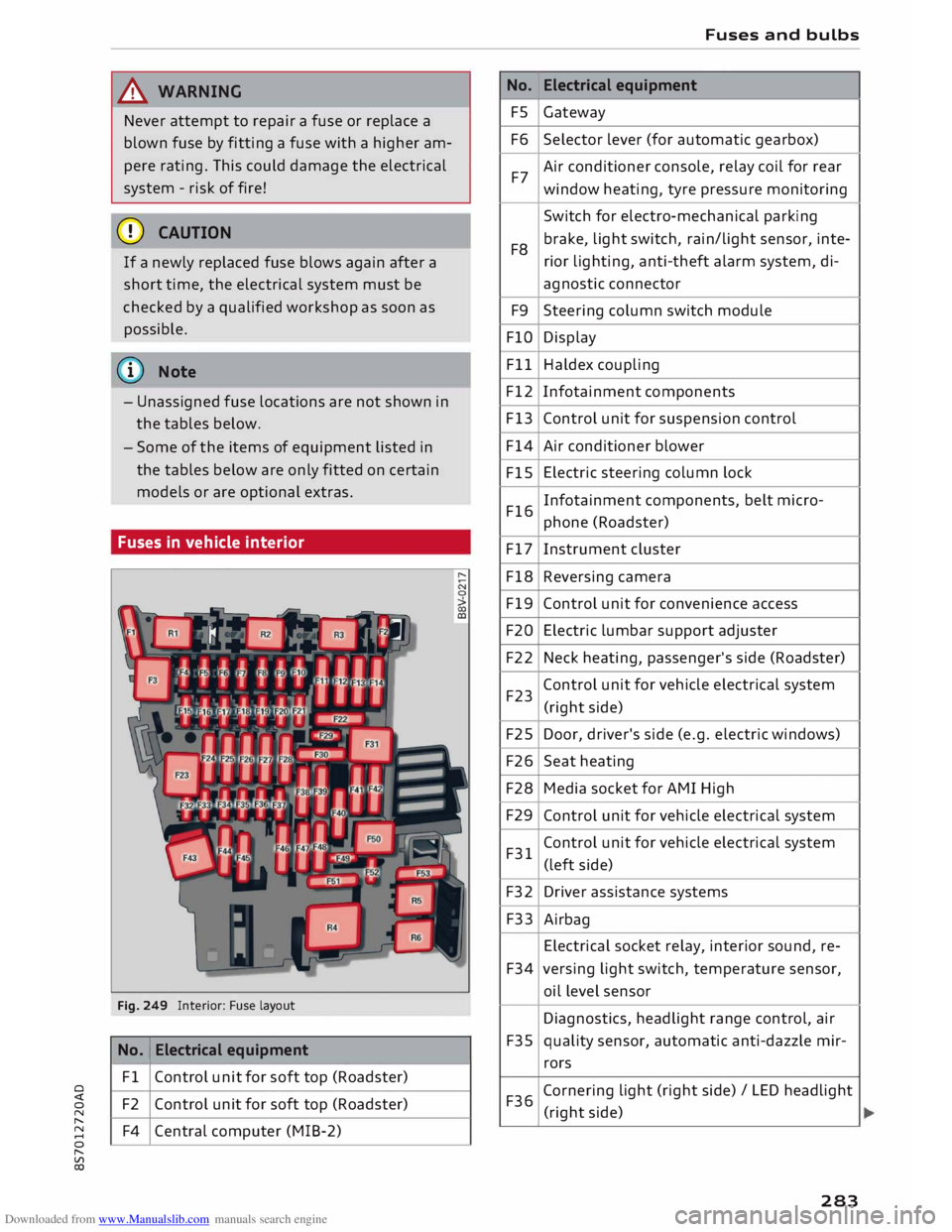
Fig. 249 Interior: Fuse layout
No. 1
Electrical equipment
Fl Control unit for soft top (Roadster)
F2 Control unit for soft top (Roadster)
F4 Central computer (MIB-2) No.
FS
F6
F7
F8 F9
FlO
Fll
F12
F13
F14
FlS
F16
F17
F18
F19
F20
F22
F23
F25
F26
F28
F29
F31
F32
F33
F34
F35
F36 Fuses
and bulbs
Electrical equipment
Gateway
Selector lever (for automatic gearbox)
Air conditioner console, relay coil for rear
window heating, tyre pressure monitoring
Switch for electro-mechanical parking
brake, light switch, rain/light sensor, inte-
rior lighting, anti-theft alarm system, di-
agnostic connector
Steering column switch module
Display
Haldex coupling
Infotainment components
Control unit for suspension control
Air conditioner blower
Electric steering column lock
Infotainment components, belt micro-
phone (Roadster)
Instrument cluster
Reversing camera
Control unit for convenience access
Electric lumbar support adjuster
Neck heating, passenger's side (Roadster)
Control unit for vehicle electrical system
(right side)
Door, driver's side (e.g. electric windows)
Seat heating
Media socket for AMI High
Control unit for vehicle electrical system
Control unit for vehicle electrical system
(left side)
Driver assistance systems
Airbag
Electrical socket relay, interior sound, re-
versing light switch, temperature sensor,
oil level sensor
Diagnostics, headlight range control, air
quality sensor, automatic anti-dazzle mir-
rors
Cornering light (right side)/ LED headlight
(right side)
283
Page 292 of 306
Downloaded from www.Manualslib.com manuals search engine Index
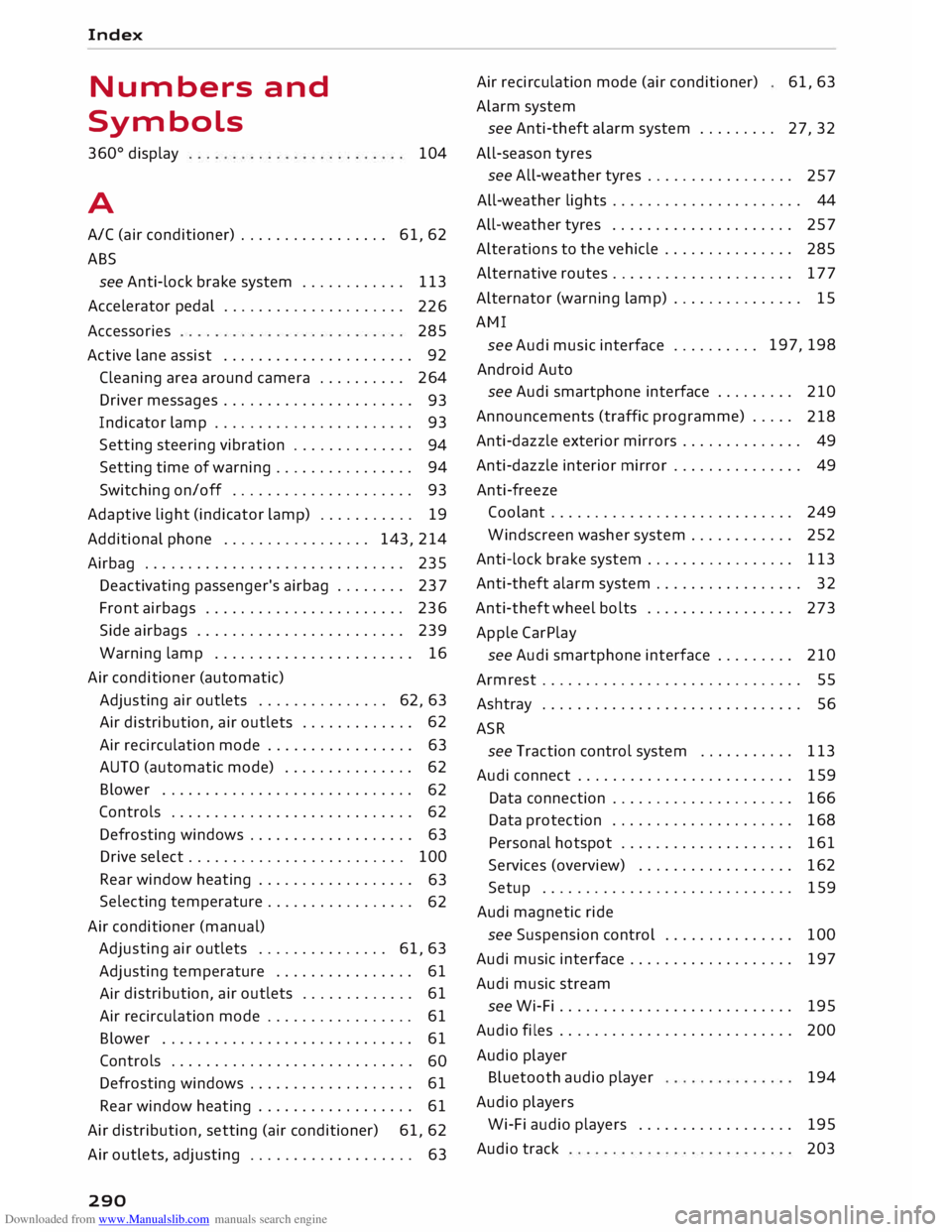
Numbers and
Symbols
360 °
display
A 104
A/C (air conditioner) . . . . . . . . . . . . . . . . . 61, 62
ABS see Anti-lock brake system . . . . . . . . . . . .
113
Accelerator pedal . . . . . . . . . . . . . . . . . . . . .
226
Accessories 285
Active lane assist . . . . . . . . . . . . . . . . . . . . . . 92
Cleaning area around camera . . . . . . . . . . 264
Driver messages . . . . . . . . . . . . . . . . . . . . . .
93
Indicator lamp . . . . . . . . . . . . . . . . . . . . . . .
93
Setting steering vibration . . . . . . . . . . . . . .
94
Setting time of warning . . . . . . . . . . . . . . . .
94
Switching on/off . . . . . . . . . . . . . . . . . . . . . 93
Adaptive light (indicator lamp) . . . . . . . . . . . 19
Additional phone ................. 143,214
Airbag . . . . . . . . . . . . . . . . . . . . . . . . . . . . . .
235
Deactivating passenger's airbag . . . . . . . .
237
Front airbags . . . . . . . . . . . . . . . . . . . . . . .
236
Side airbags . . . . . . . . . . . . . . . . . . . . . . . .
239
Warning lamp . . . . . . . . . . . . . . . . . . . . . . . 16
Air conditioner (automatic)
Adjusting air outlets . . . . . . . . . . . . . . . 62, 63
Air distribution, air outlets . . . . . . . . . . . . . 62
Air recirculation mode . . . . . . . . . . . . . . . . . 63
AUTO (automatic mode) . . . . . . . . . . . . . . . 62
Blower . . . . . . . . . . . . . . . . . . . . . . . . . . . . .
62
Controls . . . . . . . . . . . . . . . . . . . . . . . . . . . .
62
Defrosting windows . . . . . . . . . . . . . . . . . . .
63
Drive select . . . . . . . . . . . . . . . . . . . . . . . . . 100
Rear window heating . . . . . . . . . . . . . . . . . .
63
Selecting temperature . . . . . . . . . . . . . . . . .
62
Air conditioner (manual)
Adjusting air outlets . . . . . . . . . . . . . . . 61, 63
Adjusting temperature . . . . . . . . . . . . . . . . 61
Air distribution,
air outlets . . . . . . . . . . . . .
61
Air recirculation mode . . . . . . . . . . . . . . . . . 61
Blower . . . . . . . . . . . . . . . . . . . . . . . . . . . . .
61
Controls . . . . . . . . . . . . . . . . . . . . . . . . . . . .
60
Defrosting windows . . . . . . . . . . . . . . . . . . .
61
Rear window heating . . . . . . . . . . . . . . . . . . 61
Air distribution, setting (air conditioner) 61, 62
Air outlets, adjusting . . . . . . . . . . . . . . . . . . . 63
290 Air
recirculation mode (air conditioner)
Alarm system 61,63
see Anti-theft alarm system . . . . . . . . . 27, 32
All-season tyres
see All-weather tyres . . . . . . . . . . . . . . . . .
257
All-weather lights . . . . . . . . . . . . . . . . . . . . . . 44
All-weather tyres . . . . . . . . . . . . . . . . . . . . . 257
Alterations to the vehicle . . . . . . . . . . . . . . .
285
Alternative routes . . . . . . . . . . . . . . . . . . . . . 177
Alternator (warning lamp) . . . . . . . . . . . . . . . 15
AMI see Audi music interface .......... 197,
198
Android Auto
see Audi smartphone interface . . . . . . . . .
210
Announcements (traffic programme) . . . . .
218
Anti-dazzle exterior mirrors . . . . . . . . . . . . . . 49
Anti-dazzle interior mirror . . . . . . . . . . . . . . . 49
Anti-freeze Coolant . . . . . . . . . . . . . . . . . . . . . . . . . . . . 249
Windscreen washer system . . . . . . . . . . . .
252
Anti-lock brake system . . . . . . . . . . . . . . . . .
113
Anti-theft alarm system . . . . . . . . . . . . . . . . . 32
Anti-theft wheel bolts . . . . . . . . . . . . . . . . . 273
Apple CarPlay
see Audi smartphone interface . . . . . . . . . 210
Armrest . . . . . . . . . . . . . . . . . . . . . . . . . . . . . .
55
Ashtray . . . . . . . . . . . . . . . . . . . . . . . . . . . . . .
56
ASR see Traction control system .......... .
Audi connect ........................ .
Data connection .................... .
Data protection .................... . 113
159
166
168
Personal hotspot . . . . . . . . . . . . . . . . . . . . 161
Services (overview) . . . . . . . . . . . . . . . . . . 162
Setup . . . . . . . . . . . . . . . . . . . . . . . . . . . . . 159
Audi magnetic ride
see Suspension control . . . . . . . . . . . . . . .
100
Audi music interface . . . . . . . . . . . . . . . . . . .
197
Audi music stream
see Wi-Fi . . . . . . . . . . . . . . . . . . . . . . . . . . .
195
Audio files . . . . . . . . . . . . . . . . . . . . . . . . . . . 200
Audio player
Bluetooth audio player
194
Audio players
Wi-Fi audio players . . . . . . . . . . . . . . . . . .
195
Audio track 203