warning lights AUDI TT ROADSTER 2016 Owner's Manual
[x] Cancel search | Manufacturer: AUDI, Model Year: 2016, Model line: TT ROADSTER, Model: AUDI TT ROADSTER 2016Pages: 306, PDF Size: 31.82 MB
Page 52 of 306
Downloaded from www.Manualslib.com manuals search engine Lights
and vision
Windscreen wipers
Switching on the windscreen wipers
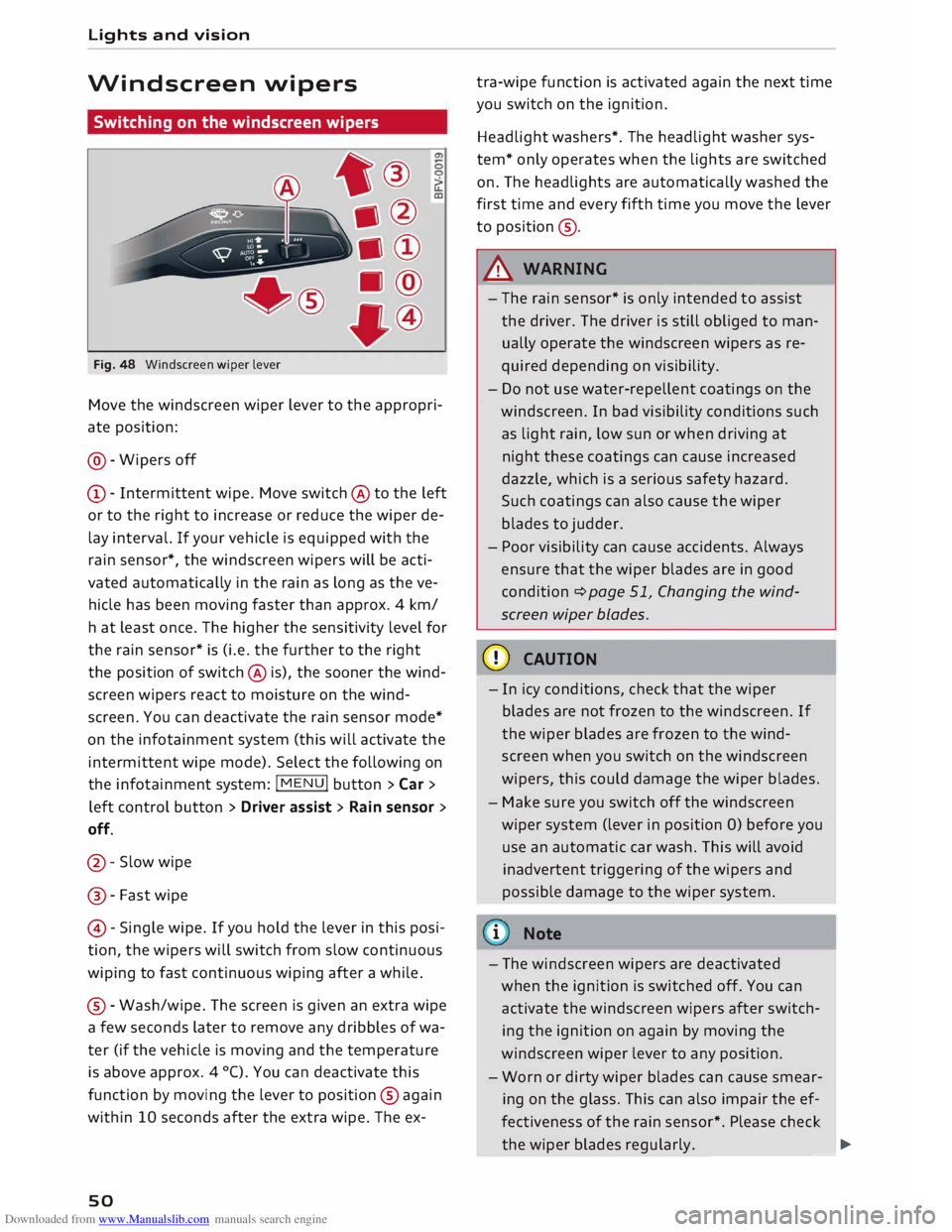
Fig. 48 Windscreen wiper lever
Move the windscreen wiper lever to the appropri
ate position:
@- Wipers off
CD- Intermittent wipe. Move switch @ to the left
or to the right to increase or reduce the wiper de
lay interval. If your vehicle is equipped with the
rain sensor*, the windscreen wipers will be acti
vated automatically in the rain as long as the ve
hicle has been moving faster than approx. 4 km/
ha t least once. The higher the sensitivity level for
the rain sensor* is (i.e. the further to the right
the position of switch @ is), the sooner the wind
screen wipers react to moisture on the wind
screen. You can deactivate the rain sensor mode*
on the infotainment system (this will activate the
intermittent wipe mode). Select the following on
the infotainment system: !MENU! button> Car >
left control button > Driver assist> Rain sensor >
off.
@- Slow wipe
@ -Fast wipe
@ -Single wipe. If you hold the lever in this posi
tion, the wipers will switch from slow continuous
wiping to fast continuous wiping after a while.
® -Wash/wipe. The screen is given an extra wipe
a few seconds later to remove any dribbles of wa
ter (if the vehicle is moving and the temperature
is above approx. 4 °C). You can deactivate this
function by moving the lever to position @again
within 10 seconds after the extra wipe. The ex-
so tra-wipe
function is activated again the next time
you switch on the ignition.
Headlight washers*. The headlight washer sys
tem* only operates when the lights are switched
on. The headlights are automatically washed the
first time and every fifth time you move the lever
to position ®·
A WARNING
- The rain sensor* is only intended to assist
the driver. The driver is still obliged to man
ually operate the windscreen wipers as re
quired depending on visibility.
- Do not use water-repellent coatings on the
windscreen. In bad visibility conditions such
as light rain, low sun or when driving at
night these coatings can cause increased
dazzle, which is a serious safety hazard.
Such coatings can also cause the wiper
blades to judder.
- Poor visibility can cause accidents. Always
ensure that the wiper blades are in good
condition ¢ page 51, Changing the wind
screen wiper blades.
CD CAUTION
- In icy conditions, check that the wiper
blades are not frozen to the windscreen. If
the wiper blades are frozen to the wind
screen when you switch on the windscreen
wipers, this could damage the wiper blades.
- Make sure you switch off the windscreen
wiper system (lever in position 0) before you
use an automatic car wash. This will avoid
inadvertent triggering of the wipers and
possible damage to the wiper system.
i Note
- The windscreen wipers are deactivated
when the ignition is switched off. You can
activate the windscreen wipers after switch
ing the ignition on again by moving the
windscreen wiper lever to any position.
- Worn or dirty wiper blades can cause smear
ing on the glass. This can also impair the ef
fectiveness of the rain sensor*. Please check
the wiper blades regularly. ______ �
Page 53 of 306
Downloaded from www.Manualslib.com manuals search engine 0
N
,.....
N
......
0
,.....
Vl
CX) -
The windscreen washer jets are heated*
when the ignition is switched on if the out
side temperature is low.
- If you stop briefly, e.g. at traffic lights, the
wiper speed setting will automatically be re
duced by one level.
Cleaning windscreen wiper blades
Clean the wiper blades if the wipers leave smear
ing on the glass. Clean the wiper blades using a
soft cloth and a glass cleaning solution.
11- Set the wiper arms to the service position
¢page 51.
11- Lift the wiper arms away from the glass.
A WARNING
Dirty wiper blades can impair the driver's view
- risk of accident!
Changing the windscreen wiper blades
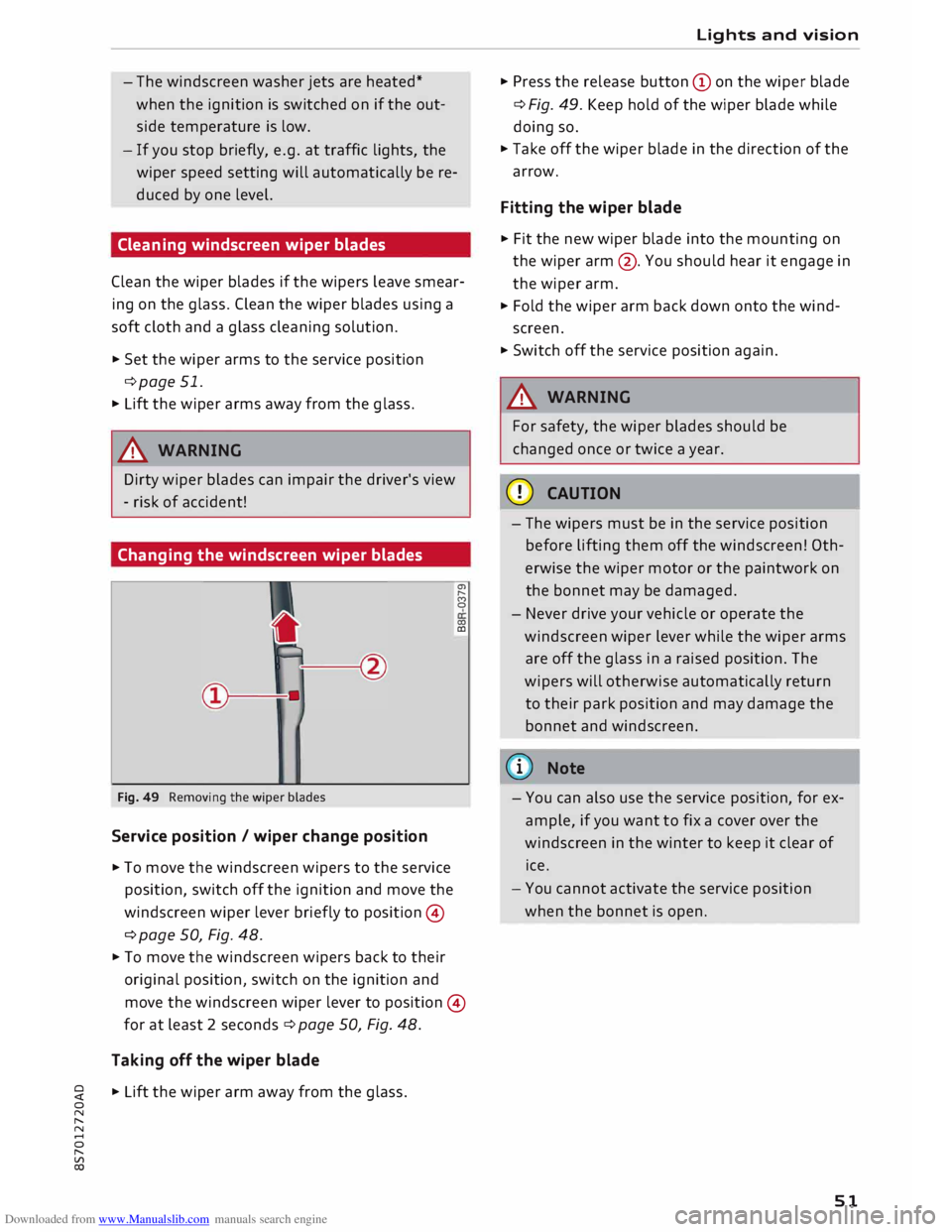
Fig. 49 Removing the wiper blades
Service position / wiper change position
11- To move the windscreen wipers to the service
position, switch off the ignition and move the
windscreen wiper lever briefly to position ©
¢ page 50, Fig. 48. a,
,._.
(')
0
0)
CD
11- To move the windscreen wipers back to their
original position, switch on the ignition and
move the windscreen wiper lever to position ©
for at least 2 seconds¢ page 50, Fig. 48.
Taking off the wiper blade
11- Lift the wiper arm away from the glass. Lights
and vision
11- Press the release button (Don the wiper blade
¢ Fig. 49. Keep hold of the wiper blade while
doing so.
11- Take off the wiper blade in the direction of the
arrow.
Fitting the wiper blade
11- Fit the new wiper blade into the mounting on
the wiper arm@. You should hear it engage in
the wiper arm.
11- Fold the wiper arm back down onto the wind
screen.
11- Switch off the service position again.
A WARNING
For safety, the wiper blades should be
changed once or twice a year.
CD CAUTION
- The wipers must be in the service position
before lifting them off the windscreen! Oth
erwise the wiper motor or the paintwork on
the bonnet may be damaged.
- Never drive your vehicle or operate the
windscreen wiper lever while the wiper arms
are off the glass in a raised position. The
wipers will otherwise automatically return
to their park position and may damage the
bonnet and windscreen.
(D) Note
- You can also use the service position, for ex
ample, if you want to fix a cover over the
windscreen in the winter to keep it clear of
ice.
- You cannot activate the service position
when the bonnet is open.
51
Page 55 of 306
Downloaded from www.Manualslib.com manuals search engine 0
N
,.....
N
......
0
,.....
Vl
CX) will
be ended automatically after a few sec
onds.
Calibrating compass
Applies to: vehicles with digital compass
The compass must be re-calibrated if the display
is incorrect or inaccurate .
... Press and hold button (D until the letter Cap
pears on the interior mirror .
... Drive in a circle at a speed of about 10 km/h un
til a point of the compass is displayed on the in
terior mirror.
& WARNING
- Calibrate your compass at a location where
there is no traffic so that you do not endan
ger yourself or other road users (accident
risk).
- Always pay attention to the road and the
area surrounding the vehicle when you are
reading the compass while the vehicle is
moving. Lights
and vision
53
Page 71 of 306
Downloaded from www.Manualslib.com manuals search engine Starting
the engine
� Manual gearbox: Press the clutch pedal all the
way down and move the gear Lever into neutral.
� Vehicles with automatic gearbox: Press the
brake pedal and move the selector Lever to po
sition P or N ¢ ,&..
� Press the ....,1s=
T_A_R _T_E_
N_G_I_N_ E-ST_O_PI
button. The
engine should start.
� Diesel engines can take a few seconds Longer
than usual to start on cold days. Please keep
your foot on the clutch pedal (manual gearbox)
or brake pedal (automatic gearbox) until the
engine starts. The indicator Lamp IJ Lights up
while the glow plugs are preheating.
If the engine fails to start immediately, the start
er will be switched off automatically after a few
seconds. Try to start the engine again.
Start/stop system
Please note the information on ¢ page 71,
Start/stop sy
stem.
A WARNING
Never run the engine in confined spaces. The
exhaust gases are toxic -risk of poisoning!
CD CAUTION
Avoid high engine speeds, full throttle and ex
treme load conditions until the engine has
reached its normal operating temperature;
otherwise this can damage the engine.
@) For the sake of the environment
Do not warm up the engine by running it with
the car stationary. You should drive off imme
diately whenever possible. This will help avoid
unnecessary exhaust emissions.
ijj} Note
-Any noises which may be heard when the
engine is started are quite normal and no
cause for concern.
- If you leave the vehicle with the ignition
� switched
on, it will be switched off auto-
o
N
,.....
N
......
0
,.....
� 1}
This function is not available on all export versions. Driving
matically after a while. Please note that
electrical equipment such as the exterior
Lighting will also be switched off.
Switching off the engine
� Stop the vehicle.
� Vehicles with automatic gearbox: Move these
lector Lever to position P.
� Press the !START
ENGINE STOP!
button
¢page 68, Fig. 72.
Steering lock1
)
The steering will be locked if you switch off the
engine with the !START
ENGINE STOP!
button,
move the selector lever to position P (on vehicles
with automatic gearbox*) and open the driver's
door.
The steering will be Locked if you switch off the
engine with the !START
ENGINE STOP!
button
and open the driver's door. The steering lock acts
as a theft deterrent.
Emergency Off function*
If necessary in an emergency, the engine can be
switched off while the vehicle is still moving at
speeds of 7 km/h and above. To switch off the
engine, press the !START E
NG I
N E
ST
OP!
button
twice in quick succession or hold it in for longer
than two seconds.
A WARNING
- Never switch off the engine until the vehicle
is stationary. Otherwise you may not have
the full benefit of the brake servo and pow
er steering. You may need more strength to
steer and brake the vehicle than you nor
mally would. This would mean a greater risk
of accidents and serious injury, because you
cannot steer and brake in the normal man
ner.
- Always take the key with you when you leave
the vehicle. Otherwise the engine can be
started or power-operated equipment such
as the electric windows can be used. This
could result in serious injury.
liJI>
69
Page 72 of 306
Downloaded from www.Manualslib.com manuals search engine Driving
CD CAUTION
If the engine has been working hard for a long
time, there is a risk of heat building up in the
engine compartment after the engine has
been switched off; this could cause engine
damage. For this reason, you should leave the
engine idling for about 2 minutes before
switching it off.
{(D Note
After the engine is stopped, the radiator fan
may remain on or turn itself back on for up to
10 minutes, even if the ignition is switched
off. This may occur for the following reasons:
- Residual heat has raised the coolant tem-
perature.
- Direct sunlight has additionally heated up
the engine compartment while the engine is
warm.
-Applies to vehicles with diesel particulate
filter: The emission control system is hot
because of the regeneration process, even
though the engine has not yet reached oper
ating temperature.
Driver messages
Switch off ignition before leaving car. Battery is
being discharged
This message appears and the buzzer sounds if
you open the driver's door while the ignition is
switched on. Switch off the ignition to prevent
the battery from being discharged.
Pressing start/stop button again will switch off
engine.
This message appears if you press the
!START ENGINE STOP!
button while the vehicle is
moving.
Engine start system: fault. Please contact work
shop
A fault has occurred when starting the engine au
tomatically (automatic start function). Drive to a
qualified workshop soon and have the fault recti
fied. Press and hold
the !START
ENGINE STOP!
button to start the engine.
70 II
Remote control key: hold back of key
against marked area. See owner's manual
This message appears if there is no convenience
key inside the vehicle or if the system cannot de
tect or identify the key. This can happen, for ex
ample, if the radio signal from the key is obstruc
ted by a metal briefcase or similar, or if the key
battery is weak. Electronic equipment, such as
mobile phones, can also interfere with the radio
signal from the key.
The engine can still be started or stopped if this
happens (please refer to �page 71, Starting
the engine after a malfunction).
Ill Remote control key: key not recognised. Is
key still in vehicle?
If the indicator lamp Ill lights up and the mes
sage appears, the convenience key was removed
from the vehicle while the engine was running. If
the convenience key is not in the vehicle you will
not be able to switch on the ignition or restart
the engine after it has been switched off. You will
also not be able to lock the vehicle from the out
side.
Please press brake pedal
This message appears on vehicles with an auto
matic gearbox if you try to start the engine with
out first pressing the brake pedal.
Please press clutch pedal
This message appears on vehicles with a manual
gearbox if you try to start the engine without
first pressing the clutch pedal. The engine will
only start if you press the clutch pedal.
Please engage N or P
This message will appear if you try to start or
switch off the engine when the selector lever is
not in Nor P. The engine can then not be started
or switched off.
Shift to P, otherwise vehicle can roll away.
Doors do not lock if lever is not in P
For safety reasons, this message will appear and
a warning buzzer will sound if the selector lever
of the automatic gearbox is not in position P
when you switch off the ignition with the
�
Page 73 of 306
Downloaded from www.Manualslib.com manuals search engine !START
E
NGIN E
STOP!
button. Put the selector
lever in position P; otherwise the vehicle can roll
away. If the lever is not in position P you will not
be able to lock the vehicle using the locking sen
sor on the door handle or the convenience key.
Starting the engine after a malfunction
If the remote control key battery is exhausted or
if radio interference or a system malfunction oc
curs, extra steps may be necessary in order to
start the engine.
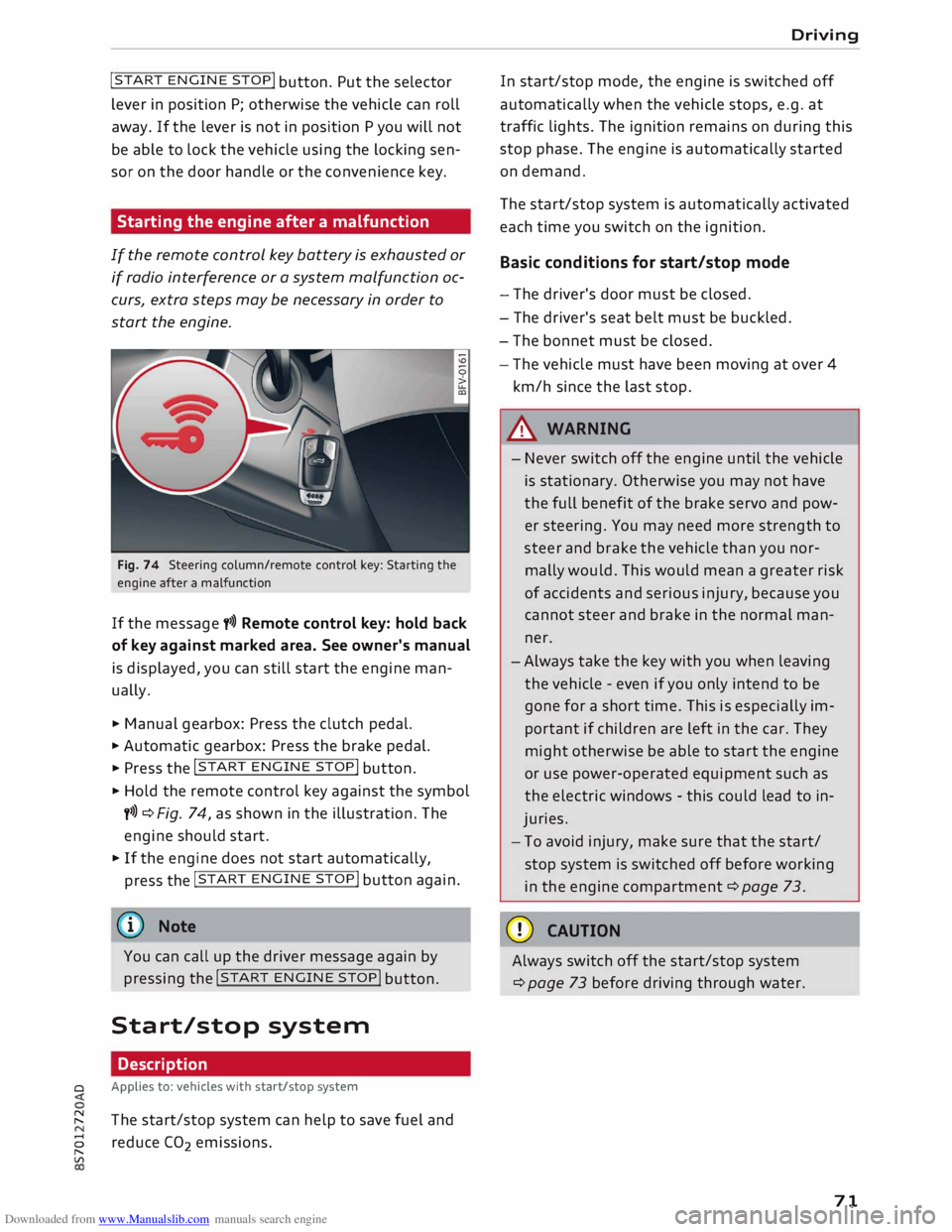
Fig. 74 Steering column/remote control key: Starting the
engine after a malfunction
If the message t>>) Remote control key: hold back
of key against marked area. See owner's manual
is displayed, you can still start the engine man
ually.
� Manual gearbox: Press the clutch pedal.
� Automatic gearbox: Press the brake pedal.
� Press the !START
ENGINE STOP!
button.
� Hold the remote control key against the symbol
y>>) ¢Fig. 74, as shown in the illustration. The
engine should start.
� If the engine does not start automatically,
press the !START
E
NGINE STOP!
button again.
@ Note
You can call up the driver message again by
pressing the !START
ENGINE STOP!
button.
Start/stop system Description
0 Applies
to: vehicles with start/stop system
� The start/stop system can help to save fuel and
8 reduce CO
2 emissions.
"
Vl Driving
In start/stop mode, the engine is switched off
automatically when the vehicle stops, e.g. at
traffic lights. The ignition remains on during this
stop phase. The engine is automatically started
on demand.
The start/stop system is automatically activated
each time you switch on the ignition.
Basic conditions for start/stop mode
- The driver's door must be closed.
- The driver's seat belt must be buckled.
- The bonnet must be closed.
- The vehicle must have been moving at over 4
km/h since the last stop.
A WARNING
- Never switch off the engine until the vehicle
is stationary. Otherwise you may not have
the full benefit of the brake servo and pow
er steering. You may need more strength to
steer and brake the vehicle than you nor
mally would. This would mean a greater risk
of accidents and serious injury, because you
cannot steer and brake in the normal man
ner.
- Always take the key with you when leaving
the vehicle -even if you only intend to be
gone for a short time. This is especially im
portant if children are left in the car. They
might otherwise be able to start the engine
or use power-operated equipment such as
the electric windows -this could lead to in
juries.
- To avoid injury, make sure that the start/
stop system is switched off before working
in the engine compartment ¢page 73.
CD CAUTION
Always switch off the start/stop system
¢page 73 before driving through water.
71
Page 75 of 306
Downloaded from www.Manualslib.com manuals search engine 0
N
,.....
N
......
0
,.....
Vl
CX) -
The engine has not yet reached the minimum
temperature required for start/stop mode.
- The interior temperature selected on the air
conditioner has not yet been reached.
- The exterior temperature is very high/Low.
- The windscreen is being defrosted @.
- The parking aid* or park assist* is switched on.
- The vehicle battery charge is too Low.
- The steering wheel is close to full Lock or the
vehicle is being steered.
- Reverse gear has just been selected.
- The vehicle is on a steep gradient.
� will appear in the infotainment display to in
dicate this status.
Engine cuts in again automatically
The stop phase is interrupted in the following sit
uations, for example. The engine cuts in auto
matically without intervention from the driver.
- The vehicle starts to roll (e.g. on a hill).
- The interior temperature deviates from the air
conditioner setting.
- The windscreen is being defrosted @.
- The brake pedal is pressed several times in suc-
cession.
- The vehicle battery charge drops to an insuffi-
cient level.
- The power consumption is high.
Ignition is switched off automatically
To prevent the vehicle battery from being dis
charged, the ignition will be switched off auto
matically if certain conditions are met. For in
stance:
- The vehicle has already been driven.
- The start/stop system has switched off the en-
gine.
- The driver's door is opened.
- The driver's seat belt is unbuckled.
- The brake pedal is not pressed.
- The vehicle is stationary.
If the dipped beam headlights are on when this
happens, the side lights will be turned on instead
and the message Side Lights will be automatical
ly switched off in 30 minutes. See owner's man
ual will appear on the infotainment display. After Driving
approx. 30 minutes, or when you Lock the vehicle,
the side lights will be switched off.
If the start/stop system has not stopped the en
gine or if you have switched off the start/stop
system manually, the engine will continue run
ning and the ignition will not be switched off au
tomatically¢,&..
A WARNING
Never run the engine in confined spaces. The
exhaust gases are toxic -risk of poisoning!
(© Note
If you select D, No r S (on vehicles with auto
matic gearbox) after selecting reverse gear,
the car must have been moving at over
10 km/h before the system can switch off the
engine again.
Switching the start/stop system off and on
manually
Applies to: vehicles with start/stop system
You can switch the system off manually if you
don't want to use it.
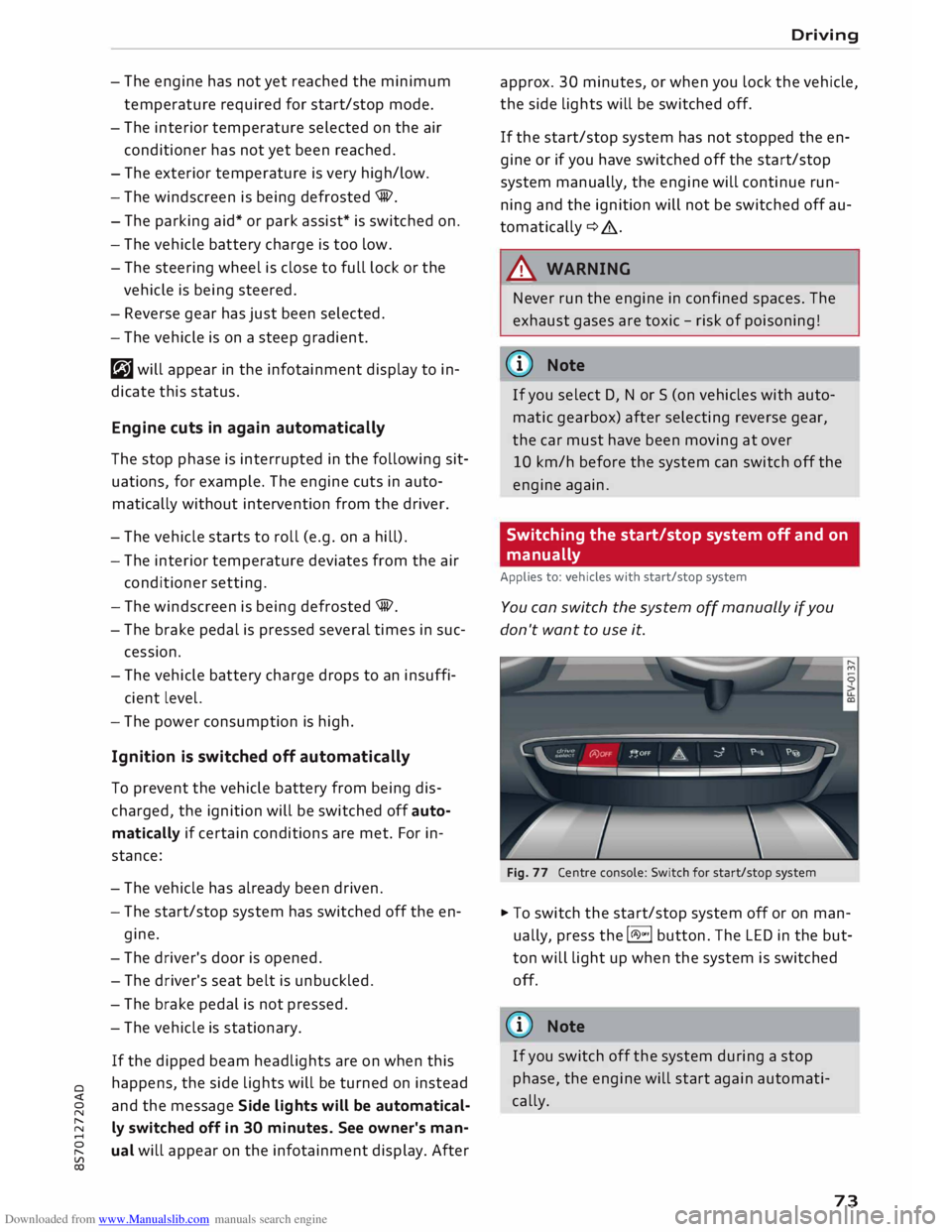
Fig. 77 Centre console: Switch for start/stop system
� To switch the start/stop system off or on man
ually, press the l(A)"'I button. The LED in the but
ton will light up when the system is switched
off.
@ Note
If you switch off the system during a stop
phase, the engine will start again automati
cally.
73
Page 77 of 306
Downloaded from www.Manualslib.com manuals search engine 0
N
,.....
N
......
0
,.....
Vl
CX) A
WARNING
- Never press the accelerator pedal or release
the clutch inadvertently if a gear is engaged
or if the selector lever is not in position P or
N (on automatic vehicles) while the vehicle
is stationary with the engine running. The
vehicle will otherwise start moving immedi
ately and could cause an accident.
- You should only use the emergency braking
function in a real emergency, for example if
the brake system were to fail or if the brake
pedal were to be obstructed. If you use the
emergency braking function by activating
the parking brake switch, this has the same
effect as heavy braking. Please remember
that the ESC (and the integrated ABS, EDL
and traction control functions) is still sub
ject to certain physical limits. In a corner or
in bad road or weather conditions an emer
gency stop can cause the vehicle to skid or
lose steering control.
- It is not possible to apply the parking brake
if the electrical power supply fails. In this
case, park the vehicle on a level surface and
select 1st gear (manual gearbox) or move
the selector lever to position P (automatic
gearbox) to prevent it from rolling. Obtain
professional assistance.
- Always take the key with you when leaving
your vehicle -even if you only intend to be
gone for a short time. This is especially im
portant if children are left in the car. They
might otherwise be able to start the engine,
release the parking brake or use power-op
erated equipment such as the electric win
dows -this could lead to injuries.
- Do not leave anyone (especially children) in
the vehicle when it is locked. Locked doors
could delay assistance in an emergency, po
tentially putting lives at risk.
Applies to: vehicles with automatic gearbox
You can apply the parking brake manually or
switch on the hold assist* when stopping at
traffic lights, etc. You do not then have to
hold the car with the brake pedal, as the Driving
brakes will stop it creeping forward while a
gear is engaged in the automatic transmis
sion. When you drive off in the normal way,
the parking brake will be released automati
cally and your vehicle will start moving
¢page 75.
(CD) Note
- Any slight noise which may be heard when
the parking brake is applied or released is
quite normal and no cause for concern.
- The parking brake runs an automatic test
cycle at regular intervals when the vehicle is
parked. This may cause a slight noise, which
is normal.
- If the electrical power supply fails, it is not
possible to release the parking brake (if it
was applied) or to apply the parking brake
(if it was released) ¢ &,. Obtain professional
assistance.
Moving off
Various features and safety functions are availa
ble for driving off, depending on the equipment
in your vehicle.
Hill starting with the parking brake applied
Important: The driver's door must be closed.
� To drive off more easily on a slope, apply the
parking brake and drive off just as you usually
would. The parking brake will be released auto
matically, but not until there is enough power
at the wheels to make the vehicle move in the
desired direction.
Hill starting with the hill hold assist
The hill hold assist function makes it easier to
drive away on a slope.
Important: The driver's door must be closed and
the engine must be running.
� To activate the hill hold assist, press and hold
the brake pedal for several seconds. The vehicle
must be on a slope and facing uphill.
When you release the brake pedal the braking
force will be maintained for a moment ¢.&. in
..,.
75
Page 78 of 306
Downloaded from www.Manualslib.com manuals search engine Driving
order to hold the vehicle and make it easier for
you to drive away.
Driving off with the hold assist
Applies to: vehicles with hold assist
The hold assist helps the driver if the vehicle is
stationary for a long period or very often, for in
stance at traffic lights, on steep gradients or in
stop-and-go traffic.
Important: The driver's door must be closed and
the engine must be running.
.,. To switch the hold assist on/off, press the but
ton(@) @¢page 74, Fig. 78, ¢A .The LED in
the button will light up or go out.
.,. Once it detects that the vehicle has stopped,
the hold assist keeps the vehicle stationary.
You can now take your foot off the brake pedal.
.,. Drive
off in the normal way: the brake will be
released automatically and the vehicle will
start moving.
In certain situations, the hold assist transfers the
job of holding the vehicle to the parking brake.
As soon as the parking brake is holding the vehi
cle still, the warning lamp. appears in the in
strument cluster. In addition, the LED in the C®)
button will light up.
Driver messages in the instrument cluster
display
[iJ Hold assist: unavailable
If this message appears, the system require
ments have not been met.
A WARNING
Applies to: vehicles with hill hold assist
If you do not drive away immediately after re
leasing the brake pedal, or if the engine
stalls, the vehicle may start to roll back. You
should therefore immediately press the brake
pedal or apply the parking brake.
A WARNING
The intelligent technology in the hold assist*
and hill hold assist functions cannot defy the
laws of physics. Do not let the extra conven
ience afforded by the hold assist* and hill
76 hold
assist functions tempt you into taking
any risks when driving -this can cause acci
dents.
- The hold assist* and hill hold assist func
tions cannot keep the vehicle stationary in
all conditions on a gradient (e.g. if the road
is slippery or icy).
- Always ensure that the vehicle is stopped
properly and safely -risk of accident!
CD CAUTION
Switch off the hold assist* function before
driving the vehicle into a car wash.
� Note
Applies to: vehicles with automatic gearbox
When the hold assist* function is switched
on, it stops the vehicle from creeping for
wards when you take your foot off the brake
pedal.
Automatic gearbox
Introduction
Applies to: vehicles with automatic gearbox
The vehicle is equipped with an electronically
controlled dual-clutch gearbox (S tronic). Torque
between the engine and the gearbox is transmit
ted via two independent clutches. They enable
smooth, uninterrupted acceleration of the vehi
cle.
The gearbox shifts up or down automatically and
continuously adapts the timing of the gear
changes to your driving style.
When you drive at moderate speeds the gearbox
will select the most economical shift pro
gramme. It will then change up early and delay
the downshifts to give better fuel economy.
If you drive at higher speeds with heavy accelera
tion, if you open the throttle quickly, or if you use
the kick-down or the car's maximum speed, the
gearbox will automatically select the more "spor
ty" shift programmes.
If desired, you can also select the gears manually
(tiptronic mode).
Page 81 of 306
Downloaded from www.Manualslib.com manuals search engine 0
N
,.....
N
......
0
,.....
Vl
CX) -
If the vehicle does not move in the desired
direction, the system may have failed to en
gage the gear correctly. In this case, press
the brake pedal and select the gear again.
- If the vehicle still does not move in the de
sired direction, a system malfunction has
occurred. Seek professional assistance and
have the system checked.
General notes on driving an automatic
Applies to: vehicles with automatic gearbox
The gearbox changes the forward gears up and
down automatically.
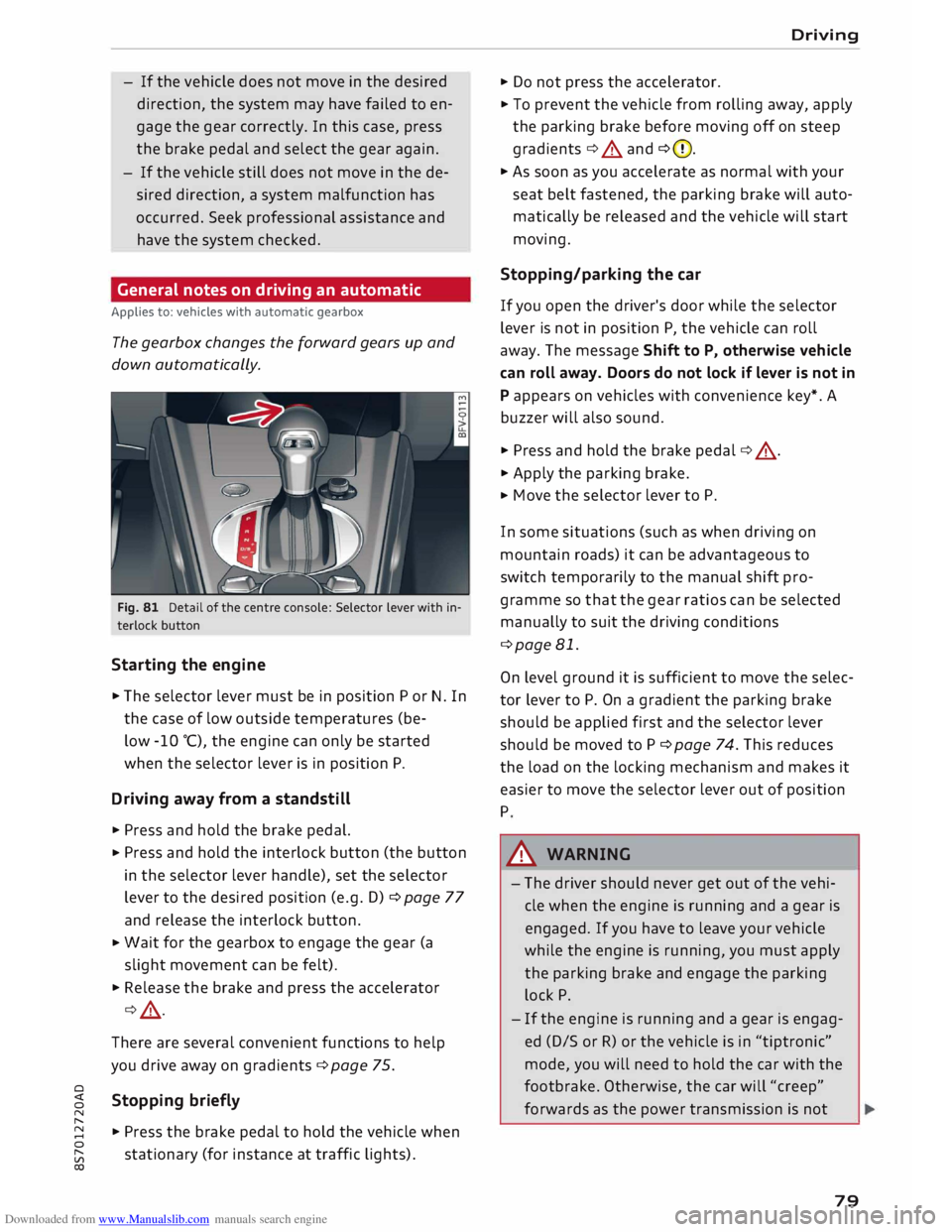
Fig. 81 Detail of the centre console: Selector lever with in
terlock button
Starting the engine
.,. The selector lever must be in position P or N. In
the case of low outside temperatures (be-
low -10 °(), the engine can only be started
when the selector lever is in position P.
Driving away from a standstill
.,. Press and hold the brake pedal.
.,. Press
and hold the interlock button (the button
in the selector lever handle), set the selector
lever to the desired position (e.g. D) ¢ page 77
and release the interlock button.
.,. Wait
for the gearbox to engage the gear (a
slight movement can be felt).
.,. Release the brake and press the accelerator
¢ .&, .
There are several convenient functions to help
you drive away on gradients ¢page 75.
Stopping briefly
.,. Press the brake pedal to hold the vehicle when
stationary (for instance at traffic lights). Driving
.,. Do not press the accelerator .
.,. To prevent the vehicle from rolling away, apply
the parking brake before moving off on steep
gradients ¢.&. and ¢(D.
.,. As soon as you accelerate as normal with your
seat belt fastened, the parking brake will auto
matically be released and the vehicle will start
moving.
Stopping/parking the car
If you open the driver's door while the selector
lever is not in position P, the vehicle can roll
away. The message Shift to P, otherwise vehicle
can roll away. Doors do not lock if lever is not in
P appears on vehicles with convenience key*. A
buzzer will also sound .
.,. Press and hold the brake pedal¢ .&, .
.,. Apply the parking brake .
.,. Move
the selector lever to P.
In some situations (such as when driving on
mountain roads) it can be advantageous to
switch temporarily to the manual shift pro
gramme so that the gear ratios can be selected
manually to suit the driving conditions
¢page 81.
On level ground it is sufficient to move the selec
tor lever to P. On a gradient the parking brake
should be applied first and the selector lever
should be moved to P ¢ page 74. This reduces
the load on the locking mechanism and makes it
easier to move the selector lever out of position
P
A WARNING
- The driver should never get out of the vehi
cle when the engine is running and a gear is
engaged. If you have to leave your vehicle
while the engine is running, you must apply
the parking brake and engage the parking
lock P.
- If the engine is running and a gear is engag
ed (D/S or R) or the vehicle is in "tiptronic"
mode, you will need to hold the car with the
footbrake. Otherwise, the car will "creep"
forwards as the power transmission is not
79