ECO mode AUDI TT ROADSTER 2016 Owners Manual
[x] Cancel search | Manufacturer: AUDI, Model Year: 2016, Model line: TT ROADSTER, Model: AUDI TT ROADSTER 2016Pages: 306, PDF Size: 31.82 MB
Page 26 of 306
Downloaded from www.Manualslib.com manuals search engine Driver
information system
The equipment installed on your vehicle deter
mines which of the following tabs are available:
1st tab
Car ¢page 25
2nd taba)
Warnings
3rd tab Radio
¢ page 185
Media ¢ page 191
4th tabb)
Sound ¢page 212
Settings ¢page 212
a) This tab is only visible if one or more warning/indicator
lamps or driver messages are displayed or if the relevant
system is switched on.
b) The tab contents depend on which menu you used last.
- To switch between tabs: Press the
I MOD
E
! but
ton on the multi-function steering wheel until
the desired tab is displayed.
- To select a function in a menu/list: Scroll the
left thumbwheel on the multi-function steering
wheel to the desired function.
- To confirm the selection: Press the left thumb
wheel on the multi-function steering wheel to
confirm your selection.
- To scroll within the lists: Scroll the left thumb
wheel on the multi-function steering wheel
rapidly to scroll within the lists.
@!VIEW! button
- To change views: Press the !VIE
W! button to
switch from the classic view¢ page 20, Fig. 4
to the extended view¢ page 20, Fig. 5.
@ Right thumbwheel
You can adjust the volume of an audio source or
system message (e.g. during a traffic announce
ment) directly while it is being played.
- Volume up/down: Scroll the right thumbwheel
up/down.
- Mute/pause: Scroll the right thumbwheel
down. Or: Press the right thumbwheel.
- Unmute/resume: Scroll the right thumbwheel
upwards. Or: Press the right thumbwheel.
24 Rev
counter
The rev counter indicates the number of engine
revolutions per minute.
The start of the red zone on the dial indicates the
maximum engine speed which may be used brief
ly in all gears when the engine is warm and after
it has been run in properly. However, it is advisa
ble to change up a gear or move the selector lev
er to D/S (or lift your foot off the accelerator) be
fore the needle reaches the red zone.
Shift light display in the rev counter
Applies to: vehicles with Audi virtual cockpit and shift light
display
The shift light display is only visible in the sport
view* ¢ page 25 when shifting gears in tiptron
ic mode. Green, yellow and red zones are dis
played in the high-rev area of the dial. The entire
rev counter flashes in red at engine speeds near
the limit. Remember to shift to the next gear in
good time.
CD CAUTION
The rev counter needle must only ever briefly
go into the red zone on the scale; otherwise
there is a risk of engine damage. The start of
the red zone on the dial is different for some
engine versions.
@ For the sake of the environment
Changing up a gear early will help you to save
fuel and minimise engine noise.
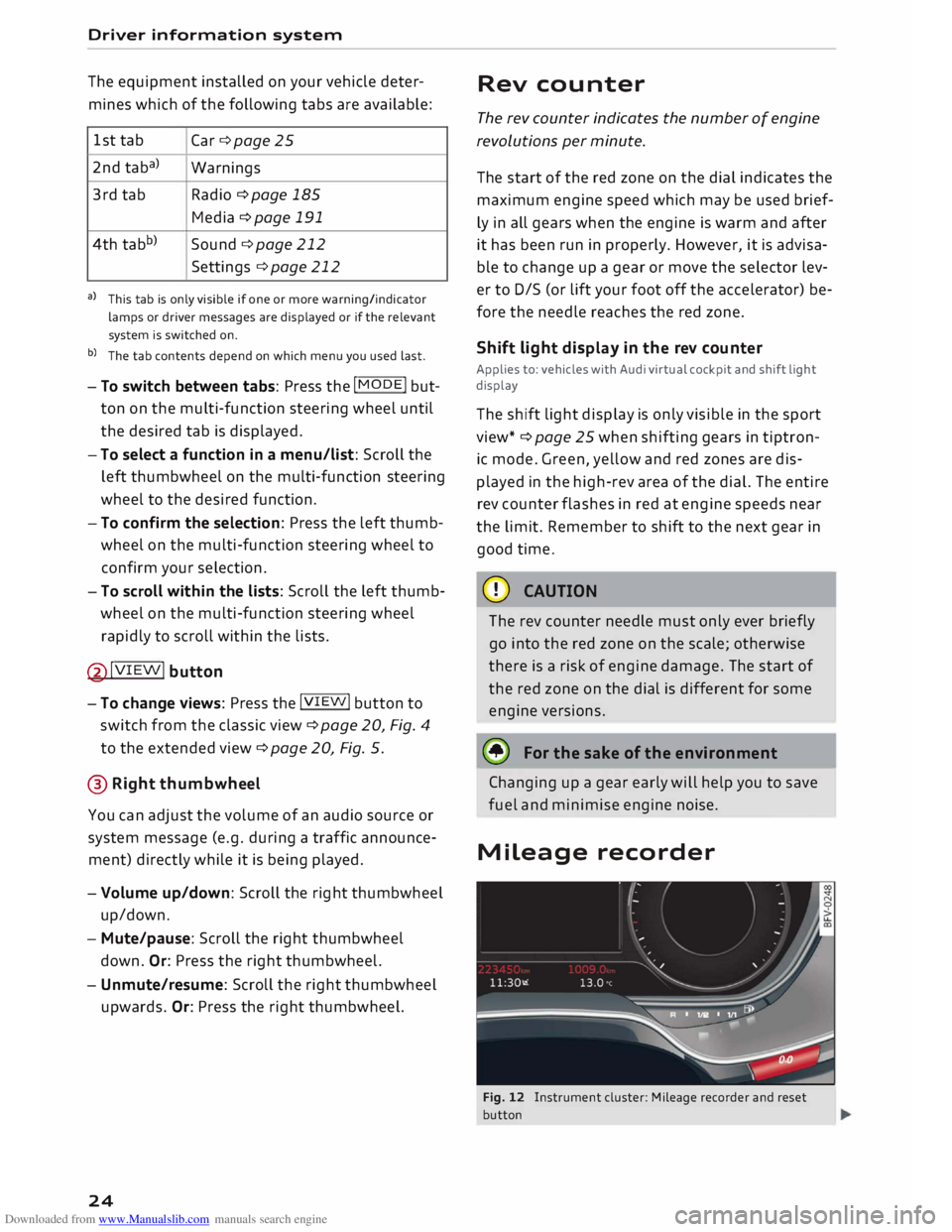
Mileage recorder
Fig. 12 Instrument cluster: Mileage recorder and reset
button
Page 27 of 306
Downloaded from www.Manualslib.com manuals search engine 0
N
,.....
N
....
0
,.....
Vl
CX) Trip
recorder/odometer
The trip recorder shows the distance that has
been travelled since it was last reset. It is used to
measure individual journeys.
The trip recorder can be reset to zero by pressing
the reset button lo.al ¢Fig. 12.
The odometer records the vehicle's total mileage.
Fault display
If there is a fault in the instruments, the letters
DEF appear in the trip recorder display. Have the
fault rectified as soon as possible.
On-board computer
You can call up the following information se
quentially on the on-board computer ¢ page 20,
Fig. 4@ :
-Time & date ¢page 212
-Average consumption
- Fuel range
- Single journey memory summary
- Total journey memory summary
The single journey memory processes the infor
mation on a journey from the time the ignition is
Sport view Driver
information system
switched on until it is switched off. If the journey
is resumed within two hours after the ignition is
switched off, the new figures are automatically
included in the calculation.
Unlike the single journey memory, the total jour
ney memory is not erased automatically. In this
way, you can determine the period for which you
wish the on-board computer to supply driving in
formation.
Fuel consumption
The current fuel consumption can be shown in a
bar display. The average fuel consumption from
the single journey memory can also be displayed.
If the bar turns green, your vehicle is saving fuel
using one of the following functions:
- Recuperation: Electrical energy can be stored in
the vehicle battery (recuperation) if the vehicle
is travelling downhill or coasting in gear (over
run). In this case, the bar will move towards the
t:::3 symbol.
- Coasting mode* ¢ page 82.
@ Note
The date, time and display format can be
changed via the infotainment system.
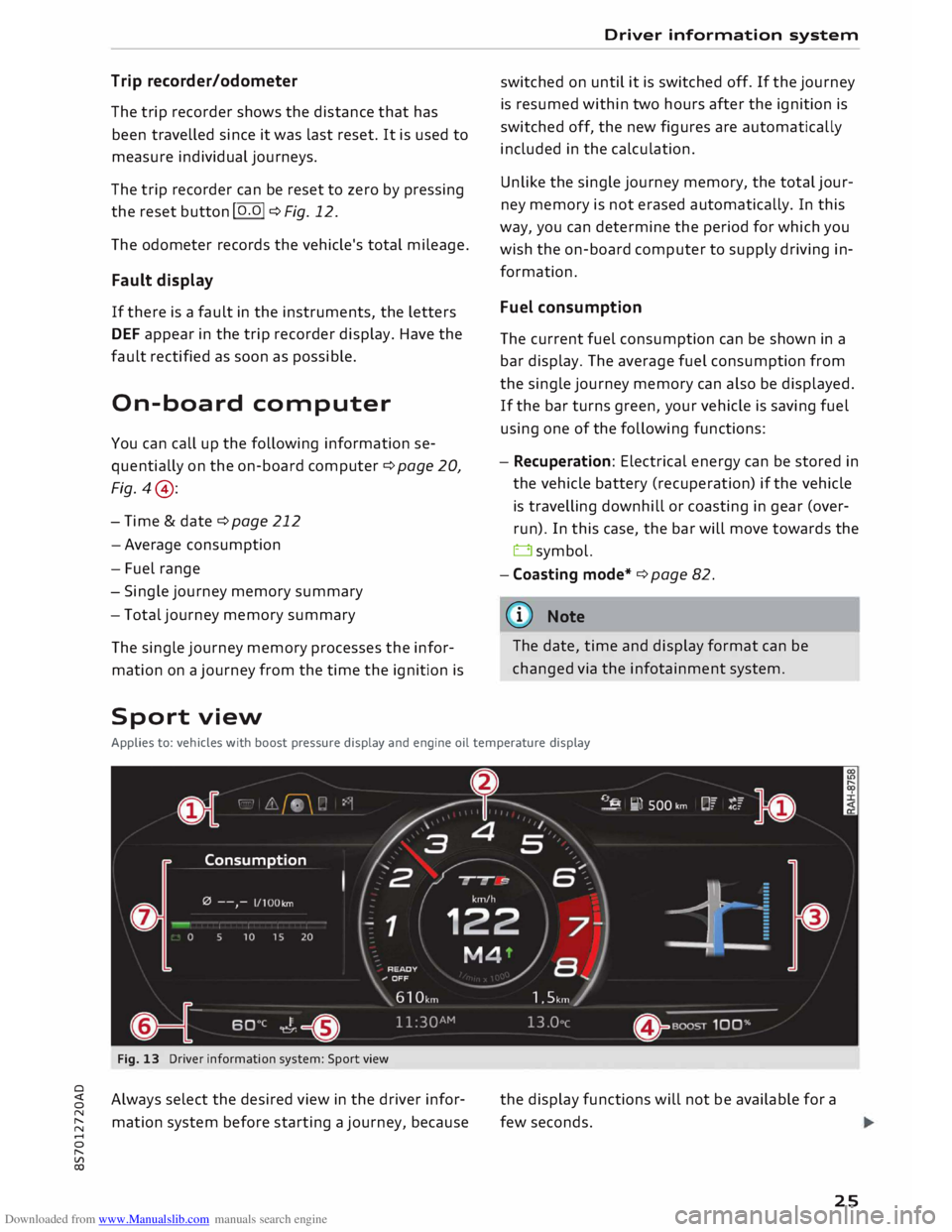
Applies to: vehicles with boost pressure display and engine oil temperature display
Fig. 13 Driver information system: Sport view
Always select the desired view in the driver infor
mation system before starting a journey, because the
display functions will not be available for a
few seconds.
25
Page 38 of 306

Downloaded from www.Manualslib.com manuals search engine Doors
and windows
which perform the functions of up to three hand
held transmitters.
To operate the desired systems with the garage
door opener, you first need to program the but
tons in the operating unit.
A WARNING
When you are operating or programming the
garage door opener, make sure that no per
sons or objects are close to the devices receiv
ing the transmitter signals. Otherwise, per
sons might be injured or other damage
caused by moving parts.
(D Note
- For security reasons we recommend that
you delete the programming of the buttons
prior to selling your vehicle.
- For more information about Homelink,
please see www.homelink.com.
Controls
Applies to: vehicles with garage door opener (Homelink)
Fig. 28 Operating unit above the interior mirror
Important: The button in the operating unit must
be programmed <=> page 36 and the vehicle
must be within range of the garage door or other
system you wish to operate.
.. To open the garage door, press the button. The
green LED CD will light up or flash.
.. To close the garage door, press the button
again.
Note
When opening/closing the garage door, do
not keep the button pressed for more than
36 20
seconds; otherwise the garage door open
er will switch to the programming mode.
Programming the transmitter
Applies to: vehicles with garage door opener (Homelink)
Fig. 29 Distance between radiator grille and hand-held
transmitter
Programming a button: Stage 1 (at the
operating unit)
1. Switch on the ignition.
2. Press
and hold down the two outer buttons
on the operating unit<=> page 36, Fig. 28 until
the yellow LED@ goes out and the green
LED CD flashes. This procedure will delete the
standard factory settings and does not need
to be repeated when programming the other
buttons.
3. Briefly
press the particular button in the op
erating unit that you would like to program.
4. Wait until the yellow LED@flashes . The
programming mode is then activated for 5
minutes.
5. Step in front of your vehicle with the original
hand-held transmitter for the system you
wish to assign to the button in the operating
unit.
Programming a button: Stage 2 (at the
radiator grille)
6. Hold
the hand-held transmitter in front of
your car's radiator grille<=> Fig. 29.
7. Now press and hold the button on the hand
held transmitter until the turn signals on
your vehicle start to flash. This can take up to
30 seconds.
8. If the hazard lights flash three times, the
button has been programmed successfully. If
the hazard lights flash once only, the
�
Page 39 of 306
Downloaded from www.Manualslib.com manuals search engine 0
N
,.....
N
......
0
,.....
Vl
CX) programming
operation has failed or the five
minute programming period has expired. Re
peat the programming procedure starting
with the 3rd step, or try holding the trans
mitter nearer or further away from the radia
tor grille.
9. If the garage door or other system still fails
to be activated using the buttons in the oper
ating unit after programming is completed,
it is possible that the system might be work
ing with a rolling code instead of the normal
fixed security code. If this is the case, a roll
ing code progr amming is required in addi
tion to the steps described above
¢page 37.
Follow the instructions above to program the
other two buttons. Start with the 3rd step.
Erasing the button programming
Programmed buttons can only be erased all at
once; it is not possible to erase them individually.
Reprogram the buttons if necessary.
� Switch on the ignition.
� Press and hold down the two outer buttons on
the operating unit until the yellow LED @
goes
out and the green LED CD
flashes.
Reprogramming the buttons
� Switch on the ignition.
� To reprogram an individual button, press and
hold the desired button until the green LED CD
goes out and the yellow LED @
starts to flash
(after about 20 seconds). Then release the but
ton immediately. The programming mode is
then activated for S minutes.
� Continue with the 5th step.
ij) Note
- The required distance between the hand
held transmitter and the Homelink module
inside the radiator grille¢ Fig. 29 depends
on the system you are programming.
- With some types of systems, you may need
to briefly release the button during pro
gramming and then press it again. When
programming a new device, keep the button
pressed for at least 15 seconds before try- Doors
and windows
ing again with the transmitter in a different
position. Watch out for your vehicle's haz
ard warning lights while doing so.
Rolling code programming
Applies to: vehicles with garage door opener (Homelink)
Some devices require rolling code programming.
Identifying a rolling code
� Press a programmed button in the operating
unit again and hold it down.
� Watch the green LED CD
¢ page 36, Fig. 28. If
the green LED starts flashing rapidly, this indi
cates that the system you wish to operate, such
as a garage door, is equipped with a rolling
code.
� Program the rolling code as follows:
Activating a system's drive unit
� Locate
the programming button on the sys
tem's drive unit. The exact location and colour
of the button may vary depending on the type
of system.
� Press
the programming button on the system's
drive unit (this will normally cause an indicator
lamp on the unit to light up). You now have
about 30 seconds to start and complete pro
gramming of the button in the operating unit.
Programming the button in the operating
unit
� Press the previously programmed button in the
operating unit for 2 seconds.
� Press the button for 2 seconds again to com
plete rolling code programming.
� For some systems, the button may have to be
pressed a third time to complete the program
ming sequence.
After programming, the system should recognise
the signal and respond when the button in the
operating unit is pressed. Now the other control
buttons can be programmed as required.
@ Note
- Having a second person assist you makes
programming of the rolling code easier and
faster. ..,_
37
Page 52 of 306
Downloaded from www.Manualslib.com manuals search engine Lights
and vision
Windscreen wipers
Switching on the windscreen wipers
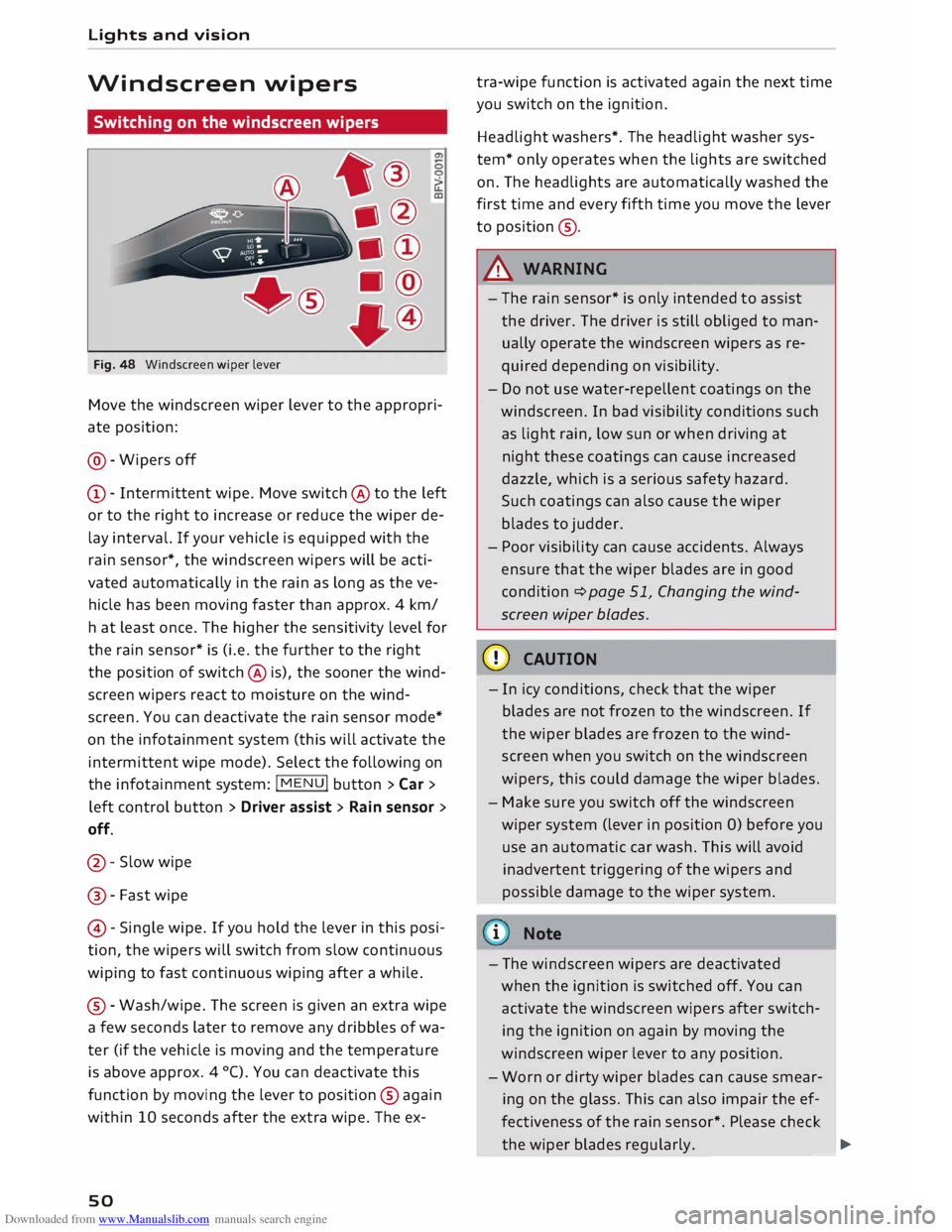
Fig. 48 Windscreen wiper lever
Move the windscreen wiper lever to the appropri
ate position:
@- Wipers off
CD- Intermittent wipe. Move switch @ to the left
or to the right to increase or reduce the wiper de
lay interval. If your vehicle is equipped with the
rain sensor*, the windscreen wipers will be acti
vated automatically in the rain as long as the ve
hicle has been moving faster than approx. 4 km/
ha t least once. The higher the sensitivity level for
the rain sensor* is (i.e. the further to the right
the position of switch @ is), the sooner the wind
screen wipers react to moisture on the wind
screen. You can deactivate the rain sensor mode*
on the infotainment system (this will activate the
intermittent wipe mode). Select the following on
the infotainment system: !MENU! button> Car >
left control button > Driver assist> Rain sensor >
off.
@- Slow wipe
@ -Fast wipe
@ -Single wipe. If you hold the lever in this posi
tion, the wipers will switch from slow continuous
wiping to fast continuous wiping after a while.
® -Wash/wipe. The screen is given an extra wipe
a few seconds later to remove any dribbles of wa
ter (if the vehicle is moving and the temperature
is above approx. 4 °C). You can deactivate this
function by moving the lever to position @again
within 10 seconds after the extra wipe. The ex-
so tra-wipe
function is activated again the next time
you switch on the ignition.
Headlight washers*. The headlight washer sys
tem* only operates when the lights are switched
on. The headlights are automatically washed the
first time and every fifth time you move the lever
to position ®·
A WARNING
- The rain sensor* is only intended to assist
the driver. The driver is still obliged to man
ually operate the windscreen wipers as re
quired depending on visibility.
- Do not use water-repellent coatings on the
windscreen. In bad visibility conditions such
as light rain, low sun or when driving at
night these coatings can cause increased
dazzle, which is a serious safety hazard.
Such coatings can also cause the wiper
blades to judder.
- Poor visibility can cause accidents. Always
ensure that the wiper blades are in good
condition ¢ page 51, Changing the wind
screen wiper blades.
CD CAUTION
- In icy conditions, check that the wiper
blades are not frozen to the windscreen. If
the wiper blades are frozen to the wind
screen when you switch on the windscreen
wipers, this could damage the wiper blades.
- Make sure you switch off the windscreen
wiper system (lever in position 0) before you
use an automatic car wash. This will avoid
inadvertent triggering of the wipers and
possible damage to the wiper system.
i Note
- The windscreen wipers are deactivated
when the ignition is switched off. You can
activate the windscreen wipers after switch
ing the ignition on again by moving the
windscreen wiper lever to any position.
- Worn or dirty wiper blades can cause smear
ing on the glass. This can also impair the ef
fectiveness of the rain sensor*. Please check
the wiper blades regularly. ______ �
Page 63 of 306
Downloaded from www.Manualslib.com manuals search engine 0
N
,.....
N
......
0
,.....
Vl
CX) For
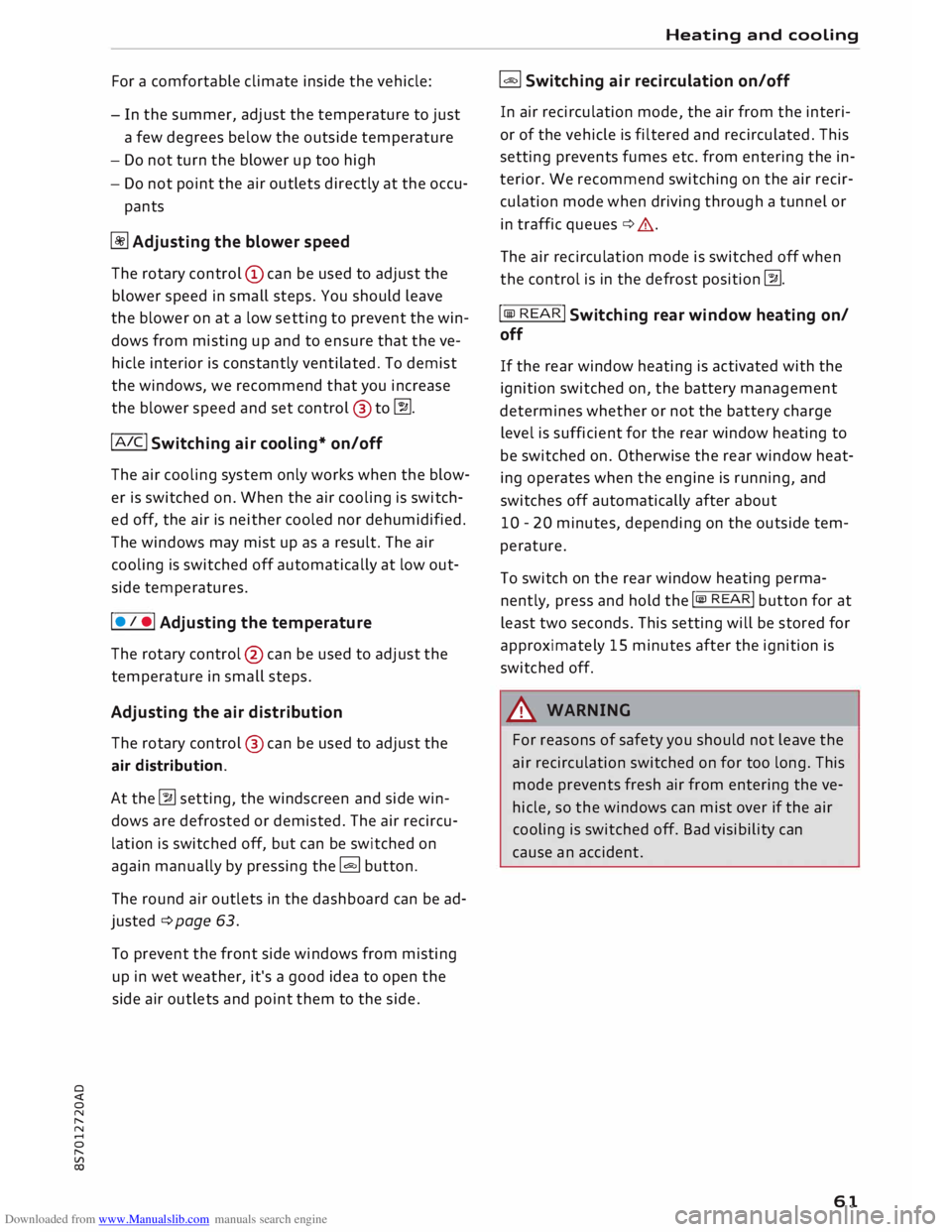
a comfortable climate inside the vehicle:
- In the summer, adjust the temperature to just
a few degrees below the outside temperature
- Do not turn the blower up too high
- Do not point the air outlets directly at the occu-
pants
� Adjusting the blower speed
The rotary control (D can be used to adjust the
blower speed in small steps. You should leave
the blower on at a low setting to prevent the win
dows from misting up and to ensure that the ve
hicle interior is constantly ventilated. To demist
the windows, we recommend that you increase
the blower speed and set control @ to�-
! A IC !
Switching air cooling* on/off
The air cooling system only works when the blow
er is switched on. When the air cooling is switch
ed off, the air is neither cooled nor dehumidified.
The windows may mist up as a result. The air
cooling is switched off automatically at low out
side temperatures.
I • I • I Adjusting
the temperature
The rotary control @ can be used to adjust the
temperature in small steps.
Adjusting the air distribution
The rotary control @ can be used to adjust the
air distribution.
At the � setting, the windscreen and side win
dows are defrosted or demisted. The air recircu
lation is switched off, but can be switched on
again manually by pressing the� button.
The round air outlets in the dashboard can be ad
justed ¢page 63.
To prevent the front side windows from misting
up in wet weather, it's a good idea to open the
side air outlets and point them to the side. Heating
and cooling
� Switching air recirculation on/off
In air recirculation mode, the air from the interi
or of the vehicle is filtered and recirculated. This
setting prevents fumes etc. from entering the in
terior. We recommend switching on the air recir
culation mode when driving through a tunnel or
in traff ic queues ¢,&.
The air recirculation mode is switched off when
the control is in the defrost position �-
! lliil
RE
AR
!
Switching rear window heating on/
off
If the rear window heating is activated with the
ignition switched on, the battery management
determines whether or not the battery charge
level is sufficient for the rear window heating to
be switched on. Otherwise the rear window heat
ing operates when the engine is running, and
switches off automatically after about
10 -20 minutes, depending on the outside tem
perature.
To switch on the rear window heating perma
nently, press and hold the !lliil REAR! button for at
least two seconds. This setting will be stored for
approximately 15 minutes after the ignition is
switched off.
A WARNING
For reasons of safety you should not leave the
air recirculation switched on for too long. This
mode prevents fresh air from entering the ve
hicle, so the windows can mist over if the air
cooling is switched off. Bad visibility can
cause an accident.
61
Page 64 of 306
Downloaded from www.Manualslib.com manuals search engine Heating
and cooling
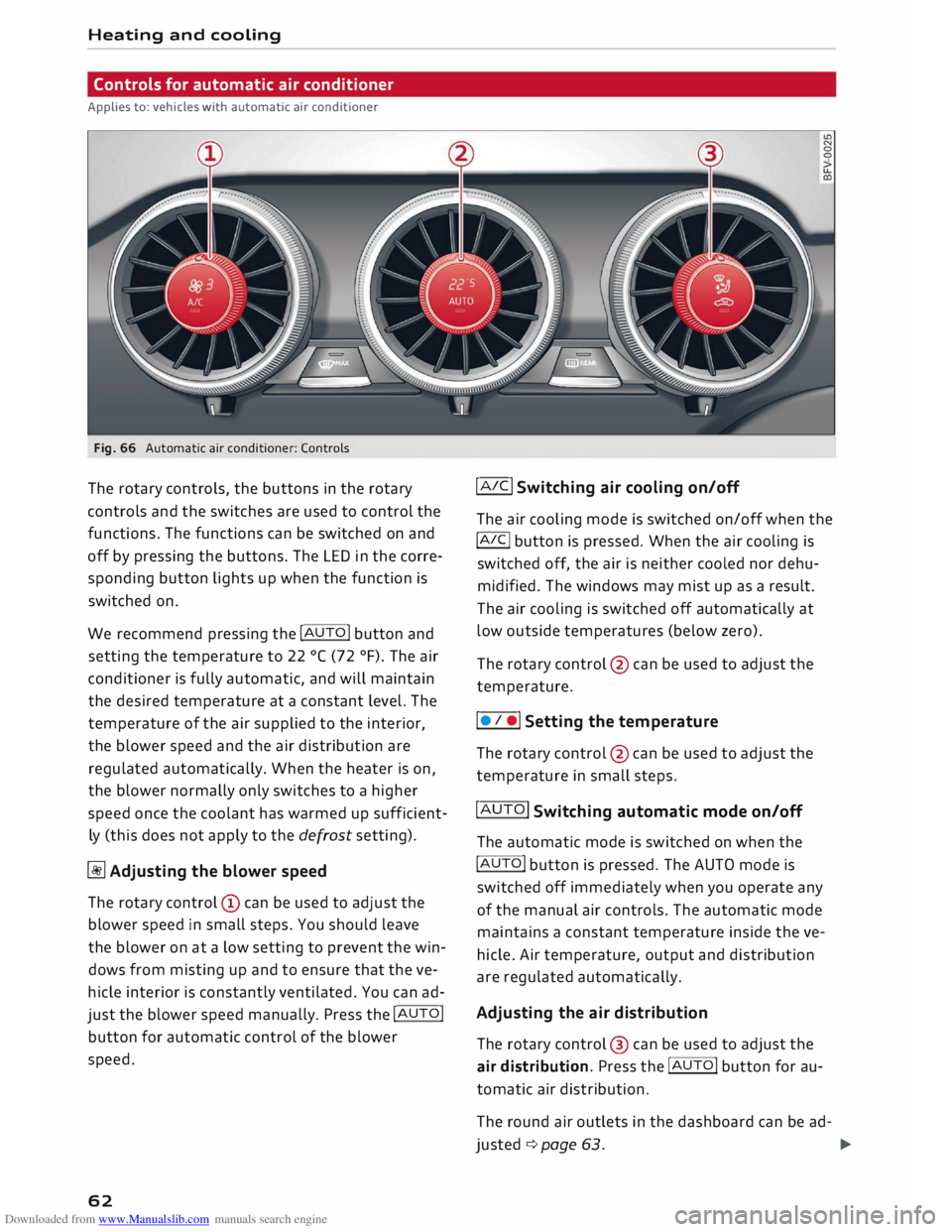
Controls for automatic air conditioner
Applies to: vehicles with automatic air conditioner
Fig. 66 Automatic air conditioner: Controls
The rotary controls, the buttons in the rotary
controls and the switches are used to control the
functions. The functions can be switched on and
off by pressing the buttons. The LED in the corre
sponding button lights up when the function is
switched on.
We recommend pressing the !AUTO! button and
setting the temperature to 22 °( (72 °F). The air
conditioner is fully automatic, and will maintain
the desired temperature at a constant level. The
temperature of the air supplied to the interior,
the blower speed and the air distribution are
regulated automatically. When the heater is on,
the blower normally only switches to a higher
speed once the coolant has warmed up sufficient
ly (this does not apply to the defrost setting).
� Adjusting the blower speed
The rotary control @ can be used to adjust the
blower speed in small steps. You should leave
the blower on at a low setting to prevent the win
dows from misting up and to ensure that the ve
hicle interior is constantly ventilated. You can ad
just the blower speed manually. Press the !AUTO!
button for automatic control of the blower
speed.
62 !AIC!
Switching air cooling on/off
The air cooling mode is switched on/off when the
!A IC!
button is pressed. When the air cooling is
switched off, the air is neither cooled nor dehu
midified. The windows may mist up as a result.
The air cooling is switched off automatically at
low outside temperatures (below zero).
The rotary control @ can be used to adjust the
temperature.
I • I •I Setting the temperature
The rotary control @ can be used to adjust the
temperature in small steps.
!AUTO! Switching automatic mode on/off
The automatic mode is switched on when the
!AUTO! button is pressed. The AUTO mode is
switched off immediately when you operate any
of the manual air controls. The automatic mode
maintains a constant temperature inside the ve
hicle. Air temperature, output and distribution
are regulated automatically.
Adjusting the air distribution
The rotary control @ can be used to adjust the
air distribution. Press the !AUTO! button for au
tomatic air distribution.
The round air outlets in the dashboard can be ad-
justed ¢ page 63.
�
Page 65 of 306
Downloaded from www.Manualslib.com manuals search engine 0
N
,.....
N
......
0
,.....
Vl
CX) To
prevent the front side windows from misting
up in wet weather, it's a good idea to open the
side air outlets and point them to the side.
� Switching air recirculation on/off
The air recirculation mode can be switched on
manually or automatically*.
- To switch the manual air recirculation mode
on/off, press the[;] button.
- The automatic* air recirculation function must
be activated on the infotainment system. Se
lect the following on the infotainment system:
IM ENU
I
button > Car > left control button > Ve
hicle settings > A/C > Auto recirculation. The
air quality sensor, which is designed for the de
tection of diesel and petrol exhaust fumes, au
tomatically switches the air recirculation mode
on or off depending on the level of pollution in
the outside air.
In air recirculation mode, the air from the interi
or of the vehicle is filtered and recirculated. This
setting prevents fumes etc. from entering the in
terior. We recommend switching on the air recir
culation mode when driving through a tunnel or
in traffic queues ¢ A.
The air recirculation mode is switched off when
the [;] or I
AUTO I
or I l!ii'
M
AX
I button is pressed.
I@ MAX!
Switching the defroster on/off
The windscreen and side windows are defrosted
or demisted as quickly as possible. Most of the
air comes out of the outlets below the wind
screen. The air recirculation mode is deactivated.
The temperature is regulated automatically.
The defroster is switched off when the !AUTO!
button is pressed.
l[jjj) REAR!
Switching the rear window heating
on/off
If the rear window heating is activated with the
ignition switched on, the battery management
determines whether or not the battery charge
level is sufficient for the rear window heating to
be switched on. Otherwise the rear window heat
ing operates when the engine is running, and
switches off automatically after about Heating
and cooling
10 -20 minutes, depending on the outside tem
perature.
To switch on the rear window heating perma
nently, press and hold the l[jjj) REA
R!
button for at
least two seconds. This setting will be stored for
approximately 15 minutes after the ignition is
switched off.
A WARNING
For reasons of safety you should not leave the
air recirculation switched on for too long. This
mode prevents fresh air from entering the ve
hicle, so the windows can mist over if the air
cooling is switched off. Bad visibility can
cause an accident.
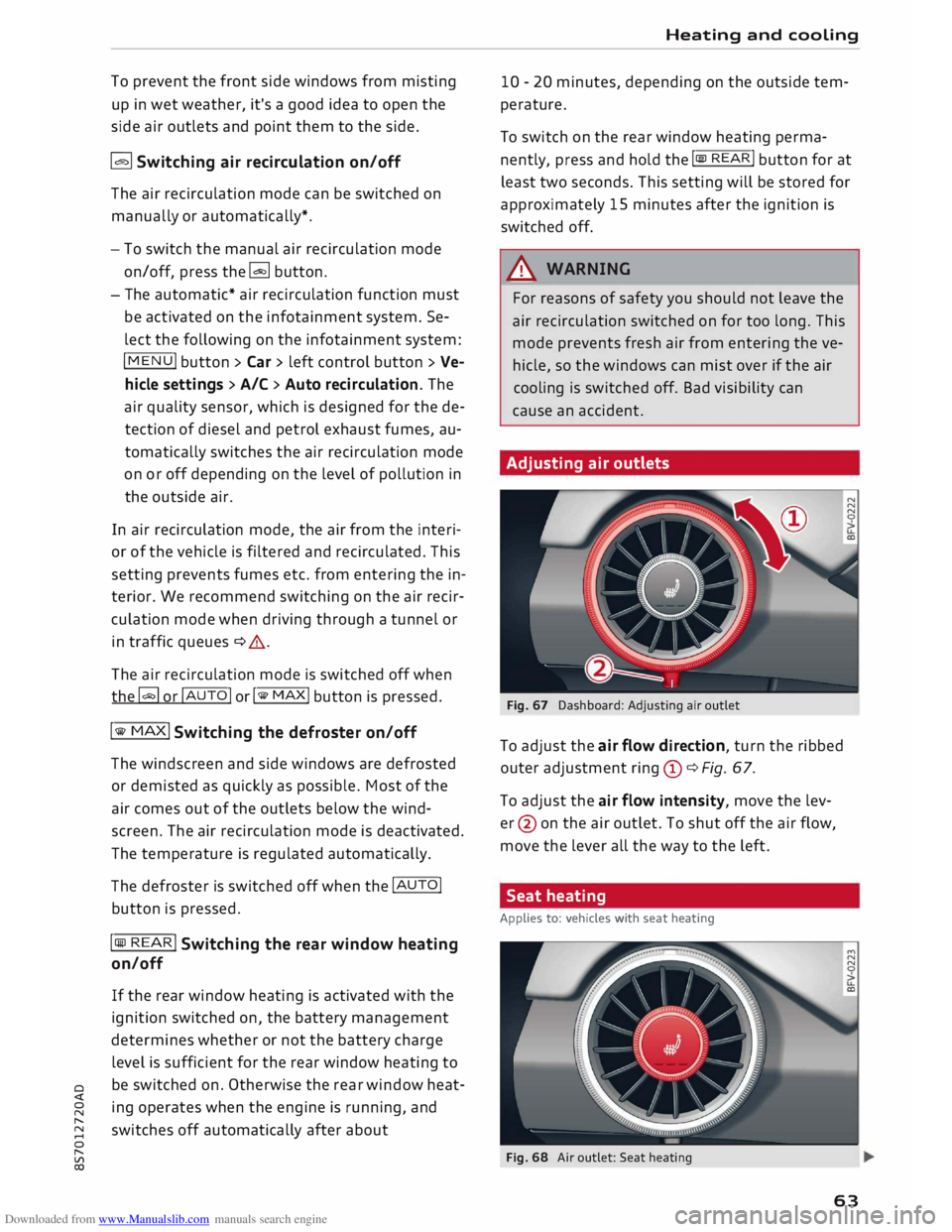
Adjusting air outlets
Fig. 67 Dashboard: Adjusting air outlet
To adjust the air flow direction, turn the ribbed
outer adjustment ring(!)¢ Fig. 67.
To adjust the air flow intensity, move the lev
er @ on the air outlet. To shut off the air flow,
move the lever all the way to the left.
Seat heating
Applies to: vehicles with seat heating
Fig. 68 Air outlet: Seat heating
63
Page 69 of 306
Downloaded from www.Manualslib.com manuals search engine 0
N
,.....
N
......
0
,.....
Vl
CX) -
Do NOT stop the vehicle, drive in reverse or
switch off the engine before you are out of
the water.
- Bear in mind that waves created by oncom
ing traffic could exceed the permissible
wading depth of your vehicle.
- Avoid driving through salt water (corrosion).
How to improve economy and minimise
pollution
Fuel economy, environmental impact and wear
on the engine, brakes and tyres depend largely
on the way you drive the vehicle. By adopting an
economical driving style and anticipating the
traffic situation ahead, you can reduce fuel con
sumption by 10-15%. The following section gives
you some tips on lessening the impact on the en
vironment and reducing your operating costs at
the same time.
Anticipate well in advance
A car uses most fuel when accelerating. If you an
ticipate hazards and speed changes well in ad
vance, you will need to brake less and thus accel
erate less. Wherever possible, let the car slow
down gradually with a gear engaged, for in
stance when you can see that the next traffic
lights are red.
Change gear early to save fuel
An effective way of saving fuel is to change up
quickly through the gears. Running the engine at
high rpm in the lower gears uses an unnecessary
amount of fuel. Press the accelerator slowly and
avoid using the "kick-down" feature.
Avoid driving at high speed
Avoid travelling at top speed. Fuel consumption,
exhaust emissions and noise levels all increase
very rapidly at higher speeds. Driving at moder
ate speeds will help to save fuel.
Do not let the engine idle for longer than
necessary
Engine idling periods are automatically reduced
on vehicles with start/stop system*. On vehicles
without start/stop system*, it is worthwhile
switching off the engine at level crossings, for in- Driving
stance, or at traffic lights with a long red phase.
The fuel saved after only 30 -40 seconds is
greater than the amount of fuel needed to re
start the engine.
The engine takes a very long time to warm up
when it is running at idling speed. Mechanical
wear and pollutant emissions are also especially
high during this initial warm-up phase. It is
therefore best to drive off immediately after
starting the engine. Avoid running the engine at
high speed.
Regular servicing
Regular servicing can establish a basis for good
fuel economy before you start driving. A well
serviced engine gives you the benefit of im
proved fuel efficiency as well as maximum relia
bility and an enhanced resale value.
A poorly maintained engine can consume up to
ten percent more fuel than necessary.
Check the oil level when filling the tank. Oil con
sumption depends to a great extent on the en
gine load and engine speed. It is quite normal
that the oil consumption of a new engine only
reaches its lowest level after a certain mileage.
This means that the oil consumption can only be
properly assessed after about 5,000 km.
Avoid short trips
The engine and emission control system need to
reach their proper working temperature in order
to minimise fuel consumption and emissions.
A cold engine uses disproportionately more fuel.
The engine only reaches its working temperature
after about four kilometres, when fuel consump
tion will return to a normal level.
Check tyre pressures
Always make sure the tyres are inflated to the
correct tyre pressures to save fuel. If the tyre
pressures are just 0.5 bar too low, this can in
crease the fuel consumption by as much as 5 %.
Due to the greater rolling resistance, under-infla
tion also increases tyre wear and impairs han
dling.
67
Page 78 of 306
Downloaded from www.Manualslib.com manuals search engine Driving
order to hold the vehicle and make it easier for
you to drive away.
Driving off with the hold assist
Applies to: vehicles with hold assist
The hold assist helps the driver if the vehicle is
stationary for a long period or very often, for in
stance at traffic lights, on steep gradients or in
stop-and-go traffic.
Important: The driver's door must be closed and
the engine must be running.
.,. To switch the hold assist on/off, press the but
ton(@) @¢page 74, Fig. 78, ¢A .The LED in
the button will light up or go out.
.,. Once it detects that the vehicle has stopped,
the hold assist keeps the vehicle stationary.
You can now take your foot off the brake pedal.
.,. Drive
off in the normal way: the brake will be
released automatically and the vehicle will
start moving.
In certain situations, the hold assist transfers the
job of holding the vehicle to the parking brake.
As soon as the parking brake is holding the vehi
cle still, the warning lamp. appears in the in
strument cluster. In addition, the LED in the C®)
button will light up.
Driver messages in the instrument cluster
display
[iJ Hold assist: unavailable
If this message appears, the system require
ments have not been met.
A WARNING
Applies to: vehicles with hill hold assist
If you do not drive away immediately after re
leasing the brake pedal, or if the engine
stalls, the vehicle may start to roll back. You
should therefore immediately press the brake
pedal or apply the parking brake.
A WARNING
The intelligent technology in the hold assist*
and hill hold assist functions cannot defy the
laws of physics. Do not let the extra conven
ience afforded by the hold assist* and hill
76 hold
assist functions tempt you into taking
any risks when driving -this can cause acci
dents.
- The hold assist* and hill hold assist func
tions cannot keep the vehicle stationary in
all conditions on a gradient (e.g. if the road
is slippery or icy).
- Always ensure that the vehicle is stopped
properly and safely -risk of accident!
CD CAUTION
Switch off the hold assist* function before
driving the vehicle into a car wash.
� Note
Applies to: vehicles with automatic gearbox
When the hold assist* function is switched
on, it stops the vehicle from creeping for
wards when you take your foot off the brake
pedal.
Automatic gearbox
Introduction
Applies to: vehicles with automatic gearbox
The vehicle is equipped with an electronically
controlled dual-clutch gearbox (S tronic). Torque
between the engine and the gearbox is transmit
ted via two independent clutches. They enable
smooth, uninterrupted acceleration of the vehi
cle.
The gearbox shifts up or down automatically and
continuously adapts the timing of the gear
changes to your driving style.
When you drive at moderate speeds the gearbox
will select the most economical shift pro
gramme. It will then change up early and delay
the downshifts to give better fuel economy.
If you drive at higher speeds with heavy accelera
tion, if you open the throttle quickly, or if you use
the kick-down or the car's maximum speed, the
gearbox will automatically select the more "spor
ty" shift programmes.
If desired, you can also select the gears manually
(tiptronic mode).