change time AUDI TT ROADSTER 2017 User Guide
[x] Cancel search | Manufacturer: AUDI, Model Year: 2017, Model line: TT ROADSTER, Model: AUDI TT ROADSTER 2017Pages: 314, PDF Size: 76.54 MB
Page 97 of 314

co
co
.... N
" N .... 0
" "' c:o
for an extremely small period of time. Data that
is recorded in such a case may include vehicle
speed, driving direction, the load on the brakes
and head restraints and performance in the event
of an acc ident or other change in status. The
stored data can only be read or downloaded with
special devices .
Intelligent Technology
95
Page 114 of 314
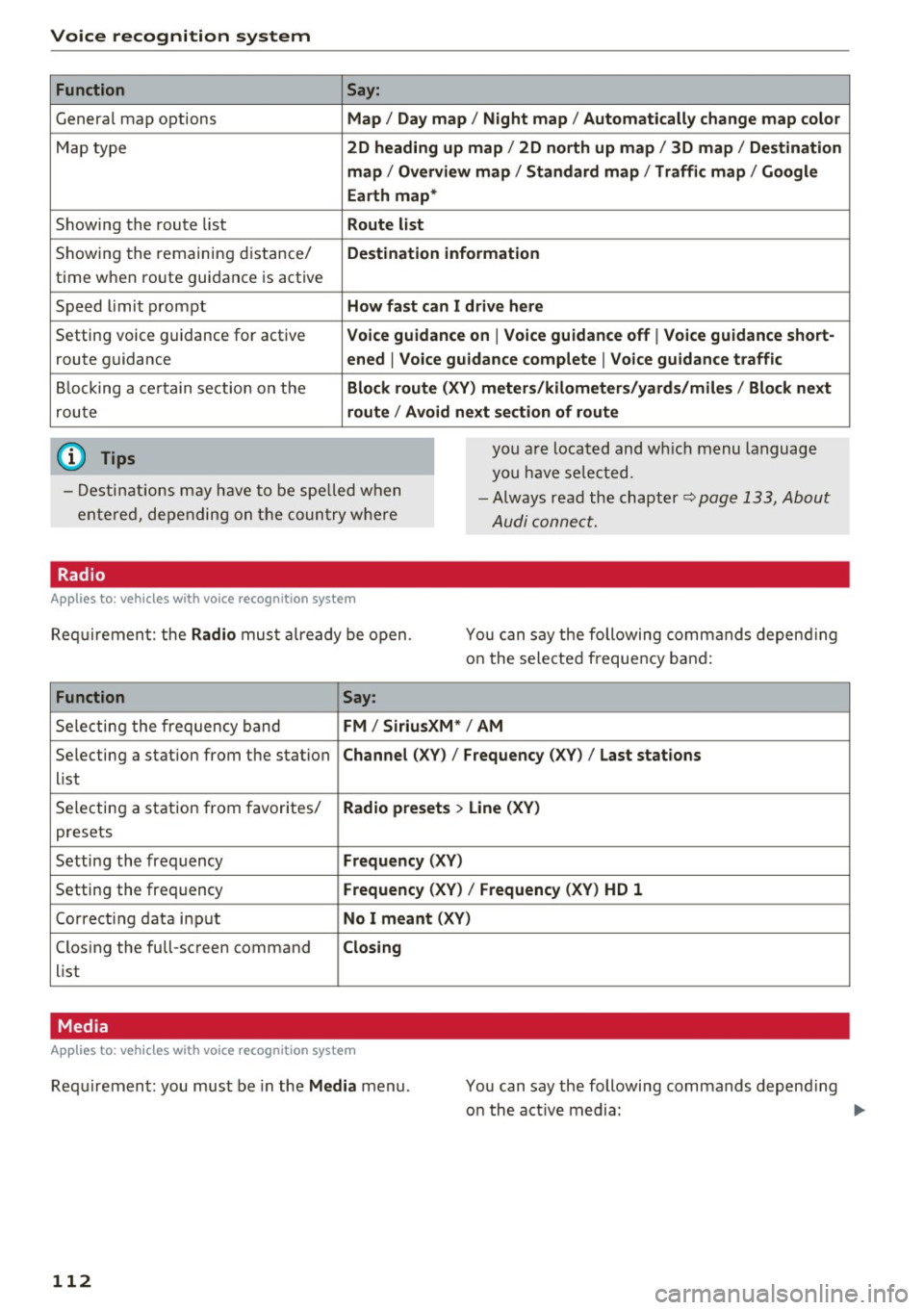
Voice recognition system Function
Genera l map options
Map type
Showing the route list
Showing the remaining distance/
time when route guidance is active
Speed limit prompt
Setting voice guidance for active route guidance
B locking a ce rtain section on the
rou te
(D Tips Say:
Map / Day map / N ight map / Automatically change map color
2D heading up map / 2D north up map / 3D map / De stination
map / Ov ervi ew map / Standard map / Traffic map / Googl e
Earth map *
Route l ist
Destin ation information
How fa st can I drive here
V oice guidance on
I V oice guidance off I Voice guidance short-
ened
I Vo ice guidance complete I V oice guid ance traffic
Block route (XV ) m eter s/kilom eters /yards /mile s/ Block next
route / Avo id next section of route
you a re located and wh ich menu language
you have se lected.
- Destinations may have to be spe lled when
entered, depending on the coun try where -
Always read the chapter~
page 133, About
Audi connect.
Radio
Applies to : vehicles with voice recognitio n system
Req uirement: the Radio mus t already be open. You can say the following commands depend ing
on the selected frequency band:
Function Say:
Selecting the frequency band FM / Siriu sXM * / AM
Selecting a station from the station Channel (XV) / !Frequency (XV) / Last stat ions
list
Selecting a station from favorites/
Radio presets > Line (XV)
presets
Setting the frequency
Fr equ ency (XV)
Setting the frequency Frequenc y (XV) / Frequency (XV ) HD 1
Correcting data input No I m eant (XV )
Closing the full-screen command C losing
list
Media
Appl ies to: vehicles with voice recognition system
Requirement: you must be in the Med ia menu .
112 You can say the following commands depend
ing
o n the act ive media:
Page 117 of 314
co
co
.... N
" N .... 0
" "' c:o
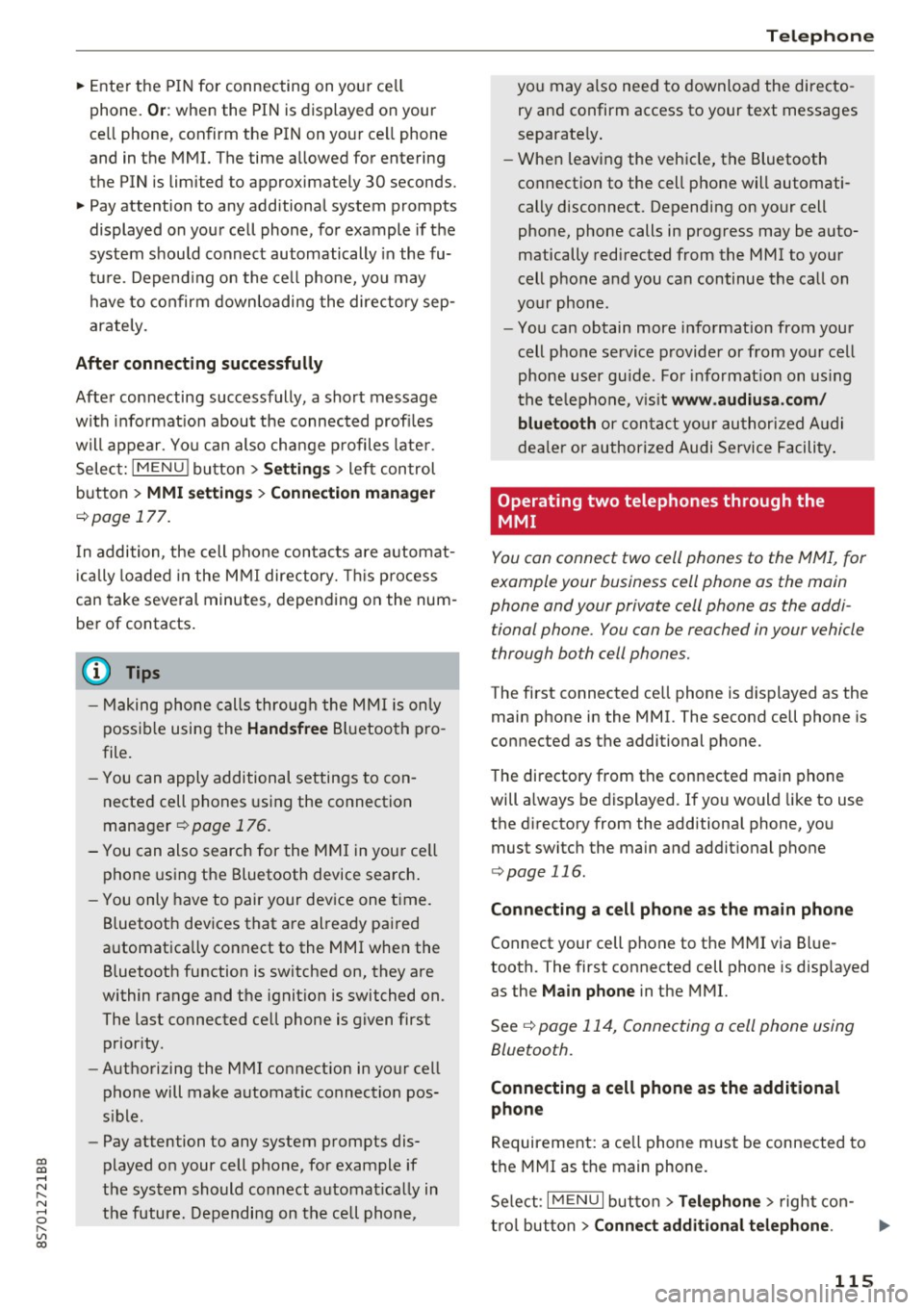
~ Enter the PIN for connecting on your cell
phone.
O r: when the PIN is displayed on your
ce ll phone, confirm the PIN on your ce ll phone
and in the MMI. The time allowed for entering
the PIN is limited to approximately 30 seconds.
~ Pay attention to any additional system prompts
displayed on your cell phone, for example if the
system should connect automatically in the fu
ture. Depend ing on the ce ll phone, you may
have to confirm downloading the directory sep
arately.
After conn ecting succes sfully
After connecting successfully, a sho rt message
w ith informat ion about the connected profi les
will appear. You can also change profiles later.
Select:
IMENU ! button> Setting s> left control
button >
MMI setting s > Conn ecti on ma nag er
c>page 177.
In addition, the cell phone contacts are automat
ically loaded in the MMI directory. This p rocess
can take several minutes, depending on the num
ber of contacts.
@ Tips
- Making phone calls through the MMI is only
possib le using the
Hand sfree Bl uetooth pro
file.
- You can apply additional settings to con
nected cell phones using the connection
manager
c> page 176.
- You can also search for the MMI in you r ce ll
phone using the Bluetooth device search .
- You only have to pair your dev ice one time.
Bluetooth devices that are already paired
automatically connect to the MMI when the Bluetooth function is switched on, they are
within range and the ignit ion is switched on.
The last connected cell phone is given first
prior ity .
- Authorizing the MMI connection in your cell
phone will make automat ic connection pos
s ible .
- Pay attention to any system prompts dis
played on your cell phone, for example if
the system should connect automat ica lly in
the future. Depending on the cell phone,
T e le ph on e
you may also need to download the directo
ry and confirm access to your text messages
separately .
- When leaving the vehicle, the Bluetooth
connection to the cell phone will automati
cally disconnect. Depending on your cell
phone, phone calls in progress may be auto
matically redirected from the MMI to your
cell phone and you can continue the call on
your phone.
- You can obtain more information from your
cell phone service provider or from yo ur cell
phone user gu ide. For informat ion on us ing
the te lephone, v is it
www .audiu sa .co m/
blu eto oth
or contact your authorized A udi
dea ler or authorized Audi Service Facility .
Operating two telephones through the
MMI
You can connect two cell phones to the MMI, for
example your business cell phone as the main
phone and your private cell phone as the addi
tional phone. You con be reached in your vehicle
through both cell phones.
The first connected ce ll phone is displayed as the
main phone in the MMI. The second cell phone is
connected as the additional phone.
The directory from the connected main phone
will a lways be displayed. If you would like to use
the d irectory from the additional phone, you
must switch the main and addit ional phone
c> page 116.
Connecting a ce ll phone as the m ain phone
Connect your cell phone to the MMI via Blue
tooth. The first connected cell phone is disp layed
as the
Main phone in the MMI.
See
c> page 114, Connecting a cell phone using
Bluetooth .
Connecting a ce ll phone as the additional
phone
Requirement: a ce ll phone must be connected to
the MMI as the main phone.
Se lect:
I MENU I button> Tel ephon e> right con-
t rol button >
Connect additional telephone . ..,.
115
Page 129 of 314
co
co
.... N
" N .... 0
" "' c:o
Audi connect Introduction
A pp lies to: ve hicles with Audi co nnect
With Audi connect services, on line information is
transmitted and integrated direct ly in the vehi
cle.
Using the Wi-Fi hotspot, you can access the In
ternet through a mob ile dev ice when the vehicle
is stationary.
A WARNING
- To reduce the risk of an accident, on ly use
Audi connect services when road and traffic
condit ions perm it. Always read the instruc
t ions in the chapter
c> page 96, Traffic safe
ty information.
- It is only safe to use tablets, laptops, mo
bile devices and othe r similar dev ices when
the vehicle is stationary because, like all loose objects, they could be thrown a round
the ins ide of the vehicle in a crash and cause
ser ious injur ies. S to re t hese types of devi ces
sec urely wh ile driving.
- T o red uce the risk of an accident, o nly use
Audi conne ct serv ices using a Wi- Fi hotspo t
when the veh icle is sta tionary .
Aud i connect is desig ned fo r use only with the
prov ided SIM card. Aud i AG is not liable fo r
t he consequences of using other SI M cards.
(1) Tips
Read this chapter also befo re operati ng
i=> page 133, About Audi connect .
Setup
Audi connect requirements
Applies to: ve hicles with Audi co nnect
An Internet connection is required to use Audi
connect. The following req uirements must be
met to establish a connection:
-
- The Audi connect SIM ca rd must be inserted in
to the S IM card reader for the MMI.
Audi c onn ect
- A data connection must be configured for Audi
connect services .
(D Tips
The data conne ction for Aud i connec t services
i s preconfigured at the factory. You can
change the data connection at any time if you
need to adjust the configu ration
¢ page 132.
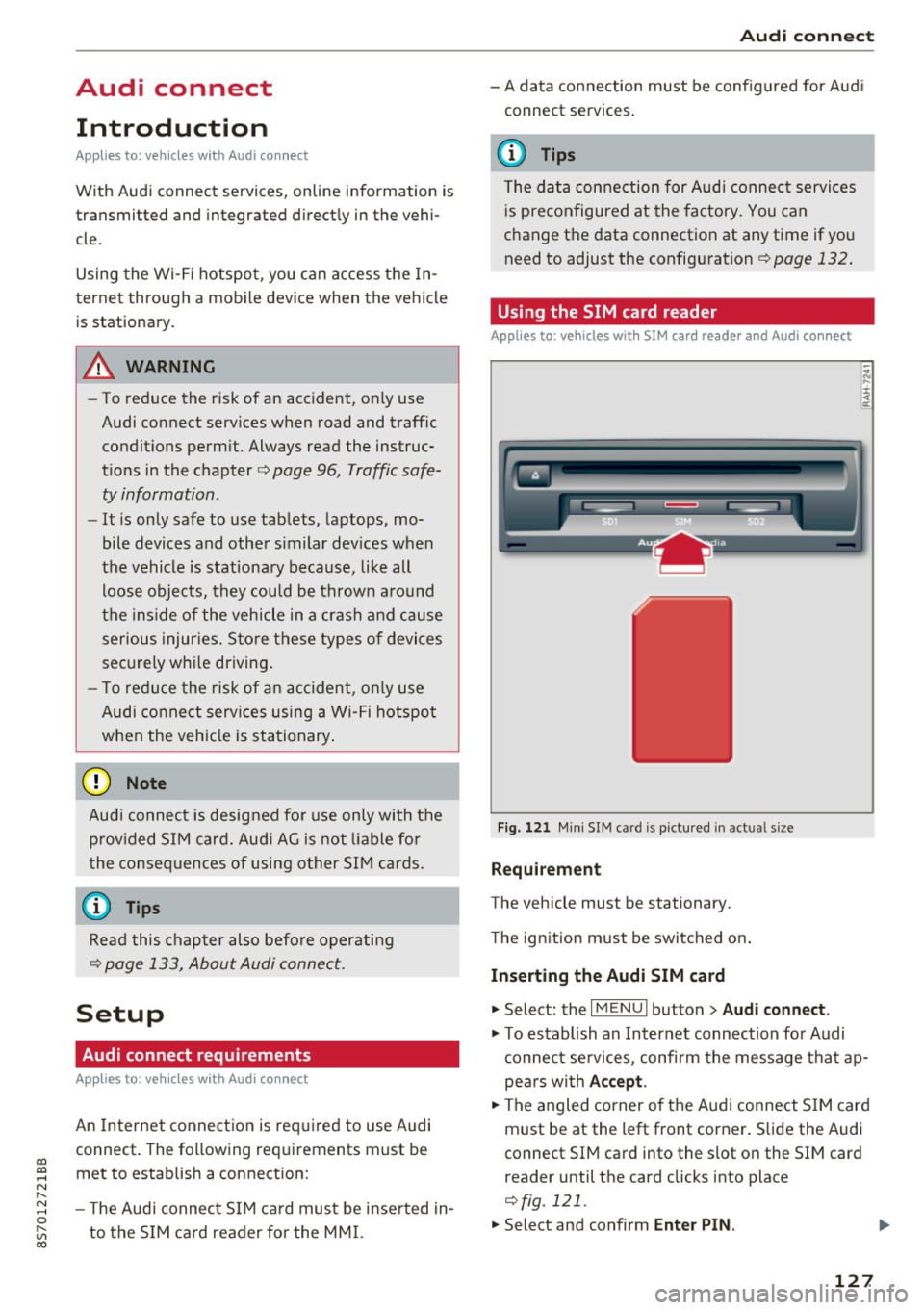
Using the SIM card reader
App lies to : vehicles wit h SIM ca rd reade r and Audi conn ect
Fig. 121 Min i SIM car d is pictured in act ual size
Requirement
The vehicle must be stationary.
T he ign ition must be switched on .
Inserting th e Audi SIM card
.,. Select: the I MENU I button> Audi conn ect .
.,. To establish an Internet connection fo r Audi
connect services, confirm the message tha t ap
pe ars with
Acc ept .
.,. The angled corner of the Audi connect S IM card
m ust be at the left front corner. Slide the Audi
connect SIM ca rd into the slot on the SIM card
reader until the card clicks into place
i=>fig. 121.
.,. Select and confirm Enter PIN .
127
Page 131 of 314
CD
CD
.... N
" N .... 0 r--. V, co
Audi connect services
Basic functions
Applies to: vehicles with Audi connect
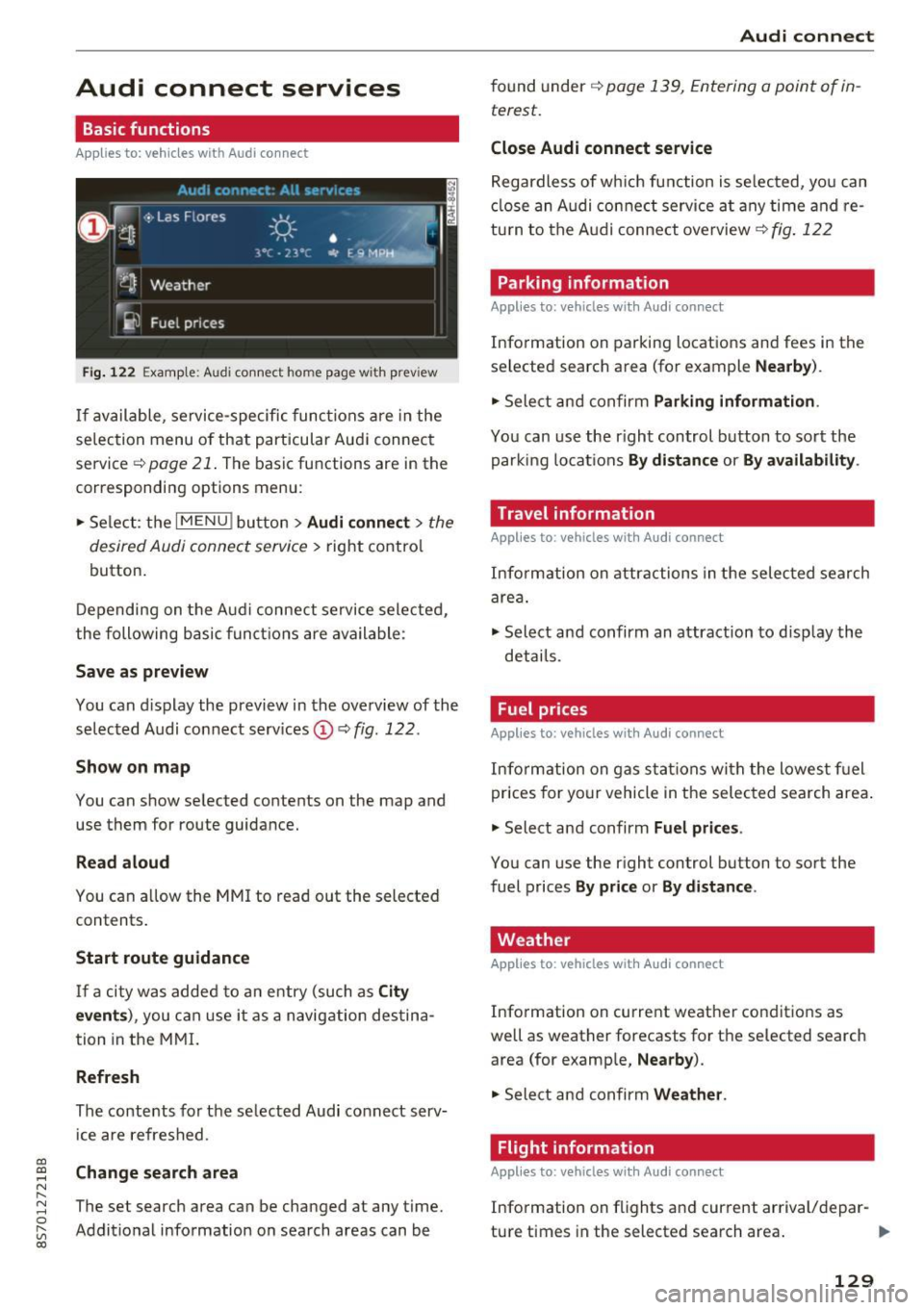
Fig. 12 2 Example: A udi co nn ect home page w ith prev iew
If available, service-specific func tions are in the
se lec tion menu o f th at particular Aud i connec t
service ~
page 21. The basic functions are in the
correspondi ng options menu:
.,. Se lect: the
I MENU ! button> Audi connect > the
desired Audi connec t service>
right contro l
button.
D epending on the A ud i connect se rvice sele cte d,
the following basic fun ctions are ava ilable:
Save as preview
You can d isplay the preview in the overview of the
se lected A udi connect services ©~
fig. 122 .
Show on map
You can show se lected contents on the map and
use them for route guidance.
Read aloud
You can a llow the MM I to read out the selected
contents .
Start route guidance
If a city was added to a n entry (such as City
event s),
you can use i t as a navig ation destina
tion in the M MI.
Refresh
The conte nts for the se lected Audi co nnect serv
i ce are refreshed .
Change search area
The set search area can be changed at any time.
Addit io nal information on search areas can be
Audi connect
found under ~ page 139, Entering a point of in
terest .
Close Audi connect service
Regardless of wh ich func tion is se lec ted, yo u can
cl ose an A udi con nect service a t any time and re
tu rn to the A udi conne ct overview
~ fig . 122
Parking information
Applies to: vehicles with Audi connect
Info rmation on parking locations and fees in the
se lected search area (for example
Nearby ).
.,. Sele ct and confirm Parking information .
You can use the right control button to sort the
parki ng locat ions
By distance or By availability .
Travel information
Applies to: vehicles with Audi connect
Info rm ation on attr actions in the selec ted search
are a.
.,. Select and confirm an attraction to disp lay the
details .
Fuel prices
Applies to: vehicles with Audi connect
Inform ation on gas s ta tions wi th the lowes t fu el
prices for yo ur vehicle in the selec ted sea rch area .
.,. Select and confirm
Fuel price s.
You can use the right control button to sort the
fuel prices
By pr ice or By d istance .
Weather
Applies to: vehicles with Audi connect
Info rmation on current weather conditions as
well as weather forecasts for the selected search area (for examp le,
Nearby ).
.,. Sele ct and confirm Weather .
Flight information
Applies to: vehicles with Audi connect
Info rmation on f lights and cur rent arrival/depar-
ture times in the selected search area . ..,.
129
Page 138 of 314
Navigation
Navigation
Opening navigation
A pplies to: ve hicles w ith navigation system
The navigation system directs you to your destination, around traffic incidents and on alternative
routes, if desired.
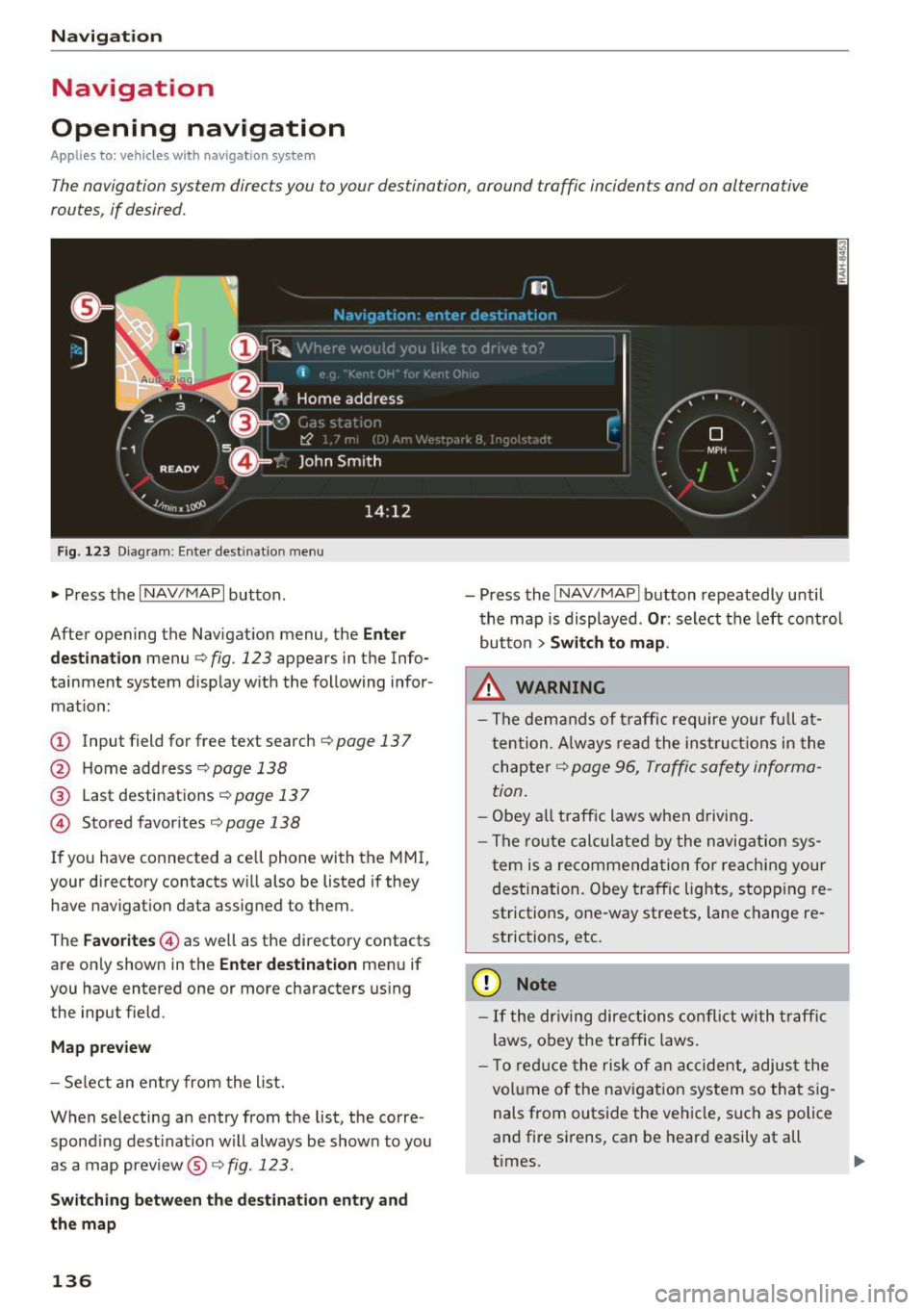
Fig. 123 Diagram: Enter destination menu
~ Press the I NAV/MAPI button.
After opening the Navigation menu, the
Enter
destination
menu Q fig. 123 appears in the Info
tainment system display with the following infor mat ion:
(!) Input field for free text search q page 13 7
@ Home address 9poge 138
@ Last destinations qpoge 137
© Stored favorites q page 138
If you have connected a cell phone with the MMI,
your directory contacts will also be listed if they
have navigation data assigned to them .
The
Favorites © as well as the directory contacts
are only shown in the
Enter destination menu if
you have entered one or more characters using the input field.
Map preview
-Select an entry from the list.
When selecting an entry from the list, the corre
spond ing dest ination will always be show n to you
as a map preview®~
fig. 123.
Switching between the destination entry and
the map
136
- Press the I NAV/MAPI button repeatedly until
the map is displayed .
Or: select the left control
button
> Switch to map.
.&_ WARNING
-The demands of traffic require your full at
tention. Always read the instructions in the
chapter
9 page 96, Traffic safety informa
tion.
- Obey all traffic laws when driving.
- The route calculated by the navigation sys-
tem is a recommendation for reaching your
destination. Obey traffic lights, stopp ing re
strictions, one-way streets, lane change re
strictions, etc.
(D Note
- If the dr iving directions conflict with traffic
laws, obey the traffic laws.
- T o reduce the risk of an accident, adjust the
volume of the navigation system so that sig
nals from outside the vehicle, such as police
and fire sirens, can be heard easily at all
times.
-
Page 142 of 314
Navig ation
(D Tips
- Distances to points of interest are shown as
a stra ight-line distance from the veh icle po
sition. The actual distance from your current
l ocation to the point of interest is updated
automat ically . The list of found points of in
terest is not resorted when this happens .
- There may be entries in the list that cannot
be d isplayed completely due to their length.
If you select these list entries using the con
tro l knob , deta iled informa tion about t he
se lected list entry wi ll be shown automati
c al ly a fter several seconds .
Point of interest online search
Applies to: vehicles with navigation system and Audi connect
You can search for points of interest on the In
ternet.
Requirement: the requirements fo r A udi con nect
services must be met
¢ page 127.
.,. Press t he I N AV /MAPI button repeated ly until
the
Enter destination menu is displayed
¢ page 136, fig. 123 .
.,. Se lect: left cont rol button > Online search . The
search area las t set is shown in the input field.
- Changing the search area : select and confirm
Search area > a search area from the list .
-Sear ching for onl ine destinations in thes e
lected search area :
enter a new city if necessa
r y. En ter a sea rch te rm su ch as restau rant . Se
l ec t and co nfirm an on line destin ation. Se lect
and con firm
Start route guidance .
- Sea rching for an online de stination in a specif
i c category :
select: Select category > desired
category,
s u ch a s Hotel s.
Find which search areas a re available under
¢ page 139, Entering a point of interest.
You can search for o n line dest inat io ns using the
voice recognition system¢
table on page 111 .
(D Tips
-Always read the chapter¢ page 133.
-Additional in format ion can be found under
www.audiusa.com/audiconnect
140
Accessing destinations from your myAudi
account
Applies to: vehicles with navigation system and Audi connect
Import destinations from your myAudi account
into the MMI.
Requireme nt: yo u must have a reg istered myAud i
account at
my .audiusa. com . You must have ave
hicle s to red in yo ur myAud i account and you
mus t have a destination stored .
.,. Press the
I NAV/MAPI button repeatedly u ntil
the
Enter dest inat ion me nu is displayed
¢page 136, fig. 123 .
.,. Sele ct: le ft control button > myAudi contacts .
.,. If necess ary, en ter yo ur myAu di user data or
your myA udi PIN. The contacts stored in myA u
di are disp layed.
- Select and confirm a contac t
> desired destina
tion .
-Sele ct and confirm Start route guidance .
(D Tips
-You only n eed to e nter the myA udi use r da ta
one time .
- You can rece ive your myAudi PI N if yo u have
set up a myAu di acco unt. For addit io nal in
forma tio n, see
my.audiusa.com .
'
Entering a destination using geo
coordinates
Applies to: vehicles with navigation system
.,. Pr ess the I NAV/MAP I button repeatedly until
the
Enter destinat ion men u is displayed
¢page 136, fig. 123 .
.,. Select: left control button > Geo coordinates .
-Select and confi rm either Latitude or Longi·
tude .
-Tur n th e control knob to change the latit ude/
longitude.
- Press the contro l knob to confirm your in put .
- Sele ct and confirm
Sta rt route guidance.
Page 169 of 314
"' "' ....
-Move fa vorite : select the desired entry from
the favorites list. Select the right control but
ton
> Mo ve fa vo rite. Select and confirm the
desired presets location.
- Deleting a fa vorite : select the desired entry
from the favor ites list. Select the right control
button
> Delete fa vorite > Delete thi s fa vorite
or D ele te all fa vori tes .
Additional settings
Options menu
Context-specific functions and settings are avai l
ab le depending on the se lected source.
.,. Press the right contro l button.
Sound setting s
See r::>page 179.
Input lev el
Requirement: a mobile device must be connected
to the AUX connect ion cable or to a USB adapter
r::> page 162, Multimedia connections.
The vo lume of the mobile device is adapted to
the MMI. Audi recommends adjusting the vo lume
on the mobile device to 70% of the max imum
volume output.
Blu etooth settings
See c> page 177.
Wi-Fi settings
See c> page 131, Wi-Fi hotspot.
Connection man ager
See c> page 176.
Additional tr ack inform ation
W ith the function switched on~ and a p lay list
open, vario us info rmation about the current track
(such as artist, album and album cover *) as well
as the playing t ime and the remaining playing
time are displayed.
N ~ l) The func tion automat ically sw itches off when the sou rce
8 is changed. r---~ 2> Th is func tion is not available for all cell phones.
Media
Jukebo x m emory capacity *
Information on the Jukebox memo ry c apac ity and
the n umber of sto red tracks in the Jukebox is dis
played.
Change playing position
T urn the cont rol knob to the left or r ight. Or :
move yo ur finge r on the MM I touch contro l pad
from the left to the r igh t.
Shuffle1>
With the function switched on~, all files in the
playlist are p layed and shown in random order.
Repeat track1>
When the funct ion is switched on~, the current
track repeats.
Back to 'Playback '
The options menu is closed. The track currently
playing appears in the playlist
c> page 166,
fig. 149.
Play s imilar mus ic *
T he tra ck cu rre ntly playing is quick ly an alyzed
(such as artists, genres, mood, beat) and a sma rt
playlist with sim ilar tracks is shown.
Play more ...
A smart playlist is shown based on the track cur
rently playing. Yo u can select between a p laylist
with more tracks
by thi s art ist, from thi s album
or of thi s genre.
Set as ringtone*
2>
Requirement: a ce ll phone must be connected to
the MMI. The trac k currently p lay ing must be in
t h e
Juk ebox * c> page 158 .
The selected track w ill be used as the ringtone
for incoming calls.
Gr acenote online databa se*
Requirement: the MMI must be connected to the
Internet. .,.
167
Page 173 of 314
co
co
.... N
" N .... 0
" "' c:o
Media
on the system language and cannot a lways
be g uaranteed .
Troubleshooting
Problem Solution
Audi music interface* /Bluetooth au-
Read the instructions in the chapter ¢ page 162, Multimedia
dio player *: mobile device is not sup-connections/ ¢ page 159, Bluetooth audio player. You can
ported. learn about supported mobile devices in the Audi database for
mob ile dev ices at
www .audiusa.com /bluetooth .
Audi music interface* /AUX input:
the Adjust the volume of the mobile device to approximate ly 70%
volume is too high/too low when of the maximum output
¢ page 167, Input level.
starting playback through the AUX in-
put.
Audi music interface *: the portable For many cell phones or mobile devices, playback is not possi-
device is not recognized as a source. b
le when the battery level is too low (less than 5% of its ca-
pacity) . The mobi le device will only be recognized as a media
source in the MMI after connecting if the battery charge level
is sufficient.
Audi music interface *: malfunctions The Bluetooth audio player functio n is switched on. Switch
dur ing audio playback through an this funct io n off¢
page 177 when you are not using the
iPod/ iPhone .
Bluetooth audio player.
AUX input:
there is stat ic when con- When connecting and d isconnecting, the E xternal audio play-
necting and disconnect ing the AUX er source is already selected . Before connecting or d isconnect-
connection cable. ing the mobile dev ice, either m ute the device (see
¢ page 179) or switch to a different aud io so urce (fo r exam-
p ie
¢page 151, Opening the radio).
Bluetooth audio player * /Wi-Fi audio On ly one interface should be act ively used at a time to ensure
player* : audio playback interference. problem-free playback.
Wi-Fi audio player* : audio pla yback Aud io playback interference can occur on some ce ll phones if
in terference . the Internet connection in the vehicle was not estab lished
through the SIM card reader* on the MMI control panel and
the
mobile data option on the cell phone is switched on. De-
activate the
mobile data option on your cell phone.
Jukebox* : tracks on the imported When importing p laylists , all of the files themse lves must be
playlist are grayed out. imported.
Jukebox*: imported tracks cannot be If you cannot find imported tracks in the media center, they
played or found . may not be supported. Only copy supported f iles
¢ page 169
to the Jukebox .
Wi-Fi audio player* : multiple devices
Close the Audi MMI connect app on the connected devices
are connected to the Wi-Fi hotspot. A (for exam ple, smartphones) that are not being used as the
med ia p layer (such as a smartphone) Wi-Fi audio player*. Likewise, close the UPnP server apps or
appears as the med ia source and can- the med ia permiss ions on the integrated UPnP/DLNA server.
not be changed . Connect the desired dev ice as a W i- F i aud io play-
er* ¢page 160 .
171
...
Page 175 of 314
co
co
.... N
" N .... 0
" "' c:o
Audi smartphone interface
Setup
App lies to: ve hicles with Audi smartpho ne interface
You can connect your smartphone to the MMI us
ing the Audi smartphone interface . Certain con
tent on your smartphone is adapted to the Info
tainment system display while driving and can
be operated through the MMI control panel.
Requirement:
The vehicle must be stationary and the ignition
must be switched on.
iPhone generation 5 or higher with Lightning
connector and iOS 7.1.2 operating system or
h igher.
O r:
Smartphone with Android Auto app and Android
5 .0 Loll ipop operating system or higher.
.,. Connect your smar tphone to the Audi music in
te rface
c:> page 162 using a USB adapter
¢page 162, fig. 142 .
.. Se lect and confirm A cti va te Apple CarPl ay or
Acti vate And roid Auto now.
.. Follow the system instruct ions.
.,. Pay attention to any add itional system prompts
on your smartphone if applicable.
If you chose not to use Apple CarPlay or Android
Auto when connecting your smartphone for the
first time, you can start the Audi smartphone in
terface later on using the
Connection m an ager .
.. Se lect: I MENU I button > Audi smartphone in·
terfa ce
> Change to connecti on manager .
.. Connect your smar tphone to the Audi music in
terface
c:>page 162 using a USB adapter
¢page 162, fig. 142 .
.. Se lect and confirm Audi smartphone : in the
Connection manager c:> page 176. You can se
lect your smartphone in the list of devices that
are already paired
c:> page 177.
.,. Follow the system instruct ions.
l ) In preparat io n at the t ime of pr inting.
Aud i smartphon e int erfac e
{!) Tips
-The functions that can be used depend on
the fo llow ing factors, among others:
- the brand of your smartphone
- the vers ion of the operating system in
your smartphone
- the software ve rsion of the app used
- the USB adapter cab le and correct connec-
tion
- your cell phone service provider
- the customized settings on your smart -
phone
- One of the factors
above or a combina tion
of any of them could cause your smartphone
to be incompatib le wit h the Audi smart
phone interface. Compatibility cannot be
guaranteed for all types of smartphones.
For more informat ion and assistance, refe r
to the use r guide and the manufactu rer of
your smartphone .
- If the connected smartphone has voice con
tr ol, you can operate your smartpho ne usi ng
the external voice recognition system*
c:>page 113.
-The menu language show n in the MMI is
based on the settings in you r smartphone .
- The time d isplayed in the MMI is based o n
t he settings in your smartphone.
- Several MMI functions are not avai lab le
when Apple Car Play or Andro id Auto is ac
tive.
- You cannot co nnect any mob ile dev ices via
Bl uetooth when an App le CarPlay connec
tion is act ive .
- Whe n the Apple CarPlay connection is ac
tive,
Tag this song for iTunes*1 ) is not ava il
able
¢page 152 .
Operating
Appl ies to: vehicles wit h Audi smartp hone interface
Opening a menu
App le CarPlay : you can go back to the Apple Ca r
Play main me nu regardless of the selected menu
item by p ressing and holding the
I BACKI button. Ill>-
173