fuel AUDI TT ROADSTER 2017 User Guide
[x] Cancel search | Manufacturer: AUDI, Model Year: 2017, Model line: TT ROADSTER, Model: AUDI TT ROADSTER 2017Pages: 314, PDF Size: 76.54 MB
Page 109 of 314
"'
"' ....
N
" N ....
R v> CX)
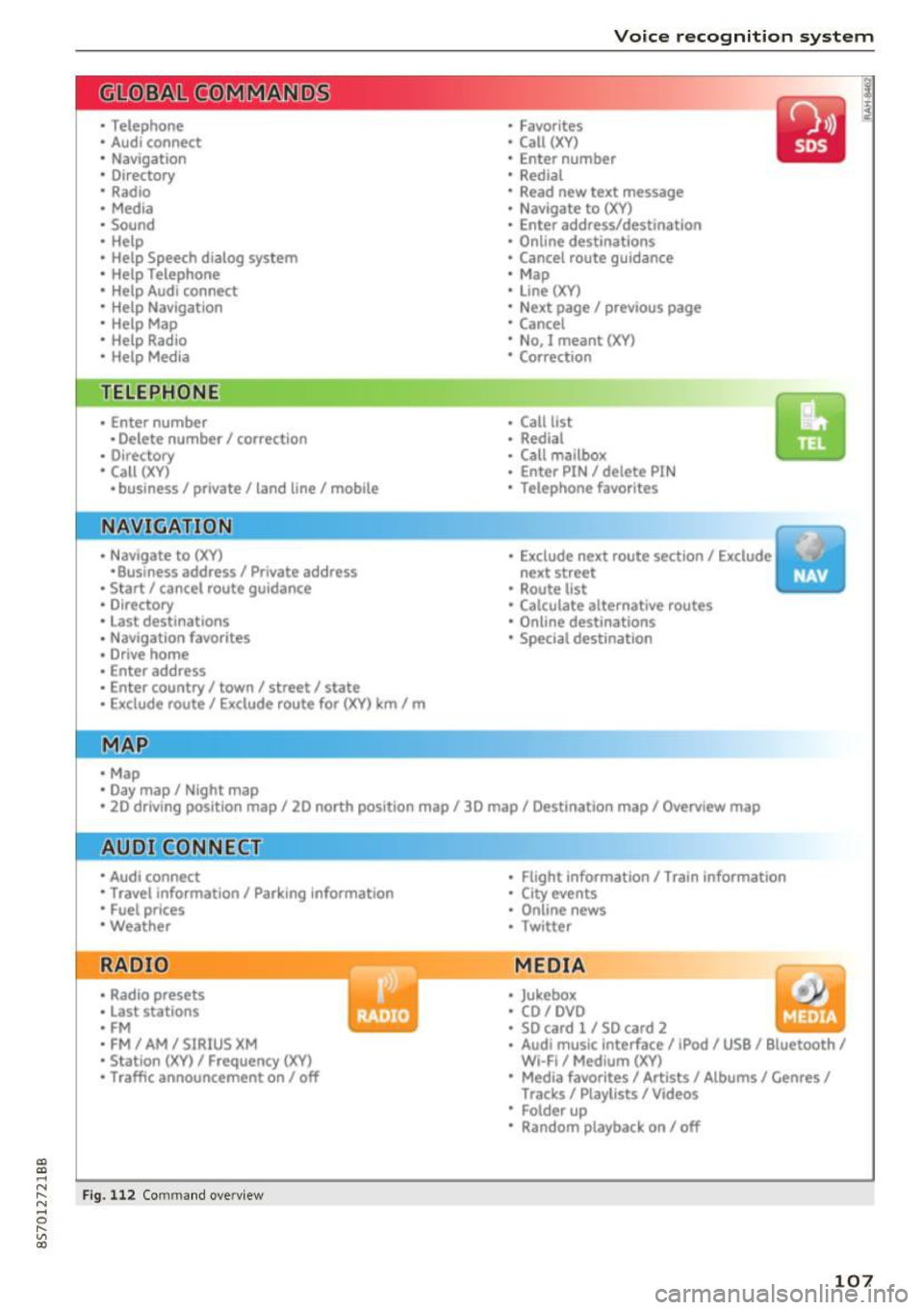
• Telephone
• Audi connect
• Navigation
• Directory
• Radio
• Med ia
• Sound
• Help
• Help Speech dia log system
• Help Telephone
• Help Audi connect
• Help Navigation
• Help Map
• Help Radio
• Help Media
TELEPHONE
· Enter number
• Delete number/ correc tion
• Directory
• Call (XY)
·business/ private/ land line/ mobile
NAVIG:ATI0N
• Navigate to (XV)
• Business address/ Private address
• Start/ cancel route guidance
· Directory
• Last destinations
• N avigation favorites
• Drive home
• Enter address
• Enter country/ town/ street/ state
• Exclude routt / Exclude route for (XY) km/ m
• M ap
• Day map / Night map
Voice recognition system
• Favor ites
• Call (XY)
• Enter number
• Redial
• Read new tex t message
• N avigate to
(XV)
• Enter address/destination
• Onhne destinations
• Cancel route guidance
• M ap
• Line (XY)
• Next page/ previous page
• Cancel
• N o, l meant
()(Y)
• Correction
• Call list
• Redial
• Call mailbox
• Enter PIN/ delete PI N
• Telephone favori tes
• Exclude ne xt route section / Exclude
nex t street
• Route list
• Calculate alternative routes
· Online destinations
• Special destination
• 20 driving position map/ 20 north position map/ 30 map/ Destination map/ Overview map
AllJC !H C0NNECf
• Audi connect
• Travel information/ Parking Information
• Fuel prices
• Weather
RADIO
• Radio presets
• Last stations
• FM
• FM / AM/ SIRIUS XM
• Station (XY) / Frequency (XY)
• T raffic announcement on/ off
Fig . 112 Co mmand overv ie w
• Flight Information I Train Information
• City events
• Online news
• Twitter
MEDIA
• Jukebo x
• CO/ DVD y
• SO card l / SD card 2
· Audi music Interface/ !Pod/ USB / Bluetooth /
Wl ·Fi / Medium (XV)
• Media favorites/ Artists/ Albums/ Genres/
Tracks/ Playlists / Videos
• Folder up
· Random playback on / off
107
Page 116 of 314
Telephone
Telephone Introduction
Applies to: vehicles with telephone
To make phone coils in your vehicle using the
/11/111, connect your cell phone to the /11/111 via
Bluetooth.
Hand sfree
Afte r you have connected you r ce ll phone to the
MMI via Bluetooth , you can use the handsfree
system and operate telephone functions through
your MMI. You can make calls using the antenna
on your cell phone.
A WARNING
-Med ical experts warn that cell phones can
interfere w ith the funct ion of pacemakers .
Always mainta in a m inimum d istance of 20
c ent imeters between the cell phone anten
na and the pacemaker.
- Do not carry the cell phone in a pocket di
rectly over the pacemaker when the phone
is switched on.
- Sw itch the cell phone off immediately if
you suspect it may be interfering w ith the
pacemaker.
- Do not use the vo ice recognit ion sys-
tem* c>
page 108 in emergenc ies because
your vo ice may change in stressful situa
t ions. It may take longe r to dial the number
o r the system may not be able to dial it at
all. Dial the emergency n umbe r manually .
- Switch your cell phone off in areas where
there is a risk of an exp losion . These loca
tions are not always clea rly mar ked. This
may include gas stations, fuel and chemical
storage facilities or transport vehicles, or lo cations where fue l vapors (such as propane
or gaso line vapor in vehicles or bui ld ings),
chemicals or large quantities of dust parti
cles (such as flour, sawdust or metal) may
be present in the air. This also applies to all
other locations where you would normally
turn yo ur vehicle engine off .
- The demands of traffic requ ire yo ur full at
tent ion. Always read the chapter c>
page 96,
Traffic safety information.
114
-
(D Tips
- To learn which Bluetooth connections and
wh ich of the funct ions in your cell phone are
supported, check with your cell phone serv
ice provider or the database for mobile devi
ces at
www .audiu sa.com /bluetooth .
-The Bluetooth connection range is limited
to inside the vehicle . It can also be affected
by local condit ions and interference with
other devices .
Setup
Connecting a cell phone using Bluetooth
Applies to: vehicles with telephone
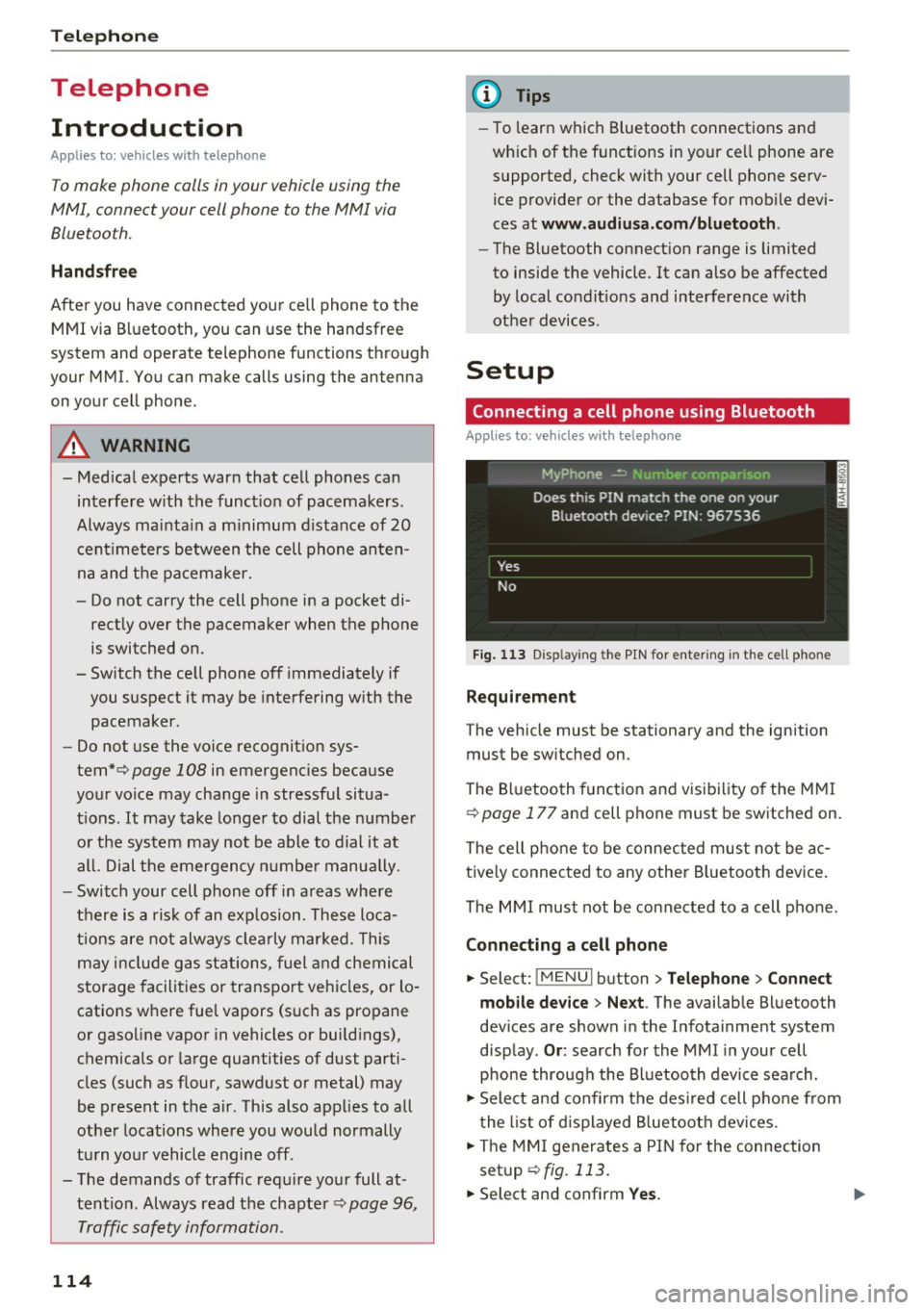
Fig. 11 3 Disp laying the PIN for entering in the cell phone
Requirement
The vehicle must be stationary and the ignition
must be sw itched on.
The Bluetooth funct ion and visibility of the MMI
c>
page 177 and cell phone must be switched on.
The cell phone to be connected must not be ac
tive ly connected to any othe r Bluetoot h dev ice .
The MMI must not be connected to a cell phone.
Connecting a cell phone
... Select: !MENUI button> Tel ephone > Connect
mob ile d ev ice > Ne xt .
The available Bluetooth
dev ices are shown in the Infotainment system
disp lay .
Or : search for the MMI in your cell
phone through the Bluetooth device search .
... Sele ct and confirm the des ired cell p hone from
the list of d isplayed B luetooth devices.
... The MMI generates a PIN for the connection
setup
c> fig. 113.
... Select and confirm Yes. .,..
Page 131 of 314
CD
CD
.... N
" N .... 0 r--. V, co
Audi connect services
Basic functions
Applies to: vehicles with Audi connect
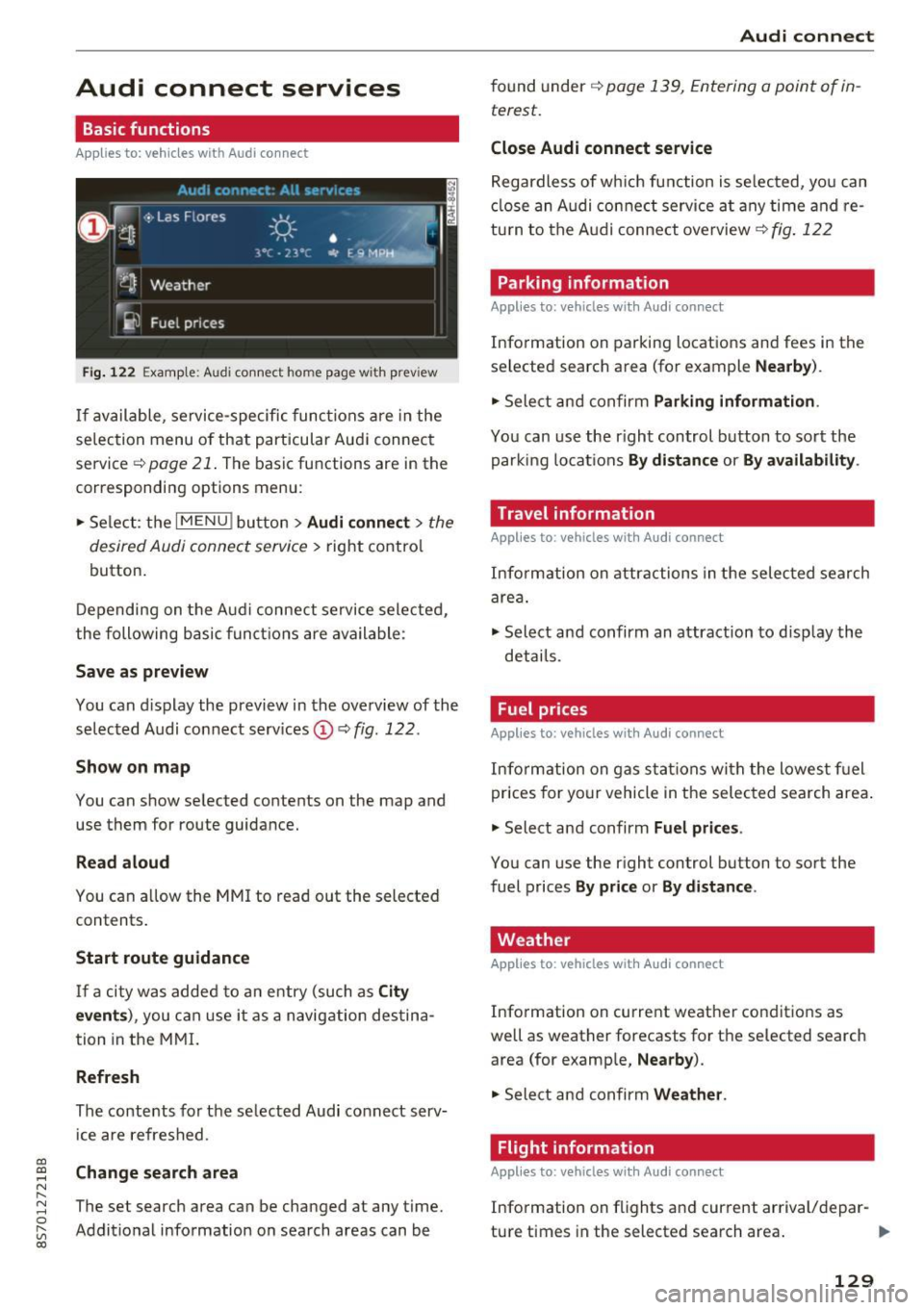
Fig. 12 2 Example: A udi co nn ect home page w ith prev iew
If available, service-specific func tions are in the
se lec tion menu o f th at particular Aud i connec t
service ~
page 21. The basic functions are in the
correspondi ng options menu:
.,. Se lect: the
I MENU ! button> Audi connect > the
desired Audi connec t service>
right contro l
button.
D epending on the A ud i connect se rvice sele cte d,
the following basic fun ctions are ava ilable:
Save as preview
You can d isplay the preview in the overview of the
se lected A udi connect services ©~
fig. 122 .
Show on map
You can show se lected contents on the map and
use them for route guidance.
Read aloud
You can a llow the MM I to read out the selected
contents .
Start route guidance
If a city was added to a n entry (such as City
event s),
you can use i t as a navig ation destina
tion in the M MI.
Refresh
The conte nts for the se lected Audi co nnect serv
i ce are refreshed .
Change search area
The set search area can be changed at any time.
Addit io nal information on search areas can be
Audi connect
found under ~ page 139, Entering a point of in
terest .
Close Audi connect service
Regardless of wh ich func tion is se lec ted, yo u can
cl ose an A udi con nect service a t any time and re
tu rn to the A udi conne ct overview
~ fig . 122
Parking information
Applies to: vehicles with Audi connect
Info rmation on parking locations and fees in the
se lected search area (for example
Nearby ).
.,. Sele ct and confirm Parking information .
You can use the right control button to sort the
parki ng locat ions
By distance or By availability .
Travel information
Applies to: vehicles with Audi connect
Info rm ation on attr actions in the selec ted search
are a.
.,. Select and confirm an attraction to disp lay the
details .
Fuel prices
Applies to: vehicles with Audi connect
Inform ation on gas s ta tions wi th the lowes t fu el
prices for yo ur vehicle in the selec ted sea rch area .
.,. Select and confirm
Fuel price s.
You can use the right control button to sort the
fuel prices
By pr ice or By d istance .
Weather
Applies to: vehicles with Audi connect
Info rmation on current weather conditions as
well as weather forecasts for the selected search area (for examp le,
Nearby ).
.,. Sele ct and confirm Weather .
Flight information
Applies to: vehicles with Audi connect
Info rmation on f lights and cur rent arrival/depar-
ture times in the selected search area . ..,.
129
Page 145 of 314
CD
CD
.... N
" N ...... 0 r--. V, co
Low fuel warning
A message is disp laye d if the fue l g auge goes be
l ow the reserve m arki ng when this fun ct ion is
switche d on ~-Co nfirming this message displays
a list of gas stations in the area. When a gas sta
tion is selected, route gu idance from the c urrent
ve hicle position is calcu lated.
Notification when nearby*
The notifi cation when near by is switche d off a t
the facto ry.
The M MI not ifi es you whe n you are appro ac hing
se lec te d p oin ts of in terest when this func tio n is
switche d on ~-You can a lso h ave a
Notification
tone .
Presentation mode
The pre se nt ation mode he lp s yo u to plan a nd fo l
l ow a ro ute wi tho ut mo ving the veh icle. Yo u ca n
Select starting point when yo u wo uld like to cal
cula te a ro ute star ting from a loca tion o ther than
the vehicle pos it io n. Sta rt p resentation mode to
sim ulate route guida nce .
Route criteria
App lies to: veh icles with navigation system
J(
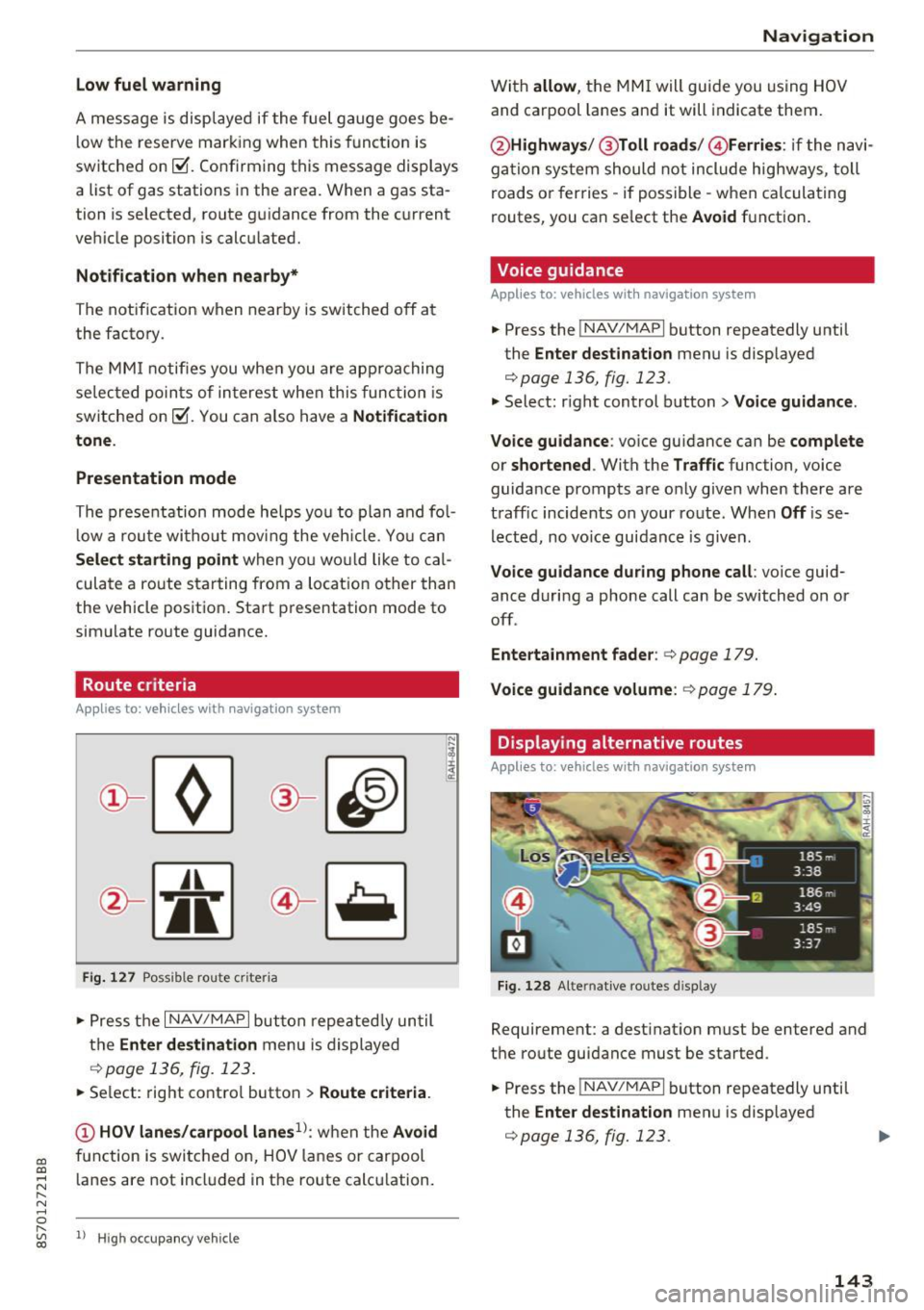
Fi g. 127 Possib le route criteria
• Pres s th e I NAV/ MAP I button r epeated ly un til
t h e
Enter destination menu is displayed
.::!) page 136, fig. 12 3.
• Se lect: rig ht contro l butto n > Route criteria .
(D HOV lanes/carpool lanes1
l: w hen t he Avoid
fu nction is swi tc h ed o n, HOV lanes or car pool
l anes are not incl uded in t he ro ute ca lcu lation .
1> Hig h oc cu pa ncy ve hicle
Navigation
W it h allow , the MMI will gui de you using HOV
and carpool la nes an d it will indicate them.
@ Highways /@ Toll roads /@ Ferries : if the n avi
ga tio n sy stem should not include highways, toll
roads or fer ries -if poss ible -w hen c alcula ting
routes, you can se lect the
Avoid f u nction .
Voice guidance
Applies to: vehicles with navigation system
• Press the !NAV/MAPI b utton repeatedly unti l
the
Enter destination men u is displayed
r::;,page 136, fig. 123.
• Select: r igh t cont rol button > Voice guidance .
Voice guidance :
voice gui dance ca n be complete
or shortened . With the Traffic function, voice
guida nce prompts a re o nly given when there ar e
t raff ic incidents on your ro ute. When
Off is se
l e cte d, no vo ic e gui dan ce is giv en.
Voice guidance during phone call : voice guid
ance d uri ng a phone call can be switched on or
off .
Entertainment fader : c:> page 179.
Voice guidance volume : r::!) page 179 .
Displaying alternative routes
Applies to: vehicles with navigation system
Fig. 128 Alte rnati ve routes d isp lay
Requireme nt: a dest inat ion m ust be entered and
t h e ro ute guidance must be started .
• Press the
!NAV/MAPI b utton repeatedly u nti l
the
Enter destination men u is displayed
r::;,page 136, fig. 123.
143
Page 177 of 314
"' "'
System settings
Setting the date and
time
You can set the clock time manually or using the
C PS .
.,. Se lect : I MENU I button> Settings > left co ntro l
button >
MMI settings > Date & time .
.,. Or :
select : IMENU I button> Vehicle > left con-
t ro l button >
Vehicle settings > Date & time .
Automatic setting
When th is function is sw itched on~. the time
a n d date are a utomat ically set.
Time
R equ irement: the Automatic setting must be
switched off .
Pr ess the cont ro l kn ob . You ca n se t the
Time
manu ally by turning and press ing the con trol
k nob.
Date
R equi remen t: the Automatic setting must be
s witche d off .
Pr ess the cont rol knob . You can set the
Date
manually by turn ing and press ing the con trol
knob.
Time zone
When se lecting the approp riate t ime zone, a
sampling of countr ies in this zone will be listed .
Automatic time zone*
When t his function is sw itched on~' the t ime
will automatically a djust to the correspon ding
time zone .
Time format
If yo u selec t 24h, the clock will disp lay, for ex
ample,
13:00. If yo u se lect AM/PM , the clock
wi ll disp lay, for e xamp le,
1:00 PM .
Date format
....
~ I f yo u sele ct DD.MM.YYYY , the da te di spl ay w ill
N 8 s how, for ex amp le, 31 .08 .2017 . If you se le ct
~ MM/DD/YYYY , the d ate disp lay wi ll s how, fo r ex -
System settings
amp le, 08/31/2017. If you select YYYY-MM
DD ,
the date display wi ll sh ow, fo r exam ple,
2017-08-31.
MMI settings
.,. Select: iME NUI button> Settings > left control
button >
MMI settings .
Language
Yo u ca n cha nge the displ ay la ngu age as well as
t h e la ngu age fo r th e v oic e gui dance* and voi ce
recognition system *.
T he number of language s avai lab le de pend s on
t h e m arket .
Measurement units
The following units ca n be selected:
- Speed (mph o r km/h)
- Distance (miles o r kilomete rs)
- Temperature (°For 0
( )
-Fuel consumption (l/ l0 0k m, mpg ( US), m pg
( UK ) or km/l )
-Volume (li te rs, ga llon s)
Tool tips
When this f unct ion is switched on~' your MMI
s h ows you t ips fo r input. The freq uency of how
often it display s dec reases w ith time . You can
swi tch off the operati ng tips a t any ti me.
Speech dialog system
Applies to : vehicles with voice recogn it ion system
Command display : when this function is sw itch
ed on~ , the MMI w ill show yo u the possible
commands for voice input in the res pect ive
me nu. You ca n sw itch the f unct io n off a t any
t im e.
Short dialog : when th is function is sw itched on
~ . a sho rter form of the prompts is used . You
can sw itch the func tion off at any t ime .
Speech dialog system volume : you can adjust
the volume of t he p rompts by turning the contro l
k nob. .,,.
175
Page 233 of 314
co
co
.... N
" N .... 0
" "' c:o
Checking and Filling Fuel
Gasoline grade
The correct gasoline grade is stated on the inside
of the fuel filler door .
The vehicle is equipped with a catalytic converte r
and must only be d riven w it h
unleaded gasoline .
Audi recommends using TOP TIER Detergent Gas
oline. Additiona l information on TOP TIER Deter
gent Gasoline can be found on the offic ial web
site (www .topt iergas.com).
The individ ua l gasoline grades a re differentiated
by
o ctane ratings . This value is given with (R +M)/
2 equating to AKI or in RON.
The fo llow ing headings ma tch the correspon ding
sticker in the fue l filler door .
UNLEADED FUEL ONLY MIN. (R+M)/2 87
Regula r/ MIN. RON
91 Regular
Use reg ular gaso line wi th minim um 87 AK I/
91 RON ~ 0 .
The m aximum engine power is only reache d if
p rem ium gaso line 91 AKI/ 95 R ON is use d .
UNLEADED FUEL ONLY PREMIUM MIN . (R
+M )/2
91 / SUPER MIN. RON 95
Using prem ium gaso line wit h minim um 91 AKI/
9 5 RON is recommende d.
If premium gasoline is not availab le, yo u can also
use reg ular gasoline 87 A KI/ 91 RO N. Howeve r
this does reduce t he engine powe r sli ght ly.
CD Note
- Fill ing the tank just one t ime with lead ed
fuel or o ther meta llic additives will cause
p erm anen t de ter io rat io n to the ca taly tic
c onve rter fu nctio n.
- W hen g asoline wi th an octane ratin g th at is
t oo low is used, high speed s or heavy eng ine
l o ad ca n lea d to eng ine damage.
Checking and Filling
{!) Tips
The vehicle may be filled with fuel t hat has a
higher octane rating than w hat is requ ired by
the eng ine .
Blended gasoline
Use of gasoline containing alcohol or MTBE (methyl tertiary butyl ether)
You may use unleaded gasoline b lended with al
cohol o r MTBE (commonly referre d to as oxygen
a tes) if the blende d m ixt ure meets the fo llow ing
cr it e ria :
Blend of gasoline methanol (wood alcohol or
methyl alcohol)
-Anti-knock index must be 87 AKI or higher.
- Blend must contain no more than
3% metha-
nol.
- Blend must contain more than
2% co-solvents.
Blend of gasoline and ethanol (grain alcohol or
ethyl alcohol )
-Ant i-kno ck ind ex mus t be 87 AKI or hig her.
- Blend must not co nta in mo re than
15% etha-
nol.
Blend of gasoline and MTBE
- Anti-knoc k index must be 87 AKI or h igher .
- Blend mus t contain no t mo re than
15% M TBE .
Seasonally adjusted gasoline
Many gasoline grades are blended to pe rform es
pecially well for w inter or s ummer dr iving . D ur
i ng seasonal cha nge-ove r, we sugges t that yo u
fill up a t busy gas stat ions where the seasonal
adjus tme nt is mo re li ke ly to be m ade in time .
CD Note
- Metha nol fuels which do not meet these re
quireme nts may cause cor rosion and dam
a ge to p last ic and r ubber co mpon ents i n t he
fue l sys te m .
- D o not use f ue ls tha t fa il to mee t the speci
fie d cr iteria in thi s ch ap te r.
231
Page 234 of 314
Checking and Filling
-If you a re unable to determine whether or
not a particular fuel blend meets the speci
fications, ask your service station or its fuel
supplier.
- Do not use fuel for which the contents can
not be identified.
- Fuel system damage and performance prob
lems resulting from the use of fuels differ
ent from those specified are not the respon
sibility of Audi and are not covered under
the New Vehicle or the Emission Control
System Warranties.
- If you experience a loss of fuel economy or
driveability and performance problems due
to the use of one of these fuel blends, we
recommend that you switch to unblended
fuel.
Gasoline additives
A major concern among many auto manufactur
ers is carbon deposit build-up caused by the type
of gasoline you use.
Although gasoline grades differ from one manu
facturer to another, they have certain things in
common. All gasoline grades contain substances
that can cause deposits to collect on vital engine
parts, such as fuel injectors and intake valves. Al
though most gasoline brands include additives to keep engine and fuel systems clean, they are not
equally effective .
Audi recommends using TOP TIER Detergent Gas
oline. For more information on TOP TIER Deter
gent Gasoline, please go to the official website (www .toptiergas .com).
After an extended period of using inadequate
fuels, carbon deposit build-ups can rob your en
gine of peak performance.
(D Note
Damage or malfunction due to poor fuel qual
ity is not covered by the Audi New Vehicle
Limited Warranty.
232
Refueling
' Fuel filler neck
The fuel filler neck is located on the right rear
side panel behind the fuel filler flap .
If the power locking system should fail, you can
still open the flap manually -for detailed instruc
tions see
~ page 234.
You can find the fuel tank capacity of your vehicle in
~ page 291.
The label on the inside of the fuel filler flap tells
you the correct fuel for your vehicle. For more in
formation about fuel specifications, see
~ page 231.
Your vehicle fuel tank has an on board refuelling
vapor recovery system. This feature helps to pre
vent fuel vapors from escaping from the tank and
polluting the environment while you refuel your
vehicle . In order to fill the tank properly while
protecting the environment, please follow this
refueling procedure carefully.
.8, WARNING
Under normal operating conditions, never car
ry additional fuel containers in your car. Gas
canisters and other containers used to trans port fuel can be dangerous. Such containers,
full or empty, may leak and could cause a fire
in a collision. If you must transport fuel to
use for your lawn mower, snow blower, etc .,
be very careful and always observe local and
state laws regarding the use, transportation
and storage of such fuel containers. Make cer
tain the container meets industry standards
(ANSI/ASTM F852 -86).
CI) Note
Never drive your vehicle until the fuel tank is
completely empty. The irregular supply of
fuel can cause misfiring. Gasoline could enter
the exhaust system and damage the catalytic
converter.
Page 235 of 314
CD
CD
.... N
" N .... 0 r--. V, co
Fueling procedure
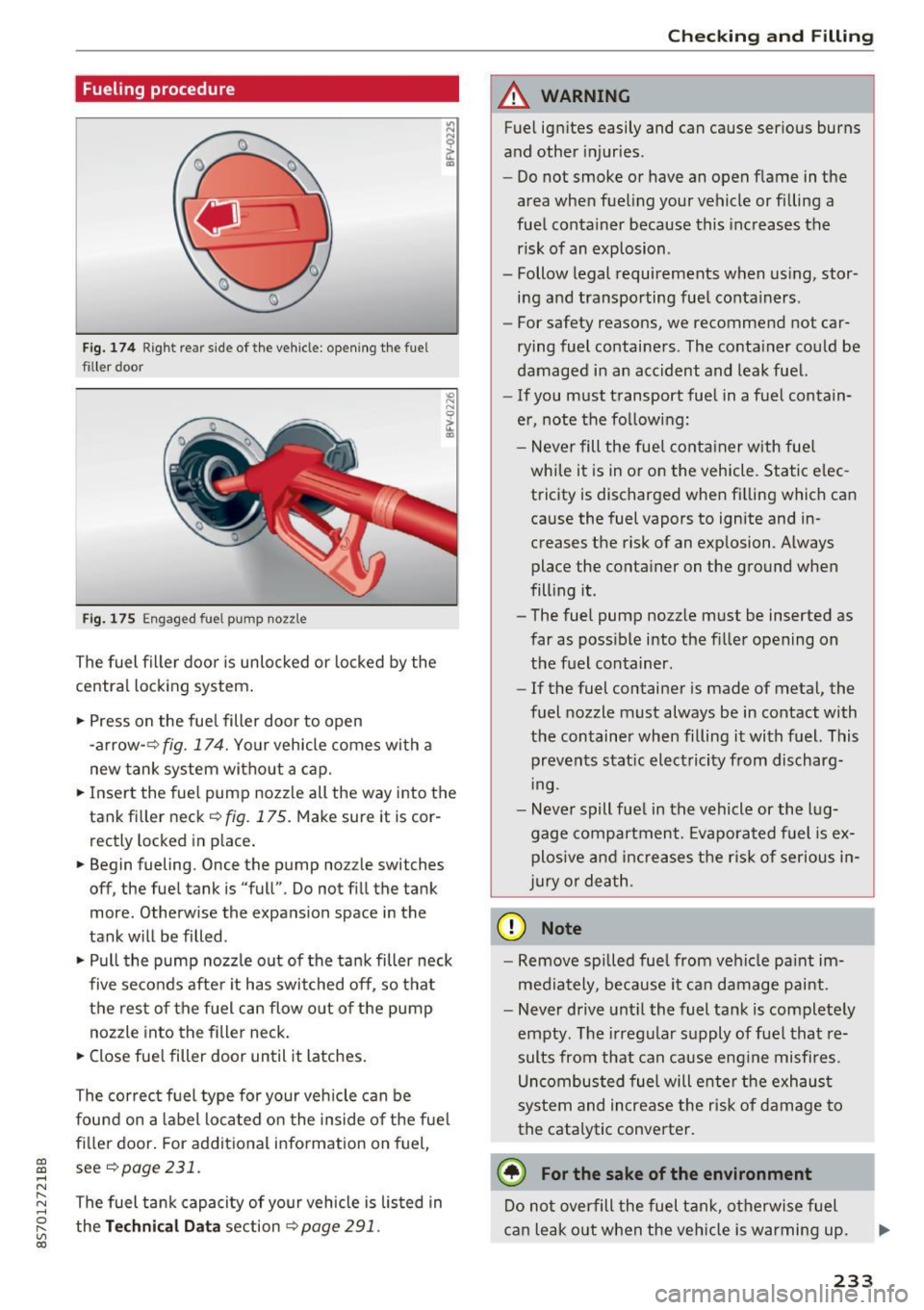
Fig. 174 Right rear side of the vehicle: opening the fue l
filler door
Fig . 175 Engaged fue l pump nozz le
The fuel filler door is unlocked or locked by the
central locking system .
.. Press on the fuel filler door to open
-arrow- ~
fig. 174. Your vehicle comes with a
new tank system without a cap.
.. Insert the fuel pump nozzle all the way into the
tank filler neck¢
fig. 175. Make sure it is cor
rectly locked in place.
• Begin fueling. Once the pump no zzle switches
off, the fuel tank is "full" . Do not fill the tank
more . Otherwise the expansion space in the
tank will be filled .
.. Pull the pump nozz le out of the tank filler neck
five seconds after it has switched off, so that
the rest of the fuel can flow out of the pump
nozzle into the filler neck.
.. Close fue l filler door until it latches.
The correct f uel type for your vehicle can be
found on a label located on the inside of the fuel
filler door. For additional information on fuel,
see ¢
page 231.
The fuel tank capacity of your vehicle is listed in
the
Technical Data section Q page 291 .
Checking and Filling
A WARNING
-Fuel ignites easily and can cause serious burns
and other injuries.
- Do not smoke or have an open flame in the
area when fueling your vehicle or filling a
fuel container because this increases the
risk of an explosion .
- Follow legal requirements when using, stor
ing and transporting fuel containers .
- For safety reasons, we recommend not car
rying fuel containers . The container could be
damaged in an accident and leak fuel.
- If you must transport fuel in a fuel contain
er, note the following:
- Never fill the fuel container with fuel
while it is in or on the vehicle. Static elec
tricity is discharged when filling which can
cause the fuel vapors to ignite and in
creases the risk of an exp losion . Always
place the container on the ground when
fill ing it.
- The fuel pump nozzle must be inserted as
far as poss ible into the filler opening on
the fuel container .
-If the fuel container is made of metal, the
fuel nozzle must always be in contact with
the container when filling it with fuel. This
prevents static electricity from discharg
ing .
- Never spill fuel in the vehicle or the lug
gage compartment. Evaporated fuel is
ex
plosive and increases the risk of serious in
jury or death.
(D Note
-Remove spilled fuel from vehicle pa int im
mediately, because it can damage paint.
- Never drive until the fuel tank is completely
empty . The irregular supply of fue l that re
sults from that can cause engine misfires.
Uncombusted fuel will enter the exhaust
system and increase the risk of damage to
the catalytic converter.
@) For the sake of the environment
Do not overfill the fuel tank, otherwise fuel
can leak out when the veh icle is warming up.
233
Page 236 of 314
Checking and Filling
(D Tips
If adverse weat her conditio ns cause the fuel
filler door to freeze shut, p ress on the center
of the f iller door with the heel of your hand
and then try opening it again.
(!) Tips
- Your vehicle is equipped with a misfueling
guard. It allows the veh icle to be fueled on
l y w ith the correct fuel pump nozzle .
- A worn or damaged nozzle or a nozzle that
is too small may not be able to open the
diesel misfueling guard . If this is the case,
try turning the nozzle before insert ing it in
the fuel filler neck, use a different fuel p ump, o r see an a uthorized Audi deale r or
a uthorized Audi Serv ice Facility fo r ass is
ta nce.
- T he misfueling guard does not open when
adding fue l from a fue l conta iner. When re
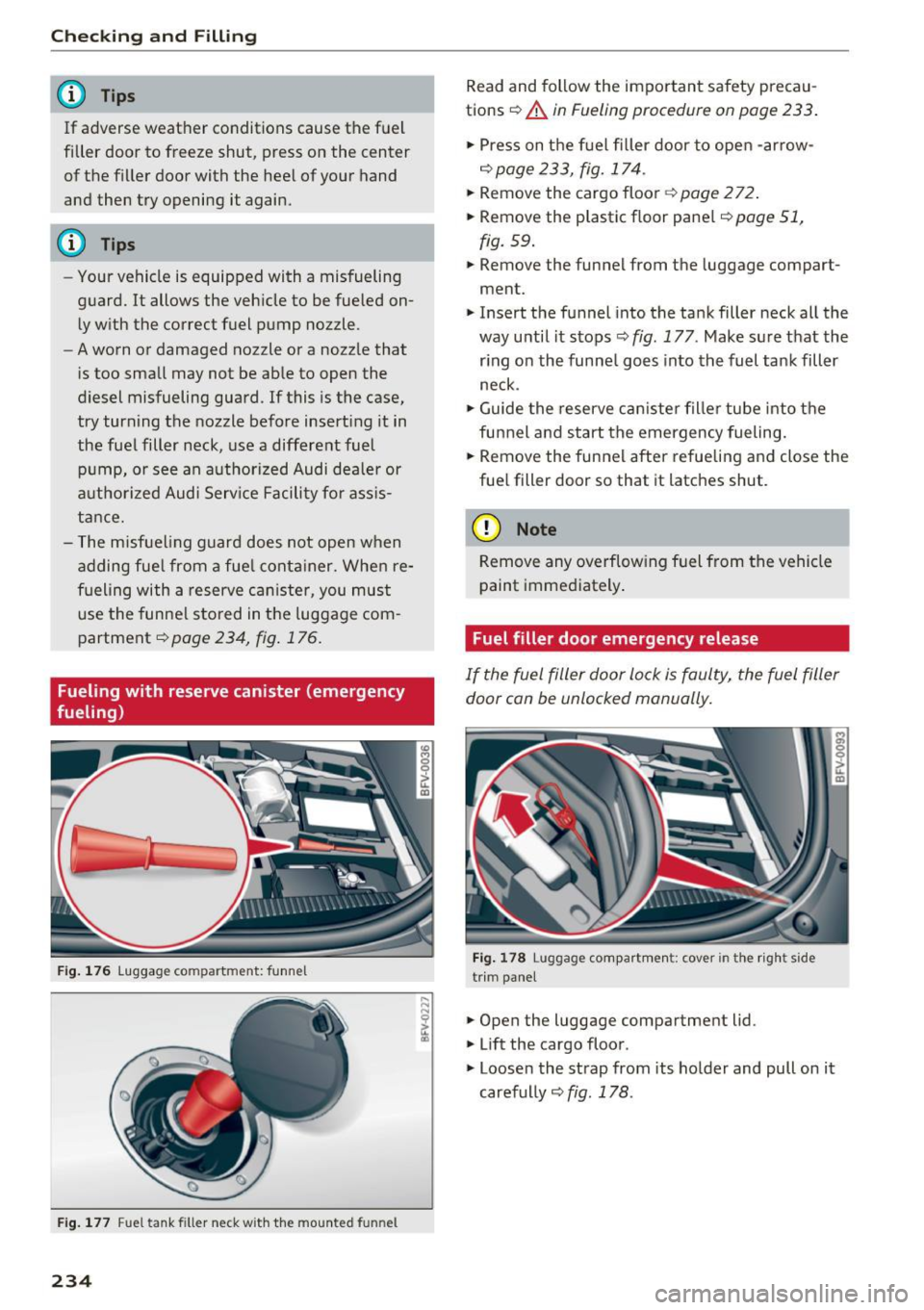
fueling with a reserve can ister, you must
use the funne l stored in the luggage com
partment
¢ page 234, fig . 176 .
Fueling with reserve canister (emergency
fueling)
F ig . 1 76 lu ggag e co mpar tme nt: funn el
Fig. 1 77 Fu el t ank filler neck w it h th e m ounted funnel
234
Read and follow the important safety precau
tions ¢
A in Fueling procedure on page 233 .
.,. Press on t he fuel filler door to open -arrow-
¢ page 233, fig. 174 .
.,. Remove the cargo floor~ page 2 72 .
.,. Remove the plastic f loor pane l¢
page 51 ,
fig. 59 .
.,. Remove the funnel from the luggage compart
ment.
.,. Insert the funnel into the tank filler neck all the
way until it stops ¢
fig. 177 . Make sure t hat the
r ing on the funne l goes into the fuel tank filler
neck .
.,. Guide the reserve can iste r fille r tube into the
funnel a nd start the emergency fueling.
.,. Remove the funnel after re fueling and close the
fue l fill er door so that it latches shut .
(D Note
Remove any overflowing fuel from the vehicle
paint immediately .
Fuel filler door emergency release
If the fuel filler door lock is faulty, the fuel filler
door can be unlocked manually.
Fig. 178 lu gga ge compar tm en t: cover in the rig ht side
tr im pa nel
.,. Open the luggage compartment lid .
.,. Lift the cargo floor .
M
"'
~ u. m
.,. Loosen the strap from its holder and pull on it
carefully ¢
fig. 178.
Page 237 of 314
co
co
.... N
" N .... 0
" "' c:o
Engine compartment
Working in the engine compartment
Special care is required if you are working in the
engine compartment
F or wo rk in th e en gine c ompar tment su ch as
ch eckin g and fi llin g flu id s, th ere is a risk of in
j u ry , sca lding , acci dent s, a nd b urn s. Fo r this
re aso n, follow all the warnin gs and ge nera l
saf ety pr eca uti ons pr ov ided in the follow in g i n·
form ation . Th e e ng ine c ompartm en t is a d an
ger ous a re a .
¢ ,&. .
A WARNING
- T urn the engine off.
- Switch the ign ition off .
- Set the parking brake .
- Place the selector lever in the P pos it ion.
- Let the engine cool down.
- Never open the hood when there is steam or coolant escaping from the eng ine compart
ment, because there is a risk that you could
be burned . Wait until no steam or coolant is
escaping .
- Keep children away from the engine com
partment .
- Never spill fluids on a hot engine. These flu
ids (such as the freeze protection contained
in the coolant) can catch fire .
- Avoid short circu its in the electrical system,
especially to the battery .
- When working in the engine compartment ,
remember that the radiator fan can sw itch
on even if the ign ition is switched off , which
increases the risk of pe rsonal injury.
- Never open the cap on the coolant expan sion tank when the eng ine is warm . The
cooling system is under pressu re .
- To protect your face, hands, and arms from
hot steam or coolant, cover the cap with a
large cloth when opening.
- Do not remove the engine cover under any
circumstances. This increases the risk of
burns.
- If tests need to be performed w ith the en
gine running, there is additional dange r due
Ch eck ing and Filling
to moving components (such as the ribbed
be lt, alternator and radiator fan) and from
the high voltage ignition system.
- Do not press the acce lerator pedal inadver
tently if a gear is selected when the vehicle
is stationary and the engine is running. Oth
erwise, the vehicle will start to move imme
diate ly and this could result in an accident .
- Pay attent ion to the following warnings list
ed when work on the fuel system or on the
electrical equipment is required.
- Do not smoke .
- Never wor k near open flames .
- Always have a working fi re extingu isher
nearby
- All work on the battery or electrical system
in your veh icle can result in inju ries, chemi
cal burns, acc idents or burns . Because of
this, all work must be performed
onl y by an
authorized Audi dealer or authorized Audi
Service Facility.
- To reduce the risk of electric shock and in
jury, never touch the following components
when the engine is running or is being start·
ed:
- Ign it ion cable
- Other components in the electronic high -
voltage ign ition system
- If you must check or perform work on the
engine wh ile it is running:
- Set the parking brake and place the selec
tor lever in the P (park) position first .
- Always proceed w ith extreme caution so
that clothing, jewelry or long hair do not
become caught in the radiator fan , fan
belt or other moving components or do
not come into contact with hot compo
nents. Tie back long hair before beginning
work and do not wear clothing that can hang down into the engine .
- Lim it your exposure to exhaust and chemi
cals to as short a time as possible
¢ ,&. .
A WARNING '"--
California Proposition 65 Warning:
235