tow AUDI TT ROADSTER 2017 User Guide
[x] Cancel search | Manufacturer: AUDI, Model Year: 2017, Model line: TT ROADSTER, Model: AUDI TT ROADSTER 2017Pages: 314, PDF Size: 76.54 MB
Page 51 of 314
CD
CD
.... N
" N .... 0 r--. V, co
CD Note
-To reduce the risk of damage to the vehicle
electrical system, never attempt to charge
the veh icle battery by connect ing accesso
ries that prov ide power, such as solar panels
or battery chargers, to the 12 Volt sockets
or the cigarette lighter.
- To reduce the risk of damage to the sockets,
on ly use plugs that fit correctly .
Storage
Beverage holders
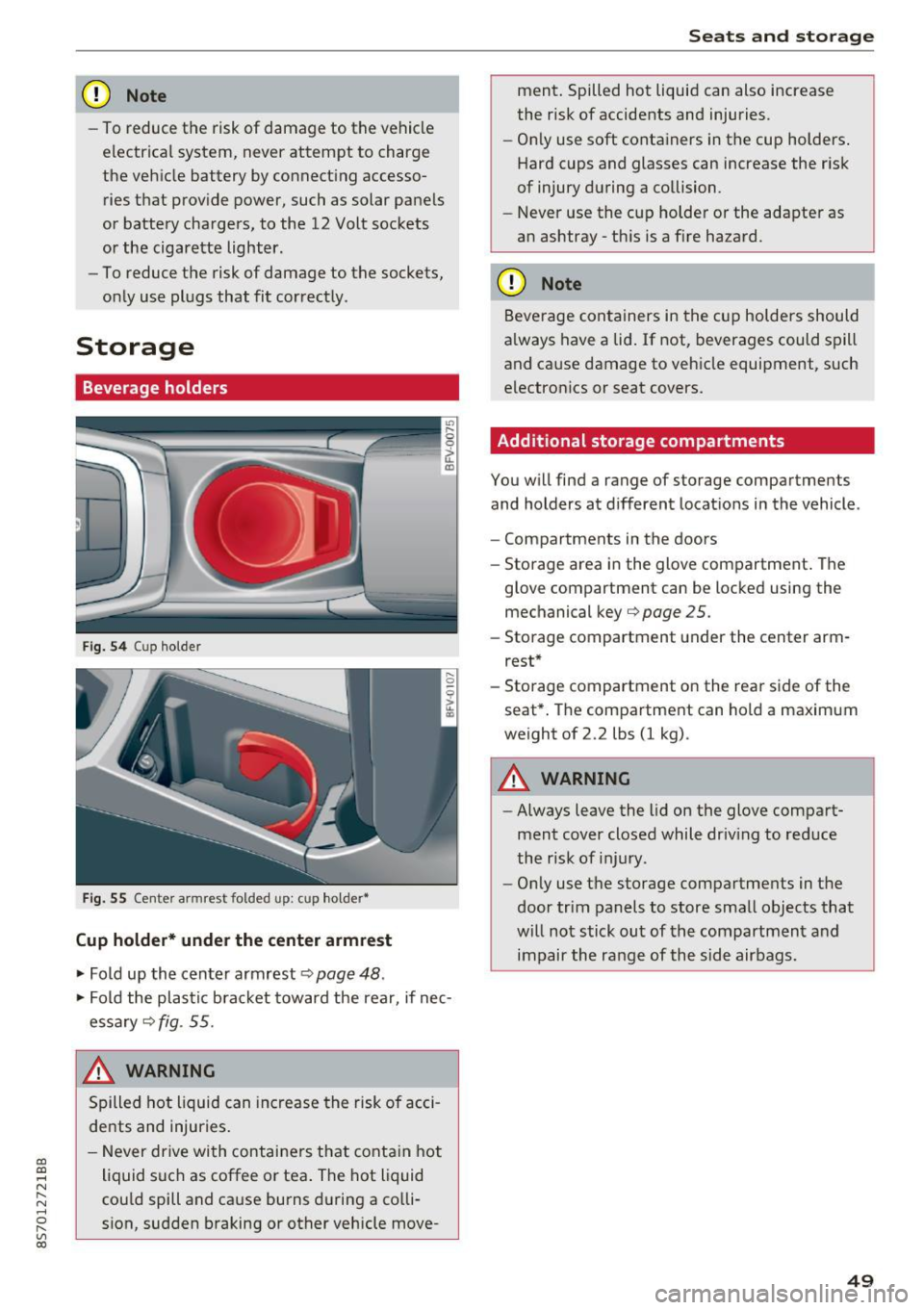
Fig. 5 4 Cup holder
Fig. 55 Cente r armrest folded up: cup holder•
Cup holder* under the center armrest
~ Fold up the center armrest q page 48 .
~ Fold the plas tic bracket toward the rear, if nec
essary
q fig . 55.
,&_ WARNING
Spilled hot liquid can increase the risk of acci
de nts and injuries .
- Never drive wi th containers that contain hot
liquid such as coffee or tea . The hot liquid
cou ld spill and cause burns during a colli·
sion, sudden braking or other vehicle move -
Seats and storage
ment. Spilled hot liquid can also increase
the risk of accidents and injuries.
- On ly use soft containers in the cup holders .
Hard cups and glasses can increase the risk
of injury during a collision.
- Never use the cup holder or the adapter as
an ashtray -th is is a f ire hazard.
CD Note
Beverage containers in the cup holders should
a lways have a lid. If not, beverages could spill
and cause damage to vehicle equipment, such
electronics or seat covers.
Additional storage compartments
You w ill find a range of storage compartments
and holders at different locat ions in the vehicle .
- Compartments in the doors
- Storage area in the glove compartment . The
glove compartment can be locked using the mechanical key
qpage 25 .
-Storage compartment under the center arm
rest*
- Storage compartment on the rea r side of the
seat*. The compartment can hold a maximum
weight of 2.2 lbs (1 kg) .
A WARNING
-
-Always leave the lid on the glove compart
ment cover closed while driv ing to reduce
the risk of injury.
- Only use the storage compartments in the
door trim panels to store small objects that
will not stick out of the compartment and
impair the range of the side airbags.
-
49
Page 52 of 314
Sea ts and stor age
Storage compartment between the seat
backrests
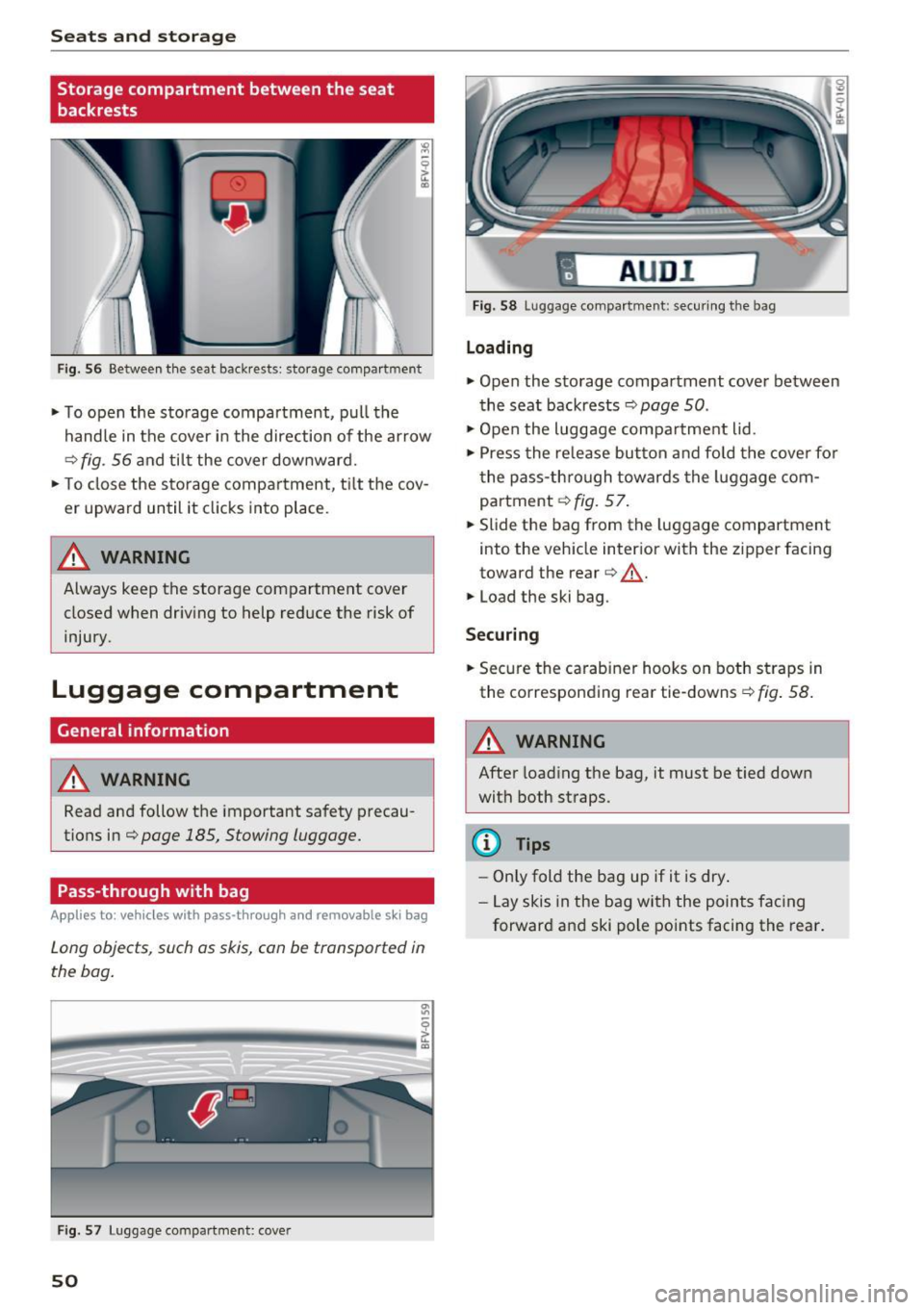
Fig . 56 Between th e seat backrests: storage compartment
• To open the storage compartment, pull the
handle in the cover in the direction of the ar row
r::::> fig . 56 a nd til t the cover downward.
• To close the s torage compa rtment, t ilt the cov
er upward until it clicks into place .
_& WARNING
Always keep the storage compartment cover
closed when dr iv ing to help reduce the risk of
injury.
Luggage compartment
General information
A WARNING
Read and follow the important safety precau
tions in¢
page 185, Stowing luggage.
Pass-through with bag
Applies to: vehicles with pass-through and removable s ki bag
Long objects , such as skis, can be transported in
the bag .
Fig . 57 Luggage compartme nt: cover
50
fl AUD I 1
Fig. 58 Luggage compa rtment: secu ring the bag
Loading
• Open the storage compartment cover between
the seat backrests ¢
page 50.
• Open the luggage compa rtment lid .
• Press the release button and fo ld the cove r fo r
t he pass-th rough towards the luggage com
partment ¢
fig. 57.
• Slide the bag from the luggage compartment
into the vehicle inter ior with the zipper facing
toward the rear
r::::> .&_.
• Load the ski bag.
Securing
• Secure the carabine r hooks on both straps in
the corresponding rea r tie-downs
r::::> fig . 58.
A WARNING
After loading the bag, it must be tied down
with both straps.
(I} Tips
-Only fold the bag up if it is dry.
- Lay skis in the bag with the points facing
forward and ski pole points facing the rear.
-
Page 70 of 314
Driving - The transmission can overheat and be dam
aged under certain driving and traffic condi
tions such as frequent starts, creeping for a
long time, or stop -and-go traffic. When the
@] or. indicator light turns on, stop the
vehicle at the next opportunity and let the
transmission cool
r=;, page 70 .
-Allowing the vehicle to roll when the engine
is stopped will damage the S tronic trans
mission because it is not lubricated
¢ page 286, Towing with a tow truck.
@ Tips
For safety reasons, the parking brake is re
leased automatically only when the driver's
safety belt is engaged in the buckle.
Hill descent control
The hill descent control system assists the driver
when driving down hills .
Hill descent control is ac tivated when the selec
tor lever is in the Dor S position and you press
the brake pedal. The transmission automatically
selects a gear that is suitable for the hill. Hill de
scent control tries to maintain the speed ach
ieved at the time of braking, within physical and
technical limitations.
If may still be necessary to
adjust the speed with the brakes. Because hill de
scent control cannot shift down farther than 3rd
gear, it may be necessary to shift into tiptronic
mode in very steep areas. In this case, shift man
ually into 1st or 2nd gear in tiptronic mode to
use the engine's braking force to relieve the
brakes .
Hill descent control switches off once the hill lev
els out or you press the accelerator pedal.
On vehicles with a cruise control system*
¢ page 72, hill descent control is also activated
when the speed is set.
A WARNING
Hill descent control cannot overcome physical
limitations, so it may not be able to maintain
a constant speed under all conditions. Always
be ready to apply the brakes.
68
Shifting manually (tiptronic mode)
The tiptronic mode allows the driver to shi~ the
gears manually .
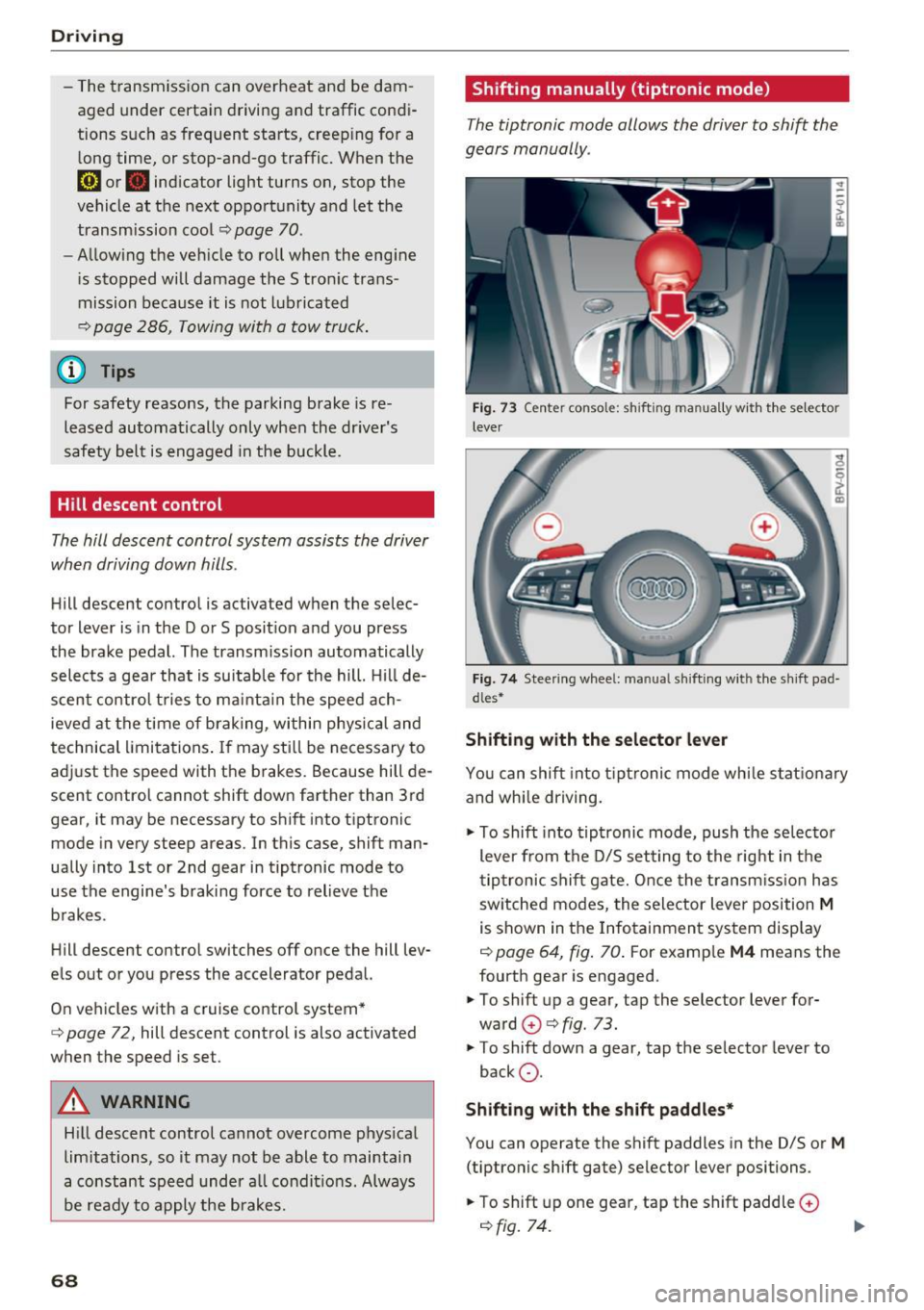
Fig. 73 C enter conso le: sh ift ing ma nuall y wi th the selecto r
lever
Fig. 74 Steering whee l: ma nual shifting wit h the shift pad
dles•
Shifting with the selector lever
You can shift into tiptronic mode while stationary
and whi le driving.
.,. To shift into tiptronic mode, push the selector
lever from the D/S setting to the right in the
tiptronic shift gate. Once the transmission has
sw itched modes, the selector lever position
M
is shown in the Infotainment system display
r=;, page 64, fig. 70 . For example M4 means the
fourth gear is engaged .
.,. To shift up a gear, tap the selector lever for
ward
G) ¢ fig. 73.
.,. To shift down a gear, tap the selector lever to
back
0 .
Shifting with the shift paddles*
You can operate the shift paddles in the D/S or
M
(tiptronic shift gate) selector lever positions.
.,. To shift up one gear, tap the shift paddle
0
r=;, fig. 7 4.
Page 71 of 314
co
co
.... N
" N .... 0
" "' c:o
~ To shift down one gear, tap the shift paddle 0-
If the sh ift paddles are tapped while in the D/S
selecto r lever posit io n, automatic mode switches
off briefly . To switch from manually shifting back
to a utomatic shifting immediately, tap the shift
paddle
G) ¢ fig . 74 for 1 second .
To keep shifting using the shift paddles, move
the sele ctor lever to the right out of the D/S posi
tion into the t ipt ronic shift gate.
The transm ission automatically shifts up o r down
befo re critical engine speed is reached.
The transm ission only a llows manual sh ift ing
when the engine speed is within the permitted
range.
(D Tips
- If you sh ift to the next lowest gear, the
transm ission w ill only shift if the engine w ill
not be over-revved.
- With kick-down, the transmission shifts to a
l ower gear, depending on vehicle speed and
engine speed.
- tiptronic does not wo rk if the t ransmiss ion
i s r unning in emergency mode.
Kick-down
Kick-down enables maximum acceleration.
When you press the accelerator pedal down be
yond the resistance point , the automatic trans
m iss ion downshifts into a lower gear and the en
g ine utilizes its fu ll power , depend ing on veh icle
speed and engine R PM.
It shifts up into t he next
h igher gea r once the maximum spec ified engine
RP M is reached.
A WARNING
Please note that the wheels could spin on
slick or slippery roads when kick-down is ac
tive.
-
l ) T he ESC lig ht turn s on continuous ly and the mess age S ta·
b ili za tion co ntro l (E SC): sport. Warn ing! Red uced st abi l·
ity appe ars te mporar ily in th e I nfotainment syste m to in
di cate tha t the syste m wa s deact ivate d.
D riv ing
Launch Control-Program
The Launch Control Program enables maximum
acceleration .
Requirement: the engine must be at operating
temperature and the steering wheel must not be
turned .
~ With the engine running, press the l1' 0FF I but
ton briefly one t ime
l ).
~ Pull the selector lever back out of the D/S posi
tion briefly to select the S position, or press it
toward the r ight into the tiptron ic position or
select the
Dynamic dr iving mode in dr ive se
lect*
¢ page 79.
~ Press the brake pedal fi rm ly w ith your left foo t
and hold it all the way down for at least 1 sec
ond.
~ At the same time, p ress the gas peda l all the
way down with your right foot until the eng ine
reaches and stays at a high RPM level.
~ Remove your left foot from the brake.
A WARNING
- Always adapt your driving to the t raff ic flow.
- Only use Launch Control when road and traf-
f ic conditions allow it and other drivers will
not be endange red or impacted by your dr iv
ing and the vehicle's acceleration.
- Please note that the d rive wheels can spin
and the vehicle can b reak away when spo rt
mode is switched on, especially when the
road is slippery.
- Once the vehicle has started mov ing, press
the
! .P-O FF I button briefly to turn the spo rt
mode off.
(D Tips
- The transmission temperature may increase
significant ly after using the launch control
prog ram. If that happens, the prog ram may
no t be ava ilable for a few minutes.
It will be
avai lab le again afte r a cool -down period. ..,.
69
Page 73 of 314
CD
CD
.... N
" N ,-I 0
" V, co
Selector lever emergency release
If the vehicle's power supply fails, the selector lever can be released in an emergency.
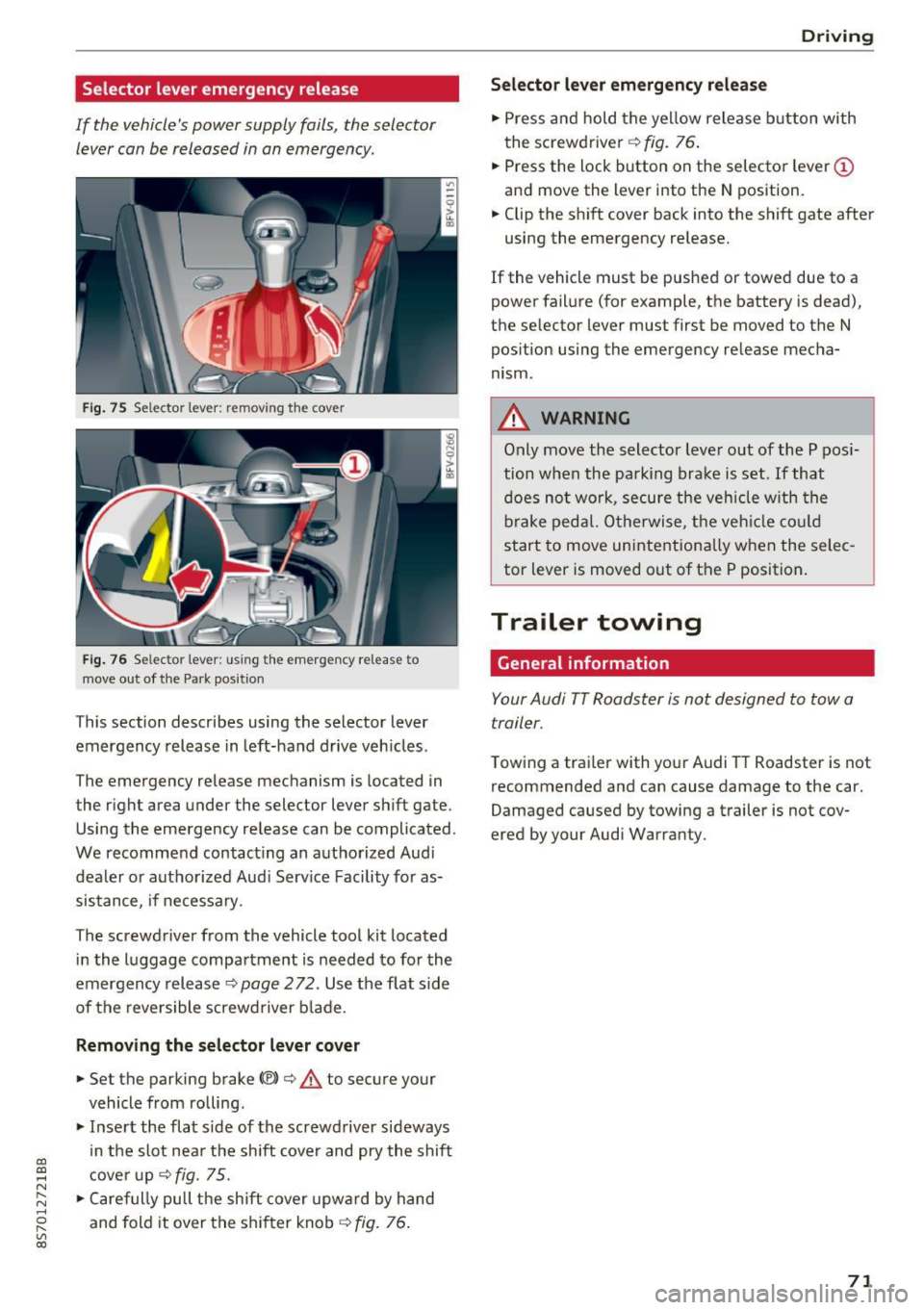
Fig . 75 Selector lever: remov ing t he cover
Fi g. 76 Selec tor lever : us ing the eme rgency re lease to
move out of t he Park pos it ion
This section describes using the selector lever
emergency release in left-hand drive veh icles .
The emergency re lease mechanism is located in
the right area under the selector lever shift gate.
Using the emergency release can be complicated.
We recommend contact ing an authorized Audi
dealer o r authorized Aud i Serv ice Facility fo r as
sistance, if necessary .
The screwdriver from the vehicle tool kit located
i n the luggage compartment is needed to for the
emergency release ¢
page 2 72. Use the flat sid e
of the revers ible screwd river b lade.
Removing the selector lever cover
.,. Set the parking brake CV)¢ A to secure your
vehicle from ro lling .
.,. In se rt the flat side of the screwdriver sideways
in the slot nea r the sh ift cover and pry the shift
c ove r up
¢fig. 75 .
.,. Caref ully pull t he shift cover upw ard by hand
and fold it over the sh ifter knob ¢
fig. 76.
Drivi ng
Selector l ever emergency release
.,. Press and hold t he ye llow release b utton with
the screwdriver ¢
fig. 76.
.,. Press the lock button on the selecto r lever
(D
and move the lever into the N position .
.,. Clip the shift cover back into the shift gate after
using the emergency re lease.
If the vehicle must be pushed or towed due to a
power failure (for example, the battery is dead),
the selector lever must first be moved to the N
pos ition using the emergency re lease mecha
nism.
A WARNING
Only move the selector lever out of the P pos i
tion when the parking bra ke is set. If that
d oes no t wo rk, secure the ve hicle w ith the
bra ke ped al. Otherwise, t he veh icle co ul d
st art to move uninte ntiona lly w hen the selec
tor lever is moved out of the P position.
Trailer towing
General information '
Your Audi TT Roadster is not designed to tow a
trailer.
Towing a trailer with you r Audi TT Roadster is not
recommended and can cause damage to the car.
Damaged caused by towing a trailer is not cov
ered by your Audi Warranty.
71
Page 75 of 314
co
co
.... N
" N .... 0
" "' c:o
speed and the distance between your vehi
cle and other vehicles.
- For safety reasons, cruise control should not
be used in the city, in stop-and-go traffic, on
winding roads and when road conditions are
poor (such as ice, fog, gravel, heavy rain and
hydroplaning), because this increases the
risk of a n accident.
- Switch the cruise control off temporarily
when driving in turning lanes, highway exits
or in construction zones.
- Please note that unconsciously "resting"
your foot on the accelerator pedal prevents
the cruise control from braking. This is be
cause pressing the accelerator pedal over
rides the cruise control system.
- If a brake system malfunction such as over
heating occurs when the cruise control sys
tem is switched on, the braking function in
the system may be switched off . The rest of
the cruise control system functions remain
active as long as the
@;\1)~14 (USA models) I
ill (Canada models) indicator light is on.
@ Tips
The brake lights turn on when the brakes are
app lied automatica lly.
Changing speed
Applies to: veh icles with c ruise control system
.. To increase/decrease the speed in increments,
briefly
tap the lever toward 010 Q page 72,
fig. 77 up/down to the first level.
.. To increase or decrease the speed in incre
ments,
tap the lever toward 010 Q page 72,
fig. 77 up/down to the second level.
.. To increase or decrease the speed quickly ,
hold
the leve r in the 0 / 0 direction until the de
sired speed is reached .
Overriding the speed
Applies to: veh icles with c ruise control system
You can press the accelerator pedal down to in
crease your speed, for example if you want to
pass someone. The speed you set earlier wi ll re-
Assist
sume as soon as you release the acce lerator ped
al.
However, if you are exceeding the stored speed
by a considerable amount for a long time, the
cruise contro l system will temporarily switch off.
The
(ff;ji )~i4 (USA mode ls) Iii (Canada mode ls) in
dicator light in the instrument cluster turns off
and the stored speed is maintained.
Preselecting the speed
Applies to : vehicles with cruise control system
You can pre-select your desired speed when the
vehicle is stationary.
.. Switch on the ignition.
.. Pull the lever into position (!)
Q page 72,
fig. 77.
.. To increase or decrease the speed, tap the lever
toward
0 10 .
This function makes it possible, for example, to
save the speed you want before driving on the
highway . Once you are on the expressway, acti
vate the cruise control system by pulling the lev
er into position (!).
Switching off
Applies to: vehicles with cruise control system
Temporary deactivation
.. Press the brake pedal, or
.. Press the lever toward@(not locked into
place)
Q page 72, fig. 77.
Switching off completely
.. Press the lever into position @(clicked into
place), or
.. Switch the ignit ion off .
The speed you stored will be maintained if the cruise control has been switched off temporarily .
To resume the stored speed, release the brake or
clutch pedal and pull the lever to position (!).
Switching the ignition off will erase the stored
speed .
73
Page 79 of 314
CD
CD
.... N
" N ...... 0
" V, co
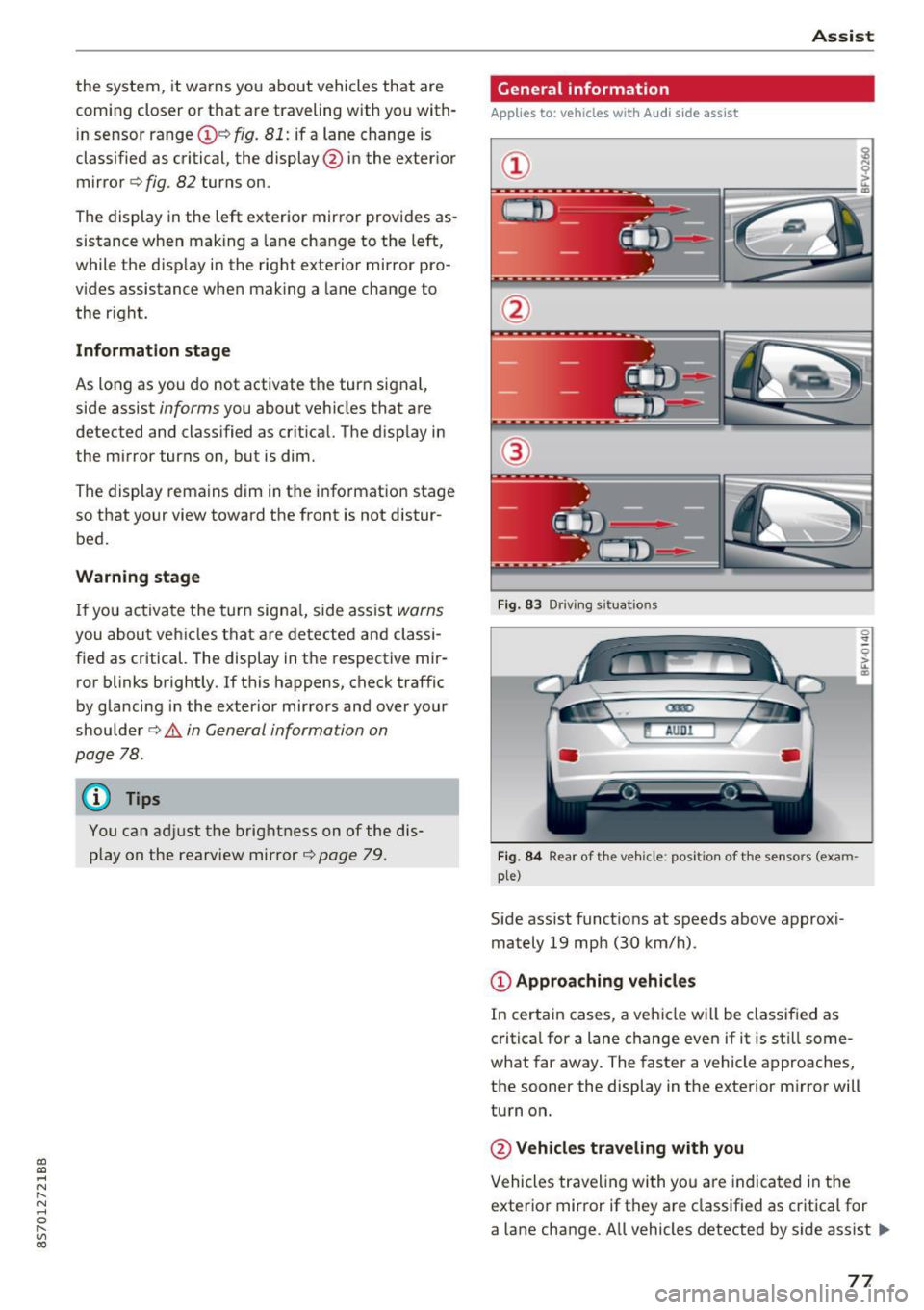
the system, it warns you about vehicles that are
coming closer or that are traveling with you with
in sensor range(!)¢
fig. 81: if a lane change is
classified as critical, the display @ in the exter ior
mirror
¢ fig . 82 turns on.
The display in the left exterior mirror provides as
sistance when making a lane change to the left,
while the d isp lay in the right exterior mirror pro
vides assistance when mak ing a lane change to
the r ight.
Information stage
As long as you do not activate the turn signal,
side assist
informs you about vehicles that are
detected and classified as crit ical. The display in
the m irror turns on, but is dim.
The display remains dim in the information stage
so that your view toward the front is not distur
bed.
Warning stage
If you activate the turn signal, side assist warns
you about vehicles that are detected and classi
fied as critical. The display in the respective mir
ror blinks brightly . If this happens, check traffic
by glancing in the exterior mirrors and over your
shoulder¢ .&
in General information on
page 78.
@ Tips
You can adjust the brightness on of the dis
play on the rearview mirror ¢
page 79.
Assist
General information
Applies to : veh icles w it h Aud i s ide ass ist
Fig . 83 Driv ing s ituat ions
Fig. 84 Rear of t he ve hicle: positio n of the sensors (exam
ple)
S id e assist funct ions at speeds above approxi
mately 19 mph (30 km/h).
@ Approaching vehicles
In certain cases, a vehicle will be classified as
critical for a lane change even if it is still some
what far away. The faster a vehicle approaches,
the sooner the display in the exterior m irror will
turn on.
@ Vehicles traveling with you
Vehicles traveling with yo u are indicated in the
exterior mirror if they are classified as critica l for
a lane change. All vehicles detected by side assist
lli>-
77
Page 87 of 314
CD
CD
.... N
" N .... 0 r--. V, co
General information
Applies to: vehicles with rearview camera
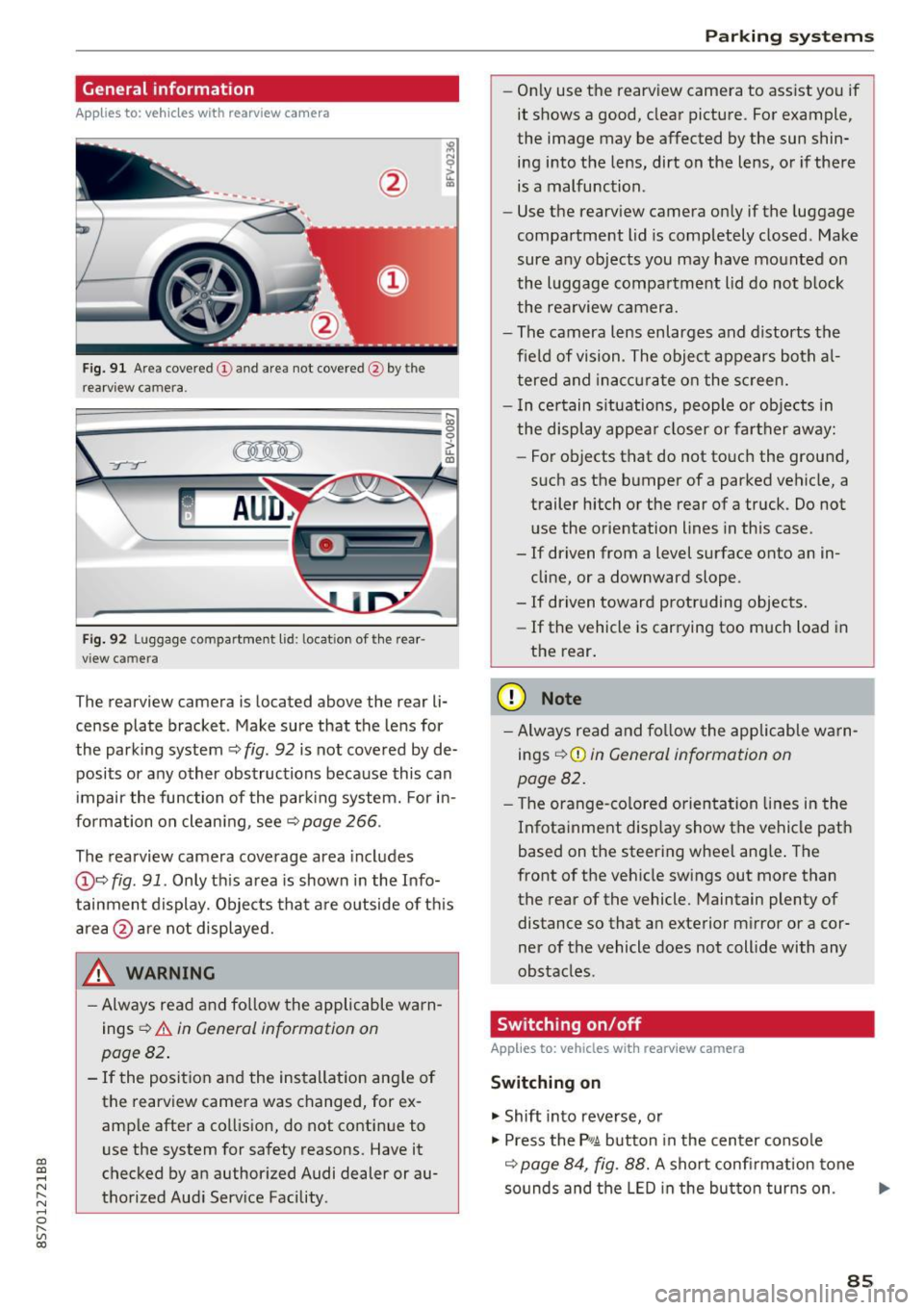
Fig. 9 1 Are a co vered (!) and a rea not cove red @ bythe
r earv iew ca mera.
~
~ ;..------ ::.·~- ,.,.~ _.,- ,,,_-------- g
(Jo00oD ~
Fig. 92 Luggage compartme nt lid: locat io n of t he rear
view c amera
The rearview camera is located above the rear li
cense plate bracket. Make sure that the lens for
the park ing system ~
fig. 92 is not covered by de
posits or any other obstructions because this can
i mpair the function of the par king system. For in
formation on clean ing, see ~
page 266 .
The rearview camera coverage area includes
@ ~ fig . 91 . Only th is area is shown in the Info
tainment display. Objects tha t are outside of th is
area @are no t displayed.
A WARNING
- Always read and fo llow the applicable warn
ings
~ A in General information on
page 82 .
- If the position and the installation ang le of
the rearview camera was changed, for ex
amp le after a collision , do not continue to
use the system for safety reasons. Have it
checked by an authorized Audi dealer or au
thorized Aud i Serv ice Facility .
Parking systems
-On ly use the rearv iew camera to ass ist you if
it shows a good, clear pictu re. For example,
the image may be affected by the sun shin
ing i nto the lens, dirt on the lens, or if there
is a malfunction .
- Use the rearv iew camera on ly if the luggage
compa rtment lid is completely closed . Make
sure any objects you may have mounted on
the l uggage compa rtment lid do not b lock
the rea rview camera.
- The camera lens enlarges and d istorts the
field of vision. The object appears both a l
t ered and ina ccur ate on the s creen.
- I n ce rtain s itu ations, people or objects in
the display appea r closer or fa rther away:
- For objects t hat do not touc h the grou nd,
such as the bumper of a parked vehicle, a
trailer hitch or the rear of a truck . Do not
u se the orie ntation lines in this case .
- If driven from a level s urface onto an in
cline, or a downward slope .
- If driven toward protruding objects.
- If the vehicle is carrying too much load in
the rear.
(D Note
-Alw ays read and fo llow the applicable w arn
ings
¢ (D in General information on
page 82 .
- The orange-co lored orientation lines in the
Infotainment display show the vehicle path
based on the steering wheel ang le . The
front o f the vehicle swings out more than
the rear of the vehicle. Maintain plenty of distance so that a n exterior m irror or a cor
ner of the vehicle does not coll ide with any
obstacles.
Switching on/off
Applies to: vehicles with rearview camera
Switching on
.. Shift into reverse, or
.. Press the
P,qA button in the center console
~ page 84, fig. 88. A short confi rmation tone
so unds and the LED in the bu tton tur ns on . ...
85
Page 93 of 314
co
co
.... N
" N .... 0
" "' c:o
brake rotors and pads by caref ull y applying
the brakes several t imes .
-If the front spoiler is damaged or you install
another spoiler, make sure the front wheel
brakes are vent ilated properly. Otherwise,
the brake system could overheat, wh ich re
duces the ir effectiveness .
- Failure of a brake circuit impairs b raking
performance , which increases brak ing dis
tance. Avoid driving the vehicle and have it
towed it to the nearest author ized Audi
dealer or author ized A udi Se rvice Facility.
- Never let the vehicle roll while t he engine is
stopped because this increases the risk of a n
acc iden t.
- If the bra ke booste r is not working, you will
have to press m uch ha rder on the bra ke
ped al to compensate for the lac k of th e
booster.
- Never let the brakes "rub " by pressing the
pedal light ly when bra king is no t actually
ne cessary . T his cause s the brakes to over
hea t and i ncre ases br aking di stance and
ca uses wear.
- B efo re driv ing downh ill a long dis tance on a
steep h ill, decrease your speed and se lec t a
l ower gear . This makes use of the engine
braking effect and relieves the brakes . If
you need to b rake additionally, brake in in
tervals and not continuously.
@ Tips
- If the brake booste r is not working, you
must press the brake pedal with much more
fo rce than normal.
- If you retrofit yo ur vehicle with a front spoil
er, whee l
covers or similar items, make sure
that the air flow to the front whee ls is not
i nterr upted . Otherw ise the brake system
ca n become too hot .
Intelligent Technology
Electromechanical
steering
The electromechanical steering supports the
driver 's steering movements .
Power steering adap ts elec tronically based on
the ve hicle speed.
Indicator light s and message s
• Steering: malfun ction! Please stop vehicle
If this indica to r li ght tur ns on and st ays on and
t hi s message appea rs, the powe r steering may
have failed.
Stop t he vehi cle in a safe location as soon as pos
s ible. Do
not cont inue drivi ng. See an autho riz ed
Audi dealer or authorized A udi Service Fac ility for
assistance .
l;r- ij S teering : malfun ction! You may continue
driving
If the indicator light turns on, the steering wheel
may be more d ifficult to
move or more sensit ive
t h an usua l. Th e steer ing whee l may a lso be at an
angle when d riving s trai ght.
D rive slowly to an a uthorized Audi dea ler or au
t h orized Audi Serv ice Facility to have the mal
funct ion corre cted.
(D Tips
If the . or l;r, ij ind icator light only s tays on
fo r a short time, you may continue d riving.
All wheel drive (quattro)
In all wheel drive, all four wheels are powered.
General information
In all whee l dr ive, the dr iv ing power is divided be
tween all four wheels . This happens automatical
ly depending on you r dr iv ing behav ior as we ll as
t h e cur rent road condi tions. A lso see ~
page 88,
Elec tronic stabilization con trol ( ESC).
T he all whee l dr ive concept is des igned for high
engine power . You r vehicle is except ionally pow
erfu l and has excellent driv ing cha racteristics
bot h unde r normal d rivi ng conditions and o n
91
Page 98 of 314
Multi Media Interface
Multi Media Interface
Traffic safety information
Aud i recommends performing certa in Infotain
ment system functions, such as entering a desti
nation, only when the vehicle is stat ionary . Al
ways be p repared to stop opera ting the Info tain
ment system i n the interest of your safety and
t he safe ty of other ro ad u sers.
_& WARNING
O nly use the In fotain ment sys tem w hen tra f
fic con ditions permit and always in a way that
allows you to ma inta in complete control ove r
your vehicle.
@ Tips
Cer tain functi ons are no t avail ab le wh ile driv
ing .
Introduction
The Multi Media Interface , or MMI for short,
combines various systems for communication ,
navigation* and entertainment in your Audi . You
can operate the MMI using the MMI control pan
el, the multifunction steering wheel or the voice
recognition system* .
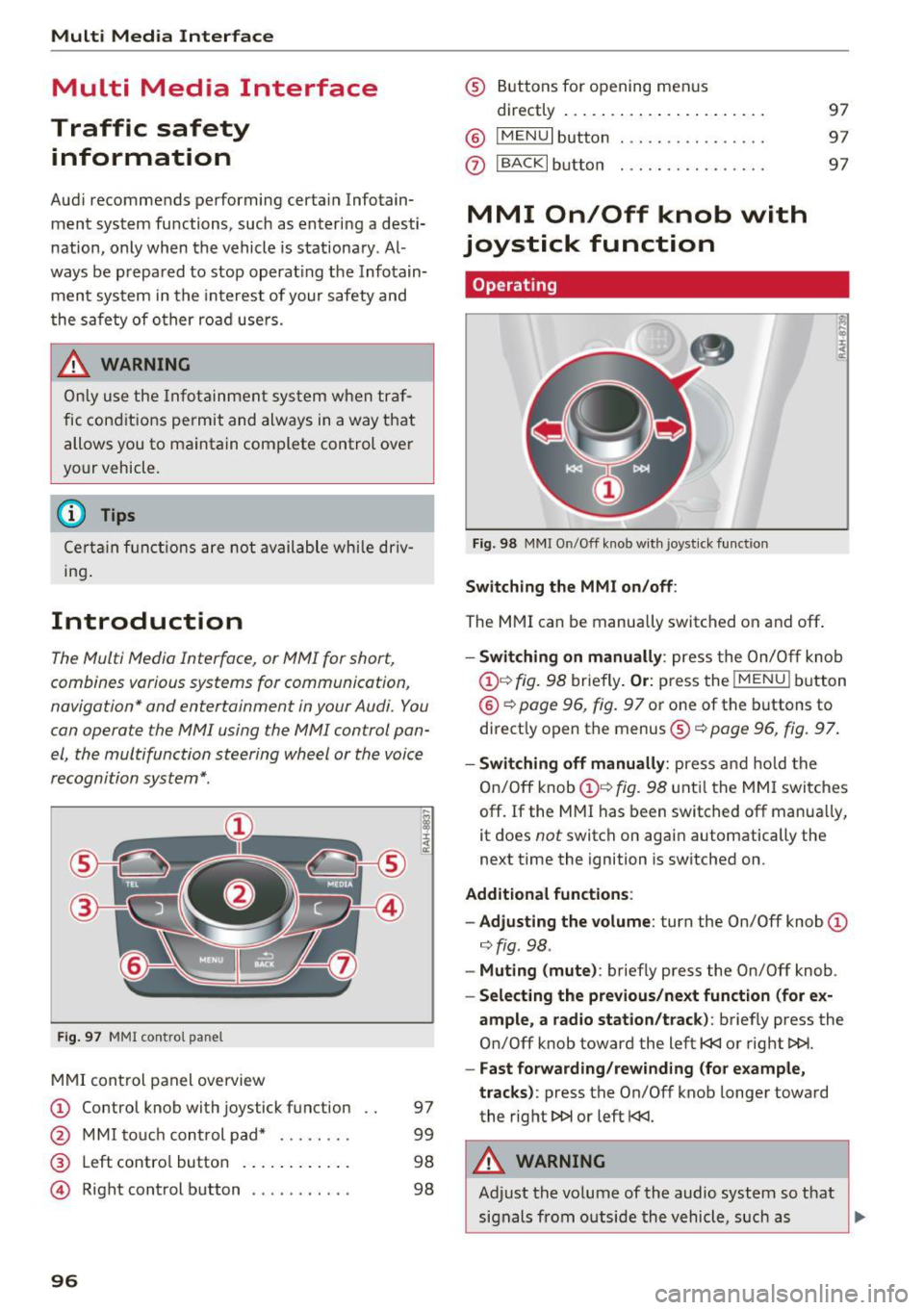
Fig. 97 MMI con trol p an el
MM I cont rol panel overview
CD Control knob with joystick f unction
@ M MI to uch con trol pad* ... .... .
® Left contro l button . ..... ... .. .
© R ight con trol b utton ....... ... .
96
97
9 9
98
98
® Buttons fo r opening men us
directly .... . .. .. .. .... .. .... .
@ IMENU I button
(J) I BACK I button . .. .. .... .. ... . .
MMI On/Off knob with
joystick function
Operating
Fig . 98 M MI O n/Off k nob w it h joys tick functio n
Switching the MMI on /off :
The M MI can be manua lly switched on and off .
97
97
97
- Switching on manually : press the On/O ff kno b
CD¢ fig. 9 8 briefly . Or: press the !MENU I button
@ ¢page 96, fig. 9 7 or one of the b uttons to
direct ly open the menus®¢
page 96, fig. 97.
-Switching off manually : press and hold the
O n/Off knob
CD ¢ fig. 98 unt il t he M MI switches
off. If the MMI ha s been switched off manua lly,
it does
not switch on agai n automatically the
next time the ignition is switched on.
Additional function s:
- Adjusting the volume :
turn the On/Off knob CD
¢fig. 98 .
-Muting (mute) : briefly press the On/Off knob .
-Selecting the previous /next function (for ex-
ample , a radio station/track ):
brief ly press the
On/Off knob toward the left
l
-Fast forwarding/rewinding (fo r example ,
tracks) :
press the On/Off knob longer toward
the rig ht t>t>I or left
l
Adjust the vo lume of the audio system so that
signals from outside th e vehicle, such as
~