brake light AUDI TT ROADSTER 2017 Owner's Manual
[x] Cancel search | Manufacturer: AUDI, Model Year: 2017, Model line: TT ROADSTER, Model: AUDI TT ROADSTER 2017Pages: 314, PDF Size: 76.54 MB
Page 92 of 314
Intelligent Technology
Operating nois e
Noises may occur when br aking depend ing on the
speed, b raking force and outside cond itions such
as tempe rature and humidity.
Effect of water and road salt
I n ce rtain s ituations, for example after driving
through wa ter, in heavy ra in, afte r ove rnig ht con
densat ion or after washing your car, the braking
effect can be reduced by moisture or ice on the
brake rotors and brake pads. The brakes must be
"dried" first w ith a few careful brake applica
tions.
At highe r speeds and with the windshie ld wipers
turned on, the brake pads press against the brake rotors for a short amount of time . Th is action,
which is not felt by the driver, happens at regular
intervals and ensures a better reaction time for
the brakes in wet weather .
The braking eff ect can also be reduced if you are
driving on salted roads and you do not apply the
brakes for long periods of time. The layer of salt
on the brake rotors and pads must be worn off
first when the brakes are applied .
Corrosion
Leaving the vehicle parked for long periods of
time, low mi leage and avoiding heavy braking
can contribute to corrosion on the brake rotors
and to dirty brake pads .
If you usually avoid heavy braking or if there is
corros ion present, occasional heavy braking at
h igh speeds is recommended to clean the brake
rotors and pads
¢ ,& .
Brake system malfunct ion
if you notice that the brake pedal travel has sud
denly increased, then a brake c ircuit in the dual
circu it brake system may have malfunct ioned.
Drive to an authorized Aud i dea ler or aut horized
Aud i Serv ice Facility immediately to have t he
p roblem co rrected . On the way there, drive with
reduced speed and keep in mi nd that you w ill
need a longer d istance to s top and you w ill need
to p ress the brake pedal har der.
90
Low brake fluid level
When the brake fluid level is low, m alfunc tions in
the b rake system may occur . The brake fluid leve l
i s e lectronically monitored .
Brake booster
The brake booster ampl ifies the press ure you ap
ply to the brake pedal.
_&. WARNING
- New brake pads do no t achieve the ir full
braking effect during the first 2 50 m i
-
(400 km). They m ust be "b roken in" first .
However, you can compensate fo r the
slightly reduced braking force by pressing
firm ly on the brake pedal. Avoid heavy brak
ing during the break-in period .
- On ly app ly the bra kes for the purpose of
cleaning the brake system when road and
traffic conditions permit. You must not en danger other road users . This increases the
ris k of an accident.
- On steep slopes, reduce the speed and se
lect a lower gear o r lower selector leve r po·
si tion. D rive as little as possible while press
ing the bra ke pedal and avoi d pu tting your
left foot on the brake pedal while dr iv ing.
This could cause the bra kes to overhea t and
impair the efficiency of the b rakes.
- Do not let the bra kes "grind" by always
keep ing your foot on the bra ke pe dal. This
can cause the brakes to overheat, inc rease
wear and increase braking distance unneces
sarily .
- Ce rtain weather and operating conditions
such as d riving through water, dr iv ing in
heavy rain or driv ing after wash ing your ve
hicle can impai r the effective ness of the
brakes . In t he win ter, ice may build up o n
the bra ke pa ds, rotors and dr ums. Check
t hese components by b raking carefully. Ap
plyi ng the brakes carefully seve ral times
dries the brakes and removes ice build-up .
- The efficiency o f th e brakes can also be im
p air ed by dr iv ing for long s tretches on roads
covered with sa lt wi thout using the bra kes .
You can remove salt deposits from the ..,.
Page 93 of 314
co
co
.... N
" N .... 0
" "' c:o
brake rotors and pads by caref ull y applying
the brakes several t imes .
-If the front spoiler is damaged or you install
another spoiler, make sure the front wheel
brakes are vent ilated properly. Otherwise,
the brake system could overheat, wh ich re
duces the ir effectiveness .
- Failure of a brake circuit impairs b raking
performance , which increases brak ing dis
tance. Avoid driving the vehicle and have it
towed it to the nearest author ized Audi
dealer or author ized A udi Se rvice Facility.
- Never let the vehicle roll while t he engine is
stopped because this increases the risk of a n
acc iden t.
- If the bra ke booste r is not working, you will
have to press m uch ha rder on the bra ke
ped al to compensate for the lac k of th e
booster.
- Never let the brakes "rub " by pressing the
pedal light ly when bra king is no t actually
ne cessary . T his cause s the brakes to over
hea t and i ncre ases br aking di stance and
ca uses wear.
- B efo re driv ing downh ill a long dis tance on a
steep h ill, decrease your speed and se lec t a
l ower gear . This makes use of the engine
braking effect and relieves the brakes . If
you need to b rake additionally, brake in in
tervals and not continuously.
@ Tips
- If the brake booste r is not working, you
must press the brake pedal with much more
fo rce than normal.
- If you retrofit yo ur vehicle with a front spoil
er, whee l
covers or similar items, make sure
that the air flow to the front whee ls is not
i nterr upted . Otherw ise the brake system
ca n become too hot .
Intelligent Technology
Electromechanical
steering
The electromechanical steering supports the
driver 's steering movements .
Power steering adap ts elec tronically based on
the ve hicle speed.
Indicator light s and message s
• Steering: malfun ction! Please stop vehicle
If this indica to r li ght tur ns on and st ays on and
t hi s message appea rs, the powe r steering may
have failed.
Stop t he vehi cle in a safe location as soon as pos
s ible. Do
not cont inue drivi ng. See an autho riz ed
Audi dealer or authorized A udi Service Fac ility for
assistance .
l;r- ij S teering : malfun ction! You may continue
driving
If the indicator light turns on, the steering wheel
may be more d ifficult to
move or more sensit ive
t h an usua l. Th e steer ing whee l may a lso be at an
angle when d riving s trai ght.
D rive slowly to an a uthorized Audi dea ler or au
t h orized Audi Serv ice Facility to have the mal
funct ion corre cted.
(D Tips
If the . or l;r, ij ind icator light only s tays on
fo r a short time, you may continue d riving.
All wheel drive (quattro)
In all wheel drive, all four wheels are powered.
General information
In all whee l dr ive, the dr iv ing power is divided be
tween all four wheels . This happens automatical
ly depending on you r dr iv ing behav ior as we ll as
t h e cur rent road condi tions. A lso see ~
page 88,
Elec tronic stabilization con trol ( ESC).
T he all whee l dr ive concept is des igned for high
engine power . You r vehicle is except ionally pow
erfu l and has excellent driv ing cha racteristics
bot h unde r normal d rivi ng conditions and o n
91
Page 244 of 314
Checking and Filling
Audi dealer or authorized Audi Service Facility
and have the cooling system inspected. If the
cooling system is not leaking, a loss can come
from the coolant boiling through overheating
and being pushed out of the cooling system.
A WARNING
The cooling system is pressurized and can be
come very hot. To reduce the r isk of burns
from hot coolant:
- Do not open the coolant expansion tank cap when the eng ine is hot. This increases the
risk of burns.
- Stop the engine and allow it to cool.
- Protect your face, hands and arms from es-
caping coolant and steam by covering the
coolant tank cap with a large, thick cloth.
- Turn the coolant tank cap counterclockwise
slowly and keep light pressure o n the cap.
- To reduce the risk of burns, do not allow any
antifreeze or coolant to drip onto the ex haust system or hot eng ine components .
T he ethylene glycol in eng ine coolant can
catch fire under certa in circumstances.
- The coo lant add itive and the coolant can be
dange rous to your health. For this reason,
keep the coolan t in the origina l container
and away from children. There is a risk of
poisoning.
- When working in the engine compartmen t,
remember that the radiator fan can switch
on even if the ignition is switched off, which
increases the risk of inj ury.
(D Note
Do not add coolant if the exp ansion tank is
empty . Air could enter the cooling system and
damage the engine . If this is the case, do not
continue driving. See an authorized Audi deal
er or authorized Audi Service Facility for assis
tance.
242
Brake fluid
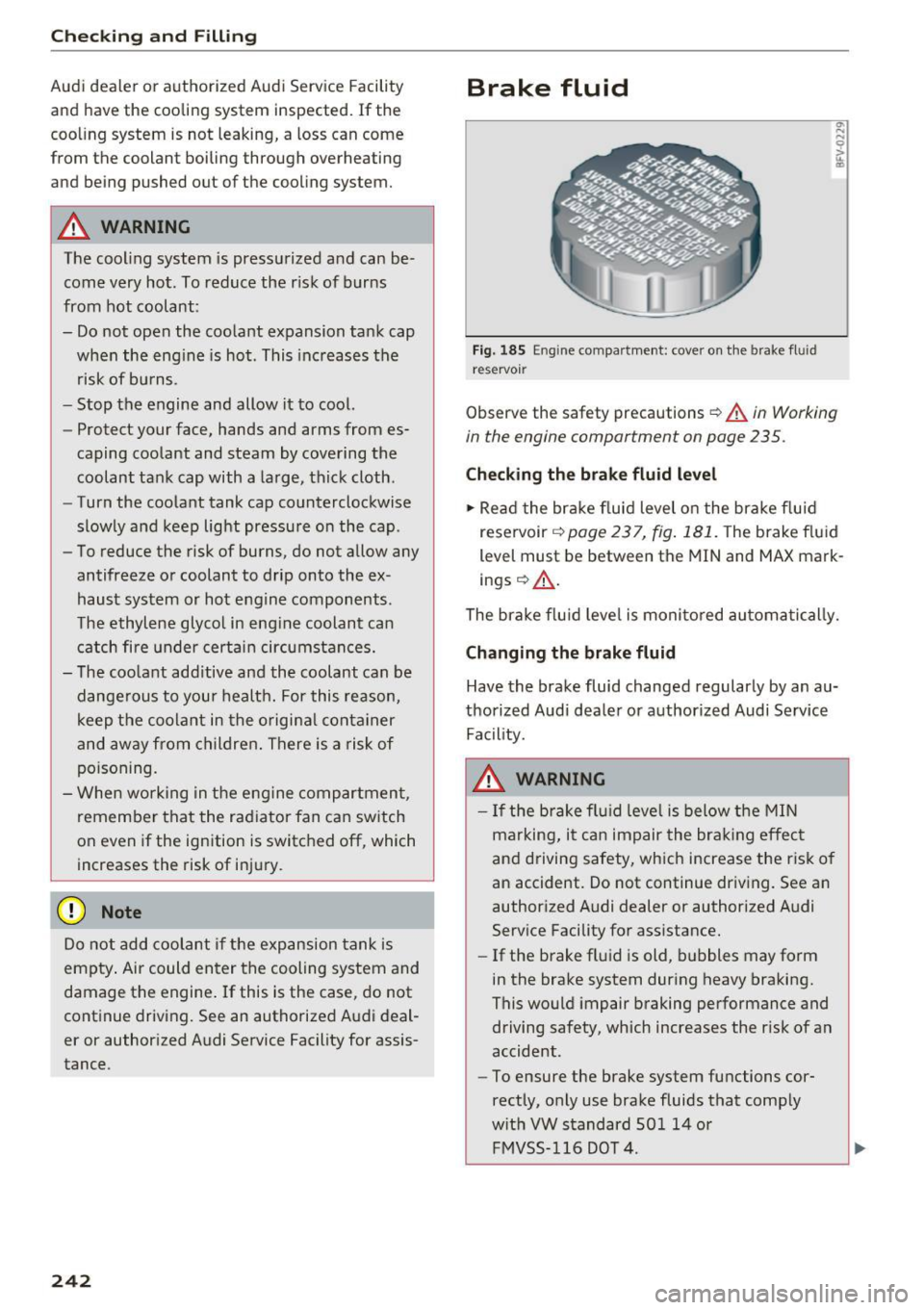
Fig. 1 85 Eng ine compa rtment: cover o n the brake fluid
reservo ir
Observe the safety precautions ¢ A in Working
in the engine compartment on page 235.
Check ing the brake fluid level
... Read the bra ke fluid level o n the bra ke flu id
reservoir
¢ page 237, fig . 181. The brake f luid
level must be between the MIN and MAX mark
ings ¢&_ .
The brake f lu id leve l is monito red au toma tically.
Changing the brake fluid
Have the brake fluid changed regularly by an au
thorized Audi dea ler or authorized Audi Service
Fac ility.
A WARNING
- I f the brake fl uid leve l is below the MIN
marking, it can impair the bra king effec t
and driving safety, which increase the risk o f
an accident . Do not continue driv ing. See a n
author ized Audi dealer or authorized A udi
Serv ice Facility for assistance.
- If the brake fl uid is old, b ubbles may form
in the brake system during heavy braking.
This would impair braking performance and
driving safety, which increases the r isk of an
accident.
- To ensure the brake system functions cor
rectly, only use brake fluids that comply
w it h VW standard SO l 14 or
FMVSS- 116 DO T 4.
Page 245 of 314
co
co
.... N
" N .... 0
" "' c:o
CD Note
-If the brake fluid level is above the MAX
mark ing, brake fluid may leak out over the
edge of the reservoir and result in damage
to the vehicle.
- Do not get any brake f luid on the vehicle
paint, because it will corrode the paint.
Battery
General warnings about batteries
All of the batteries in yo ur vehicle are practically
ma intenance-free and are checked during a ve hi
cle inspection . Because of the complex power
supp ly, all work on batter ies such as d isconnect
ing, replacing, etc. should
o nly be performed by
an author ized Audi dealer or authorized Audi
Service Facility
c> & -
The term "vehicle battery" refers to the 12 Vo lt
battery in your veh icle.
Detailed wa rning s for the vehicle batte ry:
®
Wear eye p rotection.
A
Battery acid is hig hly co rrosive. Wea r pro-
tective g loves and eye pro tect ion.
@
Fire, sparks, open flame and smok ing are
forb idden.
~
A highly exp losive mixtu re of gases can
form when charging batteries.
®
Keep childre n away from battery acid and
batteries.
A WARNING
All work on the battery or electrical system in
your vehicle can result in injuries, chemical
burns, accidents or burns. Because of this, a ll
work m ust be perfo rmed
only by an author
ized Aud i deale r or authorized Audi Serv ice
Facility.
A WARNING
California Proposition 65 Warn ing:
- Battery posts, terminals and re lated acces
sories contain lead and lead compounds,
Ch eck ing and Filling
chemicals known to the State of California
to cause cancer and reproductive problems.
Wash hands after handling.
CD Note
Protect the vehicle battery against freezing if
the veh icle wi ll be parked for long periods of
time so that it is not destroyed by "freezing"
c> page244.
Vehicle battery
The term "vehicle battery" refers to the 12 Volt
battery in your vehicle.
Not running the vehicl e for long periods of
time
If you do not drive your vehicle for severa l days or
weeks, electrical equ ipment is gradua lly scaled
back or sw itched off. Th is reduces energy use and
ensures the vehicle will be ab le to start after long
per iods of time
c> page 93 . Some convenience
func tions, such as i nterio r lighting o r power seat
adjus tme nt, may no t be ava ilab le unde r certain
cir cumstances . These convenience func tions will
be available again once you switch the ignit ion on
and start the engine.
E ven when elec trical equipment is switched off,
the eq uipment can sti ll dr ain the vehicle ba ttery
i f the veh icle is not dr iven for long periods of
t ime . Deep dra ining resu lts in a chemica l reaction
t h at destroys the inside of the vehicle batte ry.
The veh icle battery must be charged every month
to red uce the risk of this happening
c> page 244.
Contact an authorized Aud i dea ler or authorized
Audi Service Facility for more information .
Winter operat ion
Co ld weather places higher demands on the vehi
cle battery. Th is res ults in reduced starting ab ili
ty. Have the vehicle battery checked by an au
thorized Aud i dea ler or authorized Audi Service
Facility before the cold time of year .
243
Page 269 of 314
co
co
.... N
" N .... 0
" "' c:o
wash operator to reduce the risk of accidents.
- To reduce the risk of cuts, protect yourself
from sharp metal components when wash
ing the underbody or the inside of the wheel
housings .
- After washing the vehicle, the brak ing effect
may be delayed due to mo isture on the
brake rotors or ice in the w inter . This in
creases the risk of an acc ident. The brakes
must be d ried fi rst w ith a few careful b rake
applications.
(D Note
- If you wash t he vehicle in an automatic car
wash, yo u m ust retract the extendable rear
spo iler* if necessary, and fold the exter ior
mir rors in to red uce the risk of damage.
Power folding e xte rior m irrors * mus t onl y
be fo lded in and ou t using the power folding
f u nct ion .
- To reduce the risk of pai nt d amage, do no t
wash the vehicle in di rect sunlig ht.
Ca re and cleaning
- To re duce the risk of damage, do not wash
the power top with a pressure washer .
- T o red uce the risk of damage to the surface,
do not use insect removing sponges, kitche n
sponges o r similar items .
- Matte finish painted veh icle components:
- To reduce the risk of damage to the sur-
face, do not use polishing agents or hard
wax.
- Never use protective wax. It can destroy
the matte finish effect .
- Do not place any stickers or magnetic
signs on vehicle parts painted with matte
finish paint . The paint could be damaged
when the stickers or magnets are re
moved.
@ For the sake of the environment
Only wash t he veh icle in facili ties s pec ially de
s igned for that pu rpose . This will reduce the
r isk of dirty wate r contamina ted with o il from
ente ring the sewe r sys tem.
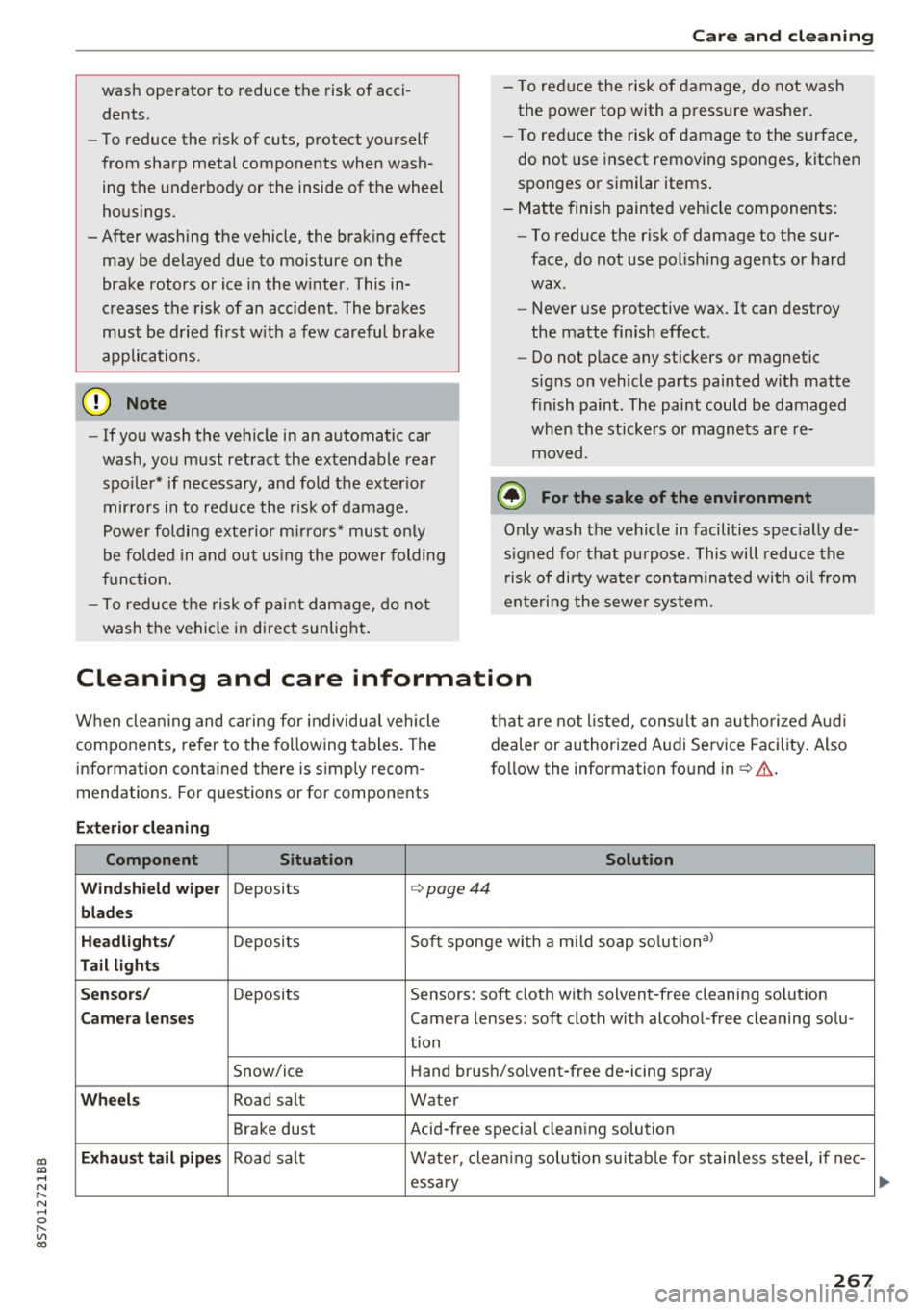
Cleaning and care information
W hen cle aning and ca ring for individua l vehicle
components, refer to the following tables . The
info rmation contained there is simply recom
mendations. Fo r questions or for components t
h at are not l isted, cons ult an autho riz e d Aud i
dealer or au thorized A udi Service Fac ility . Also
fo llow the information found in¢& .
Exterior cleaning
Component Situation Solution
Windshield wiper
Deposits c::- page44
blades
Headlights /
Deposit s So
ft sponge wi th a m il d soap solutiona )
Tail light s
Sensors /
Deposits Sensors: soft cloth with solvent-free cleaning solut ion
Camera lenses Camera lenses: soft cloth w ith alcohol -free cleaning solu -
tion
Snow/ice H
and brus h/solvent-free de-icing spray
Wheels Road salt Water
Brake dust Acid-free special clean ing solution
Exhaust tail pipes Road salt Water, clea ning solution su itab le for stainless stee l, if nee-
essa ry
267
Page 284 of 314

Fuses and bulbs
Interior fuse assignment
Fig. 208 Vehicle inter ior: fuse assignme nt
No. Equipment
Fl Power top control modu
le (Roadster)
F2 Power top control module (Roadster)
F3 ESC control module
F4 Central computer processor (MIB-2)
FS Gateway
F6 Anti-theft alarm system Climate control system, selector lever (au-
F7 tomatic transmission), parking heater,
rear window heater relay coil
Diagnos is, electrical parking brake switch,
F8 light swi tch, rain/light sensor, interior
lighting
F9 Steering column switch module
Fl0 Display
F ll Haldex clutch
F12 MMI area
F 13 Adaptive dampers control module
F14 Climate control system blower
FlS Electronic steering co lumn lock
F16 MMI components, safety be
lt microphone
(Roadster)
282
No . Equipment
F17 Instrument cluster
F18 Rearview camera
F19 Convenience key system control module
F20 Power lumbar support adjustment
F22 Front passenger's side neck heating (Road-
ster)
F23 R
ig ht exterior lighting, on-board compute r
(right)
F 25 Driver's s
ide door (for example power win-
dows)
F26 Seat heating
F28 AMI H igh med ia port
F29 On-board computer
F31 Left on-board computer
F32 Driver assistance systems
F33 Airbag
Socket relay, interior sound, back-up light
F34 switch, temperature sensor, oil level sen-
sor
Diagnosis, headlight range control system,
F35 air quality sensor, automatic dimming
rearview mirror
F36 Right cornering light/ r ight LED-h eadlight
F37 Left cornering light/ left LED-headlight
F38 E
ng ine control module, ESC control mod-
ul e
F39 Front passenger's side door (for example
power windows)
F40 Cigarette lighter, sockets
F41 SCR relay and delivery unit
F42 Central locking area
F43 On-board computer
F45 Power adjustable driver's side seat
F46 Driver's side neck heat ing (Roadster)
F49 Starter, clutch sensor
FS0 ESC valves
F53 Rear window defogger
The power seats* are protected v ia
circuit break
ers
that automatically switch on after a few sec
onds after the overload has been reduced.
Page 285 of 314
CD
CD
.... N
" N .... 0 r--. V, co
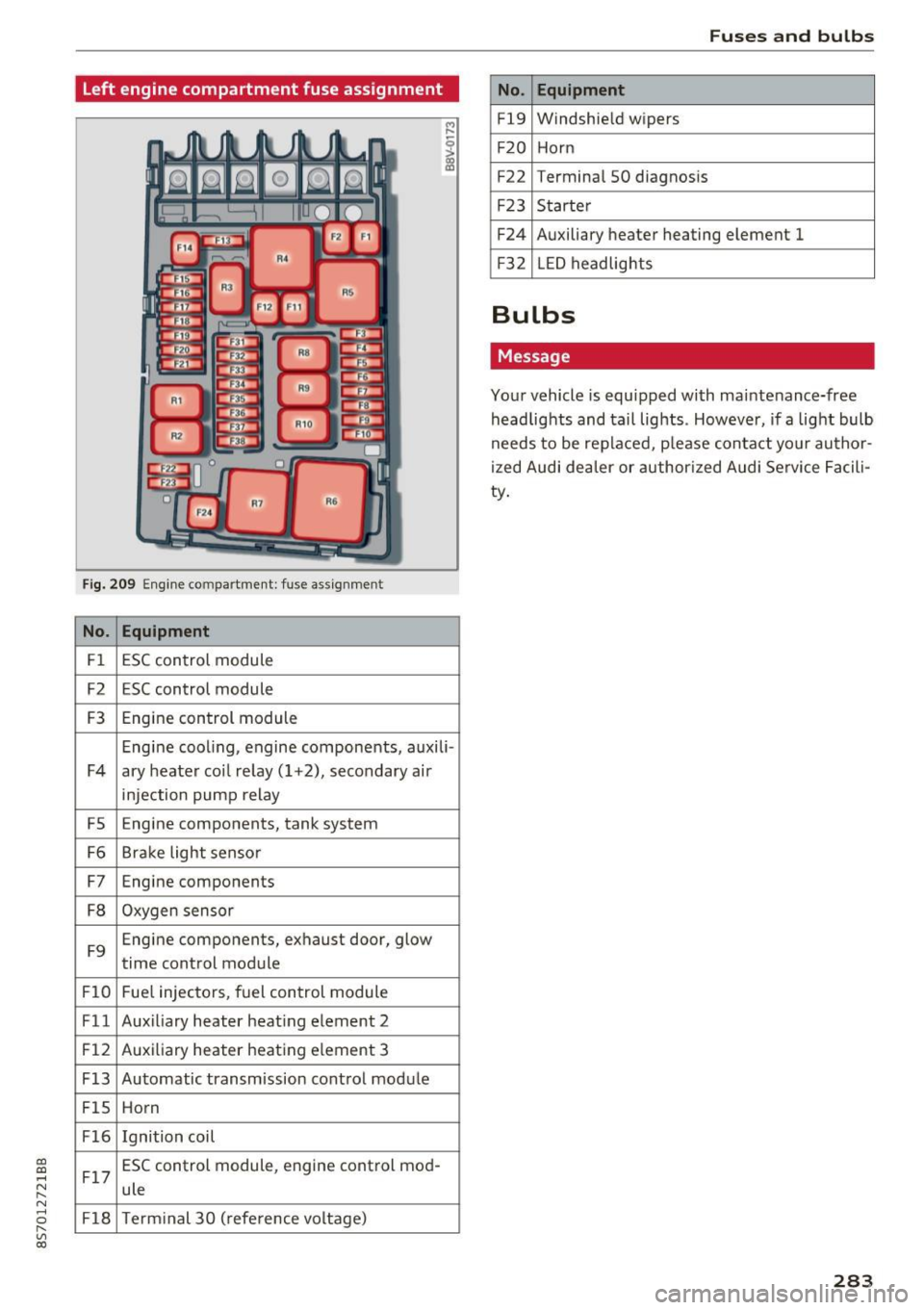
Left engine compartment fuse assignment
Fig. 209 Engine compartment: fuse ass ignment
No. Equipment
Fl ESC control module
F2 ESC control module
F3 Engine control module
Engine cooling, engine components, auxili -
F4 ary heater coil re lay ( 1+2), secondary air
injection pump relay
FS E
ngine components, tank system
F6 Brake light sensor
F7 Engine components
F8 Oxygen sensor
F9 Engine components, exhaust door, glow
time control module
FlO Fuel injectors, fuel control module
Fll Auxiliary heater heating element 2
F 12 Auxiliary heater heating e
lement 3
F13 Automatic transmission cont rol module
FlS Horn
F16 Ignition coil
F17 ESC control module
, engine control mod-
ule
F18 Term inal 30 (reference voltage)
Fuses and bulbs
No . Equipment
Fl9 Windshield wipers
F20 Horn
F22 Terminal SO diagnos
is
F23 Starter
F24 Auxiliary heater heating element 1
F3 2 LED headlights
Bulbs
Message
Your vehicle is equ ipped with maintenance-free
headlights and tail lights . However, if a light bulb
needs to be replaced, p lease contact yo ur author
ized Audi dea ler or authorized Audi Service Facili
ty.
283
Page 287 of 314
CD
CD
.... N
" N ...... 0
" V, co
When jump starting or charging the battery,
never connect the negative ground cable to
the battery negative post because the battery
manager system must be able to detect the
battery's state of charge. Always connect the
negative ground cable to the negat ive ground
post of the battery manager control unit .
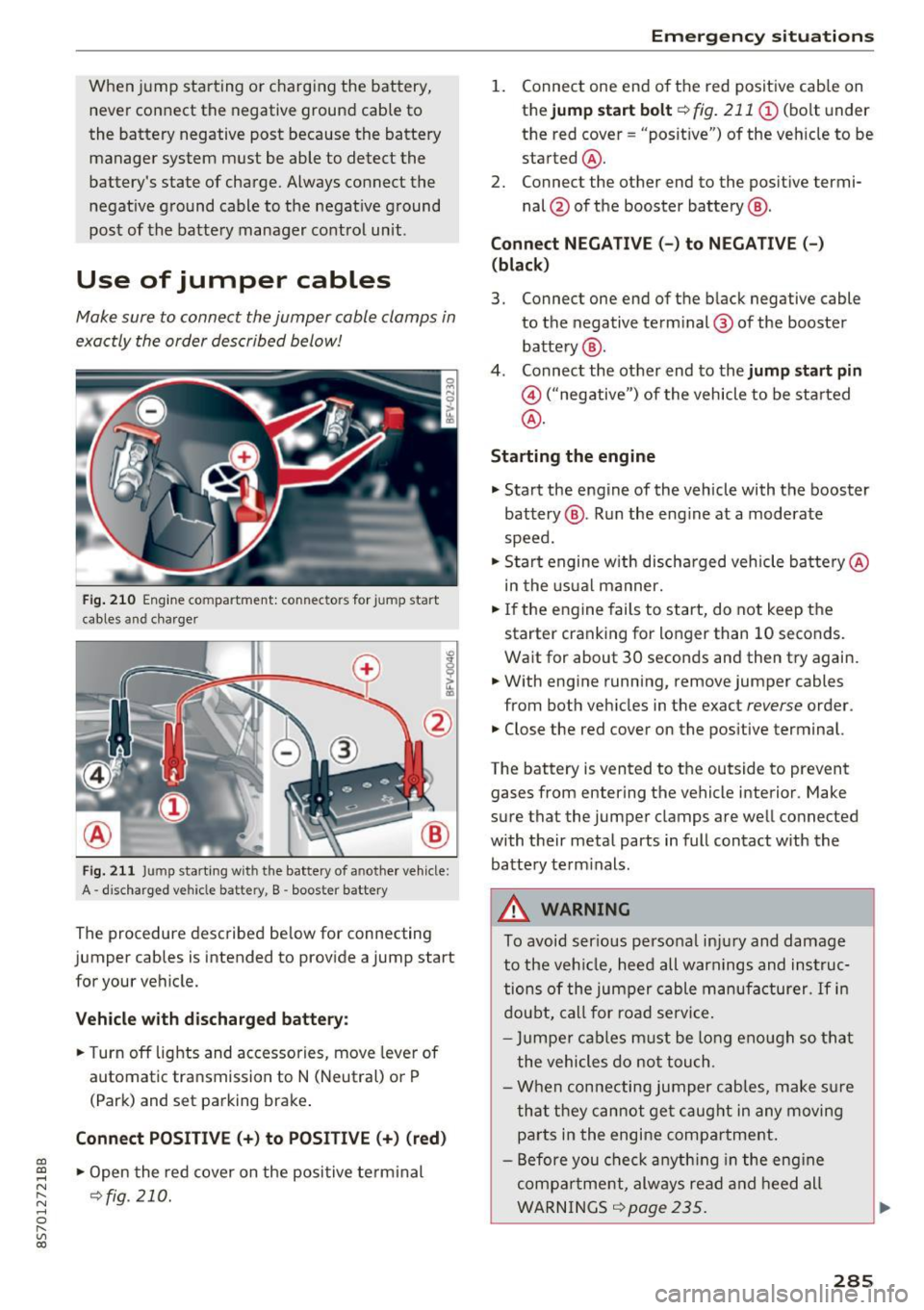
Use of jumper cables
Make sure to connect the jumper cable clamps in
exactly the order described below!
Fig. 210 Engine compartment: connectors for jump start
cables and c harger
Fig. 211 Jump starting w ith the battery of another vehicle :
A -discharged vehicle battery, B -booster battery
The proc edure desc ribed below for connecting
jumper cables is intended to provide a jump start
for your vehicle.
Vehicle with discharged battery:
.. Turn off lights and accessories, move lever of
automatic transmission to N (Neutral) or P
(Park) and set parking brake .
Connect POSITIVE(+) to POSITIVE(+) (red)
.,. Open the red cover on the positive terminal
~fig. 210.
Emergency situations
1. Connect one end of the red positive cab le on
the
jump start bolt~ fig. 211 (D (bolt und er
the red cover= "posit ive") of the veh icle to be
sta rted @.
2. Connect the other end to the posit ive termi-
nal @of the booster battery @.
Connect NEGATIVE (-) to NEGATIVE (- )
(black)
3. Connect one end of the black negative cable
to the negative terminal @ of the booster
battery @.
4. Connect the other end to the
jump start pin
@ ("negative") of the vehicle to be started
@.
Starting the engine
.. Start the engine of the vehicle with the booster
battery @. Run the eng ine at a moderate
speed .
.,. Start engine w ith discharged vehicle battery @
in the usual manner.
.,. If the engine fails to start, do not keep the
starter cranking for longer than 10 seconds.
Wait for about 30 seconds and then try again .
.. With engine running, remove jumper cables
from both vehicles in the exact
reverse order .
.. Close the red cover on the positive terminal.
The battery is vented to the outside to prevent
gases from entering the vehicle interior . Make
sure that the jumper clamps are well connected
with their metal parts in full contact with the battery term inals .
A WARNING
To avoid ser ious personal injury and damage
to the vehicle, heed all warnings and instruc
tions of the jumper cable manufacturer.
If in
doubt, call for road service.
- Jumpe r cables must be long enough so that
the vehicles do not touch .
- When connecting jumper cables, make sur e
that they cannot get caug ht in any moving
parts in the engine compartment.
- Before you check anything in the engine
compa rtment, always read and heed all
WARNINGS ~
page 235 .
285
Page 300 of 314
Index
AUTO Automatic climate control system . . . . . . . 53
Automatic headlights . . . . . . . . . . . . . . . . . 39
Auto Lock (central locking) . . . . . . . . . . . . . . 24
Automatic belt retractor . . . . . . . . . . . . . . . 192
Automatic climate control system
refer to Climate control system (automatic) .S3
Automatic key . . . . . . . . . . . . . . . . . . . . . . . . . 24
Automatic transmission . . . . . . . . . . . . . . . . . 63
Driving tips . . . . . . . . . . . . . . . . . . . . . . . . . . 66
Emergency mode . . . . . . . . . . . . . . . . . . . . . 70
Hill descent contro l . . . . . . . . . . . . . . . . . . . 68
Kick-down . . . . . . . . . . . . . . . . . . . . . . . . . . . 69
La unch Control-Program . . . . . . . . . . . . . . . 69
malfunction . . . . . . . . . . . . . . . . . . . . . . . . . 65
Selector lever emergency release . . . . . . . . 71
Selector lever lock . . . . . . . . . . . . . . . . . . . . 65
Selector lever positions . . . . . . . . . . . . . . . . 64
Shifting manually . . . . . . . . . . . . . . . . . . . . 68
Steering wheel with shift paddles. . . . . . . . 68
tiptronic . . . . . . . . . . . . . . . . . . . . . . . . . . . . 68
Automatic wipe/wash system . . . . . . . . . . . . 43
Automatic zoom (navigation) . . . . . . . . . . . 146 Brakes . .
. . . . . . . . . . . . . . . . . . . . . . . . . . . . . 89
Brake assist system . . . . . . . . . . . . . . . . . . . 88
Brake booster . . . . . . . . . . . . . . . . . . . . . . . . 89
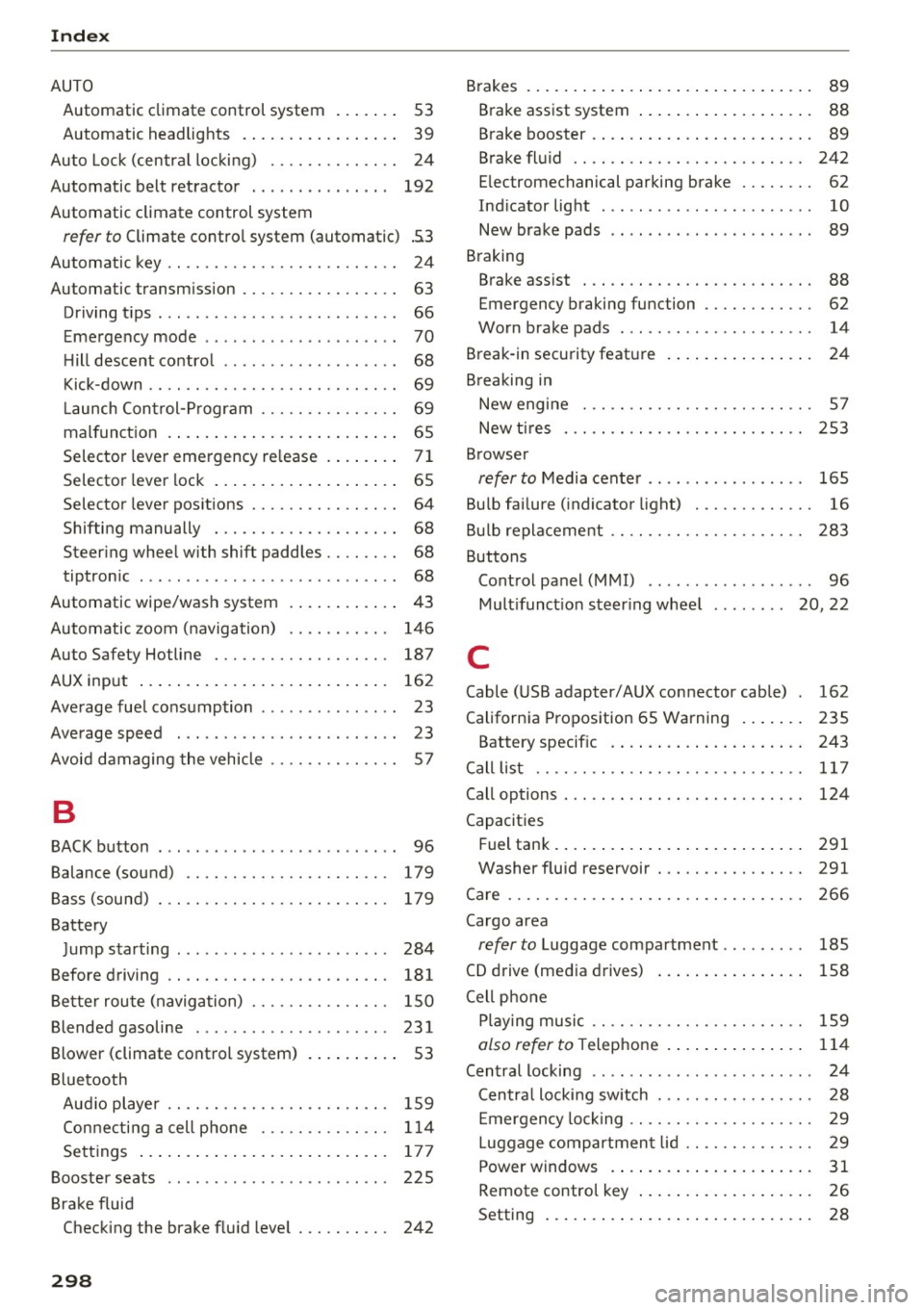
Brake fluid . . . . . . . . . . . . . . . . . . . . . . . . . 242
Electromechanical parking brake . . . . . . . . 62
Indicator light . . . . . . . . . . . . . . . . . . . . . . . 10
New brake pads . . . . . . . . . . . . . . . . . . . . . . 89
Braking Brake assist . . . . . . . . . . . . . . . . . . . . . . . . . 88
Emergency braking function . . . . . . . . . . . . 62
Worn brake pads . . . . . . . . . . . . . . . . . . . . . 14
Break-in security feature . . . . . . . . . . . . . . . . 24
Breaking in New engine . . . . . . . . . . . . . . . . . . . . . . . . . 57
New tires . . . . . . . . . . . . . . . . . . . . . . . . . . 253
Browser
refer to Media center . . . . . . . . . . . . . . . . . 165
Bulb failure (indicator light) . . . . . . . . . . . . . 16
Bulb replacement . . . . . . . . . . . . . . . . . . . . . 283
Buttons Control panel (MMI) . . . . . . . . . . . . . . . . . . 96
Multifunction steering wheel . . . . . . . . 20, 22
Auto Safety Hotline . . . . . . . . . . . . . . . . . . . 187 C
AUX input . . . . . . . . . . . . . . . . . . . . . . . . . . . 162
Average fuel consumption . . . . . . . . . . . . . . . 23
Average speed . . . . . . . . . . . . . . . . . . . . . . . . 23
Avoid damaging the vehicle . . . . . . . . . . . . . . 57
B
BACK button . . . . . . . . . . . . . . . . . . . . . . . . . . 96
Balance (sound) . . . . . . . . . . . . . . . . . . . . . . 179
Bass (sound) . . . . . . . . . . . . . . . . . . . . . . . . . 179
Battery Jump starting . . . . . . . . . . . . . . . . . . . . . . . 284
Before driving . . . . . . . . . . . . . . . . . . . . . . . . 181
Better route (navigation) . . . . . . . . . . . . . . . 150
Blended gasoline . . . . . . . . . . . . . . . . . . . . . 231
Blower (climate control system) . . . . . . . . . . 53
Bluetooth Aud io player . . . . . . . . . . . . . . . . . . . . . . . . 159
Connecting a cell phone . . . . . . . . . . . . . . 114
Settings . . . . . . . . . . . . . . . . . . . . . . . . . . . 177
Booster seats . . . . . . . . . . . . . . . . . . . . . . . . 225
Brake fluid Checking the brake fluid level . . . . . . . . . . 242
298
Cable (USB adapter/AUX connector cable) 162
California Proposition 65 Warning . . . . . . . 235
Battery specific . . . . . . . . . . . . . . . . . . . . . 243
Call list . . . . . . . . . . . . . . . . . . . . . . . . . . . . . 117
Call options . . . . . . . . . . . . . . . . . . . . . . . . . . 124
Capacities Fuel tank ..... ... .. .. ............... 291
Washer fluid reservoir . . . . . . . . . . . . . . . . 291
Care . . . . . . . . . . . . . . . . . . . . . . . . . . . . . . . . 266
Cargo area
refer to Luggage compartment . . . . . . . . . 185
CD drive (media drives) . . . . . . . . . . . . . . . . 158
Cell phone Playing music . . . . . . . . . . . . . . . . . . . . . . . 159
also refer to Telephone . . . . . . . . . . . . . . . 114
Central locking . . . . . . . . . . . . . . . . . . . . . . . . 24
Centra l locking sw itch . . . . . . . . . . . . . . . . . 28
Emergency locking . . . . . . . . . . . . . . . . . . . . 29
Luggage compartment lid . . . . . . . . . . . . . . 29
Power windows . ... .. ................ 31
Remote control key . . . . . . . . . . . . . . . . . . . 26
Setting . . . . . . . . . . . . . . . . . . . . . . . . . . . . . 28
Page 302 of 314
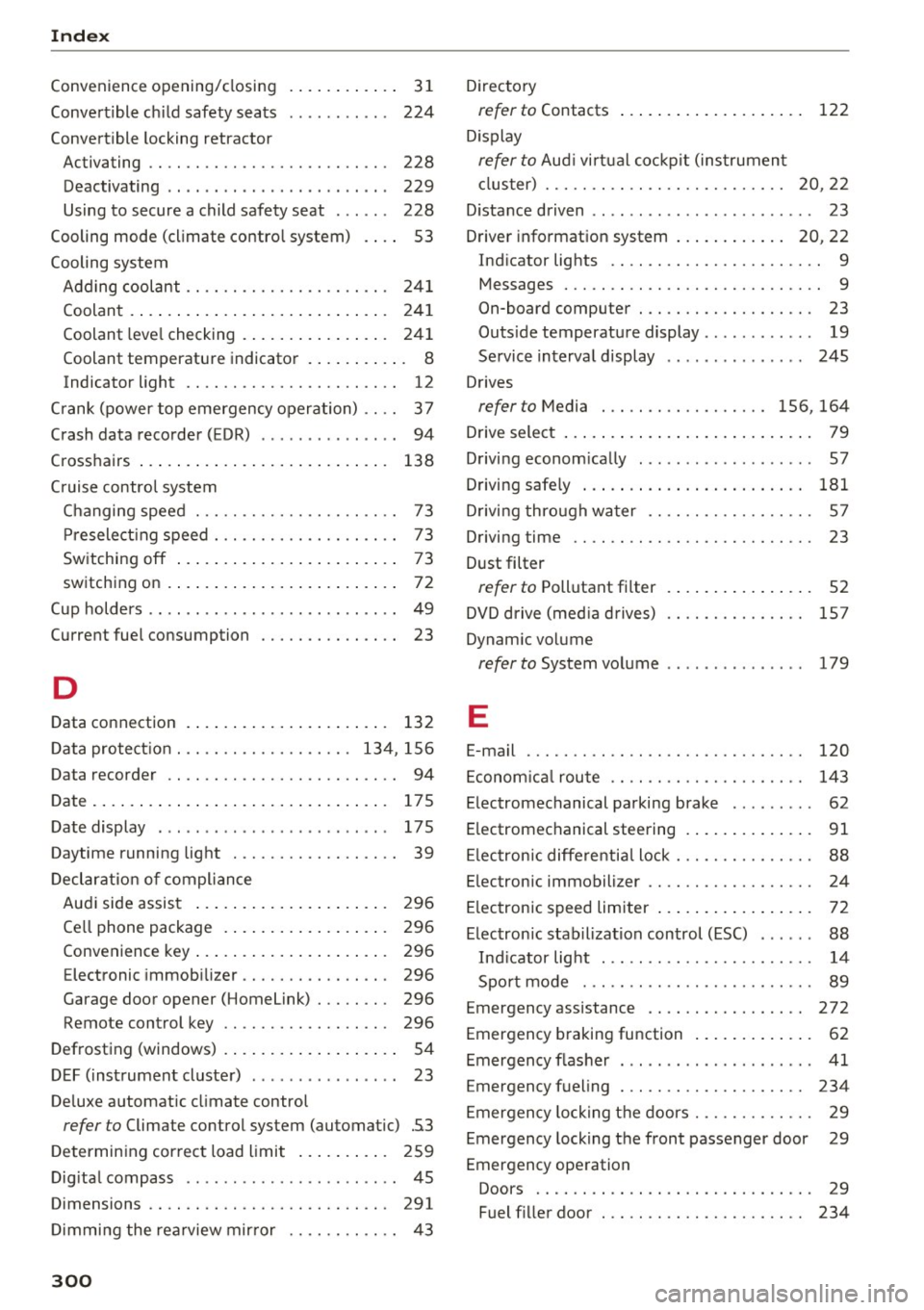
Index
Convenience opening/closing
Convert ible ch ild safety seats
Convertible locking ret ractor .
. . . . . . . . . . . 31
224
Activating . . . . . . . . . . . . . . . . . . . . . . . . . . 228
Deactivating . . . . . . . . . . . . . . . . . . . . . . . . 229
Using to secure a child safety seat . . . . . . 228
Cooling mode (climate contro l system) . . . . 53
Cooling system Add ing coolant . . . . . . . . . . . . . . . . . . . . . . 24 1
Coolant . . . . . . . . . . . . . . . . . . . . . . . . . . . . 241
Coolant leve l checking . . . . . . . . . . . . . . . . 241
Coolant temperature indicato r . . . . . . . . . . . 8
Indicator light . . . . . . . . . . . . . . . . . . . . . . . 12
C rank (power top emergency operation) . . . . 3 7
Crash data recorder (EDR) . . . . . . . . . . . . . . . 94
Cross hairs . . . . . . . . . . . . . . . . . . . . . . . . . . . 138
C ru ise control system
Changing spee d . . . . . . . . . . . . . . . . . . . . . . 73
Pr esele ct ing speed . . . . . . . . . . . . . . . . . . . . 73
Sw itching off . . . . . . . . . . . . . . . . . . . . . . . . 73
sw itch ing on .... ... .. ..... ... .. .. ... .
72
Cup holders . . . . . . . . . . . . . . . . . . . . . . . . . . . 49
Current fuel consumption 23
D
Data connection . . . . . . . . . . . . . . . . . . . . . . 132
D ata protec tion . . . . . . . . . . . . . . . . . . . 13 4, 156
Data recorder . . . . . . . . . . . . . . . . . . . . . . . . . 94
Date. ... .. .. .... ... . ...... ... .. .. ... 175
Date display . . . . . . . . . . . . . . . . . . . . . . . . . 175
Daytime running light . . . . . . . . . . . . . . . . . . 39
Decl arat ion o f compliance
Au di side assist . . . . . . . . . . . . . . . . . . . . . 296
Ce ll phone package . . . . . . . . . . . . . . . . . . 296
Convenience key . . . . . . . . . . . . . . . . . . . . . 296
Electronic immob ilizer . . . . . . . . . . . . . . . . 296
Garage door opener (Home link) . . . . . . . . 296
Remote control key . . . . . . . . . . . . . . . . . . 296
D efrost ing (windows) . . . . . . . . . . . . . . . . . . . 54
D EF ( inst rument cluste r) . . . . . . . . . . . . . . . . 23
Deluxe automatic cl imate control
refer to Climate control system (automatic) .5.3
Determin ing cor rec t load limi t . . . . . . . . . . 259
D ig ita l compass . . . . . . . . . . . . . . . . . . . . . . . 45
Dimensions . . . . . . . . . . . . . . . . . . . . . . . . . . 291
Dimmi ng the rea rview mirror . . . . . . . . . . . . 43
300
D irec to ry
refer to Contacts
D isplay
refer to Aud i virt ual coc kp it (ins trumen t
122
cluster) . . . . . . . . . . . . . . . . . . . . . . . . . . 20, 22
D istance driven . . . . . . . . . . . . . . . . . . . . . . . . 23
Driver informat io n system . . . . . . . . . . . . 20 , 22
Ind icator lights . . . . . . . . . . . . . . . . . . . . . . . 9
Messages . . . . . . . . . . . . . . . . . . . . . . . . . . . . 9
On-board computer . . . . . . . . . . . . . . . . . . . 23
Outs ide temperature display . . . . . . . . . . . . 19
Se rvice interva l display . . . . . . . . . . . . . . . 245
Drives
refer to Media . . . . . . . . . . . . . . . . . . 156, 164
Drive select . . . . . . . . . . . . . . . . . . . . . . . . . . . 79
Drivi ng econom ically . . . . . . . . . . . . . . . . . . . 57
D riving safe ly . . . . . . . . . . . . . . . . . . . . . . . . 181
D rivi ng thro ugh water . . . . . . . . . . . . . . . . . . 57
Driving time . . . . . . . . . . . . . . . . . . . . . . . . . . 23
D ust filter
refer to Pollutant fi lter . . . . . . . . . . . . . . . . 52
DVD d rive (med ia d rives) 157
Dynam ic volume
refer to System volume . . . . . . . . . . . . . . . 179
E
E-mail
120
Econom ica l rou te . . . . . . . . . . . . . . . . . . . . . 143
E lectromechanical parking brake . . . . . . . . . 62
E lectromechanical steering . . . . . . . . . . . . . . 91
El ec tron ic diffe re ntia l lock . . . . . . . . . . . . . . . 88
E lectronic immobilizer . . . . . . . . . . . . . . . . . . 24
E lec tronic spee d limiter . . . . . . . . . . . . . . . . . 72
E lec tron ic stabilization control (ESC) . . . . . . 88
Ind icator lig ht . . . . . . . . . . . . . . . . . . . . . . . 14
Spo rt mode . . . . . . . . . . . . . . . . . . . . . . . . . 89
Emergency ass istance . . . . . . . . . . . . . . . . . 272
Emergency braking function . . . . . . . . . . . . . 62
Emergency f las her . . . . . . . . . . . . . . . . . . . . . 41
Emergency f ueling . . . . . . . . . . . . . . . . . . . . 234
Emergen cy lo ck ing t he doors . . . . . . . . . . . . . 29
Emergency locking the front passenger door 29
Emergency ope ration
Doors . . . . . . . . . . . . . . . . . . . . . . . . . . . . . . 29
Fuel f iller door . . . . . . . . . . . . . . . . . . . . . . 234