lights AUDI TT ROADSTER 2017 Owner's Guide
[x] Cancel search | Manufacturer: AUDI, Model Year: 2017, Model line: TT ROADSTER, Model: AUDI TT ROADSTER 2017Pages: 314, PDF Size: 76.54 MB
Page 105 of 314
co
co
.... N
" N .... 0
" "' c:o
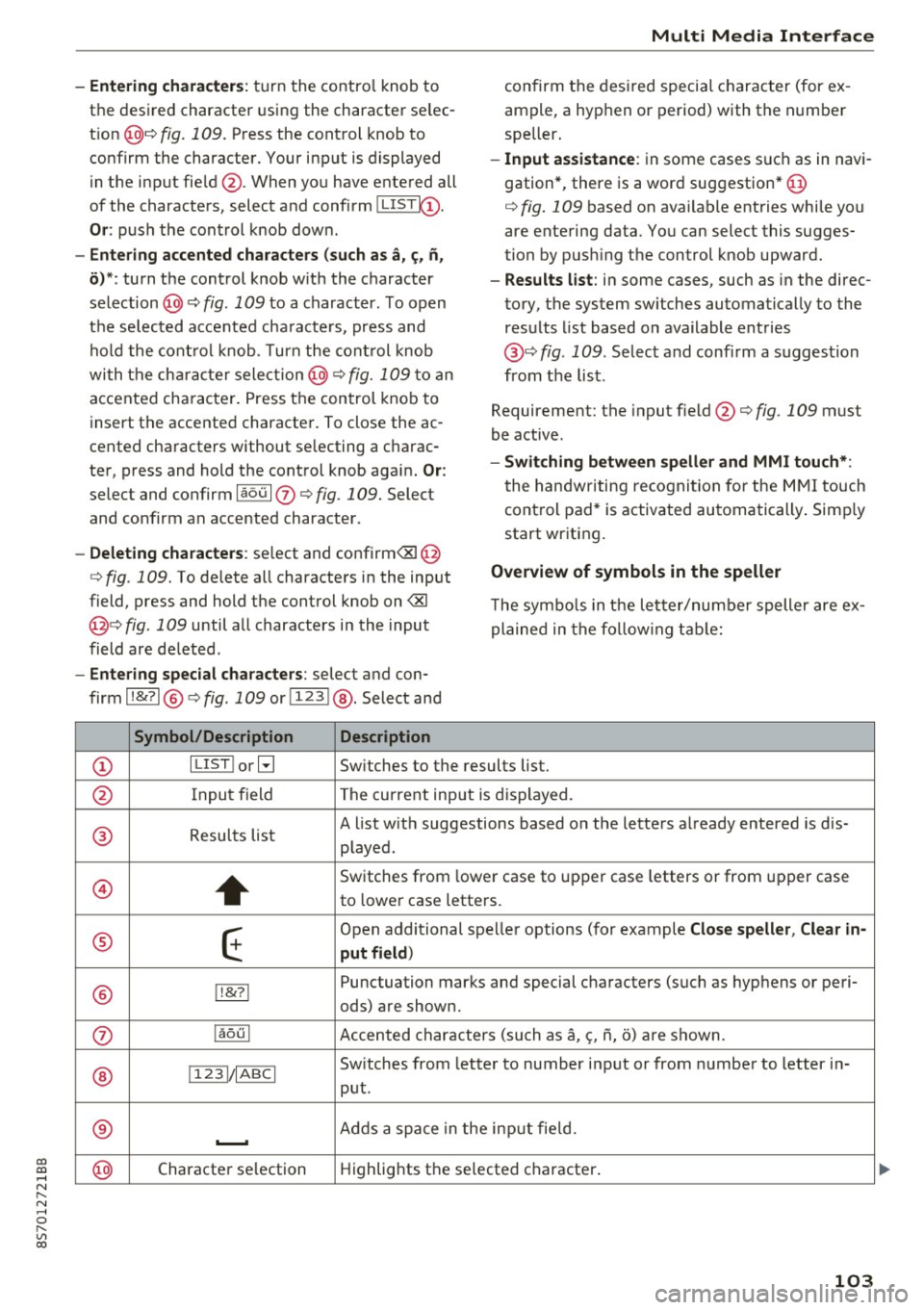
-Entering characters: turn the contro l knob to
the desired character using the character se lec
t ion @¢ fig.
109. Press the control knob to
confirm the character. Your input is displayed
in the input fie ld @ . When you have entered all
of the characters, select and confirm~
Or: push the control knob dow n.
-Entering accented characters (such as a, ~. n,
o) *: turn the control knob w it h the character
selection @¢ fig .
109 to a character. To open
the se lected accen ted cha racters, press and
hold the control knob. T urn the control knob
wi th the charact er selection @¢ fig.
109 to an
accented cha racter. Press the control knob to
insert the accented character. To close the ac
cented characters without se lecting a charac
ter, press and hold the control knob again.
Or:
select and confirm laou 10 ¢ fig . 109. Select
and confirm an accented character .
-Deleting characters: select and confirm<&! @
¢ fig .
109. To delete all characters in the input
field, press and hold the control knob on
<&I
@¢ fig . 109 until a ll characters in the input
field are de leted .
-Entering special characters : select and con
firm l!&?l @¢fig .
109 orll23 I@ . Select and
Symbol/Description Description
Multi Media Interface
confirm the desired special character (for ex
ample, a hyphen or period) with the number
speller .
-Input assistance : in some cases s uch as in navi
gation*, there is a word suggestion* @
¢ fig.
109 based on available entries while you
are entering data. You can select this sugges
tion by pus hing the control knob upward.
- Results list : in some cases, such as in the direc
tory, the system sw itches automatically to the
results list based on available entries
@ ¢
fig. 109. Select and confirm a suggestion
from the list.
Requirement: the input field@¢
fig. 109 must
be active .
-Switching between speller and MMI touch*:
the handwriting recogn itio n for the MMI touch
control pad* is activated automatically . Simply
start wr iting.
Overview of symbols in the speller
T he symbo ls in the letter/numbe r speller are ex
plained in the following table:
CD ILIST lorB
Switches to the results list.
@ Input field The current input is displayed.
® Results list A list w
ith suggestions based on the letters already entered is dis-
played .
@
+
Switches from lower case to upper case letters or from upper case
to lower case letters.
® E
Open additional spe ller options (for example Close speller , Clear in -
put field )
® 1!&71 Punctuation
marks and special characters (such as hyphens or peri-
ods) are shown.
0 l
aou l Accented characters (such as
a, <;, ii, o) are shown .
Sw itches from letter to number input or from number to letter in-
® 11 231/ IABCI
put.
® ...__. Adds
a space in the inp ut fie ld .
@ Character
selection Highlights
the selected character .
103
Page 131 of 314
CD
CD
.... N
" N .... 0 r--. V, co
Audi connect services
Basic functions
Applies to: vehicles with Audi connect
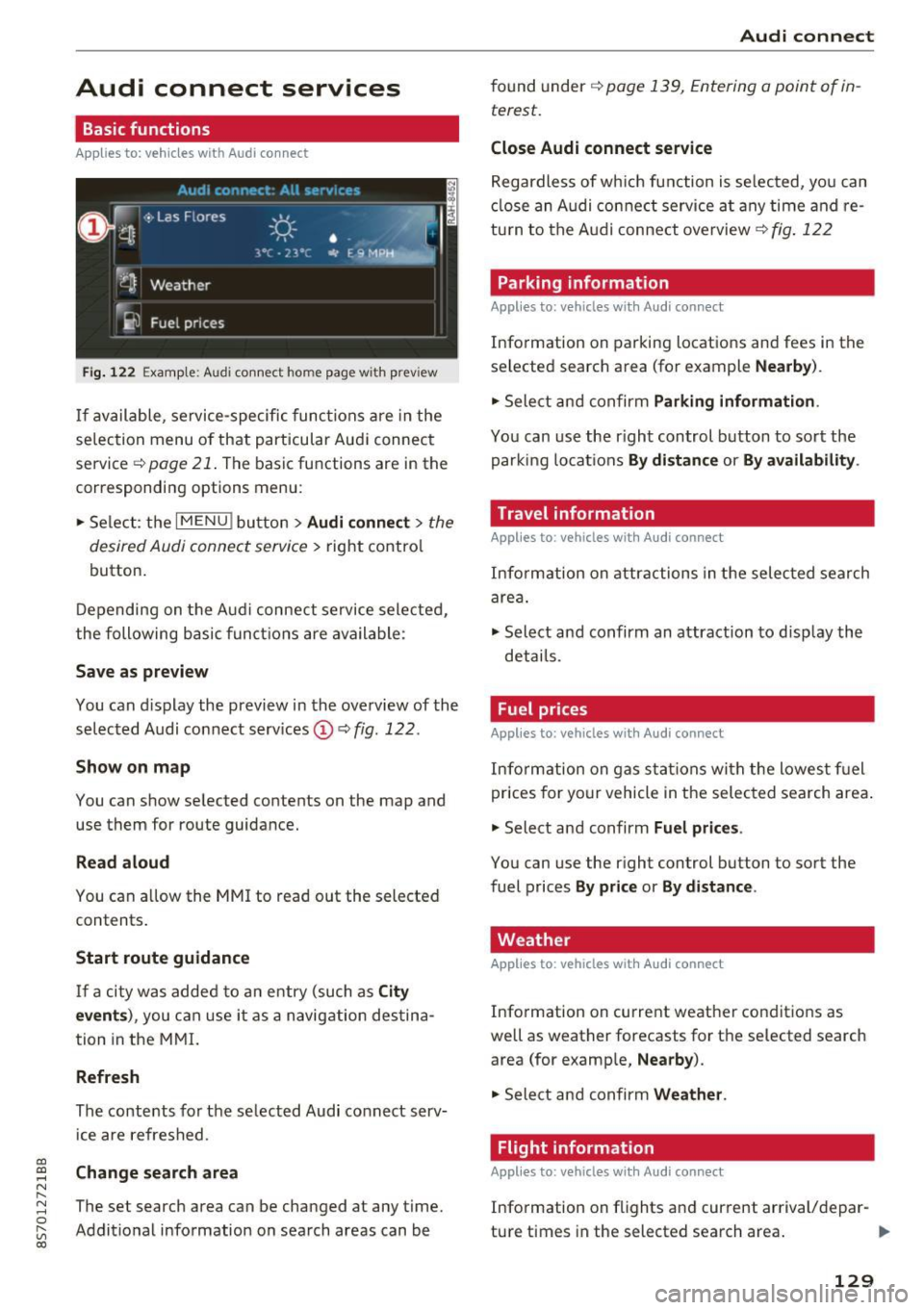
Fig. 12 2 Example: A udi co nn ect home page w ith prev iew
If available, service-specific func tions are in the
se lec tion menu o f th at particular Aud i connec t
service ~
page 21. The basic functions are in the
correspondi ng options menu:
.,. Se lect: the
I MENU ! button> Audi connect > the
desired Audi connec t service>
right contro l
button.
D epending on the A ud i connect se rvice sele cte d,
the following basic fun ctions are ava ilable:
Save as preview
You can d isplay the preview in the overview of the
se lected A udi connect services ©~
fig. 122 .
Show on map
You can show se lected contents on the map and
use them for route guidance.
Read aloud
You can a llow the MM I to read out the selected
contents .
Start route guidance
If a city was added to a n entry (such as City
event s),
you can use i t as a navig ation destina
tion in the M MI.
Refresh
The conte nts for the se lected Audi co nnect serv
i ce are refreshed .
Change search area
The set search area can be changed at any time.
Addit io nal information on search areas can be
Audi connect
found under ~ page 139, Entering a point of in
terest .
Close Audi connect service
Regardless of wh ich func tion is se lec ted, yo u can
cl ose an A udi con nect service a t any time and re
tu rn to the A udi conne ct overview
~ fig . 122
Parking information
Applies to: vehicles with Audi connect
Info rmation on parking locations and fees in the
se lected search area (for example
Nearby ).
.,. Sele ct and confirm Parking information .
You can use the right control button to sort the
parki ng locat ions
By distance or By availability .
Travel information
Applies to: vehicles with Audi connect
Info rm ation on attr actions in the selec ted search
are a.
.,. Select and confirm an attraction to disp lay the
details .
Fuel prices
Applies to: vehicles with Audi connect
Inform ation on gas s ta tions wi th the lowes t fu el
prices for yo ur vehicle in the selec ted sea rch area .
.,. Select and confirm
Fuel price s.
You can use the right control button to sort the
fuel prices
By pr ice or By d istance .
Weather
Applies to: vehicles with Audi connect
Info rmation on current weather conditions as
well as weather forecasts for the selected search area (for examp le,
Nearby ).
.,. Sele ct and confirm Weather .
Flight information
Applies to: vehicles with Audi connect
Info rmation on f lights and cur rent arrival/depar-
ture times in the selected search area . ..,.
129
Page 138 of 314
Navigation
Navigation
Opening navigation
A pplies to: ve hicles w ith navigation system
The navigation system directs you to your destination, around traffic incidents and on alternative
routes, if desired.
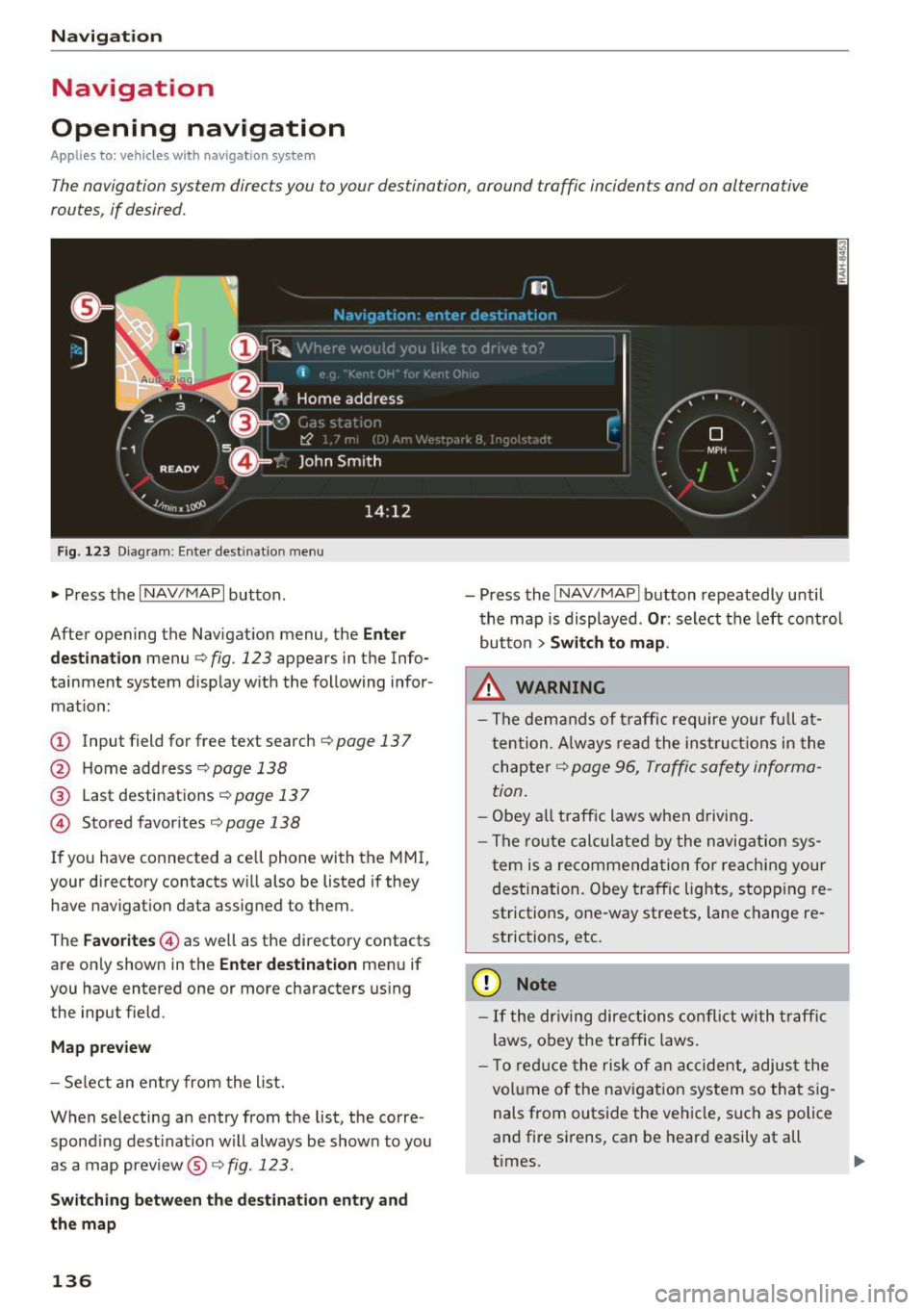
Fig. 123 Diagram: Enter destination menu
~ Press the I NAV/MAPI button.
After opening the Navigation menu, the
Enter
destination
menu Q fig. 123 appears in the Info
tainment system display with the following infor mat ion:
(!) Input field for free text search q page 13 7
@ Home address 9poge 138
@ Last destinations qpoge 137
© Stored favorites q page 138
If you have connected a cell phone with the MMI,
your directory contacts will also be listed if they
have navigation data assigned to them .
The
Favorites © as well as the directory contacts
are only shown in the
Enter destination menu if
you have entered one or more characters using the input field.
Map preview
-Select an entry from the list.
When selecting an entry from the list, the corre
spond ing dest ination will always be show n to you
as a map preview®~
fig. 123.
Switching between the destination entry and
the map
136
- Press the I NAV/MAPI button repeatedly until
the map is displayed .
Or: select the left control
button
> Switch to map.
.&_ WARNING
-The demands of traffic require your full at
tention. Always read the instructions in the
chapter
9 page 96, Traffic safety informa
tion.
- Obey all traffic laws when driving.
- The route calculated by the navigation sys-
tem is a recommendation for reaching your
destination. Obey traffic lights, stopp ing re
strictions, one-way streets, lane change re
strictions, etc.
(D Note
- If the dr iving directions conflict with traffic
laws, obey the traffic laws.
- T o reduce the risk of an accident, adjust the
volume of the navigation system so that sig
nals from outside the vehicle, such as police
and fire sirens, can be heard easily at all
times.
-
Page 148 of 314
Navig ation
on highways , possib le parking lots and rest areas
are shown, which you can select as a stopover .
POis along the route
Requirement: route gu idance must be active.
Searching fo r points of interest along your cur
rent route See
<=> page 139 .
Additional options on the map
Applies to: vehicles with navigation system
~ Press the I NAV/MAPI button repeated ly until
the map is d isp layed
¢ page 144, fig. 130.
~ Press t he right contro l bu tton.
Depending on the funct ion selected , the follow
i n g options ca n also be se lected under the
Map
menu :
Cancel rout e guidance : see¢ page 141 .
Map settings : see <=> page 146.
Route c rite ria : see ¢ page 143 .
Voice guidance : see <=> page 143.
Nav igat ion sett ing s: see ¢ page 142 .
Online traffic data *: se e <=> page 148 .
Show altern ative route s: see<=> page 143.
Parking along the route : parking options near
the vehicle are disp layed.
Save current position : you can save your current
ve hicle position as a favorite <=>
page 142 or save
it as a contact in the di rectory <=>
page 142.
Aud i connect at this locat ion *: allows you to
search for
City events or Weather at the entered
locat ion .
Country inform ation : you can d isp lay the appli
cable urban and rural speed lim its for any coun
try/state. T his information w ill be automatically
shown to you in the route information @
<=> page 144, fig. 130 when the speed lim it is ex
ceeded , if this function is act ivated
¢ page 147.
Avoid route *: when route guidance is act ive, the
calc ulated route w ill avoid the area you have
specified (max imum: 12 mi (20 km)), if possible .
The navigation system ca lcula tes an a lter nat ive
146
route . The route to be avo ided that you have en
tered applies only to the current route and must be set again, if needed. The areas you have se
l ected to avoid w ill appear with red and white
shading on the map .
' Map settings
Applies to: vehicles with navigation system
~ Press the I NAV /MAPI button repeatedly until
the map is displayed
<=> page 144, fig . 130 .
~ Select: r ight cont rol b utton> Map settings .
Depending on the selected function, the follow
i ng settings can be selected :
Map colors
Day /Night :
the map is displayed w ith a light/
dark background.
Automatic : when the lights switch on, the map
colors switch from day to n ight .
Map display
Standard
<=> page 14 4, fig . 129.
Google E arth * <=>page 147 , fig. 131.
Traffic <=> page 148.
Map orientation
Destinati on:
the map indic ates the des tin ation
and is or ien ted to t he nor th .
2 D heading up map /2D north up map : the cur
r ent vehicle pos ition is d isplayed. The map is ori
ented in the d irect ion of t rave l o r to t he no rth.
3D map : when this function is sw itched on, the
cu rrent veh icle pos it io n is shown on a three-di
mensiona l map and oriented in t he d irect ion of
travel. At a sc ale of 62 mi ( 100 k m) and l arger ,
the map o rientation is to the north.
Overview : the entire route from the v ehicle pos i
t ion to the des tina tion o r the next stopove r is d is
played on the m ap. The m ap scale depends o n
the length of the ro ute and adapts automatically .
The map is oriented to the north . ..,.
Page 183 of 314
co
co
.... N
" N .... 0
" "' c:o
Safe driving Basics
Safe driving habits
Please remember -safety first!
This chapter contains important information,
tips, instructions and warnings that you need to
read and observe for your own safety, the safety
of your passengers and others . We have summar
ized here what you need to know about safety
be lts, airbags, child restraints as well as child
safety. Yo ur safety is for us
priority number 1. Al
ways observe the info rmation and warn ings i n
this section - for you r own safety as well as that
of your passengers.
The information in this sect ion app lies to all
model ve rsions of your vehicle. Some of the fea
tures descr ibed in t his sec tions may be standa rd
equipment on some models, or may be optional
equipment on others . If you are not sure, ask
your authorized Audi dealer.
A WARNING
- Always make sure that you follow the in
struct ions and heed the WARNINGS in th is
Manual. It is in your interest and in the in
terest of your passengers .
-
-Always keep the complete Owner's Litera
ture in your Audi when you lend or sell your
vehicle so that this important information
will always be available to the d river and
passenge rs.
- Always keep the Owne r's literature handy so
that you can find it easily if you have ques
t ions.
Safety equipment
The safety features are part of the occupant re
straint system and work together to help reduce
the risk of injury in a wide variety of accident sit
uations.
Your safety and the safety of yo ur passenger
should not be left to c han ce. Advances in tech
nology have made a var iety of features ava ilab le
t o he lp reduce the risk of injury in an accident.
Safe d riv ing
The following is a lis t of just a few of the sa fe ty
features in yo ur Audi :
- sophisti cated safety be lts fo r dr ive r and pas -
senger seat ing pos ition,
- safety belt p re tensioners,
- safety belt force lim ite rs,
- front airbags,
- knee airbags*
- side airbags in the seats,
- specia l LATCH anchorages for child restraints,
- ad justab le steer ing colum n.
These ind iv idual safety features , ca n work to
gether as a system to he lp p rotect you and your
passenger in a w ide range of acc idents. These
f ea tures canno t work as a system if they are not
always correc tly ad justed and cor rect ly used.
Safet y is everybody's r esponsibility!
Important things to do before driving
Safety is everybody 's job! Vehicle and occupant
saf ety always depends on the informed and care
f1,1/ driver .
For your safety and the safety of your passenger,
before driv ing always:
.,. Make sure that all lights and s ignals are operat
ing correctly .
.,. Make sure that the tire pressure is correct .
.,. Ma ke sure that a ll w indows are clean and afford
good v isibility to the outs ide.
.,. Sec ure all luggage and othe r items c arefully
¢ page 185, ¢ page 49.
.,. Make sure that not hing can i nterfere with the
peda ls .
.,. Adj ust seat and mirro rs cor rectly for your
he ight .
.,. Make sure to use the right child restra int cor
rectly to protect children ¢
page 218, Child
safety .
.,. Sit p roper ly in you r seat a nd make sure that
your passenger do the same¢
page 47, Seats
and storage .
.,. Fasten your safety belt and wear i t properly . Al
so instruct your passenge r to fasten his safety
be lt properly
c:!:> page 189.
181
Page 191 of 314
co
co
..... N
" N ..... 0
" "' c:o
Safety belts
General notes
Always wear safety belts!
Wearing safety belts correctly saves lives!
This chapter explains why safety belts are neces
sary, how they work and how to adjust and wear
them correctly. .. Read all the information that follows and heed
all of the instructions and WARNINGS.
A WARNING
Not wearing safety belts or wearing them im
properly increases the risk of serious personal
injury and death .
- Safety belts are the single most effective
means available to reduce the risk of serious
injury and death in automobile accidents.
For your protection and that of your passen
gers, always correctly wear safety belts
when the vehicle is moving.
- Pregnant women, injured, or physically im
paired persons must also use safety belts.
Like all vehicle occupants, they are more
likely to be seriously injured if they do not
wear safety belts. The best way to protect a
fetus is to protect the mother -throughout
the entire pregnancy.
Number of seats
Your Audi TT Roadster has two seating positions. Each seating position has a safety belt .
A WARNING
Not wearing safety belts or wearing them im
properly increases the risk of serious personal
injury and death .
- Never strap more than one person, includ
ing small children, into any belt .
It is espe
cially dangerous to place a safety belt over a
child sit ting on your lap.
- Never let more people ride in the vehicle
than there are safety belts ava ilable.
Safety belts
-Be sure everyone riding in the vehicle is
properly restrained with a separate safety
belt or child restraint.
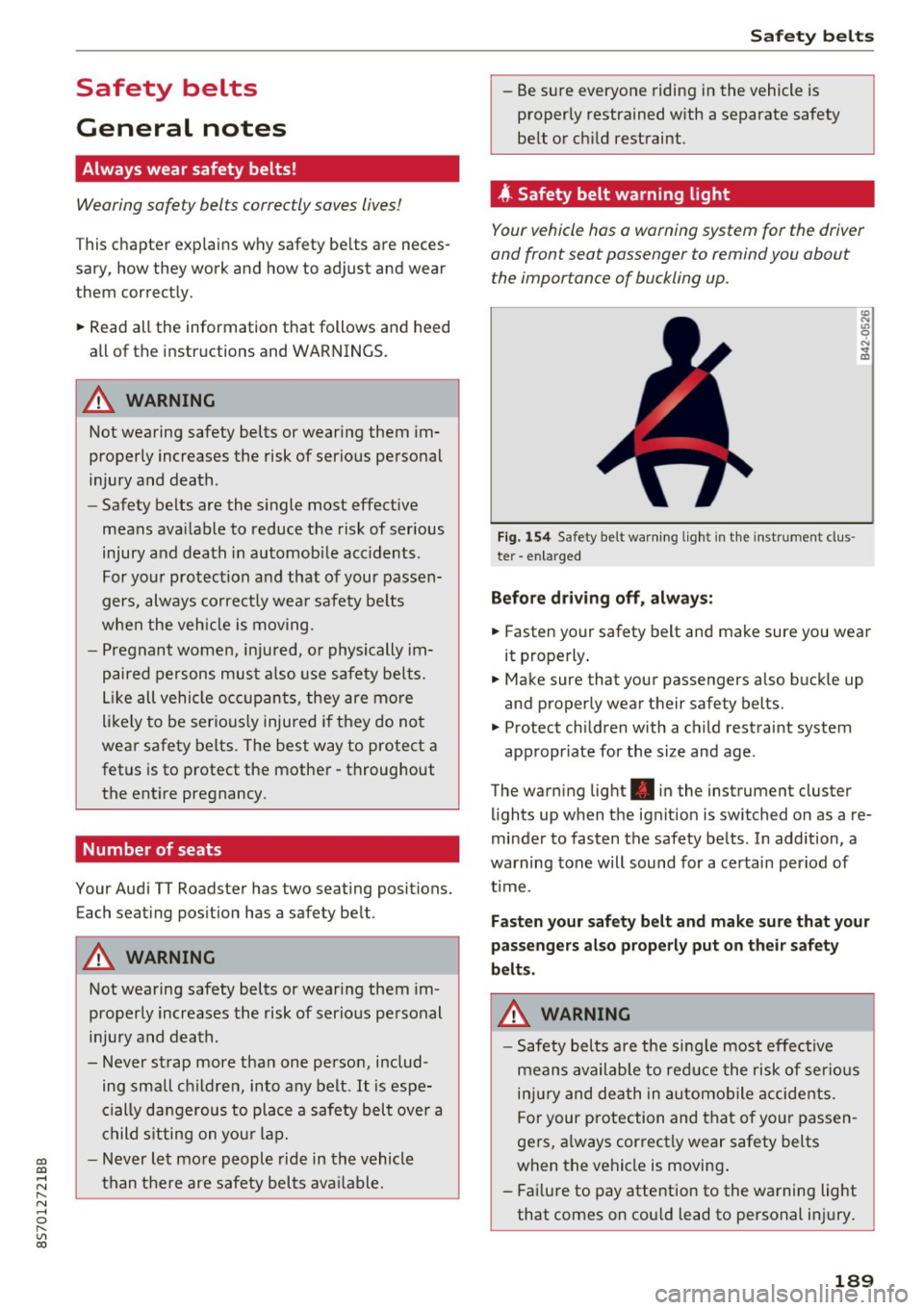
4 Safety belt warning l ight
Your vehicle hos o warning system for the driver
and front seat passenger to remind you about the importance of buckling up.
Fi g. 154 Safety belt warn ing light in the instrument clus
te r -enlarged
Before driving off, always:
.. Fasten your safety belt and make sure you wear
it properly.
.,. Make sure that your passengers also buckle up
and properly wear their safety belts.
.,. Protect children with a child restraint system
appropr iate for the size and age.
The warning light . in the instrument cluster
lights up when the ignit ion is switched on as a re
minder to fasten the safety belts . In addition, a
warning tone will sound for a certain period of
t im e.
Fasten your safety belt and make sure that your
passengers also properly put on their safety
belts.
A WARNING
-
- Safety belts are the sing le most effective
means available to reduce the risk of serious
injury and death in automobile accidents.
F or your protection and that of your passen
gers, a lways correctly wear safety belts
when the vehicle is moving .
- Failure to pay attention to the warning light
that comes on could lead to personal injury.
189
Page 240 of 314
Check ing and F illing
Using the proper engine oil is impo rtant for the
functionality and service life of the engine. Your engine was facto ry-filled with a h igh-quality oi l
which can usually be used throughout the entire
year.
@) Note
Your Limited New Vehicle War ranty does not
cover damage or malfunctions due to failure
to follow recommended maintenance and use
requirements as set forth in the Audi Owner's
Manual and Warran ty
& Maintenance booklet.
- Use only a high quality eng ine oil t hat ex-
p ressly complies with the Audi oil qua lity
standard specified for your vehicle's engine .
Using a ny o ther oil can cause serious engine
d am age.
- D o not mix any lubricants o r other addit ives
i nto the engine oil. Doing so ca n cause en
g ine damage.
(D Tips
I f you need to add oil and there is none availa
ble t hat meets the Audi o il quality standard
your eng ine requi res , you m ay ad d a tot al of
no more than 0.5 q t (0,5
l) of a h igh-quali ty
"synthe tic"oil that meets t he following speci
fications.
- AC EA A3 o r API SM wi th a viscosity grade o f
SAE 0W-30, SAE 5W-30 or SAE 5W-40.
- F or more inform ation about engine o il that
has been approve d for your ve hicl e, please
contact eithe r you r a uthorized Audi dea le r
or A udi C ustome r Relat ions at
1 (800) 822-2834 or visit o ur web site at
www.audiusa.com or www.audicanada.ca .
Engine oil consumption
T he engine in your vehicle depends on an ade
quate amoun t of oil to lubricate and cool all of
i ts moving par ts.
In order to p rovide effective lubr ication and cool
ing of internal engine components, all interna l
combustion engines consume a cer tain amount
of oil. Oi l co nsumption varies from engine to en
g ine and may change significant ly over the life of
the eng ine . Typically, eng ines with a specified
238
b reak -in period (see q page 57) cons ume more
oi l during the break-in period than they consume
after o il consumption has stab ilized.
U nder normal cond itions, the ra te of oil con
s u mption depends on the q ua lity and viscos ity o f
the oil , the RPM (revo lutions per minute) at
which the engine is operated, the amb ient tem
perature and road condit ions. Further facto rs a re
the amount of o il di lution from wate r condensa
tion or fue l resid ue a nd the oxidation level of the
o il. As any engine is subject to wear as mileage
builds up, the o il consumption may increase ove r
ti me until replacement o f wo rn components may
become ne cessary.
With a ll these va riables coming into p lay, no
standard rate of o il consumption can be estab
li sh ed or spec ified . T he re is no alte rnative to reg
u lar and freq uen t che cki ng of the oil level , see
Note .
If the yellow engine oil level warning symbo l l!I
in the instrument clus ter lights up , you sho uld
c h eck t he o il level as soon as poss ible
q page 239 . Top off the o il at your earlies t con
venience
q page 239.
_& WARNING
Before you check a nyt hing in the en gine com
partment, always read and heed all WARN
INGS
9 page 235.
@ Note
D riving w ith an insufficient oil level is like ly to
cause severe damage to the eng ine.
(D Tips
- The oil pressure warning display. is not
an indicator of the oil level. Do not rely on
it . Instead, check the oil level in your en
gine at regular intervals , preferably each
time you refuel, and always befo re going
on a long trip .
- If you have the impress io n your engine con
sumes excessive amounts of oil, we recom
mend that yo u consult an authorized A udi
dea le r to have t he cause of your concern
properly diagnosed. Keep in mind that the .,.
Page 266 of 314
Wheels
installation of replacement or alternate tires or
wheels on the vehicle that prevent the TPMS
from functioning properly. Always check the
TPMS malfunction telltale after replacing one or
more tires or wheels on your vehicle to ensure
that the replacement or alternate tires and
wheels allow the TPMS to continue to function
proper ly .
If the Tire Pressure Monitoring System
indicator appears
The tire pressure indicator in the instrument
cluster informs you if the tire pressure is too low
or if there is a system malfunction.
Using the ABS sensors, the tire pressure monitor
ing system compares the tire tread circumfer
ence and vibration characteristics of the individu
al tires. If the pressure changes in one or more
tires, this is indicated in the Infotainment system
disp lay with an indicator light
RR and a message.
If only one tire is affected , the location of that
tire will be indicated.
The tire pressures must be stored in the Infotain
ment system again each time the pressures
change (switching between partial and full load pressure) or after changing or replacing a tire on
your vehicle ¢
page 265 . The tire pressure moni
toring system only monitors the tire pressure you
have stored. Refer to the tire pressure label for
the recommended tire pressure for your vehicle
¢ page 256, fig.191.
Tire tread circumference and vibration character
istics can change and cause a tire pressure warn
ing if:
- the tire pressure in one or more tires is too low.
- the tire has structural damage .
- the tire was replaced or the tire pressure was
changed and it was not stored¢
page 265.
-the spare tire* is installed.
Indicator lights
RR -Loss of pressure in at least one tire ¢ ,& .
Check the tires and replace o r repair if necessary.
Check/correct the p ressures of a ll four tires and
store the pressure again in the Infotainment sys
tem ¢
page 265.
264
mm (T ire Pressure Monitoring System) Tire
pressure: malfunction! See owner's manual -
If
mm appears after switching on the ignit ion or
while driving and then the indicator light
RR in
the instrument cluster also starts to blink for
about one minute and then stays on permanent ly, there is a system malfunction. Try to store the
correct tire pressures¢
page 265. If the indica
tor light does turn off or turns on again after a
short period of time , drive to an authorized A udi
dealer or authorized Audi Service Facility immedi
ate ly to have the ma lfunction corrected.
_& WARNING
-If the tire pressure indicator appears in the
disp lay, reduce your speed immediately and
avoid any hard steering or brak ing maneu
vers. Stop as soon as poss ible and check the
tires and their pressure .
- The driver is responsible for maintain ing the
correct tire pressures . You must check the
tire pressures regularly .
- Under certain cond it ions (such as a sporty
driving style, w inter condit ions or unpaved
roads), the pressure monitor indicator may
be delayed.
- Do not use run-flat tires on your vehicle . Us
ing them when not perm itted can lead to
vehicle damage or accidents.
(D Tips
- The tire pressure monitoring system can al
so stop working when there is an ESC mal
function.
- Us ing snow chains may result in a system
ma lfunction.
- The tires w ith the identification "AO"
¢
page 253 have been matched w ith your
Audi t ire pressure monitoring system. We
recommend that you use these tires.
Page 269 of 314
co
co
.... N
" N .... 0
" "' c:o
wash operator to reduce the risk of accidents.
- To reduce the risk of cuts, protect yourself
from sharp metal components when wash
ing the underbody or the inside of the wheel
housings .
- After washing the vehicle, the brak ing effect
may be delayed due to mo isture on the
brake rotors or ice in the w inter . This in
creases the risk of an acc ident. The brakes
must be d ried fi rst w ith a few careful b rake
applications.
(D Note
- If you wash t he vehicle in an automatic car
wash, yo u m ust retract the extendable rear
spo iler* if necessary, and fold the exter ior
mir rors in to red uce the risk of damage.
Power folding e xte rior m irrors * mus t onl y
be fo lded in and ou t using the power folding
f u nct ion .
- To reduce the risk of pai nt d amage, do no t
wash the vehicle in di rect sunlig ht.
Ca re and cleaning
- To re duce the risk of damage, do not wash
the power top with a pressure washer .
- T o red uce the risk of damage to the surface,
do not use insect removing sponges, kitche n
sponges o r similar items .
- Matte finish painted veh icle components:
- To reduce the risk of damage to the sur-
face, do not use polishing agents or hard
wax.
- Never use protective wax. It can destroy
the matte finish effect .
- Do not place any stickers or magnetic
signs on vehicle parts painted with matte
finish paint . The paint could be damaged
when the stickers or magnets are re
moved.
@ For the sake of the environment
Only wash t he veh icle in facili ties s pec ially de
s igned for that pu rpose . This will reduce the
r isk of dirty wate r contamina ted with o il from
ente ring the sewe r sys tem.
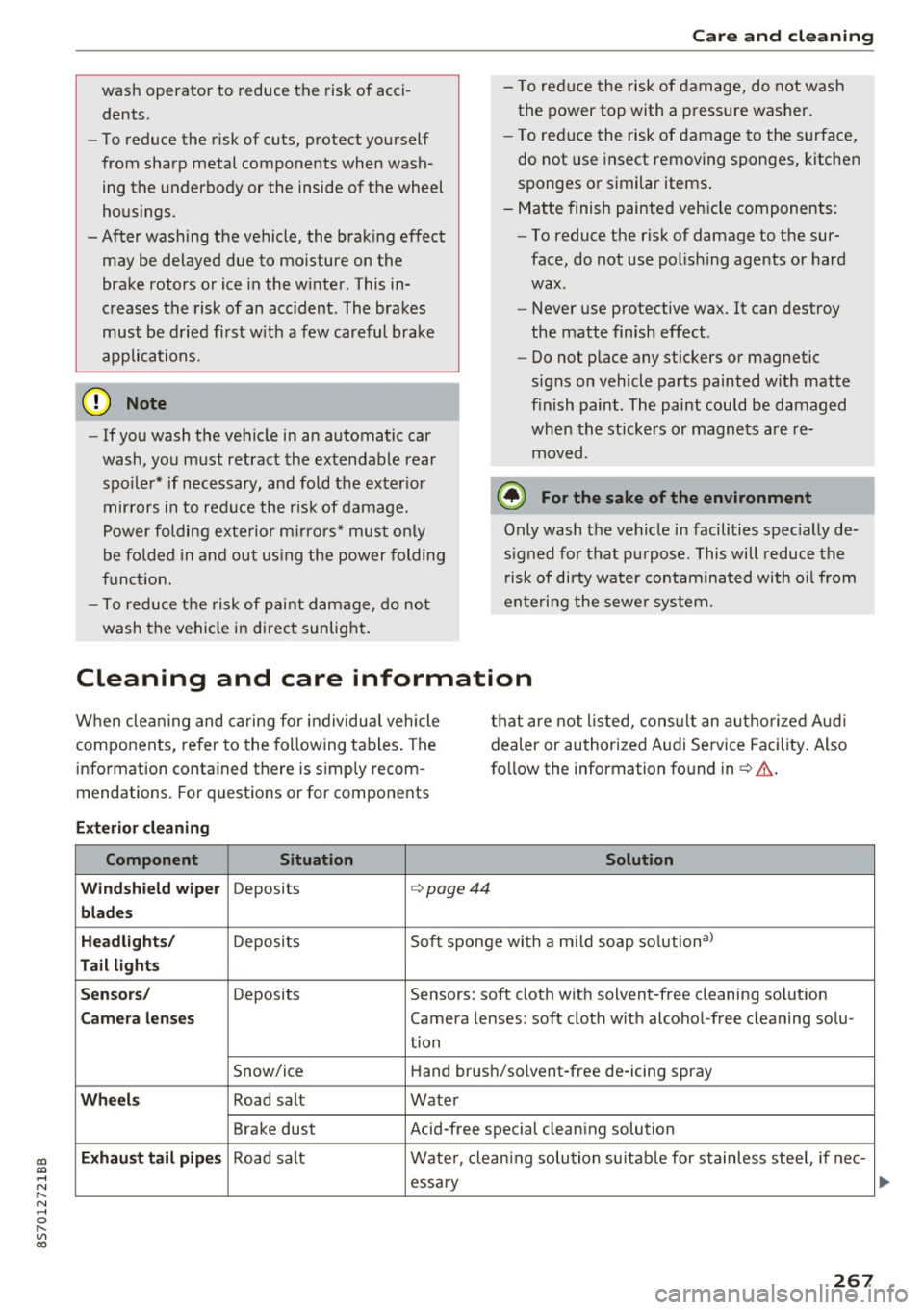
Cleaning and care information
W hen cle aning and ca ring for individua l vehicle
components, refer to the following tables . The
info rmation contained there is simply recom
mendations. Fo r questions or for components t
h at are not l isted, cons ult an autho riz e d Aud i
dealer or au thorized A udi Service Fac ility . Also
fo llow the information found in¢& .
Exterior cleaning
Component Situation Solution
Windshield wiper
Deposits c::- page44
blades
Headlights /
Deposit s So
ft sponge wi th a m il d soap solutiona )
Tail light s
Sensors /
Deposits Sensors: soft cloth with solvent-free cleaning solut ion
Camera lenses Camera lenses: soft cloth w ith alcohol -free cleaning solu -
tion
Snow/ice H
and brus h/solvent-free de-icing spray
Wheels Road salt Water
Brake dust Acid-free special clean ing solution
Exhaust tail pipes Road salt Water, clea ning solution su itab le for stainless stee l, if nee-
essa ry
267
Page 271 of 314
co
co
.... N
" N .... 0
" "' c:o
Care and cleaning
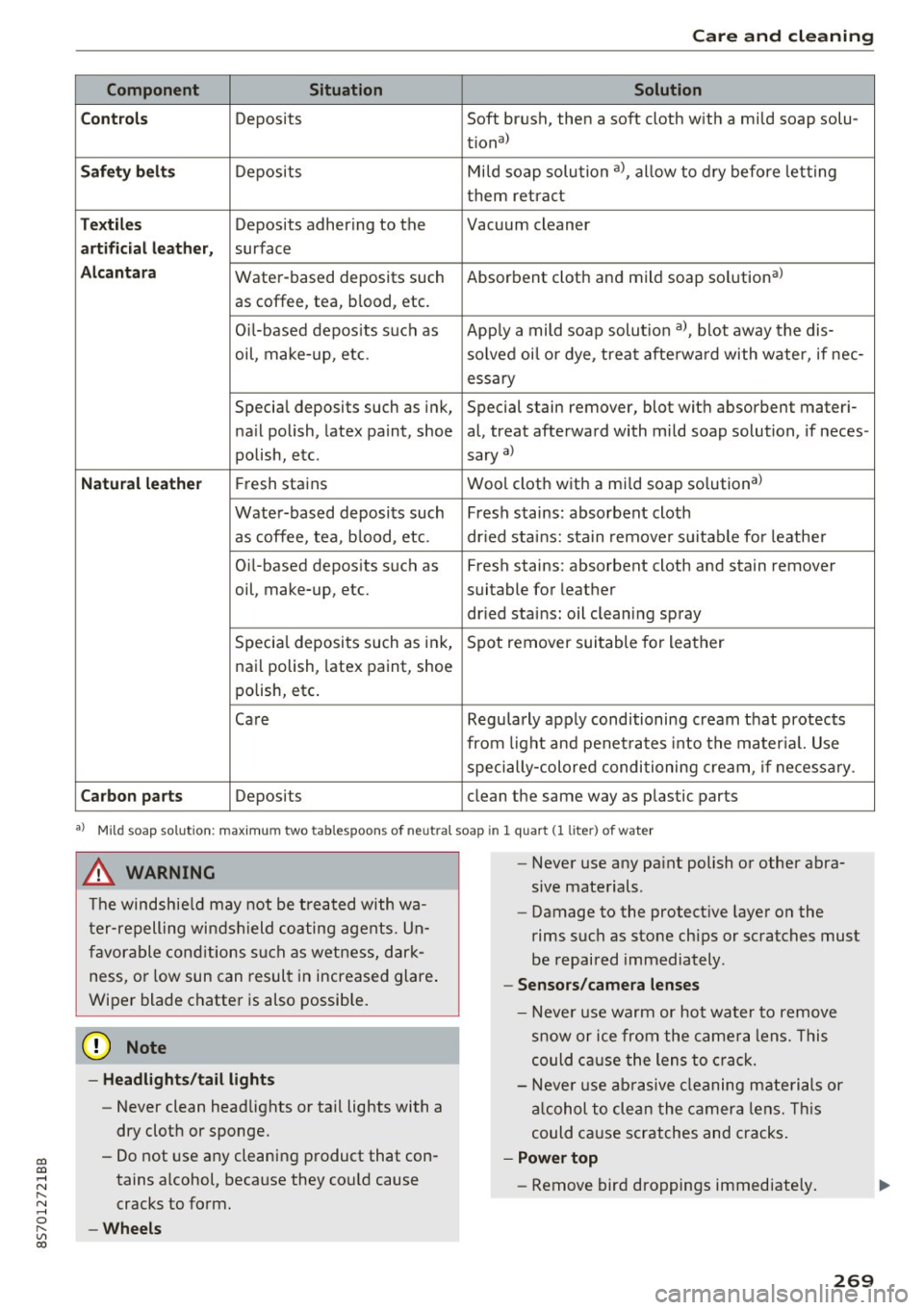
Component Situation Solution
C ont rols
Deposits Soft brush, then a soft cloth with a mild soap solu-
tiona)
Saf ety be lts Deposits Mi
ld soap solution a), allow to dry before letting
them retra ct
T ex til es Deposits adhering to the Vacuum cleaner
artificial l eather, surface
Alcantar a Water-based deposits such Absorbent cloth and mild soap solutiona)
as coffee, tea, blood, etc.
O il-based depos its s uch as App ly a mild soap solut ion a), blot away the dis-
oil, make-up, etc. solved oi l o r dye, treat afterwa rd with water, if nee-
essary
Special deposits such as ink, Special stain remover, blot with absorbent materi-
na il polish, latex paint, shoe al, treat afterward with mild soap solution, if neces-
polish, etc. sary
a)
Natu ral lea the r Fresh stains Wool cloth with a mi
ld soap solutiona >
Water-based deposits such Fresh stains: absorbent cloth
as coffee, tea, b lood, etc. dr ied stains: sta in remove r su itable for leathe r
Oi l-based deposits such as Fresh stains: absorbent cloth and stain remover
oil, make-up, etc. suitable for leather
dr ied stains: oil cleaning spray
Specia l deposits such as ink, Spot remover suitable for leather
nai l polish, latex paint, shoe
polish, etc.
Care Regularly apply conditioning cream that protects
from light and penet ra tes into the mater ial. Use
specially-colored conditioning cream, if necessa ry.
Carbon parts Deposits clean the same way as plastic parts
•> Mild soap solution: maximum two tablespoons of neutral soap in 1 quart (1 liter ) of water
A WARNING
The windshie ld may not be treated with wa
t er-repelling windshield coating agents. Un
favorable cond itions such as wetness, dark
ness, or low sun can result in increased glare .
Wiper blade chatter is also possib le.
{U) Note
- Headligh ts /t ail li ghts
- Never clean headlights or tai l lights with a
dry cloth or sponge.
- Do not use any cleaning product that con
tains alcohol, because they cou ld cause
cracks to form.
-Whe els
-
- Never use any pa int polish or other abra
sive materials.
- Damage to the protect ive layer on the
rims such as stone chips or scratches must
be repaired immediately.
- Sensors /cam era lenses
- Neve r use warm or hot water to remove
s n ow or ice from the came ra lens. This
could ca use the lens to crack.
- Neve r use ab rasive cleaning materials or
a lcohol to clean the camera lens. Th is
could cause scratches and cracks .
-Power top
- Remove bird droppings immediately.
269