phone AUDI TT ROADSTER 2017 Owners Manual
[x] Cancel search | Manufacturer: AUDI, Model Year: 2017, Model line: TT ROADSTER, Model: AUDI TT ROADSTER 2017Pages: 314, PDF Size: 76.54 MB
Page 5 of 314
co
co
.... N
" N .... 0
" "' c:o
Opening the selection/options menu with
the control knob . . . . . . . . . . . . . . . . . . . . 102
Letter/number speller . . . . . . . . . . . . . . . . 102
Free text search . . . . . . . . . . . . . . . . . . . . . 104
Menus and Symbols . . . . . . . . . . . . . . . . . . 105
Voice recognition system . . . . . . . . 108
Operating . . . . . . . . . . . . . . . . . . . . . . . . . . 107
Command overview information . . . . . . . . 108
Commands . . . . . . . . . . . . . . . . . . . . . . . . . 109
Telephone . . . . . . . . . . . . . . . . . . . . . . . . 114
Introduction . . . . . . . . . . . . . . . . . . . . . . . . 114
Setup . . . . . . . . . . . . . . . . . . . . . . . . . . . . . 114
Using the te lephone . . . . . . . . . . . . . . . . . 116
Favorites . . . . . . . . . . . . . . . . . . . . . . . . . . . 119
Messages . . . . . . . . . . . . . . . . . . . . . . . . . . 119
L istening to voicemail . . . . . . . . . . . . . . . . 121
Emergency call functions . . . . . . . . . . . . . 122
Directory . . . . . . . . . . . . . . . . . . . . . . . . . . . 122
Settings . . . . . . . . . . . . . . . . . . . . . . . . . . . 124
Safety belt microphone . . . . . . . . . . . . . . . 125
Troubleshooting . . . . . . . . . . . . . . . . . . . . . 126
Audi connect . . . . . . . . . . . . . . . . . . . . . 127
Introduction . . . . . . . . . . . . . . . . . . . . . . . . 127
Setup . . . . . . . . . . . . . . . . . . . . . . . . . . . . . 127
Configuration through myAudi . . . . . . . . . 128
Audi connect services. . . . . . . . . . . . . . . . . 129
W i-F i hotspot . . . . . . . . . . . . . . . . . . . . . . . 131
Configur ing the data connect ion . .. .. .. .
About Audi connect ............ ..... .
Troubleshooting .................... .
N .
. av1gat1on .. ................ ..... .
132
133
135
136
Opening navigation . . . . . . . . . . . . . . . . . . 136
Entering a destination . . . . . . . . . . . . . . . . 137
Cancel route guidance . . . . . . . . . . . . . . . . 141
Home address . . . . . . . . . . . . . . . . . . . . . . 142
Favorites . . . . . . . . . . . . . . . . . . . . . . . . . . . 142
Directory contacts . . . . . . . . . . . . . . . . . . . 142
Addit ional settings . . . . . . . . . . . . . . . . . . 142
Map ... .. ... ... .. .. .... ... .. .. .. .. . 144
Online map display . . . . . . . . . . . . . . . . . . 147
Accessing traffic information . . . . . . . . . . 148
Troubleshooting . . . . . . . . . . . . . . . . . . . . . 150
Table of contents
Radio ...... .. .. .................. .
151
Opening the radio . . . . . . . . . . . . . . . . . . . 151
Radio funct ions . . . . . . . . . . . . . . . . . . . . . 152
Radio menu . . . . . . . . . . . . . . . . . . . . . . . . 153
Favorites . . . . . . . . . . . . . . . . . . . . . . . . . . . 153
Additional settings . . . . . . . . . . . . . . . . . . 154
Troubleshooting . . . . . . . . . . . . . . . . . . . . . 155
Med ia .... .. .. .. .... .. .. .... ... .. .. 156
Introduction ... .. .. ...... ....... .. .. 156
Notes . . . . . . . . . . . . . . . . . . . . . . . . . . . . . 156
Media drives . . . . . . . . . . . . . . . . . . . . . . . . 157
Bluetooth audio player . . . . . . . . . . . . . . . 159
Wi-Fi audio player . . . . . . . . . . . . . . . . . . . 160
Online media and Internet radio . . . . . . . . 161
Multimedia connections . . . . . . . . . . . . . . 162
Playing media . . . . . . . . . . . . . . . . . . . . . . . 164
Additional settings . . . . . . . . . . . . . . . . . . 167
Supported media and file formats . . . . . . 169
Troubleshooting .. .. ................. 171
Audi smartphone interface . . . . . . 173
Setup . . . . . . . . . . . . . . . . . . . . . . . . . . . . . 173
Operating . . . . . . . . . . . . . . . . . . . . . . . . . . 173
Troubleshooting .. .. ................. 174
System settings .................. 175
Setting the date and time . . . . . . . . . . . . . 175
MM I settings . . . . . . . . . . . . . . . . . . . . . . . 175
Connection manager . . . . . . . . . . . . . . . . . 176
System update . . . . . . . . . . . . . . . . . . . . . . 178
Sound settings . . . . . . . . . . . . . . . . . . . . . . 179
Vo lume settings . . . . . . . . . . . . . . . . . . . . . 179
Restarting the MMI (Reset) . . . . . . . . . . . . 180
Software license information . . . . . . . . . . 180
Safety . . . . . . . . . . . . . . . . . . . . . . . . . . . . 181
Safe driving . . . . . . . . . . . . . . . . . . . . . . 181
Basics . . . . . . . . . . . . . . . . . . . . . . . . . . . . . 181
Correct passenger seating positions . . . . . 182
Driver and passenger side footwell . . . . . . 184
Pedal area . . . . . . . . . . . . . . . . . . . . . . . . . . 184
Stow ing luggage . . . . . . . . . . . . . . . . . . . . 185
Reporting Safety Defects . . . . . . . . . . . . . . 187
Safety belts . . . . . . . . . . . . . . . . . . . . . . 189
General notes . . . . . . . . . . . . . . . . . . . . . . . 189
Why safety belts? . . . . . . . . . . . . . . . . . . . 190
3
Page 9 of 314
co
co
.... N
" N .... 0
" "' c:o
(!) Side assist display ..... ... .. .. .
@ Door handle
®
©
®
Cent ral locking switch
Air vent with seat heating controls
Lever for:
- T urn s ignals and h igh beams .. .
- Active lane assis t ......... .. .
® Multifunction steering wheel with :
- Horn
- Driver's ai rbag .. ......... .. .
- Controls for the virtual instru-
ment cluster includ ing the driver
information system, aud io/video,
telephone, navigation and voice
recogn ition system
- Shift paddles . .... ..... ... . .
0 Aud i v ir tu al co ckpit (instrument
cluster) ... .... .. .... ... .. .. .
@ W indshield washer system lever
® S tarting the engi ne if the re is a
mal func tion .. ........... .. .. .
@ Adjustab le st eering column . ... .
@ Cruise co ntrol lever .. ..... ... . .
@ Ins trument i llum ination ... .. .. .
@ Hood release . .... ......... .. .
0 H eadlight cont rol sw itch .... .. .
@ Power exterior mirror adjustment
@ Power windows . .... ..... ... . .
@ A ir ven t incl uding climate con trol
system controls ... .... ... .. .. .
@ Lockable g love compartment
76
28
40
74
200
68
8
43
6 1
59
72
42
235
39
42
30
52
Coc kpit o ve rv iew
@) Drives for CD, DVD, SI M/SD cards
@ Front passenger's ai rbag ...... .
@ Rear window defogger bu tton
@ Depending on equipment, buttons
for:
- drive select .. .. ............ .
- Electronic Stabilization Control
(ESC) ..... .. .. ............ .
- Emergency flashers . ...... .. .
- Retractab le rear spoiler ...... .
@ Depend ing on equ ipment , center
co nsole with:
- Mu ltimedia compartment for cell
phone .... .. .............. .
~ Infotai nment system on/off
button . .. .. .. .. ............ .
@ Infotainment system unit ... .. .
@ Wind deflector button ........ .
@ Depending o n eq uipment:
- Storage compartment
- Ashtray ... .. ... .. .. ..... .. .
- Cup holder .. ... .. .. ..... .. .
@ Power top button ............ .
@ Parking b rake . .. ............ .
@ I S TAR T ENGINE ST OP I butto n ...
@ Selector lever (S tronic)
@ Tips
1S7
200
79
88
41
92
162
9 6
96
36
48
49
34
62
59
64
Some the equipment listed here is only instal
l ed in certa in models or is available as an op
tion.
7
Page 22 of 314
Driver information system
Multifunction steering
wheel plus
Operating
Apples to: vehicles with multifunctio n steering wheel plus
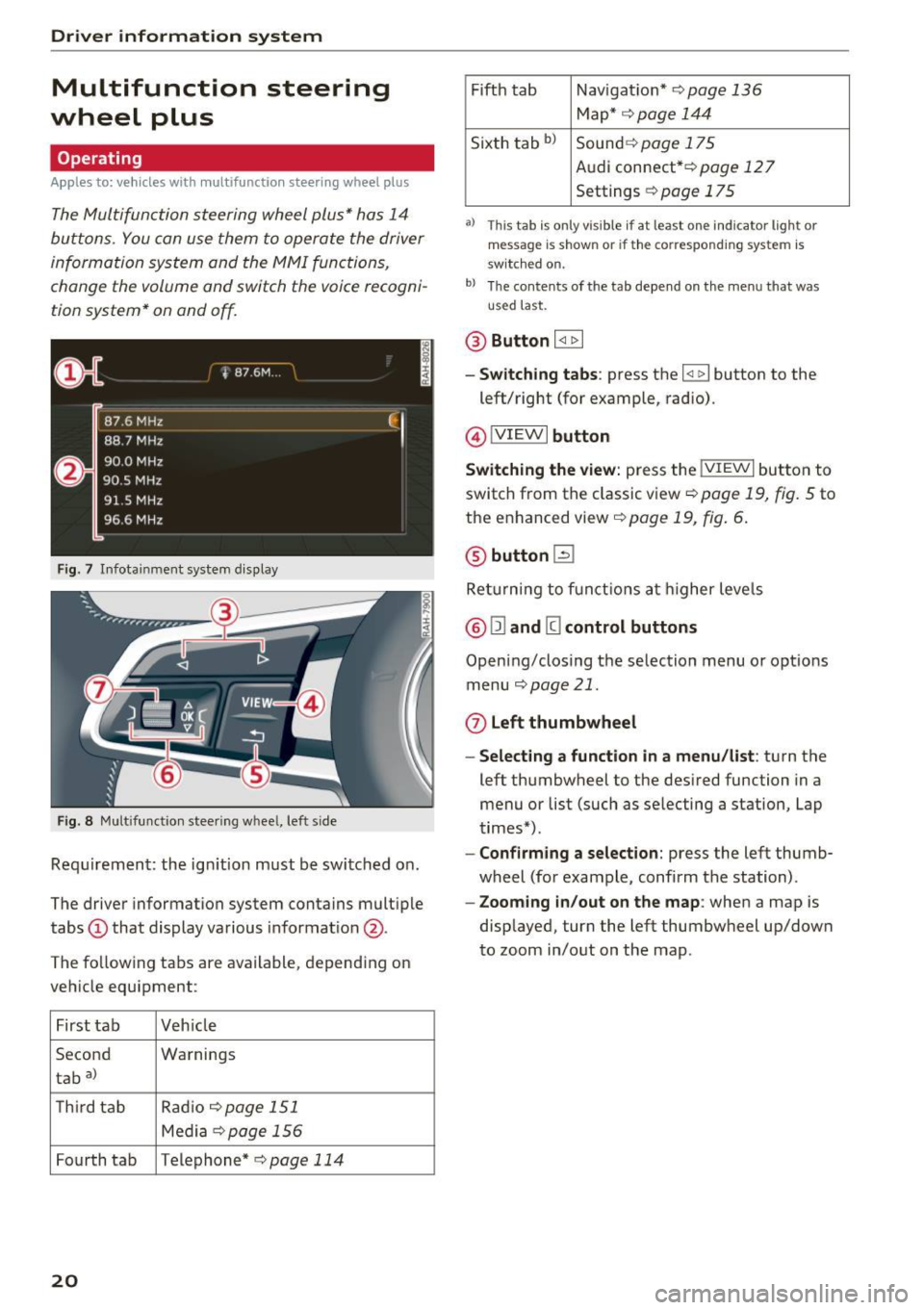
The Multifunction steering wheel plus* hos 14
buttons. You con use them to operate the driver
information system and the MMI functions,
change the volume and switch the voice recogni
tion system* on and off.
F ig. 7 Infotainment system display
Fig. 8 Mult ifunction steering wheel, left side
Requirement: the ign ition must be switched on .
The driver information system contains multiple
tabs
(D that display various informat ion @.
The fo llowing tabs are available, depending on
vehicle equipment :
First tab Veh icle
Second Warnings
tab
a)
T h ird tab Rad
io c:>page 151
Media c:> page 156
Fourth tab Telephone* c:> page 114
20
Fifth tab Navigat ion* c:> page 136
Map * c:> page 144
Sixth tab bl Sound c:> page 175
Audi connect* c:>page 127
Settings c:> page 175
a) This tab is only visible if at least o ne indicator lig ht or
message is shown or if the correspond ing system is
sw itc hed on.
bl Th e contents of the tab depend on the menu that was
u se d last.
® Button I <1 1> I
- Switching tabs: press the I
left/right (for example, radio).
@!VIEWI button
Switching the view: press the !VIEWI button to
switch from the classic view
c:> page 19, fig. 5 to
the enhanced view c:>
page 19, fig. 6.
@ button l2J
Returning to f unctions at higher levels
® l1l and III control buttons
Opening/closing the selection menu o r options
menu
c:>poge 21.
0 Left thumbwheel
-Selecting a function in a menu/list: turn the
left thumbwheel to the desired function in a
menu or list (such as selecting a station, Lap
times*) .
-Confirming a selection: press the left thumb
wheel (for example, confirm the station) .
-Zooming in/out on the map : when a map is
displayed, turn the left thumbwheel up/down
to zoom in/out on the map.
Page 23 of 314
CD
CD
.... N
" N ...... 0 r--. V, co
Control buttons
Applies to: vehicles with multifunction steering wheel plus
Fig . 9 Open ing th e selec tio n and opt ions menu
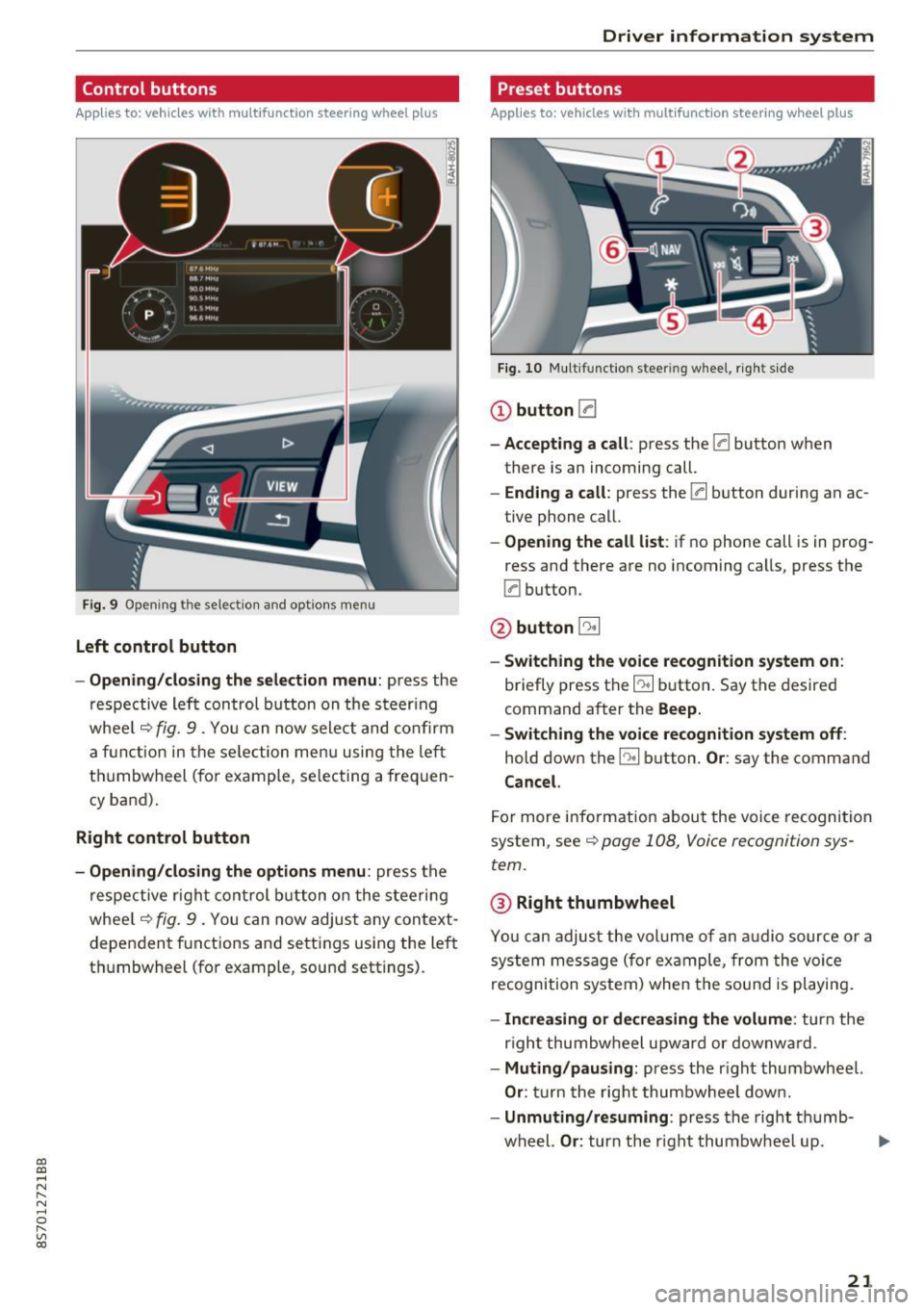
Left control button
- Opening /closing the select ion menu : press the
respective lef t control button on the s teer ing
whee l
c::> fig. 9 . You can now sele ct and confirm
a f unction in the se lection men u using the le ft
t hu mbwheel (for example, se lec ting a frequen
cy band) .
Right control button
-Opening /closing the options menu : press the
r espective r ight con trol b utton o n the stee rin g
whee l
c::> fig. 9 . You can now adjus t any context
dependent f unctions and setti ngs using the left
t hu mbwheel (fo r example , sound sett ings).
Driver in forma tion system
Preset buttons
Applies to: vehicles with multifunctio n steering wheel plus
Fig . 10 M ulti fun ctio n stee ring whee l, ri ght s ide
CD button [a
-Accepting a call : press the [a button when
there is an incoming call.
- Ending a call : press the [a button during an ac
tive phone call.
- Opening the call list : if no phone call is in prog
ress and there are no incoming ca lls, press the
[a button.
@ button 5l
-Switching the voice re cognition system on :
briefly press the~ button. Say the desired
command a fter the
Beep.
- Switching the voice recognition system off :
hold down the~ button. Or : say the command
Cancel.
For more info rm ation abou t the voice recognition
system, see
c::> page 108, Voice recognition sys
tem.
@ Right thumbwheel
You can adjus t the vol ume of an a udio source or a
system message (for ex ample, from the voice
recognition system) when the sou nd is pl ayin g.
-Increasing or decrea sing the volume: turn the
r ight thumbw heel upward or downw ard.
- Muting /pausing : press the r ight thumbwheel.
Or : turn the rig ht thumbwhee l dow n.
- Unmuting /resuming : press the right t humb-
wheel.
Or : turn th e right thumbw heel up. .,,.
21
Page 27 of 314
CD
CD
.... N
" N .... 0 r--. V, co
@ Key tag with PIN
Only applies to vehicles with Connectivity serv
ice*: open the key fob and rub the PIN until it is
v isib le . You can activate the Connectivity service*
on your vehicle using th is PIN code.
Replacing a key
If a key is lost, see an au thorized A udi dealer or
authorized Audi Service Facility. Have
this key de
activated.
It is important to bring all keys with
you. If a key is lost, you should report it to your
insurance company.
Number of keys
You can check the number of keys ass igned to
your veh icle in the Infotainment system . To do
this, select: the
I MENU ! button >Vehicle > left
control b utton
> Service & checks > Vehicle in
formation.
This way, you can make sure that you
have all the keys when purchasing a used vehicle .
Electronic immobilizer
The immobilizer prevents unauthorized use of
the vehicle.
Unde r certain circumstances, the vehicle may not
be ab le to start if there is a key from a different
vehicle manufacturer on the key chain .
Data in the master key
When driving, service and maintenance-relevant
data is continuously stored in your remote con
tro l key. Your Aud i service adviso r ca n read o ut
this da ta and tell you about the wo rk your veh icle
needs. This applies also to vehicles with a con
venience key*.
Personal convenience settings
I f two people use one vehicle, it is recommended
that each person always uses "t heir own" master
key. When the ignition is turned off or when the
vehicle is lock ed, persona l conven ience settings
for the following systems are stored and as
signed to the remote master key.
- Climate control system
- Parking aid*
- Active lane assist*
- Side assist*
Open ing and closing
-Drive se lect
T he sto red settings a re automa tica lly recalled
when you unlock the vehicle, open the doors or
turn on the ign ition.
& WARNING ~
A lways take the vehicle key with you when
l eav ing the vehicle, even for a short period of
time. This applies particularly when chi ldren
remain in the vehicle. Otherwise the children
could start the engine or operate e lectr ica l
equipment such as power windows.
@ Tips
-
The operation of the remote control key can
be temporarily disrupted by interference from
transmitters near the veh icle work ing in the
same frequency range (such as a cell phone or
radio equipment). A lways check if your vehicle
i s locked!
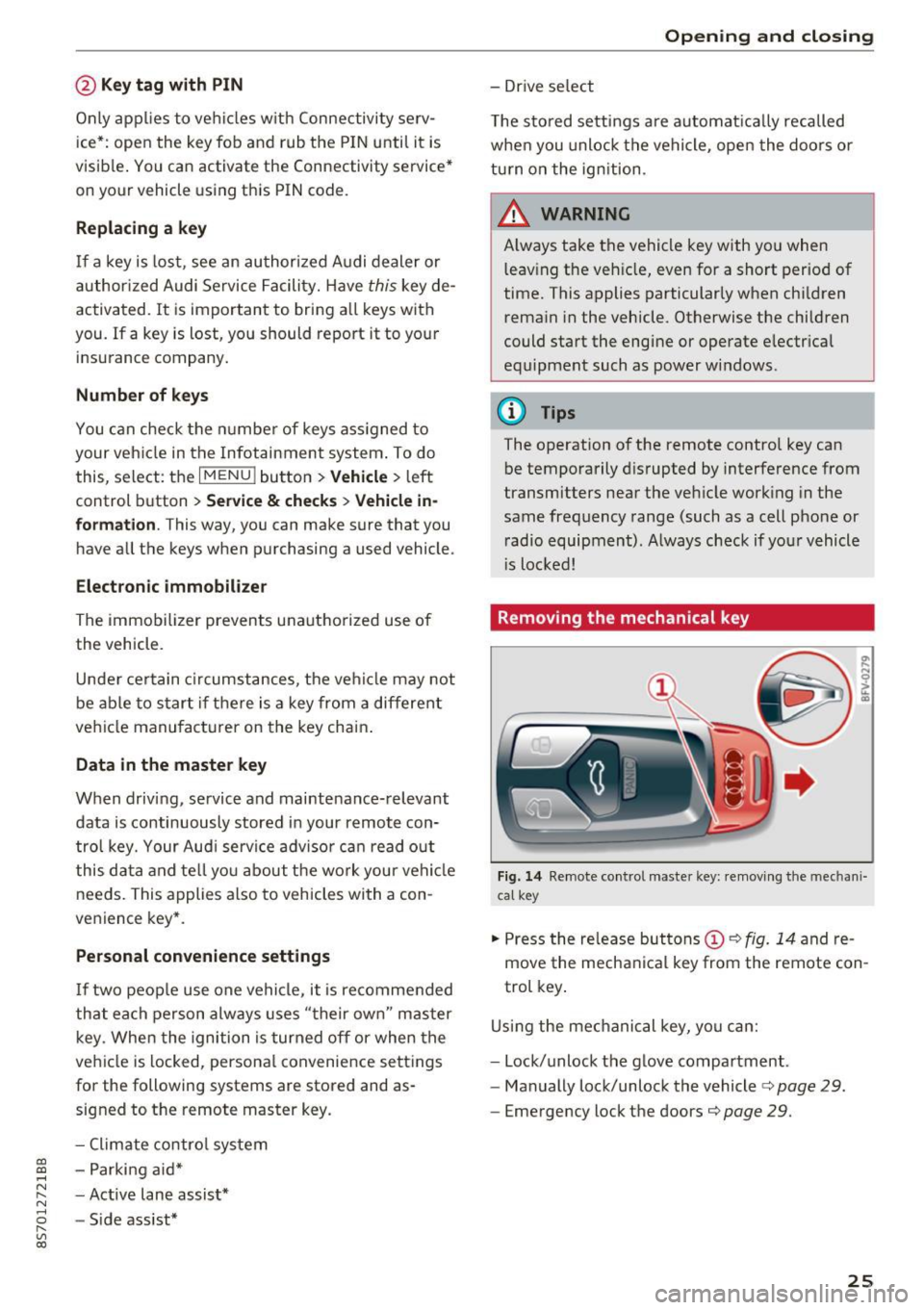
Removing the mechanical key
Fig . 14 Remote control mas ter key: remov ing the mechan i
ca l key
.,. Press the release but tons (D c::> fig. 14 and re
move the mechanical key from the remote con
trol key .
Using the mechanical key, you can:
- Lock/unlock the glove compartment.
- Manually lock/unlock the vehicle
c::> page 29.
-Eme rgency lock the doors c::> page 29.
25
Page 63 of 314
CD
CD
.... N
" N ...... 0 r--. V, co
have the malfunction corrected. To start the en
gine, press and hold the
! START ENGINE STOPI
button.
DJ R emot e control key : hold b ack of key
again st the d esignated are a. See owner's man
ual
This message appea rs if the re is no convenie nce
key inside the vehicle or if the system does not
recognize the key . The conven ience key may not
be recognized, for example, if it is cove red by an
object that
disrupts the signal (such as a brief
case), or if the key battery is weak. Electronic de
vices such as cell phones can also interfere with
the signal.
To still be able to start or stop the eng ine, see
c:::> page 61, Starting the engine when there is a
malfunction .
Ill Remote control key : key not recogn ized . Is
the ke y still in th e vehi cle?
The Ill ind icator light turns on and this message
appears if the conve nience key was removed from
the vehicle when the engine was running.
If the
conven ience key is no longer in the vehicle, you
cannot switch the ign ition on or start the engine
once you stop it. You a lso cannot lock the vehicle
from the outside .
Please press brake p edal
This message appears if you do not press the
brake pedal when starting the eng ine.
Please pr ess clut ch p edal
This message appea rs in vehicles w it h manual
transmissions if you do not press the clutch pedal
when sta rting the engine . The engine can on ly be
started when t he clu tch pedal is pressed.
Pl ease select N or P
This message appea rs when starting or stopping
the eng ine if the selector lever is not in the Nor P
position . The engine will not start/stop.
Shift to P , otherw ise vehi cle can roll awa y.
Doors can be lo cked i n P only
This message appears for safety reasons a long
with a warning tone. It appears if the selector
lever for the automatic transmission is not in the
D rivi ng
P position when switch ing the ignit ion off w ith
the
I START ENGINE STOPI b utton. P lace these
l ector lever in the P position. The veh icle cou ld
roll if the lever is not in P. You also cannot lock
the vehicle using the locking sensor on the door handle or using the conven ience key .
Starting the engine when there is a
malfunction
It may not be possible to start the engine under
certain circumstances, for example if th e battery
in the vehicle key is drained, if interference is af
fected the key or if there is a system malfunc
tion.
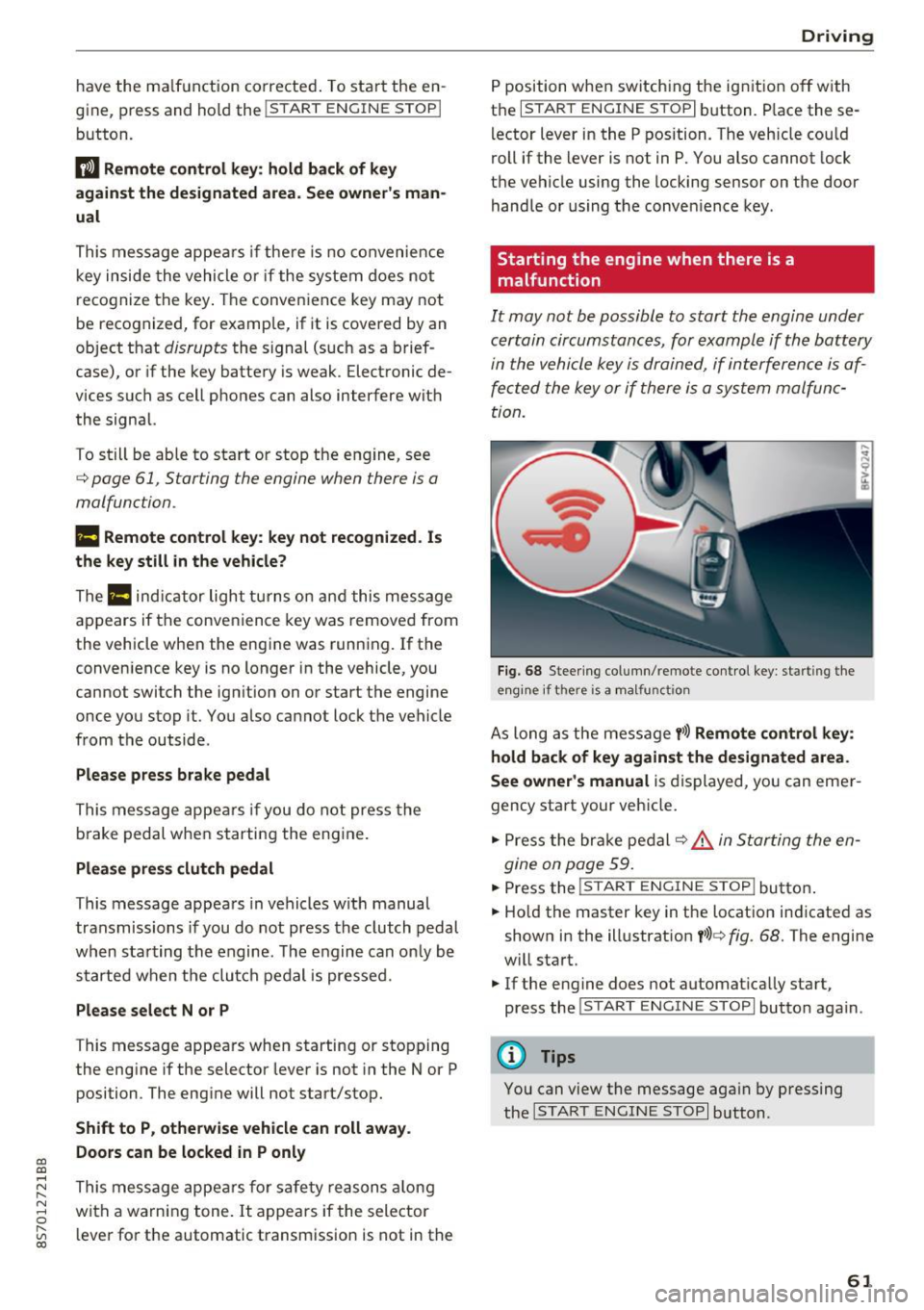
F ig. 68 Steering column/ remote control key: starting the
e n g in e if there is
a m alfunct ion
As long as the message y >l) Remote control key :
hold back of key against the designated are a.
See owner's manual
is displayed, you can emer
gency start your vehicle.
.. Press the brake pedal
c:::> .&. in Starting the en
gine on page 59.
... Press the ~I s=T ~A ~ R~ T~ E_N _G _I _N =E - S~ T= o- P~I button .
.,. Ho ld the master key in the location ind icated as
shown in the illustrat ion
y >l) c:::, fig. 68. The engine
w ill start.
.. If the engine does not automat ica lly start,
press the
! S TART ENGINE STOPI butto n again .
(D Tips
You can view the message aga in by pressing
the
I S TA RT ENGINE S TOP I button.
61
Page 106 of 314
Multi Media Interface
Symbol /Description Description
@ ..
Inserts the input s uggestion* when yo u pus h the co ntro l knob up .
@ ~ D ele tes t he chara cter to the left o f the cursor.
@ Tips
Accen ted characters are not available for ev
ery letter.
Free text search
Using the free te x t sear ch, you can select the or
der that the search term s are en tered in the in
pu t field .
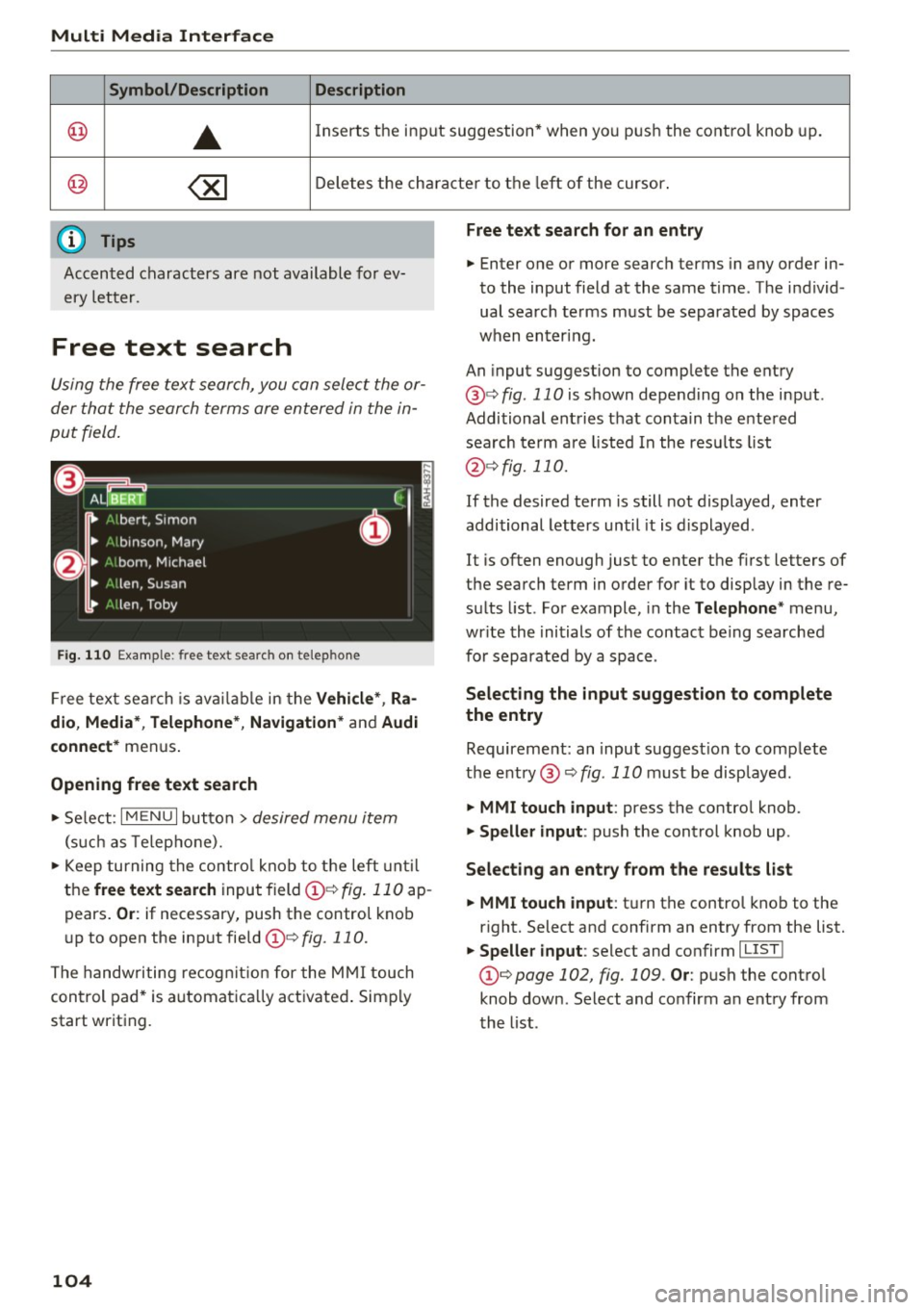
Fig. 110 Exal'l'lple: free text searc h on telep hon e
Fr ee tex t se arc h is availabl e in the Vehicle *, Ra
dio, Media *, Telephone* , Navigation *
and Audi
connect*
men us.
Opening free text search
"' Se lect : I MENU I button> desired menu item
(such as Telep ho ne).
"' Keep turning the contro l knob to t he left until
the
free text search inpu t field @¢ fig. 11 0 ap
pears .
Or: if necessary, push the contro l kno b
u p to open the inp ut fie ld @ ¢fig.
110.
The handwriting re cog nit ion for the M MI touch
control pad * is a utomatica lly act ivated . Simp ly
start writ ing.
104
Free text search for an entry
.. Enter one or more searc h terms in any order in
to the input field a t the same time . T he individ
ual sea rch terms must be separated by spaces
when en ter ing.
An input suggestion to comp lete the entry
@ ¢
fig. 110 is shown depending on the input.
Additional ent ries t hat conta in t he e nte red
sea rch te rm a re listed In the resu lts list
@ ¢fig. 110.
If the desired term is still not displayed, enter
additional letters until it is displayed .
It is often enough just to enter the f irst letters of
the search term in order fo r it to disp lay in the re
s ul ts list. Fo r example, in the
Telephone * menu,
wr ite the ini tials of the contac t be ing searched
for separated by a space .
Selecting the input suggestion to complete
the entry
Requireme nt: an input suggest io n to comp lete
the entry @¢
fig. 110 must be disp layed.
.. MMI touch input : press the control knob.
.. Speller input : push the control knob up .
Selecting an entry from the results list
.. MMI touch input :
tu rn the contro l knob to the
r ight. Select and confirm an entry from the list.
.. Speller input : select and confirm I LIST!
the list .
Page 107 of 314
CD
CD
.... N
" N ...... 0
" V, co
Multi Media Interface
Menus and Symbols
I~ :c
' ~
@
14
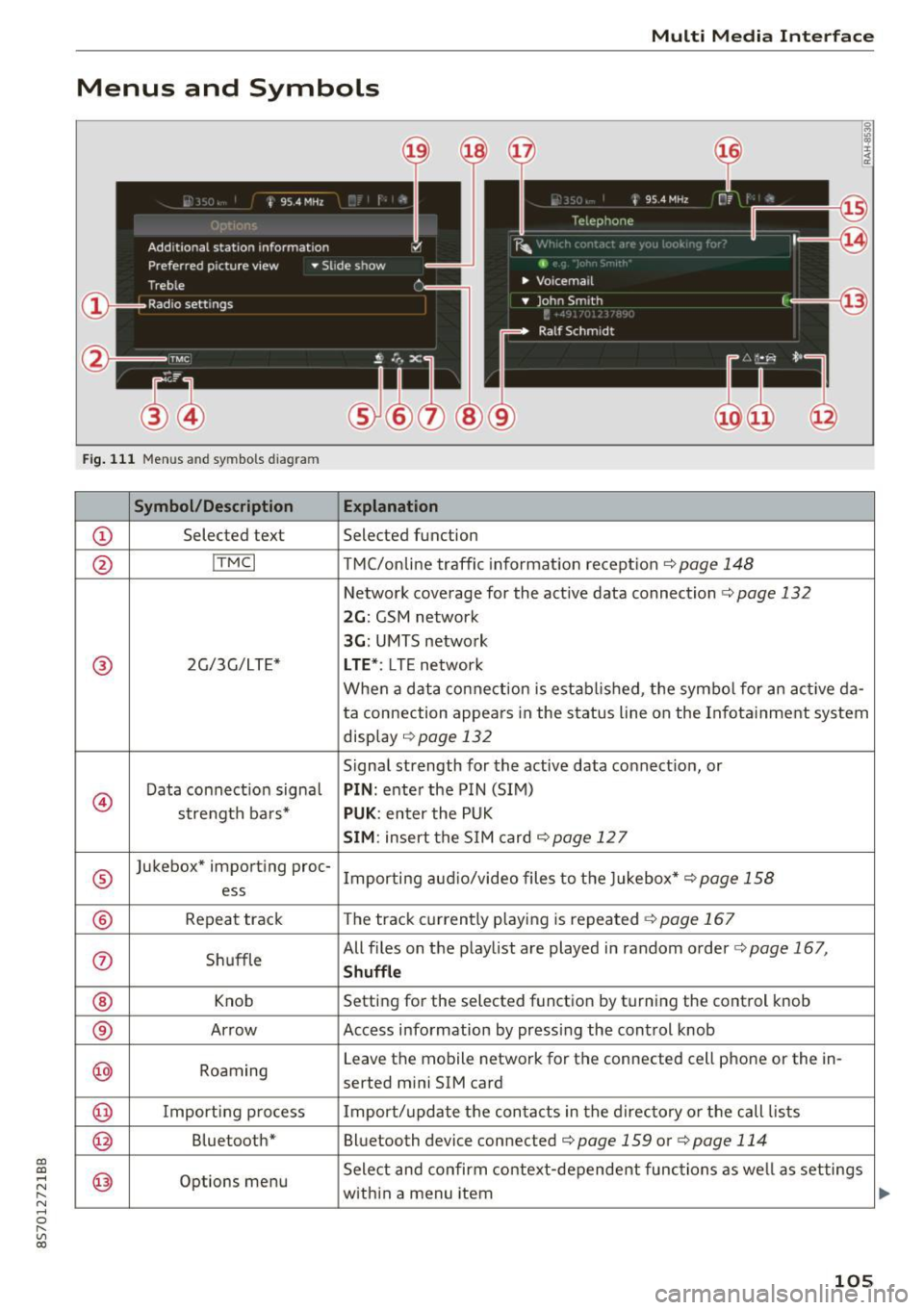
Fig. 111 Menus and symbols diagram
Symbol/Description Explanation
CD Selected text Selected function
@ I
TMC I TMC/online traffic informat ion recept ion c::>page 148
Network coverage for the active data connection c::> page 132
2G: GSM network
3G : UMTS network
® 2G/3G/LTE* LTE *: LTE network
When a data connection is establ ished, the symbol for an act ive da-
ta connection appea rs in the status line on the Infota inment system
display
c::> page 132
Signal strength for the active data connect ion, or
@
Data connect ion signa l PIN: enter the PIN (SIM)
strength bars*
PUK : enter the PUK
SIM: insert the SIM card c::> page 12 7
®
Jukebox* importing proc-
Importing audio/video files to the Jukebox*
c::> page 158
ess
® Repeat track The track currently playing is repeated c::>page 167
0 Shuffle All files on the playlist are played in random o
rder
c::> page 167,
Shuffle
® Knob Setting for the selected function by turning the control knob
® Arrow Access information by pressing the control
knob
@ Roaming Leave the mobile network for the connected cell phone or the in-
serted mini SIM card
@ Importing process Import/update the contacts in the directory or the call lists
@ Bluetooth* Bluetooth device connected c::> page 159 or c::> page 114
@ Options menu Select
and confirm context-dependent functions as well as settings
within a menu item
105
Page 108 of 314
Multi Med ia Int erfac e
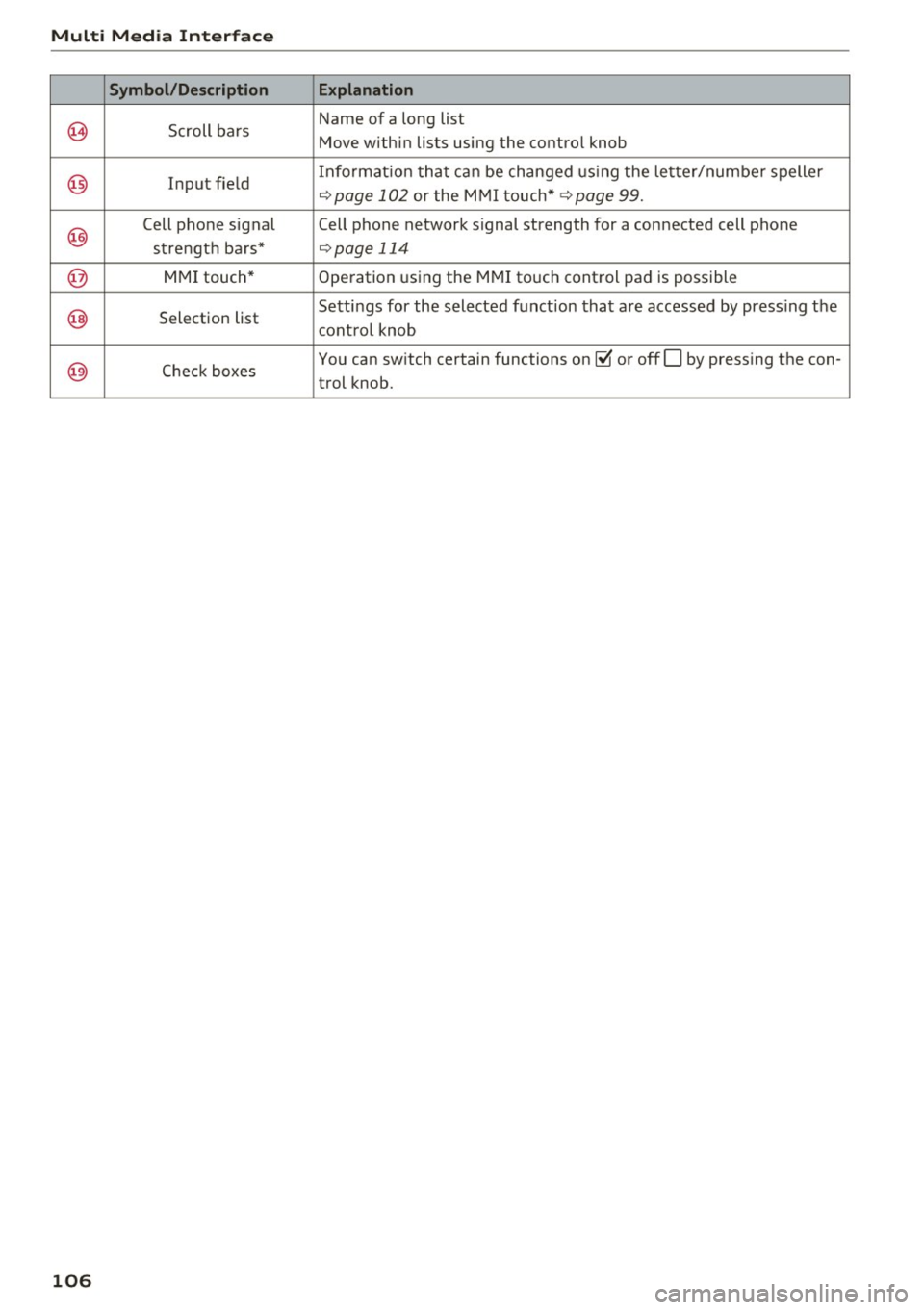
Symbol /Description E xplanation
~ Scroll bars Name of
a long list
Move within lists using the control knob
@ Input field Informat
ion that can be changed using the letter/numbe r spelle r q page 102 or the MMI touch* q page 99.
@
Cell phone signal Cell phone network signal strength for a connected cell phone
strength bars*
qpage 114
@ MMI touch* Operation using the MMI touch control pad is possible
@ Selection list Settings for the
selected function that are accessed by press ing the
control knob
@) Check boxes You
can switch certain functions on~ or offO by pressing the con-
trol knob.
106
Page 109 of 314
"'
"' ....
N
" N ....
R v> CX)
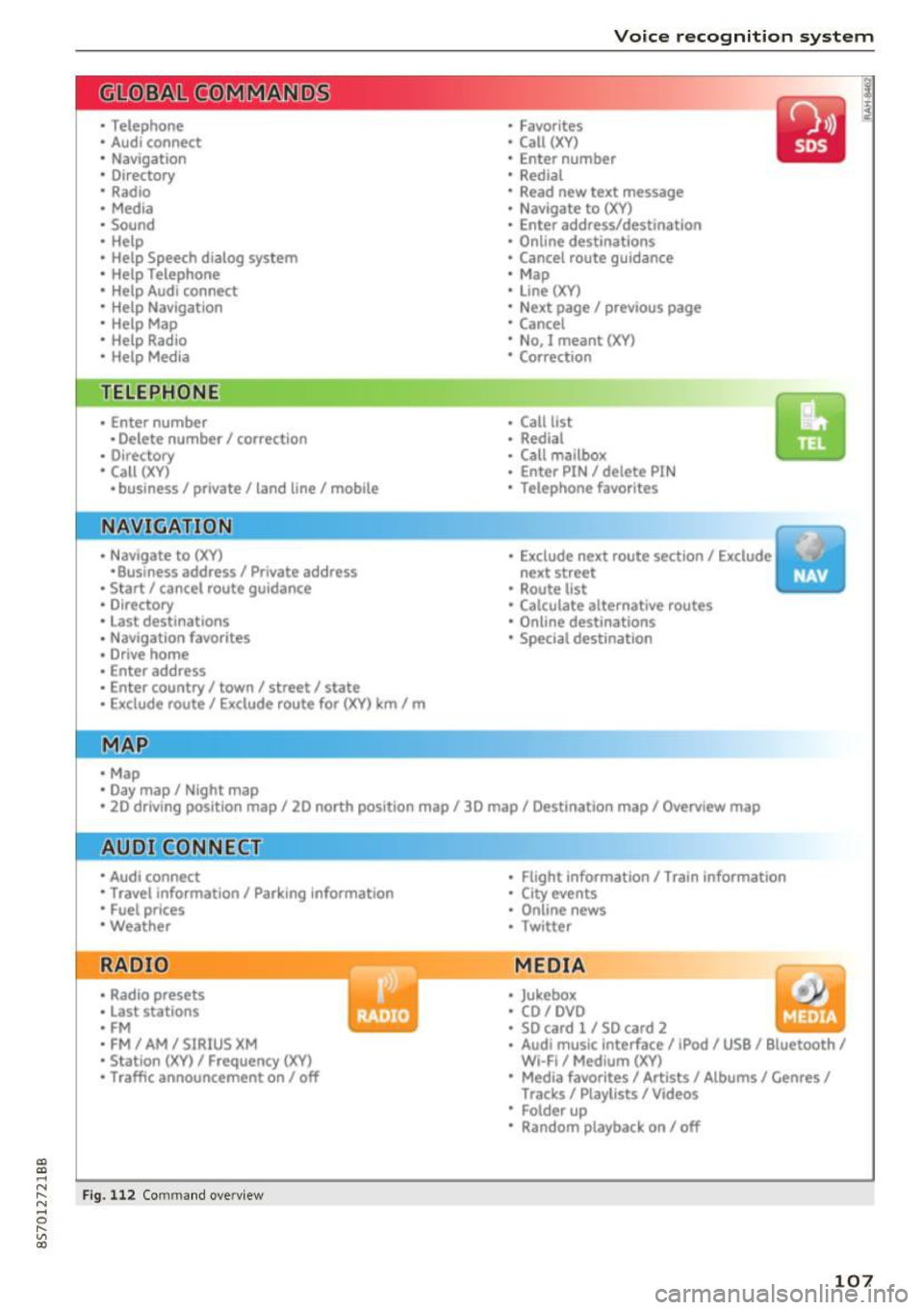
• Telephone
• Audi connect
• Navigation
• Directory
• Radio
• Med ia
• Sound
• Help
• Help Speech dia log system
• Help Telephone
• Help Audi connect
• Help Navigation
• Help Map
• Help Radio
• Help Media
TELEPHONE
· Enter number
• Delete number/ correc tion
• Directory
• Call (XY)
·business/ private/ land line/ mobile
NAVIG:ATI0N
• Navigate to (XV)
• Business address/ Private address
• Start/ cancel route guidance
· Directory
• Last destinations
• N avigation favorites
• Drive home
• Enter address
• Enter country/ town/ street/ state
• Exclude routt / Exclude route for (XY) km/ m
• M ap
• Day map / Night map
Voice recognition system
• Favor ites
• Call (XY)
• Enter number
• Redial
• Read new tex t message
• N avigate to
(XV)
• Enter address/destination
• Onhne destinations
• Cancel route guidance
• M ap
• Line (XY)
• Next page/ previous page
• Cancel
• N o, l meant
()(Y)
• Correction
• Call list
• Redial
• Call mailbox
• Enter PIN/ delete PI N
• Telephone favori tes
• Exclude ne xt route section / Exclude
nex t street
• Route list
• Calculate alternative routes
· Online destinations
• Special destination
• 20 driving position map/ 20 north position map/ 30 map/ Destination map/ Overview map
AllJC !H C0NNECf
• Audi connect
• Travel information/ Parking Information
• Fuel prices
• Weather
RADIO
• Radio presets
• Last stations
• FM
• FM / AM/ SIRIUS XM
• Station (XY) / Frequency (XY)
• T raffic announcement on/ off
Fig . 112 Co mmand overv ie w
• Flight Information I Train Information
• City events
• Online news
• Twitter
MEDIA
• Jukebo x
• CO/ DVD y
• SO card l / SD card 2
· Audi music Interface/ !Pod/ USB / Bluetooth /
Wl ·Fi / Medium (XV)
• Media favorites/ Artists/ Albums/ Genres/
Tracks/ Playlists / Videos
• Folder up
· Random playback on / off
107