change wheel AUDI TT ROADSTER 2018 User Guide
[x] Cancel search | Manufacturer: AUDI, Model Year: 2018, Model line: TT ROADSTER, Model: AUDI TT ROADSTER 2018Pages: 310, PDF Size: 46.95 MB
Page 251 of 310
0 co .... N
" N .... 0
" "' co
beads are laid at substantially
90 degrees to the centerline of
the tread .
Recommended inflation
pressure
see ¢ page 247, Cold tire infla
tion pressure .
Reinforced tire
means a tire designed to operate
at higher loads and at h igher in
flation pressures than the corre
sponding standard tire. Rein
forced tires may be identified as
"XL", "xl", "EXT RA L OAD", or "RF"
on the sidewa ll.
Rim
means a metal support for a tire
or a tire and tube assemb ly upon
which the t ire beads are seated .
Rim diameter
means nominal diameter of the
bead seat . If you change your
whee l size, you will have to pu r
c h ase new t ires to match the new
rim diameter .
Rim size designation
means rim diamete r and width .
Rim width
means nominal distance between
rim flanges .
Wheels
Sidewall
means that portion of a tire be
tween the tread and bead .
Speed rating (letter code)
means the speed at which a tire is
designed to be driven for extend
ed periods of time. The ra tings
range from
93 mph (150 km/h)
to
186 mph (298 km/h) ¢ table
on page 245 .
You may not find
this informat ion on all tires be
cause it is not required by law .
The speed rating letter code,
where applicable, is molded on
the tire sidewall and indicates t he
maximum pe rmissible roa d
speeds . See also ¢
A in General
information on page 244.
Tire pressure monitoring
system *
means a system that detects
when one or more of a vehicle's
ti res are underinflated and illumi
nates a low tire pressure warning
telltale .
Tread
means that portion of a ti re that
comes into contact with the road .
.,.
249
Page 263 of 310
Cl 00 .-< N r-N .-< 0 r-Vl 00
Tire pressure monitoring system
(J_) General notes
Each tire, incl uding the spare (if provided),
should be checked month ly when co ld and inflat
ed to the inf lation pressure recommended by the
ve hicle manufacturer on the vehicle placard or
tire inflat ion pressure label. (If your vehicle has
tires of a d ifferent s ize tha n the s ize indicated on
the veh icle placa rd or t ire inflation pressure la
be l, you s hou ld determine the prope r tir e infla
tion pressure fo r th ose tires).
As an added safety feature, your ve hicle has been
equ ipped w ith a t ire pressu re monito ring system
(TPMS) that ill uminates a low tire p ress ure tell
tale whe n one or more of yo ur t ires is sign ificant
l y unde r-infla ted. Accord ingly, whe n the low tire
p ressure tellta le illuminates, yo u should stop and
check your tires as soon as possible, and inflate
them to the proper press ure. D riving on a signifi
cantly under-inflated tire causes the tire to ove r
h eat and can lead to t ire failure. Under-inflation
a lso reduces fuel efficiency and ti re tread life,
and may affect the veh icle's handling and stop
p ing ability .
P lease note that the TPMS is not a substitute for
proper tire maintenance, and it is the driver's re
sponsib il ity to ma inta in correct tire pressure,
even if u nder-inflation has not reached t he leve l
to tr igger illum inat io n of t he TPM S low tire p res
sure telltale.
Your veh icle has also been equ ipped w ith a TPMS
malfunct ion ind icator to indicate when the sys
tem is not operat ing properly. The TPMS ma l
f u nction ind icator is combined w ith the low tire
p ressure tellta le. Whe n the system det ects a
mal function, the te lltale wi ll flash fo r approxi
mate ly one mi nute and then remain continuous ly
illum inated. This sequence will continue upon
subseq uent ve hicle start-ups as long as the ma l
function ex ists .
W hen t he malfunctio n indicator is ill uminated,
the system may not be ab le to detect or signa l
low t ire press ure as intended. TPMS ma lfunctions
may occur for a var iety of reasons, including the
Wheels
insta llation o f replacement or alternate tires or
whee ls on the vehicle that prevent the TPMS
from functioning p roperly . Always check the
TPMS ma lfunction te lltale after replac ing one or
more tires or wheels on you r vehicle to ensure
t h at the rep lacement or a lternate tires a nd
wheels allow t he TPMS to continue to function
prope rly.
If the Tire Pressure Monitoring System
indicator appears
Applies to: vehicles with Tire Pressure Monitoring System in
dicator
The tire pressure indicator in the instrument
cluster informs you if the tire pressure is too low
or if there is a system malfunction.
U sing the ABS se nsors, the t ire pressure monitor
ing system compares the tire tread c ircumfer
ence and v ibration characterist ics of the ind ividu
al tires. If the pressu re changes in one o r more
t ir es, th is is indica ted in the Info tainment sys tem
display wi th an indica to r li ght
ti] and a message.
If only one ti re is affected, the location of tha t
tire will be indicated.
T he tire press ures mus t be store d in the Infota in
me nt system agai n ea ch t ime t he p ressures
change (switching between partia l and full load
pressure) or after c hanging or replacing a tire on
yo ur vehicle
¢ page 262 . The tire pressure moni
toring system on ly monitors the tire pressure you
have stored. Refer to the t ire pressure label for
the recommended t ire pressure for your vehicle
¢ page 254, fig . 190 .
Tire tread c ircumference and vibration character
istics can change and cause a tire pressu re warn
i ng if:
- the ti re pressure in one or more tires is too low
- the tire has str uctural damage
- t he t ire w as replaced or the t ire pressu re w as
changed and it was no t stored ¢
page 262
- the spare tire* is i nstalled
Indicator lights
ti] -loss of pressure in at least one tire ¢,& .
Check the t ires and replace or repair if necessary.
Check/correct the pressures of all fou r tires and
.,.
261
Page 265 of 310
Cl 00 .-< N r-N .-< 0 r-Vl 00
Please note that the TPMS is not a substitute for
proper tire maintenance, and it is the driver's re
sponsibility to maintain correct tire pressure,
even if under-inflation has not reached the level
to trigger illumination of the TPMS low tire pres
sure telltale .
Your vehicle has also been equipped with a TPMS malfunction indicator to indicate when the sys
tem is not operating properly. The TPMS mal
function indicator is combined with the low tire pressure telltale. When the system detects a
malfunction, the telltale will flash for approxi
mately one minute and then remain continuously
illuminated. This sequence will continue upon
subsequent vehicle start-ups as long as the mal
function exists.
When the malfunction indicator is illuminated,
the system may not be able to detect or signal
low tire pressure as intended. TPMS malfunctions
may occur for a variety of reasons, including the
installation of replacement or alternate tires or
wheels on the vehicle that prevent the TPMS
from functioning properly . Always check the
TPMS malfunction telltale after replacing one or
more tires or wheels on your vehicle to ensure
that the replacement or alternate tires and
wheels allow the TPMS to continue to function
properly.
Description
Applies to: vehicles with tire pressure monitor ing system
The tire pressure monitoring system monitors
the pressure in the four tires when driving.
T he system uses sensors that measure the tem
perature and pressure in the tires . The data is
sent from these sensors to the control module by radio frequency.
T he tire pressure monitoring system shows the
current pressures and temperatures of the tires
in the Infotainment system while driving
¢ page 264. It also compares the current tire
pressures with the stored tire pressures and
gives a warning if the tire pressure is different
from what is stored
¢ page 264 .
Wheels
The system does not detect if the stored tire
pressures match the recommended tire pres
sures. You must store the tire pressures again
¢ page 264:
- every time the tire pressures change, for exam
ple when the load in the vehicle changes,
- after replacing a tire, or
- if wheels with new wheel sensors are used.
_& WARNING
- The tire pressure monitoring system assists
the driver in monitoring tire pressures. The
driver is responsible for having the tires in
flated to the correct pressure.
- Do not change the tire pressure when the
temperature of the tire is extremely high.
This could result in serious damage to the
tire and even cause the tire to burst, in
creasing the risk of an accident.
- A tire with low pressure flexes more. This heats the tire up too much. This could cause
the tread to separate and even cause the
tire to burst, increasing the risk of an acci
dent.
- The tire pressure monitoring system does not warn about damage or defects in the
tire construction that could cause the tire to
burst, for example. Inspect your tires regu
larly.
(D Tips
- If tires are replaced, the sensors/valves do
not need to be removed or replaced . Just re
placed the valve stem and, if necessary, the
valve and the wheel electronics. If you have questions, see an authorized Audi dealer or
authorized Audi Service Facility.
- An incorrect display or a malfunction in the
tire pressure monitoring system can occur
after using the tire mobility kit. Have the
sensors replaced by an authorized Audi
dealer or authori zed Audi Service Facility.
- For an explanation on conformity with the
FCC regulations in the United States and the
Industry Canada regulations, see
¢ page 293.
263
Page 266 of 310
Wheels
Displaying tire pressures/temperatures
Applies to: vehicles with tire pressure monitoring system
Requirement: you must be d rivi ng the veh icle .
"'Se lect in the Infotainment system: IMENU I but
ton
> Service & checks > Tire pre ssur e monitor
ing > Di splay tire pressure.
- Green:
the current tire pressure and the speci
fied t ire pressure are approximately the same .
-Yellow: the current tire pressure is too low
compared to the specified tire pressure .
The specified tire press ure is the last tire pres
sure that was stored
c> page 264.
Note that t he tire p ressure also de pends on the
temperature of the tire . The tire press ure in
creases as the engine becomes wa rmer whi le
driving.
A WARNING
Read and follow the important information
and notes
c> page 263.
(D Tips
The tire pressure or temperature is not d is
played while the veh icle is stationary and in
adaptation mode. Dashes --.--are shown in
place of the pressu re and temperature.
(D Tire pressure loss
Applies to: vehicles with tire pressure monitoring system
-
If the Rt] indicato r light turns on, the p ressure in
at least one t ire is too low o r new sensors we re
not adapted :
[I] indicator lights turns on after turning the
ignition on
The tire pressure is too low compared to the
specified p ressure.
"' Check and store the t ire pressure(s) the next
time it is poss ible
c> page 264 .
[I] indicator light turns on while dri ving
Wheels with new sensors were not adapted or
the t ire pressure has reached a critical leve l com
pared to the specified pressure .
264
"'Avoid unnecessary steering and brak ing maneu -
vers .
"'Adapt your dr iving sty le to the s ituation.
"' Stop as soon as possible and check the tire(s).
"'If it is possib le to continue driv ing, see an au-
thorized Audi dealer or authorized Aud i Service
Facility immediately and have your tire(s) re
pa ired o r rep laced .
A WARNING
Read and fo llow the impo rtant info rmation
and n otes
c>page 263.
Storing new tire pressures
Applies to: vehicles with tire pressure monitoring system
Correctly stored tire pressure specifications are
necessary for reliable tire pressure monitoring.
-
It is always necessary to store the t ire pressures
whe n the t ire pressu res a re modified, fo r exam
ple d ue to a change in load . o r when new senso rs
a re installed.
"' Before storing the t ire pressures, make su re the
tire pressures of all four t ires meet the spec i
fied va lues and are adapted to t he load
c::> page 254, fig. 190 . Only correct and store
the pressure in tires whose temperature is ap
proximate ly the same as the ambient tempera
t u re . If the temperature of the tire is higher
than the ambient air temperature, the tire pressure must be increased approximately
3.0 PSI (0.2 bar) above the value on the st icker.
"' Switch the ignit ion on .
"'Select in the Infotainment system : IMENU! but
ton
> Service & checks > Tire pressure monitor
ing > Store tire pre ssure > Ye s, store now .
Af
ter storing the t ire pressures, the t ire press ure
mon itor ing system measures the c urrent pres
sures while driving and stores them as the new
specified pressures .
"'If the changed tire pressures are not displayed
in the Infotainment system, drive the vehicle
for approximately 10 minutes so that the sen sor signa l from the wheels is received again .
During this adaptation phase, -- .- - is d isplayed
for the pressure and temperature and the tire pressure monitoring system is on ly partially
Page 267 of 310
![AUDI TT ROADSTER 2018 User Guide Cl 00 .-< N r-N .-< 0 r-Vl 00
availab le . It only provides a warning if one o r
more tire pressures is be low the minimum per
mitted specif ied pressure .
If the
[I] indica to r l](/img/6/57668/w960_57668-266.png "AUDI TT ROADSTER 2018 User Guide Cl 00 .-< N r-N .-< 0 r-Vl 00
availab le . It only provides a warning if one o r
more tire pressures is be low the minimum per
mitted specif ied pressure .
If the
[I] indica to r l")
Cl 00 .-< N r-N .-< 0 r-Vl 00
availab le . It only provides a warning if one o r
more tire pressures is be low the minimum per
mitted specif ied pressure .
If the
[I] indica to r lig ht turns on and the mes
sage
Tire pressure: wheel change detected .
Please check all tires and store pressures in
MMI also appears, the system has detected that
the posit ion of the sensors has changed because
of a tire rotation, or that new sensors were in
stalled . Store the new tire pressures.
A WARNING -
Read and follow the important informa tion
and notes<=;>
page 263.
Malfunctions
App lies to: ve hicles with tire press ure m onitoring system
If t he tire pressure monitoring system is not
available, the
m;i ind icat or light appears in the
in str ument cluster display along with th e mes
sage
Tire pressure: malfunction! See owner's
manual.
I f the @m in dica tor light appears after switch
ing the ignition on or while dr iv in g and the
[I] in
d icator light also blinks for approximate ly one
minute and t hen stays on, there is system ma l
function. The following are examples of sit ua
tions that cou ld cause a malfunction:
-If the message appears at the end o f the adap
tation phase, the system may not detect one or
severa l of the wheel senso rs necessa ry for pres
s ur e monitoring. This may result from one or
more wheels being installed without wheel sen
sors or with incompatible wheel sensors .
- A wheel sensor o r another component has
failed.
- Using snow cha ins can affect the f unction of
the system because of the shie lding effect of
the cha ins.
- The tire pressure monitor ing system is not
available due to a malfunction.
- Transmitters with the same frequency, such as
headphones or remote-controlled dev ices, may
cause a temporary system malfunction due to
the strong electromagnetic field .
Wheels
The m;i indicator lig ht and the message turn off
once the tire pressure monitoring system is avail
able again. If you cannot co rrect the malfunction
and
the m indicator light stays on, drive imme
diately to an authorized Audi dea ler or author
ized Audi Se rvice Facility to have the malfunct ion
repaired.
265
Page 277 of 310
Cl co .... N ,..._
N ...... 0 ,..._
Vl co
-If the tire is too severely damaged , see an
authorized Aud i dealer or authorized Aud i
Service Facility for assistance .
@ For the sake of the environment
You can give the used tire sealant bottle to an
author ized Audi dealer or authorized A udi
Service Facility for disposal.
@ Tips
Remember to obtain a new bottle of sea lant
from an authorized Audi dea ler or authorized
Audi Service Facility after repairing a tire.
Replacing wheels
Preparation
You must complete the preparation before
changing a tire .
"' Read and follow the important safety precau-
t ions
Q page 2 72, General information .
"' Set the parking brake .
"'Se lect the "P" selec to r l ever position.
"'Lay out the vehicle tool kit Q page 2 72 and the
spare tire
Q page 279 .
A WARNING ,-
You or your passenger could be injured while
changing a wheel if you do not follow these
safety precautions:
- If you have a flat tire, move a safe distance
off the road. Turn off the engine, turn the
emergency flashers on and use other warn
ing devices to alert other motorists.
- Make sure that passengers wait in a safe place away f rom the vehicle and well away
from the road and traffic .
- To help prevent the vehicle from moving suddenly and possibly slipping off the jack,
always fully set the parking brake and block
the front and back of the wheel diagonally
opposite the w heel be ing changed. Whe n
one front whee l is lifted off the ground,
pla cing the A utoma tic Transm ission in P
(Park) will
not prevent the ve hicle from
moving .
Emergen cy as sis tanc e
-Before you change a wheel, be sure the
ground is level and firm . If necessary, use a
sturdy board under the jack.
- Always store the vehicle too l kit, the jack
and the replaced tire in the luggage com
partment
<=) page 183.
(D Tips
Obey all laws .
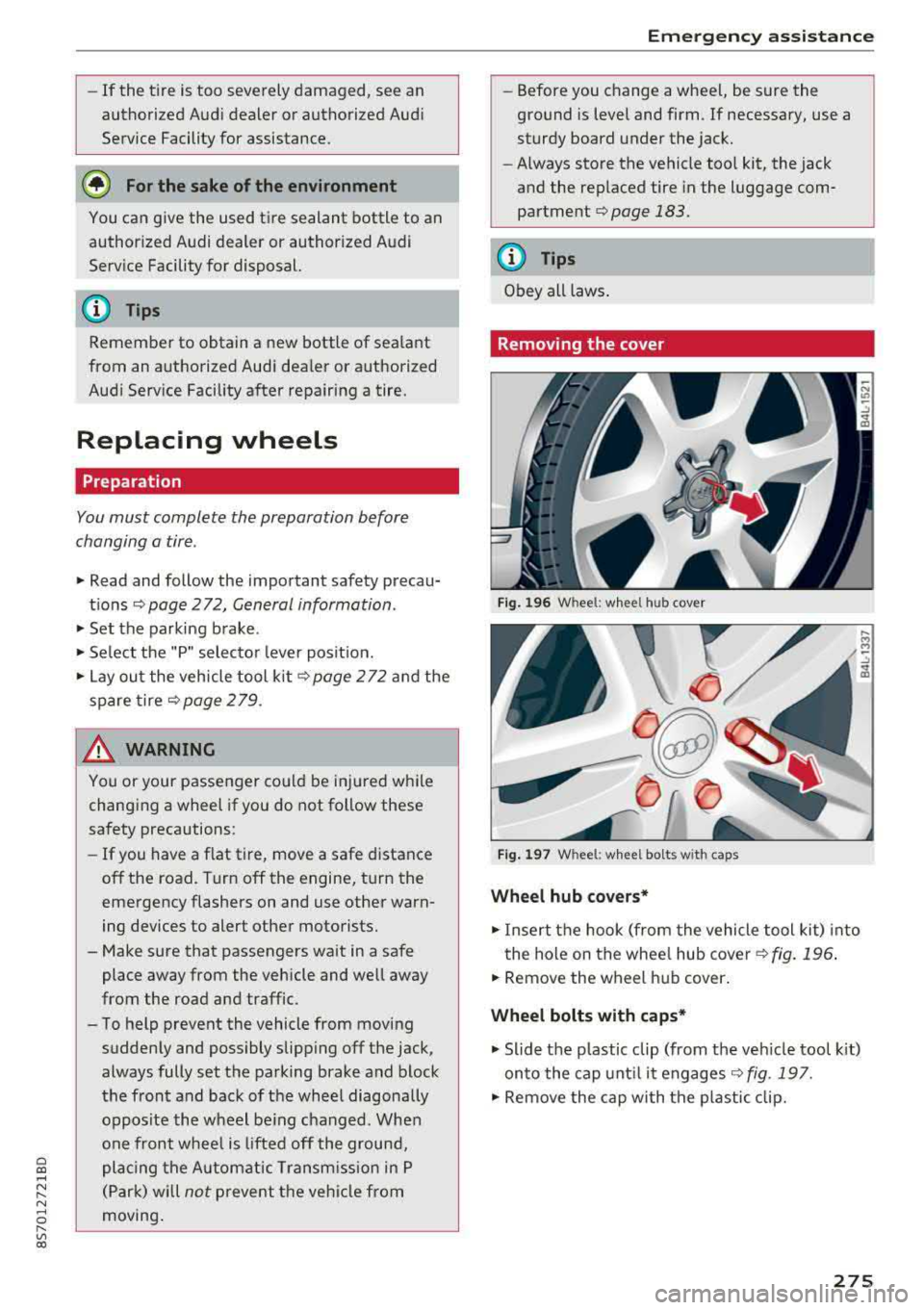
Removing the cover
Fig. 196 W heel: wh eel hu b cov er
F ig. 1 97 Wheel: wh eel bol ts with cap s
Wheel hub covers*
"'Insert the hook (from the vehicle tool kit) into
the hole on the whee l hub cover
Q fig. 196 .
"'Remove the wheel h ub cover .
Wheel bolts with caps *
"'Slide the p lastic clip (from the veh icle too l kit)
onto the cap unt il it engages
Q fig . 197.
"' Remove the cap with the p lastic clip.
275
Page 278 of 310
Emerg enc y assis ta nce
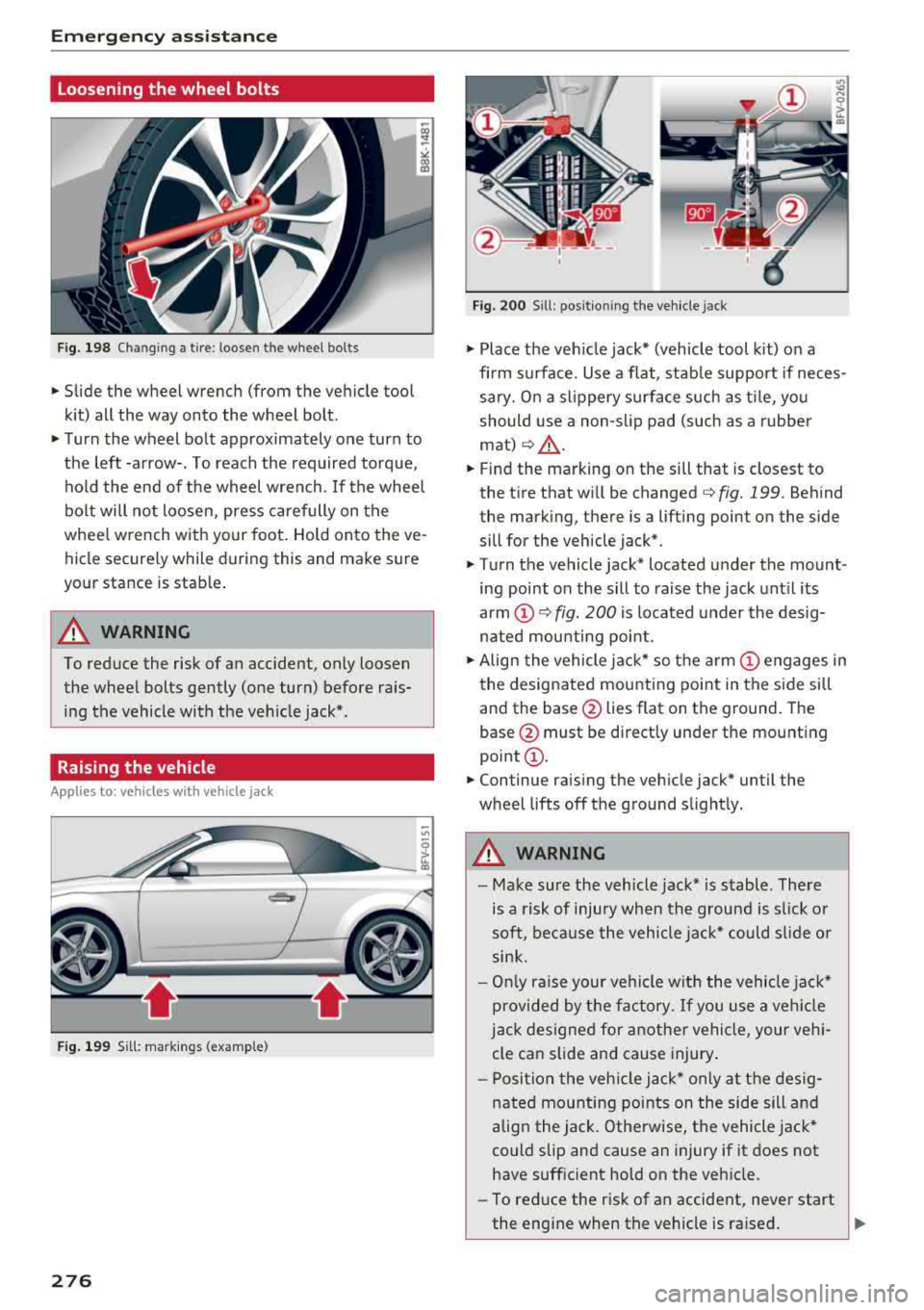
Loosening the wheel bolts
Fig. 198 Chan gin g a tire : loosen t he wheel bolts
.,. Slide the wheel wrench (from the vehicle tool
k it) all the way onto the wheel bolt.
.,. Turn the wheel bolt approximately one turn to
the left -arrow-. To reach the required torque, hold the end of the wheel wrench. If the wheel
bolt will not loosen, press carefully on the
whee l wrench with your foot. Hold onto the ve
hicle securely while during this and make sure
your stance is stable .
A WARNING
To reduce the risk of an accident, only loosen
the wheel bolts gently (one turn) before rais
ing the vehicle with the veh icle jack*.
Raising the vehicle
A ppl ies to: ve hicles w ith vehicle jack
- ,t.------,:
Fig. 199 Sill: markings (examp le)
276
Fig. 200 S ill : pos ition ing the vehicle jack
.,. Place the veh icle jack* (vehicle tool kit) on a
firm s urface. Use a f lat, stab le support if neces
sary. On a slippery surface such as ti le, you
should use a non-slip pad (such as a rubber
mat) <=>& .
.,. Find the marking on the sill that is closest to
the tire that will be changed
c> fig. 199. Behind
the marking, there is a lifting point on the side
sill for the vehicle jack* .
.,. Turn the vehicle jack* located u nder the mount
ing point on the sill to raise the jack until its
arm
(D c> fig. 200 i s located under the desig
nated mou nting point .
.,. Align the vehicle jack* so the a rm (!) engages in
the designated mounting point in the side sill
and the base @lies flat on the ground. The
base @ must be directly under the mounting
point @.
.,. Continue raising the vehicle jack* until the
wheel lifts off the ground slightly.
A WARNING
- Make sure the vehicle jack* is stable . There
is a risk of injury when the ground is s lick or
soft, because the vehicle jac k* could sl ide or
sink.
- On ly raise your vehicle w ith the vehicle jac k*
provided by the factory. If you use a ve hicle
j a ck designed for anothe r vehicle, your veh i
cle can slide and cause injury .
- Posi tion the veh icle jack* only at the des ig
nated mounting points on the side sill and
align the jack . Otherwise, the vehicle jack*
could slip and cause an injury if it does not
have sufficient hold on the vehicle.
- To reduce the risk of an accident, never start
the engine when the vehicle is ra ised.
Page 280 of 310
Emergency assistance
{QJ Note
When removing or installing the wheel, the
rim could hit the brake rotor and damage the
rotor. Work carefully and have a second per
son help you.
(D Tips
- When mounting tires with unidirectional
tread design
make sure the tread pattern is
pointed the right way
¢ page 278.
-The wheel bolts should be clean and easy to
turn. Check for dirt and corrosion on the mating surfaces of both the wheel and the
hub. Remove all dirt from these surfaces be
fore remounting the wheel.
Unidirectional tires
A unidirectional tire profile is identified by arrows
that point in the running direction on the tire
sidewall. You must always adhere to the speci
fied running direction. This is necessary ensure
the tire 's optimum performance in regard to ad
hesion, running noise, friction and hydroplaning .
To benefit fully from the advantages of the uni
directional tire design, you should replace faulty
tires as soon as possible and restore the correct
running direction on all of the tires.
Finishing
.,. Reinstall the caps on the wheel bolts if neces
sary .
.,. Store the vehicle tool kit in its designated
place .
.,. If the removed wheel does not fit in the spare
wheel well, store it securely in the luggage
compartment
¢ page 183.
.,. Check the tire pressure on the installed wheel
as soon as possible.
.,. Check the tire pressure and store it in the Info
tainment system.
.,. The wheel bol t tightening specification must be
90 ft lbs (120 Nm) . Check it as soon as possible
with a torque wrench. Drive carefully until then.
.,. Have the faulty wheel replaced as quickly as
possible.
278
(D Tips
- If you notice that the wheel bolts are cor
roded and difficult to turn while changing a
tire, they should be replaced before you check the tightening torque.
- Drive at reduced speed until you have the
tightening torques checked.
Notes on wheel changing
Please read the information ¢ page 251 if you
are going to use a spare tire which is different
from the tires on your vehicle .
After you change a tire:
- Check the tire pressure on the spare immedi
ately after installation.
- Have the wheel bolt tightening torque
checked with a torque wrench as soon as pos
sible by your authorized Audi dealer or a
qualified service station.
- With steel and alloy wheel rims, the wheel
bolts are correctly tightened at a torque of
90
ft lbs (120 Nm).
- If you notice that the wheel bolts are corroded
and difficult to turn while changing a tire,
they should be replaced before you check the
tightening torque.
- Replace the flat tire with a new one and have
it installed on your vehicle as soon as possi
ble. Remount the wheel cover .
Until then, drive with extra care and at reduced
speeds.
A WARNING
- If you are going to equip your vehicle with
tires or rims which differ from those which
were factory installed, then be sure to read
the information
¢page 251.
-Always make sure the damaged wheel or
even a flat tire and the jack and tool kit are
properly secured in the luggage compart
ment and are not loose in the passenger
compartment.
- In an accident or sudden maneuver they
could fly forward, injuring anyone in the ve
hicle.
-
Page 296 of 310
Index
A
A/C (climate control system) . . . . . . . . . . . . . 52
Accessories . . . . . . . . . . . . . . . . . . . . . . . . . . 292
Active lane assist . . . . . . . . . . . . . . . . . . . . . . 72
Activating vibration warning . . . . . . . . . . . . 75
Adjusting steering time . . . . . . . . . . . . . . . . 75
Cleaning the camera area . . . . . . . . . . . . . 267
Indicator l ight . . . . . . . . . . . . . . . . . . . . . . . 73
Messages . . . . . . . . . . . . . . . . . . . . . . . . . . . 74
Switching on/off . . . . . . . . . . . . . . . . . . . . . 73
Adaptive light . . . . . . . . . . . . . . . . . . . . . . . . . 78
Adaptive light (indicator light) . . . . . . . . . . . 16
Adjusting the air d istr ibut ion (climate control
system) . . . . . . . . . . . . . . . . . . . . . . . . . . . . . . 52
Adjusting the air vents . . . . . . . . . . . . . . . . . . 53
Adjusting the center console lighting . . . . . . 41
Adjusting the sound . . . . . . . . . . . . . . . . . . . 177
Adjusting the temperature (climate contro l
system) . . . . . . . . . . . . . . . . . . . . . . . . . . . . . . 52
Advanced Airbag System Children
....... .. .............. ....
Components ...... .............. ... .
Front airbags ..... .............. ... .
How the components work together ... .
Ai rba g .. .. .. .. .. ............. .. .. .. .
I ndicator light .... .............. .... .
Airbag system .. .. .. .............. ... .
Advanced Airbag System ....... .. .. .. .
Care
. . .. .. .. .. ............. .. .. .. .
Ch ild rest raints .............. .... .. .
Components (front airbags) .......... .
Danger of fitting a child safety seat on the
front passenger seat ................ .
Disposal ... .. .. ............. .... .. .
Front airbags ... ............. .... .. .
H ow do the front airbags work? . .. .. .. .
H ow many airbags does my vehicle have?
Important information .............. .
I mportant safety instructions on the knee
airbag system . .. ............. .. .. .. .
Knee airbags .. .. ............. .... .. .
Monitoring ....... .............. ... .
PASSENGER AIR BAG light ........... .
Repairs
Safety instructions ................ .. .
Side airbags .. .. ............. .... .. .
294
218
201
199
202
194 14
213 198
208
218
201
195
208 198
203 201
194
211
210
205
206 208
207
212 Warning/Indicator
lights . . . . . . . . . . . . . 205
When must the system be inspected? . . . 205
Ala rm system
refer to Anti-theft ala rm system . . . . . . 22, 27
Alignment pin (tire change) . . . . . . . . . . . . . 272
All-weather lights . . . . . . . . . . . . . . . . . . . . . . 38
All season tires . . . . . . . . . . . . . . . . . . . . . . . 259
All wheel drive . . . . . . . . . . . . . . . . . . . . . . . . 89
Alte rnative routes . . . . . . . . . . . . . . . . . . . . . 141
Ambient lighting . . . . . . . . . . . . . . . . . . . . . . 40
AMI
refer to Audi music interface . . . . . . . 160, 161
Android Auto
refer to Audi smartphone interface . . . . . 171
Announcements (sett ings)
refer to Voice guidance . . . . . . . . . . . . . . . 141
Anti-freeze Windshield washer system . . . . . . . . . . . . 243
Anti- lock braking system (ABS) . . . . . . . . . . . 86
Ant i-slip regulat ion . . . . . . . . . . . . . . . . . . . . 86
Anti-theft alarm system . . . . . . . . . . . . . . . . . 27
Apple CarPlay
refer to Audi smartphone interface . . . . . 171
Armrest . . . . . . . . . . . . . . . . . . . . . . . . . . . . . . 47
Ashtray . . . . . . . . . . . . . . . . . . . . . . . . . . . . . . 47
Aspect ratio (video) . . . . . . . . . . . . . . . . . . . 165
Audi connect . . . . . . . . . . . . . . . . . . . . . . . . . 124
Data connection . . . . . . . . . . . . . . . . . . . . . 130
Data protection . . . . . . . . . . . . . . . . . . . . . 132
Services (overview) . . . . . . . . . . . . . . . . . . 126
Setup . . . . . . . . . . . . . . . . . . . . . . . . . . . . . 124
Audi magnetic ride
refer to Suspension control . . . . . . . . . . . . . 78
Audi music interface . . . . . . . . . . . . . . . . . . . 160
Audi music stream
refer to Wi-Fi . . . . . . . . . . . . . . . . . . . . . . . 158
Audio files . . . . . . . . . . . . . . . . . . . . . . . . . . . 162
Audio player
B luetooth audio player . . . . . . . . . . . . . . . 157
Wi-Fi audio player . . . . . . . . . . . . . . . . . . . 158
Audio track . . . . . . . . . . . . . . . . . . . . . . . . . . 165
Audi Service Repair Manuals and Literature 290
Audi smartphone interface ......... 171,175
Audi virtual cockpit (instrument cluster) . . . . 8
Page 303 of 310
Cl 00 ... N r-N ... 0 r-Vl 00
MMI search
refer to Free text search . . . . . . . . . . . . . . 101
MMI touch . . . . . . . . . . . . . . . . . . . . . . . . . . . . 95
MODE .. .. .. .. ............... .. .. .. .. 20
Monitoring the Advanced Airbag System 205
MP3
refer to Jukebox . . . . . . . . . . . . . . . . . . . . . 156
Multifunction steering wheel . . . . . . . . . . 18, 20
Buttons . . . . . . . . . . . . . . . . . . . . . . . . . . . . . 19
Operating . . . . . . . . . . . . . . . . . . . . . . . . 18, 20
Multi Media Interface . . . . . . . . . . . . . . . . . . . 93
Music collection
refer to Jukebox . . . . . . . . . . . . . . . . . . . . . 156
Mute
refer to Muting . . . . . . . . . . . . . . . . . . . . . . 177
Muting .. .... .. ................ ... 19, 177
myAudi Configur ing (Audi connect services) . . . . . 125
L ogging in in the vehicle . . . . . . . . . . . . . . 125
PIN . . . . . . . . . . . . . . . . . . . . . . . . . . . . . . . 125
N
Natural leather care/cleaning . . . . . . . . . . . 269
NAV/MAP button . . . . . . . . . . . . . . . . . . . . . 134
Navigation . . . . . . . . . . . . . . . . . . . . . . . . . . . 134
Control pane l (MMI) . . . . . . . . . . . . . . . . . 134
also refer to Map . . . . . . . . . . . . . . . . . . . . 142
Neck heating . . . . . . . . . . . . . . . . . . . . . . . . . . 54
Network connection (Wi -Fi) . . . . . . . . . . . . . 129
NHTSA Contacting . . . . . . . . . . . . . . . . . . . . . . . . . 185
Number of seats . . . . . . . . . . . . . . . . . . . . . . 187
0
Occupant seating posit ions . . . . . . . . . . . . . 180
Octane rating (gasoline) . . . . . . . . . . . . . . . . 229
Odometer . . . . . . . . . . . . . . . . . . . . . . . . . . . . 21
Oil Indicator light . . . . . . . . . . . . . . . . . . . . . . . 15
also refer to Eng ine oi l . . . . . . . . . . . . . . . 236
Oil change interval . . . . . . . . . . . . . . . . . . . . 243
On-board computer . . . . . . . . . . . . . . . . . . . . 21
On-Board Diagnostic System (OBD) . . . . . . . 233
On/Off knob (MMI) . . . . . . . . . . . . . . . . . . . . . 93
Index
Online destinations
refer to Point of interest search
138
Online map . . . . . . . . . . . . . . . . . . . . . . . . . . 145
Online media . . . . . . . . . . . . . . . . . . . . . . . . . 159
Online services
refer to Audi connect . . . . . . . . . . . . . . . . . 124
Opening Doors . . . . . . . . . . . . . . . . . . . . . . . . . . . . . . 25
Fuel filler door . . . . . . . . . . . . . . . . . . . . . . 230
Hood . . . . . . . . . . . . . . . . . . . . . . . . . . . . . . 235
Windows ........................... 29
Opening/closing Using the door lock . . . . . . . . . . . . . . . . . . . 27
also refer to Unlocking/locking . . . . . . . 22, 25
Operating Multifunction steering wheel . . . . . . . . 18, 20
Multi Media Interface . . . . . . . . . . . . . . . . . 94
Vo ice recognit ion system . . . . . . . . . . . . . 105
Options menu . . . . . . . . . . . . . . . . . . . 94, 98, 99
Outside temperature display . . . . . . . . . . . . . 17
Overview (Cockpit) . . . . . . . . . . . . . . . . . . . . . . 6
p
Paint damage
Paint number 268
288
Parenta l control . . . . . . . . . . . . . . . . . . . . . . 166
Parking brake Indicator light . . . . . . . . . . . . . . . . . . . . . . . 11
also refer to Electromechanical
parking brake . . . . . . . . . . . . . . . . . . . . . . . . 61
Parking light . . . . . . . . . . . . . . . . . . . . . . . . . . 38
Parking system
refer to Parking systems . . . . . . . . . . . . 81, 82
Parking systems . . . . . . . . . . . . . . . . . . . . . . . 80
Adjusting the display/warning tone . . . . . . 84
Cleaning sensors/the camera . . . . . . . . . . 267
Cleaning the rearview camera . . . . . . . . . . . 83
Malfunction . . . . . . . . . . . . . . . . . . . . . . . . . 84
Parking system plus . . . . . . . . . . . . . . . . . . . 81
Peripheral disp lay . . . . . . . . . . . . . . . . . . . . 81
R ear parking system . . . . . . . . . . . . . . . . . . 81
Rearview camera . . . . . . . . . . . . . . . . . . . . . 82
Parking (automatic transm ission) . . . . . . . . . 65
Parts replacement . . . . . . . . . . . . . . . . . . . . 292
Pass-through . . . . . . . . . . . . . . . . . . . . . . . . . 49
PASSENGER AIR BAG light . . . . . . . . . . . . . . 206
301