key AUDI TT ROADSTER 2018 User Guide
[x] Cancel search | Manufacturer: AUDI, Model Year: 2018, Model line: TT ROADSTER, Model: AUDI TT ROADSTER 2018Pages: 310, PDF Size: 46.95 MB
Page 43 of 310
Cl co .... N ,....
N ...... 0 ,....
Vl co
Instrument illumination
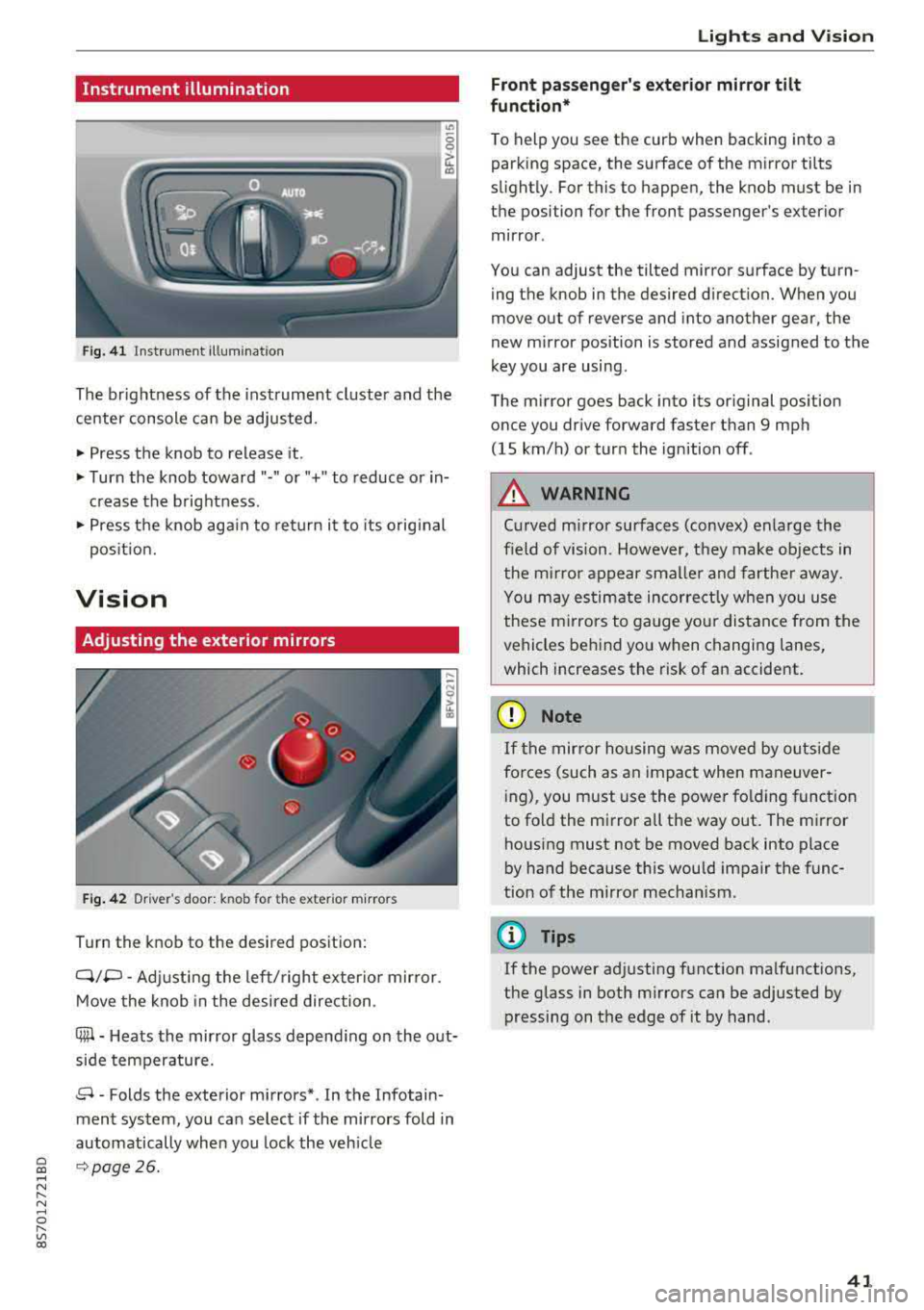
Fig. 41 Instrument illumination
The brightness of the instrument cluster and the
center console can be adjusted.
~ Press the knob to release it.
~ Turn the knob toward"·" or"+" to reduce or in
crease the brightness .
~ Press the knob again to return it to its original
posit ion.
Vision
Adjusting the exterior mirrors
Fig. 42 Driver 's door: knob for the ex ter ior mirrors
Turn the knob to the desired pos ition:
Q/P -Adjusting the left/ right exter io r mir ror.
Move the knob in the desired direction .
C@-Heats the mirror glass depend ing on the out
side temperature.
8 -Folds the exterior mirrors* . In the Infotain
ment system, you can select if the mirrors fold in
automatically when you lock the veh icle
9 page26.
Lights and Vision
Front passenger 's exterior mirror tilt
function*
To help you see the curb when backing into a
parking space, the surface of the mirror tilts
slight ly. For this to happen, the knob must be in
the position for the front passenger's exterior
mirror .
You can adjust the tilted mirror surface by turn ing the knob in the desired direction. When you
move out of reverse and into another gear, the
new mirror position is stored and assigned to the
key you are using .
The mirror goes back into its original position
once you drive forward faster than 9 mph
(15 km/h) or turn the ignition off .
A WARNING
Curved mirror surfaces (convex) enlarge the
f ield of vision. However, they make objects in
the m irror appear smaller and farther away.
You may estimate incorrectly when you use
these mirrors to gauge your distance from the
vehicles behind you when changing lanes,
which increases the risk of an accident.
(D Note
If th e mirror housing was moved by outs ide
fo rces (such as an impact when maneuver
i ng), you must use the power fold ing funct ion
to fold the mirror a ll the way out . The mirror
housing must not be moved back into place
by hand because th is would impair the func
tion of the mirror mechanism.
(D Tips
If the power adjusting function malfunctions,
the glass in both mirrors can be adjusted by
pressing on the edge of it by hand.
41
Page 51 of 310
Cl co .... N ,....
N .... 0 ,....
Vl co
(D Note
Beverage containers in the cup holders should
always have a lid. If not, beverages could spill
and cause damage to vehicle equipment, such
electronics or seat covers.
Additional storage compartments
You will find a range of storage compartments
and holders at different locations in the veh icle .
- Compartments in the doors
- Storage area in the glove compartment . The
glove compartment can be locked using the
mechan ica l key
q page 23.
- Storage compartment under the center arm
rest*
- Storage compartment on the rear side of the
seat* . The compartment can hold a max imum
weight of 2.2 lbs (1 kg).
A WARNING
-Always leave the lid on the glove compart
ment cover closed while driving to reduce
the risk of injury.
- Only use the storage compartments in the door trim panels to store small objects that
will not st ic k out of the compa rtment and
impair the range of the side a irbags.
Storage compartment between the seat
backrests
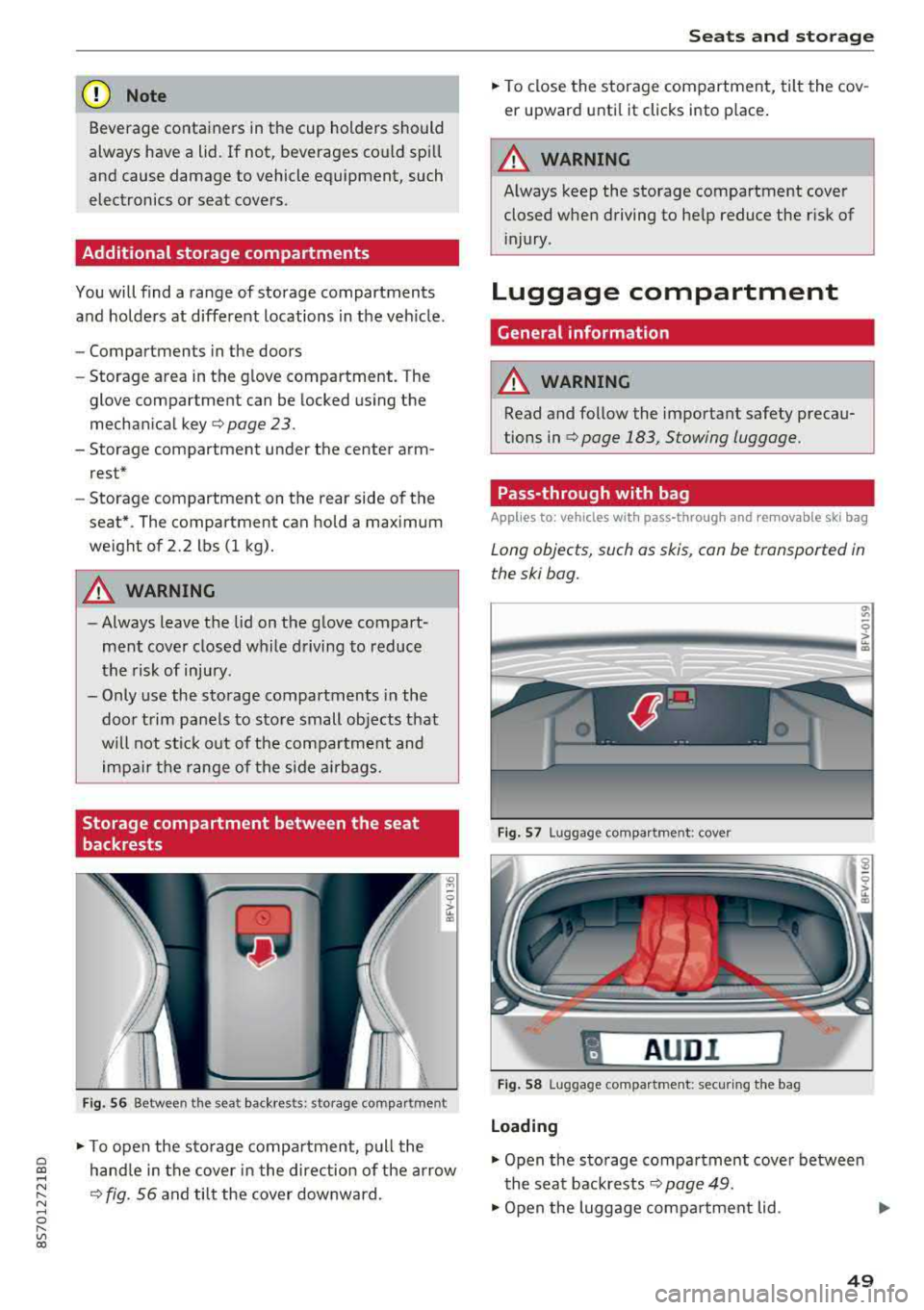
F ig . 56 Between the seat backrests: storage compartment
-
.. To open the s to rage compa rtment, p ull the
hand le in the cover in the direction of the arrow
q fig. 56 and tilt the cover downward.
S eats and storag e
.. To close the storage com partment, tilt the cov
er upward unti l it clicks into place .
A WARNING
Always keep the storage compartment cover
closed when driving to he lp reduce the risk of
i njury.
Luggage compartment
Gene ral information
A WARNING
-Read and follow the important safety precau
tions in
qpage 183, Stowing luggage.
Pass-through with bag
Applies to : vehicles with pass-through and removable ski bag
Long objects, such as skis, con be transported in
the ski bog.
Fig. 57 Luggage compa rtment : cove r
"
AUD I l
Fig . 58 Luggage compa rtment: secur ing the bag
Loading
.. Open the storage compartment cover betwee n
the seat backrests
Q page 49.
.. Open the luggage compartment lid . .,_
49
Page 53 of 310
Cl 00 .-< N r-N .-< 0 r-Vl 00
Warm and cold Climate control system
Description
The climate control system warms , cools and re
moves humidity from the air in the vehicle inte ri
or. It functions most effective ly w hen the w in
dows are closed. If there is a build -up of heat in
side the vehicle, venti lation can help to speed up
the cooling process .
Pollutant filter
The pollutant filte r removes pollutants such as
d ust and pollen from the a ir.
Key recognition
Certain settings are automat ically stored and as
signed to the remote contro l key being used .
A WARNING
Poor vis ibili ty ca n lead to ac cidents .
- For safer d riving, keep all windows free of
ice, snow a nd fog.
- Become fam ilia r as qu ickly as possible with
the correct use and function of the cl imate
c o ntro l system, espe cially with the defrost
ing and defogg ing func tion.
- Whe n the tempe ratu re is below free zing,
o nly use the win dshi eld washer sys tem after
the wi nds hield ha s been war med by t he cli
mate co ntro l sys tem. The washer fluid co ul d
freeze on the w indshield and impair visibili
ty .
{LlJ) Note
-If yo u suspect t hat the clim ate con trol sys
tem is d amaged, sw itch the system off to
Warm and c old
preven t furt her damage and have it chec ked
by an autho rized Audi dea ler o r auth orized
Audi Service Facility .
- Repairs to t he Audi climate control system
require special technical know ledge and
special tools. Have it inspected by an a u
thorized Aud i dealership or a qualified elec
tronics store.
@) For the sake of the environment
Reducing the amount of fue l used a lso re
duces the amount of pollutants that enter the
a ir.
{!) Tips
- To prevent interference with the heat ing
and cooling output and to prevent the win
dows from fogging over , th e a ir intake in
fro nt of t he w indshie ld m ust be free of ice,
snow o r leaves .
- Condensation from the cooli ng system can
dr ip and form a pudd le of water unde r the
veh icle . T h is is no rma l and does not mean
there is a le ak .
- Th e ene rgy managemen t system may tem
pora rily switch off certa in fu nctions, s uch as
the seat heati ng* o r rear window defogger.
Th ese sys tems are availab le aga in as soon
as t he ene rgy supply has been res tored .
- Th e flows throug h the vents under the re ar
w indow. Make s ure the openings are no t
cove red when plac ing clothing on t he lug
gage compa rtment cover .
51
Page 56 of 310
![AUDI TT ROADSTER 2018 User Guide Warm and cold
,.. To switch the seat heating off, press the Q] but-
ton repeatedly until the LED turns off.
The seat heating sw itches automatically from
setting 3 to setting 2](/img/6/57668/w960_57668-55.png "AUDI TT ROADSTER 2018 User Guide Warm and cold
,.. To switch the seat heating off, press the Q] but-
ton repeatedly until the LED turns off.
The seat heating sw itches automatically from
setting 3 to setting 2")
Warm and cold
,.. To switch the seat heating off, press the Q] but-
ton repeatedly until the LED turns off.
The seat heating sw itches automatically from
setting 3 to setting 2 after 10 minutes.
When seat h eating should not be switched
on
Do not t ur n the seat heating on under the follow
i n g circumstances :
- The seat is unocc upied.
- The seat is covered with a seat cover.
- The seat is covered with a child seat.
- The seat is damp or wet.
A WARNING
Individua ls with reduced sensitivity to pain or
temperature could develop burns when using
the seat heating function. To reduce the risk
of injury, these individuals should not use
seat heat ing .
«D Note
To avoid damage to the heat ing elements in
the seats, do not kneel o n the seats or place
heavy loads on a small area of the seat.
(D Tips
- The setting for the seat heating on the driv
er's side is ass igned to the key that is in use.
- If the front passenger's seat heating is
turned on, it will not turn on again automat
i ca lly if more than 10 m inutes have passed
between sw itching the ignition off and
switching it on again.
54
Neck heating
App lies to : vehicles wi th neck heating
The neck heating functions when the engine is
running .
Fig. 64 Driver 's seat: neck heating vents
Fig . 65 Cockp it: neck heating
The neck heating has three levels . If you turn the
knob to the right, the neck heating switches on
¢ fig. 65. The LEDs above the seat symbol indi
cate the ventilation level. Turn the knob to the
left to reduce ventilat ion. To switch off the neck
heating, keep turning the knob to the left until
no LEDs are turned on .
When the power top is closed, the neck heating
switches automatically from setting 3 to setting
2 after approx imately six minutes.
A WARNING
- Individuals with reduced sensitiv ity to pain
or temperature could develop burns when
using the neck heat ing . To reduce the risk of
in ju ry, these individuals shou ld no t use neck
heat ing.
- The output from the neck hea ting may be
come very hot temporarily if the air vents in
the seats
qfig . 64 are covered by clothing
or simi lar ob jects when the system is
Page 62 of 310
Driving
switched on. Switch the ignition off so that the
battery will not discharge .
Pressing start /stop button again will swit ch off
e ngine.
This message appea rs when you press the
I S TAR T
ENGI NE STOP I but ton while dr iving .
Engine start sy st e m: malfunction! Please con
tact Se rvice
The engine automatic start system has a mal
function. Drive to an author ized Audi dealer or
author ized Audi Service Facility immed iate ly to
have the malfunct ion co rrected . To sta rt the en
g ine, p ress and ho ld the lS TART
ENGINE STOPI
button.
fl Remote control key : hold back of key
again st the designated area. See owner 's man
ual
This message appears if there is no convenience
key inside the vehicle or if the system does not
recognize the key. The conve nience key may not
be recognized, for examp le, if it is covered by an
object that
disrupts t he s ignal (such as a b rief
case), o r if the key ba tte ry is weak. Elect ronic de
vices s uch as cell phones can also interfere w it h
the sign al.
T o sti ll be able to sta rt or stop the e ngine, see
~ page 60, Starting the engine when there i s a
malfunction .
Ill Remote control key: key not recognized . Is
the key still in the vehicle?
The Ill ind icator light turns on and this message
appears if the conve nience key was removed from
the vehicle whe n the eng ine was running .
If the
conven ience key is no longer in the vehicle, you
cannot swi tch the ig nition on or st art the engine
once yo u stop it. Yo u also cannot lock the veh icle
from the outside.
Please press brake pedal
This message appears if you do not press the
b rake pedal whe n starting the engine.
Please select N o r P
60
This message appears w hen starting or stopping
the engine if the selecto r lever is not in the "N " or
" P" pos ition. The engine will not sta rt/stop.
Shift to P, otherwise vehicle c an roll away.
Door s do not lock if gearshift is not in P
This message appears for safety reasons along
with a war ning tone. It appears if t he selec to r
l ever for the a utoma tic tr ansmiss ion is no t in the
P position when switching the ign ition off with
the I START
ENGINE STOPI button. Shift these
l ector lever to the P pos ition. Otherwise, t he vehi
cle co uld ro ll. You also cannot lock the veh icle us
ing the lock ing sensor on the door handle or us
i ng the conven ience key .
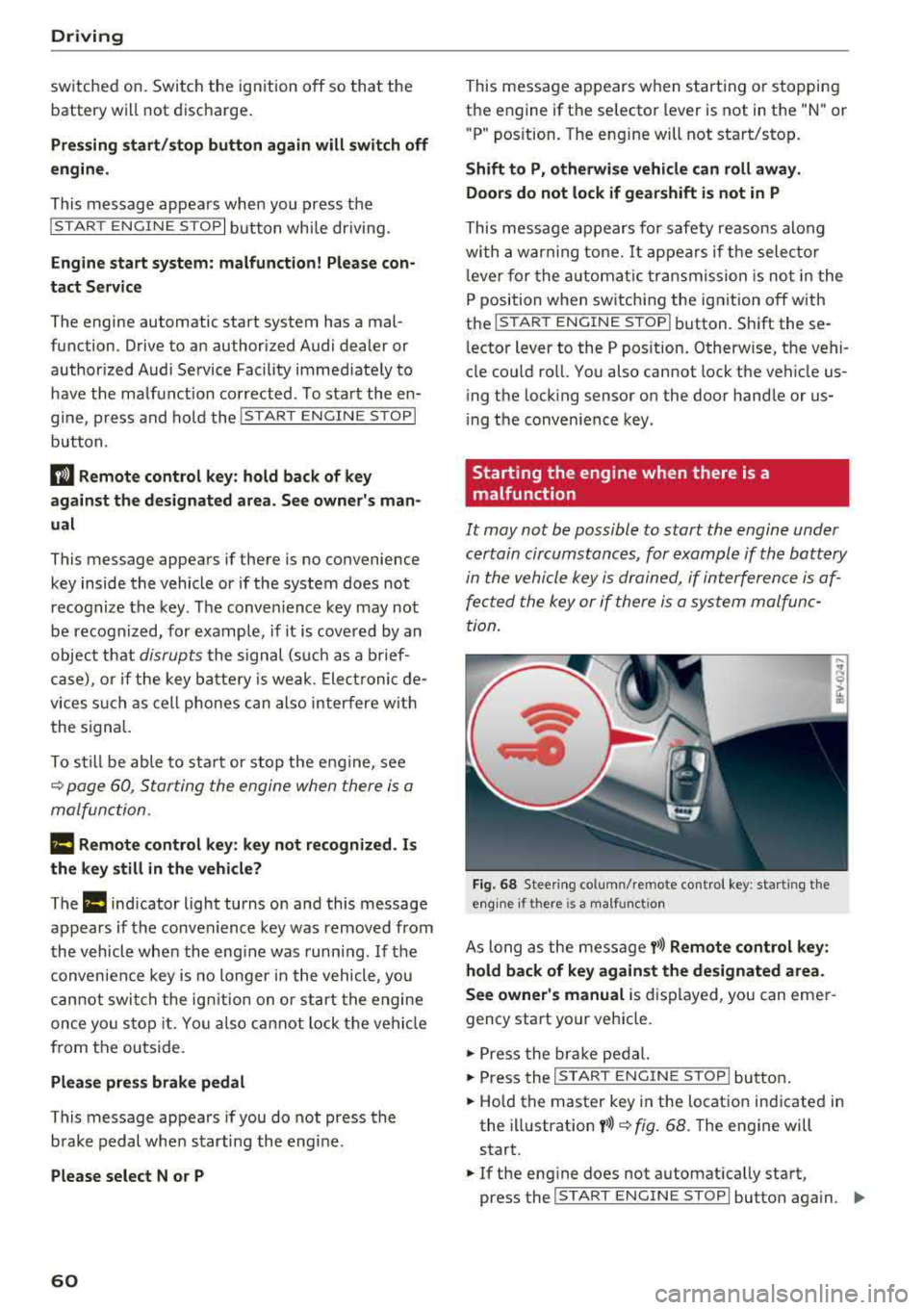
Starting the engine when there is a
malfunction
It may not be possible to start the engine under
certain circumstances, for example if the battery
in the vehicle key i s drained, if in terferen ce is af
fe cted the key or if there i s a system malfunc
tion.
Fi g. 6 8 Stee ring co lumn /remote contro l key : sta rting t he
e n g in e if there is
a m alfunct io n
As long as the message y>>) Remote control key :
hold back of key against the designated area.
See owner's manual
is d isplayed, you can emer
gency start your vehicle.
.,. Press the br ake pe dal.
... Press the I S TAR T ENGINE ST OP ! butto n.
.,. Hold the master key in the location ind icated in
the illustration
y >>) ~ fig . 68. The engine will
start .
.,. If the eng ine does not automat ica lly start,
press the
I S TART E NGINE STOPI butto n aga in . ..,.
Page 64 of 310
Drivin g
- If the power sup ply fai ls, you cannot set the
parking brake if it is release d. In this case,
park the vehicle on level ground an d secure
it by placing the selector lever in the P posi
t ion . See an authorized Aud i d ealer or au
thorized Aud i Serv ice Facility for ass istance.
- If you leave the veh icle, switch the ignit ion
off and take the vehicle key w ith you . This
applies particularly when children remain in
the vehicle. Othe rwise children could sta rt
the engine, re lease the par king brake o r op
erate electrical equipment such as power
windows, which increases the risk of an acci
dent.
- No one shou ld remain in the vehicle when it
is locked - especially chi ldren . Locked doors
make it more diff icu lt for emergency work
ers to get into the vehicle, which puts lives
at risk.
(D Tips
When stopping at a traffic signal or stopping in city traffic, you can set the parking brake
manually. The vehicle does not have to be
he ld w ith the brake pedal. The parking brake
elim inates the tendency to creep when a se
lector lever pos ition is engaged. As soon as
you press the accelerator pedal, the park ing
brake releases automat ica lly and your vehicle
s tarts to move
~ page 62.
(D Tips
- Occasiona l noises when the par king b rake is
set and re leased a re normal and a re not a
cause for con cern.
- T he par king brake goes th ro ugh a se lf-test
cycle at regular intervals when the veh icle is
stoppe d. Any noises associated w ith this a re
no rma l.
- If there is a power fa ilure, the p arking bra ke
will not set if it is re leased, and it will not
release if it is
set~ &.. See an authorized
A udi dealer or authorized Audi Service Fa
cility for ass istance.
62
Starting to drive
Va rious convenience and sa fe ty f unctions may be
available when the vehicle begins driving, de pending on vehicle equipment.
Starting on hills with th e parking brake set
Requireme nt: the d rive r's doo r mus t be closed.
"'To sta rt drivi ng comfortably when on a h ill, set
the parking b rake and beg in driving as usual.
The b raking force of the pa rking brake does not
release automat ic a lly until t he whee ls build up
enoug h driving force .
Starting on hills with hill hold assist
Hill hold assist makes it easier to start on hills .
Requirement: the driver 's door must be closed
and t he engine must be running.
"' To activate hi ll hold assist, press and hold the
brake pedal for severa l seconds. The vehicle
must be in an uphill direct ion of travel.
After re leasing the brake pedal, the braking pow
er is maintained for a brief
moment~ A to pre ·
vent the vehicle from ro lling back when starting.
D ur ing this time, you can easily begin to move
your vehicle.
A WARNING
Applies to: vehicles with hill hold assist
-If you do not beg in dr iving immed iate ly or
t he engine stalls after releasing the bra ke
pedal, your veh icle may beg in to roll back
ward . Press the bra ke peda l or set the park
ing brake immediately.
- The inte lligent technology of hill ho ld assist
cannot ove rcome the limitat ions imposed by
natural phys ica l laws. The increased com fort
offered by hill hold assist should not cause
you to take safety risks .
- Hill hold ass ist cannot hold the vehicle in
place on all hills (for examp le, if the ground
is s lippery or icy).
- To reduce the r is k of an accident, always
make sure the veh icle is situated safely
while stationary .
Page 67 of 310
Cl co .... N ,....
N ...... 0 ,....
Vl co
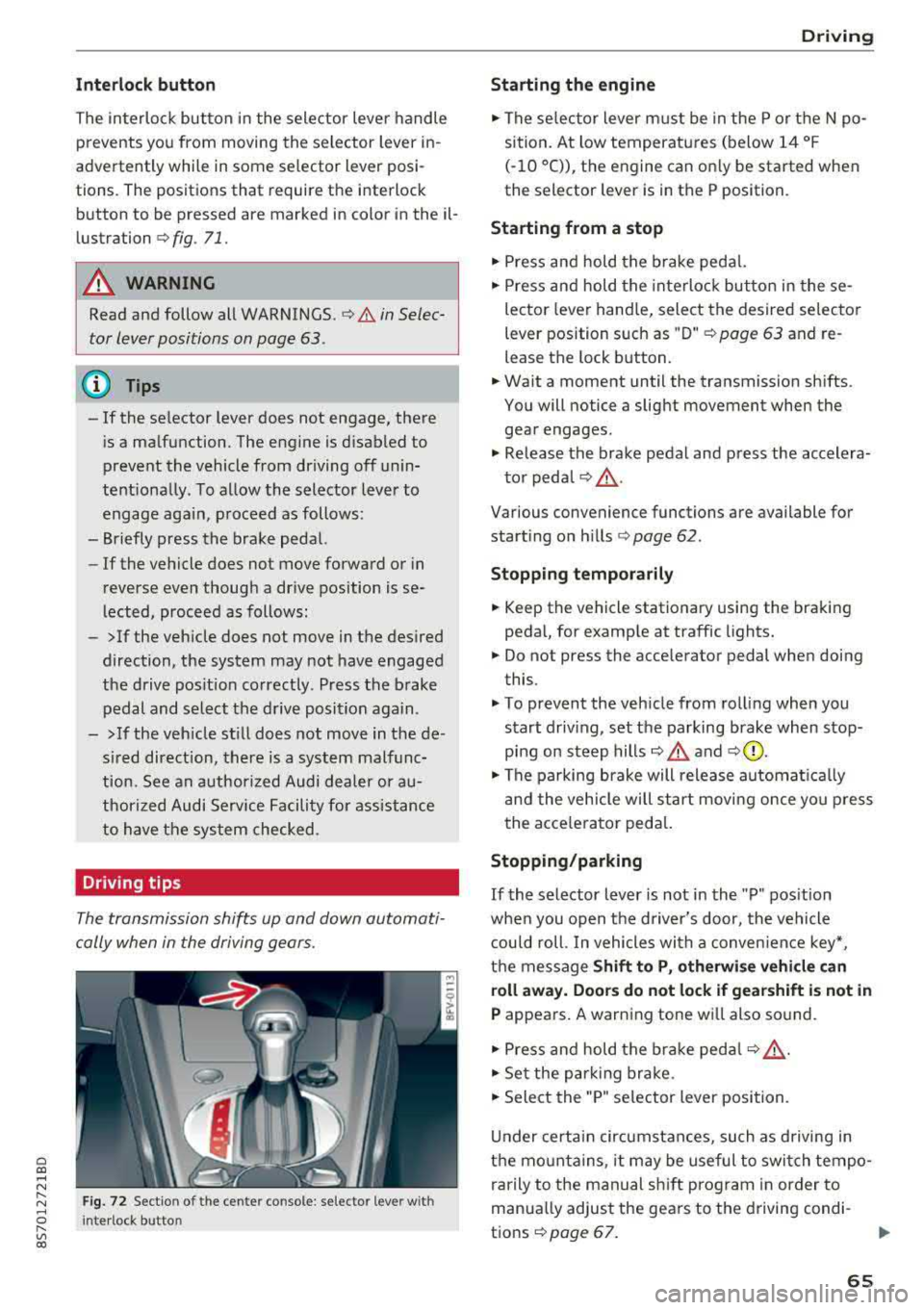
Inte rlock button
The in terlock button in the selector lever handle
prevents you from moving the selector lever in
advertently while in some selector lever posi
tions. The positions that require the interlock
button to be pressed are marked in color in the il
lustration
c:;, fig . 71.
A WARNING
Read and follow all WARNINGS . c;, .&. in Selec
tor lever positions on page 63.
@ Tips
-If the se lector lever does not engage, there
i s a malfunction. The engine is d isabled to
prevent the vehicle from driving off unin
tentiona lly . To allow the selector lever to
engage aga in , proceed as follows:
-Briefly press the brake pedal.
-If the vehicle does not move forward or in
reverse even thoug h a drive position is se
lected, proceed as follows:
-> If the veh icle does not move in the desired
direction, the system may not have engaged
the drive pos it ion correctly. Press the brake
pedal and select the drive position again.
->If the veh icle st ill does not move in the de
s ired direction, there is a system malfunc
tion. See an authorized Audi dea ler or au
thorized Audi Service Facility for assistance
to have the system checked .
Driving tips
The transmission shifts up and down automati
cally when in the driving gears.
F ig. 72 Sectio n of the cente r console: se lecto r leve r w ith
I nte rlock button
D rivi ng
Starting the engine
.,. The se lector lever must be in the P or t he N po
sition. At low temperatures (below 14 °F
(-10 °C)), the engine can on ly be started when
the selector lever is in the P position.
Starting from a stop
.,. Press and hold the brake pedal.
.,. Press and hold the interloc k butto n in these
lector lever hand le, select the desired selecto r
lever position s uch as " D"
c;, page 63 and re
lease the lock b utton.
.,. Wa it a moment until the transmission sh ifts.
You will notice a slight movement when the
gear engages .
.,. Release the brake pedal and press the accelera-
to r peda l
c;, _&..
Various convenience functions are available for
start ing o n hills
¢ page 62.
Stopping t emporarily
.,. Keep the vehicle stationary using the braking
pedal, for examp le at traffic lights.
.,. Do not press the acce lerator pedal when doing
this.
.,. To prevent the veh icle from rolling when you
s tart driv ing, set the parking brake when stop
ping on steep
hills¢ .&. and c;,0.
.,. The pa rking brake will release automat ica lly
and the vehicle will star t movi ng once yo u press
the acce le rator ped al.
Stopping /parking
If
the selector lever is not in the "P" pos ition
whe n you open the d river's door, the vehicle
c ou ld roll. In vehicles wi th a conven ien ce key*,
t h e message
Shift to P, otherwi se vehicle can
roll away. Door s do not lock if gearshift is not in
P appears. A warning tone wi ll also so und .
.,. Press and hold the brake peda l c;, _&. .
.,. Set the park ing br ake .
.,. Sele ct the "P" selector lever position.
U nder certain circumstances, such as d riving in
the mo unta ins, i t may be useful to switch tempo
rarily to the manual sh ift prog ram in order to
manua lly adjust the gears to the d riving condi-
t ions
c;, page 67. .,.
65
Page 77 of 310
Cl co .... N ,....
N
This message appears if you are not stee ring by
yourse lf . If this is th e case, active lane ass ist does
not switch off, but it is "not ready" to provide a
warning . The system can he lp you keep the veh i
cle in the lane. However, you are responsible for
driving the vehicle and must steer it yourself .
A WARNING
Note that messages may be delayed or not
displayed on vehicles with accessor ies mount
ed on the steer ing whee l, such as a stee ring
wheel sp inner knob. Always keep you r hands
on t he steering whee l.
Adjusting the steering time and vibration
warning
Appl ies to: vehicles with Audi act ive lane ass ist
You con adjust individual act ive lone assist set
tings in the Infotainment system.
Selec t in the Infotai nment system : I MENUI but
ton>
Vehicle > left con trol button > Driv er a ssis
tance > Audi acti ve lane assist
Steering time
1>
Early : in this setting, the correct ive steering hap
pens continuously to help keep the vehicle in the
center of the lane .
Late : in this setting, the system provides correc
tive steering just before a vehicle whee l touches a
detected lane ma rker line .
Vibration warning
You can switch the additional vibration warning
in the steering wheel o n or off.
(I) Tips
In certain markets: your settings are stored
automatically and assigned to the remote
cont rol key in use .
8 1l The co rrect ive stee rin g fu nctio n is not ava ilabl e in all mar ,..._
~ kets.
A ssi st a nce systems
Audi side assist
Description
Applies to: veh icles w ith Audi side assist
0, :;; 0
it m
Fig . 81 Senso r de tect io n range
Fi g. 82 Disp lay on t he ex te ri or m irro r
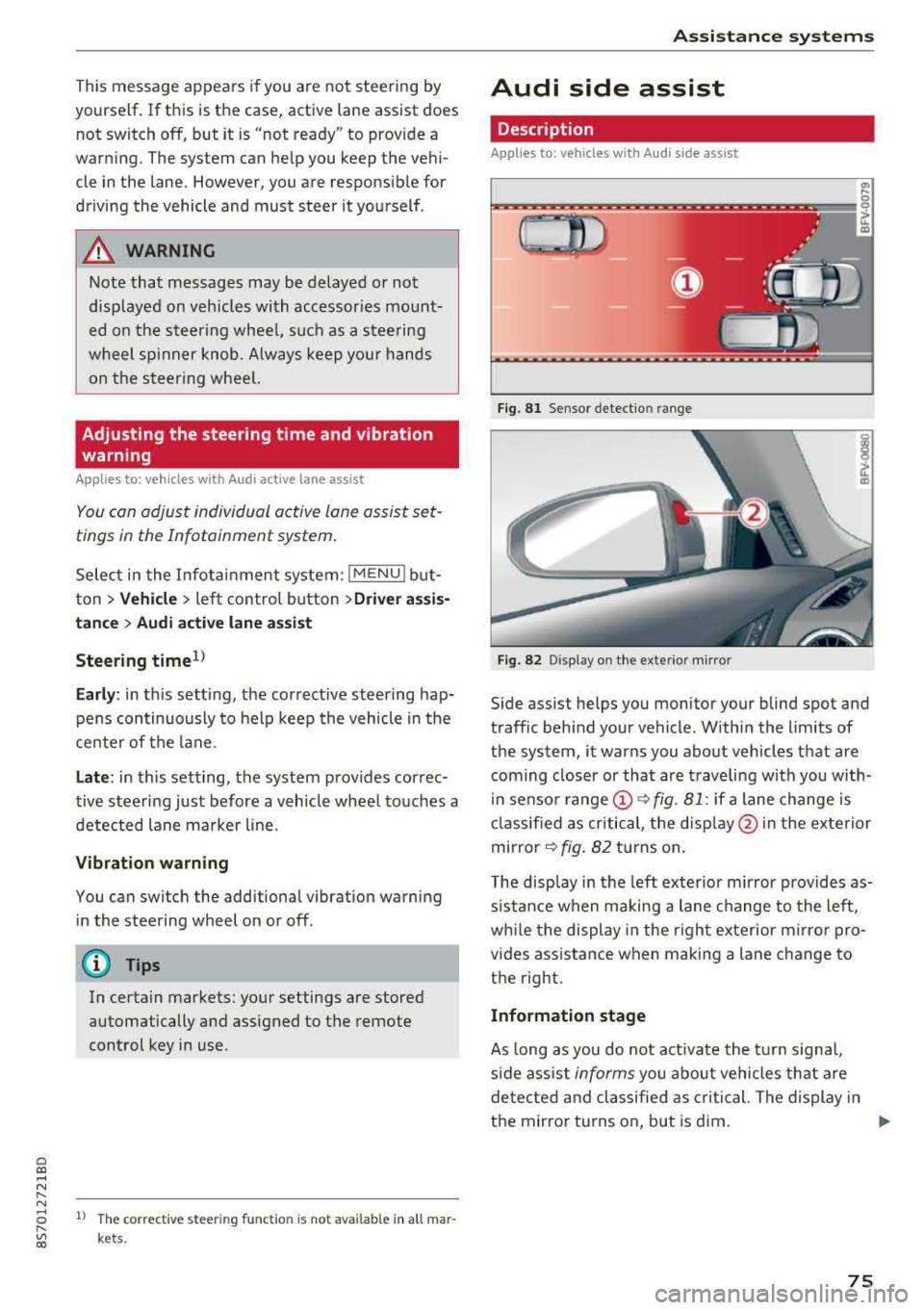
Side assist helps you monitor your blind spot and
traff ic beh ind your vehicle . Withi n the limits of
the system , it warns you abo ut vehicles that are
coming closer or that a re t raveling with you with
i n senso r
range @~ fig. 81: if a lane change is
cla ssified as critical , the disp lay @ in the e xte rior
mirror
~ fig . 82 turns on .
T he display in the left exterio r m irror p rovides as
s istance when making a lane change to the left,
whi le the display in the r ight exterior mirro r pro
vides ass istance when m aking a lane change to
the right.
Information stage
As long as you do not act ivate the tu rn s igna l,
s ide ass ist
informs you about vehicles tha t are
detec ted and classifie d as critical. The display in
t h e mirror tu rns on, but is d im.
75
Page 79 of 310
Cl 00 ... N r-N ... 0 r-Vl 00
system may have detected a vehicle in another
l ane that is
not adjacent to your current lane .
- If you are dr iving t hrough a curve . Side assist
may react to a vehicle that is one lane over
from the adjacent lane .
- If side assist reacts to other objects (such as
high or displaced guard rails) .
- In poor weat her condit ions . The side assist
functions a re limited.
D o no t cove r the radar
sensors ¢ fig. 84 wit h
sticke rs, deposits, bicycle whee ls o r othe r ob
jects , beca use they w ill impai r the f unct ion . For
information on cleaning,
see¢ page 266 .
A WARNING
-Always pay atte ntion to traffic and to the
area aro und yo ur vehicle. Side assist cannot
rep lace a dr ive r's attention. The dr ive r alone
is a lways responsib le for lane changes and
s imi lar driving maneuvers .
- In some situat ions, the system may not
function or its funct io n may be limited . For
example:
- If vehicles a re a ppro ac hi ng o r being le ft
behind very quickly. The display may not
tur n on in t ime .
- I n poo r weather cond itions s uch as heavy
rain, snow o r heavy mist .
- On very wide lanes, in t ight curves, o r if
there is a rise in the road s urface. Vehicles
in the adjacent lane may not be detected
beca use they are outs ide of the sensor
range.
{Ll) Note
The sensors can be disp laced by im pacts o r
damage to the bumpe r, whee l housing and
underbody. Th is can impa ir the system. Have
an authorized A udi dealer or autho rized Audi
Serv ice Facility c heck their fu nction.
(D Tips
- If the window g lass in the d river 's doo r or
front passenger 's doo r has been t inted, the
display in the exterior mirror may be i ncor
r ect .
-
Ass istance systems
- F or an exp lanat ion on co nf orm ity w it h t he
FCC regulat ions in the Un ite d States an d the
Indust ry Canada regulat ions, see
¢ page 293.
Switching on and off
App lies to : vehicles wi th Audi side ass ist
.. Select in the Infotainmen t system: I M ENU ! but
ton
> Vehicle > left control b utton > Driver a s
s istance > Audi side a ssist
If the system is activated, the disp lays in the ex
terior m irrors w ill turn on briefly when the igni
t ion is switched on .
Adjusting the display brightness
Applies to : vehicles wit h Audi s ide ass ist
The display brightness con be adjusted in the In
fotainment system .
.. Select in the Infotainment system: I MENU! but
ton
> Vehicle > left control button >Dri ver as
sistance > Audi side assist
The disp lay br ightness adjusts automatically to
the brightness of the surroundings, both in the
i nformation and in the wa rn ing stage. I n very
dark or very br ight surround ings, the automatic
adjustment w ill set the display to t he m inimum
o r max imum level. In such cases, yo u may notice
no ch ange when adj usting the br igh tne ss, or the
c h ange m ay only be noticeab le on ce t he sur
r oundings change.
Adjust the br ightness to a leve l w he re the d isplay
in th e i nfo rm atio n stage will not disrupt yo ur
v iew ahe ad. If yo u change the br igh tness , the d is
play in the exterio r mirror wi ll briefly show the
brightness leve l in the information stage . The
brig htness of th e warning stage is linked to the
brightness in the information stage and is adjust
ed along with the information stage.
(D Tips
- Side ass ist is not act ive while you are mak
ing the adjustment.
- Yo ur settings a re automat ica lly stored and
assigned to the remote control key be ing
used.
77
Page 81 of 310
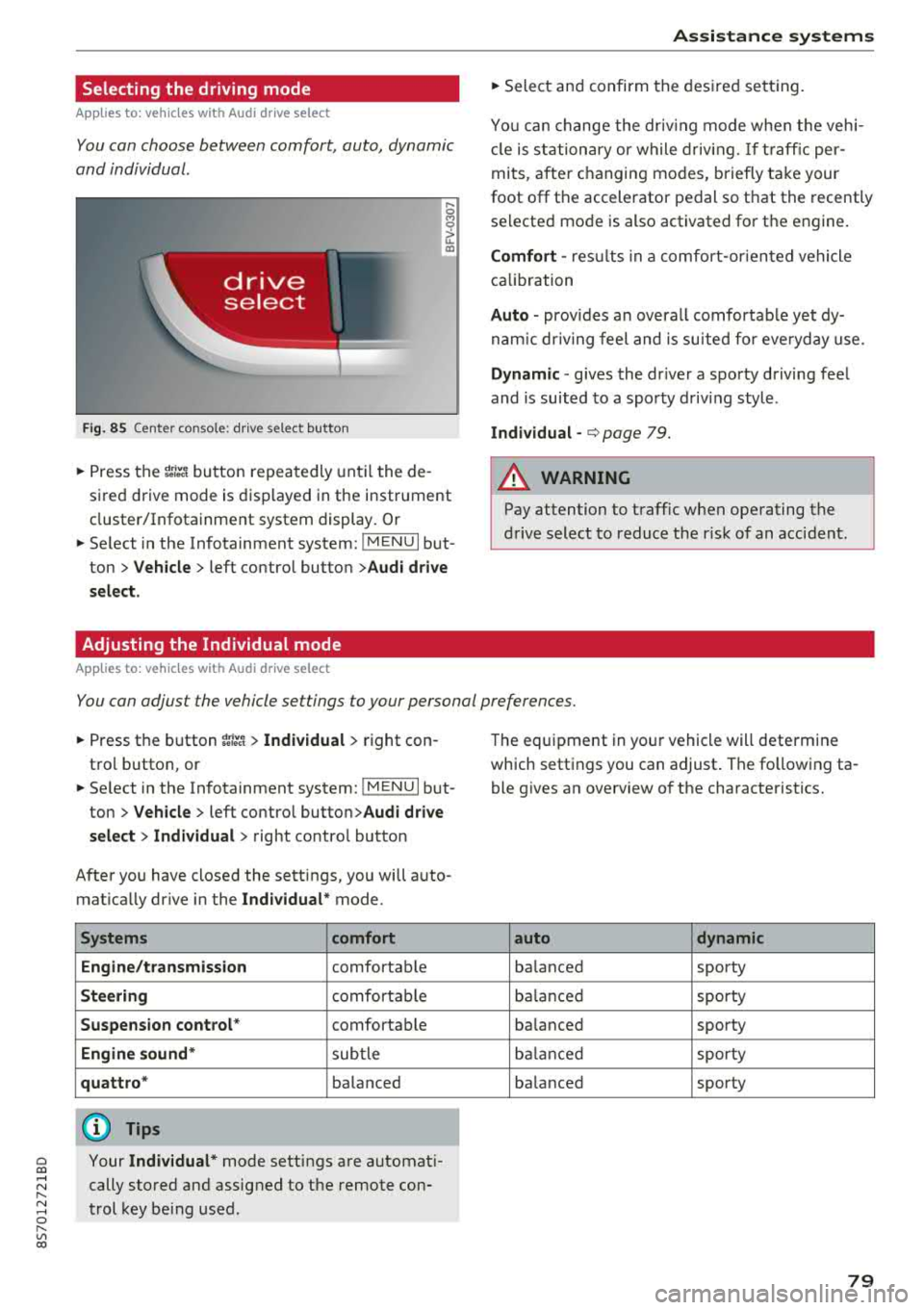
Selecting the driving mode
App lies to: ve hicles with Audi drive select
You can choose between comfort, auto, dynamic
and individual .
Fig. 85 Center conso le: drive select button
.... 0 M 0
G'. al
.. Press the ~i~ button repeatedly until the de
sired drive mode is displayed in the instrument
cluster/Infotainment system display . Or
.. Se lect in the Infotainment system: !MENUI but
ton >
Vehicle > left contro l button >Audi drive
select.
Adjusting the Individual mode
Applies to: ve hicles with Audi drive select
Assistance systems
.. Select and confirm the desired settin g.
You can change the driv in g mode when the veh i
cl e is stationary or while driving.
If traffic per
mits, after ch anging modes, briefly ta ke your
foot off t he accelerator pedal so that the recently
se lected mode is also activated for the engine.
Comfort -res ults in a comfo rt-orien ted vehicle
calibration
Auto -provides an overa ll comfortab le yet dy
namic driving feel and is suited for everyday use.
Dynamic -gives the driver a sporty driving fee l
and is suited to a spo rty driving style .
Individual -¢ page 79.
A WARNING ...__ -
Pay attention to traffic w hen operating the
drive select to reduce the r isk of an accident .
You can adjust the vehicle settings to your personal preferences .
.. Press the button ~:/:er. > Individual > right con
tro l button, or
.. Se lect in the Infotainment system: !MENUI b ut
ton>
Vehicle > left contro l button> Audi drive
select> Individual >
right contro l button
After you have closed the sett ings, you will a uto
mat ica lly dr ive in the
Individual* mode.
Systems comfort
Engine/transmission
comfortable
Steering comfortable
Suspension control * comfortable
Engine sound* subtle
quattro * balanced
(D Tips
~ Your Individual* mode settings are automat i-
;:::: cally stored and assigned to the remote con-r--
~ trol key being used. 0 r-Vl 00
T he equipment in yo ur vehicle will determine
which settings you can adjust . The fo llowing ta
ble gives an overview of the characteristics.
auto dynamic
balanced sporty
balanced sporty
ba lanced sporty
balanced sporty
ba lanced sporty
79