light AUDI TT ROADSTER 2018 User Guide
[x] Cancel search | Manufacturer: AUDI, Model Year: 2018, Model line: TT ROADSTER, Model: AUDI TT ROADSTER 2018Pages: 310, PDF Size: 46.95 MB
Page 18 of 310
Instruments and indicator lights
<;v! Windshield wipers
i,ij Windshield wipers: malfunction! Pl ease
c ontact Servic e
There is a malfunc tion with t he w indshie ld w ip
ers .
D rive to an authori zed Aud i dea ler or aut hori zed
Aud i Serv ice Facility immediately to have the
malfunc tion corrected .
-:
fa iled. The message in dicat es t he loca tion of the
b ul b.
Re place the bulb immedia tely .
Vehicle lights: malfunction! Please contact
Service
There is a malfunction in the head lights or t he
light switch . D rive to an autho rized A udi dealer or
author ized Audi Se rvice Facility immed iate ly to
have the ma lf u nct ion co rrected.
A WARNING
- L igh t bu lbs are under pressu re and can ex
plode when bulbs are replaced, which in
cr eases t he ris k of injury.
- W it h gas-discharge lam ps* (xenon head
l igh ts), th e high-voltage component must
be handle d ap propriate ly. Otherwise, t here
is a risk of fa tal in jury.
~[) Headlight range control system
II Headlight range control : malfunction! See
owner 's manual
T here is a malfunc tion in the hea dlight range
con trol sys tem, w hich m ay cau se g lare fo r othe r
d rivers.
D rive to an a utho rized Aud i dea le r or a uth orized
Au di S ervice Fac ility immedia tely to have t he
malfunc tion co rrecte d.
16
-
~O Audi adaptive light
Applies to: vehicles with Audi adaptive light
JII Audi adaptive light : malfunction! See own
er's manual
There is a ma lf u nction in the adap tive ligh ts. T he
headlig hts still funct ion .
D rive to an author ized A udi dealer or autho rized
Audi Se rvice Fac ility immed iate ly to have the
malfunction correc ted .
~D Light/rain sensor
Applies to: vehicles with light/rain sensor
El Automatic headlights : malfunction! See
owner's manual
m Automatic wipers: malfunction ! See owner's
manual
The light/ rain sensor is malfunctioning.
The low beams remain sw itche d on at all times
fo r safety reasons whe n the light switch is in t he
AUTO position. Yo u can cont in u e to turn t he
li ghts on and
off using the lig ht switch . You can
still contro l all w iper fu nctions t hat are inde
pende nt of t he rain senso r.
D rive to an authorized A udi dealer or autho rized
Audi Se rvice Facility immed iate ly to have the
malfunction cor rected .
g Suspension control
Applies to: vehicles with Audi drive select
B Suspension: malfunction! You may continue
driving
There is a suspension contro l ma lf u nction.
D rive to an authorized A udi dealer or autho rized
Audi Se rvice Fac ility immed iate ly to have the
malfunction cor rected .
¢¢ Turn signals
If the. or B in dicator lig ht blinks, a tur n sig
nal is tu rned on .
If both indica to r lights are bl ink
i ng, t he emergency flashers are on .
Page 19 of 310
Cl co .... N ,-... N ...... 0 ,-... Vl co
Driver information system
Overview
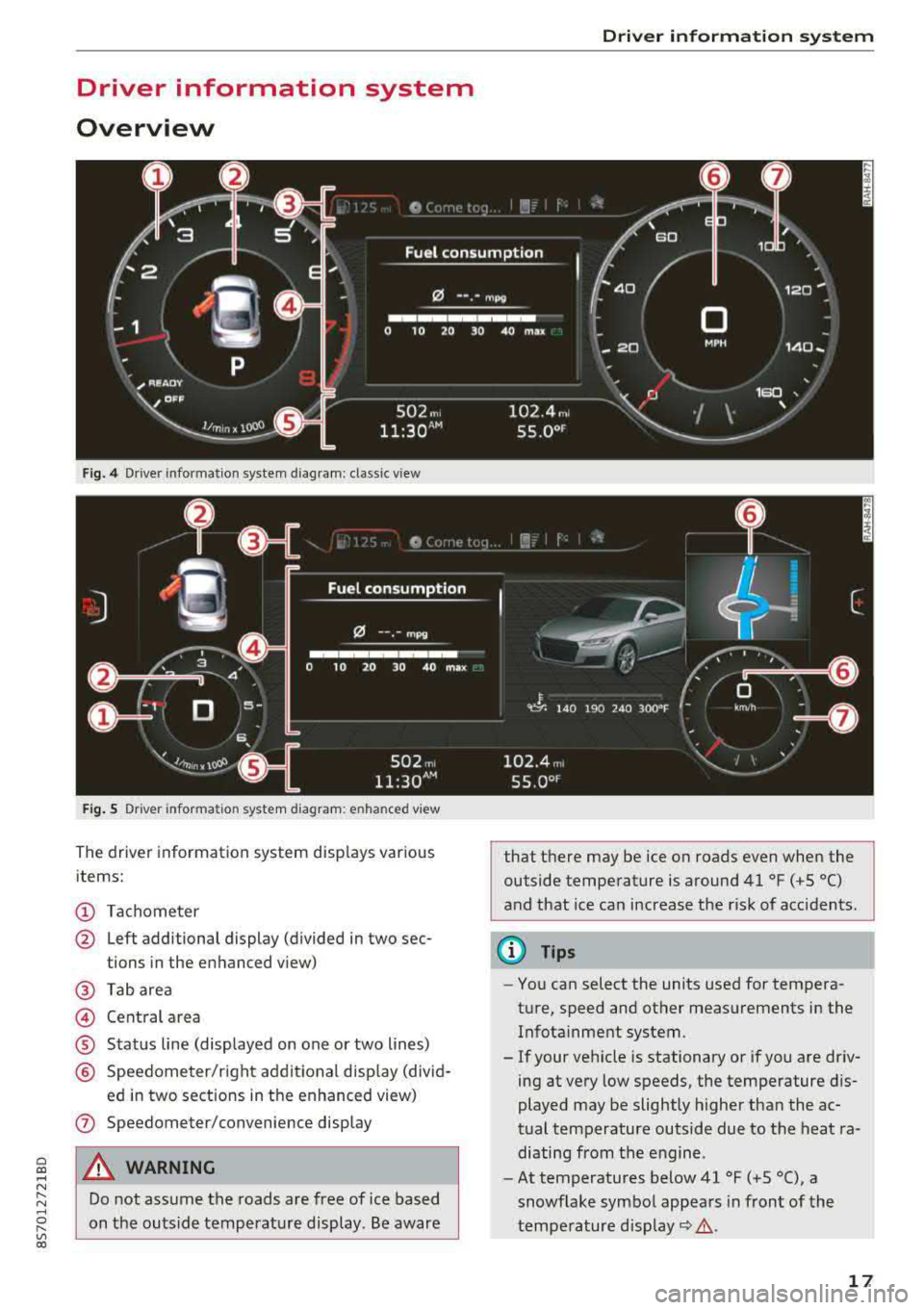
Fig. 4 Driver information system diagram: classic v iew
Fig. S D rive r in formation system diagram : en ha nced v iew
The driver information system displays various
items:
(D Tachometer
@ Left additional display (divided in two sec-
tions in the enhanced view)
@ Tab area
@ Central area
® Status line (displayed on one or two lines)
@ Speedometer/right additional display (divid-
ed in two sections in the enhanced view)
(J) Speedometer/convenience display
A WARNING
Do not assume the roads are free of ice based
on the outside temperature display . Be aware
Driver information system
that there may be ice on roads even when the
outside temperature is around 41 °F ( +S °C)
and that ice can increase the risk of acc idents.
(D Tips
- You can select the units used for tempera
ture, speed and other measurements in the Infotainment system .
- If your vehicle is stationary or if you are driv
ing at
very low speeds, the temperature dis
played may be slightly higher than the ac
tual temperature outside due to the heat ra
diating from the engine.
- At temperatures below 41 °F (+S °C), a
snowflake symbol appears in front of the
temperature
display~ &.
17
Page 24 of 310
Opening and clo sin g
Opening and closing
Central locking
Description
You can lock and u nlock the veh icle centrally. You
have the following options:
- Remote control key
i:> page 24,
- Sensors in the door handles* c> page 25,
-Lock cylinder on the driver 's door c> page 27,
or
- Interior central locking switch
c> page 26.
Auto Lock
The Auto Lock funct ion locks all doors and the
luggage compartment lid once the speed has ex
ceeded approx imately 9 mph (lS km/h).
The vehicle can be unlocked if the opening func
tion in the centra l locking system sw itch is used
or one of the door handles is pulled. The Auto L ock function can be switched on and off in the
Infotainment system
c> page 26.
I n t he event of a crash with a irbag deployment ,
the doors will a lso automat icall y unlock to allow
access to the vehicle .
Selective unlocking
The doors and luggage compartment lid w ill lock
when they close. You can set in the Infotainment
system whether
only the driver's doo r or the en
tire veh icle should be unlocked when unlocking
c>page26.
Turn signals
The turn s ignals flash tw ice when you un lock the
veh icle and flash once when you lock the veh icle .
I f the blin king con tinues, one of the doors or the
luggage compartment lid is not closed or the ig
nition is still switched on .
Unintentionally locking yourself out
Only lock your vehicle when all of the doo rs and
the luggage compa rtment l id a re closed and the
remo te control key is no t in the vehicle. This
he lps to prevent yo u from locking yourself out
accidentally.
22
The following conditions prevent yo u from lock
ing your remote control key in the vehicle:
- If the driver's door is open, the vehicle can not
be locked by press ing
the ~ button on the re
mote contro l key or by touching the locking
sensor* on a door .
- If the mos t recently used conven ien ce key* is
detected in the luggage compartment, the lug
gage compartment lid automatica lly unlocks
again after closing it.
- If the convenience key* that was last used is de
tected inside the vehicle, then the vehicle can
not be locked from the outside.
(D Tips
- Do not leave va luables unattended in the ve
hicle. A locked vehicle is not a safe!
- The LED i n the driver's door rail b links when
you lock the vehicle. If the LED lights up for
approximate ly 30 seconds after locking,
there is a malfunction in the central locking
system. Have the problem corrected by an
authorized A udi dealer or autho rized Aud i
Service Facility .
Key set
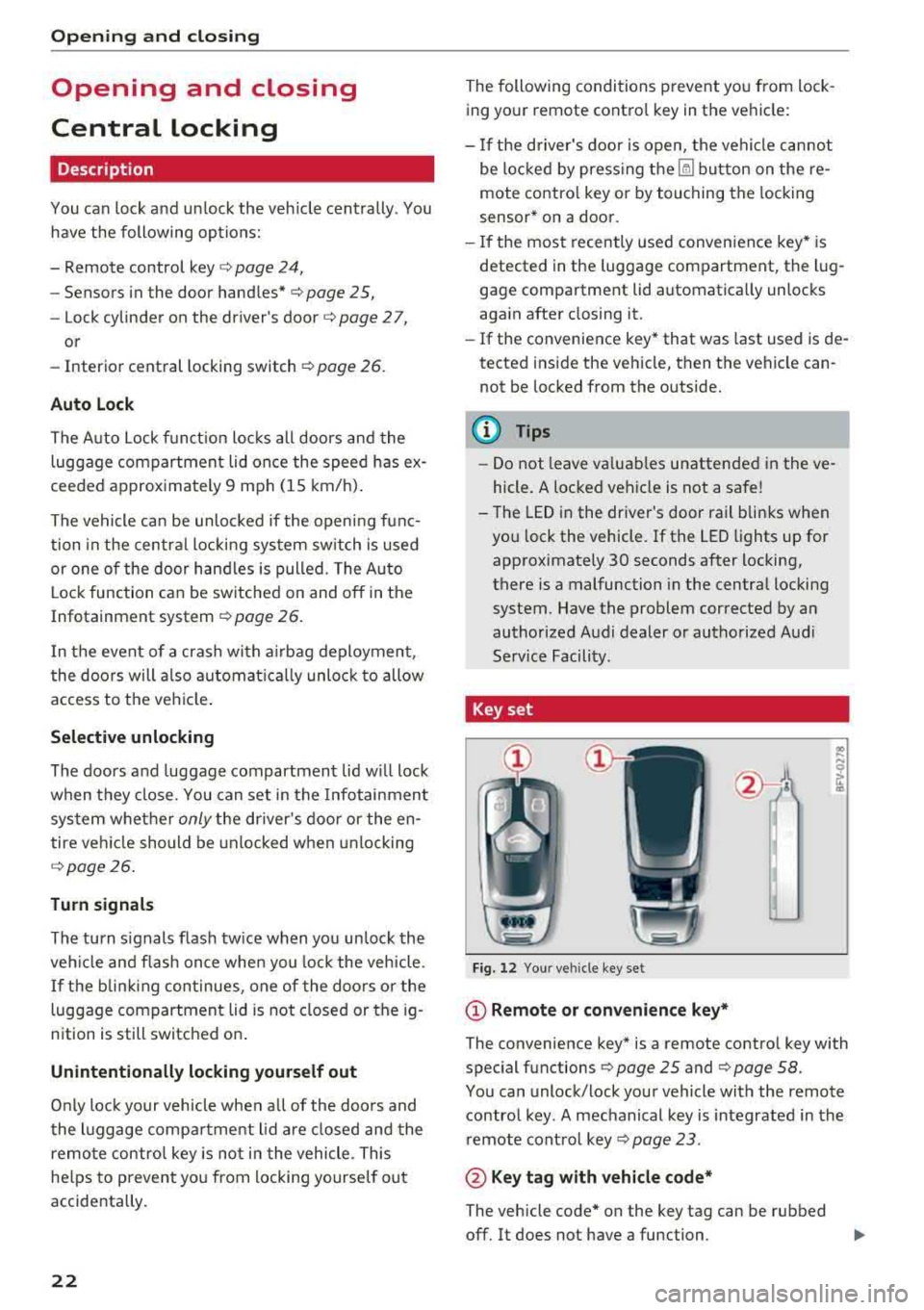
Fig. 12 Your ve hicle key set
(D Remote or con venience key*
.. .... N 0
ti
The convenience key* is a remote control key with
special functions
c> page 25 and c> page 58.
You can unlock/lock your vehicle with the remote control key . A mechanical key is integrated in the
remote control key
c> page 23 .
@ Key ta g w ith vehicle code*
The vehicle code* on the key tag can be rubbed
off. It does not have a function .
Page 26 of 310
Opening and closing
LED and batteries in the remote control key
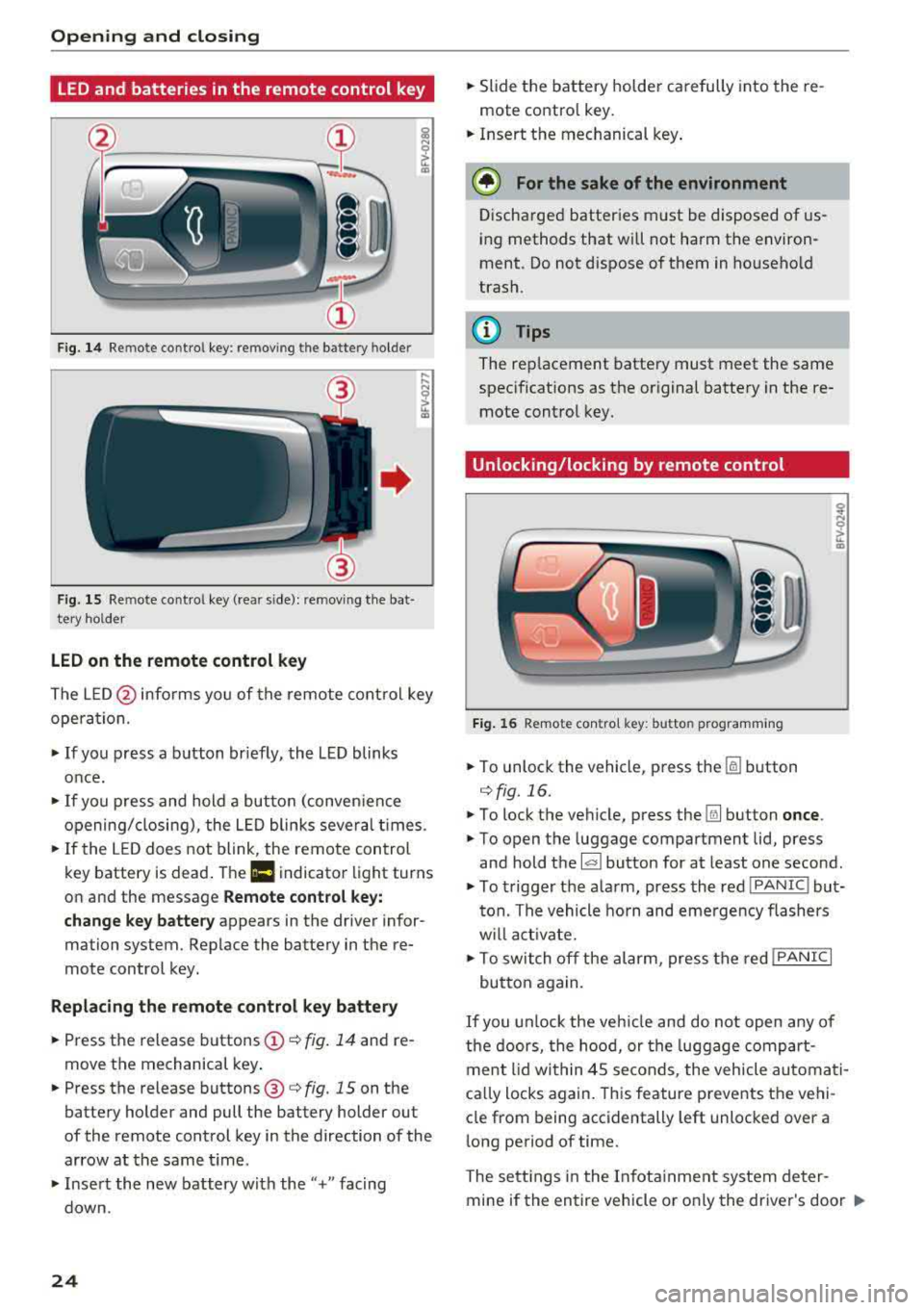
Fig. 14 Remote control key: removing the battery holder
Fig. 15 Re mote control key (rear side): removing the bat·
tery holder
LED on the remote control key
The L E D @ informs you of the remote control key
opera tion.
~ If you press a button briefly, the LED blinks
once.
~ If you press and hold a button (conven ience
opening/closing), the LED blinks several times.
~ If the LED does not blink, the remote control
key battery is dead . The
Ill indicator light turns
on and the message
Remote control key:
change key battery
appears in the driver infor·
mation system. Replace the battery in the re
mote control key.
Replacing the remote control key battery
~ Press the release buttons (!)¢ fig. 14 and re
move the mechanical key .
~ Press the release buttons@¢ fig. 15 on the
battery holder and pull the battery holder out
of the remote control key in the direction of the
arrow at the same time.
~ Insert the new battery w ith the"+" facing
down.
24
~ Slide the battery holder carefully into the re
mote contro l key.
~ Insert the mechanical key .
@ For the sake of the environment
Discharged batteries must be disposed of us
ing methods that will not harm the environ
ment. Do not dispose of them in household
trash.
@ Tips
The rep lacement battery must meet the same
specifications as the original battery in the re
mote control key.
Unlocking/locking by remote control
Fig. 16 Remote contro l key: butto n programm ing
~ To unlock the vehicle, press the [§] button
c:> fig. 16.
~ To lock the vehicle, press the Ifill button once .
~ To open the luggage compartment lid, press
and hold the
l al button for at least one second.
~ To trigger the alarm, press the red IPANIC I but
ton. The vehicle horn and emergency flashers
w ill activate.
~ To switch off the alarm, press the red !PANIC I
button again.
If you unlock the vehicle and do not open any of
the doors, the hood, or the luggage compart
ment lid within 45 seconds, the vehicle automati
ca lly locks again. This feature prevents the vehi
cle from being accidentally left unlocked over a
long period of time.
The settings in the Infotainment system deter
mine if the entire vehicle or o nly the driver's door
..,_
Page 28 of 310
Opening and clo sin g
pull once on the door handle to unlock the
vehicle and a second time to open it .
- The energy management system gradually
turns off unnecessary convenience functions
to prevent the vehicle battery from draining
and to maintain the vehicle's ability to start
for as long as possible. You may not be able
to unlock your vehicle using the convenience
key.
- For an explanation on conformity with the
FCC regulations in the United States and the
Industry Canada regulations, see
¢page 293.
(0 Tips
Unlocking with the convenience key (keyless
access) can be deactivated temporarily .
- Place the selector lever in the "P" pos ition;
otherwise, the vehicle cannot be locked.
- Close the door and press the button
(D III
¢ page 24, fig.16.
- Press the sensor on the door handle on ce
within five seconds ¢ fig. 17, ¢ & . Do not
ho ld the door handle wh ile doing this .
- The next time the vehicle is unlocked, it can
on ly be done with the remote control key or
mechanically us ing the door lock cylinder.
The convenience key will be active again af
ter the next loc king/un locking.
Central locking switch
F ig . 18 Dr ive r's doo r: central locki ng switch
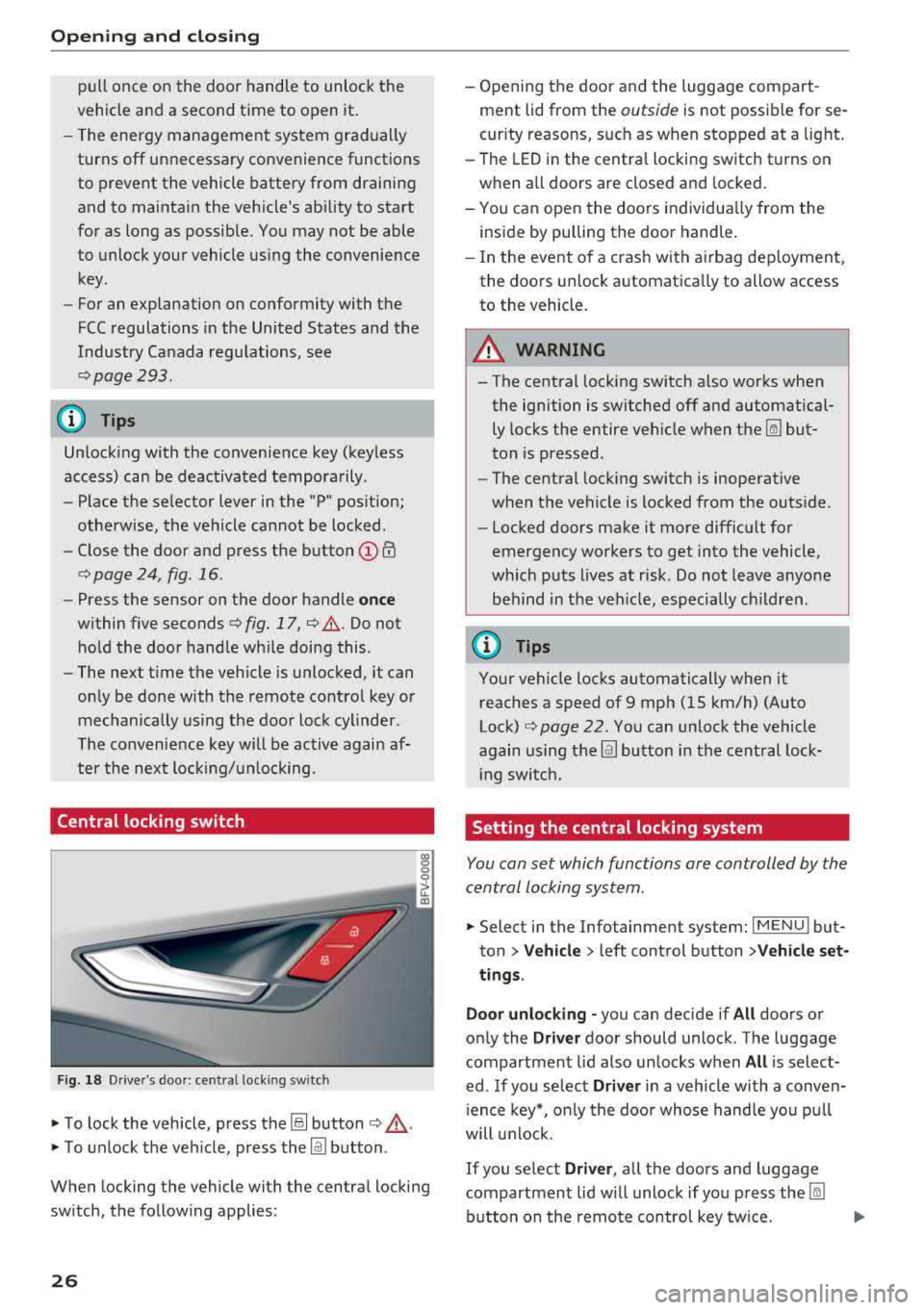
• To lock the vehicle, press the@! button ¢,& .
• To unlock the veh icle, press the @J button .
When locking the vehicle with the central locking
sw itch, the follow ing applies:
26
- Opening the door a nd the luggage compart
ment lid from the
outside is not possible for se
curity reasons, such as when stopped at a light.
- The LED in the centra l locking switch t urns on
when all doors are closed and locked.
- You ca n open the doors individua lly from the
inside by pulling the door handle.
- In the eve nt of a cras h with a irbag dep loyment,
the doo rs unlock automatica lly to allow access
to the vehicle.
8_ WARNING
-The central locking switch a lso works when
the ignition is switched off and automatical
ly locks the entire vehicle when
the~ but
ton is pressed.
- The central locking switch is inoperative
when the vehicle is locked from the outs ide .
-Locked doors make it more difficult for
emergency workers to get into the vehicle,
which p uts lives at risk . Do not leave anyone
behind in the ve hicle, especially ch ildren.
(D Tips
Your vehicle locks automatically when it
reaches a speed of 9 mph (15 km/h) (Auto
Lock)
¢ page 22. Yo u can unlock the vehicle
again using the
@J button i n the cent ral lock-
i ng switch.
Setting the central locking system
You con set which functions ore controlled by the
central locking system .
• Select in the Infotainment system: IMENUJ but
ton
>Ve hicle > left control button >V ehicle set
ting s.
Door unloc king -
you can decide if All doors or
on ly the
Driv er door should unlock . The luggage
compartmen t lid also un locks when
All is select
ed . If you se lect
Driver in a vehicle with a conven
i ence key*, o nly the doo r whose hand le yo u pu ll
will u nlock.
If you se lect Driver , all the doors and luggage
compartment lid w ill unloc k if yo u press
the ~
button on the remo te con trol key tw ice.
Page 32 of 310
Opening and clo sin g
Correcting power w indow malfunctions
You can reactivate the one-touch up/down func
tion if it malfunctions .
.. Pull the power window sw itch up unt il the win
dow is completely raised.
.. Release the sw itch and pull it up again for at
least one second .
Garage door opener
(Homelink)
Description
Applies to: vehicles with garage door opener (Homelink)
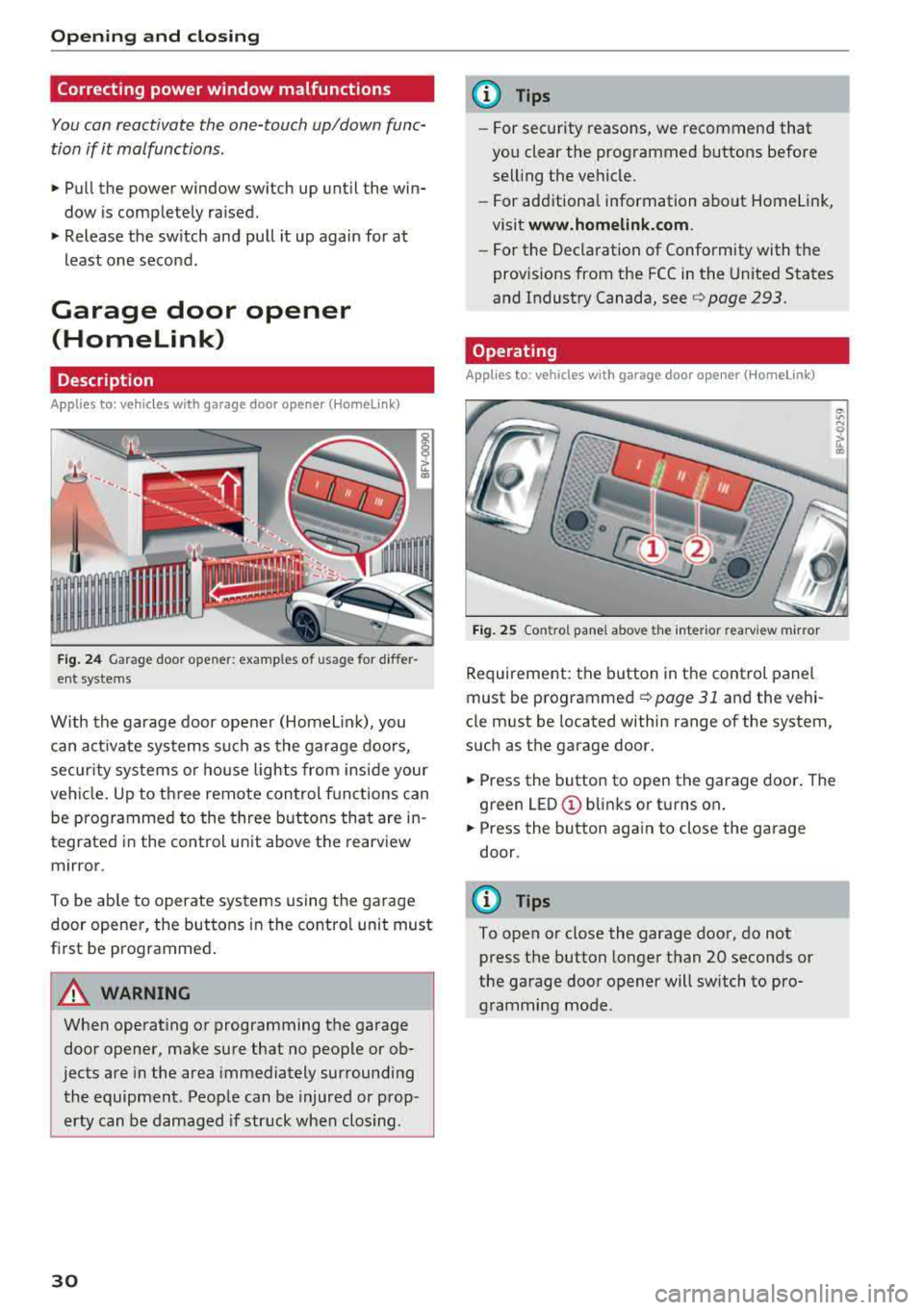
Fig . 24 Garage door ope ner: exa mples o f usage fo r differ
ent systems
W ith the garage door opener (Homelin k), you
can activate systems such as the garage doors,
secur ity systems o r house lights from inside your
veh icle. Up to three remote control f unctions can
be programmed to the three buttons that are in
tegrated in the control unit above the rearview
mirror .
To be ab le to operate systems using the garage
door opener, the buttons in the contro l unit must
first be programmed .
A WARNING
When operating or programming the garage
door opener, make sure that no people or ob
jects are in the area immediately surrounding
the equipment . Peop le can be injured or prop
erty can be damaged if str uck when closing .
30
@ Tips
-For security rea.sons, we recommend that
you clear the programmed buttons before
selling the vehicle .
- For additiona l information about Homelink,
visit
www.homeli nk.com .
-For the Dec laration of Conformity with the
prov isions from the FCC in the United States
and Industry Canada, see
c;, page 293.
Operating
App lies to : vehicles with garage door opener (Homelink)
F ig . 25 Co ntro l pane l above t he inter ior rea rv iew mirror
Requirement: the button in the control panel
must be
programmed ¢ page 31 and the vehi
cle must be located within range of the system,
such as the garage door.
.. Press the button to open the garage door . The
green
LED © blinks or turns on .
.. Press the button aga in to close the garage
door.
(D Tips
To open or close the garage door, do not
press the button longer than 20 seconds or
the garage door opener will switch to pro gramming mode.
Page 36 of 310
Power top
-Visibility to the rear is limited when operat
ing the power top. Avoid operat ing the top
wh ile driving in reverse.
(D Note
- To prevent damage to the power top:
- do not store any objects in the power top
storage compartment.
- make sure there is enough space above
the vehicle when opening or clos ing the
powe r top.
(D Tips
- To prevent the vehicle battery from dra ining
unnecessari ly, do not open or close the pow
er top repeatedly when the engine is switch
ed off.
- A message will appear in the instrument
cluster if there is a malfunction in the powe r
top
~ page 34.
- The powe r top can also be operated manual
l y temporari ly if there is a malfunction
~ page 36, Power top emergency opera
tion.
An authorized A udi dealer or author
ized Audi Service Facility should diagnose
and correct the cause of the ma lfunction as
soon as possib le .
- If the vehicle is parked with the power top open, the vehicle interior is not protected
from damaging weather or unauthor ized ac
cess. Lock any items you leave behind in the
luggage compartment. C lose the power top
before leaving the vehicle .
- The side windows automat ically lower
slightly when opening or closing the power
top.
34 Power top convenience opening and closing
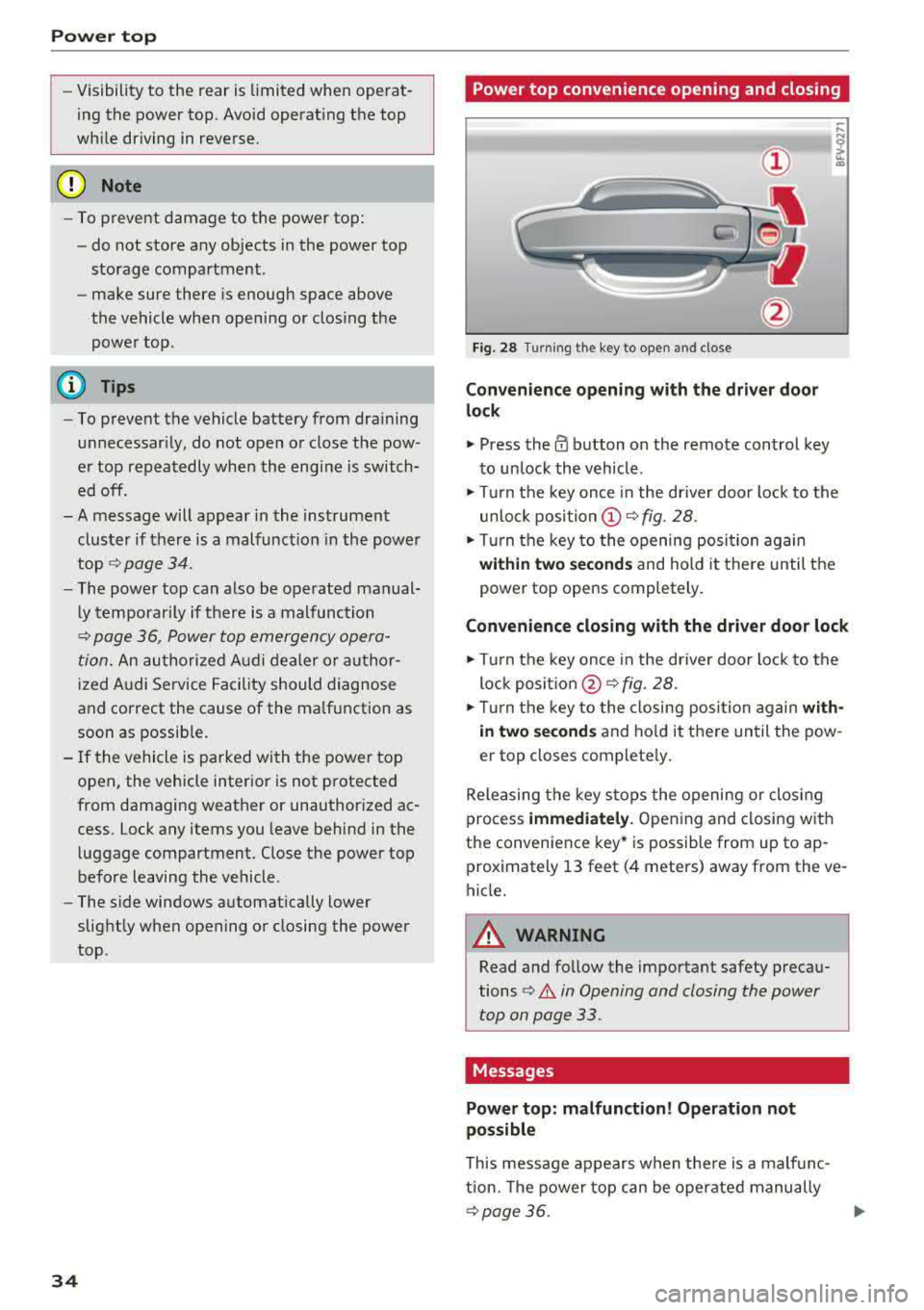
Fig. 28 Turn
ing the key to open and close
Convenience opening with t he dri ver door
lock
.,. Press the 0 button on the remote control key
to un lock the vehicle .
.,. Turn the key once in the driver door lock to the
unlo ck
position @~ fig. 28 .
.. Turn the key to the opening posi tion again
within two se cond s and hold it there until the
power top opens completely .
Convenience closing with the driver door lock
.,. Turn the key once in the driver door lock to the
lock
posit ion @ ~ fig. 28.
.. T urn the key to the closing posi tion again w ith
i n two second s
and ho ld it there until the pow
er top closes complete ly .
Releasing the key stops the opening or clos ing
process
immedi ately . Opening and closing with
the convenience key* is possible from up to ap
prox imately 13 feet (4 meters) away from the ve
hicle.
A WARNING
Read and follow the important safety precau
tions
¢ .&. in Opening and closing the power
top on page 33.
Messages
Power top: m alfunction! Oper ation not
possible
This message appears when the re is a malfunc
tion. The power top can be operated manually
~ page 36. .,.
Page 40 of 310
Lights and Vision
Lights and Vision
Exterior lighting
Switching lights on and off
F ig. 37 Instrument panel: l ight sw itch
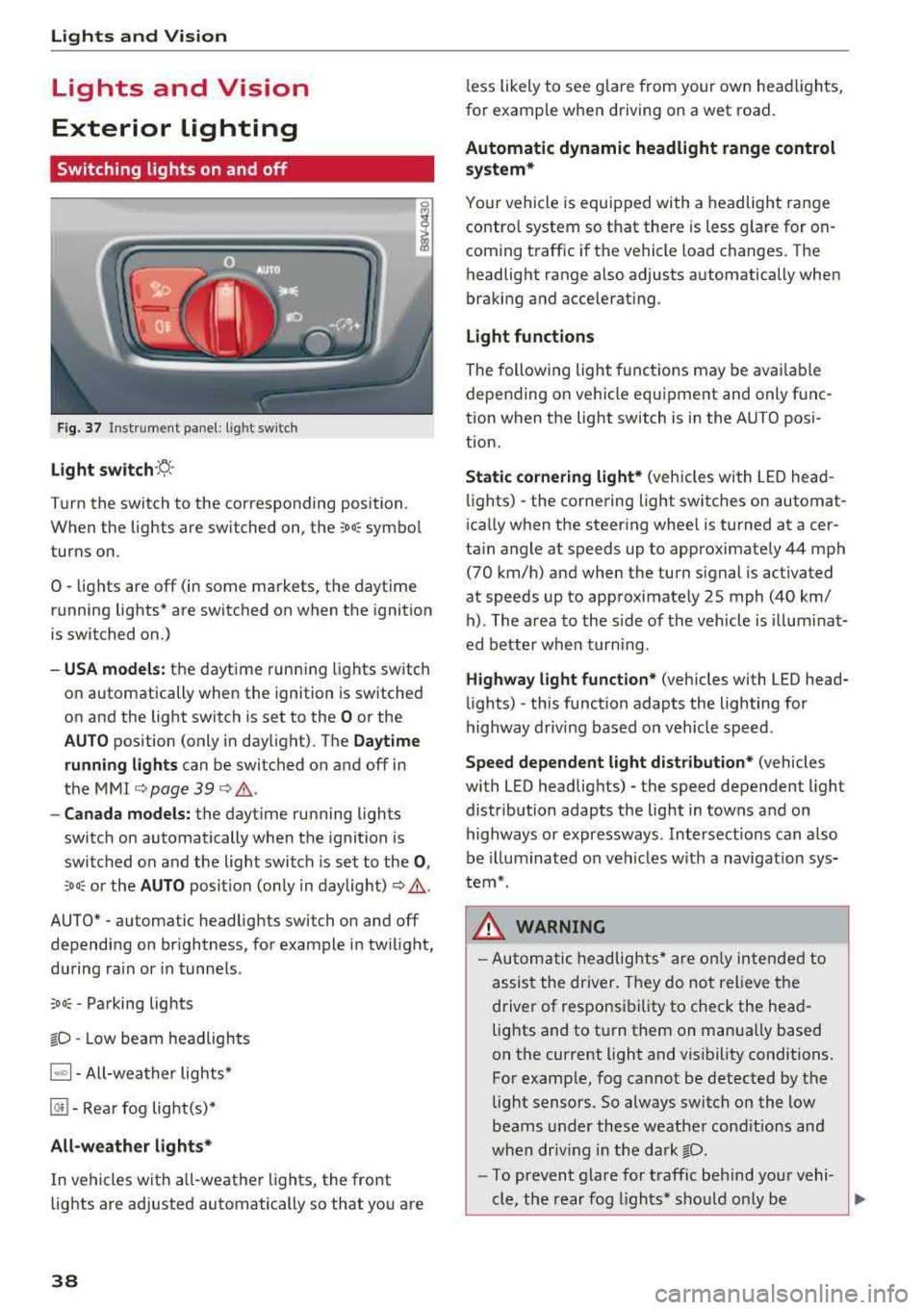
Light s witch ·~ ·
I
Turn the switch to the corresponding position.
When the lights are switched on, the
;Do: symbo l
turns on.
0
• lights are off (in some markets, the daytime
running lights* are switched on when the ignition
is switched on.)
-USA models : the daytime running lights switch
on automatically when the ignition is sw itched
on and the light switch is set to the
O or the
AUTO position (only in daylight). The Daytime
runn ing lights
can be switched on and off in
the
MMI c::;, page 39 c::;, ,&. .
-Canad a models: the dayt ime running lights
switch on automatically when the ignition is
switched on and the light switch is set to the
0 ,
:'.Do: or the AUTO position (only in daylight) c::;, ,&. .
AUTO* - automatic headlig hts switch on and off
depending on br ightness, for example in tw ilight,
during ra in or in tunne ls .
;Do: -Parking lights
tD -Low beam headlights
1~"' 1-All-weather lights*
@!I -Rear fog light(s)*
All-weather light s*
In vehicles with a ll-weathe r lights, the front
lights are adjusted automatically so that yo u are
38
less likely to see g lare from your own head lights,
fo r example when driving on a wet road.
Automatic dynamic headlight range control
system*
Your vehicle is equipped with a headlight range
contro l system so that there is less g la re for on
coming t raffic if the vehicle load changes. The
headlight range also adjusts automatically when
braking and accelerat ing.
Light function s
The following light funct ions may be ava ilable
depending on ve hicle equipment and only f unc
tion when the light switch is in the AUTO posi
t ion.
Static cornering light* (vehicles with LED head
li ghts) - the corne ring light switches on automat
i ca lly when the steer ing whee l is turned at acer
ta in angle at speeds up to approximately 44 mph
(70 km/h) and when the turn signal is activated
at speeds up to approximately 25 mph (40 km/ h) . The area to the side of the veh icle is illum ina t
ed bette r whe n turn ing .
Highway l ight function * (vehicles with LED head
li ghts)
-this function adapts the lighting for
highway driv ing based on veh icle speed .
Speed dependent light dist ribution* (vehicles
with LED headlig hts) - the speed dependent light
distribution adapts the light in towns and on
highways or expressways . Intersections can a lso
be illuminated on veh icles w ith a navigat ion sys
tem*.
& WARNING
- Autom atic headlig hts * are o nly in tended to
assis t the driver. They do not relieve the
driver of responsi bility to check the head
lights and to t urn them on manually based
on the current light and v is ibility conditions.
For examp le, fog cannot be detected by the
light sensors . So always switch on the low
beams under these weather cond it io ns an d
when dr iv ing in the da rk
tD.
-To prevent gla re for traffic be hind you r vehi-
cle, the rear fog lights* sho uld only be
..,.
Page 41 of 310
Cl co .... N ,..._
N .... 0 ,..._
Vl co
turned on in accordance with traffic
reg ulations.
- If the battery has been discharging for a
while, the parking light may sw itch off auto
matically. A lways make sure your vehicle is
parked and adequately lit according to the
laws . Avo id using the parking lights for sev
era l hours.
- Always observe legal reg ulat ions when us
ing the light ing systems described.
(!') Tips
- The light sensor for the automatic head
lights* is in the rearview mirror mount. Do
not place any stickers in this area on the
windsh ield.
- Some exterior lighting fu nctions can be ad
j usted
c::> page 39.
- If you turn off the ignition wh ile the exterio r
lights are on and open the door, a warning
tone so unds.
- In some markets, the ta il lights will sw itch
on when the dayt ime runn ing lights sw itch
on.
- In cool o r damp weather, the inside of the
headlig hts, tu rn s ignals and tai l lights can
fog over d ue to the tem perature d ifference
betwee n the inside and ou ts ide. They will
clea r shor tly after sw itch ing them o n. This
d oes not aff ect t he serv ice life o f the lig ht
i ng.
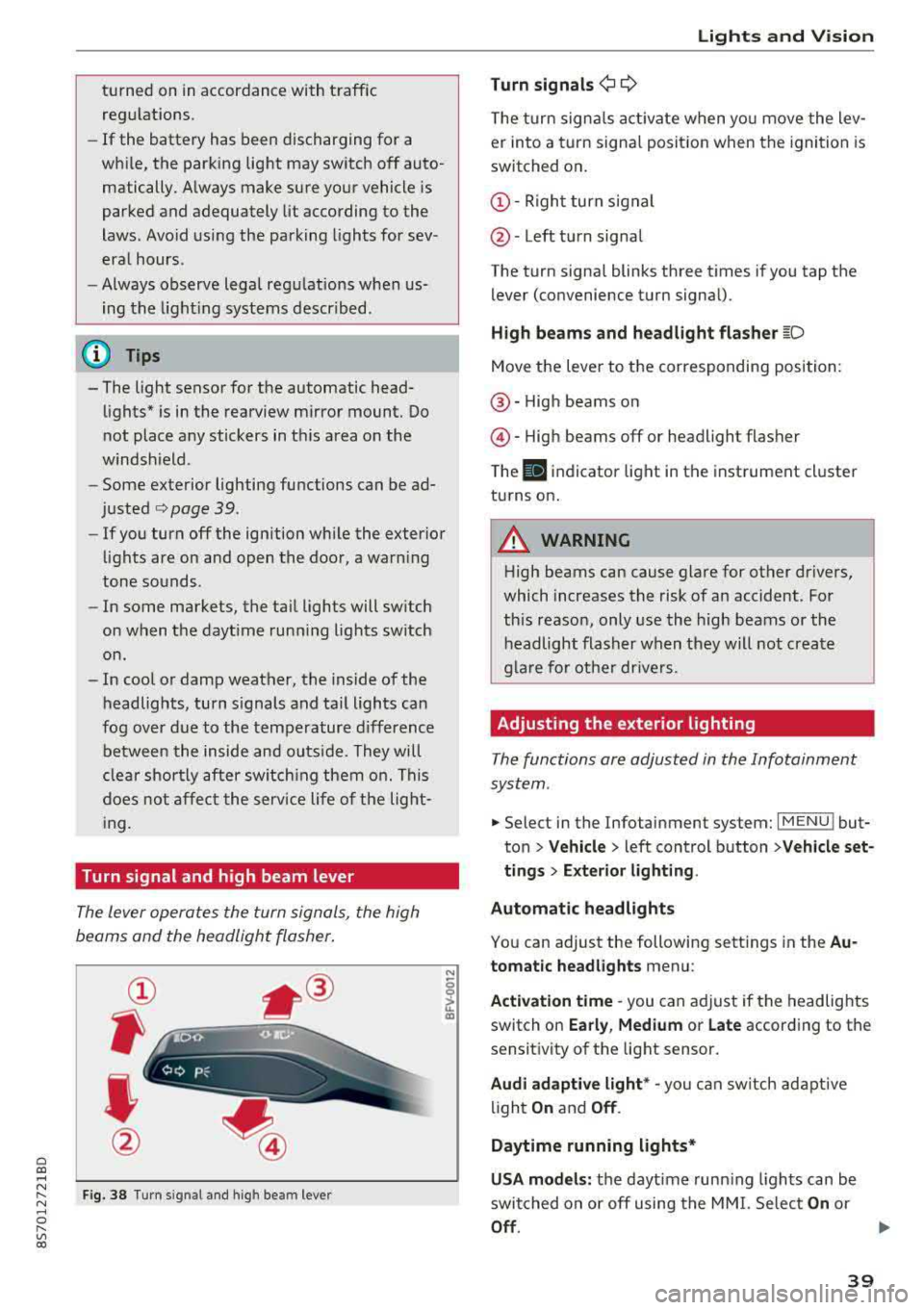
Turn signal and high beam lever
The lever opera tes the turn sign als, the high
beams and the headlight flasher .
Fig . 38 Tu rn signal an d high beam lever
N
0
~
"'
Lights and V ision
Turn signals ¢ 9
The turn signa ls act ivate w hen yo u move the lev
er into a turn signa l posit io n when the igni tion is
switched on .
©-Righ t turn signal
@ -Left tur n signal
The turn signa l blinks three t imes i f you tap t he
lever (convenience t urn signa l).
High beams and headlight flasher
~D
Move t he lever to the corresponding position:
@ -High beams o n
@-High beams off or headlight flasher
T he
II indicato r light in t he inst rument cl uster
turns on .
A WARNING
-High beams can cause glare for other drivers,
which increases the risk of an accident. Fo r
this reaso n, only use the high beams or the
headlight flasher when they wil l not create
g la re fo r ot her dr ivers.
Adjusting the exterior lighting
The functions are adjusted in the Infotainment
system .
.,. Select in the Infotainment system: I MENU ! but
ton> Vehicle > left control button >Vehicle set
tings > Exterior lighting .
Automatic headlights
You can adjust the following sett ings in the Au
tomatic headlights menu:
Activation time
-you can a djust if the headlights
switch on Early, Medium or Late according to the
sensit ivity of the light sensor.
Audi adaptive light * -you can sw itch ad ap tive
li gh t
On and Off .
Daytime running lights*
USA models: the daytime runn ing ligh ts can be
switched on or off using the MM I. Se lec t
On or
Off .
39
Page 42 of 310
Lights and Vision
Canada models: this function cannot be switched
off . They activate automatica lly each time the ig
n ition is switched on . T his menu item is shown
with a "gray background".
Entry /exit lighting
The ent ry li ghti ng function illum ina tes the area
outside the vehicle when you unlock the vehicle
when it is dark . To switch on the function, select
Ent ry/ex it lighting .
The exit light ing fun ct io n illum inates the area
outside the vehicle when you turn the ignition o ff
an d open the driver 's door when it is dark. To
sw itch on the function, select
Entry /exit light·
ing .
The ent ry/exit lighting only wo rks when it is dar k
an d the light switch is in the
AUTO position.
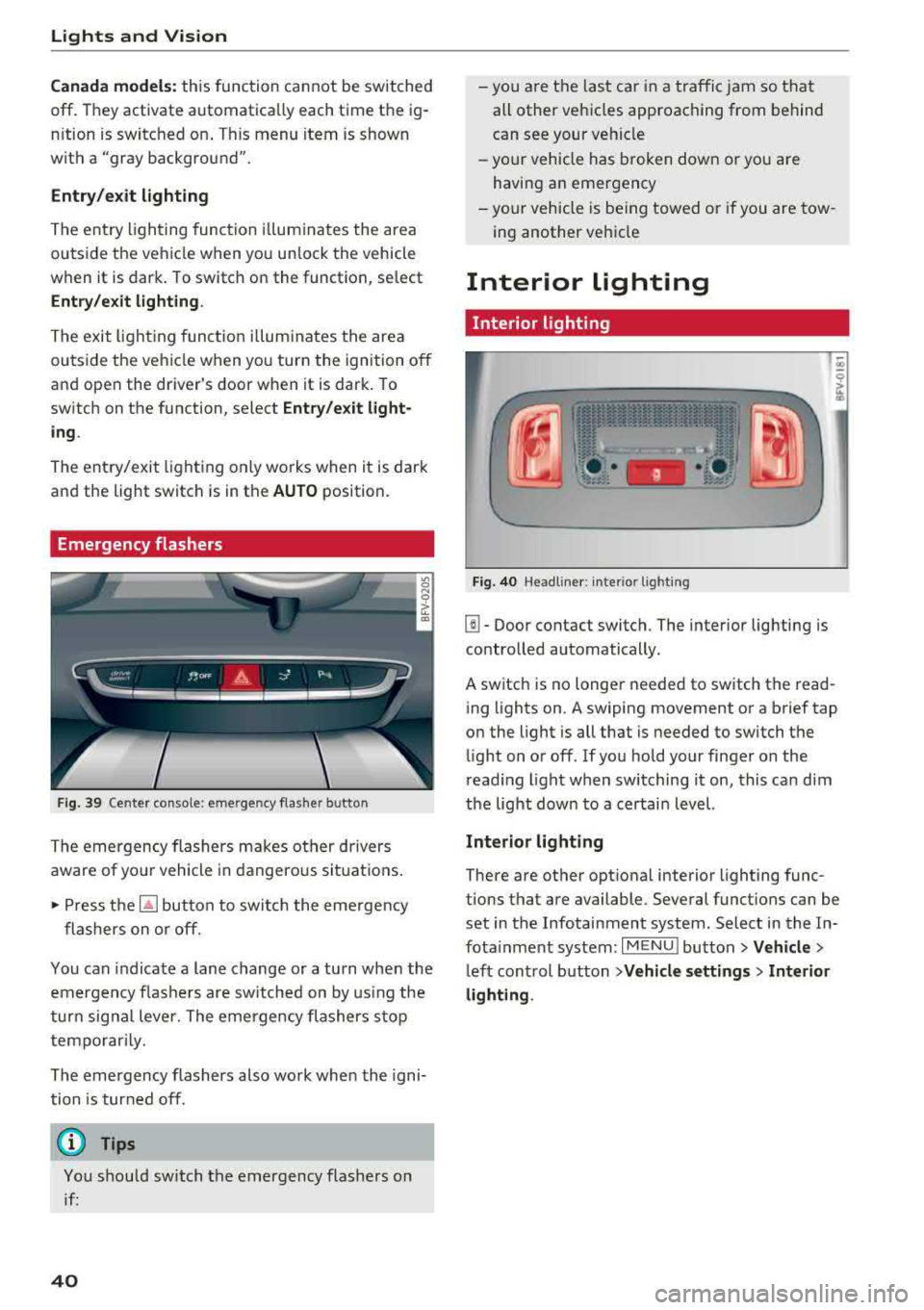
Emergency flashers
Fig. 39 Cente r conso le : eme rge ncy f las her butto n
The emergency flashers makes ot her dr ivers
aware of yo ur vehicle in dangerous si tuat io ns.
• P ress t h e ~ button to swi tch the eme rgency
flashers on or off.
You can indicate a lane change or a tu rn when the
em ergency fl ashe rs are sw itched on by us ing the
tur n sig na l lever. The emergency flashers s to p
tempo rarily.
The emergency flashers also work whe n the igni
tion is tur ned off.
(D Tips
You s hou ld switch t he emergency flashers on
i f :
40
-yo u are t he las t car in a traffi c jam so that
all other vehi cles approaching from behind
can see your ve hicle
- yo ur vehicle has broken down o r yo u a re
havin g an emerge ncy
-yo ur vehicle is be ing towed or if you a re tow
ing another vehi cle
Interior lighting
Interior lighting
Fi g. 40 Head lin e r: int eri or light ing
[]] - Door contact switch. The interior lighting is
contro lled automatically.
A switch is no longer needed to sw itch the read
i ng lights on .
A swiping movement o r a b rief tap
o n the light is all that is needed to switch the
li ght on o r off. If yo u ho ld your finger on the
r ead ing light when switching it on, this ca n dim
the lig ht dow n to a certai n level.
Interior lighting
There are othe r opt ional interior lighting func
tions that are available . Seve ral funct ions can be
set in the Infotainment system. Select in the In
fota inment system :
I MENU I button> Vehicle >
left con trol b utton > Vehicle settings > Interior
lighting .