diagram AUDI TT ROADSTER 2018 Owners Manual
[x] Cancel search | Manufacturer: AUDI, Model Year: 2018, Model line: TT ROADSTER, Model: AUDI TT ROADSTER 2018Pages: 310, PDF Size: 46.95 MB
Page 19 of 310
Cl co .... N ,-... N ...... 0 ,-... Vl co
Driver information system
Overview
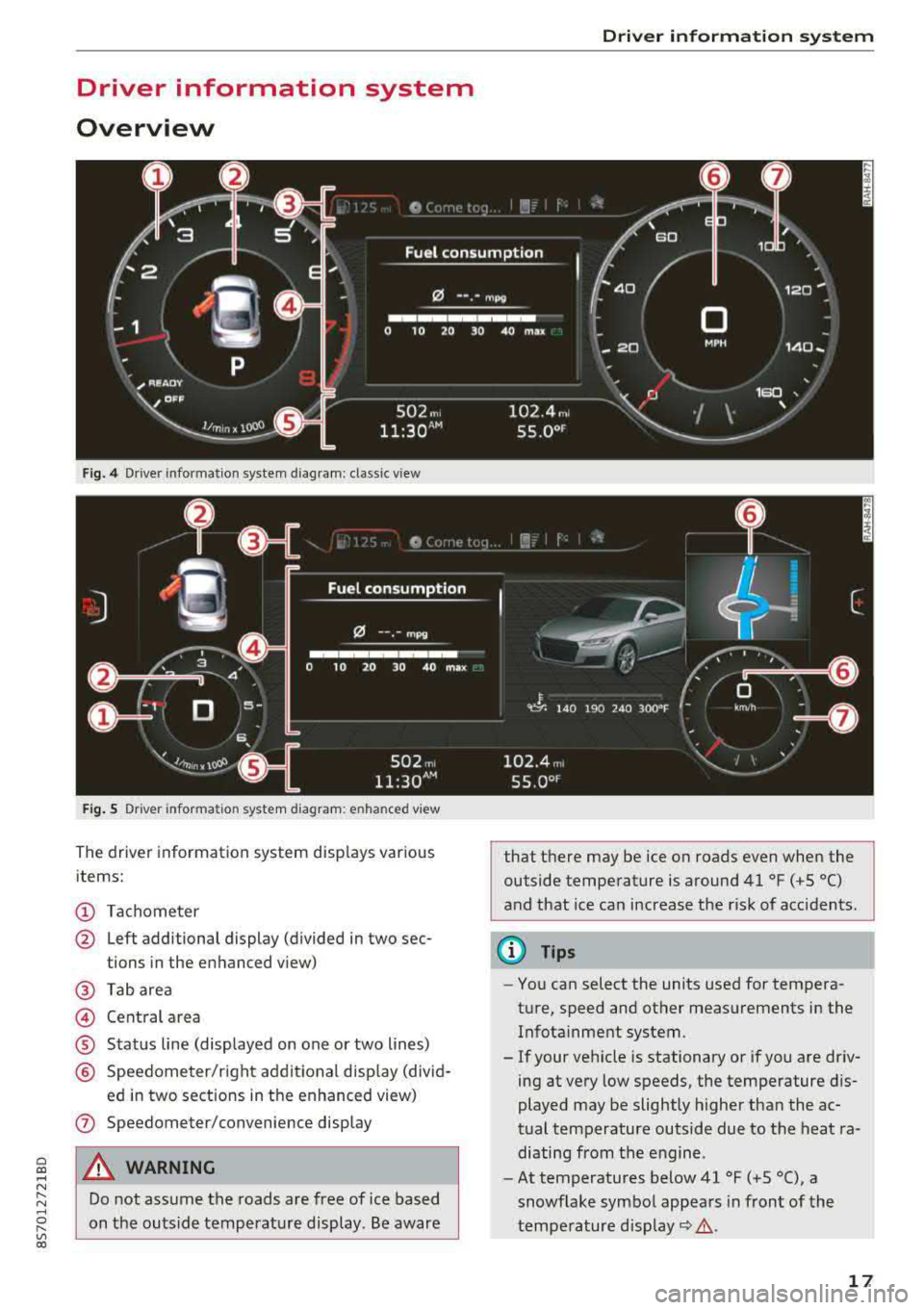
Fig. 4 Driver information system diagram: classic v iew
Fig. S D rive r in formation system diagram : en ha nced v iew
The driver information system displays various
items:
(D Tachometer
@ Left additional display (divided in two sec-
tions in the enhanced view)
@ Tab area
@ Central area
® Status line (displayed on one or two lines)
@ Speedometer/right additional display (divid-
ed in two sections in the enhanced view)
(J) Speedometer/convenience display
A WARNING
Do not assume the roads are free of ice based
on the outside temperature display . Be aware
Driver information system
that there may be ice on roads even when the
outside temperature is around 41 °F ( +S °C)
and that ice can increase the risk of acc idents.
(D Tips
- You can select the units used for tempera
ture, speed and other measurements in the Infotainment system .
- If your vehicle is stationary or if you are driv
ing at
very low speeds, the temperature dis
played may be slightly higher than the ac
tual temperature outside due to the heat ra
diating from the engine.
- At temperatures below 41 °F (+S °C), a
snowflake symbol appears in front of the
temperature
display~ &.
17
Page 84 of 310
Parking systems
Switching on/off
Applies to: ve hicles w ith pa rking system p lus
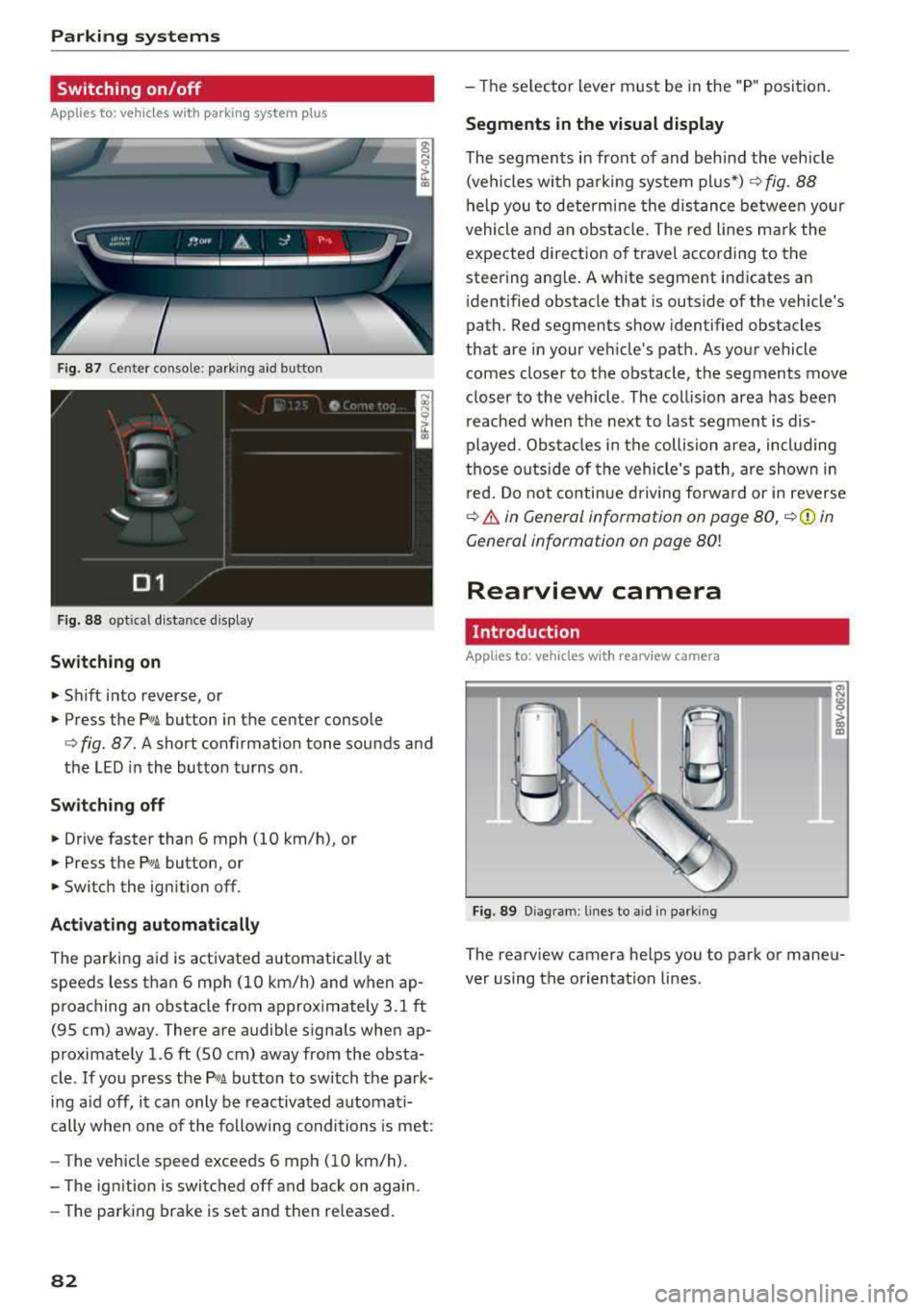
F ig. 87 Center console: parking aid button
Fig. 88 opt ical distance display
Switching on
• Shift into reverse, or
.. Press the PwA button in the center console
c> fig. 87. A short confirmat ion tone sounds and
the LED in the button turns on .
Switch ing off
.. Drive faster than 6 mph (10 km/h), or
• Press the P,, ,A button, or
.. Switch the ignition off.
Activating automatically
The parking aid is activated automatically at
speeds less than 6 mph (10 km/h) and when ap
proaching an obstacle from approximately 3.1 ft (95 cm) away. There are audible signals when ap
proximately 1.6
ft (SO cm) away from the obsta
cle .
If you press the p,,1.I! button to switch the park
ing a id off, it can only be reactivated automati
cally when one of the following conditions is met :
- The vehicle speed exceeds 6 mph (10 km/h).
- The ignition is switched off and back on again.
- The parking brake is set and then re leased.
82
- The selector lever must be in the "P " position.
Segments in the visual display
The segments in front of and behind the vehicle
(vehicles with parking system plus*)
c> fig. 88
help you to determine the distance between your
vehicle and an obstacle. The red lines mark the
expected direction of travel according to the
steering ang le. A white segment indicates an
identified obstacle that is outside of the vehicle's
path. Red segments show identified obstacles
that are in your vehicle's path. As your vehicle comes closer to the obstacle, the segments move
closer to the vehicle . The collision area has been
reached when the next to last segment is dis
played. Obstacles in the collision a rea, including
those outside of the vehicle 's path, are shown in
red. Do not continue driving forward or in reverse
c> .& in General information on page 80, c>(D in
General information on page
80!
Rearview camera
Introduction
App lies to: vehicles wit h rearv iew camera
Fig. 89 Diagram: lines to ai d in parking
The rearview camera helps you to park or maneu
ver using the orientation lines .
Page 96 of 310
Multi Media Interface
A WARNING
Adjust the volume of the audio system so that signals from outside the vehicle, such as po
lice and fire sirens, can be heard easily at all
times .
(j) Tips
The MMI switches off automatically if the en
gine is not running and the vehicle battery is
low .
MMI operation
Selecting and confirming a function
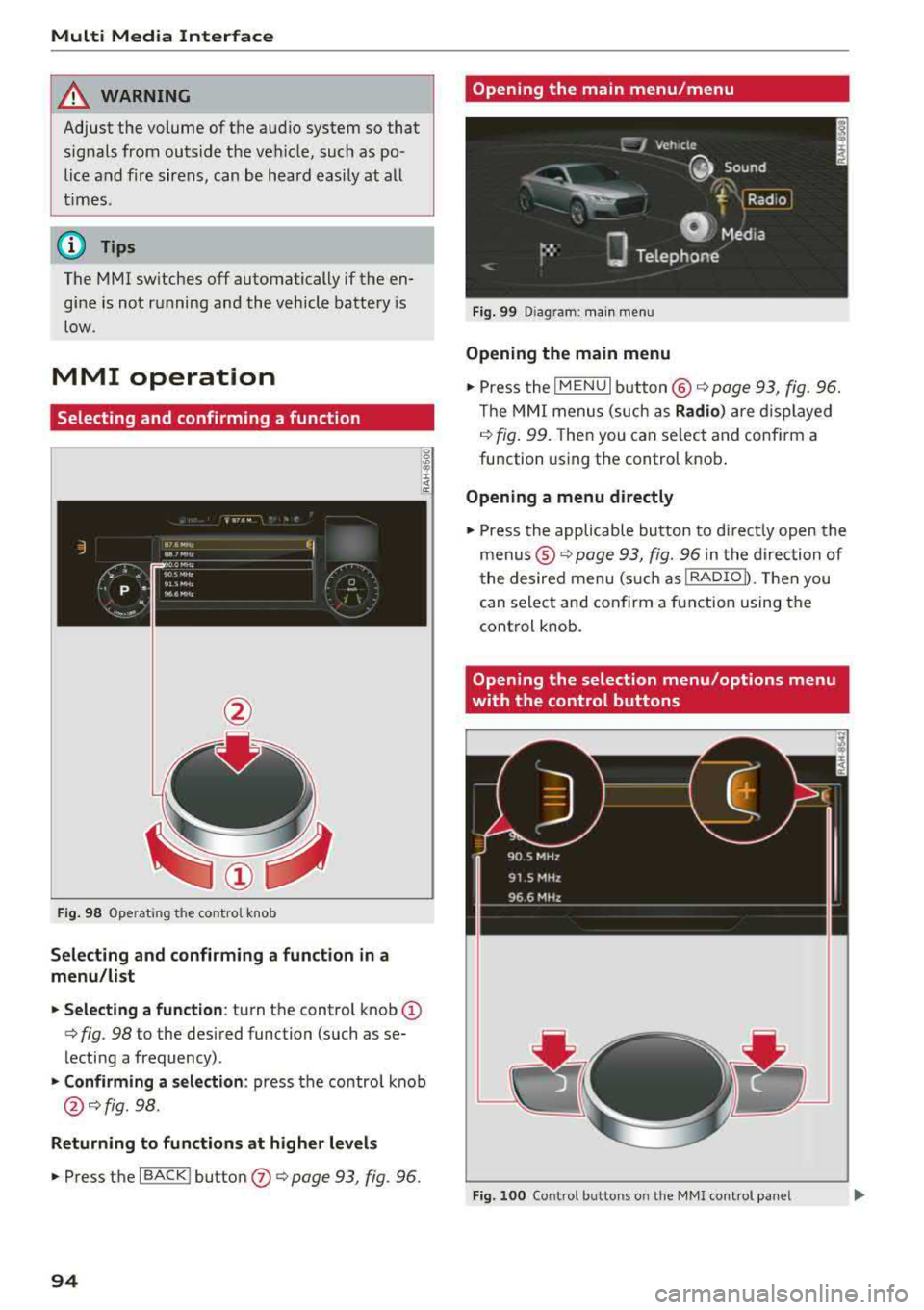
Fig . 98 Operat ing the control knob
Selecting and confirming a function in a
menu/list
.. Selecting a function : turn the control knob (D
c> fig. 98 to the desired function (such as se
lecting a frequency) .
.. Confirming a selection : press the contro l knob
@ c>fig . 98.
Returning to functions at higher levels
.. Press the I BACK ! button (J) c> page 93, fig. 96.
94
Opening the main menu/menu
Fig. 99 Diagram: main menu
Opening the main menu
.,. Press the I MENU I button @ c> page 93, fig. 96.
Th e MMI menus (such as
Radio) are displayed
c>fig. 99. Then you can select and conf irm a
function using the control knob.
Opening a menu directly
.. Press the applicable button to directly open the
menus ®
c> page 93, fig. 96 in the direction of
the desired menu (such as
!RADIOD. Th en you
can select and confirm a function using the
control knob.
Opening the selection menu/options menu
with the control buttons
Fig. 100 Control butto ns on the MMI cont rol panel
Page 101 of 310
Cl co .... N ,....
N ...... 0 ,....
Vl co
Opening the selection/options menu with
the control knob
Applies to: vehicles with joystick function
Fig. 10 7 Opening the sele ctio n/op tion s m enu wit h the
co ntrol knob
Letter/number speller
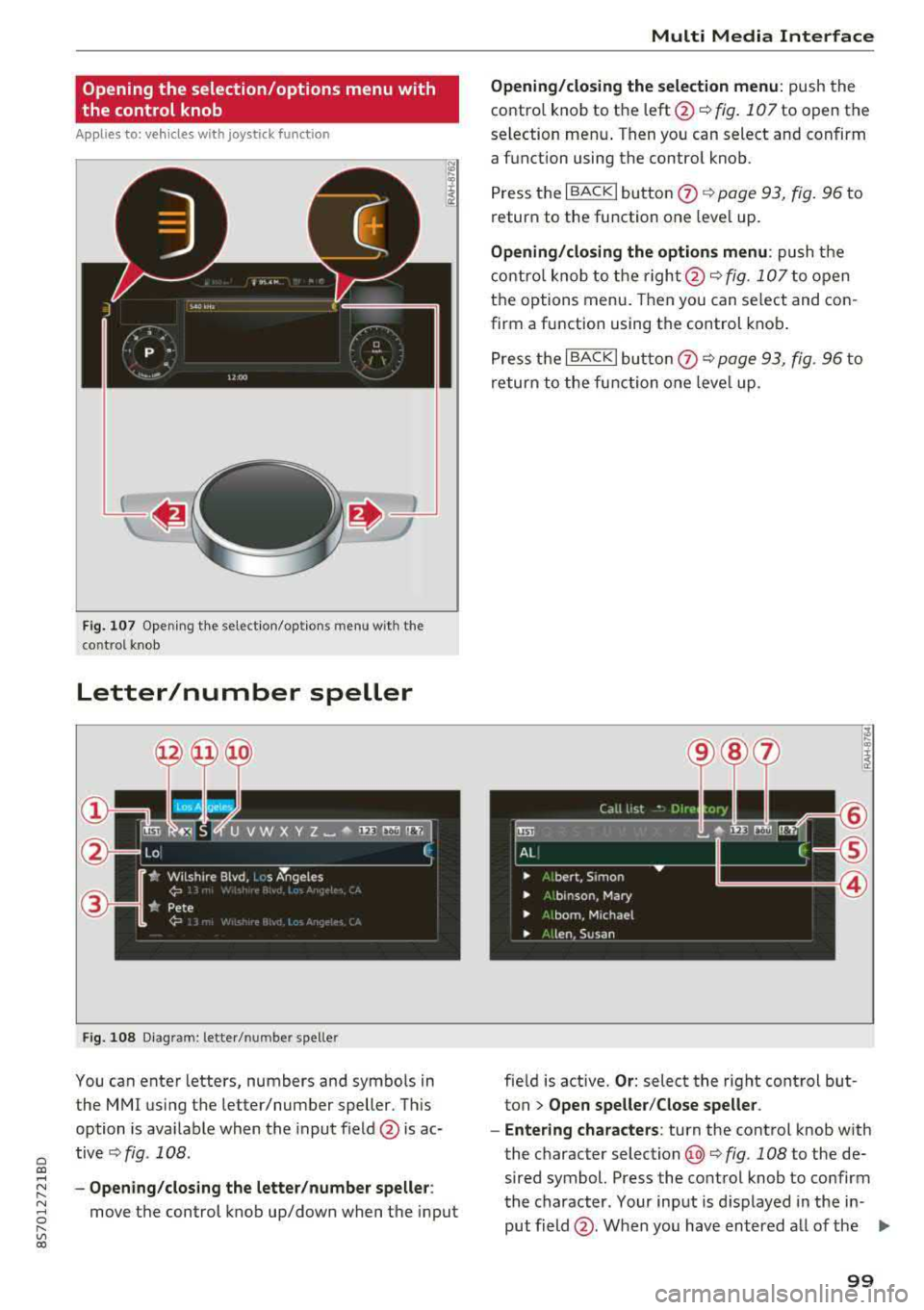
F ig . 1 08 Diagram: letter/ number spe ller
You can enter letters, numbers and symbo ls in
the
MMI using the letter/number speller. Th is
option is ava ilable when the input field @is ac
tive
Q fig . 108 .
-Opening /clos ing the letter /number speller :
move the control knob up/down when the input
Multi Media Inte rface
Opening/closing the selection menu : push the
contro l knob to the
left @~ fig. 107 to open the
selection men u. Then you can select and confirm
a f unction using the contro l knob.
Press the I BACK
I button 0 Q page 93, fig . 96 to
return to the function one leve l up.
Opening/closing the options menu : push the
contro l knob to t he
ri ght @Q fig. 107 to open
the options menu . Then you can select and con
firm a function using the control knob .
P ress t he I BACKI bu tto n
0 Q page 93, fig. 96 to
return to the function o ne leve l up .
fie ld is active.
Or : select the right cont rol but
ton
> Open speller /Close speller .
- Enter ing characters :
turn the control knob with
the character
selection @¢ fig. 108 to the de
sired symbol. Press the co ntrol knob to co nfirm
the character. Your input is d isplayed in the in
put field @. When you have entered a ll of the
.,.
99
Page 104 of 310
Multi Media Interfac e
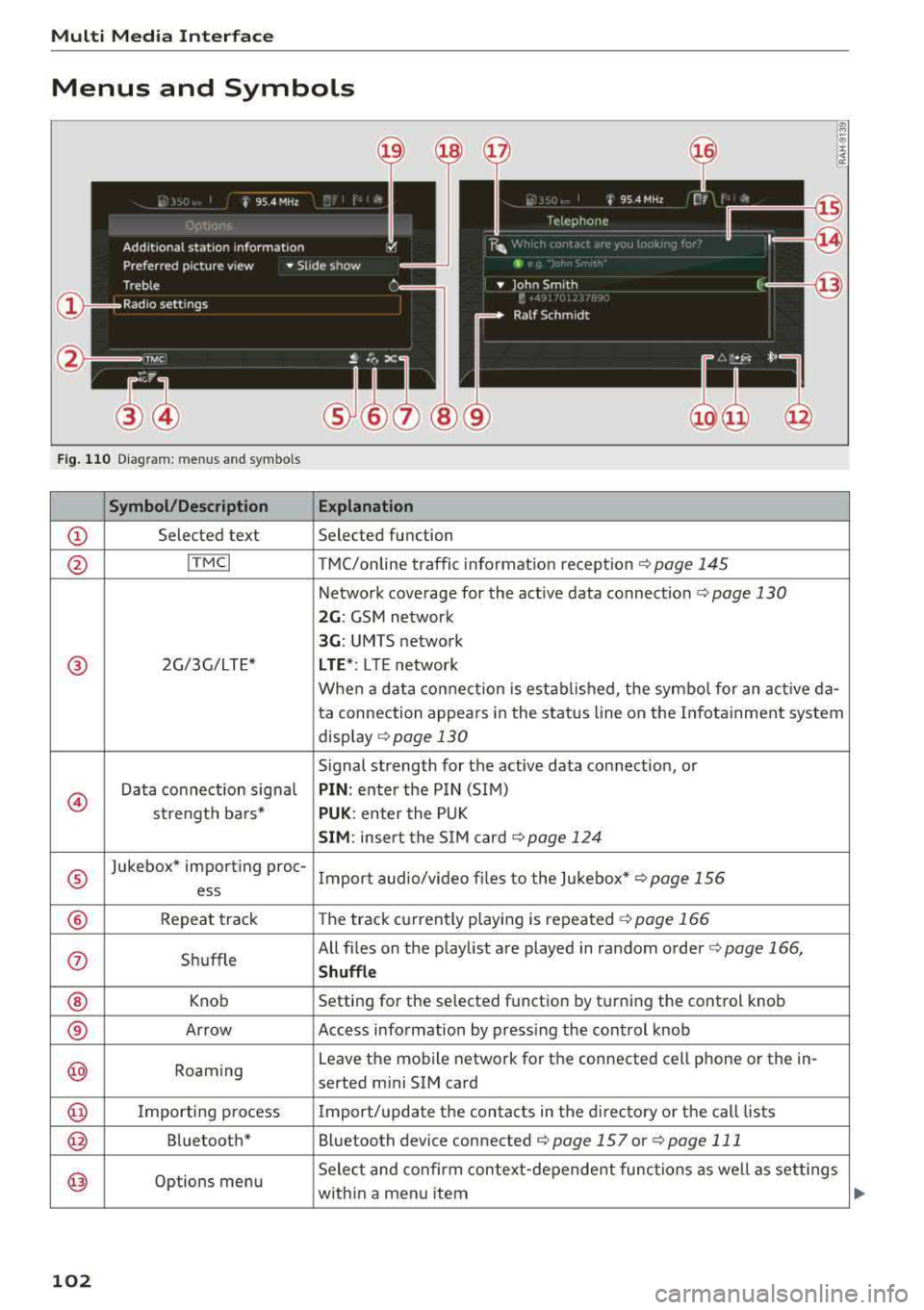
Menus and Symbols
@
14
Fig. 110 Diagram: menus and symbols
Symbol /Description E xplanation
CD Selected text Selected function
@ ITMCI T MC/online traffic information reception c> page 145
Network coverage for the active data connection c> page 130
2 G : GSM network
3G : UMTS network
® 2G/3G/LTE* LTE *: L T E network
When a data connection is established, the symbo l for an act ive da-
ta connection appears in the status line on the Infota inment system
disp lay
c> page 130
Signal strength for the active data connection, or
@
Data connect ion signa l PIN : enter the PIN (SIM)
strength bars*
PUK: enter the PUK
SIM : insert the S IM card <=>page 124
®
Jukebox* importing proc-
Import audio/v ideo fi les to the Jukebox*
c> page 156
ess
® Repeat track The track currently playing is repeated c> page 166
(i) Shuffle All files on
the playlist are played in random order
c> page 166,
Shuffle
® Knob Setting
for the selected function by turning the control knob
® Arrow Access information by pressing the control knob
@ Roaming Leave
the mobile network for the connected cell phone or the in-
serted mini SIM card
@ Importing process Import/update the conta cts in the d irectory or the call lists
@ Bluetooth* Bluetooth device connected c> page 157 or c> page 111
@ Options menu Select and confirm context
-depende nt functions as well as set tings
with in a menu item
102
Page 136 of 310
Navigation
Navigation
Opening navigation
Applies to: vehicles with navigation system
The navigation system directs you to your destination, around traffic incidents and on alternative
routes, if desired.
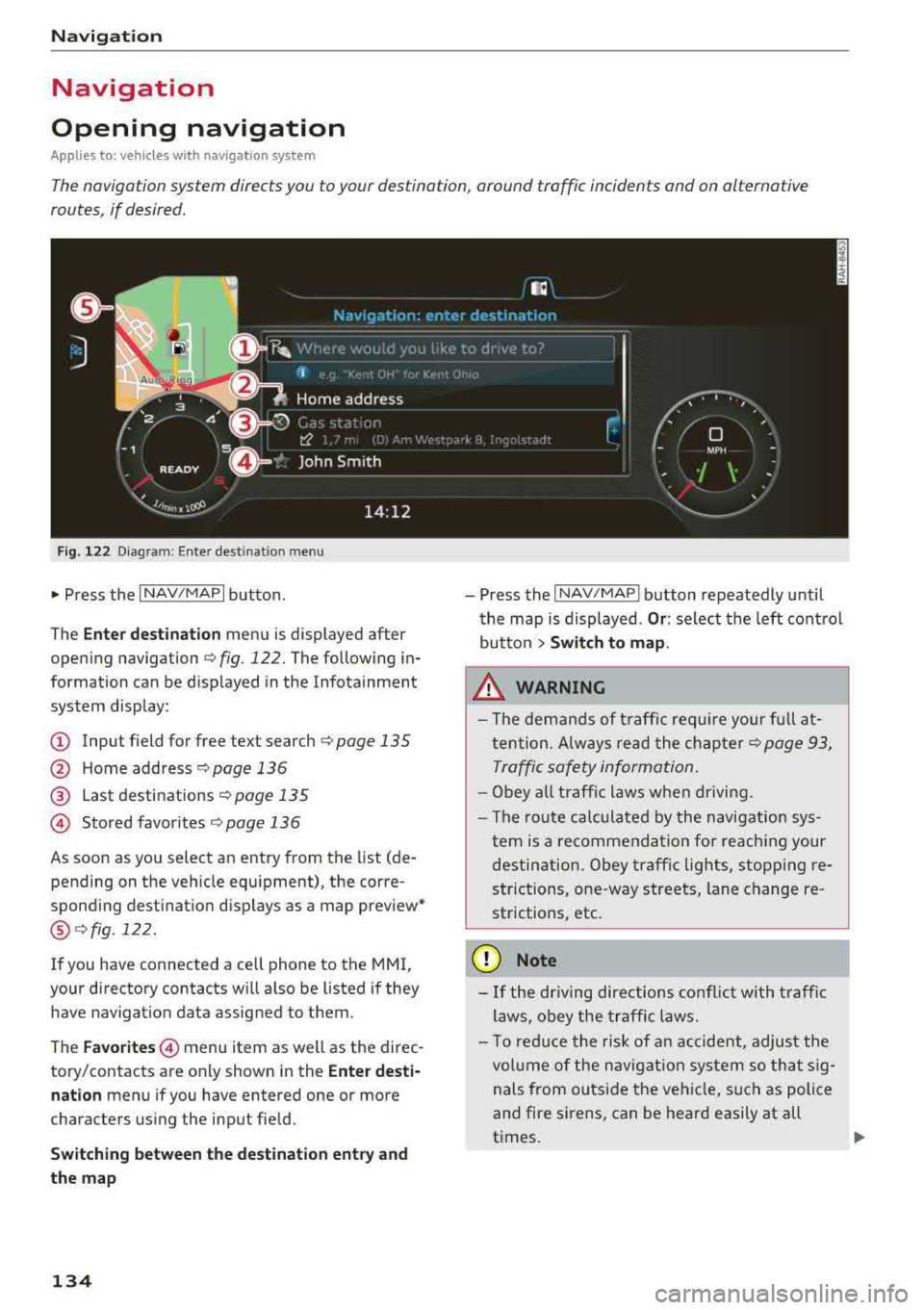
F ig. 122 Diagram: Ente r dest inat io n menu
~ Press the I NAV/MAPI button .
The
Enter destination menu is displayed after
opening navigation
¢ fig . 122. The following in
formation can be displayed in the Infotainment
system display:
@ Input field for free text search r:::;, page 135
@ Home address c;,poge 136
@ Last destinations r:::;, page 135
© Stored favor ites r:::;, page 136
As soon as you select an entry from the list (de
pending on the vehicle equipment), the corre
spond ing destination displays as a map preview*
@ c;,fig .122.
If you have connected a cell phone to the MMI,
your directory contacts will also be listed if they
have navigation data assigned to them .
The
Favorites © menu item as well as the direc
tory/contacts are only shown in the
Enter desti·
nation
menu if you have entered one or more
characters using the input field.
Switching between the destination entry and
the map
134
-Press the I NAV/MAPI button repeatedly until
the map is displayed .
Or: select the left control
button
> Switch to map.
& WARNING
-The demands of traffic require your full at
tention . A lways read the chapter
c;, page 93,
Traffic safety information.
-Obey all traffic laws when driving.
-The route calculated by the navigation sys-
tem is a recommendation for reaching your
destination . Obey traffic lights, stopp ing re
strictions, one-way streets, lane change re
strictions, etc.
(D Note
-If the driving directions conflict with traffic
laws, obey the traffic laws.
-To reduce the risk of an accident, adjust the
vol um e of the navigation system so that sig
nals from outside the vehicle, such as police
and fire sirens, can be heard easily at all
t imes.
-
Page 144 of 310
Navigation
,.. Select: right control button > Show alternative
routes.
Three routes will be displayed in the overview
map after you enter a destination
¢ fig. 126.
If available, the following informat ion w ill ap
pear on the route suggestions:
-Route type (fast (D , fast alternative @, eco
nomic route@)
-Distance to the destination and the calculated
arrival time
Map
Operating the map
A pp lies to: ve hicles w ith navigat ion sys tem
Escondido Fwy
Escondido
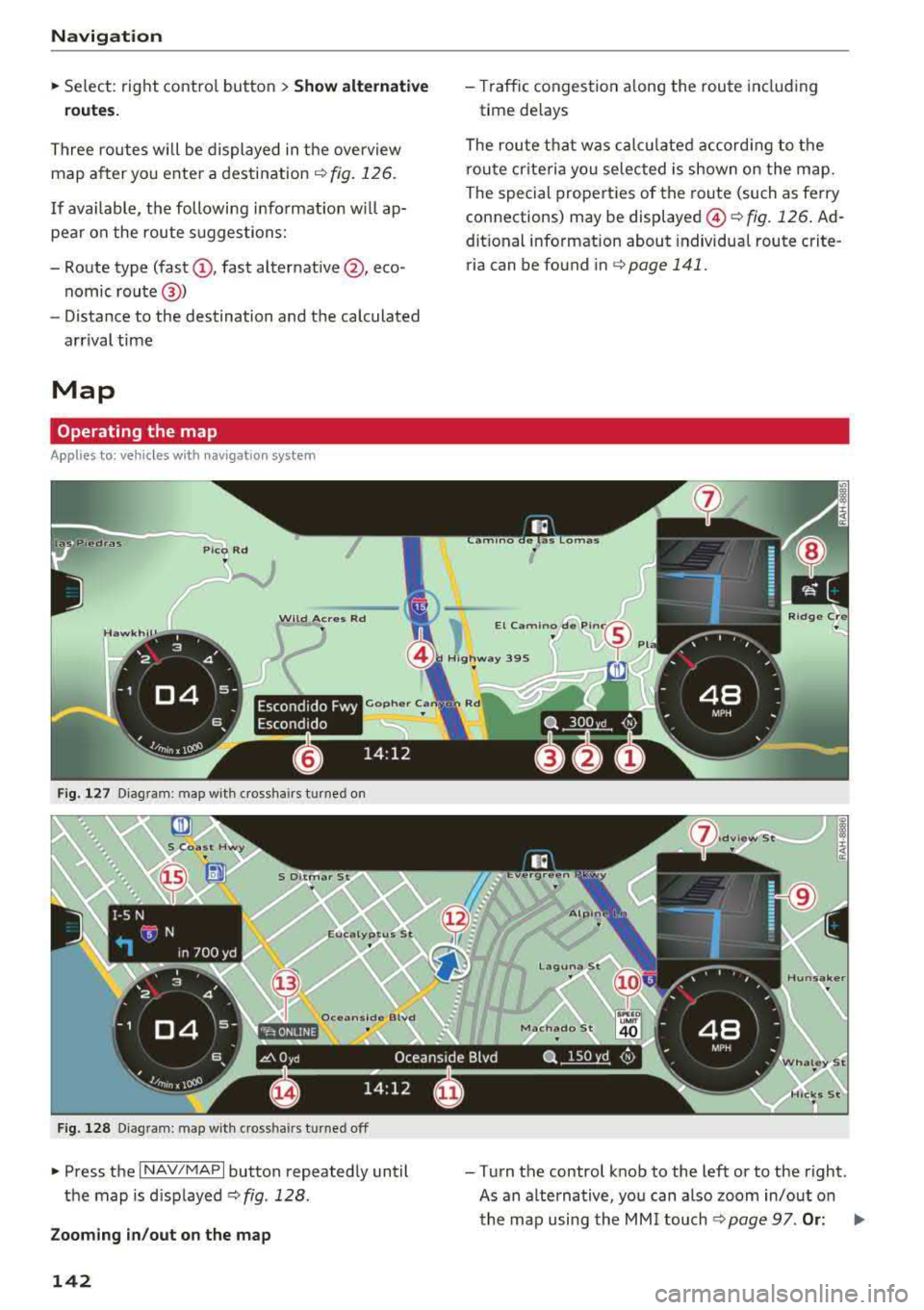
F ig. 127 Diagram: map with crosshairs tu rned on
F ig. 128 Diag ram: map with crossha irs t urn ed off
" Press the I NAV /MAP I button repeatedly until
the map is d isp layed
c:> fig . 128.
Zooming in/out on the map
142
-Traffic congestion a long the route includ ing
time delays
The route that was calc ulated according to the
route criteria yo u selected is shown on the map.
The special properties of the route (such as ferry
connections) may be
displayed @¢ fig. 126 . Ad
dit ional information about individua l route crite
ria can be found in
c:>page 141.
-Turn the control knob to the left or to the right .
As an alternative, you can also zoom in/out on the map using the MMI
touch ¢ page 97. Or: .,._
Page 164 of 310
Media
-Audi recommends setting the volume of a
mobil e device connected to the AUX input to
approximately 70% of the maximum vol
ume .
- Functionality is not guaranteed for mobile
devices that do not conform to the USB 2.0
spec ification.
- USB hubs are not supported .
- Some ve rsions of the iPod such as the iPod
shuffle cannot be connected to the USB
adapter for devices w ith App le Dock connec
tor. Connect these dev ices using a AUX con
nector cable .
- Video p layback through the Audi music in
terface is only supported if the connected
device is recognized as a USB storage device
(for example a USB stick) . Apple devices and
MT P devices (such as smartphones) a re not
r ecogni zed as USB storage devices .
- i Pod/iPhone malfunct ions also affect the
operation of the MMI. Reset your iPod/
i Phone if this happens.
- For important information on operating
your iPod/iPhone, refer to the user guide for
the dev ice. Audi recomme nds updat ing the
i Pod/iPhone so ftwa re to the latest ve rsion.
- Fo r more information about the Audi music
i nte rface and supporte d devices, check the
A udi databa se fo r mobile devices at
www.audiusa.com/mp3 or contact an au
thorized Audi dealer or authorized Audi
Service Fac ility.
162
Playing media
Accessing media
You can start and operate various media
through the
MMI control panel .
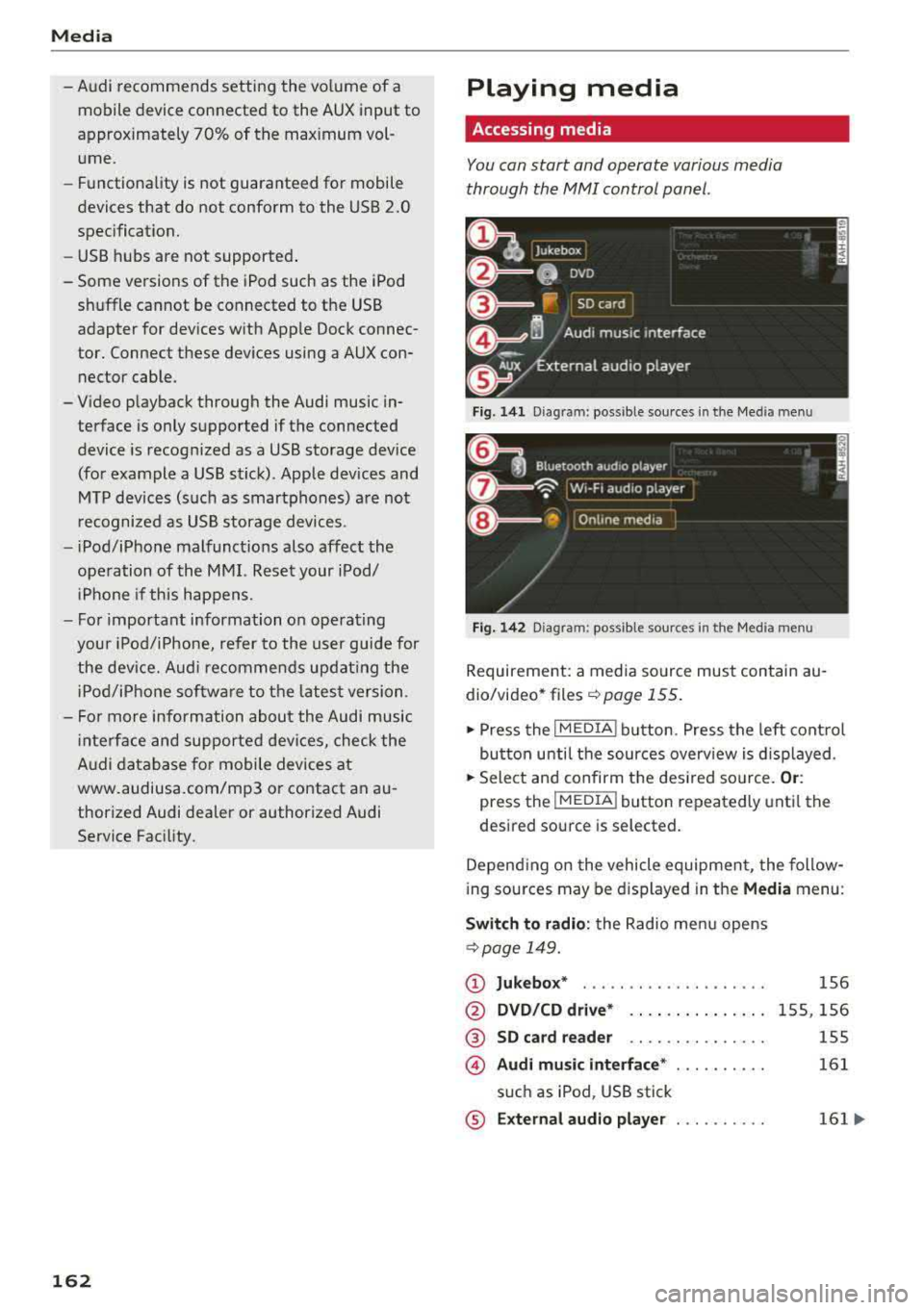
Fig. 1 41 Diagram: possible source s in t he Me dia menu
F ig . 142 Dia gr am: pos sible sour ces in the Med ia m enu
Requireme nt: a media so urce mus t contain au
dio/video* files
c:> page 155.
.,. Press the I M EDIA i button . Press the left cont rol
button unti l the sources overv iew is d isplayed .
.,. Select and confirm the des ired so urce. Or :
press the !MEDIA ! button repeatedly unti l th e
d esired sourc e is s elected.
Depend ing o n the vehicle equipmen t, the follow
i ng sou rces may be d isplayed in the
Media menu :
Switch to radio : the Radio menu opens
c:> page 149.
CD Jukebox* ....................
@ DVD /CD dri ve* .. .. .... . ..... .
® SD ca rd re ader .. .. ... ... ... ..
© Audi mu sic interface * ..........
s u ch as iPod , USB stick
® E xternal audio player . . . . . . . . . .
1S6
1 5S, 156
155
161
161 ...