wheel AUDI TT ROADSTER 2018 User Guide
[x] Cancel search | Manufacturer: AUDI, Model Year: 2018, Model line: TT ROADSTER, Model: AUDI TT ROADSTER 2018Pages: 310, PDF Size: 46.95 MB
Page 68 of 310
Driving
When parking on a level surface, simply place the
selector lever in the "P" position. On inclines, ac
tivate the parking brake first and then move the
selector lever to the "P " position
c> page 61 . This
prevents the locking mechanism from being
loaded too heavily and will make it easier to
move the selector lever out of the "P" position.
A WARNING
- The vehicle can roll even when the engine is
switched off .
- Unintended vehicle movement can lead to
serious injuries.
- Never leave your vehicle with the engine
running while in gear . If you must leave
your vehicle when the engine is running, set
the parking brake and move the selector lev
er to the P position.
- Power is still transferred to the wheels
when the engine is running at idle. To pre
vent the vehicle from "creeping", you must
keep your foot on the brake when the en
gine is running and the selector lever is in
the "D" , "S" or "R" position or "tiptronic"
mode is selected.
- Do not inadvertently press the accelerator
pedal when the vehicle is stationary. Other
wise the vehicle will start to move immedi
ately, even if the parking brake is set . This
could result in a crash .
- Do not press the accelerator pedal when
changing the selector lever position while
the vehicle is stationary and the engine is
running .
- Never engage the R or P selector level posi
tions while driving. It could cause a crash .
- Before driving down a steep slope, reduce
your speed and shift into a lower gear with
"ti ptron i c" .
- Do not ride the brakes or press the brake
pedal too often or too long when driving
downhill. Constant braking causes the
brakes to overheat and substantially re
duces braking performance, increases brak
ing distance or causes complete failure of
the brake system.
- If you must stop on an incline, always hold
the vehicle in place with the foot brake or
66
parking brake to prevent it from rolling
back .
- Never hold the vehicle on an incline with a
slipping clutch. The clutch opens automati
cally when it becomes too hot from the
overload. The
ml indicator light turns on
and a message appears
c> page 68 when
the clutch is overloaded .
- If the engine must run while you are work
ing in the engine compartment with the
hood open, make sure a gear is not engag
ed. The selector lever must be firmly in the
P position and locked in place and the park
ing brake must be set
c> page 233. Other
wise, the vehicle could begin moving when
increasing the engine speed, even with the
parking brake set.
@ Note
- When stopping on an incline, do not try to
hold the vehicle in place by pressing the ac
celerator pedal while a driving gear is se
lected. This can cause the automatic trans
mission to overheat and can damage it. Set
the parking brake or press the brake pedal
to prevent the vehicle from rolling.
- Allowing the vehicle to roll when the engine
is stopped and the selector lever is in the N
position will damage the automatic trans
mission because it is not lubricated under
those circumstances.
- The transmission can overheat and be dam
aged under certain driving and traffic condi
tions such as frequent starts, creeping for a
long time , or stop-and-go traffic . When the
ml or. indicator light turns on, stop the
vehicle at the next opportunity and let the
transmission cool
c> page 68.
- Allowing the vehicle to roll when the engine
is stopped will damage the S tronic trans
mission because it is not lubricated
c> page 285, Towing with a tow truck .
(D Tips
For safety reasons, the parking brake is re
leased automatically only when the driver's
safety belt is fastened.
Page 70 of 310
Drivin g
The transmission only a llows manual shifting
w hen t he engine spee d is within t he permitted
range.
(D Tips
tiptronic does not work if the transmission is
running in emergency mode .
Kick-down
Kick-down enables maximum acc ele ration .
When you press the accele rato r peda l dow n be
yond the resistance po int, the automatic trans
miss io n downshifts into a lower gea r and the
en
gine utilizes its f ull power, depending on veh icle
speed and engine RPM . It shifts up into the next
h igher gear once the maximum spec ified engine
RPM is reached.
A WARNING
Please note that the wheels could spin on
slick or slippery roads when kick -down is
ac
t ive .
Launch Control Program
-
The Launch Control Program enables maximum
acceleration .
Requirement: the eng ine must be at operating
temperature and the steer ing whee l must not be
turned.
.. With the engine running, p ress th e l~ O FF ! but
ton b riefly one time
ll .
.. Pu ll the selector lever back out of the "D/S" po
s ition briefly to select the "S" position, or press
i t toward the r ight into the tiptron ic posit ion or
select the
D ynamic d riving mode in d rive se
lect* ~ page 78 .
.,. Press t he b rake peda l firmly with you r left foot
and hold it all the way dow n fo r a t least 1 sec
ond.
1 > T he ESC lig ht t urns on con tinuous ly and the mess age S ta
bil iza tio n con trol ( ESC ): sp ort. Warni ng! Reduced sta bil
ity appe ars te m porar ily in the Infota inment sy st em t o in
dic ate th at t he s yst em w as d eactivate d.
68
.. At the same time, press the gas peda l all the
way down with your rig ht foot until the engine
reaches and stays at a hig h RPM leve l.
.. Remove your left foot from the brake.
A WARNING
-Always adapt your driving to the traff ic flow.
- On ly use Launch Control when road and traf-
fic conditions allow it and other drivers w ill
not be endange red or impacted by your dr iv
ing and the vehicle's acceleration .
- Please note that the d rive wheels can spin
and the vehicle can b reak away when spo rt
mode is switched on, especially when the
road is slippery.
- Once the vehicle has started mov ing, press
the
IB OFF I button b riefly to turn the spor t
mode
off.
(D Tips
- The transmission temperat ure may increase
significant ly after using the launch control
prog ram . If that happens, the prog ram may
not be ava ilab le for a few minutes. I t will be
avail able ag ain afte r a coo l-down period.
- Whe n accelerating using the launch contro l
prog ram, all vehicle pa rts a re subje ct to
he avy loads. This c an le ad t o incre ased
wea r.
Transmission malfunction
• Tran smiss ion: malfunction! Plea se stop ve
hicle and shift to P
There is a ma lf u nction in the transm ission. Park
t h e ve hicle secure ly and do not continue driving .
See an authorized Audi dealer or authorized A udi
Service Facility for assistance .
• Transmission : too hot . Ple ase stop vehicle
The t ra nsmission is too hot and can become dam
aged. Stop and let the t ransmiss io n coo l w it h t he
engine r unning (a t idle) in t he "P" se lector lever
.,.
Page 75 of 310
Cl co .... N ,....
N
wheel will vibrate lightly. In order for this warn
ing vibration to occur, it must first be switched
on in the Infotainment system. Active lane assist
is ready for operation when the lane marker line
is detected on a t least one side of the vehicle.
The system is design ed for driving on express
ways and highways and so it only activates at
speeds above approximately 40 mph (65 km/h)
(depending on the market).
Applies to vehicles with side assist* : if you acti
vate a turn s ignal when active lane assist is ready
and it classifies a lane change as critical because
of vehicles traveling alongside you or approach ing you, there will be noticeable corrective steer
in g shortly before you leave the lane . This will at
tempt to keep your vehicle in the lane.
Applies to vehicles without side assist *: the sys
tem does not warn when it is ready if you activate
the turn signal before crossing the lane marker line. In this case , it assumes that you are chang
ing lanes intentionally .
A WARNING
- The system warns the driver that the vehicle
is leaving the lane using corrective steer ing.
The driver is always responsible for keeping
the vehicle within the lane.
- The system can assist the driver in keeping
the vehicle in the lane, but it does not drive
by itself. Always keep your hands on the
steering wheel.
- Corrective steering may not occur in certain
situations, such as during heavy braking .
-There may be cases where the camera does
not recognize all lane marker lines . Correc
tive steering can only take place on the side
of the vehicle where lane marker lines are
detected .
-Other road structures or objects could possi
bly be identified unintentionally as lane
marker lines . As a result, corrective steering
may be unexpected or may not occur .
8 1l The corrective stee rin g func tion is not avail able in all mar,..._
~ ket s.
Assistance systems
-The camera view can be restricted, for ex
ample by vehicles driving ahead or by rain,
snow, heavy spray light shining into the
camera or by dirt on the window . This can
result in active lane assist not detecting the
lane marker lines or detecting them incor
rectly.
- In certain situations where visibility is low,
the vehicle may switch internally from "ear
ly " to "late" steering correction
l).
-Under certain conditions such as ruts in the
road, an inclined roadway or crosswinds, the
corrective steer ing alone may not be enough
to keep the vehicle in the middle of the lane .
- For safety reasons, act ive lane assist must
not be used when there are poor road and/
or weather conditions such as slippery roads, fog, gravel, heavy rain, snow and the
potential for hydroplaning. Using active lane
assist under these conditions may increase
the risk of a crash.
Switching on/off
Applies to : vehicles wit h Aud i act ive la ne ass ist
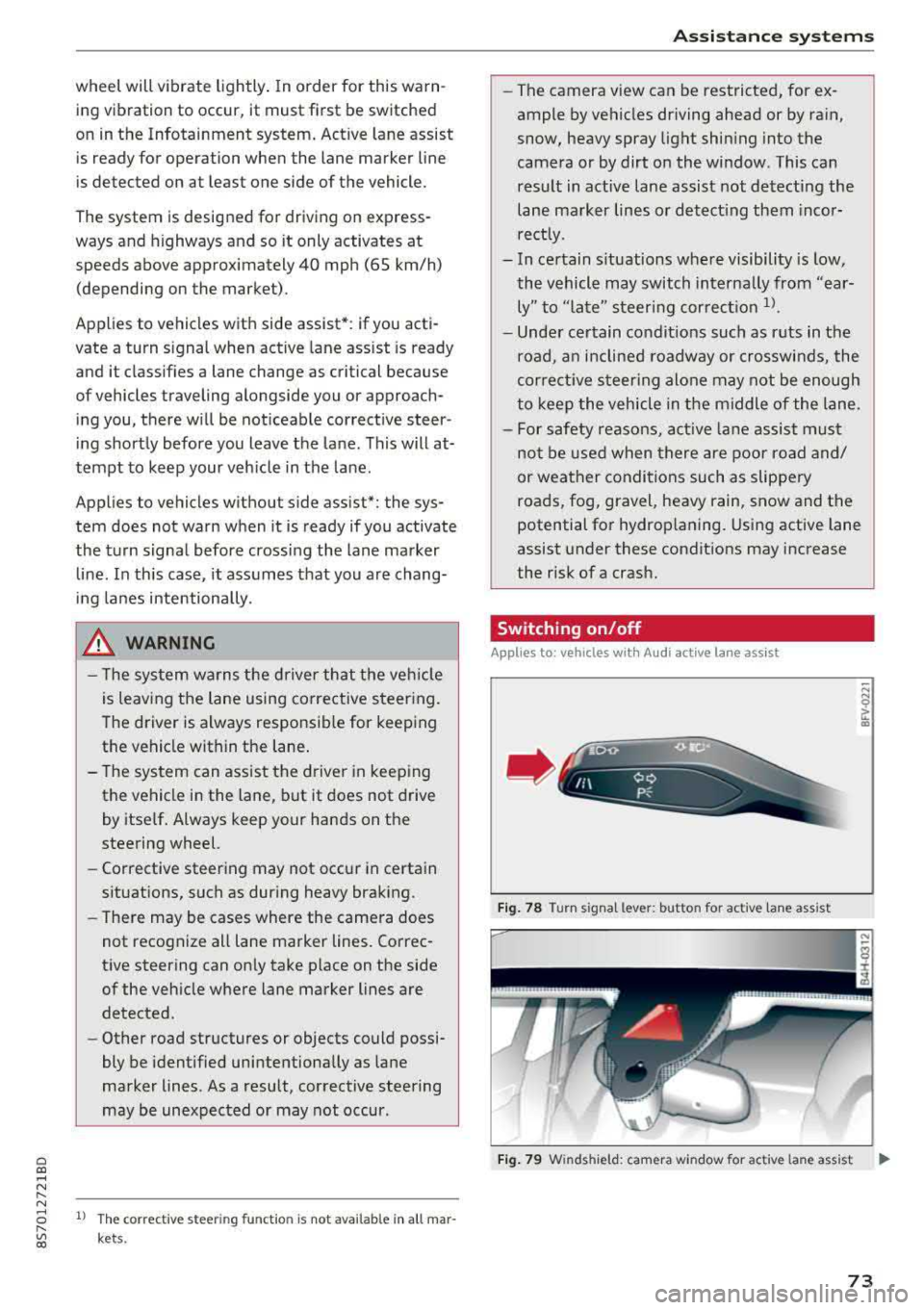
Fig. 78 Turn s ignal lever: but ton for activ e lane ass ist
"' N 0 > u. CD
Fig. 79 W inds hield: camera w indow for ac tive la n e ass ist ..,.
73
Page 76 of 310
Ass is tance sy stem s
,.. Press the button to switch the system on and
off¢ fig. 78. The . or rl1 indicator light in
the instrument cluster turns on or off.
Ind icat or light s
• Read y: the i ndicator light t urns on when the
system is ready for use. The system can now be
operated.
rl1 Not read y: the indicator light turns on if the
system is swi tched on but is inoperab le. Th is may
be due to the following reasons:
- There is no lane marker line .
- The relevant lane marker lines are not detected (for example, mark ings in a construction zone
o r because they are obstructed by snow, dirt,
water or lighting).
- The veh icle speed is below the activation speed
of approximately 40 mph (65 km/h) (the speed
may vary depending on yo ur country).
- The lane is too narrow or too wide.
- The curve is too narrow .
- The driver's hands are not on the steering
wheel.
(D Tips
- Make sure the camera's field of view
¢
fig. 79 is not obstructed by stickers or
anything else . For informat ion on cleaning,
see¢ page 266 .
-In certain markets : if the system is switched
on, it will sw itch on automat ically each time
the ign it ion is switched on .
Indicator in Infotainment d isplay
Ap plies to: ve hicles w ith Aud i active lane assist
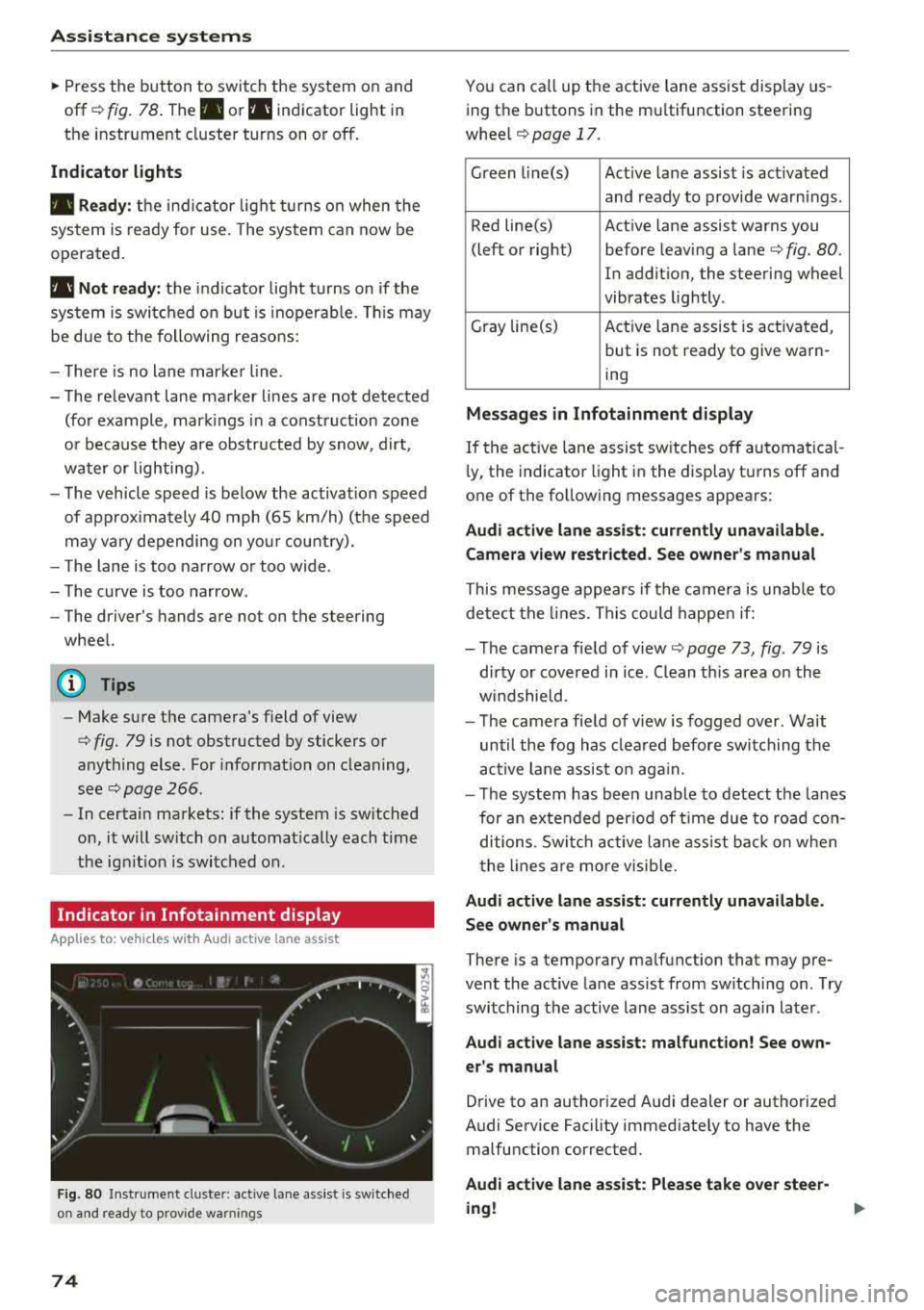
F ig. 80 Instrument cluste r: active lane ass ist is switched
on and ready to prov ide warnings
74
You can call up the active lane ass ist display us
ing the buttons in the mu ltifunction steering
wheel
¢ page 17.
Green l i ne(s) Act ive lane assist is act ivated
and ready to provide warnings .
Red line(s) Active lane assist warns you
(left or right) before leav ing a
lane¢ fig. 80.
In addition, the steering wheel
vibrates lightly .
Gray line(s) Act ive lane assist is activated,
but is not ready to give warn-
ing
M essag es in Infotainm ent disp la y
If the active lane assist sw itches off automatical
l y, the indicato r light i n the display turns off and
one of the following messages appears :
Audi a ctive l ane ass is t: currentl y unavailable.
Camera view restricted . See ow ner' s ma nual
This message appears if the camera is unable to
detect the lines. This could happe n if:
- The camera field of
view ¢ page 73, fig. 79 is
dirty or covered in ice . Clean th is area on the
w indshield.
- The camera fie ld of view is fogged over. Wait
until the fog has clea red before switching the
active lane assist on aga in.
- T he system has been unable to detect the lanes
for an extended per iod of t ime due to road con
ditions . Switch ac tive lane assist ba ck on w hen
the lines a re more visib le.
A udi acti ve l ane as sis t: cur rentl y una vailable.
Se e owner' s manual
There is a temporary malfunction that may pre
vent the act ive lane assist from sw itching on . T ry
switching the active lane assist on again later .
Audi active lane assi st: mal func tion! See own
er 's manual
Drive to an authorized Audi dealer or authorized
Audi Service Facility immediately to have the malfunction corrected.
Audi a ctive lane a ssi st: Plea se take over stee r
ing !
Page 77 of 310
Cl co .... N ,....
N
This message appears if you are not stee ring by
yourse lf . If this is th e case, active lane ass ist does
not switch off, but it is "not ready" to provide a
warning . The system can he lp you keep the veh i
cle in the lane. However, you are responsible for
driving the vehicle and must steer it yourself .
A WARNING
Note that messages may be delayed or not
displayed on vehicles with accessor ies mount
ed on the steer ing whee l, such as a stee ring
wheel sp inner knob. Always keep you r hands
on t he steering whee l.
Adjusting the steering time and vibration
warning
Appl ies to: vehicles with Audi act ive lane ass ist
You con adjust individual act ive lone assist set
tings in the Infotainment system.
Selec t in the Infotai nment system : I MENUI but
ton>
Vehicle > left con trol button > Driv er a ssis
tance > Audi acti ve lane assist
Steering time
1>
Early : in this setting, the correct ive steering hap
pens continuously to help keep the vehicle in the
center of the lane .
Late : in this setting, the system provides correc
tive steering just before a vehicle whee l touches a
detected lane ma rker line .
Vibration warning
You can switch the additional vibration warning
in the steering wheel o n or off.
(I) Tips
In certain markets: your settings are stored
automatically and assigned to the remote
cont rol key in use .
8 1l The co rrect ive stee rin g fu nctio n is not ava ilabl e in all mar ,..._
~ kets.
A ssi st a nce systems
Audi side assist
Description
Applies to: veh icles w ith Audi side assist
0, :;; 0
it m
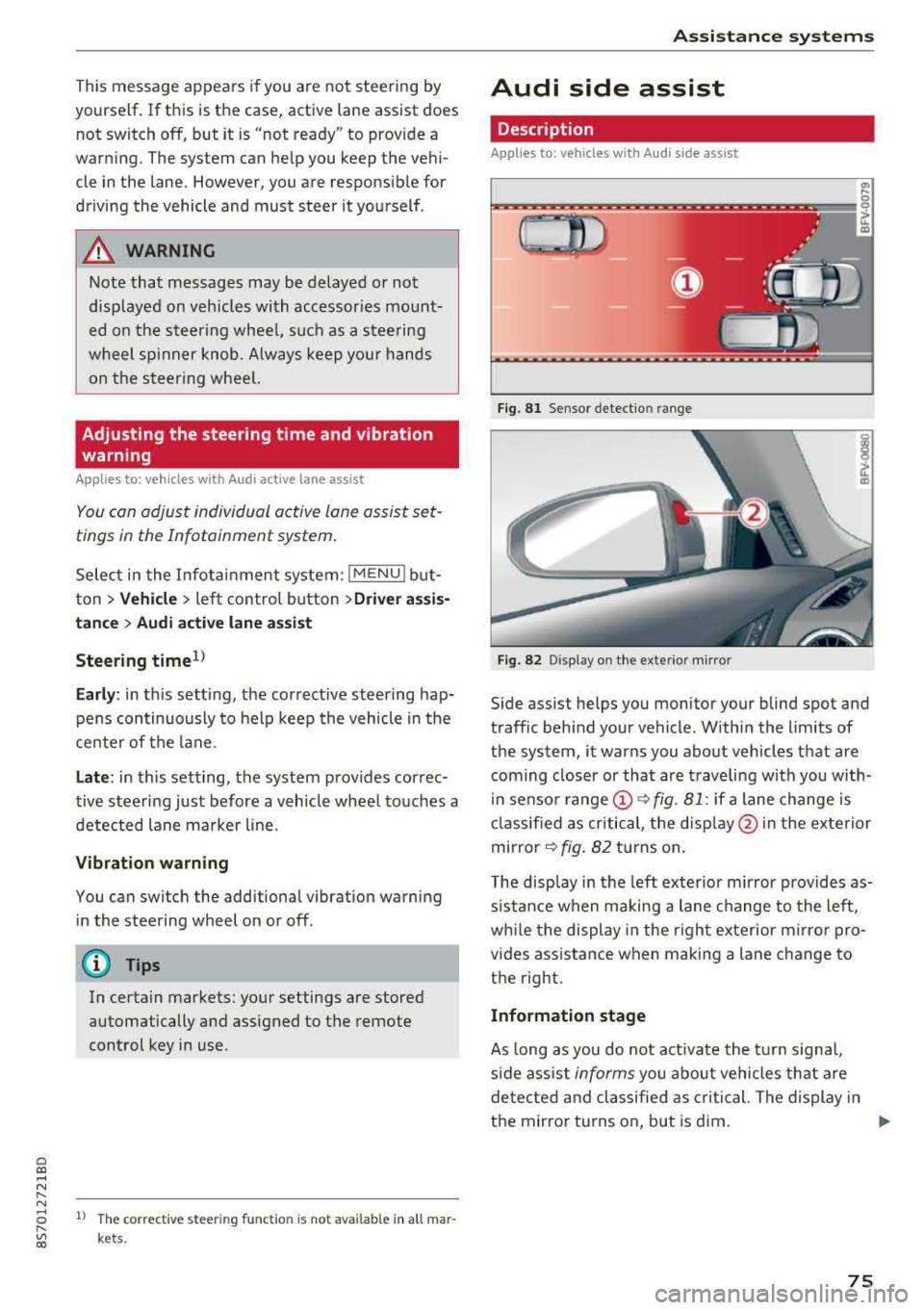
Fig . 81 Senso r de tect io n range
Fi g. 82 Disp lay on t he ex te ri or m irro r
Side assist helps you monitor your blind spot and
traff ic beh ind your vehicle . Withi n the limits of
the system , it warns you abo ut vehicles that are
coming closer or that a re t raveling with you with
i n senso r
range @~ fig. 81: if a lane change is
cla ssified as critical , the disp lay @ in the e xte rior
mirror
~ fig . 82 turns on .
T he display in the left exterio r m irror p rovides as
s istance when making a lane change to the left,
whi le the display in the r ight exterior mirro r pro
vides ass istance when m aking a lane change to
the right.
Information stage
As long as you do not act ivate the tu rn s igna l,
s ide ass ist
informs you about vehicles tha t are
detec ted and classifie d as critical. The display in
t h e mirror tu rns on, but is d im.
75
Page 80 of 310
Assistance systems
Messages
App lies to: ve hicles w ith Aud i side ass ist
If th e side assist sw itches off automatically, a
message appears in the Infotainment system dis
p la y.
@j Audi side assist: currently unavailable.
Sensor vision restricted due to surroundings.
See owner's manual
The radar sensor vision is impaired . Do not cover
the area in front of the sensors with bike wheels,
stickers, dirt or other objects. Clean the area in
front of the sensors, if necessary
c:> page 76,
fig . 84 .
@j Audi side assist: currently unavailable.
See owner's manual
Side assist cannot be switched on at th is time be
cause there is a malfunction (for example, the battery charge level may be too low) .
@j Audi side assist: malfunction! Please
contact Service
The system cannot guarantee that it will detect
veh icles correctly and it has switched off . The
sensors have been moved or are faulty. Have the
system checked by an author ized Audi deale r or
authorized Audi Service Facility soon.
Audi drive select (drive
settings)
Introduction
A pp lies to: ve hicles w ith Aud i d rive select
Drive select makes it possible to expe rience d if
fe rent types of vehicle settings in one vehicle.
The driver can select from three modes, Comfort,
Auto and Dynamic , using the
i:l:ta button in the
center console or by using the Infotainment sys
tem . T his allows you to switch between a sporty
and a comfortab le driving mode, for examp le. In
the Indi vidual mode, the settings can be adjust
ed to your personal preferences. This makes it
possible to combine sett ings such as a sporty en
g ine setting w ith light steering.
78
A WARNING
Using Aud i drive select incorrectly can lead to
coll is ions, other accidents and serious inju
ries.
Description
App lies to: vehicles with A udi drive se lect
The veh icle setup in each mode depends on the
vehicle's features.
Engine and automatic transmission
Depending on the mode, the engine and auto
matic transmission respond more quickly or in a
more balanced manner to accelerator pedal
movements.
Suspension control (Audi magnetic ride)*
The suspension control uses sensors to record in
format ion regarding steering movements, brak
i ng and acceleration operations by the driver, as
well as information about the road surface, driv
i ng speed, and load. W ith dr ive se lect, you can
adjust the suspension control to sporty (dynam
ic ), comfortable (comfort) or balanced (auto).
Steering
The power steering adapts . Indirect steering that
moves eas ily as in comfort mode is espec ially
su ited to long drives on a highway . The dynamic
mode provides sporty, direct steering.
Engine sound*
The engine sound adapts to the current mode
and can be subtle to sporty .
(D Tips
In some models, the maximum vehicle speed
can only be reached in the auto and dynamic
modes .
Page 82 of 310
Parking syste m s
Parking systems
General information
A pplies to: ve hicles w ith rear park in g syste m/pa rk in g system
p lus
Depending on your vehicle 's equipment , various
parking aids will help you when parking and ma
neuvering.
The
r ea r p arki ng sys te m is an aud ible parking a id
that warns you of obstacles
behind the vehicle
¢ page 81.
The parki ng sys te m plu s assists you when park
ing by aud ibly and visually indicating objects de
tected
in front of and behind the veh icle
¢ page 81.
The rea rv iew ca mera shows the area behind the
veh icle in the Infotainment system d isplay . The
lines in the rearv iew camera image he lp you to
pa rk or maneuve r
¢page 82.
_& WARNING
-Always look for traff ic and check the area
around your vehicle by looking at it direct ly
as well. The parking system cannot replace
the driver's attention . The driver is always
responsib le when entering or leaving a park
ing space and during similar maneuvers.
- Please note that some surfaces, such as
clothing, are not detected by the system.
-
- Sensors and cameras have blind spots in
which people and objects cannot be detect
ed . Be especially cautious of small children
and animals.
- The sensors can be displaced by impacts or
damage to the radiator gr ille, bumper,
wheel housing and the underbody . The park
i ng system may be impa ired as a result .
Have an authorized Audi dealer or author
ized Audi Serv ice Facility check their func
t ion.
- Make su re the senso rs a re not obst ructed by
st ickers, depos its or othe r ma ter ia ls.
If they
are, the senso r funct io n could be impai red .
For additiona l information on cleaning, see
¢ page 266 .
80
@ Note
-Some objects are not detected or disp layed
by t he system under certain c ircumstances:
- objects such as barrier cha ins, tra iler draw
bars, vertical po les or fences
- objects above the sensors such as wall ex
tensions
- objects with certain surfaces or structures
such as cha in link fences or powder snow
- If you continue driving closer to a low ob
ject, it may disappear from the sensor range . Note that you will no longer be
wa rned about th is obstacle.
- Keep enough distance from the curb to re
duce the risk of damage to the rims .
(D Tips
-The system may provide a warning even
though there are no obstacles in the cover
age area in some situations, such as :
- certain road surfaces or when there is tall grass
- externa l ultrasonic sources such as from
cleaning vehicles
- in heavy rain, snow, or th ick vehicle ex
h a u st
- We recommend that you practice par king in
a traffic -free location or parking lot to be
come familiar with the system . When doing
this, there shou ld be good light and weath
er conditions.
- You can change the vo lume of the signa ls.
- What appea rs in the disp lay is slight ly de -
layed.
- Th e sensors m ust be kept clean and free of
snow and ice for the parking aid to operate .
Page 85 of 310
Cl co .... N ,....
N ...... 0 ,....
Vl co
General information
Applies to: ve hicles with rearview camera
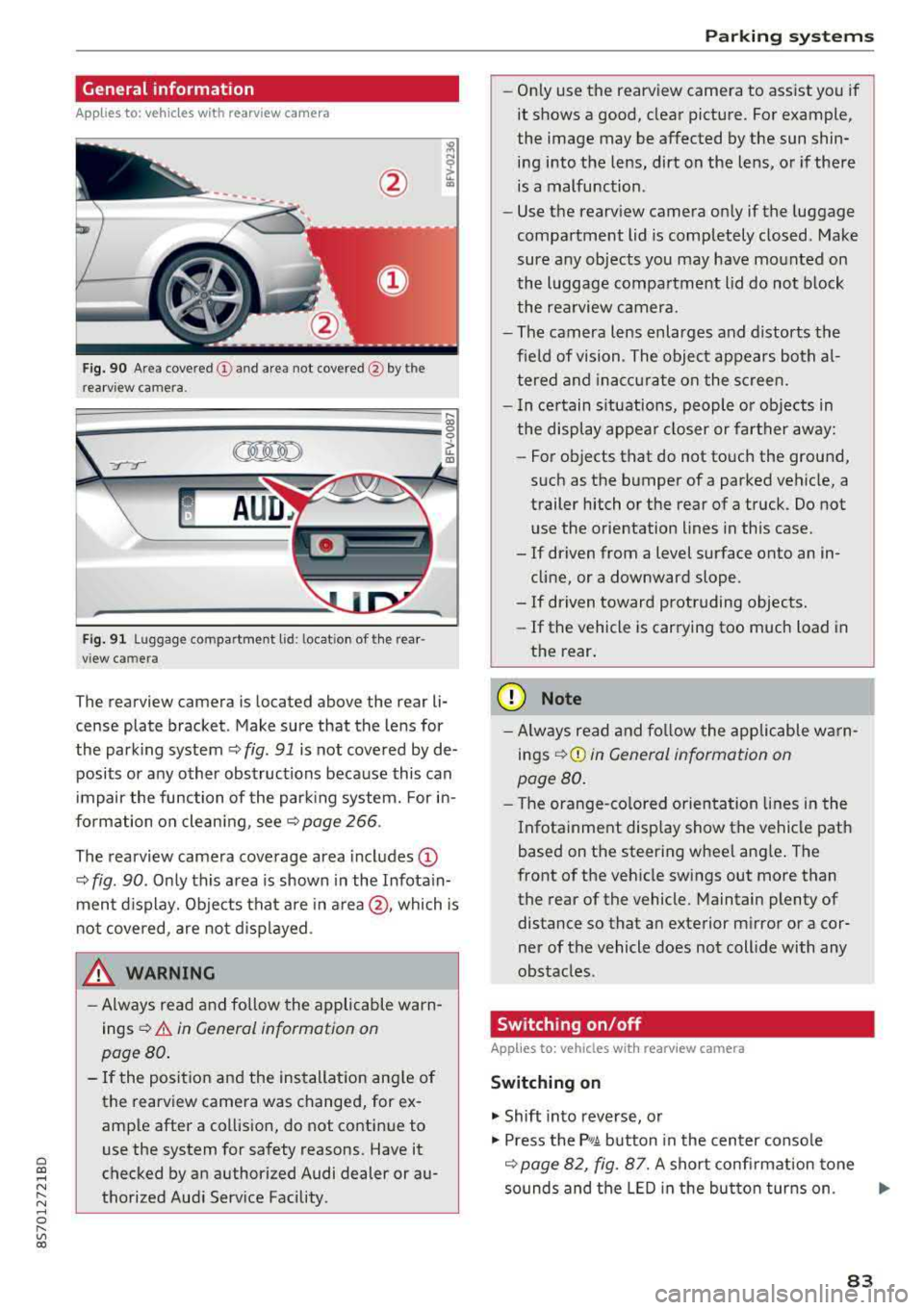
Fig . 90 Area covered (!) and area not covered @ by the
rea rview camera.
:;,
~;..------: :.·~- ---~ _.,- ,.,,.--------g
(Jo00oD ~
Fig. 91 Luggag e compartment lid: locat ion of the rear
view camera
The rearview camera is located above the rear li
cense plate bracket. Make sure that the lens for
the parking system¢
fig. 91 is not covered by de
posits or any other obstructions because this can
impair the function of the parking system. For in
formation on cleaning, see¢
page 266 .
The rearview camera coverage area includes
(D
¢ fig. 90. Only this area is shown in the Infotain
ment display. Objects that are in
area @, which is
not covered, are not displayed.
A WARNING
-Always read and follow the applicable warn
ings ¢
A in General information on
page 80.
- If the position and the installation angle of
the rearv iew camera was changed, for ex
ample after a collision, do not continue to
use the system for safety reasons. Have it
checked by an authorized Audi dealer or au
thorized Audi Service Facility .
Parking systems
-Only use the rearview camera to assist you if
it shows a good, clear picture. For example,
the image may be affected by the sun shin
ing into the lens, dirt on the lens, or if there
is a malfunction.
- Use the rearview camera only if the luggage
compartment lid is completely closed. Make
sure any objects you may have mounted on
the luggage compartment lid do not block
the rearview camera.
- The camera lens enlarges and distorts the
field of vision. The object appears both al
tered and inaccurate on the screen.
- In certain situations, people or objects in
the display appear closer or farther away:
- For objects that do not touch the ground,
such as the bumper of a parked vehicle, a
trailer hitch or the rear of a truck. Do not use the orientation lines in this case.
- If driven from a level surface onto an in cline, or a downward slope .
- If driven toward protruding objects.
- If the vehicle is carrying too much load in
the rear.
(D Note
-Always read and follow the applicable warn
ings
¢ (D in General information on
page 80.
- The orange-colored orientation lines in the
Infotainment display show the vehicle path
based on the steering wheel angle. The
front of the vehicle swings out more than
the rear of the vehicle. Maintain plenty of
distance so that an exterior mirror or a cor
ner of the vehicle does not collide with any
obstacles.
Switching on/off
App lies to : vehicles wi th rearv iew camera
Switching on
.,. Shift into reverse, or
.,. Press the P,q.A button in the center console
¢ page 82, fig. 87. A short confirmation tone
sounds and the LED in the button turns on.
..,.
83
Page 86 of 310
Parking systems
Switching off
~ Drive faster than 6 mph (10 km/h), or
~ Press the P"'il button, or
~ Switch the ignition off .
(D Tips
-The visual display in the left part of the dis
play should help you detect the critical vehi
cle areas .
- You can change the volume of the signals
and the display
¢page 84.
Perpendicular parking
Applies to: vehicles with rearview camera
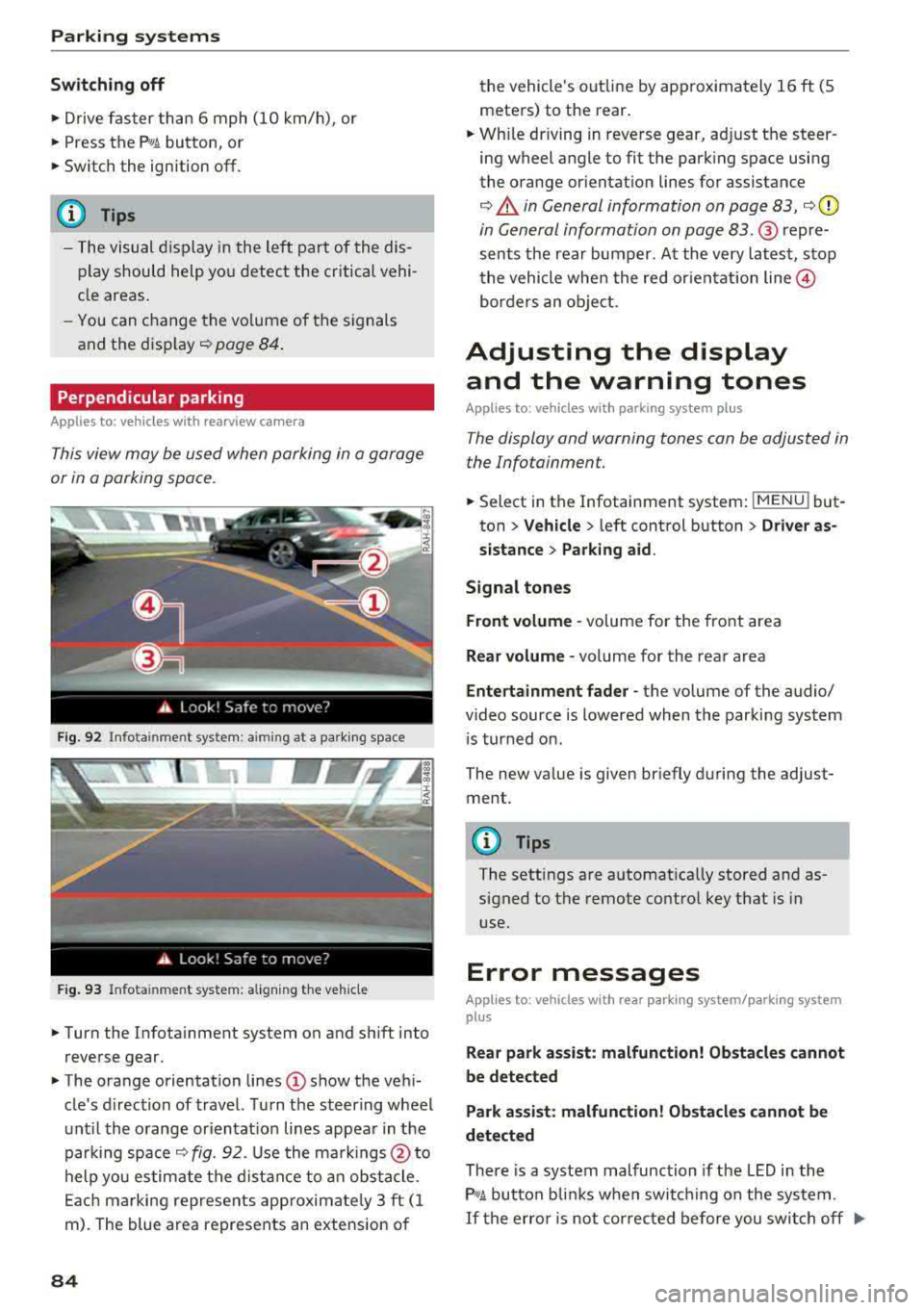
This view may be used when parking in a garage
or in a parking space.
F ig. 92 Info ta in ment system: a im ing at a park ing space
Fig. 93 Infota inme nt system: aligning the vehicle
~ Turn the Infota inment system on and shift into
reverse gear.
~ The orange orientation lines (D show the vehi
cle's d irection of travel. Turn the steering wheel
until the orange or ientat ion lines appear in the
parking space
¢ fig. 92. Use the markings @to
help you estimate the distance to an obstacle.
Each marking represents app roximate ly 3 ft (1
m). The blue area represents an extension of
84
the vehicle 's out line by approximately 16 ft (5
meters) to the rear.
~ Wh ile driving in reverse gear, adjust the steer
ing wheel angle to fit the parking space using
the orange orientation lines for assistance
¢ .&. in General information on page 83, ¢(D
in General information on page 83. ® repre
sents the rear bumper. At the very latest, stop
the vehicle when the red or ientat ion
line @
borders an object.
Adjusting the display
and the warning tones
Applies to: vehicles with parking system plus
The display and warning tones can be adjusted in
the Infotainment.
~ Select in the Infotainment system : IMENU! but
ton
> Vehicle > left control button > Driver as
sistance> Parking aid.
Signal tones
Front volume -
volume for the front area
Rear volume -volume for the rear area
Entertainment fader -the volume of the audio/
video source is lowered when the parking system
i s turned on.
The new value is given briefly during the adjust ment.
{!) Tips
The settings are automat ically stored and as
signed to the remote control key that is in
use.
Error messages
App lies to: vehicles with rear park ing system/parking system
plus
Rear park assist: malfunction! Obstacles cannot
be detected
Park assist: malfunction! Obstacles cannot be
detected
There is a system malfunction if the LED in the
P'1
1 .ll button blin ks when switc hing on the system .
If the error is not corrected before you switch off Ill-
Page 88 of 310
Intelligent Technology
Intelligent Technology Electronic stabilization
control (ESC)
Description
Elect ronic stabili zation control ( ESC) suppo rts
driver safety. It red uces the risk of slipping and
improves dr iving stabi lity. ESC detects crit ica l sit
uations such as the vehicle overstee ring and un
dersteeri ng or the w heels are sp inning. The vehi
cle is stabilized by app lying the brakes or reduc
i n g e ngine torque . When the ESC engages, the
liJ indicato r light bli nks in t he instr ument clus
t er.
The fo llow ing systems are in tegrated in the ESC:
Anti-lock braking system (ABS)
ABS p reve nts the whee ls from lock ing whe n brak
ing. The vehicle can st ill be steered even d uring
hard brak ing. Apply steady press ure to the bra ke
pedal. Do not pump the pedal. A puls ing in t he
b rake pedal indicates that the system is act ing to
s tabili ze the vehicle .
Brake assist system
The brake assist system can decrease brak ing dis
tance . It inc reases brak ing power when the d river
presses the brake pedal q uick ly in eme rgency sit
uations . You must press and hold t he b rake pedal
until the dangerous si tuatio n is ove r.
Anti-slip regulation (ASR)
ASR red uces eng ine power when the d rive wheels
begin sp inning a nd adapts the force to the road
conditions . This makes it easie r to start, acceler
ate and dr ive u p hill s.
Electronic differential lock (EDL)
E DL applies the brakes to a wheel that sta rts
spi nning and t ransfe rs the d rive power to the
other driving wheels. This f unction is not availa
b le at higher speeds.
In extreme cases, EDL automatically sw itches off
to keep the brake on the b raked wheel from over
heati ng. The vehicle is st ill work ing correctly. EDL
86
will swi tc h on again automatically when condi
tions have retu rned to normal.
Power steering
The ESC can also support veh icle stab ility
t hr ough stee rin g.
Selective wheel torque control
Se lective wheel to rque con trol is used when d riv
i ng on curves . The front whee l on the ins ide of
t h e curve or bo th whee ls on the i nside of th e
cu rve are braked se lective ly as needed. This al
l ows mo re pre cise dr iving in curves .
_&. WARNING
-The E SC and i ts in teg ra ted systems cannot
overcome the lim its imposed by natura l
phys ica l laws. This is es pec ially important
on s lippery or wet roa ds.
If the systems be
gin acting to stabilize yo ur vehicle, you
should immediately a lter your speed to
match the road and traffic conditions. Do
no t le t the inc reased safety p rovi ded tempt
you into taking risks. This could increase
y o ur r is k of a c oll is ion.
- Please note the r is k of a coll is ion increases
w hen dr iv in g fast, especially t hrough curves
a nd on sl ippery or wet r oads, and w hen dr iv
ing to o cl ose to obje cts ahead. T he ES C and
it s i ntegrated systems cannot a lways pre
vent co llisions
-there is st ill a risk of acci
dents!
- Press the accelerator peda l caref ully when
accelerating on even, slippery sur faces such
as ice and snow. The drive wheels can spin
even when these control systems a re instal
led and this can affect driving stability and
increase the risk of a collision.
(0 Tips
- The ABS and ASR only funct ion correctly
when a ll four wheels have a sim ila r wear
co nditio n. D iffere nt tire sizes can lead to a
red uction in engin e power.
- You may hear noises when the systems de
sc ribed are working .