hood release AUDI TT ROADSTER 2018 Owners Manual
[x] Cancel search | Manufacturer: AUDI, Model Year: 2018, Model line: TT ROADSTER, Model: AUDI TT ROADSTER 2018Pages: 310, PDF Size: 46.95 MB
Page 9 of 310
Cl 00 .-< N r-N .-< 0 r-Vl 00
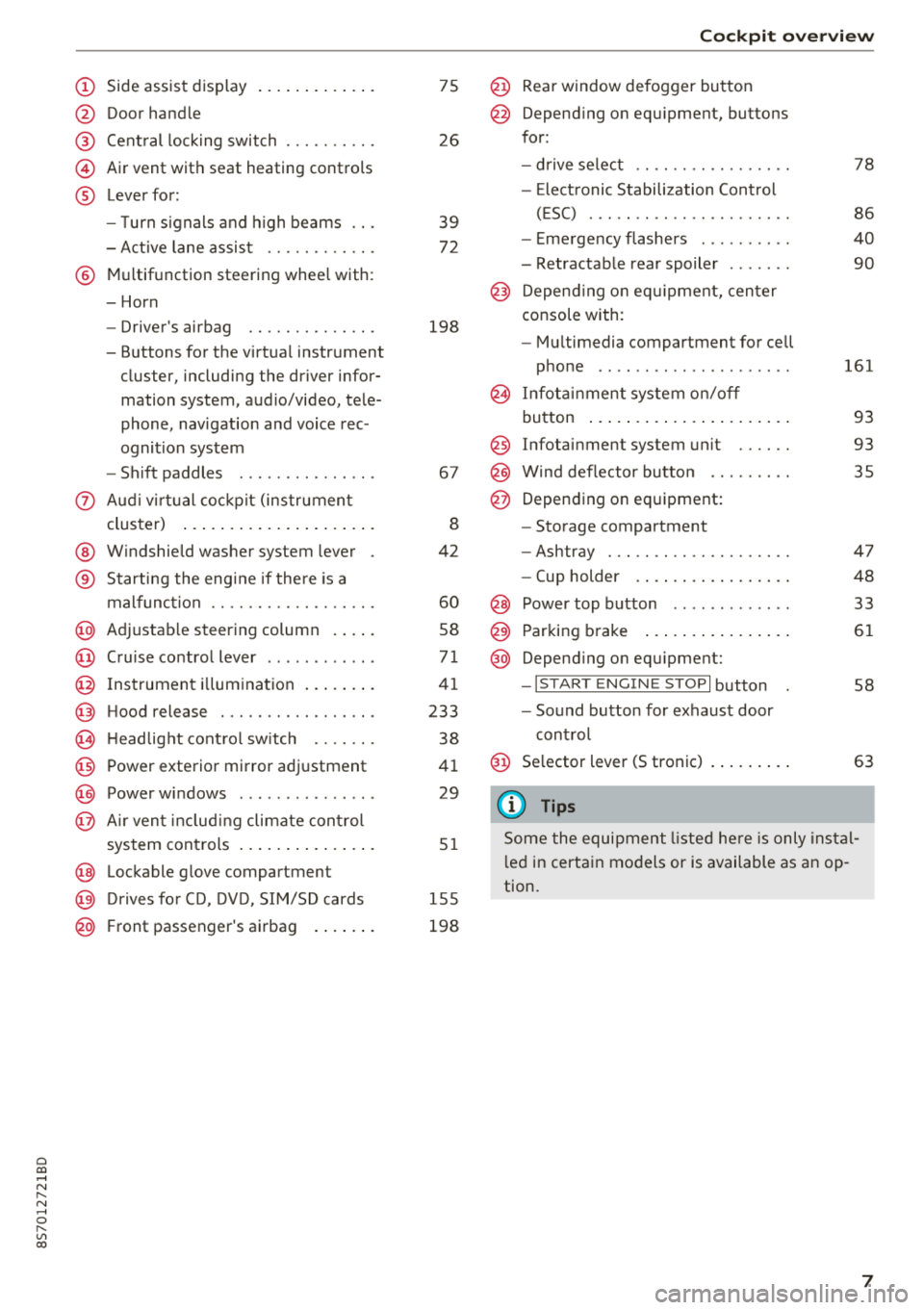
(D Side assist disp lay ..... ... .. .. .
@ Door handle
@ Cent ral locking swit ch ..... .. .. .
@ Air vent with seat heating controls
® Lever for:
- T urn s ignals and high beams
- Act ive lane assist ....... .. .. .
® M ultifunction steering whee l with :
- Horn
- Driver's airbag ........... .. .
- Buttons for the virtua l instr ument
cluster, including the dr iver infor
mation system, audio/video, tele
phone, navigation and voice rec
ognit ion system
- Shift paddles ............. . .
(J) A ud i v irtu al coc kp it (instrument
cluster) ... ... .. ..... ... .. .. .
@ W indshield washer system lever
® Starting the eng ine if the re is a
malfunc tion ............... .. .
@ Ad justable steer ing column . ... .
@ Cruise contro l lever .......... . .
@ Ins trumen t il lum ination ... .. .. .
@ Hood release .............. .. .
€3) H eadlight cont ro l sw itch .... .. .
@ Power exterio r mirror adj ustment
@) Power windows .............. .
@ A ir ven t incl uding climate con trol
system controls .. ..... ... .. .. .
@ Lockable g love compartment
@) D rives fo r CD, DV D, SIM/SD cards
@ Front passenger's ai rbag . ... .. .
75
26
39
7 2
198
67
8
42
60
58
71
41
233
38
4 1
29
5 1
1 55
198
Coc kpit o ver view
@ Rear window defogger button
@ Depend ing on equ ipment, buttons
for:
- drive select .. .............. .
- Elect ronic Stabili zation Cont rol
( E SC) . .. .. .. .............. .
- E me rge ncy flashers ......... .
- Retractable rear spoiler ...... .
@ Depending o n eq uipment, cen ter
console with:
- Mu ltimedia compartment for cell
p hone .. .. .. .. ............ .
@ In fota inment system o n/off
bu tton ... .... .. ... .. ..... .. .
@ Infotai nment system unit ..... .
@ Wind deflector butto n ........ .
@ Depending on eq uipment:
- Storage compartment
- Ashtray . .. .. .............. .
- Cup holder .... ... .. ..... .. .
@ Power top b utton ............ .
@ Parking b rake ... ... .. ..... .. .
@ Depend ing on eq uipment:
-I S TAR T ENGI NE STOP I button
- So und button for exhaust door
cont rol
@ Se lector lever (S tronic)
(D Tips
78
86
40
90
161
93
93 35
47
48
33
61
58
63
Some the equi pment listed he re is only ins tal
l e d in certa in models or is available as an op
tion.
7
Page 13 of 310
Cl 00 .-< N r-N .-< 0 r-Vl 00
If brake assist (brake booster) is not working, you
have to use much more force when braking the
vehicle. See an authorized Audi dealer or author
i zed Audi Service Facility for assistance.
1111 (USA models) /. (Canada models)
Brakes: malfunction! Please stop vehicle safely
If the ABS indicator light rJ]) (USA models) /
¢e'A (Canada models), the ESC indicator light GJ.
and the brake system indicator light 1111 (USA
models)/ . (Canada models) turn on and this
message appears, then the ABS, ESC and braking
distribution are
malfunctioning¢ &.
Drive to an authorized Audi dealer or authorized
Audi Service Facility immediately to have the
malfunction corrected
¢ & .
1111 (USA models) /. (Canada models)
Parking brake: malfunction! Safely stop vehicle.
See owner's manual
- If the indicator light and the message appear
when the vehicle is stationary or after switch
ing the ignition on,
check if you can release the
parking brake. If you cannot release the park
ing brake, see an authorized Audi dealer or au
thorized Audi Service Facility. If you can release
the parking brake and the message still ap pears, see an authorized Audi dealer or author
ized Audi Service Facility immediately to have
the malfunction corrected.
- If the indicator light and message appear
while
driving,
the hill start assist or emergency brak
ing function may be malfunctioning. It may not
be possible to set the parking brake or release
it once it has been set. Do not park your vehicle
on hills. See an authorized Audi dealer or au
thorized Audi Service Facility for assistance.
(USA models): if the
1111 and Ei] indicator
lights turn on together, have the brake system
checked immediately by an authorized Audi deal
er or authorized Audi Service Facility
¢page 14.
There is also a warning tone when the lights turn
on.
Instruments and indicator lights
A WARNING
-- Read and follow the warnings in
¢ page 233, Working in the engine com
partment
before opening the hood and
checking the brake fluid level.
- If the brake system indicator light does not
turn off or it turns on while driving, the
brake fluid level in the reservoir is too low,
and this increases the risk of an accident .
Stop the vehicle and do not continue driv
ing. See an authorized Audi dealer or au
thorized Audi Service Facility for assistance.
- If the brake system indicator light turns on
together with the ABS and ESC indicator
lights, the ABS/ESC regulating function may
be malfunctioning. Functions that stabilize
the vehicle are no longer available. This
could cause the rear of the vehicle to
swerve, which increases the risk that the ve
hicle will slide. Drive carefully to the nearest
authorized Audi dealer or authorized Audi
Service Facility and have the malfunction
corrected.
PARK/(®)f 'i®5, Electromechanical parking
brake
If the -(USA models) / . (Canada models)
indicator light turns on, the parking brake was
set.
-(USA models) / . (Canada models) Park
ing brake: caution! Vehicle parked too steep
If the indicator light blinks and the message ap
pears, there is not enough braking power to se
cure the vehicle. The brakes have overheated. The
vehicle could roll away even on a small incline.
fcdA Parking brake: malfunction! Please contact
Service
There is a malfunction in the parking brake. Drive
to an authorized Audi dealer or authorized Audi
Service Facility immediately to have the malfunc
tion corrected.
!il];!J:l;H3~ (USA models) / [iJ (Canada models)
Parking brake: caution! Vehicle parked too
steep
11
Page 14 of 310
Instruments and indicator lights
If th e indicator lig ht blinks and t he message ap
pea rs, there is not eno ugh bra king power to se
cure the vehicle . The brakes have overheated. The
ve hicle co uld ro ll away eve n on a small incline .
llJ;l:l:);J;H~ (USA models) / Ii] (Canada models)
Parking brake: applied
If thi s m essage appears, p re ss the bra ke peda l
fir st and t hen release the p arking br ake if neces
sary .
(D Tips
For additional in format io n on t he parkin g
bra ke, see
q page 61.
_}_ Cooling system
• Turn off engine and check coolant level.
Th e co olan t leve l is too low .
Do not cont inue drivi ng a nd switch the eng ine
off. Check the coolan t leve l
q page 239 .
-If the coolant leve l is too low, add coo lant
q poge 240 . Onl y cont inue driv ing once the in
dicator light t urns off .
• Coolant temperature: too high. Let engine
run with vehicle stationary
L et the eng ine run at id le for a few minutes to
coo l off, unt il the indicator light turns off .
- I f th e indic ator li ght d oes no t turn off, do no t
contin ue d riving the vehicle . See an au thori zed
Audi dealer or authorized A udi Se rvi ce Fac ility
fo r assistance .
A WARNING
-Never open t he hood if you can see o r hear
steam o r co olant esca ping from the eng ine
compartment. This inc reases t he risk of
bur ns. Wa it unti l you no long er see or h ea r
st eam o r coolan t esca ping .
- The eng ine compartmen t in any ve hicle can
b e a dangero us area. S to p the eng ine and
allow it to coo l before wo rking in the e ngine
compa rtm ent. A lw ays f ollow the in for ma
tion fo un d in
q page 233, Wo rking in the
engine comportment .
12
@ Note
Do not conti nue driv ing if the . indicato r
ligh t tu rn s on as this increases the risk of en
g ine damage.
9=7: Engine oil pressure
• Turn off engine. Oil pressure too low
Stop t he e ngine and do not co nti nu e d riving .
Check the eng ine oi l level
q page 237.
- If the en gine o il level is too low, add engi ne oil
q poge 237. Only continue driving once the in
dicator light turns off .
- If the eng ine o il level is co rre ct an d t he indic a
t o r lig ht still bli nks, t urn the engine o ff and do
not continue dr iving. See a n author ized A udi
dea le r or a uth orized Audi Serv ice Facility fo r as
sistance.
(D Tips
The o il press ure wa rning is not an oil leve l in
d icator . A lways check t he oil leve l regula rly.
E::3 Generator/vehicle battery
• Electric system : malfunction! Battery is not
being charged
There is a ma lf u nction in the a lternato r o r the ve
hicle e lectrica l system.
Dr ive to an au thor ized A udi d ealer or au tho rize d
Audi Se rvice Fac ility immed iate ly . T urn off a ll un
necessary e lect rical eq uipment because it will
dra in the battery. See an a uthorized Audi dea ler
or a uthori zed Aud i Serv ice Facility if the battery
c h arge level is too low.
(•) Electrical system: low battery charge. Bat
tery will be charged while driving
The s ta rting ability may be imp aired.
If this m essage turns off af ter a litt le whi le, t he
vehicle battery ch arge d enoug h while d riv in g.
If the message does not t urn off , have an autho r
i zed Audi dealer or author ized A udi Se rvice Facili
ty repair the ma lfu nction .
Page 26 of 310
Opening and closing
LED and batteries in the remote control key
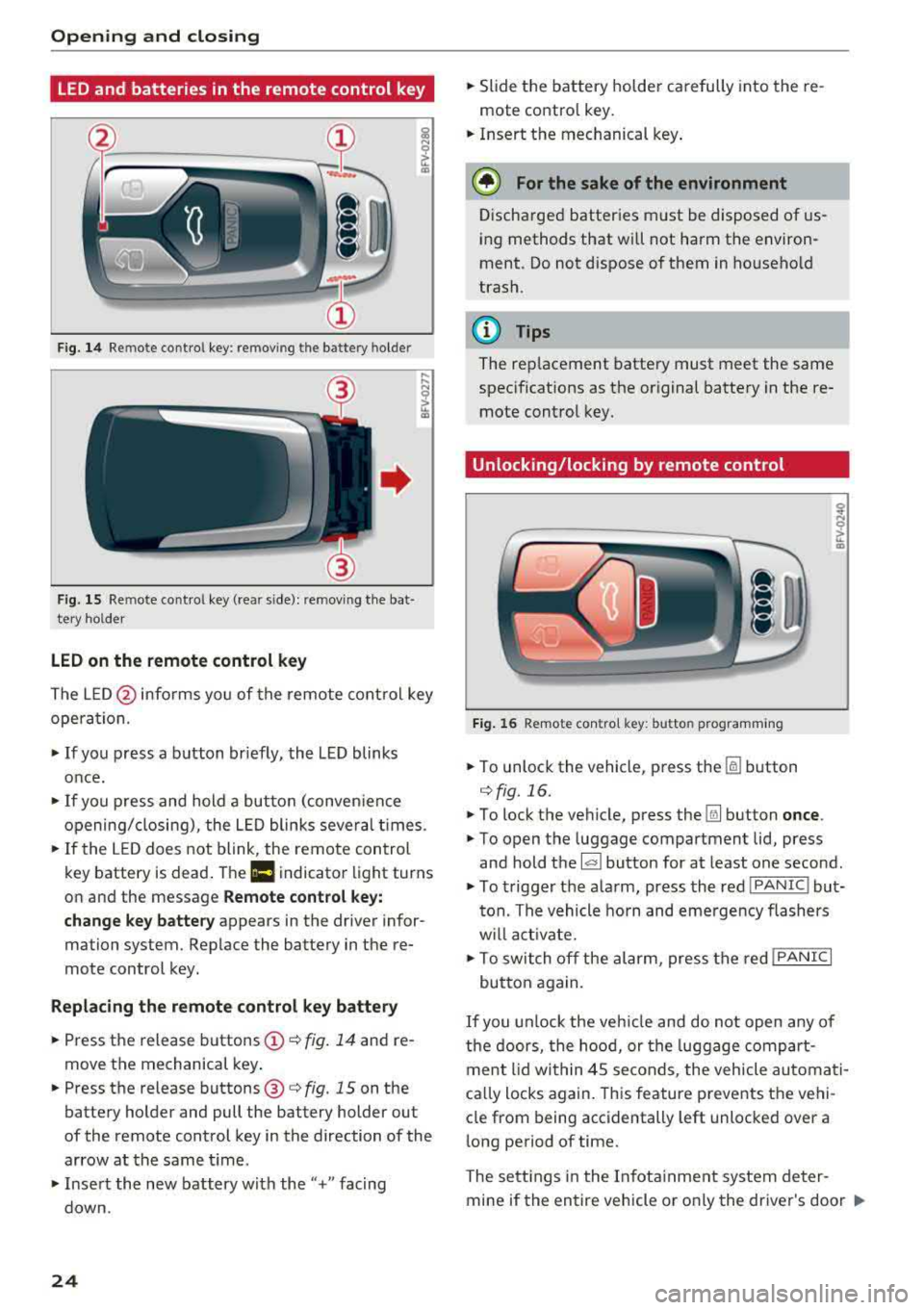
Fig. 14 Remote control key: removing the battery holder
Fig. 15 Re mote control key (rear side): removing the bat·
tery holder
LED on the remote control key
The L E D @ informs you of the remote control key
opera tion.
~ If you press a button briefly, the LED blinks
once.
~ If you press and hold a button (conven ience
opening/closing), the LED blinks several times.
~ If the LED does not blink, the remote control
key battery is dead . The
Ill indicator light turns
on and the message
Remote control key:
change key battery
appears in the driver infor·
mation system. Replace the battery in the re
mote control key.
Replacing the remote control key battery
~ Press the release buttons (!)¢ fig. 14 and re
move the mechanical key .
~ Press the release buttons@¢ fig. 15 on the
battery holder and pull the battery holder out
of the remote control key in the direction of the
arrow at the same time.
~ Insert the new battery w ith the"+" facing
down.
24
~ Slide the battery holder carefully into the re
mote contro l key.
~ Insert the mechanical key .
@ For the sake of the environment
Discharged batteries must be disposed of us
ing methods that will not harm the environ
ment. Do not dispose of them in household
trash.
@ Tips
The rep lacement battery must meet the same
specifications as the original battery in the re
mote control key.
Unlocking/locking by remote control
Fig. 16 Remote contro l key: butto n programm ing
~ To unlock the vehicle, press the [§] button
c:> fig. 16.
~ To lock the vehicle, press the Ifill button once .
~ To open the luggage compartment lid, press
and hold the
l al button for at least one second.
~ To trigger the alarm, press the red IPANIC I but
ton. The vehicle horn and emergency flashers
w ill activate.
~ To switch off the alarm, press the red !PANIC I
button again.
If you unlock the vehicle and do not open any of
the doors, the hood, or the luggage compart
ment lid within 45 seconds, the vehicle automati
ca lly locks again. This feature prevents the vehi
cle from being accidentally left unlocked over a
long period of time.
The settings in the Infotainment system deter
mine if the entire vehicle or o nly the driver's door
..,_
Page 66 of 310
Driving
keep your foot on the brake in all selector
lever positions (except P) when the engine is
running. Otherwise, this increases the risk
of an accident.
- Do not inadvertently press the accelerator
pedal when the vehicle is stopped if a gear is
engaged. Otherwise the vehicle will start to
move immediately, even if the parking brake
is set . This could result in a crash.
- Do not press the accelerator pedal when changing the selector lever position while
the vehicle is stationary and the engine is
running.
- Never leave your vehicle with the engine
running while in gear.
If you must leave
your vehicle when the engine is running, set
the parking brake and move the selector lev
er to the "P" position.
- To decrease the risk of an accident, these
lector lever must be in the P position and
the parking brake must be set before open
ing the hood and working on a running en
gine. Always read and follow the applicable
warnings¢ page 233, Working in the en
gine compartment .
(D Note
Never let the vehicle roll downhill with engine
off and the selector lever in the "N" position,
because this could damage the automatic
transmission and catalytic converter .
{D) Tips
- Drive select: sporty shifting characteristics
can be selected using the
Dynamic driving
mode . The Infotainment display shows Sas
the selector lever position instead of D.
- If you accidentally select "N" while driving,
take your foot off the accelerator pedal im
mediately and wait for the engine to slow
down to idle before selecting "D" or "S".
- If there is a power failure, the selector lever
will not move out of the "P" position. The
emergency release can be used if this hap
pens. Left-hand drive
vehicles¢ page 69.
64
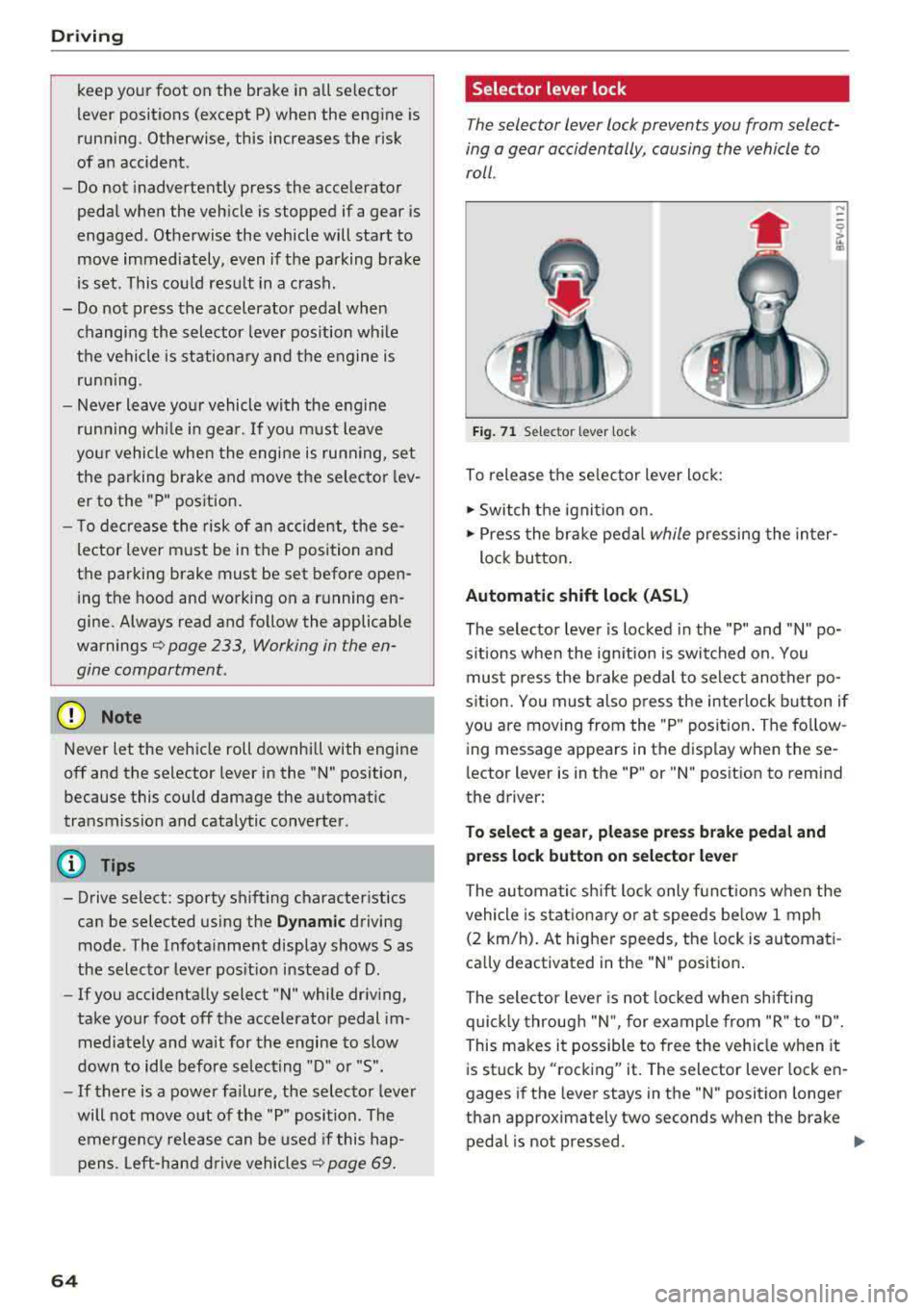
Selector lever lock
The selector lever lock prevents you from select
ing a gear accidentally, causing the vehicle to
roll .
Fig. 71 Selector lever lock
To release the selector lever lock:
.., Switch the ignition on.
....
.., Press the brake pedal while pressing the inter-
lock button.
Automatic shift lock (ASL)
The selector lever is locked in the "P" and "N" po
sitions when the ignition is switched on. You
must press the brake pedal to select another po
sition. You must also press the interlock button if
you are moving from the "P" position. The follow
ing message appears in the display when these
lector lever is in the "P" or
"N" position to remind
the driver:
To select a gear, please press brake pedal and press lock button on selector lever
The automatic shift lock only functions when the
vehicle is stationary or at speeds below 1 mph
(2 km/h). At higher speeds, the lock is automati
cally deactivated in the "N" position.
The selector lever is not locked when shifting
quickly through "N", for example from "R" to "D".
This makes it possible to free the vehicle when it
is stuck by "rocking" it. The selector lever lock en
gages if the lever stays in the "N" position longer
than approximately two seconds when the brake
pedal is not pressed.
Iii>
Page 205 of 310
Cl co .... N ,....
N .... 0 ,....
Vl co
front three-point safety belts to help reduce the
risk of injury in a wide range of accident and
crash situations. Be sure to read the important
information about safety and heed the WARN
INGS in this chapter.
Deployment of the Advanced A irbag System and
the activation of the safety belt pretensioners de
pend on the deceleration measured by the crash
sensors and registered by the electronic control
unit . Crash severity depends on speed and decel
eration as well as the mass and stiffness of the
vehicle or object involved in the crash .
On the passenger side, regardless of safety belt
use, the front passenger frontal airbag will be
turned off if the electrical capacitance measured
by the capacitive passenger detection system on
the front passenger seat is less than the amount
programmed in the electronic control unit. The
front passenger frontal airbag will also be turned
off if the capacitance measured by the system for
the front passenger seat equals that of an infant
of about one year of age in one of the child seats
that was used to certify the Advanced Airbag Sys
tem under Federal Motor Vehicle Safety Standard
208. The
PASSENGER AIR BAG OFF '1; light
comes on and stays on to tell you when the front
Advanced Airbag System on the passenger side
has been turned off
Q page 206.
A WARNING
To reduce the risk of injury when an airbag in
flates, always wear safety belts properly.
- If you are unrestrained, leaning forward, sit
ting sideways or out of position in any way,
your risk of injury is much higher.
- You will also receive serious injuries and
could even be killed if you are up against the
airbag or too close to it when it inflates
-
even with an Advanced Airbag Qpoge 194.
Airbag system
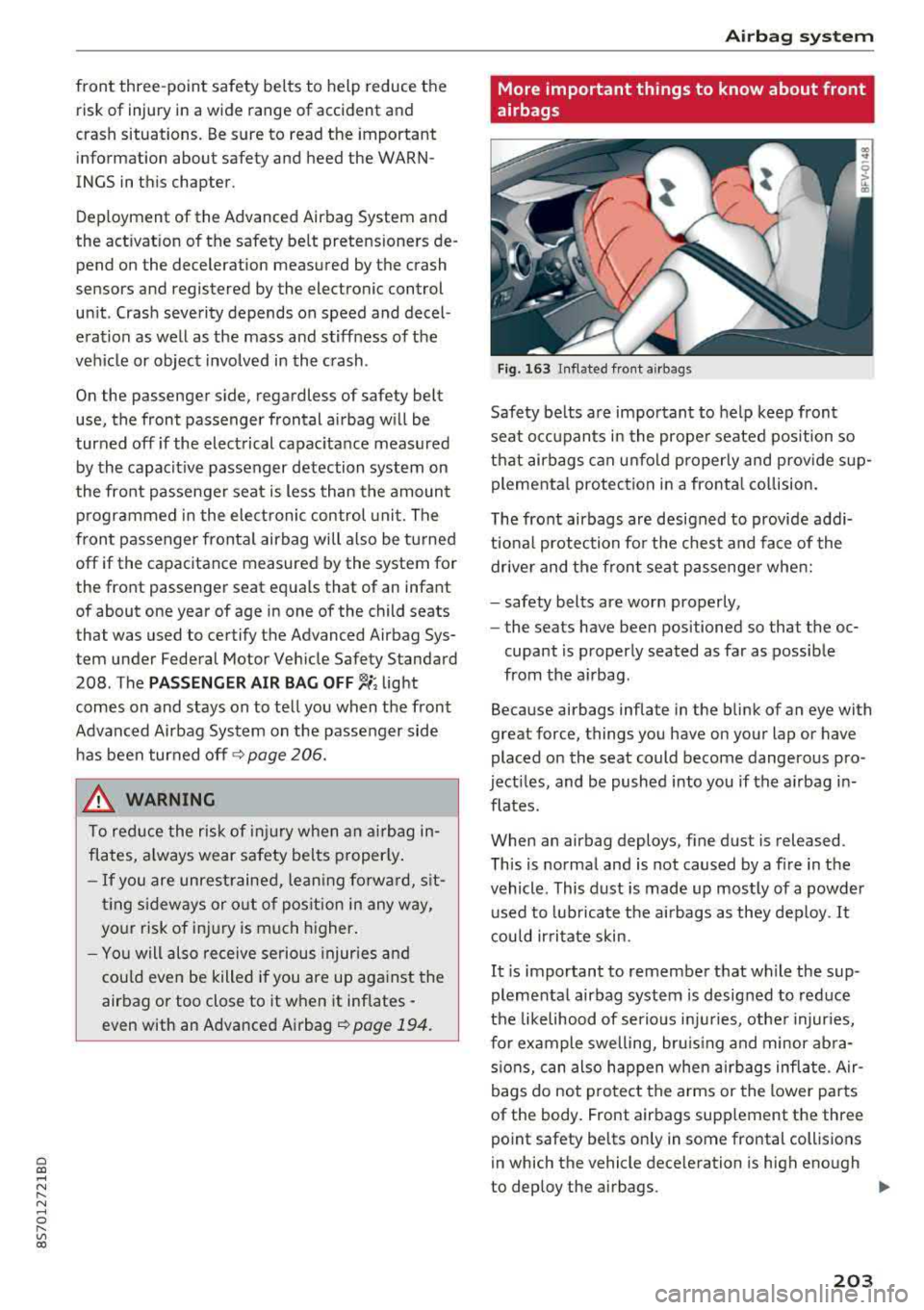
More important things to know about front
airbags
Fig. 163 Inflated front airbags
Safety belts are important to help keep front
seat occupants in the proper seated position so
that airbags can unfold properly and provide sup
plemental protection in a frontal collision.
The front airbags are designed to provide addi
tional protection for the chest and face of the
driver and the front seat passenger when:
- safety belts are worn properly,
- the seats have been positioned so tha t the oc-
cupant is properly seated as far as possible
from the airbag.
Because airbags inflate in the blink of an eye with
great force, things you have on your lap or have
placed on the seat could become dangerous pro
jectiles, and be pushed into you if the airbag in
flates.
When an airbag deploys , fine dust is released.
This is normal and is not caused by a fire in the
vehicle . This dust is made up mostly of a powder
used to lubricate the airbags as they deploy.
It
could irritate skin.
It is important to remember that while the sup
plemental airbag system is designed to reduce
the likelihood of serious injuries, other injuries,
for example swelling, bruising and minor abra
sions, can also happen when airbags inflate. Air
bags do not protect the arms or the lower parts
of the body. Front airbags supp lement the three
point safety belts only in some frontal collisions
in which the vehicle deceleration is high enough
to deploy the airbags.
IJII,-
203
Page 237 of 310
Cl co .... N ,....
N .... 0 ,....
Vl co
bring your vehicle to an authorized Aud i dea l
er or authorized Audi Service Facility to be
checked.
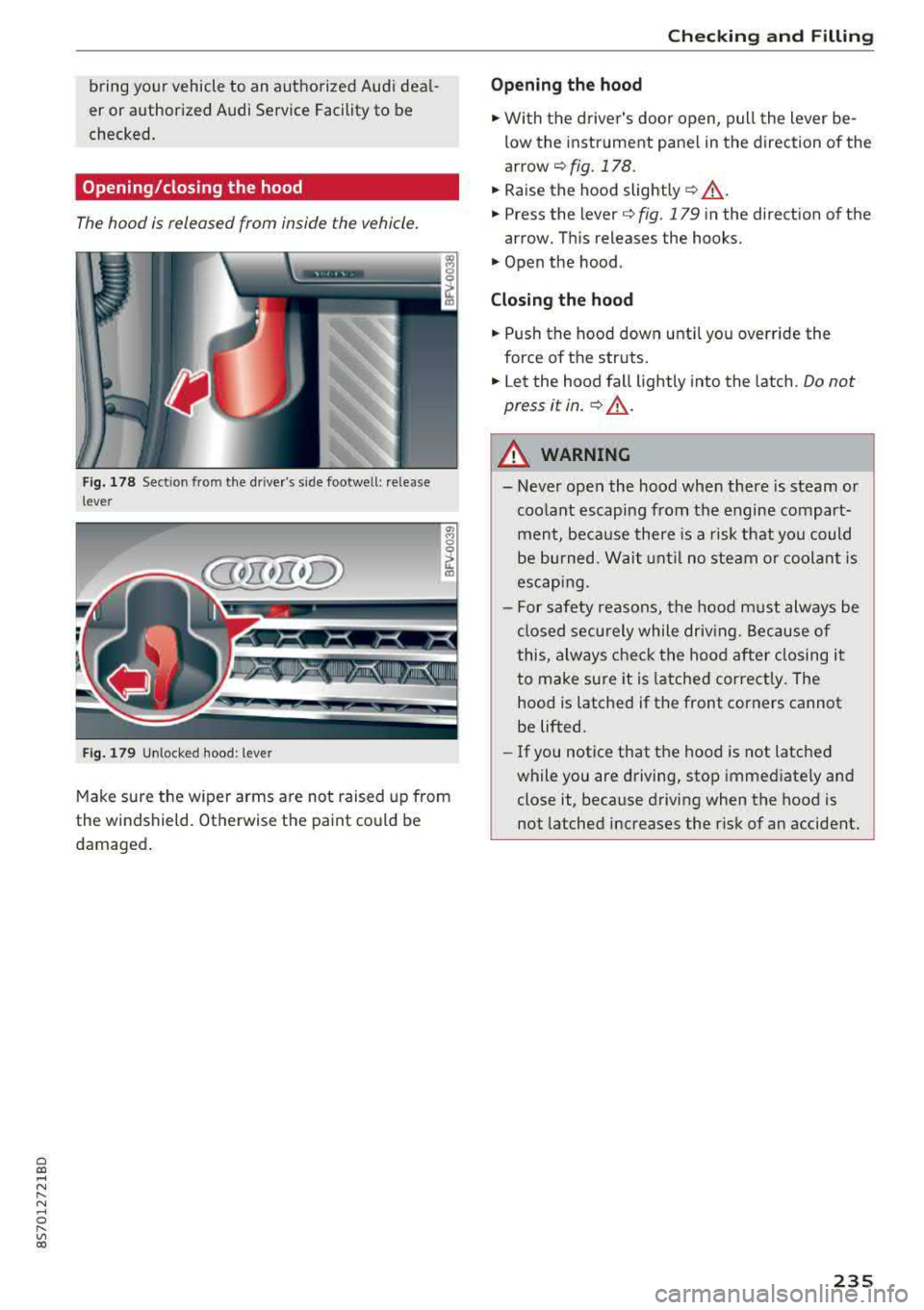
Opening/closing the hood
The hood is released from inside the vehicle.
F ig. 178 Sect ion from the drive r's side footwell: release
lever
F ig. 179 Unloc ked hood: lever
"' 8
~ (I)
Make sure the w iper arms are not raised up from
the windshield. Otherwise the pa int could be
damaged .
Checking and Filling
Opening the hood
... With t he driver's door open, pull the lever be
low the inst rument pane l in the direction of the
arrow ¢ fig. 178 .
... Raise the hood slightly ¢.&, .
... Press the lever¢ fig. 179 in the direction of the
arrow. Th is releases the hooks .
... Open the hood .
Closing the hood
... Push the hood down unti l yo u override the
force of the struts .
... Let the hood fall lightly into the latch. Do not
press it in.
¢ .&, .
A WARNING
--Never open the hood when there is steam or
coolant escaping from the engine compart
ment, because there is a risk that you could
be burned. Wait unt il no steam or coolan t is
escapi ng.
- F or safety reasons, the hood m ust always be
closed securely while driving. Because of
this, always che ck the hoo d after closing it
to make sure it is latched correct ly. The
hood is latched if the front corners cannot
be lifted.
-If you notice that the hood is not latched
while you are driving, stop immediately and
close it, because driving when the hood is not latched increases the r isk of an accident.
235
Page 300 of 310
Index
Engine Coolant . . . . . . . . . . . . . . . . . . . . . . . . . . . .
239
Starting . . . . . . . . . . . . . . . . . . . . . . . . . 58, 59
Starting with jumper cables . . . . . . . . . . . 283
Stopping . . . . . . . . . . . . . . . . . . . . . . . . . . . . 59
Engine compartment
Opening/closing the hood . . . . . . . . . . . . .
235
Overview . . . . . . . . . . . . . . . . . . . . . . . . . . . 236
Safety precautions . . . . . . . . . . . . . . . . . . . 233
Engine control ( indicator light) . . . . . . . . . . . 14
Engine oil
Adding . . . . . . . . . . . . . . . . . . . . . . . . . . . .
236
Changing . . . . . . . . . . . . . . . . . . . . . . . . . . 238
Checking oil level . . . . . . . . . . . . . . . . . . . . 236
Consumption . . . . . . . . . . . . . . . . . . . . . . . 236
Indicator light . . . . . . . . . . . . . . . . . . . . 12, 15
Engine speed limitation (indicator light) . . . 15
Entering characters/numbers (speller) . . . . . 99
Entering letters (speller) . . . . . . . . . . . . . . . . 99
Environment
Proper disposal of drained engine oil ... .
Unleaded gasoline .................. .
E xterior lighting
Exterior mirrors
238
229
38
Adjusting . . . . . . . . . . . . . . . . . . . . . . . . . . . 41
Dimming ....... ................ ..... 42
Heating . . . . . . . . . . . . . . . . . . . . . . . . . . . . . 41
External voice operation......... .... .. . 110
F
Factory default settings (MMI) 174
Fader(sound) .. .. ............. .... .. . 177
Fa sten ing
Booster seats . . . . . . . . . . . . . . . . . . . . . . .
223
Convertible child safety seats . . . . . . . . . . 222
Infant seats . . . . . . . . . . . . . . . . . . . . . . . . 221
Fast forward ing/rew inding (audio/video
file) . . . . . . . . . . . . . . . . . . . . . . . . . . . . . . . .
162
Fast forwarding (audio/video file) . . . . . . . . 162
Fast route
Favorites Media 141
165
Navigation . . . . . . . . . . . . . . . . . . . . . . . . . 136
Telephone.......................... 116
Federal Communications Commission (FCC) 293
Fi le formats (media drives) . . . . . . . . . . . . . 168
298
Floor mats . . . . . . . . . . . . . . . . . . . . . . . . . . . 183
Fog lights/rear fog light(s) . . . . . . . . . . . . . . 38
Foot pedals . . . . . . . . . . . . . . . . . . . . . . . . . . 182
Footwell lighting . . . . . . . . . . . . . . . . . . . . . . 40
For the sake of the environment
Environmentally-friendly driving . . . . . . . .
56
Fueling . . . . . . . . . . . . . . . . . . . . . . . . . . . . 230
Leaks..... .... .. .. .. ............. .. 234
Free text search . . . . . . . . . . . . . . . . . . . . . . 101
Media . . . . . . . . . . . . . . . . . . . . . . . . . . . . . 164
Navigation . . . . . . . . . . . . . . . . . . . . . . . . . 135
Radio . . . . . . . . . . . . . . . . . . . . . . . . . . . . . 150
Telephone. . . . . . . . . . . . . . . . . . . . . . . . . . 120
Freeze protection
Coolant . . . . . . . . . . . . . . . . . . . . . . . . . . . .
239
Frequency band ..... .. ........... 149, 151
Front airbags
Description . . . . . . . . . . . . . . . . . . . . . . . . .
198
How they work . . . . . . . . . . . . . . . . . . . . . . 203
Frontal collisions and the laws of physics . . 188
Front seats
Adjusting . . . . . . . . . . . . . . . . . . . . . . . . . .
181
Child restraints in the front seat . . . . . . . . 195
also refer to Seats . . . . . . . . . . . . . . . . . . . . 46
Fuel . . . . . . . . . . . . . . . . . . . . . . . . . . . . . . . .
229
Additives. . . . . . . . . . . . . . . . . . . . . . . . . . . 229
Blended gasoline . . . . . . . . . . . . . . . . . . . . 229
Current fuel consumption . . . . . . . . . . . . . . 21
Fuel gauge . . . . . . . . . . . . . . . . . . . . . . . . . . . 8
Fuel tank capacity . . . . . . . . . . . . . . . . . . .
288
Gasoline additives . . . . . . . . . . . . . . . . . . . 230
Indicator light . . . . . . . . . . . . . . . . . . . . . . . 15
Saving fuel . . . . . . . . . . . . . . . . . . . . . . . 56 , 78
Fueling
Fuel filler door emergency release . . . . . .
232
Fuel gauge . . . . . . . . . . . . . . . . . . . . . . . . . . . 8
Fuel tank capacity . . . . . . . . . . . . . . . . . . .
288
Opening the fuel filler door . . . . . . . . . . . . 230
With reserve canister (emergency fueling) 232
Fuses
Assignment . . . . . . . . . . . . . . . . . . . . . . . .
281
Replacing . . . . . . . . . . . . . . . . . . . . . . . . . . 280
G
Garage door opener (Homelink) . . . . . . . . . . 30
Garment hooks . . . . . . . . . . . . . . . . . . . . . . . . 49