ECU AUDI TT ROADSTER 2018 Owner's Manual
[x] Cancel search | Manufacturer: AUDI, Model Year: 2018, Model line: TT ROADSTER, Model: AUDI TT ROADSTER 2018Pages: 310, PDF Size: 46.95 MB
Page 156 of 310
Media
Media
Introduction
There are various media d rives and connections
ava ilab le in the MMI. You can play, for example,
au dio/video files f rom the Jukebox * or connect
your mob ile dev ice to the Audi m usic interface *
and operate it through the MMI.
Notes
General
Media and format restrictions :
the MMI (in cl ud
i n g the S D card reade r and the USB storage de
vice co nnect ion *) was tested w ith a var iety of
products and media on the market. However,
there may be cases where ind iv idual devices or
media and audio/video files" may not be recog
n ized, may play o nly w ith restr ictions, o r may no t
p lay a t all.
Digital Rights Management : please note that
the audio/v ideo files are sub ject to copyright pro
tect ion .
The media drives do not p lay f iles that a re pro
tected by OR M and that are ident ified with the
symbo l~ -
Data security : never store im portant data on SD
cards, the Ju kebox*, CDs/DVDs o r mobile devices.
Aud i AG is not responsib le for damaged or lost
fi les and media .
Loading times : th e mo re files/fo lde rs/p lay lists
that a re on a sto rage medium, the longer it will
take to loa d the audio/video* fi les . Audi recom
mends using storage med ia that on ly conta in a u
d io/video files* . T o decrease the t ime it takes to
load audio/v ideo f iles*, crea te subfo lde rs (fo r ex
a m ple, fo r th e a rtist o r album). The loading time
w ill als o incre as e whe n importing fi les.
Additional information : when playing, audio
f il es are automatically displayed with any add i
tional infor mat io n that is s to red (such as the ar
tis t, tra ck and al bum cover).
If this info rm ation is
no t a vai lable on the storage mediu m, t he M MI
w ill check the Gr ace no te metadata d atabase .
154
Howeve r, in some cases, the addi tional informa
tion may not be dis played .
Restri cted functionality : reset the Media set
tings
t o the fac to ry defa ult se ttings i f func tional
i ty is res tric ted
c::> page 1 74.
If func tionali ty is restr icte d, reset the Jukebo x*
to t he fa ctory defa ult se tt in gs
<=:> page 17 4.
Fo r informa tion abo ut the propert ies of s upport
ed med ia and fi le formats, see
<=:>page 168 .
@ Note
Always fo llow the informa tion fo und in c::> @ in
Wi- Fi hotspot on pag e 130.
CD/DVD operation
CD /DVD and format restrictions :
th e f unct iona li
ty o f indivi dual sto rage med ia m ay be limi ted due
to t he v ariety of b lank C Ds/DV Ds av a ila b le and
t h e va rious cap acities. Audio CDs or video DV Ds
with copy p rotection, CDs/DVDs that do not con
fo rm to the standard and mult isess ion CDs may
hav e limit ed playback or may not play at all. A udi
recommends finaliz ing the recording process
whe n creat ing mult isess ion CDs . Mult isess ion is
not supported for DVDs .
Using CDs/DVDs, the CD dr ive or the DVD drive :
to ensure correct, hig h-q ua lity playback and to
prevent damage to the dr ive or disc read ing e r
r ors, always store CDs/DVDs in a protec tive
s leeve and do no t expose them to direct s unligh t.
Do
not u se :
- Damaged, dirty or sc ratched CDs/DVDs
- Single CDs/DVDs with 3 in (8 cm) d iameter
- CD/DVDs that a re not roun d
- CDs/DV Ds w ith labe ls
- Protec tive rings
- Clean ing CDs
Thermal protection switch : CD/DVD playback
may be tempora rily unavailab le if o utside tem
peratures a re ex tremely hot or co ld. A t hermal
pro tect io n sw itch is inst alled t o protec t th e C D/
DVD a nd the laser.
Laser devi ces : lase r devices a re divided i nto safe -
ty classes 1 to 4 in accordance with DI N IE C 76
.,.
Page 160 of 310
Media
(D Tips
-Check for any connection requests on your
Bluetooth device.
- Multiple Bluetooth audio players can be
connected to the MMI, but only one mobile
device can be active.
- Bluetooth protocols AVRCP (1.0/1.3/1.4)
and A2DP are supported.
- Note the volume setting on your Bluetooth
device. Audi recommends setting your mo
bile device to the maximum volume when
using it as a Bluetooth audio player.
- The supported media functions (such as
shuffle) depend on the Bluetooth device be ing used.
- For more information on the supported de
vices, visit www.audiusa.com/bluetooth or
contact an authorized Audi dealer or author
ized Audi Service Facility.
Wi-Fi audio player
App lies to: ve hicles w ith Wi-F i audio playe r
Using the Wi-Fi audio player media source on the
MMI, you can connect and operate your Wi-Fi-ca
pable media player (such as a smartphone) to wirelessly play music from your media player
li
brary. The media player is connected through the
vehicle's Wi-Fi hotspot. A UPnP Server opp or an
integrated UPnPIDLNA server on your media
player is required to access your media player
li
brary.
Requirement: the Wi-Fi function on your media
player must be switched on. The
Audi MMI con
nect
app or a UPnP server app must be installed
on your media player .
Or: you must be using a
media player with an integrated UPnP/DLNA
server .
-Connecting a media player: press the I MEDIA !
button. Press the left control button until the
sources overview
¢ page 162 is displayed . Se
lect and confirm
Wi-Fi audio player 0
¢ page 162, fig . 142.
- If necessary, select and confirm Wi-Fi turned
off> Turn on Wi-Fi
to activate Wi-Fi in the
MMI. Select
Wi-Fi settings, if necessary . Select
158
the same settings on the wireless media player
that are used for the Wi-Fi hotspot.
- Starting the Wi-Fi audio player: start the Audi
MMI connect
app or a UPnP server app. Or: al
low media sharing on your media player.
Operating the media player: the media player is
operated through the MMI.
- Press the left control button repeatedly until
the
Folders menu item appears. Select and con
firm
Folders .
- Playing music from the media player:
select
and confirm
Media center .
Web radio:
see ¢ page 159.
A WARNING
- As the driver, do not allow usage of the Wi
Fi hotspot to distract you from driving, as
this could increase the risk of an accident.
- It is only safe to use tablets, laptops, mo
bile devices and other similar devices when
the vehicle is stationary because, like all
loose objects, they could be thrown around
the inside of the vehicle in a crash and cause
serious injuries. Store these types of devices
securely while driving.
- Do not use any Wi-Fi devices within range of
the airbags while driving . Also read the
warnings in the
chapter¢ page 194.
((D} Note
Always follow the information found in ¢(l} in
Wi-Fi hotspot on page 130.
(D Tips
- The Wi-Fi connection is reconfigured when
inserting or removing the mini SIM card in
the SIM card reader*. There may be a tem
porary interruption in audio playback, de
pending on the media player.
- Always read the chapter¢
page 131, About
Audi connect.
- Please note that a Wi-Fi connection does
not automatically make it possible to use
the Internet. For additional information,
see ¢
page 124.
Page 161 of 310
Cl 00 .-< N r-N .-< 0 r-Vl 00
- To avoid interruptions during playback, de
activate the power saving function on the media playe r or connect it to a charger.
- The loading times for the a udio data depend
on the media p layer used and the number of
files that it contains.
- A maximum of 2,000 entries per directory
are displayed in the MMI.
- Songs down loaded for offline use using mu
sic streaming services are stored on your mobile device (such as a smartphone) and
may be ORM protected. The Wi-Fi audio
player w ill not play ORM protected files.
- Contact an a uthorized Audi dea ler or au
thorized Audi Service Facility for additional i nformat ion on the Wi-Fi audio p layer .
Online media and
Internet radio
Applies to: vehicles with Audi connect
You can playback and operate various online me
dia services and Internet radio using the MMI.
,. Press t he IM EDIA I button. P ress the left control
button until the so urces ove rview
Q page 162,
fig. 142
is d isplayed.
Applies to: using online media and Internet radio
Requirement:
- The
Audi MMI conn ect app must be installed
and open on your mob ile dev ice.
- You must be logged into your my Audi account
i n the
Audi MMI conn ect app and you must
have selected your veh icle .
- The Wi-Fi function on the mobile device and on
the MMI must be switched on .
- If necessary, check in the connection manager
Q page 174 if the mob ile device you connected
is selected under the
MMI connect app (~) .
-The MMI must be connected to the network.
- The symbo l for the
O nline media * source®
Qpage 162, fig . 142 is shown in the MMI.
Applies to: using online media
Addit ional requirement:
- A supported o n line media serv ice m ust be avail
able in your country.
- You must have an account with a supported on
l ine med ia serv ice .
Media
-Depending on t he online media service, you
must install and open an app on your mobile
dev ice .
St arting Onlin e media
- Press the I MEDIA i button. Press the left control
button until the sources overv iew
Q page 162
is displayed .
- Select and confirm an online media serv ice.
Starting Inte rnet radio
- Press the I MEDIA i button. Press the left control
button until the sources overv iew
Q page 162
is displayed .
- Select and confirm
Int ernet r adio . The Internet
radio b rowser or the last stat io n that was play
ing is shown .
-Sel ecting the station : if necessary, select and
confirm a category in the Inte rnet rad io
Bro ws
er >
a station.
Online m edia and Internet radio :: additional op
tion s
-Press the r ight cont rol b utt on.
The following opt ions may be ava ilable, depend
i ng on the information shown (such as the sta
tio n/t rack that is cur re ntly playing):
- Sound setting s: see Q page 177.
-Wi-Fi settings : see Q page 129, Wi-Fi hotspot .
-Conne ction manager : see Qpage 174.
-Add it io na l opt ions may be ava ilable, depend ing
on the active online med ia service or In ter net
radio .
_&. WARNING
= -
-It is only safe to use tablets, laptops, mo
bi le devices and other simi lar devices when
the vehicle is stationary because, like all loose objects, they could be thrown around
the inside of the vehicle in a crash and cause
serio us injuries . Store these types of devices
securely while d riving .
- Do not use any Wi-Fi devices within range of
the airbags while dr iv ing . Also read the
warn ings in the chapter
Q page 194 . ..,.
159
Page 178 of 310
System settings
Select Invisible for t he MMI to not be v is ibl e to
othe r devices. Howeve r, it is still possib le to es
ta bli sh a B luetooth con nection with paired de
vices when the v is ibility is switched off . Se lect
Off to turn visibi lity off . Then a B luetooth con
nect io n is not possible .
-Bluetooth audio player : when this function is
switched on
g, t h e Blue tooth aud io player is
available as a so urce in t he
Media menu .
-Delete Bluetooth device : th e se lected cell
phone/mobile device is d isconnected from t he
MMI.
- Show Bluetooth profiles : you ca n Connect or
Disconnect the Handsfree profi le a nd the Di
rectory /contacts *
separately.
- Bluetooth audio player : switch th is function on
g to be a ble to selec t the B luetoo th a udio p lay
er as a source in t he M edia me nu.
-Bluetooth name : the MMI B luetoo th name (for
example ,,AUDI M MI 2017") is displayed and
can be changed .
W hen the function is switched on
g , the symbo l
@<=>page 102, fig . 110 appears in the Infotain
ment sys tem disp lay.
Online settings*
- Data connection settings :
see<=> page 130,
Configuring the data connection
- Data usage counter : th e amount of data pack
ets that a re sent and received throug h the MMI
is d isp layed. You can reset the data usage infor
mation to zero using the
Reset data counter
opt ion.
- Network status : the mobile netwo rk p rovider
for data se rvice as well as the network status
are disp layed .
Wi-Fi settings*
See <=> page 129, Wi -Fi hotspot.
SIM PIN settings*
- Automatic PIN entry:
when this funct ion is
swi tched on
g , th e S IM PIN is automatically
saved in the MMI after it is entered for t he first
time. The SI M PIN for four d ifferent SIM ca rds
can be saved i n the MMI. With the function
switched off, the cur rently stored SI M PIN i s
dele ted from the MMI. When the a utomat ic
176
P IN entry is swi tched on, the re a re no S IM P IN
prompts .
-Disable PIN query : when sw itche d on, there are
no SIM PIN queries . The a utomatic PIN entry is
not use d in this case .
-Change PIN : you can change the P IN on you r
SI M card . First ente r th e cur rent SI M PIN. T he
SI M PIN may on ly conta in digits 0 -9 . T he new
SI M PIN must be entered twice for security a nd
then it w ill be saved to the SI M card .
Apple CarPlay sound settings/ Android Auto
sound settings
App lies to : vehicles wit h Audi s m artph one interface
See<=> page 177.
About Apple CarPlay/ About Android Auto
App lies to : vehicles wi th Audi sma rtphone interface
Here you w ill find leg al inform ation reg arding
t h e use o f A pple Car Play o r And ro id Auto and in
fo rmat ion about devi ce -s p ecific data exc han ge.
Delete CarPlay device/Delete Android Auto
device
App lies to : vehicles wi th Audi s m artph one interface
Requirement: yo ur cell phone m ust not be con
necte d to the Au di music interface with a USB
adapter.
S e le ct :
Audi smartphone > a d evice from th e list
> righ t con trol button .
To re m ove your cell p ho ne from the list, se lect
a nd con firm
Delete CarPlay device or Delete An
droid Auto device .
© Tips
Some SIM cards do not allo w the SIM PIN
qu eri es to be sw itch ed off .
System update
.,. Selec t: !ME NUI butt on> Settings > left cont rol
bu tton >
System maintenance.
- System update :
slide the storage device with
t he upda te da ta into the a pprop ria te d rive
r=;, page 155. Selec t an d co nfirm t he drive>
Start update . The leng th of the p rocess de
pe nd s on the s ize of the up dat e.
Page 181 of 310
Cl 00 .-< N r--N .-< 0 r--Vl 00
Safe driving Basics
Safe driving habits
Please remember -safety first!
The individua l safety features of your vehicle can
work together as a system to help protect you
and your passengers in a wide range of accidents.
These features cannot work as a system if they
are not always correctly adjusted and correctly
used .
This chapter contains important informat ion,
tips, instruct ions and warn ings that you need to
read and observe for your own safety, the safety
of your passenge rs and others . We have summar
i zed here w hat you need to know about safety
be lts, a irbags, child restra ints as well as child
safety. Yo ur safety is for us priority number 1. Al
ways observe the information and warnings in
this section - for your own safety as well as that
of your passengers.
The informa tion in t his sect ion app lies to all
model versions of your vehicle. Some of the fea
tures described in t his sections may be standard
eq uipment on some models, or may be optional
equ ipment on others. If you are not sure, ask
your author ized Audi dealer.
A WARNING
-Always make sure that you follow the in
st ruct ions and heed the WAR NINGS in t his
Manua l. It is in your i nterest a nd in the in
t e res t of your passengers .
-
-Always keep the complete Owner's Litera
t ur e in yo ur Audi whe n you lend or se ll yo ur
vehicle so tha t this import ant information
w ill a lways be available to t he d rive r and
passengers.
-Alw ays keep t he Owne r's lite rature h andy so
that you can f ind it easily if yo u have ques
tions .
Safe dri ving
Important things to do before driving
Safety is everybody 's job ! Vehicle and occupant
safety always depends on the informed and care
ful driver .
For your safety and the safety of your passenger,
b efor e driving alw ay s:
.. Make sure that a ll lights and s ignals are operat
ing correctly.
.. Make sure tha t the tire pressure is correct .
.. Make sure that all windows are clean and afford
good vis ibility to the outs ide .
.. Secure all luggage and othe r items ca refully
c::> page 183, c::> page 49.
.. M ak e sure tha t not hing c an in terfere wi th the
peda ls .
.. Adj ust seat and mirrors correctly for your
height .
.. Make sure to use the right child restra int cor
rectly to protect children
c::> page 216, Child
safety.
.. Sit properly in your seat and make sure that
your passenger do the
same ¢ page 46, Front
seats.
.. Fasten yo ur safety belt and wear i t properly. Al
so inst ru ct yo ur passenge r to fas ten his safety
be lt properly
¢ page 187.
What impairs driving safety?
Safe driving is dire ctly related to the condition of
the vehicle, the driver as well as the driver's abili
ty to concentrate on the road without being dis
tracted.
T he dr iver is responsib le for the sa fe ty of the ve
hicle and a ll of its occupants. If your ability to
drive is impai red, safety risks for everybody in the
vehicl e inc rease and you a lso become a hazard to
everyone else on the road
¢ A_ . Therefore:
.. Do not let yourse lf be distracted by passenge r
or by using a ce llular telephone .
.. NEVER drive when your driving ability is im
pa ired (by med ications, alcohol, drugs, etc.) .
.. Observe all traffic laws, rules of the road and
speed lim its and plain common sense .
.. ALWAYS adjust your speed to road, traffic and
weather conditions .
.,.
179
Page 184 of 310
Safe dri ving
~ Never allow anyone to assume an incorrect
seating position when the vehicle is being used
¢A .
The fo llowing bulletins list only some sample po
sitions that wi ll increase the risk of serious injury
and deat h. Our hope is that these examples wi ll
make you more aware of seating positions that
are dangerous.
Therefor e, when ever th e veh icle is mo ving :
-never stand up in t he vehicle
- never s tand on the seats
- never knee l on the seats
- never r ide with the seatback reclined
- never lie down on the seats
- never lean up against the instrument pane l
- never sit on the edge of the seat
- never sit sideways
- never lean out the w indow
- never put you r feet out the window
- never put your feet on the instrument panel
- never rest your feet on the sea t cushion or back
of the seat
- never ride in the footwell
- never ride in the cargo area
A WARNING
Improper seat ing posit ions increase the r isk
of serious personal injury and deat h whenever
a vehicle is being used .
- Always make sure that a ll vehicle occupants
stay in a proper seat ing pos ition and are
properly restra ined whenever the vehicle is
being used .
Driver and passenger
side footwell
Important safety instructions
A WARNING
Alw ays ma ke sure that t he knee ai rbag can in
flate without interferen ce. Obje cts between
yourse lf and the airbag can increase the risk
of injury in an accident by interfering with the
182
way the airbag dep loys o r by being pushed in
to you as the airbag dep loys.
- No persons (chi ldren) o r anima ls should ride
in the footwell in front of the passenger
seat.
If the airbag deploys, this can resu lt in
serious or fatal injuries.
- No objects of any kind should be carried in the footwell area in front of the dr iver's or
passenger's seat . Bu lky objects (shopping
bags, for examp le) can hamper or prevent
proper dep loyment of the a irbag. Sma ll ob
jects ca n be thrown th ro ugh t he ve hicle if
the airbag deploys a nd injur e you or your
p a sse ngers.
Pedal area
Pedals
The pedals must always be free to move and
must never be interfered with by a floor mat or
any other object.
Make sure that all pedals move free ly without in
terference and t hat nothing prevents them from
returning to their orig inal positions .
Only use floor mats t hat leave the pedal area free
and can be secured with floor mat fasteners.
If a bra ke circuit fails , in creased bra ke pedal trav
el is req uired to b ring the vehicle to a fu ll stop.
A WARNING
Pedals that cannot move freely can cause loss
of vehicle contro l and increase the risk of se ri
ous injury .
- Never p lace any objects in the driver's foot
we ll. An object could get into the peda l area
and interfere with pedal funct ion. In case of
sudden b raking or an acc ident, you would
not be able to brake or acce lerate!
- Always make sure that nothing can fall or move into the driver's footwel l.
Page 185 of 310
Cl 00 .-< N r-N .-< 0 r-Vl 00
Floor mats on the driver side
Always use floor mats that can be securely attached to the floor mat fasteners and do not in
terfere with the free movement of the pedals .
... Make sure tha t t he floor mats are properly se
cured and cannot
move and interfere with the
pedals
q ,& .
Use only floor mats th at leave the pedal area un
obstructed and that are firmly secured so that
they cannot slip out of position . You can obtain
suitable floor mats from your authorized Audi Dealer .
Floor mat fasteners are installed in your Audi.
Floor mats used in your vehicle must be attached
to these fasteners. Properly securing the floor mats will prevent them from sliding into posi
tions that could interfere with the pedals or im
pair safe operation of your vehicle in other ways .
A WARNING
Pedals that cannot move freely can result in a
loss of vehicle control and increase the risk of
serious personal injury.
- Always make sure that floor mats are prop
erly secured.
- Never place or install floor mats or other
floor coverings in the vehicle that cannot be
properly secured in place to prevent them
from slipping and interfering with the ped
als or the ability to control the vehicle.
- Never place or install floor mats or other
floor coverings on top of already installed
floor mats. Additional floor mats and other coverings will reduce the size of the pedal
area and interfere with the pedals.
- Always properly reinstall and secure floor
mats that have been taken out for cleaning.
- Always make sure that objects cannot fall
into the driver footwell while the vehicle is
moving. Objects can become trapped under
the brake pedal and accelerator pedal caus ing a loss of vehicle control.
Safe driving
Stowing luggage
Loading the luggage compartment
All luggage and other objects must be properly
stowed and secured in the luggage compart
ment.
Loose items in the luggage compartment can
shift suddenly, changing vehicle handling charac
teristics . Loose items can also increase the risk of
serious personal injury in a sudden vehicle ma
neuver or in a collision.
... Distribute the load evenly in the luggage com
partment .
... Always place and properly secure heavy items in
the luggage compartment as far forward as
possible .
... Secure luggage using the tie-downs provided
qpage 184.
A WARNING ~ -
Improperly stored luggage or other items can
fly through the vehicle causing serious per
sonal injury in the event of hard braking or an
accident. To help reduce the risk of serious
personal injury:
- Always put objects, for example, luggage or
other heavy items in the luggage compart
ment.
- Always secure objects in the luggage com
partment using the tie-down eyelets and
suitable straps .
A WARNING
-
Heavy loads will influence the way your vehi
cle handles. To help reduce the risk of a loss
of control leading to serious personal injury:
- Always keep in mind when transporting
heavy objects, that a change in the center of
gravity can also cause changes in vehicle
handling:
- Always distribute the load as evenly as
possible.
- Place heavy objects as far forward in the
luggage compartment as possible.
- Never exceed the Gross Axle Weight Rating or the Gross Vehicle Weight Rating specified
""
183
Page 186 of 310
Safe driving
on the safety compliance sticker on the left
door jamb. Exceeding permissible weight
standards can cause the vehicle to slide and handle differently .
- Please observe information on safe driving
9 page 179.
A WARNING
To help prevent poisonous exhaust gas from
being drawn into the vehicle, always keep the
rear lid closed while driving.
- Never transport objects larger than those
fitting completely into the luggage area be cause the rear lid cannot be fully closed .
- If you absolutely must drive with the rear lid open, observe the following notes to reduce
the risk of poisoning:
- Close all windows,
- Close the convertible top,
- Open all air outlets in the instrument pan-
el,
- Switch off the air recirculation,
- Set the fresh air fan to the highest speed .
A WARNING
.
-
Always make sure that the doors, all win
dows, the convertible top and the rear lid are
securely closed and locked to reduce the risk
of injury when the vehicle is not being used.
- After closing the rear lid , always make sure
that it is properly closed and locked.
- Never leave your vehicle unattended espe
cially with the rear lid left open . A child
could crawl into the vehicle through the lug
gage compartment and close the rear lid be
coming trapped and unable to get out. Be
ing trapped in a vehicle can lead to serious
personal injury.
- Never let children play in or around the vehi
cle.
- Never let passengers ride in the luggage compartment. Vehicle occupants must al
ways be properly restrained in one of the ve
hicle's seating positions.
184
@ Tips
- Air circulation helps to reduce window fog
ging. Stale air escapes to the outside
through vents in the trim panel, on the left
side of the luggage compartment. Be sure
to keep these slots free and open.
- The tire pressure must correspond to the
load. The tire pressure is shown on the tire
pressure label. The tire pressure label is lo
cated on the driver's side B-pillar . The tire
pressure label lists the recommended cold
tire inflation pressures for the vehicle at its
maximum capacity weight and the tires that
were on your vehicle at the time it was man
ufactured. For recommended tire pressures
for normal load conditions , please see chap
ter ¢page255.
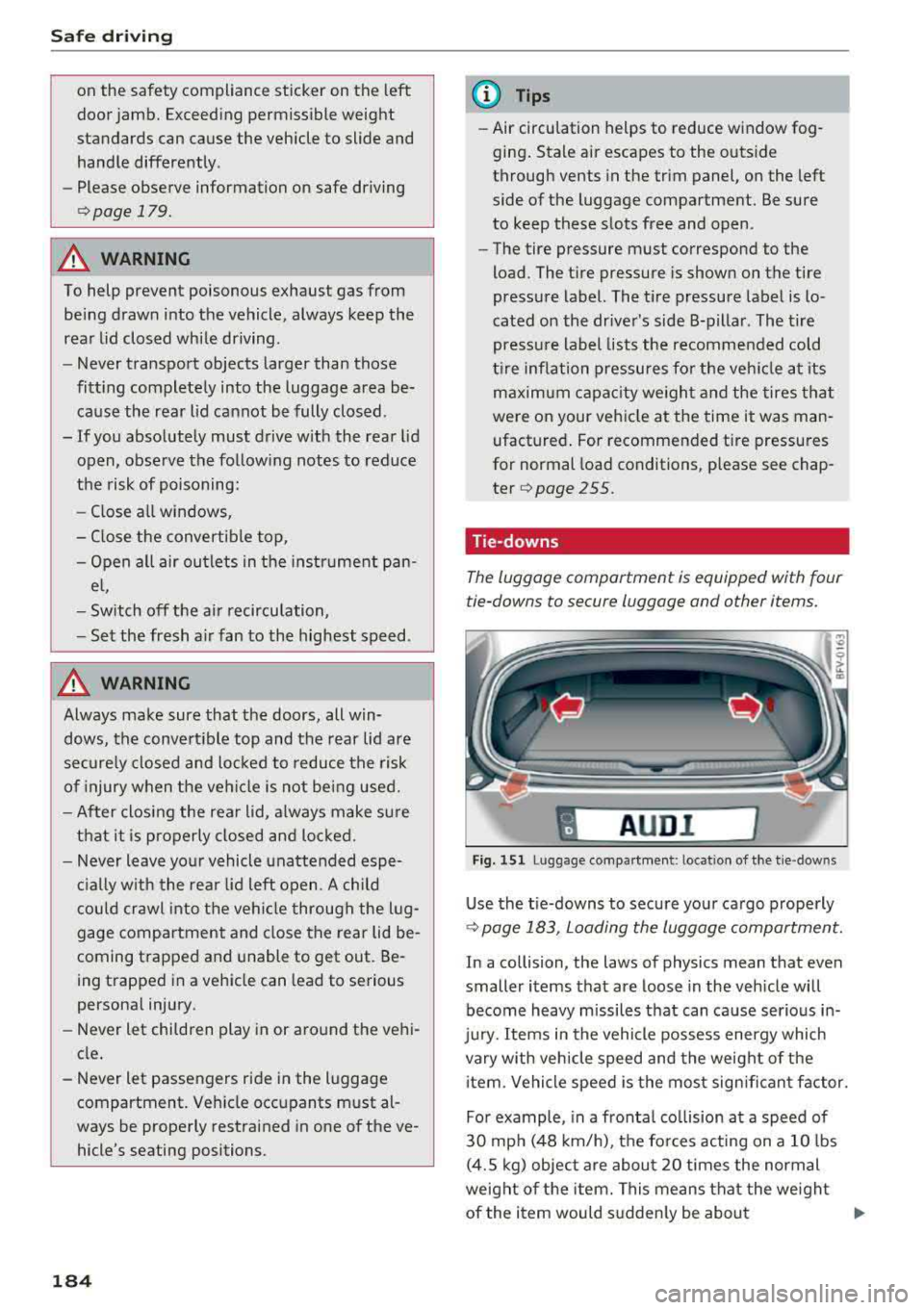
Tie -downs
The luggage compartment is equipped with four
tie-downs to secure luggage and other items.
I A UD I I
Fig. 151 Lu ggage compartmen t: loca tion of the tie -dow ns
Use the tie-downs to secure your cargo properly
9page 183, Loading the luggage compartment.
In a collision, the laws of physics mean that even
smaller items that are loose in the vehicle will
become heavy missiles that can cause serious in
jury. Items in the vehicle possess energy which
vary with vehicle speed and the weight of the
item . Vehicle speed is the most significant factor.
For example , in a frontal collision at a speed of
30 mph (48 km/h), the forces acting on a 10 lbs
(4.5 kg) object are about 20 times the normal
weight of the item. This means that the weight
of the item would suddenly be about
...
Page 187 of 310
Cl 00 .-< N r-N .-< 0 r-Vl 00
200 lbs (90 kg). You can imagine the injuries that
a 200 lbs (90 kg) item flying freely through the
passenger compartment could cause in a colli
sion like this.
A WARNING
Weak, damaged or improper straps used to
secure items to tie -downs can fail during hard
braking or in a collision and cause serious per
sonal injury.
- Always use suitable mounting straps and properly secure items to the tie-downs in
the luggage compartment to help prevent
items from shifting or flying forward as dan
gerous missiles .
- Never attach a child safety seat tether strap
to a tie-down.
-
Reporting Safety Defects
Applicable to U.S.A.
If you believe that your vehicle
has a defect which could cause a
crash or could cause injury or
death, you should immediately in
form the National Highway Traffic
Safety Administration (NHTSA) in
addition to notifying Audi of
America, Inc.
If NHTSA receives similar com
plaints, it may open an investiga
tion, and if it finds that a safety
defects exists in a group of
vehicles, it may order a recall and
remedy campaign. However,
NHTSA cannot become involved in
individual problems between you,
your dealer, or Audi of America,
Inc.
Safe driving
To contact NHTSA, you may call
the Vehicle Safety Hotline toll
free at:
Tel.: 1-888-327-4236 (TTY:
1-800-424-9153) or
1-800-424-9393
or you may write to:
Administrator NHTSA
1200 New Jersey Avenue, SE
Washington, D.C. 20590
You can also obtain other infor mation about motor vehicle safe
ty from:
http:/ /www.safercar.gov
Applicable to Canada
If you live in Canada and you be
lieve that your vehicle has a de
fect that could cause a crash, in
jury or death, you should immedi
ately inform Transport Canada,
Defect Investigations and Recalls.
You should also notify Volkswa
gen Group Canada, Inc.
Canadian customers who wish to
report a safety-related defect to
Transport Canada, Defect Investi gations and Recalls, may either
call Transport Canada toll-free at:
..,
185
Page 192 of 310
Safe ty belts
-Never remove a safety be lt while the vehicle
is mov ing . Doing so will increase your r isk of
being injured or killed.
-Never wear belts twisted.
-Never wear belts over rigid or breakable ob -
jects in or on your cloth ing, such as eye
glasses , pens, keys, etc ., as these may cause
injury.
-Never allow safety be lts to become dam
aged by being caught in door or seat hard
ware .
-Do not wear the shoulder part of the belt
under your arm or otherwise out of position.
-Severa l layers of heavy clothing may inter
fere with correct positioning of belts and re duce the overall effectiveness of t he system.
-Always keep belt buckles free of anything
that may prevent the buckle from latching
securely .
-Never use comfort clips or devices that cre
ate slack in the shoulder belt. However, spe
c ial clips may be requ ired for the proper use
of some child restraint systems.
-Torn or frayed safety belts can tear and damaged belt hardware can break in an acc i
dent. Inspect belts regularly .
If webbing,
bind ings, buckles, or retrac to rs are dam
aged, have belts replaced by an auth orized
Audi dealer or quali fied workshop .
-Safety belts that have been wo rn and loaded
in an accident m ust be rep lace d wi th the
c orrect replacemen t sa fety be lt by an au
tho rized Aud i dea le r. Replacement may be
necessary even if damage cannot be clear ly
seen . Anchorages that were loaded m ust al
so be inspected.
-Never remove, modify, disassemble, or try
to repair the safety belts yourself .
- Always keep the belts clean . Di rty be lts may
not work proper ly and can impai r the f unc
t ion of the inertia ree l ¢
table Interior
cleaning on page 268.
190
Safety belts
Fastening safety belts
Safety first -everybody buckle up!
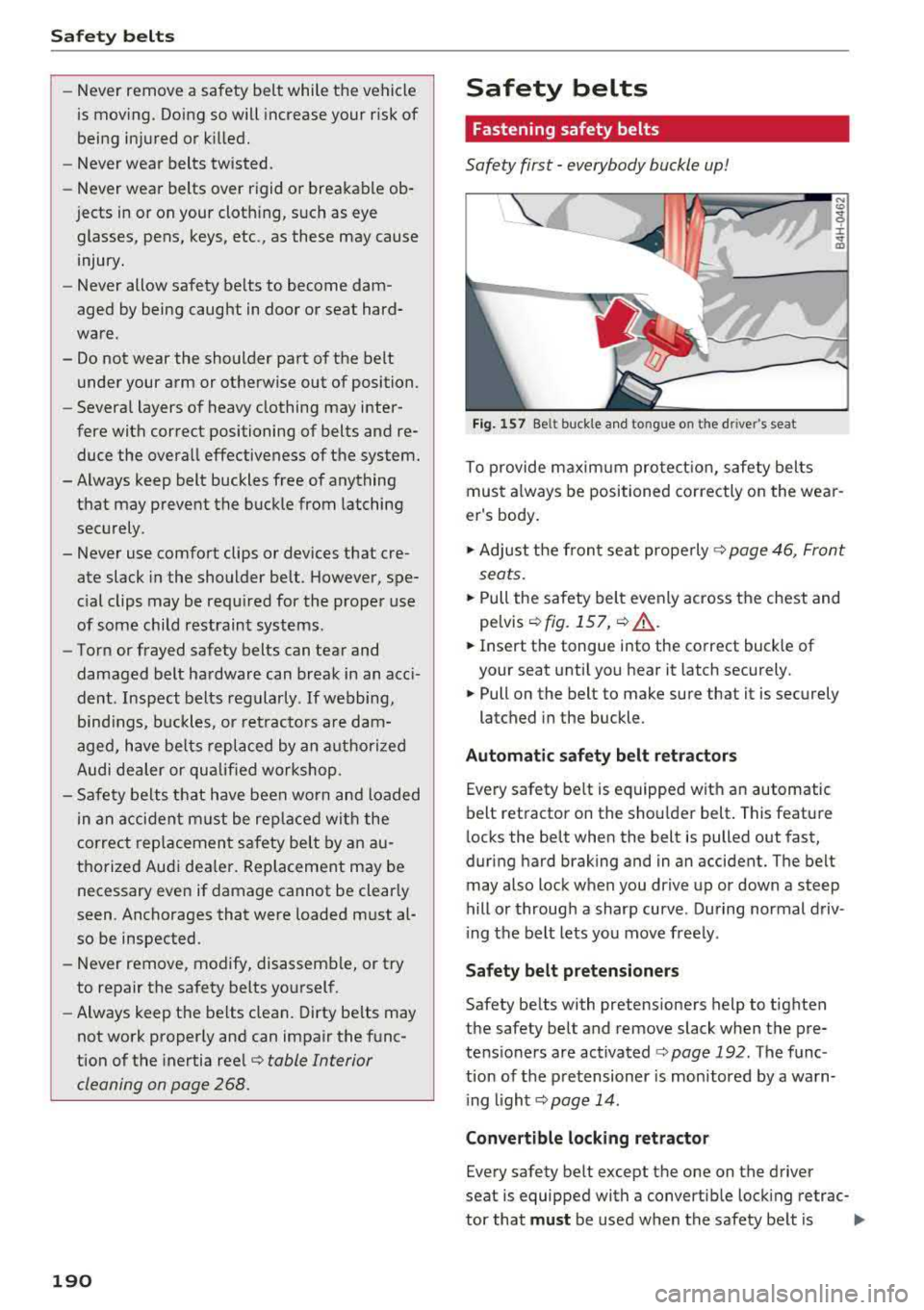
Fig. 1 57 Belt buck le a nd to ngue on t he drive r's seat
To p rovide m axim um pro tect ion , safety belts
must a lways be positioned correctly on the wear
er 's body .
.,. Adjust the fron t se at prope rly ¢ page 46 , Front
sea ts .
.,. Pull the safety belt evenly across the chest and
pe lvis
¢ fig. 157 , ¢ .&,.
.,. Insert the tongue into the correct buck le of
your seat until you hear it latch securely.
.,. Pull on the belt to m ake sure that it is sec urely
latched in the buckle .
Automatic safety belt ret ractors
Eve ry safety belt is equipped with an automatic
b elt ret ractor on th e shou lder belt . This feature
locks the belt when the belt is pulled out fast,
during hard brak ing and in an accident. The belt
may also lock when you dr ive up or down a steep
hill or through a sharp curve . During normal driv
i ng t he belt lets you move free ly .
Safety belt pretensioners
Safety be lts with pretensioners help to tighten
the safety belt and remove slack when the pre
te ns ioners are activated
¢ page 192 . The f u nc
tion of the p re tensioner is mon itored by a warn
i ng
li ght ¢ page 14 .
Convertible locking retractor
Every safety belt except the one on the driver
seat is equipped with a convertib le lock ing retrac-
tor that
must be used when t he safety be lt is .,..