ECU AUDI TT ROADSTER 2018 User Guide
[x] Cancel search | Manufacturer: AUDI, Model Year: 2018, Model line: TT ROADSTER, Model: AUDI TT ROADSTER 2018Pages: 310, PDF Size: 46.95 MB
Page 60 of 310
Driving
Steering
Adjusting the steering wheel position
The steering wheel position is fully adjustable up
and down and forward and back .
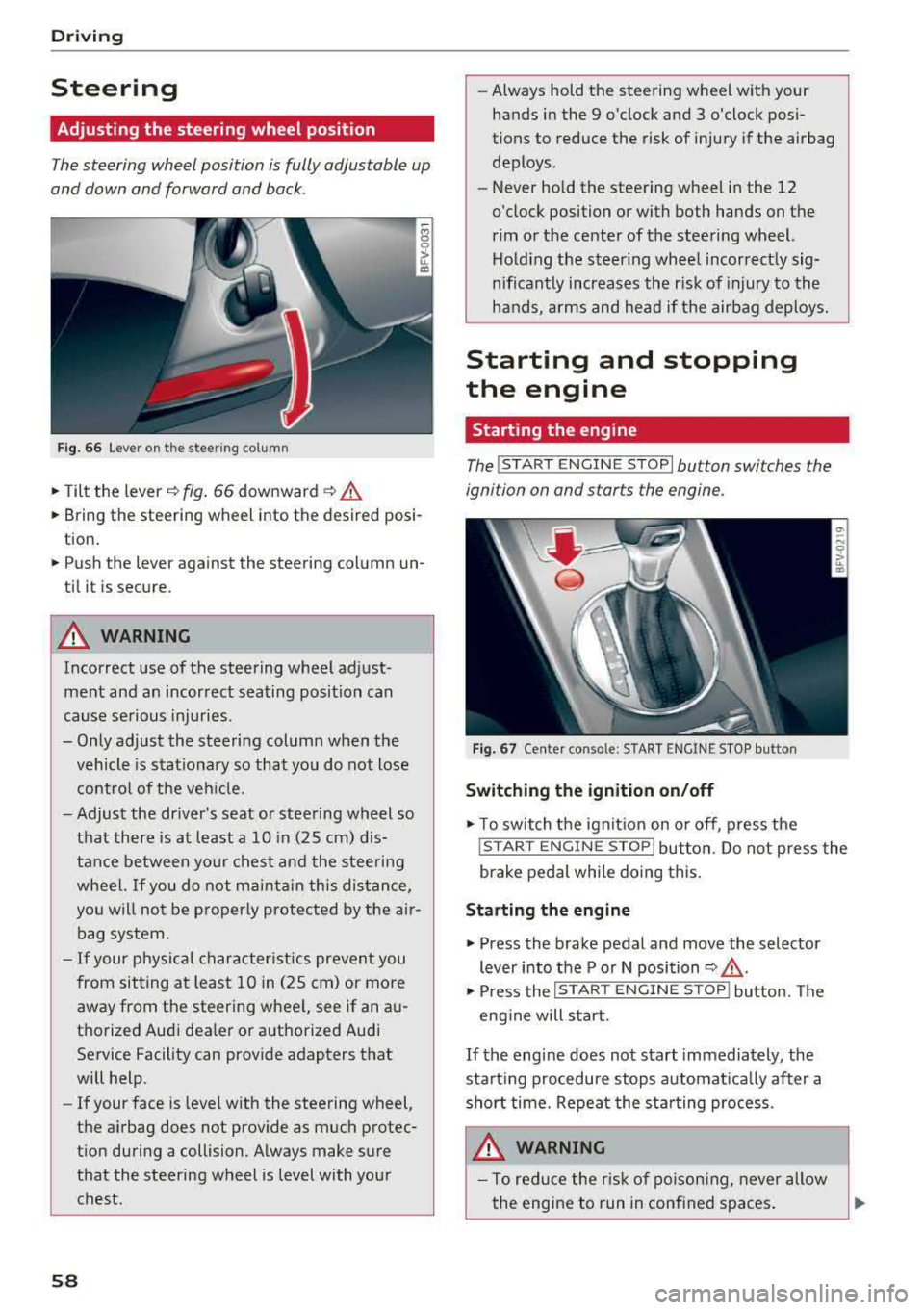
Fig. 6 6 Lever on th e steering column
.., Tilt the lever~ fig . 66 downward ~ .&.
... Bring the steering wheel into the desired posi
tion .
... Push the lever against the steering column un
til it is secure.
A WARNING
Incorrect use of the steering wheel adjust
ment and an incorrect seating position can
cause se rious injuries .
- Only adjust the steering column when the vehicle is stat io nary so that you do not lose
contro l of the ve hicle.
-
-Adjust the driver's seat or steering wheel so
that there is at least a 10 in (25 cm) d is
tance between your c hest an d the steering
wheel.
If you do not mainta in this dis tan ce,
you will not be p roper ly protec ted by t he air
bag system.
- If your physical character istics preven t you
from sit ting at least 1 0 in (25 cm) or more
away from the steering wheel, see if an a u
tho rized Aud i dea le r or a uthorized Audi
Service Facility can provide adapters that
will help.
- If your face is leve l w ith the steering
wheel,
the a irbag does not prov ide as much protec
t ion during a collision. A lways make sure
that the steering wheel is level with your
chest.
58
-Always hold the steering wheel with your hands in the 9 o'clock and 3 o'clock pos i
tions to reduce the risk of injury if the airbag
deploys .
- Never hold the steering wheel in the 12
o'clock position or with both hands on the
rim or the center of the steering wheel. Ho ld ing the steer ing whee l incorrect ly sig
nificant ly increases the risk of injury to the
hands, a rms and head if the airbag deploys.
Starting and stopping
the engine
Starting the engine
The !S T ART ENGINE STOP lbutton switches the
ignition on and starts the engine .
F ig . 67 Ce nter conso le: S TART ENGINE STOP bu tton
Switching the ignition on /off
.., T o switch the ign it io n on o r off, p ress the
! STAR T
ENGINE STOPI button. Do not press the
brake pedal while do ing this.
Starting the engine
... Press the brake pedal and move the selector
lever into the P or N position
~ .&_ .
... Press the !S TAR T ENGIN E ST OP ! butto n. Th e
eng ine will s tart.
If the engine does not start immediately , the
start ing procedure stops a utomat ica lly after a
sho rt time. Repeat the sta rting process.
A WARNING
- To red uce the r isk of po ison ing, never allow
the engine to run in conf ined spaces .
Page 64 of 310
Drivin g
- If the power sup ply fai ls, you cannot set the
parking brake if it is release d. In this case,
park the vehicle on level ground an d secure
it by placing the selector lever in the P posi
t ion . See an authorized Aud i d ealer or au
thorized Aud i Serv ice Facility for ass istance.
- If you leave the veh icle, switch the ignit ion
off and take the vehicle key w ith you . This
applies particularly when children remain in
the vehicle. Othe rwise children could sta rt
the engine, re lease the par king brake o r op
erate electrical equipment such as power
windows, which increases the risk of an acci
dent.
- No one shou ld remain in the vehicle when it
is locked - especially chi ldren . Locked doors
make it more diff icu lt for emergency work
ers to get into the vehicle, which puts lives
at risk.
(D Tips
When stopping at a traffic signal or stopping in city traffic, you can set the parking brake
manually. The vehicle does not have to be
he ld w ith the brake pedal. The parking brake
elim inates the tendency to creep when a se
lector lever pos ition is engaged. As soon as
you press the accelerator pedal, the park ing
brake releases automat ica lly and your vehicle
s tarts to move
~ page 62.
(D Tips
- Occasiona l noises when the par king b rake is
set and re leased a re normal and a re not a
cause for con cern.
- T he par king brake goes th ro ugh a se lf-test
cycle at regular intervals when the veh icle is
stoppe d. Any noises associated w ith this a re
no rma l.
- If there is a power fa ilure, the p arking bra ke
will not set if it is re leased, and it will not
release if it is
set~ &.. See an authorized
A udi dealer or authorized Audi Service Fa
cility for ass istance.
62
Starting to drive
Va rious convenience and sa fe ty f unctions may be
available when the vehicle begins driving, de pending on vehicle equipment.
Starting on hills with th e parking brake set
Requireme nt: the d rive r's doo r mus t be closed.
"'To sta rt drivi ng comfortably when on a h ill, set
the parking b rake and beg in driving as usual.
The b raking force of the pa rking brake does not
release automat ic a lly until t he whee ls build up
enoug h driving force .
Starting on hills with hill hold assist
Hill hold assist makes it easier to start on hills .
Requirement: the driver 's door must be closed
and t he engine must be running.
"' To activate hi ll hold assist, press and hold the
brake pedal for severa l seconds. The vehicle
must be in an uphill direct ion of travel.
After re leasing the brake pedal, the braking pow
er is maintained for a brief
moment~ A to pre ·
vent the vehicle from ro lling back when starting.
D ur ing this time, you can easily begin to move
your vehicle.
A WARNING
Applies to: vehicles with hill hold assist
-If you do not beg in dr iving immed iate ly or
t he engine stalls after releasing the bra ke
pedal, your veh icle may beg in to roll back
ward . Press the bra ke peda l or set the park
ing brake immediately.
- The inte lligent technology of hill ho ld assist
cannot ove rcome the limitat ions imposed by
natural phys ica l laws. The increased com fort
offered by hill hold assist should not cause
you to take safety risks .
- Hill hold ass ist cannot hold the vehicle in
place on all hills (for examp le, if the ground
is s lippery or icy).
- To reduce the r is k of an accident, always
make sure the veh icle is situated safely
while stationary .
Page 70 of 310
Drivin g
The transmission only a llows manual shifting
w hen t he engine spee d is within t he permitted
range.
(D Tips
tiptronic does not work if the transmission is
running in emergency mode .
Kick-down
Kick-down enables maximum acc ele ration .
When you press the accele rato r peda l dow n be
yond the resistance po int, the automatic trans
miss io n downshifts into a lower gea r and the
en
gine utilizes its f ull power, depending on veh icle
speed and engine RPM . It shifts up into the next
h igher gear once the maximum spec ified engine
RPM is reached.
A WARNING
Please note that the wheels could spin on
slick or slippery roads when kick -down is
ac
t ive .
Launch Control Program
-
The Launch Control Program enables maximum
acceleration .
Requirement: the eng ine must be at operating
temperature and the steer ing whee l must not be
turned.
.. With the engine running, p ress th e l~ O FF ! but
ton b riefly one time
ll .
.. Pu ll the selector lever back out of the "D/S" po
s ition briefly to select the "S" position, or press
i t toward the r ight into the tiptron ic posit ion or
select the
D ynamic d riving mode in d rive se
lect* ~ page 78 .
.,. Press t he b rake peda l firmly with you r left foot
and hold it all the way dow n fo r a t least 1 sec
ond.
1 > T he ESC lig ht t urns on con tinuous ly and the mess age S ta
bil iza tio n con trol ( ESC ): sp ort. Warni ng! Reduced sta bil
ity appe ars te m porar ily in the Infota inment sy st em t o in
dic ate th at t he s yst em w as d eactivate d.
68
.. At the same time, press the gas peda l all the
way down with your rig ht foot until the engine
reaches and stays at a hig h RPM leve l.
.. Remove your left foot from the brake.
A WARNING
-Always adapt your driving to the traff ic flow.
- On ly use Launch Control when road and traf-
fic conditions allow it and other drivers w ill
not be endange red or impacted by your dr iv
ing and the vehicle's acceleration .
- Please note that the d rive wheels can spin
and the vehicle can b reak away when spo rt
mode is switched on, especially when the
road is slippery.
- Once the vehicle has started mov ing, press
the
IB OFF I button b riefly to turn the spor t
mode
off.
(D Tips
- The transmission temperat ure may increase
significant ly after using the launch control
prog ram . If that happens, the prog ram may
not be ava ilab le for a few minutes. I t will be
avail able ag ain afte r a coo l-down period.
- Whe n accelerating using the launch contro l
prog ram, all vehicle pa rts a re subje ct to
he avy loads. This c an le ad t o incre ased
wea r.
Transmission malfunction
• Tran smiss ion: malfunction! Plea se stop ve
hicle and shift to P
There is a ma lf u nction in the transm ission. Park
t h e ve hicle secure ly and do not continue driving .
See an authorized Audi dealer or authorized A udi
Service Facility for assistance .
• Transmission : too hot . Ple ase stop vehicle
The t ra nsmission is too hot and can become dam
aged. Stop and let the t ransmiss io n coo l w it h t he
engine r unning (a t idle) in t he "P" se lector lever
.,.
Page 71 of 310
Cl co .... N ,....
N ...... 0 ,....
Vl co
position. Then the indicator light and the mes
sage turn off, drive to an authorized Audi dea ler
or author ized Audi Service Facility immed iately to
have the malfunction corrected.
If the ind icator
light and the driver message do not turn off, do
not continue driving . See an authorized Audi
dealer or authorized Aud i Serv ice Facility for as
sistance .
DI Transmission : malfunction! You can contin
ue driving. See owner's manual
Drive to an authorized Aud i dea ler or authorized
Aud i Service Facility immediately to have the
malfunction corrected .
DI Transmission: malfunction! You may contin
ue driving. No reverse gear
There is a system mal funct ion in the transm is
sion. The transmission is switching to emergency
mode. This mode only shifts into certain gears or
will no longer shift at all. The engine may stall.
You cannot engage the reverse gear . Drive to an
author ized Audi dealer or authorized Audi Service
Facility immediately to have the malfunction cor
rected .
DI Transm ission : malfunction! You may contin
ue driving in D until engine off
Drive the vehicle away from moving traffic and
park. See an authorized Audi dealer or authorized
Aud i Service Facility for assistance.
DI Transmission: too hot. Please adapt driving
style
The transmission temperature has increased s ig
nificantly. Drive ve ry cautiously or take a break
from driving until the temperature returns to the
norma l range and the indicator light turns off.
DI Transmission : Please press brake pedal and
select gear again
I f the transmission ma lfunctions because the
temperature is too high, a message appears
when the transmission is cooled .
Driving
Selector lever emergency release
If the vehicle 's power supply fails, the selector
lever can be released in an emergency .
Fig. 7 S Selecto r lever : remov ing the cov er
Fig. 76 Se lecto r le ver: u sing th e em erge ncy re lease to
move out of t he Pa rk po siti on
This sect ion descr ibes using the selector lever
eme rgency release in left-hand dr ive vehicles .
The emergency release mechanism is located in
the right area under the selector lever shift gate.
Using the emergency release can be complicated .
We recommend contacting an authorized Audi
dealer or authorized A udi Service Fac ility for as
s istan ce, if necessary.
The screwdr iver from the vehicle tool kit located
in the luggage compartment is needed to for the
emergency
re lease ¢ page 2 72 . Use the flat side
of the reversible sc rewdr ive r blade .
Removing the selector lever cover
.,. Set the park ing brake<®> ¢.&. to secure your
veh icle from rolling.
.,. Insert the f lat s ide of the screwdr iver s ideways
in the slot near the shift cover and pry the shift
cover up
¢ fig . 75 .
.,. Carefully pull the shift cover upward by hand
and fold it over the shifter knob
¢ fig. 76. ..,.
69
Page 72 of 310
Drivin g
Selector le ver em ergency r ele ase
.,. Press and hold the yellow release bu tton with
the screwdriver
c:::> fig. 76 .
.,. Press the lock button on the se lector lever (D
and move the lever into the N position .
.,. Clip the shift cover back into the shift gate after
us ing the emergency release .
If the ve hicle must be pushed or towed due to a
power failure (for example, the battery is dead),
the selector lever must first be moved to the N position us ing the emergency release mecha
n ism .
A WARNING
-Only activate the emergency release while
on a level su rface or a slight slope.
- Only move the selector lever out of the "P" pos it ion when the parking brake is set. If it
is not funct ioning, secu re the vehicle from
rolling using the b rake pedal o r othe r su ita
ble means, such as bloc king a front and a
rear whee l. An unsecured veh icle may roll
away, which increases the risk of an acci
dent.
Trailer towing
General information
Your Audi TT Roadster is not designed to tow a
trailer .
-
Towing a trailer w ith your Aud i TI Roadster is not
recommended and can cause damage to the car .
Damaged caused by tow ing a trailer is not cov
ered by your Audi Warranty .
70
Page 97 of 310
Cl co .... N ,-... N ...... 0 ,-... Vl co
Selection menu: through the selection menu,
you can open additional functions within a men u
i tem (such as
Radio ).
Req uireme nt: the select io n menu symbol mus t
be disp layed in the In fota inment system display
¢ fig . 100 .
Opening /closing the selection menu : press the
l eft contro l bu tton
¢ fig. 100 . Then you c an se
lect and conf irm a function usi ng the control
knob.
Options menu : using the opt io ns menu, you can
se lec t a nd con firm con tex t-depen den t fu nct ions
as we ll as settings within a men u item (such as
Radio ).
Re qui rement : the options menu symbol G must
be disp layed in the In fota inme nt system di splay
¢ fig . 100 .
Opening /closing the options menu : press the
right contr ol
bu tton ¢ fig. 100. Then yo u can se
lec t an d con firm a func tion usi ng the cont rol
knob.
Information about menu paths
T his guide shows you a t a glan ce the path s for
opening a desired menu and its se ttings and
functions.
Example of a path
"' Se lect : I RADIO ! bu tton> left cont rol bu tton>
FM .
Following the path
"'Press th e I RADIO I button .
"' Press the left control button .
"'Turn the con trol knob to the FM menu item to
sele ct i t.
"'P ress th e c ont rol knob to confi rm the se le cte d
FM me nu item .
"'The selected and conf irmed funct ion is execut
ed . In this e xam ple, the
FM frequency band is
set .
Multi Media Inte rface
MMI touch
MMI touch control pad
App lies to: vehicles wi th MMI to uch
You can enter data using handwri ting recogni
tion on the
MMI touch control pad .
Fig . 10 1 En ter ing a nav igatio n destin atio n
The M MI touch cont rol pa d@ ¢ page 93, fig . 96
is located on the contro l kno b (D ¢ page 93,
fig . 96 .
Entering letters, numbers and symbols
App lies to : vehicles wit h MMI to uch
The MMI touch allows you to enter data on the
MMI touch control pad using handwriting recog
nition.
Fig. 102 Disp la y when MMI to uch is act ive
95
Page 129 of 310
Cl 00 .-< N r-N .-< 0 r-Vl 00
Flight information
Applies to: vehicles with flight information
Information on flig hts and current arr ival/depa r
ture times in the selected searc h area .
.,. Select and confirm Flight information .
You can select the desired information using the
right control button.
City events
Applies to: vehicles with City events
Information on events in various categories in
the desired search area .
.. Select City Events > left control button > cate
gory.
Online news
Applies to: vehicles with online news
You can check the current headlines of your fa
vor ite pub lications in the MMI.
Requirement: your myAudi account must be sub
scr ibed to newsfeeds and your vehicle must be
connected to myAudi
~page 125.
.. Se lect : Online news > desired newsfeed > a
headline.
(D Tips
If you have not subscr ibed to any personal
newsfeeds in your myAud i account, pre-con
figured newsfeeds wi ll be displayed.
Twitter
Applies to: vehicles with Twitter
You can access the most important functions in
your Twitter account through your
MMI.
Requirement:
You must have connected your myAudi account
with Twitter. You can find additional information
at www.audiusa .com/myaudi.
You must have connected your vehicle with
myAudi
~page 125.
Audi connect
.. Select Twitter > left control button > desired
function
(for examp le, Trends ).
T he following categories can be selected in the
Twitter menu:
- My tweets: News Feed and the Tweets you have
posted are listed.
- Home : the Tweets for everyone you fo llow are
d isp layed.
- Trends : top ics on Twitter that are currently
popu lar within a country.
Different functions are ava ilable depending on
the Twitter category you have selected :
- New tweet: you can post a new tweet using
pre-made templates or using custom ized tem
plates in your myAudi account.
- Refresh : the se lected Twitter function is re
freshed.
- Favorite : mark a Tweet as favorite to show you
Liked it.
- Retweet : you can quote a Tweet to share it wit h
others.
(D Tips
- You can find additional information on con
necting your myAudi account to Twitter at
www.aud iusa.com/myaudi.
- Other settings suc h as account, language,
Tweet security and locat ion settings
cannot
be changed in the MMI. These changes m ust
be made on the Tw itter website.
- You can only connect
one Twitter account
w ith your myAudi account.
- Audi connect makes it possible to access
Twitter. Permanent availability cannot be
guaranteed, because that depends on Twit
ter.
Travel (travel guide)
Applies to: vehicles with Travel (travel guide)
You can use the Audi MMI connect opp to store
points of interest on your mobile device (such as a smartphone) and then use them for route
guidance in the
MMI .
Requirement:
127
Page 130 of 310
Audi conn ect
The Audi MMI con nect app must be installed and
open on your mobile device.
You must be logged into yo ur myAud i acco unt in
t he
Audi MMI connect app and you must have se
lected you r vehicle .
The Wi-Fi funct ion on you r mobile device and on
the MMI must be sw itched on.
The MMI must be connected to the network .
~ Select : I MENU I button > Aud i conn ect> left
cont ro l button
> In formation category> Tra v
el.
After opening th e travel guide , travel tips in your
area will be d isplayed including current rat ings as
well as the corresponding ca tegory.
~ Press the left control button to change the cat
egory (such as bars nearby) .
A WARNING
-It is only safe to use tab lets, laptops, mo
bile devices and othe r similar devices w hen
the vehicle is st ationa ry be cause, like all
loose objects, they could be thrown aro und
the inside of the vehicle in a crash and cause serious injuries . Store t hese types of devices
securely whi le driving.
- Do not use any wireless devices on the front
seats w ith in range of the a irbags while driv
ing. Also read the warnings in the chapter
Q page 198, Front airbags.
@ Note
Always follow the information found in Q i© in
Wi-Fi hotspot on page 130.
@ Tips
Units of meas urement, language settings and
time are shown in the Infotainment system
disp lay based on how they were set in the
MMI system settings
<=) page 173 .
-
ll AUDI AG pr ovide s access to services fro m third party pro
v ider s. Pe rma ne nt ava ilabil ity c anno t be guara nteed , be
c a use that depen ds on th e th ird party provid er.
128 Audi connect services in navigation
App
lies to : vehicles wit h naviga tion sys te m and A udi connect
The following Aud i connect services a re current ly
available :
- Navigation with
satellite map1> Q page 145 .
-Point of Interest (POI ) on line sear ch wi th
v oi ce recognit ion
(such as restaurants) : plan
route guidance using the MMI control panel
and the vo ice recognit ion system
<=) page 105 .
- Set up destinations in your MMI using your
m yA udi account or the sat ellite map view l )
r=;, page 145 .
-Online traffic information : receive up-to-the
m inute traffic informat ion about acc idents,
road const ruct ion and other inc idents
r=;, page 146 .
-Map updates *: import navigat ion map updates
in yo ur MMI using an S D card.
(D Tips
-For the map update Audi connect serv ice
using an SD card, check t he current soft
w ar e version in yo ur vehicle and compare it
w ith www.aud iusa.com/myaudi to see if a
new ve rsion is avai lab le . You can a lso have
the new navigation data installed by an Audi dea ler, which can be done for an addit iona l
charge.
- You can find additional information about
the
map update at www.a udiusa.com/
myaudi.
Audi connect services in the Media menu
App lies to: vehicles wit h Audi conne ct
- Online media and Internet radio : offers access
to d ifferent online med ia services as well as In
ternet radio and ope ration through the
MMI us
ing the
A udi MMI connect app Q page 159.
App lies to: vehicles wi th Wi-Fi au dio player
- Wi-Fi audio playe r: you can access the media
center through W i-F i connected med ia p layers
(such as smartphones)
Q page 158. Ill-
Page 131 of 310
Cl 00 .-< N r-N .-< 0 r-Vl 00
@ Note
Always follow the information found in c::>((j) in
Wi-Fi hotspot on page 130.
(D Tips
For more information on the Wi-Fi audio play
er and supported devices, contact an author
ized Audi dealer or authorized Audi Service
Facility.
Additional options
App lies to: vehicles with Audi co nnect
"'Select : IMENUI button> Audi connect> right
control button.
The following options are available in the Audi
connect services overview:
About Audi connect
Here you will find legal information for Audi con
nect usage.
Login*
See c::> page 125, Logging into myAudi in the vehi
cle.
Connection manager
See c::>page 174 .
License subscription
The validity and expiration date of your licenses
are displayed. When the function is switched on
~. the message Warning before subscription
expires
will display to warn you that your license
is about to expire .
Refresh
The content of the selected Audi connect service
or the entire Audi connect list is updated.
Data privacy
Requirement: the ignition must be switched on.
Location and personal data are transmitted when
using Audi connect services. If you do not want
Audi connect
this information to be transmitted, activate data
privacy.
-Activate privacy : the data connection is switch
ed off . The Audi connect services will not be
available.
-Deactivate data privacy: if the data connection
is switched off, you can switch on the data con
nection for the use of all Audi connect services.
Select and confirm
Activate data connection.
Wi-Fi hotspot
Applies to: vehicles with Wi -Fi hotspot
You can use the MMI as a Wi-Fi hotspot to con
nect up to eight Wi-Fi devices to the Internet.
Requirement: the ignition must be switched on.
"'Select: !MENUI button> Telephone> right con-
trol button >
Wi-Fi settings .
The following settings can be selected:
Wi-Fi
The MMI Wi-Fi hotspot is deactivated at the fac
tory. Switch the Wi-Fi hotspot to
On before es
tablishing an Internet connection between your
vehicle and your Wi-Fi device.
-On: the MMI Wi-Fi hotspot is active and visible
to other devices. You can connect your Wi-Fi
device to the MMI and use the Internet connec
tion if necessary .
-Off: the MMI Wi-Fi hotspot is deactivated. An
Internet connection for Wi-Fi devices is not
possible .
A WARNING
--
-As the driver, do not allow usage of the Wi
Fi hotspot to distract you from driving, as
this could increase the risk of an accident.
-It is only safe to use tablets, laptops, mo
bile devices and other similar devices when
the vehicle is stationary because, like all
loose objects, they could be thrown around
the inside of the vehicle in a crash and cause
serious injuries. Store these types of devices
securely while driving.
...,
129
Page 134 of 310
Audi connect
-Using Audi connect services requires a mini
SIM card with data options and, when using L TE*, it also requires L TE options.
-Usage of Audi connect services depends on
the availability of services through third par
ty providers .
-Also read the information in the chapter
¢page 111, Telephone.
-Audi connect is designed for use only with
the provided SIM card. Receiving data pack
ets from the Internet will quickly increase
the volume of data used. For more informa
tion, contact Audi connect customer service
at 1 (877) SOS -AUDI (2834) .
-The Audi connect services are available in
the USA. Audi connect services are currently not available in Canada or in Mexico.
-Availability, scope, providers, screen display
and costs of services may vary depending on
the country, model, model year, end device
and rates . For additional information, visit
www.audiusa.com.
-An initial registration/activation on the
myAudi platform at www.audiusa.com/
myaudi is required to use individual serv
ices. You can contact an authorized Audi
dealer or Audi connect customer service at
877-SOS-AUDI (2834) to receive informa
tion on options for expanding your usage
and any costs that may result.
-It is only possible to use Audi connect serv
ices with a valid Audi connect SIM card.
- To ensure all of the Audi connect features
work correctly, Audi recommends setting up
data service and a Wi-Fi package with your
network service provider. Your network
service provider can be authorized by law,
through a judicial order or other lawful in
structions, to disclose the position of your
vehicle. Additional information on your cell phone service provider's privacy policies can
be found in their Terms of Use.
-The Audi connect services are a Wi-Fi/lnter
net-based system. If the system does not
function correctly even though all of the re
quirements are met, please try again later
or contact Audi connect customer service at
877-SOS-AUDI (2834).
132
-Additional information for Audi connect and
the applicable terms of use are found at
www.audiusa.com.
Data protection
App lies to : vehicles wit h Aud i connect
(D Tips
- You can find additional information in your
MMI in the options menu
¢ page 94 for the
selected Audi connect service and also on
line at www.audiusa .com.
- Your privacy is important to us.
- AUDI AG collects, processes, shares and
transmits your personal information in ac
cordance with legal regulations in order to
ensure proper function and availability of
the individual Audi connect services. You
can view the complete, current and valid
Audi connect data protection policy in your
MMI. The myAudi website is available for to
you to activate additional Audi connect serv
ices and to transfer data with your vehicle,
among other services. A one-time registra
tion is required to establish a connection to
your vehicle . For this purpose, AUDI AG col
lects, processes, transmits and uses your re
quired personal information as required for
you to use the services provided by AUDI
AG. Your information is not distributed to
third parties. Using your cell phone with the
help of your myAudi platform, you can
transfer information for Audi connect serv
ices functions to your vehicle and allow spe
cific information to be transmitted from
your vehicle .
- By activating special information services
that are part of your Audi connect portfolio,
you can use these functions directly in your
vehicle by entering data to confirm your
identity (to use social networks, for exam
ple). To do this, the identification informa
tion you provided is forwarded with the re
quest to the respective service provider.
Then you can access your personal content using a secure connection. This content is
displayed in the vehicle for your use. Your
personal content is not stored within Audi
.,..