engine AUDI TT ROADSTER 2018 Workshop Manual
[x] Cancel search | Manufacturer: AUDI, Model Year: 2018, Model line: TT ROADSTER, Model: AUDI TT ROADSTER 2018Pages: 310, PDF Size: 46.95 MB
Page 245 of 310
Cl 00 .-< N r-N .-< 0 r-Vl 00
authorized Audi Service Facility for more in
formation.
- Do not connect or disconnect the charging
cable while charging because this increases
the risk of an exp losion.
(D Tips
- Only charge the vehicle battery through the
connections in the engine compartment.
- Read all of the manufacturer's instructions
for the charger before charging the vehicle
battery.
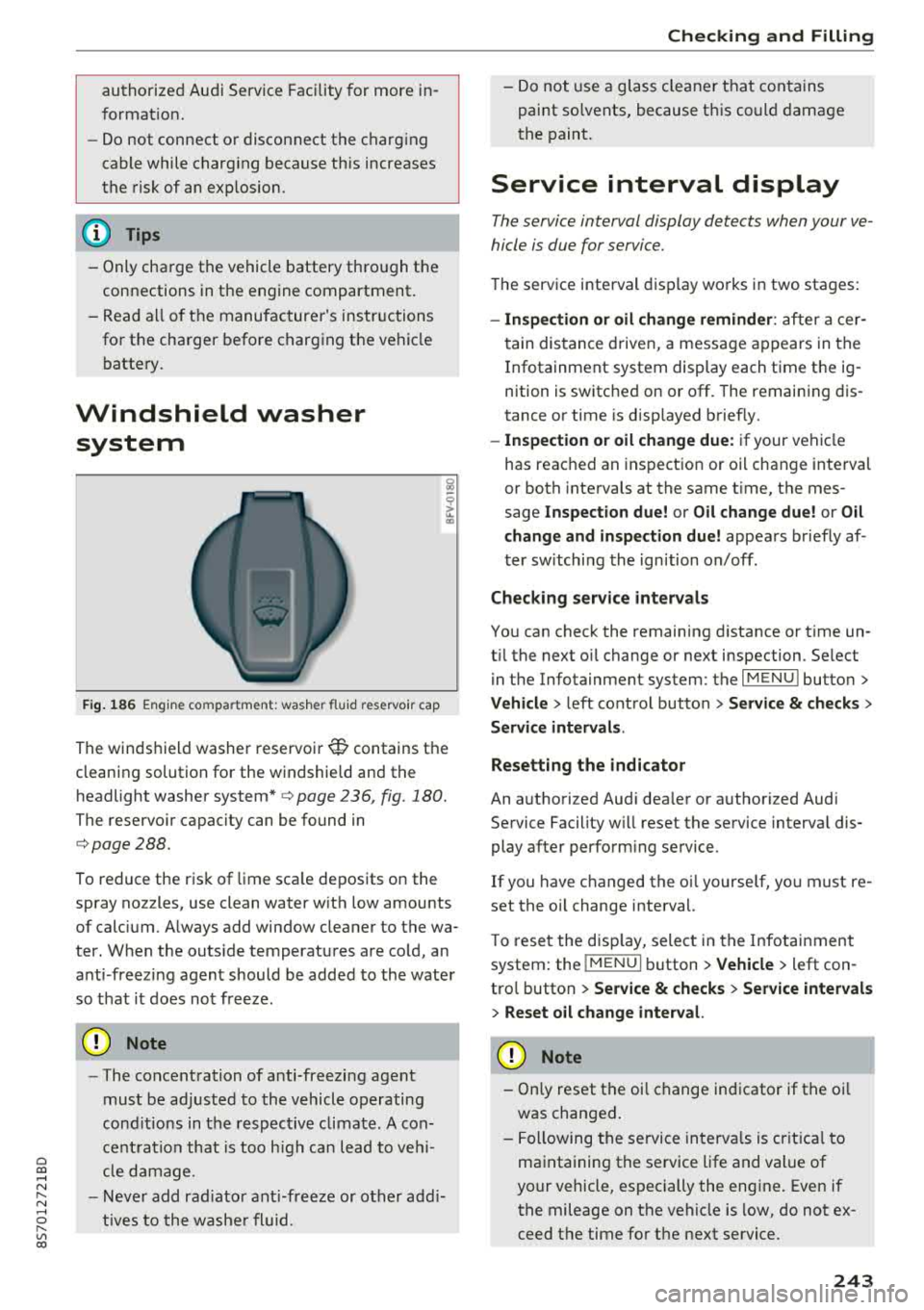
Windshield washer system
Fig. 186 Engine compa rtment: washer flu id reservo ir cap
The windshield washer reservoir W contains the
cleaning solution for the windshie ld and the
headlight washer
system* ¢ page 236, fig . 180.
The reservoir capacity can be found in
¢page 288.
To reduce the risk of lime sca le deposits on the
spray nozzles, use clean water with low amounts
of calc ium. A lways add window cleaner to the wa
ter. When the outs ide temperatures are cold, an
anti -freezing agent should be added to the water
so that it does not freeze.
@ Note
-The concentration of anti-freezing agent
must be adjusted to the vehicle operating
cond itions in the respective climate. A con
ce ntrat ion that is too high can lead to vehi
cl e damage.
- Never add radiator anti-freeze or other addi
tives to the washer fluid.
Checking and Filling
- Do not use a glass cleaner that contains
paint so lvents, because t his could damage
the paint.
Service interval display
The service interval display detects when your ve
hicle is due for service .
The service interval display works in two stages:
-Inspection or oil change reminder : after a cer-
tain distance driven, a message appears in the
In fotainment system display each time the ig
nition is switched on or off. The remaining dis
tance or time is disp layed briefly.
- Inspection or oil change due: if your vehicle
has reached an inspection or oil change interval
or both intervals at the same t ime, the mes
sage
Inspection due! or Oil change due! or Oil
change and inspection due!
appears briefly af
ter switching the ignition on/off .
Checking service intervals
You can check the remaining distance or time un
t il the next oil change or next inspection. Se lect
in the Infotainment system: the
I MENU I button>
Vehicle > left control button > Service & checks >
Service intervals .
Resetting the indicator
An authorized Audi dea ler or authorized Audi
Service Facility w ill reset the service interval dis
play after performing service.
If you have ch anged the oi l yourse lf, you must re
set the oil change interval.
T o reset the disp lay, select in the Infotainment
system: the
I MENUI button> Vehicle> left con
trol button >
Service & checks > Service intervals
> Reset oil change interval.
@ Note
-Only reset the oil change indicator if the oi l
was changed.
- Following the service intervals is crit ica l to
maintaining the service life and value of
your vehicle, especially the engi ne. Even if
the mileage on the vehicle is low, do not ex
ceed the time for the next service.
243
Page 258 of 310
Wheels
and the tire pressures specified
on the label on the driver's side
B
pillar, always follow the specifica
tion on the B-pillar label
¢ page 254, fig. 189.
Make sure that the tire designa
tion on your tire matches the des-
Model/ Tire designation
ignation on the tire pressure label
and the tire pressure table.
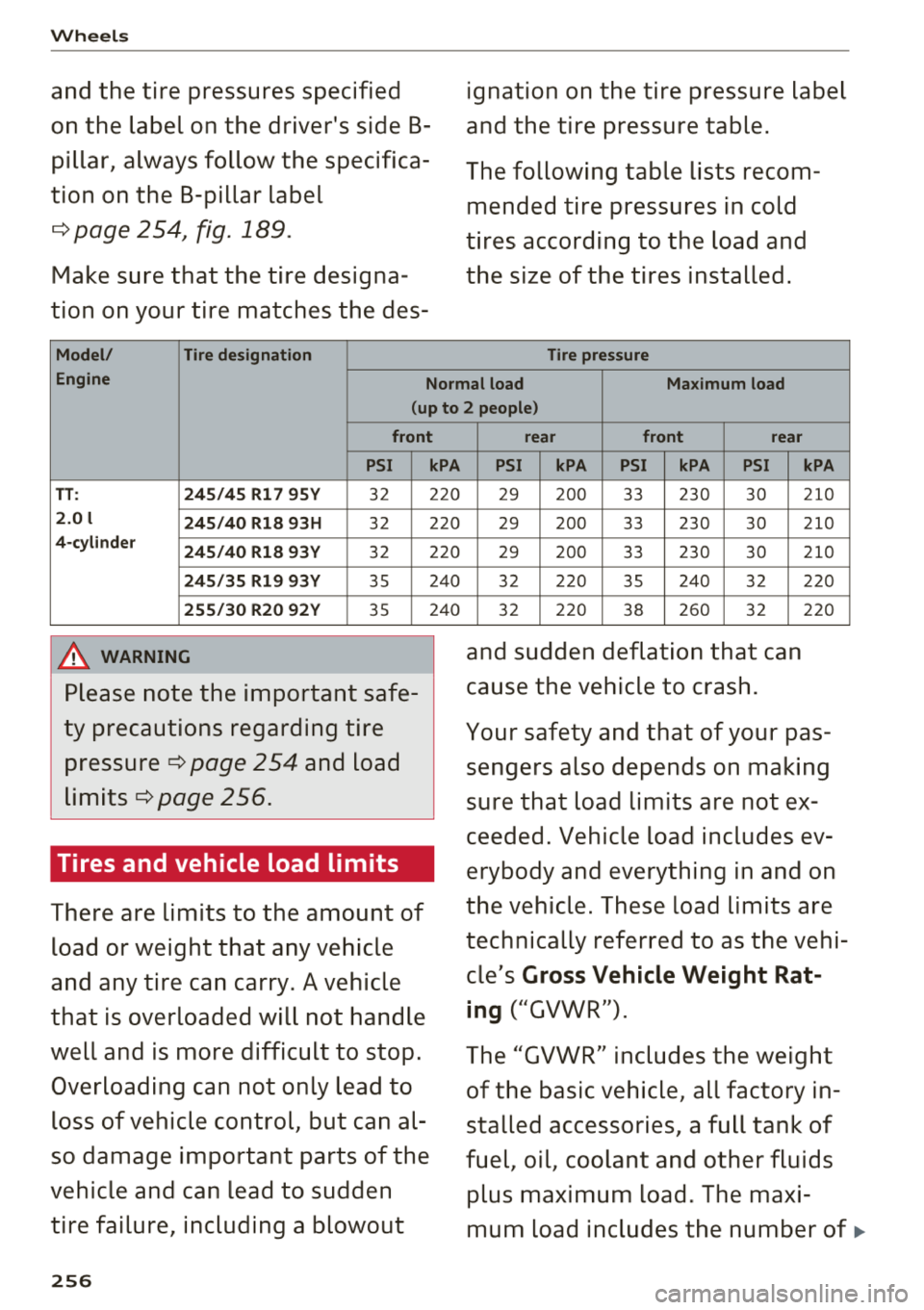
The following table lists recom mended tire pressures in cold
tires according to the load and
the size of the tires installed.
Tire pressure
Engine Normal load Maximum load
(up to 2 people)
front
PSI
TT : 245/45 R17 95Y 32
2.0 l
245/40 R18 93H 32
4-cylinder
245/40 R18 93Y 32
245/35 R19 93Y 35
255/30 R20 92Y 35
A WARNING
Please note the important safe
ty precautions regarding tire
pressure ¢ page 254 and load
limits¢ page 256.
Tires and vehicle load limits
There are limits to the amount of
load or weight that any vehicle
and any tire can carry. A vehicle
that is overloaded will not handle
well and is more difficult to stop.
Overloading can not only lead to loss of vehicle control, but can al
so damage important parts of the
vehicle and can lead to sudden
tire failure, including a blowout
256
kPA
220
220
220
240
240
rear front rear
PSI kPA PSI kPA PSI
29 200 33 230 30
29 200 33 230 30
29 200 33 230 30
32 220 35 240 32
32 220 38 260 32
and sudden deflation that can
cause the vehicle to crash.
kPA
210
210
210
220
220
Your safety and that of your pas
sengers also depends on making
sure that load limits are not ex
ceeded. Vehicle load includes ev
erybody and everything in and on
the vehicle. These load limits are
technically referred to as the vehi
cle's
Gross Vehicle Weight Rat
ing
("GVWR").
The "GVWR" includes the weight
of the basic vehicle, all factory in
stalled accessories, a full tank of
fuel, oil, coolant and other fluids
plus maximum load. The maxi
mum load includes the number
of .,.
Page 266 of 310
Wheels
Displaying tire pressures/temperatures
Applies to: vehicles with tire pressure monitoring system
Requirement: you must be d rivi ng the veh icle .
"'Se lect in the Infotainment system: IMENU I but
ton
> Service & checks > Tire pre ssur e monitor
ing > Di splay tire pressure.
- Green:
the current tire pressure and the speci
fied t ire pressure are approximately the same .
-Yellow: the current tire pressure is too low
compared to the specified tire pressure .
The specified tire press ure is the last tire pres
sure that was stored
c> page 264.
Note that t he tire p ressure also de pends on the
temperature of the tire . The tire press ure in
creases as the engine becomes wa rmer whi le
driving.
A WARNING
Read and follow the important information
and notes
c> page 263.
(D Tips
The tire pressure or temperature is not d is
played while the veh icle is stationary and in
adaptation mode. Dashes --.--are shown in
place of the pressu re and temperature.
(D Tire pressure loss
Applies to: vehicles with tire pressure monitoring system
-
If the Rt] indicato r light turns on, the p ressure in
at least one t ire is too low o r new sensors we re
not adapted :
[I] indicator lights turns on after turning the
ignition on
The tire pressure is too low compared to the
specified p ressure.
"' Check and store the t ire pressure(s) the next
time it is poss ible
c> page 264 .
[I] indicator light turns on while dri ving
Wheels with new sensors were not adapted or
the t ire pressure has reached a critical leve l com
pared to the specified pressure .
264
"'Avoid unnecessary steering and brak ing maneu -
vers .
"'Adapt your dr iving sty le to the s ituation.
"' Stop as soon as possible and check the tire(s).
"'If it is possib le to continue driv ing, see an au-
thorized Audi dealer or authorized Aud i Service
Facility immediately and have your tire(s) re
pa ired o r rep laced .
A WARNING
Read and fo llow the impo rtant info rmation
and n otes
c>page 263.
Storing new tire pressures
Applies to: vehicles with tire pressure monitoring system
Correctly stored tire pressure specifications are
necessary for reliable tire pressure monitoring.
-
It is always necessary to store the t ire pressures
whe n the t ire pressu res a re modified, fo r exam
ple d ue to a change in load . o r when new senso rs
a re installed.
"' Before storing the t ire pressures, make su re the
tire pressures of all four t ires meet the spec i
fied va lues and are adapted to t he load
c::> page 254, fig. 190 . Only correct and store
the pressure in tires whose temperature is ap
proximate ly the same as the ambient tempera
t u re . If the temperature of the tire is higher
than the ambient air temperature, the tire pressure must be increased approximately
3.0 PSI (0.2 bar) above the value on the st icker.
"' Switch the ignit ion on .
"'Select in the Infotainment system : IMENU! but
ton
> Service & checks > Tire pressure monitor
ing > Store tire pre ssure > Ye s, store now .
Af
ter storing the t ire pressures, the t ire press ure
mon itor ing system measures the c urrent pres
sures while driving and stores them as the new
specified pressures .
"'If the changed tire pressures are not displayed
in the Infotainment system, drive the vehicle
for approximately 10 minutes so that the sen sor signa l from the wheels is received again .
During this adaptation phase, -- .- - is d isplayed
for the pressure and temperature and the tire pressure monitoring system is on ly partially
Page 274 of 310
Emergency assistance
Emergency assistance
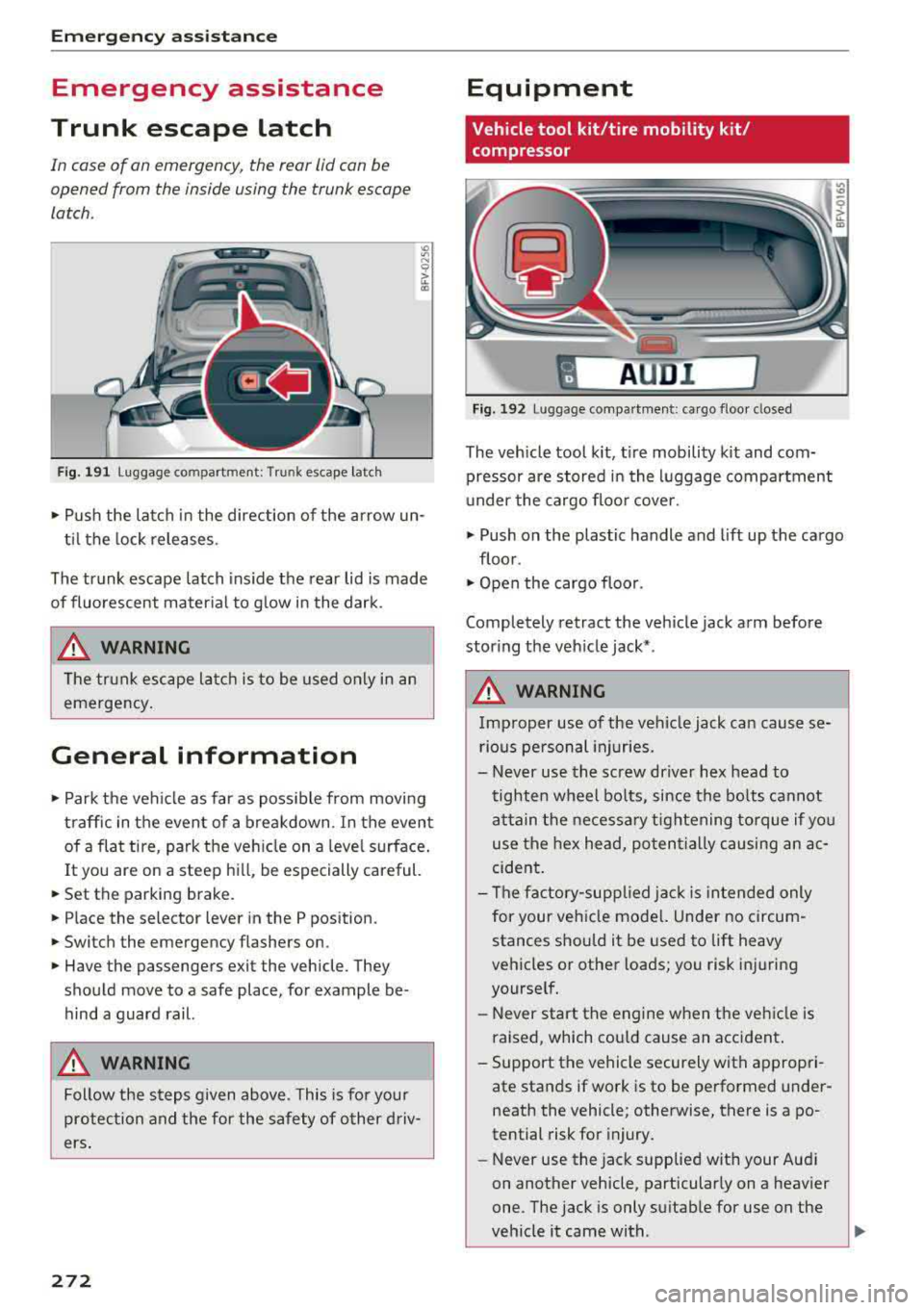
Trunk escape latch
In case of an emergency , the rear lid can be
opened from the inside using the trunk escape
latch.
Fig. 191 L uggage compartment: Trunk escape latch
• Pu sh the latch in the direction of the arrow un
til the lock releases .
The trunk escape latch inside the rear lid is made
of fluorescent material to g low in the dark.
.&_ WARNING
The trunk escape latch is to be used only in an
emergency.
General information
• Park the vehicle as far as poss ible from moving
traffic in the event of a breakdown . In the event
of a flat tire , park the vehicle on a level surface .
It you are on a steep hill, be especially careful.
• Set the parking brake.
• Place the selector lever in the P position.
• Switch the emergency flashers on.
• Have the passengers exit the vehicle. They
should move to a safe place, for example be
hind a guard rail.
.&_ WARNING
Follow the steps given above . This is for your
protection and the for the safety of other driv
ers.
272
Equipment
Vehicle tool kit/tire mobility kit/
compressor
A UD i 1
Fig. 192 Lu ggage compartmen t: cargo floor closed
The vehicle tool kit, tire mobility kit and com·
pressor are stored in the luggage compartment
u nder the cargo floor cover.
• Push on the plastic handle and lift up the cargo
floor .
• Open the cargo floor.
Completely retract the vehicle jack arm before
storing the vehicle jack* .
.&_ WARNING
Improper use of the veh icle jack can cause se
rious personal injuries.
- Never use the screw driver hex head to
tighten wheel bolts, since the bolts cannot
attain the necessary tightening torque if you
use the hex head, potentially causing an ac
cident.
- The factory-supplied jack is intended only
for your vehicle mode l. Under no circum
stances should it be used to lift heavy
vehicles or other loads; you risk injuring
yourself.
- Never start the engine when the vehicle is
raised, which cou ld cause an accident .
- Support the vehicle securely with appropri
ate stands if work is to be performed under
neath the vehicle; otherwise, there is a
po
tential risk for injury.
- Never use the jack supplied with your Aud i
on another vehicle, particularly on a heavier
one. The jack is only suitable for use on the
vehicle it came with .
...
Page 277 of 310
Cl co .... N ,..._
N ...... 0 ,..._
Vl co
-If the tire is too severely damaged , see an
authorized Aud i dealer or authorized Aud i
Service Facility for assistance .
@ For the sake of the environment
You can give the used tire sealant bottle to an
author ized Audi dealer or authorized A udi
Service Facility for disposal.
@ Tips
Remember to obtain a new bottle of sea lant
from an authorized Audi dea ler or authorized
Audi Service Facility after repairing a tire.
Replacing wheels
Preparation
You must complete the preparation before
changing a tire .
"' Read and follow the important safety precau-
t ions
Q page 2 72, General information .
"' Set the parking brake .
"'Se lect the "P" selec to r l ever position.
"'Lay out the vehicle tool kit Q page 2 72 and the
spare tire
Q page 279 .
A WARNING ,-
You or your passenger could be injured while
changing a wheel if you do not follow these
safety precautions:
- If you have a flat tire, move a safe distance
off the road. Turn off the engine, turn the
emergency flashers on and use other warn
ing devices to alert other motorists.
- Make sure that passengers wait in a safe place away f rom the vehicle and well away
from the road and traffic .
- To help prevent the vehicle from moving suddenly and possibly slipping off the jack,
always fully set the parking brake and block
the front and back of the wheel diagonally
opposite the w heel be ing changed. Whe n
one front whee l is lifted off the ground,
pla cing the A utoma tic Transm ission in P
(Park) will
not prevent the ve hicle from
moving .
Emergen cy as sis tanc e
-Before you change a wheel, be sure the
ground is level and firm . If necessary, use a
sturdy board under the jack.
- Always store the vehicle too l kit, the jack
and the replaced tire in the luggage com
partment
<=) page 183.
(D Tips
Obey all laws .
Removing the cover
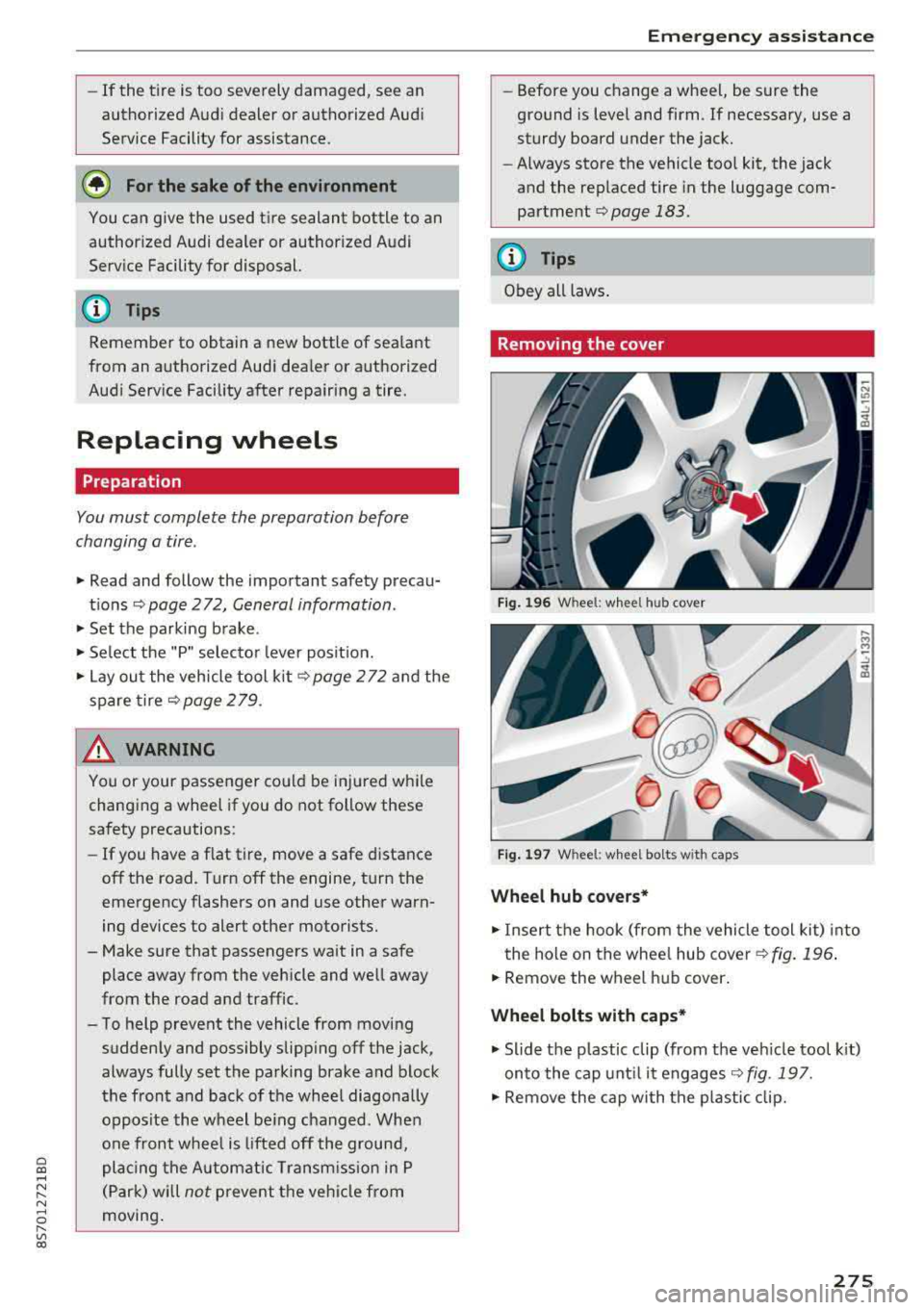
Fig. 196 W heel: wh eel hu b cov er
F ig. 1 97 Wheel: wh eel bol ts with cap s
Wheel hub covers*
"'Insert the hook (from the vehicle tool kit) into
the hole on the whee l hub cover
Q fig. 196 .
"'Remove the wheel h ub cover .
Wheel bolts with caps *
"'Slide the p lastic clip (from the veh icle too l kit)
onto the cap unt il it engages
Q fig . 197.
"' Remove the cap with the p lastic clip.
275
Page 278 of 310
Emerg enc y assis ta nce
Loosening the wheel bolts
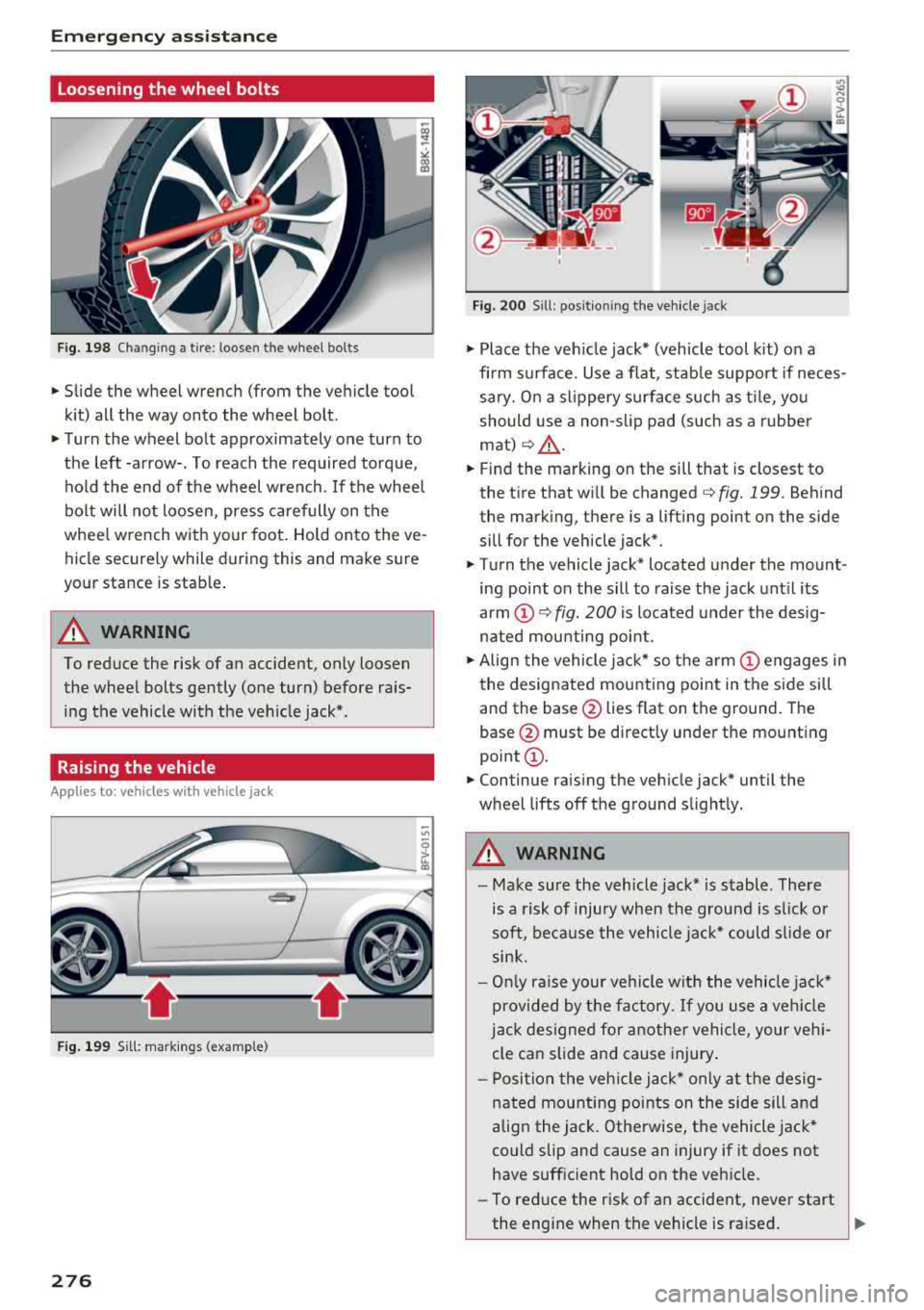
Fig. 198 Chan gin g a tire : loosen t he wheel bolts
.,. Slide the wheel wrench (from the vehicle tool
k it) all the way onto the wheel bolt.
.,. Turn the wheel bolt approximately one turn to
the left -arrow-. To reach the required torque, hold the end of the wheel wrench. If the wheel
bolt will not loosen, press carefully on the
whee l wrench with your foot. Hold onto the ve
hicle securely while during this and make sure
your stance is stable .
A WARNING
To reduce the risk of an accident, only loosen
the wheel bolts gently (one turn) before rais
ing the vehicle with the veh icle jack*.
Raising the vehicle
A ppl ies to: ve hicles w ith vehicle jack
- ,t.------,:
Fig. 199 Sill: markings (examp le)
276
Fig. 200 S ill : pos ition ing the vehicle jack
.,. Place the veh icle jack* (vehicle tool kit) on a
firm s urface. Use a f lat, stab le support if neces
sary. On a slippery surface such as ti le, you
should use a non-slip pad (such as a rubber
mat) <=>& .
.,. Find the marking on the sill that is closest to
the tire that will be changed
c> fig. 199. Behind
the marking, there is a lifting point on the side
sill for the vehicle jack* .
.,. Turn the vehicle jack* located u nder the mount
ing point on the sill to raise the jack until its
arm
(D c> fig. 200 i s located under the desig
nated mou nting point .
.,. Align the vehicle jack* so the a rm (!) engages in
the designated mounting point in the side sill
and the base @lies flat on the ground. The
base @ must be directly under the mounting
point @.
.,. Continue raising the vehicle jack* until the
wheel lifts off the ground slightly.
A WARNING
- Make sure the vehicle jack* is stable . There
is a risk of injury when the ground is s lick or
soft, because the vehicle jac k* could sl ide or
sink.
- On ly raise your vehicle w ith the vehicle jac k*
provided by the factory. If you use a ve hicle
j a ck designed for anothe r vehicle, your veh i
cle can slide and cause injury .
- Posi tion the veh icle jack* only at the des ig
nated mounting points on the side sill and
align the jack . Otherwise, the vehicle jack*
could slip and cause an injury if it does not
have sufficient hold on the vehicle.
- To reduce the risk of an accident, never start
the engine when the vehicle is ra ised.
Page 279 of 310
Cl co .... N ,....
N ...... 0 ,....
Vl co
-To reduce the risk of injury, support the ve
hicle securely with suitab le stands if work is
to be performed underneath the vehicle.
- To help prevent injury to yourself and your
passengers:
- Do not ra ise the vehicle until you are sure
the jack is securely engaged .
- Passengers must not remain in the vehicle
when it is jacked up.
- Make sure that passengers wait in a safe
p lace away from the vehicle a nd well away
from the road and t raffic.
- Make sure jack posit ion is correct, adjust
as necessary and then cont inue to raise
the jack.
- If work has to be done under the v ehicle,
ensure that it is safely s upported on su ita
b le stands
-risk of inju ry!
- Never start the engine when the vehicle is
on the jac k
-risk of accident!
(D Note
Do not lift the vehicle by the sill . Position the
veh icle jack* only at the des ignated mounting
points on the side s il l. Otherwise, yo ur vehicle
w ill be damaged.
Removing and mounting a wheel
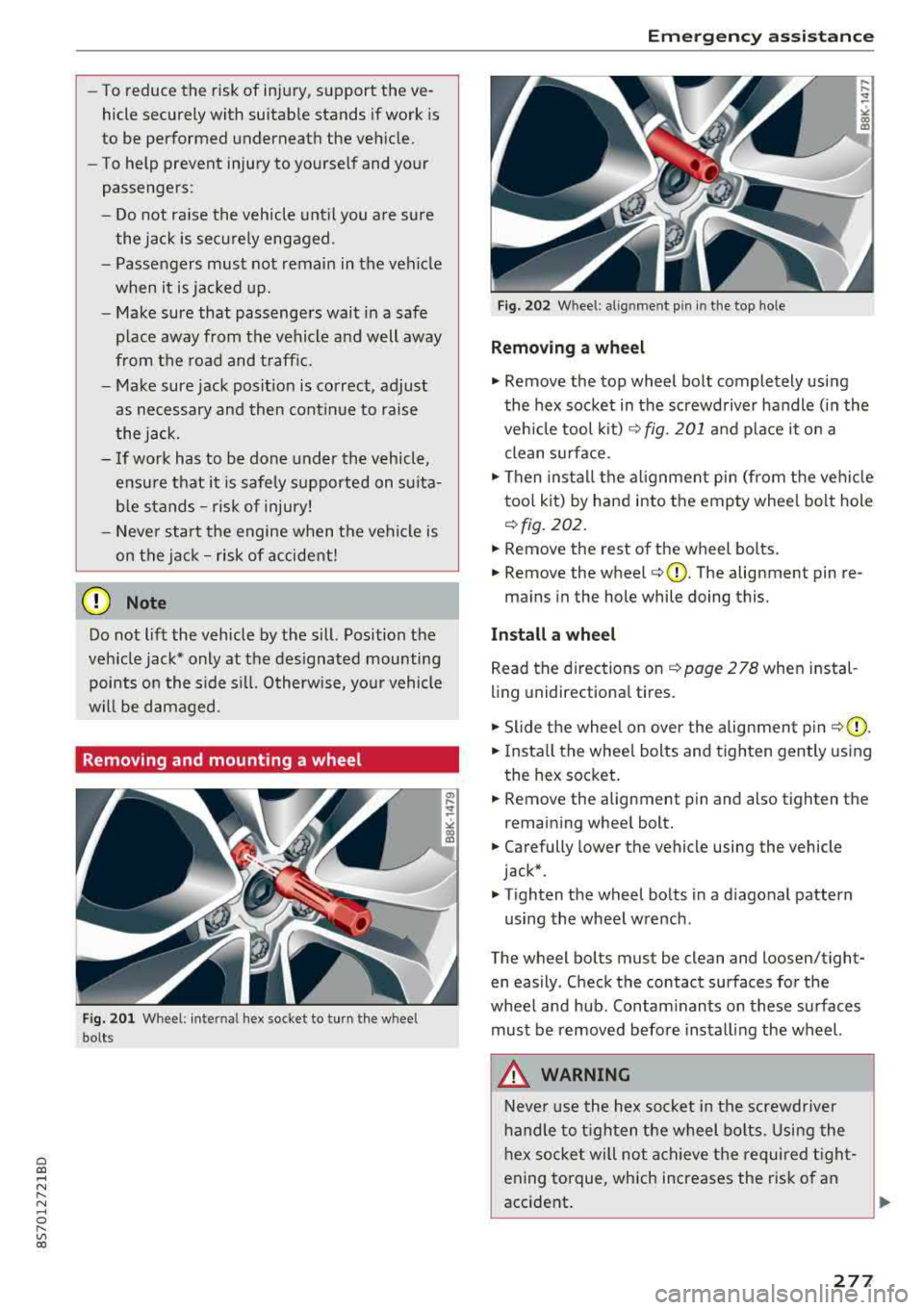
Fi g. 2 01 Wheel : internal hex socket to turn the wheel
bolts
Em ergen cy as sis tanc e
Fig. 202 Whee l: alignment pin in the top ho le
Removing a wheel
.,. Remove the top wheel bolt completely using
the hex socket in th e screwdriver handle (in the
ve hicle tool kit) ¢
fig. 201 and p lace it on a
clean s urface.
.,. Then insta ll the alignment pin (from the ve hicl e
too l kit) by hand into the empty wheel bolt hole
<=> fig . 202.
.,. Remove the rest of the wheel bo lts.
.,. Remove the wheel <=>CD. The alignment pin re-
mains in the hole while doing this.
Install a wheel
Read the directions on <=> page 2 78 when in stal
ling unidirectiona l tires.
.,. Slide the wheel on over the alignment pin ¢ (D .
.,. Insta ll the whee l bolts and tighten gently us ing
t he hex socket .
.,. Remove the alignment pin and also tighten the
remain ing whee l bolt .
.,. Carefully lower the vehicle using the vehicle
jack* .
.,. Tighten the wheel bolts in a d iagonal pattern
using the wheel wrench .
The wheel bolts must be clean and loosen/tight
en easily . Check the contact surfaces for the
whee l and hub. Contam inants on these su rfaces
must be removed before installing the wheel.
_&. WARNING
Neve r use the hex socke t in the screwd river
handle to t igh ten the wheel bo lts . Using the
h ex socket will not ac hieve the required t ight
ening torque, which increases the risk of an
accident .
..,.
277
Page 282 of 310
Fuses and bulbs
Fuses and bulbs
Electrical fuses
Replacing fuses
A fuse that has blown will have metal strips that
have burned through.
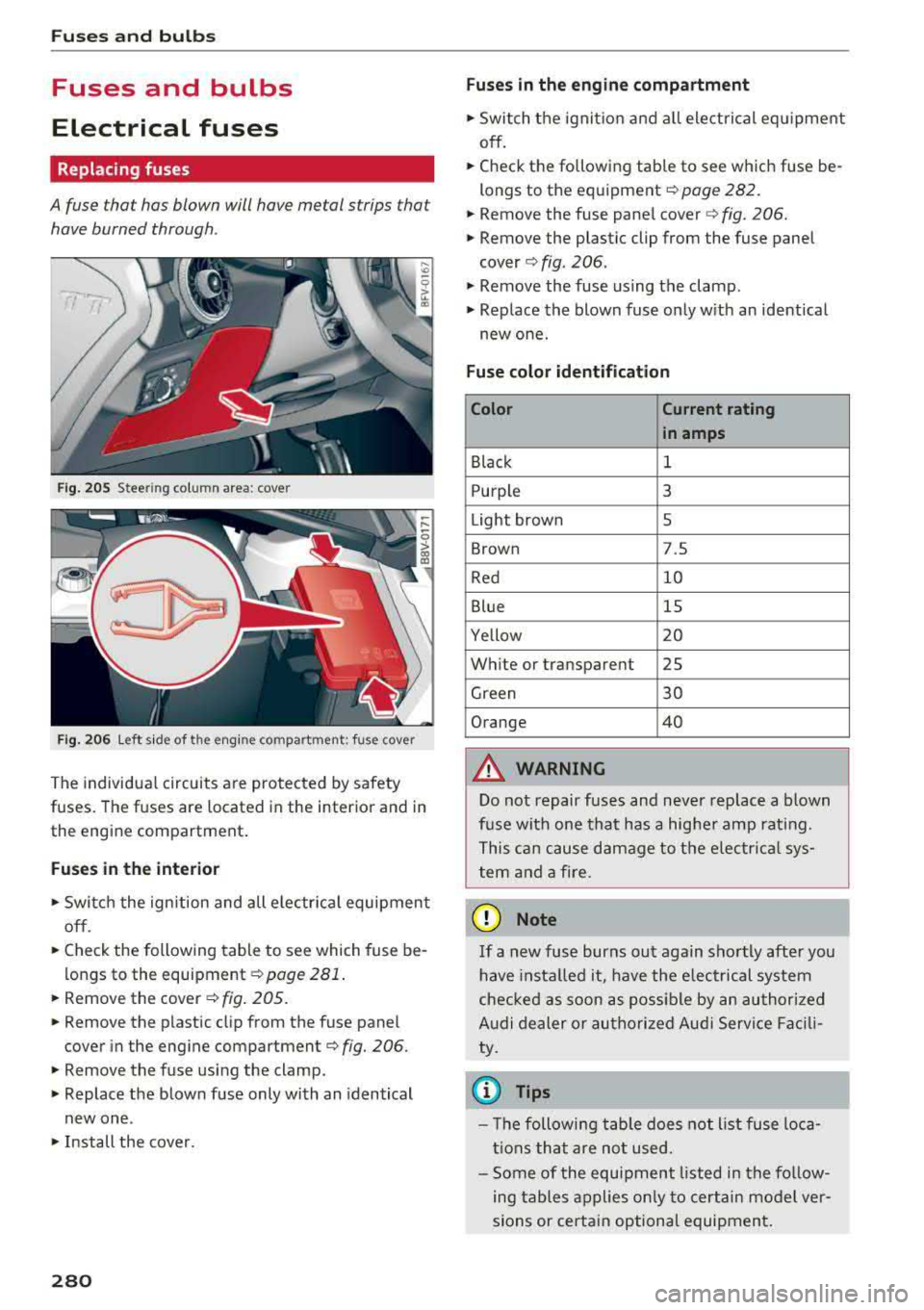
Fig. 20 5 Steering column area: cover
F ig. 20 6 Left side of the e ngine compartment: fuse cover
The individu al circuits are pro tec ted by safety
fuses. The fuses are located in the inter ior and in
the engine compartment .
Fuses in the interior
., Switch the ignition and all e lectr ica l equipment
off.
.. Check the following table to see which fuse be
l ongs to the
equipment ¢ page 281.
.. Remove the cover ¢ fig. 205.
.. Remove the plastic cl ip from the fuse panel
cover in the engine
compartment¢ fig. 206 .
.. Remove the fuse using the clamp.
., Replace the blow n fu se only with an identical
new one .
., Install the cover.
280
Fuses in the engine compartment
.. Switch the ignit io n and all electrical eq uipment
off .
.. Check the following table to see which fuse be
longs to th e eq uipment
¢page 282.
.. Remove the fuse pane l cover c> fig . 206.
.. Remove the plastic clip from the fuse panel
cover ¢ fig. 206 .
., Remove the fuse us ing the clamp .
.. Replace the blown fuse on ly w ith an ident ical
new one.
Fuse color identification
Color Current rating
in amps
Black 1
Purple 3
Light brown 5
Brown 7.S
Red
10
Blue 15
Yellow 20
Wh ite or transparent 25
Green 30
Orange 40
A WARNING
D o not repair fuses and neve r rep lace a blown
f u se with one tha t has a hig her amp rat ing.
T his ca n ca use damage to the e lectr ica l sys
tem and a fire .
(D Note
If a new fuse burns out again sho rtly after you
h ave insta lled it, have the e lectrical system
che cked as soon as possible by an au thori zed
A udi de aler or au tho riz ed Audi Service Fac ili
ty .
0) Tips
- Th e followi ng t able does not list fuse loca
t ions tha t are not used.
- Some of the e quipment listed in the fo llow
ing tables applies on ly to certain mo del ver
sions or certa in option al equipmen t.
Page 283 of 310
Cl co .... N ,....
N ...... 0 ,....
Vl co
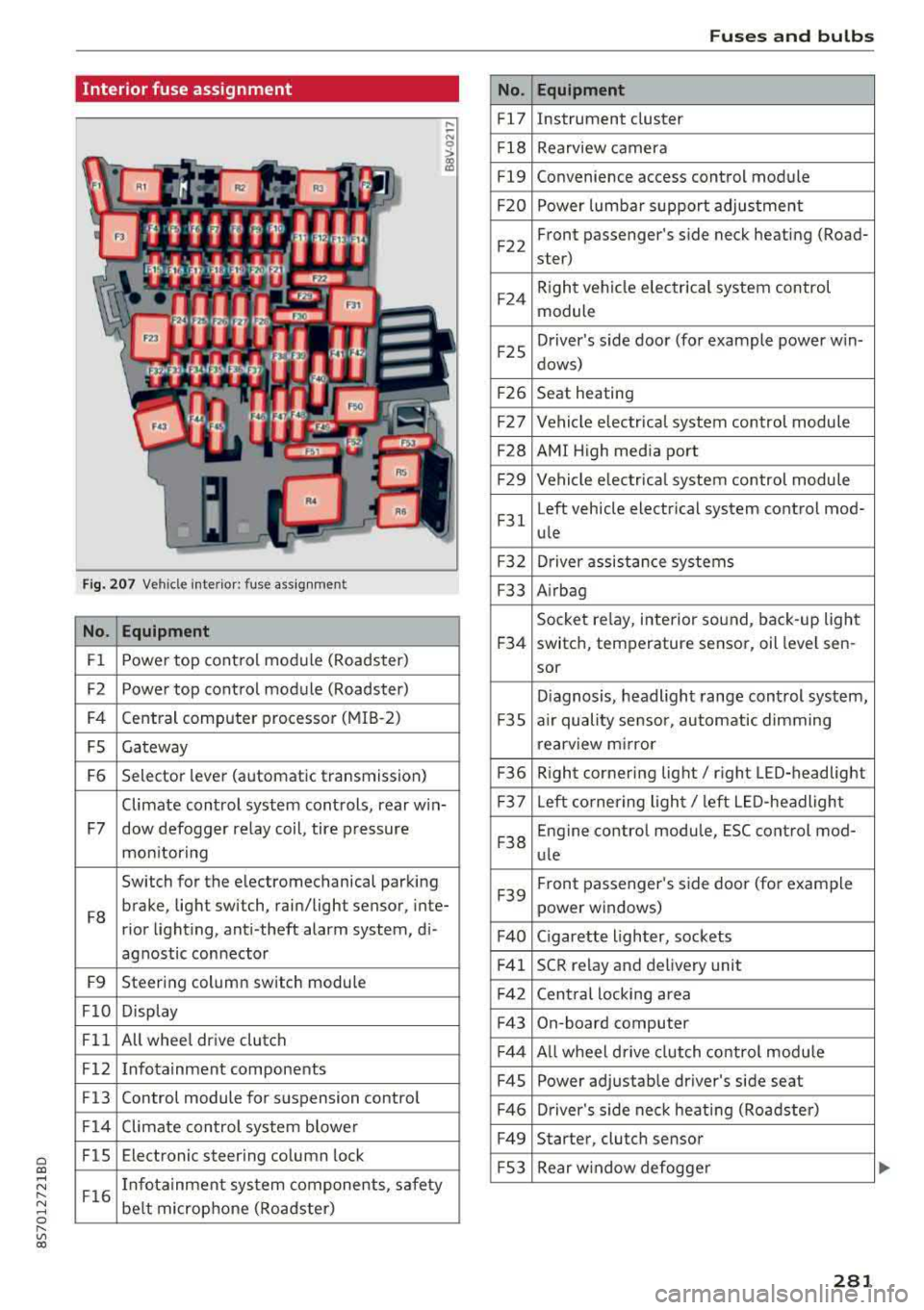
Interior fuse assignment
Fig. 207 Vehicle interior: fuse assignmen t
No. Equipment
Fl Power top cont
rol module (Roadster)
F2 Power top control module (Roadster)
F4 Central computer processor (MIB
-2)
FS Gateway
F6 Selector lever (automatic transmission)
Climate control system controls, rear w in-
F7 dow defogger relay coil, tire pressure
mon itoring
Switch for the electromechanical parking
F8 brake, light switch, rain/light sensor, inte-
rior lighting, anti -theft alarm system, di -
agnostic connector
F9 Steering column switch module
FlO Display
Fll All whee
l drive clutch
F12 Infotainment components
F13 Control module for suspension control
F14 Climate control system blowe r
FlS Electronic steering column
lock
F16 I
nfotainment system components, safety
be lt microphone (Roadster)
No.
Fl7
F1 8
Fl9
F20
F 22
F24
F 25
F 26
F 27
F28
F2 9
F 31
F3 2
F33
F 34
F 35
F36
F37
F3 8
F39
F40
F41
F 42
F43
F44
F45
F46
F49
F S3
Fuses and bulbs
Equipment
Instrument cluster
Rearview camera
Convenience access control module
Power lumbar support adjustment
Front passenger's side neck heating (Road-
ster)
R ight vehicle electrica l system control
module
Driver's s ide door (for example power w in-
dows)
Seat heating
Vehicle electrical system control module
AMI High media port
Vehicle e lectr ical system control module
Left vehicle electrical system contro l mod-
ule
Driver assistance systems
Airbag
Socket relay, inte rior sound , back-up light
switch, temperature sensor, oil leve l sen -
sor
Diagnosis, headlight range control system,
a ir quality sensor, automatic dimming
rearview mirror
R ight cornering light/ right LED-headlight
L eft cornering light/ left LED-headlight
Engine control module, ESC control mod-
ule
Front passenger's side door (for example
power windows)
C igarette lighter, sockets
SCR relay and delivery unit
Central locking area
On-board computer
A ll wheel d rive clutch control module
Power adjustable driver's side seat
Driver's side neck heating (Roadster)
Starter, clutch sensor
Rear window defogger
281
Page 284 of 310
Fuses and bulbs
The power seats* are protected via circuit break
ers
that automatically switch on after a few sec
onds after the overload has been reduced.
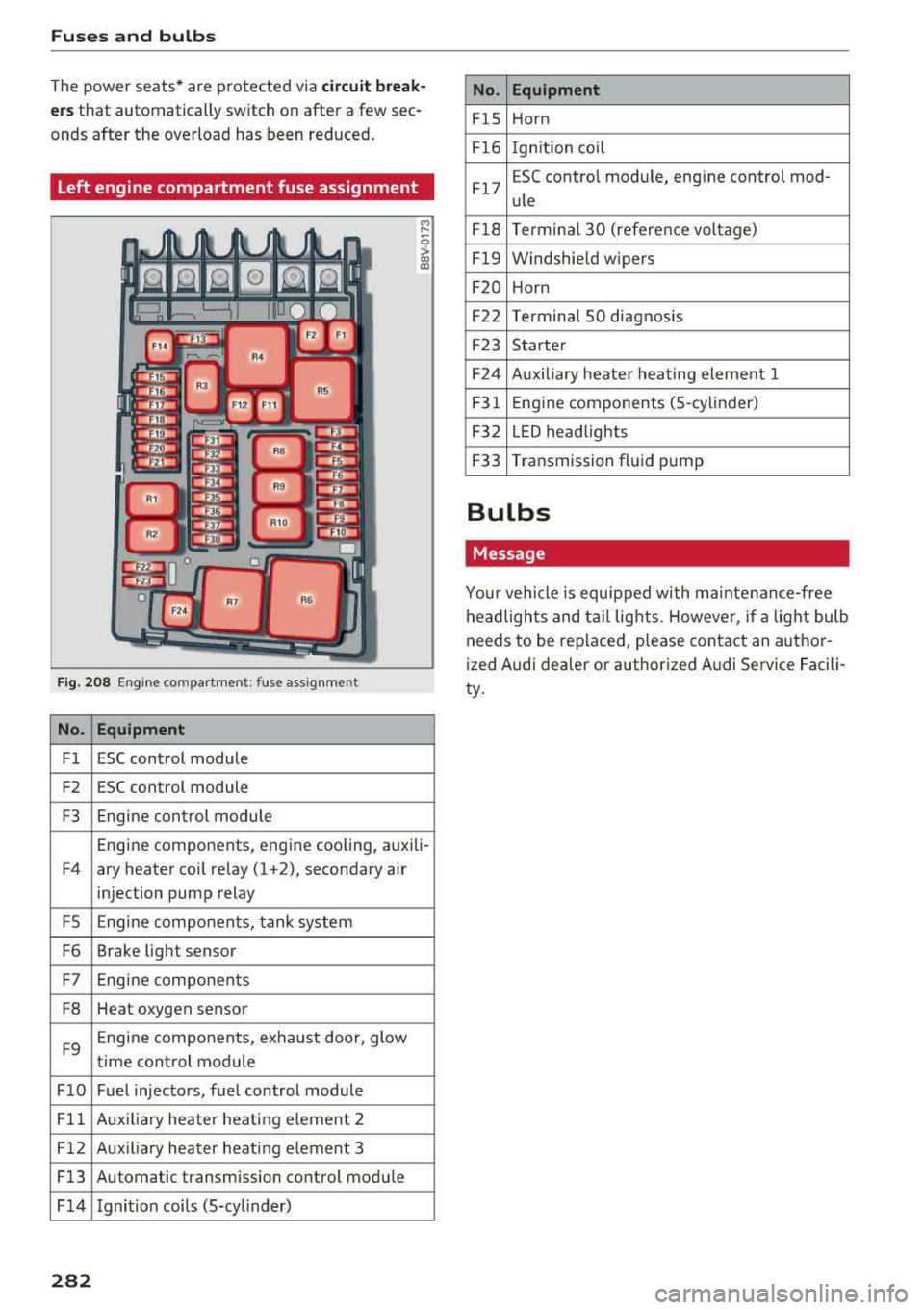
Left engine compartment fuse assignment
F ig. 208 Engine co mpartment : fuse assignment
No. Equipment
Fl ESC control module
F2 ESC control module
F3 Engine control module
M
" 0 > a, m
Engine components, engine cooling, auxili-
F4 ary heater coil relay (1 +2), secondary air
injection pump relay
FS Engine components, tank system
F6 Brake light sensor
F7 Engine components
F8 Heat oxygen sensor
F9 Engine components, exhaust door, glow
time control module
FlO Fuel injectors, fuel control module
Fll Auxiliary heater heating e lement 2
F 12 Aux iliary heater heat ing element 3
Fl3 Automatic transmission control module
F 14 Ignition coils (5-cylinder)
282
No. Equipment
FlS Horn
Fl6 Ignition coil
Fl7 E
SC contro l module, engine control mod-
ule
Fl8 Terminal
30 (reference voltage)
Fl9 Windshield wipers
F20 Horn
F22 Terminal SO diagnosis
F23 Starter
F24 Auxiliary heater heating element 1
F31 Engine
components (5 -cylinder)
F32 LED headlights
F33 Transmission fluid pump
Bulbs
Message
Your vehicle is equipped with ma intenance-free
headlights and tail lights. However, if a light bulb
needs to be replaced, please contact an author
ized Audi dealer or authorized Audi Service Facili
ty.