display AUDI TT ROADSTER 2018 Owners Manual
[x] Cancel search | Manufacturer: AUDI, Model Year: 2018, Model line: TT ROADSTER, Model: AUDI TT ROADSTER 2018Pages: 310, PDF Size: 46.95 MB
Page 10 of 310
Instruments and indicator lights
Instruments and indicator lights
Instruments
Audi virtual cockpit (instrument cluster)
The instrument cluster is the central information center for the driver.
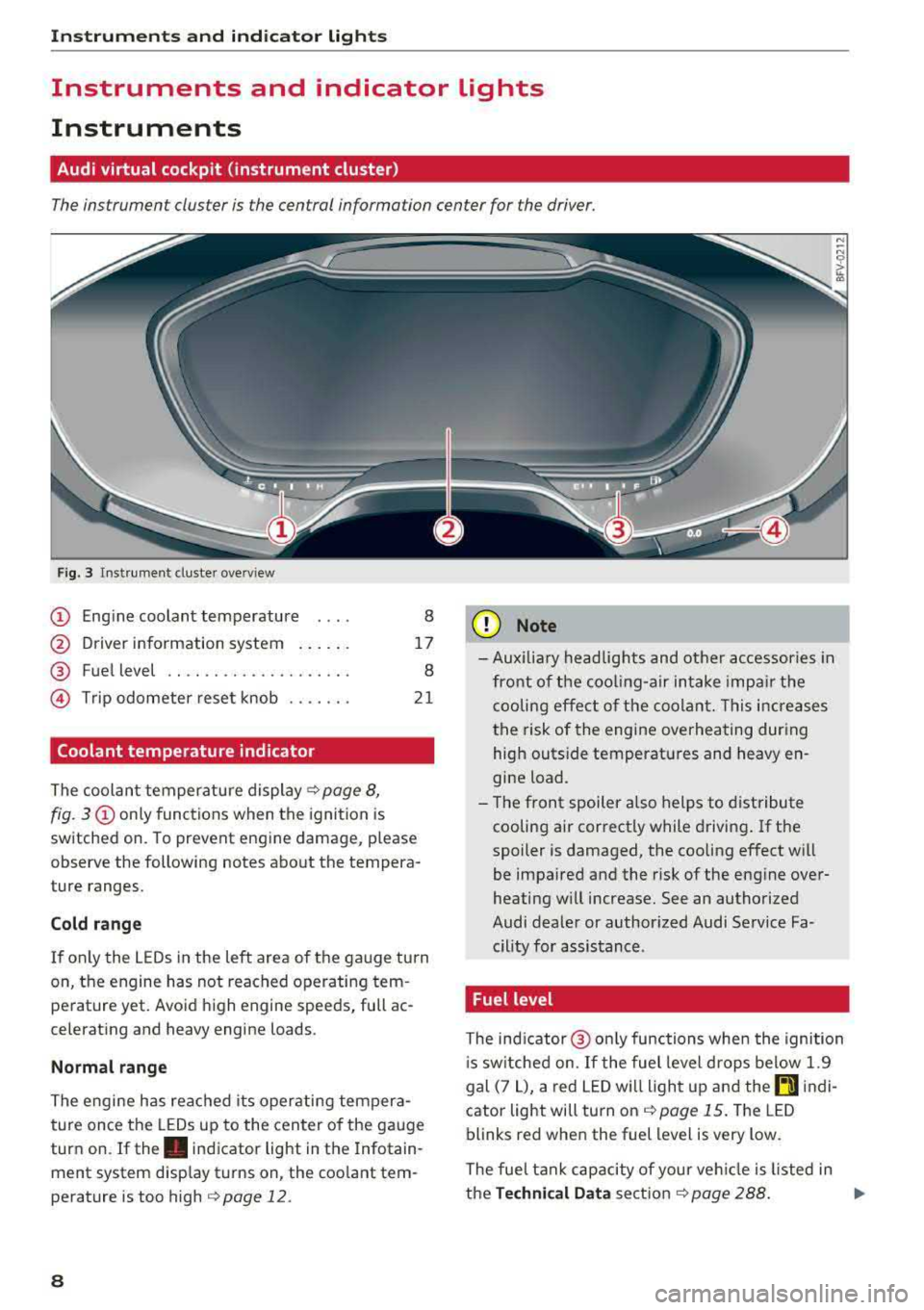
Fig. 3 Instrument cluster overview
CD Engine coolant temperature 8
@ Driver information system . . . . . . 17
® Fuel level . . . . . . . . . . . . . . . . . . . . 8
@ Trip odometer reset knob . . . . . . . 21
Coolant temperature indicator
The coolant temperature display c;, page 8,
fig. 3
CD only functions when the ignition is
sw itched on. To prevent engine damage, p lease
observe the following notes about the tempera
ture ranges.
Cold range
If on ly the LEDs in the left area of the gauge turn
on, the engine has not reached operating tem perature yet. Avoid high engine speeds, full ac
celerating and heavy engine loads .
Normal range
The engine has reached its operating tempera
ture once the LEDs up to the center of the gauge
turn on. If
the . indicator light in the Infotain
ment system display turns on, the coolant tem
perature is too high
c::;, page 12.
8
(I;} Note
-Aux iliary head lights and other accessories in
front of the cooling-air intake impair the
cooling effect of the coolant. This increases
the risk of the engine overheating during
high outside temperatures and heavy en
gine load.
- The front spoiler also helps to distribute
cooling air correctly while driving. If the
spoiler is damaged, the cooling effect will
be impaired and the risk of the engine over
heating w ill increase. See an authorized
Audi dealer or author ized Audi Service Fa
cility for assistance .
Fuel level
The indicator@ only func tions when the ignition
i s sw itched on. If the fuel level drops below 1.9
gal (7
L), a red LED will light up and the rD indi
cator light will turn on
c::;, page 15. The LED
blinks red when the fuel level is very low.
The fuel tank capacity of your veh icle is listed in
the
Technical Data section c;, page 288. ..,.
Page 11 of 310
Cl 00 .-< N r-N .-< 0 r-Vl 00
@ Note
Never drive until the tank is completely emp
ty. The irregular supply of fuel that results
from that can cause engine misfires. Uncom
busted fuel will then enter the exhaust sys
tem. Th is can cause overheating and damage
to the catalytic converter.
Indicator lights
Description
The indicator lights in the instrument cluster
blink or turn on. They indicate functions or mal
functions.
With some indicator lights, messages may ap
pear and warning signals may sound. The indica
tor lights and messages in the display can be cov
ered by other displays. To show them again, se
lect the tab for indicator lights and messages us
ing the multifunction steering wheel
¢ page 17. If there are several malfunct ions,
you can display them one at a time us ing the
thumbw heel.
Some ind icator lights in the d isplay can display in
several colors .
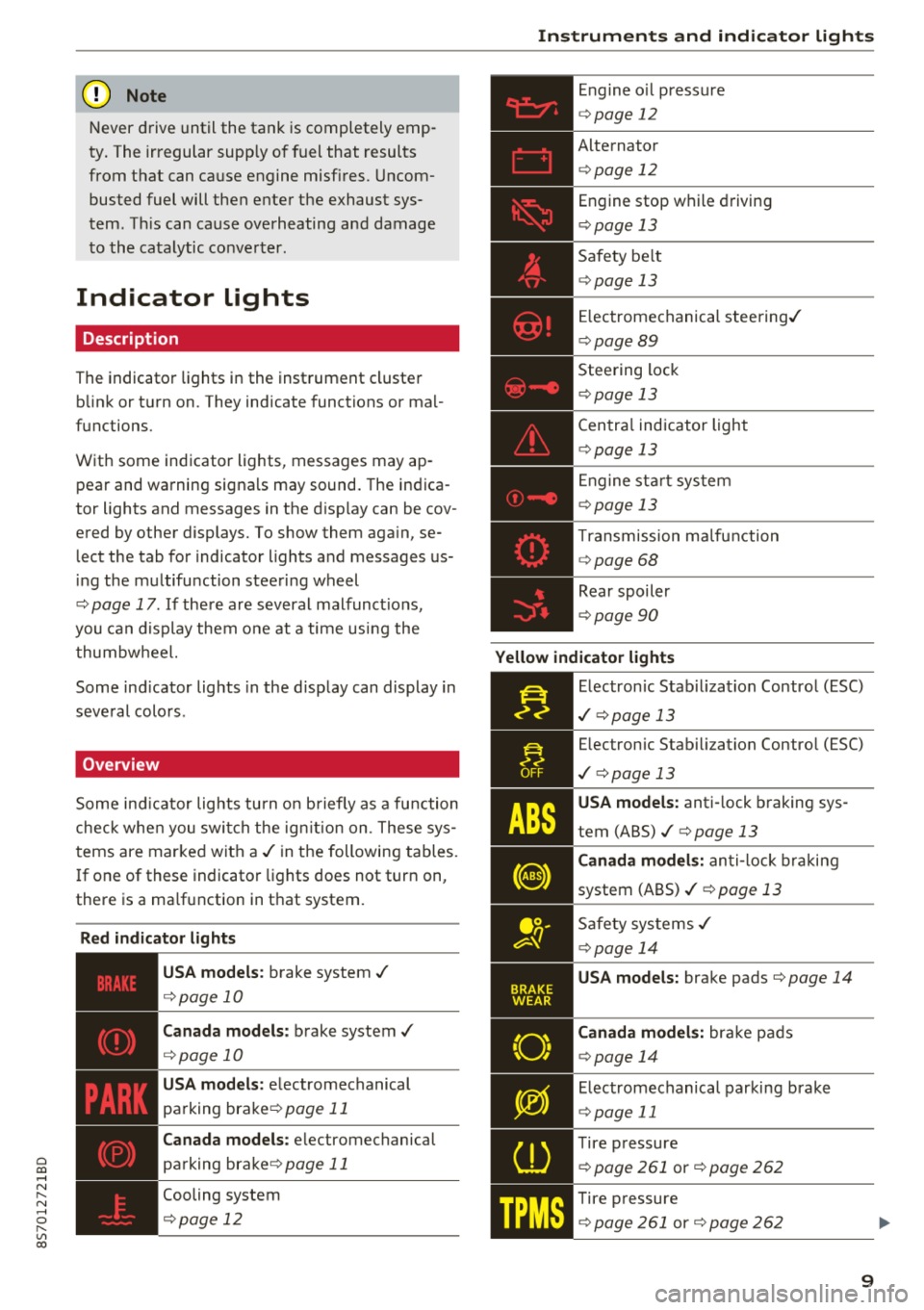
Overview
Some indicator lights turn on briefly as a function
check when you switch the ign ition on. These sys
tems are marked with a
./ in the following tables.
I f one of these indicator lights does not turn on,
there is a ma lfunction in that system.
Red indicator lights
---------------
US A models : brake system ./
¢page 10
Canada models: brake system ./
¢page 10
USA models: electromechanical
parking
brake¢ page 11
Canada models: electromechanical
parking
brake¢ page 11
Cooling system
¢ page 12
Instruments and indicator lights
Engine oil pressure
¢ page 12
Alternator
¢p age 12
Engine stop while driving
¢page 13
Safety be lt
¢ page 13
Electromechanical steering./
¢page 89
Steering lock
¢page 13
Central indicator light
¢page 13
En gine start system
¢page 13
Transmission ma lfunction
¢ page 68
Rear spoiler
¢page 90
Yellow indicator lights
Electronic Stabil iz ation Control (ESC)
./ ¢p age 13
Electronic Stabilization Contro l (ESC)
./ ¢pag e 13
USA models: anti-lock braking sys
tem
(ABS)./¢ page 13
Canada models: anti-lock braking
system
(ABS)./ ¢ page 13
Safety systems ./
¢page 14
USA models: brake pads ¢page 14
Canada models: bra ke pads
¢ page 14
Electromechanical parking brake
¢page 11
Tire pressure
¢ page 261 or¢ page 262
Tire pressure
¢ page 261 or¢ page 262
9
Page 19 of 310
Cl co .... N ,-... N ...... 0 ,-... Vl co
Driver information system
Overview
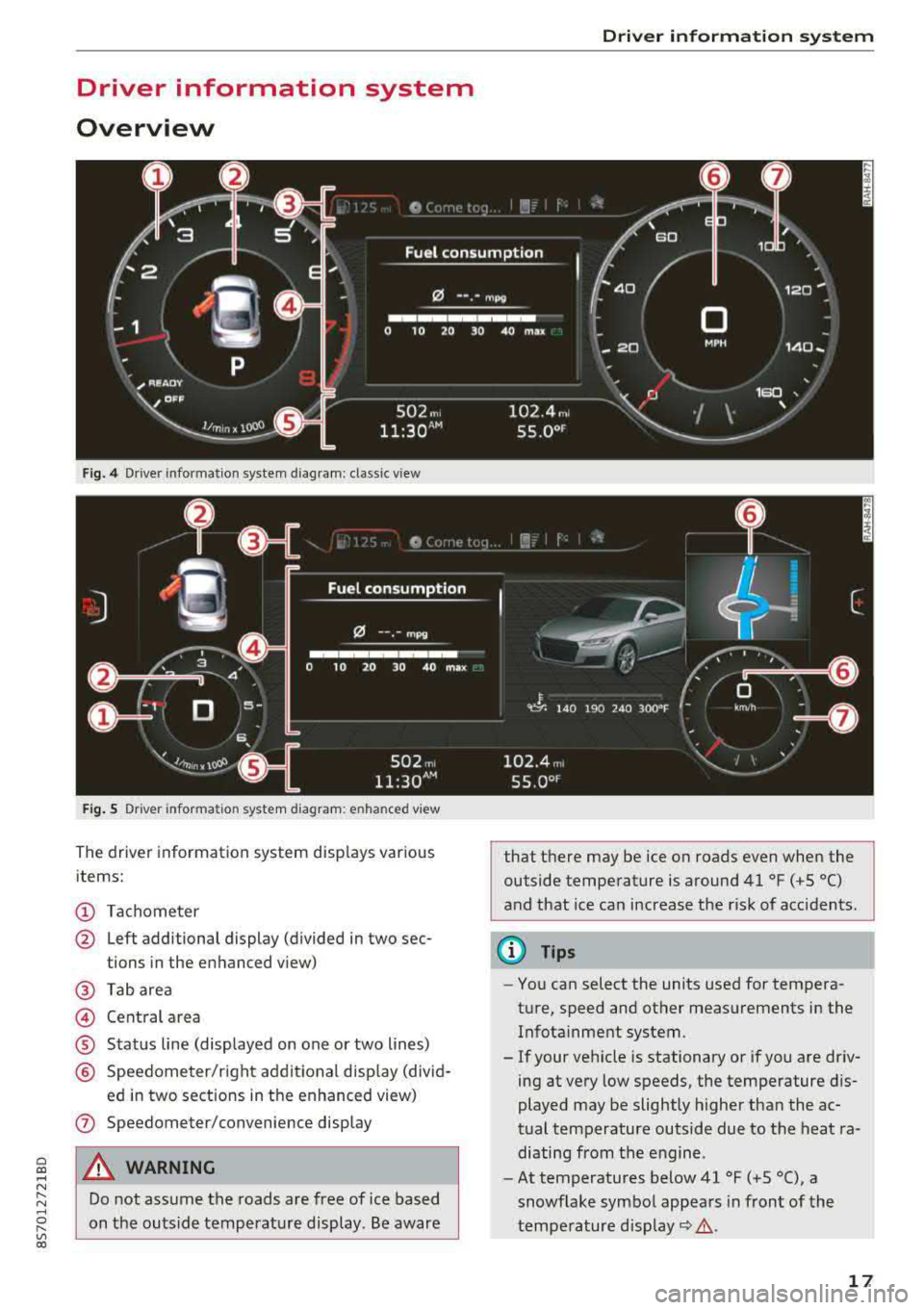
Fig. 4 Driver information system diagram: classic v iew
Fig. S D rive r in formation system diagram : en ha nced v iew
The driver information system displays various
items:
(D Tachometer
@ Left additional display (divided in two sec-
tions in the enhanced view)
@ Tab area
@ Central area
® Status line (displayed on one or two lines)
@ Speedometer/right additional display (divid-
ed in two sections in the enhanced view)
(J) Speedometer/convenience display
A WARNING
Do not assume the roads are free of ice based
on the outside temperature display . Be aware
Driver information system
that there may be ice on roads even when the
outside temperature is around 41 °F ( +S °C)
and that ice can increase the risk of acc idents.
(D Tips
- You can select the units used for tempera
ture, speed and other measurements in the Infotainment system .
- If your vehicle is stationary or if you are driv
ing at
very low speeds, the temperature dis
played may be slightly higher than the ac
tual temperature outside due to the heat ra
diating from the engine.
- At temperatures below 41 °F (+S °C), a
snowflake symbol appears in front of the
temperature
display~ &.
17
Page 20 of 310
Driver information system
Multifunction steering
wheel plus
Operating
Applies to: vehicles with multifunction steering wheel plus
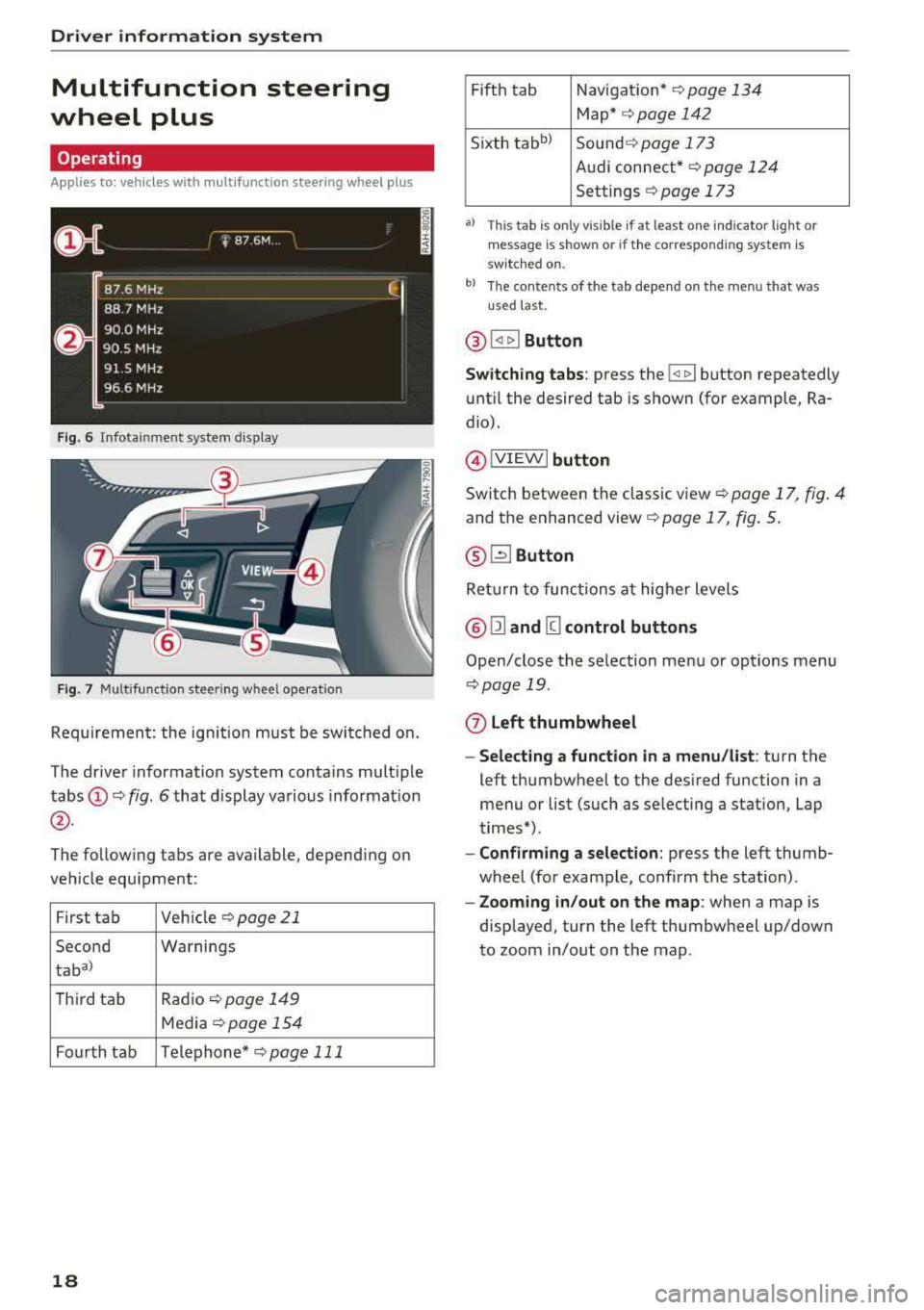
F ig. 6 Infotainment system display
Fig. 7 Multifunction steering wheel operation
Requirement: the ign ition must be switched on.
The driver information system contains multiple
tabs
(D ¢ fig. 6 that display various information
@.
The following tabs are available, depend ing on
vehicle equipment:
First tab Veh
icle ¢page21
Second Warnings
taba)
T
hird tab Radio ¢page 149
Media ¢page 154
Fourth tab Telephone*
¢pag e 111
18
Fifth tab Navigat ion* ¢page 134
Map* ¢ page 142
Sixth
tabb ) Sound ¢ page 173
Audi connect*
¢page 124
Settings ¢ page 173
a) This tab is only visible if at least o ne indicator lig ht or
mes sage is shown or if the correspon ding system is
sw itc hed on.
b) The contents of the tab depend on the menu that was
u se d last.
® I<] t>I Button
Switching tabs: press the !
until the desired tab is shown (for example, Ra
dio).
@ !VIEWI button
Switch between the classic view¢ page 17, fig. 4
and the enhanced
view¢ page 17, fig. 5.
® G2J Button
Ret urn to functions at higher levels
@ Ill and [g control buttons
Open/close the selection menu or options menu
¢page 19.
(z) Left thumbwheel
- Selecting a function in a menu/list : turn the
left thumbwheel to the desired function in a
menu or list (such as se lecting a station, Lap
times*).
- Confirming a selection: press the left thumb
wheel (for example, confirm the station) .
-Zooming in/out on the map : when a map is
displayed, turn the left thumbwheel up/down
to zoom in/out on the map.
Page 22 of 310
Driver information system
@l1<1
- Selecting the previous/next track or station :
press the l1<1<1! or l1:>1>1 I button.
-Fast forwarding/rewinding audio files : press
and hold the
!1<1<1 1 or 11:>1:> 1! bu tton un til the desired
location in the file is reached.
@lilButton
- Programmable steering wheel button
-open
ing a function :
press the@ button.
-Programmable steering wheel button - re
questing a function :
press and hold the@ but
ton.
- Programmable steering wheel button - chang
ing a function :
select the first tab > Vehicle
settings
> Steering wheel button assignment .
@l~w l Button
- Repeating the last navigation prompt :
press
the
l ~"'v l button when route guidance is act ive.
- Changing the voice guidance volume : when
route gu idance is active, turn the right thumb
whee l upward or downward during a navigation
prompt.
Multifunction steering
wheel
Operating
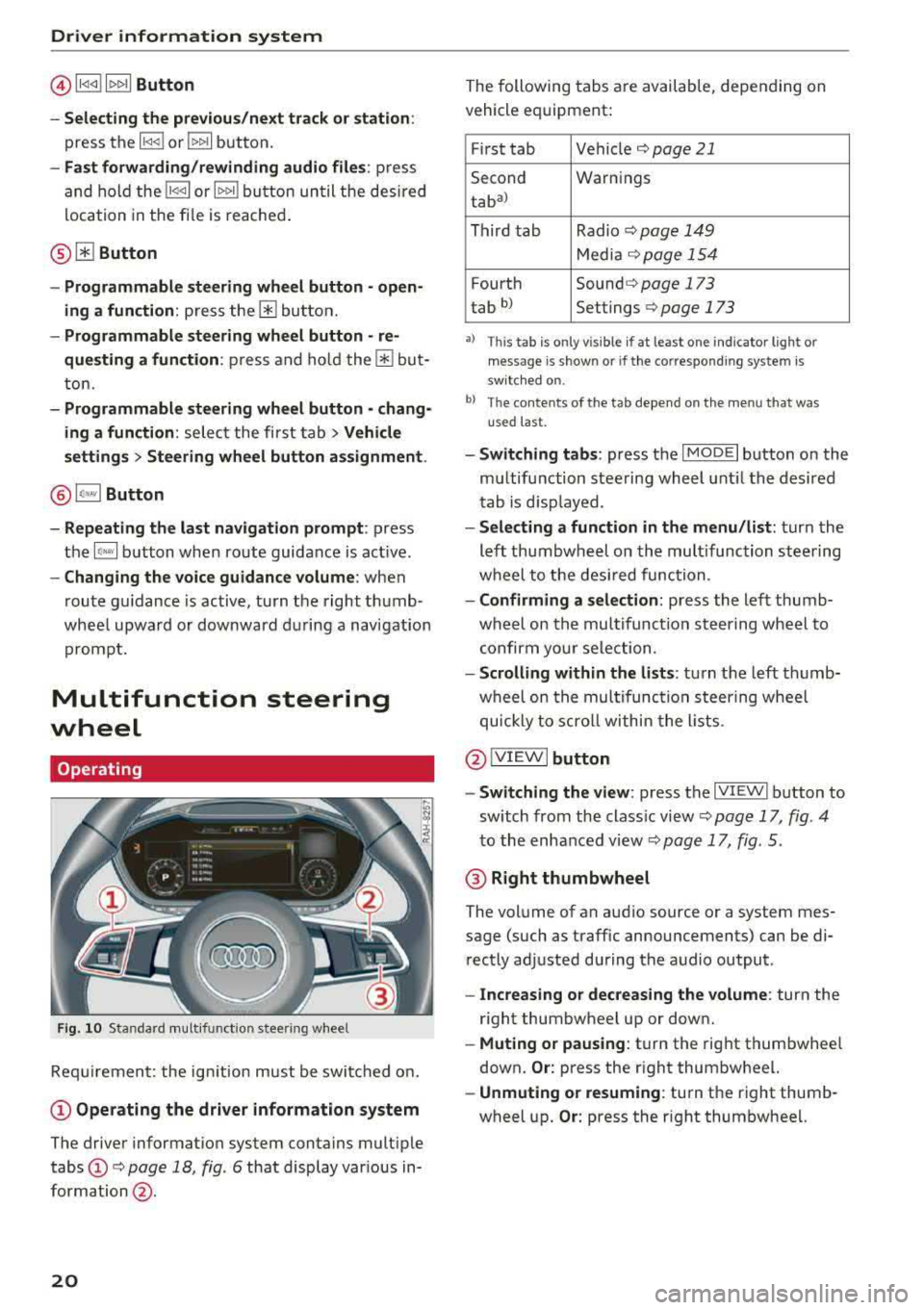
F ig . 10 Standard multifunct ion stee ring wheel
Requirement: the ign ition must be swi tched on.
(D Operating the driver information system
The driver information system contains multiple
tabs
(D c> page 18 , fig. 6 that display various in
formation @.
20
The following tabs are available, depending on
vehicle equipment:
First tab Vehicle
c> page 21
Second Warnings
tab
a)
Third tab Radio c> page 149
Media c>page 154
Fourth Sound c> page 173
tab b) Settings c> page 173
•> This tab is onl y visi ble if at least on e indi ca tor ligh t o r
mess age is show n or if the co rres pond ing sys te m is
s w it ch ed o n.
bl Th e conten ts of the t ab depe nd on the men u th at wa s
u se d las t.
- Switching tabs: press the I MOD E I button on the
multifunction steering wheel until the desired
tab is disp layed .
-Selecting a function in the menu /list: turn the
left thumbwheel on the multifunction steering
wheel to the desired function.
-Confirming a selection: press the left thumb
wheel on the multifunc tion steering wheel to
confirm your selection .
-Scrolling within the lists : turn the left thumb
wheel on the multifunction steering wheel
quickly to scroll within the lists .
@IVIEWI button
- Switching the view :
press the IV IEWI button to
sw itch from the class ic view
c> page 17, fig . 4
to the enhanced view c> page 17, fig. 5.
@ Right thumbwheel
The volume of an audio source or a system mes
sage (such as traffic announcements) can be di
rectly adjusted during the audio output .
-Increasing or decreasing the volume : turn the
right thumbwheel up or down.
-Muting or pausing : turn the right thumbwhee l
down.
Or: press the right thumbwheel.
-Unmuting or resuming : turn the right thumb
wheel up.
Or: press the right thumbwheel.
Page 23 of 310
Cl co .... N ,....
N ...... 0 ,....
Vl co
Tachometer
The tachometer displays the engine speed in rev
olutions per minute (RPM) .
The beginning of the red zone in the tachometer
indicates the maximum perm iss ib le engine speed
for all gears once the engine has been broken in
and when it is warmed up to operating tempera
ture. Before reaching the red zone, you should
sh ift into the next h igher gear, choose the Do r S
selecto r lever posi tion, or remove you r foot from
the ac cele rator peda l.
{Q;l Note
The needle in the tachometer may only be in
t he red a rea of the gauge for a short per iod of
time or there is a risk of damaging the engine.
T he loca tio n where the red zo ne begins varies
de pending o n the engine.
@ For the sake of the environment
Upshifti ng e arly helps you to save fuel and re
duces operati ng noise.
Odometer
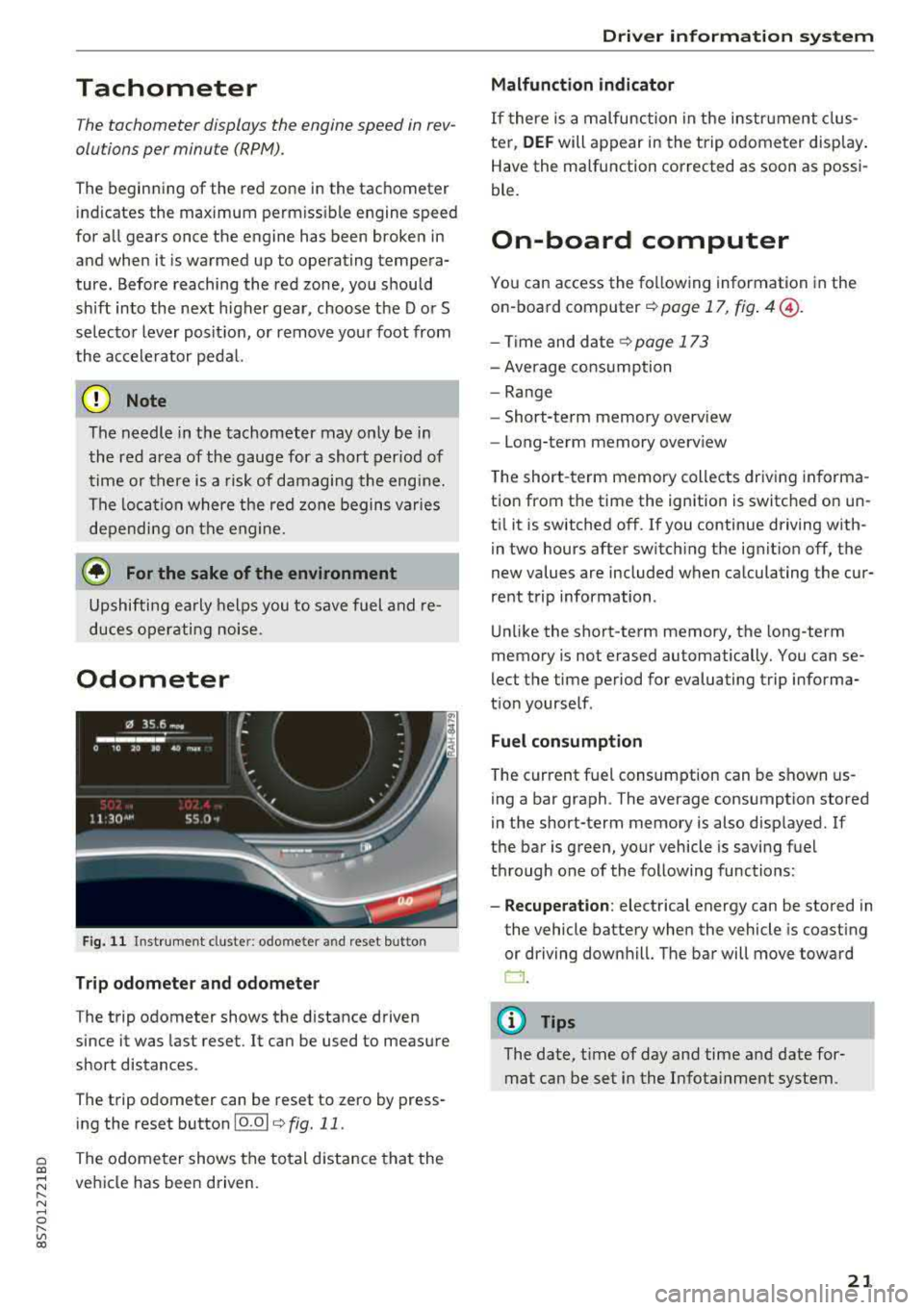
Fig . 11 Inst rument cluste r: odomete r and reset b utto n
Trip odometer and odomete r
The trip odometer shows the distance driven
since it was last reset.
It can be used to meas ure
short distances .
The trip odometer can be reset to zero by press ing the reset button 10.01
¢ fig. 11.
The odome ter shows the to tal d ist ance tha t the
ve hicle has been driven .
Driver information system
Malfunction indicator
If there is a malfunction in the instr ument clus
ter,
DEF will appear in the trip o dome ter disp lay.
Have the malfunction corrected as soon as possi
ble.
On-board computer
Yo u can access the fo llowing information in the
o n- board
computer ¢ page 17, fig . 4@ .
-Time and d ate ¢page 173
- Average cons umption
- Range
- Short-term memory overv iew
- Long-term memory overv iew
T he short -term memory collects driv ing in forma
tion from t he time the ignition is switc hed on un
t il it is switched off. If you continue driving w ith
in two hours after sw itch ing the ignit ion off , the
new values are included when ca lculating the cur
rent t rip information .
U nli ke the short-te rm memory, the long-term
memory is not erased automatically. You can
se
lect t he time period for evaluating trip informa
t ion yourse lf .
Fuel consumption
T he current f uel consumption can be shown us
ing a bar graph . The average consumption stored
in the short-term memory is also disp layed. If
the ba r is green, your vehicle is savi ng fuel
t hr ough one of the following functions :
-Recuperation: electrical energy can be stored in
the vehicle battery when the vehicle is coast ing
or driving downhil l. The bar will move toward
D .
(D Tips
The date, time of day and time and date for
mat can be set in the I nfota inment system.
21
Page 46 of 310
Lights and Vision
& WARNING
Dirty windshield wiper blades can impair vi
sion, which increases the risk of an accident .
Replacing windshield wiper blades
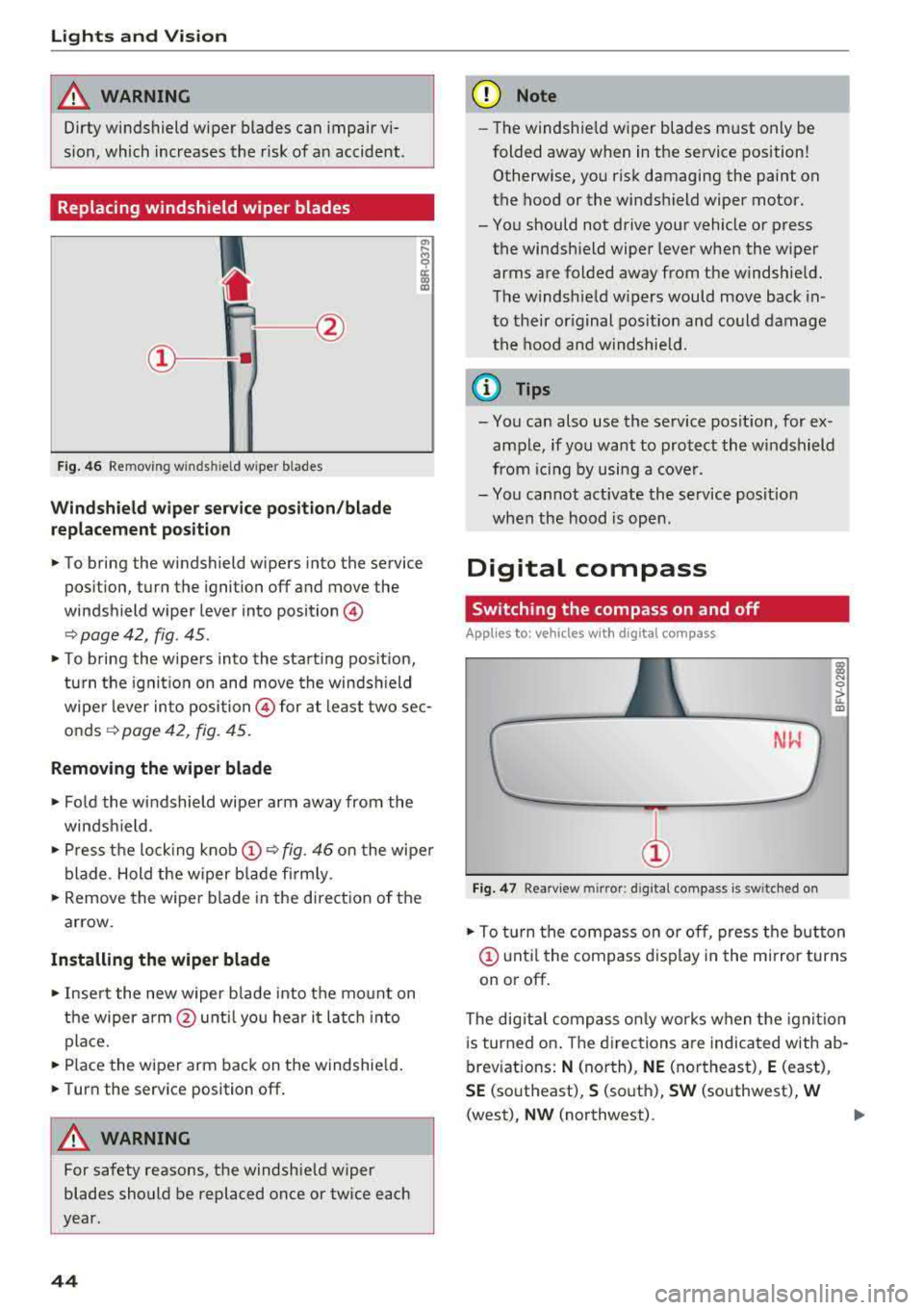
Fig. 46 Removing w inds hield w iper b lades
Windshield wiper service position/blade
replacement position
"' ij
a:: CX) m
,.. To bring the windshield wipers into the service
position, turn the ignition off and move the
windshield wiper lever into position@
¢ page 42, fig. 45 .
,.. To bring the wipers into the starting pos it io n,
turn the ignition on and move the windsh ield
wiper lever into position @ for at least two sec
onds¢ page 42, fig. 45.
Removing the wiper blade
,.. Fold the windshield wiper arm away from the
windshield.
,.. Press the locking knob@¢ fig. 46 on the wiper
blade . Hold the wiper blade firmly.
,.. Remove the wiper blade in the direction of the
arrow.
Installing the wiper blade
,.. Insert the new wiper b lade into the mount on
the wiper arm@until you hear it latch into
place.
,.. Place the wiper arm back on the windshield.
,.. Turn the service position off.
& WARNING
-
For safety reasons, the windshie ld wiper
blades should be replaced once or twice each
year.
44
(D Note
- Th e windshie ld wiper blades must only be
folded away when in the service position!
Otherwise, you risk damaging the paint on
the hood or the windshield wiper motor.
- You should not drive your vehicle or press the windshield wiper lever when the wiper
arms are folded away from the windshield.
The windshield w ipers would move back in
to their original position and could damage
the hood and windshield.
a) Tips
- You can also use the service posit ion, for ex
ample, if you want to protect the windshield
from icing by using a cover .
- You cannot activate the service posit ion
when the hood is open .
Digital compass
Switching the compass on and off
Applies to: vehicles wit h digital compass
Fig. 47 Rearview m irror: d ig ital compass is sw itched on
l!l
"' 0
> ... m
,.. To turn the compass on or off, press the button
@ until the compass display in the mirror turns
on or off.
The dig ital compass only works when the ignit ion
is turned on . The directions are indicated with ab
breviations:
N (north), NE (northeast), E (east),
SE (southeast), S (south), SW (southwest), W
(west), NW (northwest).
Page 47 of 310
Cl co .... N ,..._
N .... 0 ,..._
Vl co
(D Tips
To prevent inaccurate compass readings, do not bring any remote controls, e lectr ica l devi
ces or metallic objects near the mirror .
Adjusting the magnetic zone
Applies to: vehicles with digital compass
I
I I
' I
I I
®
' ' ' '
®
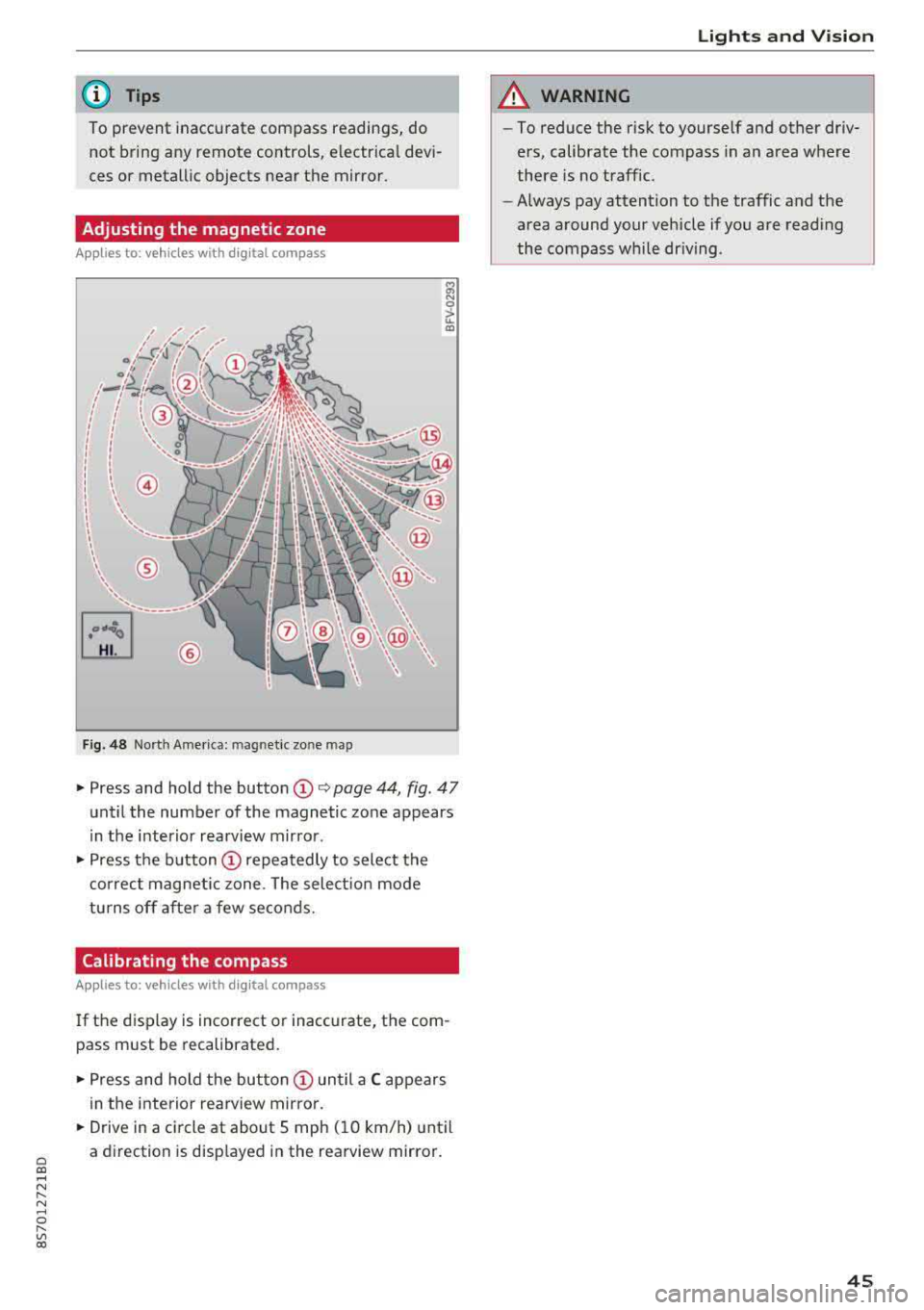
Fig. 48 Nort h Ame rica: mag netic zo ne map
~ N 0
> u. ID
• Press and hold the button (D Q page 44, fig . 47
until the number of the magnetic zone appears
in the interior rearview mirror .
• Press the button (D repeatedly to select the
correct magnetic zone . The select ion mode
turns off after a few seconds.
Calibrating the compass
Applies to: vehicles with digital compass
If the display is incorrect or inaccurate, the com
pass must be recalibrated.
• Press and hold the button (D until a C appears
in the interior rearview mirror .
.,. Drive in a circle at about 5 mph ( 10 km/h) until
a direction is displayed in the rearview mirror .
Lights and Vision
A WARNING
-To reduce the risk to yourself and other driv
ers, calibrate the compass in an area where
there is no traffic.
- Always pay attention to the traffic and the
area around your vehicle if you are reading
the compass while driving .
45
Page 63 of 310
Cl co .... N ,....
N .... 0 ,....
Vl co
(D Tips
You can view the message again by pressing
the
I START ENGINE S T OP ! button.
Electromechanical
parking brake
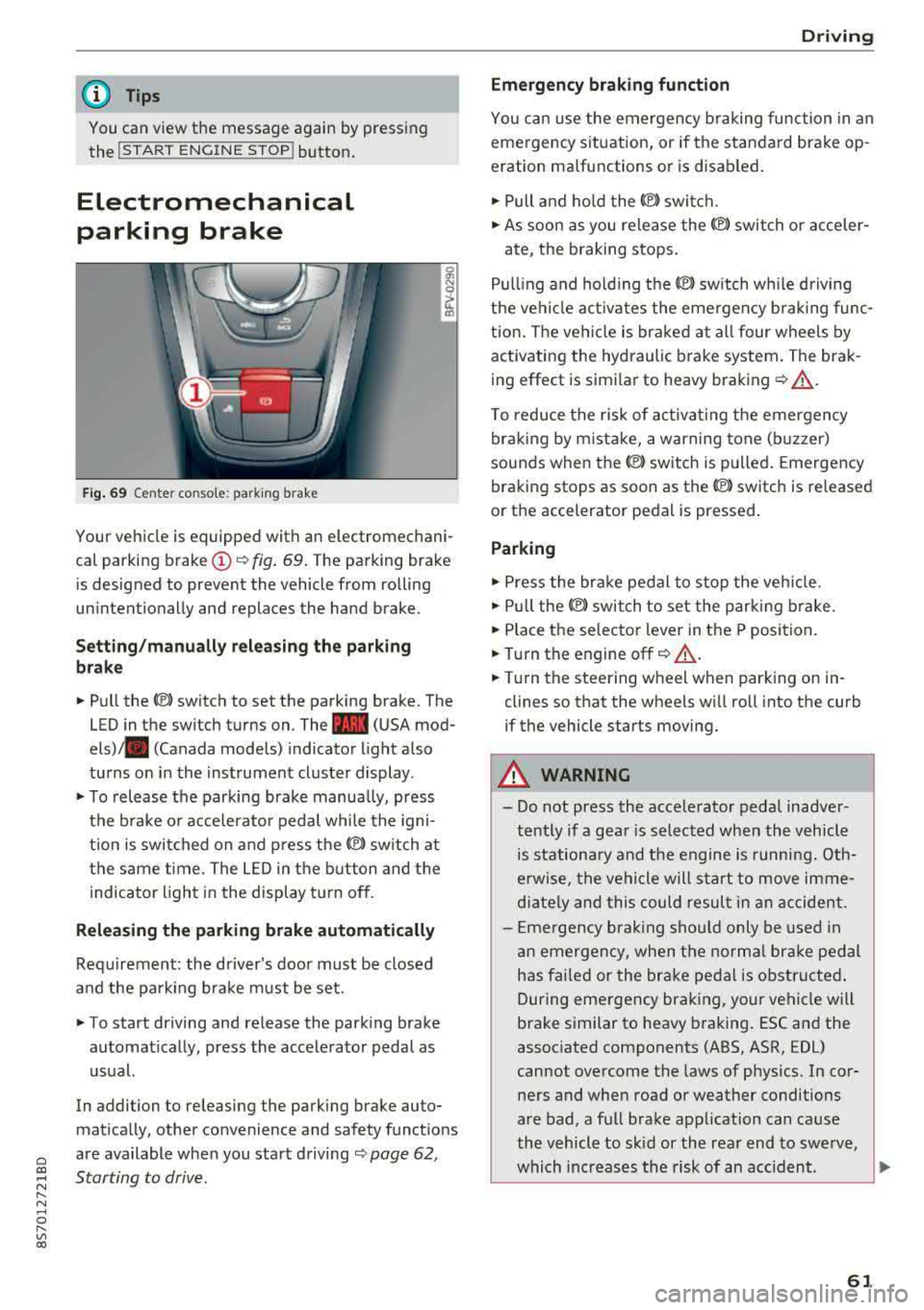
Fig. 69 C ent er co n so le : pa rking brake
Your vehicle is equipped with an electromechani
cal parking brake
(D <¢ fig. 69. The parking brake
is designed to prevent the vehicle from rolling
unintention ally and replaces the hand brake.
Setting/manually releasing the parking
brake
.. Pull the(®) switch to set the parking brake. The
LED in the switch turns on. The
-(USA mod
els) . (Canada models) indicator light also
turns on in the instrument cluster display .
.. To release the parking brake manually, press
the brake or acce lerator pedal while the igni
t ion is switched on and press
the®) switch at
the same time. The LED in the button and the
indicator light in the display turn off .
Releasing the parking brake automatically
Requirement: the driver's door must be closed
and the parking brake must be set.
.. To start driving and release the parking brake
automatically, press the accelerator pedal as
usual.
In addi tion to releasing the parking brake au to
mat ically, other convenience and safety funct ions
are available when you start driving
<¢ page 62,
Starting to drive .
Driving
Emergency braking function
You can use the emergency braking function in an
emergency situation, or if the standard brake op
eration malfunctions or is disabled.
.. Pull and hold the ®l switch .
.. As soon as you release the ®) switch or acceler-
ate, the braking stops.
Pulling and holding the
®l sw itch wh ile driving
the vehicle activates the emergency braking func
tion. The vehicle is braked at all four wheels by
activating the hydraulic brake system. The brak
ing effect is similar to heavy braking
r¢ &_ .
To reduce the risk of activating the emergency
braking by mistake, a warning tone (buzzer)
sounds when
the(®) switch is pulled. Emergency
braking stops as soon as
the(®) sw itch is released
or the accelerator pedal is pressed.
Parking
.,.. Press the brake pedal to stop the vehicle.
.. Pull the®> switch to set the parking brake .
.. Place the selector lever in the P position.
.. Turn the engine off r¢ &_ .
.. Turn the steering whe el wh en parking on in
clines so that the wheels will roll into the curb
if the vehicle starts moving.
A WARNING
-- Do not press the accelerator pedal inadver-
tently if a gear is selected when the vehicle
is stationary and the engine is running. Oth
erwise, the vehicle will start to move imme
diately and this could result in an accident.
- Emergency braking should only be used in
an emergency, when the normal brake pedal
has fai led or the brake pedal is obstructed .
During emergency braking, your vehicle will
brake similar to heavy braking . ESC and the
associated components (ABS, ASR, EDL)
cannot overcome the laws of physics . In cor
ners and when road or weather conditions
are bad, a full brake application can cause
the vehicle to skid or the rear end to swerve,
which increases the risk of an accident .
~
61
Page 65 of 310
Cl co .... N ,....
N ...... 0 ,....
Vl co
Automatic transmission
Introduction
Your vehicle is equipped with an electronically
controlled DSG transmiss ion called S tronic. Two
independent clutches transfer the power be
tween the engine and transmission . It allows the
vehicle to accelerate without a noticeab le inter
ruption in traction.
The transmission upshifts or downsh ifts auto
mat ica lly. The driving style continuously influen
ces the selection of the driving program.
When a
mod erat e d rivin g sty le is used, the
transmission selects the most economical d riving
mode. The transmiss ion upsh ifts at a lower RPM
and downshifts at a higher RPM to improve fuel
efficiency.
The transm ission switches to a spo rty mode after
a kick-down or when the driver uses a
s po rt y
d riv ing sty le
characterized by quick accelerator
pedal movements, heavy acce leration, frequent
changes in speed and traveling at the maximum
speed.
If desired, the driver can also select the gears
manually ( tipt roni c mod e).
Selector lever positions
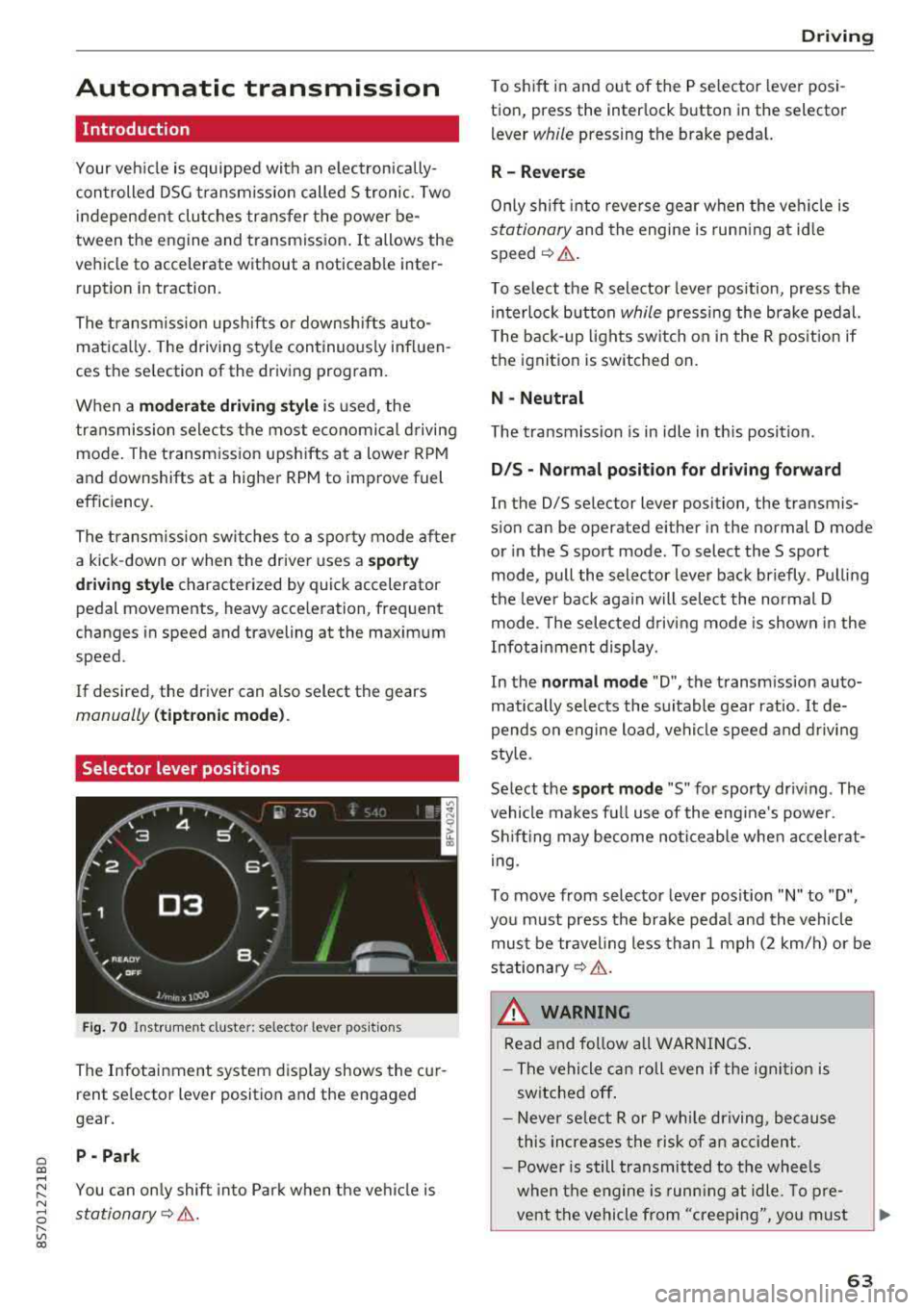
Fig . 70 Instrumel'lt cluster: selector lever positions
The Infotainment system d isplay shows the cur
rent se lector lever position and the engaged
gear.
P -Pa rk
You can on ly shift into Park when the vehi cle is
stationary¢ &.
Drivi ng
To shift in and out of the P selector lever posi
tion, press the inter lock button in the selector
lever
while pressing the brake pedal.
R- Reverse
Only s hift into reverse gear when the vehicle is
stationary and the engine is runn ing at id le
speed¢ &.
To se lect the R selector leve r pos ition, press the
in terlock button
while press ing the brake pedal.
T he back-up lights sw itch on in the R pos ition if
the ignition is switched on.
N -Neutral
The t ransmission is in idle in th is posit ion.
D IS -Norm al position fo r driving forward
In the D/S se lector lever position, the transmis
s ion can be operated either in the normal D mode
or in the S sport mode . To select the S sport
mode, pull the selector lever back briefly . Pulling
the leve r back aga in will selec t the normal D
mode. The selected d riving mode is shown in the
Infotainment display.
In the
n ormal mode "D", the transm ission auto
matically selects the suitable gear ratio.
It de
pends on engine load, vehicle speed and driving
sty le.
Select the
s p o rt mod e "S" for sporty driving . The
vehicle makes full use of the eng ine 's powe r.
Shifting may become noticeable whe n accelerat
i ng.
To move from selector lever pos ition
"N" to "D",
you m ust press the brake peda l and the vehicle
must be traveling less than 1 mph (2 km/h) or be
stationary¢ &.
A WARNING
Read and fo llow all WARNI NGS .
- The vehicle can roll even if the ignit ion is
switched off .
- Never se lect R or P whi le driving, because
this increases the risk of an accident .
- Power is still transmitted to the wheels
when the engine is runn ing at idle. To pre
vent the vehicle from "creeping", yo u must
63